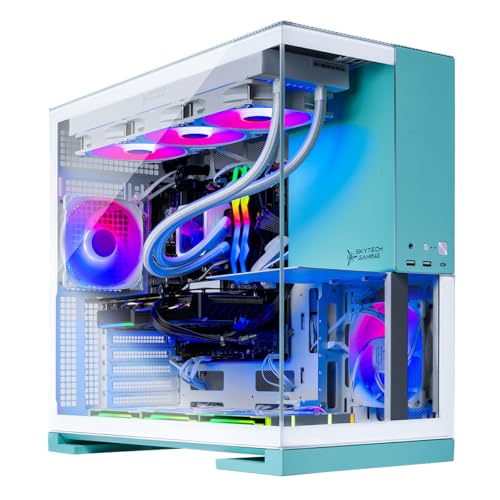
Where to buy
Check the latest price, availability and delivery on Amazon. Orders are placed on Amazon. We may earn a commission from qualifying purchases.
- Best overall for 240Hz+ esports: Skytech Gaming Aqua, Ryzen 7 9800X3D, RTX 5070 Ti 16GB, 2TB SSD — Check on Amazon
- Skytech Gaming Rampage, Ryzen 7 7800X3D, RTX 5070 Ti 16GB — Check on Amazon
- CyberPowerPC Gamer Supreme Liquid Cool, Ryzen 7 7800X3D, RTX 4070 Ti Super 16GB — Check on Amazon
- STORMCRAFT Falcon, Ryzen 7 7800X3D, Radeon RX 9070 XT 16GB — Check on Amazon
See 2 more Amazon options
- MSI Aegis ZS2, Ryzen 9 7900X, RTX 4070 Super 12GB — Check on Amazon
- MXZ Gaming PC, Ryzen 7 7800X3D, RTX 4070 Super 12GB, 16GB DDR5 — Check on Amazon
Read the full guide ↓
Disclosure: As an Amazon Associate, reviewstook.com earns from qualifying purchases. Links to Amazon on this page are affiliate links; they cost you nothing extra. Listing details such as price and availability change often, so check the current Amazon listing before you buy.
Start with the uncomfortable truth, because this budget demands it: $2,500 is far more money than 1080p gaming requires. A competent 1080p machine costs half of this, and a good one costs less than two-thirds of it. At 1920×1080 the pixels are simply not the problem any more — even mid-range graphics cards from the last two generations can fill a 1080p screen faster than most monitors can display it. So a guide that pretends you need to spend $2,500 to play at 1080p would be lying to you, and this one will not. What $2,500 actually buys at this resolution is a different set of things: frame rates high enough to feed a 240Hz or faster esports monitor without ever dipping near its floor, a processor with enough cache-fed speed that the graphics card is never the one waiting, hardware that will still be fast when you eventually replace that 1080p monitor with a 1440p or 4K one, and the storage, memory and power-supply headroom that stops a gaming PC feeling old in year three. This is a guide for the buyer who knows all of that — the competitive player, the buy-once buyer, and the person whose next monitor upgrade is already planned.
The second honesty note is about the top of the budget itself. When we checked Amazon for this guide, the top of the budget was thin, and everything above it was thinner air still: RTX 5080 prebuilts and several RTX 5070 Ti systems from big-name ranges were listed well over the ceiling — in one case a 5070 Ti desktop with the same class of processor as picks below was listed well above it. Component prices, memory in particular, have been climbing, and prebuilt prices move with them, sometimes week to week. So check the live price on Amazon for every pick in this guide, and note that two of our six picks sit right at the ceiling in the premium tier and only belong in this guide because they also appear below it. If a pick has drifted above $2,500 when you click through, it has left this guide’s budget, whatever its merits: drop to the next pick down, which in this company is no hardship. Below are the quick picks, detailed reviews of all six machines, a comparison table, a buying checklist for high-refresh 1080p, the mistakes that waste money at this tier, and the questions buyers ask before spending flagship money on a Full HD screen.
In this guide
Quick Picks
Short on time, or comparing several options at once? Each row below names a buyer type and the machine that suits it, with a link to the listing.
| Buyer type | Pick | Why it stands out | Link |
|---|---|---|---|
| Best overall for 240Hz+ esports | Skytech Gaming Aqua, Ryzen 7 9800X3D, RTX 5070 Ti | The fastest gaming CPU class here, 2TB storage, DDR5-6000 | Check on Amazon |
| Best value RTX 5070 Ti | Skytech Gaming Rampage, Ryzen 7 7800X3D, RTX 5070 Ti | Same GPU tier as the top pick — check price on Amazon | Check on Amazon |
| Best 2TB last-generation value | CyberPowerPC Gamer Supreme Liquid Cool, RTX 4070 Ti Super | 16GB flagship-class GPU and 2TB SSD — check price on Amazon | Check on Amazon |
| Best Radeon alternative | STORMCRAFT Falcon, Ryzen 7 7800X3D, RX 9070 XT | 16GB of fast raster performance without paying the NVIDIA tax | Check on Amazon |
| Best for gaming and creating | MSI Aegis ZS2, Ryzen 9 7900X, RTX 4070 Super | Twelve cores for streaming, editing and compiling, 2TB storage | Check on Amazon |
| Best lower spend with an X3D chip | MXZ Gaming PC, Ryzen 7 7800X3D, RTX 4070 Super | The esports CPU at the lowest spend here — with one catch | Check on Amazon |
How These Picks Were Chosen
The budget was applied as a ceiling, not a target: every machine below is a real Amazon listing positioned at or below $2,500 in the United States — check its live price on Amazon before you buy, because prices drift. Machines positioned only above the ceiling were excluded however good they might be, and that excluded some famous names: RTX 5080 prebuilts start above this budget, and at least one major brand’s RTX 5070 Ti desktop was listed well above the ceiling on Amazon when checked, which is not a $2,500 gaming PC in any honest accounting. If you are reading this after a price surge, expect the two ceiling picks to wobble in and out of budget; the other four picks are the stable core of the guide.
We did not use these machines ourselves. We read the maker listings and specification pages, and compared processors, graphics cards and their memory, system memory capacity and speed, storage, power supplies and cooling, favoring listings that publish their numbers in full. Three technical filters mattered most at this tier, and they are worth understanding because they explain the whole list. The first is the processor’s gaming speed at 1080p specifically: at Full HD the graphics card finishes its work quickly, so the frame rate is set by how fast the CPU can prepare frames — which is why five of the six picks use AMD X3D processors, whose stacked 3D V-Cache is built for exactly this, and why the one non-X3D pick earns its place with twelve cores for work that is not gaming. The second filter is graphics memory: every pick carries 12GB or, in four cases, 16GB, because a machine bought for years of service should not be memory-starved by the next generation of games, even at 1080p. The third is the unglamorous hardware — a named 850W Gold power supply or equivalent, DDR5 memory, a Gen4 NVMe SSD and real liquid or tower cooling — because at $2,500 there is no excuse for the parts buyers forget to check being the parts that fail first.
Two framing filters sat on top of all of that. The first is the monitor filter: a pick earns its place here only if it can do something at 1080p that a $1,200 machine cannot — sustain very high refresh in competitive titles, hold high frame rates in heavy single-player games with ray tracing on, or drive a future 1440p or 4K monitor without a graphics upgrade. A machine that merely plays 1080p well is overpriced at this budget by definition. The second is the honesty filter about configuration variance: several makers below state plainly in their listings that the brand of graphics card and some components may vary. That is normal for prebuilts at every price, but at $2,500 you are entitled to check the listing’s current specification block before ordering, and the reviews say where it matters most.
The 6 Best 1080p Gaming PCs Under $2,500
Skytech Gaming Aqua — Ryzen 7 9800X3D, RTX 5070 Ti 16GB, 2TB SSD
Who it suits: Competitive players on 240Hz or faster monitors who want the strongest processor in this guide, streamers who play at high refresh, and anyone buying once for the next monitor upgrade as well as this one.
The processor is the headline, and at 1080p the processor is the right headline. The Ryzen 7 9800X3D is AMD’s current-generation X3D gaming chip — eight cores with 3D V-Cache, a 4.7GHz base clock and boost to 5.2GHz per the listing — and in CPU-limited situations, which at 1080p means most competitive games most of the time, it is the class of chip that sets the ceiling for everyone else. Paired with it is an RTX 5070 Ti with 16GB of GDDR7 memory, a graphics card that is frankly oversized for Full HD raster work and therefore exactly right for the two jobs this budget is really about: sustaining very high frame rates with settings turned up rather than down, and carrying ray-traced single-player games at 1080p without the frame rate falling apart. Around those two headline parts, the specification is the complete one in this guide: 32GB of DDR5 RAM at 6000 speed, a 2TB Gen4 NVMe SSD rather than the 1TB drive most rivals ship, an 850W Gold ATX 3 power supply, a 360mm ARGB liquid cooler, Wi-Fi and Windows 11. Nothing on that list is the part you will be upgrading next year, which is the entire point of spending at the top of a budget.
Check the price on Amazon before you buy: this configuration sits right at the top of the budget in the premium tier, and its live price can move above the ceiling when component prices spike. Read that as: it belongs in this guide as a premium pick at the ceiling, it will not always be in this guide’s budget, and the live listing decides. Two further honest notes. Skytech states in its listings that the graphics card brand may vary, so the RTX 5070 Ti you receive is a tier guarantee, not a specific model. And the case for this machine over the Rampage below is deliberately narrow — a faster processor generation, double the storage and faster memory — because the graphics cards are the same tier. If those three things are not worth the extra cost to you, they should not be; the next pick exists precisely for you. For the player whose monitor and ambitions match it, though, this is the most complete 1080p machine under the ceiling we found on Amazon.
- Ryzen 7 9800X3D — the fastest gaming-processor class in this guide, built for CPU-limited 1080p.
- RTX 5070 Ti 16GB GDDR7 — headroom for 240Hz play now and a 1440p or 4K monitor later.
- The complete supporting spec: 32GB DDR5-6000, 2TB Gen4 SSD, 850W Gold PSU, 360mm liquid cooling.
Honest limitation: It only fits this budget when its live price sits at or below the ceiling — check price on Amazon — and the graphics card brand may vary per the listing.
Choose it if you play competitive titles on a high-refresh monitor and want the strongest CPU and the fullest specification under the ceiling. Skip it if the live price has drifted over $2,500, or your monitor is 144Hz or slower — the Rampage gives you the same graphics tier for far less.

Skytech Gaming Rampage — Ryzen 7 7800X3D, RTX 5070 Ti 16GB, 1TB SSD
Who it suits: High-refresh 1080p players who want the modern graphics tier and an X3D processor, but would rather keep part of the budget for the monitor, headset and chair that actually complete a setup.
This is the value expression of the same idea as the Aqua. The processor steps back one generation to the Ryzen 7 7800X3D — 4.2GHz base, boost to 5.0GHz, and still, by wide agreement, one of the best gaming processors ever made, with the same 3D V-Cache formula that makes X3D chips dominate CPU-limited resolutions. The graphics card does not step back at all: the same RTX 5070 Ti tier with 16GB of GDDR7, which means the same DLSS 4 feature set, the same ray-tracing headroom at 1080p, and the same ability to grow into a 1440p monitor later. The supporting cast is where the money was saved, and it was saved sensibly: 32GB of DDR5 at 5600 rather than 6000, a 1TB Gen4 NVMe SSD rather than 2TB, with the same class of 850W Gold ATX 3 power supply and 360mm ARGB liquid cooler retained. For pure gaming at 1080p, the honest summary is that most players, most of the time, would struggle to tell this machine from the one above it — the differences appear in storage space, in heavily CPU-bound edge cases, and on the invoice.
Check the price on Amazon for this exact configuration — it is the cheapest route to this graphics tier in the guide by a wide margin. The caveats mirror the Aqua’s, because the maker is the same: the graphics card brand may vary, and 1TB of storage fills faster than new buyers expect when individual games routinely exceed 100GB — budget for a second SSD eventually, which the platform makes easy. One more consideration separates the two Skytech picks cleanly: if you stream, record or keep a dozen applications open while you play, the Aqua’s newer processor earns more of its premium; if the machine is a pure gaming box, the Rampage’s saving is the smarter spend. Either way, this is the pick we would show a friend first, because it is the one where the price and the performance argue in the same direction.
- RTX 5070 Ti 16GB with a Ryzen 7 7800X3D — the modern high-refresh pairing — check price on Amazon.
- 32GB DDR5 and an 850W Gold ATX 3 PSU — the important supporting parts were not cut.
- 360mm liquid cooling for sustained boost clocks in long sessions.
Honest limitation: The 1TB SSD is the tightest storage in the top half of this guide, and the graphics card brand may vary per the listing.
Choose it if you want 5070 Ti performance and an X3D chip at the lowest spend in this guide. Skip it if you know your library will overwhelm 1TB within months and you hate managing storage — the CyberPowerPC and MSI picks below carry 2TB.

CyberPowerPC Gamer Supreme Liquid Cool (SLC8480A3) — Ryzen 7 7800X3D, RTX 4070 Ti Super 16GB, 2TB SSD
Who it suits: Buyers who shop the hardware rather than the launch date — players who would rather have last generation’s flagship-class graphics card and double storage than this generation’s badge, at the lowest spend in this guide.
Read the specification the way an enthusiast would, because it holds up: a Ryzen 7 7800X3D at 4.2GHz, a GeForce RTX 4070 Ti Super with 16GB of graphics memory, 32GB of DDR5, and a 2TB PCIe Gen4 SSD, in CyberPowerPC’s liquid-cooled Gamer Supreme line with Windows 11 Home. The 4070 Ti Super is the important line. It was the thinking buyer’s card of its generation — the full 16GB memory configuration on the larger chip — and at 1080p it remains a sledgehammer: native high-refresh performance in competitive titles, and enough ray-tracing capacity, with DLSS, to play the heaviest single-player games at this resolution with the settings where the developers intended them. What it does not have is the 50-series’ newest frame-generation tricks, and the review should say so plainly, because that is the entire trade: you are exchanging the latest feature list for 2TB of storage, a liquid-cooled build from the biggest name in American prebuilts, and a value positioning well below everything else here.
Check the price on Amazon for this machine — it is the value outlier of this guide, undercutting the 5070 Ti picks while matching or beating their storage and memory. The honest cautions are generational rather than specific: it is a previous-generation graphics card, so its remaining years of driver-era feature support are fewer than a 50-series card’s; CyberPowerPC, like its rivals, builds with components that can vary by production run; and a liquid-cooled system asks for the same dust-and-airflow housekeeping as any other. None of that dents the central argument. At 1080p, where the processor and the monitor set the experience more than the last few percent of graphics power, a 7800X3D and a 16GB 4070 Ti Super with 2TB of storage is not a compromise configuration — it is the configuration the smart money bought last year, now priced like it.
- RTX 4070 Ti Super 16GB — flagship-class memory capacity that ages gracefully, even at 1080p.
- 2TB Gen4 SSD and 32GB DDR5 — the storage and memory the cheaper 5070 Ti picks make you add later.
- Positioned in the value tier of this guide — check price on Amazon.
Honest limitation: A previous-generation graphics card: no 50-series frame-generation features, and its value positioning can move with sales — check the live price on Amazon.
Choose it if value per dollar outranks having the newest generation, and your library needs 2TB from day one. Skip it if you specifically want DLSS 4 multi frame generation, or you plan to keep the graphics card for five-plus years — buy the newer tier instead.

STORMCRAFT Falcon — Ryzen 7 7800X3D, Radeon RX 9070 XT 16GB, 1TB SSD
Who it suits: Players who live in rasterized games — competitive shooters, sims, and the great majority of titles that do not lean on ray tracing — and who would rather spend on raw frames than on one brand’s feature ecosystem.
Every guide at this budget needs the Radeon conversation, and this is it, in its strongest form: a Ryzen 7 7800X3D paired with AMD’s Radeon RX 9070 XT carrying 16GB of GDDR6 memory. In traditional raster rendering — which is to say, in how most games, and nearly all competitive games, actually draw their frames — the 9070 XT trades blows with graphics cards that cost more, and at 1080p, paired with an X3D processor, it is a very high-refresh machine by any measure. The rest of the Falcon’s specification is the pattern this guide keeps rewarding: 32GB of DDR5 RGB memory at a full 6000 speed, a 1TB Gen4 NVMe SSD, an 850W Gold ATX 3 power supply, a 360mm liquid cooler, a B850-chipset platform per the listing family, USB-C, Bluetooth and Wi-Fi, and Windows 11 Home. STORMCRAFT also bundles the machine as a VR-ready system, which follows naturally from the specification — VR at high refresh is the same CPU-and-frames problem as 240Hz esports, wearing a headset.
The trade-offs are the familiar Radeon ones, and they should be weighed rather than waved away. You give up NVIDIA’s DLSS ecosystem, including its newest frame generation, in favor of AMD’s FSR alternatives, which are good and improving but less universally supported in older titles; ray tracing, while far better on this Radeon generation than the last, still trails the RTX picks here when every effect is enabled; and if you plan to stream with the graphics card’s encoder or work in software that assumes NVIDIA hardware, the RTX machines are the safer buy. On price, the Falcon sits at the ceiling in the premium tier on Amazon, while the same model has also appeared at lower price points from other major retailers, so this is the pick where checking the live Amazon price matters most: at a lower live price it is arguably the frames-per-dollar champion of this entire guide; at its full premium positioning, the Rampage’s RTX 5070 Ti makes the stronger all-round case. Check price on Amazon before you buy.
- RX 9070 XT 16GB — elite raster performance for competitive and traditional gaming at 1080p.
- 32GB DDR5-6000 and an 850W Gold ATX 3 PSU — no supporting-part compromises.
- 7800X3D plus high-refresh VR readiness — the same build serves a 240Hz monitor and a headset.
Honest limitation: No DLSS, ray tracing trails the RTX picks, and its Amazon positioning sits at the $2,500 ceiling — it is a deal-price pick, so check price on Amazon.
Choose it if your games are raster-first, you want 16GB of memory, and the live price sits in its lower tier. Skip it if you stream with GPU encoding, play ray-traced single-player games above all else, or the Amazon price is at its premium tier while the Rampage is discounted.

MSI Aegis ZS2 (B7NUE-853US) — Ryzen 9 7900X, RTX 4070 Super 12GB, 2TB SSD
Who it suits: The player whose PC is also a workstation in disguise — streaming while gaming, editing video, compiling, rendering, or running a small server of game mods and media — and who games at high refresh in the hours left over.
This is the one pick that breaks the guide’s X3D pattern, and it breaks it on purpose. The Ryzen 9 7900X is a twelve-core, twenty-four-thread processor — 4.7GHz base, boost to 5.6GHz on AMD’s B650 platform per MSI’s specification — and those extra four cores do nothing for a game at 1080p that an X3D chip does not do better. What they do is everything else: encoding a stream without touching the gaming cores, chewing through a video export, compiling code, unzipping and patching enormous game installs, and generally making the machine feel unbothered when gaming is only one of five things it is doing. Around it, MSI builds the most conventionally complete system here: an RTX 4070 Super with 12GB of GDDR6X memory, 32GB of DDR5, a 2TB M.2 NVMe SSD, liquid cooling, an 80+ Gold power supply, Wi-Fi 6E, a bundled keyboard and mouse, and Windows 11 Home — from a maker whose DIY-friendly positioning means the case and layout are designed to be opened and upgraded by the owner, which is not true of every prebuilt.
This configuration is positioned in the premium tier on Amazon, and it has also appeared at lower price points at warehouse retail, so like the Falcon, it rewards a check of the price on Amazon and punishes an impulse buy at the wrong week. The gaming honesty note must be direct: at purely 1080p gaming, this machine will usually trail the X3D picks in CPU-limited titles despite costing more than some of them, because games reward cache more than core count; its 12GB of graphics memory is also the joint-smallest here, adequate for years at 1080p but with less headroom for a future 4K monitor than the 16GB picks. Buy it for the whole workload and it is the most versatile machine in the guide. Buy it only to play, and you have paid a creator premium for cores your games will leave idling — the Rampage and the CyberPowerPC both exist to catch exactly that buyer.
- Ryzen 9 7900X, 12 cores / 24 threads — the multitasking and creation pick, by a distance.
- 2TB NVMe SSD, liquid cooling, Wi-Fi 6E and bundled peripherals — the complete-box MSI build.
- DIY-friendly design from a component maker — the easiest ownership and upgrade story here.
Honest limitation: No X3D cache, so pure 1080p gaming usually trails the cheaper X3D picks, and the RTX 4070 Super’s 12GB is the joint-smallest memory here.
Choose it if the PC streams, edits, compiles or renders as well as it games. Skip it if it is a games-only machine — the X3D picks are faster where it matters to you and mostly cheaper.

MXZ Gaming PC — Ryzen 7 7800X3D, RTX 4070 Super 12GB, 16GB DDR5
Who it suits: The focused esports player: one or two competitive titles, a high-refresh monitor, Discord and nothing else — who wants the X3D processor and a strong graphics card at the lowest entry price, and is comfortable adding a memory stick later.
MXZ is a smaller builder than the household names above, and its formula is to spend visibly on the two parts esports players feel and save on the one they can fix. The visible spending is real: the same Ryzen 7 7800X3D that anchors three other picks in this guide, an RTX 4070 Super with 12GB of memory, a B650 motherboard, a 1TB NVMe SSD, six RGB fans, and Windows 11 Pro rather than Home — a small but genuine upgrade for tinkerers. At 1080p competitive settings, that CPU-and-GPU core is not a budget experience in any sense: it is the same frame-rate engine as higher-tier machines, and for a player whose world is a handful of optimized esports titles, the frame graph will look much the same as the Rampage’s. This configuration is positioned at a strikingly lower tier for an X3D system — check price on Amazon — and it is the reason this machine closes the guide rather than a better-known brand’s weaker build.
Now the catch, stated as plainly as the guide can state it: this configuration ships with 16GB of DDR5 memory in a guide where every other pick carries 32GB. Sixteen gigabytes still runs competitive titles perfectly well, and DDR5 at 6000 speed is the right kind of memory — but modern single-player games, a browser full of tabs, recording software and a few launchers will push against it in a way they simply do not on the other picks, and at this end of the market 32GB should be the standard. Allow for one matching memory upgrade, done sooner rather than later, and even allowing for that upgrade it undercuts most of the guide. Add the smaller maker’s thinner support footprint compared with CyberPowerPC or MSI, and the profile is clear: this is the pick for a confident buyer optimizing a narrow job. If that is you, it is excellent. If you want the machine that needs nothing and phones a big company when it breaks, spend the difference on the picks above.
- 7800X3D plus RTX 4070 Super — the esports frame-rate engine — check price on Amazon.
- DDR5-6000 memory, B650 platform and Windows 11 Pro — the bones are right.
- Six RGB fans and a 1TB NVMe SSD in a standard, upgradeable tower.
Honest limitation: Only 16GB of RAM where every rival here ships 32GB — budget for a matching upgrade — and a smaller maker means a smaller support operation.
Choose it if you play a narrow set of competitive titles and want X3D performance at the lowest spend. Skip it if you multitask heavily, play the newest single-player releases, or want 32GB and a big-brand warranty from day one.

Comparison Table
| Product | CPU / GPU | RAM / Storage | Best use | Link |
|---|---|---|---|---|
| Skytech Gaming Aqua | Ryzen 7 9800X3D / RTX 5070 Ti 16GB | 32GB DDR5-6000 / 2TB Gen4 | 240Hz+ esports and future monitor upgrades | Check on Amazon |
| Skytech Gaming Rampage | Ryzen 7 7800X3D / RTX 5070 Ti 16GB | 32GB DDR5-5600 / 1TB Gen4 | 5070 Ti performance at the lowest spend | Check on Amazon |
| CyberPowerPC Gamer Supreme SLC8480A3 | Ryzen 7 7800X3D / RTX 4070 Ti Super 16GB | 32GB DDR5 / 2TB Gen4 | Last-gen flagship value with full storage | Check on Amazon |
| STORMCRAFT Falcon | Ryzen 7 7800X3D / RX 9070 XT 16GB | 32GB DDR5-6000 / 1TB Gen4 | Raster and esports frames, Radeon value | Check on Amazon |
| MSI Aegis ZS2 B7NUE-853US | Ryzen 9 7900X / RTX 4070 Super 12GB | 32GB DDR5 / 2TB NVMe | Gaming plus streaming and creation | Check on Amazon |
| MXZ Gaming PC | Ryzen 7 7800X3D / RTX 4070 Super 12GB | 16GB DDR5-6000 / 1TB NVMe | Focused esports on the lowest budget | Check on Amazon |
How to Choose a 1080p Gaming PC Under $2,500
- Start with your monitor, not the listings. This budget only makes sense with a 240Hz or faster 1080p monitor, or a planned upgrade to 1440p or 4K. On a 60–144Hz screen, every pick in this guide is money spent on frames you will never see — buy a cheaper tier and a better monitor instead.
- At 1080p, the processor is the performance part. Full HD is usually CPU-limited, so an X3D processor with 3D V-Cache is worth more here than a step up in graphics card. Five of our six picks follow that rule; the sixth buys cores for creation work instead, knowingly.
- Buy graphics memory for the monitor after next. 12GB is comfortable at 1080p today. 16GB — four of these six picks — is what makes the machine a 1440p or 4K machine later without a graphics upgrade. Decide which future you are buying before you decide which card.
- Insist on 32GB of system memory at this price. It is the standard everywhere in this guide except the one budget pick, whose 16GB we flag as an upgrade-to-do. Memory prices swing, but capacity regret is permanent until you open the case.
- Count storage in games, not gigabytes. 1TB holds perhaps eight to ten modern big releases once Windows and launchers take their share. A large or rotating library wants 2TB from day one — three picks here have it.
- Check the power supply like an enthusiast. A named wattage and rating — 850W Gold ATX 3 in most of these listings — is what lets a future graphics upgrade happen without a rebuild. A listing that hides its PSU at this price is telling you something.
- Read the “brand may vary” line before ordering. Several makers vary the graphics card brand and minor components by production run. The tier is guaranteed; the exact model is not. If a specific card model matters to you, confirm it on the live listing.
- Treat the ceiling picks as deal picks. Two machines here belong under $2,500 as deal picks, not at their full premium positioning. Check price on Amazon, be willing to buy the stable mid-priced picks instead, and never let a surge week talk you into paying above the ceiling for a machine in this guide.
- Match the ecosystem to your games. DLSS and NVIDIA encoding point one way; Radeon raster value points the other. Check the three or four titles you actually play most, not the fifty you own — the right GPU is the one your real library rewards.
- Keep the packaging until the second week. Run your most demanding game, your stream and your full peripheral set in the first days, while returns are painless. Prebuilts earn trust early or not at all.
What the Step Up to $2,500 Actually Buys at 1080p
Shoppers reasonably ask whether each tier in this category is real or just the same parts in a bigger box, and at 1080p the question is sharper than usual, because a $1,200 machine already plays everything. The honest answer is that the step up buys three specific things, none of which is “being able to play at 1080p.” The first is frame-rate height and stability in competitive play: the jump from a good processor to an X3D processor, and from a mid-range card to a 16GB high-end one, is the jump from high refresh to very high refresh — the territory of 240Hz and 360Hz monitors, where the frame rate stays above the panel’s speed in the fights that decide matches, not just in the menus. The second is ray tracing without apology: heavy single-player games at 1080p with full effects are a real workload, and this tier is where enabling them stops costing you the smoothness that makes them worth enabling. The third is time: DDR5 platforms with current sockets, 850W power supplies, 2TB drives and 16GB graphics cards are machines whose first upgrade is a monitor, not a component — the step up is partly a payment to not shop again for years.
What the step up does not buy deserves equal clarity. It does not buy a better picture at 1080p once settings are maxed — a maxed frame is a maxed frame, and surplus power renders identical pixels faster, which only a faster monitor can show you. It does not buy immunity from the prebuilt realities: variable component brands, listings that drift in price with the memory market, and support that is only as good as the maker’s. And it does not buy sense for a buyer on a 144Hz monitor with no upgrade plans, for whom this entire guide is an expensive answer to a question a $1,500 machine answers completely. Spend the step up for refresh rate, ray tracing and years, in that order, and it is money with a job. Spend it for “1080p, but more,” and it is the most expensive nothing in gaming.
High Refresh Is a System, Not a Graphics Card
The buyers this guide is written for are chasing a number — 240 frames per second, or 360 — and the least obvious truth in PC gaming is that no single part delivers it. The chain runs: the processor prepares frames, the graphics card draws them, the memory feeds both, and the monitor displays what survives. At 1080p the chain almost always breaks at its first link, which is why this guide spends so much of its length on processors with three-figure cache counts and so little on the graphics specifications that dominate at 4K. It is also why the supporting parts matter in a way casual buyers miss: dual-channel DDR5 at a proper speed keeps an X3D chip fed in the titles that are not cache-friendly, a 360mm liquid cooler holds boost clocks through a three-hour session rather than a three-minute benchmark, and a monitor connected with the right cable at the right refresh setting is the difference between owning a 240Hz system and merely having bought one — the single most common high-refresh mistake is a Windows display setting left at 60Hz on a machine built for four times that.
The second half of the system is settings discipline. Competitive players at this level do not run ultra presets; they run tuned ones — textures high, shadows and volumetrics lowered, reflex and low-latency modes enabled — because the goal is the frame rate’s floor, not its average, and because visual clutter loses fights. A $2,500 machine’s real gift to that player is margin: the tuned settings that a mid-range PC reaches by sacrificing image quality, this tier reaches while keeping the game looking like itself, and the dips that break aim on lesser hardware flatten into the headroom. Buy the system, tune the system, and check the monitor setting twice — that unglamorous sequence is the whole sport at this budget.
Common Buying Mistakes
- Spending $2,500 on the PC and playing on a 60Hz or 144Hz monitor. The monitor is the only place frame rate becomes visible; upgrade it first or together.
- Choosing the graphics card first at 1080p. This resolution is CPU-limited in most titles — an X3D processor matters more than a GPU tier, which is why this guide is built around them.
- Paying a ceiling pick’s list price during a component-price surge. Two picks here are deal-price machines; at above-ceiling prices they have left the budget and the argument.
- Accepting 16GB of system memory at this tier without pricing the upgrade. It is the one specification in this guide we flag as unfinished from the factory.
- Buying 1TB of storage for a library of modern 100GB-plus games, then managing installs forever. The 2TB picks cost less than the regret.
- Ignoring the “graphics card brand may vary” line, then being surprised by the specific model in the box. The tier is the promise; check the live listing if the model matters.
- Leaving the monitor at its default refresh rate in Windows. A 240Hz panel set to 60Hz turns a $2,500 system into a far lesser experience.
- Buying twelve cores for a games-only machine, or an X3D chip for a rendering workstation. Match the processor to the workload — this guide’s MSI and Skytech picks are the two sides of that coin.
- Chasing RTX 5080 badges just over budget by cutting memory, storage and power supply to get there. A complete 5070 Ti system outlasts a starved 5080 one.
Final Recommendation
- Most buyers at this budget: Skytech Gaming Rampage.
- Maximum performance under the ceiling: Skytech Gaming Aqua.
- Lowest spend with flagship-class hardware: CyberPowerPC Gamer Supreme Liquid Cool.
- Radeon and raster-first players: STORMCRAFT Falcon.
- Gaming plus streaming and creation: MSI Aegis ZS2.
- Focused esports on the tightest budget: MXZ Gaming PC.
Our top two at this budget are the Skytech Gaming Rampage, because RTX 5070 Ti performance with an X3D processor at a value-tier live price — check price on Amazon — is the strongest price-to-performance argument in the guide, and the Skytech Gaming Aqua, for the buyer whose 240Hz ambitions and next-monitor plans genuinely use the faster 9800X3D, the DDR5-6000 and the 2TB drive — provided its live price sits at or below the ceiling and not above it. Between them they cover the two honest shapes of this search: the same graphics tier bought smartly, and the complete flagship bought at its deal price. The CyberPowerPC is the value spoiler that beats both on storage per dollar, the Falcon is the frames-per-dollar spoiler when its price behaves, the MSI is the right answer the moment the machine has a second job, and the MXZ is proof of how far the spend falls when you accept one upgrade task. Readers who conclude, correctly, that their monitor does not need any of this should step down to Best 1080p Gaming PC Under $1500, while those ready to spend the same money on resolution instead will find their machines in Best 1440p Gaming PC Under $2500. Check your monitor’s refresh rate, count your storage in games, and check the live price before you order — at $2,500, that homework is the whole difference between a flagship and an overspend.
Frequently Asked Questions
Is a $2,500 PC overkill for 1080p gaming?
For simply playing at 1080p, yes — a machine at half the price does that well, and this guide says so in its opening paragraphs. The budget stops being overkill in three specific cases: competitive play on a 240Hz or faster monitor, where frame-rate height and stability are the product; ray-traced single-player games with settings fully enabled; and buying for the next monitor, since every pick here can drive 1440p, and most can drive 4K, when the screen changes. If none of those is you, spend less.
Why do most of these picks use AMD X3D processors?
Because 1080p is usually limited by the processor, not the graphics card. The GPU finishes a Full HD frame quickly, so the frame rate becomes a test of how fast the CPU can prepare the next one — and AMD’s X3D chips stack extra cache on the processor precisely to win that test. At 4K the balance flips toward the graphics card; at 1080p, cache is king, and the listings in this guide reflect it.
Should I buy an RTX 5070 Ti or save with a 4070 Ti Super or 4070 Super?
At 1080p, all three are more than fast enough today. The 5070 Ti buys the newest DLSS feature set, including multi frame generation, and the longest feature-support runway — worth its premium if you keep cards for years. The 4070 Ti Super counters with the same 16GB of memory in a much lower tier — check price on Amazon — making it the value pick. The 4070 Super machines trade down to 12GB and lower prices again, which is fine at this resolution. Let the live prices on Amazon and how long you keep hardware decide, not launch order.
Is 32GB of RAM really necessary for gaming?
For a single competitive title, no — 16GB still runs esports games well, which is why the MXZ pick exists. For a $2,500 machine expected to serve for years — modern single-player games, a browser, Discord, recording and launchers all at once — 32GB is the correct standard, and it is what five of the six picks ship. Treat 16GB at this tier as an unfinished specification with an upgrade priced in.
Why are some of these PCs sometimes listed above $2,500?
Because prebuilt prices move with component costs, memory most of all, and because list prices are set above the deal prices these machines actually trade at. Two picks in this guide — the Aqua and the Falcon — have premium positioning at or above the ceiling and deal pricing below it, and rival brands’ equivalent systems were positioned well above the ceiling when we checked. The guide’s rule is strict: a machine is a sub-$2,500 pick only at a sub-$2,500 live price, so check the listing, use price alerts, and let the stable mid-priced picks catch you if a surge week prices the ceiling picks out.
Can these PCs handle 1440p or 4K when I upgrade my monitor?
Yes — that is half the point of the budget. The RTX 5070 Ti, 4070 Ti Super and RX 9070 XT picks are all genuine 1440p graphics tiers with 16GB of memory, and are capable of 4K play with upscaling; the 4070 Super picks are strong 1440p machines. The processors, memory and power supplies in this guide were all chosen so the monitor can be the next upgrade rather than the next excuse for a rebuild. Buyers already certain about 4K should also read Best 4K Gaming PC Under $2500.
What else should I budget for beyond the PC?
The monitor this budget assumes — a 240Hz 1080p panel — if you do not already own one, plus the peripherals your game rewards: a mouse your aim trusts, a keyboard you can type a thesis on, and a headset with a microphone your team can understand. Readers building a streaming setup around the PC should see Best 1080p Gaming PC For Streaming Under $2500, and first-time buyers at this level may want the walkthrough in Best 1080p Gaming PC For Beginners Under $2500 before they spend.


