Where to buy
Every PC below is sold through Amazon. Ordering happens on Amazon, and we may earn a commission from qualifying purchases.
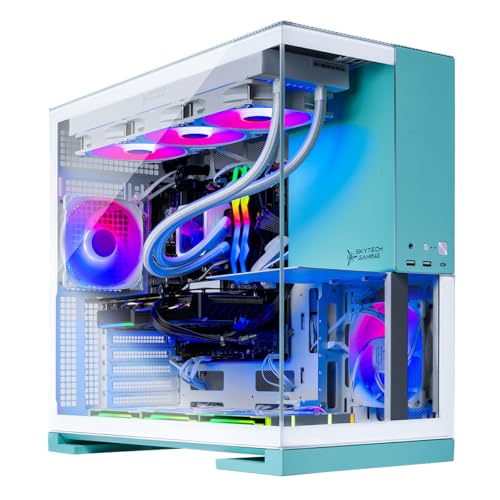
- Best buy-once pick for a certain beginner: Skytech Gaming Aqua, Ryzen 7 9800X3D, RTX 5070 Ti 16GB, 2TB SSD — Check on Amazon
- Skytech Gaming Rampage, Ryzen 7 7800X3D, RTX 5070 Ti 16GB — Check on Amazon
- CyberPowerPC Gamer Supreme Liquid Cool, Ryzen 7 7800X3D, RTX 4070 Ti Super 16GB — Check on Amazon
- STORMCRAFT Falcon, Ryzen 7 7800X3D, Radeon RX 9070 XT 16GB — Check on Amazon
See 2 more Amazon options
- MSI Aegis ZS2, Ryzen 9 7900X, RTX 4070 Super 12GB — Check on Amazon
- MXZ Gaming PC, Ryzen 7 7800X3D, RTX 4070 Super 12GB, 16GB DDR5 — Check on Amazon
Read the full guide ↓
Disclosure: As an Amazon Associate, reviewstook.com earns from qualifying purchases. Links to Amazon on this page are affiliate links; they cost you nothing extra. Listing details such as price and availability change often, so check the current Amazon listing before you buy.
If this is your first gaming PC, let us save you some money before we spend any of it: you almost certainly do not need a $2,500 one. That is not a sales trick or false modesty — it is the plain shape of this market. A first gaming PC in the $700 to $1,200 range, paired with a good monitor, will play the same games listed in this guide, at the same 1080p resolution written on the box, and it will do it well enough that most new players would not feel the difference for a year or more. The honest default recommendation for a beginner is a machine from that lower tier plus the best monitor the leftover money buys, because as a new player you will stare at the monitor every second and at the spec sheet never. Our guides to Best 1080p Gaming PC Under $1200 and Best Budget Gaming PC For Beginners Under $800 exist for exactly that buyer, and if any part of you is still deciding whether PC gaming is even for you, start there instead.
So why does this guide exist? Because a smaller group of beginners is in a different position, and they deserve a straight answer too. You might be certain — you have played on a friend’s PC, or on console for years, and you know this is a five-year hobby, not a two-week experiment. You might be buying for competitive games where very high frame rates on a 240Hz monitor are the entire point. Or you might simply hate the buy-cheap-buy-twice cycle and want the machine that still feels fast when your tastes graduate from 1080p to a bigger monitor. For that buyer, the “buy once, cry once” logic is real: a $2,500 prebuilt is not a faster version of a first PC so much as a first PC with the next two upgrades already inside it. This guide is written for that person. Everyone else has our blessing — and our genuine advice — to spend less.
A special word for the person buying this PC for someone else — a teenager, a partner, a kid heading off with a scholarship and a Steam library. Gift buyers are beginners by proxy, and the temptation to equate price with love is understandable, but the same arithmetic applies with extra force: a young player will value the monitor, the headset and the games themselves at least as much as the tower, and a $1,200-tier PC with excellent peripherals makes a more joyful gift than a $2,500 tower opened next to a borrowed office screen. If you are the certain buyer described above, you are really buying certainty about yourself; a gift buyer rarely has it about someone else’s five-year plans, and the lower tier forgives that uncertainty far better.
One more thing before the picks, because it confuses every newcomer: the “1080p” in this keyword is almost a misnomer at this budget. Five of the six machines below carry graphics cards from the tiers most players use for 1440p, and they will run 1080p at frame rates beyond what most monitors can show. Nobody is being cheated by that — the headroom is the product. But it does mean the choice here is less about “can it play my games” (all six can, easily) and more about support, setup, storage, and how gracefully each machine will age in the hands of someone who does not yet know what they do not know. That is the lens every review below is written through.
In this guide
Quick Picks
| Pick | Machine | Why a beginner might choose it | Price | Link |
|---|---|---|---|---|
| Best buy-once pick | Skytech Gaming Aqua — 9800X3D, RTX 5070 Ti 16GB, 32GB, 2TB | The strongest gaming processor in the guide and the most storage; nothing to upgrade for years | Check price on Amazon | Check on Amazon |
| Best value of the top tier | Skytech Gaming Rampage — 7800X3D, RTX 5070 Ti 16GB, 32GB, 1TB | Nearly the same graphics power as the Aqua, positioned lower in this tier | Check price on Amazon | Check on Amazon |
| Best spend-less route | CyberPowerPC Gamer Supreme Liquid Cool — 7800X3D, RTX 4070 Ti Super 16GB, 32GB, 2TB | A big-brand machine with a flagship-class card from the previous generation, positioned lower in this tier | Check price on Amazon | Check on Amazon |
| Best AMD alternative | STORMCRAFT Falcon — 7800X3D, RX 9070 XT 16GB, 32GB, 1TB | 16GB graphics card from AMD’s current line — check the current price on Amazon before you choose | Check price on Amazon | Check on Amazon |
| Easiest first evening | MSI Aegis ZS2 — Ryzen 9 7900X, RTX 4070 Super 12GB, 32GB, 2TB | Keyboard and mouse in the box and a household-name maker behind the warranty | Check price on Amazon | Check on Amazon |
| Cheapest way in | MXZ Gaming PC — 7800X3D, RTX 4070 Super 12GB, 16GB, 1TB | Positioned at the lower end of this tier — but read the memory warning in its review first | Check price on Amazon | Check on Amazon |
How These Picks Were Chosen
Beginners do not need a different spec sheet from anyone else — the hardware rules are the same — but they do need a different order of priorities, and that is how this list was built. First, every machine here is a prebuilt: it arrives assembled, with Windows installed, and your job is cables and setup, not screwdrivers and thermal paste. Second, we weighted support and simplicity higher than a benchmark chart would. A first-time owner will eventually have a question or a problem, so big retail brands with established support channels earn their place, and every pick ships with at least a standard warranty through its maker — check the listing for the exact terms before you buy, because they vary.
On support specifically: every maker here offers warranty coverage on its systems, but the shape of it differs — large brands route you through established service channels, while smaller builders often offer more personal but less formal help. Since exact terms change and vary by listing, treat the warranty line on the Amazon product page as required reading before checkout, and keep your order confirmation somewhere findable; the beginner who needs support in month eight is always the one who cannot locate a receipt from month one. Amazon’s own return window is your first line of protection, which is why the mistakes section below urges you to run any new machine hard in its first fortnight.
Third, we required headroom that protects a beginner from their own learning curve. New players install everything, delete nothing, and fill drives with game libraries, clips and launchers; that is why 2TB of storage scores so well here and why five of six picks carry 32GB of memory. Fourth, price discipline: this end of the market moves often, so check the current price on Amazon for every pick before you decide. If a pick is sitting above $2,500 when you open its page, the guide’s rule is simple: it is not a sub-$2,500 pick that day, and the picks positioned lower in this tier are the ones to buy.
New to This? The Parts, in Plain English
Spec sheets read like alphabet soup when you are new, so here is the whole machine in one short pass. The processor (CPU) is the part that runs the game itself — the world, the physics, the other players. Several picks below use AMD processors with “X3D” in the name; that simply means they carry extra cache memory stacked on the chip, which games happen to love, and it is why they punch above their weight class for gaming specifically. The graphics card (GPU) draws what you see, and at higher resolutions it matters most; the number after RTX or RX is the model, and the GB figure beside it is its own memory — 16GB cards here will age more gracefully than 12GB ones. RAM is the machine’s short-term workspace: 32GB is the comfortable amount in this guide, 16GB is the workable minimum, and the difference shows up when a game, a browser, a voice chat and a recording app all run at once — which, for a new player, is always. The SSD is storage; games are enormous now, so 1TB fills faster than you expect and 2TB is the relaxed option. The power supply (PSU), measured in watts, feeds everything — an 850W Gold unit, as most picks have, leaves room for a future graphics card. Finally, the liquid coolers (the “360mm AIO” lines) are sealed, maintenance-free units that keep the processor cool and quiet; you never open them or top them up.
And a word on the resolution itself: 1080p means the picture is 1920×1080 pixels. Monitors also have a refresh rate in hertz — how many new pictures they can show per second. A standard monitor shows 60; gaming monitors show 144, 240 or more, and higher feels dramatically smoother in fast games. The machines below can produce far more frames than a 60Hz screen can display, which is why the monitor conversation matters so much in the advice sections that follow: an overpowered PC on a basic monitor is the classic beginner misallocation, and it is avoidable.
Settings Worth Changing in Your First Week
New players tend to open a game, drag every slider to its maximum, and then wonder why the internet calls their card fast. A few grounded habits will serve you better. Match the game to your monitor: set each game to 1920×1080 and, in competitive titles, let the frame rate run to your monitor’s refresh rate rather than capping it at 60 out of habit. Start at High, not Ultra: in most games the Ultra preset costs a large slice of performance for differences you need a screenshot comparison to spot; High is where experienced players quietly live, and on these machines High at 1080p will still run very fast. Learn one acronym: upscaling. Modern games offer DLSS (NVIDIA), FSR (AMD, and usable on most cards) or XeSS — technologies that render the game slightly lower and reconstruct it, buying smoothness at a small sharpness cost. At 1080p on hardware this strong you will rarely need them, but they are the first lever to reach for in a demanding game, and the reason these PCs will cope at 1440p later. Mind the background: browsers with dozens of tabs, recording software and launchers all sip memory and processor time; on the 32GB picks you will never notice, on the 16GB MXZ you occasionally will — which is precisely the trade its review describes. Finally, leave the overclocking tools alone for now. Every machine here is fast at stock settings, and the beginner’s performance wins are all in the boring places: current drivers, correct cables, the right refresh rate.
The 6 Best 1080p Gaming PCs Under $2,500 for Beginners
1. Skytech Gaming Aqua — Ryzen 7 9800X3D, RTX 5070 Ti 16GB, 2TB SSD
Who it suits: the beginner who is genuinely certain — the one buying a five-year machine on day one and skipping the upgrade ladder entirely. If your plan is to unbox a PC, learn on it, and still be happily using it when you are no longer a beginner, this is the guide’s purest expression of that plan.
The Aqua pairs the Ryzen 7 9800X3D — widely regarded as the fastest gaming processor in this guide’s class — with an RTX 5070 Ti graphics card carrying 16GB of its own memory, plus 32GB of system RAM and a 2TB solid-state drive. In beginner terms: the processor will not be the reason a game slows down for years, the graphics card is a tier most players use for 1440p (so at 1080p it is loafing), and the storage is the largest on this list, which matters more to a new player than veterans admit — your library will grow faster than you think. The 850W Gold power supply leaves real room for a future graphics card, and the 360mm liquid cooler keeps the processor cool without you ever touching it.
Pros: strongest gaming CPU in the guide; 16GB graphics card with headroom for a future 1440p or 4K monitor; 2TB storage; generous power supply; nothing meaningful to upgrade in the first several years.
Honest limitation: price, and price behavior. This machine sits at the very top of this tier, so it fits this guide only when its current listing stays within the $2,500 budget — check the current price on Amazon before you buy, because prices at this end of the market can move above budget during component-price surges. Skytech also notes the graphics card brand may vary by production run. Neither fact is a deal-breaker, but both mean the same thing: buy it on a day it is actually under $2,500.
Choose it if you are sure about the hobby and want the fewest possible future purchases. Skip it if the live price has drifted above budget — at that point the Rampage below delivers nearly the same experience for less, or the honest move is down a tier entirely.

2. Skytech Gaming Rampage — Ryzen 7 7800X3D, RTX 5070 Ti 16GB, 1TB SSD
Who it suits: the certain beginner who still likes arithmetic. The Rampage keeps the same class of graphics card as the Aqua and a processor one step behind it, and it is positioned lower in this tier — money a new player saves there can go toward the monitor this tier quietly requires. Check price on Amazon to see where it sits today.
Inside are a Ryzen 7 7800X3D processor, the same RTX 5070 Ti 16GB graphics card as the top pick, 32GB of RAM, and a 1TB drive, cooled by a 360mm liquid cooler and fed by the same 850W Gold power supply. For 1080p play — and, later, 1440p — this specification is not a compromise in any way a beginner would detect; the 7800X3D was the enthusiast favorite of its generation, and it remains thoroughly overqualified for driving high-refresh 1080p. The realistic difference from the Aqua is storage: 1TB is fine, but it is the size where a growing library starts asking you to delete things by year two.
Pros: same graphics tier as the best overall pick; positioned lower in this tier — check price on Amazon; strong processor with years of life; full-size power supply and cooler.
Honest limitation: its value case depends on where its current price sits — check the current price on Amazon rather than assuming it will always sit well under the ceiling. And the 1TB drive is the one place the saving shows; budget a second drive in a year or two, which is an easy, inexpensive addition when the time comes.
Choose it if you want top-tier headroom and would rather spend the difference on a 240Hz monitor — for a beginner, that is arguably the smartest allocation in this entire guide. Skip it if its current price has moved close to the Aqua’s when you look; at that point the Aqua’s extra storage earns the premium.

3. CyberPowerPC Gamer Supreme Liquid Cool (SLC8480A3) — Ryzen 7 7800X3D, RTX 4070 Ti Super 16GB, 2TB SSD
Who it suits: the beginner who likes the buy-once idea but not the buy-once price — and who takes comfort in a large, long-established brand standing behind their first machine.
CyberPowerPC is one of the biggest names in prebuilt gaming PCs, and for a first-time owner that matters in unglamorous ways: support lines that exist, documentation that exists, a warranty process that has been used by a great many people before you. The machine itself is built around the same 7800X3D processor as the Rampage, a previous-generation RTX 4070 Ti Super graphics card with 16GB of memory, 32GB of RAM and a roomy 2TB drive. The graphics card is one generation older than the 5070 Ti picks, and honesty requires saying so — but it was a flagship-adjacent card in its day, with the same 16GB memory capacity, and for 1080p and 1440p play it remains far more power than a new player can use.
Pros: big-brand support and warranty infrastructure; 16GB graphics card; 2TB storage; positioned lower in this tier — check price on Amazon.
Honest limitation: its value depends on checking the current price on Amazon — do not anchor on an expectation of a deep discount, and set a price alert if you are happy to wait, because comparable configurations in this class can sit higher in the tier. The previous-generation graphics card also gives up the newest frame-generation features of the 50-series picks, which matters for future 4K ambitions more than for anything a beginner will do this year.
Choose it if you catch it on sale and value brand support on your first machine. Skip it if it is priced near the 5070 Ti machines — at similar money, the newer graphics card is the better buy.

4. STORMCRAFT Falcon — Ryzen 7 7800X3D, Radeon RX 9070 XT 16GB, 1TB SSD
Who it suits: the beginner who wants current-generation hardware but is indifferent — or actively favorable — toward AMD’s graphics cards rather than NVIDIA’s. Team loyalty aside, this is simply the guide’s AMD route to the same destination.
The Falcon combines the familiar 7800X3D processor with a Radeon RX 9070 XT, AMD’s current 16GB graphics card, alongside 32GB of fast DDR5 memory, a 1TB drive, an 850W Gold power supply and a 360mm liquid cooler. In plain terms, its raster gaming power sits in the same conversation as the 5070 Ti picks, and 16GB of graphics memory is the right amount for longevity. The honest beginner-relevant difference is ecosystem, not speed: NVIDIA’s cards currently enjoy broader support for the newest upscaling and frame-generation features and for streaming encoders, while AMD’s software has closed much of the gap and the card itself is strong. A new player will be well served by either; a new player who already knows they want to stream should read the comparison carefully.
Pros: current-generation 16GB graphics card; proven gaming processor; full-size power supply and cooler; complete, modern specification with no obvious corner cut.
Honest limitation: price discipline again. The Falcon sits near the top of this tier, so its value depends entirely on where its current price sits when you look — check the current price on Amazon. Positioned lower in the tier it is one of the best buys in this guide; positioned at the ceiling it is merely an acceptable one. STORMCRAFT is also a smaller brand than MSI or CyberPowerPC, so check the warranty terms on the listing with a beginner’s care.
Choose it if its current price positions it lower in this tier when you look and you are happy on AMD graphics. Skip it if it is at the top of the tier while the Rampage is positioned lower — the NVIDIA machine is then the simpler recommendation.

5. MSI Aegis ZS2 (B7NUE-853US) — Ryzen 9 7900X, RTX 4070 Super 12GB, 2TB SSD
Who it suits: the beginner who wants the calmest possible first evening. Of the six machines here, this is the one that asks the least of a new owner on day one — and for many first-time buyers that is worth more than a spec-sheet victory.
MSI is a household name in PC hardware, and the Aegis ZS2 arrives with a keyboard and mouse in the box, which sounds trivial until you picture a new player unboxing their first PC at 8 p.m. and realizing the peripherals were a separate purchase. Inside, the Ryzen 9 7900X is a 12-core processor — more cores than the gaming-focused X3D chips, which makes this the guide’s best multitasker for the beginner who will also edit video, stream casually, or keep twenty things open. The RTX 4070 Super graphics card has 12GB of memory: a tier below the 16GB picks, but a proven strong 1440p card and a wildly overqualified 1080p one. Storage is the full 2TB, the power supply is Gold-rated, and cooling is liquid.
Pros: keyboard and mouse included; big-brand support; 12-core processor suits beginners who will do more than game; 2TB storage — check price on Amazon.
Honest limitation: for pure gaming, the X3D picks are the sharper tools — the 7900X trades a little gaming-specific speed for its extra cores, and the 12GB graphics card has less long-term headroom than the 16GB cards above it. Neither matters at 1080p today; both are the reasons this is fifth rather than first.
Choose it if an easy setup, included peripherals and a familiar brand name lower your stress more than peak specs raise your frame rate. Skip it if your use is purely competitive gaming — the X3D machines serve that better.

6. MXZ Gaming PC — Ryzen 7 7800X3D, RTX 4070 Super 12GB, 16GB DDR5
Who it suits: the price-led beginner — someone whose budget stretched to reach this guide at all, and who is comfortable learning one small lesson early in exchange for the lowest entry price here.
The MXZ pairs the same 7800X3D processor found in three picks above with an RTX 4070 Super, a 1TB drive and Windows 11 Pro, and it is positioned at the lower end of this tier — check price on Amazon. That is a genuinely strong processor-and-graphics combination for its position in the tier, and nothing about the gaming experience on day one will feel cheap. The catch is in the listing itself, and it is the single most useful specification lesson a beginner can learn from this entire page: this machine ships with 16GB of RAM where every other pick has 32GB. Sixteen gigabytes still plays games fine today. But it is the first component a new player will feel — the first stutter when a game, Discord, a browser and a recording app share the machine — and it is the difference between a PC that ages quietly and one that asks for an early upgrade.
Pros: positioned at the lower end of this tier; excellent processor and a strong graphics card; Windows 11 Pro included.
Honest limitation: the 16GB of memory, full stop — plus the 1TB drive, and a smaller brand’s support footprint. The saving versus the picks above is partly real and partly this specification gap; a memory upgrade later is neither expensive nor difficult, but a beginner should buy this machine knowing it is on the list, not discovering it.
Choose it if the budget is firm and you accept a planned memory upgrade as your first hands-on project. Skip it if the CyberPowerPC is on sale anywhere near it — the complete specification is worth the small step up.

Comparison Table
| Machine | Processor | Graphics card | RAM | Storage | Price | Link |
|---|---|---|---|---|---|---|
| Skytech Aqua | Ryzen 7 9800X3D | RTX 5070 Ti 16GB | 32GB | 2TB | Check price on Amazon | Check on Amazon |
| Skytech Rampage | Ryzen 7 7800X3D | RTX 5070 Ti 16GB | 32GB | 1TB | Check price on Amazon | Check on Amazon |
| CyberPowerPC Gamer Supreme | Ryzen 7 7800X3D | RTX 4070 Ti Super 16GB | 32GB | 2TB | Check price on Amazon | Check on Amazon |
| STORMCRAFT Falcon | Ryzen 7 7800X3D | RX 9070 XT 16GB | 32GB | 1TB | Check price on Amazon | Check on Amazon |
| MSI Aegis ZS2 | Ryzen 9 7900X | RTX 4070 Super 12GB | 32GB | 2TB | Check price on Amazon | Check on Amazon |
| MXZ Gaming PC | Ryzen 7 7800X3D | RTX 4070 Super 12GB | 16GB | 1TB | Check price on Amazon | Check on Amazon |
How to Choose — Starting With Whether to Spend This Much at All
Work through these questions in order; the first one matters more than all the others combined. Are you sure? If PC gaming is a new interest you are testing, the correct first PC costs $700–$1,200, full stop — see Best 1080p Gaming PC Under $1200. The machines in this guide are for beginners who have already answered that question. What monitor do you own, or plan to own? On a basic 60Hz screen, everything in this guide is wasted horsepower; the pairing this budget assumes is a 144Hz or 240Hz monitor, and if you do not have one, the Rampage-plus-monitor combination beats the Aqua-plus-old-monitor combination every day of the week. How much do you hate upgrading? If the answer is “completely,” weight the 2TB, 32GB picks (Aqua, CyberPowerPC, MSI) — storage and memory are the two things beginners outgrow first. Who do you want to call when something is wrong? If the honest answer is “a big company,” MSI and CyberPowerPC earn their shortlist places on support as much as silicon. What is the price today? Check the current price on Amazon for each pick you are considering. Prices at this end of the market can move, and this market’s surge weeks are real, so confirm a pick still fits the $2,500 budget on the day you buy.
Your First Evening: Unboxing and Setup, Step by Step
Every machine in this guide arrives assembled with Windows installed, so your first evening is a checklist, not a project. One: before plugging anything in, open the case’s side panel if the manual instructs it and remove any protective foam packed inside the case for shipping — this is the step new owners most often miss, and the foam is there to protect the graphics card in transit, not to live there. Two: connect the monitor to the graphics card’s sockets on the back of the PC — the horizontal row of ports low on the case — never to the similar-looking ports up near the other connectors, which belong to the motherboard and bypass your graphics card entirely. This single cable mistake is responsible for more “my expensive PC is slow” panic than every hardware fault combined. Three: plug in keyboard, mouse and an Ethernet cable if you can possibly manage one; wired internet is faster and steadier than Wi-Fi for downloads and online play. Four: power on and let Windows finish its first setup — connect your account, let it update, and resist installing anything until it settles. Five: update the graphics driver through NVIDIA’s or AMD’s own app; the driver a prebuilt ships with is rarely current, and this is the closest thing to a free performance upgrade that exists. Six: in Windows display settings, set your monitor’s refresh rate to its maximum — gaming monitors ship set to 60Hz in Windows surprisingly often, and until you change it, the 240Hz you paid for is theoretical. Then install one game, set it to your monitor’s resolution, and play. Everything else — recording apps, overlays, RGB software — can wait a week. Two last housekeeping habits worth starting on day one: keep the box and packaging until the return window closes, because returns without packaging are a headache you do not need, and note the machine’s serial number and your order details in your phone. Neither takes two minutes; both are the sort of thing experienced owners do automatically and beginners only learn about the hard way.
Common Beginner Mistakes at This Budget
- Spending the whole budget on the PC and nothing on the screen. A $2,500 machine behind a basic office monitor delivers a fraction of what it is. Keep monitor money aside, or step down a tier — Best 1080p Gaming PC Under $1500 plus a great monitor is a better experience than any pick here plus a poor one.
- Plugging the monitor into the motherboard. Covered above because it deserves repeating: display cable goes into the graphics card, always.
- Paying a surge price out of impatience. The Aqua and Falcon sit near the ceiling of this tier. Buying either when its price has spiked above budget converts this guide’s best picks into its worst deals; price alerts and a week’s patience are beginner skills too, and always check the current price on Amazon before you buy.
- Assuming 16GB and 32GB machines are equivalent because the graphics card matches. The MXZ is a good machine with a known gap, priced accordingly. Compare full specifications, not headline parts.
- Forgetting the extras. Only the MSI includes a keyboard and mouse. Budget for peripherals, a headset, and possibly a desk and chair reality-check — the PC is most of the cost of getting started, not all of it.
- Ignoring the return window. Run the machine hard in its first two weeks — your full library, your longest sessions. Faults in any brand’s production run tend to announce themselves early, and early is when returns are painless.
The Honest Alternative, Priced Out
Because this guide keeps insisting a cheaper PC plus a better monitor is the smarter beginner purchase, it should show its working. Set the Rampage — positioned lower in this top tier — against a complete $1,200-tier setup: a machine from our Best 1080p Gaming PC Under $1200 guide, a quality 240Hz 1080p monitor, a good mouse, keyboard and headset, and change left over. At 1080p — the resolution in this keyword — that cheaper setup plays the same games, and because its owner actually owns the high-refresh screen, in fast competitive games it can genuinely feel like the better system. What the $2,500 machines buy instead is everything beyond that screen: 1440p and 4K headroom for a future monitor, higher settings held for more years, bigger storage, quieter operation under load, and a longer wait before the first upgrade conversation. Neither answer is wrong; they are answers to different questions. The beginner’s only real mistake is paying for the second answer while still asking the first question — which is why this guide opened the way it did, and why we are content if it talked you down a tier.
Final Recommendation
For the beginner this guide is actually for — the certain one — the Skytech Gaming Aqua is the buy-once answer: the strongest gaming processor here, a 16GB current-generation graphics card, 2TB of storage and nothing to upgrade for years, provided its current listing still fits the $2,500 budget — check price on Amazon before you buy. For most certain beginners, though, our genuine first choice is the Skytech Gaming Rampage: the same graphics tier, positioned lower in this tier, leaves more of the budget for the high-refresh monitor that makes this entire tier make sense, and that combination — a PC positioned lower in the tier, much better screen — is the wisest way a new player can spend within this total budget. And if reading this guide has quietly convinced you that certainty is not quite the word for where you are, take that as the guide working as intended: start with Best 1080p Gaming PC Under $1200, keep the change, and upgrade when you know. Nobody ever regretted learning on a good PC and stepping up; the regret runs the other way.
Frequently Asked Questions
Is $2,500 too much for a first gaming PC?
For most beginners, yes — and this guide says so in its opening paragraphs. A $700–$1,200 PC plays the same games at 1080p very well. The $2,500 tier makes sense only if you are certain the hobby will stick, you play competitive games on a high-refresh monitor, or you are deliberately buying the next several years of headroom in one purchase. If none of those describes you, our lower-budget guides are the better starting point.
Do I have to build or assemble anything?
No. All six picks are prebuilt desktops that arrive assembled with Windows installed. Your setup is unboxing, removing any internal shipping foam as the manual directs, connecting cables — the monitor into the graphics card, not the motherboard — and completing Windows’ first-run setup and updates. The step-by-step version is in the “Your First Evening” section above.
What monitor should I pair with one of these PCs?
At minimum a 144Hz 1080p gaming monitor; ideally a 240Hz one, which is the pairing this budget is really built around. Remember to set the refresh rate in Windows display settings after setup, because monitors frequently default to 60Hz there. If a monitor purchase would push you over budget, buy the Rampage instead of the Aqua and put the difference into the screen.
Can these PCs handle 1440p or 4K when I am ready?
Yes — that future-proofing is the honest justification for the budget. The 16GB graphics cards in the Aqua, Rampage, CyberPowerPC and Falcon are genuine 1440p tiers and can play at 4K with upscaling; the 4070 Super picks are strong 1440p machines. When the monitor upgrade comes, readers aiming specifically at those resolutions should also see Best 1080p Gaming PC For 1440p Gaming Under $2500 and Best 1440p Gaming PC Under $2500.
What else do I need to buy besides the PC?
A monitor (see above), a keyboard and mouse unless you choose the MSI, which includes them, and a headset if you play with others. Readers short on desk space should check Best 1080p Gaming PC For Small Spaces Under $2500, and anyone planning to broadcast their play should read Best 1080p Gaming PC For Streaming Under $2500 before assuming a streaming setup costs nothing extra.
Why are some of these PCs sometimes listed above $2,500?
Component prices — memory especially — have been climbing, and prebuilt prices move with them. Some picks in this guide sit near the ceiling of the tier, so they belong here only when their current listing fits the $2,500 budget. Check the current price on Amazon for every pick, and if a pick is over budget on the day, either wait or buy one of the picks positioned lower in this tier instead.
How long before a beginner needs to upgrade one of these?
That is the point of the tier: realistically years. The likely first additions are storage on the 1TB picks and, on the MXZ, memory — both inexpensive, beginner-friendly upgrades when the time comes. The processors, power supplies and graphics cards in this guide were chosen so that the monitor, not the PC, is your next planned purchase.
Should a beginner wait for a sale before buying?
At this budget, often yes — and this is a skill worth learning on your first purchase rather than your third. Prices in this tier move, and the spread between a patient purchase and an impatient one can be meaningful. Set price alerts on your top two picks, give it a few weeks if your timeline allows, and buy when a pick’s current price on Amazon fits comfortably within the budget. The exception is a surge period, when waiting can backfire — which is why the picks positioned lower in this guide matter: they leave more room in the budget even when prices move.


