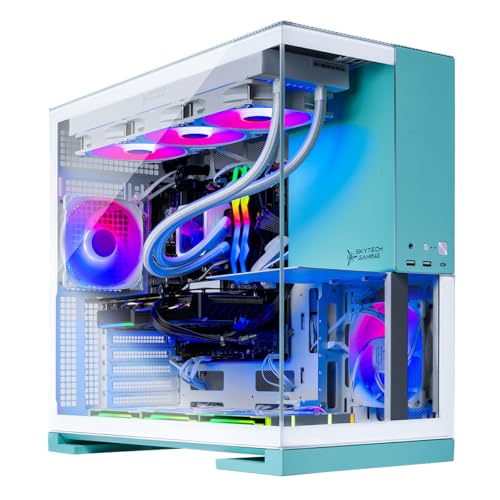
Where to buy
Check the latest price, availability and delivery on Amazon. Orders are placed on Amazon. We may earn a commission from qualifying purchases.
- Best 1440p machine in this guide: Skytech Gaming Aqua, Ryzen 7 9800X3D, RTX 5070 Ti 16GB, 2TB SSD — Check on Amazon
- Skytech Gaming Rampage, Ryzen 7 7800X3D, RTX 5070 Ti 16GB — Check on Amazon
- CyberPowerPC Gamer Supreme Liquid Cool, Ryzen 7 7800X3D, RTX 4070 Ti Super 16GB — Check on Amazon
- STORMCRAFT Falcon, Ryzen 7 7800X3D, Radeon RX 9070 XT 16GB — Check on Amazon
See 2 more Amazon options
- MSI Aegis ZS2, Ryzen 9 7900X, RTX 4070 Super 12GB — Check on Amazon
- MXZ Gaming PC, Ryzen 7 7800X3D, RTX 4070 Super 12GB, 16GB DDR5 — Check on Amazon
Read the full guide ↓
Disclosure: As an Amazon Associate, reviewstook.com earns from qualifying purchases. Links to Amazon on this page are affiliate links; they cost you nothing extra. Listing details such as price and availability change often, so check the current Amazon listing before you buy.
Let us start by saying the quiet part out loud: if you are shopping with a $2,500 budget, you are not really shopping for a 1080p gaming PC any more, whatever the search box said. At 1920×1080, every machine in this guide is so far past the point of sufficiency that grading them on 1080p performance would be meaningless — they would all pass, all of the time, and the guide would tell you nothing. The honest way to grade a $2,500 budget in late 2026 is at 2560×1440, because that is the resolution this money is actually for. A buyer spending this much is buying one of three things: a 1440p high-refresh setup today, a 1080p esports setup with a 1440p monitor already planned, or a machine with enough graphics headroom that a future 4K monitor does not force a second PC purchase. This guide grades all six picks as what they really are — 1440p machines — and it grades them on the questions that matter at that resolution: which ones hold native 1440p at high settings without leaning on upscaling, which ones treat DLSS or FSR as a bonus rather than a crutch, how much video memory each one carries for 1440p texture loads, and which one leaves you the clearest path to 4K later.
Two definitions before anything else, because the whole guide turns on them. Native 1440p means the game renders every frame at the full 2560×1440 — roughly 3.69 million pixels, about 78 percent more than 1080p — and sends that frame to the monitor untouched. Upscaled 1440p means the game renders at a lower internal resolution and an algorithm reconstructs a 1440p image from it: DLSS Quality mode, for example, renders internally at about 1707×960 and rebuilds the rest, and FSR Quality works on the same principle. Modern upscaling is good — at a desk, in motion, DLSS Quality at 1440p is hard to tell from native — but it is not free performance conjured from nothing, and a card that needs upscaling to reach acceptable frame rates today will need more aggressive upscaling, then lower settings, as games get heavier. So each machine below gets two grades: what it does at native 1440p, and what its upscaling headroom looks like on top of that. The machines that grade best are the ones for whom upscaling is insurance, not life support.
The second honesty note concerns the budget ceiling itself. RTX 5080 prebuilts start above this budget, several RTX 5070 Ti systems sit well above it, and component prices, memory especially, have been climbing through late 2026 and dragging prebuilt prices with them. Prices on Amazon change often, so this guide does not print a fixed price for any pick: check price on Amazon for the live figure before you buy. The rule throughout is simple: if a pick is sitting above $2,500 when you check it, it has left this guide’s budget — wait for its price to come back into line, or buy a pick that lives below the ceiling.
In this guide
Quick Picks
Six machines, one budget, graded as 1440p PCs. Check price on Amazon on the live listing before you buy.
- Best 1440p PC under $2,500 overall: Skytech Gaming Aqua — Ryzen 7 9800X3D, RTX 5070 Ti 16GB, 32GB DDR5-6000, 2TB SSD. Check price on Amazon: the strongest processor in the guide behind the joint-strongest graphics card, comfortable at native 1440p high-to-ultra with DLSS in reserve, and the clearest 4K-upgrade path of the six.
- Best value 1440p streamer: Skytech Gaming Rampage — Ryzen 7 7800X3D, RTX 5070 Ti 16GB, 32GB DDR5-5600, 1TB SSD. Check price on Amazon — the same graphics card as the Aqua, which makes it a strong native-1440p value in this guide; the compromise is half the storage.
- Best 1440p value pick: CyberPowerPC Gamer Supreme Liquid Cool (SLC8480A3) — Ryzen 7 7800X3D, RTX 4070 Ti Super 16GB, 32GB DDR5, 2TB SSD. Check price on Amazon — at a competitive live price it is a compelling route in this guide to a 16GB card that plays native 1440p at high settings. If the live listing sits in the premium tier, the value case collapses and the Rampage above is the better buy.
- Best Radeon route to native 1440p: STORMCRAFT Falcon — Ryzen 7 7800X3D, Radeon RX 9070 XT 16GB, 32GB DDR5-6000, 1TB SSD. Check price on Amazon; the same model family is also sold via Newegg. Raster performance at 1440p in the same class as the 4070 Ti Super, with FSR instead of DLSS and ray tracing a step behind the NVIDIA cards.
- Best for gaming plus heavy desktop work: MSI Aegis ZS2 — Ryzen 9 7900X (12 cores), RTX 4070 Super 12GB, 32GB DDR5-5600, 2TB SSD. Check price on Amazon. The 4070 Super plays native 1440p at high settings with some discipline in the heaviest titles, and the twelve-core processor is the pick for buyers whose PC also renders, compiles or encodes all day.
- Lower-tier credible 1440p entry in this guide: MXZ Gaming PC — Ryzen 7 7800X3D, RTX 4070 Super 12GB, 16GB DDR5-6000, 1TB SSD. Check price on Amazon. The same X3D processor and 4070 Super pairing as far pricier machines, but it ships with 16GB of system RAM where every other pick here has 32GB — budget for a second stick or a matched kit from day one.
How These Picks Were Chosen
Every pick in this guide was checked against the same standard before the 1440p grading even started. The ASIN had to resolve to a real Amazon listing whose specification block — processor, graphics card, memory, storage, power supply — could be read and cross-checked against the maker’s own specification pages or deal and roundup coverage that tracks the Amazon listing. Prices change often, so the live Amazon listing — not a headline number — is the only price that counts. We did not use these PCs ourselves, and no frame-rate figure in this guide is presented as a measurement of these exact machines: the performance discussion is class-level, based on what these graphics cards and processors are documented to do at 1440p.
The 1440p grading itself used four tests. First, native capability by title class: esports titles at 1440p are light enough that all six machines run them at high refresh; the separating question is demanding single-player titles, where a card either holds high settings natively or starts making bargains. Second, video memory: at 1440p, ultra texture settings in current releases can push past 12GB of VRAM, so a 16GB card is not a luxury at this budget — it is the difference between choosing ultra textures and being told no. Third, upscaling quality and reserve: every NVIDIA pick supports DLSS, the 5070 Ti pair in its newest generation, while the Falcon substitutes FSR; what matters is whether the card needs that help today or merely has it banked. Fourth, the platform around the card: 32GB of system memory, a power supply with wattage and certification published rather than implied, storage sized for a modern library, and a processor that will not bottleneck the next monitor.
What got excluded is as much a part of the method as what got in. RTX 5080 prebuilts were researched and excluded because they start above this budget, as was a Skytech King 95 configuration with the same 9800X3D and 5070 Ti pairing as our top pick, which also sits above this budget. Machines whose listings would not publish a power-supply wattage, or whose graphics card could not be pinned to an exact model, did not make the cut either. And the inclusions come with explicit guidance rather than quiet caveats: live prices move, so check price on Amazon for every pick before you buy. That guidance is stated in the reviews, in the mistakes section and in the FAQ, because a guide that hides its own conditions is not a guide.
Native, Upscaled and Everything Between: Reading a 1440p Claim
Because the keyword that brought you here mixes two resolutions, it is worth being precise about what “good at 1440p” can mean, because sellers use the phrase to cover three very different realities.
Native 1440p is the full workload: 2560×1440 rendered pixels per frame, full-resolution textures, no reconstruction. It is the most demanding and the cleanest image, and at this budget it is a realistic expectation for most games on most of these machines — which is exactly why the guide leads with it. Upscaled 1440p renders fewer pixels — DLSS or FSR Quality at a 1440p output works from roughly 1707×960 internally — and reconstructs the difference using temporal data and, on the newest NVIDIA generation, machine-learned models that are remarkably good at it. In motion, on a 27-inch 1440p monitor at a normal desk distance, the difference between native and DLSS Quality is small enough that many players choose upscaling deliberately for the frame-rate headroom even when they do not need it. Frame generation goes one step further and inserts generated frames between rendered ones; it raises the displayed frame rate, but it does not reduce input latency the way a genuinely higher rendered frame rate does, and it is a poor rescue for a card whose base frame rate is already low.
The practical reading rule is this: a machine whose 1440p story is “native in esports, upscaled in AAA” is a 1080p machine visiting 1440p. A machine whose story is “native almost everywhere, upscaling in reserve” is a 1440p machine. All six picks below are the second kind — that is what $2,500 buys — but they are not equal within it. The two RTX 5070 Ti machines and the RTX 4070 Ti Super hold native 1440p at high-to-ultra settings across the widest range of current titles, with the 5070 Ti pair adding the newest DLSS generation on top. The RX 9070 XT matches that native class in rasterised games and gives back a little in ray-traced ones, with FSR as its upscaling route. The two RTX 4070 Super machines are native-1440p-high machines with an asterisk: in the heaviest current releases, holding high frame rates means either turning a few settings down with intent or engaging DLSS Quality — settings discipline, not defeat, but discipline all the same, and their 12GB of VRAM is where the ceiling will show first as texture demands keep climbing.
Finally, the monitor half of the equation, because a 1440p PC graded without its display is half a review. These machines belong on a 1440p monitor with a refresh rate of at least 144Hz and adaptive sync; pairing any of them with a 1080p 60Hz panel wastes most of what you paid for, and pairing them with a 4K monitor is a legitimate choice — covered in its own section below — as long as you understand that 4K on this hardware means upscaled 4K, which these cards do well, rather than native 4K, which is the next budget tier’s job. If your current monitor is 1080p and a 1440p replacement is months away, the Best 1080p Gaming PC Under $2500 guide grades this same budget purely on 1080p terms; if the 1440p monitor is the point of the purchase, read on — and the Best 1440p Gaming PC Under $2500 guide is the dedicated shortlist for exactly that resolution.
The 6 Best 1440p Gaming PCs Under $2,500
Skytech Gaming Aqua — Ryzen 7 9800X3D, RTX 5070 Ti 16GB, 2TB SSD

Who it suits: the buyer who wants the strongest 1440p machine this budget can produce and a credible first step toward 4K later — and who is willing to check the live price carefully before buying.
The Aqua pairs the Ryzen 7 9800X3D — the fastest gaming processor in this guide — with an RTX 5070 Ti carrying 16GB of GDDR7. Graded as a 1440p machine, that pairing is comfortable in the literal sense: native 1440p at high-to-ultra settings across the great majority of current titles, esports at frame rates that saturate a 240Hz 1440p panel, and ray tracing that stays playable natively in most games and becomes easy with DLSS engaged. The newest-generation DLSS, including frame generation, sits in reserve rather than on the critical path, which is where you want it: as titles get heavier, the card can trade a reconstruction it currently does not need for frame rate it will want. The 16GB of VRAM is the other half of that longevity story — 1440p ultra texture sets that crowd a 12GB card fit here without argument.
The supporting platform is specified the way this budget deserves: 32GB of DDR5-6000, a 2TB Gen4 NVMe drive, an 850W Gold ATX 3 power supply — the current standard, with the connector and transient handling a card of this class expects — and a 360mm liquid cooler. Skytech notes the graphics card brand may vary by production run, which is normal for system integrators at this level: the card’s model and memory are contracted, its badge is not.
Honest limitation: the price. Check price on Amazon before you buy, because pricing for this configuration moves with the late-2026 component market. Treat the buy rule as absolute: at or under $2,500 it is the best machine here; above that line it has left the budget, and no specification in this review changes that.
Choose it if you want one purchase that answers 1440p completely and keeps the most 4K headroom in reserve. Skip it if the listing is sitting above $2,500 when you shop — buy the Rampage below instead and keep the difference.
Skytech Gaming Rampage — Ryzen 7 7800X3D, RTX 5070 Ti 16GB, 1TB SSD

Who it suits: the value-first 1440p buyer — and, thanks to the encoder story below, the streamer — who would rather save money than spend it on storage and a processor tier they may never feel.
The Rampage makes the sharpest argument in this guide: the same RTX 5070 Ti 16GB graphics card as the Aqua, in a lower price tier — check price on Amazon. Every word of the Aqua’s 1440p grading applies to the card here: native 1440p high-to-ultra across most current titles, newest-generation DLSS in reserve, 16GB of VRAM between you and the texture ceiling. What you give up versus the Aqua is real but specific: the processor steps down to the 7800X3D, which at 1440p gives back very little in most titles and mainly shows in CPU-limited esports scenarios; and storage halves to 1TB, the compromise you will actually feel, because a modern library of 1440p-era games fills a terabyte faster than new buyers expect.
The rest of the platform holds up well: 32GB of DDR5-5600, the same 850W Gold ATX 3 power supply specification, the same class of 360mm liquid cooling. For streamers there is a specific reason to look hard at this pick: the 5070 Ti carries dual NVENC encoders with AV1 support, so the card can run a broadcast encode and a high-quality local recording at once without touching the game’s rendering budget — the full workflow is covered in the Best 1080p Gaming PC For Streaming Under $2500 guide, but the hardware point belongs here, because it makes the Rampage the strongest play-and-broadcast value in this six.
Honest limitation: the 1TB drive is the genuine pinch, and Skytech’s graphics-card-brand-may-vary note applies here too. Neither is hidden, and both are manageable — a second NVMe drive is the easiest upgrade in any modern PC — but budget for it rather than discovering it.
Choose it if you want 5070 Ti-class 1440p performance at a strong value — check price on Amazon. Skip it if you know your library is huge and you would rather pay the Aqua’s premium for 2TB and the 9800X3D up front than upgrade later.
CyberPowerPC Gamer Supreme Liquid Cool (SLC8480A3) — Ryzen 7 7800X3D, RTX 4070 Ti Super 16GB, 2TB SSD

Who it suits: the patient, price-watching buyer who understands exactly what they are looking at: last generation’s high-end card, bought when its live price is competitive, doing a current-generation job at 1440p.
The RTX 4070 Ti Super is the interesting card in this guide. Its raster performance at 1440p sits in the same class as the 5070 Ti pair for the majority of titles — native 1440p at high settings is its home territory, with ultra achievable in most games and DLSS Quality as a well-tested, mature relief valve in the heaviest. Crucially, it carries 16GB of VRAM, the specification that decides how gracefully a card ages at this resolution, and on that axis it outranks the two 4070 Super machines below despite being the older architecture. What it does not have is the newest DLSS generation and its improved frame generation; its DLSS 3-era frame generation is good, and at 1440p base frame rates as healthy as this card produces, the practical gap is smaller than the marketing suggests. Around the card, the specification is complete: the 7800X3D, 32GB of DDR5 and a 2TB Gen4 SSD — the storage the Rampage makes you give up, present here.
Now the condition, stated as plainly as the guide can state it: this machine’s value case depends on its live price, in a market that has moved sharply upward. It is included because the configuration keeps resurfacing in sale cycles and because, at a competitive live price, it is a compelling route here to a 16GB native-1440p machine. But the walk-away rule is the review: check price on Amazon on the live listing, and if the price has drifted into the premium tier, the entire case for this pick evaporates — at price parity, the Rampage’s newer card, newer DLSS and dual encoders win.
Honest limitation: everything about this pick is conditional on the live price, and CyberPowerPC builds can vary minor components by production run. You are buying a specification and a price, in that order — verify both on the live listing and check price on Amazon before you buy.
Choose it if the live price is competitive and you want 16GB of VRAM and 2TB of storage at a strong value here. Skip it if the listing has drifted up: at full price it is a good machine wearing a bad deal, and this guide does not recommend bad deals.
STORMCRAFT Falcon — Ryzen 7 7800X3D, Radeon RX 9070 XT 16GB, 1TB SSD

Who it suits: the buyer who plays rasterised games, is indifferent to which company’s logo is on the upscaling, and wants 16GB of VRAM and native 1440p strength without paying the NVIDIA premium.
The RX 9070 XT is AMD’s strongest card of its generation, and in traditional rasterised rendering at 1440p it trades blows with the RTX 4070 Ti Super class — native 1440p at high settings across most current titles, with headroom in esports that a high-refresh panel can use. Its 16GB of GDDR6 gives it the same texture headroom as the other 16GB picks, and the surrounding specification is the equal of anything here: 7800X3D, 32GB of DDR5-6000, an 850W Gold ATX 3 power supply and a 360mm liquid cooler. The compromises are specific. Ray tracing is a step behind the NVIDIA cards — playable at 1440p with settings judgment, but if ray-traced lighting is the centre of your gaming, this is the wrong pick. And its upscaling route is FSR rather than DLSS: current FSR is good and much improved, but DLSS on the NVIDIA picks remains the more polished reconstruction.
The price needs the same discipline as the Aqua. Check price on Amazon before you buy; the same model family is also sold via Newegg. Read that the way the guide intends: at a competitive live price this is a genuinely strong 1440p machine and the strongest argument for the Radeon route; at a premium-tier live price it is asking Aqua money for a card that gives back ray tracing and DLSS, and the Aqua is the better spend.
Honest limitation: its live price can sit near the ceiling, so check price on Amazon first; it also comes from a smaller system builder than the household names here, with the ray-tracing and upscaling trade-offs described above. None of that is disqualifying; all of it should be known before you buy.
Choose it if its live price on Amazon is competitive and your library is raster-first. Skip it if its live price is uncompetitive while the Aqua or Rampage fit the budget, or if ray tracing is a priority.
MSI Aegis ZS2 (B7NUE-853US) — Ryzen 9 7900X, RTX 4070 Super 12GB, 2TB SSD

Who it suits: the buyer whose PC is a workstation that games — rendering, compiling, encoding or running heavy multitasking loads all day — and who wants a major manufacturer’s build, support and bundled peripherals.
Graded purely as a 1440p games machine, the Aegis ZS2’s RTX 4070 Super is a native-1440p-high card with an asterisk, and the asterisk is settings discipline: in most current titles it holds high settings at native 1440p outright; in the heaviest releases, keeping frame rates high means either easing a few settings with intent or engaging DLSS Quality — which, to be fair, is what DLSS Quality is for, and this card’s implementation is mature and excellent. The 12GB of VRAM is the specification to watch: sufficient for 1440p today, including high texture settings in most games, but with less headroom against rising texture demands than the 16GB cards above it, and the place where this machine will feel its age first. If your horizon is three years, that is a footnote; if it is five, it is a chapter.
What you are paying for instead is the rest of the machine. The Ryzen 9 7900X brings twelve cores and twenty-four threads — double the thread count of the X3D picks — which does nothing for most games and a great deal for everything else a powerful PC gets asked to do. MSI builds the platform out properly: 32GB of DDR5-5600, a 2TB NVMe drive, liquid cooling, an 80+ Gold power supply, Wi-Fi 6E, and a keyboard and mouse in the box. Check price on Amazon before you buy; this model has also been sold through Costco — a reminder that it does get discounted when channels clear it.
Honest limitation: it sits in the premium tier here while carrying the joint-weakest graphics card for 1440p longevity, and pure gamers are paying for cores they will not use. That is a fair trade only if you are not a pure gamer.
Choose it if your PC earns its keep outside games and you value a major-brand build with everything in the box. Skip it if gaming is the whole job — the Rampage gives you a stronger, newer graphics card.
MXZ Gaming PC — Ryzen 7 7800X3D, RTX 4070 Super 12GB, 16GB DDR5

Who it suits: the budget-disciplined buyer who wants the X3D-plus-4070-Super combination at a budget-friendlier entry tier in this guide and is comfortable treating one specification as a day-one correction.
The MXZ’s core pairing is legitimately strong: the same 7800X3D that anchors three other picks here, behind the same RTX 4070 Super as the MSI — so the entire 1440p grading of that card carries over. Native 1440p at high settings in most titles, DLSS Quality as the relief valve in the heaviest, 12GB of VRAM as the long-term ceiling. Check price on Amazon: it sits in a lower tier than the MSI while matching its gaming hardware almost exactly, and it even ships Windows 11 Pro rather than Home. On gaming components alone, this is the sharpest value in the guide.
The correction is the memory: 16GB of DDR5-6000 where every other pick here ships 32GB. Sixteen gigabytes still runs games — but at 1440p, with a browser, a voice client and a launcher or two living alongside the game, it is the specification most likely to make a powerful machine feel ordinary. The fix is neither expensive nor difficult — a matched 32GB kit, or a second stick matched to the first — but it is a real cost on top of the purchase price, and the honest comparison is the MXZ plus its memory fix against the Rampage, not the MXZ alone against everyone else’s complete package. The 1TB drive is the second place the budget shows.
Honest limitation: the 16GB of RAM, full stop — compounded by this being a smaller builder whose long-term support operation is not MSI’s. Buy it with the upgrade already planned and it is a bargain; buy it as-is and leave it, and you have hobbled the best-value processor in the guide.
Choose it if you are happy to do one memory upgrade and want a lower-tier entry to this class of 1440p hardware — check price on Amazon. Skip it if you want the machine finished the day it arrives — that is what stepping up to the Rampage buys.
Comparison Table
| PC | Processor | Graphics card | VRAM | RAM | Storage | Price | 1440p verdict |
|---|---|---|---|---|---|---|---|
| Skytech Gaming Aqua | Ryzen 7 9800X3D | RTX 5070 Ti | 16GB | 32GB DDR5-6000 | 2TB Gen4 | Check price on Amazon | Native high–ultra; newest DLSS in reserve; best 4K headroom |
| Skytech Gaming Rampage | Ryzen 7 7800X3D | RTX 5070 Ti | 16GB | 32GB DDR5-5600 | 1TB Gen4 | Check price on Amazon | Same card as the Aqua in a lower tier; dual-encoder streamer |
| CyberPowerPC Gamer Supreme | Ryzen 7 7800X3D | RTX 4070 Ti Super | 16GB | 32GB DDR5 | 2TB Gen4 | Check price on Amazon | Native high; superb value only if the live price is competitive |
| STORMCRAFT Falcon | Ryzen 7 7800X3D | RX 9070 XT | 16GB | 32GB DDR5-6000 | 1TB Gen4 | Check price on Amazon | Native high in raster; FSR route; ray tracing a step behind |
| MSI Aegis ZS2 | Ryzen 9 7900X (12-core) | RTX 4070 Super | 12GB | 32GB DDR5-5600 | 2TB NVMe | Check price on Amazon | Native high with settings discipline; workstation-leaning |
| MXZ Gaming PC | Ryzen 7 7800X3D | RTX 4070 Super | 12GB | 16GB DDR5-6000 | 1TB NVMe | Check price on Amazon | Native high with settings discipline; budget for a RAM upgrade |
How to Choose a 1440p Gaming PC Under $2,500
Start with the graphics card’s memory, not its name. At 1440p the single most predictive specification for how a machine ages is VRAM. The four 16GB picks in this guide can take ultra texture settings as they come; the two 12GB picks will, in time, start asking you to choose. If your buying horizon is long, let that one number sort the shortlist before anything else does.
Then grade native first, upscaling second. Every card here can produce a good-looking 1440p image with DLSS or FSR Quality engaged. The question that separates the tiers is what happens with upscaling off. A card that holds native 1440p high today can fall back on upscaling in three years and still look right; a card that needs upscaling today has nowhere further to fall back except lower settings. Buy the machine whose fallback you have not already spent.
Match the processor to the monitor, not the marketing. At 1440p the graphics card carries the load, and the gap between the 9800X3D and 7800X3D narrows compared with 1080p — it shows in esports frame rates and minimum frame times rather than averages. Competitive players on a 240Hz panel get real value from the X3D premium; single-player gamers lose almost nothing on the 7800X3D machines, and the twelve-core MSI only makes sense when the PC works for a living outside games.
Check the live price before you decide. Prices in this band move often, and a pick only belongs in this guide while its live price fits the $2,500 budget. Check price on Amazon for every machine on your shortlist, and apply the CyberPowerPC’s walk-away rule to all of them: if the live price has drifted into the premium tier, wait or choose another pick.
Count the whole purchase. A 1440p machine implies a 1440p monitor if you do not already own one, and possibly a memory upgrade (the MXZ) or a second drive (the 1TB picks). If the monitor purchase pushes the total past comfort, stepping down to the tier covered in the Best 1440p Gaming PC Under $1500 guide and buying the better monitor is usually the wiser allocation — a mid-range PC on a good 1440p panel beats a flagship PC on a tired 1080p one.
The 4K Question: Which of These Leaves the Most Headroom?
Because so many buyers at this budget are buying in two stages — 1440p now, 4K when the right monitor deal appears — the six are ranked explicitly on the upgrade path here. Understand the terms first: none of these machines is a native-4K ultra-settings PC. That tier starts above this budget — RTX 5080 prebuilts were excluded from this guide for exactly that reason, and the machines built for native 4K live in the Best 4K Gaming PC Under $2500 and Best 4K Gaming PC Under $3000 guides. What this budget buys toward 4K is an excellent upscaled 4K experience: DLSS or FSR rendering from a 1440p-class internal resolution to a 4K panel, which on a television at sofa distance is genuinely hard to distinguish from native, and at a desk is a reasonable compromise rather than a defeat.
Ranked on that basis, the two RTX 5070 Ti machines lead, and the Aqua leads them: the newest DLSS generation does its best work exactly here, reconstructing a 4K image from fewer rendered pixels, the 16GB of VRAM has room for 4K texture sets, and the 9800X3D will not be the bottleneck at the frame rates 4K implies. The CyberPowerPC’s 4070 Ti Super and the Falcon’s 9070 XT form the second rank — 16GB cards with the raster strength to feed upscaled 4K well, the NVIDIA card with the more polished reconstruction, the Radeon with FSR and the same memory advantage. The two 4070 Super machines are the third rank: entirely usable on a 4K screen with DLSS Quality and sensible settings, but their 12GB of VRAM is the first wall a 4K texture load will find, and buyers for whom 4K is a definite near-term plan should read that as the guide steering them up the ranking. The honest summary: at $2,500 you can buy a superb 1440p machine with a good 4K story, or a compromised version of a 4K machine. This guide recommends the first of those, every time.
Common Buying Mistakes
Buying the Aqua or Falcon without checking the live price because the review was kind. Both sit in the premium tier, and their live prices move with the market. Check price on Amazon before you buy either one. If the live price is above the ceiling, the correct move is to wait or to buy a pick that lives below the ceiling — not to stretch the budget and call it the same purchase.
Assuming an old sale price is today’s price. Past discounts do not entitle anyone to that price today — the market has moved since those sale cycles. Check price on Amazon on the live listing, apply the walk-away rule in the review, and if the price has drifted up, let the pick go without regret — the Rampage exists precisely for that moment.
Assuming “handles 1440p” means the same thing on every listing. Sellers use the phrase for machines that upscale from 1080p and machines that render natively, for esports frame rates and for 40-frame cinematic ones. This guide graded native capability first for a reason. Before buying anything outside this shortlist, ask which meaning the seller intends — and notice how rarely the listing says.
Pairing a $2,500 PC with a 1080p 60Hz monitor and calling it done. Every pick here will drive that panel beautifully and waste most of its ability doing it. If the monitor upgrade is genuinely not coming, you do not need this budget — the guides at lower tiers will serve you better and leave money in your pocket. If it is coming, sequence the purchases so the panel and the PC arrive in the same season of your gaming life.
Ignoring VRAM because the card names sound close. A 4070 Super and a 4070 Ti Super are not near-identical cards with a syllable between them: at 1440p the 16GB card holds ultra textures the 12GB card will eventually refuse, and that difference compounds every year you keep the machine. The comparison table puts VRAM in its own column because it deserves one.
Buying the MXZ and never fixing the memory. Sixteen gigabytes is a known, planned correction — the review treats it as part of the purchase. Left uncorrected, it becomes the bottleneck in the best-value machine in this guide, and the saving that justified the pick quietly evaporates into stutter.
Final Recommendation
Graded as what they are — 1440p machines bought with a $2,500 ceiling — the six picks sort themselves into a clear order. For most buyers, the Skytech Gaming Rampage is the recommendation to act on first: the joint-strongest graphics card in the guide in a lower price tier — check price on Amazon — with the storage compromise being the easiest flaw in this entire shortlist to fix later. If the Aqua’s live price fits the budget when you shop — at or under $2,500 — the Skytech Gaming Aqua is the best machine here outright, and the one with the longest 1440p life and the clearest 4K path. Catch the CyberPowerPC at a competitive live price and it leapfrogs both on value; catch the Falcon at a competitive live price and it is the raster gamer’s alternative. The MSI is the professional’s pick, bought for its twelve cores as much as its card, and the MXZ is the sharp buyer’s project — a lower-tier ticket into this class, with one memory upgrade standing between it and full membership.
Whichever you choose, hold the guide’s two disciplines: check price on Amazon and buy only when the live price fits the budget, and put the machine in front of a 1440p high-refresh monitor — that pairing, not the badge on the case, is what this budget is actually for. Readers still deciding between resolutions can compare this budget’s other lives in the Best 1080p Gaming PC Under $2500 guide, its bigger sibling in the Best 1440p Gaming PC Under $3000 shortlist, and the wider field in the Best Prebuilt Gaming PC Under $2500 roundup.
Frequently Asked Questions
If these are 1440p machines, why does this guide exist under a 1080p keyword?
Because that is the search buyers actually make when they are upgrading in stages — a 1080p setup today, a 1440p monitor next, and a budget that has to cover the future as well as the present. The honest answer to that search is not a list of 1080p machines; it is the truth that $2,500 has outgrown 1080p entirely, and a grading of the machines at the resolution the money is really for. Every pick here also plays 1080p at very high frame rates — nothing is lost by grading them at 1440p, and a great deal of useful truth is gained.
What is the difference between native and upscaled 1440p in practice?
Native renders all 2560×1440 pixels every frame. Upscaled 1440p — DLSS or FSR in Quality mode — renders internally at roughly 1707×960 and reconstructs the rest, which looks remarkably close to native in motion and costs far less performance. The distinction that matters for buying is direction of travel: a machine that is native-capable today can adopt upscaling later as games get heavier, while a machine that needs upscaling today has already spent its reserve. All six picks here are native-capable at 1440p in most titles; the 4070 Super pair lean on DLSS soonest in the heaviest games.
Is 12GB of VRAM enough for 1440p, or do I need 16GB?
Twelve gigabytes is enough for 1440p today, including high texture settings in most current games — the two 4070 Super picks are in this guide because they genuinely work. Sixteen gigabytes is the safer specification for a machine you intend to keep for four or five years, because texture demands only move one direction and VRAM cannot be upgraded without replacing the card. Treat 12GB as a three-year answer and 16GB as a five-year one, and choose by your horizon.
Why is there no RTX 5080 machine in a $2,500 guide?
Because RTX 5080 prebuilts start above this budget — they were researched and excluded for that reason, along with 5070 Ti systems listed well above it. A guide that quietly includes an over-budget machine teaches readers to distrust every other price in it. If 5080-class performance is the goal, the budget has to move; if the budget cannot move, the 5070 Ti pair here is the honest ceiling of what $2,500 buys.
The Aqua and Falcon prices I see are above $2,500. Is the guide wrong?
Both machines sit in the premium tier, and their live prices move — check price on Amazon before you buy. Listings drift above the ceiling between deals, especially in a surge. When they do, the guide’s rule applies rather than its ranking: buy a pick that is in budget today, or wait for prices to come back into line. The Best 1080p Gaming PC Under $3000 guide covers the machines that legitimately live at the next ceiling up.
Should I buy a 1440p monitor or a 4K monitor for these PCs?
A 1440p high-refresh monitor is the natural pairing: every pick drives it natively at high settings, and high refresh is worth more to most players than resolution beyond 1440p at desk distance. A 4K monitor is a defensible choice if you also watch media or work on the screen, or play on a television — these machines upscale to 4K convincingly, with the 5070 Ti pair doing it best — but buy it knowing the gaming mode is upscaled 4K, not native. The headroom ranking in this guide’s 4K section tells you exactly how each pick handles that future.
What else should I budget for beyond the PC?
The monitor, first and largest, if 1440p is not already on your desk. Then the small corrections flagged where they apply: a 32GB memory kit for the MXZ, a second NVMe drive for the 1TB picks once the library grows, and ordinary desk basics — a headset, a surge protector, and the display cable your monitor’s refresh rate actually requires. Count the setup, not just the box.


