Where to buy
Check the latest price, availability and delivery on Amazon. Orders are placed on Amazon. We may earn a commission from qualifying purchases.
- Best overall for 1440p: Lenovo Legion T7 34IAS10, Core Ultra 7 265KF, RTX 5080 — Check on Amazon
- CLX Set Gaming PC, Ryzen 7 9800X3D, RTX 5080, 2TB SSD — Check on Amazon
- Lenovo Legion Tower 7i Gen 10, Core Ultra 9 285K, RTX 5080, 2TB SSD — Check on Amazon
- CyberPowerPC Gamer Supreme SLC8480A9, Ryzen 7 9800X3D, RTX 5070 Ti, 2TB SSD — Check on Amazon
See 2 more Amazon options
- Skytech King 95, Ryzen 7 9800X3D, RTX 5070 Ti, 850W Gold PSU — Check on Amazon
- Acer Nitro 60 N60-181-UR26, Ryzen 9 7900, RTX 5070 Ti, 2TB SSD — Check on Amazon
Read the full guide ↓
Disclosure: As an Amazon Associate, reviewstook.com earns from qualifying purchases. Links to Amazon on this page are affiliate links; they cost you nothing extra. Listing details such as price and availability change often, so check the current Amazon listing before you buy.
Three thousand dollars is flagship money, and this guide starts with the sentence most flagship guides bury: for 1440p gaming alone, you do not need to spend it. A well-chosen $1,500 machine already plays 1440p at high settings, and the $2,500 tier already reaches RTX 5080 graphics. What the step from $2,500 to $3,000 actually buys is narrower and more specific than the marketing suggests — the fastest gaming CPU AMD makes, 2TB of storage instead of 1TB, liquid cooling sized for sustained loads, power supplies with real headroom, and machines that keep their composure when the game is sharing the PC with a stream, a recording and a second monitor full of browser tabs. This guide is written for the buyer who wants those things knowingly, not for the buyer who assumes the biggest number on the page is automatically the right one.
The honesty note that defines this tier: there is no RTX 5090 in this guide, because there is no verified RTX 5090 prebuilt on Amazon anywhere near $3,000 — complete 5090 systems sit far above this budget. The fastest graphics tier we could verify under $3,000 on Amazon is the RTX 5080, and three of the six picks below use it. The other three use the RTX 5070 Ti, which at 1440p is not a consolation prize: it carries the same 16GB of GDDR7 memory, supports the same DLSS 4 feature set, and, positioned lower in the tier, it can leave room in your budget for the 240Hz monitor that this tier of PC deserves — check the current price on Amazon for each pick before you decide. Below are the quick picks, detailed reviews of all six machines, a comparison table, a flagship buying checklist, a plain-spoken section on diminishing returns, the mistakes that waste the most money at this budget, and the questions buyers ask before spending three thousand dollars on a gaming PC.
In this guide
Quick Picks
Short on time, or comparing several options at once? Each row below names a buyer type and the machine that suits it, with a link to the listing.
| Buyer type | Pick | Why it stands out | Link |
|---|---|---|---|
| Best overall for 1440p | Lenovo Legion T7 34IAS10, Core Ultra 7 265KF, RTX 5080 | RTX 5080 power from a major OEM — check price on Amazon | Check on Amazon |
| Best pure gaming build | CLX Set Gaming PC, Ryzen 7 9800X3D, RTX 5080 | The fastest gaming CPU paired with an RTX 5080 and a 360mm liquid cooler | Check on Amazon |
| Best for streaming and creation | Lenovo Legion Tower 7i Gen 10, Core Ultra 9 285K, RTX 5080 | 24-core flagship Intel CPU, 2TB storage, OEM build and support | Check on Amazon |
| Best X3D alternative | CyberPowerPC Gamer Supreme SLC8480A9, Ryzen 7 9800X3D, RTX 5070 Ti | 9800X3D plus 2TB of storage in a standard, upgradeable tower | Check on Amazon |
| Best high-refresh value | Skytech King 95, Ryzen 7 9800X3D, RTX 5070 Ti | Named 850W Gold PSU and 360mm AIO — check price on Amazon | Check on Amazon |
| Best when discounted | Acer Nitro 60 N60-181-UR26, Ryzen 9 7900, RTX 5070 Ti | 12-core Ryzen 9 and 2TB storage; best value when discounted — check price on Amazon | Check on Amazon |
How These Picks Were Chosen
The budget was applied as a ceiling, not a target: every machine below is a real Amazon listing in the United States that belongs in the under-$3,000 tier, and because pricing at this tier moves a lot between deal events, this guide does not print a fixed price for any machine — check the current price on Amazon before you buy. Two picks in this guide, the CLX Set and the Acer Nitro 60, are notably price-volatile; both reviews say so plainly and explain, in qualitative terms, when each machine stops making sense. A flagship guide that pretended pricing never moved would be a disservice at exactly the budget where a mistimed purchase costs the most.
We did not use these machines ourselves. We read the maker listings and specification pages and compared graphics cards, CPUs, memory capacity and speed, storage, power supply wattage and certification, and cooling, favoring listings that publish their numbers in full. At this tier we weighted the specification sheet’s boring corners more heavily than its headlines: every GPU here is fast, so the differences that decide a good flagship from a frustrating one are the unnamed power supply, the single stick of memory, the 1TB drive that fills by spring, and the warranty you will actually use. Where a listing leaves the PSU brand or motherboard model unstated — a common gap even at $3,000 — the review flags it rather than filling it in.
One filter sat on top of all of that, and it is the filter this whole tier needs: the diminishing-returns test. A pick earns its place near $3,000 only if it offers something a $1,500–$2,500 machine genuinely cannot — an RTX 5080 instead of a 5070 Ti, a Ryzen 7 9800X3D or a 24-core Core Ultra 9 instead of a midrange chip, 2TB of fast storage, liquid cooling, or a support structure from a major OEM. Machines that were simply last tier’s specification wearing this tier’s price were excluded, however good their reviews, because they do not answer the search you actually made.
The 6 Best 1440p Gaming PCs Under $3,000
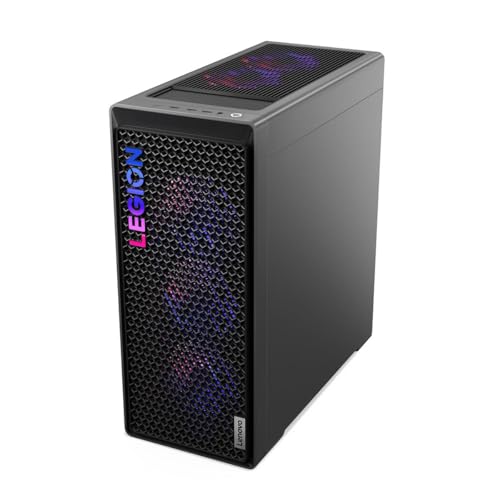
Lenovo Legion T7 34IAS10, Core Ultra 7 265KF, RTX 5080 (90Y6003KUS)
Who it suits: The flagship buyer who wants RTX 5080 performance at 1440p with a major manufacturer’s build quality and support — and who is willing to time the purchase to a deal event.
This is the machine that makes the whole tier interesting, because it keeps breaking the tier’s price logic. The specification is unambiguous flagship material: an Intel Core Ultra 7 265KF processor, an NVIDIA GeForce RTX 5080 with 16GB of GDDR7 memory, 32GB of RAM and a 1TB SSD, in Lenovo’s Legion T7 tower with Windows 11 Pro. The RTX 5080 is the fastest graphics card that exists under this budget on Amazon, and at 1440p it is not a marginal upgrade over the 5070 Ti picks below — it is the card that holds ultra settings and native resolution in the heaviest ray-traced games while still feeding a 240Hz panel in competitive titles, with DLSS 4 and multi frame generation in supported games widening the gap further. Paired with a 20-core Arrow Lake processor that handles streaming, recording and background work without touching the game’s frame time, this is a complete flagship with no apology in the specification.
Pricing is the story here, and it is a volatile one: this listing is at its most compelling when it is discounted in a deal event, and merely a fair flagship when it is not. That is the whole buying strategy for this machine — check the current price on Amazon, and compare it against the other RTX 5080 systems in this guide on the same day. Lenovo’s own direct pricing for Legion Tower 7i configurations tends to sit higher in the tier, which makes the Amazon listing the one to watch. The OEM advantages are real either way — a single warranty covering the whole machine, a manufacturer support line, and a tower built around standard serviceability rather than a boutique integrator’s parts bin. This is the first machine to check and the benchmark the other five are judged against.
- RTX 5080 with 16GB GDDR7 — the fastest verified GPU tier under $3,000 on Amazon.
- Positioned in the flagship RTX 5080 tier — check the current price on Amazon, especially during deal events.
- Major-OEM build, warranty and support, with Windows 11 Pro included.
Honest limitation: Storage is 1TB where two rivals below offer 2TB, and the value case depends heavily on catching the listing when it is discounted — when it is not, the CLX and the second Legion argue back hard.
Choose it if you want the strongest 1440p graphics in this guide from a big-name maker and can wait for a deal cycle. Skip it if the listing is not discounted while a rival 5080 machine is, or you know your library needs 2TB on day one.

CLX Set Gaming PC, Ryzen 7 9800X3D, RTX 5080, 2TB SSD
Who it suits: The pure gamer — the buyer whose PC exists to produce frames, who plays competitive and AAA titles at 1440p high-refresh, and who wants the single best gaming CPU and GPU pairing this budget can verify.
If you spec a flagship gaming PC on paper, you circle two parts first: AMD’s Ryzen 7 9800X3D and NVIDIA’s RTX 5080. The 9800X3D, with its 3D V-Cache design, is the processor that tops gaming benchmarks because its enormous cache keeps frame rates high and, just as importantly, keeps the low percentiles smooth in the CPU-heavy scenes where lesser chips stutter — big multiplayer matches, simulation titles, modded open worlds. The RTX 5080 needs no reintroduction from the review above. CLX builds around that pairing with 32GB of DDR5 memory, a 2TB NVMe SSD, a 360mm all-in-one liquid cooler to keep the X3D chip sustained under long sessions, WiFi and Windows 11 Home, in a full-size case with room to grow. Of the six machines here, this is the one whose every major decision points at gaming first: no cores diverted to productivity bragging rights, no storage skimping, cooling sized for the hardware it actually carries.
Pricing requires the same honesty as the Legion’s, in the opposite direction. When this CLX Set is discounted inside this budget, it is a fair proposition for the pairing. But its pricing has also climbed well above this tier at times, as component prices rose. The machine did not change; the market did. So the rule for this pick is absolute: it belongs in this guide when its live listing sits inside this budget, and it does not belong in your cart when the listing has climbed above the tier. Check the current price on Amazon, and if it has climbed, the Legion above delivers the same GPU with an OEM warranty, and the King 95 below delivers the same CPU with a 5070 Ti, both positioned lower in the tier. Bought when its pricing sits in this tier, though, this is the purest expression of what $3,000 is for at 1440p: the best gaming silicon of the generation, cooled properly, with storage that will not be your first upgrade.
- Ryzen 7 9800X3D plus RTX 5080 — the benchmark-topping gaming pairing of this generation.
- 2TB NVMe SSD and a 360mm AIO liquid cooler fitted as standard.
- Best bought when discounted inside this tier — check the current price on Amazon.
Honest limitation: Its pricing is the most volatile in this guide — the same configuration has at times sat well above this budget — and CLX is a smaller integrator than Lenovo or Acer, so support runs through them rather than a global OEM network.
Choose it if gaming performance is the whole brief and the live listing sits inside this budget — check the current price on Amazon. Skip it if the price has climbed past $3,000 — at that point it has left this guide’s budget and its value case behind.

Lenovo Legion Tower 7i Gen 10, Core Ultra 9 285K, RTX 5080, 2TB SSD
Who it suits: The streamer-creator flagship buyer — someone whose 1440p sessions run alongside OBS, a capture pipeline, editing timelines and rendering queues, and who wants one OEM machine that treats all of it as its day job.
Where the CLX optimizes for gaming alone, this Legion optimizes for everything at once. The processor is Intel’s flagship Core Ultra 9 285K, a 24-core part whose gaming performance sits close to the top of the charts while its core count pulls decisively ahead the moment the workload widens: encoding a stream while gaming, exporting a video while a game updates, compiling, rendering, running a small server of background tools. The graphics are the same RTX 5080 with 16GB of GDDR7 found in the two picks above, which at 1440p means ultra settings and high refresh today and genuine 4K capability if a monitor upgrade arrives later. Around that pairing Lenovo fits 32GB of RAM, a 2TB SSD — the capacity the T7 above lacks — a 360mm liquid cooler, an 850W power supply named in the listing, and Windows 11, inside the Gen 10 Legion Tower with its tool-free transparent panel and the manufacturer’s full support structure behind it.
For a flagship-CPU OEM tower, this configuration sits competitively in this tier on Amazon — check the current price on Amazon — while Lenovo’s own store positions comparable 285K and RTX 5080 configurations higher in the tier. That channel difference is worth understanding rather than fearing: Amazon’s listing is a specific configuration sold at marketplace pricing, and it fluctuates like one, so verify the exact specification on the page before ordering, since Legion Tower 7i listings exist in several CPU, memory and storage combinations that look alike at a glance. Judged on what is verified, this is the most complete machine in the guide: no weak corner, no first-upgrade IOU, and the only pick whose processor will still feel oversized — in the good way — five years from now. For the buyer who games at 1440p and creates in the same chair, it is the flagship that justifies the word.
- Core Ultra 9 285K — 24 cores for streaming, editing and multitasking headroom.
- RTX 5080, 32GB RAM and the 2TB SSD the cheaper Legion skips.
- 360mm liquid cooling and an 850W PSU stated in the Amazon listing.
Honest limitation: For gaming alone, the 285K’s extra cores buy little over the 9800X3D — pure gamers are paying for headroom they will rarely use — and Legion listings come in lookalike configurations, so the exact spec must be checked at checkout.
Choose it if your PC streams, edits or renders alongside gaming and you want OEM support behind a flagship spec. Skip it if the machine will only ever game — the CLX or the T7 above spends the same money more directly.

CyberPowerPC Gamer Supreme SLC8480A9, Ryzen 7 9800X3D, RTX 5070 Ti, 2TB SSD
Who it suits: The upgrade-minded gamer who wants the 9800X3D’s frame rates and a big drive now, in a standard-parts tower they can open, change and extend for years.
CyberPowerPC’s Gamer Supreme line is the traditional integrator proposition: named retail-grade components assembled in a conventional case, with none of an OEM’s proprietary lock-in. This configuration pairs the Ryzen 7 9800X3D — the same benchmark-leading gaming CPU as the CLX above — with an RTX 5070 Ti carrying 16GB of GDDR7, 32GB of DDR5 memory and a 2TB PCIe 4.0 SSD, running Windows 11 Home with WiFi ready out of the box. At 1440p that GPU sits one step below the 5080 picks, and the honest size of that step matters: in rasterized gaming the 5070 Ti delivers the large majority of the experience — ultra settings at 1440p, high-refresh play in competitive titles, DLSS 4 with multi frame generation in supported games — and the gap only becomes decisive in the heaviest native-resolution ray tracing. For a buyer whose monitor is a 1440p 165Hz or 240Hz panel, this machine will use all of it.
Its position in this tier frames its real negotiation with the reader: it can sit close to the Legion T7’s RTX 5080 machine when that machine is discounted, so this pick wins on its configuration’s balance — the better gaming CPU and double the T7’s storage — rather than on raw graphics. Check the current price on Amazon for both machines on the same day before you decide.
Two specification gaps deserve naming, because they are exactly the corners this guide promised to watch. The listing does not state the power supply’s wattage, which at this price should be a published number; and the motherboard model is not spelled out, which matters for future CPU upgrades on the AM5 platform. Neither gap is unusual for the brand, and CyberPowerPC’s standard-parts approach means both components can be identified on arrival and replaced later if needed — but a flagship buyer should know they are buying those two small unknowns. What is not unknown is the core pairing, and a 9800X3D with 2TB of storage and a 16GB GPU is a machine with no scheduled disappointments.
- Ryzen 7 9800X3D gaming performance with a 2TB PCIe 4.0 SSD as standard.
- RTX 5070 Ti 16GB — full DLSS 4 feature set and strong native 1440p play.
- Conventional standard-parts tower: the easiest machine here to upgrade piecemeal.
Honest limitation: The listing leaves the PSU wattage and motherboard model unstated, and in this tier it can sit close to discounted RTX 5080 machines — check the current price on Amazon against the Legion T7 before ordering.
Choose it if you value the X3D chip, 2TB of storage and an open, upgradeable tower over the last step of GPU power. Skip it if an RTX 5080 pick in this guide is priced very close to it on the day you buy — check the current price on Amazon for both.

Skytech King 95, Ryzen 7 9800X3D, RTX 5070 Ti, 850W Gold PSU
Who it suits: The value flagship buyer — the player who wants this tier’s defining components, the 9800X3D and a 16GB GPU, with the specification sheet’s fine print filled in, at the lowest verified prices in this guide.
The King 95 is the machine for readers who made it this far and started asking the right question: how much of the $3,000 experience survives lower in this tier? Most of it, is the answer this configuration gives.
The Ryzen 7 9800X3D is here in full — the same gaming CPU as the CLX and the CyberPowerPC — and the RTX 5070 Ti brings its 16GB of GDDR7 and the complete DLSS 4 toolkit. What elevates this listing above most integrator fare is that it publishes the parts other listings hide: an 850W 80 Plus Gold power supply, a 360mm all-in-one liquid cooler with ARGB fans, 32GB of DDR5 5600 memory with heat spreaders, and a 1TB Gen4 NVMe SSD, with Windows 11 Home installed. That transparency is not a cosmetic virtue. The named PSU is the component that decides whether a future GPU upgrade is a ten-minute swap or a rewiring project, and 850 Gold watts is the correct answer for this class of machine and the one above it.
Its positioning is the friendliest in the guide: it sits in the lower part of this tier, and it is discounted further in deal events — check the current price on Amazon. At that position the King 95 performs the most useful service a pick in a $3,000 guide can perform: it gives the flagship shopper a credible place to stop. The room it leaves in the budget can go toward a premium 1440p 240Hz monitor, which will change what gaming looks like more than the step from a 5070 Ti to a 5080 will. Two cautions complete the picture. Skytech sells near-identical King 95 variants — different storage, memory speeds and even newer X3D chips under similar titles — so confirm the model and specification on the exact listing page; and the GPU brand may vary, as the listing states, which is normal for integrators but means the specific card is a lottery within the contracted model. Neither caution dents the core case: this is the best-value flagship in the guide.
- 9800X3D plus RTX 5070 Ti, with the PSU actually named: 850W 80 Plus Gold.
- 360mm AIO liquid cooling and 32GB DDR5 fitted as standard.
- Positioned in the lower part of this tier — check the current price on Amazon, especially during deal events.
Honest limitation: Storage is 1TB where the CyberPowerPC and CLX offer 2TB, and near-identical King 95 variants crowd the listings — the exact model number must be checked before ordering.
Choose it if you want flagship gaming performance with money left for the monitor it deserves. Skip it if you specifically want RTX 5080 ray-tracing headroom or 2TB of storage without an upgrade.

Acer Nitro 60 N60-181-UR26, Ryzen 9 7900, RTX 5070 Ti, 2TB SSD
Who it suits: The patient deal-hunter and the hybrid gamer-creator — a buyer who wants a 12-core processor and 2TB of storage from a global OEM, and who understands that this particular listing is only a good idea on its discounted days.
The Nitro 60’s specification reads like a creator’s variation on the flagship theme. Its Ryzen 9 7900 is a 12-core processor — not an X3D gaming specialist, but a chip with half again as many cores as the 9800X3D machines, which shows up in rendering, encoding, compiling and heavy multitasking rather than in benchmark headlines. The RTX 5070 Ti provides the same 16GB GDDR7 graphics foundation as the two picks above it, and Acer rounds the machine out with 32GB of DDR5, a 2TB PCIe 4.0 SSD, WiFi 6 and gigabit ethernet in an airflow-focused Nitro chassis. For 1440p gaming it is thoroughly flagship-capable: ultra settings, high refresh, DLSS 4 where supported. For a desk that also edits video or builds software, its core count is a genuine argument the gaming-specialist picks cannot make.
Now the part of this review that matters most, because this listing’s pricing is the most volatile in the guide. At the top of its range, to be blunt, it should not be bought while RTX 5080 machines in this guide sit competitively in the same tier — check the current price on Amazon for all of them on the same day. When it is discounted, though, the picture reverses: this is a machine that is a poor flagship at the top of its range and one of the best buys in the entire guide when discounted — a 12-core, 2TB, 5070 Ti OEM tower positioned low in the tier is a specification no rival here matches at that position. The buying rule writes itself: set a price alert, buy it discounted, and walk away when it sits near the top of the tier. Acer’s OEM warranty and support stand behind it either way, but the value of this pick lives entirely in its sale days, and this guide would rather tell you that than pretend otherwise.
- 12-core Ryzen 9 7900 — the strongest multitasking and creation CPU among the 5070 Ti picks.
- 2TB PCIe 4.0 SSD, 32GB DDR5 and OEM warranty from a global manufacturer.
- Strongest value when discounted low in this tier — check the current price on Amazon before buying.
Honest limitation: At the top of its pricing range it is outclassed by the RTX 5080 picks in this guide, and its non-X3D processor trails the 9800X3D machines in pure gaming frame rates.
Choose it if you catch it discounted low in this tier, especially if your desk does creation work too — check the current price on Amazon. Skip it if the live price sits near the top of the tier — the Legion T7 above is the better flagship in that position.

Comparison Table
| Product | CPU / GPU | Best use | Link |
|---|---|---|---|
| Lenovo Legion T7 34IAS10 (90Y6003KUS) | Core Ultra 7 265KF / RTX 5080 | Flagship 1440p power at deal prices | Check on Amazon |
| CLX Set Gaming PC | Ryzen 7 9800X3D / RTX 5080 | Pure gaming performance, 2TB storage | Check on Amazon |
| Lenovo Legion Tower 7i Gen 10 | Core Ultra 9 285K / RTX 5080 | Streaming and creation headroom, OEM support | Check on Amazon |
| CyberPowerPC Gamer Supreme SLC8480A9 | Ryzen 7 9800X3D / RTX 5070 Ti | X3D frames with 2TB and easy upgrades | Check on Amazon |
| Skytech King 95 | Ryzen 7 9800X3D / RTX 5070 Ti | Flagship value with a named 850W Gold PSU | Check on Amazon |
| Acer Nitro 60 N60-181-UR26 | Ryzen 9 7900 / RTX 5070 Ti | 12-core creation value when discounted | Check on Amazon |
How to Choose a 1440p Gaming PC Under $3,000
- Start with the monitor, not the machine. A $3,000 PC on a 60Hz 1440p panel is a waste in a way no other tier can match. This budget assumes a 240Hz (or at least 165Hz) 1440p display; if you do not own one, the King 95 plus a great monitor beats any 5080 machine plus a mediocre one.
- Know the real GPU ceiling at this budget. The RTX 5080 is the fastest card verified under $3,000 on Amazon. There is no 5090 here — complete 5090 systems live far above this budget — so any listing implying one at this price deserves deep suspicion.
- Pick your CPU by your second job. Pure gaming points to the Ryzen 7 9800X3D and its 3D V-Cache. Streaming, editing and rendering point to core count: the 24-core Ultra 9 285K or the 12-core Ryzen 9 7900. Buying the wrong specialty is the easiest flagship mistake.
- Demand 32GB of memory — and check its configuration. Every pick here has 32GB. Confirm it runs as two sticks in dual channel; a single 32GB stick in a flagship listing is a corner cut that costs real performance.
- Treat 2TB as the flagship storage standard. Modern AAA installs regularly exceed 100GB. A 1TB flagship (the Legion T7, the King 95) is fine if a second drive is in your near future; otherwise favor the 2TB picks.
- Read the power supply line before the RGB line. Look for a named wattage and certification — 850W Gold is the right class for a 5070 Ti or 5080 build. An unstated PSU at $3,000, as on the CyberPowerPC pick, is a question to ask, not a detail to skip.
- Check who supports the machine. Lenovo and Acer offer global OEM warranty networks; integrators like CLX, Skytech and CyberPowerPC offer standard-parts serviceability instead. Both models work — know which one you are buying.
- Verify the exact configuration at checkout. Flagship product families ship in lookalike variants. Match the model number, CPU, GPU, memory and storage on the listing page to the review you read — especially with Legion towers and King 95 variants.
- Price-check against the tier below on the same day. Flagship pricing swings a lot between deal events — check the current price on Amazon. If a $2,500-tier machine matches your target spec on sale, the rational flagship move is to buy it and keep the rest of your budget.
- Budget the whole desk. At this level the PC is one purchase among several: a high-refresh monitor, a decent UPS to protect a $3,000 machine, and peripherals that do the hardware justice. A flagship tower on a bargain panel is a mismatched system.
The Diminishing-Returns Ledger: $1,500 vs $2,500 vs $3,000
Every buyer at this tier deserves the arithmetic in one place. At around $1,500, a 1440p machine already buys an RTX 5070-class graphics card, 32GB of memory and high-settings 1440p gaming that most players, shown the screen without the receipt, could not distinguish from a flagship’s in the majority of titles. That is not a small caveat; it is the center of the value map. The step to $2,500 buys the first genuinely flagship goods: RTX 5080 graphics in deal events, the 9800X3D, better cooling and power supplies — the tier where native 1440p ultra and 240Hz play stop being aspirations. The step from $2,500 to $3,000, the step this guide covers, buys the least in return of the three: the same GPUs with better partners around them, 2TB instead of 1TB, flagship CPUs whose advantages appear in creation workloads and worst-case gaming scenes rather than averages, and support structures. Each of those things is real. None of them doubles anything.
So the honest framing of this entire tier is that it is not buying performance so much as it is buying margin — margin against the heaviest games of the next three years, against the stream you might start, against the upgrade you would rather postpone. Margin is a legitimate thing to purchase at a flagship budget, and the six machines above deliver it in different flavors. But a buyer who reads this guide and concludes that the correct 1440p flagship is actually a discounted $2,500 machine and a better monitor has not misunderstood the guide. They have understood it perfectly, and the picks above are annotated so that either decision — spend the full tier knowingly, or stop one tier early — is an informed one.
Common Buying Mistakes
- Chasing an RTX 5090 at a $3,000 budget. It does not exist in a verified Amazon prebuilt at this price; listings suggesting otherwise are mislabeled, barebones or scams until proven otherwise.
- Paying a flagship’s top-of-range price during a deal drought. Machines in this guide swing widely between events — the CLX Set in particular has sat both inside this budget and well above it. Timing is a specification at this tier — check the current price on Amazon.
- Buying the Acer Nitro 60 at the top of its pricing range, when it is a far stronger buy discounted, and RTX 5080 machines in this guide can sit competitively in the same tier.
- Pairing a $3,000 PC with a 60Hz monitor and concluding the upgrade feels small. At 1440p, the display is half the flagship experience.
- Choosing a CPU by brand loyalty instead of workload: an X3D chip for a rendering desk, or a 24-core flagship for a pure gaming rig, both spend money where it cannot be seen.
- Accepting an unnamed power supply without a second thought. On a machine drawing flagship power, the PSU is the component whose failure can take the rest with it.
- Ordering a lookalike variant. Legion towers and King 95s ship in multiple configurations under similar titles; the model number is the product, not the headline.
- Filling a 1TB drive by spring and calling it a defect. It is arithmetic: check your current library’s size before deciding 1TB is enough.
- Skipping surge protection and a UPS for a $3,000 machine plugged into the same strip as a space heater.
Final Recommendation
- Most flagship buyers: Lenovo Legion T7 34IAS10 — RTX 5080 power and OEM support; check the current price on Amazon, especially during deal events.
- Pure gamers: CLX Set — the 9800X3D and RTX 5080 pairing, bought only when its live price sits inside this budget.
- Streamers and creators: Lenovo Legion Tower 7i Gen 10 — 24 cores, 2TB and the same RTX 5080.
- Upgraders who want 2TB now: CyberPowerPC Gamer Supreme SLC8480A9.
- Best value in the tier: Skytech King 95 — flagship gaming with money left for a 240Hz monitor.
- Deal hunters: Acer Nitro 60 — superb when discounted low in the tier, untouchable at the top of its range.
Our top two at this budget are the Legion T7, because an RTX 5080 from a major OEM, bought when it is discounted, is the strongest value proposition in the entire flagship market — check the current price on Amazon — and the CLX Set, because the 9800X3D and RTX 5080 together are simply the fastest gaming combination this budget can verify. Between them they cover the tier’s two honest flagship shapes: the manufacturer machine bought on sale, and the gaming specialist bought when its pricing sits in this tier.
Buyers aiming a tier lower should see Best 1440p Gaming PC Under $2500 and Best 1440p Gaming PC Under $1500, and streamers speccing this exact budget should also read Best 1440p Gaming PC For Streaming Under $3000. Whichever machine you choose, verify the model number and the live price on the listing page before ordering — at $3,000, that five-minute check is worth more than any single component in this guide.
Frequently Asked Questions
Is a $3,000 PC overkill for 1440p gaming?
For resolution alone, largely yes — and this guide says so rather than hiding it. A $1,500 machine plays 1440p well and a $2,500 machine plays it at flagship level. The final step up to this tier buys margin: the fastest gaming CPU, 2TB of storage, stronger power and cooling, and creation headroom. Buy it for the margin knowingly, or stop a tier down with our blessing and put the rest of your budget into a 240Hz monitor.
Can you really buy an RTX 5080 PC for under $3,000?
Yes — verified, repeatedly, in Amazon deal events. The Lenovo Legion T7 and the CLX Set in this guide are both RTX 5080 machines that belong in this tier when they are discounted. The catch is timing: the same listings can sit at or above $3,000 outside deal windows, so check the current price on Amazon, and let the purchase reward patience and price alerts.
Why is there no RTX 5090 in this guide?
Because no verified Amazon prebuilt with an RTX 5090 comes near $3,000. The card on its own sits in flagship territory, and complete 5090 systems from Corsair, HP, CLX and others sit far above this tier. Rather than invent a halo pick, this guide crowns the tier that actually exists under the budget: the RTX 5080.
Ryzen 7 9800X3D or Core Ultra 9 285K at this budget?
For gaming, the 9800X3D — its 3D V-Cache makes it the benchmark leader and the smoothest choice for high-refresh 1440p. For a desk that also streams seriously, edits video or renders, the 285K’s 24 cores pull ahead the moment a second workload joins the game. Both appear in this guide because both answers are right for different buyers.
Is 32GB of RAM and 2TB of storage enough at $3,000?
32GB is the correct flagship amount for gaming today, with headroom for streaming and creation; 64GB is a workstation luxury, not a gaming need. On storage, 2TB is the comfortable flagship standard — two picks here ship 1TB, which is workable but will likely be your first upgrade as modern libraries grow.
Should I buy a prebuilt at this price or build my own?
Building can still save money and guarantees every component is named — no unstated PSU, no variant lottery. What the prebuilts in this guide sell in exchange is a single warranty, support, and deal pricing that can occasionally undercut the parts market, as the Legion T7 shows when it is discounted. At $3,000 the honest answer is to check the current price on Amazon for the prebuilt and price the parts list on the same day, then let that day’s comparison decide.
What monitor should pair with a $3,000 1440p PC?
A 27-inch 1440p panel at 240Hz is the natural partner for the RTX 5080 and 9800X3D picks — these machines exist to feed exactly that refresh rate — with 165Hz as the sensible minimum. Buying the PC before the monitor is the one sequencing mistake this tier cannot afford.


