Where to buy
Check the latest price, availability and delivery on Amazon. Orders are placed on Amazon. We may earn a commission from qualifying purchases.
- Best overall for streaming: Lenovo Legion T7 34IAS10, Core Ultra 7 265KF, RTX 5080 — Check on Amazon
- CLX Set Gaming PC, Ryzen 7 9800X3D, RTX 5080, 2TB SSD — Check on Amazon
- Lenovo Legion Tower 7i Gen 10, Core Ultra 9 285K, RTX 5080, 2TB SSD — Check on Amazon
- CyberPowerPC Gamer Supreme SLC8480A9, Ryzen 7 9800X3D, RTX 5070 Ti, 2TB SSD — Check on Amazon
See 2 more Amazon options
- Skytech King 95, Ryzen 7 9800X3D, RTX 5070 Ti, 850W Gold PSU — Check on Amazon
- Acer Nitro 60 N60-181-UR26, Ryzen 9 7900, RTX 5070 Ti, 2TB SSD — Check on Amazon
Read the full guide ↓
Disclosure: As an Amazon Associate, reviewstook.com earns from qualifying purchases. Links to Amazon on this page are affiliate links; they cost you nothing extra. Listing details such as price and availability change often, so check the current Amazon listing before you buy.
Streaming changes what a flagship PC is for. A machine that only has to play a game can spend its whole budget on the game; a machine that has to play the game, encode a broadcast, record a clean local copy, run OBS scenes, alerts, a browser stack and a chat overlay at the same time is doing four jobs at once, and it fails differently — not with low frame rates, but with dropped frames in the encoder, a recording that stutters, or a CPU that runs out of threads at the worst moment of the stream. This guide grades six verified Amazon machines under $3,000 on that combined workload: playing at 1440p while broadcasting professionally, with the encoder treated as the headline specification rather than a footnote.
The good news at this budget is real: every graphics card in this guide — the RTX 5080 in the first three picks, the RTX 5070 Ti in the last three — carries two ninth-generation NVENC encoder units plus AV1 encoding, which is the hardware combination that lets one PC broadcast and record at the same time without either job stealing from the other. The honest news is just as important. No amount of hardware raises the ceiling the platforms set: Twitch’s standard ingest sits around 6,000 kbps, which is why almost everyone broadcasts at 1080p60 no matter what they play at, and a so-called 4K streaming PC is in practice a 4K YouTube PC. And there is no RTX 5090 system anywhere near $3,000 — the cheapest verified 5090 machines sit well above this budget — so the RTX 5080 is the top of this budget, full stop. What follows is what each of the six machines does with that reality: which are built for playing and broadcasting, which are built for production, where the storage runs out, and which prices are only worth paying on deal days.
In this guide
Quick Picks
Short on time, or comparing several options at once? Each row below names a streamer type and the machine that suits it, with a link to the listing.
| Streamer type | Pick | Why it stands out for streaming | Link |
|---|---|---|---|
| Best overall for streaming | Lenovo Legion T7 34IAS10, Core Ultra 7 265KF, RTX 5080 | Dual-NVENC RTX 5080 and a 20-core CPU, with especially strong value when discounted — check price on Amazon | Check on Amazon |
| Best for play-and-broadcast | CLX Set Gaming PC, Ryzen 7 9800X3D, RTX 5080 | The fastest gaming CPU with a dual-encoder 5080 and 2TB for recordings — at its deal price only | Check on Amazon |
| Best for production-heavy creators | Lenovo Legion Tower 7i Gen 10, Core Ultra 9 285K, RTX 5080 | 24 cores for editing and rendering between streams, 2TB storage, named 850W PSU | Check on Amazon |
| Best recording room | CyberPowerPC Gamer Supreme SLC8480A9, Ryzen 7 9800X3D, RTX 5070 Ti | X3D gaming chip plus 2TB of storage for long local-recording archives | Check on Amazon |
| Best spend-less streamer | Skytech King 95, Ryzen 7 9800X3D, RTX 5070 Ti | Same dual-encoder GPU class and a named 850W Gold PSU, with value-tier pricing — check price on Amazon | Check on Amazon |
| Best when discounted | Acer Nitro 60 N60-181-UR26, Ryzen 9 7900, RTX 5070 Ti | 12-core production-leaning CPU and 2TB; pricing swings widely, so value depends on a discount — check price on Amazon | Check on Amazon |
How These Picks Were Chosen
The grading order in this guide is encoder first, then CPU, then storage, then everything else — because that is the order in which a streaming PC actually bottlenecks. The encoder decides whether your broadcast and your local recording can run at full quality at the same time. The CPU decides how much scene complexity, how many browser sources and how much background production work the machine absorbs before the game notices. Storage decides how many hours of high-bitrate local recording you can keep before the archive becomes a chore. Graphics horsepower still matters — you are playing at 1440p — but at this budget every pick clears that bar, so it is graded last among equals rather than first.
Every machine below is a real Amazon listing in this guide’s under-$3,000 tier in the United States, and you should check price on Amazon before ordering, because at this tier a listing can move a long way between deal events. Two picks carry explicit walk-away rules — pricing levels at which the recommendation is withdrawn — and those rules are stated in their reviews, the mistakes section and the FAQ, not buried. We did not use these machines ourselves; we worked from maker listings and specification pages, and where a listing leaves a component unstated — one pick below does not publish its power supply wattage or motherboard — the review flags the gap instead of filling it in.
One more filter shaped the list: streaming relevance. A machine earned its place here only if its specification answers a streaming question — dual hardware encoders, core count for the app stack, storage sized for recordings, or a price that leaves room in the budget for the broadcast kit covered later in this guide. Pure gaming value is handled in our general 1440p guide; this variant assumes the second job is real.
Two Encoders, Two Jobs
The single most useful streaming fact about this budget is that all six picks carry graphics cards with two NVENC encoder units. NVENC is NVIDIA’s dedicated hardware encoder: it turns your gameplay into a broadcast stream without asking the CPU or the game’s rendering pipeline to do the work. With one encoder unit, a streamer who wants a clean local recording for later editing has to share that unit between the broadcast encode and the recording encode, or drop the recording to CPU encoding and pay for it in cores. With two units, the jobs separate completely — one NVENC unit produces the live broadcast at platform bitrates while the second records locally at a much higher bitrate for YouTube uploads and edits, and neither touches the game’s performance.
That separation is the workflow this entire guide is built around, and it is worth being precise about where it starts. Both the RTX 5080 and the RTX 5070 Ti carry the dual ninth-generation NVENC configuration with AV1 encoding, verified against NVIDIA’s published specifications. Machines built on the plain RTX 5070, one tier down, carry only a single NVENC unit — a distinction that is invisible on a gaming spec sheet and decisive on a streaming one, and the reason the GPU line deserves more scrutiny in a streaming guide than the headline tier suggests. AV1 matters for a second reason: it is the most efficient codec the platforms are rolling out, and having it in hardware today is the closest thing this purchase has to future-proofing on the broadcast side.
What dual encoders do not do is raise the platform ceiling, widen your upload bandwidth, or fix a bad network path. They remove the PC as the bottleneck in a two-job workflow. The bottleneck that remains is the subject of the next section.
The Platform Ceiling: What “4K Streaming” Actually Means
Playing resolution and broadcast resolution are different numbers, and confusing them is the most expensive misunderstanding in streaming hardware. You will play at 1440p on every machine in this guide. What your audience receives is decided by the platform’s ingest, not by your GPU. Twitch’s standard ingest runs around 6,000 kbps with H.264 encoding, which is a 1080p60 budget — push a 1440p or 4K signal into it and the platform’s ceiling, not your hardware, decides how much of it survives. Twitch’s Enhanced Broadcasting opens HEVC encoding to Affiliates and Partners, which improves efficiency at the same ceiling rather than removing the ceiling.
YouTube is where the higher rungs actually exist. It accepts substantially higher bitrates — roughly 12 Mbps is a working figure for 1080p60 — it carries 1440p live streams, and its AV1 and HEVC ingest at 4K60 runs to roughly 35 Mbps. So a “4K streaming PC” is, in practice, a 4K YouTube PC: the hardware in this guide can encode a 4K AV1 stream and record a 4K local copy simultaneously, and YouTube is the platform that will take the 4K stream. On Twitch, the same machine’s correct broadcast is a high-quality 1080p60. None of that is a defect in these PCs; it is the shape of the platforms in late 2026, and any guide that sells you hardware as a way around it is selling you a misunderstanding.
The practical settings follow from that. Broadcast with NVENC, constant bitrate, a two-second keyframe interval, at 1080p60 for Twitch or 1440p for YouTube if your upload sustains it. Record locally on the second encoder at the highest bitrate your storage plan tolerates. And run the broadcast on a wired Ethernet connection — every encoder in this guide is wasted behind an unstable wireless uplink, a point the mistakes section returns to.
The 6 Best 1440p Gaming PCs for Streaming Under $3,000
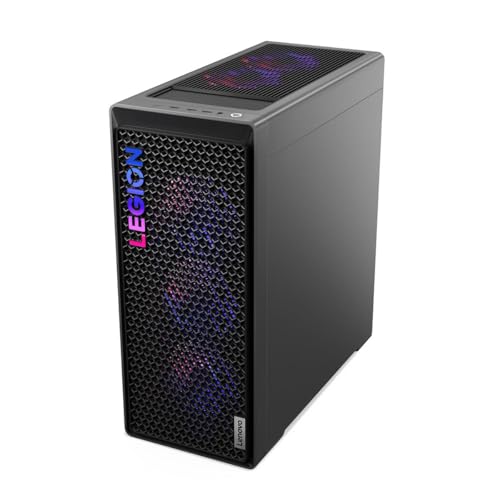
Lenovo Legion T7 34IAS10, Core Ultra 7 265KF, RTX 5080 (90Y6003KUS)
Who it suits: The streamer who wants the strongest broadcast hardware in this guide — a dual-encoder RTX 5080 and a many-core Intel CPU — from a major manufacturer, and who can time the purchase to a deal event.
Start with the encoder, because this guide does: the RTX 5080 carries two ninth-generation NVENC units and AV1 encoding, so the broadcast encode and a high-bitrate local record run on separate hardware and neither degrades the other. Behind it sits Intel’s Core Ultra 7 265KF, a 20-core processor that gives the streaming app stack — OBS with layered scenes, browser-source alerts, chat tools, a second monitor of dashboards — a deep bench of threads to live on while the game renders at 1440p. Add 32GB of memory and Lenovo’s Legion T7 build quality with Windows 11 Pro, and this is the most balanced streaming flagship in the guide: no job in the combined workload is the weak one.
The buying strategy is the price, so check price on Amazon before you decide. The listing’s full price sits near the top of this budget tier, but this exact listing is also known for limited-time deal events that make it much better value. When discounted, this machine undercuts every other RTX 5080 pick here while matching their encoder hardware exactly — the strongest value event in the guide. At list, it is a fair flagship rather than a bargain, and the CLX below argues back. Lenovo’s support structure — one warranty over the whole machine — stands behind it either way.
- RTX 5080 with dual ninth-gen NVENC and AV1 — broadcast and local record fully separated.
- 20-core Core Ultra 7 265KF leaves deep thread headroom for OBS and the app stack.
- Strongest value when this listing is discounted in a deal event — check price on Amazon before ordering.
Honest limitation: Storage is 1TB, and for a recording streamer that is the tightest number in this specification. At roughly 45GB per hour for a 100 Mbps local record, 1TB holds on the order of twenty hours of footage before you are archiving or deleting — workable with discipline, but it is this pick’s first upgrade, and it is why the 2TB machines below exist.
Choose it if you want the guide’s best streaming hardware at its deal price and will manage a 1TB recording drive actively. Skip it if the listing is at full price while another 5080 pick is discounted, or your recording archive is large and growing.

CLX Set Gaming PC, Ryzen 7 9800X3D, RTX 5080, 2TB SSD
Who it suits: The play-and-broadcast streamer — a gamer first, whose stream rides on competitive and AAA play at 1440p, and who wants the fastest gaming CPU in the guide feeding the same dual-encoder GPU as the pick above.
The Ryzen 7 9800X3D is the CPU half of this machine’s argument. Its 3D V-Cache design makes it the benchmark-leading gaming processor, and for a streamer that matters in a specific way: the moments that stress a broadcast — big multiplayer fights, simulation-heavy scenes, the CPU-bound spikes where frame times wobble — are exactly the moments this chip handles most smoothly, which keeps both the game and the OBS preview composed when a lesser CPU would make you choose. The RTX 5080 behind it supplies the dual ninth-gen NVENC pair and AV1, so the broadcast-plus-record workflow runs entirely on dedicated silicon. CLX completes the specification with 32GB of DDR5, a 2TB NVMe SSD — double the Legion T7’s recording room — a 360mm liquid cooler, WiFi and Windows 11 Home.
The price discipline for this pick is absolute, and the review states it as plainly as the base guide does. Check price on Amazon: this configuration belongs in this guide only when it is discounted within this budget tier — that is a fair level for this pairing. At other times the same configuration has been seen priced well above this guide’s budget as component prices climbed. The machine did not change; the market did. When it climbs that high, walk away: the Legion T7 delivers the same GPU and encoder pair with an OEM warranty, and the King 95 below delivers the same CPU with a 5070 Ti for far less.
- Ryzen 7 9800X3D plus RTX 5080 — the smoothest play-and-broadcast pairing in the guide.
- Dual ninth-gen NVENC with AV1, plus a 2TB SSD for the recording archive.
- Worth buying only when discounted within this budget tier — check price on Amazon before ordering.
Honest limitation: The most volatile price in this guide — the same configuration has also been seen well above this budget — and as a pure streaming-and-production CPU, the 9800X3D’s eight cores are a gaming specialty; heavy editing and rendering between streams is the Legion 7i’s argument, not this one’s.
Choose it if your stream is built on high-end gameplay and the live listing is discounted within this budget. Skip it if the price has climbed above this guide’s budget, or your workload leans harder on production than on play.

Lenovo Legion Tower 7i Gen 10, Core Ultra 9 285K, RTX 5080, 2TB SSD
Who it suits: The production-heavy creator — the streamer whose PC also edits the VODs, renders the exports, runs VTubing or a heavy scene stack, and treats the broadcast as one job among several.
Intel’s Core Ultra 9 285K is a 24-core flagship, and this is the pick where core count stops being a specification and becomes the product. During a stream, those cores absorb the app stack without negotiation. After it, they are what an editing timeline, an export queue and a render actually run on — the work that decides whether a channel publishes daily or weekly. The graphics are the same dual-NVENC RTX 5080 as the two picks above, so the broadcast-plus-record separation is identical; what this machine adds around it is the rest of the production desk: 32GB of memory, a 2TB SSD for footage, a 360mm liquid cooler, an 850W power supply named in the listing, and Lenovo’s full OEM support in the Gen 10 Legion Tower.
Check price on Amazon for this configuration — it can be striking value for a flagship-CPU OEM tower, since Lenovo’s own store prices comparable 285K and RTX 5080 configurations at a noticeably higher premium level. That gap is channel pricing, and it comes with one instruction: Legion Tower 7i listings exist in several lookalike CPU, memory and storage combinations, so verify the exact configuration on the page before ordering. Judged on the verified specification, this is the most complete streaming-and-production machine in the guide, and the one whose processor will still feel generous years from now.
- Core Ultra 9 285K — 24 cores for the stream, the edit and the render queue.
- RTX 5080 dual-NVENC pair, 2TB SSD and a named 850W PSU.
- Check price on Amazon — often well under Lenovo’s own store pricing for comparable configurations.
Honest limitation: For gaming and broadcasting alone, the 285K’s extra cores buy little over the 9800X3D picks — this machine’s premium is production headroom, and a streamer who never edits is paying for capacity that will sit idle.
Choose it if your channel’s bottleneck is the work around the stream — editing, rendering, heavy scenes — and you want OEM support behind it. Skip it if the PC will only ever play and broadcast; the CLX spends the same money on the gaming side of the desk.

CyberPowerPC Gamer Supreme SLC8480A9, Ryzen 7 9800X3D, RTX 5070 Ti, 2TB SSD
Who it suits: The streamer who records everything — long sessions kept as high-bitrate local archives for editing — and who wants the X3D gaming chip, the dual-encoder workflow and the joint-largest recording drive in the guide.
The RTX 5070 Ti is the streaming-relevant step down from the 5080, and it is a smaller step than the gaming gap suggests: it carries the same dual ninth-generation NVENC configuration and AV1 encoding, so the broadcast-plus-record separation works identically here. What you give up is rendering headroom at 1440p in the heaviest ray-traced titles, not encoder capability. The 9800X3D supplies the same smooth play-and-broadcast CPU behaviour as the CLX, and the specification around the pairing is archive-minded: 32GB of DDR5 and a 2TB PCIe 4.0 SSD. Run the recording arithmetic and the point lands — at roughly 45GB per hour for a 100 Mbps local record, 2TB holds around forty hours of footage, double the 1TB picks, which is the difference between archiving monthly and archiving every other week.
Check price on Amazon — in CyberPowerPC deal roundups it sits in direct negotiation with the Legion T7’s deal days: this pick wins on CPU specialty and double the storage, and loses on raw GPU tier. Two specification gaps deserve the same naming the base guide gave them. The listing does not state the power supply’s wattage — a number that should be published at this tier — and the motherboard model is not spelled out, which matters for future AM5 CPU upgrades. CyberPowerPC’s standard-parts build means both can be identified on arrival and replaced later, but a flagship buyer should know they are buying those two small unknowns.
- RTX 5070 Ti with the same dual-NVENC plus AV1 encoder pair as the 5080 picks.
- 9800X3D gaming CPU with a 2TB SSD — roughly forty hours of 100 Mbps recordings.
- Standard-parts tower: the easiest machine here to upgrade piecemeal.
Honest limitation: The listing publishes neither the PSU wattage nor the motherboard model, and at its typical pricing it sits close to discounted RTX 5080 machines, so compare live prices against the Legion T7 before ordering.
Choose it if recording volume and the X3D chip matter more to you than the last step of GPU power. Skip it if an RTX 5080 pick in this guide is close to its live price on the day you buy.

Skytech King 95, Ryzen 7 9800X3D, RTX 5070 Ti, 850W Gold PSU
Who it suits: The value-minded streamer who wants the full dual-encoder workflow and the X3D chip at value-tier pricing in this guide — and would rather spend the savings on the broadcast kit.
Ask how much of the $3,000 streaming experience survives at a lower spend and this configuration answers: nearly all of it. The RTX 5070 Ti brings the dual ninth-gen NVENC pair and AV1, so broadcast and local record separate exactly as they do on the 5080 machines. The 9800X3D is the same play-and-broadcast CPU as the CLX and the CyberPowerPC. And Skytech publishes the fine print other listings hide: an 850W 80 Plus Gold power supply — the correct class for this GPU tier and the one above it — a 360mm AIO liquid cooler, 32GB of DDR5 5600 memory, and a 1TB Gen4 NVMe SSD with Windows 11 Home. The pricing is the friendliest in the guide: it sits in the value tier for this hardware class, especially when discounted — check price on Amazon. The money left unspent can go toward the broadcast kit this guide covers later — the microphone, the camera, the second monitor — which will improve a stream more visibly than the step from a 5070 Ti to a 5080.
Two cautions complete the picture. Storage is 1TB, so the recording arithmetic from the CyberPowerPC review applies in reverse: around twenty hours at 100 Mbps before the archive needs attention, making a second drive this pick’s planned first upgrade. And Skytech sells near-identical King 95 variants — different storage, memory speeds and even newer X3D chips under similar titles — so match the model number ST-KING95-1671-W-AM and the specification on the exact listing page; the GPU brand may vary, as the listing states, which is normal integrator practice within the contracted model.
- Dual-NVENC RTX 5070 Ti and 9800X3D, with the PSU actually named: 850W 80 Plus Gold.
- A 360mm AIO liquid cooler and 32GB of DDR5 come fitted as standard.
- Value-tier pricing for this hardware class, especially in Amazon deal events — check price on Amazon.
Honest limitation: Storage is 1TB where three rivals offer 2TB — the tightest recording budget in the guide alongside the Legion T7 — and near-identical King 95 variants crowd the listings, so the exact model must be verified before ordering.
Choose it if you want the complete streaming workflow with money deliberately left for the kit around the PC. Skip it if you record long archives and do not want storage to be your first upgrade.

Acer Nitro 60 N60-181-UR26, Ryzen 9 7900, RTX 5070 Ti, 2TB SSD
Who it suits: The patient deal-hunter whose desk leans production — editing, encoding jobs, heavy multitasking alongside the stream — and who understands this listing is only a good idea on its discounted days.
The Ryzen 9 7900 gives this machine its streaming shape: twelve cores, half again as many as the 9800X3D picks, which shows up not in gaming headlines but in the simultaneous workload — a stream running beside an export, a render queue chewing through last night’s VOD while tonight’s game loads. For play-and-broadcast purity the X3D machines are smoother; for a desk that produces as much as it plays, this is the 5070 Ti pick with the deepest bench. The GPU is the same dual-NVENC, AV1-capable RTX 5070 Ti as the two picks above, and Acer rounds out the specification with 32GB of DDR5, a 2TB PCIe 4.0 SSD for the recording archive, WiFi 6 and gigabit Ethernet — the wired connection this guide keeps insisting on, present and named in the listing — plus a global OEM’s warranty behind it all.
The most important paragraph in this review is about price, because no listing in this guide swings wider. Check price on Amazon before anything else: at its full list level, bluntly, it should not be bought while RTX 5080 machines in this guide are available for less. Its pricing history swings widely, from its premium list level down to deep discounts. In its discounted band this is one of the best streaming values in the guide — a 12-core, 2TB, dual-encoder OEM tower at a discounted, value-tier level matches no rival here. The rule writes itself: set a price alert, buy it discounted, and walk away at list.
- 12-core Ryzen 9 7900 — the deepest multitasking bench among the 5070 Ti picks.
- Dual-NVENC RTX 5070 Ti, 2TB SSD and gigabit Ethernet named in the listing.
- Pricing for this model swings widely from its list level — buy only when discounted; check price on Amazon.
Honest limitation: At its full list price it is outclassed by the RTX 5080 picks in this guide, and its non-X3D processor trails the 9800X3D machines in pure gaming smoothness while you broadcast.
Choose it if you catch it in the discounted band its pricing history shows, especially if your desk does production work too. Skip it if the live listing sits anywhere near list price; at that level the Legion T7 is the stronger flagship.

Comparison Table
| Product | CPU / GPU | Best streaming use | Link |
|---|---|---|---|
| Lenovo Legion T7 34IAS10 (90Y6003KUS) | Core Ultra 7 265KF / RTX 5080 | Strongest all-round broadcast hardware at deal prices; 1TB recording drive | Check on Amazon |
| CLX Set Gaming PC | Ryzen 7 9800X3D / RTX 5080 | Play-and-broadcast smoothness, 2TB archive — deal price only | Check on Amazon |
| Lenovo Legion Tower 7i Gen 10 | Core Ultra 9 285K / RTX 5080 | Production-heavy channels: stream, edit and render on one machine | Check on Amazon |
| CyberPowerPC Gamer Supreme SLC8480A9 | Ryzen 7 9800X3D / RTX 5070 Ti | Record-everything streamers who want 2TB and easy upgrades | Check on Amazon |
| Skytech King 95 | Ryzen 7 9800X3D / RTX 5070 Ti | Full dual-encoder workflow at value-tier pricing; 1TB drive | Check on Amazon |
| Acer Nitro 60 N60-181-UR26 | Ryzen 9 7900 / RTX 5070 Ti | 12-core production value and 2TB when discounted; never at list | Check on Amazon |
How to Choose a 1440p Streaming PC Under $3,000
- Count the encoders before the cores. The workflow that defines this tier — broadcast on one NVENC unit, high-bitrate local record on the other — needs a dual-encoder GPU. Every pick here has one; machines built on the plain RTX 5070 carry a single encoder unit and quietly remove the feature this budget should guarantee.
- Pick your CPU by your second job. Play-and-broadcast points to the Ryzen 7 9800X3D and its cache-driven smoothness. Production — editing, rendering, VTubing, heavy scene stacks — points to core count: the 24-core Ultra 9 285K, the 20-core 265KF or the 12-core Ryzen 9 7900. Choosing the wrong specialty is the easiest way to waste flagship money.
- Do the recording arithmetic. A high-quality local record at 100 Mbps consumes roughly 45GB per hour. A 1TB drive is therefore about twenty hours of footage; 2TB is about forty. If you record every session for editing, treat 2TB as the standard and 1TB as a drive with a planned second beside it.
- Broadcast on a wire. Run Ethernet to the streaming PC, always. The finest encoder in this guide cannot repair an unstable wireless uplink, and dropped frames from the network look identical to dropped frames from the hardware. If the PC must sit far from the router, solve the cable run before solving anything else.
- Set broadcast settings the platform can actually take. NVENC with constant bitrate and a two-second keyframe interval; 1080p60 for Twitch’s roughly 6,000 kbps standard ingest, 1440p on YouTube where the ingest supports it. Playing at 1440p and broadcasting at 1080p60 is not a compromise — it is the correct configuration.
- Demand 32GB of memory, in two sticks. Every pick here ships 32GB. Confirm it runs dual-channel; a single-stick configuration in a flagship listing is a corner cut that costs real performance under simultaneous load.
- Read the power supply line. A named 850W Gold unit, as two picks here publish, is the right class for this GPU tier and leaves room for a future card. An unstated PSU, as on the CyberPowerPC pick, is a question to ask before ordering, not a detail to skip.
- Verify the exact configuration at checkout. Legion towers and King 95s ship in lookalike variants. Match the model number, CPU, GPU, memory and storage on the listing page to the review you read — the model number is the product, not the headline.
- Obey the walk-away rules. The CLX Set belongs here only when discounted within this budget and has also been seen well above it; the Acer Nitro 60 is a bargain discounted and a poor buy at its full list price. At this tier, timing is a specification.
- Budget the whole broadcast desk. The PC is the largest purchase, not the only one. The kit in the next section is what your audience actually sees and hears, and the King 95’s savings exist precisely to fund it.
What $3,000 Does Not Include
None of the six picks above buys the equipment your audience experiences directly, and a streaming budget that ends at the tower is a budget half-spent. The broadcast kit is covered here separately, in qualitative terms, and is never included with any pick. A microphone comes first — a budget-to-mid-range microphone transforms how a stream sounds more than any component in this guide — followed by a mid-range webcam, a second monitor so OBS, chat and alerts live off your game screen, and basic lighting. A capture card, a modest additional purchase, belongs on the list only for console streamers bringing an external source into the PC; a PC gamer does not need one. Altogether, plan on a further modest outlay beyond the tower. The King 95’s value-tier pricing is written with exactly this gap in mind.
Common Buying Mistakes
- Buying a single-encoder GPU for a two-job workflow. A plain RTX 5070 machine games beautifully at this budget and then forces the broadcast and the local record to share one NVENC unit — the compromise this tier exists to avoid.
- Streaming over Wi-Fi because the router is in another room. Dropped frames from an unstable uplink are indistinguishable from hardware failure on the viewer’s screen, and no pick in this guide can fix your network path.
- Setting a 1440p or 4K broadcast on Twitch and blaming the PC for the result. The platform’s roughly 6,000 kbps standard ingest is the ceiling; the correct Twitch broadcast from these machines is 1080p60, and 4K streaming is a YouTube conversation.
- Paying the CLX Set’s climbed price. It belongs in this guide only when discounted within this budget and has also been seen well above it for the same configuration. Check the live price on Amazon and walk away above the rule.
- Paying list for the Acer Nitro 60. Its pricing swings well below list when discounted, RTX 5080 machines in this guide can be available below its list level, and its discounted level is far lower — the discount is the product.
- Recording everything to a 1TB drive with no archive plan. At roughly 45GB per hour, the drive fills in about twenty hours of footage; the deletion decision then makes itself, badly, mid-season.
- Encoding the broadcast on the CPU because a guide said x264 looks better. On a one-PC setup, NVENC exists precisely so the game’s cores stay the game’s; CPU encoding is a two-PC technique.
- Ordering a lookalike variant. Flagship families ship in multiple configurations under similar titles; five minutes matching the model number is worth more than any single component decision in this guide.
- Spending the whole budget on the tower and streaming through a headset microphone. Your audience hears the microphone on every second of every stream; they see the GPU’s work only when it fails.
Final Recommendation
- Most streamers: Lenovo Legion T7 34IAS10 — dual-encoder RTX 5080, a 20-core CPU and strong value when discounted — check price on Amazon.
- Play-and-broadcast purists: CLX Set — the 9800X3D and RTX 5080 pairing with 2TB, bought only when discounted within this budget.
- Production-heavy creators: Lenovo Legion Tower 7i Gen 10 — 24 cores, 2TB and the same dual-encoder 5080.
- Record-everything streamers: CyberPowerPC Gamer Supreme SLC8480A9 — X3D smoothness with the joint-largest archive drive.
- Best value in the tier: Skytech King 95 — the complete dual-encoder workflow with money left for the broadcast kit.
- Deal hunters: Acer Nitro 60 — a 12-core production value when deeply discounted, untouchable at list.
Our top two at this budget are the Legion T7, because a dual-encoder RTX 5080 from a major OEM seen when discounted is the strongest streaming value in the flagship market, and the CLX Set, because pairing the fastest gaming CPU with the same encoder hardware and double the storage is the purest play-and-broadcast machine this budget can verify — at its deal price. Streamers speccing a step down should see Best 1440p Gaming PC For Streaming Under $2500 and Best Streaming PC Under $3000, and buyers weighing the gaming side of the same budget should read Best 1440p Gaming PC Under $3000. Whichever machine you choose, verify the model number and the live price on the listing page before ordering — at $3,000, that check outranks every other step in this guide.
Frequently Asked Questions
Can one PC really play at 1440p and stream at the same time?
Yes — that is the workflow this tier is built for. The game renders at 1440p on the GPU’s graphics pipeline while the broadcast encode runs on dedicated NVENC hardware, and on every pick here a second NVENC unit records locally at the same time. The CPU’s job is the game plus the streaming app stack, which is why the guide grades core count and cache alongside the encoder.
Why broadcast at 1080p60 when the PC plays at 1440p?
Because the platform, not the PC, sets the broadcast ceiling. Twitch’s standard ingest is around 6,000 kbps, a 1080p60 budget; sending a higher resolution into it does not produce a higher-quality stream. YouTube accepts higher bitrates and 1440p live, so the same machine can broadcast 1440p there. Playing resolution and broadcast resolution are separate settings, and setting each correctly is the whole game.
Is a “4K streaming PC” under $3,000 a real thing?
The hardware half is: these machines can encode a 4K AV1 stream and record 4K locally at once. The platform half is narrower — 4K live ingest at meaningful bitrates, roughly 35 Mbps with AV1 or HEVC, is a YouTube capability, while Twitch’s standard ingest remains a 1080p60 conversation with HEVC arriving through Enhanced Broadcasting for Affiliates and Partners. So read every “4K streaming” claim, including this guide’s, as a YouTube claim.
Why is there no RTX 5090 pick in this guide?
Because no verified RTX 5090 system comes near $3,000 — the cheapest verified 5090 machines sit well above this budget, and the card alone launched at a premium list price well beyond what this tier allows. The RTX 5080 is the fastest graphics tier this budget actually buys, and for streaming it carries the same dual-encoder configuration that defines this guide’s workflow.
Ryzen 7 9800X3D or a many-core CPU for streaming?
It depends on the second job. If the stream is the job — playing and broadcasting — the 9800X3D’s cache-driven smoothness is the better tool, and three picks here use it. If the desk also edits, renders or runs heavy production software, the 24-core Ultra 9 285K, 20-core 265KF or 12-core Ryzen 9 7900 pull ahead the moment the stream ends and the production begins. Neither answer is wrong; buying the wrong one for your desk is.
How much storage does a recording streamer actually need?
Work it backwards from the bitrate. A 100 Mbps local record consumes roughly 45GB per hour, so a 1TB drive holds around twenty hours and a 2TB drive around forty. Streamers who record every session for editing should treat 2TB as the standard — three picks here ship it — and 1TB buyers should plan the second drive as a scheduled purchase, not a surprise.
Should I build a dedicated second streaming PC instead?
Almost certainly not at this budget. The dual-encoder workflow exists so one machine does both jobs without compromise, and a second PC adds a capture card, a second desk footprint and a second failure point to solve a problem these GPUs already solve in hardware. A dedicated streaming PC makes sense for multi-source studio setups, not for a single broadcaster playing at 1440p.
- Best 1440p Gaming PC Under $3000
- Best 1440p Gaming PC Under $2500
- Best 1440p Gaming PC For Streaming Under $2500
- Best 1440p Gaming PC For Beginners Under $3000
- Best Streaming PC Under $3000
- Best Streaming PC Under $2500
- Best 4K Gaming PC Under $3000
- Best Gaming PC Under $3000
- Best Prebuilt Gaming PC Under $3000
- Best 1080p Gaming PC For Streaming Under $3000


