Where to buy
Check the latest price, availability and delivery on Amazon. Orders are placed on Amazon. We may earn a commission from qualifying purchases.
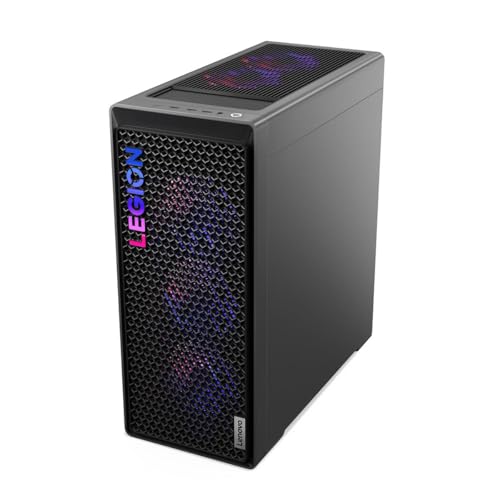
- Best overall for streaming: Lenovo Legion T7 34IAS10, Core Ultra 7 265KF, RTX 5080 — Check on Amazon
- Skytech King 95, Ryzen 7 9800X3D, RTX 5070 Ti — Check on Amazon
- CyberPowerPC Gamer Supreme SLC8480A9, Ryzen 7 9800X3D, RTX 5070 Ti — Check on Amazon
- iBUYPOWER Y40 PRO, Ryzen 9 7900X, RTX 5070 Ti — Check on Amazon
See 2 more Amazon options
- CyberPowerPC Gamer Supreme SLC8480A3, Ryzen 7 7800X3D, RTX 4070 Ti Super — Check on Amazon
- CyberPowerPC Gamer Xtreme GXiVR8760A4, Core i7-14700KF, RTX 4070 Super — Check on Amazon
Read the full guide ↓
Disclosure: As an Amazon Associate, reviewstook.com earns from qualifying purchases. Links to Amazon on this page are affiliate links; they cost you nothing extra. Listing details such as price and availability change often, so check the current Amazon listing before you buy.
Streaming changes what a gaming PC is for. A machine that only has to play a game can spend its whole budget on frame rates; a machine that has to play the game, encode the broadcast, record a clean local copy for the edit, and run the browser full of alerts, dashboards and chat tools at the same time is doing four jobs, and it fails at the job nobody spec’d — the stream stutters, the recording drops frames, the game hitches exactly when the channel is watching. At $2,500, the good news is that the hardware argument is mostly settled: every machine in this guide carries a graphics card with two hardware NVENC encoders and AV1 support, which means the broadcast and the recording can run on separate encoder units while the game renders untouched. That dual-encoder fact, more than any frame-rate chart, is what this budget buys a streamer. The differences that remain are real but narrower: which CPU shape suits your mix of playing and producing, how much storage your recording habit needs, and how honestly each listing prices itself.
Two clarifications before the picks, because streaming marketing blurs both. First, playing at 1440p and broadcasting at 1440p are different numbers. These machines play at 1440p locally; your stream almost certainly leaves at 1080p60, because Twitch’s standard ingest sits around 6,000 kbps — a ceiling set by the platform, not by your PC. YouTube is more generous, accepting higher bitrates, 1440p streams and AV1 live ingest, which is why AV1 support matters more there. A “4K streaming PC” is, in practice, a PC that plays in 4K and records in 4K while the audience watches a 1080p or 1440p feed — no purchase in this guide or any other changes what the platforms accept. Second, the halo card: complete RTX 5080 systems normally sit in a premium tier above this guide’s ceiling on Amazon, so the one 5080 machine below belongs here only when its live listing fits the budget — check price on Amazon — and its review says so every time it matters. Everything else runs the RTX 5070 Ti, 4070 Ti Super or 4070 Super — all dual-encoder cards — in configurations positioned to fit under the ceiling.
In this guide
Quick Picks
Short on time, or comparing several options at once? Each row below names a streamer type and the machine that suits it, with a link to the listing.
| Streamer type | Pick | Why it stands out | Link |
|---|---|---|---|
| Best overall for streaming | Lenovo Legion T7 34IAS10 (90Y6003KUS) | RTX 5080 with dual 9th-gen NVENC + AV1, 20-core CPU for production — check price on Amazon | Check on Amazon |
| Best for play-and-broadcast | Skytech King 95, Ryzen 7 9800X3D, RTX 5070 Ti | The fastest gaming CPU plus dual NVENC; the game never waits on the stream | Check on Amazon |
| Best for recording everything | CyberPowerPC Gamer Supreme SLC8480A9 | Same flagship pairing as the King 95, with a 2TB drive for the local-record archive | Check on Amazon |
| Best for production-heavy creators | iBUYPOWER Y40 PRO, Ryzen 9 7900X, RTX 5070 Ti | 12 cores for editing, encoding and multitasking alongside dual NVENC | Check on Amazon |
| Best value dual-encoder | CyberPowerPC Gamer Supreme SLC8480A3 | 7800X3D and RTX 4070 Ti Super (dual 8th-gen NVENC) — a previous-generation value pick; check price on Amazon | Check on Amazon |
| Best spend-less streamer | CyberPowerPC Gamer Xtreme GXiVR8760A4 | 20-core i7 and dual-NVENC 4070 Super; leaves budget for the microphone and camera | Check on Amazon |
How These Picks Were Chosen
The budget was applied as a ceiling for the whole machine: every system below is a real Amazon listing positioned at or under the $2,500 ceiling in the United States — check price on Amazon for the current figure before you buy. Prices at this tier refuse to sit still, so each review avoids printing a fixed number and instead tells you to check the live listing at the moment of purchase. The Legion T7 is the extreme case: it belongs in this guide only when its live listing fits under the ceiling, and its review keeps that framing in view rather than presenting it as a standing offer at this tier. One other pick, the CyberPowerPC SLC8480A9, is graded on the same basis; the honest instruction there is likewise to check the live listing and buy only if it sits at or under the ceiling. Machines positioned above the ceiling were excluded, however good they looked.
We did not use these PCs ourselves. We read the maker listings and specification pages and compared graphics cards and their encoder hardware, processors, memory capacity and speed, storage, power supply ratings and cooling, favoring listings that publish their numbers in full. For this streaming variant of the guide, the comparison started from the encoder block and worked outward: how many NVENC units the card carries and of which generation, whether AV1 encode is present, how much VRAM is left for the game once OBS compositing and encoding take their share, how many CPU cores remain for the application stack once the game is fed, and how many hours of local recording the fitted drive can hold.
One filter sat on top of all of that, specific to streaming: the simultaneous-load test. Each machine was judged running four jobs at once — the game at 1440p, the broadcast encode, a high-bitrate local record, and the ordinary stack of OBS scenes, alerts, browser sources and chat tools. A PC that benchmarks brilliantly with only a game running can still be the wrong streaming purchase if its storage fills in a month of recordings or its CPU has nothing left for the production side. The reviews grade that combined workload, not the gaming benchmark alone.
Two Encoders, Two Jobs: The Streaming Spec at This Tier
NVENC is NVIDIA’s hardware video encoder — a dedicated block on the graphics card that turns gameplay into a stream without borrowing the cores the game is rendering on. For years the streaming question was whether a card had NVENC at all. At this budget the question is how many encoder units it has, because the modern streaming workflow runs two encodes at once: a broadcast encode, shaped for the platform (1080p60 at roughly 6,000 kbps CBR with two-second keyframes for Twitch), and a local record at far higher quality — 1440p or 4K at 40 to 100 Mbps — that becomes the YouTube edit, the clips and the archive. On a single-encoder card those two jobs share one unit and one quality budget. On a dual-encoder card they run on separate silicon: the stream stays clean at platform bitrates while the recording keeps the detail the broadcast had to throw away.
Every graphics card in this guide is a dual-encoder card, and that is the tier’s defining fact. The RTX 5080 and the three RTX 5070 Ti machines carry two 9th-generation NVENC units with AV1 encode; the RTX 4070 Ti Super and RTX 4070 Super carry two 8th-generation Ada NVENC units, also with AV1. The generational gap between 8th and 9th gen is real but modest — the newer block is more efficient at the same quality, which matters most at Twitch’s tight bitrate — and both generations handle the two-jobs workflow without touching the game’s rendering budget. What no card here changes is the platform ceiling: Twitch’s standard ingest remains around 6,000 kbps, so your audience’s picture is capped by the platform long before it is capped by this hardware. YouTube accepts more — higher bitrates at 1080p60, 1440p streams, and AV1 live ingest — which is the one place the AV1 encoders in all six machines can be fed today.
The CPU still matters, just for a different job than the encoding. With NVENC carrying both encodes, the processor feeds the game, composites OBS scenes, runs browser sources and alerts, and handles everything you produce afterward. That is the fork this guide is really selling. AMD’s X3D chips — the 9800X3D in two picks, the 7800X3D in one — spend their design on the game itself, holding frame rates and minimums highest while you play and broadcast. The many-core picks — Intel’s 20-core Ultra 7 265KF and i7-14700KF, AMD’s 12-core Ryzen 9 7900X — give a little back in gaming minimums and repay it in editing timelines, export speed and heavy multitasking. One honest note for buyers comparing encoder fallbacks: both Intel machines here are KF models, which means no integrated graphics and no Quick Sync backup encoder — NVENC carries the whole streaming load on those two, which it is built to do. Choose by which side of the stream your time actually goes: playing it, or producing it.
The 6 Best 1440p Gaming PCs for Streaming Under $2,500
Lenovo Legion T7 34IAS10, Core Ultra 7 265KF, RTX 5080 (90Y6003KUS)
Who it suits: The streamer-producer who wants the strongest single machine this budget can hold — flagship game performance, dual top-generation encoders, and a 20-core CPU for the editing work that happens after the stream ends.
Start with the encoder block, because on this card it is the best in the guide. The RTX 5080 carries two 9th-generation NVENC units with AV1 encode, the same dual-encoder arrangement as the 5070 Ti machines below and a generation of efficiency ahead of the 40-series picks. The two-jobs workflow runs exactly as it should: one unit holds the broadcast at platform bitrates, the second records locally at high bitrate for the edit, and neither touches the rendering budget that is busy driving 1440p at high refresh. AV1 encode is ready for YouTube’s live ingest and for the day Twitch’s AV1 support widens beyond its current Enhanced Broadcasting rollout. Around the card, the Core Ultra 7 265KF brings 20 cores running to 5.5GHz — the production half of this guide’s CPU fork. While you stream, the game and the app stack have cores to spare; after you stream, timeline exports and renders use the whole chip in a way the eight-core gaming chips below cannot match. The rest of the specification is OEM-complete: 32GB of DDR5 at 5600MHz, an 850W power supply per the model’s published specification, Windows 11 Pro, Wi-Fi 6 and Bluetooth, in the Storm Gray Legion T7 tower.
The price needs the guide’s full honesty treatment. This configuration is a premium-tier system that normally sits above this guide’s ceiling, and it belongs here only when the live Amazon listing brings it within budget — check price on Amazon before you consider it. If the listing shows it above the ceiling when you check, the walk-away rule applies: this machine then belongs in the under-$3,000 guide and the 5070 Ti picks below are the standing recommendations. Two streaming-specific caveats complete the picture. The fitted drive is 1TB, the joint-smallest in this guide, and a high-bitrate recording habit eats storage at roughly 45GB an hour at 100 Mbps — a few weeks of streamed sessions archived locally will fill it, so budget the second drive early. And the 265KF’s KF suffix means no integrated graphics and therefore no Quick Sync fallback encoder; NVENC does all the encoding work here, which its dual units are designed for, but there is no second encoder path if you ever wanted one.
- RTX 5080 16GB with dual 9th-gen NVENC + AV1 — broadcast and high-bitrate local record on separate encoder units.
- 20-core Core Ultra 7 265KF to 5.5GHz — the production side of the fork: editing, exports and multitasking.
- Premium-tier RTX 5080 configuration — check price on Amazon and buy only when it fits this budget; 32GB DDR5-5600 and an 850W-class power supply per the model specification.
Honest limitation: It is under $2,500 only when the live listing brings it within the ceiling; at its usual premium positioning it is out of this guide’s budget. Storage is 1TB against a recording workload, and the KF processor means no Quick Sync backup encoder.
Choose it if the listing shows it at or under $2,500 when you check, and your channel’s workload includes serious editing after the stream. Skip it if it is sitting above the ceiling — a 5070 Ti machine below does the same streaming job within this budget.

Skytech King 95, Ryzen 7 9800X3D, RTX 5070 Ti
Who it suits: The play-and-broadcast streamer: competitive and high-refresh players who stream the same sessions they play, and whose stream must never cost the game a frame.
The division of labor in this machine is the cleanest in the guide. The RTX 5070 Ti carries two 9th-generation NVENC encoders with AV1, so the broadcast encode and the local record run on dedicated silicon, and the Ryzen 7 9800X3D — the benchmark gaming CPU of its generation, eight cores with stacked 3D V-Cache, 4.7GHz base and 5.2GHz boost — is left almost entirely for the game and the OBS stack. That matters more to a streamer than to an offline player: when a CPU-bound scene gets crowded, the X3D’s cache holds the game’s minimum frame rates up, and a stream that shares the machine inherits that steadiness instead of the stutter. The supporting specification is published the way this guide likes: 32GB of DDR5 at 5600 speed in this configuration, a 360mm ARGB liquid cooler, an 850W Gold ATX 3.0 power supply — named wattage, named rating, current standard — Wi-Fi and Windows 11. This configuration, model ST-KING95-1671-W-AM, is positioned near the top of this budget tier, so check price on Amazon first among the picks and confirm the live listing still fits the ceiling before you order.
The caveats are the ones Skytech’s catalogue always carries, and they apply at full size. “King 95” is a case family, not a single PC: a 2TB, DDR5-6000 variant of this same pairing circulates alongside this 1TB, 5600 configuration, and the model number in the listing title is the product — check it letter by letter before ordering. The graphics card brand may vary, as Skytech notes; you are guaranteed an RTX 5070 Ti, not a specific partner model, which also means the physical card’s cooler and fan behavior can differ between units. For streamers specifically, the 1TB drive is the working limitation: at high-bitrate local recording rates, plan on the second NVMe drive sooner rather than later, and confirm a free slot when the machine arrives. None of that displaces it: for the streamer whose product is the gameplay itself, this is the pairing the rest of the industry is chasing, with the encoder question already answered.
- Ryzen 7 9800X3D — the gaming CPU benchmark-setter, keeping minimums steady while the stream runs.
- RTX 5070 Ti 16GB with dual 9th-gen NVENC + AV1 — the two-jobs workflow on current-generation encoders.
- Named supporting cast: 360mm AIO, 850W Gold ATX 3.0 PSU, 32GB DDR5-5600; check price on Amazon.
Honest limitation: The 1TB SSD fills quickly under a recording habit, its live price can sit above the ceiling when no offer is running, and Skytech’s near-identical King 95 variants demand a careful read of the exact model number.
Choose it if you play and broadcast the same high-refresh sessions and want the strongest gaming CPU under the ceiling. Skip it if your hours go to editing and production after the stream — the 12-core and 20-core picks below spend the same money on your actual bottleneck.

CyberPowerPC Gamer Supreme, Ryzen 7 9800X3D, RTX 5070 Ti (SLC8480A9)
Who it suits: The record-everything streamer — the same flagship pairing as the King 95, but with the storage to keep every session’s local recording instead of deleting last month’s to make room.
The streaming hardware is identical where it counts. The RTX 5070 Ti’s two 9th-generation NVENC units with AV1 split the broadcast and the local record between them, and the Ryzen 7 9800X3D feeds the game and the OBS stack with the strongest gaming processor in this guide. What changes is the drive: 2TB of PCIe 4.0 storage instead of 1TB, on an AMD B850 platform with 32GB of DDR5. Do the arithmetic that makes this the recording pick: a high-quality local record at 40 to 50 Mbps consumes roughly 20GB an hour, and a 100 Mbps archive-quality record roughly 45GB an hour. A 1TB machine that also holds a game library surrenders its free space to a few dozen streamed sessions; this machine doubles that runway, which is the difference between recording everything by default and making deletion decisions mid-season. The Gamer Supreme line is CyberPowerPC’s liquid-cooled flagship series; the listing confirms Wi-Fi readiness and Windows 11 Home, and the model number to verify at checkout is SLC8480A9.
This pick carries the guide’s two most explicit unknowns, and the review states them rather than smoothing them over. The listing does not publish the power supply’s wattage in the material we could verify — a meaningful omission at this tier, and the first thing to confirm on the live listing or the maker’s configurator before ordering, because an unnamed PSU is the classic prebuilt corner to cut. Memory speed is likewise unstated; only the 32GB capacity is confirmed. On price, the only honest instruction is to check price on Amazon for SLC8480A9 itself, buy only if it sits at or under $2,500, and hold it against the King 95 — same pairing, with this machine’s 2TB drive as the tiebreaker in its favor when their live positions in the tier are close.
- The flagship pairing — 9800X3D and dual-NVENC RTX 5070 Ti 16GB — with the 2TB PCIe 4.0 SSD a recording workflow needs.
- AMD B850 platform and 32GB DDR5 in CyberPowerPC’s liquid-cooled Gamer Supreme series.
- Wi-Fi readiness and Windows 11 Home, under one unambiguous model number — SLC8480A9 — to check at checkout.
Honest limitation: Check price on Amazon, because the live listing is the only price that counts — and the listing does not publish the power supply wattage or memory speed, both of which must be confirmed before buying.
Choose it if the live price lands at or under $2,500 and you record every session at high bitrate. Skip it if the unnamed power supply cannot be confirmed as a quality 750W+ unit, or its live position sits well above the King 95’s by more than the storage is worth to you.

iBUYPOWER Y40 PRO, Ryzen 9 7900X, RTX 5070 Ti (Y40BA9N57T01)
Who it suits: The production-heavy creator: streaming in the evening, then editing the VOD, cutting clips and exporting in the same chair — the workflow where CPU cores, not encoder blocks, decide how long the work takes.
The encoder side needs no apology. The RTX 5070 Ti brings the same two 9th-generation NVENC units and AV1 encode as the X3D picks above, so the broadcast-plus-record workflow runs identically. The difference is the Ryzen 9 7900X: twelve cores where the gaming picks carry eight, bought deliberately for everything around the stream. While you are live, those cores absorb a heavier OBS stack — more scenes, more browser sources, VTubing software, a busy chat dashboard — without borrowing from the game. When you are not, they are export speed in the editor, faster renders, and a machine that treats a dozen open production applications as normal. The supporting specification is complete: 32GB of DDR5 RGB at 5200MHz, a 2TB NVMe SSD that suits a working archive of recordings and projects, Wi-Fi readiness, Windows 11 Home, and a keyboard and mouse in the box, in iBUYPOWER’s Y40 case. Check price on Amazon for this configuration, model Y40BA9N57T01 — its position in the tier can shift, so the live listing is worth checking before you time a purchase.
The trade is the mirror image of the X3D picks’, and it should be chosen with open eyes. At 1440p the 7900X gives up a little to the 9800X3D in gaming minimum frame rates — the frames a competitive streamer feels in crowded scenes — because its design spends on core count rather than cache. The DDR5-5200 kit is the slowest memory in this guide, a small real difference that matters most to the productivity work this machine targets. And the Y40’s panoramic glass prioritizes the view over raw airflow next to mesh-front designs, though the configuration’s cooling handles its components as shipped. For the creator whose channel is a production pipeline with a game in the middle of it, none of that changes the verdict: this is the correct allocation of the budget, and it is also one of the more accessible ways in this guide to buy into the dual-encoder 5070 Ti tier — check price on Amazon to see where it sits today.
- 12-core Ryzen 9 7900X — the editing, exporting and heavy-multitasking pick of this guide.
- RTX 5070 Ti 16GB with dual 9th-gen NVENC + AV1, 32GB DDR5, 2TB NVMe, keyboard and mouse included.
- Positioned in the mid-to-upper part of this tier — check price on Amazon, because timing the buy can pay.
Honest limitation: It gives up some gaming minimum frame rates to the 9800X3D machines, and its DDR5-5200 kit is the slowest memory here; pure play-and-broadcast streamers should buy above it in this list.
Choose it if your stream is the start of a production workflow — VODs, clips, edits, exports — rather than the whole job. Skip it if the machine will only ever play and broadcast live, where the X3D picks convert the same money into steadier frames.

CyberPowerPC Gamer Supreme, Ryzen 7 7800X3D, RTX 4070 Ti Super (SLC8480A3)
Who it suits: The value-first streamer who reads encoder generations instead of marketing generations: last generation’s flagship pairing still carries two NVENC units and 16GB of VRAM, and it is positioned as a value pick that can leave the broadcast kit funded.
Grade this machine by the streaming spec and it barely reads as a compromise. The RTX 4070 Ti Super carries two 8th-generation Ada NVENC encoders with AV1 — the same two-jobs arrangement as the 50-series picks, one generation of encoder efficiency behind them, which shows up mainly as a small quality difference at Twitch’s tightest bitrates. Its 16GB of GDDR6X matches the VRAM of the newer cards, which is the figure that decides how the machine ages for game-plus-OBS workloads. The Ryzen 7 7800X3D was the fastest gaming CPU in the world until its successor arrived and remains close behind the 9800X3D for play-and-broadcast duty. Around them: 32GB of DDR5, a 2TB PCIe Gen4 SSD sized for a real recording archive, liquid cooling in the Gamer Supreme case, Wi-Fi readiness and Windows 11 Home. This is a previous-generation configuration positioned as a clearance-style value pick rather than a current standing offer at the top of the tier — check price on Amazon to see where the live listing sits today.
Keep that positioning in view when you shop it. As a value pick in this tier, the headroom it can leave against the 5070 Ti machines can help fund a proper microphone, camera and lighting. It should be compared live against the Y40 PRO — check price on Amazon for both — before choosing. The generational compromises are specific: no DLSS 4 multi-frame generation for the game itself, ray tracing a step behind the 5070 Ti, and stock that is the least permanent in this guide precisely because the model is clearing. None of those touch the streaming core — dual encoders, AV1, 16GB of VRAM, an X3D processor and 2TB of storage is a complete streaming specification at any generation, and as a value-tier pick it is among the most machine for the money in this guide.
- RTX 4070 Ti Super 16GB with dual 8th-gen Ada NVENC + AV1 — the full two-jobs workflow, one encoder generation back.
- 7800X3D, 32GB DDR5 and a 2TB Gen4 SSD; no part of the streaming specification reads cut down.
- Previous-generation configuration framed as a clearance-style value pick — check price on Amazon.
Honest limitation: This is a clearing previous-generation model; today’s live price and remaining stock are the least predictable in this guide — check price on Amazon. No multi-frame generation, and ray tracing trails the 50-series.
Choose it if its live listing sits in value territory for this tier and you would rather fund the whole broadcast setup than the newest GPU generation. Skip it if its live price has drifted up to match the 5070 Ti picks — at parity the newer encoder generation and platform win.

CyberPowerPC Gamer Xtreme, Core i7-14700KF, RTX 4070 Super (GXiVR8760A4)
Who it suits: The streamer building the whole desk at once — tower, 1440p monitor, microphone, camera — who needs the PC to leave real money behind without leaving the dual-encoder tier.
The streaming core survives the price cut intact. The RTX 4070 Super carries two 8th-generation Ada NVENC encoders with AV1, so the broadcast and the local record still run on separate units, and the Core i7-14700KF brings 20 cores — eight performance, twelve efficiency — that make this, like the Y40 PRO, a genuine hybrid: cores for the OBS stack while live, and real export muscle for the edit afterward, in a lower tier position than the Y40. The rest of the specification is complete rather than trimmed: 32GB of DDR5, a 2TB PCIe Gen4 SSD that holds a serious recording archive, liquid cooling, Wi-Fi readiness and Windows 11 Home. Check price on Amazon for the live listing — positioned below the 5070 Ti machines in this tier, it can leave headroom for the broadcast kit this guide covers separately below: a good microphone, a camera, a light and the second monitor.
The limits are the ones its price admits, and for streamers one of them deserves emphasis. Twelve gigabytes of VRAM is the tightest headroom in this guide: adequate for 1440p gaming today, but the game, OBS compositing and two encodes all draw on the same memory pool, and heavy texture loads at 1440p will press this card’s ceiling sooner than the 16GB picks’. The 14700KF also trails the X3D chips in gaming minimums, its KF suffix again means no Quick Sync fallback encoder, and Intel’s platform here is a socket at the end of its road, so a future CPU upgrade means a motherboard as well. Check it against the SLC8480A3 above on the day — check price on Amazon for both: if that machine sits in clear value territory, its 16GB card and stronger gaming CPU win; if it has drifted up in the tier and this one stays in its lower position, the Xtreme’s cores and the kit money it leaves behind make it the smarter allocation.
- RTX 4070 Super with dual 8th-gen NVENC + AV1, plus a 20-core i7 — the hybrid stream-and-produce pick at the guide’s lower tier position.
- 32GB of DDR5, a 2TB Gen4 SSD and liquid cooling — check price on Amazon.
- Leaves headroom in the budget for a broadcast kit — the right trade for a whole-setup purchase.
Honest limitation: The 12GB of VRAM is the least headroom in this guide once game, compositing and encodes share it; the CPU trails the X3D chips for pure gaming, there is no Quick Sync fallback, and the Intel platform has no CPU upgrade path without a new motherboard.
Choose it if the budget also has to buy the microphone, camera and monitor, or the channel’s work splits evenly between live streaming and editing. Skip it if the tower is the whole purchase and longevity is the priority — the 16GB cards above it age better under streaming loads.
Comparison Table
| Product | GPU / Encoders | CPU | Best use | Link |
|---|---|---|---|---|
| Lenovo Legion T7 34IAS10 | RTX 5080 16GB / dual 9th-gen NVENC + AV1 | Core Ultra 7 265KF, 20-core | Flagship streaming + production — check price on Amazon | Check on Amazon |
| Skytech King 95 | RTX 5070 Ti 16GB / dual 9th-gen NVENC + AV1 | Ryzen 7 9800X3D | Play-and-broadcast at max refresh | Check on Amazon |
| CyberPowerPC Gamer Supreme SLC8480A9 | RTX 5070 Ti 16GB / dual 9th-gen NVENC + AV1 | Ryzen 7 9800X3D | Record-everything streamer, 2TB archive | Check on Amazon |
| iBUYPOWER Y40 PRO | RTX 5070 Ti 16GB / dual 9th-gen NVENC + AV1 | Ryzen 9 7900X, 12-core | Production-heavy creator | Check on Amazon |
| CyberPowerPC Gamer Supreme SLC8480A3 | RTX 4070 Ti Super 16GB / dual 8th-gen NVENC + AV1 | Ryzen 7 7800X3D | Best value dual-encoder pick | Check on Amazon |
| CyberPowerPC Gamer Xtreme GXiVR8760A4 | RTX 4070 Super 12GB / dual 8th-gen NVENC + AV1 | Core i7-14700KF, 20-core | Spend-less hybrid, kit money left over | Check on Amazon |
How to Choose a 1440p Gaming PC for Streaming Under $2,500
- Count the encoders before the CUDA cores. The streaming specification is two NVENC units with AV1 — one for the broadcast, one for the local record. Every pick in this guide has them; any machine outside it with a single-encoder card is a tier down for streaming, whatever its gaming benchmarks say.
- Set the broadcast target honestly. You play at 1440p; you broadcast at 1080p60 for Twitch’s roughly 6,000 kbps standard ingest, or at higher bitrates and 1440p on YouTube. Buy the PC for the playing and recording, and let the platform set the stream’s ceiling — no hardware purchase raises it.
- Pick your side of the CPU fork. X3D chips (9800X3D, 7800X3D) if the stream is the gameplay: highest, steadiest frames while you play live. Many-core chips (7900X, 14700KF, 265KF) if the stream is the start of production: editing, exports and a heavy app stack. Buying the wrong side wastes the same money in opposite directions.
- Do the recording arithmetic before choosing storage. A local record at 40–50 Mbps costs roughly 20GB an hour; at 100 Mbps, roughly 45GB an hour. Multiply by your weekly streaming hours and decide whether 1TB with an early second drive, or 2TB from the start, is the real price.
- Wire the connection. Every machine here should stream over Ethernet, not Wi-Fi, however good the wireless spec reads. Upload stability decides stream quality more than any component in this guide; run the cable, or budget for powerline or a MoCA adapter if the router is far away.
- Check the power supply before the lighting. At this tier, expect a named 750W to 850W unit with an 80 Plus Gold rating. One pick in this guide leaves its PSU unpublished; treat any such silence as homework that has to be done before checkout, not after delivery.
- Buy the model number, not the name on the case. King 95, Gamer Supreme and Legion T7 each cover a spread of configurations in different tier positions and several hardware generations apart. What you are actually purchasing is the string — ST-KING95-1671-W-AM, SLC8480A9, 90Y6003KUS — so line it up across this guide, the listing title and the specification table before you pay.
- Treat prices as perishable. The best pick in this guide fits under the ceiling only when its live listing allows it, and the value pick is a clearing previous-generation model. Check price on Amazon at the moment of purchase and judge any machine by the live price on your screen.
- Keep 16GB of VRAM as your floor where you can. Game, OBS compositing and two encodes share the same memory pool. Five of the six picks carry 16GB; the 12GB pick is a deliberate, disclosed trade for a lower tier position — take it knowingly, not by accident.
- Stress-test inside the return window. Run your heaviest game, a full OBS scene stack, the broadcast and the local record together for an hour in the first week. Dropped frames, thermal throttling and fan noise at streaming loads are all return-window discoveries, not month-three ones.
What $2,500 Does Not Include
Every price in this guide buys the tower. The equipment that decides whether a stream looks and sounds professional sits outside the tower itself, and it should be budgeted as its own line — as a separate broadcast-kit budget — rather than discovered afterward. The microphone comes first, because audio quality is the upgrade viewers notice most: a good USB or XLR microphone, in budget to mid-range territory depending on type, matters more than anything else on this list. A webcam sits in a similar accessible tier. A second monitor — the unglamorous item experienced streamers rank above both — keeps chat, alerts and OBS visible without alt-tabbing out of the game, and any serviceable panel does the job. Lighting is a modest further spend that makes a modest camera look expensive. A capture card, a mid-range accessory purchase, belongs on the list only if you stream console games; for PC gaming on a single machine it does nothing, and buying one anyway is the most common wasted purchase in streaming setups. None of these items is linked or included in any pick’s price, deliberately: the spend-less picks in this guide earn their place partly by leaving this kit funded, and a tower-only comparison that hides the kit’s cost would flatter the premium picks.
Common Buying Mistakes
- Streaming over Wi-Fi because the listing advertised fast wireless. Upload stability, not headline speed, decides whether frames drop; wire the PC.
- Buying a “4K streaming” setup expecting the audience to see 4K. Platform ingest caps the broadcast — Twitch around 6,000 kbps, YouTube higher but still capped — and no PC in any guide changes that.
- Recording everything at maximum bitrate onto a 1TB drive, then deleting archives mid-season. Do the per-hour arithmetic first; storage is a streaming specification.
- Paying a premium-tier price for a machine that only fits this guide when its live listing is within budget. Check price on Amazon for the Legion T7 before you buy — at this tier, when you buy is part of what you buy.
- Ordering the wrong variant of a familiar name. Listings wearing the King 95 or Gamer Supreme badge can hide different memory speeds, drive sizes and even processors behind nearly identical titles, so the badge alone tells you almost nothing.
- Choosing a workstation CPU for a gameplay channel, or an X3D chip for a production pipeline, because a benchmark chart said “fastest” without saying at what.
- Spending the whole budget on the tower and streaming on a headset microphone. The broadcast kit is not an accessory; for most channels it is worth more than the step between two of these GPUs.
- Buying a capture card for single-PC gaming. It adds cost and complexity and does nothing unless a console or a second PC enters the setup.
- Skipping the power supply question because the graphics card looked right. An unnamed PSU in a machine at this tier is a question to resolve before checkout, not after the first shutdown under streaming load.
Final Recommendation
- Most streamers at this budget: Skytech King 95 (9800X3D, RTX 5070 Ti) — the play-and-broadcast pairing with dual current-gen encoders.
- If the live price fits the budget: Lenovo Legion T7 34IAS10 (RTX 5080) — at or under $2,500 it outranks everything here for streamers and producers alike.
- Record everything: CyberPowerPC Gamer Supreme SLC8480A9 — the flagship pairing with the 2TB archive drive.
- Production-heavy creators: iBUYPOWER Y40 PRO (Ryzen 9 7900X, RTX 5070 Ti).
- Best value: CyberPowerPC Gamer Supreme SLC8480A3 (7800X3D, RTX 4070 Ti Super) anywhere in value territory for this tier — check price on Amazon.
- Whole-desk buyers: CyberPowerPC Gamer Xtreme GXiVR8760A4, with the savings spent on the microphone, camera and second monitor.
Our top two for a streaming budget are the Skytech King 95, because the 9800X3D and RTX 5070 Ti pairing is the strongest play-and-broadcast combination that lives under this ceiling as a matter of routine, and the Lenovo Legion T7, because when its live listing fits the budget an RTX 5080 with dual 9th-generation encoders and a 20-core production CPU under $2,500 is not a close contest. Between them they cover the two shapes this search takes: the streamer who wants the purchase done today, and the one willing to watch a listing for the flagship in a lower tier position. If your recordings are the product, the SLC8480A9’s 2TB drive settles it; if your evenings split between streaming and editing, the Y40 PRO is the correct detour; and if value is the point, the 7800X3D machine’s dual Ada encoders make the newest generation justify its premium, which for streaming it only partly does. Streamers working to a lower ceiling will find the same dual-encoder logic applied at Best 1440p Gaming PC For Streaming Under $1500, and buyers who can stretch should compare Best 1440p Gaming PC Under $3000, where the RTX 5080 sits as a standard premium-tier option. Verify the model number, confirm the power supply, check the live price — and then run the cable to the router.
Frequently Asked Questions
Can these PCs stream in 4K?
They can play in 4K and record in 4K; they cannot make your audience watch in 4K, because that ceiling belongs to the platforms. Twitch’s standard ingest is around 6,000 kbps, which means a 1080p60 broadcast in practice. YouTube accepts higher bitrates, 1440p streams and AV1 live ingest, and it is the platform where these machines’ headroom shows. Buy for 1440p play and high-bitrate local recording; treat the broadcast resolution as the platform’s decision.
What does a second NVENC encoder actually do for a streamer?
It separates your two simultaneous encodes. One encoder unit produces the broadcast at platform bitrates; the second produces the high-bitrate local recording that becomes your edits and clips. On a single-encoder card the two jobs share one unit; on every card in this guide they run on independent silicon, so the recording’s quality no longer competes with the stream’s, and neither competes with the game for rendering resources.
9800X3D, 7900X, 14700KF or 265KF — which CPU for streaming?
It depends on which side of the stream your hours go. The X3D chips (9800X3D, 7800X3D) hold the highest, steadiest frame rates while you play and broadcast, because NVENC does the encoding and the CPU’s job is the game plus the app stack. The many-core chips (7900X, 14700KF, 265KF) repay their small gaming-minimum deficit in editing timelines, export times and heavy multitasking. Name the job first; the benchmark chart cannot name it for you.
Is AV1 encoding worth caring about yet?
Yes, in specific places. YouTube accepts AV1 live ingest today, and AV1 delivers cleaner quality at the same bitrate, which matters most exactly where bitrates are tightest. Twitch’s AV1 path runs through its Enhanced Broadcasting programme and is still arriving rather than arrived. All six machines here encode AV1, so the support costs you nothing to have — but buy these PCs for their dual encoders and CPUs, not for a Twitch feature that has not fully landed.
How much storage does a streaming habit need?
Work it out from your recording bitrate: roughly 20GB per hour at 40–50 Mbps, roughly 45GB per hour at 100 Mbps, on top of the game library itself. A streamer recording ten hours a week at high quality fills a 1TB drive’s free space in a couple of months. Either start with a 2TB pick, as four of these six are, or confirm a free M.2 slot and budget the second drive from day one.
Do I need a capture card with any of these PCs?
Not for PC gaming on the same machine — OBS captures the game directly, and a capture card adds nothing. A capture card earns its place only when a console or a second PC feeds the stream. It is covered in this guide’s kit section for console streamers and deliberately excluded from every pick’s price.
Is $2,500 overkill for a streaming PC?
For a 1080p broadcast — which is what nearly every stream still is — the encoder hardware alone would not justify it; dual NVENC exists further down the ladder, and this guide’s own value pick proves it. What the budget buys is the combination: flagship 1440p play with headroom, dual current-generation encoders, a CPU chosen for your side of the production fork, and storage that treats recording as a default. If your channel is smaller than your ambitions, the honest allocation is often a cheaper pick here plus the full broadcast kit.


