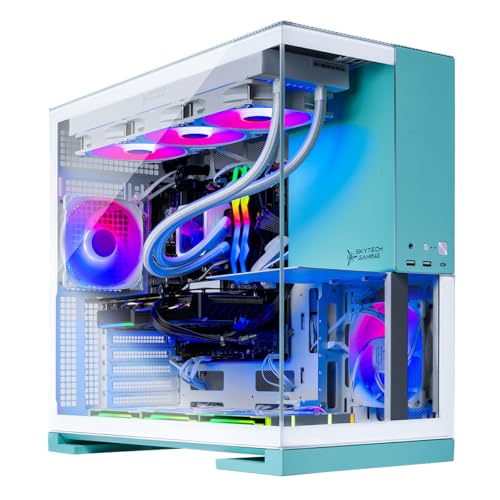
Where to buy
Check the latest price, availability and delivery on Amazon. Orders are placed on Amazon. We may earn a commission from qualifying purchases.
- Best overall for play-and-broadcast: Skytech Gaming Aqua, Ryzen 7 9800X3D, RTX 5070 Ti 16GB, 2TB SSD — Check on Amazon
- Skytech Gaming Rampage, Ryzen 7 7800X3D, RTX 5070 Ti 16GB — Check on Amazon
- CyberPowerPC Gamer Supreme Liquid Cool, Ryzen 7 7800X3D, RTX 4070 Ti Super 16GB — Check on Amazon
- STORMCRAFT Falcon, Ryzen 7 7800X3D, Radeon RX 9070 XT 16GB — Check on Amazon
See 2 more Amazon options
- MSI Aegis ZS2, Ryzen 9 7900X, RTX 4070 Super 12GB — Check on Amazon
- MXZ Gaming PC, Ryzen 7 7800X3D, RTX 4070 Super 12GB, 16GB DDR5 — Check on Amazon
Read the full guide ↓
Disclosure: As an Amazon Associate, reviewstook.com earns from qualifying purchases. Links to Amazon on this page are affiliate links; they cost you nothing extra. Listing details such as price and availability change often, so check the current Amazon listing before you buy.
A streaming PC has to do three jobs at the same time: render your game, encode the broadcast your audience watches, and — if you take your channel seriously — record a clean local copy of everything for edits and uploads. A machine can be excellent at the first job and quietly bad at the other two, which is why this guide grades the same class of hardware a plain gaming guide would, but on different evidence. The specification that defines a modern streaming PC is not the frame rate on the box; it is the encoder hardware inside the graphics card. Every NVIDIA pick below carries two hardware encoders, which means the stream and the local recording each get their own dedicated silicon and neither touches the processor or steals frames from the game. That dual-encoder workflow — broadcast on one, archive on the other — is what this budget is really for, and it is the standard the six machines below are judged against.
Two honesty notes before the picks. The first is about the ceiling nobody at this price can break: 4K streaming is limited by the platforms, not by your hardware. Twitch’s standard ingest sits around 6,000 kbps of H.264, with its Enhanced Broadcasting programme raising that to roughly 7,500 kbps at 1080p and around 9,000 kbps at 1440p for Affiliates and Partners; YouTube is far more generous, accepting on the order of 12 Mbps of AV1 or HEVC at 1080p60 and roughly 35 Mbps at 4K60. Even the cheapest machine in this guide can encode far beyond what Twitch will accept. What $2,500 buys a streamer is therefore not a higher-resolution broadcast — it is a 1080p broadcast that never stutters while the game runs at high refresh, a simultaneous high-bitrate local recording, and a machine with the storage and cores to turn that recording into edited video afterwards. The second note is about price: the top of this budget on Amazon is thin and moves with component costs, so always check price on Amazon before you buy, and note that two picks only belong in the guide when their live price sits inside the budget. If one has drifted above $2,500 when you click, it has left the budget — the pick below it will serve you nearly as well.
In this guide
Quick Picks
Short on time, or comparing several options at once? Each row below names a streaming buyer type and the machine that suits it, with a link to the listing.
| Buyer type | Pick | Why it stands out | Link |
|---|---|---|---|
| Best overall for play-and-broadcast | Skytech Gaming Aqua, Ryzen 7 9800X3D, RTX 5070 Ti | Dual ninth-generation NVENC with AV1, the fastest gaming CPU here, 2TB for recordings | Check on Amazon |
| Best value streamer | Skytech Gaming Rampage, Ryzen 7 7800X3D, RTX 5070 Ti | The same dual-encoder GPU tier at a lower price point — check price on Amazon | Check on Amazon |
| Best record-everything value | CyberPowerPC Gamer Supreme Liquid Cool, RTX 4070 Ti Super | Dual Ada NVENC, 16GB GPU memory and 2TB of recording space — check price on Amazon | Check on Amazon |
| Best for streamers who edit and produce | MSI Aegis ZS2, Ryzen 9 7900X, RTX 4070 Super | Twelve cores for the editing and exporting that happen between streams | Check on Amazon |
| Best Radeon — with an encoder caveat | STORMCRAFT Falcon, Ryzen 7 7800X3D, RX 9070 XT | Elite raster frames per dollar; the encoder is its one compromise | Check on Amazon |
| Cheapest dual-encoder entry | MXZ Gaming PC, Ryzen 7 7800X3D, RTX 4070 Super | X3D chip and dual NVENC at the lowest price point here — with one catch | Check on Amazon |
How These Picks Were Chosen
The budget was applied as a ceiling, not a target: every machine below is a real Amazon listing positioned at or below $2,500 in the United States — check price on Amazon for the current figure, since listings move often. Machines positioned above the ceiling were excluded however strong their specifications, and that excluded famous hardware: RTX 5080 prebuilts start above this budget, and at least one major brand’s RTX 5070 Ti desktop sits well above it on Amazon. If you are reading during a component-price surge, expect the two ceiling picks to wobble in and out of budget; the mid-range picks are the stable core of the guide.
We did not use these machines ourselves. We read the maker listings and specification pages, and graded what a streaming workload actually loads. The first filter is the encoder count and generation. NVIDIA’s published specifications give the RTX 5070 Ti two ninth-generation NVENC encoders with AV1 encode, and the previous generation’s RTX 4070 Ti Super and RTX 4070 Super carry two eighth-generation Ada encoders, also with AV1 — so five of the six picks can run a broadcast encode and a separate recording encode at the same time without either job touching the CPU. The second filter is the processor philosophy, and this guide refuses to pretend one answer fits everyone: AMD’s X3D chips, with their stacked 3D V-Cache, are the fastest gaming processors here and the right choice when the machine’s job is to play and broadcast; the one twelve-core pick earns its place because a working channel also edits, exports and compiles, and those jobs eat cores, not cache. The third filter is the archive: local recordings at high bitrate are enormous, so 2TB of storage is scored as a streaming feature, not a luxury, and the picks with 1TB are flagged for it. The fourth is the unglamorous foundation — a named 850W Gold power supply or equivalent, 32GB of memory for a game plus OBS plus a browser plus chat, and cooling that holds clocks through a four-hour session rather than a four-minute benchmark.
One framing filter sits on top of all of that. A pick earns its place here only if it does something for a streamer that a budget machine cannot: run the dual-encoder workflow with headroom to spare, keep a high-refresh game perfectly smooth while both encoders work, or absorb the production workload around the stream. A machine that merely streams adequately is overpriced at this budget by definition — the cheaper tiers of this same category do that job honestly, and this guide will point you down to them where it should.
Two Encoders, Two Jobs
The single most useful way to understand this tier is to watch what happens inside the graphics card during a serious stream. Your audience’s broadcast is one encode: OBS takes the rendered game, compresses it to your platform’s bitrate — around 6,000 kbps on Twitch — and sends it out. Your archive is a second, completely separate encode: a local recording written at a bitrate ten or twenty times higher, so that tomorrow’s edited video, highlights package or sponsor deliverable is cut from a clean master rather than from the compressed stream your viewers saw. On a single-encoder card, or worse, encoding on the CPU, those two jobs compete with each other and with the game. On the dual-NVENC machines that fill this guide, each job gets dedicated hardware. The game never knows the recording exists; the recording never knows the stream exists. That separation, more than any frame rate, is what separates a streaming PC from a gaming PC with OBS installed.
The encoder generation matters second, and it matters in a specific way. The RTX 5070 Ti picks carry NVIDIA’s ninth-generation NVENC, the 4070-class picks the eighth-generation Ada design; both generations encode AV1 as well as H.264 and HEVC. AV1 is the present and future of this workflow — YouTube accepts AV1 ingest today and rewards it with visibly cleaner results at the same bitrate, and a high-bitrate AV1 local recording is the best master format a creator at this level can keep. Twitch remains the conservative platform: H.264 at roughly 6,000 kbps is still its standard shape, with higher-bitrate HEVC arriving through Enhanced Broadcasting for Affiliates and Partners. So the honest summary of the whole encoder question at $2,500 is this: the hardware in this guide is already ahead of the platforms. Your broadcast resolution and bitrate will be set by Twitch’s and YouTube’s ingest rules, not by your PC — and anyone who sells you a “4K streaming PC” without explaining that is selling you the platform’s ceiling as if it were the machine’s.
What, then, does the money actually buy a streamer? Height and stability everywhere the platform does not cap you. The game itself runs at 1080p on your monitor at the high refresh rates these X3D processors exist for, completely independent of the 1080p60 shape of the broadcast. The local recording is written at whatever bitrate your storage allows. The editing session the next morning — timeline scrubbing, effects, the export — runs on hardware with cores, memory and drive space in reserve. And the stream stays clean in the moments that break lesser setups: the forty-person fight, the scene transition with three overlays and a browser source, the game that patches mid-session. Streaming failures are almost never average-case failures; they are worst-case failures. This tier is priced for the worst case.
What $2,500 Does Not Include
Every price in this guide buys the tower and nothing else, and a streaming setup is not a tower. Budget separately for the kit that makes a broadcast watchable, because none of it is inside any pick’s price. A USB microphone listeners can tolerate for three hours matters more than everything else on this list combined — audiences forgive soft video long before they forgive bad audio. A 1080p webcam is a modest separate purchase. A basic light to keep that camera honest is a small further spend. A second monitor — for chat, OBS and alerts, so the game never shares its screen — is close to non-negotiable for a working streamer. And if you plan to stream a console, a capture card is a separate purchase that no PC in this guide replaces. Add it up and a realistic streaming setup adds a meaningful extra spend beyond the machine, before the high-refresh monitor this hardware assumes.
The 6 Best 1080p Streaming PCs Under $2,500
Skytech Gaming Aqua — Ryzen 7 9800X3D, RTX 5070 Ti 16GB, 2TB SSD
Who it suits: Streamers who play competitive, high-refresh titles and broadcast them — the player whose game, stream and recording all have to be perfect at the same time, in the same fight.
Start with the silicon that defines this guide. The RTX 5070 Ti carries two ninth-generation NVENC encoders with AV1 support, per NVIDIA’s published specifications, which makes the Aqua the cleanest expression of the dual-encoder workflow here: one encoder broadcasts your 1080p60 stream, the second writes a high-bitrate local recording, and neither job costs the game a frame. In front of that card sits the Ryzen 7 9800X3D — eight cores with 3D V-Cache, 4.7GHz base and boost to 5.2GHz per the listing — the fastest gaming processor class in this guide, and at 1080p, where the processor sets the frame rate, that is the part your viewers’ smooth broadcast ultimately rests on: a stream can only be as stable as the game feeding it. The supporting specification is the most complete here for a creator’s week: 32GB of DDR5 at 6000 speed, a 2TB Gen4 NVMe SSD with room for a real archive of recordings rather than a weekend’s worth, an 850W Gold ATX 3 power supply, a 360mm ARGB liquid cooler for long sessions, Wi-Fi and Windows 11.
The price discipline is the same as in the base guide, because the facts are the same: this configuration sits right at the top of the budget, and it has been seen higher when component prices spiked. Treat it as a deal-dependent pick, full stop — check price on Amazon before you buy; at a live price above $2,500 it has left this guide, and the Rampage below is the correct purchase. Skytech also states in its listings that the graphics card brand may vary — the 5070 Ti tier and its dual encoders are the guarantee, not a specific card model. One streaming-specific consideration completes the profile: the 9800X3D’s eight cores are a gaming specialist’s eight cores. With the encoders on the GPU, that is no handicap while you broadcast — OBS’s scene compositing is light work — but if your channel’s centre of gravity shifts toward heavy live production, VTubing rigs and a dozen animated sources, the twelve-core MSI pick below is built for that shape of work. For playing and broadcasting at the highest level this budget allows, nothing here beats the Aqua.
- RTX 5070 Ti with dual ninth-generation NVENC and AV1 — stream and high-bitrate local record on separate encoders.
- Ryzen 7 9800X3D — the fastest gaming CPU class in the guide, feeding the broadcast from a high-refresh game.
- 2TB Gen4 SSD and 32GB DDR5-6000 — an archive that survives a month of recordings, and memory for game plus OBS plus chat.
Honest limitation: It only fits this budget when its live price behaves — check price on Amazon before you buy — and the graphics card brand may vary per the listing.
Choose it if you play and broadcast competitive titles and want the dual-encoder workflow with the strongest gaming processor under the ceiling. Skip it if the live price has drifted over $2,500, or your workload is production-first — the MSI’s twelve cores serve that better for less.

Skytech Gaming Rampage — Ryzen 7 7800X3D, RTX 5070 Ti 16GB, 1TB SSD
Who it suits: The streamer with the same dual-encoder ambitions as the Aqua buyer, who would rather fund the microphone, camera and second monitor out of the saving than pay for the last increment of processor.
The streaming hardware here is identical in kind to the top pick’s, and that is the whole argument. The same RTX 5070 Ti tier means the same two ninth-generation NVENC encoders, the same AV1 encode, the same ability to broadcast and record simultaneously on dedicated silicon. The processor steps back one generation to the Ryzen 7 7800X3D — 4.2GHz base, boost to 5.0GHz, the same 3D V-Cache formula — which remains one of the finest gaming processors ever made and is more than equal to feeding a 1080p broadcast from a high-refresh game. Where the money was saved, it was saved in places a streamer should examine honestly: memory is 32GB of DDR5 at 5600 rather than 6000, which no streaming workload will ever detect, and storage is a 1TB Gen4 NVMe SSD rather than 2TB, which a recording workload absolutely will detect. The 850W Gold ATX 3 power supply and 360mm ARGB liquid cooler are retained, so the foundation is uncut.
This exact configuration sits noticeably lower in the budget than the Aqua on Amazon — check price on Amazon for the current figure — for the same encoder hardware and the same graphics tier. For a streaming budget, that gap is not a footnote; it can cover much of the peripheral kit in the “What $2,500 Does Not Include” section above. The storage caveat deserves its full size: high-bitrate local recordings consume space at a rate new streamers consistently underestimate, and a 1TB drive shared with a modern game library will have you deleting masters or buying a second SSD sooner than you planned — the platform makes adding one easy, and you should price that in rather than pretend it away. Skytech’s graphics-card-brand-may-vary note applies here as it does to the Aqua. Judged purely as a streaming purchase — encoders first, game second, archive third — the Rampage is the pick we would show a working streamer first, because it spends the budget where a broadcast can actually feel it.
- The same dual ninth-generation NVENC and AV1 hardware as the top pick — check price on Amazon.
- Ryzen 7 7800X3D — an elite gaming processor feeding the stream, with 32GB of DDR5 behind it.
- The lower price point versus the Aqua leaves room in the budget for the microphone, camera and second monitor a stream actually needs.
Honest limitation: The 1TB SSD is the tightest archive in the guide — high-bitrate recordings will force a second drive sooner than you expect.
Choose it if you want the modern dual-encoder tier at its lowest price point and will manage or expand storage. Skip it if you record everything and hate storage housekeeping — the CyberPowerPC below pairs dual encoders with 2TB for less.

CyberPowerPC Gamer Supreme Liquid Cool (SLC8480A3) — Ryzen 7 7800X3D, RTX 4070 Ti Super 16GB, 2TB SSD
Who it suits: The record-everything streamer — the creator who archives every session in high bitrate, edits from local masters, and would rather have last generation’s flagship-class card and double storage than this generation’s badge.
The specification reads like it was assembled by someone who understood the assignment: a Ryzen 7 7800X3D at 4.2GHz, an RTX 4070 Ti Super with 16GB of graphics memory, 32GB of DDR5 and a 2TB PCIe Gen4 SSD, in CyberPowerPC’s liquid-cooled Gamer Supreme line with Windows 11 Home. For streaming, the 4070 Ti Super’s credentials are generational rather than weak: its two eighth-generation Ada NVENC encoders run the same dual-job workflow as the 5070 Ti picks — broadcast on one, high-bitrate local record on the other — with AV1 encode for YouTube ingest and for your archive format. What you give up against the newer cards is the 50-series’ latest frame-generation features, which are a gaming luxury, not a streaming one; no viewer ever saw a frame-generation setting. What you gain is the archive: 2TB of fast storage in the guide’s cheapest dual-encoder machine, from the biggest name in American prebuilts, with the liquid cooling to hold clocks through marathon sessions.
This machine is positioned as the value outlier of the guide on Amazon — check price on Amazon for the current figure, since prebuilt pricing moves with component costs and sale cycles. As long as its live price stays clearly below the 5070 Ti picks, its argument holds; a live price drifting toward theirs dissolves it, and the reviews’ rule applies — judge it on the live listing, not on past sale coverage. The remaining cautions are the generational ones: a previous-generation card has fewer years of feature support ahead of it than a 50-series card, and CyberPowerPC, like its rivals, varies minor components by production run. Neither dents the central case. For the streamer whose bottleneck is archive space and encoder headroom rather than launch dates, this is the most recording you can buy under the ceiling.
- Dual eighth-generation Ada NVENC with AV1 — the full stream-plus-record workflow on dedicated hardware.
- 2TB Gen4 SSD and 32GB DDR5 — the archive capacity the 1TB picks make you add later.
- The lowest dual-encoder price point in this guide — check price on Amazon.
Honest limitation: A previous-generation graphics card, and its value case depends on the live price — check price on Amazon before you buy.
Choose it if you record every session and edit from local masters, and value per dollar outranks the newest generation. Skip it if you want the 50-series feature set and the longest support runway — the Rampage is the newer tier at a still-sensible price point.

MSI Aegis ZS2 (B7NUE-853US) — Ryzen 9 7900X, RTX 4070 Super 12GB, 2TB SSD
Who it suits: The production-heavy creator — the streamer whose channel runs on edited videos, exports, thumbnails and compilations as much as on live hours, and whose PC works a full shift between broadcasts.
This pick breaks the guide’s X3D pattern deliberately, and a streaming guide is exactly where the break makes sense. The Ryzen 9 7900X is a twelve-core, twenty-four-thread processor — 4.7GHz base, boost to 5.6GHz on AMD’s B650 platform per MSI’s specification — and those cores are not for the live hours. While you broadcast, the RTX 4070 Super’s two eighth-generation Ada NVENC encoders do the streaming work, with AV1 for YouTube and the local archive, exactly as on the other NVIDIA picks. The twelve cores earn their money around the stream: chewing through a video export while yesterday’s VOD uploads, scrubbing a dense editing timeline, compiling, rendering a highlights package — the production queue that decides whether a channel posts three times a week or once. Around that pairing, MSI builds the most conventionally complete system here: 32GB of DDR5, a 2TB M.2 NVMe SSD for the archive, liquid cooling, an 80+ Gold power supply, Wi-Fi 6E, a bundled keyboard and mouse, and Windows 11 Home, in a case from a component maker that expects owners to open it and upgrade it.
This configuration is a premium-positioned pick on Amazon, and it has also been seen far lower at warehouse retail, so it rewards a price check — check price on Amazon — and punishes an impulse buy in the wrong week. The gaming honesty note must be direct, because streamers feel it live: in purely CPU-limited games at 1080p, this machine will usually trail the X3D picks despite costing more than some of them, since games reward cache over core count — your broadcast will be flawless, but the high-refresh headroom behind it is a step below the Aqua’s and Rampage’s. Its 12GB of graphics memory is also the joint-smallest here: ample for 1080p streaming and play for years, with less to spare if a 4K monitor joins the desk. Buy it as a production workstation that streams superbly and it is the most versatile machine in the guide. Buy it as a pure play-and-broadcast box and you have paid for cores your stream will leave idling.
- Ryzen 9 7900X, 12 cores / 24 threads — the editing, exporting and compiling pick, by a distance.
- Dual Ada NVENC with AV1 — the live workflow is fully covered while the cores handle production.
- 2TB NVMe SSD, liquid cooling, Wi-Fi 6E and bundled peripherals — the complete-box MSI build.
Honest limitation: No X3D cache, so high-refresh gaming usually trails the cheaper X3D picks, and the RTX 4070 Super’s 12GB is the joint-smallest memory here.
Choose it if your channel’s bottleneck is production — edits, exports and uploads between streams. Skip it if the machine only plays and broadcasts: the X3D picks are faster where you will feel it and mostly cheaper.

STORMCRAFT Falcon — Ryzen 7 7800X3D, Radeon RX 9070 XT 16GB, 1TB SSD
Who it suits: The raster-first streamer — competitive and traditional titles, a high-refresh monitor — who wants the strongest frames per dollar in the guide and is willing to accept the one compromise this guide exists to grade.
The gaming half of this machine is beyond argument: a Ryzen 7 7800X3D driving a Radeon RX 9070 XT with 16GB of GDDR6 memory, backed by 32GB of DDR5 RGB at a full 6000 speed, a 1TB Gen4 NVMe SSD, an 850W Gold ATX 3 power supply, a 360mm liquid cooler, USB-C, Bluetooth and Wi-Fi, and Windows 11 Home, with the machine bundled as VR-ready. In rasterized games — which is to say, in nearly everything competitive players actually stream — that pairing delivers very high-refresh 1080p with room to spare, and the game feeding your broadcast will never be the problem. The compromise is the encoder, and this guide grades it plainly rather than waving it through: AMD’s current media engine encodes a perfectly serviceable stream, and for a single broadcast at platform bitrates many streamers would never see the difference. But the dual-job workflow that defines this tier — broadcast and high-bitrate archive running as two fully independent hardware encodes, inside the OBS and NVENC ecosystem most streaming software is tuned around — is the RTX picks’ home ground, and the Falcon is the one machine here where the streaming layer, not the gaming layer, is the reason to pause.
Price sharpens the decision rather than settling it. The Falcon sits right at the top of this budget on Amazon — check price on Amazon — while the same model has been seen lower from other major retailers, so the live Amazon price decides its argument: when it sits lower in the range it is arguably the frames-per-dollar champion of this entire guide for a streamer whose encoder needs are simple; at the top of the budget, the Rampage’s dual ninth-generation NVENC makes the stronger streaming case at a similar price point. Add the familiar ecosystem notes — no DLSS, with AMD’s FSR as the alternative, and ray tracing that trails the RTX picks when every effect is enabled — and the profile is honest and narrow. Buy the Falcon for the game. Accept its encoder as good rather than best-in-class. If the broadcast is the business, buy an RTX pick instead.
- RX 9070 XT 16GB — elite raster performance for the competitive titles that dominate streaming.
- 32GB DDR5-6000 and an 850W Gold ATX 3 PSU — no supporting-part compromises.
- 7800X3D plus VR readiness — the game side of the broadcast is never the weak link.
Honest limitation: The encoder is the compromise: capable for a single stream, but the dual-encoder workflow and streaming-software ecosystem favour the RTX picks — and its Amazon pricing sits right at the top of the budget, so check price on Amazon before you buy.
Choose it if your streams are raster-first competitive titles, your encoder needs are simple, and the live price sits comfortably inside the budget. Skip it if you record-and-stream simultaneously as a matter of routine, or rely on NVENC-tuned streaming software — that is the Rampage’s and CyberPowerPC’s job.

MXZ Gaming PC — Ryzen 7 7800X3D, RTX 4070 Super 12GB, 16GB DDR5
Who it suits: The focused esports streamer on the tightest budget here — one or two competitive titles, a lean OBS setup — who wants genuine dual-encoder hardware and an X3D processor at the lowest entry price, and is comfortable adding a memory stick later.
MXZ is a smaller builder than the household names above, and its formula spends on the two parts a streamer feels and saves on the one they can fix. The spending is real: the same Ryzen 7 7800X3D that anchors three other picks, and an RTX 4070 Super whose two eighth-generation Ada NVENC encoders deliver the full dual-job workflow — a 1080p60 broadcast on one encoder, a high-bitrate AV1 local recording on the other — that far pricier machines are bought for. Add a B650 motherboard, a 1TB NVMe SSD, six RGB fans and Windows 11 Pro rather than Home, and the streaming core of this machine is not a budget experience in any sense. Check price on Amazon for this configuration: it is positioned as the lowest entry point here for an X3D system with dual NVENC, and it is why this machine closes the guide rather than a better-known brand’s weaker build.
Now the catch, stated at full size because streaming makes it bigger, not smaller: this configuration ships with 16GB of DDR5 memory in a guide where every other pick carries 32GB. Sixteen gigabytes runs a competitive title and a disciplined OBS setup perfectly well — but streaming is a multitasking workload by definition: the game, OBS with its scenes and browser sources, Discord, a browser full of dashboard tabs and the recording all draw on the same pool, and that is precisely the combination that pushes against 16GB in a way pure gaming does not. The fair way to judge this machine is therefore its price plus one matching memory upgrade, done sooner rather than later, and even counted that way it undercuts most of the guide. The 1TB drive fills quickly under a record-everything habit, and the smaller maker runs a smaller support operation than CyberPowerPC or MSI. For a confident buyer running a lean, focused stream, this is excellent value. If your scenes are heavy, your browser is a second desktop, or you want 32GB and a big-brand warranty from day one, spend the difference on the picks above.
- 7800X3D plus dual Ada NVENC — the full stream-and-record workflow; check price on Amazon.
- DDR5-6000 memory, B650 platform and Windows 11 Pro — the bones are right.
- The lowest entry price point to this guide’s defining hardware.
Honest limitation: Only 16GB of RAM where every rival here ships 32GB — a real constraint under streaming multitasking, so budget for a matching upgrade — and a smaller maker means a smaller support operation.
Choose it if you run a lean esports stream and want dual-encoder hardware at the lowest price point. Skip it if your OBS scenes are heavy, you multitask hard while live, or you want the archive space and memory finished from the factory.

Comparison Table
| Product | CPU / GPU | RAM / Storage | Best streaming use | Link |
|---|---|---|---|---|
| Skytech Gaming Aqua | Ryzen 7 9800X3D / RTX 5070 Ti 16GB | 32GB DDR5-6000 / 2TB Gen4 | Dual 9th-gen NVENC: high-refresh play, stream and archive at once | Check on Amazon |
| Skytech Gaming Rampage | Ryzen 7 7800X3D / RTX 5070 Ti 16GB | 32GB DDR5-5600 / 1TB Gen4 | The same dual-encoder tier at a lower price point | Check on Amazon |
| CyberPowerPC Gamer Supreme SLC8480A3 | Ryzen 7 7800X3D / RTX 4070 Ti Super 16GB | 32GB DDR5 / 2TB Gen4 | Dual Ada NVENC with a 2TB archive at a value price point | Check on Amazon |
| MSI Aegis ZS2 B7NUE-853US | Ryzen 9 7900X / RTX 4070 Super 12GB | 32GB DDR5 / 2TB NVMe | Twelve cores for the production work around the stream | Check on Amazon |
| STORMCRAFT Falcon | Ryzen 7 7800X3D / RX 9070 XT 16GB | 32GB DDR5-6000 / 1TB Gen4 | Raster-first streaming; encoder is the compromise | Check on Amazon |
| MXZ Gaming PC | Ryzen 7 7800X3D / RTX 4070 Super 12GB | 16GB DDR5-6000 / 1TB NVMe | Dual NVENC on the tightest budget — add RAM | Check on Amazon |
How to Choose a 1080p Streaming PC Under $2,500
- Count encoders before you count frames. The defining specification of this tier is two hardware encoders in the graphics card — one for the broadcast, one for the local recording. Five of the six picks have them; the sixth is graded openly on its encoder compromise. A faster card with a weaker streaming layer is the wrong purchase for this job.
- Split the CPU question honestly. If the machine plays and broadcasts, an X3D processor is the answer — the GPU does the encoding, and cache wins the game. If the machine also edits, exports and produces the channel’s videos, cores earn their keep. Decide which streamer you are before you decide which chip; this guide’s Skytech and MSI picks are the two sides of that fork.
- Know the platform ceiling before you spend against it. Twitch ingests around 6,000 kbps as standard; YouTube accepts far more and rewards AV1. No PC at any price broadcasts 4K to Twitch, because the limit is the platform’s, not the hardware’s. Spend on stability, recording quality and production speed — the things that are actually yours to buy.
- Size storage for the archive, not the library. High-bitrate local recordings dwarf game installs over a season. The 2TB picks hold a real archive; the 1TB picks need a second drive or a deletion habit. Price the drive you will inevitably add into the 1TB machines.
- Insist on 32GB of memory for a streaming workload. Game, OBS, browser sources, chat and recording together are a multitasking load. Five picks ship 32GB; the one that ships 16GB is flagged with its upgrade priced into its review.
- Wire the connection. Ethernet, always. Every pick here also carries Wi-Fi, and none of them should use it for a broadcast if a cable can reach. More streams die of home networking than of hardware.
- Budget the kit separately and first. Microphone, camera, light, second monitor, and a capture card if a console is involved — all of it beyond the tower, none of it inside any price in this guide. A Rampage plus a proper microphone out-streams an Aqua plus a headset mic every night of the week.
- Treat the ceiling picks as deal picks. Two machines here belong under $2,500 only when their live price behaves, not at the top of their range. Check price on Amazon, set a price alert, and let the stable mid-priced picks catch you if a surge week prices the ceiling picks out.
- Read the “brand may vary” line before ordering. Several makers vary the graphics card brand and minor components by production run. The GPU tier and its encoders are guaranteed; the exact card model is not. Confirm on the live listing if a specific model matters to you.
- Stream-test inside the return window. Run your heaviest game, your full scene collection and a simultaneous local recording in the first days, at your real bitrates, on your real connection. A streaming PC earns trust under its worst load or not at all — and the worst load is the only one your audience will remember.
Common Buying Mistakes
- Buying a “4K streaming PC.” The platforms cap the broadcast — Twitch around 6,000 kbps as standard — so the money buys nothing your viewers can see. Buy dual encoders, storage and stability instead.
- Encoding the stream on the CPU when the GPU has hardware encoders sitting idle. NVENC exists precisely so the processor never touches the broadcast; x264 on a gaming rig is a frame-rate tax you chose to pay.
- Recording to the same nearly-full 1TB drive the games live on, then losing masters to emergency deletions mid-season.
- Spending the whole budget on the tower and streaming through a headset microphone. Audio is the first thing audiences judge and the last thing PC listings mention.
- Streaming over Wi-Fi because the router is “fast.” Throughput was never the issue; jitter and interference are, and they arrive mid-broadcast.
- Choosing twelve cores for a play-and-broadcast box, or an X3D chip for an editing workstation. The two CPU philosophies in this guide are both right — for opposite streamers.
- Accepting 16GB of memory for a streaming workload without pricing the upgrade. It is the one specification here we flag as unfinished from the factory.
- Paying a ceiling pick’s list price during a component-price surge. Two picks in this guide are deal-price machines; above $2,500 they have left both the budget and the argument.
- Ignoring the “graphics card brand may vary” line, then being surprised by the specific model in the box. The tier and its encoders are the promise; check the live listing if the model matters.
Final Recommendation
- Most streamers at this budget: Skytech Gaming Rampage.
- Maximum play-and-broadcast performance: Skytech Gaming Aqua.
- Record-everything value: CyberPowerPC Gamer Supreme Liquid Cool.
- Production-heavy creators: MSI Aegis ZS2.
- Raster-first streamers on a deal: STORMCRAFT Falcon.
- Lean esports streaming on the tightest budget: MXZ Gaming PC.
Our top two at this budget are the Skytech Gaming Rampage, because the full dual-encoder RTX 5070 Ti workflow with an X3D processor at a lower price point — check price on Amazon — leaves budget alive for the microphone, camera and second monitor that decide whether a stream is watchable, and the Skytech Gaming Aqua, for the competitive streamer whose high-refresh game and broadcast both have to be flawless at once — provided its live price sits inside the budget and not above the ceiling. Between them they cover the two honest shapes of this search: the complete streaming workflow bought smartly, and the same workflow bought at maximum strength. The CyberPowerPC is the archive spoiler with 2TB at a value price point, the MSI is the right answer the moment the channel becomes a production business, the Falcon is the frames-per-dollar spoiler when its price behaves and its encoder compromise fits your setup, and the MXZ proves how far the entry price falls when you accept one memory upgrade. Readers whose streaming ambitions are real but whose budget is not should step down to Best 1080p Gaming PC For Streaming Under $1500, and readers who want a machine judged purely as a gaming PC will find this same hardware graded that way in Best 1080p Gaming PC Under $2500. Count your encoders, wire your connection, and check the live price before you order — at $2,500, that homework is the whole difference between a streaming PC and a gaming PC with OBS installed.
Frequently Asked Questions
Why do I need two encoders to stream?
Because a serious stream is two encodes, not one: the broadcast your audience watches, compressed to the platform’s bitrate, and a local recording at far higher bitrate that you later edit into videos and highlights. With two hardware NVENC encoders — every NVIDIA pick in this guide — each job runs on its own silicon, so the recording costs the stream nothing and the stream costs the game nothing. With one encoder, or with CPU encoding, the jobs compete, and something — usually the game’s frame rate — pays.
Can I stream in 4K with a PC at this budget?
The hardware can encode 4K easily; the platforms are the limit. Twitch’s standard ingest is around 6,000 kbps of H.264, with higher-bitrate HEVC arriving through Enhanced Broadcasting for Affiliates and Partners; YouTube is the generous exception, accepting roughly 12 Mbps of AV1 or HEVC at 1080p60 and around 35 Mbps at 4K60. So a “4K streaming PC” is, in practice, a YouTube 4K PC — and everywhere else, what this budget buys is a flawless 1080p broadcast, a high-refresh game behind it, and a high-bitrate local 4K-capable recording for edited uploads.
X3D or more cores — which CPU should a streamer choose?
It depends on where your hours go. If the machine plays and broadcasts, choose the X3D chip: the GPU’s encoders handle the stream, and the X3D’s cache delivers the fastest, most stable game for the encoder to capture. If the machine also produces the channel — editing timelines, exporting videos, rendering and compiling between streams — the twelve-core MSI pick converts those hours into output. The mistake is buying either philosophy for the other’s job.
Is AV1 worth caring about for streaming?
Yes, in two specific places. YouTube accepts AV1 ingest today and delivers cleaner quality at a given bitrate than H.264, and a high-bitrate AV1 local recording is the best master format these machines can keep. Twitch remains an H.264 platform at roughly 6,000 kbps as standard, with HEVC arriving through Enhanced Broadcasting — so AV1 is a YouTube and archive advantage now, not a Twitch one. Every NVIDIA pick here encodes it; the Radeon pick is where the encoder story needs the honest caveat given in its review.
How much storage does a streamer actually need?
More than gamers expect. A high-bitrate local recording habit consumes space at a rate that makes a 1TB drive — shared with a modern game library — a management chore within a season. The three 2TB picks in this guide hold a genuine archive; the 1TB picks are fine if you edit promptly and delete masters, or if you budget for the second SSD the platforms make easy to add. Record-everything streamers should treat 2TB as the floor, not the upgrade.
Why are some of these PCs sometimes listed above $2,500?
Because prebuilt prices move with component costs, memory most of all, and because list prices sit above the deal prices these machines actually trade at. Two picks here — the Aqua and the Falcon — sit at or above the ceiling at the top of their range and below it when their live price behaves, and rival brands’ equivalent systems sit well above this budget. The guide’s rule is strict: a machine is a sub-$2,500 pick only at a sub-$2,500 live price, so check price on Amazon, use price alerts, and let the stable mid-priced picks catch you in a surge week.
What else should I budget for beyond the PC?
The streaming kit, none of which is inside any price in this guide: a USB microphone (the single highest-value purchase in streaming), a 1080p webcam, a basic light, a second monitor for chat and OBS, and a capture card if you will stream a console. Budget for that kit separately, beyond the tower. First-time buyers at this level may also want the walkthrough in Best 1080p Gaming PC For Beginners Under $2500, and compact-desk streamers should see Best 1080p Gaming PC For Small Spaces Under $2500.


