Where to buy
Check the latest price, availability and delivery on Amazon. Orders are placed on Amazon. We may earn a commission from qualifying purchases.
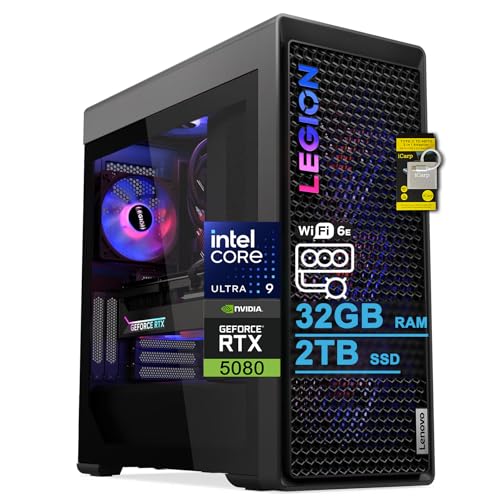
- Best overall under $3,000: Lenovo Legion Tower 7i Gen 10, Core Ultra 9 285K, RTX 5080 — Check on Amazon
- CLX Set Gaming PC, Ryzen 7 9800X3D, RTX 5080 — Check on Amazon
- Skytech King 95, Ryzen 7 9800X3D, RTX 5070 Ti — Check on Amazon
- Acer Nitro 60 N60-181-UR26, Ryzen 9 7900, RTX 5070 Ti — Check on Amazon
See 2 more Amazon options
- iBUYPOWER Y40 PRO, Ryzen 9 7900X, RTX 5070 Ti — Check on Amazon
- ZOTAC MEK Gaming PC, Ryzen 7 9700X, RTX 5070 Ti — Check on Amazon
Read the full guide ↓
Disclosure: As an Amazon Associate, reviewstook.com earns from qualifying purchases. Links to Amazon on this page are affiliate links; they cost you nothing extra. Listing details such as price and availability change often, so check the current Amazon listing before you buy.
Three thousand dollars for a 1080p gaming PC sounds, on first hearing, like a category error. Full HD is the resolution budget PCs brag about. A competent $800 tower plays esports titles at 1080p, a good $1,500 tower plays almost everything there at high settings, and the standard advice — which is correct as far as it goes — is that money beyond that should go to a better monitor, not a bigger tower. So let us be honest at the start about what this budget is and is not. It is not the sensible way to reach 1080p. It is the way to remove 1080p as a variable: to hold a 240 Hz or 360 Hz monitor at its refresh rate in competitive shooters, to max every slider including ray tracing in single-player games without watching the frame counter, to stream and record at the same time without the game noticing, and to keep doing all of that through several years of heavier releases instead of upgrading next season. If your monitor is 1080p at 60 Hz or even 144 Hz and you play on the couch, this entire guide is more PC than you need, and the honest recommendation is to spend half of it and bank the rest. If your monitor is fast, your games are competitive or your desk is also a streaming studio, read on — this is your tier.
The second honesty note concerns the ceiling, because at this budget the ceiling is the story. We verified every listing in this guide against real Amazon product pages, and here is what the market actually looks like just under $3,000: there is no RTX 5090 system anywhere near this money, and most RTX 5080 prebuilts sit above this budget. The 5080 machines that do appear under $3,000 — two of them lead this guide — get there on deal pricing that comes and goes rather than living there permanently, so check the current price on Amazon before assuming either still fits. The natural resident of this tier is the RTX 5070 Ti: a 16GB card that is heavily overpowered for 1080p today, paired in the best systems here with processors chosen for frame-rate consistency rather than core-count bragging. That is the correct shape for this search. At 1080p the graphics card finishes its work quickly and hands the problem to the CPU, so the difference between a good $3,000 1080p machine and a wasteful one is rarely the GPU badge — it is whether the processor, memory and cooling can feed high, stable frame rates for years. Below are the quick picks, detailed reviews of all six verified systems, a comparison table, a buying checklist, the mistakes that waste the most money at this tier, and the questions buyers ask before spending flagship money on a Full HD monitor.
In this guide
Quick Picks
Short on time, or comparing several options at once? Each row below names a buyer type and the system that suits it, with a link to the listing.
| Buyer type | Pick | Why it stands out | Link |
|---|---|---|---|
| Best overall under $3,000 | Lenovo Legion Tower 7i Gen 10, Ultra 9 285K, RTX 5080 | The only big-brand RTX 5080 tower verified under the ceiling, with 360mm liquid cooling and an 850W PSU | Check on Amazon |
| Best for esports frame rates | CLX Set, Ryzen 7 9800X3D, RTX 5080 | The strongest gaming CPU in this guide paired with an RTX 5080 — check the current price on Amazon | Check on Amazon |
| Best X3D value | Skytech King 95, Ryzen 7 9800X3D, RTX 5070 Ti | 9800X3D frame consistency with headroom left in the budget, with 850W Gold power and a 360mm AIO | Check on Amazon |
| Best for gaming plus creation | Acer Nitro 60 N60-181-UR26, Ryzen 9 7900, RTX 5070 Ti | A 12-core Ryzen 9 and 2TB of storage from a mainstream brand, verified right at the ceiling | Check on Amazon |
| Best for streaming and upgrading | iBUYPOWER Y40 PRO, Ryzen 9 7900X, RTX 5070 Ti | 12-core AM5 platform in a standard-layout showcase case, with keyboard and mouse in the box | Check on Amazon |
| Best for spending less | ZOTAC MEK, Ryzen 7 9700X, RTX 5070 Ti | The same 16GB GPU class positioned lowest in this tier, with Windows 11 Pro and Wi-Fi 6E — check price on Amazon | Check on Amazon |
How These Picks Were Chosen
The budget was applied as a hard ceiling: every system below is a real Amazon listing selected to fit under $3,000 in the United States, and where a system’s fit in this guide is deal-dependent the review says so plainly. Check the current price on Amazon for each pick before you buy. Two of the six picks are RTX 5080 systems that reach this guide on deal pricing; if either has drifted back above $3,000 when you read this, that is the market behaving as documented here, not a different machine.
We did not use these systems ourselves. We read the maker listings and specification pages and compared graphics cards, processors, memory capacity and speed, storage, power supply wattage and certification, cooling and connectivity, favoring listings that publish their numbers in full. Three 1080p-specific filters sat on top of the spec comparison. The first is the CPU filter: at 1920×1080 a flagship GPU renders frames so quickly that the processor becomes the limit in many games, so systems built around AMD’s X3D processors — whose stacked cache exists precisely to keep frame rates high and frame times even — were weighted ahead of prettier towers with ordinary chips. The second is the headroom filter: a $3,000 1080p purchase only makes sense if it also streams, records, runs a browser and voice chat, and survives tomorrow’s releases, so 32GB of memory and 2TB of storage (or a clear, cheap path to them) were treated as the expected standard, and 1TB systems were marked down for it in their reviews. The third is the honesty filter about your monitor: every review states who should skip the machine, and for most picks the first skip reason is a slow display — no tower in this guide can make a 60 Hz screen show more than 60 frames.
A note on graphics tiers, because the naming invites confusion. The RTX 5070 Ti and RTX 5080 both carry 16GB of GDDR7 memory, and at 1080p the practical gap between them is far smaller than at 4K: both are, frankly, more card than the resolution requires today. What the 5080 buys at this resolution is time — more headroom for ray tracing, for frame-generation features and for the heavier games of the next few years — and what it costs, most days, is a price above this guide’s ceiling. The 5070 Ti systems here are not consolation prizes; they are the tier’s center of gravity, and several of them put the savings into the X3D processor that 1080p play actually rewards.
The 6 Best 1080p Gaming PCs Under $3,000
Lenovo Legion Tower 7i Gen 10 — Core Ultra 9 285K, RTX 5080, 32GB DDR5, 2TB SSD
Who it suits: Buyers who want the flagship graphics tier from a mainstream brand with a national service network — the “buy it once, from a name I can call” purchase at this budget.
This is the system that defines the top of the verified market under $3,000: an RTX 5080 with 16GB of GDDR7, Intel’s 24-core Core Ultra 9 285K, 32GB of DDR5 memory and a 2TB SSD, cooled by a 360mm liquid cooler and powered by an 850W supply, in a tower of about 17.6 × 8.3 × 19.3 inches and just under 40 pounds. Check the current price on Amazon before you buy — most 5080 towers live above this budget, so treat this listing’s place in the guide as deal-dependent and verify that it still fits under the ceiling at checkout rather than assuming it. What the Lenovo badge adds over the boutique builders in this guide is everything around the spec sheet: a single warranty counter, standardized parts, and a listing that publishes its connectivity in full — Wi-Fi 6E, 2.5-gigabit Ethernet, Thunderbolt 4, a front USB-C and a generous spread of USB-A ports, with keyboard and mouse included. For a 1080p esports player who also edits video, the 285K’s core count is the point: the game runs on the fast cores while capture, encoding and everything else take the rest, and nothing in the machine argues with anything else.
The honest trade is the processor’s gaming character. The 285K is a formidable all-round chip, but at 1080p in purely CPU-limited esports titles, AMD’s X3D parts — two of which follow it in this guide — are generally the frame-rate specialists, because their cache feeds the game directly rather than adding cores the game cannot use. If your play is almost entirely competitive shooters on a 360 Hz screen, the CLX below is aimed at you. If your week mixes ranked matches with editing timelines, 3D work or heavy multitasking, the Lenovo’s balance is the better buy, and its 5080 gives it the longest graphics runway of any machine here. One more practical note: the listing’s memory ceiling is stated as 32GB, so treat the fitted memory as the configuration you are buying rather than a starting point for a 64GB upgrade plan.
- RTX 5080 16GB GDDR7 — the flagship-adjacent tier in a listing selected for this budget; check price on Amazon.
- 360mm liquid cooling and an 850W PSU named in the listing — no mystery power supply.
- Wi-Fi 6E, 2.5Gb Ethernet and Thunderbolt 4: the most complete connectivity in this guide.
Honest limitation: It reaches this budget on deal pricing that may not hold, its 24-core Intel chip is an all-rounder rather than the esports specialist, and the stated 32GB memory maximum limits one upgrade path.
Choose it if you want the strongest all-round machine and big-brand support at this budget. Skip it if your play is purely competitive and CPU-limited — the X3D systems below are built for exactly that — or the listing has drifted well above $3,000 when you check.

CLX Set Gaming PC — Ryzen 7 9800X3D, RTX 5080, 32GB DDR5, 2TB NVMe SSD
Who it suits: Competitive players on 240 Hz and 360 Hz monitors who want the strongest gaming processor in this guide and a flagship-tier card in the same box.
If a $3,000 1080p PC has a purest expression, this is it. The Ryzen 7 9800X3D is the processor high-refresh players actually ask for by name — eight cores with AMD’s 3D V-Cache stacked on top, a design that keeps game data close to the cores and produces the high, even frame rates that a fast monitor exists to display. CLX pairs it with an RTX 5080 16GB, 32GB of DDR5 RGB memory, a 2TB NVMe SSD and a 360mm all-in-one liquid cooler, with Wi-Fi and Windows 11 Home, in the Set’s panoramic-style case. Check the current price on Amazon for this combination — its usual positioning belongs a tier up, and its presence in this guide depends on catching its deal pricing on the right week. At 1080p this pairing is deliberately excessive in the one way that matters for esports: the GPU is never the bottleneck, the CPU is the best gaming chip in the comparison, and the frame-time graph — the thing you actually feel as smoothness — is as flat as current hardware makes it.
CLX is a boutique US builder rather than a global brand, and the trade-offs follow from that. You get a system assembled from standard desktop parts — easier to upgrade and repair over a long life than a proprietary big-brand chassis — in exchange for support that runs through a smaller company. The case is a showcase design with aRGB lighting, which some buyers will love and others will immediately switch off; either way it is a large visual presence on a desk. And the same deal-pricing warning as the Lenovo applies, doubled: at its usual positioning this machine sits above this guide’s budget, so the entire case for it here depends on its current pricing. Check the current price on Amazon first; if it currently fits under the ceiling, it is arguably the strongest buy in the guide for a competitive player, and if it does not, the Skytech below delivers the same processor philosophy while sitting comfortably in this tier.
- Ryzen 7 9800X3D — the frame-consistency specialist, and the CPU this resolution rewards most.
- RTX 5080 16GB with a 360mm AIO and 2TB NVMe storage: no weak line on the spec sheet.
- Standard-parts boutique build positioned above this tier at its usual pricing — check the current price on Amazon.
Honest limitation: Its under-$3,000 status is entirely deal-dependent, and boutique support is a smaller operation than a big brand’s service network.
Choose it if competitive frame rates are the whole point and its current pricing fits this budget. Skip it if the listing is currently above this budget — or you want mainstream-brand support and creator core counts, which is the Lenovo above.

Skytech King 95 — Ryzen 7 9800X3D, RTX 5070 Ti, 32GB DDR5, 1TB Gen4 SSD
Who it suits: Esports-first buyers who want the X3D processor and a 16GB flagship-class card, and would rather keep meaningful headroom in the budget than chase the last graphics tier.
The King 95 makes the argument that at 1080p, the smart $3,000-budget build spends on the CPU first. Its Ryzen 7 9800X3D — 4.7 GHz base, boosting to 5.2 GHz — is the same processor as the CLX above, and it is paired with an RTX 5070 Ti 16GB GDDR7 card, 32GB of DDR5-5600 RGB memory, an 850W Gold ATX 3.0 power supply and a 360mm ARGB liquid cooler, with Wi-Fi and Windows 11 in Skytech’s King 95 case. It sits comfortably under the ceiling, well below the deal-dependent 5080 systems — check the current price on Amazon — and that headroom is the review in one line: at 1920×1080, the 5070 Ti is already far more graphics card than the resolution can stress in competitive titles, so the money not spent on a 5080 is money not missed, while the X3D chip’s contribution to minimum frame rates is felt in every match. For a player whose library is Valorant, Counter-Strike, Apex, Fortnite and a rotation of shooters, this is the configuration a builder would spec with their own money, and it leaves budget inside the $3,000 envelope for the 360 Hz monitor that makes it meaningful.
Two limitations are printed in its own spec sheet. Storage is 1TB — half the 2TB of the systems above — and modern game libraries fill 1TB with four or five large installs and a capture folder; a second NVMe drive is a cheap, easy addition to a standard case like this, but it is an addition you should price in from day one. Second, Skytech’s listings carry the familiar note that the graphics card brand may vary: you are guaranteed the GPU model, not a specific partner card, which matters to buyers who care about a particular cooler design. Neither point is hidden, and neither undoes the value case — but a buyer who wants 2TB fitted from the factory and a named card should look at the Lenovo or the Acer instead.
- 9800X3D plus RTX 5070 Ti: the CPU-first split that suits 1080p high-refresh play best.
- 850W Gold ATX 3.0 PSU and 360mm AIO are named in the listing, not left to chance.
- Sits well under the ceiling — check price on Amazon — with the widest margin of any X3D system here.
Honest limitation: 1TB of storage is the smallest drive in this guide, and the exact graphics card brand varies by build.
Choose it if competitive play is the priority and you want the X3D advantage without deal-hunting. Skip it if you want 2TB fitted from the start or the RTX 5080’s extra longevity — and can catch the CLX while its pricing fits this budget.

Acer Nitro 60 N60-181-UR26 — Ryzen 9 7900, RTX 5070 Ti, 32GB DDR5, 2TB SSD
Who it suits: Buyers who split their desk time between games and creation — editing, rendering, coursework, a small business — and want a mainstream brand’s machine with cores to spare.
The Nitro 60 is the pragmatist’s flagship. Acer builds it around a 12-core Ryzen 9 7900 and an RTX 5070 Ti — listed at 1,406 AI TOPS, with the DLSS 4 feature set — plus 32GB of DDR5 and a 2TB PCIe 4.0 SSD, with Wi-Fi 6 and gigabit Ethernet. Its positioning in this tier is the most variable in this guide: it lives under the ceiling but sometimes only just, and at other times it sits far lower in the band, which makes it the pick where checking the listing matters most and rewards most. Check the current price on Amazon before judging it. What you get is balance with a creation tilt: twelve Zen 4 cores will not beat an X3D chip for esports minimum frame rates, but they will chew through exports, compiles and multitasking that an 8-core gaming chip handles more slowly, and at 1080p the 5070 Ti keeps every game in this discussion firmly in high-refresh territory anyway.
The Nitro line is Acer’s value-oriented gaming range, and two expectations should be set accordingly. The case and presentation are mainstream rather than showcase — this is a tool, not a light show — and the listing is thinner on power supply and cooling detail than the boutique systems in this guide, so buyers who plan a future graphics upgrade should confirm the PSU specification on the live listing before ordering. Ethernet is gigabit rather than the Lenovo’s 2.5-gigabit, a difference that matters only if your network can feed it. None of that dents the core proposition: a 12-core, 16GB-GPU, 2TB machine from a brand with global support, often sitting well under the ceiling — check the current price on Amazon.
- 12-core Ryzen 9 7900 — the multitasking and creation muscle of the mid-guide picks.
- 2TB PCIe 4.0 SSD and 32GB DDR5 fitted as standard.
- Positioning moves widely within this tier, so timing pays — check the current price on Amazon.
Honest limitation: It can sit close to the $3,000 ceiling, its listing leaves PSU detail unpublished, and its CPU favors productivity over esports frame-time consistency.
Choose it if your PC works as well as plays and its current pricing sits comfortably in this tier. Skip it if pure competitive frame rates are the goal, or its current pricing is at the very top of this band — the Y40 PRO below covers similar ground in the same tier; check its current price on Amazon as well.

iBUYPOWER Y40 PRO — Ryzen 9 7900X, RTX 5070 Ti, 32GB DDR5, 2TB NVMe SSD
Who it suits: Streamers and upgraders — buyers who want a standard-layout AM5 system that can grow, with the cores to run the stream and the game at once.
iBUYPOWER’s Y40 PRO (model Y40BA9N57T01) pairs a 12-core Ryzen 9 7900X with an RTX 5070 Ti 16GB, 32GB of DDR5 RGB memory at 5200 MHz, a 2TB NVMe SSD and Windows 11 Home, in the panoramic HYTE Y40 case, with a keyboard and mouse in the box and a one-year manufacturer warranty stated on the listing. Check the current price on Amazon — this system sits in the upper part of this tier. The streaming case writes itself: the 7900X’s twelve cores absorb the game, the encoder, the browser and the chat; the GPU’s hardware encoding keeps the stream smooth without taxing the game; and 2TB of storage holds the library and the VOD folder at the same time. The ownership case is just as strong. A standard ATX layout on AMD’s AM5 platform — a socket AMD has committed to supporting across multiple processor generations — means the two upgrades a machine like this eventually wants, a newer X3D processor and a bigger graphics card, are drop-in jobs rather than a new PC.
The compromises are in the finer print. The memory runs at 5200 MHz, slower than the 5600 and 6000 kits in rival systems here; at 1080p with a non-X3D processor that can cost a little frame-rate consistency in CPU-limited titles, and it is the first thing a performance-minded owner might swap. The listing does not headline its power supply either, so confirm wattage on the live page if a flagship GPU upgrade is part of the plan. And like the Acer, this is a 12-core all-rounder: magnificent at doing everything at once, a step behind the X3D pair at the single job of feeding a 360 Hz monitor in a shooter. Buy it for breadth and longevity, not for the last esports frame.
- Standard ATX, AM5 platform — the clearest upgrade path in this guide.
- 12 cores for streaming and multitasking, 2TB storage, keyboard and mouse included.
- Positioned in the upper part of this tier — check price on Amazon.
Honest limitation: DDR5-5200 is the slowest memory kit here, the PSU is not headlined in the listing, and esports specialists will prefer an X3D chip.
Choose it if you stream, multitask or plan to upgrade in place over several years. Skip it if competitive 1080p frame consistency is the whole brief — that is the King 95 above.

ZOTAC MEK Gaming PC — Ryzen 7 9700X, RTX 5070 Ti, 32GB DDR5, 1TB NVMe SSD
Who it suits: Buyers who want this tier’s graphics class and a clean, professional specification — and would rather keep a meaningful share of the budget for the monitor, chair or next upgrade.
The MEK is the guide’s exercise in spending less without leaving the tier. ZOTAC — a graphics card maker building its own systems — fits an RTX 5070 Ti 16GB GDDR7, a Ryzen 7 9700X boosting to 5.5 GHz, 32GB of DDR5-6000, a 1TB NVMe SSD and a 750W 80+ Gold power supply, with Wi-Fi 6E, Bluetooth 5.3, quad-display outputs and Windows 11 Pro. Check the current price on Amazon — either way, this is the lowest-positioned entry point in this guide by a wide margin. The specification is notably tidy: the memory is the joint-fastest here at 6000 MT/s, the power supply’s wattage and certification are printed rather than implied, and Windows 11 Pro is a small but real upgrade over the Home edition in every rival. At 1080p, the 9700X and 5070 Ti pairing will hold high-refresh frame rates in competitive titles and max settings in single-player ones; the gap to the X3D systems shows up mainly in the minimum frame rates of CPU-heavy games, not in whether the games run beautifully.
What its lower position in the tier gives up is storage and cache. The 1TB drive matches the King 95 as the smallest here, and the 9700X — an excellent conventional processor — lacks the X3D cache that makes its Skytech and CLX rivals esports specialists. Buyers should also note that secondary details in ZOTAC’s own materials have been inconsistent in places (the Windows edition and output descriptions), so verify the configuration on the Amazon listing itself at checkout; the headline specification we cite is the Amazon page’s. Judged fairly, this is the pick for the buyer who read the intro, agreed that $3,000 for 1080p is about headroom rather than need, and decided to buy most of the headroom and keep the change.
- Lowest-positioned entry in the guide — check price on Amazon.
- DDR5-6000, a named 750W 80+ Gold PSU, Wi-Fi 6E and Windows 11 Pro — a tidy spec sheet.
- ZOTAC builds its own graphics cards, and the MEK’s GPU is a named ZOTAC GAMING model.
Honest limitation: 1TB of storage, no X3D cache for CPU-limited esports titles, and some inconsistency in the maker’s secondary documentation — trust the Amazon listing.
Choose it if you want the tier’s GPU class with money left over for the rest of the setup. Skip it if you will spend the full budget anyway — the X3D systems convert it into frame consistency you can feel.

Comparison Table
| Product | CPU | GPU | Memory / Storage | Price | Link |
|---|---|---|---|---|---|
| Lenovo Legion Tower 7i Gen 10 | Core Ultra 9 285K, 24-core | RTX 5080 16GB | 32GB DDR5 / 2TB SSD | Check price on Amazon | Check on Amazon |
| CLX Set | Ryzen 7 9800X3D | RTX 5080 16GB | 32GB DDR5 / 2TB NVMe | Check price on Amazon | Check on Amazon |
| Skytech King 95 | Ryzen 7 9800X3D | RTX 5070 Ti 16GB | 32GB DDR5-5600 / 1TB Gen4 | Check price on Amazon | Check on Amazon |
| Acer Nitro 60 N60-181-UR26 | Ryzen 9 7900, 12-core | RTX 5070 Ti 16GB | 32GB DDR5 / 2TB PCIe 4.0 | Check price on Amazon | Check on Amazon |
| iBUYPOWER Y40 PRO | Ryzen 9 7900X, 12-core | RTX 5070 Ti 16GB | 32GB DDR5-5200 / 2TB NVMe | Check price on Amazon | Check on Amazon |
| ZOTAC MEK | Ryzen 7 9700X | RTX 5070 Ti 16GB | 32GB DDR5-6000 / 1TB NVMe | Check price on Amazon | Check on Amazon |
How to Choose a 1080p Gaming PC Under $3,000
- Start with the monitor, not the tower. This budget only makes sense in front of a 240 Hz or 360 Hz 1080p display. On a 60 Hz or 144 Hz screen, every system here is capped by the panel — buy a cheaper PC from Best 1080p Gaming PC Under $1500 and a better monitor instead.
- At 1080p, buy the CPU for frame consistency. The GPU finishes each frame quickly at this resolution, so minimum frame rates — the ones you feel as stutter — are set by the processor. AMD’s X3D chips exist for this; 12-core all-rounders exist for streaming and creation. Choose by your actual week.
- Treat the RTX 5080 as a deal, not a tier. Most 5080 prebuilts live above $3,000. The two in this guide fit this budget only when their current deal pricing does. If the current price on Amazon has climbed back over the line, the 5070 Ti systems are not a downgrade in any way you will feel at 1080p today.
- Demand 32GB of memory, and prefer 6000 MT/s on AMD. Every pick here has 32GB, which is the correct amount for gaming plus streaming plus a browser. Memory speed is a secondary but real factor in CPU-limited play; 5200 kits are the first upgrade candidate.
- Price in storage honestly. 2TB is the comfortable size for a modern library; the two 1TB systems here are excellent value precisely because a second NVMe drive is cheap and easy to add. Budget for it rather than discovering it.
- Insist on a named power supply. Wattage and certification printed in the listing — 850W Gold in the Lenovo, CLX class systems and King 95, 750W Gold in the ZOTAC — is the difference between an upgradeable machine and a question mark. Where a listing is silent, ask before you buy.
- Use frame generation for single-player, not for ranked. DLSS and multi frame generation make beautiful games smoother, but generated frames add latency. Competitive play should run native rendering with low-latency modes; save the AI frames for the story games.
- Check who supports the machine. Lenovo and Acer offer big-brand service networks; CLX, Skytech and iBUYPOWER offer standard-parts builds that any local shop can service. Both models can be right — decide which failure experience you prefer before you need it.
- Verify the exact configuration at checkout. Boutique listings sell near-identical titles with different CPUs, drive sizes and memory speeds, and some note that the GPU brand may vary. The ASIN on this page is the configuration reviewed; if the checkout page shows a different one, it is a different machine.
- Keep the total setup in the budget. A $3,000 tower in front of a basic budget monitor is a misallocation. The ZOTAC and King 95 exist in this guide partly so the full desk — fast monitor, decent peripherals — can land inside a sane total.
Why $3,000 at 1080p Is Really About Refresh Rate and Time
Strip the marketing away and this budget buys three things. The first is refresh rate made real. A 360 Hz monitor can only show what the PC delivers, and delivering a stable 300-plus frames in a modern shooter — not an average, a minimum that holds in the busiest fight — requires the strongest gaming processors made and a graphics card with nothing else to do. The second purchase is simultaneity: gaming, streaming, recording, voice, browser and background tasks all at once, at full quality, without the negotiations a mid-range machine forces — core counts and 32GB of memory are what that costs. The third is time. A 5070 Ti or 5080 system bought today for 1080p is not buying today’s frame rates, which a far cheaper PC also reaches; it is buying the frame rates of 2029’s releases at the same resolution, the GPU generations you will skip, and the upgrade you will not have to make mid-cycle. Judged on this year alone, every machine in this guide is overkill. Judged on a five-year desk, the arithmetic changes — which is why the reviews above keep returning to platform longevity, standard parts and named power supplies.
The counterargument deserves its paragraph too, because it is strong. Resolution is the one upgrade that makes games look categorically better, and every system here would drive a 1440p high-refresh monitor superbly — indeed Best 1080p Gaming PC For 1440p Gaming Under $3000 exists because so many buyers at this tier make exactly that move. If there is any chance your next monitor is 1440p, buy from this guide with confidence anyway: nothing here is a 1080p-only machine, and the headroom that is excessive at Full HD is simply correct at QHD. These six are the verified ceiling of the under-$3,000 market, and none of them needs the resolution to stay small in order to stay fast.
Common Buying Mistakes
- Pairing a $3,000 tower with a 60 Hz or 144 Hz monitor and wondering where the money went. The display is the ceiling on every frame this PC produces.
- Chasing an RTX 5090 at this budget. No verified system with one exists near $3,000; listings implying otherwise are selling a different configuration in the dropdown.
- Assuming a deal-dependent machine fits the budget without checking. The 5080 systems here sit above this tier at their usual positioning — check the current price on Amazon before deciding they are in or out of budget.
- Buying core count for an esports-only desk. Twelve and twenty-four cores help streamers and editors; a competitive-only player gets more from an X3D cache than from cores the game never touches.
- Ignoring the 1TB drive until the library outgrows it in the first month — then paying rush prices for storage that was cheap when planned.
- Trusting a near-identical listing title. Skytech, CyberPower-class builders and others sell the same case with three different processors; the ASIN and the spec lines, not the product family name, are the machine.
- Enabling frame generation in competitive titles and blaming the PC for input lag. Generated frames are for single-player smoothness; ranked play wants native frames and low-latency settings.
- Skipping the PSU line entirely. An unnamed power supply in a $3,000 purchase is the one component that can quietly veto every future upgrade.
- Spending the whole budget on the tower and nothing on the chair, monitor arm, headset or the second SSD — the setup is the product, not the box.
Final Recommendation
- Most buyers at this budget: Lenovo Legion Tower 7i Gen 10.
- Competitive players, when the deal is live: CLX Set, Ryzen 7 9800X3D, RTX 5080.
- Esports value without deal-hunting: Skytech King 95.
- Gaming plus creation: Acer Nitro 60 N60-181-UR26.
- Streaming and long-term upgrading: iBUYPOWER Y40 PRO.
- The full tier with headroom to spare: ZOTAC MEK.
Our top two at this budget split the brief exactly in half. The Lenovo Legion Tower 7i is the best all-round machine: an RTX 5080 in this tier — check the current price on Amazon — a 24-core processor that games and creates without compromise, the guide’s best connectivity and a big brand standing behind it. The CLX Set is the best pure gaming machine: the same flagship graphics tier paired instead with the 9800X3D that competitive 1080p play rewards most, and equally deal-dependent in this budget. If neither is sitting under $3,000 when you shop, the Skytech King 95 is the standing recommendation — X3D consistency and a 16GB card sitting well under the ceiling, no deal required; check its current price on Amazon — and the ZOTAC MEK is the value conscience of the guide, positioned lowest in the tier. Buyers whose needs are honestly smaller should step down to Best 1080p Gaming PC Under $2500 or Best Gaming PC Under $3000, and streamers comparing dedicated machines will want Best 1080p Gaming PC For Streaming Under $3000. Whichever you choose, check the current price on Amazon and verify the exact configuration on the listing first — at this tier, that two-minute check decides whether a system still belongs in this guide at all.
Frequently Asked Questions
Is a $3,000 PC for 1080p a waste of money?
For most people, yes — and this guide says so in its introduction. It makes sense for three buyers: competitive players feeding a 240 Hz or 360 Hz monitor, streamers who game and broadcast from one machine, and buyers purchasing five years of headroom in one step. On a 60–144 Hz display or a casual library, a system from our under-$1,500 coverage plus a better monitor is the smarter spend.
Can I actually get an RTX 5080 gaming PC for under $3,000?
Sometimes. Most RTX 5080 prebuilts sit above this budget, but deal pricing periodically brings specific systems — the Lenovo Legion Tower 7i and CLX Set in this guide — into this tier. Treat that as deal pricing to catch, not a permanent position, and check the current price on Amazon. No RTX 5090 system comes anywhere near this budget.
RTX 5070 Ti or RTX 5080 for 1080p?
At 1080p, the 5070 Ti is already more than the resolution stresses today, and both cards carry 16GB of GDDR7. The 5080 buys longevity and ray-tracing headroom, and it earns its premium if you may move to 1440p or keep the machine a long time. If the price gap is the difference between an ordinary CPU and an X3D chip, take the X3D chip — at this resolution it returns more.
Why do so many picks use the Ryzen 7 9800X3D?
Because 1080p is CPU-limited more often than any other resolution. The 9800X3D’s 3D V-Cache keeps game data beside the cores, which raises minimum frame rates and smooths frame times — exactly what high-refresh monitors display. It has only eight cores, so heavy multitaskers and creators are better served by the 12- and 24-core systems in this guide.
How much RAM and storage should a $3,000 gaming PC have?
32GB of DDR5 is the correct standard — every pick here meets it — and 64GB is a creator luxury rather than a gaming need. For storage, 2TB is the comfortable size for a modern library; the two 1TB systems in this guide sit lower in this tier, leaving room in the budget for adding a second NVMe drive, which is a simple, inexpensive upgrade in their standard cases.
Should I use DLSS frame generation on a machine this powerful?
For single-player games, yes — it adds smoothness the monitor can show and these cards support the latest multi-frame features. For competitive titles, run native rendering with low-latency settings instead: generated frames increase input latency, and at 1080p these systems produce all the real frames a fast monitor can use.
Will these PCs work if I upgrade to a 1440p or 4K monitor later?
Yes — that is half the point of the tier. Every system here, 5070 Ti and 5080 alike, is a strong 1440p high-refresh machine, and the 5080 pair are credible entry-4K systems with upscaling. Nothing in this guide is a 1080p-only purchase; the resolution in the title describes the buyer’s current monitor, not the machine’s ceiling.


