Where to buy
Check the latest price, availability and delivery on Amazon. Orders are placed on Amazon. We may earn a commission from qualifying purchases.
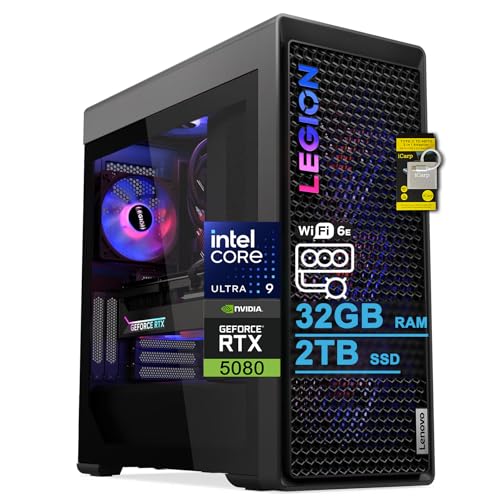
- Best 1440p ultra under $3,000: Lenovo Legion Tower 7i Gen 10, Core Ultra 9 285K, RTX 5080 — Check on Amazon
- CLX Set Gaming PC, Ryzen 7 9800X3D, RTX 5080 — Check on Amazon
- Skytech King 95, Ryzen 7 9800X3D, RTX 5070 Ti — Check on Amazon
- Acer Nitro 60 N60-181-UR26, Ryzen 9 7900, RTX 5070 Ti — Check on Amazon
See 2 more Amazon options
- iBUYPOWER Y40 PRO, Ryzen 9 7900X, RTX 5070 Ti — Check on Amazon
- ZOTAC MEK Gaming PC, Ryzen 7 9700X, RTX 5070 Ti — Check on Amazon
Read the full guide ↓
Disclosure: As an Amazon Associate, reviewstook.com earns from qualifying purchases. Links to Amazon on this page are affiliate links; they cost you nothing extra. Listing details such as price and availability change often, so check the current Amazon listing before you buy.
Start with the honest version of this search, because the keyword itself is slightly out of date. Nobody spending $3,000 on a gaming PC in 2026 is really buying “for 1080p” — and nobody should be. At this budget, 1080p stopped being a target several price tiers ago; it is simply the floor these machines walk across on their way somewhere else. The real destination, and the one this guide grades every system against, is 1440p: 2560×1440, roughly 78 percent more pixels than Full HD, sharp enough that individual pixels disappear at a normal desk distance, and light enough that a genuinely fast graphics card can still feed a high-refresh monitor at native resolution. Every one of the six systems below was verified on a real Amazon listing at or under $3,000, and every one of them is, in truth, a 1440p machine. The two RTX 5080 systems run 1440p at ultra settings with high-refresh headroom to spare, and carry enough power left over to upscale convincingly to a 4K display. The four RTX 5070 Ti systems are locked native-1440p high-settings machines — the tier’s natural residents, and the sensible center of this budget. So the question this guide actually answers is not “which of these can do 1440p” — they all can, comfortably — but which one matches the way you will use that headroom: all-in on 1440p ultra today, or a first credible step toward 4K tomorrow.
The second honesty note is about the ceiling, because just under $3,000 the ceiling is where the interesting buying happens. There is no RTX 5090 system anywhere near this money — the cheapest we could verify sits well above this budget — and most RTX 5080 prebuilts list above this budget, safely out of reach. The two 5080 systems that lead this guide are here because of deal pricing that brings them under the ceiling, pricing that appears and disappears rather than pricing that lives anywhere. Both reviews below carry walk-away rules for exactly that reason: if the live listing has climbed back over $3,000, the correct move is to buy a 5070 Ti system from this same page, not to stretch. Below those two, the rest of the field sits lower in this tier, in the 5070 Ti band below the 5080 pair. Read on for the quick picks, a plain-language explanation of what 1440p actually demands from a PC, full reviews of all six machines graded as 1440p systems, a comparison table, a buying checklist, the mistakes that waste money at this tier, and the questions buyers ask before committing flagship money to a QHD monitor.
In this guide
Quick Picks
Short on time, or comparing several options at once? Each row below names a buyer type and the system that suits it, with a link to the listing.
| Buyer type | Pick | Why it stands out | Link |
|---|---|---|---|
| Best 1440p ultra under $3,000 | Lenovo Legion Tower 7i Gen 10, Ultra 9 285K, RTX 5080 | An RTX 5080 verified under the ceiling when deal pricing is live — check price on Amazon — with the headroom to upscale to 4K later | Check on Amazon |
| Best for 1440p high-refresh esports | CLX Set, Ryzen 7 9800X3D, RTX 5080 | The strongest gaming CPU in this guide behind an RTX 5080 — frame consistency at 1440p; check price on Amazon | Check on Amazon |
| Best native-1440p value | Skytech King 95, Ryzen 7 9800X3D, RTX 5070 Ti | X3D frame consistency and a 16GB card for native 1440p high settings; check price on Amazon | Check on Amazon |
| Best for 1440p gaming plus creation | Acer Nitro 60 N60-181-UR26, Ryzen 9 7900, RTX 5070 Ti | Twelve cores and 2TB of storage behind the same 1440p-capable GPU class, from a mainstream brand | Check on Amazon |
| Best for streaming a 1440p setup | iBUYPOWER Y40 PRO, Ryzen 9 7900X, RTX 5070 Ti | A 12-core AM5 system in a standard-layout case that can grow with your channel and your monitor | Check on Amazon |
| Best for spending less | ZOTAC MEK, Ryzen 7 9700X, RTX 5070 Ti | Native 1440p high settings at the lower end of this tier — check price on Amazon — leaving more of the budget for the QHD monitor itself | Check on Amazon |
What 1440p Gaming Actually Asks of a PC
Before the picks, the terms — because “1440p gaming” covers three different workloads, and the right machine depends on which one you mean. The first is native 1440p: the game renders every one of the resolution’s 3.69 million pixels, every frame, with no reconstruction. It is the sharpest and most honest mode, and it is the mode this guide grades first. The second is upscaled 1440p: the game renders at a lower internal resolution and DLSS or FSR rebuilds the image to fill a 1440p screen. Done well, it looks close to native and runs considerably faster; it is a legitimate tool, but it is not the same achievement, and a guide that blurs the two is selling you something. The third is the step beyond: rendering below 4K and using DLSS to upscale onto a 4K display. That is not 1440p gaming at all, but it matters here because the two RTX 5080 systems in this guide are the first machines in the under-$3,000 market that make it credible — which is why the honest fork at this budget is not “1080p or 1440p” but “1440p ultra, or first-step 4K.”
What does native 1440p demand? Roughly 78 percent more GPU work per frame than 1080p, and enough video memory to hold larger textures — which is why the 16GB of GDDR7 fitted to every card in this guide matters more than any single clock speed. At high settings in modern releases, 8GB cards are already negotiating with texture budgets at 1440p; 16GB cards simply are not. The processor’s job changes shape rather than disappears: the GPU is busier per frame than at 1080p, but a buyer pairing these systems with a 240 Hz QHD monitor is still asking for very high frame rates, and in CPU-limited moments — crowded multiplayer scenes, simulation titles, the first minutes of a badly optimized port — minimum frame rates are still set by the chip. That is why AMD’s X3D processors, whose stacked cache keeps frame times even, appear twice in this guide even at a resolution where the graphics card does more of the work. Finally, ray tracing: at 1440p it is the feature that separates the two GPU tiers here. The 5070 Ti handles it with DLSS assistance in most titles; the 5080 holds native 1440p with ray tracing and high refresh in more of them. Neither statement requires a benchmark chart — it is the shape of the two tiers, and the reviews grade each machine against it.
How These Picks Were Chosen
The budget was enforced as a hard ceiling. Every system below is a real Amazon listing that belongs in this under-$3,000 tier in the United States, and wherever inclusion is deal-dependent, the review says so in plain language and gives you the rule to apply at checkout. Two picks — the Lenovo and the CLX — are RTX 5080 systems that qualify only when deal pricing brings them under the ceiling; both are written to remain accurate, and to tell you to walk away, if the live price has drifted back above the line — check the current price on Amazon before you buy.
We did not use these systems ourselves. We read the maker listings and specification pages and compared graphics cards, processors, memory capacity and speed, storage, cooling and connectivity, favoring listings that publish their numbers in full — and saying so, in the review, where a listing declines to publish one. On top of that comparison sat three 1440p-specific filters. The first is the native-rendering filter: a machine earns its place here by running 1440p natively at high settings, not by upscaling to it, so every pick carries a 16GB graphics card from the two tiers that clear that bar under $3,000. The second is the longevity filter: a $3,000 purchase should still be a good 1440p machine in several years, so 32GB of system memory and either 2TB of storage or a cheap, standard path to it were treated as the expected specification, and the two 1TB systems are marked down for it openly. The third is the honesty filter about trajectory: because buyers at this budget so often upgrade their monitor within the machine’s life, each review states plainly whether the system is a 1440p endgame or a stepping stone toward 4K — the distinction that actually separates the 5080 pair from the 5070 Ti field. Readers whose search is really about QHD from the start will also want Best 1440p Gaming PC Under $3000, and those already decided on the bigger panel should compare Best 4K Gaming PC Under $3000 before spending.
The 6 Best PCs for 1440p Gaming Under $3,000
Lenovo Legion Tower 7i Gen 10 — Core Ultra 9 285K, RTX 5080, 32GB DDR5, 2TB SSD
Who it suits: The buyer moving to a 1440p high-refresh monitor who wants ultra settings today and a genuine 4K option tomorrow — from a brand with a service counter they can walk up to.
Grade this machine as what it is: the strongest 1440p system verified under $3,000, with a second life above the resolution. The RTX 5080 with 16GB of GDDR7 renders native 1440p at ultra settings across the current catalogue and still has headroom when a 240 Hz QHD panel asks for high frame rates on top of high settings — the combination that defeats lesser cards, which can usually give you one or the other. And when the monitor after this one is a 4K display, the same card is the entry ticket to credible upscaled 4K: render below native, let DLSS rebuild, and the image holds together in a way a 1440p-only card cannot match at that pixel count. Around the GPU, Lenovo fits Intel’s 24-core Core Ultra 9 285K, 32GB of DDR5 and a 2TB SSD, kept cool by a 360mm liquid cooler and powered by an 850W supply, in a tower of about 17.6 × 8.3 × 19.3 inches and just under 40 pounds. Check price on Amazon for the current listing. Since most 5080 towers sit higher in the market, above this budget, treat this pick as deal-dependent and confirm the current price on Amazon at checkout, not as a standing position to plan around. The connectivity is the most complete in this guide — Wi-Fi 6E, 2.5-gigabit Ethernet, Thunderbolt 4 — with keyboard and mouse in the box.
Two honest qualifications. First, the walk-away rule: this system belongs in the guide only when it sits under the $3,000 ceiling; if the live listing has returned to the above-budget territory where its 5080 siblings live, close the tab and buy the Skytech King 95 below, which delivers locked native 1440p from a lower position in this tier. Second, the processor’s character: the 285K is a superb all-rounder, and its core count earns its keep in editing, rendering and heavy multitasking, but in purely CPU-limited competitive titles at 1440p high-refresh, the X3D systems in this guide are the frame-consistency specialists. One specification note: the listing states a 32GB memory maximum, so buy this configuration as the finished article rather than the start of a 64GB plan.
- RTX 5080 16GB GDDR7 — native 1440p ultra with high-refresh headroom, and the guide’s most credible upscaled-4K path.
- 360mm liquid cooling and a named 850W PSU — flagship parts, published in full.
- Wi-Fi 6E, 2.5Gb Ethernet and Thunderbolt 4: nothing in this guide connects to more.
Honest limitation: It is under $3,000 only when deal pricing is live — check the current price on Amazon — its Intel chip is an all-rounder rather than the esports specialist, and the stated 32GB memory ceiling closes one upgrade path.
Choose it if you want 1440p ultra now, a real 4K step later, and big-brand support behind both. Skip it if the deal pricing is gone when you check the current price on Amazon — or your play is purely competitive, where the CLX below spends the same money better.

CLX Set Gaming PC — Ryzen 7 9800X3D, RTX 5080, 32GB DDR5, 2TB NVMe SSD
Who it suits: Competitive players stepping up to a 240 Hz 1440p monitor, who want the frame-rate ceiling of this budget in a single box.
If the Lenovo is the all-round flagship, the CLX Set is the specialist. Its Ryzen 7 9800X3D — eight cores with AMD’s 3D V-Cache stacked over them — exists to do one thing supremely well: keep frame rates high and frame times even in the CPU-limited moments that decide how a high-refresh monitor actually feels. At 1440p the graphics card works harder per frame than at 1080p, which tempts buyers to dismiss the CPU — a mistake in exactly the games competitive players live in, where the busiest scene of the match is where minimum frame rates are made. CLX pairs that chip with an RTX 5080 16GB, 32GB of DDR5 RGB memory, a 2TB NVMe SSD and a 360mm all-in-one liquid cooler, with Wi-Fi and Windows 11 Home in the Set’s panoramic case. The result is the pairing a 1440p esports player would spec for themselves: native QHD at high settings, frame consistency at the top of the class, and — like the Lenovo — enough GPU in reserve to upscale to a 4K display credibly if the desk evolves that way. Check price on Amazon — this pick reaches this tier through deal pricing below its list position.
That last sentence carries the whole caveat, so here it is undiluted: at list pricing it sits above this budget, and its place in an under-$3,000 guide rests entirely on the deal being live when you shop. The same model has been positioned far higher at other retailers, which is what deal-dependent pricing means in practice. Apply the rule mechanically — when deal pricing brings it under the ceiling, check the current price on Amazon and, if it is in budget, it is arguably the strongest buy on this page for a competitive player; above $3,000 it is out of the guide’s budget and the King 95 below becomes the recommendation. The remaining trades are the boutique ones: CLX builds from standard desktop parts, which any competent local shop can service and upgrade, in exchange for a smaller support operation than a global brand’s — and the showcase case with its aRGB lighting is a large visual presence whether you love it or switch it off on day one.
- Ryzen 7 9800X3D — the frame-consistency specialist, and the CPU 1440p high-refresh rewards most.
- RTX 5080 16GB with 360mm AIO cooling and 2TB NVMe storage: no weak line anywhere on the sheet.
- A boutique build from standard desktop parts — in this tier only on deal pricing below its list position; check price on Amazon.
Honest limitation: Its under-$3,000 status is entirely deal-dependent — at list price it does not belong in this guide at all — and boutique support is a smaller operation than a big brand’s network.
Choose it if competitive 1440p frame rates are the whole brief and the deal price is live. Skip it if the listing is back at list — or you want mainstream-brand support and creator core counts, which is the Lenovo above.

Skytech King 95 — Ryzen 7 9800X3D, RTX 5070 Ti, 32GB DDR5, 1TB Gen4 SSD
Who it suits: The 1440p buyer who has decided QHD is the destination, not a waypoint — and would rather lock in native high settings and keep part of the budget than pay for a 4K option they will not use.
The King 95 is the argument that at 1440p, the tier’s center of gravity is the smart buy. Its RTX 5070 Ti carries the same 16GB of GDDR7 as the 5080 pair, and at 2560×1440 that card is a locked native-high-settings machine: esports titles at high refresh, single-player releases at high settings with ray tracing handled through DLSS where a title demands it, and none of the texture-budget anxiety that follows 8GB cards around at this resolution. Skytech pairs it with the same Ryzen 7 9800X3D as the CLX — 4.7 GHz base, boosting to 5.2 GHz — plus 32GB of DDR5-5600 RGB memory, an 850W Gold ATX 3.0 power supply and a 360mm ARGB liquid cooler, with Wi-Fi and Windows 11. It sits below the deal-priced 5080 systems in this tier — check price on Amazon — and unlike them it does not need a deal week to make sense: that lower position is close to its standing territory. What you give up against the 5080 pair is specific and, for a committed 1440p desk, mostly theoretical — ultra-everything headroom at the highest refresh rates, and a comfortable upscaled-4K path. What you keep is the best CPU in the guide and the guide’s best frame consistency in this tier.
The limitations are printed in its own specification. Storage is 1TB — half the drive of the systems above it — and a modern library plus a capture folder fills 1TB faster than new owners expect; a second NVMe drive is an inexpensive, simple addition in a standard case like this, but budget for it from the start rather than discovering it in month two. Skytech’s listing also notes that the graphics card brand may vary: the GPU model is guaranteed, the specific partner card is not, which matters if you had a particular cooler design in mind. Neither caveat touches the value case. A buyer who wants 2TB fitted from the factory and a named card should look at the Lenovo or the Acer; a buyer who wants native 1440p done properly, at a price that leaves the monitor upgrade fully funded, is looking at the right machine.
- 9800X3D plus RTX 5070 Ti 16GB: locked native 1440p high settings with the guide’s best frame consistency.
- Power and cooling are published, not implied: an 850W Gold ATX 3.0 supply and a 360mm AIO, both named in the listing.
- Positioned below the 5080 pair in this tier — check price on Amazon — leaving more of the budget for the 1440p monitor this machine deserves.
Honest limitation: 1TB of storage is the joint-smallest drive in this guide, the exact graphics card brand varies by build, and there is no comfortable 4K step here — this is a 1440p machine, full stop.
Choose it if 1440p is your destination and you want it done natively, without deal-hunting. Skip it if a 4K display is genuinely in your near future — that is what the 5080 pair above exists for.

Acer Nitro 60 N60-181-UR26 — Ryzen 9 7900, RTX 5070 Ti, 32GB DDR5, 2TB SSD
Who it suits: Buyers whose desk splits its hours between a 1440p games library and real work — editing, rendering, coursework, a small business — and who want a mainstream brand’s balance.
The Nitro 60 grades at 1440p exactly as its GPU class says it should: the RTX 5070 Ti — listed at 1,406 AI TOPS, with the DLSS 4 feature set — is a native-1440p high-settings card, and Acer pairs it with a 12-core Ryzen 9 7900, 32GB of DDR5 and a 2TB PCIe 4.0 SSD, with Wi-Fi 6 and gigabit Ethernet. Where this machine separates itself from the King 95 is everything that happens around the games. Twelve Zen 4 cores will not match an X3D chip for esports minimum frame rates, but they move exports, compiles, renders and a dozen simultaneous applications in a way an eight-core gaming chip does not, and at 1440p the 5070 Ti keeps the gaming side of the ledger firmly in high-refresh territory while it does so. Its pricing position is the most instructive in this guide: it can sit anywhere from well under the ceiling to close to the top of this tier. Translation: this machine lives under the ceiling, sometimes only just, and the buyer who checks the current price on Amazon on the right week is rewarded.
Set two expectations to match the Nitro line’s value positioning. The case and presentation are mainstream rather than showcase — a tool, not a light show — and the listing is thinner on power-supply and cooling detail than the boutique systems here, so a buyer planning a future graphics upgrade should confirm the PSU specification on the live listing before ordering; we do not state a wattage for this machine because the verified sources do not publish one. Ethernet is gigabit rather than the Lenovo’s 2.5-gigabit, which matters only if your network can feed faster. None of that dents the proposition: a 12-core, 16GB-GPU, 2TB machine from a brand with global support, graded honestly as a native-1440p system and frequently positioned well under the ceiling — check price on Amazon.
- 12-core Ryzen 9 7900 — the multitasking and creation muscle of the 5070 Ti field.
- 2TB PCIe 4.0 SSD and 32GB DDR5 fitted as standard, behind a native-1440p GPU.
- Positioning that varies widely within this tier — check price on Amazon, because timing pays.
Honest limitation: On a bad week it sits close to the ceiling — check the current price on Amazon — Acer publishes no PSU figure for it, and its twelve cores serve production work better than esports frame times.
Choose it if your PC works as hard as it plays and you can buy when it sits low in this tier. Skip it if your only metric is competitive frame rates, or the listing is sitting at the top of its range today — the Y40 PRO below does similar work from a lower position in this tier.

iBUYPOWER Y40 PRO — Ryzen 9 7900X, RTX 5070 Ti, 32GB DDR5, 2TB NVMe SSD
Who it suits: Streamers and upgraders building a 1440p setup meant to grow — more cores for the broadcast, a standard case for the future, a platform with years left in it.
The Y40 PRO (model Y40BA9N57T01) takes the same native-1440p foundation as the Acer — an RTX 5070 Ti 16GB, which renders QHD at high settings without upscaling apologies — and builds the most expandable machine in the guide around it: a 12-core Ryzen 9 7900X, 32GB of DDR5 RGB memory at 5200 MHz in a 16×2 layout, a 2TB NVMe SSD and Windows 11 Home, in the panoramic HYTE Y40 case, with keyboard and mouse included and a one-year manufacturer warranty stated on the listing. Check price on Amazon for its current position in this tier. The streaming case is the natural fit for a 1440p desk: playing at QHD while broadcasting is a heavier simultaneous load than the same work at 1080p, and the 7900X’s twelve cores absorb the game, the encoder’s supporting work, the browser and the chat while the GPU’s hardware encoding carries the stream itself. The ownership case matches it: a standard ATX layout on AMD’s AM5 platform — a socket AMD has committed to across multiple processor generations — makes the two upgrades this class of machine eventually wants, a newer X3D chip and a bigger graphics card, drop-in jobs rather than a replacement PC.
The compromises live in the finer print. The memory runs at 5200 MHz, the slowest kit in this guide; in CPU-limited moments at 1440p high-refresh that can cost a little of the frame consistency the X3D systems deliver by design, and it is the first component a performance-minded owner would swap. The listing does not headline its power supply, so confirm the wattage on the live page before ordering if a flagship GPU upgrade is part of the plan — we state no figure here because the verified listing material does not headline one. And like the Acer, this is a twelve-core all-rounder: magnificent at doing everything at once, a step behind the X3D pair at the single narrow job of feeding a 240 Hz QHD monitor in a shooter. Buy it for breadth, longevity and the broadcast — not for the last competitive frame.
- Standard ATX on AM5 — the clearest upgrade path in this guide, for CPU and GPU alike.
- Twelve cores for playing and streaming 1440p at once, 2TB of storage, peripherals in the box.
- A position in the upper part of the 5070 Ti band in this tier — check price on Amazon.
Honest limitation: DDR5-5200 is the slowest memory kit here, the PSU is not headlined in the listing, and esports specialists will still prefer an X3D chip.
Choose it if your desk broadcasts, juggles a dozen tasks at once, or will still be upgrading this same case in three years. Skip it if competitive 1440p frame consistency is the whole brief — that is the King 95 above.

ZOTAC MEK Gaming PC — Ryzen 7 9700X, RTX 5070 Ti, 32GB DDR5, 1TB NVMe SSD
Who it suits: The buyer who wants native 1440p done properly and would rather keep part of the budget for the QHD monitor itself than spend it reaching for a tier they do not need.
The MEK is this guide’s exercise in buying the resolution, not the badge. ZOTAC — a graphics card maker building its own systems — fits an RTX 5070 Ti 16GB GDDR7, a Ryzen 7 9700X boosting to 5.5 GHz, 32GB of DDR5-6000, a 1TB NVMe SSD and a 750W 80+ Gold power supply, with Wi-Fi 6E, Bluetooth 5.3, quad-display outputs (HDMI 2.1b and three DisplayPort 2.1b) and Windows 11 Pro. Check price on Amazon — it is the lowest entry point in this guide by a wide margin, positioned at the bottom of this tier. Graded at 1440p, that buys the full native experience: the 5070 Ti renders QHD at high settings with its 16GB frame buffer untroubled by modern texture budgets, the 9700X is an excellent conventional processor, and the specification around them is notably tidy — the memory is the joint-fastest here at 6000 MT/s, the power supply’s wattage and certification are printed rather than implied, and Windows 11 Pro is a small but real upgrade over the Home edition fitted to every rival. The honest summary is that most buyers in this search need exactly this machine and a good monitor, not a $3,000 tower and a compromised screen.
What its lower position in this tier costs you is capacity and cache. The 1TB drive matches the King 95 as the smallest here, and the 9700X lacks the X3D cache that makes its Skytech and CLX rivals frame-consistency specialists — the gap shows in the minimum frame rates of CPU-heavy games, not in whether games run beautifully. Buyers should also know that secondary details in ZOTAC’s own materials have been inconsistent in places, including the Windows edition and output descriptions, so verify the configuration on the Amazon listing itself at checkout; the headline specification cited here is the Amazon page’s. Judged fairly, this is the pick for the reader who followed the logic of the introduction — at $3,000, 1440p is the floor, not the ceiling — and decided to buy the floor properly and keep the change.
- The lowest-positioned way into this guide by a wide margin — check price on Amazon.
- The joint-fastest memory in this guide (DDR5-6000), a 750W 80+ Gold supply with its certification printed, Wi-Fi 6E and Windows 11 Pro.
- The GPU is a named ZOTAC GAMING card — fitting, since ZOTAC manufactures its own graphics cards.
Honest limitation: 1TB of storage, no X3D cache for CPU-limited titles, and some inconsistency in the maker’s secondary documentation — trust the Amazon listing.
Choose it if you want native 1440p with money left over for the monitor it deserves. Skip it if the full $3,000 is getting spent regardless — the X3D machines turn that difference into frame consistency you can actually feel.

Comparison Table
| Product | CPU | GPU | Memory / Storage | Price | Link |
|---|---|---|---|---|---|
| Lenovo Legion Tower 7i Gen 10 | Core Ultra 9 285K, 24-core | RTX 5080 16GB | 32GB DDR5 / 2TB SSD | Check price on Amazon | Check on Amazon |
| CLX Set | Ryzen 7 9800X3D | RTX 5080 16GB | 32GB DDR5 / 2TB NVMe | Check price on Amazon | Check on Amazon |
| Skytech King 95 | Ryzen 7 9800X3D | RTX 5070 Ti 16GB | 32GB DDR5-5600 / 1TB Gen4 | Check price on Amazon | Check on Amazon |
| Acer Nitro 60 N60-181-UR26 | Ryzen 9 7900, 12-core | RTX 5070 Ti 16GB | 32GB DDR5 / 2TB PCIe 4.0 | Check price on Amazon | Check on Amazon |
| iBUYPOWER Y40 PRO | Ryzen 9 7900X, 12-core | RTX 5070 Ti 16GB | 32GB DDR5-5200 / 2TB NVMe | Check price on Amazon | Check on Amazon |
| ZOTAC MEK | Ryzen 7 9700X | RTX 5070 Ti 16GB | 32GB DDR5-6000 / 1TB NVMe | Check price on Amazon | Check on Amazon |
How to Choose a PC for 1440p Gaming Under $3,000
- Decide the monitor question first: 1440p ultra, or first-step 4K? That fork, not brand loyalty, splits this guide in half. Committed to QHD for years? The 5070 Ti systems are your tier. Suspect a 4K display is coming? Only the 5080 pair gives you a credible upscaled-4K step — compare them against Best 4K Gaming PC Under $2500 before deciding how much step you need.
- Grade native rendering, not upscaled claims. A machine that needs DLSS to reach 1440p is a 1080p machine with good software. Every pick here renders 1440p natively at high settings; upscaling on these systems is a bonus for ray tracing and future titles, not the admission ticket.
- Treat 16GB of VRAM as the 1440p floor. QHD textures are bigger, and 8GB cards already negotiate with texture settings in current releases. All six picks carry 16GB of GDDR7 — do not step outside this guide to an 8GB card to save money at this resolution.
- Still buy the CPU for frame consistency. The GPU does more per frame at 1440p, but high-refresh QHD play still lives and dies by minimum frame rates in CPU-limited scenes. X3D chips exist for that job; 12- and 24-core all-rounders exist for streaming and creation. Choose by your actual week, not by core-count bragging.
- Apply the deal rule to the 5080 pair mechanically. Both are in this guide on deal pricing against higher list positions, and most 5080 prebuilts live above this budget. Check the current price on Amazon: at or under $3,000, buy with confidence. Above it: the 5070 Ti field is not a consolation prize — it is the tier’s center of gravity.
- Demand 32GB of memory, and mind its speed on AMD. Every pick here has 32GB, the correct amount for gaming plus streaming plus everything else a desk runs. On Ryzen systems, 6000 MT/s kits are the sweet spot; the 5200 kit in the Y40 PRO is its first upgrade candidate.
- Budget for storage honestly. 2TB is the comfortable size for a modern library at these install sizes. The two 1TB systems are excellent value precisely because a second NVMe drive is cheap and easy to add — budget for it rather than discovering it.
- Insist on a named power supply. Wattage and certification printed in the listing — as in the Lenovo, King 95 and ZOTAC — is the difference between an upgradeable machine and a question mark. Where a listing is silent, as with the Acer and the Y40 PRO, confirm on the live page before you buy.
- Use frame generation for single-player, not for ranked. DLSS and multi frame generation smooth story games beautifully, but generated frames add latency. Competitive play wants native rendering and low-latency modes — which these machines provide in abundance at 1440p.
- Verify the exact configuration at checkout. Boutique listings sell near-identical titles with different CPUs, drive sizes and memory speeds, and some note the GPU brand may vary. The ASIN on this page is the configuration reviewed; if checkout shows a different one, it is a different machine.
1440p Ultra or First-Step 4K? The Real Fork at $3,000
It is worth one section to say plainly what the marketing will not: at this budget, 1440p is not the stretch goal — it is the settled ground, and the live decision is what happens above it. Path one is 1440p as the endgame. You pair any of these six systems with a good 240 Hz QHD monitor, run everything natively at high or ultra settings, and stop thinking about hardware for years. The 5070 Ti systems are built exactly for this path, and the ZOTAC and King 95 in particular exist so that the monitor half of that equation is funded as generously as the tower half. Path two treats 1440p as the present and 4K as the plan: you game at QHD today, then replace the monitor — not the PC — when a 4K display tempts you, leaning on DLSS upscaling to bridge the pixel gap. Only the RTX 5080 pair walks that path credibly under $3,000, and even they are an entry step rather than a native-4K endgame; buyers whose destination is unambiguously 4K should be reading Best 4K Gaming PC Under $3000 and the wider field in Best Gaming PC Under $3000 alongside this guide.
What neither path includes, at this money, is an RTX 5090. That card’s systems start well above this budget by our verification — a different budget, a different guide, and a different conversation. Anyone who tells you a sub-$3,000 listing is a 5090 machine is showing you a configuration dropdown, not a computer. The honest ceiling of this budget is a deal-priced 5080 or a well-bought 5070 Ti, and the good news buried in that sentence is that both are, at 1440p, genuinely excellent: this is the rare tier where the honest answer and the satisfying answer are the same one.
Common Buying Mistakes
- Spending $3,000 on the tower and keeping a 1080p 60 Hz monitor. Every system here is a 1440p machine; on an old Full HD panel you have bought headroom you cannot see. The monitor is half this purchase.
- Believing a sub-$3,000 RTX 5090 listing. No verified 5090 system exists near this budget — the cheapest we could verify sits well above this budget — and listings implying otherwise are selling a different configuration in the dropdown.
- Paying list price for a deal-dependent machine. The 5080 systems here sit in this tier only on deal pricing against higher list positions. Check the current price on Amazon first; above $3,000, the correct purchase is a 5070 Ti from this same guide.
- Judging 1440p capability by upscaled claims. A card that reaches QHD only through DLSS is not a 1440p card. Grade native rendering first — every pick here passes that test — and treat upscaling as headroom, not as the specification.
- Stepping down to an 8GB graphics card to save money. At 1440p, texture budgets in current releases already press against 8GB. The 16GB fitted to all six picks is not a luxury line; it is the resolution’s floor.
- Assuming the CPU stops mattering above 1080p. High-refresh 1440p play still bottoms out in CPU-limited scenes, and minimum frame rates — the ones you feel — are set there. That is what the X3D premium buys.
- Ignoring the 1TB drive until the library outgrows it in the first month, then paying rush prices for storage that was cheap when planned.
- Trusting a near-identical listing title. Builders sell the same case with three different processors and two drive sizes; the ASIN and the spec lines, not the product family name, are the machine you are buying.
- Turning on frame generation for ranked play, then blaming the hardware for the input lag. Generated frames belong in story games; competitive queues want native rendering and low-latency modes.
- Skipping the PSU line entirely. An unnamed power supply in a $3,000 purchase is the one component that can quietly veto every future upgrade — confirm it where the listing is silent.
Final Recommendation
- Most buyers at this budget: Lenovo Legion Tower 7i Gen 10.
- Competitive 1440p players, when the deal is live: CLX Set, Ryzen 7 9800X3D, RTX 5080.
- Native 1440p without deal-hunting: Skytech King 95.
- Gaming plus creation: Acer Nitro 60 N60-181-UR26.
- Streaming and long-term upgrading: iBUYPOWER Y40 PRO.
- The full resolution at the lower end of this tier: ZOTAC MEK.
The top two picks split this budget along the fork the whole guide is built on. The Lenovo Legion Tower 7i is the best all-round machine: an RTX 5080 verified under this budget when deal pricing is live — check price on Amazon — with native 1440p ultra and high-refresh headroom, the most credible upscaled-4K step in the guide, the best connectivity here and a big brand standing behind it. The CLX Set is the best pure gaming machine in the same deal-dependent position, spending its flagship budget on the 9800X3D pairing that competitive 1440p play rewards most. If neither is sitting under $3,000 when you shop, the Skytech King 95 is the standing recommendation — X3D consistency and locked native 1440p from below the 5080 pair in this tier, no deal required; check price on Amazon — and the ZOTAC MEK is the value conscience of the guide at the lower end of this tier, with the savings pointed at the monitor. Buyers whose needs are honestly smaller should step down to Best 1080p Gaming PC Under $2500 or across to Best 1440p Gaming PC Under $2500, and streamers comparing dedicated machines will want Best 1080p Gaming PC For Streaming Under $3000. Whichever you choose, spend two minutes on the live listing before paying: check the current price on Amazon, then confirm the configuration line by line. At this tier that small check matters.
Frequently Asked Questions
Why buy a “1080p” PC for 1440p gaming at all?
Because at $3,000 the label has stopped describing the hardware. Every system in this guide is a native-1440p machine — the 1080p in the search describes the monitor many buyers are upgrading from, not a ceiling on what these PCs can do. If your search starts at QHD, the same shortlist logic applies in Best 1440p Gaming PC Under $3000 and Best High End Gaming PC Under $3000.
RTX 5070 Ti or RTX 5080 for 1440p?
Both carry 16GB of GDDR7, and both render 1440p natively at high settings. The 5070 Ti is the resolution’s natural resident — locked high settings, high refresh in esports, DLSS assistance for heavy ray tracing. The 5080 adds ultra-settings headroom at the highest refresh rates and the only credible upscaled-4K path in this guide. Under $3,000, it also adds a condition: it is here only on deal pricing, so check the current price on Amazon, buy it when the deal is live and buy the 5070 Ti without regret when it is not.
Can these PCs really not reach an RTX 5090 at $3,000?
Correct — no verified RTX 5090 system exists anywhere near this budget; the cheapest we could verify sits well above this budget. Most RTX 5080 prebuilts also live above the line. The two 5080 systems in this guide are the documented exceptions, and both sit in this tier on deal pricing rather than as standing positions — check price on Amazon.
Is native 1440p better than upscaled 1440p?
Native rendering is the sharper, more honest image, and it is the standard this guide grades by — every pick achieves it at high settings. DLSS upscaling to 1440p is a good tool for ray-traced titles and future releases, and on machines of this class it is best understood as extra headroom. What you should not accept is a weaker PC whose only route to the resolution is upscaling; that is a 1080p machine wearing a 1440p label.
Will these systems drive a 4K monitor later?
The 5080 pair will, credibly, using DLSS upscaling — that is their defining advantage and the reason to catch them when deal pricing brings them into this tier. The 5070 Ti systems can output to a 4K display and upscale lighter titles, but their honest home is 1440p; a buyer certain about 4K should start from the 4K guides rather than stretch these.
How much RAM and storage does 1440p gaming need?
The same as the rest of this tier: 32GB of DDR5, which every pick here has, covers gaming plus streaming plus a browser without negotiation, and 64GB remains a creator luxury. For storage, 2TB is the comfortable size at modern install weights; the two 1TB systems are positioned lower in this tier to leave room for a second NVMe drive, an inexpensive upgrade in their standard cases.
Does the processor still matter at 1440p?
Yes — differently, not less. The GPU does more work per frame than at 1080p, but high-refresh QHD play still hits CPU-limited scenes where minimum frame rates are decided, which is why two of the six picks use AMD’s X3D cache design. The 12- and 24-core systems trade a little of that specialization for streaming and creation muscle; match the chip to your week.


