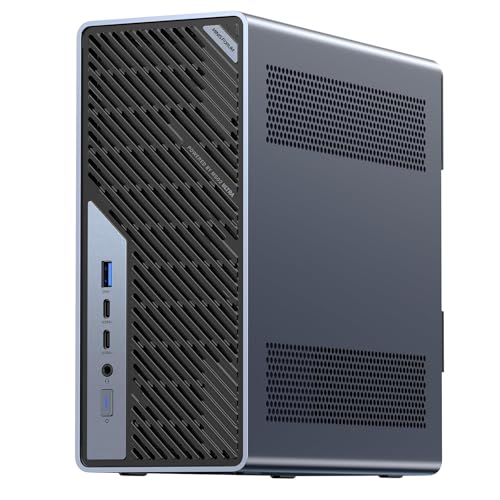
Where to buy
Check the latest price, availability and delivery on Amazon. Orders are placed on Amazon. We may earn a commission from qualifying purchases.
- Best small-space workstation platform: Minisforum MS-02 Ultra, Core Ultra 9 285HX, ECC to 256GB, PCIe 5.0 x16, Dual 25GbE — Check on Amazon
- Lenovo Legion Tower 7i Gen 10, Core Ultra 9 285K, RTX 5080, 32GB, 2TB — Check on Amazon
- GMKtec EVO-X2, Ryzen AI Max+ 395, 64GB Unified Memory, Radeon 8060S — Check on Amazon
- Alienware Aurora ACT1250, Core Ultra 9 285, RTX 5080, 32GB, 1TB — Check on Amazon
- iBUYPOWER Y40 PRO, Ryzen 9 7900X, RTX 5070 Ti, 32GB, 2TB — Check on Amazon
See 1 more Amazon option
- Minisforum MS-A2, Ryzen 9 HX 16-Core, PCIe x16 Slot, Dual 10G SFP+, RAM to 96GB — Check on Amazon
Read the full guide ↓
Disclosure: As an Amazon Associate, reviewstook.com earns from qualifying purchases. Links to Amazon on this page are affiliate links; they cost you nothing extra. Listing details such as price and availability change often, so check the current Amazon listing before you buy.
Start with the uncomfortable truth this search usually hides: at $3,000, “workstation” and “small” only partly overlap. The honest shortlist for serious work at this budget contains exactly two machines that are small by any measurement — a 1.78-litre mini PC and a roughly 4.8-litre platform box — plus one more compact mini whose maker publishes no dimensions we could verify, and three full-size towers that are not small at all. We have kept the towers in this guide, graded plainly as floor-standing machines, because their render throughput is real and some small rooms do have one honest corner of floor. Nobody should order a tower believing it will perch on a shelf, or a mini believing it will render like a tower. This guide grades the installation as rigorously as the specification: where each machine can live, the air it needs, where its cables fall, the heat it pours into a small room overnight, and the placements we refuse outright.
Two of these machines are genuine workstation platforms — one of them the only ECC-memory platform in the guide, with memory headroom to 256GB and dual 25-gigabit networking — and three are gaming towers we grade honestly as render nodes: fast, powerful, and carrying no ISV certification whatever their category pages imply. Two ceiling facts belong up front. There is no RTX 5090 system anywhere near $3,000; complete 5090 machines sit well above this budget on Amazon, so a listing gesturing at 5090-class performance at this price is selling a lesser card under a bigger headline. And the RTX 5080 towers below sit at the top end of this budget and their pricing moves with deal cycles, so check the current price on Amazon for each before deciding.
For a small room, our order of business is the Minisforum MS-02 Ultra if your work is bounded by memory, expansion or networking, the Minisforum MS-A2 if you want the smallest honest platform with a real expansion slot, and the Lenovo Legion Tower 7i only if your room has floor space and your work is measured in GPU render hours. Below: the quick picks, what “installed” actually means in a small room, a five-step measure-before-you-buy checklist, installation-graded reviews of all six machines, a comparison table, buying guidance, the mistakes that waste money and floor space at this tier, and the questions small-room professionals ask before committing.
In this guide
Quick Picks
Short on time, or comparing several options at once? Each row below names a workload and a room, with a link to the listing.
| Workload and room | Pick | Why it stands out | Link |
|---|---|---|---|
| Best small-space workstation | Minisforum MS-02 Ultra | ECC to 256GB, PCIe 5.0 slot and dual 25GbE in about 4.8 litres, internal power supply | Check on Amazon |
| Maximum throughput, floor space available | Lenovo Legion Tower 7i Gen 10 | 24-core 285K plus RTX 5080 16GB — a full tower, graded as one | Check on Amazon |
| Local AI in a compact mini | GMKtec EVO-X2 64GB | 64GB unified memory the GPU can address most of | Check on Amazon |
| GPU render node (deal only) | Alienware Aurora ACT1250 | RTX 5080 behind a 1000W Platinum PSU — check price on Amazon — full tower | Check on Amazon |
| Value production tower | iBUYPOWER Y40 PRO | 12-core 7900X and RTX 5070 Ti — value positioning in this tier, check price on Amazon — full tower | Check on Amazon |
| Smallest expandable platform | Minisforum MS-A2 | Real PCIe x16 slot and dual 10G SFP+ in 1.78 litres | Check on Amazon |
How These Picks Were Chosen
The budget was applied as a ceiling for a complete, working machine: every pick is a real Amazon listing positioned at or under the $3,000 budget ceiling in the United States, and where pricing moves with deal cycles, the review says so and tells you to check the current price on Amazon. Pricing in this tier moves often, and we would rather state that plainly than pretend a fixed figure stays current.
On top of the usual workstation criteria — sustained multi-core throughput, memory ceiling and whether ECC is genuinely supported by the platform rather than merely compatible-sounding, expansion slots and their electrical width, networking speed, GPU compute value — this variant adds an installation audit. Each machine is graded on its form-factor class; on the air it needs around its vents during an eight-hour load, not a five-minute benchmark; on where its power comes from (an internal supply, or an external adapter that itself needs a home); on cable drop — how many leads leave the box, in which directions, and how far they fall to a socket, a switch and your monitors; and on room heat, because a machine rendering overnight in a small room is also a heater in that room. Dimensions and volumes are printed only where the underlying research for this exact set documents them: two picks carry documented figures, and for the other four we print none rather than borrowing numbers from other models or other guides. Mounting is treated the same way: no pick in this guide has a documented VESA mount in the research behind it, so no pick is credited with one anywhere below — if monitor-mounting is your plan, verify it on the live listing before ordering.
Two honesty rules shaped the list. The certification rule: none of these machines carries ISV certification for professional CAD and engineering software — the validated-driver story that firms running SolidWorks, CATIA or certified Siemens NX seats actually buy. That certification lives in the named workstation lines (Lenovo ThinkStation, HP Z, Dell Precision), which are the correct route for certified-seat work and are named here as that alternative, without product links, because we could not verify in-budget Amazon listings for them to our standard. The naming rule: the three gaming towers are graded as render nodes throughout. A 5080 tower renders superbly; contractually it is still not a workstation, and the difference surfaces exactly when something breaks mid-project — or when the tower does not fit the room.
What “Installed” Actually Means in a Small Room
A product photo shows a box. An installation is five things: the box, the air around the box, the power supply and where it sits, the cables and where they fall, and the heat the whole arrangement sheds into the room over hours. In a large office those five things arrange themselves. In a small room — a box room, a studio flat’s work corner, a shared spare bedroom — each one is a negotiation, and a machine that wins the spec sheet can lose the negotiation.
The box. Only two picks here come with documented measurements. The MS-A2 occupies 1.78 litres — hardback-book territory, the class of machine that can sit on a shelf or the corner of a shallow desk. The MS-02 Ultra measures 221.5 × 225 × 97mm, about 4.8 litres: still a desk machine, but a deliberate one, roughly the footprint of a small NAS enclosure standing on your workspace rather than beside it. The EVO-X2 is a mini PC by class — its maker publishes no dimensions in the research behind this guide, so we grade it as a compact desktop mini and route exact measurements to the live listing and your tape. The three towers are towers: no dimensions are documented for them in this set’s research, and none are needed to grade them — a full tower is a floor-standing object that also wants desk-adjacent cable reach, bought as furniture, not as an accessory.
The air. Every machine here cools itself with room air and returns that air warmer. The working rule is a hand’s breadth of clear space at every vent and nothing soft — curtains, bedding, stacked paper — within falling distance of an intake. Sustained workstation loads make this non-negotiable: a render queue runs the cooling at full effort for hours, and a machine starved of intake air does not fail dramatically, it throttles quietly and turns your overnight job into a two-night job. The MS-A2’s independent review coverage flags limited airflow around its PCIe area specifically, which caps how hard a slot card should be pushed inside it.
The brick. An external power adapter is a second furniture object: it needs a surface, ventilation of its own, and a cable run that does not drape across a walkway. Only one pick’s power arrangement is fully documented in this set’s research — the MS-02 Ultra’s supply is internal, a 350W unit inside the chassis, so its entire power story is one mains lead from box to socket. The three towers likewise run internal supplies (850W documented for the Legion, 1000W Platinum for the Aurora; the Y40 PRO’s wattage is not published in the verified listing material, and confirming it is part of that pick’s homework). For the two remaining minis, the research documents no adapter wattage, so we claim none: treat the adapter question as a live-listing check, and give any adapter the same air and surface you would give the machine.
The cables. Count the drop before you buy. A workstation install typically sheds a mains lead, one to three display cables, Ethernet (the whole point of the fast networking on the Minisforum pair is a wired run to your switch or NAS), and USB for drives and docks. On a desk against a wall, that bundle falls behind the desk and disappears; on a free-standing desk in the middle of a small room, it falls in view and underfoot. The towers add their own geometry: their ports sit at floor level when the tower stands on the floor, so display cables must reach up to the desk from below — measure that run, because a cable that only just reaches will be unplugged by a chair wheel within a month.
The heat. In a small room, sustained load is a climate decision. A tower pulling several hundred watts through a render queue is, thermodynamically, a several-hundred-watt heater with a fan; in winter that is a bonus, in summer it is the reason the room is unusable by midnight. The minis shed far less heat in absolute terms, but they shed it at desk height, close to where you sit. None of this disqualifies any pick — it schedules them. If your heavy jobs run overnight in the room you sleep in, heat and fan noise belong in the purchase decision alongside core count.
Three placement classes follow. Desk or shelf is the natural home of the two documented minis and, with its measurements confirmed on the live listing, the EVO-X2. Floor-standing is the only honest class for the three towers: beside the desk, vents clear, cables rising to the desk from below. Inside furniture — a closed cabinet, a media unit with the door shut, a drawer — is refused for every pick in this guide, without exception: a sealed cabinet turns any of these machines into a slow cooker within the first hour of a real load. If the only home you have for a computer is inside a closed unit, the correct purchase is a different room arrangement, not any machine on this page.
Measure Before You Buy: The Five-Step Checklist
- Measure the spot. Tape-measure the exact surface or floor area, in all three dimensions, and write the numbers down. Compare them against the documented figures where they exist — 221.5 × 225 × 97mm for the MS-02 Ultra, 1.78 litres for the MS-A2 — and against the live listing for every other pick. A tower’s spot is measured on the floor, not on the desk you wish it fitted.
- Check the ventilation clearance. Add a hand’s breadth on every vented side and above any top vent, then re-measure. If the clearance only exists with a cabinet door open, the placement fails this step — doors get closed. Confirm there is a path for warm air to leave the corner entirely, not just to circulate against a wall.
- Give the power supply an address. Decide where the mains lead lands and, for any machine with an external adapter, where the adapter itself will sit — on a surface, in air, not buried behind books or under a rug. For the MS-02 Ultra this step is short: its 350W supply is internal, so the address is simply the socket. For every pick, confirm the socket is reachable without an extension lead draped across the room.
- Walk the cable drop. From the machine’s future position, trace each cable to its destination: displays, Ethernet to the switch or NAS, USB to drives and docks. On a floor-standing tower, measure the rise from floor-level ports to the desk surface and add slack for the chair. If any run only works at full stretch, move the machine or the destination now, on paper.
- Then order. Only after the first four steps pass do the specification questions get their turn — configuration, and checking the current price on Amazon. The reviews below each carry their buy line; a machine that fits the room but sits above this budget tier on the live listing is a machine to wait for, and a machine that fails step one is not a bargain at any price.
The 6 Best Workstation PCs for Small Spaces Under $3,000
Minisforum MS-02 Ultra — Core Ultra 9 285HX, ECC to 256GB, PCIe 5.0 x16, Dual 25GbE
Who it suits: Professionals whose bottleneck is memory, expansion or networking rather than raw GPU power — virtualisation hosts, homelab and small-studio servers, developers running container fleets — and whose room is small enough that the machine has to earn its desk space.
Installation grade: the easiest serious install in this guide. The chassis measures 221.5 × 225 × 97mm — about 4.8 litres — a footprint a small desk can genuinely spare, and the power supply is internal (350W), so there is no adapter to house: one mains lead, box to socket. No VESA mount is documented for this machine in the research behind this guide, so plan on it standing on a surface, not hanging behind a monitor. The cable count is the one real negotiation: dual 25GbE SFP+, 10GbE and 2.5GbE ports invite wired runs, and a machine bought for its networking should sit where those runs fall naturally — near the switch or NAS — rather than at the far end of the room from everything it talks to.
The workstation inside that small box is the most complete platform here. The Core Ultra 9 285HX brings 24 cores and 24 threads at up to 5.5GHz. Around it sit four DDR5 SO-DIMM slots accepting up to 256GB of memory with ECC support on this chip — the only ECC platform in the guide — a PCIe 5.0 x16 expansion slot that takes a low-profile dual-slot card, four M.2 2280 storage positions (two on the board, two carried on the networking card), and a network stack no tower here approaches: dual 25GbE SFP+ on an Intel E810 controller, plus 10GbE and 2.5GbE, with Wi-Fi 7 behind that. Two USB4 ports run at the 80Gbps V2 speed with a third at 40Gbps, the listing specifies four video outputs, and Windows 11 Pro is fitted. Check the current price on Amazon — it is positioned toward the lower end of this guide, because none of the budget went to a gaming GPU.
The workstation reading of those numbers: ECC memory is the difference between a three-day simulation you trust and one you re-run to check; 25-gigabit networking is the difference between editing media off a NAS and copying it locally first; and the PCIe slot is a future — a low-profile GPU, a capture card, a further network card — that sealed machines simply do not have. In a small room the argument sharpens: this one box can be the workstation and the VM host at once, which is desk space you do not have to find twice.
- Documented 221.5 × 225 × 97mm chassis (~4.8L) with an internal 350W supply — no brick to place.
- The only ECC platform in the guide: four SO-DIMM slots, up to 256GB.
- Dual 25GbE SFP+ plus 10GbE and 2.5GbE — server-class networking.
- PCIe 5.0 x16 slot and four M.2 positions.
Honest limitation: Integrated graphics as shipped and a 350W ceiling on what the slot can become; the 32GB fitted as standard is a starting point, not the destination — the machine earns its place when you budget the ECC upgrade. No monitor mount is documented, so it needs real surface.
Choose it if your work is memory-, VM- or network-bound and your room rewards a platform that replaces several boxes. Skip it if your living is GPU rendering — the towers below carry the card you need already fitted, at the price of your floor.

Lenovo Legion Tower 7i Gen 10 — Core Ultra 9 285K, RTX 5080, 32GB, 2TB
Who it suits: Creators and engineers who need maximum combined throughput — long CPU renders, GPU renders, heavy compiles and large media projects — from one tower, and whose small room still has one honest patch of floor.
Installation grade: floor-standing only, stated without apology. This is a full tower; no dimensions are documented for it in this set’s research and none are printed here, because the grade does not depend on them — it will not fit a shelf, a cabinet or a desk corner, and it must never be sealed inside furniture. Placed beside a desk with its vents clear, it asks for three things: floor area you are not using for anything else, display and USB cables long enough to rise from floor-level ports to the desk, and a room that can absorb the heat of a 24-core CPU and an RTX 5080 working together through a render queue. Its 360mm liquid cooler and 850W power supply are built for exactly that sustained effort — and the heat that effort produces goes into your room, not out of it.
On specification this is the most complete single tower here. The Core Ultra 9 285K is a genuine 24-core part (up to 5.6GHz boost in the listing’s description), paired with the RTX 5080 16GB — the strongest GPU compute card in this guide, with 16GB of VRAM for render scenes and AI workloads that will not fit in 8GB. The supporting cast is professional: a 2TB SSD, Wi-Fi 6E, 2.5-gigabit Ethernet and Thunderbolt 4, with keyboard and mouse in the box and Windows 11 Home installed. Check the current price on Amazon, and verify the exact configuration at checkout, treating any listing within this budget tier as a deal to confirm rather than assume. Lenovo’s support infrastructure is also the closest thing in this guide to the certified-workstation route, even though this Legion is a gaming line and carries no ISV certification.
The ceiling to know about is printed in Lenovo’s own listing: memory maxes out at 32GB. On a machine with this much CPU and GPU that is the compromise — large timelines, VM work and simulation will run into it, and no ECC option exists on this platform at any price. Read it as a very fast 32GB render and creation tower that happens to need your floor, rather than a workstation you grow into, and the specification is honest.
- 24-core 285K plus RTX 5080 16GB — the guide’s strongest CPU + GPU pairing.
- 360mm liquid cooling and an 850W PSU support sustained loads.
- Major-brand support network; Thunderbolt 4 and 2.5GbE fitted.
Honest limitation: A full tower in a small-spaces guide — floor-standing only, never cabinet-sealed — and the listing states a 32GB memory maximum with no ECC option.
Choose it if your work is render- and compile-throughput on projects that fit in 32GB, and your floor can house it. Skip it if the room has no floor to give, or your memory needs grow year on year — the MS-02 Ultra’s platform is the growth path.

GMKtec EVO-X2 — Ryzen AI Max+ 395, 64GB Unified Memory, Radeon 8060S
Who it suits: Anyone running large language models, AI-assisted development or memory-hungry creative work locally — the workload where how much memory the GPU can reach matters more than how fast the CPU is — from a desk that cannot spare tower room.
Installation grade: a compact desktop mini by class, with an asterisk this guide insists on: the research behind this set documents no dimensions for this machine, so we print none and grade it on class rather than numbers. Measure it from the live listing against your spot before ordering — that is step one of the checklist doing its job. No VESA mount is documented for it in this research either, so plan for it standing on the desk or a shelf with air around it, never inside a closed unit. Its power arrangement is likewise undocumented in the set’s research — no adapter wattage is claimed here — so give whatever adapter the live listing specifies the surface-and-air treatment from step three. What the documented facts do support is favourable: a small machine shedding far less heat into the room than any tower in this guide.
The machine itself is built around AMD’s Ryzen AI Max+ 395: 16 cores and 32 threads, and a Radeon 8060S integrated GPU with 40 compute units that shares the machine’s memory rather than sitting behind a small VRAM wall. This configuration carries 64GB of LPDDR5X-8000 — soldered, fast and unified — and AMD’s variable graphics memory guidance lets the graphics side address up to 48GB of that pool. That is the local-AI proposition no discrete card here can match at any price in this guide: an RTX 5080’s 16GB is far faster, but a model needing 40GB of memory simply does not fit on it, and fits here. Add a 1TB PCIe 4.0 SSD, USB4, Wi-Fi 7 and quad-display support per the listing, and you can check the current price on Amazon.
The professional framing matters, because this is not a gaming mini wearing a workstation badge: the 8060S does genuine GPU compute and media work, the 16 Zen 5 cores handle compile and productivity loads properly, and the unified memory pool is a real architectural advantage for inference and large-context development work. The honest limitations are architectural too. Soldered memory means 64GB is the permanent specification, and the 128GB versions of this chip class now sit well above this budget after shortage repricing, which is why they appear here as a landmark rather than as picks. ECC is absent, there is no PCIe slot, and no discrete GPU can ever be added. Buy the EVO-X2 when your workload is bounded by memory capacity today; do not buy it as a platform to grow.
- 64GB unified memory, up to ~48GB addressable by the GPU — unique in this guide.
- 16-core Zen 5 CPU with a 40-CU integrated GPU for compute and media.
- Compact mini class that sheds a fraction of a tower’s heat into the room.
- Check the current price on Amazon.
Honest limitation: Memory is soldered at 64GB forever, with no ECC, no expansion slot and no discrete-GPU path — and its exact dimensions are not documented in this set’s research, so the live listing and a tape measure decide the fit.
Choose it if local AI, large models or in-memory workloads are the job and the desk is small. Skip it if you need CUDA-ecosystem GPU rendering — that work belongs on the NVIDIA towers, floor permitting.

Alienware Aurora ACT1250 — Core Ultra 9 285, RTX 5080, 32GB, 1TB (Deal Only)
Who it suits: GPU-render and 3D professionals who want the strongest render card in the guide with the strongest power supply behind it, who are willing to buy on a deal cycle rather than on a schedule — and who have floor space, because that is the only place this machine can go.
Installation grade: floor-standing tower, full stop. No dimensions are documented for it in this set’s research, and its clear-panel chassis is designed to be looked at on a desk in a large room — in a small room the honest reading is that it stands on the floor beside the desk, vents clear, never inside a cabinet or media unit. The detail a small-room renderer should weigh is thermal: a 1000W Platinum-rated power supply — the most headroom in this guide — feeding an RTX 5080 through a long render means the machine can shed serious wattage for hours. In a small room that is a climate commitment: schedule the heavy queue for when the room can take it, or accept that the room warms while the frames land.
Graded as a render node, the Aurora’s specification is serious: a Core Ultra 9 285, an RTX 5080 16GB, 32GB of DDR5, a 1TB SSD and liquid cooling, from the industry’s largest PC maker. Check the current price on Amazon — this model sits at the top end of this tier. When the live listing sits within this tier, the purchase case works: 5080-class GPU compute, a big-brand warranty route, and power delivery that will never be the bottleneck.
This recommendation comes with two pieces of homework, because the listing earns them. Amazon’s own product information contradicts itself on this machine — the chip is described as a 20-core part where Intel’s specification says 24, and the liquid cooling is described as both fitted and optional. Trust Intel’s specification, and confirm the cooling configuration with the seller before ordering. Second, the trade behind the Alienware brand is a proprietary platform: motherboard and case standards are Dell’s own, which makes some future upgrades a Dell-shaped problem, and there is no ECC path. When the live price sits above this guide’s budget, the Legion above is the better buy; when it sits within this tier, the balance reverses. That is the whole recommendation — a deal-conditional render node with the best PSU in the guide, conditional also on your floor.
- RTX 5080 16GB behind a 1000W Platinum PSU — the guide’s most headroom.
- Positioned at the top end of this budget tier — check the current price on Amazon.
- Big-brand warranty and support route.
Honest limitation: Deal-dependent pricing, a proprietary platform with no ECC path, a listing that contradicts itself on core count and cooling — and a full tower’s footprint and heat in a small room.
Choose it if the current price on Amazon sits within this budget tier, GPU rendering is the workload, and the floor space exists. Skip it if the live price sits above this tier, you need memory expandability and standard parts, or the room cannot take a tower.

iBUYPOWER Y40 PRO — Ryzen 9 7900X, RTX 5070 Ti, 32GB, 2TB
Who it suits: Working creators — video editors, 3D generalists, streamers who produce — who need a balanced production tower now, at a price that leaves budget for the monitor, storage and software the job also needs, and who can give a tower its floor space.
Installation grade: the third tower, graded the same way: floor-standing, vents clear, never sealed in furniture, cables rising from floor level to the desk. No dimensions are documented for it in this set’s research, so none are printed — measure the live listing’s figures against your floor patch at step one. One documentation gap is part of this pick’s homework: the PSU wattage is not headlined in the verified listing material, and in a small room that figure also caps the heat the machine can shed, so confirm it on the live listing before purchase. Note also that the Y40 PRO name covers a different 7800X3D configuration under another listing; this review covers only the 7900X machine linked here.
The Y40 PRO anchors the value end of this guide, and its specification reads like a production checklist: a 12-core Ryzen 9 7900X — the multi-core profile editing, encoding and compile work actually uses, rather than a gaming-tuned part — an RTX 5070 Ti with 16GB of VRAM for GPU rendering and AI-assisted tools, 32GB of DDR5 in a proper two-stick configuration, and a 2TB NVMe SSD, with keyboard and mouse included and a 1-year manufacturer warranty. Its positioning tells the value story: check the current price on Amazon — it sits below the 5080 towers in this tier while surrendering less render performance than that positioning implies — the 5070 Ti sits in the same 16GB memory class, one tier down.
Graded on workstation criteria, balance is the point: twelve cores hold sustained all-core loads through renders and exports, the GPU covers CUDA-ecosystem work, and 2TB of fast storage ends the project-file juggling that smaller drives impose. It remains a gaming-branded tower — no ISV certification, no ECC — and this review does not pretend otherwise. Verify the model, confirm the PSU, pass the checklist, and this is the guide’s easiest value recommendation.
- 12-core 7900X plus 16GB RTX 5070 Ti — balanced production specification.
- 32GB in two sticks and 2TB of storage, keyboard and mouse included.
- Positioned below the 5080 towers in this tier — check the current price on Amazon.
Honest limitation: PSU wattage is not published in the verified listing material — confirm before buying; gaming platform, so no ECC or ISV certification; and it needs a tower’s floor space.
Choose it if you want a complete production tower with money left for the rest of the room. Skip it if your renders are long enough that the 5080’s extra GPU tier pays for itself, or your room has no floor to spare — the minis above exist for that room.

Minisforum MS-A2 — Ryzen 9 HX 16-Core, PCIe x16 Slot, Dual 10G SFP+, RAM to 96GB
Who it suits: Homelab professionals, network-heavy workflows and small studios that want a real expansion slot and 10-gigabit networking in a machine the size of a hardback book — and who are comfortable treating a PC as a platform.
Installation grade: the smallest documented install in the guide — 1.78 litres — and the most placement-flexible: a shelf, a shallow ledge or the corner of a small desk are all honest homes for it, with air around it and never inside a closed cabinet. No VESA mount is documented for this machine in the research behind this guide, so do not plan a monitor-back mount on this guide’s say-so; verify on the live listing if mounting matters to you. Two installation caveats come straight from independent review coverage and belong in a small-room grading: it is audible under sustained load, which in a small room means audible at your desk, and airflow around its PCIe area is limited, which caps how hard a slot card should be pushed. Its idle power draw is also relatively thirsty for its class. None of that disqualifies it; all of it shapes where it should sit — in open air, a little distance from where you sit.
The workstation case is the platform argument, one tier down from the MS-02: a 16-core, 32-thread Zen 5 processor running to 5.4GHz, two DDR5-5600 SO-DIMM slots to 96GB, three M.2/U.2 storage positions, and a genuine PCIe x16 slot (PCIe 4.0, x8 electrical). Networking pairs dual 10G SFP+ on an Intel X710 controller with dual 2.5GbE and Wi-Fi 6E, and displays run from HDMI plus two USB-C outputs. Barebone and configured 32GB/1TB versions are both listed on Amazon — check the current price on Amazon — and this is the most accessible route in this guide to a slotted, fast-networked platform.
The slot takes a low-profile GPU, a capture card or further networking; 96GB is a real memory ceiling for VM and container work; 10-gigabit SFP+ talks directly to proper network storage. The limitations follow from the size: the fitted graphics are a basic Radeon 610M, so any GPU ambition goes through the slot and its power and airflow envelope; ECC is not supported here (that is the MS-02’s step-up); and the listing family mixes barebone and configured styles, so confirm the exact configuration on the live page — the link here is the family’s configured listing, and the copy cites both styles deliberately.
- A real PCIe x16 slot (x8 electrical) and dual 10G SFP+ in a documented 1.78 litres.
- Memory to 96GB across two SO-DIMM slots; three storage positions.
- Barebone and configured versions both available — check the current price on Amazon.
Honest limitation: Basic integrated graphics as shipped, audible under load per independent reviews with limited PCIe-area airflow, no ECC — and barebone vs configured styles must be confirmed on the live listing. No monitor mount is documented.
Choose it if expansion and networking per litre are the priorities and the room is genuinely small. Skip it if you need ECC (step up to the MS-02 Ultra) or a fitted discrete GPU.

Comparison Table
| Machine | CPU / GPU | Memory ceiling | Installation class | Link |
|---|---|---|---|---|
| Minisforum MS-02 Ultra | Core Ultra 9 285HX, 24-core / integrated | 256GB, ECC supported | Desk mini, documented 221.5 × 225 × 97mm (~4.8L), internal PSU | Check on Amazon |
| Lenovo Legion Tower 7i Gen 10 | Core Ultra 9 285K, 24-core / RTX 5080 16GB | 32GB (listing maximum) | Full tower — floor-standing only | Check on Amazon |
| GMKtec EVO-X2 64GB | Ryzen AI Max+ 395, 16-core / Radeon 8060S integrated | 64GB unified, soldered | Compact mini class — dimensions not documented in this set’s research; verify on the live listing | Check on Amazon |
| Alienware Aurora ACT1250 | Core Ultra 9 285, 24-core / RTX 5080 16GB | 32GB fitted | Full tower — floor-standing only | Check on Amazon |
| iBUYPOWER Y40 PRO | Ryzen 9 7900X, 12-core / RTX 5070 Ti 16GB | 32GB fitted | Full tower — floor-standing only | Check on Amazon |
| Minisforum MS-A2 | Ryzen 9 HX, 16-core / Radeon 610M (slot for a card) | 96GB, two slots | Shelf/desk mini, documented 1.78L | Check on Amazon |
How to Choose a Workstation PC for a Small Space Under $3,000
- Measure first, shop second. Run the five-step checklist before comparing a single benchmark. At this budget the most common failure is not a slow machine — it is a fast machine with nowhere honest to stand.
- Name your bottleneck before your budget. If your slowest hour is memory — VMs, big datasets, huge timelines — the MS-02 Ultra or EVO-X2 is the shape of the answer; if it is rendering or AI tools, the 5080 and 5070 Ti towers are; if it is storage access and expansion, the two Minisforum platforms are. Naming the bottleneck also names your size class, which in a small room is half the decision.
- Read the memory ceiling, not the memory fitted. Everything here ships with 32GB or 64GB; the futures differ. Ceilings run from the Legion’s hard 32GB (stated in its own listing) through the EVO-X2’s soldered 64GB and the MS-A2’s 96GB to the MS-02 Ultra’s 256GB with ECC. Buy for the workload of three years from now, not this quarter.
- Treat ECC as a platform feature, not a checkbox. It exists only where CPU, board and memory support it together — in this guide, the MS-02 Ultra alone. For long, unattended work that is expensive to re-run (simulations, financial models, overnight renders that must be right), ECC is a genuine reason to choose that platform. For interactive work you will never feel it, and the towers are better buys.
- Grade gaming towers as render nodes, honestly — and as furniture, honestly. The Legion, Aurora and Y40 PRO do professional work daily in studios everywhere on the strength of their CPUs and GPUs. What they lack is certification and, in the Aurora’s case, standard parts — and they all lack a small footprint. Price them as render nodes and place them as floor-standing furniture, and both judgements will serve you.
- Budget the heat, not just the box. In a small room, a tower under sustained load is a heater with a render queue. If the room is also where you sleep or record, weigh the minis’ lower absolute heat — and the MS-A2’s documented audibility under load — as heavily as core counts.
- Check the slot’s fine print. “PCIe x16” names the connector, not the wiring: the MS-A2’s slot runs x8 electrical with limited airflow around it, and the MS-02’s accepts low-profile dual-slot cards under a 350W supply. Both slots earn their keep; neither hosts a flagship GPU. Read width, profile and power before planning an upgrade around one.
- Respect the deal structure on 5080 towers. Both 5080 towers sit at the top end of this tier and their pricing moves with deal cycles. Check the current price on Amazon; if the live figure sits above this tier, patience or the Y40 PRO is the correct move.
- If your employer or client requires certification, stop here. Validated drivers and ISV certification lists are a contractual feature of the ThinkStation, HP Z and Dell Precision lines. Nothing in this guide substitutes for them, and buying one while hoping nobody checks is the most expensive mistake in this category.
Common Buying Mistakes
- Ordering the tower first and measuring the room second. Floor space is a specification. A tower that fails step one of the checklist is not a bargain at any price.
- Sealing any of these machines inside a closed cabinet or media unit. Every pick in this guide is refused that placement: within the first hour of a real load, a sealed cabinet is a slow cooker, and the throttling that follows is silent.
- Paying above this budget tier for a deal-listed machine. Both 5080 towers earn their place here when the live price sits within this tier; above it the value argument collapses. Check the current price on Amazon before buying.
- Treating “32GB” as a starting point on a machine whose listing states 32GB as the maximum. Lenovo prints the Legion’s ceiling in its own listing — take it at its word.
- Assuming ECC from a workstation badge. Exactly one platform in this guide supports it; the other five do not, whatever the category page implies.
- Hunting RTX 5090 performance at $3,000. Complete 5090 systems sit well above this budget; a listing that blurs this is selling a 5080 or less under a bigger headline.
Final Recommendation
- Most small-room professionals: Minisforum MS-02 Ultra — the only true workstation platform here, documented at about 4.8 litres with an internal power supply, and positioned toward the lower end of this tier.
- The smallest honest platform: Minisforum MS-A2 at a documented 1.78 litres, with the slot and 10G networking as the point.
- Local AI on a small desk: GMKtec EVO-X2 64GB — memory capacity the discrete cards cannot match, in a compact mini class.
- Maximum throughput, floor permitting: Lenovo Legion Tower 7i Gen 10 — check the current price on Amazon and buy when it sits within this tier.
- GPU rendering on a deal: Alienware Aurora ACT1250 — check the current price on Amazon, and only when it sits within this tier.
- Balanced production with money left for the room: iBUYPOWER Y40 PRO — confirm the PSU wattage, then buy with confidence.
Our top two for small-room buyers at this budget are the MS-02 Ultra, for everyone whose work is bounded by memory, expansion or networking, and the MS-A2, for everyone whose room is the binding constraint and who still wants a slot and fast networking. The EVO-X2 is the third answer when the work is local AI. The towers are excellent render nodes for rooms with floor to give — and only for those rooms. Readers whose real ceiling is lower should also see Best Workstation PC For Small Spaces Under $2500 and Best Workstation PC Under $1500, and anyone whose install will in truth be a full-size desk setup should start with Best Workstation PC Under $3000 instead. Verify the live price, the exact configuration and the measurements before you order — at $3,000, in a small room, that homework is the difference between a workstation and an expensive misunderstanding that also blocks the doorway.
Frequently Asked Questions
Can any of these machines go inside a closed cabinet or media unit?
No — none of them, and this guide refuses that placement for all six picks without exception. Workstation loads are sustained for hours, and a sealed cabinet traps the heat every one of these machines sheds, throttling performance quietly and shortening component life. If the machine must live in furniture, the furniture needs open or actively ventilated bays; a closed door fails step two of the checklist, and the correct fix is a different placement, not a different pick.
Can I mount one of the mini PCs behind my monitor?
Not on this guide’s evidence. No pick here — including the two documented minis — carries a verified VESA mount in the research behind this guide, so we claim none for any of them. Some listings in this category do offer mounts; if monitor-back mounting is essential to your install, confirm it on the live listing for the exact configuration before ordering; until then, plan for the minis to stand on a surface.
How small is the smallest real workstation here?
The Minisforum MS-A2, at a documented 1.78 litres — hardback-book class — while still offering a genuine PCIe x16 slot (x8 electrical), memory to 96GB and dual 10G networking. The MS-02 Ultra is the next step up at about 4.8 litres (221.5 × 225 × 97mm) and adds the guide’s only ECC support, a 256GB ceiling and dual 25GbE. Below those sizes, machines in this price range stop offering slots and memory headroom, and the word “workstation” becomes a sticker.
Will a tower heat up a small room?
Yes, measurably, under sustained load. A tower drawing several hundred watts through a render queue returns nearly all of it to the room as heat — welcome in winter, a genuine problem in a small room in summer, and a scheduling consideration for overnight jobs in a room you also sleep in. The minis shed far less heat but shed it at desk height. Neither fact disqualifies a pick; both belong in the decision.
What makes a PC a workstation rather than a gaming PC?
Four things decide it, in descending order of importance to professionals: memory capacity and ECC support for long, trusted runs; expansion and networking (PCIe slots, 10GbE or faster) that let the machine join professional infrastructure; sustained multi-core performance under cooling and power delivery built for hours rather than minutes; and a support and driver story, rising to full ISV certification on the named workstation lines. A gaming tower can deliver the third in full and none of the other three — which is why this guide grades its three towers as render nodes.
Is there an RTX 5090 workstation under $3,000?
No. The cheapest complete RTX 5090 systems on Amazon sit well above this budget, so treat any $3,000 listing gesturing at 5090 performance as a 5080 or 5070 Ti wearing a bigger headline. The realistic GPU ceiling at this budget is an RTX 5080 bought on a deal or a 5070 Ti bought any day — both carrying 16GB of VRAM, which for most render and AI work is the figure that actually binds.
- Best Workstation PC Under $3000
- Best Workstation PC Under $2500
- Best Workstation PC For Streaming Under $3000
- Best Workstation PC For Beginners Under $3000
- Best Workstation PC For 1440p Gaming Under $3000
- Best Workstation PC For Small Spaces Under $2500
- Best Workstation PC For Small Spaces Under $1500
- Best Mini PC Under $3000
- Best Home Office PC Under $3000
- Best Prebuilt Gaming PC Under $3000
- Best Small Form Factor Gaming PC Under $3000


