Where to buy
Check the latest price, availability and delivery on Amazon. Orders are placed on Amazon. We may earn a commission from qualifying purchases.
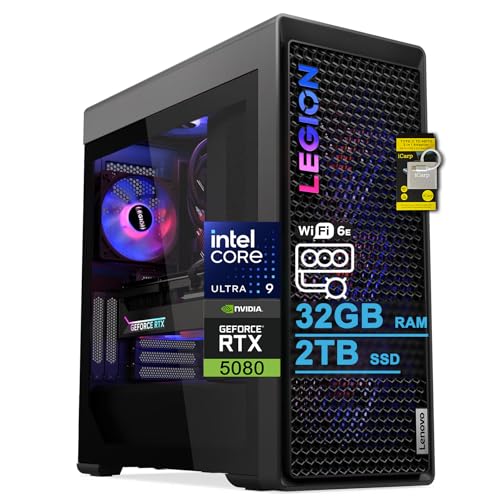
- Best 1440p pick overall: Lenovo Legion Tower 7i Gen 10, Core Ultra 9 285K, RTX 5080, 32GB, 2TB — Check on Amazon
- Minisforum MS-02 Ultra, Core Ultra 9 285HX, ECC to 256GB, PCIe 5.0 x16, Dual 25GbE — Check on Amazon
- GMKtec EVO-X2, Ryzen AI Max+ 395, 64GB Unified Memory, Radeon 8060S — Check on Amazon
- Alienware Aurora ACT1250, Core Ultra 9 285, RTX 5080, 32GB, 1TB — Check on Amazon
- iBUYPOWER Y40 PRO, Ryzen 9 7900X, RTX 5070 Ti, 32GB, 2TB — Check on Amazon
See 1 more Amazon option
- Minisforum MS-A2, Ryzen 9 HX 16-Core, PCIe x16 Slot, Dual 10G SFP+, RAM to 96GB — Check on Amazon
Read the full guide ↓
Disclosure: As an Amazon Associate, reviewstook.com earns from qualifying purchases. Links to Amazon on this page are affiliate links; they cost you nothing extra. Listing details such as price and availability change often, so check the current Amazon listing before you buy.
Searching for a workstation PC for 1440p gaming puts you at the crossing of two different promises, and this guide keeps them separate from the first paragraph. A workstation earns its name on sustained professional work: memory ceilings, expansion slots, fast networking, error-correcting memory on the one platform that supports it. A 1440p gaming machine earns its name on something narrower and more brutal — a graphics processor that can actually render games at 2560×1440, frame after frame, rather than merely light up a monitor of that size. Those are not the same test, and two of the six machines below pass the first while failing the second outright. So every pick in this guide carries a printed 1440p verdict, and the verdicts are not flattering across the board.
Here is the shape of the list. Two towers carry the RTX 5080, a card for which native 1440p is not a stretch goal but a floor — it renders this resolution with headroom to spare and reaches into native 4K territory besides. A third tower carries the RTX 5070 Ti, the card whose home resolution genuinely is 1440p: native rendering across the modern catalogue, with upscaling held in reserve rather than used as a crutch. Then the list turns. The GMKtec EVO-X2’s integrated Radeon 8060S is the strongest integrated graphics in this guide by a wide margin, and it still renders most demanding games below 1440p and upscales the rest of the way. The two Minisforum platforms — superb workstations by every professional measure — ship with basic integrated graphics that can drive a 1440p or 4K desktop all day and cannot render a modern game at 1440p at all. On those two, gaming at this resolution is a project you complete through an expansion slot, not a feature you unbox.
One more honesty note before the picks. The RTX 5080 towers belong in this guide only when their current price fits the budget — check the current price on Amazon for each one, because channel pricing moves and each review prints its walk-away line in those terms. And there is no RTX 5090 system anywhere near $3,000; complete 5090 machines sit well above this guide’s budget, so any listing at this budget implying 5090-class gaming is selling a lesser card under a bigger headline. What follows is the quick-pick table with a 1440p verdict for every machine, the rendering audit explained, six full reviews, a comparison table, monitor-pairing guidance, the mistakes this search makes people commit, and the questions worth asking before $3,000 changes hands.
In this guide
Quick Picks
Short on time, or comparing several options at once? Each row below names a buyer and the machine that suits them, with the 1440p verdict stated in the open and a link to the listing.
| Buyer type | Pick | 1440p verdict | Link |
|---|---|---|---|
| Best 1440p gaming overall | Lenovo Legion Tower 7i Gen 10 | Native — RTX 5080 renders 1440p outright, with headroom into 4K | Check on Amazon |
| Best workstation platform | Minisforum MS-02 Ultra | Display only as shipped — 1440p gaming arrives via the PCIe slot | Check on Amazon |
| Best integrated graphics | GMKtec EVO-X2 64GB | Upscaled — 8060S renders below 1440p in demanding games, native in lighter ones | Check on Amazon |
| Best 5080 deal (deal only) | Alienware Aurora ACT1250 | Native — RTX 5080; check price on Amazon and buy only when it fits the budget | Check on Amazon |
| Best value native 1440p | iBUYPOWER Y40 PRO | Native — RTX 5070 Ti is a true 1440p card; check price on Amazon | Check on Amazon |
| Best expandable mini platform | Minisforum MS-A2 | Display only as shipped — the slot is the gaming route | Check on Amazon |
How These Picks Were Chosen — and How the 1440p Audit Works
The six machines are the verified set from this guide’s base research: real Amazon listings, each checked against the $3,000 budget, judged first on workstation criteria — sustained multi-core throughput, memory ceiling and whether ECC is genuinely supported, expansion and networking, and GPU compute value. What changes is the second audit layered on top of it, because the search term adds a gaming requirement the base guide never promised to meet.
The audit starts with a distinction that listing pages work hard to blur: rendering resolution versus display resolution. A 1440p panel contains 2560×1440 pixels — about 3.69 million of them, roughly 78% more than the 2.07 million in a 1080p frame. A machine “supports 1440p” in the display sense if its outputs can drive such a panel, which every pick here can do, several of them at 4K and beyond. A machine renders at 1440p only if its graphics hardware computes each of those 3.69 million pixels in the game engine, every frame. The first property is about ports; the second is about silicon. Confusing them is how a buyer ends up with a beautiful 1440p desktop and a game running far below it underneath.
Each pick was therefore graded on its documented graphics hardware alone, into three verdicts. Native means the fitted GPU renders modern games at 2560×1440 without reconstruction as its normal mode of operation. Upscaled means the honest route to a 1440p screen is rendering below the panel’s resolution and letting an upscaler rebuild the difference — a legitimate, often excellent-looking technique, but a different claim from native, and labelled as such wherever it appears. Display only means the shipped graphics can run the monitor and not the games; the review then says plainly what completing the machine for 1440p would involve, using only the expansion facts the base research documented.
Upscaling is credited strictly per chip. DLSS belongs to NVIDIA’s RTX cards and their Tensor cores: the three towers here carry it, and where DLSS figures appear in this guide they are NVIDIA’s published render-scale figures, attached to DLSS by name every time. The Radeon 8060S in the EVO-X2 has no Tensor cores and no DLSS — its reconstruction route is FSR, credited generically with no internal-resolution figures attached, because the base research documents none. The integrated Intel and basic Radeon graphics in the two Minisforum platforms get no upscaling credit at all: no documented upscaler story turns them into 1440p gaming hardware, and pretending otherwise would be the exact dishonesty this variant exists to avoid.
Two standing rules from the base guide carry over untouched. The certification rule: none of these machines carries ISV certification for professional CAD and engineering software — that lives in the Lenovo ThinkStation, HP Z and Dell Precision lines, named here as the alternative for certified-seat work, without links, because no in-budget listing for them met this batch’s verification standard. And the naming rule: the three gaming towers are graded as render nodes on the workstation side, however strong their gaming verdicts are. A tower can be the best 1440p gaming pick in this guide and still not be a certified workstation — both things are true of the Legion below, and the review says both.
The 6 Best Workstation PCs for 1440p Gaming Under $3,000
Lenovo Legion Tower 7i Gen 10 — Core Ultra 9 285K, RTX 5080, 32GB, 2TB
Who it suits: The buyer whose evenings are gaming and whose days are rendering, compiling or editing — and who wants one tower that is genuinely first-rate at both, bought from a major brand.
1440p verdict: Native, with headroom. The RTX 5080 16GB is a native-4K-class card; at 2560×1440 it renders the modern catalogue at the panel’s full resolution as a matter of routine, and the honest question for this pick is not whether it can do 1440p but whether your monitor is fast enough to deserve it. Where a title is heavy enough that you choose upscaling anyway, DLSS is documented hardware here, and its published figures are worth knowing precisely: DLSS Quality at a 1440p output renders internally at roughly 1707×960 and reconstructs upward, Balanced renders at roughly 1485×836, and Performance renders at roughly 1280×720 — a 720p-class internal frame wearing a 1440p output. On this card those modes are headroom tools for the most demanding settings, not necessities. Should you later pair it with a 4K panel, the same honesty applies one shelf up: DLSS Quality at 4K output renders at roughly 2560×1440 internally, and DLSS Performance at 4K renders at roughly 1920×1080.
The workstation side of the ledger is why this tower, and not a pure gaming build, anchors the guide. The Core Ultra 9 285K is a genuine 24-core desktop part (Intel’s specification; the listing quotes boost up to 5.6GHz), held under a 360mm liquid cooler with an 850W power supply — the sustained-load story that separates a render node from a sprint machine. Around it sit a 2TB SSD, Wi-Fi 6E, 2.5-gigabit Ethernet and Thunderbolt 4, with keyboard and mouse in the box and Windows 11 Home installed. For monitor pairing, the documented outputs are the card’s own ports plus that Thunderbolt 4 connection; the base research documents no per-port refresh ceiling, so treat the live listing as the authority on the exact port mix and buy the 1440p high-refresh panel this card plainly justifies. Check the current price on Amazon before you buy, and match the exact configuration at checkout, because channel pricing can differ from the maker’s own store pricing for what is the same machine, and that difference cuts both ways if you grab the wrong listing.
The honest limitation is printed in the listing itself and matters more to workstation buyers than to gamers: the memory maximum is stated as 32GB. The fitted 32GB is also the ceiling, with no ECC at any price on this platform. For gaming that ceiling is a non-issue for years; for memory-heavy professional work — big timelines, VM fleets, simulation — it is the compromise you are accepting in exchange for the strongest CPU-plus-GPU pairing in the guide. Buy it as a very fast, fixed-capacity render and gaming tower and it is honestly specified.
- RTX 5080 16GB: native 1440p outright, native 4K in reach, DLSS documented with published render figures.
- 24-core 285K under 360mm liquid cooling and an 850W PSU — sustained throughput on both sides of the desk.
- 2TB SSD, Thunderbolt 4, 2.5GbE and a major-brand support network behind it.
Honest limitation: The listing states a 32GB memory maximum and there is no ECC option — a hard ceiling for memory-growing professional work; check price on Amazon to confirm it fits the budget before you buy.
Choose it if 1440p gaming at full native resolution and professional throughput are both the job, and the current price on Amazon fits the budget. Skip it if your memory needs grow year on year — the MS-02 Ultra’s platform below is the growth path, at the cost of gaming you must build yourself.

Minisforum MS-02 Ultra — Core Ultra 9 285HX, ECC to 256GB, PCIe 5.0 x16, Dual 25GbE
Who it suits: Professionals whose bottleneck is memory, expansion or networking — virtualisation hosts, small-studio servers, developers running container fleets — who also want a credible route to gaming at this resolution without replacing the machine.
1440p verdict: Display only as shipped — and the most honest “display only” in the guide, because the fix is a designed feature, not a hack. As it leaves the box, graphics are integrated Intel graphics. The listing specifies four video outputs, and those outputs will drive a 1440p workstation desktop — multiple monitors, crisp text, video playback — without complaint. What they will not do is render a modern game at 2560×1440; integrated graphics of this class are display hardware with light 3D manners, and no upscaling credit is claimed for them here, because no documented upscaler story changes that verdict. If your plan is to game at 1440p on the machine exactly as shipped, this is the wrong pick, full stop.
The gaming route is the platform itself. The MS-02 Ultra carries a PCIe 5.0 x16 expansion slot that takes a low-profile dual-slot card, fed by an internal 350W power supply. That envelope is a real constraint: it suits efficient low-profile cards, not a flagship GPU, so the 1440p machine you build inside this chassis is a modest-rendering one — lighter titles rendered natively at reduced settings, or stronger low-profile silicon upscaling to the panel — rather than a rival to the towers. What you get in exchange is everything the towers cannot offer. The Core Ultra 9 285HX brings 24 cores and 24 threads at up to 5.5GHz. Four DDR5 SO-DIMM slots accept up to 256GB of memory with ECC support on this chip — the only ECC platform in the guide, and the difference between a three-day simulation you trust and one you re-run to check. Four M.2 2280 storage positions (two on the board, two carried on the networking card) and a network stack no tower here approaches: dual 25GbE SFP+ on an Intel E810 controller, plus 10GbE and 2.5GbE, Wi-Fi 7, two USB4 ports at the 80Gbps V2 speed and a third at 40Gbps. All of it sits in a chassis of about 4.8 litres — check price on Amazon. It sits in the lower part of this guide’s range, because none of the budget went to a gaming GPU.
Grade it plainly: as a gaming purchase it is incomplete. As a workstation purchase it is the strongest platform here, and the slot means the incompleteness is a budget line — the card you add later, inside a documented envelope — rather than a dead end. Buy it as a platform, with the memory you actually need and the card you intend to fit.
- The only ECC platform in the guide: four SO-DIMM slots, up to 256GB.
- PCIe 5.0 x16 slot (low-profile dual-slot) — the documented route from display-only to gaming.
- Dual 25GbE SFP+ plus 10GbE and 2.5GbE — server-class networking in about 4.8 litres.
Honest limitation: Integrated graphics as shipped cannot render modern games at 1440p; the slot’s low-profile envelope and the 350W supply cap the card you can add, and the 32GB fitted memory is a starting configuration, not a workstation finish.
Choose it if your work is memory-, VM- or network-bound and your gaming can arrive via a low-profile card in the slot. Skip it if you want to game at native 1440p the evening the box arrives — that is the towers’ job, and they are reviewed below and above.

GMKtec EVO-X2 — Ryzen AI Max+ 395, 64GB Unified Memory, Radeon 8060S
Who it suits: The buyer whose professional work is local AI, large language models or memory-hungry creative work — and whose gaming is real but secondary, played on the same small, quiet box.
1440p verdict: Upscaled — the strongest integrated-graphics story in the guide, and still not native where it matters. The Radeon 8060S is a 40-compute-unit RDNA 3.5 integrated GPU, a different species from the basic display graphics in the two Minisforum picks. In lighter and older titles it can render at or near 1440p natively at sensible settings. In demanding modern games, the honest route is the one printed on the label: render below the panel — at 1080p or between 1080p and 1440p — and let FSR reconstruct the output to 2560×1440. FSR is credited generically here and deliberately without internal-resolution figures, because the base research documents none; the technique is this chip’s native ecosystem, it is widely supported, and the result on a 1440p panel is a good-looking image that is not a native 1440p render. DLSS, by contrast, is denied explicitly: the 8060S has no Tensor cores, no RTX silicon, and no path to NVIDIA’s upscaler, so any listing or review implying DLSS on this machine is wrong.
The hardware that produces that verdict is the same hardware that makes the EVO-X2 a genuine workstation pick. The Ryzen AI Max+ 395 brings 16 cores and 32 threads, and the graphics share the machine’s memory rather than sitting behind a small VRAM wall: this configuration carries 64GB of LPDDR5X-8000, soldered and unified, with AMD’s variable graphics memory guidance allowing the graphics side to address up to 48GB of the pool. For gaming that means texture budgets integrated graphics never usually see; for the day job it is the local-AI proposition no discrete card in this guide can match — a 16GB RTX 5080 is a far faster GPU, but a model needing 40GB of memory does not fit on it at all, and fits here. A 1TB PCIe 4.0 SSD, USB4, Wi-Fi 7 and quad-display support per the listing complete the specification: the machine will drive your 1440p panel — and three more displays besides — with the render-resolution honesty above governing what happens inside the game, not on the desktop. Check the current price on Amazon before you buy.
The limitations are architectural and permanent. The memory is soldered: 64GB is what this machine will ever have, and the 128GB versions of this chip class now sit well above this guide’s budget after shortage repricing, which is why they are a landmark here rather than picks. There is no ECC, no PCIe slot and no path to a discrete GPU, so the upscaled verdict is also permanent. Buy it when the workload is memory-capacity-bound and the gaming is upscaled-happy; do not buy it as a native-1440p gaming machine, because it is not one.
- 64GB unified memory, up to ~48GB addressable by the GPU — unique in this guide, for AI and textures alike.
- 40-CU Radeon 8060S: native 1440p in lighter titles, FSR-upscaled 1440p in demanding ones.
- Check the current price on Amazon; quad-display support per the listing.
Honest limitation: No DLSS (no Tensor cores), no native 1440p in demanding games, and memory soldered at 64GB forever — with no ECC, no slot and no discrete-GPU path.
Choose it if local AI and large models are the job and upscaled 1440p gaming on the same box is a welcome second shift. Skip it if native 1440p gaming is the point of the purchase — the Y40 PRO below does that natively.

Alienware Aurora ACT1250 — Core Ultra 9 285, RTX 5080, 32GB, 1TB (Deal Only)
Who it suits: GPU-first buyers — 3D artists, render-heavy creators, serious gamers doing professional work on the side — who want the strongest card in the guide behind the strongest power supply in the guide, and who can buy on a deal cycle rather than a schedule.
1440p verdict: Native, identical silicon to the Legion — the difference between these two towers is not the gaming, it is everything around the gaming. The RTX 5080 16GB renders 1440p natively as its floor, with native 4K in reach, and DLSS is documented hardware with the same published figures as on the Legion: at a 1440p output, DLSS Quality renders internally at roughly 1707×960, Balanced at roughly 1485×836 and Performance at roughly 1280×720; at a 4K output, Quality renders at roughly 2560×1440 and Performance at roughly 1920×1080. On a card of this class those modes buy settings headroom, not survival. The supporting specification is the render-node one the base guide documented: a Core Ultra 9 285, 32GB of DDR5, a 1TB SSD, liquid cooling and a 1000W Platinum-rated power supply — the most headroom in this guide — in a clear-panel chassis from the industry’s largest PC maker — check the current price on Amazon, because this pick only makes sense when that price fits this guide’s budget.
This recommendation comes with homework, because the listing demands it. Amazon’s own product information cannot agree with itself: it describes the Ultra 9 285 as a 20-core part, where Intel’s specification says 24 cores, and it presents the liquid cooling as both fitted and optional. Take Intel’s word for the chip, and get the seller to confirm the cooling before you order. Second, the platform trade: Alienware’s motherboard and case standards are Dell’s own, which makes some future upgrades a Dell-shaped problem, there is no ECC path, and the fitted storage is 1TB where the Legion gives you 2TB in a similar tier. None of that touches the 1440p verdict. All of it touches whether this is the 5080 tower you should buy.
When its current price sits above this guide’s budget, the Legion is the better buy; when the current price on Amazon fits the budget, the Aurora becomes a rational purchase — 5080-class gaming and GPU compute, a big-brand warranty route, and power delivery that will never be the bottleneck. That is the whole recommendation, stated as a condition rather than a compliment: a price-conditional native-1440p tower with the best PSU in the guide.
- RTX 5080 16GB behind a 1000W Platinum PSU — native 1440p with the guide’s most power headroom.
- Check the current price on Amazon — buy only when it fits the budget.
- Big-brand warranty and support route; 24-core Ultra 9 285 per Intel’s specification.
Honest limitation: Deal-dependent pricing, a proprietary platform with no ECC path, 1TB of fitted storage, and a listing that contradicts itself on core count and cooling — verify both before ordering.
Choose it if the current price on Amazon fits the budget and native 1440p gaming plus GPU rendering is the workload. Skip it if its current price sits above the budget, or you want the 2TB storage and standard-parts future the Legion offers.

iBUYPOWER Y40 PRO — Ryzen 9 7900X, RTX 5070 Ti, 32GB, 2TB
Who it suits: Working creators — video editors, 3D generalists, streamers who produce — who want genuine native 1440p gaming and a balanced production tower, at a price that leaves budget for the monitor this resolution deserves.
1440p verdict: Native — and of the three native verdicts in this guide, this is the one where 1440p is the card’s actual home. The RTX 5070 Ti 16GB is built for this resolution: it renders the modern catalogue at 2560×1440 natively as its normal mode, one tier below the 5080 towers and priced like it. DLSS is documented hardware here, and its role on this card is the honest one — a reserve for the heaviest titles and highest settings, not the load-bearing wall. When you do reach for it, know what the modes mean in pixels, from NVIDIA’s published figures: DLSS Quality at a 1440p output renders internally at roughly 1707×960, Balanced at roughly 1485×836, and Performance at roughly 1280×720. The 16GB of VRAM matters to the verdict as much as the compute does: texture budgets at 1440p are where 8GB and 12GB cards start negotiating, and this card does not have to. What it is not is a native-4K card — step up to a 4K panel and you are in upscaled territory with DLSS Quality at 4K rendering internally at roughly 2560×1440, which is, not coincidentally, this card’s home resolution arriving by the back door.
The workstation side is balance rather than extremes: a 12-core Ryzen 9 7900X — the multi-core profile editing, encoding and compile work actually uses — 32GB of DDR5 in a proper two-stick configuration, a 2TB NVMe SSD, keyboard and mouse included, and a 1-year manufacturer warranty. Its value story is its positioning: check the current price on Amazon — it sits in a lower tier than the 5080 towers, and the budget it leaves behind is exactly the budget a 1440p monitor needs. It is a gaming-branded tower: no ISV certification, no ECC, graded here as a render node on the professional side and as the guide’s best-value native gaming machine on the other, and both grades are earned.
The honest limitation here is missing paperwork, not missing hardware: the PSU wattage appears nowhere in the verified listing material, and for a work machine that figure matters — confirm it on the live listing rather than assuming. One naming caution: a different 7800X3D configuration also sells under the Y40 PRO name, under another listing; everything in this review concerns only the 7900X machine linked here. Verify the model, confirm the PSU, and this is the guide’s easiest recommendation per dollar on either side of the desk.
- RTX 5070 Ti 16GB: native 1440p as its home resolution, DLSS in reserve with published figures.
- 12-core 7900X, 32GB in two sticks and 2TB of storage — a balanced production specification.
- Check the current price on Amazon — positioned below the 5080 towers, leaving monitor money in the budget.
Honest limitation: PSU wattage is not published in the verified listing material — confirm before buying; gaming platform, so no ECC or ISV certification.
Choose it if native 1440p gaming and balanced production work are the job and the total budget must also furnish the desk. Skip it if your renders or your gaming ambitions are long enough that the 5080’s extra tier pays for itself — then buy a 5080 tower when its current price on Amazon fits the budget.

Minisforum MS-A2 — Ryzen 9 HX 16-Core, PCIe x16 Slot, Dual 10G SFP+, RAM to 96GB
Who it suits: Homelab professionals, network-heavy workflows and small studios that want a real expansion slot and 10-gigabit networking in a machine the size of a hardback book — and who are comfortable treating a PC as a platform to be completed.
1440p verdict: Display only as shipped — the weakest gaming start in the guide, attached to one of its most interesting platforms. The graphics fitted as standard are a basic Radeon 610M. Displays run from HDMI and two USB-C outputs, and those outputs will drive a 1440p monitor for desktop work without any drama; the monitor is not the problem. Rendering is. The 610M is display-class silicon, and this guide claims no upscaling route for it and no native rendering story — in demanding games it is not a 1440p device, an upscaled-1440p device, or honestly a gaming device at all. If you buy this machine to game on its integrated graphics, you have bought the wrong machine, and the review’s job is to say so before the purchase rather than after.
The route to gaming is the same door the workstation case walks through: a genuine PCIe x16 slot — PCIe 4.0, x8 electrical, and the distinction matters, because “x16” describes the connector, not the wiring — inside a 1.78-litre chassis. A low-profile card fitted there turns this into a modest 1440p machine: lighter titles rendered natively at reduced settings, heavier ones upscaled, within the power and airflow envelope the size imposes. Independent review coverage adds the texture a spec sheet hides: it is audible under sustained load, idles relatively thirsty, and airflow around the PCIe area is limited, which caps how hard a slot card should be pushed. Around the slot sit the platform facts: a 16-core, 32-thread Zen 5 processor (the family runs to 5.4GHz), two DDR5-5600 SO-DIMM slots accepting up to 96GB, three M.2/U.2 storage positions, dual 10G SFP+ networking on an Intel X710 controller plus dual 2.5GbE, and Wi-Fi 6E. The family spans two tiers honestly: a barebone version sits at the entry end, and configured 32GB/1TB versions sit higher — check the current price on Amazon for the exact style you are considering. Either way, it is positioned as an accessible route in this guide to a slotted, fast-networked platform.
The honest limitations follow from the size and the family. There is no ECC support here — that is the MS-02 Ultra’s step-up — and the listing family mixes barebone and configured styles, so confirm the exact configuration on the live page; the link here is the family’s configured listing, and this copy distinguishes both styles deliberately. Graded as a workstation platform, the MS-A2 is excellent value. Graded as a 1440p gaming machine, it is a starting point with a slot-shaped promise, and the promise’s terms — low-profile, x8 electrical, limited slot airflow — are printed in this review rather than discovered in your chassis.
- A real PCIe x16 slot (x8 electrical) and dual 10G SFP+ in 1.78 litres.
- Memory to 96GB across two SO-DIMM slots; three storage positions.
- Barebone and configured styles sit in different tiers — check the current price on Amazon for the exact configuration.
Honest limitation: Basic Radeon 610M graphics as shipped — display only for gaming purposes; audible under load per independent reviews, no ECC, and barebone versus configured styles must be confirmed on the live listing.
Choose it if expansion and networking per dollar — and per litre — are the priorities, and a low-profile card in the slot is a plan rather than a hope. Skip it if you need ECC (step up to the MS-02 Ultra) or a fitted discrete GPU that games at 1440p out of the box.

Comparison Table
| Machine | GPU | 1440p verdict | Upscaling, as documented | Memory ceiling | Link |
|---|---|---|---|---|---|
| Lenovo Legion Tower 7i Gen 10 | RTX 5080 16GB | Native (4K in reach) | DLSS — Quality ≈1707×960 internal at 1440p output | 32GB (listing maximum) | Check on Amazon |
| Minisforum MS-02 Ultra | Integrated Intel (slot fitted) | Display only as shipped | None claimed for the integrated graphics | 256GB, ECC supported | Check on Amazon |
| GMKtec EVO-X2 64GB | Radeon 8060S integrated | Upscaled (native in lighter titles) | FSR, generic — no figures documented; no DLSS | 64GB unified, soldered | Check on Amazon |
| Alienware Aurora ACT1250 | RTX 5080 16GB | Native (4K in reach) | DLSS — Quality ≈1707×960 internal at 1440p output | 32GB fitted | Check on Amazon |
| iBUYPOWER Y40 PRO | RTX 5070 Ti 16GB | Native (its home resolution) | DLSS — Quality ≈1707×960 internal at 1440p output | 32GB fitted | Check on Amazon |
| Minisforum MS-A2 | Radeon 610M (slot fitted) | Display only as shipped | None claimed for the integrated graphics | 96GB, two slots | Check on Amazon |
Pairing a 1440p Monitor With These Machines
A resolution is a partnership between a card and a panel. The guidance below uses only the outputs the base research documented for each machine; where a port’s refresh ceiling is not documented, this guide does not invent one — the live listing is the authority.
For the three towers, the pairing logic is simple because the rendering logic is settled. The two RTX 5080 machines render 1440p natively with headroom, so they justify the best version of this panel class: a 1440p high-refresh monitor is money spent on frames the card can actually produce, and a future step to 4K is a settings conversation (DLSS Quality at 4K renders at roughly 2560×1440 internally) rather than a hardware replacement. The Legion’s documented connections include Thunderbolt 4 alongside the card’s own ports; the Aurora’s and the Y40 PRO’s are the cards’ outputs as documented in their listings. The Y40 PRO is the pairing argument in its purest form: the native-1440p tower that leaves more of the budget unspent relative to the 5080 machines, and spending that remainder on the panel is, for most desks, the better-balanced purchase than a 5080 tower feeding an old 1080p screen.
For the EVO-X2, pair for the verdict: a 1440p panel is the right buy — the desktop, the creative work and the upscaled games all benefit from the sharper screen — but buy it as a display upgrade, not as a promise the games will render at its resolution. The listing documents quad-display support, so multi-monitor workstation setups are squarely in bounds; the honesty lives inside each game’s render scale, not in the monitor count. For the two Minisforum platforms, the panel is a workstation purchase first: their documented outputs — four video outputs on the MS-02 Ultra’s listing, HDMI plus two USB-C on the MS-A2 — drive 1440p and higher desktop resolutions happily. Just do not let the crisp desktop talk you into believing the games will match it: on those two machines, 1440p gaming is the slot card’s verdict to earn.
How to Choose a Workstation PC for 1440p Gaming Under $3,000
- Decide which word in the search is the job. If “1440p gaming” is the requirement and “workstation” is the shape of the budget, buy a tower: three picks here render natively, and no platform feature substitutes for a fitted GPU. If “workstation” is the requirement and gaming is the hobby, buy the platform and treat the slot as the gaming budget line. The search term contains both machines; it does not contain a machine that is both at once in the lower tiers.
- Read the verdict, not the display specification. Every pick here can drive a 1440p monitor; three can render games at 1440p as shipped. Listings lead with outputs because outputs are easy. This guide prints a rendering verdict per pick — hold any other guide, and any listing, to the same standard.
- Do not let an upscaler cross brands. DLSS is NVIDIA silicon only. The EVO-X2’s FSR route is legitimate and well supported, credited generically in this guide because the base research documents no figures for it — and any source attaching DLSS, or DLSS’s numbers, to the Radeon machine is telling you it has not checked. The same discipline applies in reverse: FSR’s figures, where documented elsewhere, are FSR’s, not DLSS’s.
- Grade gaming towers as render nodes, honestly. The Legion, Aurora and Y40 PRO are excellent machines whose GPUs and CPUs do professional work daily. What none of them carries is certification, and the Aurora additionally trades away standard parts. Price them on throughput per dollar and they shine; buy them expecting a certified workstation and the disappointment is structural, not incidental.
- Check the slot’s fine print before planning around it. “PCIe x16” names the connector. The MS-A2’s slot is x8 electrical with limited airflow around it; the MS-02’s takes low-profile dual-slot cards under a 350W supply. Both are genuinely useful; neither hosts a flagship GPU. A 1440p plan built on a slot should name the class of card the envelope actually accepts.
- Respect the price condition on 5080 towers. Both 5080 towers belong in this guide only when their current price fits the budget — check the current price on Amazon for each one. When the current price sits above that line, the right answer is the Y40 PRO or patience — never a stretch to an over-budget price this guide never endorsed.
- Read the memory ceiling, not the memory fitted. The ceilings here run from a hard, listing-stated 32GB (the Legion) through a soldered 64GB (EVO-X2) and 96GB (MS-A2) to 256GB with ECC (MS-02 Ultra). Gaming forgives all of them; professional work does not. Buy the ceiling your next three years need.
- Budget the whole desk. A 1440p monitor, backup storage, a warranty term and software seats are part of this purchase. The Y40 PRO, sitting in a lower tier, leaves more of the budget for them; the 5080 towers leave less. For many buyers the cheaper native tower plus the right panel is the better 1440p workstation purchase, full stop.
- If your employer or client requires certification, stop here. Validated drivers and ISV-certified configurations are contractual features of the ThinkStation, HP Z and Dell Precision lines. Nothing in this guide substitutes for them, on either side of the desk — gaming verdicts included.
Common Buying Mistakes
- Reading “supports 1440p” — or 4K, or quad displays — as a gaming claim. Those are output specifications. The rendering verdict is the gaming claim, and on two of this guide’s six picks it is “display only” as shipped.
- Buying a workstation platform to game on its integrated graphics. The MS-02 Ultra and MS-A2 are superb platforms whose shipped graphics are display hardware. Their gaming story is a slot and a card you budget separately; pretending otherwise wastes the platform’s money and the buyer’s evening.
- Assuming DLSS is a feature of “modern graphics” generally. It is NVIDIA RTX silicon only. The Radeon 8060S upscales through FSR; the integrated Intel and basic Radeon picks have no documented upscaling story worth the name.
- Quoting upscaling figures across brands or modes. DLSS Quality at 1440p is ~1707×960 internally; the ~1920×1080 figure belongs to DLSS Performance at 4K output. A review that attaches the wrong number to the wrong mode — or to FSR — has not done the reading, and its other numbers deserve the same suspicion.
- Paying an over-budget price for a price-conditional machine. Both 5080 towers here are recommendations only when the current price on Amazon fits the budget; above that line the value argument inverts, and the Y40 PRO becomes the buy.
- Hunting RTX 5090 performance at $3,000. Complete 5090 systems sit well above this budget; listings that blur this are selling a 5080 or less under a bigger headline.
- Skipping the listing’s fine print when the listing argues with itself. The Aurora’s page gives two versions of its core count and its cooling — ask the seller which is true, and photograph everything at delivery.
- Spending the whole $3,000 on the box and feeding it a 1080p monitor. At this resolution the panel is half the experience; the value picks exist so the budget can cover it.
Final Recommendation
- Native 1440p gaming plus professional throughput: Lenovo Legion Tower 7i Gen 10 — check the current price on Amazon and buy when it fits the budget.
- Native 1440p, GPU first: Alienware Aurora ACT1250 — check the current price on Amazon, and buy only when it fits the budget.
- Native 1440p with money left for the monitor: iBUYPOWER Y40 PRO — confirm the PSU wattage, then buy with confidence.
- Workstation platform first, gaming via the slot: Minisforum MS-02 Ultra — the only ECC platform here, and positioned in the lower part of this guide’s range.
- Local AI with upscaled gaming on the side: GMKtec EVO-X2 64GB — memory capacity the discrete cards cannot match.
- Expansion per litre: Minisforum MS-A2, configured or barebone, with the slot and 10G networking as the point.
Our top two for this search are the Legion Tower 7i, because it is the only pick that is simultaneously a top-tier native-1440p gaming machine and a credible professional throughput tower, and the Y40 PRO, because it delivers the same native verdict at the resolution the search actually names while leaving the monitor money in the budget. The MS-02 Ultra is the answer when the workstation half of the search is the real one — a platform you grow into, gaming included, on your own schedule. The EVO-X2 is the third shape: one small box whose unified memory serves local AI all day and upscaled games all evening. Buyers whose real ceiling is lower should also see Best Workstation PC Under $2500 and Best Workstation PC Under $1500, anyone whose gaming will be broadcast as well as played should see Best Workstation PC For Streaming Under $3000, and anyone whose “workstation” will in truth spend its evenings gaming should start with Best Gaming PC Under $3000 instead. Check the current price on Amazon and verify the exact configuration before you order.
Frequently Asked Questions
Can a workstation PC actually game at 1440p?
Some can, and this guide’s six picks split three ways on exactly that question. The three towers with fitted RTX cards — two RTX 5080s and an RTX 5070 Ti — render games at 2560×1440 natively; gaming is a designed capability, not a side effect. The EVO-X2 games at 1440p by upscaling in demanding titles and natively in lighter ones. The two Minisforum platforms cannot render modern games at 1440p on their shipped integrated graphics at all — their route runs through an expansion slot and a card you add. “Workstation” on the box answers none of this; the graphics hardware does.
What is the difference between displaying 1440p and rendering 1440p?
Displaying is what the monitor shows; rendering is what the graphics hardware computes. A 1440p frame holds about 3.69 million pixels — roughly 78% more than 1080p’s 2.07 million — and a native render computes all of them in the game engine. An upscaled frame computes fewer (DLSS Quality at 1440p output, for example, renders about 1707×960 internally) and reconstructs the rest. Every machine in this guide can display 1440p; the verdicts in the reviews grade what each one renders, which is the number your games will actually feel.
Is DLSS Quality at 1440p really rendering at 1440p?
No — and knowing that is a feature, not a gotcha. DLSS Quality at a 1440p output renders internally at roughly 1707×960 and reconstructs a 1440p image from it, which on the RTX towers in this guide looks excellent and costs far less than native rendering. The dishonesty to watch for is not DLSS itself but figures quoted loosely: Balanced at 1440p renders at roughly 1485×836, Performance at roughly 1280×720, and the often-quoted 1920×1080 internal figure belongs to DLSS Performance at 4K output — while DLSS Quality at 4K renders at roughly 2560×1440. Modes and resolutions are not interchangeable, and neither are brands: none of these figures applies to AMD’s FSR, which this guide credits generically on the one Radeon pick, without figures the base research did not document.
Why can’t the EVO-X2’s integrated graphics just use DLSS?
Because DLSS is not a software setting — it is NVIDIA hardware. It runs on the Tensor cores built into RTX cards, and the Radeon 8060S has none. AMD’s equivalent route is FSR, which the 8060S does support and which this guide credits as the machine’s upscaling path. Any listing, review or marketplace answer attaching DLSS to the EVO-X2 — or to the integrated graphics in the Minisforum picks — is simply incorrect, and it is a reliable tell that the source has not verified the hardware it is describing.
Can I add a graphics card to the Minisforum machines later?
Yes, within printed limits. The MS-02 Ultra’s PCIe 5.0 x16 slot takes a low-profile dual-slot card under its internal 350W supply; the MS-A2’s slot is a physical x16 wired at x8 electrical (PCIe 4.0), with limited airflow around the slot area documented in independent reviews. Either route produces a modest 1440p gaming machine — lighter titles natively at reduced settings, heavier ones upscaled — not a tower rival. The EVO-X2 has no slot at all: its upscaled verdict is permanent. If a future flagship card is part of your plan, buy a tower now; the slot machines are platforms for everything except that.
Is there an RTX 5090 workstation under $3,000?
No. Complete RTX 5090 systems sit well above the $3,000 budget, and any listing in this budget gesturing at 5090 performance is a 5080 or 5070 Ti machine wearing a bigger headline. At this budget the realistic gaming ceiling is an RTX 5080 bought on a deal or a 5070 Ti bought any day — both native-1440p cards with 16GB of VRAM, which for this resolution is the specification that actually binds.
Should I buy a certified workstation instead?
If certification is required — by a client contract, an employer’s IT policy, or a software vendor whose support you rely on — yes: look at Lenovo ThinkStation, HP Z and Dell Precision configurations, and accept that 1440p gaming becomes a secondary question answered by whatever GPU the certified configuration carries. If it is not required, the machines in this guide deliver more rendering and gaming throughput per dollar, and the honest trade is certification and enterprise support for performance and price. Decide which side of that line your work sits on before the money moves.
- Best Workstation PC Under $2500
- Best Workstation PC Under $1500
- Best Workstation PC For Streaming Under $3000
- Best Workstation PC For Beginners Under $3000
- Best Workstation PC For Small Spaces Under $3000
- Best Mini PC Under $3000
- Best Home Office PC Under $3000
- Best Prebuilt Gaming PC Under $3000
- Best High End Gaming PC Under $2000


