Where to buy
Check the latest price, availability and delivery on Amazon. Orders are placed on Amazon. We may earn a commission from qualifying purchases.
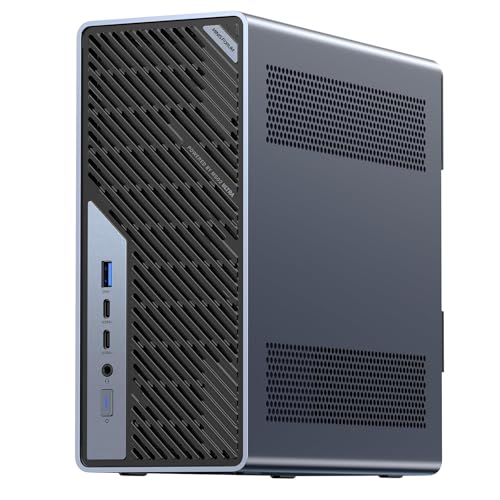
- Best overall workstation: Minisforum MS-02 Ultra Mini Workstation, Core Ultra 9 285HX, 32GB, 1TB — Check on Amazon
- GMKtec EVO-X2, Ryzen AI Max+ 395, 64GB Unified Memory, 1TB — Check on Amazon
- Skytech King 95, Ryzen 7 9800X3D, RTX 5070 Ti, 32GB, 1TB — Check on Amazon
- iBUYPOWER Y40 PRO, Ryzen 9 7900X, RTX 5070 Ti, 32GB, 2TB — Check on Amazon
See 2 more Amazon options
- Lenovo Legion T7, Core Ultra 7 265KF, RTX 5080, 32GB, 1TB — Check on Amazon
- Apple Mac mini M4 Pro, 24GB Unified Memory, 512GB — Check on Amazon
Read the full guide ↓
Disclosure: As an Amazon Associate, reviewstook.com earns from qualifying purchases. Links to Amazon on this page are affiliate links; they cost you nothing extra. Listing details such as price and availability change often, so check the current Amazon listing before you buy.
Be honest about what this search really asks: $2,500 buys genuine workstation capability — and a small room forgives almost none of the ways that capability is usually packaged. The six machines below split cleanly in two. Three are minis: compact boxes that claim a desk corner, an open shelf, or the shadow behind a monitor. Three are full-size gaming towers that happen to be superb render nodes — and a tower is furniture, whatever the product photos imply. No verified fact turns one class into the other, so this guide grades every pick on both axes that matter: the professional work it can sustain, and the installation it demands — floor or desk, air, power, cable drop, and heat poured into a small room.
A workstation is the hardest-run machine in any home: render queues overnight, simulations pinned for days, compile stacks that never idle. Crammed into a closed media console, the box that benchmarked beautifully will throttle, bake and age early; given open air and a planned cable drop, even the towers settle into the room, while the minis effectively vanish. Each review below therefore ends with an installation grade, a full section prices what “installed” means, and a five-step checklist puts measuring before money. One rule admits no exceptions: none of these six machines goes inside a sealed cabinet, a shut media console, or any enclosure without airflow — each review refuses that placement for its own pick, by name.
ECC memory is supported on exactly one platform here — the one whose documentation establishes it — and claimed nowhere else. The towers are graded as render nodes throughout: elite GPU throughput, no ISV-certified drivers, no workstation support contract — certification still resides in workstation lines priced far above this budget. Check the current price on Amazon before you decide: two picks belong here only when their live price sits within this budget, and they say so every time they appear.
In this guide
Quick Picks
Short on time, or comparing several options at once? Each row names a workload type and the machine that suits it, with a link to the listing. The install class is stated in plain terms — half the decision in a small room.
| Buyer type | Pick | Why it stands out | Link |
|---|---|---|---|
| Best overall workstation | Minisforum MS-02 Ultra, Core Ultra 9 285HX, 32GB, 1TB | ECC support to 256GB, dual 25GbE and a PCIe 5.0 x16 slot inside a documented roughly 4.8-litre mini | Check on Amazon |
| Best for local AI and large models | GMKtec EVO-X2, Ryzen AI Max+ 395, 64GB, 1TB | A 64GB unified pool its graphics can draw on almost fully — in a compact mini | Check on Amazon |
| Best GPU render node | Skytech King 95, Ryzen 7 9800X3D, RTX 5070 Ti | 5070 Ti 16GB compute and a published 850W Gold PSU — in a floor-standing tower | Check on Amazon |
| Best multi-core value | iBUYPOWER Y40 PRO, Ryzen 9 7900X, RTX 5070 Ti | Twelve cores, the same 5070 Ti and double storage in a value-oriented package — floor-standing tower | Check on Amazon |
| Best GPU compute, when the live price fits | Lenovo Legion T7, Core Ultra 7 265KF, RTX 5080 | An RTX 5080 inside this budget only at a live price within it — floor-standing tower | Check on Amazon |
| Best for video and media work | Apple Mac mini M4 Pro, 24GB, 512GB | Hardware ProRes acceleration, three-display support and near-silent running in the guide’s gentlest install | Check on Amazon |
How These Picks Were Chosen
The ceiling was applied to the complete machine. Every pick is a live Amazon listing in the United States — check the current price on Amazon and confirm it sits within the $2,500 budget before ordering. Two picks are conditional and stay labelled that way: the Legion T7 belongs to the under-$3,000 guide at its regular positioning above this budget and appears here only at a live price within it, while the King 95 likewise qualifies only at a live price within the ceiling.
Nobody on this team ran these machines. The judgements rest on maker listings, specification pages and independent coverage, weighed on four workstation axes: sustained multi-core output rather than burst scores; memory — how much, how far it grows, whether it corrects its own errors; expansion in slots, networking and storage positions; and GPU compute, with gaming hardware graded as a render node, never dressed as a certified workstation.
The installation grading follows an evidence rule this guide does not bend: a size, volume or mounting claim appears only where the verified research behind that exact machine documents it. Hence the MS-02 Ultra carries a litre figure and the other five carry none — its chassis volume is on its record, theirs are not. Undocumented footprints are graded by class, compact mini or full tower, with precise measurements sent to the live listing and your tape. Mounting is stricter still: no pick is credited with a VESA bracket, because no verified listing material documents one; a bracket confirmed later for a specific model is a bonus at install time, not a promise made here.
What “Installed” Actually Means
A product photo shows a box; an installation is five things — the box, the air around it, the power supply’s address, the cables leaving it, and the heat it hands to the room. Price all five before you order: in a small space each can veto a machine the spec sheet approved.
The box. Only one pick here has a documented volume: the MS-02 Ultra, at roughly 4.8 litres — a true mini workstation for a desk corner or a shelf. The EVO-X2 and the Mac mini are compact minis by class, with no dimensions their verified material lets this guide print. The three towers are full-size cases whose natural address, in a small room, is the floor beside the desk — a perfectly good install, provided the remaining four factors are planned.
The air. Every machine here cools itself with room air, and every one is refused a sealed placement — no closed cabinet, no media console with the door shut, no drawer, no cupboard with a cable hole drilled in the back. The minis sip air and forgive a shelf with open sides; the towers move serious air under render load and need open space at intakes and exhausts. The MS-02 Ultra adds a wrinkle: its power supply fan becomes audible under sustained load, so a quiet corner behind a monitor serves it better than the desk’s centre.
The power supply’s address. Three picks carry documented internal supplies: the MS-02 Ultra’s 350W unit, and the 850W units documented for the King 95 (a published 850W Gold ATX 3) and the Legion T7 (850W in the model’s published specification). For those, the “brick address” is the cord’s run and rear clearance. The Y40 PRO’s listing material publishes no wattage at all — confirming it is a condition of buying — and the EVO-X2 and Mac mini print no adapter figure: reserve a brick-sized space in the run behind the desk and confirm the arrangement on the live listing.
The cable drop. The drop is where small installs succeed or fail. The MS-02 Ultra is the extreme case: listing copy specifying four video outputs, plus dual 25GbE SFP+ networking that wants the switch within a sensible cable run of the desk. The Mac mini is the tidy extreme: three Thunderbolt 5 ports and HDMI at the rear, where display cables fall straight down behind a desk; two USB-C ports and a headphone jack at the front, where daily-touched cables stay short. The EVO-X2’s listing advertises quad-display output — plan for as many as four display cables leaving one small box. On the towers, display cables land on the graphics card’s rear bracket and drop from there: a clean vertical run on a floor install, a cable shelf you will look at for years on a desk install.
The room heat. A workstation under sustained load is a small heater with a job. The towers are the room-warmers — an 850W-class supply feeding a flagship-tier graphics card through a long render returns most of that energy to the air around your chair. The minis are far gentler: the Mac mini the coolest-tempered install here by class, the MS-02 Ultra still needing its exhaust respected on overnight runs. So the floor spot beside a door beats the alcove behind a curtain for a tower, and the open-sided shelf beats the bookcase cubby for a mini, every time.
Measure Before You Buy: The Five Steps
- Step 1 — Measure the spot. Tape-measure the exact place the machine will live — desk corner, shelf, or the floor rectangle beside the desk — in width, depth and height. Then set the live listing’s published dimensions against your numbers: this guide prints a figure only where the research documents one (the MS-02 Ultra’s roughly 4.8 litres), so the listing arbitrates for the other five.
- Step 2 — Check the ventilation clearance. Whatever spot survived Step 1, confirm it breathes: open air at the intakes and exhausts, no door closing over it, no curtain across it. This is the step where sealed cabinets, closed media consoles and lidded enclosures are refused — for all six picks, without exception.
- Step 3 — Give the power supply an address. Decide where the power actually lands. Internal-supply machines (the MS-02 Ultra, and the towers with documented 850W units) need a cord run and rear clearance. The EVO-X2 and Mac mini publish no adapter figure in the verified material, so reserve a brick-sized space in the run behind the desk and confirm the arrangement live.
- Step 4 — Walk the cable drop. Count the cables your real setup sends to the machine — displays first, then networking, then peripherals — and trace each one’s path. Four displays off one mini is four cables falling together; the MS-02 Ultra’s 25GbE links want the switch near the desk, not across the room; a floor-standing tower wants its drop down the desk’s back leg, not across the walkway.
- Step 5 — Then order. Only now: confirm the exact configuration in the cart — this category sells lookalike variants under shared names, and model numbers are the ground truth (King 95: ST-KING95-1671-W-AM; Legion T7: 90Y6003KUS; Mac mini here: MCX44LL/A) — check the live price against the buy lines below, and order. Measuring first is what makes a small-space workstation feel inevitable instead of improvised.
The 6 Best Workstation PCs Under $2,500
Minisforum MS-02 Ultra Mini Workstation — Core Ultra 9 285HX, 32GB, 1TB
Who it suits: Professionals whose work is infrastructure-shaped — virtualization, shared storage, long-running compute, multi-machine workflows — and anyone waiting for ECC memory and serious networking without stepping up to a higher tier, in a box a small room can absorb.
Nothing else here is engineered as a workstation from the board outward. Intel’s Core Ultra 9 285HX brings 24 cores and 24 threads at up to 5.5GHz into a chassis of roughly 4.8 litres — the sole documented volume in this guide. Memory headlines the specification: four DDR5 SO-DIMM slots carry the machine to 256GB, and the platform supports ECC, the error-correcting memory professional lines charge heavily for — the kind that matters on jobs long enough for one silent bit error to poison a result. ECC is claimed for this machine alone, on its documentation; no other pick receives the word. Storage opens at 1TB across four M.2 2280 positions — two on the board, two riding the networking card — so growth happens inside the case.
Expansion completes the argument. The PCIe 5.0 x16 slot takes a low-profile, dual-slot graphics card when a job demands one. Networking runs to dual 25GbE SFP+ on an Intel E810 controller, backed by 10GbE and 2.5GbE — shared-storage class connectivity. Listing copy specifies four video outputs across two USB4 v2 80Gbps ports, a further USB4 port and HDMI 2.1; the machine runs Windows 11 Pro behind an internal 350W supply. Check the current price on Amazon — it is the most complete workstation package here by a wide margin, and the reason it leads.
Installation grade: the easiest serious install here, carrying one acoustic condition. The 4.8-litre chassis stands on a desk corner or an open shelf and asks for open air at its vents, a cord run for its internal supply, and a real cable plan — up to four displays of cabling, and a switch within sensible reach if the 25GbE links are used. Sealed placement is refused, as for every pick; an enclosure would also trap its one documented flaw — a power supply fan audible under load. Set it behind a monitor or at the desk’s far corner, not at elbow distance. No VESA mount is documented in the verified material, so plan on a surface, not a mount.
The other limits are structural — the toll the form exacts. The box ships with integrated graphics only, so GPU rendering waits on the card you add, bounded twice over: low-profile format, and the 350W supply’s ceiling. Reviewer coverage adds that the CPU’s power limit steps down once a discrete card is fitted. Specialist coverage also collects owner reports of Linux and Proxmox driver and passthrough quirks; Windows with Hyper-V is the smoother road, and homelab buyers should check them before committing. Against the core case, none of it dents much: no rival in this guide combines ECC, a 256GB ceiling, 25-gigabit networking and a Gen 5 slot in under five litres.
- ECC memory support across four SO-DIMM slots, up to 256GB.
- Dual 25GbE SFP+ plus 10GbE and 2.5GbE — shared-storage class networking.
- PCIe 5.0 x16 slot and four M.2 positions for genuine growth.
Honest limitation: No discrete graphics as shipped; any card added later must be low-profile under the 350W ceiling, and the power supply fan is audible under sustained load.
Choose it if your work rewards memory integrity, capacity and networking over day-one GPU power — and your room rewards a shelf corner over a floor. Skip it if the first job is GPU rendering on day one: begin with a tower below, or add this class of machine when the infrastructure itch arrives.

GMKtec EVO-X2 — Ryzen AI Max+ 395, 64GB Unified Memory, 1TB
Who it suits: AI developers, researchers and technical artists whose models outgrow a 16GB graphics card — and who prefer one large memory pool to a faster card with a hard ceiling.
AMD’s Ryzen AI Max+ 395 anchors the machine: 16 cores, 32 threads, up to 5.1GHz, with a Radeon 8060S integrated GPU of 40 compute units. The defining specification, though, is memory — 64GB of LPDDR5X, soldered and shared between processor and graphics as one pool. AMD’s platform guidance lets the graphics side address as much as 48GB of it, reframing what a machine in this tier can hold: large language models, fat texture sets and scene files that refuse to load into 16GB of discrete memory run here, at integrated pace rather than discrete pace. Capacity is usually local AI’s binding constraint, and this is the most of it a complete, verified Amazon listing offers under the ceiling. Check the current price on Amazon for the configuration covered here.
The supporting specification is complete rather than exotic: 1TB PCIe 4.0 SSD, Wi-Fi 7, USB4, and a listing advertising quad-display output. The processor half is a genuine 16-core workstation-class part, so compiling, data work and CPU rendering are handled by the same box that holds the big model — one machine instead of a workstation plus a separate inference box.
Installation grade: a compact mini, graded by class because its verified material publishes no dimensions this guide can print. The install’s real demand is cable planning: a listing advertising quad-display output can land four display cables, networking and peripherals on one small box, and the tidy outcome is a single deliberate drop behind the desk, not cables off four sides. Its power arrangement is likewise unprinted here — no adapter figure is documented — so reserve a brick-sized space in the run and confirm it on the live listing. Sealed placement is refused, as everywhere in this guide: an open shelf or desk corner is its correct home. No VESA mount is documented, so plan a surface placement.
Its limits follow its architecture. Soldered memory fixes 64GB as the lifetime specification — no upgrade path exists, ever — and the 128GB configuration sits in a higher tier outside this budget, which is why it is discussed rather than linked. No PCIe slot exists, so expansion is whatever USB4 can carry. The single 1TB drive is the guide’s joint-smallest, making fast external or network storage a planned second purchase for media-heavy work — its shelf space planned at the same time, since it joins the cable drop the day it arrives. Finally, integrated graphics fed generously with memory remain integrated graphics: for raw rendering throughput per hour, the towers below finish sooner. Buy this machine for what only it can hold.
- 64GB unified memory pool; graphics can address up to 48GB of it.
- 16-core / 32-thread Ryzen AI Max+ 395 with a 40-CU Radeon 8060S.
- Complete and compact: 1TB SSD, Wi-Fi 7, USB4, quad-display listing spec.
Honest limitation: Soldered memory fixes the specification at 64GB for life, no PCIe slot exists, and the 128GB version of this machine sits far above this budget.
Choose it if your models or scenes exceed discrete-card memory and you run them locally, from a desk with no floor to spare. Skip it if your work is classic GPU rendering at ordinary scene sizes — the towers below are faster per hour — or if you need internal expansion.

Skytech King 95 — Ryzen 7 9800X3D, RTX 5070 Ti, 32GB, 1TB
Who it suits: 3D artists, motion designers and video editors whose bottleneck is GPU throughput — and who have a floor corner, not a desk, to give a workstation.
Graded as what it is — the guide’s best render node — the King 95 makes its case through its graphics card and its paperwork. The RTX 5070 Ti brings 16GB of GDDR7 and current-generation CUDA compute, the resources Blender Cycles, Octane, Redshift and Resolve’s GPU effects consume; for viewport work and final renders it is the hardest-working component here after the Legion’s conditionally included 5080. Skytech also publishes what most builders conceal: an 850W Gold ATX 3 power supply named in the listing, alongside 32GB of DDR5-5600 and a 360mm liquid cooler — a named supply matters professionally, because it makes the next GPU a card swap rather than a rebuild. Check the current price on Amazon for this exact configuration; it earns its place here only when that live price sits within this budget.
Its processor merits a candid paragraph. The Ryzen 7 9800X3D is an eight-core chip organised around a large cache that games adore — and most workstation loads are not games: rendering, encoding, compiling and simulation scale with cores and clocks, and the celebrated cache does little for them. Eight strong cores beside a GPU this capable are entirely adequate for DCC work, with excellent single-threaded viewport response. But CPU-render and heavy-compile buyers should read the Y40 PRO review first, because twelve cores beat eight for those loads.
Installation grade: a full-size tower, and this guide will not dress it as anything else. No dimensions are documented in the verified material, so the listing and your Step 1 tape measure arbitrate — but the class verdict needs no numbers: a floor-standing install beside the desk, open air at intakes and exhausts, display cables dropping from the graphics card’s rear bracket down the desk’s back, and the documented 850W supply’s cord run planned rather than trailed. Across a long render it is the joint-strongest room-heater in the guide, so give it the floor spot with moving air nearby, not the alcove. Sealed placement is refused in the strongest terms used here — a liquid-cooled tower rendering overnight inside furniture is a failure scheduled, not a risk taken. The 360mm figure in its specification is a cooler size, not a footprint.
The remaining limits are the render-node class limits, stated once for the towers: a consumer platform, so no ECC memory and no certified professional driver programme; Windows 11 Home rather than Pro; a graphics card whose brand may vary under Skytech’s listing note, making the 5070 Ti model and its 16GB the contracted spec rather than any board partner; and a name covering a family of configurations, so the model number — ST-KING95-1671-W-AM — is what gets matched at checkout. Storage, at 1TB, is the guide’s joint-smallest; in a standard tower, filling it is a cheap internal fix rather than a flaw. Judged as a render node with published internals, at a live price within the ceiling — check price on Amazon — it is the first tower we would buy — for a room that has the floor for it.
- RTX 5070 Ti 16GB — the strongest resident GPU compute under the ceiling.
- Published 850W Gold ATX 3 PSU and 360mm liquid cooling.
- Standard tower platform: RAM, storage and GPU all upgrade in place.
Honest limitation: A gaming platform graded as a render node: no ECC, no ISV certification, Windows 11 Home — and eight cores whose celebrated cache does little for render or compile loads.
Choose it if GPU rendering and viewport work dominate your day, you want published internals, and your room offers a ventilated floor corner. Skip it if your loads are CPU-bound — the twelve-core pick below serves those loads better — or if the only space you have is the desk itself.

iBUYPOWER Y40 PRO — Ryzen 9 7900X, RTX 5070 Ti, 32GB, 2TB
Who it suits: Developers, video professionals and generalist freelancers who need CPU cores and GPU compute in the same box — and who check the live price before they buy.
Where the King 95 is the GPU-first tower, this is the balanced one, and for mixed professional work it may be the smarter purchase. The Ryzen 9 7900X supplies twelve cores and twenty-four threads — half again the King 95’s count — the specification that compile jobs, CPU render buckets, virtual machines and a Resolve timeline carrying a dozen background tasks all feel. The same RTX 5070 Ti 16GB covers the GPU side, so nothing is conceded there. Storage doubles the other towers at a 2TB NVMe drive — at media-project sizes, the difference between working off the internal drive and managing space weekly. Memory is 32GB of DDR5, and a keyboard and mouse ride in the box. Positioning completes the story: it is this tier’s value-oriented tower — check the current price on Amazon. On specification it is the most complete tower package here; buy when the live price suits your budget, not against it.
Balance costs documentation. The verified listing material publishes no power supply wattage for this model, and none is invented here: on a machine bought to work for years and to accept a future GPU, the supply is a specification to confirm with the seller before ordering — a condition of this recommendation, not a footnote. In a small-space install the unknown doubles as a planning gap, since a cord run and an upgrade path cannot be fully planned around an unidentified supply. The platform’s class limits are shared with the other towers: no ECC, no certified drivers, Windows 11 Home — a high-value gaming tower that happens to be an excellent general-purpose work engine.
Installation grade: the same class verdict as the King 95 — a full-size tower, floor-standing, with no documented dimensions in the verified material, so the live listing and your tape measure settle the exact fit. Its 2TB of internal storage earns an installation point the other towers cannot match: the second drive a media workload eventually demands is already inside, sparing the small room the external enclosure and extra cable the 1TB picks will sooner or later add to the desk. Plan the drop as for any tower — display cables off the graphics card’s rear bracket, down the desk’s back, open air on every side the case breathes through — and refuse it a sealed cabinet exactly as firmly as the other two towers. Within those terms the all-rounder’s case holds: mixed professional work is better served by twelve cores, the strong card and double storage than by any single-axis maximum here. Bought well within the budget, it leaves room in a wider budget for the second monitor, backup drive and software licences a workstation honestly includes.
- 12-core / 24-thread Ryzen 9 7900X plus RTX 5070 Ti 16GB.
- 2TB NVMe storage — double the other towers in this guide.
- The value benchmark among the towers here — check price on Amazon.
Honest limitation: No PSU wattage appears anywhere in the listing material — confirm it with the seller before buying a machine you intend to upgrade — and the platform carries the usual render-node limits: no ECC, no certified drivers, Windows 11 Home.
Choose it if your work mixes CPU and GPU loads, the live price suits your budget when you check it on Amazon, and a ventilated floor spot is available. Skip it if unpublished internals are a deal-breaker for a work purchase — the King 95 above documents its supply in full.

Lenovo Legion T7 — Core Ultra 7 265KF, RTX 5080, 32GB, 1TB
Who it suits: GPU-bound professionals — render artists, AI tinkerers, simulation hobbyists-turned-pros — who can buy when the live price fits and have the floor to stand a tower on.
The current price is the condition everything else about this pick hangs on — check the current price on Amazon. Above this budget the Legion T7 belongs to our under-$3,000 guide; what brings it here is a live price within this budget — and when the listing shows that, it offers what nothing else in this guide can: an RTX 5080 with 16GB of GDDR7, a full tier above the 5070 Ti towers, driven by Intel’s Core Ultra 7 265KF, a 20-core processor that answers the core-count objection the King 95 raises. For GPU rendering, viewport work and local inference the 5080 is the fastest card in this guide, and twenty cores keep the CPU side honest beside it. Around that pairing sit 32GB of DDR5-5600, a 1TB SSD and Windows 11 Pro — the only tower here shipping the professional operating system — with an 850W power supply in the model’s published specification. It is also the only gaming tower here from a maker that sells certified workstations — a lineage that confers no certification on this machine, and we do not pretend otherwise.
What this pick demands is timing discipline. A live price within budget is not a permanent position: between promotions the listing can climb back above the budget, and anyone who needs a machine this week while it sits there is shopping in the wrong guide — the final recommendation points to the right one. The rule is the one printed in the buy box and quick picks: at or under $2,500, arguably the strongest workstation-adjacent tower here; above it, an excellent machine in the wrong budget. There is no middle reading.
Installation grade: the largest commitment in the guide. A full-size tower with no documented dimensions in the verified material — listing and tape measure arbitrate — and the strongest GPU here makes it the joint-strongest room-heater under sustained work — an overnight render queue in a small room is a heating decision as much as a computing one — so its floor spot wants the room’s best air, not a leftover corner. Display cables land on the 5080’s rear bracket and drop from there; the documented 850W supply makes the cord run the install’s one predictable element. Sealed placement is refused without exception — the fastest card in the guide is the worst candidate for an unventilated box. Storage is 1TB, the joint-smallest here, in a chassis with room to add more internally — the small-room-friendly way to grow. Its grading is the render-node grading, class limitations intact: no ECC, GeForce rather than certified professional drivers, gaming-tower support rather than a workstation service contract. None of that diminishes what it offers when the live price fits — the strongest GPU compute under the ceiling, twenty cores, the Pro operating system — but it defines the buyer: one who values throughput over platform guarantees, treats price as a discipline rather than a hope, and can give the machine a ventilated floor patch. If its live price sits above the budget, the King 95 offers the same idea without that condition.
- RTX 5080 16GB — the strongest GPU in the guide, at a live price within budget only.
- 20-core Core Ultra 7 265KF and Windows 11 Pro.
- 850W PSU in the model’s published specification.
Honest limitation: Under budget only while its live price sits within it; above that it belongs to the under-$3,000 guide, and it carries the render-node class limits — no ECC, no ISV certification.
Choose it if the live price is at or under $2,500, GPU throughput is your bottleneck, and a well-aired floor spot is free. Skip it if its live price sits above the budget and your purchase cannot wait, or your space is desk-only — the minis above exist for that room.

Apple Mac mini M4 Pro — 24GB Unified Memory, 512GB
Who it suits: Video editors, audio producers, photographers and Apple-ecosystem developers who want a quiet, small, media-specialized workstation — comfortable spending well under the budget to get it.
Every other machine here is a Windows PC, and for a large class of professional work that is simply the wrong shortlist. The Mac mini with M4 Pro pairs a 12-core CPU (eight performance, four efficiency) with a 16-core GPU, 273GB/s of memory bandwidth and dedicated hardware engines for ProRes and AV1 — silicon aimed squarely at media pipelines. In Final Cut, Logic, Lightroom and ProRes-heavy Premiere or Resolve workflows, those fixed-function engines take on work that general-purpose cores grind through slowly — inside a near-silent box that disappears behind a monitor. Apple publishes support for up to three displays for this model, across three Thunderbolt 5 ports and HDMI at the rear, with two USB-C ports and a headphone jack in front — the only display count stated for a mini in this guide, because it is the maker’s own specification. Its positioning is simple: it sits well below the budget ceiling — check the current price on Amazon — and is the lowest-positioned pick here.
Installation grade: the gentlest install in the guide, and the reference point the other five are measured against. A compact mini by class — no dimensions are printed, because the verified material publishes no figure to stand behind — with the tidiest documented cable story of the six: displays and docks hang off the rear ports, cables falling straight down behind the desk, while the front USB-C ports and headphone jack keep daily cables short. Its documented near-silent running lets it live at ear level on the desk, and its heat manners are the mildest here. Two disciplines still apply in full: no VESA mount is documented in the verified material, so do not plan a monitor-back hang the paperwork does not promise; and sealed placement is refused as for every pick — near-silent is not no-heat, and a closed console would still cook it slowly. The positioning gap is the review’s real subject: the mini is this guide’s control group, proof that a professional workload does not automatically need $2,500. An editor cutting ProRes, a producer mixing in Logic, a developer building for Apple’s platforms — each is fully served, with room left in the wider budget for the calibrated monitor, audio interface and storage their work touches daily.
Apple’s standing limitations apply, and they admit no exceptions. Memory and storage are fixed at purchase: 24GB and 512GB form this configuration’s lifetime specification, the 512GB drive is tight for media work, and fast external storage becomes a planned companion rather than an upgrade path — in installation terms that drive joins your cable drop permanently, so plan its shelf space alongside the machine; buyers whose projects are memory-bound should check the current price on Amazon for the 48GB configuration before ordering this one. It runs macOS only, excluding Windows-only professional software outright. Its GPU, strong as it is for media engines and Metal-accelerated work, is not a CUDA device, so Blender and AI pipelines built on NVIDIA compute belong on the towers above. Choose this machine because your software lives in Apple’s world, and it will be the quietest, cheapest, smallest-footprint workstation in the guide; choose it on any other basis and the fit fails fast.
- Hardware ProRes and AV1 engines for media pipelines.
- Up to three displays per Apple’s published specification; Thunderbolt 5 throughout.
- Positioned well below this budget’s ceiling — check price on Amazon.
Honest limitation: Memory and storage are sealed at purchase — 24GB and 512GB for life — it runs macOS only, and there is no CUDA for NVIDIA-based render or AI pipelines.
Choose it if your professional software is Apple-native and media-focused, and your room is the smallest of the six scenarios here. Skip it if you need Windows software, CUDA compute, or any prospect of upgrading memory down the line.

Comparison Table
| Product | Type | Install class | Best use | Link |
|---|---|---|---|---|
| Minisforum MS-02 Ultra, 285HX, 32GB, 1TB | Mini workstation platform | Compact mini — roughly 4.8L documented; desk corner or open shelf | ECC memory, 25GbE networking, virtualization, expansion | Check on Amazon |
| GMKtec EVO-X2, AI Max+ 395, 64GB, 1TB | Unified-memory mini | Compact mini — surface placement; up to four display cables to plan | Local AI models too large for a 16GB graphics card | Check on Amazon |
| Skytech King 95, 9800X3D, RTX 5070 Ti | Gaming tower, render node | Full tower — floor-standing, ventilated; never enclosed | GPU rendering with published internals | Check on Amazon |
| iBUYPOWER Y40 PRO, 7900X, RTX 5070 Ti | Gaming tower, render node | Full tower — floor-standing, ventilated; never enclosed | Mixed CPU + GPU professional work, value position in this tier | Check on Amazon |
| Lenovo Legion T7, 265KF, RTX 5080 | Gaming tower, render node | Full tower — floor-standing in the room’s best air; never enclosed | Maximum GPU compute when the live price fits | Check on Amazon |
| Apple Mac mini M4 Pro, 24GB, 512GB | Media mini workstation | Compact mini — desk or behind-monitor placement; near-silent | ProRes video, audio and Apple-ecosystem development | Check on Amazon |
How to Choose a Workstation PC Under $2,500 for a Small Space
- Settle which space problem you actually have. If the constraint is desk area, your shortlist is the three minis and the towers are out — grading language cannot change a form factor. If the constraint is a small room with free floor, all six compete, and the installation grades rather than box size decide.
- Name the bottleneck before the budget. GPU rendering, CPU throughput, memory capacity and memory integrity are four different purchases sharing one keyword. The six picks divide almost perfectly along those lines, so choosing the axis first makes the shortlist obvious.
- Treat ECC as a platform decision, not a checkbox feature. Error-correcting memory exists here on exactly one platform, and it arrives wearing that platform’s whole shape — mini chassis, integrated graphics, expansion by slot and port. If your long-running work needs it, the shape is the price. If it does not, the word is not worth paying for.
- For local AI, count memory before compute. A model that does not fit does not run at all, however fast the card. The discrete GPUs here carry 16GB each; the unified-memory pick lets graphics address up to 48GB of its 64GB pool. Size your largest model or scene before you shop.
- Match cores to the load, not the headline. Rendering and viewport work lean on the GPU; compiling, CPU rendering, VMs and heavy multitasking lean on core count. Eight famous gaming cores are not twelve ordinary ones, and the reviews grade them that way.
- Respect live-price discipline at this tier. Two picks qualify only when their live price sits within the budget, and the walk-away point is part of the product: if the live price breaks it, the correct move is a different pick or the under-$3,000 guide — never a stretched budget.
Common Buying Mistakes
- Calling a gaming tower a certified workstation. The render-node picks are excellent throughput machines, but certification belongs to workstation product lines and their drivers — no graphics card confers it.
- Ordering a tower for a desk that cannot hold it. The three towers here are floor installs; bought for a small desk, they become the room’s dominant furniture and its dominant heat source — a mismatch no benchmark repairs.
- Hiding any of these machines in a sealed cabinet or closed media console. It is the costliest placement error at this tier: sustained workstation loads in unventilated furniture throttle the performance you paid for and shorten the machine’s life.
- Assuming a mount exists because a machine is small. No VESA bracket is documented for any pick in this guide. Plan surface placements, and treat any bracket a maker later confirms as a bonus rather than a plan.
- Trusting a dimension copied from a different machine. This guide prints a volume for exactly one pick, because exactly one is documented; measure the rest against their live listings.
- Treating a temporary live price as a permanent one. The Legion T7 visits this budget only when its live price does; buying it above the budget while citing this guide is the most expensive mistake on this page.
Final Recommendation
- Most professional buyers, and the easiest install: Minisforum MS-02 Ultra.
- Local AI and oversized models: GMKtec EVO-X2 64GB.
- GPU rendering, floor space available: Skytech King 95.
- Mixed CPU + GPU work, value position in this tier: iBUYPOWER Y40 PRO.
- Maximum GPU compute, live price permitting: Lenovo Legion T7.
- Media work in Apple’s ecosystem, smallest daily presence: Mac mini M4 Pro.
Our top two are the MS-02 Ultra — for buyers whose work rewards the platform traits (ECC memory, a 256GB ceiling, 25-gigabit networking, a Gen 5 slot) that define a workstation everywhere except the certification paperwork, delivered in the guide’s only documented small chassis at roughly 4.8 litres — and the EVO-X2, for the fast-growing class of work bounded by memory rather than speed, in a compact mini that leaves the desk clear. Together they cover the two shapes this search most often takes at $2,500 in a small room: infrastructure and capacity, both without surrendering the floor. If rendering throughput is the bottleneck and the room offers a ventilated floor corner, the King 95 is the tower to buy when its live price sits within the budget, the Y40 PRO the balanced value alternative in this tier, and the Legion T7 the higher-tier option that makes sense only at a live price within the budget. Media professionals in Apple’s world should take the Mac mini, positioned well below this tier’s ceiling. Buyers whose workloads are lighter than this tier assumes should also see Best Workstation PC Under $1500 and Best Workstation PC For Small Spaces Under $1500; buyers willing to shop the higher tier will find it in Best Workstation PC Under $3000. Confirm the exact configuration and the live price before ordering, and run the five measuring steps before either — at $2,500, in a small room, that homework separates a workstation that disappears into your working life from an expensive PC that dominates it.
Frequently Asked Questions
Can I put one of these PCs inside a media console or cabinet?
No — not one of the six, and this guide refuses that placement for every pick by name. These are sustained-load machines, and a sealed or door-closed enclosure traps exactly the heat their work produces. The minis belong on open shelves or desk corners, the towers on open floor. If the machine must live behind a door, the honest options are an actively ventilated enclosure designed for equipment, or a different room plan.
Can I mount one of the mini PCs behind my monitor?
Not on this guide’s evidence. No VESA mount is documented for any of the six picks in the verified research behind these reviews — including the three minis, where the idea tempts. Plan surface placement: a desk corner, an open shelf, or the space behind a monitor. A bracket confirmed on a maker’s live listing for your exact model is a bonus discovered at install time.
Is a gaming PC a workstation?
It is a render node — a distinction worth keeping clearly. A gaming tower with a 5070 Ti or 5080 performs GPU rendering, encoding and inference at full speed. What it lacks is the platform layer: ECC memory, certified professional drivers, a workstation support contract. If your work needs throughput, the towers here qualify; if it needs the platform layer or the paperwork, only the MS-02 Ultra offers part of it — and full certification still lives in the dedicated workstation lines above this budget.
Does any PC under $2,500 have ECC memory?
One in this guide does — the Minisforum MS-02 Ultra, whose platform supports ECC across four DDR5 SO-DIMM slots up to 256GB, per its maker documentation. The other five picks run standard non-ECC memory, and the reviews say so outright rather than letting the category keyword imply otherwise.
Why is a 64GB mini recommended over a faster graphics card for AI?
Because capacity gates the work before speed gets a vote. The discrete cards here carry 16GB; a model or dataset larger than that does not run slowly on them — it does not run. The EVO-X2’s unified pool lets its graphics address up to 48GB, so the large models load, at integrated-graphics pace. On models that fit, the towers win on throughput. Serious local AI shopping starts with the size of the largest thing you run — and in a small room, the EVO-X2’s answer arrives without the tower’s floor footprint or heat.
What happened to the 128GB mini PCs?
They sit outside this budget. The 128GB configuration of the EVO-X2 sits in a higher tier above this budget, its competitors higher still. The 64GB configuration — check the current price on Amazon — is the version this guide can honestly recommend under $2,500; buyers who need 128GB of unified memory are shopping a different tier.
Can I add a graphics card to the MS-02 Ultra later?
Yes — the PCIe 5.0 x16 slot exists for exactly that — within two limits the review states: the card must be a low-profile, dual-slot design, and the internal power supply is 350W, which caps the class of card the machine can feed. Reviewer coverage notes, too, that the CPU power limit steps down once a discrete card is installed. It is an expansion path sized for a workstation card or a modest gaming card — not a route to a flagship GPU.
- Best Workstation PC Under $1500
- Best Workstation PC Under $3000
- Best Workstation PC For Beginners Under $2500
- Best Workstation PC For Streaming Under $2500
- Best Workstation PC For Small Spaces Under $1500
- Best Workstation PC For Small Spaces Under $3000
- Best Workstation PC For 1440p Gaming Under $2500
- Best Mini PC Under $2500
- Best Home Office PC Under $2500
- Best Small Form Factor Gaming PC Under $2500


