Where to buy
Check the latest price, availability and delivery on Amazon. Orders are placed on Amazon. We may earn a commission from qualifying purchases.
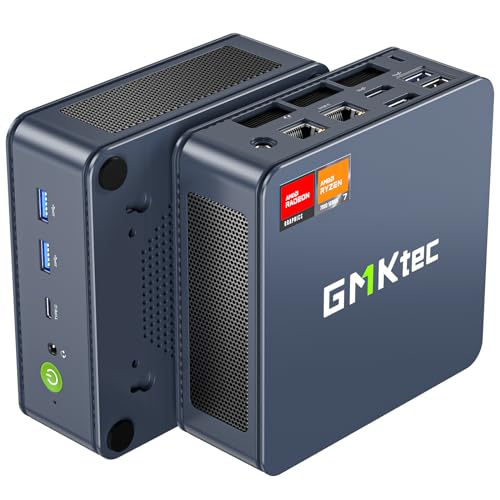
- Best for streaming: GMKtec NucBox K6, Ryzen 7 7840HS, Radeon 780M, 32GB DDR5, 1TB SSD — Check on Amazon
- Beelink SER5 MAX Mini PC, Ryzen 7 7735HS, Radeon 680M, 24GB RAM, 500GB SSD — Check on Amazon
- GMKtec M5 Plus, Ryzen 7 5825U, 32GB RAM, 1TB SSD, Dual 2.5GbE LAN — Check on Amazon
- BOSGAME P4 Mini PC, Ryzen 7 5700U, 32GB RAM, 1TB SSD, Triple 4K — Check on Amazon
See 2 more Amazon options
- MINIX NEO Z300-0dB Fanless Mini PC, Intel i3-N300, 16GB RAM, 512GB SSD — Check on Amazon
- Beelink EQ14 Mini PC, Intel N150, 16GB RAM, 500GB SSD, Dual 2.5GbE — Check on Amazon
Read the full guide ↓
Disclosure: As an Amazon Associate, reviewstook.com earns from qualifying purchases. Links to Amazon on this page are affiliate links; they cost you nothing extra. Listing details such as price and availability change often, so check the current Amazon listing before you buy.
Streaming asks a computer to do two jobs at once, and a mini PC under $500 feels both of them. The first job is whatever is on screen — a game, a desktop, a camera feed, a console coming in through a capture card. The second job is the broadcast itself: OBS composites the scene, a hardware encoder compresses it in real time, and the connection carries it away without dropping frames. On Twitch that broadcast is conventionally 1080p60 at around 6,000 kbps CBR with two-second keyframes. YouTube accepts higher bitrates, takes 1440p streams, and is where AV1 live encoding lives today; Twitch’s AV1 support arrives through its Enhanced Broadcasting programme rather than as a standard setting. Streaming in 4K is limited by the platforms, not by anything you can buy — so the honest target here is a clean 1080p broadcast, and what separates these machines is the encoder silicon inside the chip and the headroom left over while it works.
That framing produces one honest warning before any picks. There is no NVIDIA graphics hardware in a complete mini PC at this price, which means there is no NVENC — the encoder most streaming advice is written about — anywhere in this guide. What these machines offer instead is AMD’s VCN encoder in three generations and Intel’s Quick Sync in two small chips, and they are not interchangeable: only one pick, the GMKtec NucBox K6, can encode AV1, because its Radeon 780M is RDNA3 silicon and AV1 encoding does not exist on anything older from AMD. None of that makes these machines bad stream boxes. It makes them specific ones: excellent for talk and desktop streams, for console streaming through a capture card, as dedicated second-PC encoders, and — in the K6’s case — for playing and streaming lighter games from one box. Demanding modern games played and broadcast from the same mini is beyond all six, and this guide will keep saying so. Check price on Amazon for each pick, because memory and SSD costs surged through late 2026 and these listings reprice weekly.
In this guide
Quick Picks
Short on time, or comparing several options at once? Each row below names a streaming job and the machine that suits it, with a link to the listing.
| Streaming job | Pick | Why it stands out | Link |
|---|---|---|---|
| Best for streaming | GMKtec NucBox K6, Ryzen 7 7840HS, 32GB | Radeon 780M on RDNA3 — the only AV1 encoder in this guide; check price on Amazon | Check on Amazon |
| Best one-box game stream | Beelink SER5 MAX, Ryzen 7 7735HS, 24GB | 680M plays the game while its VCN encoder broadcasts it — the strongest pairing under $500 | Check on Amazon |
| Best dedicated stream box | GMKtec M5 Plus, Ryzen 7 5825U, 32GB/1TB | Socketed memory, dual 2.5GbE and a terabyte for recordings; check price on Amazon | Check on Amazon |
| Best budget stream station | BOSGAME P4, Ryzen 7 5700U, 32GB/1TB | 32GB and 1TB — capacity a stream setup grows into; check price on Amazon | Check on Amazon |
| Best silent stream corner | MINIX NEO Z300-0dB, Intel i3-N300, 16GB | Fanless — zero fan noise near the microphone, Quick Sync doing the encoding | Check on Amazon |
| Cheapest encode box | Beelink EQ14, Intel N150, 16GB/500GB | Quick Sync and dual 2.5GbE — a console-capture station; check price on Amazon | Check on Amazon |
How These Picks Were Chosen
The budget was applied as a ceiling for a complete, working computer: every pick is a real Amazon listing with memory, storage and a Windows license included, selling at or regularly within $500 in the United States. Barebone kits were excluded however attractive their sticker, because in the current parts market completing one costs far more than the headline suggests; that route is covered separately at Best Barebones Mini PC Under $500. Prices in this category drift often, so check the live price on Amazon before you buy rather than relying on a number printed here. One pick needs its condition stated up front: the GMKtec K6 belongs here only when its current Amazon listing fits this budget, so confirm its live price before relying on its ranking in this guide.
Within that filter, the grading order is encoder first, simultaneous load second, everything else third. Encoder first means the hardware video block inside the chip decides the ranking, because the encoder is the one component a streamer cannot upgrade, overclock or work around — a mini PC’s encoder is soldered into its processor for life. Simultaneous load means we graded what is left while the encoder works: streaming is the game or the desktop, plus OBS compositing scenes, plus a browser, chat, alerts and a voice app all asking for cores and memory at the same moment. A chip that encodes beautifully but has nothing left for the scene drops frames just as surely as a weak encoder does.
We did not use these machines ourselves. We read the maker listings, specification pages and model databases, and compared encoder generation, processor class, memory type and ceiling, storage, networking and price history. Encoder capabilities are stated at the level of the silicon generation: a feature either exists in a chip’s hardware block or it does not, and no driver adds it later. Where a listing family sells several configurations under one name, the review names the exact configuration the linked listing represents — a different configuration can mean a different chip, and therefore a different encoder.
The Encoder Map: What Each Chip Can Actually Broadcast
Everything in this guide follows from one short set of silicon facts. The GMKtec NucBox K6’s Radeon 780M is RDNA3 hardware, and its VCN encoder handles H.264, HEVC and AV1 — making the K6 the only machine here that can send an AV1 stream, the format YouTube’s live ingest rewards and the one Twitch is rolling out through Enhanced Broadcasting. AMD’s H.264 encoding is visibly softer than NVIDIA’s NVENC at Twitch’s roughly 6,000 kbps ceiling, a gap every AMD pick here shares; AV1 is how the K6 closes most of it, on the platforms that accept AV1.
The Beelink SER5 MAX’s Radeon 680M is RDNA2 hardware: its VCN encoder handles H.264 and HEVC and it decodes AV1 for playback, but it cannot encode AV1, and no setting in OBS changes that — treat any advice crediting a 680M machine with AV1 streaming as a misprint. The GMKtec M5 Plus and BOSGAME P4 carry Vega-generation graphics, whose encoder is the oldest VCN here: H.264 and HEVC only, no AV1 in either direction, and the softest H.264 of the three AMD generations at a fixed bitrate. As game players that matters a great deal; as dedicated encoders fed by a capture card, much less — the picture they compress is not also being rendered on the same silicon.
The two Intel machines run Quick Sync on UHD graphics. Its H.264 encoding is genuinely good — clean at Twitch bitrates and light on the processor — and both the i3-N300 in the MINIX and the N150 in the Beelink EQ14 decode AV1 for playback. Neither encodes AV1: that belongs to Intel’s Arc-class hardware, and this guide does not credit it to them. What limits the pair is not the encoder but everything around it — four or eight small efficiency cores and 16GB of memory is a tight stage for OBS, a browser, chat and a game to share, which is why both are graded as dedicated encode boxes and talk-stream machines, not one-box game streamers.
One more note applies to all six: none should be asked to encode in software. OBS offers x264, which spends CPU cores instead of using the hardware block; on the eight-core Ryzen picks it survives as an emergency fallback at its fastest presets, and on the small Intel chips it competes with everything else the machine is doing and loses. The setup section below assigns each pick its hardware encoder by name — the single most consequential setting in this guide.
The 6 Best Mini PCs for Streaming Under $500
GMKtec NucBox K6, Ryzen 7 7840HS, Radeon 780M, 32GB DDR5, 1TB SSD
Who it suits: Streamers who can wait for a sale and want the one machine in this guide whose encoder belongs to the current generation — AV1 for YouTube today and Twitch’s rollout tomorrow, plus enough processor and memory to play and broadcast lighter games from the same box.
Check the price first, because it defines this pick. The K6’s 32GB/1TB configuration often sits in a higher tier, so check price on Amazon and confirm the current listing fits this budget before you buy. Everything in this review is conditional on that check: if the live price has moved into the next tier, this machine belongs to the $700 tier covered at Best Mini PC For Streaming Under $700.
When it fits the budget, the K6 is the strongest streaming mini under $500, and the reason is silicon. The Ryzen 7 7840HS pairs eight full-performance cores with the Radeon 780M, whose RDNA3 media engine is the only encoder in this guide that handles AV1. For a YouTube streamer that is a present-tense advantage: AV1 at a given bitrate carries visibly more detail than H.264, and YouTube accepts 1440p AV1 ingest. For a Twitch streamer it is a near-term one, arriving with Enhanced Broadcasting. The simultaneous-load side of the ledger is also the best here: eight cores and 32GB of socketed DDR5 — expandable to 64GB — leave real room for the game, OBS, a browser and a chat stack at once, and the 780M is the strongest game-playing integrated graphics in the guide, so the one-box arrangement is honest for esports, indie and older titles. A 1TB PCIe 4.0 SSD with a second M.2 slot holds local recordings, USB4 sits alongside HDMI 2.0 and DisplayPort for triple 4K output, and dual 2.5-gigabit Ethernet makes the wired connection this guide insists on a non-event.
The debits are acoustic and financial. Reviewers who have measured this model note fan noise under sustained load, with no fan-profile control in the BIOS to tame it — there are 45W quiet and 65W performance modes, but the acoustic character is set by GMKtec, not by you — and fan noise is not an abstract flaw in a streaming machine, because the microphone hears it too. One buyer report in the model’s review history described a factory-fitted SSD whose SMART data showed prior power-on hours; do what you should do with any mini PC and read the drive’s health figures during the first week, while a return is still painless. And AMD’s H.264, when you do stream to Twitch, remains softer than NVENC at the same bitrate — the K6 narrows the integrated-graphics gap; it does not repeal it.
- RDNA3 VCN encoder with AV1 — the only AV1 streaming capability in a complete mini under $500.
- Eight cores and 32GB of socketed DDR5: the most simultaneous-load headroom in the guide.
- 1TB fitted plus a second M.2 slot, USB4, and dual 2.5GbE for the wired rule.
Honest limitation: It only belongs in this guide when its live Amazon price fits the budget — check price on Amazon before buying — and its fan is audible under load with no BIOS control to quiet it, which a nearby microphone will pick up.
Choose it if you can set a price alert and wait, stream to YouTube or AV1-capable routes, or want one box that plays lighter games and broadcasts them. Skip it if you need to buy this week at whatever price is showing, or your recording space cannot tolerate any fan noise at all.

Beelink SER5 MAX Mini PC, Ryzen 7 7735HS, Radeon 680M, 24GB RAM, 500GB SSD
Who it suits: Streamers who want to play and broadcast from one small machine at a price that is actually in budget today — the strongest game-playing graphics under $500 paired with a competent hardware encoder, and no sale to wait for.
The SER5 MAX is the guide’s one-box answer. Its Ryzen 7 7735HS runs eight cores to 4.75GHz, and its Radeon 680M is the strongest graphics in a complete mini PC under $500 without waiting for a sale — esports and indie titles run comfortably at 1080p, older AAA games are playable at medium settings, and current releases are a low-settings conversation. For streaming, the division of labour inside the chip is what matters: the game renders on the 680M’s graphics units while its RDNA2 VCN block encodes the broadcast in H.264 or HEVC, so the encode does not steal the game’s frame rate the way software encoding would. Twitch at 6,000 kbps CBR is squarely this encoder’s job, and it does it well — AMD’s H.264 softness versus NVENC is a real but modest gap, visible in fast-motion detail rather than in whether the stream looks good. Check price on Amazon for the current listing: it is positioned at the premium end of this budget tier, and unlike the K6 it does not depend on a special sale framing.
The boundary, stated plainly: the 680M decodes AV1 and does not encode it. If AV1 streaming is your reason for buying, this is the wrong machine and the K6 above is the right one — no OBS setting or driver update adds an encoder the silicon does not have. Twenty-four gigabytes of memory is enough for a game, OBS, a browser and a voice app simultaneously, though it is LPDDR5 soldered to the board and will never be more; storage starts at 500GB, which local recordings will fill faster than you expect, and the empty second M.2 2280 slot is the designed answer. Triple 4K output over HDMI 2.0, DisplayPort 1.4 and USB-C covers a streamer desk, 2.5-gigabit Ethernet covers the wired rule, and Windows 11 Pro is fitted. One caution is inherited from the model line: Beelink sells an older Vega-graphics 5800H machine under the SER5 name, and the linked listing is the 7735HS/680M configuration — confirm those two lines in the cart, because the 5800H version is a materially weaker streaming machine in both graphics and encoder generation. There is also no USB4 — the USB-C carries data and video but not the 40Gbps standard — which closes the external-GPU-dock door for the future.
- 680M graphics plus a hardware VCN encoder: the best play-and-broadcast pairing actually priced under $500.
- Eight cores and 24GB leave genuine room for OBS, chat and a browser alongside the game.
- Second M.2 slot stands empty for the recording drive this machine will eventually want.
Honest limitation: No AV1 encoding — the 680M decodes AV1 only — and the 24GB of memory is soldered and permanent, with no USB4 for an external GPU later.
Choose it if you stream to Twitch in H.264, play esports, indie or older titles, and want one box that does both jobs now. Skip it if AV1 output is the point of the purchase, or your game library is current AAA releases — that workload wants a discrete GPU, and the wider streaming guides at Best Streaming PC Under $500 are the honest next read.

GMKtec M5 Plus, Ryzen 7 5825U, 32GB RAM, 1TB SSD, Dual 2.5GbE
Who it suits: Streamers building the two-box or console arrangement — a dedicated encoder and recording machine that never has to render the game it is broadcasting — and anyone whose stream PC doubles as the home server between broadcasts.
Judged as a game player, the M5 Plus is a generation behind the two picks above: its Ryzen 7 5825U carries Vega-generation graphics a clear class below the 680M, fine for esports and older titles at 1080p and not a machine bought for current releases. Judged as a stream box, the ranking inverts. Feed it a console or a gaming PC through a capture card and the Vega VCN block only has to compress a picture it did not have to draw — and at that single job, with nothing else competing for the silicon, it is steady and adequate at Twitch’s 6,000 kbps. What the M5 Plus adds around that encoder is the best support package in the guide: 32GB of DDR4 in two slots, expandable to 64GB, so OBS, a browser, chat and recording software never negotiate; a 1TB NVMe SSD with a second M.2 slot beside it and room for up to 4TB of recordings and VOD archive; and two 2.5-gigabit Ethernet ports, so the broadcast rides a wired connection while the second port talks to the network storage or the gaming PC. Check price on Amazon for the current listing — for a dedicated stream box, its fitted capacity makes it a strong value in its tier.
The honest debit is the encoder’s generation. Vega VCN is the oldest AMD encoder here: H.264 and HEVC only, no AV1 in either direction, and its H.264 at a fixed bitrate is the softest of the three AMD picks — fast-motion scenes will smear sooner than on the K6 or the SER5 MAX. In the dedicated-box role that softness is the whole of the compromise, and its afterlife as a home server — media library, file storage, self-hosted services on dual fast Ethernet — is the best in the guide. As a one-box game streamer it is the weakest of the three Ryzen picks: the same money buys the SER5 MAX’s newer silicon if playing and streaming from one box is the plan. Bought for the job it is best at, the M5 Plus is the pick most likely to still be earning its place in five years.
- Socketed 32GB, dual M.2 slots and dual 2.5GbE: the dedicated stream box with room to grow into a server.
- A full terabyte fitted for recordings — capacity that serves a stream archive well; check price on Amazon.
- Eight cores that only run the stream, never the game, when it works as a second PC.
Honest limitation: Vega-generation encoder — the softest H.264 in the guide and no AV1 — and Vega graphics make it the weakest one-box game streamer of the Ryzen picks.
Choose it if your game lives on a console or a separate PC and this box’s job is encoding, recording and serving. Skip it if you intend to play and broadcast modern games from this one machine.

BOSGAME P4 Mini PC, Ryzen 7 5700U, 32GB RAM, 1TB SSD, Triple 4K
Who it suits: Streamers who want the M5 Plus’s capacity story — 32GB of memory and a full terabyte — at a budget-tier positioning in the guide, for a console-capture station or a talk-stream desk, and who are willing to check a configuration selector carefully to get it.
The P4’s streaming case rests on the same logic as the pick above it, executed cheaper. Its Ryzen 7 5700U is an eight-core Vega-generation chip, and its encoder is that generation’s VCN block: H.264 and HEVC, no AV1 in either direction, and the softest H.264 output in the guide at a fixed bitrate. As a dedicated encoder fed by a capture card, though, that is a workable tool — one job, compressing a picture another machine rendered — and at Twitch’s 6,000 kbps it holds a clean 1080p60 for talk, desktop and console content. Around it sits the capacity streamers actually consume: 32GB of memory, a 1TB SSD for recordings and clips, triple 4K output across HDMI, DisplayPort and USB-C, dual 2.5-gigabit Ethernet for the wired rule, Wi-Fi 6E and Windows 11 Pro. Check price on Amazon for the current listing — it is positioned as the budget option in this guide for this capacity pair. One point of discipline, carried from the base research: this guide makes no claim about how the P4’s memory is constructed, because the verification behind it does not document that; what is documented is the 32GB fitted, and that is the fact that matters here.
The warning here concerns the page, not the product. BOSGAME has sold this family with 5700U and 5825U processors under titles that are nearly identical, and mini PC pages generally rotate configurations — so the processor, memory and storage showing in your cart are what you are buying, whatever the headline photo suggests. The linked listing is the 5700U/32GB/1TB configuration documented in the price records; spend the ten seconds before checkout confirming those three lines, because in a streaming machine the configuration is the encoder. BOSGAME is also a smaller brand than Beelink or GMKtec, which shows up in the intangibles that matter at 9 p.m. on stream night: thinner documentation, a smaller owner community to search when something odd happens, and support that runs through the seller. At a budget-tier price those are fair trades. If its live price climbs toward the mid-range tier, though, the M5 Plus above buys the same idea with better documentation.
- 32GB and 1TB — budget-tier fitted capacity for a stream station in the guide; check price on Amazon.
- Dual 2.5GbE and triple 4K output give it desk and capture-station range beyond its price.
- Eight cores devoted to the broadcast when a console or second PC renders the game.
Honest limitation: The Vega encoder is the guide’s softest and has no AV1, and the listing family mixes 5700U and 5825U configurations under similar titles — the configuration in the cart is the purchase, and the brand’s support bench is thinner than the bigger names’.
Choose it if you check price on Amazon and the current listing fits your budget, the cart confirms 5700U/32GB/1TB, and the job is console capture, talk streaming or a budget second box. Skip it if the live price has drifted into the next tier — at that point the GMKtec above is the safer buy — or if you need one box that plays modern games and streams them.

MINIX NEO Z300-0dB Fanless Mini PC, Intel i3-N300, 16GB RAM, 512GB SSD
Who it suits: Streamers whose room is the problem — a bedroom studio, a recording corner, any space where a fan spinning up mid-sentence lands on the recording — and whose broadcast is talk, desktop, media or a console feed rather than a game rendered on this box.
The Z300-0dB’s product is the absence of a sound, and for one specific streaming problem that is worth real money. Its chassis is a finned metal enclosure that cools an eight-core Intel i3-N300 entirely by passive convection: no fan, no moving parts, nothing for a microphone to hear, ever. Every fanned machine here asks you to think about where the box sits relative to the mic; this one deletes the question. The encoding is done by Intel Quick Sync, whose H.264 output is clean at Twitch bitrates — for a talk stream, a desktop presentation or a console feed arriving through a capture card, Quick Sync at 6,000 kbps CBR is a genuinely good broadcast. The machine around it is respectable: 16GB of DDR4 in a slot that accepts 32GB, a 512GB PCIe SSD in an M.2 slot that accepts drives up to 4TB, two HDMI ports at 4K@60 plus USB-C with power delivery and display output, 2.5-gigabit Ethernet for the wired rule, Wi-Fi 6 and Windows 11 Pro. Check price on Amazon for the current listing — it sits at the premium end of this budget tier, with the money spent on the cooling and the build rather than on speed.
What the ceiling price does not buy is simultaneous-load headroom, and physics collects its fee in heat: reviewers who measured this model under sustained load saw the processor reach 98°C — within its design limits, and a plain demonstration that a fanless box sheds heavy work by slowing down rather than by getting louder. A stream that asks the N300 to render a game, composite OBS and encode at once will meet that ceiling; a stream that asks it to encode a captured feed or a desktop will not. Its UHD graphics decode AV1 for playback, but Quick Sync on this chip class does not encode AV1 — that belongs to Intel’s Arc hardware. Judge it as what it is — the quietest stream corner in this guide — and it justifies its price. Judge it as a game-streaming purchase at this budget and it is the weakest here. Which judgement matters is a question about your room and your format, not the spec sheet.
- Truly fanless: zero fan noise in the microphone’s room, in a metal chassis built to be the heatsink.
- Quick Sync H.264 is a clean, efficient encoder for talk, desktop and captured console feeds.
- Memory sits in a slot (to 32GB) and storage in an M.2 bay (to 4TB) — upgrade room fanless designs rarely offer.
Honest limitation: Passive cooling caps sustained performance — measured at 98°C under load — the N300’s small cores leave little room for game-plus-stream multitasking, and there is no AV1 encoding.
Choose it if silence in the recording space is the requirement and the format is talk, desktop or captured console. Skip it if you intend to play and stream games from this one box, or run long sustained loads — every other pick here is faster for the same or less money.

Beelink EQ14 Mini PC, Intel N150, 16GB RAM, 500GB SSD
Who it suits: Streamers on the tightest budget who need a dedicated encode box — a console-capture station or a quiet talk-stream machine — and would rather keep part of the budget for the microphone, light and capture card that viewers will actually notice.
The EQ14’s proposition is narrow and honest: it is the cheapest way in this guide to put a hardware encoder on a desk. Its Intel N150 — four cores to 3.6GHz — carries the same Quick Sync H.264 as the MINIX above, and at Twitch’s 6,000 kbps CBR a console feed or a talk-and-desktop broadcast from this box looks the way it should. The specification around the encoder is more generous than the price suggests: 16GB of DDR4, a 500GB SSD with two M.2 2280 slots in the chassis for the recording drive, dual HDMI at 4K@60, dual 2.5-gigabit Ethernet, Wi-Fi 6 and Bluetooth 5.2. Check price on Amazon for the current listing — pricing in this tier moves with restocks and the wider parts market, so confirm it when you shop. The graphics decode AV1 for playback; they do not encode it, and this guide does not pretend otherwise.
The limitations are structural, and they define the job this machine can hold. Four small cores is the tightest simultaneous-load budget in the guide: OBS plus a browser plus chat is a working arrangement, OBS plus a browser plus chat plus a game rendered locally is not, and no configuration of this machine changes that — it is an encode box, not a game streamer. The 16GB of memory occupies the machine’s single slot, and 16GB is also the platform’s maximum, so the multitasking ceiling is fixed at purchase. The listing title specifies Windows 11 Home rather than Pro, which costs a streamer nothing — OBS and the platforms do not care — and matters only if you need Pro features for the machine’s other jobs. Stock on this listing was interrupted from late September to mid-November 2026, a reminder that the cheapest listings are also the most fragile supply lines: if it is in stock and its live price fits your budget when you shop, that is the moment. Buyers offloading encode duty from a console or a gaming PC will find it does the one job well and leaves real money for the kit section below.
- Quick Sync H.264 encoding and dual 2.5GbE — a budget-tier dedicated encode box here; check price on Amazon.
- A second M.2 slot waits for the recording drive a stream archive quickly demands.
- Cool, quiet and frugal — a dedicated broadcast appliance that never competes with the game.
Honest limitation: Four cores and a fixed 16GB ceiling make it a dedicated encode box only — it cannot play and stream from the same machine — and the listing ships Windows 11 Home with a recently interrupted stock history.
Choose it if the game lives elsewhere — a console or a gaming PC — and this box’s job is to broadcast it on the smallest budget. Skip it if you need one machine that plays and streams, or expect the setup to grow into heavier production.

Comparison Table
| Product | Chip and encoder | Memory | Best streaming use | Link |
|---|---|---|---|---|
| GMKtec NucBox K6 | Ryzen 7 7840HS, RDNA3 VCN — H.264, HEVC, AV1 encode | 32GB DDR5, socketed to 64GB | AV1 and YouTube streams; one-box lighter game streams | Check on Amazon |
| Beelink SER5 MAX (7735HS) | Ryzen 7 7735HS, RDNA2 VCN — H.264, HEVC encode; AV1 decode only | 24GB LPDDR5, soldered | Play and stream lighter games from one box | Check on Amazon |
| GMKtec M5 Plus | Ryzen 7 5825U, Vega VCN — H.264, HEVC encode | 32GB DDR4, socketed to 64GB | Dedicated stream box and recording server | Check on Amazon |
| BOSGAME P4 | Ryzen 7 5700U, Vega VCN — H.264, HEVC encode | 32GB fitted, 1TB SSD | Budget console-capture and talk-stream station | Check on Amazon |
| MINIX NEO Z300-0dB | Intel i3-N300, Quick Sync — H.264, HEVC encode | 16GB DDR4, slotted to 32GB | Silent talk, desktop and captured-feed streams | Check on Amazon |
| Beelink EQ14 | Intel N150, Quick Sync — H.264, HEVC encode | 16GB DDR4, platform maximum | Cheapest dedicated encode box | Check on Amazon |
Setting Up OBS on a Mini PC: Encoders, Bitrates and the Three Lag Counters
Whichever pick you buy, the same OBS decisions decide whether the stream is clean. The first is the encoder, assigned per pick from the silicon map above. On the GMKtec NucBox K6, choose the AMD hardware encoder and prefer AV1 for YouTube; for Twitch, use its H.264 hardware encoding until Enhanced Broadcasting offers you AV1. On the Beelink SER5 MAX, choose the AMD hardware encoder in H.264 — there is no AV1 option to find. On the GMKtec M5 Plus and the BOSGAME P4, choose the AMD hardware encoder in H.264 and accept the Vega generation’s softer picture as the price of the tier. On the MINIX and the Beelink EQ14, choose Quick Sync H.264. On no pick should the encoder be x264 software encoding except as a diagnostic: if the stream only works in x264, something else is wrong. Set rate control to CBR, bitrate to around 6,000 kbps for Twitch 1080p60 — higher for YouTube, which accepts and rewards it — and the keyframe interval to 2 seconds, which the platforms expect.
The second decision is how to read trouble. OBS’s stats window reports three distinct failures, and streamers ruin evenings by treating them as one. Frames missed due to rendering lag mean the machine could not composite the scene in time — the graphics and processor were busy elsewhere, usually the game. The fixes: cap the game’s frame rate so it stops eating the whole GPU, lower its settings, and reduce the OBS canvas or the number of animated sources. Frames skipped due to encoding lag mean the encoder itself was overloaded — on these machines that almost always means software encoding was selected by accident, the hardware encoder was pushed past its comfort, or a fanless pick is heat-throttling under a load it was never built for. The fixes: confirm the hardware encoder by name, drop the output to 720p before touching anything else, and give a passive box air. Dropped frames, the third counter, are network: the connection could not carry the bitrate you asked for. The fixes: lower the bitrate, change the ingest server — and above all, wire the machine.
That last point deserves its own paragraph: it is the cheapest quality upgrade in streaming. Every pick here has a real Ethernet port — most are 2.5-gigabit, three picks have two — and a wired connection removes the largest source of dropped frames: Wi-Fi contention in a lived-in house. Run the cable; if the router is in another room, run a longer one. A stream that drops frames on Wi-Fi and runs clean on Ethernet has told you where the problem lived, and it was never the encoder.
Two load habits complete the setup. Record locally while you stream only if the machine has headroom to spare — on the eight-core Ryzen picks a separate higher-quality recording is a reasonable ask; on the small Intel boxes, take the platform’s VOD instead and keep the box’s one job singular. And rehearse: run the full stack — game or capture source, OBS, browser, chat, alerts — for twenty minutes before the first broadcast, watching the three counters. Every failure mode in this section announces itself in rehearsal at no cost, and on stream night at full price.
The Rest of the Kit: What Viewers Actually Notice
A streaming setup is judged by its audience on two things — how it sounds and how it looks — and neither is decided by the computer. That is why this section deliberately carries no prices: the kit below is bought separately, at whatever tier your remaining budget honestly supports, and none of it belongs inside a mini PC’s price or this guide’s $500 ceiling. What it does belong in is your plan, because a modest machine with the right kit out-streams a stronger machine without it.
Buy the microphone first. Viewers forgive a soft picture for hours and bad audio for about ninety seconds; audio is the stream. A decent USB microphone — or a headset with a respectable mic while you learn — placed close to your mouth and away from any fanned mini PC is the highest-value purchase in streaming. This is also where the MINIX’s silence earns its keep — on every pick with a fan, the box goes as far from the microphone as the cables allow.
Buy light second. A single modest key light aimed at your face does more for a camera image than a camera upgrade two tiers up, because small sensors are starved for light long before they are starved for resolution. With light sorted, almost any current webcam is adequate, and a phone you already own can serve as the camera while you decide whether streaming is a hobby or a habit.
The capture card comes last, and for a specific reason: it is the one piece of kit that is useless to some streamers and essential to others. If your games are played on the same mini PC that streams them, you do not need a capture card at all — OBS captures the game directly, and a card would add cost and latency to a signal that never leaves the machine. If your games are played on a console, a capture card is the bridge that makes the whole two-box arrangement in this guide possible, and it is not optional. It is also the bridge in a two-PC setup, where a gaming PC plays and one of these minis encodes. Buy it when your format needs it, and let the format — not a bundle deal — make the decision. First setups are walked through more gently at Best Mini PC For Beginners Under $500, and tight desks at Best Mini PC For Small Spaces Under $500.
How to Choose a Mini PC for Streaming Under $500
- Name your format before your machine. Talk and desktop streams, console-through-capture streams, one-box game streams and dedicated second-PC encoding are four different jobs with four different right answers here. The format chooses the pick; the pick never rescues the wrong format.
- Grade the encoder before the processor. The encoder is fixed in the silicon for the machine’s life. AV1 encode exists here only in the K6’s RDNA3 hardware; the 680M decodes AV1 without encoding it; the Vega pair and the small Intel chips are H.264 machines. Buy the encoder your platform roadmap needs, not the one a listing’s adjectives suggest.
- Count the simultaneous load honestly. A stream is a game or a capture feed, plus OBS, plus a browser, chat, alerts and a voice app, all at once. Eight Ryzen cores and 32GB absorb that stack; four small cores and 16GB are a dedicated box’s budget.
- Decide whether the box also plays the game. If it does, graphics class joins encoder class as a buying criterion and the SER5 MAX or the K6, when its live price fits the budget, are the honest answers. If it does not, capacity, ports and price matter more than graphics, and the M5 Plus and P4 become the value picks.
- Read the configuration selector like a contract. Mini PC listings rotate processors, memory and storage through one page, and in a streaming machine the processor line is the encoder line. Chip, RAM, SSD: the three lines in the cart are the purchase.
- Check the live price, not a remembered one. This category reprices weekly and one pick here is explicitly price-conditional. Check price on Amazon for the K6 before you decide; if its current listing no longer fits this budget, the honest purchase is a different pick or the $700 tier at Best Mini PC Under $700.
Common Buying Mistakes
- Believing a Radeon 680M machine can stream AV1 because it plays AV1 video. Decode and encode are different hardware capabilities; the 680M has the first and not the second.
- Selecting x264 software encoding in OBS on a small Intel mini and concluding the machine is broken. The hardware encoder was the purchase; use it by name.
- Streaming over Wi-Fi because the desk looks cleaner, then shopping for a better encoder to fix what is a network problem.
- Buying a capture card for a one-box PC setup, where OBS already captures the game directly — or skipping one for a console setup, where nothing else can bridge the signal.
- Buying the K6 without checking its live Amazon price first, on the strength of reviews — this one included — that assessed it as a budget-tier pick.
- Skipping the cart check on multi-configuration listings and receiving the weaker chip variant of the machine you researched — a different encoder in a similar box.
- Expecting any machine in this guide to play a current AAA game and broadcast it from the same box. Integrated graphics divide their strength between the game and the stream, and demanding titles take both shares.
Final Recommendation
- Most streamers, patient ones: GMKtec NucBox K6 — the only AV1 encoder here and the most headroom; check price on Amazon and confirm it fits this budget.
- One-box game streamers: Beelink SER5 MAX (7735HS) — the strongest graphics under the ceiling, broadcasting in H.264 today at an ordinary price.
- Two-box and console streamers: GMKtec M5 Plus — socketed 32GB, dual 2.5GbE and a terabyte for recordings, bought to encode rather than to play.
- Budget stream stations: BOSGAME P4 — 32GB and 1TB in the budget tier, cart checked.
- Silent rooms: MINIX NEO Z300-0dB — zero fan noise near the microphone, Quick Sync doing the work.
- Tightest budgets: Beelink EQ14 — a dedicated encode box that leaves real money for the microphone and light.
Our top two for most streaming desks are the GMKtec NucBox K6, whose RDNA3 encoder is the only one in this guide pointed at where the platforms are going, and the Beelink SER5 MAX, whose 680M graphics make it the only pick priced under the ceiling today that treats playing and broadcasting as one job. If the K6’s live Amazon price fits this budget while you read this, it settles the argument: take the AV1 encoder and the socketed memory both. If it is not, the SER5 MAX is the machine most one-box streamers at this budget should buy anyway. Streamers whose game lives on a console should skip both arguments and buy the encoder-and-capacity picks; anyone whose real ambition is a discrete-GPU streaming rig should start at Best Streaming PC Under $400 rather than asking integrated graphics to be something they are not. Check the configuration in the cart, check price on Amazon, wire the Ethernet cable, choose the hardware encoder by name — and the broadcast will be the one you meant to send.
Frequently Asked Questions
Can a mini PC under $500 really work for streaming?
Yes — for the formats this guide is honest about. Talk and desktop streams, console games arriving through a capture card, and lighter games played and broadcast from one box are all well served here, because the work is done by hardware encoders that cost the processor almost nothing. What a mini at this price cannot do is play a demanding modern game and broadcast it from the same integrated graphics at high settings: the silicon has one strength to divide between the two jobs. Streamers in that position should look at the gaming-first machines at Best Mini Gaming PC Under $500.
Which of these mini PCs can stream in AV1?
Exactly one: the GMKtec NucBox K6, whose Radeon 780M is RDNA3 hardware with AV1 in its encoder. The Beelink SER5 MAX’s 680M decodes AV1 for playback but cannot encode it; the Vega-generation machines neither encode nor decode it; and the Intel pair decode AV1 while their Quick Sync encodes H.264 and HEVC only — AV1 encoding on Intel belongs to Arc-class hardware, not to these chips. AV1 matters mainly for YouTube live and for Twitch’s Enhanced Broadcasting rollout; an H.264-only machine is not obsolete, it is not on that road.
Why is there no NVENC option in this guide?
Because no complete mini PC under $500 in this research contains NVIDIA graphics hardware, and NVENC is NVIDIA’s encoder. The streaming world’s default advice assumes NVENC because discrete cards dominate gaming PCs; in the mini PC tier the encoders are AMD’s VCN and Intel’s Quick Sync, graded here on their merits. If NVENC is a requirement, the purchase is a small tower rather than a mini, and the place to start is Best Streaming PC Under $500.
Can these machines stream at 1440p or 4K?
Mostly no, and the constraint is the platforms before it is the hardware. Twitch’s standard broadcast is 1080p60; YouTube accepts 1440p streams and the K6’s AV1 encoder is the one route here that uses that door properly. Streaming in 4K is limited by platform support rather than by anything purchasable. The honest target at this budget is an excellent 1080p broadcast; the rendering question for games on a 1440p monitor is a separate one, covered at Best Mini PC For 1440p Gaming Under $500.
Why should I check the live price before buying?
Because mini PC prices in late 2026 move weekly, sometimes daily, and a number printed here could be out of date by the time you read it. Memory and storage — most of what a mini PC is — have been volatile in cost, and the listings reprice with them. Check price on Amazon for the pick you want and confirm the current listing fits this budget before you buy; if it no longer fits, wait or choose another pick in this tier. The step down to the cheaper tier is covered at Best Mini PC For Streaming Under $400, and the fanless corner of this same budget at Best Fanless Mini PC Under $500.


