Where to buy
Check the latest price, availability and delivery on Amazon. Orders are placed on Amazon. We may earn a commission from qualifying purchases.
- Best mini gaming PC for streaming: Cooler Master NR2 Pro, Ryzen 7 9800X3D, desktop RTX 5070 Ti 16GB, 32GB, 2TB — Check on Amazon
- ASUS ROG NUC (2025), Core Ultra 9 275HX, RTX 5070 Laptop GPU, 32GB, 1TB — Check on Amazon
- MINISFORUM AtomMan G7 Pro, Core i9-14900HX, RTX 5070 Laptop GPU — Check on Amazon
- HP OMEN 16L TG03, Core i7-14700F, desktop RTX 5060 Ti 16GB, 32GB, 2TB — Check on Amazon
See 2 more Amazon options
- MINISFORUM AtomMan G7 Ti, Core i9-14900HX, RTX 4070 Laptop GPU 140W, 32GB, 1TB — Check on Amazon
- MINISFORUM AtomMan G7 Pt, Ryzen 9 7945HX, RX 7600M XT, 32GB, 1TB — Check on Amazon
Read the full guide ↓
Disclosure: As an Amazon Associate, reviewstook.com earns from qualifying purchases. Links to Amazon on this page are affiliate links; they cost you nothing extra. Listing details such as price and availability change often, so check the current Amazon listing before you buy.
A streaming PC has two jobs that fight each other. The game wants every watt and every megabyte of graphics memory the machine has; the broadcast wants a slice of the same graphics chip to encode the picture, CPU time for OBS and its plugins, memory for the browser, chat and alerts, and storage that can absorb hours of local recording. In a tower, that fight is settled with spare capacity. In a mini PC — where four of the six machines below carry a laptop graphics chip with 8GB of memory, soldered in place — the fight is the whole purchasing decision. This guide grades these six minis as streaming machines first: by their encoder silicon, by how much simultaneous load each can carry, and only then by size and price.
First, the workflow this guide grades against, because “good for streaming” means nothing without it. The standard Twitch broadcast is 1080p60 at roughly 6,000 kbps with constant bitrate (CBR) and a two-second keyframe interval — that is the load every pick is judged on. YouTube is the more generous platform: it accepts higher bitrates, carries 1440p streams, and takes AV1 live encoding, which is where a current-generation encoder earns its keep. Twitch’s AV1 support exists through its Enhanced Broadcasting programme rather than as a switch every channel can flip, so AV1 on Twitch is a future-proofing argument, not a launch-day feature. And 4K streaming is limited by the platforms, not by anything you can buy: no encoder changes what the services accept. A machine that handles the Twitch standard cleanly while the game stays smooth, and that can feed YouTube an AV1 or high-bitrate 1440p stream when you want it, is a complete streaming PC. That is the bar.
The honest headline is better than mini buyers usually get. Every one of these six machines contains an encoder that can produce AV1 — five NVIDIA NVENC parts from the two most recent generations, and one AMD RDNA 3 encoder — so nobody here is locked out of YouTube’s modern ingest. The differences that decide the ranking are subtler: one machine carries two NVENC encoder blocks where the rest carry one; one machine’s desktop card brings 16GB of graphics memory to a fight the 8GB laptop chips must share with the game; one machine’s Intel processor is an F-suffix part with no integrated graphics, which quietly removes the backup encoder most Intel systems have; and the smallest machines ask their fans to work hardest exactly where a microphone sits. Size still costs money here — the base guide for this budget, Best Mini Gaming PC Under $3000, examines that premium pick by pick — but for streaming the premium buys something real: a broadcast box that lives on the desk, in frame, without dominating it.
In this guide
Quick Picks
Short on time, or comparing several options at once? Each row below names a streaming buyer type and the machine that suits it, with a link to the listing.
| Streamer type | Pick | Why it stands out for streaming | Link |
|---|---|---|---|
| Best mini gaming PC for streaming | Cooler Master NR2 Pro, desktop RTX 5070 Ti | Two NVENC blocks, AV1, 16GB desktop card and 2TB for recordings | Check on Amazon |
| Best true-mini streamer | ASUS ROG NUC (2025), RTX 5070 Laptop GPU | Current-generation NVENC with AV1 in about 3 liters | Check on Amazon |
| Best value flagship streamer | MINISFORUM AtomMan G7 Pro, RTX 5070 Laptop GPU | The same encoder class as the ROG NUC, for less when configured — check price on Amazon | Check on Amazon |
| Best memory headroom | HP OMEN 16L TG03, desktop RTX 5060 Ti 16GB | 16GB of graphics memory for game and broadcast, 2TB fitted | Check on Amazon |
| Best streamer under $1,500 | MINISFORUM AtomMan G7 Ti, RTX 4070 Laptop GPU | Ada NVENC with AV1 at full 140W — check price on Amazon | Check on Amazon |
| Best CPU-encoding fallback | MINISFORUM AtomMan G7 Pt, RX 7600M XT | 16-core CPU strong enough for software encoding; RDNA 3 encoder with AV1 | Check on Amazon |
How These Picks Were Chosen
The six machines are the verified set from the base guide at this budget — the same listings and deal rules — re-graded through a streaming lens. Nothing was added; what changed is the order and the reasoning. Three tests decided the ranking. The first is the encoder itself: which hardware block produces the stream, which codecs it can emit, and whether there is a second block or encoder to share the work. The second is simultaneous load: a stream is never just a game plus an encoder, it is a game plus OBS, a browser, chat, alerts, a voice application and a local recording, all competing for the CPU, the memory and the graphics card at once — so system memory, core count and graphics memory are graded as streaming specifications here, not gaming garnish. The third is the room: a streaming PC sits within microphone range, so fan behaviour under sustained load counts, and storage counts twice, because the same drive holds the game library and the recording archive.
Encoder claims in this guide are derived from the silicon each listing documents, and from nothing else. Where a graphics part belongs to a generation with AV1 encode, the review says so; where it does not, the review says that instead. One standing correction matters across this whole batch of guides: AV1 encoding exists only on NVIDIA’s RTX 40-series and newer, and on AMD’s RDNA 3 generation — an RTX 3050 or 3060, desktop or laptop, has an Ampere-generation encoder with no AV1 in it, whatever a listing headline implies. No pick in this guide is that old, but the rule is what separates an encoder map from a marketing summary. Equally, Intel Quick Sync is credited only where the processor actually has integrated graphics: the three Intel HX chips here do, and the one F-suffix Intel chip does not.
The budget discipline is inherited unchanged. Every pick is a real Amazon listing for a complete, working machine in this $3,000 budget — check price on Amazon before you buy, because listing prices move. Two Minisforum picks sit in listing families that mix barebone and configured styles; for those, the configured machine is the pick, and completion is stated honestly where a listing is barebone only. A barebone listing is never a finished streaming PC.
The Encoder Map: What Each Machine Actually Broadcasts With
Before the individual reviews, the whole set on one page. Five of the six machines encode through NVIDIA’s NVENC hardware, the benchmark the industry grades against: at Twitch’s roughly 6,000 kbps, a current NVENC H.264 stream is the cleanest picture that bitrate buys. The Cooler Master NR2 Pro’s desktop RTX 5070 Ti carries two NVENC encoder blocks of the current generation, with AV1 encode — two blocks means the stream encode and a simultaneous high-quality local recording do not queue behind each other. The ROG NUC and the AtomMan G7 Pro carry the RTX 5070 Laptop GPU: a single NVENC block of the same generation, again with AV1 — entirely sufficient for one broadcast, with no twin to split work with. The HP OMEN 16L’s desktop RTX 5060 Ti is likewise a current-generation NVENC part with AV1, and the AtomMan G7 Ti’s RTX 4070 Laptop GPU is the previous Ada generation’s NVENC, also with AV1 — a proven encoder that differs from the newer blocks in refinement, not in capability class. The AtomMan G7 Pt is the set’s one AMD encoder: the RX 7600M XT is an RDNA 3 part whose media engine does encode AV1, keeping it eligible for YouTube’s AV1 ingest — but AMD’s hardware H.264 at Twitch bitrates is visibly softer than NVENC’s, with fine detail in fast motion smearing sooner. What rescues the G7 Pt is sitting next to the encoder: its 16-core Ryzen 9 is the one processor here strong enough to run a good software x264 encode as a genuine alternative.
Two absences belong on the map as plainly as the presences. The Core Ultra 9 275HX in the ROG NUC and the Core i9-14900HX chips in the two Intel G7 machines carry integrated graphics with Intel Quick Sync, credited here as a reserve encoder for a recording while NVENC carries the broadcast. The HP OMEN 16L’s Core i7-14700F is an F-suffix processor: the F means the integrated graphics are absent, so there is no Quick Sync in that machine at all — its desktop card’s NVENC is the only encoder it will ever have. And no machine here encodes AV1 to Twitch as a standard feature, because Twitch does not offer it that way — AV1’s present tense is YouTube, and its Twitch future runs through Enhanced Broadcasting.
The 6 Best Mini Gaming PCs for Streaming Under $3,000
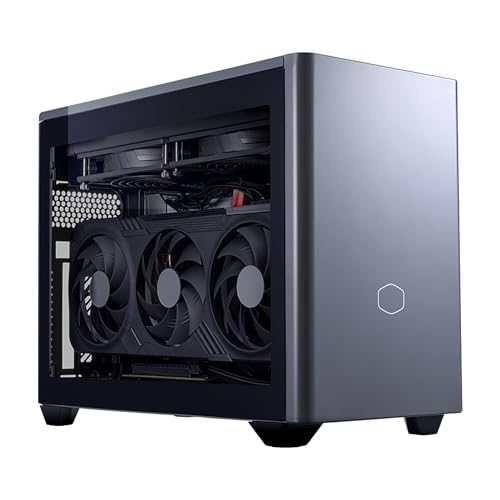
Cooler Master NR2 Pro — Ryzen 7 9800X3D, Desktop RTX 5070 Ti 16GB, 32GB, 2TB
Who it suits: The streamer who wants the mini shape without any encoder compromise — one machine that games, broadcasts and records at full quality at the same time.
For gaming alone, the base guide ranks this machine second, behind the flagship mini. For streaming it ranks first, and the reason is a single line of its specification: the desktop RTX 5070 Ti carries two NVENC encoder blocks where every other pick in this guide carries one. A broadcast uses one block. The second is what turns this from a machine that streams into a machine that streams professionally — it can carry a simultaneous local recording at far higher quality than the broadcast itself, which is how you get clean footage for edited videos without re-encoding a compressed stream VOD, or feed a second encode for a vertical clip feed while the main broadcast runs untouched. Both blocks are current-generation, both encode AV1 as well as H.264 and HEVC, and the card behind them is a genuine desktop part with 16GB of memory: the game, OBS’s canvas and the encoder all draw on that pool, and 16GB is the difference between a pool that is shared and a pool that is fought over.
The simultaneous-load supporting cast is equally complete. The Ryzen 7 9800X3D leaves OBS, a browser, chat and a voice application more headroom than they can use; 32GB of DDR5-6000 keeps the whole supporting cast resident; and the fitted 2TB Gen4 drive is the only storage in this guide sized for a recording habit out of the box — hours of high-quality local capture alongside a real game library, without the weekly delete-or-archive ritual the 1TB picks impose. The 850W SFX Gold power supply and standard mini-ITX construction add serviceability: every part is a retail part, so a failed fan or a wanted upgrade is a component purchase, not a new machine. It is built in Cooler Master’s NR200P Max case at 18.25 liters — the large end of mini — with a custom 280mm radiator doing the cooling.
Check price on Amazon before you buy: its listing price moves widely, and at the top of its range it can sit outside this budget. When its current price sits comfortably within this $3,000 budget, this is the strongest streaming mini in the guide; near its peak, it is neither in budget nor sensible. Two ownership notes from roundup coverage belong in a streaming review in particular. Fan noise is described as reasonable rather than silent — an 18-liter box moving this much heat will be audible in a quiet room, and a microphone will hear what you hear, so placement and mic technique are part of this purchase. And isolated reports of a front USB-C port dead on arrival and a GPU riser cable needing reseating after shipping are precisely the faults a first-week streaming rehearsal exists to catch.
- Two current-generation NVENC blocks with AV1: stream and recording encode in parallel, not in queue.
- Desktop 5070 Ti with 16GB — the only graphics memory pool here with genuine headroom.
- 2TB fitted and standard replaceable parts throughout.
Honest limitation: At 18.25 liters it is six times the flagship mini’s volume, its fans are reasonable rather than silent in a microphone’s room, and its listing price swings widely — at the top it is out of budget, so check price on Amazon.
Choose it if the broadcast is a production — stream plus recording, or two outputs at once — and 18 liters fits the desk. Skip it if the live price is near its peak, or the machine must sit silently near the microphone; the ROG NUC below is the true-mini answer.
ASUS ROG NUC (2025) — Core Ultra 9 275HX, RTX 5070 Laptop GPU, 32GB, 1TB
Who it suits: The streamer whose setup is on camera and whose desk is small — a current-generation broadcast encoder in a three-liter box that disappears behind the monitor.
The ROG NUC’s streaming case rests on the same silicon as the winner, one size down. Its RTX 5070 Laptop GPU carries a single NVENC encoder block of the current generation, with AV1 encode — which is to say, the broadcast itself loses nothing against the NR2 Pro: one Twitch stream at 6,000 kbps CBR, or one YouTube stream at high bitrate or in AV1, is encoded by the same class of hardware with the same cleanliness. What the single block gives up is only the parallel second encode; a simultaneous local recording shares the one block’s capacity rather than owning its own. For most streamers, who broadcast one stream and record lightly or not at all, that is a theoretical sacrifice. Alongside it, the 24-core Core Ultra 9 275HX is the strongest simultaneous-load processor in this guide — OBS, browser sources, chat, voice and capture software are a rounding error on 24 cores — and its integrated graphics carry Intel Quick Sync, credited here as a reserve encoder for a recording while NVENC holds the broadcast.
The constraints are the flagship’s constraints, graded for streaming. The laptop GPU’s 8GB of memory is the machine’s permanent graphics ceiling, soldered in place, and it is shared between the game and everything OBS composites — at 1080p broadcast loads this is workable with sensible settings, but it is the first specification that will feel tight as games grow, and there is no upgrade path for it. The fitted 1TB drive is the second streaming catch: a streamer who records locally will fill it with a game library and an archive faster than either alone suggests — consider it as machine plus a storage plan — an external archive drive, or the 2TB configuration of this same machine; check price on Amazon for either. Cooling is a triple-fan system in about three liters fed by a 330W external adapter; small fans under a sustained load will be audible, so the box belongs behind the monitor — which its five display outputs and dual Thunderbolt 4 make easy — not beside the microphone.
Price discipline is absolute on this listing, as the base guide states it. Buy this configuration from ASUS’s own storefront — check price on Amazon — and be wary of third-party sellers asking well above that price for the identical box. Buy from ASUS within this budget, or do not buy from this listing. Owner sentiment in roundup coverage is genuinely divided, with praise for good units alongside reports of dead-on-arrival and failing ones — for a streaming machine, whose failure mode is a cancelled broadcast, that argues for the maker’s storefront and a full-load rehearsal in the first week.
- Current-generation single NVENC with AV1: the broadcast encode matches the winner’s, in about 3 liters.
- 24-core 275HX plus Quick Sync reserve: the deepest headroom of any true mini here.
- Dual Thunderbolt 4 and five display outputs — capture, cameras and monitors connect without a hub hunt.
Honest limitation: One encoder block, not two; 8GB of soldered graphics memory shared with the game; and a 1TB drive a recording streamer will outgrow — with third-party pricing on this listing sometimes well above the ASUS storefront price — check price on Amazon and compare sellers.
Choose it if the broadcast is one stream, the desk is the stage, and you will buy from ASUS’s storefront — check price on Amazon first. Skip it if you record everything at high quality while you stream — that workload is the NR2 Pro’s second encoder block — or if the only live offers are marked-up third-party ones.

MINISFORUM AtomMan G7 Pro — Core i9-14900HX, RTX 5070 Laptop GPU
Who it suits: The value-minded streamer who wants the flagship mini’s exact encoder class — current-generation NVENC with AV1 — and will verify the listing to pay less than the flagship mini — check price on Amazon.
Strip the badge away and the G7 Pro’s streaming hardware is the ROG NUC’s: an RTX 5070 Laptop GPU with 8GB, which means a single current-generation NVENC block with AV1 encode, producing the same broadcast quality at Twitch’s bitrate and the same YouTube AV1 eligibility. The processor beside it is the Core i9-14900HX, a 24-core laptop flagship whose integrated graphics carry Quick Sync — again a reserve encoder while NVENC broadcasts. Where this machine out-thinks the flagship for a streaming career is growth: two DDR5 SO-DIMM slots expand memory to 96GB and two M.2 2280 slots expand storage, so the specifications a growing channel outgrows can grow with it, in a way the flagship’s fixed configuration cannot match at its price. Six heat pipes and dual fans handle the sustained load, with HDMI 2.1, USB4 and WiFi 7 on the connectivity side.
The discipline this listing demands is the same one the sibling guides state, and for a streamer it matters doubly, because the trap version of this machine cannot broadcast at all. The Amazon listing for this ASIN is titled as the barebone version — without storage or operating system — while some marketplace mirrors of the same ASIN describe a configured unit. Minisforum positions the barebone below the configured 32GB/1TB machine, which sits below the ROG NUC in this tier — check price on Amazon for both styles. Completing a barebone means adding a 32GB DDR5 SO-DIMM kit, an SSD and an operating system, at a time when memory is expensive — which makes the configured version the rational buy, and the barebone sensible only for a buyer who already owns the parts. Confirm the configured style, with RAM, SSD and OS present, on the live listing before ordering.
Graded purely as a broadcast box, the G7 Pro shares the class constraints of every laptop-GPU pick: one encoder block, 8GB of graphics memory shared between game and OBS, a soldered GPU that is the machine’s permanent ceiling, and fans that will be audible under sustained load — plan its placement with the microphone in mind. Support is a specialist maker’s rather than a global brand’s, which is the honest trade inside the saving compared with the flagship mini. Within those terms, this is the pick for buyers who would rather the money saved became a microphone, a light and a second monitor than a badge on the box.
- Same single-NVENC, AV1-capable encoder class as the flagship mini, configured — check price on Amazon.
- Memory to 96GB and two M.2 slots: the only true mini here that can grow with a channel.
- 24-core HX processor with Quick Sync reserve.
Honest limitation: The listing mixes barebone and configured styles under one family, and at current memory costs completing the barebone can erase the saving; the encoder is a single block behind 8GB of soldered graphics memory.
Choose it if you want flagship-class broadcasts for mid-tier money and will verify the configured style before checkout. Skip it if the purchase must arrive unambiguous with a global brand behind it — that certainty is what the ROG NUC’s premium buys.

HP OMEN 16L TG03 — Core i7-14700F, Desktop RTX 5060 Ti 16GB, 32GB, 2TB
Who it suits: The streamer whose bottleneck is graphics memory rather than encoder count — running a demanding game, a composited OBS scene and a browser of dashboards on one machine, with a big brand’s support behind it.
The OMEN 16L’s streaming argument is a memory figure. Its desktop GeForce RTX 5060 Ti carries 16GB — twice the graphics memory of every laptop-GPU pick in this guide — and simultaneous load is where that pays: the game renders into the pool, OBS composites its canvas from the same pool, browser sources and capture previews nibble at it, and on an 8GB card those appetites collide exactly when a busy scene meets a demanding game. On 16GB they mostly do not. The encoder on that card is a current-generation NVENC block with AV1 encode — one block, fully sufficient for the broadcast itself and for YouTube’s AV1 ingest. The fitted 2TB SSD matches the NR2 Pro as the guide’s joint-best recording storage, and 32GB of system memory keeps the supporting cast resident. Roundup coverage positions Amazon’s OMEN 16L builds with the 5060 Ti 16GB card in the lower part of this budget, among the more accessible routes to a desktop card with a full memory complement — check price on Amazon for this exact configuration, because the family spans a wide range.
Two cautions define this pick, and the first is unique to it in this guide. Its Core i7-14700F is an F-suffix processor, and the F means no integrated graphics: there is no Intel Quick Sync in this machine, in any settings menu, under any driver. The three other Intel picks here quietly include Quick Sync as a reserve encoder; the OMEN’s NVENC is its only encoder, permanently. For a single broadcast that costs nothing. For a streamer who wants to split work — broadcast on one encoder, recording on another — it removes the split the ROG NUC and G7 machines offer, leaving the NR2 Pro’s second NVENC block as this guide’s only true parallel-encode answer. The second caution is how Amazon sells the range: the OMEN 16L is also sold with the 8GB version of the 5060 Ti, a materially weaker card for exactly the memory-headroom reason this pick exists, sometimes presented as only a small step down — the 16GB in the configuration is the entire point, and an 8GB listing is a different machine wearing this one’s name. Coverage also notes some units are opened and upgraded by resellers, with upgraded parts carrying the seller’s warranty rather than HP’s; check who is selling and what they changed.
At 16 liters this is a small desktop rather than a true mini — it will not hide behind a monitor — but for streaming that size cuts both ways honestly: a larger chassis moves air more slowly and quietly than a three-liter box under the same load, which a microphone appreciates. Graded as a broadcast box it is the memory-headroom pick: one excellent encoder, the joint-largest recording drive, and a pool of graphics memory that lets the game and the show stop negotiating.
- 16GB of desktop graphics memory — double every laptop pick — for game, OBS canvas and sources at once.
- Current-generation NVENC with AV1, plus 2TB fitted for recordings.
- In the lower part of this budget, with a mainstream brand behind it — check price on Amazon.
Honest limitation: The F-suffix processor means no Quick Sync reserve encoder — NVENC is the only encoder this machine will ever have — and Amazon’s range mixes 8GB-card variants and reseller-upgraded bundles with split warranties into the same family.
Choose it if your scenes and games are memory-hungry and one broadcast is the whole production. Skip it if you want a parallel recording encode on separate hardware — step up to the NR2 Pro — or if the listing’s configuration and seller cannot be verified as the 16GB factory build.

MINISFORUM AtomMan G7 Ti — Core i9-14900HX, RTX 4070 Laptop GPU (140W), 32GB, 1TB
Who it suits: The streamer on the sensible half of the budget — a proven AV1-capable encoder and flagship-mini pace, leaving headroom in the budget for the microphone, lighting and monitor.
The G7 Ti’s encoder is the previous NVIDIA generation’s, and for streaming that gap is smaller than the gaming gap. Its RTX 4070 Laptop GPU carries an Ada-generation NVENC block with AV1 encode, and at Twitch’s 6,000 kbps H.264 standard its output is the clean NVENC picture this guide benchmarks against — one generation of refinement behind the 5070 machines, not a class behind. The chip runs at its full 140W power limit, which matters for simultaneous load: the full-power version sustains game-plus-encode loads that a throttled variant cannot. Beside it sits the same 24-core Core i9-14900HX as the G7 Pro, with Quick Sync as a reserve encoder, 32GB of memory, and two SO-DIMM slots to 96GB plus two PCIe 4.0 M.2 slots for growth. The configured 32GB/1TB version sits in the lower half of this budget — check price on Amazon — in a chassis of about 2.55 liters.
The catches are the generation’s catches, stated plainly. The graphics memory is 8GB, soldered, and permanent — the same simultaneous-load ceiling as the other laptop picks. The fitted 1TB drive is the recording constraint: a channel that archives locally should consider this machine as machine plus a storage plan from day one, because a game library and a season of recordings do not share 1TB gracefully. Barebone versions also appear in this listing family, and the completion warning from the G7 Pro review applies unchanged — at current DDR5 costs, configured is the sensible purchase; check price on Amazon. The shared-listing caution applies too: confirm the 32GB/1TB configuration is the one in the cart.
For gaming this pick is the base guide’s value sweet spot, and for streaming it keeps that title with a small demotion, because the OMEN’s 16GB pool answers a streaming-specific problem — memory contention under simultaneous load — that this machine’s 8GB cannot. What it returns is a chassis less than a sixth of the OMEN’s volume, a reserve encoder the OMEN lacks, and an audience-visible truth: nobody watching can tell an Ada NVENC broadcast from a newer one at Twitch bitrates.
- Ada-generation NVENC with AV1 at the chip’s full 140W — a broadcast-proven encoder.
- Configured 32GB/1TB — check price on Amazon: flagship-mini streaming in the lower half of this budget.
- Quick Sync reserve encoder and 96GB memory ceiling, in about 2.55 liters.
Honest limitation: A generation behind on the encoder and the GPU, with the same 8GB soldered memory ceiling and a 1TB drive that a recording streamer will outgrow; the listing family mixes barebone and configured styles.
Choose it if you want the best streaming experience per dollar in this guide and will spend the savings on the audible, visible parts of the setup. Skip it if your games and scenes are memory-hungry enough to need the OMEN’s 16GB pool, or you specifically want the current encoder generation — the G7 Pro is the step up.

MINISFORUM AtomMan G7 Pt — Ryzen 9 7945HX, RX 7600M XT, 32GB, 1TB
Who it suits: The creator whose work is CPU-first — editing, compiling, rendering, heavy multitasking alongside the stream — broadcasting at mainstream settings well within this budget.
The G7 Pt is this guide’s one AMD machine, and its streaming grading has to be honest in both directions. Its graphics are a Radeon RX 7600M XT, and the naming rule applies in full: the M means mobile — an 8GB laptop GPU rated up to 120W, not the desktop RX 7600 XT with twice the memory. Its media engine is RDNA 3 generation, which means it does encode AV1, keeping this machine eligible for YouTube’s AV1 ingest on equal codec terms with the NVIDIA picks. The honest qualification is H.264 at Twitch’s bitrate: AMD’s hardware encoder produces a visibly softer picture than NVENC at roughly 6,000 kbps, with fine detail in fast motion smearing sooner. A G7 Pt Twitch stream is perfectly watchable; side by side with the same game from any other pick here, it is the softest broadcast in the guide, and no setting changes that ranking, because it is a property of the encoder silicon.
What makes this machine a genuine streaming pick rather than a cautionary tale is the processor the encoder sits beside. The Ryzen 9 7945HX is a 16-core chip from AMD’s desktop-replacement class — the strongest sustained multi-core CPU in this guide for work — and sixteen cores is enough to run a good software x264 encode at sensible quality presets while a mainstream game runs, something no other pick here can honestly claim. That gives the G7 Pt a second, independent encoding path: hardware AV1 for YouTube, software encoding as a real alternative for Twitch. Around that platform sit two DDR5 SO-DIMM slots to 96GB and one PCIe 5.0 plus one PCIe 4.0 M.2 slot, in about two and a half liters. The configured 32GB/1TB version sits at the lower end of this budget — the lowest tier position of any pick here — check price on Amazon. Minisforum’s own store also lists it, and a barebone style appears in the family subject to the usual completion-cost warning: at current DDR5 costs, configured is the buy. Confirm the configured style on the live listing, as with its G7 siblings.
The streaming catches beyond the encoder are the familiar ones: 8GB of graphics memory, a fitted 1TB drive that needs a storage plan for a recording archive, and a GPU that is soldered and permanent. But the framing of this pick is the framing of the whole budget: at the lower end of this tier, it leaves substantial headroom for the microphone, light, capture hardware and monitor a serious setup needs, compared with spending far more on the flagship pick alone. For a creator whose bottleneck was never going to be the encoder, it is a rational broadcast box. For a gamer-streamer chasing the cleanest Twitch picture for the money, every pick above it exists precisely because this one’s encoder is its compromise.
- 16-core Ryzen 9 7945HX: the one CPU here that makes software x264 a genuine second path.
- RDNA 3 encoder with AV1 for YouTube, plus 96GB and PCIe 5.0 storage headroom.
- Configured 32GB/1TB — check price on Amazon — the most accessible pick in this guide.
Honest limitation: Its hardware H.264 at Twitch bitrates is visibly softer than every NVENC pick here, and its 8GB mobile GPU is the weakest graphics in the guide — a CPU-first machine whose encoder is its compromise.
Choose it if your work is CPU-heavy, your platform is YouTube or your settings are mainstream, and the savings fund the rest of the studio. Skip it if Twitch picture quality at 6,000 kbps is the priority — that is NVENC’s home ground, and the G7 Ti is the cheapest honest route to it.

Comparison Table
| Product | Broadcast encoder | Graphics memory | Best streaming use | Link |
|---|---|---|---|---|
| Cooler Master NR2 Pro | 2× NVENC, current generation, AV1 | 16GB desktop | Stream plus parallel high-quality recording | Check on Amazon |
| ASUS ROG NUC (2025) | 1× NVENC, current generation, AV1 + Quick Sync reserve | 8GB laptop | The true-mini broadcast box, bought from ASUS’s storefront | Check on Amazon |
| MINISFORUM AtomMan G7 Pro | 1× NVENC, current generation, AV1 + Quick Sync reserve | 8GB laptop | Flagship encoder class for less — check price on Amazon | Check on Amazon |
| HP OMEN 16L TG03 | 1× NVENC, current generation, AV1 — no Quick Sync (F-suffix CPU) | 16GB desktop | Memory-hungry games and scenes on one machine | Check on Amazon |
| MINISFORUM AtomMan G7 Ti | 1× NVENC, Ada generation, AV1 + Quick Sync reserve | 8GB laptop | The value sweet spot under $1,500 | Check on Amazon |
| MINISFORUM AtomMan G7 Pt | RDNA 3 VCN, AV1; 16-core x264 fallback | 8GB mobile | CPU-first creators who also broadcast | Check on Amazon |
Setting Up OBS on These Machines
Whichever pick you buy, the broadcast is configured the same way. In OBS, choose the hardware encoder that matches your machine: NVIDIA NVENC H.264 on the five NVIDIA picks for a Twitch broadcast, the AMD hardware encoder on the G7 Pt. Set the rate control to CBR — constant bitrate is what Twitch’s ingest expects — at roughly 6,000 kbps for 1080p60, with a keyframe interval of two seconds; those two numbers are the difference between a stream the platform handles cleanly and one it mangles regardless of hardware. For YouTube, the same machines go further: raise the bitrate substantially, send a 1440p canvas if your game load allows it, and use the AV1 encoder — every pick here has one. On the NR2 Pro, assign the local recording to the second NVENC block at high quality while the broadcast runs on the first; on the ROG NUC and the two Intel G7 machines, the natural split is broadcast on NVENC and recording on Quick Sync; on the OMEN, recording shares the one NVENC block, because there is no second encoder. On the G7 Pt, decide deliberately: hardware encoding for YouTube AV1, or a software x264 encode on its sixteen cores for Twitch, tested under your actual game.
When a stream goes wrong, OBS tells you which of three counters is failing, and each has a different fix — confusing them is how streamers waste money upgrading the wrong part. Rendering lag means the GPU is saturated: OBS cannot composite its canvas because the game is using everything. The fixes are to cap the game’s frame rate, lower its settings, or reduce the OBS canvas — and on the 8GB laptop-GPU picks this counter bites first, which is why this guide grades graphics memory as a streaming specification. Encoding lag means the encoder itself is overloaded: on a hardware encoder this is rare at one broadcast, and the fix is to move a parallel recording to a second block or the reserve encoder where your machine has one — not to buy a faster CPU. Network lag is never the PC’s fault and no upgrade fixes it: it is the upload path, and the fix is a cable. That is the wired-Ethernet rule, and it is absolute: every pick here has an Ethernet port, a stream is a sustained upload that Wi-Fi delivers unevenly no matter how strong the signal looks, and the cheapest reliability upgrade in streaming is that cable.
Finally, rehearse. Before the return window closes, run one full hour at your real settings: your game, your full scene, alerts firing, recording on if you record, voice application open. Watch the three counters. A mini PC under a sustained load is a thermal system as much as a computer — fans will rise, and on the smallest chassis you will learn in that hour whether the noise reaches your microphone at your gain settings. Every fault the sibling guides document for these listings — a dead port, a riser cable unsettled by shipping, a configuration that is not the one you ordered — announces itself inside that hour, while it is still a returns label rather than a cancelled stream.
What Else the Stream Costs: Microphone, Light, Camera, Capture
No accessory prices appear in this section, deliberately: the kit around the PC is costed in priority order, not in dollars, because the order is what budget guides get wrong. Microphone first. Audiences forgive a soft picture for hours and a bad microphone for about a minute; audio is the stream. A decent microphone positioned close — which also solves half the fan-noise problem of a small PC, because a close microphone runs at low gain and hears less of the room — outranks every other accessory combined. Lighting second. A single light aimed at your face does more for perceived picture quality than any camera upgrade, because cameras are mostly light-starved sensors; lit well, an ordinary webcam looks deliberate. Webcam third, bought after the light it depends on. Capture card last, and only for console. A capture card brings an external source — a console, a camera, a second PC — into OBS. For games played on the same PC that is streaming, it does literally nothing: the game is already in the machine, and OBS captures it directly.
Two cost rules govern all of it. The kit is never part of a pick’s price: each machine stands on its own, and the catches counted as machine plus fix are machine-side catches (a storage plan for a 1TB drive, a completion kit for a barebone), never accessories. And the order above is the spending order at every tier: the streamer who buys the G7 Ti and funds microphone, light and camera from the savings will look and sound better than the streamer who buys the flagship mini and records through a headset microphone in a dark room. The audience never sees your encoder settings. They hear your microphone in the first ten seconds.
How to Choose a Mini Gaming PC for Streaming
- Grade graphics memory as a streaming spec. The game and OBS draw on the same pool. 16GB in the two desktop-card picks absorbs a demanding game and a busy scene together; the 8GB laptop picks are workable at 1080p broadcast loads with capped frame rates and sensible settings, and they are the first ceiling you will meet.
- Check the processor suffix before assuming a backup encoder. Intel chips with integrated graphics carry Quick Sync, a genuine reserve encoder. An F-suffix chip — the OMEN’s 14700F — has none. If your plan splits broadcast and recording across two encoders, that single letter decides which machines can do it.
- Place the machine for the microphone, not the desk photo. Small fans under sustained load are audible. Behind the monitor, with a close microphone at low gain — that arrangement is worth more than any noise specification, and no pick here is silent enough to sit beside an open microphone at full load.
- Wire the Ethernet. Every pick has the port. A sustained 6,000 kbps upload over Wi-Fi is the most common cause of dropped frames that streamers misdiagnose as a weak PC. The cable is the fix, and it precedes all other troubleshooting.
Common Streaming Mistakes
- Streaming over Wi-Fi because the speed test looked fast. Speed tests measure bursts; a broadcast is a three-hour sustained upload, and dropped frames from an uneven wireless path get blamed on the PC every time. Wire it.
- Buying a capture card to stream games played on the same PC. It captures nothing — OBS already has the game. Capture cards are for consoles, cameras and second PCs only.
- Running the game uncapped and starving OBS. An unlimited frame rate lets the game consume the whole GPU, OBS misses its compositing deadlines, and the stream stutters while the game feels fine. Cap the frame rate.
- Assuming every Intel machine has Quick Sync. The F in 14700F means no integrated graphics and no Quick Sync — check the suffix before planning a two-encoder setup around it.
- Ordering a barebone style from a shared listing and discovering on stream day that RAM, storage and an operating system were your problem. Confirm the configured style first.
- Buying the 8GB variant of the OMEN 16L’s card to save a little, and giving up the 16GB that was the pick’s entire streaming argument.
- Spending the whole budget on the box and streaming through a headset microphone in the dark.
Final Recommendation
- Most streamers reading this guide: Cooler Master NR2 Pro — the only parallel-encode machine here, bought within budget — check price on Amazon.
- The true-mini broadcast box: ASUS ROG NUC (2025), from ASUS’s storefront — check price on Amazon.
- Flagship encoder class, less money: MINISFORUM AtomMan G7 Pro, configured style confirmed.
- Memory-hungry games and scenes: HP OMEN 16L TG03, factory 16GB configuration.
- Best value under $1,500: MINISFORUM AtomMan G7 Ti, savings spent on microphone and light.
- CPU-first creators: MINISFORUM AtomMan G7 Pt.
Our top two for streaming are the NR2 Pro, because its second NVENC block is the one feature in this guide that changes what a broadcast can be — a stream and a pristine local recording from the same small box, with a desktop card’s memory underneath both — and the ROG NUC, because for the streamer whose machine lives on a small, visible desk, it delivers the same current-generation broadcast encode in three liters, provided it is bought from ASUS’s storefront — check price on Amazon. Between them they frame the decision: productions grow into encoder blocks and memory pools, not into badges, and the mini market’s value still peaks below the flagship — the G7 Ti’s viewers will never know its encoder is a generation old, and its owner’s microphone, bought with the savings, is something they will notice in the first minute. Streamers on a smaller budget should see Best Mini Gaming PC For Streaming Under $2500 and Best Mini Gaming PC For Streaming Under $1500; buyers whose desk cannot take even 18 liters should weigh the same trade-offs in Best Compact Gaming PC For Streaming Under $3000; and anyone concluding the mini premium buys nothing their broadcast needs should compare Best Streaming PC Under $3000 and Best Gaming PC For Streaming Under $3000. Confirm the configuration and seller on the live listing, wire the Ethernet, rehearse for a full hour inside the return window, and check the live price before you order.
Frequently Asked Questions
Can a mini PC really handle streaming and gaming on one machine?
Yes, within the limits this guide grades. Every pick here has a dedicated hardware encoder, which is what makes one-box streaming practical: the encode runs on its own silicon block rather than competing with the game for the CPU. The real constraints are the shared ones — graphics memory, where the 8GB laptop picks need capped frame rates and sensible settings, and heat, where small fans work audibly hard. At the standard Twitch load of 1080p60 at roughly 6,000 kbps CBR, all six machines are legitimate one-box streamers; the ranking separates them on parallel work, headroom and picture quality, not basic capability.
Do I need AV1 to stream?
No — and yes, depending on platform. Twitch’s standard broadcast is H.264 at roughly 6,000 kbps, and every encoder in this guide produces an excellent version of it; Twitch’s AV1 path runs through Enhanced Broadcasting rather than as a universal option. YouTube is where AV1 is a present-tense feature: it accepts AV1 live streams and higher bitrates, and a current encoder — which all six picks have — is the entry ticket. Buy AV1 as YouTube capability and insurance, not as a Twitch requirement today.
How loud will it be on stream?
Audible in the room, manageable on the microphone — if you set up for it. Sustained game-plus-encode loads spin small fans fast; roundup coverage calls the NR2 Pro’s noise reasonable rather than silent, and the true minis are at their most audible under exactly the load streaming applies. The working solution is arrangement, not specifications: machine behind the monitor rather than beside the microphone, and a microphone close to you at low gain, which hears your voice clearly and the room faintly.


