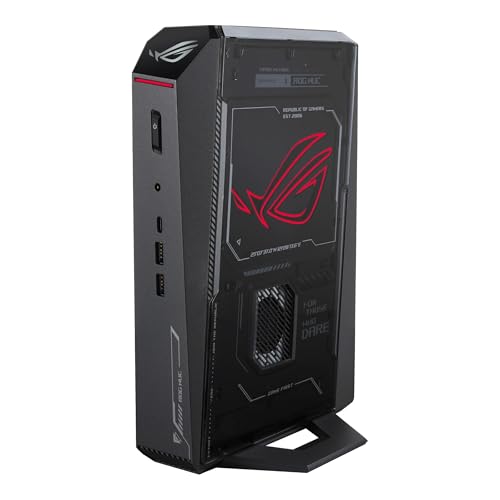
Where to buy
Check the latest price, availability and delivery on Amazon. Orders are placed on Amazon. We may earn a commission from qualifying purchases.
- Best overall compact streamer: ASUS ROG NUC (2025), Core Ultra 9 275HX, RTX 5070 Laptop GPU, 32GB RAM, 1TB SSD — Check on Amazon
- Cooler Master NR2 Pro Mini ITX, Ryzen 7 9800X3D, RTX 5070 Ti 16GB, 32GB DDR5, 2TB SSD — Check on Amazon
- Alienware Aurora ACT1250, Core Ultra 9 285, RTX 5080, 32GB RAM, 1TB SSD — Check on Amazon
- MINISFORUM AtomMan G7 Pro, Core i9-14900HX, RTX 5070 Laptop GPU — Check on Amazon
- MINISFORUM AtomMan G7 Ti, Core i9-14900HX, RTX 4070 Laptop GPU, 32GB RAM, 1TB SSD — Check on Amazon
See 1 more Amazon option
- HP OMEN 16L TG03, Core i7-14700F, RTX 5060 Ti 16GB, 32GB RAM, 2TB SSD — Check on Amazon
Read the full guide ↓
Disclosure: As an Amazon Associate, reviewstook.com earns from qualifying purchases. Links to Amazon on this page are affiliate links; they cost you nothing extra. Listing details such as price and availability change often, so check the current Amazon listing before you buy.
A streaming PC has two jobs running at the same time, and a compact streaming PC has to do both of them inside a box the size of a shoebox — or, in one case below, a box that only pretends to be small. The first job is the game itself. The second is everything your audience sees: OBS compositing your scenes, a hardware encoder turning those scenes into a broadcast, a browser full of chat and alerts, and usually a local recording being written to disk as insurance. This guide grades all six machines on that combined workload, encoder first, because the encoder is the component that decides whether a one-machine stream holds together or quietly sheds frames while the game itself plays fine.
So here is the workflow this guide is built around, stated before any product names. The standard one-machine setup at this budget is a 1080p60 broadcast: Twitch’s practical ceiling for most channels is around 6,000 kbps CBR, and every pick below can encode that without breaking a sweat. The step up is YouTube, which accepts higher bitrates, takes 1440p streams, and accepts AV1 live — which is why AV1 encode support, present on every GPU in this guide, matters more here than in a pure gaming guide. Twitch’s own AV1 path runs through its Enhanced Broadcasting programme rather than the standard ingest, so treat AV1 as a YouTube and local-recording tool today, not a Twitch one. And 4K streaming is limited by the platforms, not by these machines: no hardware in this guide is the reason you cannot broadcast 4K, because the services themselves are. What the hardware decides is how much headroom is left over — whether the game, the encode, the browser and the recording coexist, or compete.
The compact half of the keyword is enforced the same way the base guide enforced it: by litres, not by product photos. The six machines run from about 2.55 litres to roughly 38, and the big one is labelled a compact tower, not small-form-factor, wherever it appears. Two honesty rules from the wider market apply unchanged. There is no RTX 5090 system anywhere near $3,000 — complete 5090 systems sit well above this budget — and the one true small-form-factor desktop RTX 5080 we have verified, Zotac’s 11.46-litre Magnus One Ultra, also sits well above this budget. Check the current price on Amazon for each pick below, because this category’s prices move often and two of the six picks are only worth buying when they are priced within this budget on a deal.
In this guide
Quick Picks
Short on time, or comparing several options at once? Each row below names a streaming buyer type and the machine that suits it, with a link to the listing.
| Buyer type | Pick | Why it stands out | Link |
|---|---|---|---|
| Best overall compact streamer | ASUS ROG NUC (2025), RTX 5070 Laptop GPU | Three litres, a 24-core HX processor and a current-generation NVENC with AV1 | Check on Amazon |
| Best dual-encoder SFF streamer | Cooler Master NR2 Pro, 9800X3D / RTX 5070 Ti | Two NVENC blocks — one streams, one records — in 18.25 litres | Check on Amazon |
| Most powerful streamer here | Alienware Aurora ACT1250, RTX 5080 | Desktop 5080 encoding headroom and a 24-core CPU — at its deal price | Check on Amazon |
| Best value mini streamer | MINISFORUM AtomMan G7 Pro, RTX 5070 Laptop GPU | Current-generation laptop GPU and encoder, well under budget — once configured | Check on Amazon |
| Best mini streamer under $1,500 | MINISFORUM AtomMan G7 Ti, RTX 4070 Laptop GPU | A full-power 140W laptop GPU with AV1 encode, in about 2.55 litres | Check on Amazon |
| Best big-brand streamer | HP OMEN 16L TG03, RTX 5060 Ti 16GB | A 16-litre tower with a current encoder, 2TB of recording room and HP support | Check on Amazon |
How These Picks Were Chosen
The first filter was the encoder, read off each machine’s actual graphics hardware — not its marketing name. A modern NVIDIA GPU carries a dedicated NVENC block that encodes the broadcast on fixed-function silicon, which is what makes one-machine streaming practical: the game keeps the GPU’s rendering hardware and the CPU’s cores, while the stream is produced almost for free. Every pick here has NVENC with AV1 encode, but the count and generation differ, and the differences are graded pick by pick. The two desktop flagships — the RTX 5080 and RTX 5070 Ti machines — carry two NVENC blocks, so one can stream while the other writes a high-quality local recording. The RTX 5070 Laptop GPU in the two current minis is a mobile Blackwell part with a single NVENC: entirely sufficient for one broadcast plus a recording at sensible settings, but it is a laptop encoder in a laptop GPU, and it is never described here as the desktop card. The G7 Ti’s RTX 4070 Laptop GPU carries the previous generation’s single NVENC, again with AV1. The OMEN’s desktop RTX 5060 Ti carries a single current-generation NVENC with AV1. No pick is credited with an encoder its silicon does not have.
The second filter was simultaneous load. A streaming session is a game, OBS, a browser, chat tools and a recording all asking for CPU, memory and disk at once, so core counts and memory were graded as broadcast resources, not gaming trivia: the 24-core HX and desktop chips in this guide are streaming headroom, and all six machines ship with — or, in the G7 Pro’s case, must be configured with — 32GB of memory, which is the sensible floor for this workload. Storage was graded the same way: a high-quality local recording of a long session runs to tens of gigabytes, so the 2TB machines earn credit the 1TB machines have to answer for.
The third filter was the one the base guide applied: the budget is a ceiling on the complete, usable machine. A barebone shell with no memory, storage or operating system cannot stream anything, so where a pick’s listing mixes barebone and configured styles, the completion cost is stated in the open and the review grades the finished machine. For pricing, check the current price on Amazon for each pick, and we did not use these machines ourselves — the grading rests on maker listings, specification pages and independent coverage, including the reliability and quirk reports carried into each review.
The 6 Best Compact PCs for Streaming Under $3,000
ASUS ROG NUC (2025) — Core Ultra 9 275HX, RTX 5070 Laptop GPU, 32GB RAM, 1TB SSD
Who it suits: Streamers who want the whole broadcast rig to disappear — a three-litre box behind the monitor running the game, the encode and the chat stack, with a major brand’s warranty behind it.
Start with the encoder, because it is this machine’s streaming identity: the GeForce RTX 5070 Laptop GPU is a mobile Blackwell part, and its single NVENC block is the current NVIDIA generation, with AV1 encode for YouTube and local recordings and a clean H.264 block for Twitch’s 6,000 kbps standard. One encoder is the honest description — it will run your broadcast and a local recording together at sensible settings, but it does not have the second, independent block the two desktop flagships below use to separate those jobs entirely. Around the encoder sits the strongest support act in a mini: Intel’s Core Ultra 9 275HX, a 24-core processor that absorbs OBS’s compositing, the browser, chat and alerts without touching the game’s frame pacing, plus 32GB of DDR5-6400 — the memory this workload actually wants. The port count is a streamer’s friend as well: dual Thunderbolt 4, six USB-A, dual HDMI and DisplayPort outputs and Ethernet, so cameras, interfaces and a wired network connection all land without a hub hunt. Check the current price on Amazon, and buy through ASUS’s own Amazon storefront — the buy rule is part of the pick: third-party offers on this model can carry a heavy markup, which is markup, not value.
The limitations are the mini limitations, stated for a streaming buyer. The GPU is soldered and mobile — 8GB of GDDR7 — so the graphics and the encoder you start with are the ones you retire with, and 8GB of VRAM is the first place a heavier game plus a high-resolution canvas will negotiate. The 1TB SSD is the second: local recordings accumulate fast, so plan on archiving to external storage or treating recordings as disposable. And owner reports for this line are genuinely divided, with dead-on-arrival and failing units among the praise — register the three-year warranty and stress-test game-plus-stream hard inside the return window, while the return is still free.
- Single current-generation NVENC with AV1 — Twitch H.264 today, YouTube AV1 when you want it.
- 24-core HX processor and 32GB of memory: the full stream stack without CPU anxiety.
- About three litres, with the port selection to wire a stream desk without hubs.
Honest limitation: A single mobile encoder and 8GB of soldered VRAM, a 1TB drive that recordings will fill, and divided owner reports — test your unit thoroughly in the return window.
Choose it if the smallest complete streaming rig with a real warranty is the goal. Skip it if you want a second encoder block for stream-plus-record separation, or any GPU upgrade path — that is the Cooler Master below.

Cooler Master NR2 Pro — Ryzen 7 9800X3D, RTX 5070 Ti 16GB, 32GB DDR5, 2TB SSD
Who it suits: The streamer who records everything: this is the compact machine that can broadcast and capture a high-quality local copy at the same time, on separate hardware, without either job touching the game.
The desktop GeForce RTX 5070 Ti is the reason. A desktop card of this class carries two NVENC encoder blocks, and for a streamer that is not a spec-sheet ornament: assign one block to the live broadcast and the second to a high-bitrate local recording for edits and uploads, and neither encode competes with the other or with the game. Both blocks handle AV1, so the YouTube workflow — 1440p, high bitrate, AV1 — is fully available. The rest of the machine is built like a desktop because it is one: a Ryzen 7 9800X3D, the strongest gaming CPU in this guide, 32GB of DDR5-6000, a 2TB Gen4 SSD that gives recordings somewhere to live, an 850W SFX Gold power supply and a 280mm liquid radiator, all standard parts inside the 18.25-litre NR200P Max case, sold and shipped by Amazon.com. On price, check the current price on Amazon: this model’s pricing varies widely, so it is only worth buying when the live price sits comfortably within this guide’s budget on a deal. At higher pricing it is over this guide’s budget and over its value.
The caveats are the dense-build caveats. Eighteen litres with a full-power desktop card and a radiator means fan noise reviewers describe as reasonable rather than silent — relevant if your microphone sits near the case, so place it with the mic in mind. The GPU rides on a riser cable, and independent coverage of this exact system recorded one unit’s front USB-C port dead out of the box and another needing the riser connection reseated after shipping; check both in the first week. Neither is unusual for ITX density, and both are exactly what a return window is for.
- Two NVENC blocks with AV1: broadcast and local recording on separate silicon.
- 9800X3D, 32GB and 2TB — the simultaneous-load specification done properly.
- Standard ITX parts throughout: the only machine here whose GPU can be replaced later.
Honest limitation: Audible rather than silent under load, a riser-cable build that deserves a first-week check, and a price that swings widely — check the current price on Amazon and buy on a deal, not on any given day.
Choose it if stream-plus-record is your workflow and you want desktop parts in a genuinely small case. Skip it if the live price is near its peak, or your stream space needs a machine that hides behind a monitor.
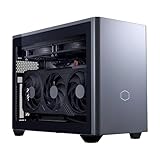
Alienware Aurora ACT1250 — Core Ultra 9 285, RTX 5080, 32GB RAM, 1TB SSD
Who it suits: Streamers whose priority is maximum headroom — the strongest encoder-and-render combination in this guide — and who will accept a compact tower’s footprint, and a deal price, to get it.
Precision first, as this machine always requires: the Aurora measures 18.05 × 7.76 × 16.46 inches, roughly 38 litres — about 40% smaller than the previous Aurora design, but a compact tower, not small-form-factor, and it is graded here as the largest interpretation of the keyword. What the volume buys a streamer is the guide’s ceiling in both jobs at once. The desktop GeForce RTX 5080 carries two current-generation NVENC blocks with AV1, so broadcast and recording separate cleanly, and its 16GB of GDDR7 is the most rendering headroom here for the game feeding them. Intel’s Core Ultra 9 285 — 24 cores by Intel’s own specification — plus 32GB of memory and a 1000W Platinum power supply mean the supporting stack never becomes the story. Check the current price on Amazon for this configuration (model DACT1250-9575BLK-PUS), which sets the rule: in budget on deal, out of budget at its regular price, and the strongest streaming hardware under the cap either way.
Two warnings come from verification of this exact listing. Amazon’s product information contradicts itself — describing the Ultra 9 285 as 20-core in one section where Intel specifies 24, and describing the liquid cooling as both fitted and optional in different sections — so confirm the exact configuration with the seller before ordering and trust the chipmaker’s specification over the listing copy. The 1TB SSD is the working streamer’s other note: with recordings in the workflow, budget a second drive or an archiving habit from day one. One more boundary worth stating plainly: Dell never offered an RTX 5090 in this chassis at any price, so no version of this machine is a quiet route to one.
- Desktop RTX 5080: two NVENC blocks with AV1 and 16GB of VRAM — the guide’s encoding ceiling.
- A 24-core desktop CPU, 32GB and a 1000W Platinum PSU behind the stream stack.
- Dell’s warranty and support — check the current price on Amazon, as this is a deal-only pick.
Honest limitation: Roughly 38 litres is a compact tower, not SFF; at its regular price it can sit over budget, so it is a deal-only pick; and the listing’s own spec contradictions must be checked before ordering.
Choose it if maximum streaming headroom matters more than footprint and the deal price is live. Skip it if you need genuinely small — the five machines around it are a fraction of its size.

MINISFORUM AtomMan G7 Pro — Core i9-14900HX, RTX 5070 Laptop GPU
Who it suits: Value hunters who want a current-generation encoder and a flagship HX processor in a slim mini for roughly half the budget — and who will read a listing carefully, because this pick is two different products until you choose correctly.
The finished machine is genuinely appealing for streaming. The GeForce RTX 5070 Laptop GPU is a mobile Blackwell part whose single NVENC carries AV1 encode — the same encoder generation as the ROG NUC’s — and Intel’s Core i9-14900HX brings 24 cores boosting to 5.8GHz, so OBS, the browser and the chat stack have somewhere to live. Two DDR5 SO-DIMM slots up to 96GB and two M.2 slots mean memory and storage stay upgradeable even though the GPU does not, and HDMI 2.1, USB4 and WiFi 7 cover the desk connections. The configured 32GB/1TB version is positioned well under this guide’s ceiling for a current-generation streaming mini — check the current price on Amazon.
Now the trap, stated the way verification found it: the Amazon page for this ASIN is titled as the barebone version — without storage or operating system — while some marketplace mirrors of the same ASIN describe a configured unit. A barebone cannot stream, record or boot; it is a chassis, a processor and a GPU waiting for parts. Minisforum sells both through shared listings with a style selector, so confirm on the live page that the style you are buying includes RAM, an SSD and Windows. If only the barebone style is live, price the completion before comparing: a barebone still needs memory, an SSD and an operating system, and at current memory prices a from-scratch completion can close most of the gap to the configured ROG NUC. Bought in its configured style, this is the value streamer of the guide; bought carelessly, it is a very fast box that cannot start.
- Current-generation single NVENC with AV1, and a 24-core HX processor, in the configured style — check price on Amazon.
- Two SO-DIMM and two M.2 slots — real memory and recording-storage headroom for a mini.
- A slim upright chassis cools the HX chip with six heat pipes and twin fans.
Honest limitation: The listing is titled as the barebone version and mixes styles — a barebone has no encoder story at all until you complete it, so confirm the configured style, with RAM, SSD and OS, before ordering.
Choose it if you will verify the style selector and want current-generation streaming in a mini at half the budget. Skip it if you want one unambiguous listing and a big-brand warranty — that is the ROG NUC.

MINISFORUM AtomMan G7 Ti — Core i9-14900HX, RTX 4070 Laptop GPU, 32GB RAM, 1TB SSD
Who it suits: Streamers who want the proven version of the formula: a full-power laptop GPU with a modern encoder, in about 2.55 litres, for roughly half the budget — and who are happy for the savings to fund the rest of the stream desk.
The number that defines this machine is 140W: its GeForce RTX 4070 Laptop GPU runs at the full power limit NVIDIA allows for the chip, rather than the detuned settings many minis hide. For streaming, the encoder is the previous generation’s single NVENC — Ada-generation, with AV1 encode for YouTube and recordings and a mature H.264 block for Twitch — and it is graded as what it is: a laptop encoder, one generation behind the Blackwell minis, entirely capable of a 1080p60 broadcast plus a local recording at sensible settings. The supporting cast is strong: the same 24-core Core i9-14900HX as the G7 Pro for the OBS-and-browser load, 32GB of DDR5 in two SO-DIMM slots up to 96GB, two PCIe 4.0 M.2 slots for recording storage, and WiFi 7 — though the wired-Ethernet rule in the setup section below still applies. The configured 32GB/1TB version is positioned well under budget — check the current price on Amazon — which leaves much of the budget for the microphone, lighting and monitor that decide how a stream actually looks and sounds.
The discipline is the family discipline: barebone and configured styles share one listing family, and at today’s memory prices the configured box is the better buy — select the configured 32GB/1TB style and confirm it on the page before checkout. The GPU is soldered and a generation old, with 8GB of GDDR6 that will age faster than the 16GB desktop cards above it; the 1TB drive wants an archiving plan if you record everything. Within those terms, it is the easiest value case in this guide.
- RTX 4070 Laptop GPU at the full 140W, with a single AV1-capable NVENC.
- Configured 32GB/1TB positioned well under budget — check price on Amazon; the savings fund the rest of the stream kit.
- 24-core HX processor and dual M.2 slots behind the broadcast load, in about 2.55 litres.
Honest limitation: A previous-generation, soldered GPU with 8GB of VRAM and one encoder block, sold through a shared listing where barebone and configured styles must be told apart.
Choose it if you want maximum streaming-mini value today and will put the savings into the desk. Skip it if you want the current encoder generation or 16GB of VRAM — step up to the NR2 Pro or the ROG NUC.

HP OMEN 16L TG03 — Core i7-14700F, RTX 5060 Ti 16GB, 32GB RAM, 2TB SSD
Who it suits: Streamers who want the broadcast rig from a household-name brand with a real service network — and who accept that HP’s 16-litre chassis trades the flagships’ second encoder block for price, space and support.
The OMEN 16L is a 16-litre tower holding desktop parts, and its streaming core is the desktop GeForce RTX 5060 Ti in its 16GB form — the version worth buying, since an 8GB variant of the same card exists in this chassis and is the trap configuration. Its single current-generation NVENC carries AV1 encode, so the full workflow is available: H.264 to Twitch at the 6,000 kbps standard, AV1 to YouTube or to a local recording. One encoder block means stream and recording share it, which modern NVENC handles at 1080p60 without drama — the honest difference from the flagships is headroom, not capability. Around it: an Intel Core i7-14700F for the compositing and browser load, 32GB of DDR5, and a 2TB SSD that is quietly one of the best streaming specs here, because recordings have somewhere to live. On price, check the current price on Amazon: OMEN 16L builds with the 16GB card sit in the lower part of this guide’s budget depending on configuration, and this 32GB/2TB listing sits in that family — take the honest frame that it leaves much of the budget unspent.
The warning is about Amazon’s OMEN 16L stock generally: many listings for this chassis are reseller bundles that have been opened and upgraded, where the upgraded memory and storage carry the seller’s warranty rather than HP’s. For a machine your channel depends on, check who is selling this listing and which warranty covers which parts before you buy; a factory-sealed HP configuration and a reseller-upgraded one are different purchases wearing the same name. Graded as a streamer, it gives up the second encoder and the flagship GPUs’ rendering headroom, and buys brand support and 2TB of calm in exchange.
- Desktop RTX 5060 Ti 16GB: a single current NVENC with AV1, and VRAM that will not age early.
- 2TB of storage and 32GB of memory — the recording-and-browser specification, standard.
- HP’s service network behind a 16-litre tower, at roughly half the guide’s budget.
Honest limitation: One encoder block where the flagships have two, a mid-tier GPU in a $3,000 guide, and Amazon stock of this chassis that includes reseller-upgraded bundles with split warranties — check the seller.
Choose it if brand support matters and your stream is 1080p60 with recordings. Skip it if you want dual-encoder separation or flagship rendering headroom — the NR2 Pro and Aurora are the step up.

Comparison Table
| Product | Size | Encoder | Best streaming use | Link |
|---|---|---|---|---|
| ASUS ROG NUC (2025) | ~3 litres | Single NVENC (Blackwell mobile), AV1 | Smallest complete stream rig | Check on Amazon |
| Cooler Master NR2 Pro | 18.25 litres | Dual NVENC (desktop), AV1 | Stream + record on separate blocks | Check on Amazon |
| Alienware Aurora ACT1250 | ~38 litres | Dual NVENC (desktop), AV1 | Maximum headroom, on deal | Check on Amazon |
| MINISFORUM AtomMan G7 Pro | Mini PC, vertical slab | Single NVENC (Blackwell mobile), AV1 | Current-gen mini value — configured | Check on Amazon |
| MINISFORUM AtomMan G7 Ti | ~2.55 litres | Single NVENC (Ada mobile), AV1 | Most streaming mini per dollar | Check on Amazon |
| HP OMEN 16L TG03 | 16 litres | Single NVENC (desktop), AV1 | Big-brand stream tower with 2TB | Check on Amazon |
Set Up OBS Once, Correctly
Every machine in this guide encodes in hardware, and the setup is the same discipline on all six. In OBS, choose the NVENC encoder for both the stream and the recording — never software x264 as your first plan, because NVENC exists precisely so the CPU stays free for the game and the scene work. Set the stream to CBR with a two-second keyframe interval: Twitch’s standard is around 6,000 kbps at 1080p60, and the two-second keyframe is a platform requirement, not a preference. On YouTube you can spend the extra headroom these encoders offer — a 1440p canvas at a higher bitrate, or AV1 where your setup accepts it. Keep the base canvas at the resolution you actually play at, and let the output scale do its single, clean step down if you broadcast below it.
Then learn the three counters in OBS’s Stats dock, because each one names a different failure with a different fix. Dropped frames are network: the connection could not carry the bitrate, and the fix is a wired connection, a lower bitrate, or a better ingest server — never more encoder quality. Skipped frames due to encoding lag mean the encoder is saturated: on the single-NVENC machines, check that a high-quality local recording is not competing with the broadcast, and step the recording’s settings down before touching the stream’s. Missed frames due to rendering lag mean the GPU is full: the game is taking everything, so cap the game’s frame rate, lower its settings a notch, or reduce the OBS canvas load — the encoder is innocent. Finally, the rule that outranks all of them: run a wired Ethernet connection to the streaming PC. Every pick here has the port or the dock to do it, WiFi is for the audience’s phones, and no encoder setting fixes a wireless dropout mid-broadcast.
What $3,000 Does Not Include
A streaming PC is the middle of a stream, not the whole of it, and the budget in this guide does not include the kit your viewers actually judge. Buy in this order. A microphone first: your audience forgives a soft picture long before it forgives bad audio, and the microphone is the single largest quality step a new channel can buy. Lighting second — a modest light aimed properly does more for a camera image than a camera upgrade does. A webcam third, once the light exists for it to work with. A capture card only if you stream a console: for PC gaming on the same machine, which is what every pick here is for, a capture card adds nothing at all. None of this belongs inside any pick’s budget — cost the kit separately, from the money the value picks leave unspent.
How to Choose a Compact Streaming PC Under $3,000
- Count encoder blocks before counting cores. Two NVENC blocks let a broadcast and a local recording run as separate jobs; one block does both at 1080p60 without drama but shares the headroom. Decide whether you record everything before you decide which tier you need.
- Read the GPU’s class, not its name. The RTX 5070 Laptop GPU in the minis is a mobile part with a mobile encoder; the desktop cards in the NR2 Pro, Aurora and OMEN are different silicon. Every review above names the class — demand the same of any listing you consider.
- Match the platform to the encoder. Twitch’s standard ingest is H.264 at around 6,000 kbps, which everything here handles. AV1 earns its keep on YouTube and in local recordings; Twitch’s AV1 route is its Enhanced Broadcasting programme, not the standard path.
- Grade the whole stack, not the game. OBS, a browser, chat and a recording run beside the game. The 24-core chips and 32GB configurations in this guide are broadcast resources; a gaming-only benchmark will not show you why they matter.
- Give recordings a home. A long session’s high-quality recording runs to tens of gigabytes. The 2TB machines absorb that; on the 1TB picks, plan the second drive or the archiving habit before the first long stream, not after the drive fills mid-broadcast week.
- Price the whole machine, never the shell. A barebone cannot stream. At current memory prices, completing one can erase the gap to a configured machine, as the G7 Pro review shows.
- Wire it. Whichever pick you buy, the Ethernet cable is part of the purchase. Dropped frames are a network diagnosis, and no compact PC streams its best over WiFi.
- Buy the deal cycle, not the day. Pricing for the NR2 Pro varies widely and the Aurora is in budget only on deal. Check the current price on Amazon for each model, set your ceiling per model within this guide’s budget, and wait for a deal.
- Verify the seller and the style. Shared listings mix barebone and configured styles; reseller bundles split warranties; third-party offers on the ROG NUC can carry a heavy markup over buying from ASUS’s own storefront. Reading the listing you are actually buying is the cheapest step in the purchase.
Common Buying Mistakes
- Expecting a compact RTX 5090 to exist at this budget. It does not — complete 5090 systems sit well above this budget — and listings implying otherwise are selling a laptop GPU, a barebone, or a mistake.
- Assuming a laptop GPU encodes like the desktop card with the same name. The minis’ mobile NVENC blocks are single and generation-specific; the dual-block stream-plus-record split belongs to the desktop 5080 and 5070 Ti machines.
- Buying the barebone style by accident, then discovering the “streaming PC” has no RAM, no SSD and no Windows when the box arrives.
- Streaming over WiFi because the desk looks cleaner. Dropped frames are network failures, and the fix is a cable, not a setting.
- Recording everything to a 1TB drive with no archiving plan, then losing a session’s recording to a full disk.
- Paying a third-party markup on a brand-name mini — the ROG NUC can carry a heavy markup from marketplace sellers compared with ASUS’s own storefront.
- Spending the whole budget on the PC and nothing on the microphone. Viewers leave bad audio in seconds and soft video in minutes; the kit order in this guide exists for that reason.
- Buying a capture card for a one-PC setup. It solves a console problem; a PC streaming its own games does not have that problem.
- Skipping the stress test. Owner reports in this category include dead-on-arrival units across brands — run game plus stream hard in week one, while the return is free.
Final Recommendation
- Most compact streamers: ASUS ROG NUC (2025) — check the current price on Amazon, from ASUS’s storefront, and avoid third-party markups.
- Stream and record everything: Cooler Master NR2 Pro — check the current price on Amazon and buy when it sits within budget on a deal.
- Maximum headroom: Alienware Aurora ACT1250 — only when it is on deal within budget; check the current price on Amazon, with its 38 litres understood.
- Mini value: the AtomMan G7 Pro in its configured style, or the G7 Ti — both positioned well under budget; check the current price on Amazon.
- Brand and support first: the HP OMEN 16L TG03, in its 16GB 5060 Ti configuration.
Our top two for compact streaming at this budget are the ROG NUC, for the complete three-litre broadcast rig with a current-generation encoder and a real warranty — bought from ASUS’s storefront, never at a marketplace markup — and the NR2 Pro, for the dual-encoder workflow no mini here can match: one NVENC block for the broadcast, one for the recording, desktop parts throughout, in 18.25 litres. Between them they cover the two honest shapes of this search: smallest possible, and smallest without giving up the second encoder. If neither fits — you want the flagship’s headroom and accept the tower — the Aurora is the answer at its deal price. Streamers earlier in the build-out should also see Best Compact Gaming PC For Streaming Under $2500 and the complete-systems view in Best Compact Gaming PC Under $3000, and anyone whose real limit is the room should start with Best Compact Gaming PC For Small Spaces Under $3000. Name your encoder out loud, confirm the style and the seller on the listing, wire the Ethernet, and check the current price on Amazon before you order.
Frequently Asked Questions
Can one compact PC really game and stream at the same time?
Yes — that is what the hardware encoder is for. NVENC produces the broadcast on dedicated silicon, so the game keeps the GPU’s rendering hardware and the CPU’s cores. Every pick in this guide does a 1080p60 one-machine stream; the differences are in headroom — a second encoder block for recordings, more cores for the surrounding stack — not in whether the basic job works.
What is the difference between one NVENC block and two?
With two blocks, as in the desktop RTX 5080 and RTX 5070 Ti machines, the broadcast and a high-quality local recording run as fully separate jobs. With one block — the minis and the OMEN — the encoder shares both tasks, which is fine at 1080p60 with sensible recording settings and becomes a negotiation only when you push resolution, quality and frame rate everywhere at once.
Do I need AV1 to stream?
No. Twitch’s standard path is H.264 at around 6,000 kbps, and every encoder here handles it. AV1 matters for YouTube, which accepts AV1 live at higher bitrates and 1440p, and for efficient local recordings. Twitch’s AV1 route runs through its Enhanced Broadcasting programme rather than the standard ingest, so buy AV1 for YouTube and recordings, not as a Twitch requirement.
Why can’t these machines stream in 4K?
The limit is the platforms, not the hardware. The services’ standard ingests are built around 1080p60, with YouTube extending to 1440p and higher bitrates; a 4K broadcast is not something a faster encoder unlocks. Spend the headroom these machines offer on bitrate, resolution up to 1440p on YouTube, and a clean local recording instead.
Can I stream over WiFi from a mini PC?
You can, and you should not. Dropped frames in OBS’s Stats dock are a network diagnosis, and wireless dropouts are the most common cause. Every pick here can be wired — directly or through its dock and ports — and a cable is the cheapest reliability upgrade in streaming.
What does “barebone” mean for a streaming PC?
It means the box ships without RAM, storage or an operating system — it cannot boot, let alone stream. Minisforum sells barebone and configured versions through shared listings with a style selector, and at current memory prices completing a barebone can cost more than the configured version. Check the style name on the listing page before you pay.
Is $3,000 overkill for a compact streaming PC?
For most channels, yes — and the guide is built to save you the difference. The G7 Ti streams 1080p60 from 2.55 litres while positioned well under budget — check the current price on Amazon — and the OMEN covers the big-brand route at roughly half the budget. The top of the budget buys specific things: the second encoder block and 16GB desktop card in the NR2 Pro, or Dell’s desktop 5080 in the Aurora. If you cannot name which of those your stream needs, spend less and put the rest into the microphone and lighting.
- Best Compact Gaming PC Under $3000
- Best Compact Gaming PC Under $2500
- Best Compact Gaming PC For 1440p Gaming Under $3000
- Best Compact Gaming PC For Beginners Under $3000
- Best Compact Gaming PC For Streaming Under $2500
- Best Small Form Factor Gaming PC Under $3000
- Best Mini Gaming PC Under $3000
- Best Gaming PC Under $3000


