Where to buy
Check the latest price, availability and delivery on Amazon. Orders are placed on Amazon. We may earn a commission from qualifying purchases.
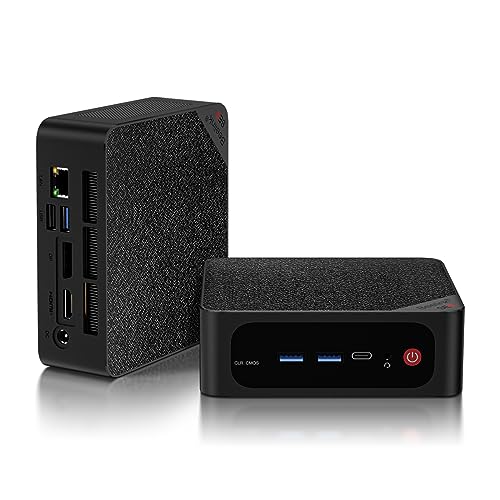
- Best overall for a home office: Beelink SER5 MAX, Ryzen 7 5800H, 32GB RAM, 1TB SSD — Check on Amazon
- GMKtec NucBox K6, Ryzen 7 7840HS, 32GB DDR5, 1TB SSD — Check on Amazon
- MINIX NEO Z300-0dB Fanless Mini PC, Intel i3-N300, 16GB RAM, 512GB SSD — Check on Amazon
- HP EliteDesk 800 G5 Mini, Core i5-9500T, 16GB RAM, 256GB SSD (Renewed) — Check on Amazon
See 2 more Amazon options
- MeLE Quieter 4C Fanless Mini PC, Intel N150, 8GB RAM, 256GB SSD — Check on Amazon
- Beelink EQ14 Mini PC, Intel N150, 16GB RAM, 500GB SSD — Check on Amazon
Read the full guide ↓
Disclosure: As an Amazon Associate, reviewstook.com earns from qualifying purchases. Links to Amazon on this page are affiliate links; they cost you nothing extra. Listing details such as price and availability change often, so check the current Amazon listing before you buy.
Five hundred dollars is the budget where a home office PC stops being a compromise you apologize for. The tier below it is built on 16GB of memory if you are lucky, small SSDs, and chips chosen for price rather than pace. At $500 the honest gains are specific, and they are the ones this guide is organized around: 32GB RAM configurations that shrug off the forty-tab browser habit, faster AMD APUs that make big spreadsheets and photo libraries feel light, triple-monitor support verified from the actual port lists rather than the marketing banner, and SSDs with a full terabyte of room. There is a second route to the same desk at this budget — the renewed business desktop, a retired corporate mini PC from HP, Dell or Lenovo selling on the renewed market — and this guide judges that route on the two things that decide whether it is a bargain or a false economy: the warranty behind it and how many years of life are realistically left in it.
One piece of market context matters before any pick makes sense. Memory and SSD prices climbed hard through late 2026, and mini PC prices climbed with them. That is why this guide uses check-price language rather than standing prices, and why factory-fitted capacity — the RAM and storage already in the box — is worth more this year than it used to be. It is also why the renewed machines in this guide, built before the surge and priced by the pallet, look so strong on paper. For most home workers we would start with the Beelink SER5 MAX for its 32GB of memory and three-display output, or the HP EliteDesk if you want the lower-cost renewed route. Below are the quick picks, detailed reviews of all six machines, a comparison table, a renewed-versus-new buying section, the mistakes that waste money at this tier, and the questions home workers ask before they order.
In this guide
Quick Picks
Short on time, or comparing several options at once? Each row below names a home-office type and the machine that suits it, with a link to the listing.
| Buyer type | Pick | Why it stands out | Link |
|---|---|---|---|
| Best overall for a home office | Beelink SER5 MAX, Ryzen 7 5800H, 32GB/1TB | 32GB of upgradeable RAM, three 4K displays, a terabyte of storage | Check on Amazon |
| Best performance | GMKtec NucBox K6, Ryzen 7 7840HS, 32GB/1TB | The fastest APU in this guide, DDR5 memory, dual SSD slots — check price on Amazon; it belongs here only when the live price fits this budget | Check on Amazon |
| Best silent for calls | MINIX NEO Z300-0dB, Intel i3-N300, 16GB/512GB | Truly fanless, so nothing whirs behind your voice on a call | Check on Amazon |
| Best renewed value | HP EliteDesk 800 G5 Mini, i5-9500T, 16GB/256GB (Renewed) | A six-core business desktop at a budget-tier renewed price — check price on Amazon — with three DisplayPort outputs | Check on Amazon |
| Best fanless on a budget | MeLE Quieter 4C, Intel N150, 8GB/256GB | Silent, Windows 11 Pro, dual HDMI — check price on Amazon | Check on Amazon |
| Best low-cost new PC | Beelink EQ14, Intel N150, 16GB/500GB | A new, warrantied low-cost machine — check price on Amazon — for documents, email and browsing | Check on Amazon |
How These Picks Were Chosen
The budget was applied as a ceiling for a working computer: every pick is a complete, ready-to-run Amazon listing — no barebones kits that still need memory, storage and an operating system before they can open a spreadsheet. Where a machine’s live price moves around the $500 line, the review says so and tells you it qualifies only when the price you see on Amazon fits the budget. Two of the six picks are price-dependent in exactly that way, and both are flagged wherever they are recommended, not just once.
We did not use these machines ourselves. We read the maker listings, specification pages and price-tracker records, and compared the things home office work actually loads: memory capacity and whether it can grow, the number of displays the ports can genuinely drive, SSD size, the Windows edition installed, and how the machine is cooled — because a fan you can hear on a video call is a specification too. Display counts in this guide come from port lists: a machine earns a “three monitors” claim only when it has three independent video outputs, such as HDMI, DisplayPort and a USB-C port carrying video. Anything whose multi-monitor claim rested on a hub or a splitter was described as what it is.
Two filters sat on top of that. The first is the memory filter, and it is the lesson of the current market: with laptop memory sticks at record prices, a machine that arrives with 32GB fitted is worth more than a cheaper machine with an empty slot you will pay 2026 prices to fill. Soldered memory was treated as a ceiling, not a detail — where a pick’s RAM can never grow, the review says what that means for a browser-heavy worker in year three. The second filter is the condition filter for the renewed pick: it had to be a business-class machine whose processor is on Microsoft’s supported list for Windows 11, sold through the Amazon Renewed program with its guarantee, at a price low enough to leave room in the budget for the monitor, keyboard and webcam the renewed box does not include.
The 6 Best Home Office PCs Under $500
Beelink SER5 MAX — Ryzen 7 5800H, 32GB RAM, 1TB SSD
Who it suits: The browser-heavy home worker — dozens of tabs, a couple of chat apps, a spreadsheet with ambitions, two or three monitors — who wants one purchase to end the subject for several years.
The specification reads like a point-by-point answer to how office work actually bogs down. The Ryzen 7 5800H is an eight-core, sixteen-thread chip, and the configuration linked here pairs it with 32GB of DDR4 memory and a 1TB NVMe SSD — the two capacities that decide whether a machine feels fast in its third year or only its first week. Memory sits in two SO-DIMM slots and can grow to 64GB, the SSD can be swapped for up to 2TB, and there is a 2.5-inch SATA bay inside for a second drive, which makes this the most expandable new machine in the guide. Display support is the verified kind: one HDMI 2.0 port, one DisplayPort 1.4 and a USB-C port that carries video drive up to three 4K displays at 60Hz between them, so a laptop-style two-screen setup plus a third panel for chat or reference material is a cabling exercise, not an upgrade. Windows 11 Pro comes pre-installed, Wi-Fi 6 and Bluetooth 5.2 are built in, and a VESA mount in the box lets the machine disappear behind a monitor. Pricing on this listing moves, so check price on Amazon before you buy — what you are paying for is the fitted capacity described above.
The honest limitations are about age and acoustics rather than capability. The 5800H is a 2021-era chip: still more than quick enough for office work, but newer processors at this money are more efficient, and its integrated graphics are for desktop work and light, casual gaming only. The cooling is a dual-fan design running the chip at a 54-watt setting, and reviewers have flagged fan noise under sustained heavy load — ordinary office work will not provoke it, but a silent-room worker should know it is there. Reviewers also noted the fitted NVMe drive is a QLC design, a type that can slow during very large sustained writes; copying a huge video archive will feel it, copying documents will not. One variant warning matters at checkout: Beelink also sells a 24GB/500GB build of this name on a different chip with soldered memory. The listing linked here is the 5800H model with slotted DDR4 — confirm the configuration on the page matches before you pay.
- 32GB of memory in slots, expandable to 64GB — the browser-tab problem solved properly.
- Three independent 4K display outputs: HDMI, DisplayPort and USB-C video.
- 1TB SSD fitted, plus a 2.5-inch bay for a second drive later.
Honest limitation: A 2021-era processor with fans that reviewers could hear under sustained load, and a same-name soldered-memory variant exists — check the configuration at checkout.
Choose it if you run many tabs and more than one monitor and want memory and storage you will not outgrow. Skip it if silence is your first priority, or you want the newest processor generation — the next pick is faster, the fanless picks are quieter.

GMKtec NucBox K6 — Ryzen 7 7840HS, 32GB DDR5 RAM, 1TB SSD
Who it suits: The home worker whose “office work” quietly includes heavy lifting — huge spreadsheets, data tools, photo editing, light video, virtual machines — and who is willing to buy on a sale day.
This is the performance pick, and the gap is real. The Ryzen 7 7840HS is a newer eight-core chip with Radeon 780M integrated graphics, the strongest in this guide by a wide margin; paired with 32GB of DDR5-5600 memory in two SO-DIMM slots (expandable to 64GB) and a 1TB PCIe 4.0 SSD, with a second M.2 slot empty for later. The ports are a home-office wish list: HDMI 2.0, DisplayPort 1.4 and a USB4 port carrying video drive three 4K displays; there are two 2.5GbE Ethernet ports, Wi-Fi 6E, and Windows 11 Pro pre-installed. For office purposes the practical translation is headroom — the machine that does not hesitate when the workbook recalculates, the export runs or the call screen-shares a heavy deck — and the 780M graphics make it the only pick here with genuinely useful light gaming and GPU-accelerated creative work in reserve.
The catch is price. This listing often sits above this guide’s budget, and it only qualifies when a promotion brings the live price within it. So the rule is simple and it is the whole review in one line: check price on Amazon — if the live price fits the under-$500 budget, this is the best home office PC in the guide on performance; if it does not, it is not in this guide’s budget at all, and the SER5 MAX above is the buy. Two further honest notes. The fans are audible under load and the BIOS offers no fan-profile control — GMKtec provides Quiet (45W) and Performance (65W) power modes, and office work belongs in Quiet. And one verified buyer reported a fitted SSD that showed prior usage hours in its SMART data, so whichever mini PC you buy, check the drive’s health readout in the first week while returns are easy.
- The fastest processor and graphics in this guide, with DDR5 memory.
- Three 4K display outputs including USB4, plus dual 2.5GbE networking.
- Two SSD slots and memory expandable to 64GB — years of headroom.
Honest limitation: Its everyday price is often above this budget; it belongs in this guide only when the live Amazon price fits under $500, and its fans are not quiet under load.
Choose it if your workload is heavy and you can wait for the sale. Skip it if you need to order today at whatever the price is, or your work is documents and browsing — you would be paying for headroom you never touch.

MINIX NEO Z300-0dB — Intel i3-N300, 16GB RAM, 512GB SSD, Fanless
Who it suits: Anyone whose workday is spent on calls — managers, teachers, support and sales staff — in a quiet room where a fan cycling up behind their voice is a real professional problem.
The “0dB” in the name is the product. This machine has no fan at all: the all-metal chassis is the heatsink, so there is no fan noise on a call, no fan to wear out, and no dust being pulled through the case across years of desk life. The specification around that silence is a considered office build. The Intel Core i3-N300 is an eight-core efficiency processor — modest on paper, genuinely sufficient for documents, browsing, email and video calls — with 16GB of DDR4 memory in a slot that can be upgraded to 32GB, and a 512GB PCIe SSD in an M.2 slot that accepts drives up to 4TB. Windows 11 Pro is installed. Display support is verified from the port list: two HDMI ports at 4K/60 plus a USB-C port carrying video and power delivery make three displays possible, and there is a 2.5GbE Ethernet port, Wi-Fi 6 and Bluetooth 5.2. Check price on Amazon — it sits at the premium end of this budget tier, and what the money buys is the silence and the build, not raw speed.
The physics of fanless design set the honest limitation, and it is the same one every passive machine has: sustained heavy load has nowhere to put its heat. Independent testing of this model measured the processor at 98°C under a sustained full load, which is the chip managing itself by slowing down — office work, which is bursty rather than sustained, does not live in that regime, but a worker who renders video, compiles code for long stretches or runs a local AI model should choose a fanned machine from this guide instead. The second limitation is simpler: at this price the processor is the weakest of the three new full-price picks, so the purchase only makes sense if quiet is truly the priority it claims to be.
- Genuinely fanless — zero fan noise on calls, no fan to fail.
- Memory in a slot (to 32GB) and an SSD slot that takes up to 4TB.
- Two HDMI ports plus USB-C video for up to three displays; Windows 11 Pro.
Honest limitation: The processor is modest and passive cooling throttles under sustained heavy load — this is a quiet-office machine, not a workstation.
Choose it if you spend your day on calls in a quiet room and value silence over speed. Skip it if your work includes long renders, big data jobs or anything that pins a processor for minutes at a time.

HP EliteDesk 800 G5 Mini — Core i5-9500T, 16GB RAM, 256GB SSD (Renewed)
Who it suits: The value-first home worker — a second desk, a family office, a side business — who would rather spend less on the computer and keep more of the budget for the monitor, chair and webcam.
This is the renewed route at its most persuasive. The EliteDesk 800 G5 Mini is a one-litre business desktop built for corporate fleets, and the configuration linked here carries a six-core Core i5-9500T processor, 16GB of DDR4 memory and a 256GB NVMe SSD with Windows 11 Pro. The port list is the business-desktop advantage in miniature: six USB-A ports, a USB-C port, and three DisplayPort outputs, so a three-monitor desk needs no hub and no apologies. Check price on Amazon — as a renewed, budget-tier listing, a six-core machine with 16GB of memory at this level is the kind of value that makes the renewed route worth its caveats. Those caveats are real, and they are the review. A renewed unit is an individual, not a product: reviewers of this exact model family note that the internal configuration varies between units — the Wi-Fi arrangement and the third display output’s form differ — and the listing’s own details are not perfectly consistent, with the title saying Windows 11 Pro while a features block mentions Windows 10 Professional. Amazon’s Renewed program backs purchases with its guarantee (a minimum 90-day warranty is the program’s standard), which is the floor of the deal, not a manufacturer’s multi-year cover.
Two working rules make this pick safe rather than merely cheap. First, treat the first evening as an inspection: confirm the memory, storage, Wi-Fi and ports match the listing, and run the machine through a full workday inside the return window. Second, reinstall Windows from Microsoft’s own media before you trust it with work accounts — at least one review outlet reported malware detections on a pre-installed image for this model family, and a clean install costs an hour and removes the question entirely. Judged on longevity, the platform is a 2019 design: the processor is on Microsoft’s Windows 11 supported list, so the machine has a supported present, but there is no next-Windows runway to count on, and the 256GB SSD is the size you will feel first. Buy it as a three-to-four-year, budget-tier answer and it is excellent value; buy it expecting a decade and the disappointment is scheduled.
- Six-core business processor and 16GB of memory at a budget-tier renewed price — check price on Amazon.
- Three DisplayPort outputs and six USB-A ports — a real multi-monitor desk with no hub.
- Windows 11 Pro on a supported processor, backed by the Amazon Renewed guarantee.
Honest limitation: A renewed individual, not a new product: configuration varies by unit, the warranty is the Renewed program’s rather than HP’s, and the 256GB SSD and 2019 platform cap its lifespan.
Choose it if the budget matters more than the warranty and you will do the first-evening checks. Skip it if this will be your only machine for many years, or you need a manufacturer’s warranty behind it — buy new from this guide instead.

MeLE Quieter 4C — Intel N150, 8GB RAM, 256GB SSD, Fanless
Who it suits: The quiet-desk worker with a lighter load — documents, email, web apps, calls — who wants silence and Windows 11 Pro without spending to the top of the budget.
The Quieter 4C is built around the same idea as the MINIX above — no fan, a passively cooled chassis, nothing to hear on a call — executed at a lower price and a smaller scale. The Intel N150 is a four-core efficiency processor that handles the document-and-browser working day without drama, and the machine carries Windows 11 Pro, dual HDMI outputs at 4K, a USB-C port with power delivery, Wi-Fi 6 and a VESA mount for behind-monitor fitting. Check price on Amazon before you buy: this is a budget-to-mid-range fanless option, and its value depends on the live price you see. At a price that undercuts the MINIX above it is a tidy silent office box; when the two are close, the MINIX, with double the memory in an upgradeable slot, is the better spend.
The limitation is the memory, and it is structural: 8GB of LPDDR5 is soldered to the board and can never be increased. For a worker whose day is a handful of tabs, a document or two and a call, 8GB is workable today. For the forty-tab browser habit this guide keeps mentioning, 8GB is the ceiling that decides the machine’s retirement date, because memory pressure — not processor speed — is what makes an aging office PC feel old. The 256GB SSD asks for the same discipline. Buy this machine for the workload it honestly fits, after you check price on Amazon, and it is a pleasure to sit next to; buy it as a five-year main machine for heavy multitasking and the solder will be the reason it is replaced.
- Fanless and silent, with Windows 11 Pro and dual 4K HDMI outputs.
- Compact, VESA-mountable, and sips power — an easy desk companion.
- Check price on Amazon — best value when its live price sits clearly below the MINIX above.
Honest limitation: 8GB of memory is soldered and final, and the SSD is 256GB — a machine fitted to a light workload, with no growth path.
Choose it if your work is documents, email and calls and silence matters more than headroom. Skip it if you multitask heavily or keep machines for many years — the SER5 MAX’s slotted 32GB is the grown-up answer.

Beelink EQ14 — Intel N150, 16GB RAM, 500GB SSD
Who it suits: The straightforward home office — documents, email, browsing, video calls, a second monitor — that wants a new machine with a maker’s warranty and most of the budget left over.
Not every home office needs thirty-two gigabytes and eight cores, and the EQ14 is the proof priced accordingly. Its Intel N150 runs four efficiency cores up to 3.6GHz, with 16GB of DDR4 memory and a 500GB SSD — a mainstream specification for this tier, offered here as a low-cost new option. Check price on Amazon before you buy. What the money buys is completeness and calm: dual HDMI outputs at 4K/60 for the classic two-monitor desk, two 2.5GbE Ethernet ports (more networking than most offices can use), Wi-Fi 6, a second M.2 slot for another drive later, and a new machine’s warranty behind all of it. For the defined workload — and it is the workload most home offices actually have — it simply does the job and leaves more of the budget for the monitor arm and the good keyboard.
The boundaries deserve the same clarity. Four efficiency cores are four: the EQ14 is responsive at documents and browsing and ordinary multitasking, and it is the wrong machine for heavy spreadsheets, big photo libraries, virtual machines or anything that keeps a processor busy for minutes. The 16GB of memory lives in a single slot and 16GB is the platform’s maximum, so the fitted amount is also the final amount. And the listing’s title specifies Windows 11 Home — fine for most home workers, but Home lacks Pro’s BitLocker drive encryption controls, domain joining and Remote Desktop hosting, so anyone whose employer requires those should look at the Pro machines above. Stock on this listing has also been interrupted before, disappearing for a stretch of autumn 2026 before returning; if it is unavailable when you shop, the MeLE above is the nearest equivalent, and Best Mini PC Under $500 tracks the wider field.
- A new, warrantied low-cost machine — check price on Amazon, and the budget keeps its change.
- 16GB of memory and 500GB of storage fitted, dual 4K HDMI, dual 2.5GbE.
- A second M.2 slot gives storage a growth path even though memory has none.
Honest limitation: Four efficiency cores and a hard 16GB memory ceiling, on Windows 11 Home rather than Pro — fitted to ordinary office work and nothing beyond it.
Choose it if your workload is documents, email, browsing and calls and you value a new machine’s warranty. Skip it if your work is heavy, your employer needs Windows Pro features, or you keep a PC for six years.

Comparison Table
| Product | Type | Best use | Link |
|---|---|---|---|
| Beelink SER5 MAX, 5800H, 32GB/1TB | New mini PC | Heavy multitasking across three monitors | Check on Amazon |
| GMKtec NucBox K6, 7840HS, 32GB/1TB | New mini PC | Heaviest workloads — when its live price fits the budget | Check on Amazon |
| MINIX NEO Z300-0dB, N300, 16GB/512GB | New fanless mini PC | Silent running for call-heavy days | Check on Amazon |
| HP EliteDesk 800 G5 Mini, i5-9500T (Renewed) | Renewed business desktop | Maximum value per dollar, three DisplayPorts | Check on Amazon |
| MeLE Quieter 4C, N150, 8GB/256GB | New fanless mini PC | Silent light-duty desk — check price on Amazon | Check on Amazon |
| Beelink EQ14, N150, 16GB/500GB | New mini PC | Ordinary office work, new with warranty | Check on Amazon |
How to Choose a Home Office PC Under $500
- Buy memory first; it is the specification you will feel. Office slowdowns are almost never the processor — they are the browser, the chat apps and the office suite competing for RAM. 32GB fitted ends the subject; 16GB is the sensible floor; 8GB only suits a genuinely light workload, and soldered memory at any size is a ceiling, not a specification.
- Count video outputs, not promises. A two- or three-monitor desk needs that many independent outputs: HDMI, DisplayPort, and USB-C ports that carry video. Verify the ports on the listing — all six picks here were chosen from their port lists — and remember that a USB-C port without video support is just a data port wearing a costume.
- Match the processor to the shape of your work, not its peak. Documents and browsing are bursty and suit almost anything in this guide. Recalculating models, exports, compiles and local AI are sustained, and they want the fanned AMD machines — and will throttle a fanless box no matter what its badge says.
- Decide whether you need Windows Pro before you shop. Pro adds BitLocker management, domain joining and Remote Desktop hosting; some employers require one of the three. Five of these six picks ship with Pro. The EQ14’s Home edition is fine for independent workers and a genuine mismatch for managed ones.
- Price the whole desk, not the box. A mini PC is not a laptop: monitor, keyboard, mouse and webcam are separate purchases. The renewed EliteDesk and the low-cost EQ14 both leave real money for exactly those — a legitimate reason to choose them over a machine at the very top of this budget.
- Treat fitted capacity as a hedge against this market. With memory and SSD prices at record levels, a machine that arrives with 32GB and 1TB fitted is partially insulated from the surge; a cheap machine plus an upgrade list priced today may cost more than the complete machine did.
- Put noise on the checklist if you take calls. Fan noise is a specification like any other. Fanless picks are silent by construction; fanned picks vary, and the two performance machines here are both documented as audible under load — irrelevant in a busy room, decisive in a quiet one.
- Check the drive health and configuration in week one. New or renewed, verify the memory, storage and ports match the listing and glance at the SSD’s health data while returns are painless. It takes ten minutes and it is the only inspection you cannot do later.
Renewed Business Desktop or New Mini PC?
Every buyer at this budget faces the same fork, and this guide deliberately stocks both sides of it. The renewed business desktop — the EliteDesk here, and its Dell OptiPlex and Lenovo ThinkCentre cousins — is a machine built for a corporate fleet: metal case, standard parts, ports in business quantities, and a processor with real cores. Its economics are unmatched; a six-core renewed desktop with 16GB of memory at a budget-tier price is not something the new market can easily answer. What you give up is time and cover. The platform is years old on the day it arrives, the warranty is the Renewed program’s guarantee rather than a maker’s multi-year commitment, and each unit is an individual whose exact configuration must be verified rather than assumed. Judged coldly: the renewed machine wins on value per dollar today and loses on years of life remaining, which is why its natural buyers are second desks, family offices, and anyone who would rather put the savings into the monitor and chair they will use for a decade.
The new mini PC inverts every term of that deal. You pay more per core and get a current platform, a maker’s warranty, modern ports and wireless, and efficiency that keeps the desk silent and the power draw trivial. Its risks are different ones: mini PC brands iterate quickly, fitted parts vary between production runs, and the current memory market means the live price deserves a check on Amazon before it deserves your money. The honest summary is that neither route is the smart one in the abstract. A renewed desktop is a three-to-four-year, lower-cost answer; a new mini PC is a five-to-six-year answer at the higher end of this budget. Both are rational. What is not rational is paying new-machine money for renewed-machine cover, or renewed money while expecting new-machine years — and the listings, read carefully, tell you which deal you are actually being offered. Readers still weighing the smaller end of the renewed market should also see Best Home Office PC Under $400, and those ready to spend past this tier for a longer runway should see Best Home Office PC Under $700.
Common Buying Mistakes
- Buying a renewed desktop with a processor too old for Windows 11 support. Listings cheerfully sell 6th- and 7th-generation machines with Windows 11 pre-installed, but Microsoft’s supported list effectively starts at 8th-generation Intel Core — those machines run an unsupported configuration with no update guarantee. The EliteDesk in this guide is 9th-generation for a reason.
- Counting monitors from the marketing instead of the ports. “Supports three displays” sometimes means a hub you do not own. Count physical video outputs on the listing’s port list, as this guide did.
- Paying the top of a volatile listing’s range. Several picks here swing widely in price. Checking the live price on Amazon is worth real money at this tier — the K6 fits this budget or is over-budget, depending entirely on the price on the day.
- Treating 8GB of soldered memory as a starter configuration. Soldered is final. If your workload might grow, a slotted machine at the same price is the safer purchase even when its other numbers look smaller.
- Trusting a renewed machine’s pre-installed Windows with work accounts on day one. Reinstall from Microsoft’s media first; it is an hour of setup that removes an entire category of doubt.
- Spending the whole $500 on the box and nothing on the desk. A lower-cost computer with a good monitor and keyboard is a better office than a top-of-budget computer feeding a tired panel — budget the whole workstation.
- Assuming a same-name variant is the same machine. The SER5 MAX name covers a soldered-memory build as well as the slotted one recommended here. Confirm the processor and memory type on the listing at checkout, every time.
- Buying a fanless machine for sustained work. Passive cooling is a silence feature with a physics bill attached: long renders, exports and compiles will throttle. Match the cooling to the workload’s shape.
Final Recommendation
- Most home workers: Beelink SER5 MAX.
- Heavy workloads, bought on sale: GMKtec NucBox K6.
- Call-heavy days in a quiet room: MINIX NEO Z300-0dB.
- Tightest budget, most computer per dollar: HP EliteDesk 800 G5 Mini (Renewed).
- Silent and light-duty: MeLE Quieter 4C.
- Ordinary office work, new with warranty: Beelink EQ14.
Our top two for a home office at this budget are the Beelink SER5 MAX, for the complete absence of drama — 32GB of memory, a terabyte of storage, three displays, everything fitted and expandable — and the GMKtec NucBox K6, which is the faster machine in every way that matters provided the live price on Amazon fits this budget rather than sitting above it. Between them they cover the two shapes this search usually takes: buy the finished thing today, or buy the better thing on the right day. If the desk budget is the real constraint, the renewed EliteDesk is the pick with the strongest arithmetic in the guide, bought with its inspection rules attached; if silence is the constraint, the MINIX is the machine your callers will never hear. Workers setting up in a small room should also see Best Home Office PC For Small Spaces Under $500, first-time buyers Best Home Office PC For Beginners Under $500, and anyone whose office machine doubles for play should read the gaming notes in Best Compact Gaming PC Under $500 before assuming an office pick moonlights well. Count the ports, check price on Amazon, confirm the configuration at checkout, and the machine will take care of the work.
Frequently Asked Questions
How much RAM does a home office PC actually need?
Sixteen gigabytes is the working floor for a modern office load — browser, office suite, chat and calls — and 32GB is the amount that stops memory from being a topic for years, which is why both full-price performance picks in this guide ship with it. Eight gigabytes, as in the MeLE, suits a light and stable workload only; the important question is not the number but whether it can grow. Slotted memory can be upgraded later; soldered memory is the machine’s permanent ceiling.
Can these machines run two or three monitors?
Yes — every pick here was chosen partly for its port list. The SER5 MAX, K6 and MINIX each drive three displays from HDMI, DisplayPort and USB-C video outputs; the EliteDesk offers three DisplayPort outputs; the MeLE and EQ14 drive two displays over dual HDMI. Verify the exact ports on the listing before ordering, because variant models under the same name occasionally change the arrangement.
Is a renewed business desktop a safe buy for work?
It is a managed risk with a strong price attached. Buy through the Amazon Renewed program so its guarantee stands behind the unit, choose a processor on Microsoft’s Windows 11 supported list (8th-generation Intel Core or newer), verify the configuration matches the listing in the first week, and reinstall Windows from Microsoft’s own media before signing into work accounts. Follow those rules and a renewed EliteDesk-class machine is a sound three-to-four-year office computer; skip them and you are relying on luck.
Do I need Windows 11 Pro for working from home?
Only if something requires it: an employer’s device policy, domain joining, managed BitLocker encryption, or hosting Remote Desktop connections. Independent workers and most home users lose nothing with Home. Five of the six picks here include Pro anyway; the EQ14 ships with Home, which is part of how it reaches its low-cost position — check your employer’s requirements before choosing it.
Will a fanless mini PC overheat doing office work?
Ordinary office work will not trouble it: documents, browsing and calls are bursty loads that let a passive case shed heat between peaks. Sustained loads are the exception — testing of the MINIX in this guide measured 98°C under a continuous full load, where the chip slows itself to cope. If your work includes long renders, exports or local AI, choose one of the fanned machines instead.
Can a home office PC under $500 handle any gaming?
Light and casual gaming only, and unevenly. The K6’s Radeon 780M graphics are genuinely capable at 1080p in lighter titles, and the SER5 MAX handles older and casual games at modest settings. The Intel-based picks, renewed included, are limited to very light or older games. These are office machines that can play a little, not gaming PCs — the gaming guides in this series, starting with Best Mini Gaming PC Under $500, are the right read if play matters as much as work.
Why does this guide tell me to check the price on Amazon?
Because listing prices change often. Mini PC prices moved sharply through late 2026 as memory and SSD costs climbed, and several listings swing widely between promotions. This guide therefore positions each pick by tier — budget, mid-range or premium within the under-$500 frame — and the live Amazon listing is the final word at checkout: check price on Amazon for the K6, the MeLE, the EliteDesk and every other pick before you buy.
- Best Home Office PC Under $400
- Best Home Office PC Under $700
- Best Home Office PC For Beginners Under $500
- Best Home Office PC For Small Spaces Under $500
- Best Home Office PC For Streaming Under $500
- Best Mini PC Under $500
- Best Fanless Mini PC Under $500
- Best Mini PC For Small Spaces Under $500
- Best Compact Gaming PC Under $500
- Best Workstation PC Under $500


