Where to buy
Check the latest price, availability and delivery on Amazon. Orders are placed on Amazon. We may earn a commission from qualifying purchases.
- Most powerful fanless pick: Kinupute Fanless Mini PC, Core i7-1260P, 16GB DDR5, 256GB NVMe, 3x 2.5G LAN — Check on Amazon
- KINGDEL NC3000 Fanless Industrial PC, Core i7 8th Gen, 16GB RAM, 512GB NVMe SSD — Check on Amazon
- MeLE Quieter4C N150 Fanless Mini PC, 16GB RAM, 512GB SSD, Windows 11 Pro — Check on Amazon
- Protectli Vault Pro VP2430, Fanless 4-Port 2.5GbE Mini PC (Barebones) — Check on Amazon
See 2 more Amazon options
- MeLE Quieter4C N100 Fanless Mini PC, 8GB RAM, 128GB, Windows 11 Pro — Check on Amazon
- ZOTAC ZBOX CI337 Nano Fanless Mini PC, Intel N100 (Barebones) — Check on Amazon
Read the full guide ↓
Disclosure: As an Amazon Associate, reviewstook.com earns from qualifying purchases. Links to Amazon on this page are affiliate links; they cost you nothing extra. Listing details such as price and availability change often, so check the current Amazon listing before you buy.
If this is your first mini PC, here is the one fact that will save you the most money: a fanless mini PC is a small, completely silent computer with no fan inside at all, and silence — not speed — is the entire product. There is no fan because the metal case does the cooling, spreading the processor’s heat across its finned surface the way a radiator warms a room. That design is wonderful for a bedroom, a living room or a desk you sit at for eight hours, and it comes with a hard physical limit: a small finned box can only shed the heat of a low-power processor, so every genuinely fanless machine runs modest, efficient chips and built-in graphics. No fanless mini PC at any price has a gaming graphics card. Not one. The heat would have nowhere to go.
That limit is why your $1,500 budget is far more than this category can honestly take from you. We verified the fanless machines sold on Amazon from their manufacturers’ own specifications, and even the most capable configuration we could find sits well inside this guide’s frame — check price on Amazon for the current figure. Most good fanless PCs sit in the budget to mid-range tiers. Spending at the premium end buys thicker metal, extra network and serial ports, longer warranties and a support line that answers — real things, and two picks below sell exactly that — but not a faster silent computer.
So what gaming does a fanless mini PC honestly do? The light kind, and it does it pleasantly: older games, indie titles, esports games at modest settings, retro emulation, and streamed or cloud gaming where a distant server does the heavy lifting. What it will not do is run modern big-budget games at high settings — that job needs a graphics card, a graphics card needs a fan, and a fan ends the silence you came for. If gaming is the main job, a small gaming PC with a quiet fan is the honest purchase, and the end of this guide points to those. If silence is the main job and light gaming a bonus, you are in the right place: six verified machines, every one far under budget, explained in plain English.
In this guide
Quick Picks
Short on time, or comparing several options at once? Each row below names a buyer type and the product that suits it, with a link to the listing.
| Buyer type | Pick | Why it stands out | Link |
|---|---|---|---|
| Most powerful fanless | Kinupute Fanless Mini PC, Core i7-1260P | The strongest chip a silent case can hold: 12 cores, DDR5 memory, three fast network ports | Check on Amazon |
| Best first fanless PC | MeLE Quieter4C N150, 16GB/512GB | The finished, friendly one: complete, slim, silent, Windows installed and ready | Check on Amazon |
| Toughest build | KINGDEL NC3000 Fanless Industrial PC, Core i7 | All-metal industrial case with old-style serial ports, made to run around the clock | Check on Amazon |
| Best company behind it | Protectli Vault Pro VP2430 | US support, open-source firmware option and four fast network ports — a network box, not a desktop | Check on Amazon |
| Best value complete PC | MeLE Quieter4C N100, 8GB/128GB | A whole silent Windows PC, complete without the parts hunt the kits require | Check on Amazon |
| Best kit for tinkerers | ZOTAC ZBOX CI337 Nano | A respected brand’s empty box: you add the memory, storage and system yourself | Check on Amazon |
The Words on the Listing, in Plain English
Mini PC listings are written in shorthand. Here are the terms you will meet below, translated once, with what each one means for the six machines in this guide.
- CPU (the processor). The chip that does the computer’s thinking; more cores means more jobs juggled at once. Fanless processors are deliberately small and cool-running: Intel’s N100 and N150 (four cores each) do most of this category’s work, and the two Core i7 picks use older or power-limited i7 chips a silent case can handle.
- GPU and integrated graphics. The GPU draws everything on screen, games included. A gaming PC has a separate graphics card; none of these machines does. Their graphics are integrated — built into the processor — which is why their gaming is the light kind. There is no empty slot waiting for a graphics card later, in any pick here.
- Shared memory. Because integrated graphics has no memory of its own, it borrows some of the computer’s RAM while you play. An 8GB machine is really offering the game and Windows a smaller pool than the headline suggests — one reason the 16GB picks feel smoother.
- RAM (memory). The computer’s short-term workspace. 8GB covers browsing, documents, media and light games; 16GB is comfortable headroom; more than that matters mainly for running several virtual computers at once. What matters just as much is whether it can be changed — see the next term.
- Soldered vs socketed RAM. Soldered memory is fixed to the board in the factory: the amount you buy is the amount you keep, forever. Socketed memory sits in a slot you can open and upgrade. In this guide, plainly: the MeLE Quieter4C N150’s 16GB is soldered, and the Quieter4C N100’s 8GB is not user-upgradeable either — buy the size you need. The Kinupute has two proper slots (up to 64GB), the Protectli has one slot (up to 64GB), the ZOTAC kit has one slot (up to 16GB), and the KINGDEL is sold in fixed configurations up to 32GB, so choose its size at purchase.
- SSD and storage. Where your files and games live. An NVMe SSD is the fast modern kind. eMMC is slower, simpler storage found in the cheapest complete pick and inside the Protectli as a small starter drive. 128GB fills quickly once games arrive; 256GB is workable; 512GB is comfortable.
- Resolution. How many dots make the picture — 1920 × 1080 (“1080p”) is the standard sharp screen, 3840 × 2160 (“4K”) is four times as many. These machines display a crisp 4K desktop and video happily; drawing a game at 4K is far more work than showing a 4K film, so light games at 1080p is the honest expectation.
- Refresh rate. How many times per second the screen redraws, measured in Hz. A basic monitor is 60Hz; gaming monitors run faster. Whichever screen you use, Windows often leaves it at 60Hz until you set its real rate in display settings — the setup walkthrough below includes that step.
- Upscaling. A trick where a game draws a smaller picture and stretches it cleverly to fill the screen, trading a little sharpness for speed. Gaming graphics cards advertise it heavily; these integrated chips offer nothing comparable to lean on, so the honest tools here are lowering a game’s settings or resolution — or streaming it from a cloud service that renders it elsewhere.
- Power brick. Mini PCs do not have a power supply inside; they use an external brick, like a laptop charger, which plugs into the back. It needs a home on or under your desk and a little air of its own — do not bury it in cables or bedding.
- Prebuilt vs barebones. A prebuilt (complete) machine arrives with memory, storage and Windows fitted: unbox, plug in, use. A barebones kit is the case and board only — you buy and fit the memory and storage, and install a system yourself. Two picks below are barebones (the Protectli and the ZOTAC), and their reviews spell that out honestly. There is no graphics-card version of this choice: no pick here can take one.
- Renewed vs new. Renewed means second-hand, refurbished. Plainly: none of the six picks in this guide is renewed — all are sold new. The two barebones kits are new but incomplete, which is a different thing, and it is labelled wherever it appears.
- Platform. The family a processor belongs to, and a rough guide to its age. The N100 and N150 are current low-power chips on a finished platform — no mini PC here takes a processor upgrade — so judge each machine as the finished appliance it is.
How These Picks Were Chosen
The first test was the word “fanless” itself, checked properly. A machine only counts if its maker documents a passively cooled, fan-free design — in its own specification pages or manuals — rather than a listing headline using the word loosely. MeLE builds the Quieter line fanless by design, ZOTAC sells the CI337 explicitly as a fanless, passively cooled system, Protectli’s datasheet calls the VP2430 “Fanless and Silent”, and the Kinupute and KINGDEL machines are finned all-metal industrial boxes with no fan inside. Plenty of well-known mini PCs are merely quiet — a small fan spinning slowly — and every one of them was left out, however good it is. A quiet fan still moves air, collects dust and eventually wears out; if total silence is the point of the purchase, it has to be real.
Prices change, so check price on Amazon before you buy. Fanless and industrial listings change configuration under the same listing more often than ordinary products, so each review names the exact configuration it describes and links to its listing for the live figure. Where one listing sells several configurations, the review says which one it covers, and the setup walkthrough below includes a step for checking that the machine which arrived is the configuration you actually ordered. That habit matters more in this category than in almost any other.
We did not use these products ourselves. We read the manufacturers’ specification pages and manuals alongside the Amazon listings, and compared processors, cooling design, memory and storage, ports and warranty terms. Two judgements shaped the ranking. First, in a silent case the case is the limit: a fast chip sprints well and settles to what the fins can shed on a long job, so the reviews judge sustained behaviour, not headline chip names. Second, beyond the budget tier the surviving differences are rarely speed — they are build, ports, documentation and who answers when something goes wrong — and beginners feel those differences most.
The 6 Best Fanless Mini PCs Under $1,500
Kinupute Fanless Mini PC — Core i7-1260P, 16GB DDR5, 256GB NVMe, 3x 2.5G LAN
Who it suits: The beginner whose silent PC also has to think hard — several virtual machines, a busy home server, a small lab — and who wants the most capability a case with no fan can honestly hold.
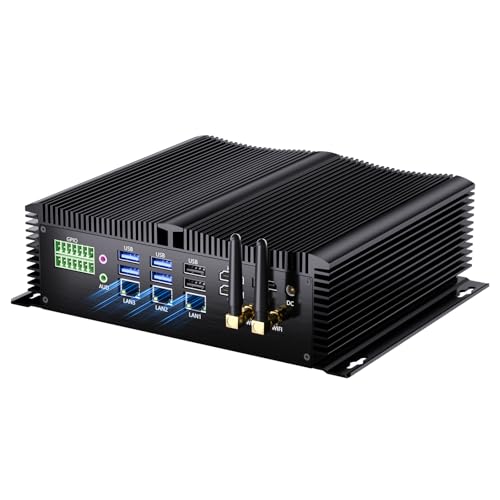
This is the ceiling of the whole category, and it is worth meeting first because it proves the budget point: the most powerful verified fanless mini PC on Amazon — check price on Amazon for its current figure. Inside its finned industrial case sits a Core i7-1260P — twelve cores, a genuinely modern laptop-class processor — with 16GB of DDR5 memory in two slots that accept up to 64GB, a 256GB NVMe SSD, Intel Iris Xe integrated graphics, three 2.5-gigabit network ports, outputs for three 4K displays and Windows 11 Pro installed. Nothing else in the fanless world combines that processor, that memory ceiling and that port count, and it still sits well inside this guide’s frame.
Now the part the headline will not tell you. That processor belongs to a 28-watt class, and a silent case cannot shed 28 watts forever. On short and mixed jobs — opening programs, juggling virtual machines, serving files — it is easily the quickest machine here. On one long, flat-out job, it slows to what the case can cool and stays there, converging toward the cheaper picks. That is not a defect; it is the physics every fanless i7 lives with. The 256GB SSD is also small for a premium-tier machine, and Kinupute is an industrial brand, so help runs through the seller rather than a domestic support network.
- The strongest fanless specification we could verify: 12-core processor, DDR5 memory, three fast network ports.
- Two memory slots up to 64GB — real upgrade room, rare in a silent case.
- Windows 11 Pro included and three 4K display outputs.
Honest limitation: Long, heavy jobs slow it to what passive cooling allows, 256GB of storage is tight, and support is seller-based rather than a big brand’s.
Choose it if your silent PC will run virtual machines or a busy home lab and your workloads come in bursts. Skip it if your main job is one long render or transcode at a time — a fanned mini PC finishes those faster — or if a famous-name warranty matters to you.

KINGDEL NC3000 Fanless Industrial PC — Core i7-8565U, 16GB RAM, 512GB NVMe
Who it suits: A beginner whose silent computer has a practical job — a workshop, a kiosk, a till, a machine controller — especially one that must connect to older equipment.
KINGDEL builds industrial computers, and the NC3000 looks it: a solid all-metal fanless case (the metal is the cooler, not decoration), a Core i7 processor, and a row of ports consumer mini PCs abandoned years ago — two serial COM ports for machinery and instruments, an HDMI output and an older VGA output for displays, four USB 3.0 ports, Wi-Fi and Bluetooth. The configuration documented here, with 16GB of memory and a 512GB NVMe SSD, is a mid-range to premium-tier build — check price on Amazon for its current figure. The same listing family sells larger configurations, up to 32GB of memory and 1TB of storage, so the single most important beginner habit applies: make sure the configuration selected on the listing is the one this review describes.
The badge needs translating. “Core i7” sounds like the top of the range, but this is the i7-8565U, a four-core chip from 2018. In everyday speed it sits much closer to the modern N100 machines below than to the Kinupute above, and its UHD 620 graphics are the modest kind — fine for displays and light games, nothing more. What you are actually paying for here is the case, the serial ports, the configuration choices and a design meant to run unattended for years in unkind places. For the buyer who needs those things it is money correctly spent; for a buyer who only read the i7 sticker, it is the dearest way in this guide to buy ordinary speed. Support and the Windows licence run through the seller here, so read the stated terms before ordering.
- All-metal fanless case built for continuous, unattended running.
- Two serial ports plus HDMI and VGA — connections modern mini PCs no longer offer.
- Several configurations on one listing, up to 32GB of memory and 1TB of storage.
Honest limitation: The processor is a 2018 four-core chip whose i7 badge flatters it; in plain speed it is a peer of far cheaper machines here.
Choose it if you need serial ports, a metal case and round-the-clock intent in a dusty or busy spot. Skip it if you want the most speed per dollar in silence — that is the Kinupute, or the MeLE below for ordinary desk work.

MeLE Quieter4C N150 — 16GB RAM, 512GB SSD, Windows 11 Pro
Who it suits: Most first-time buyers, honestly: anyone who wants a silent PC for a bedroom, study or living room that simply works when it comes out of the box.
MeLE is the closest thing fanless computing has to a friendly consumer brand, and this is its flagship shape — a slim metal slab, about 5.2 by 3.2 by 0.7 inches, with no fan, no vents and nothing to clog, small enough to mount behind a monitor and forget. Inside are Intel’s N150 processor (four cores, up to 3.6GHz), 16GB of memory and a 512GB SSD; it drives up to three 4K displays across two HDMI ports and a USB-C port, and it arrives with Windows 11 Pro properly installed and licensed. It sits in the premium tier for this category — check price on Amazon for the current figure. Of the six machines here, this is the one that behaves like a finished appliance — the always-on and astrophotography communities adopted this line precisely because it runs day and night, silently, sipping power.
Two honest notes. First, an N150 is an N150: the chip in this premium-tier machine is a close relative of the one in budget fanless boxes, and at sustained work they are equals. The premium buys the slim metal build, the generous configuration, the triple displays, the maker’s quality control and a warranty from a company that publishes manuals and replies to email — for a beginner, that wrapper is worth real money, but know it is what you are paying for. Second, on this build the memory is soldered: the 16GB you buy is the 16GB you keep. Storage is kinder — an M.2 slot lets you add a bigger SSD later. Buy the memory size you need now.
- The polished beginner’s fanless PC: slim metal case, silent, complete and supported.
- 16GB of memory and a 512GB SSD, with an M.2 slot for more storage later.
- Three 4K display outputs and a properly licensed Windows 11 Pro.
Honest limitation: You pay a premium over near-identical processor performance elsewhere in this guide, and the memory is soldered in place.
Choose it if silence in a living space is the priority and you want a complete product from a maker who answers email. Skip it if you are happy with industrial listings and would rather put the difference toward capability — the Kinupute — or save it with the N100 model below.

Protectli Vault Pro VP2430 — Intel N150, 4x 2.5GbE, Barebones
Who it suits: The beginner whose project is a home network — a firewall, a router, a small home lab — and who would rather have a real company behind the box than a longer spec sheet.
Protectli sells something the rest of this guide does not: a company. The VP2430 is a finned, fanless aluminium appliance built around the same Intel N150 found in much cheaper machines, with four Intel 2.5-gigabit network ports, one DDR5 memory slot accepting up to 64GB, a small 32GB built-in starter drive plus an M.2 slot for a real SSD, and a serial console connection for network work. Around that ordinary hardware sits the actual product — assembly and support in the United States, datasheets and a knowledge base written by the maker, validated firmware, and the option of coreboot, an open-source alternative to the usual startup software. It is sold in barebones form and in configured units of the same line — check price on Amazon for the current figure, and check Protectli’s own store as well, since checking both is part of buying one well.
Beginners should read the word “barebones” twice. The Amazon unit arrives with no operating system installed, and depending on the exact listing, memory and storage are yours to add — the built-in 32GB drive will start a lightweight firewall system but is not a desktop’s worth of storage. Fitted with memory, an SSD and a system, it becomes the silent, always-on heart of a home network, backed by people who answer tickets. Judged as an ordinary desktop, though, it is a strange and pricey way to run the same chip as the MeLE picks. Buy it for network duty, knowing the extra parts are part of the purchase, and it is the most defensible purchase here; buy it as a family PC and it is the wrong box.
- Four Intel 2.5-gigabit network ports and an open-source firmware option — a network specialist’s machine.
- US-based support, proper datasheets and a maintained knowledge base.
- One memory slot up to 64GB: unusual headroom for an appliance this size.
Honest limitation: A barebones appliance with no system installed, sold at a premium over identical processor power — poor value as a general desktop.
Choose it if it will run your network and you want support that lasts for years. Skip it if you want a silent desktop that works out of the box — the MeLE picks do that job complete, at similar money.

MeLE Quieter4C N100 — 8GB RAM, 128GB, Windows 11 Pro
Who it suits: A first-time buyer who wants the complete fanless experience as a budget-tier complete machine — a silent second PC, a media and streaming box, a computer for a spare room or a telescope.
This is the original Quieter4C configuration, and for many beginners it is the sweet spot of the entire guide: the same slim, sealed, fanless MeLE case as the N150 model above — about 5.16 by 3.19 by 0.72 inches — with Intel’s N100 processor, 8GB of memory, 128GB of storage, triple-display output and Windows 11 Pro installed and licensed. It sits in the budget tier for a complete machine — check price on Amazon for the current figure. Read that against the kits below: this is a complete, warranted, silent Windows PC, while the barebones boxes still need memory, storage and a system added before they can be used at all. For watching and streaming, the N100’s built-in video hardware handles 4K playback smoothly — showing a film is easy work for these chips; only games are heavy — and the machine idles at a few watts on a shelf.
Its limits are the configuration’s, stated plainly. Eight gigabytes of memory is enough for media, browsing, documents and light games, and not enough for a desk full of virtual machines — and on these builds the memory is not user-upgradeable, so if you already know you need 16GB, buy the N150 model above instead of planning an upgrade that does not exist. The starter storage is eMMC-class, slower than the NVMe drives in the pricier picks, though the M.2 slot and a microSD slot both let you add room later. Networking is a single standard gigabit port. None of that spoils the jobs this machine is for; it is the same honest fanless proposition as its premium sibling, in a smaller configuration, from the same maker.
- A complete, licensed, silent Windows PC in the category’s budget tier.
- The same sealed fanless MeLE case as the premium model — nothing to clog, nothing to hear.
- M.2 and microSD expansion soften the small starter storage.
Honest limitation: 8GB of memory that cannot be upgraded, slower starter storage, and one network port — a light-duties machine by design.
Choose it if your silent PC will stream, browse and handle light work, and you want it complete in one box. Skip it if you need 16GB of memory from day one — step up to the N150 build rather than discovering the limit later.

ZOTAC ZBOX CI337 Nano — Intel N100 Barebones
Who it suits: The beginner who enjoys building things — or who already has a spare memory stick and SSD in a drawer — and wants an established brand’s silent kit as the budget-tier way in here.
ZOTAC has made passively cooled nano PCs longer than almost anyone, and the CI337 is that experience in current form: a compact fanless box built on the Intel N100, with one DDR5 memory slot accepting up to 16GB, an M.2 storage slot, three display outputs across two HDMI ports, DisplayPort and DisplayPort over USB-C, and a VESA mount for hiding it behind a monitor. It sits in the budget tier as a bare kit — check price on Amazon for the current figure. As hardware it is exactly what a kit should be — a well-understood case, a documented board, and nothing fitted that you did not choose.
The beginner’s trap is arithmetic, so do it now, on paper, before ordering. The box contains no memory, no storage and no operating system. Add a 16GB DDR5 memory stick, a modest NVMe SSD and a retail Windows licence, and the finished CI337 is a very different purchase from the bare box alone — check price on Amazon for the kit, for each part and for the complete MeLE N100 system above, which arrives assembled, licensed and covered as one product, and compare them before ordering. The kit wins in three honest cases: the parts are already in your drawer, you run Linux so the system costs nothing, or you want the pleasure of choosing each part. It carries one siting rule, too, shared by every pick here: the case is the cooler, so it lives in open air, never sealed in a cabinet.
- The established brand’s fanless kit: documented, mountable behind a monitor, three display outputs.
- Takes modern DDR5 memory — a spare stick from a laptop upgrade has a home.
- The budget-tier way in here — a bare kit you complete yourself.
Honest limitation: Memory, storage and a system are all extra — check price on Amazon for each part before assuming the kit is the budget choice.
Choose it if you have the parts on hand, run Linux, or enjoy the build. Skip it if every component would be bought new — the complete MeLE systems are the better sum.

Comparison Table
| Product | Processor | Best use | Link |
|---|---|---|---|
| Kinupute Fanless Mini PC, i7-1260P | Core i7-1260P (12-core) | Most silent capability: home lab, virtual machines, busy server | Check on Amazon |
| KINGDEL NC3000 Fanless Industrial PC | Core i7-8565U | Tough round-the-clock duty with serial ports | Check on Amazon |
| MeLE Quieter4C N150 | Intel N150 | Silent living-space desktop, complete and supported | Check on Amazon |
| Protectli Vault Pro VP2430 | Intel N150 | Firewall and network duty with real support | Check on Amazon |
| MeLE Quieter4C N100 | Intel N100 | Complete silent PC in the category’s budget tier | Check on Amazon |
| ZOTAC ZBOX CI337 Nano | Intel N100 (barebones) | A kit for builders with parts on hand | Check on Amazon |
Your First Evening: Setting It Up, Step by Step
None of this is difficult, and the order matters more than any single step. Budget an unhurried hour, most of which is waiting for updates.
- Choose the spot before you plug anything in. This is the fanless rule, and it is the opposite of what a tidy instinct suggests: the case is the heatsink, so it needs open air moving past its finned surfaces. Put it on an open shelf or desktop, or mounted behind a monitor where air still circulates. Never bury it in a drawer or a pile of cables, and never seal it inside a closed cabinet — a fanless PC in a box is a slow PC in a box.
- Give the power brick an address. The brick that comes with a mini PC is part of the cooling story: it warms up as it works and needs a little air too. Set it on a hard surface beside or under the desk, not under a rug, a cushion or a tangle of wires, and plug it into the machine before the wall socket, so nothing is live while you fumble at the back.
- Connect the monitor to the machine’s display outputs. These PCs have no graphics card, so there is no “wrong” port of the kind gaming towers punish you with — the processor’s own outputs are the only outputs. Use an HDMI port, or the USB-C display output where a pick documents one (the MeLE models and the ZOTAC do; the KINGDEL also offers VGA for older screens). One cable, one screen to start; add the others later.
- Add keyboard, mouse and a wired internet connection. Plug in the basics, and for this first evening use an Ethernet cable rather than Wi-Fi even if the machine will live wirelessly later. The big updates in the next step download faster and fail less on a wire, and every pick here has a proper network port — the Protectli has four.
- Let Windows Update and the drivers finish — all of them. On the complete machines (the two MeLE models, the Kinupute, the KINGDEL), run the updates offered at first boot, restart when asked, and check again until it stops offering more. On the two barebones kits there is nothing to update yet — your evening starts earlier, with fitting memory and SSD and installing a system, and the updates follow.
- Set the monitor’s real refresh rate. Windows frequently leaves a screen at 60Hz even when the monitor can do more. Open Settings, then System, then Display, then Advanced display, and choose the highest refresh rate your monitor offers. It takes ten seconds and makes even ordinary scrolling feel like the machine you paid for.
- Verify the machine that arrived is the machine you ordered. Open Task Manager (right-click the taskbar) and read the Performance tab: processor name, memory size, storage size. Compare them with the model number and configuration on your order. This step earns its place in this category — the KINGDEL listing sells several configurations under one roof, MeLE sells several Quieter4C builds under similar titles, and the Protectli’s configurations vary. A mismatch found on night one is a painless exchange; in month two it is an argument.
- Install a game store and set your expectations kindly. Steam (or your store of choice) installs like any other program. Start with the light end of your library — older favourites, indie games, esports titles at modest settings — and let the machine show you its real, pleasant shape before asking it for anything heavy. Cloud gaming services run well here too, because another computer does the rendering.
How to Choose a Fanless Mini PC
- Start with how long the work lasts, not how big it sounds. Silent cases handle short bursts beautifully and long, heavy jobs at whatever speed the fins allow. Browsing, documents, media and light games are bursty — any pick here suits them. An all-day rendering or transcoding queue belongs in a fanned machine at any budget.
- Confirm “fanless” from the maker, not the headline. Check the manufacturer’s own specification for a fanless or passive design. “Quiet”, “silent mode” and “low noise” on a listing usually describe a small fan running slowly — a different product that collects dust and eventually wears.
- Choose the chip for the job, not the badge. The N100 and N150 machines are equals at sustained everyday work. A fanless Core i7 buys burst speed, more cores for virtual machines and snappier mixed use — not a multiple of the performance — and an older i7 badge, like the KINGDEL’s 2018 chip, can sit level with a modern N-series part despite the grander name.
- Know what the extra money buys before spending it. Beyond the budget tier, more money in this category buys case quality, ports, configuration, warranty and support. Pay it gladly when you need serial ports, four network interfaces or a support desk; skip it when you do not, and keep the change without a flicker of guilt.
- Do the barebones sum in full, first. Check price on Amazon for the kit, for memory, for storage and for a system if you need one, and compare the total honestly against the complete machines. Barebones wins with parts already owned or a free system; it quietly loses when everything is bought new.
- Check what is fixed before you buy the small size. On the MeLE builds here the memory cannot be changed later. If there is any chance 8GB will pinch, buy the 16GB configuration now — there is no upgrade path to discover afterwards.
- Count the connections your job actually uses. This category’s real speciality is ports: serial for machinery, several fast network ports for a home lab, three display outputs for a busy desk. A faster chip you cannot plug your equipment into is worth less than the correct port row.
- Treat the seller as part of the specification. A published manual, a stated warranty and a maker with its own support channel are features. On industrial listings they vary far more than the hardware does — weigh them as such.
- Spend on the room, not just the box. With every pick sitting well inside the Under $1,500 frame, the honest extras are a better monitor, a mount, a small backup power unit for an always-on machine, extra storage — or nothing at all.
What Else You Will Spend
The machines above are not the whole purchase, and a beginner’s budget should see the rest coming. First and largest: a monitor. No pick here includes a screen, keyboard or mouse, and a display is a separate purchase that is never included with a machine — if you do not already own one, it comes before everything else on this list, and it will outlive the PC. Budget for it as its own decision, not as an afterthought.
Then come the catches, each described honestly as machine + fix rather than hidden. The two barebones kits are the clearest: the ZOTAC buys a case and a board, and the finished computer still needs a DDR5 memory stick, an SSD and a system — check price on Amazon for the kit and for each part, and compare that total with the complete MeLE N100 before ordering. The Protectli likewise becomes a working machine only after memory and storage are added and a system installed; its small built-in drive is a starter, not a solution. The MeLE N100’s catch is gentler: its 128GB of starter storage is the first thing a growing game library fills, and the fix — an M.2 SSD fitted later — is a planned second purchase. The KINGDEL needs no completion parts, but its several configurations under one listing make the walkthrough’s configuration check an important step too: check that the configuration selected on the listing is the one this review describes, and only that one.
Everything else is optional and can wait: a mount to hide the box behind the screen, a small uninterruptible power supply for a machine that must never blink, a larger SSD in a year when the library demands it. Nothing in this section is included with any pick, and any listing that hides what is still to buy is doing you no kindness.
Upgrades, in Plain Terms
One promise first, because it is the one beginners most often assume wrongly: there is no graphics upgrade for a fanless mini PC — for any of them, at any later date. There is no slot for a graphics card, and a card’s heat is exactly what a silent case cannot shed. The gaming these machines do on day one is the gaming they will do in year five. Buy one for its silence and its light duties, and that sentence is a comfort; buy one hoping to grow it into a gaming PC, and it is a warning.
What can genuinely change later is memory and storage, and only where the maker left a slot. The Kinupute is the most open machine here: two memory slots accepting up to 64GB, and an SSD you can swap for a larger one. The Protectli takes one memory stick up to 64GB and an M.2 SSD alongside its built-in starter drive — as a barebones kit, fitting them is the first job rather than an upgrade. The ZOTAC kit likewise begins empty by design: one memory stick up to 16GB and an M.2 drive, chosen by you at build time. The MeLE N150’s memory is soldered and final, but its M.2 slot means storage can grow. The MeLE N100’s memory is likewise not user-upgradeable, with storage expansion through its M.2 and microSD slots. The KINGDEL is sold in fixed configurations up to 32GB and 1TB, so its “upgrade” is choosing the larger configuration at purchase. And no pick here takes a processor upgrade; the chip is part of the board. Judge each machine as the finished appliance it is — the ones with slots are simply the more forgiving appliances.
Common Buying Mistakes
- Believing a $1,500 fanless tier exists, and paying a “premium” markup on an ordinary N100 box for the privilege.
- Buying a “quiet” or “silent mode” mini PC that contains a fan, when true fanless was the whole point — check the maker’s specification, not the listing’s adjectives.
- Reading a Core i7 badge as a speed guarantee in a silent case, without asking which i7, from which year, slowed to what by its own cooling.
- Hoping to add a graphics card later. There is no slot and no thermal room; the upgrade does not exist.
- Ordering a barebones kit without checking what the parts still to buy will add, then discovering the completed machine was never the bargain the bare box suggested.
- Buying the 8GB fixed-memory configuration to save money, then needing 16GB with no way to add it.
- Sealing a fanless PC inside a cabinet or entertainment unit, then blaming the machine for slowing down in its own trapped heat.
- Expecting modern big-budget games from integrated graphics in a low-power envelope. Fanless and gaming are different purchases that happen to share a desk.
- Skipping the arrival check: never confirming that the configuration delivered matches the model number ordered, in a category where listings sell several builds under one title.
Final Recommendation
- Most beginners who want silence in a living space: MeLE Quieter4C N150.
- The most fanless capability money can buy: Kinupute Fanless Mini PC, Core i7-1260P.
- Tough duty and serial ports: KINGDEL NC3000 Fanless Industrial PC.
- Network duty with real support: Protectli Vault Pro VP2430.
- The category’s natural value point: MeLE Quieter4C N100.
- Builders with parts on hand: ZOTAC ZBOX CI337 Nano.
For a first fanless PC, start with the MeLE Quieter4C N150: complete, quiet in the absolute sense, properly licensed, and supported by a maker who writes manuals — the machine that lets a beginner learn the category without learning troubleshooting at the same time. If your silent PC must also run a home lab or several virtual machines, the Kinupute is the one genuine step up, and it is the premium ceiling of this category — check price on Amazon for its current figure. Between those two sits the category’s whole honest span, from budget to premium tier, with every difference paid for in build, ports, configuration and support rather than speed. And if the games matter more than the silence, surrender the fanless requirement with our blessing — Best Mini Gaming PC Under $1500 and Best Compact Gaming PC Under $1500 show what this budget buys when a fan is allowed. Treat the $1,500 frame either way as a ceiling set by heat, not a target to spend against.
Frequently Asked Questions
Is a fanless mini PC a good first computer for a beginner?
For the right jobs, it is an unusually kind one: nothing to configure for cooling, nothing to wear out, complete models that work out of the box, and silence that makes a small room pleasanter. Its one demand is honesty at purchase — buy it for browsing, documents, media, streaming and light games, and it will never disappoint you. Buy it expecting a gaming PC and no first-evening walkthrough can rescue the mismatch.
Can a fanless mini PC play games at all?
Yes — the light kind, framed honestly. Integrated graphics in these machines handle older titles, indie games and esports games at modest settings, plus retro emulation, and their video hardware makes them excellent for streamed and cloud gaming, where a distant machine renders the game and yours displays it. Modern big-budget games at high settings are beyond every pick here, at any price, because the heat has nowhere to go.
Why does nothing here cost anywhere near $1,500?
Because passive cooling caps performance, and performance is what expensive computers sell. A small finned case sheds roughly the heat of a low-power processor, so fanless machines are built from chips whose complete systems sit in the budget to premium tiers; even the most capable verified fanless configuration we found on Amazon sits well inside this guide’s frame — check price on Amazon for its current figure. Above that, the market does not get better — it ends. Higher-priced listings are markups on ordinary hardware, not a higher tier.
Fanless or just quiet — which should a beginner choose?
Choose true fanless where a fan is a genuine liability: a bedroom or studio where any noise is heard, a dusty room where moving air carries grit inside, or an always-on machine where a worn fan is the likeliest first failure. Everywhere else, a good quiet mini PC with a fan is faster, and the wider market — see Best Mini PC Under $1500 — is worth a look first.
Will a fanless mini PC overheat?
It manages heat by slowing down rather than breaking: under more load than its case can shed, it reduces its speed and carries on working. Trouble comes only from siting — a sealed cabinet, direct sun, fins smothered against a wall. Give it open air, as the setup walkthrough describes, and these machines are built to run for years without attention.
I bought a barebones kit by mistake. What now?
Do not panic, and do not return it until you have done the full sum: a memory stick, an SSD and a system (free, if Linux suits you) may still compare well — check price on Amazon for each part and for the complete machines before deciding. If the comparison clearly favours a complete rival and the box is unopened, exchange it and buy the finished machine — that arithmetic, done calmly in the return window, is the whole lesson of the barebones reviews above.


