Where to buy
Check the latest price, availability and delivery on Amazon. Orders are placed on Amazon. We may earn a commission from qualifying purchases.
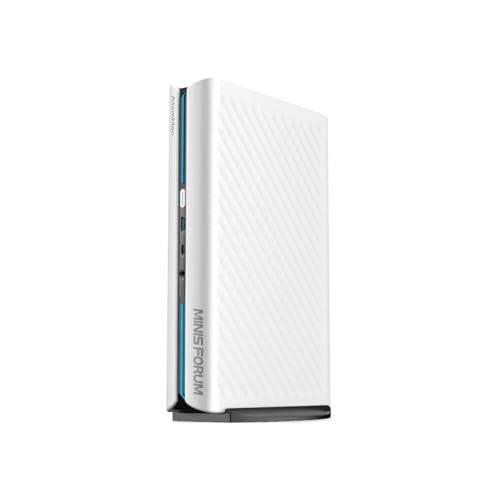
- Best overall: MINISFORUM AtomMan G1 Pro (Barebone) — Ryzen 9 8945HX, Desktop RTX 5060 — Check on Amazon
- MINISFORUM AtomMan G7 Pro (Barebone) — Core i9-14900HX, RTX 5070 Laptop GPU — Check on Amazon
- MINISFORUM AtomMan G7 PT — Ryzen 9 7945HX, Radeon RX 7600M XT — Check on Amazon
- MINISFORUM MS-A2 (Barebone) — Ryzen 9 9955HX, Dual 10G SFP+ — Check on Amazon
See 2 more Amazon options
- MINISFORUM MS-01 (Barebone) — Core i9-13900H, PCIe x16 Slot, Dual 10G SFP+ — Check on Amazon
- GMKtec NucBox K8 Plus (Barebone) — Ryzen 7 8845HS, Radeon 780M, OCuLink — Check on Amazon
Read the full guide ↓
Disclosure: As an Amazon Associate, reviewstook.com earns from qualifying purchases. Links to Amazon on this page are affiliate links; they cost you nothing extra. Listing details such as price and availability change often, so check the current Amazon listing before you buy.
Two honest things need saying before a single pick, because together they decide how this guide should be read. The first is about the money: there is no verified barebones mini PC kit on Amazon priced anywhere near $2,500. The most expensive genuine barebone kit we could verify — chassis, soldered high-end CPU and discrete GPU included, RAM, SSD and operating system still on you — is the MINISFORUM AtomMan G7 Pro, the ceiling of the category in the maker’s own store. Above that the shelf is empty, so $2,500 is treated here the way small-form-factor builders actually use it: as a ceiling for the finished machine, kit plus the memory, storage and OS licence a barebone leaves out. Costed that way, the six verified kits below all complete well under the ceiling, and only one of them can honestly spend the whole budget.
The second honest thing is about the angle itself: a barebones mini PC is already the small-space form factor, so this variant does not grade “small” as a yes-or-no question. It grades what actually differs between six small boxes competing for the same few litres of desk, shelf or cabinet: the shape of the footprint once cables are attached, whether the power supply is built into the chassis or arrives as a separate brick that also needs a home, which faces of the case breathe and therefore cannot be pushed against a wall, and the hidden second boxes — an external GPU dock, a fistful of network transceivers — that quietly double the space a “mini” PC occupies. Where our base research documents an exact figure, we use it; where it does not, we grade by chassis class and say so — nothing here is invented. One consequence follows: none of the six listings documents a VESA bracket in the research behind this guide, so verify any bracket on the live listing before ordering.
In this guide
Quick Picks
Short on time, or comparing several options at once? Each row names a small-space situation and the kit that suits it. Prices change too fast to print responsibly — check the current price on Amazon for each kit, budget for the completed build rather than the barebone sticker, and read the space column as what the box asks of your room.
| Space situation | Pick | Why it stands out | Link |
|---|---|---|---|
| Best overall | MINISFORUM AtomMan G1 Pro (Barebone) | A desktop RTX 5060 in a ~3.8L upright case with a built-in power supply — no brick to hide; completes in the middle of this budget | Check on Amazon |
| Shallowest shelf or riser | MINISFORUM AtomMan G7 Pro (Barebone) | Just 33mm thick — the slimmest chassis here — and the only kit that can spend $2,500 completed | Check on Amazon |
| Smallest gaming footprint | MINISFORUM AtomMan G7 PT | Discrete RX 7600M XT graphics in ~2.6L, at its best under promotional pricing; completes mid-budget | Check on Amazon |
| Tiniest box, server manners | MINISFORUM MS-A2 (Barebone) | ~1.78L with dual 10G SFP+ and a PCIe slot — but its 240W brick needs a home too; completes in the lower half of this budget | Check on Amazon |
| Quiet corner desk | MINISFORUM MS-01 (Barebone) | The calmest workstation kit here, with dual USB4 for a one-cable desk; the cheapest completed workstation in the guide | Check on Amazon |
| First box, smallest outlay | GMKtec NucBox K8 Plus (Barebone) | The cheapest verified kit here, and the only one whose finished build leaves most of the budget unspent — but the future GPU dock is a second box | Check on Amazon |
How These Picks Were Chosen
The six picks, their Amazon listings and every specification in this guide are inherited from our base guide to barebones mini PCs under $2,500, where each ASIN was verified against the live listing title, the maker’s manual for that exact ASIN, or a price tracker that records the listing — no ASIN was typed from memory or borrowed from a roundup. The definitional filter there was strict: a pick had to be a genuine barebone, shipping without RAM, storage and an operating system, or offering a clearly selectable barebone variant. Fully configured machines wearing a “barebones” keyword were excluded, and famous models that could not be pinned to an orderable Amazon listing — Zotac’s desktop-GPU Magnus barebone is the headline case — are discussed in prose further down instead of being linked on a guess. This variant changes the grading, not the evidence: same six kits, same specifications, same deal rules, re-scored for small rooms.
The arithmetic is inherited too, because a barebone sticker is a down payment, not a price. Every kit was costed to completion with one parts basket: a 32GB (2×16GB) DDR5 SO-DIMM kit in a volatile late-2026 memory market, a 1TB PCIe 4.0 NVMe drive, and a Windows 11 Home licence at retail, or nothing if you run Linux. Those parts produce the completed-build positioning in every review. A 64GB memory kit is the wild card in the current memory crunch, and it is the main reason the flagship below can reach this keyword’s budget at all. Prices for kits and parts alike move too fast to print responsibly, so check the current price on Amazon for the kit and price the parts basket the same week you order.
What this variant adds is a documentation rule for space claims. Exact volumes are used only where the base research documents them: about 3.8 litres for the G1 Pro, about 2.6 litres for the G7 PT, about 1.78 litres for the MS-A2, plus the G7 Pro’s documented 33mm thickness. Power arrangements are stated only where documented — the G1 Pro’s built-in 350W supply, the MS-A2’s 240W external adapter — and noise only where documented, flagged when it is a maker’s own figure. Port counts and types are documented; the exact front-versus-rear split varies, so check the live listing photos before planning a cable run around a specific face.
What Actually Decides Whether a Mini PC Fits Your Space
Footprint is the least interesting number in this guide, because all six footprints are small. What decides whether a mini PC works in a tight room is a short list of physical behaviours. Shape beats volume. A slim, flat chassis slides onto a shallow shelf or under a monitor riser; an upright tower of the same volume needs clear desk surface and vertical room, but almost no depth. The brick is part of the PC. Five of these six kits are fed by external adapters; the exception, the G1 Pro, builds its 350W supply into the chassis. A brick needs a ventilated home — floor behind the desk, a cable tray, never a drawer — and its cable limits how far the box can sit from the socket.
Exhaust is a placement rule. These machines move real heat — the gaming kits sustain around 200W-class loads — and it leaves through specific faces. The G7 Pro vents on three sides: excellent cooling, and a strict instruction that three faces must face open room, not book spines, walls or a cabinet side. Cables set the real depth: add plug length and bend radius behind the chassis to its depth before concluding anything fits. And the second box is the trap — the K8 Plus’s GPU dock is another chassis with its own power supply, and the workstation kits’ 10-gigabit ports need transceivers of their own.
The 6 Best Barebones Mini PCs for Small Spaces Under $2,500
MINISFORUM AtomMan G1 Pro (Barebone) — Ryzen 9 8945HX, Desktop RTX 5060
Who it suits: Small-desk gamers who want genuine desktop graphics with the cleanest possible power story — one box, one mains cable, nothing else to hide.
Start with the space profile, because it is this pick’s quiet superpower. The G1 Pro stands upright in a roughly 3.8-litre vertical case, and its 350W power supply is built into the chassis — the only pick here with no external brick at all. On a small desk that matters more than a litre here or there: no adapter to dangle off the desk edge or lose behind furniture, and the footprint the machine occupies is the footprint of the case alone. Inside sits the strongest graphics in this guide that is not a laptop part: a low-profile desktop GeForce RTX 5060 — a Gigabyte card running at its full 145W — alongside a 16-core, 32-thread Ryzen 9 8945HX boosting to 5.4GHz. Connectivity suits a multi-screen small desk: 5-gigabit Ethernet, Wi-Fi 7 and five display outputs — three DisplayPorts and two HDMI — driving up to four 4K screens. You add two DDR5 SO-DIMMs (up to 96GB) and up to two M.2 PCIe 4.0 drives. Check the current price on Amazon before budgeting — the same listing also carries a configured 32GB/1TB version — and plan for the completed machine, kit plus 32GB, 1TB and Windows, to land in the middle of this guide’s budget.
The placement caveats are real but manageable. An upright tower concentrates its cable bundle on one face: the box wants to sit where its display and network cables can fall straight behind the desk, and the exact port split should be confirmed from the live listing photos before you commit to a corner. The GPU is a custom fit — MINISFORUM’s manual warns only the specified Gigabyte low-profile card is supported — so the graphics are fixed for the machine’s life; this is a barebone for memory and storage, not a future GPU swap. Two first-week quirks carry over from the base guide at full size: the machine ships in an 80W gaming mode with a substantial slice of performance behind a “Beast Mode” toggle in the maker’s utility, and that utility’s bundled driver has been flagged by Windows Defender in independent testing. Buy memory as a matched two-stick kit, too — the factory 32GB configuration ships single-stick, in single-channel mode, and a barebone buyer can do better. None of this changes the verdict for tight desks — the pick that adds the least clutter per unit of gaming power.
- The only pick with a built-in power supply — no brick to place, trail or ventilate.
- A full-power desktop RTX 5060 (145W, 8GB GDDR7) in a ~3.8L upright case, completing in the middle of this budget.
- Five display outputs and 5GbE make it a genuine multi-monitor desk hub.
Honest limitation: The GPU cannot be upgraded — case, cooling and power are built around one specific low-profile card — and the performance-mode toggle plus a Defender-flagged utility driver are first-week homework, not out-of-box polish.
Choose it if your space problem is desk clutter and you want the strongest graphics here with a single-box setup. Skip it if your only gap is a shallow horizontal shelf — the slim G7 Pro below is shaped for that — or if you need 10-gigabit networking or a PCIe slot, which is the MS-A2 and MS-01’s territory.

MINISFORUM AtomMan G7 Pro (Barebone) — Core i9-14900HX, RTX 5070 Laptop GPU
Who it suits: Buyers whose space is measured in shelf depth, not desk area — and who genuinely have the full $2,500 to spend on the strongest verified kit in the category.
The G7 Pro’s space story is a single documented number: the chassis is just 33mm thick. That slimness changes where a high-end PC can live — onto shelves too shallow for any tower, under a monitor riser, or in the sliver beside a screen where a conventional mini PC’s cube would not fit — while carrying the most powerful hardware in this guide: a 24-core, 32-thread Core i9-14900HX boosting to 5.8GHz and an NVIDIA GeForce RTX 5070 Laptop GPU with 8GB of GDDR7, cooled by six heat pipes and dual fans on a 200W sustained power budget. The listing for this ASIN is explicit — its title literally reads “Barebone Version Without Storage/OS” — and you add up to 96GB of DDR5-5200 across two SO-DIMM slots and up to 8TB across two M.2 2280 slots, one PCIe 5.0-capable. HDMI 2.1 and USB4 video output, Wi-Fi 7, Bluetooth 5.4 and a full-size SD slot complete the port set. Check the current price on Amazon — the maker’s own store has shown the barebone sold out, and any reseller ask should be judged against what the maker’s store charges.
Two placement rules govern this pick. First, its exhaust leaves on three sides — superb for cooling a slim chassis, and a hard constraint in a small room: it cannot be wedged between books, pushed flush to a wall, or slipped into a cubby that blocks any of those faces. Second, like most slim kits it is fed by an external adapter, so the brick needs the same ventilated home as any other — measure the shelf for cable exits as well as the case. The money, in positioning rather than print: completed with 32GB, 1TB and Windows it lands in the upper part of this budget, and at 64GB and 2TB it is the only build here that can honestly consume the full $2,500 budget — and, depending on the memory market, occasionally blow through it. The deal rule from the base guide stays absolute: a third-party price above what the maker’s own store charges for the barebone should be walked away from, because at that point the configured version is the saner buy. And note the fixed ceiling: the RTX 5070 Laptop GPU’s 8GB of VRAM is the first wall this machine will meet at 1440p with ray tracing.
- The slimmest chassis in the guide at 33mm — fits shelves and risers nothing else here can.
- No verified barebone kit anywhere is stronger: a 24-core i9-14900HX with an RTX 5070 Laptop GPU.
- The only pick whose completed build genuinely reaches the $2,500 budget at 64GB + 2TB.
Honest limitation: Three-sided exhaust means three sides must stay in open air — the slimness tempts exactly the wedged-in placements the cooling forbids — and stock is intermittent, with the maker’s own store having shown the barebone sold out.
Choose it if shelf depth is your constraint and you will spec 64GB and 2TB to match the budget. Skip it if it is only available from resellers asking more than the maker’s own store price, or if your shelf is enclosed — an upright G1 Pro in open air is the safer flagship.

MINISFORUM AtomMan G7 PT — Ryzen 9 7945HX, Radeon RX 7600M XT
Who it suits: Gamers who want real discrete graphics in the smallest documented gaming footprint here — a box that disappears onto a shelf or a crowded desk corner.
At roughly 2.6 litres, the G7 PT is the most compact chassis in this guide that carries a genuine discrete GPU: a Radeon RX 7600M XT with 8GB of GDDR6 at up to 120W, soldered alongside a Ryzen 9 7945HX — 16 cores, 32 threads, up to 5.4GHz, run at a serious 85W in its performance mode. It was the first mini PC to earn AMD Advantage certification, and independent reviews place it exactly where the spec sheet suggests: high-refresh 1080p gaming, capable 1440p with sensible settings. For a small room, the appeal is density — serious gaming hardware in a box closer to a hardback book than to a console — with storage a step ahead of its rivals: one PCIe 5.0 M.2 slot and one PCIe 4.0 slot, and DDR5 memory up to 96GB. Connectivity runs to USB4, HDMI 2.1 and an SD slot. Pricing needs the check-price treatment applied everywhere here: the barebone sits below the flagship kits in this guide’s banding and is at its best under promotional pricing, while the listing also carries a configured 32GB/1TB version — check the current price on Amazon on the day you buy. Completed with 32GB, a 1TB drive and Windows, it lands comfortably in the middle of the budget.
Placement-wise, a compact flat chassis of this class is the easiest shape in the guide to live with: it sits happily on a shelf or under a raised monitor, provided the vented faces keep their hand’s width of air and the rear cables get their bend room — check the live listing photos for the port layout before finalising a cable run, as with every pick here. The shopping caveat is the one the base guide prints in bold, and it stays: this listing carries barebone and configured configurations under one ASIN, so confirm the style selector says “barebone” before checkout. The honest debits are generational rather than spatial. The 7945HX is a Zen 4 part and the 7600M XT an RDNA 3 GPU, so you are buying last generation’s silicon at a discount that is real but not enormous next to the RTX 5060 kit above; AMD’s upscaling at this tier leans on FSR rather than anything as mature as DLSS; and the GPU is soldered, so the upgrade path is memory and storage only. Stock rotates on this model, so check its price the same day. Caught at its promotional pricing, it earns its place; at full list price, your money argues for the G1 Pro’s desktop RTX 5060 instead.
- Discrete RX 7600M XT graphics in ~2.6L — the smallest documented gaming footprint in the guide.
- PCIe 5.0 storage slot and up to 96GB DDR5 in a shelf-friendly flat chassis.
- Completes in the middle of the budget when caught at promotional pricing.
Honest limitation: Last-generation Zen 4 / RDNA 3 silicon with a soldered GPU, on a listing that mixes barebone and configured styles under one ASIN — and a price that is only right at its promotional level.
Choose it if you want the most gaming hardware per litre here, prefer AMD graphics, or run Linux. Skip it if the listing is sitting at full list price the day you buy — the G1 Pro’s newer desktop card is the better spend.

MINISFORUM MS-A2 (Barebone) — Ryzen 9 9955HX, Dual 10G SFP+
Who it suits: Home-lab builders and workstation users who want the smallest documented box in this guide — and who will place it like the small server it is, not like a silent desk ornament.
On volume alone, the MS-A2 wins this guide: roughly 1.78 litres, the tiniest chassis here, wrapped around a Zen 5 flagship — a Ryzen 9 9955HX with 16 cores and 32 threads at up to 5.4GHz. The connectivity is rack-grade: two 10-gigabit SFP+ ports on an Intel X710 controller, two 2.5-gigabit RJ45 ports, Wi-Fi 6E, and triple display output over HDMI and two USB-C ports. Storage is the deepest in the guide — three M.2 slots in 2280 and 22110 lengths with RAID support, one converting to enterprise U.2 with the adapter in the box — memory is two DDR5 SO-DIMM slots up to 96GB, and a full-length PCIe x16 slot (electrically x8, for cards of 75W or under) is where a low-profile RTX 3050-class card can give it a gaming life later. Check the current price on Amazon: the barebone sits in the middle band of this guide’s kits, and the same chassis with the lesser 8945HX chip sits a step below it. Completed as a workstation — 32GB, 1TB, Windows or free Linux — it lands in the lower half of the budget, with a further step up in cost if you add the optional low-profile GPU.
Now the small-space honesty, because this pick’s footprint is a two-part story. The chassis is 1.78 litres, but it is fed by a documented 240W external adapter — a substantial brick that needs its own ventilated spot and effectively doubles the hardware you are placing. Budget room for both pieces, joined by a cable that fixes how far apart they can sit. Placement discipline matters more here than anywhere else in the guide: reviewers measured fans around 50 dBA under full load and idle power draw in the mid-20s of watts — put it on a shelf away from where you sit, or accept the noise as the price of the density. The integrated Radeon 610M is a display adapter in name only, so nobody should buy this as an out-of-box gaming PC; there is no USB4 port, an odd omission next to the older MS-01 below; ECC support is absent; and one in-depth review reported a PCIe passthrough bug in an early BIOS — exactly the feature home-lab buyers care most about — so update the BIOS before you build your VM stack on top.
- Smallest documented volume here at ~1.78L, with a Zen 5 16-core CPU inside.
- Dual 10G SFP+ plus dual 2.5G, three M.2 slots with U.2 support — networking and storage no other pick here matches.
- PCIe x16 slot (x8, 75W) accepts a low-profile GPU or a fast NIC/storage card later.
Honest limitation: The 240W brick is a second object to place, the fans run around 50 dBA under load, and the Radeon 610M graphics are not for gaming — it is a workstation first, always.
Choose it if your “small space” is a shelf in a working room and your budget is really a home-lab budget with gaming as a side quest via the slot. Skip it if the PC must live silently beside you — the MS-01 below is the same formula with desk manners.
MINISFORUM MS-01 (Barebone) — Core i9-13900H, PCIe x16 Slot, Dual 10G SFP+
Who it suits: Small-desk workstation and home-lab builders who need the PC to live where they sit — quietly, and ideally behind a single docking cable.
The MS-01 is the machine that defined this little category, and its barebone listing says so in plain language — its own manual describes a barebone version that “requires the installation of RAM, SSD, and an operating system to function.” Inside is a Core i9-13900H (14 cores, 20 threads, up to 5.4GHz) with Iris Xe integrated graphics, two DDR5-5200 SO-DIMM slots up to 96GB, and storage matching its successor: three M.2 slots with U.2 conversion and RAID support. Networking matches the MS-A2 port for port — two 10G SFP+, two 2.5G RJ45 — and then adds what the newer machine dropped: two USB4 ports with DisplayPort output. For a small desk that is a spatial feature, not just a spec: displays and drives can ride a single USB4 dock cable, so the box can sit further from your chair — a back shelf, the desk’s far end — behind one tidy run instead of a fistful. Its PCIe x16 slot — PCIe 4.0, wired x8 — accepts low-profile cards, and the maker’s own testing covers the RTX 3050 and RTX A2000 class, which is where a gaming or CUDA upgrade would come from. Check the current price on Amazon: the barebone sits below its successor’s band, and the i5-12600H version sits lower still. Completed with 32GB, 1TB and Windows it is the cheapest completed workstation in this guide, and it stays in the lower half of the budget even with a low-profile GPU dropped in.
Its manners are the reason it earns the small-desk slot in this variant. The maker quotes roughly 23dB at idle and 41–43dB under full load — flagged as maker figures, as this guide does wherever a manufacturer grades its own homework — but it is plainly the calmer of the workstation pair, designed to share a room with you rather than be exiled from it. Like the other workstation kit it runs from an external brick, so the two-piece rule applies: case where you want it, brick ventilated and out of the footwell. The debits are age and ceilings: a 2023 platform whose 13900H trails the 9955HX above by a clear generational margin in heavy multi-core work, a PCIe slot limited to low-profile, slot-powered cards, and Iris Xe graphics that handle esports at modest settings and nothing beyond. None of that dents its actual job — as a Proxmox host, a NAS brain, or a quiet corner workstation, the MS-01 is the value pick of the pair. Buy it for the ports, the quiet and the value, not the benchmark charts.
- Dual USB4 alongside dual 10G SFP+ — the one-cable desk option no other pick matches.
- The calmest workstation kit here, with maker-quoted noise around 23dB idle and 41–43dB at load.
- The lowest-positioned workstation kit here — and the cheapest completed workstation in the guide.
Honest limitation: A 2023 platform with integrated graphics only — heavy multi-core work trails the Zen 5 MS-A2, gaming requires buying a low-profile card for the slot, and the external brick still needs its own ventilated spot.
Choose it if the PC must live on the desk you sit at, quietly, with serious networking behind it. Skip it if multi-core throughput outranks everything else — the MS-A2 exists precisely for that buyer.
GMKtec NucBox K8 Plus (Barebone) — Ryzen 7 8845HS, Radeon 780M, OCuLink
Who it suits: Builders starting small on purpose — a first barebone, a media-and-emulation box, a light-gaming PC for a bedroom desk — who want a genuine upgrade path and the smallest bill in this guide.
The K8 Plus is the outlier here in the best way: the one kit priced like the category used to be. The listing’s title states the deal outright — this configuration ships “Without RAM/SSD/OS” — and what its low kit price buys is a Ryzen 7 8845HS (8 cores, 16 threads, up to 5.1GHz) with Radeon 780M integrated graphics, two DDR5 SO-DIMM slots, dual M.2 2280 storage slots, dual Intel 2.5-gigabit LAN ports, USB4, and HDMI 2.1 and DisplayPort output. As a physical object it is a NUC-class box: the smallest class of chassis in this guide, the kind that perches on a shelf or tucks behind a monitor on a stand — graded by class, since the base research documents no exact volume for it, and with no VESA bracket documented, so check the live listing if behind-monitor mounting is the plan. Completed with parts, it lands at the bottom of this guide’s budget range — in the same territory as its own family’s configured 32GB/1TB version, so check the current price on Amazon for both before deciding which route is cheaper this week. It is the only pick whose finished build leaves most of a $2,500 budget for the monitor, the peripherals, or the next machine entirely.
And then the honest spatial catch, which this angle exists to print in full: the K8 Plus’s defining port is OCuLink, and OCuLink’s promise is a second box. Through it you can attach an external desktop GPU dock later, at full PCIe 4.0 x4 bandwidth no USB4-only rival here can match — a genuinely excellent upgrade path. But a dock is another chassis with its own power supply, parked next to the mini PC. If your space plan is “the tiny box and nothing else,” the dock quietly breaks it; if it is “tiny now, two boxes when I can afford the GPU,” this is the smartest shape in the guide. Until the dock arrives, the 780M is integrated graphics: modern AAA titles mean 1080p, reduced settings and FSR upscaling. CPU-heavy work is also a step down — eight Zen 4 cores are plenty for gaming, streaming and office work, visibly fewer than the 16-core kits when renders or VM fleets get heavy — and GMKtec’s BIOS cadence and support sit a tier below big-OEM polish, so plan on sourcing drivers from the maker’s site. None of this stops it being the right first barebone for a small room; it just asks you to count the dock in the floor plan from day one.
- Cheapest verified kit here, and the only pick whose completed build sits at the very bottom of this budget.
- NUC-class footprint: the smallest chassis class in the guide, easy on any desk or shelf.
- OCuLink gives a true external-GPU upgrade path — at the honest cost of a second box later.
Honest limitation: Integrated 780M graphics cap you at 1080p with compromises until the GPU dock arrives, the dock doubles the hardware footprint when it does, and eight cores are the fewest in this guide.
Choose it if you are starting a build journey in a small room and want the upgrade path open. Skip it if you want discrete graphics inside the one box on day one — that is the G7 PT and G1 Pro above.

Comparison Table
| Product | Space profile | Best use | Link |
|---|---|---|---|
| MINISFORUM AtomMan G1 Pro (Barebone) | ~3.8L upright, built-in PSU — no brick | Gaming and creation with a real desktop GPU | Check on Amazon |
| MINISFORUM AtomMan G7 Pro (Barebone) | 33mm slim slab, three-sided exhaust | The category ceiling — max spec for a shallow shelf | Check on Amazon |
| MINISFORUM AtomMan G7 PT | ~2.6L flat chassis | All-AMD gaming in the smallest gaming footprint | Check on Amazon |
| MINISFORUM MS-A2 (Barebone) | ~1.78L plus a 240W brick | Home lab, virtualisation, 10G workstation | Check on Amazon |
| MINISFORUM MS-01 (Barebone) | Workstation slab plus brick, quiet class | Home lab with USB4 at the lowest completed cost | Check on Amazon |
| GMKtec NucBox K8 Plus (Barebone) | NUC-class box; dock is a future second box | Starter builds and a later external-GPU upgrade | Check on Amazon |
Measure Before You Buy: The Five-Minute Checklist
Every return in this category starts with a tape measure that stayed in the drawer. Work through these five steps in order before you order any kit in this guide.
- 1. Shelf and desk depth first. Measure the exact gap: shelf depth, the space under a monitor riser, the desk corner behind the screen. Compare it against the chassis class you are buying — a 33mm slim slab, a ~2.6L flat box, an upright ~3.8L tower — remembering that upright and flat shapes need completely different gaps. Where the listing documents exact dimensions, check them there; otherwise measure for the class and leave margin.
- 2. Ventilation clearance second. Mark which faces of your chosen chassis carry vents or exhaust, and confirm each keeps roughly a hand’s width of open air in the planned spot. Three-sided exhaust, like the G7 Pro’s, rules out cubbies and book-wedged shelves entirely. A media cabinet needs an open back or a door that stays open under load.
- 3. Brick placement third. Unless you are buying the G1 Pro with its built-in supply, decide where the adapter lives: floor behind the desk, a ventilated cable tray, a shelf end. Check its cable reaches from socket to that spot to the PC, and never bury it in a drawer or inside the same closed cabinet as the PC.
- 4. Cable drop fourth. Count what will plug in — displays, network, power, USB — and trace each run. Add plug length and bend radius behind the chassis to your step-one measurement; a shelf that fits the box but not its cables does not fit. If the box sits far from you, the MS-01’s dual USB4 and a dock can collapse the bundle into one cable — plan that deliberately.
- 5. Only then, order. With the spot measured, the air confirmed, the brick homed and the cables traced, check the live listing: the barebone style selector where the listing mixes configurations, the live price against the deal rules in the reviews, and — if behind-monitor mounting matters — whether a VESA bracket is actually offered, since none is documented for these six. Then order.
How to Choose a Barebones Mini PC for a Small Space
- Budget the finished machine, never the kit. Memory, storage and an OS licence ride on top of every sticker in this guide — a substantial parts bill on top of whichever kit you choose, and a 64GB specification adds far more while memory stays this expensive.
- Match the shape to the gap. Shallow shelf or riser: the 33mm G7 Pro. Smallest gaming footprint: the ~2.6L G7 PT. Upright desk corner with zero brick clutter: the ~3.8L G1 Pro. Absolute minimum volume: the ~1.78L MS-A2, provided the brick and the noise are planned for. Do not buy a litre count; buy the silhouette your room is missing.
- Decide where your graphics live. Three kits carry a soldered or fixed discrete GPU (G1 Pro, G7 Pro, G7 PT), two carry a PCIe slot and weak integrated graphics (MS-A2, MS-01), and one bets on integrated graphics plus an OCuLink dock (K8 Plus). That decision sets both your gaming ceiling and, in the dock’s case, your future footprint.
- Memory goes in as a matched pair. Integrated graphics lean hard on dual-channel bandwidth, and at least one configured sibling in this guide leaves the factory on one stick. A pair of 16GB SO-DIMMs will outrun a lone 32GB stick at the same total capacity in nearly everything these machines do.
- Buy the memory speed the platform asks for. The kits here split between DDR5-5200 and DDR5-5600 SO-DIMM; sticks rated faster simply downclock, while slower ones quietly cost frames. Two minutes with the manual page before ordering prevents the classic barebone return — as does checking you have laptop-format SO-DIMMs in the basket, not desktop DIMMs.
- Read the PCIe slot’s fine print before dreaming. On both workstation kits the x16 slot is wired x8 and capped at low-profile, slot-powered cards in the 75W class — RTX 3050 6GB or RTX A2000 territory. A full-size desktop card is a physical impossibility here, whatever the listing photography implies.
- Cost the network you will genuinely plug in. A pair of 10G SFP+ ports delivers nothing until transceivers or DAC cables and a 10G switch port join the order — allow a modest accessory budget, and a little shelf room for them, or admit that 2.5G copper is your actual network and save the money.
- Leave a line in the budget for the operating system. A retail Windows 11 Home licence is a real line item on every build. Home-lab builders can legitimately write that line down to nothing, because Linux and Proxmox run superbly on the two workstation kits.
- Confirm the variant at checkout, every time. Barebone and configured versions share several of these listing pages. Read the style selector, the title and the “without RAM/SSD/OS” wording before paying — expecting a barebone and receiving a configured unit, or the reverse, is this category’s most common disappointment.
The $2,000–$2,500 Gap, Briefly
Because this guide refuses to pad, it owes you one paragraph on what the missing price band actually contains. The closest resident is Zotac’s ZBOX Magnus EN275060TC: a roughly 2.65-litre barebone with a desktop RTX 5060 Ti 16GB and a 20-core Core Ultra 7 255HX, offered through CDW and Zotac’s own store in the middle of this guide’s range. Its Amazon listing, however, sits unavailable with no orderable configuration we could verify, so it is named here in prose, with no link. Its larger sibling, with a desktop RTX 5070 Ti, launched in China at a price above this budget — over budget before a single stick of RAM. The structural conclusion stands: makers price barebone kits to move volume, and volume lives in the lower bands of this budget. Ready-built equivalents live in Best Mini PC For Small Spaces Under $2500 and Best Mini Gaming PC For Small Spaces Under $2500 — and if your real constraint is a smaller completed budget rather than a smaller room, start with Best Barebones Mini PC Under $1500.
Common Buying Mistakes
- Measuring the chassis and forgetting the cables. Plugs and bend radius add real depth behind every box here; a shelf that fits the case but not its cables does not fit.
- Forgetting the brick. Five of these six kits ship an external adapter needing a ventilated home of its own — burying it in a drawer or a sealed cabinet is a heat problem you chose.
- Wedging a multi-side-exhaust chassis into a tight cubby. The G7 Pro vents on three sides; slim machines tempt exactly the placements their cooling forbids.
- Assuming a VESA bracket is in the box. None of the six listings documents one in our research — verify on the live listing if behind-monitor mounting is the plan.
- Comparing a barebone sticker with a configured PC’s price. Once parts are added, a barebone kit and a ready-built machine can turn out to be the same machine at the same money — completed builds are the only honest comparison.
- Believing a $2,500 kit must exist because the search box suggests one. Verifiably, it does not; roundups claiming otherwise pad their lists with configured machines, dead listings or models nobody can sell you.
- Buying the K8 Plus for a one-box room and forgetting the dock. Its OCuLink upgrade path is excellent — and it is a second chassis with its own power supply when it arrives.
- Funding the scalper tier on the G7 Pro. When stock rotates, resellers list the barebone above the maker’s own store price — walk away, wait, or buy the configured version instead.
- Building your whole setup on the shipping BIOS. Early firmware on these platforms has carried genuine faults — a reported PCIe passthrough bug on the MS-A2 among them — so update first, then install your stack.
- Starting on one 32GB stick “to leave room to upgrade.” That leaves the machine in single-channel from day one, and integrated graphics surrender performance in every title until the second stick arrives.
Final Recommendation
- Cleanest small-desk gaming setup: MINISFORUM AtomMan G1 Pro (Barebone).
- Shallowest shelf, full budget: MINISFORUM AtomMan G7 Pro (Barebone).
- Smallest gaming footprint: MINISFORUM AtomMan G7 PT.
- Tiniest box for a home lab: MINISFORUM MS-A2 (Barebone).
- Quiet corner-desk workstation: MINISFORUM MS-01 (Barebone).
- First barebone, smallest outlay: GMKtec NucBox K8 Plus (Barebone).
Our top two for small spaces are the G1 Pro, because it is the only pick that adds no second object to the room — a full-power desktop RTX 5060 in an upright case with the power supply built in, completing well inside the budget — and the G7 Pro, because at 33mm thick it fits shelves nothing else here can, and it remains the only machine that honestly answers a $2,500 budget, provided you catch it at or under the maker’s own store price for the barebone and spend the rest on the 64GB and 2TB it deserves. The G7 PT is the density pick at its promotional pricing; the MS-A2 is the smallest box here if its brick and fans are placed like a server’s; the MS-01 is the workstation that can actually live beside you; and the K8 Plus is where to start if the journey — dock and all — matters more than the destination. If the room is small but the budget is smaller, the same grading continues at Best Barebones Mini PC For Small Spaces Under $1500 and Best Barebones Mini PC Under $1200; for a ready-built instead, see Best Compact Gaming PC For Small Spaces Under $2500. Measure the spot, check the selector and the live price, then order — in that order.
Frequently Asked Questions
Which of these is actually the smallest?
By documented volume, the MS-A2 at roughly 1.78 litres — with two honest asterisks: its 240W external adapter is a second object that needs placing, and its fans run around 50 dBA under load, so it suits a shelf in a working room better than a quiet desk. Among the gaming kits, the G7 PT’s ~2.6 litres is the smallest documented footprint, and the G7 Pro is the thinnest at 33mm. The K8 Plus is a NUC-class box — the smallest class here — but its base research documents no exact volume, so we grade it by class rather than invent a figure.
Can I mount one of these behind my monitor?
Not on the evidence in this guide: none of the six listings documents a VESA bracket in the research behind it. Some mini PCs of these classes offer brackets as bundled or optional accessories, but “some do” is not a spec — check the live listing for your chosen pick before planning a behind-monitor build. Until verified, plan on a shelf, a riser or the desk surface.
Will a gaming mini PC overheat in a media cabinet?
In a closed, unventilated cabinet, yes — that is physics, not a defect. These kits sustain 200W-class loads, and the slim G7 Pro exhausts on three sides by design. A cabinet with an open back, clearance on the vented faces and a door that stays open under load can work; a sealed cabinet will throttle any pick here.
Is there really no barebones mini PC that costs $2,000–$2,500?
No — not as a listing anyone can actually order on Amazon, despite what the search suggestions imply. The priciest genuine barebone kit our research could verify is the AtomMan G7 Pro, the ceiling of the category in MINISFORUM’s own store. Zotac’s desktop-RTX-5060-Ti Magnus barebone would come next through other retailers, except that its Amazon listing sits unavailable. So read $2,500 as the budget for the finished machine — every pick in this guide is costed exactly that way.
What exactly does “barebone” leave out?
Three things, in every pick here: memory, storage and an operating system. The CPU and — where fitted — the GPU are soldered or pre-installed; chassis, cooling, power and Wi-Fi are included. You add SO-DIMM memory and an M.2 SSD, install Windows or Linux, and on the MS-A2 and MS-01 you may optionally add a low-profile PCIe card. On the K8 Plus, the optional OCuLink GPU dock is a further, separate purchase.
How much extra should I budget beyond the kit price?
Budget a real parts bill on top of the kit: a 32GB DDR5 SO-DIMM kit, a 1TB NVMe drive and a Windows 11 Home licence — or nothing at all for the OS if Linux is your choice. Check the current price of each part the same week you order the kit, because memory pricing in particular is volatile right now: the unpredictable line is a 64GB memory kit in the current crunch, and it can move the finished total more than any other single part.
I don’t want to build anything. What should I buy instead?
A configured mini PC — at several tiers the configured sibling of a pick here costs about what the barebone completes for. The finished-machine equivalents live at Best Mini PC Under $2500 and, for gaming-first small rooms, Best Mini Gaming PC For Small Spaces Under $2500. Barebones earn their keep when you already own parts, want specific memory or drives, run Linux, or catch a kit on promotion.
Which of these is best if the PC also has to stream or serve media?
For streaming while gaming, the discrete-GPU kits lead — NVIDIA’s NVENC encoder in the G1 Pro and G7 Pro is the streamer default, and the G7 PT’s AV1-capable AMD encoder is a fine alternative; the streaming-graded sibling is Best Barebones Mini PC For Streaming Under $2500. For serving and transcoding duty, the MS-01 and MS-A2 are the natural picks — and new builders should start with Best Barebones Mini PC For Beginners Under $2500.


