Where to buy
Check the latest price, availability and delivery on Amazon. Orders are placed on Amazon. We may earn a commission from qualifying purchases.
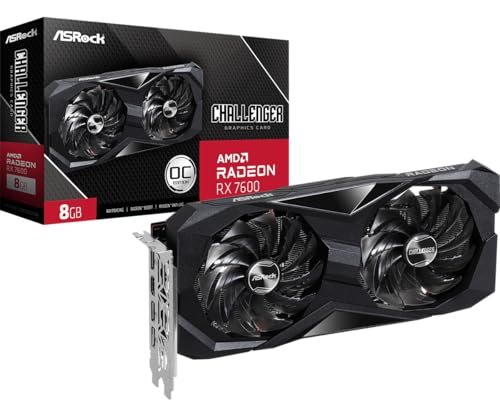
- Best build under $700: ASRock Radeon RX 7600 Challenger 8GB OC — the graphics card the top build in this guide is priced around — Check on Amazon
- IPASON Gaming PC Desktop, Ryzen 5 5600 and RTX 3060 12GB (the prebuilt benchmark) — Check on Amazon
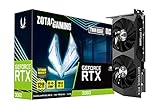
- ZOTAC Gaming GeForce RTX 3060 Twin Edge OC 12GB (anchor card for the RTX 3060 build) — Check on Amazon
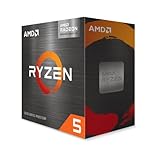
- AMD Ryzen 5 5600G with Radeon Graphics (anchor chip for the staged APU build) — Check on Amazon
- Intel Core i5-14400F build — priced around the same RX 7600 card as Build 1 — Check on Amazon
- ZER-LON Gaming PC, Ryzen 5 5500 and RTX 4060 (the sale-watch prebuilt) — Check on Amazon
Read the full guide ↓
Disclosure: As an Amazon Associate, reviewstook.com earns from qualifying purchases. Links to Amazon on this page are affiliate links; they cost you nothing extra. Listing details such as price and availability change often, so check the current Amazon listing before you buy.
Most build guides fail a small room because they answer a question the room never asked. Frames per second do not care whether the tower is two inches too deep for the shelf, whether the cabinet door closes over the cables, or whether the only corner available presses the case’s exhaust against a wall. This guide takes the six verified build paths from our main under-$700 build guide and re-grades every one on installation: the case class it lands in, the air it needs, the cables it drops, and the measurements to take before ordering.
The honest headline comes first. Nothing below is a mini PC. Four picks are self-builds planned around a micro-ATX motherboard in a compact micro-ATX tower-class case; the other two are prebuilt towers whose cases their listings leave unspecified. What a small-space buyer actually gets is the smallest honest form of a real $700 gaming PC — plus two structural advantages: every pick runs on an internal power supply, so no external brick needs a home, and the four DIY paths share one case, so one set of measurements settles four of the six installations.
The positioning carries the same honesty. A component shortage has pushed basic 16GB DDR4 kits and new RTX 3060 12GB cards well up their bands, so the classic all-new RTX 3060 build lands above this budget before Windows — described here as exactly that; check the current price on Amazon for each part. The paths that genuinely fit are an all-new Radeon RX 7600 build that reaches the ceiling when the card is caught on a dip, a Ryzen 5 5600G build at the low end of the band that plays today and accepts a card later, and an IPASON prebuilt holding the RTX 3060 12GB with Windows included, below what building the equivalent from parts would cost. Every installation judgement follows one strict rule: form-factor class and documented facts only, never a dimension we made up.
In this guide
Quick Picks
Short on time? Each row names a small-space situation, the path that suits it and its position in the budget; Windows is handled openly in each build.
| Your situation | Pick | Why it stands out | Link |
|---|---|---|---|
| Best build under $700 | RX 7600 + Ryzen 5 5500 AM4 build | The only all-new discrete-GPU build at the ceiling when the card is caught on a dip — check price on Amazon — in the one case four picks share | Check on Amazon |
| Best value overall | IPASON Gaming PC (Ryzen 5 5600, RTX 3060 12GB) | With Windows included and positioned below its own parts cost, but its tower’s dimensions come from the listing, so measure first | Check on Amazon |
| Best for upgraders | RTX 3060 12GB + Ryzen 5 5600X build | Inside the budget when your DDR4, SSD and case carry over — a reused case is a footprint your room has already approved | Check on Amazon |
| Coolest-running today | Ryzen 5 5600G APU build | The lowest entry point in the guide, with no graphics card warming the shelf; its PSU is already sized for the card that ends that arrangement | Check on Amazon |
| Best for streamers | Intel Core i5-14400F + RX 7600 build | Ten cores for game plus stream, inside the budget with your own DDR4 and SSD, in the same shared case as Build 1 | GPU listing under Build 1 |
| Best sale watch | ZER-LON Gaming PC (Ryzen 5 5500, RTX 4060) | An RTX 4060 machine that reaches this budget only on sale days — $700 or less, never above — with its footprint checked from the listing while you wait | Check on Amazon |
How These Picks Were Chosen
A build guide stands or falls on how honestly it places each pick in its band, so ours is stated up front. Amazon prices change constantly, so no static figure for any part is printed here: linked picks say check price on Amazon, and unlinked parts are placed qualitatively within their tier. Three rules hold across all six picks. A complete build means processor, board, memory, storage, power supply, case and graphics card, plus a cooler wherever the CPU does not bundle one — price the whole list on the live listings, never just the headline parts. Windows is a separate, visible consideration: a fresh Windows 11 Home license is an added cost bought separately, the two prebuilts include it, and every DIY review states how it affects the build’s position in the band. Performance is kept at class level — 1080p high, 1080p low, upscaling territory — since that is all the hardware tiers support; no per-game frame rates appear in this guide.
Installation is graded under a rule just as strict. The research behind these picks documents form-factor classes — a micro-ATX board here, a compact dual-fan card there, a tower-class prebuilt case — but no verified numeric dimensions, weights, VESA mounts or noise figures for any of them, so none are printed. Where a measurement decides the purchase, the review names the class, specifies what to measure, and points you at the live listing’s specification table for the configuration in your cart, because that figure alone decides whether a machine fits your shelf.
Three installation facts hold for the whole set. Power: all six machines feed from an internal supply — a standard ATX unit in the DIY builds, a named 550W in the IPASON, an unpublished unit in the ZER-LON — so no external brick exists anywhere here. Air: each tower, the card-less APU build included, pushes out real heat under load, and not one belongs in a sealed cabinet. Cables: the display lead’s destination changes by pick — the card’s rear ports on the discrete builds, the motherboard’s outputs on the APU build until a card arrives — and in a small room that destination sets your cable length.
Measure Before You Buy: The Five-Step Check
Work through these five steps in order, before ordering anything — ten minutes and a tape measure separate a build that installs in an evening from one that travels back in its box.
- Measure the spot. Take the width, depth and height of the shelf bay, desk corner or floor patch the machine will occupy, then set those numbers against the case dimensions in the live Amazon listing for the configuration you are buying. The four DIY builds require this check once, against one shared case; the two prebuilts require it too, because their cases are the makers’ choice and our research documents no dimensions for them. If the listing’s figures leave no margin at all, the spot is wrong — not the machine.
- Check ventilation clearance. A gaming tower breathes in at one face and out at another, and both journeys need somewhere to go: no rear panel kissing a wall, no shelf ceiling on the top panel. If the only candidate spot is an enclosed cabinet with a door, stop here — no pick in this guide is safe sealed away, and the real choices are an open shelf, a beside-desk floor spot, or a different class of machine.
- Give the power supply its address. In this set the address is simple, and it is a genuine advantage: with every supply internal, no external brick competes for its own ventilated patch of desk or floor. What remains is the cord — confirm a wall socket within the power cable’s easy reach of the spot, routed behind furniture rather than across a walkway, and remember the rear exhaust and power inlet share the same end of the machine, so a spot that strangles one strangles both.
- Walk the cable drop. From the spot, trace each cable’s actual path: the monitor lead to the graphics card’s rear ports, or to the motherboard’s outputs on the APU build; the Ethernet run to your router, worth wiring properly when the tower may sit far from the access point; then keyboard, mouse and headset. Leads a few inches short are the most common small-space failure of all — and the cheapest to prevent today.
- Then order. Only with the spot measured, the clearance confirmed and the cable paths walked should anything be bought. On arrival, verify the delivery against the listing before the return window closes — style name and graphics card on both prebuilts, which carry documented configuration caveats below; the cooler in the box on the 5600X build; the case’s true dimensions against your step-one numbers. Small-space buyers get one final check nobody else needs: set the empty case, or the prebuilt, into its spot before connecting a single cable. If it does not sit there happily bare, it will not sit there happily wired.
The 6 Best Gaming PC Builds for Small Spaces Under $700
Build 1: The RX 7600 Build — Ryzen 5 5500, Radeon RX 7600 (Best Build Under $700)
Who it suits: A first-time builder with one measured spot — a shelf bay, a desk corner, a patch of floor beside the desk — who wants a complete all-new gaming PC at the ceiling and a footprint verifiable before ordering.
The ASRock Radeon RX 7600 Challenger 8GB OC is a dual-fan RDNA 3 card boosting to 2,695 MHz, and at 1080p its raster pace sits in the RTX 3060’s class: quicker in plenty of traditional titles, slower once ray tracing and DLSS join the comparison, and holding 8GB of VRAM against the 3060’s 12GB. The Ryzen 5 5500 is the budget Zen 3 six-core that makes the build possible — check price on Amazon — with the Wraith Stealth cooler in the box, so no separate cooler line exists. Its compromises deserve plain statement: a PCIe 3.0 link and half the L3 cache of the 5600X cost it a few percent in CPU-heavy games, and because the RX 7600 connects over an x8 link, it belongs on a PCIe 4.0 board — the B550 listed here — rather than an older B450.
- Graphics card: ASRock Radeon RX 7600 Challenger 8GB OC — check price on Amazon
- CPU: AMD Ryzen 5 5500 (Check on Amazon) — check price on Amazon; cooler bundled
- Motherboard: MSI PRO B550M-P — an entry-level B550 board
- Memory: TEAMGROUP Elite DDR4-3200 16GB (2x8GB) — a basic DDR4 kit
- Storage: Crucial P3 Plus 1TB NVMe — a mainstream 1TB NVMe drive
- Power supply: MSI MAG A650GN II 650W 80+ Gold — a mid-band Gold-rated unit
- Case: Antec NX200 M — a budget-band micro-ATX case
- Total: at this budget’s ceiling when the card is caught on a dip; above it when the card sits high in its band
- Windows: budget separately for a fresh license, or nothing with an eligible transfer
The installation, graded. A micro-ATX board inside a compact micro-ATX tower-class case is the smallest standard tower arrangement that still accepts full-size parts, a regular ATX supply and a dual-fan card with no adapters or risers — and this case matters beyond this review, because Builds 3, 4 and 5 are planned into the same one. Our research documents no verified dimensions for it, so pull its height, width and depth from the live listing and run the five-step check. The supply is internal — no brick to place — so the footprint is the case’s footprint and the cable story is one power cord plus whatever leaves the rear panel. Heat sets the real limit: a discrete-GPU build of this class exhausts genuine warmth under load, so the spot wants open air at the intake and exhaust faces. An open shelf or a beside-desk floor patch serves it well; a sealed cabinet refuses it outright. And since the monitor lead plugs into the RX 7600’s ports at the back of the case, measure the cable drop from the rear panel, not the front.
Read the build’s position the way it is written: at the ceiling on the days the card cooperates, past it on the days it declines to, and sensitive to where the SSD line sits when you order. Discipline is the build — fix the card’s walk-away limit at the level that keeps the whole build inside this budget, and let the GPU wait for a dip. The reward is a balanced 1080p machine with a 650W Gold supply holding headroom for a future card.
- The only all-new discrete-GPU build that reaches the ceiling at all.
- Its case is shared with Builds 3, 4 and 5 — measure once, settle four installations.
- Internal supply and standard parts throughout: no brick, no proprietary shapes, everything individually replaceable.
Honest limitation: The headline position survives only when the card is caught low in its band with the SSD line favourable; when the RX 7600 sits at the top of its band the identical list lands well past the ceiling, and 8GB of VRAM will age quicker than the 3060’s 12GB in texture-heavy games. It is also, unapologetically, a tower — a spot that cannot accept a micro-ATX tower cannot accept it.
Choose it if your measured spot takes a micro-ATX tower and the GPU purchase can be timed. Skip it if your space is a narrow shelf or a closing cabinet; no tower in this guide fits either, whatever any headline implies.

Build 2: The Benchmark — IPASON Prebuilt with RTX 3060 12GB (Best Value Overall)
Who it suits: The buyer whose real target is maximum gaming performance for $700 or less, content to let a factory assemble it — and willing to measure an unspecified tower before trusting it to a tight spot.
A control group disciplines every comparison in this guide, and this prebuilt is it. Inside are a Ryzen 5 5600 — a stronger gaming processor than Build 1’s 5500, bringing PCIe 4.0 and the full cache — an RTX 3060 12GB, 16GB of DDR4-3200, a 1TB NVMe SSD, a named 550W power supply and Windows 11 Home already installed — check price on Amazon for where it sits today. Place that beside Build 3’s position, where the same GPU class built from parts lands above this budget before Windows, and subtlety leaves the room: the prebuilt hands you the tier’s reference card, a better CPU than our leading DIY pick and an operating system for less than building the equivalent costs. The shortage has flipped the old rule that building saves money, because system makers buy components at contract prices retail cannot match.
The installation, graded. Here is where the five-step check earns its existence. The listing leaves both motherboard and case to the maker’s discretion, so the footprint is not a documented fact in our research — it is a figure you extract from the live listing’s specification table and test against your measured spot before ordering. The 550W supply is internal, so no brick needs housing. Its heat class is that of any discrete-GPU tower: open air at the vents, no sealed cabinet, display lead to the RTX 3060’s rear ports.
The remaining cost of the arithmetic is control. The GPU brand may vary, so which maker’s 3060 arrives is their decision, not yours. Unspecified board and case return as questions in two years — will a longer card fit, will the board’s power delivery carry a faster CPU — questions a parts list answers by construction and a prebuilt only on the doorstep. Documented variant drift haunts this listing family too: the same product code has surfaced wearing an RTX 4060 headline in a reseller’s spec sheet, so confirm the configuration in the cart and on the box before the return window shuts. None of this overturns the price; it itemizes what the price demands.
- The tier’s reference GPU, RTX 3060 12GB, paired with a full-strength Ryzen 5 5600.
- Windows 11 Home included — a separate cost every DIY path must answer on its own.
- A named internal 550W supply and 1TB NVMe storage: no brick to place, no silent downgrades hiding in fine print.
Honest limitation: The GPU brand may vary, the board and case go unspecified — leaving the footprint unverified until you read it off the live listing — and its position in the band moves with the listing; catch it at the top of its band and the edge over Build 1 shrinks to the Windows license and the assembly.
Choose it if performance per dollar is the whole question and your spot, checked against the listing’s dimensions, accepts a tower. Skip it if your space tolerates one exact footprint and no other — an unspecified case is the wrong wager there.

Build 3: The RTX 3060 12GB Build — Ryzen 5 5600X (Best for Upgraders)
Who it suits: The owner of an aging DDR4 desktop whose memory, SSD and case remain serviceable — the single audience for whom this build truly costs under $700, and whose installation question is already answered.
The classic promise of this tier, priced line by line the way this guide prices everything. The ZOTAC Twin Edge OC is a compact dual-fan RTX 3060 12GB that sits high in its band — check price on Amazon; the cheapest fresh 3060 option found on the site was an ASUS Phoenix card, lower in the band, with dual-fan models from larger brands higher. The Ryzen 5 5600X sits above the 5500 in its band, on the same platform as Build 1. Carrying the ZOTAC card, the all-new sum lands well above this budget — which produces the honest headline: assembled entirely from new parts, the RTX 3060 build belongs to a higher budget tier this year, and any guide presenting it at $700 is pricing a graphics card from a market that has closed.
- Graphics card: ZOTAC GeForce RTX 3060 Twin Edge OC 12GB — check price on Amazon (the cheapest fresh 3060 elsewhere on Amazon is a lower-band single-fan Phoenix card)
- CPU: AMD Ryzen 5 5600X (Check on Amazon) — check price on Amazon
- Motherboard: MSI PRO B550M-P — an entry-level B550 board
- Memory: TEAMGROUP Elite DDR4-3200 16GB (2x8GB) — a basic DDR4 kit
- Storage: Crucial P3 Plus 1TB NVMe — a mainstream 1TB NVMe drive
- Power supply: MSI MAG A650GN II 650W 80+ Gold — a mid-band Gold-rated unit
- Case: Antec NX200 M — a budget-band micro-ATX case
- Total: well above this budget all-new; back inside it when your DDR4 kit, SSD and case carry over
- Windows: budget separately for a fresh license, or nothing with an eligible transfer
The installation, graded. The reuse column hands this build the guide’s finest small-space property: certainty — keep your existing case and the footprint is the one already standing in your spot. The card cooperates too: the ZOTAC is documented as a compact dual-fan design, the class least likely to quarrel with a shorter case’s length or an adjacent drive cage — though an old reused case still deserves a clearance check against the live listing. Bought all-new, the build occupies Build 1’s Antec micro-ATX case and inherits its grading: internal supply, no brick, open-air placement, display lead to the card’s rear ports. Two cautions attach to this pick alone. Whether a 5600X listing bundles a Wraith Stealth cooler varies — check, and where none is included, allow separately for a basic tower cooler beyond the build as listed, confirming its height for a tight case. And the premium’s justification is the long game — 12GB of VRAM and DLSS, the features still paying rent in three years — so a twelve-month esports horizon is better served by Build 1.
- The tier’s reference card with 12GB of VRAM, DLSS and the class’s strongest ray-tracing support.
- The strongest gaming CPU in this guide, the 5600X, on a PCIe 4.0 platform.
- For upgraders carrying memory, storage and case across, the best machine here under $700 — installed in a footprint already proven.
Honest limitation: From new parts it overshoots the budget by a wide margin, full stop. Its place in this guide rests on the reuse path being genuine and common, not on any wishful reading of the all-new total.
Choose it if you hold DDR4, an SSD and a case worth keeping, or the 12GB card matters enough to pay this market’s price for it. Skip it if the desk starts empty; Build 1 or the IPASON will game just as well at 1080p for far less.
Build 4: The Staged Build — Ryzen 5 5600G, Graphics Card Later (Best on a Split Budget)
Who it suits: The buyer whose $700 arrives in two stages — part now, the remainder in a few months — and whose spot is tight enough that today’s cooler machine deserves grading apart from the warmer one it becomes.
One chip in this guide carries graphics worth the name on its own silicon: the 5600G, six Zen 3 cores beside Radeon Vega 7 integrated graphics that manage esports titles and older games at 1080p on low settings, cooler in the box. Check price on Amazon, though stock runs thin and Amazon itself has lately been out of it at times, leaving third-party sellers carrying the listing — read its position in the band as a target, not a promise. The surrounding build deliberately funds the parts a future card will want: the same B550 board, 1TB SSD and 650W Gold supply as Build 1, roughly double the wattage today’s machine draws and precisely what an RX 7600 or RTX 3060 will ask for tomorrow. The empty PCIe slot is the only placeholder in the list.
- CPU: AMD Ryzen 5 5600G with Radeon Vega 7 graphics — check price on Amazon; cooler bundled
- Motherboard: MSI PRO B550M-P — an entry-level B550 board (pick a board carrying HDMI or DisplayPort output; the APU needs it)
- Memory: TEAMGROUP Elite DDR4-3200 16GB (2x8GB) — a basic DDR4 kit; dual-channel matters twice over here, since the integrated graphics share this memory
- Storage: Crucial P3 Plus 1TB NVMe — a mainstream 1TB NVMe drive
- Power supply: MSI MAG A650GN II 650W 80+ Gold — a mid-band Gold-rated unit
- Case: Antec NX200 M — a budget-band micro-ATX case
- Total: the lowest entry point today; above this budget all-in once a graphics card joins it
- Windows: budget separately for a fresh license, or nothing with an eligible transfer
The installation, graded. Same case, footprint and internal supply as Build 1 — and a different thermal temperament, which in a small room is the whole pick. With no discrete card installed, this is the least heat the shared case is ever asked to move: the gentlest exhaust of the six, the most forgiving placement, and the only build whose monitor lead plugs into the motherboard’s own outputs. Open air is still required — integrated graphics are not a sealed-cabinet exemption — and the staged plan transforms the machine: the day the card lands, its heat class climbs to Build 1’s, the display lead migrates to the card’s ports, and the cable drop measured for the motherboard’s outputs may stop being the drop needed. Measure the spot for the finished machine, never the interim one. The money honesty stands untouched: staging finances a purchase, it does not discount one — the completed machine costs more than Build 1 bought outright, because the 5600G charges a premium for graphics you will eventually retire, and its compromises, half the 5600X’s L3 cache and a PCIe 3.0 link that mildly constrains an x8 card like the RX 7600, persist after the card arrives.
- A complete, usable gaming PC today at the lowest entry point in this guide.
- The coolest-running pick as delivered, and the most forgiving of a tight shelf.
- Platform, storage and power supply are already final; the graphics card is the only staged part.
Honest limitation: Integrated graphics deliver 1080p low in undemanding games, not the high settings of Builds 1 to 3 — and the finished machine totals more than building Build 1 in a single step.
Choose it if the budget truly arrives in stages and the spot rewards the coolest machine today. Skip it if the full $700 is already in hand; splitting money you already hold only adds cost.
Build 5: The Intel Build — Core i5-14400F and RX 7600 (Best for Streamers and Multitaskers)
Who it suits: The builder who games while streaming, recording or running a second workload — who feels core count rather than clock speed — and wants that workload inside the guide’s one shared, measurable case.
Intel’s entry at this tier is a genuinely different CPU shape: six performance cores and four efficiency cores, ten cores and sixteen threads in total, boosting to 4.7 GHz, with a stock cooler inside the boxed version. Gaming alone sees it trade blows with the Ryzen chips here; add a stream encoder, a browser full of tabs and a recording beside the game, and the extra cores become the difference between a build that notices and one that does not. It sits above the Ryzen 5 5500 in its band, as the platform discussion below reflects. The board demands care: LGA1700 takes DDR4 or DDR5 according to the board fitted, and this build specifies the MSI PRO B760M-P DDR4, positioned above the B550 board in its band, because the identically named DDR5 board would drag in a far pricier DDR5 memory kit that sinks the budget. Confirm the letters DDR4 in the listing title before ordering — the pair are easily confused and the error is expensive.
- CPU: Intel Core i5-14400F, 10 cores (6P+4E), up to 4.7 GHz — a step above the Ryzen 5 5500 in its band
- Motherboard: MSI PRO B760M-P DDR4 — a step above the B550 band (the DDR4 edition; its DDR5 namesake does not fit this budget)
- Graphics card: ASRock Radeon RX 7600 Challenger 8GB OC — check price on Amazon
- Memory: TEAMGROUP Elite DDR4-3200 16GB (2x8GB) — a basic DDR4 kit
- Storage: Crucial P3 Plus 1TB NVMe — a mainstream 1TB NVMe drive
- Power supply: MSI MAG A650GN II 650W 80+ Gold — a mid-band Gold-rated unit
- Case: Antec NX200 M — a budget-band micro-ATX case
- Total: above this budget all-new; back inside it when you reuse your DDR4 kit and SSD
- Windows: budget separately for a fresh license, or nothing with an eligible transfer
The installation, graded. The real estate matches Build 1 exactly — same micro-ATX case, same internal 650W supply, no brick — with two placement-relevant distinctions. Workload heat comes first: a machine gaming and encoding simultaneously sustains its load longer than one merely gaming, so the open-air rule binds harder here; award this build the best-ventilated version of your spot, not the leftover corner. The display rule is absolute: the 14400F carries no integrated graphics whatsoever — the F means it — so the build shows nothing until the card is seated and the cable sits in the card’s ports rather than the board’s. That fixes the monitor lead’s destination at the case’s rear from day one, with no motherboard output to fall back on mid-rearrangement. The positioning follows a familiar pattern: Intel’s platform premium — a board dearer than the B550, a CPU dearer than the 5500 — carries the all-new build past Build 1’s position and past the ceiling, while reuse repairs it entirely for DDR4 owners. One platform note earns its space: a B760 board that has waited in a warehouse may need a BIOS update before it boots a 14th-generation chip, and this board has no BIOS flashback button — buy from a seller whose listing states current firmware, or be ready to borrow a CPU for it.
- Ten cores and sixteen threads — the only build here that shrugs off game-plus-stream workloads.
- The same shared case and footprint as Build 1, so one measurement covers it.
- LGA1700 on a DDR4 board keeps a foot in the current platform without the DDR5 memory bill.
Honest limitation: All-new, this build sits above the budget while wearing a $700 guide’s badge — it earns the place through its reuse position and the streaming case, and all-new buyers holding no old DDR4 belong on Build 1 instead.
Choose it if streaming or heavy multitasking is the workload, DDR4 sits in a drawer ready to reuse, and the tower can have your best-ventilated spot. Skip it if the gaming is solo and every part is new; the Ryzen build returns the same frames for noticeably less.
Build 6: The Sale Watch — ZER-LON Prebuilt with RTX 4060 (Best If You Can Wait for a Dip)
Who it suits: The patient buyer who wants this guide’s newest graphics architecture — disciplined enough to verify a tower’s footprint from its listing while the price is still wrong, so the dip, when it arrives, is a purchase rather than a research project.
In a sane market the RTX 4060 would headline a $700 guide: a generation beyond the 3060, more efficient, and the cheapest route into DLSS 3 frame generation. As a boxed card it rescues no parts list at current prices, but inside a prebuilt it periodically drops into this budget — the ZER-LON AOV4060, the machine worth watching: a Ryzen 5 5500, an RTX 4060 8GB, 16GB of DDR4, a 1TB NVMe SSD and Windows 11 Home — check price on Amazon while you watch it. Its recent history narrates it plainly: it usually sits above this guide’s ceiling, and only sale dips reach it. The recommendation is therefore a rule rather than a shrug: buy this machine at $700 or below, and decline it above — above the ceiling the IPASON’s 12GB card and stronger CPU make the better purchase, and well above it nothing about this machine resembles a deal.
The installation, graded. A tower-class prebuilt on an internal supply — no brick — whose case, like the IPASON’s, our research does not dimension. Take its measurements from the live listing, run the five-step check, and do it now, during the watching, because a dip that needs researching is a dip somebody else buys. The 4060’s efficiency is a real small-space asset in class terms — a newer card working on less power than the generation it replaced — yet the placement rules refuse to bend: open air at the vents, no sealed cabinet, display lead to the card’s rear ports. The listing publishes no power supply wattage, which matters the day a stronger card appeals; open the case on arrival, read the label, and let that figure — never optimism — plan the upgrade. And the 4060’s 8GB of VRAM is its generation’s standing trade — quicker and cleverer than the 3060, with less texture memory — which is why the IPASON keeps the value crown even when this machine dips beneath it.
- The newest GPU architecture in the guide, carrying DLSS 3 frame generation.
- A complete machine with Windows included — no separate license line when the dip lands.
- 1TB of NVMe storage rather than the 500GB that sale machines so often conceal.
Honest limitation: At its usual position above the ceiling it is not a $700 machine at all; the pick is a price alert with a hard ceiling, its footprint needs confirming from the listing like the IPASON’s, and the unpublished PSU wattage caps how confidently any upgrade can be planned.
Choose it if waiting for a sale is acceptable, walking away above $700 is genuinely in you, and the tower’s fit against your spot is already confirmed. Skip it if the purchase happens this week at the showing price; that week belongs to the IPASON, or to Build 1.

Comparison Table
| Build | Graphics | Position in this budget | Installation class | Link |
|---|---|---|---|---|
| Build 1: Ryzen 5 5500 + RX 7600 | RX 7600 8GB | At the ceiling, all-new, on a card dip | Micro-ATX tower, internal PSU — the shared case | Check on Amazon |
| Build 2: IPASON prebuilt | RTX 3060 12GB | Inside the budget, Windows included | Tower prebuilt, internal PSU — case unspecified, dimensions from the listing | Check on Amazon |
| Build 3: Ryzen 5 5600X + RTX 3060 | RTX 3060 12GB | Above the budget all-new; inside it when reusing parts | The shared micro-ATX case when new — or your existing case, footprint already proven | Check on Amazon |
| Build 4: Ryzen 5 5600G staged | Vega 7 integrated, card later | The lowest entry point today | The shared micro-ATX case; coolest as delivered, warmer once the card arrives | Check on Amazon |
| Build 5: Core i5-14400F + RX 7600 | RX 7600 8GB | Above the budget all-new; inside it when reusing parts | The shared micro-ATX case; sustained game-plus-stream heat wants the best-ventilated spot | GPU listing under Build 1 |
| Build 6: ZER-LON prebuilt | RTX 4060 8GB | Buy at $700 or below only; usually above the ceiling | Tower prebuilt, internal PSU — case unspecified, dimensions from the listing | Check on Amazon |
How to Choose a Gaming PC Build for a Small Space Under $700
- Measure first, shop second. The five-step check is not a preamble to the purchase process; it is the purchase process. A build that satisfies the budget and misses the shelf by an inch is not a small-space build.
- Be honest about what “small” means at $700. Every path here is a tower — a compact micro-ATX tower for the self-builds, a maker-chosen tower for the prebuilts. Where the space is truly miniature — a shallow shelf, a TV unit, a perch behind a monitor — the truthful answer is a different machine class entirely, covered by the mini PC guides linked below.
- Price the whole machine, never the headline parts. Forum posts quote CPU plus GPU; the build you can actually switch on adds a board, memory, storage, a power supply, a case and possibly a cooler and a Windows license. In today’s market those extras add up fast — precisely where builds aimed at this budget quietly turn into builds for a higher tier.
- Treat memory as the swing line. A basic 16GB DDR4 kit is the cheapest fresh memory a gaming build can use right now, and DDR5 kits sit far higher in the band — disqualifying at this budget — the reason every build here sits on AM4 or LGA1700-with-DDR4. A desktop DDR4 kit already in your drawer (full-size DIMMs, never laptop SO-DIMMs) is the largest single saving on offer, and on Build 3, reusing the case too makes the installation a known quantity.
- Give the graphics card a walk-away limit. GPU pricing in this tier swings widely between listings and weeks — check the current price on Amazon before committing. Fix the level the build works at — a dip low in its band for Build 1’s RX 7600, a flat $700 ceiling for the ZER-LON machine — and let the purchase wait for it. Platform parts hold steady; the card is the trade.
- Grade the heat, not just the footprint. Two machines of identical dimensions can deserve very different spots. A discrete-GPU tower under load needs open air at intake and exhaust alike; the APU build is the most forgiving pick here and still refuses a sealed cabinet; the streaming build sustains its load longest and merits the best-ventilated placement of the six.
- Buy the power supply for the next card, not this one. The 650W Gold unit in these lists sits only a little above a 450W bargain unit in its band, removes the PSU from every future upgrade conversation, and lives inside the case — no brick, no added footprint. Never carry a no-name supply of unknown wattage into a build you intend to keep, and on the prebuilts, read the fitted unit’s label on arrival.
- Answer the Windows question before ordering. A fresh license is a separate purchase, whether from Microsoft or as Amazon’s USB listing — check the current price before ordering. A retail license from a retiring PC may transfer; an OEM license welded to an old prebuilt generally will not. Running unactivated costs nothing and works, watermark notwithstanding. Each answer is defensible — pretending the line does not exist is the only one that is not.
- Check whether a cooler is in the box. The 5500, the 5600G and the boxed 14400F bundle one; 5600X listings vary. A list that assumes a cooler the listing omits arrives with an unplanned extra purchase — and in a compact case, an unplanned cooler’s height is an installation problem too.
Common Buying Mistakes
- Sealing a gaming tower inside a closed cabinet because it happens to fit. Fitting is not ventilating; every pick here, the card-less APU build included, needs open air at its vents.
- Copying a build list from a guide written before the memory shortage, then discovering at checkout that the RAM line has climbed sharply and the total was fiction.
- Budgeting the CPU and GPU while forgetting the board, power supply, case and Windows — the substantial gap between a pile of parts and a PC.
- Planning the staged 5600G build’s spot around the machine it is today. The card it is designed to receive raises its heat class and moves its display cable onto the card’s ports — measure for the finished build.
- Buying one 16GB memory stick to save money — worst on the 5600G build, where integrated graphics live on memory bandwidth, but a false economy everywhere.
- Paying the ZER-LON’s usual above-ceiling price on the grounds that a guide called it under $700. The pick is the dip, never the listing.
- Plugging the monitor into the motherboard of an F-series Intel or non-G Ryzen build and troubleshooting a “dead” PC that simply has no graphics output there — far harder to reach once the tower is wedged into its spot, rear panel to the wall.
Final Recommendation
- Building new, into a measured micro-ATX spot: Build 1, the RX 7600 with Ryzen 5 5500 — the only all-new discrete-GPU build at the ceiling, in the case four picks share.
- Most performance per dollar: the IPASON prebuilt — once its case dimensions have been read off the live listing and confirmed against your spot.
- Upgrading a DDR4 machine: Build 3, the RTX 3060 12GB with the 5600X, inside this budget with memory, SSD and case carried across — the installation with zero footprint surprises.
- Tightest spot, coolest machine today: Build 4, the 5600G staged build at the guide’s lowest entry point — placed for the warmer machine it becomes.
- Gaming plus streaming: Build 5, the i5-14400F build — inside the budget for DDR4 owners, in your best-ventilated placement.
- Patient and alert-driven: the ZER-LON RTX 4060 machine, at $700 or below and not a dollar above — footprint verified from the listing while you wait.
Our top two remain Build 1 and the IPASON, because together they state this market’s whole truth: the finest build under $700 just now is an RX 7600 machine bought with timing and discipline, and the finest value is a prebuilt that undercuts the parts market outright — provided its tower, measured honestly, fits the room it was bought for. The same six paths without the space constraint are priced in Best Gaming PC Build Under $700; tighter budgets are served by Best Gaming PC Build Under $500, and readers able to stretch should see Best Gaming PC Build Under $800, where the RTX 3060 build begins to fit without conditions. Rooms smaller than any tower belong to a different machine class, covered in Best Mini Gaming PC Under $700, while the same money in prebuilt form is compared in Best Gaming PC For Small Spaces Under $700. Fix your walk-away limits first, itemize every line including Windows, and run the tape measure ahead of the checkout — in a small space, that ordering is the difference between a build that installs and a build that goes back.
Frequently Asked Questions
Will any of these builds fit inside a TV stand or media cabinet?
Not safely, no. Each pick here is a tower that expels heated air, and a closed cabinet traps that air around the machine — the fit is physical while the failure is thermal. Given a genuinely open back and generous clearance at every vented side, re-run the five-step check against it honestly; with a door that closes and air that cannot leave, the truthful options are an open shelf, a beside-desk floor spot, or a mini PC instead.
Why doesn’t this guide print the cases’ exact dimensions?
Because the research behind these picks documents form-factor classes rather than verified measurements — and an invented dimension is worse than an absent one, since a room would be planned around it. The DIY builds share one micro-ATX tower-class case whose dimensions live in its live Amazon listing; the prebuilts ride in maker-chosen cases whose listings carry the figures. Read them there, for the configuration in your cart.
Do any of these machines use an external power brick?
None of them. All six draw from internal supplies — a standard internal ATX unit in the four self-builds, a named internal 550W in the IPASON, an internal but unpublished unit in the ZER-LON. On a small desk that is a real advantage: no brick to ventilate, conceal or route cables around.
Can you really build a gaming PC with an RTX 3060 for under $700?
Not from entirely new parts at today’s prices. Itemized honestly, that build lands well above this budget before Windows, because the card alone sits high in its band — check price on Amazon — while even a basic 16GB DDR4 kit has climbed its own band. It becomes a genuine under-$700 build when a DDR4 kit, an SSD and a case are reused from an older machine, or if card prices retreat toward their old levels. Anyone displaying the all-new version at $700 is working from pre-shortage prices.
Which pick is best for a really tight shelf?
Of these six, the Ryzen 5 5600G build — with a condition. It occupies the same micro-ATX case as the other self-builds, so its footprint shrinks not at all; what shrinks is its heat output, there being no discrete card, and heat is usually the binding constraint on a tight shelf. The condition: it is a staged build, and the card it is designed to receive will lift its heat class to the other builds’ level. Place it for the finished machine — if the shelf cannot ventilate even that, no tower here belongs on it.
Should I wait for prices to come down instead?
Waiting is legitimate this year, and the shortage forecasts behind current memory pricing stretch into 2027, so “down” may not arrive soon. The middle path: buy the stable platform parts when fairly priced, hold a hard walk-away figure on the graphics card — the most volatile line — and let the IPASON’s current position in the band — check price on Amazon — arbitrate whether building beats buying this month. The tighter and roomier editions of this angle live in Best Gaming PC Build For Small Spaces Under $500 and Best Gaming PC Build For Small Spaces Under $800; first-time builders should see Best Gaming PC Build For Beginners Under $700, and anyone building around a card for streaming should see Best Gaming PC Build For Streaming Under $700.
- Best Gaming PC Build Under $700
- Best Gaming PC Build Under $500
- Best Gaming PC Build Under $800
- Best Gaming PC Build For Small Spaces Under $500
- Best Gaming PC Build For Small Spaces Under $800
- Best Gaming PC Build For Beginners Under $700
- Best Gaming PC Build For 1440p Gaming Under $700
- Best Gaming PC Build For Streaming Under $700
- Best Gaming PC Under $700


