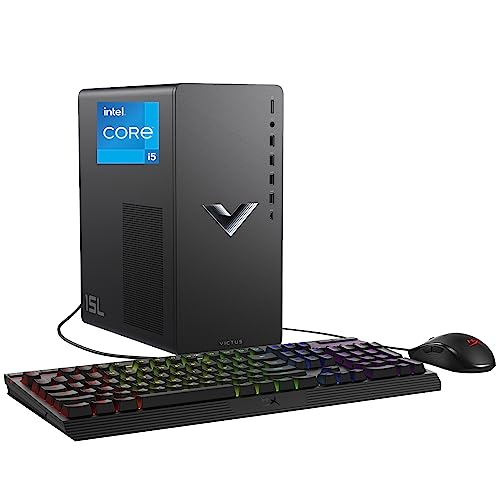
Where to buy
Check the latest price, availability and delivery on Amazon. Orders are placed on Amazon. We may earn a commission from qualifying purchases.
- Smallest documented footprint: HP Victus 15L TG02-1020h — Core i5-13400F, RTX 3050, 8GB RAM, 512GB SSD — Check on Amazon
- IPASON Gaming PC — Ryzen 5 5600, RTX 3060 12GB, 16GB RAM, 1TB NVMe — Check on Amazon
- Skytech Blaze 3.0 — Core i5-10400F, RTX 3060, 16GB RAM, 1TB SSD — Check on Amazon
- ZOTAC MEK Gaming PC — Ryzen 5 5500, RTX 3050, 16GB RAM, 650W Gold PSU — Check on Amazon
- STGAubron Gaming PC — Ryzen 5 5500, RTX 3050 6GB, 16GB RAM, 1TB SSD — Check on Amazon
See 1 more Amazon option
- ZER-LON Gaming PC (AOV4060) — Ryzen 5 5500, RTX 4060, 16GB RAM, 1TB NVMe — Check on Amazon
Read the full guide ↓
Disclosure: As an Amazon Associate, reviewstook.com earns from qualifying purchases. Links to Amazon on this page are affiliate links; they cost you nothing extra. Listing details such as price and availability change often, so check the current Amazon listing before you buy.
Start with the sentence most small-space guides will not print: at $700, a gaming PC is a tower. Five of the six machines here are conventional tower desktops — the kind that live under a desk, beside a desk, or on a desk only if the desk is generous — and exactly one is a genuinely compact desktop with a documented size. So this guide grades each pick as an installation, not a spec sheet. Where does the box physically go? What does it need around it to breathe? Where does its power cord come from, where do its cables fall, and how much of your room’s limited air and floor does it claim? A small room does not forgive a badly placed tower, and the difference between the right pick and the wrong one at this budget is usually measured in centimetres and cable runs, not specifications.
One discipline runs through everything below. The research behind this guide documents exactly one physical size figure across all six machines: the HP Victus 15L’s case, at roughly 15 litres — it is in the product’s name. No other pick’s listing research records dimensions, a weight, a VESA mount or a noise figure, so this guide prints none. The five towers are graded by form-factor class, with everything that class implies for footprint and airflow, and where an exact measurement matters the review sends you to the live listing rather than trusting a number we could not verify. That restraint is deliberate: a purchase made on an invented dimension is worse than one made on an honest class description, because the tape measure only comes out after the box arrives.
What the installation grading does change is the order. The strongest all-round machine at $700 is a full tower, and it sits second here — not because it got worse, but because in a small room the first question is whether the machine fits the life you have, and the one documented-compact desktop answers that question in a way no tower can. Read the reviews as placement advice first and performance advice second; every pick’s performance story is told in full.
In this guide
Quick Picks
Short on time, or comparing several options at once? Each row below names a placement situation and the product that suits it, with a link to the listing.
| Placement situation | Pick | Why it stands out | Link |
|---|---|---|---|
| Smallest documented footprint | HP Victus 15L TG02-1020h — Core i5-13400F, RTX 3050 | The only pick with a documented compact case (~15L) — but it ships with only 8GB of RAM | Check on Amazon |
| Best tower that arrives finished | IPASON Gaming PC — Ryzen 5 5600, RTX 3060 12GB | Full 1TB drive and a named 550W PSU fitted from the factory — the least case-opening of any tower here | Check on Amazon |
| Best documented tower install | Skytech Blaze 3.0 — Core i5-10400F, RTX 3060 | A named 600W Gold power supply and standard parts throughout — nothing about the install is a guess | Check on Amazon |
| Best power headroom in a tower | ZOTAC MEK — Ryzen 5 5500, RTX 3050 | A 650W 80+ Gold PSU — the strongest in this guide — with a 500GB drive that plans one case opening | Check on Amazon |
| Most storage, some homework | STGAubron Gaming PC — Ryzen 5 5500, RTX 3050 6GB | A full 1TB SSD fitted — but the PSU, RAM speed and drive interface are unpublished, so day one includes an inspection | Check on Amazon |
| Best graphics — when it is on sale | ZER-LON Gaming PC (AOV4060) — Ryzen 5 5500, RTX 4060 | A current-generation card that only enters this budget during sales; its unpublished PSU is one more thing to verify on arrival | Check on Amazon |
How These Picks Were Chosen
The six machines are the verified $700 set — the same six desktops the base research for this budget documents, with the same caveats. Nothing was added and nothing was swapped out to make the small-space story prettier. What changed is the grading. Each machine was assessed on five installation questions. First, form-factor class: documented compact desktop or standard tower, and what that class claims in floor or desk area. Second, the documented record: which physical facts — a case volume, a power supply, a storage size — the listing research actually states, and which it leaves for you to measure or read on arrival. Third, the power supply’s address: every machine here draws from an internal supply, so the question is where the wall socket sits relative to the spot and how the cord reaches it. Fourth, the cable drop: monitor, keyboard, mouse and network cables all leave the back of the machine and fall somewhere — in a small room, that somewhere is planned or it is a trip hazard. Fifth, heat and air: a gaming tower is a small space heater with opinions, and each review states what it needs around it to move heat into the room instead of cooking in its own exhaust.
Two refusals apply to every pick, without exception. No machine here belongs inside a sealed cabinet, a closed TV stand or a cupboard with the door shut — gaming hardware under load needs open air on its intake and exhaust sides, and an enclosed volume defeats that no matter how compact the PC is. And no placement advice relies on a dimension the research did not document: where a review needs a measurement it does not have, it says so and sends you to the live listing, because the honest sequence is measure the spot, read the listing, then order.
The budget discipline is the base guide’s, unchanged. Check the current price on Amazon for every pick before you buy, because listing prices change often, and one pick carries a hard rule that survives re-grading: the RTX 4060 machine belongs here only when its current price sits within this under-$700 budget. Where a pick ships with a known shortfall — the HP’s 8GB of memory, the ZOTAC’s 500GB drive — the review counts the fix as part of the purchase, because a machine you must immediately open is a different installation from one you simply place.
The 6 Best Gaming PCs for Small Spaces Under $700
HP Victus 15L Gaming Desktop (TG02-1020h) — Core i5-13400F, RTX 3050, 8GB RAM, 512GB SSD
Who it suits: The buyer whose room genuinely cannot take a tower — a small desk, a shelf, a shared space — who will accept a fixed graphics specification in exchange for the only documented compact footprint in this guide, and who will fix its one deliberate shortfall on day one.
This is the only pick whose size is a documented fact rather than a class description. The 15L in its name is its case class — roughly fifteen litres — making it a different physical object from everything else here: a compact desktop that can live on a desk beside the monitor, on a shelf, or in a footprint a tower’s owner would call a gap. For a small room that is not a marginal advantage; it is the difference between furniture you plan around and a box you negotiate with. The installation is correspondingly simple: one compact unit, an internal power supply drawing from the nearest socket, a short cable drop to a monitor within arm’s reach, and modest heat for its class — though modest is not zero, and its vents still need open air on every side that breathes. Compact is a size, not a licence to seal it in a cabinet.
Inside sits the strongest processor in this guide, a 13th-generation Core i5-13400F that will outlast the graphics card it ships with, backed by HP’s warranty and support network — a real asset in a small home, where the alternative to a support line is a tower in pieces on the only table. Its position in this tier is the other half of the appeal: a warrantied, documented-compact box built around this processor is an uncommon find at this budget level — check price on Amazon to see where it sits today.
Now the two costs of the small case, stated at full size. The first is fixable and must be fixed: this gaming PC ships with 8GB of RAM, below the floor for a gaming machine in 2026 — games, Windows and a browser crowd against it and stutter follows. The remedy is a second memory stick, bought in the same order and fitted in minutes; count the machine as machine plus stick whenever you compare it. The second cost is permanent: the compact case uses proprietary HP power-supply and layout choices, so the graphics upgrade path the standard towers below enjoy is largely closed — the RTX 3050 it ships with is close to the one it retires with, and its VRAM figure is not one the verified sources state, so none is claimed. In installation terms that permanence cuts both ways: you will never open this case to swap a card, route new power cables or re-plan its airflow, because there is nothing inside to re-plan. What you place on day one is what sits there for its whole life — for the room that needs exactly that, the right trade, made knowingly.
- ~15L documented case — the only verified compact footprint in this guide; desk- or shelf-sized.
- Core i5-13400F — the strongest CPU here — with HP’s warranty and support infrastructure.
- Check price on Amazon — a compact, warrantied box around this processor is an uncommon find in this tier.
- Nothing to re-plan later: no card swaps means no future cable or airflow changes.
Honest limitation: It ships with only 8GB of RAM — allow for a second stick as part of the purchase — and the proprietary compact case largely closes the GPU upgrade path.
Choose it if the spot is genuinely small, you will add the memory stick immediately, and you are content with RTX 3050-class graphics for the machine’s life. Skip it if a tower fits your room after all — the towers below offer more graphics and a future the HP deliberately does not.

IPASON Gaming PC — Ryzen 5 5600, RTX 3060 12GB, 16GB RAM, 1TB NVMe
Who it suits: The small-room buyer who has one honest tower-sized spot — beside the desk, under it with air around it — and wants the strongest gaming PC at this budget installed once, finished, with nothing left to open or add.
Physically, this is a standard tower desktop, and this guide will not dress that up: its listing research documents no dimensions, so take its exact measurements from the live listing against your spot before ordering. What earns it second place here is not size but completeness. It is the only tower that arrives with every part of the installation settled: a full 1TB NVMe drive fitted, so no second drive is planned and the case never opens for storage; 16GB of DDR4-3200 in the correct configuration class; and a power supply whose wattage the listing publishes — 550W — so the power question is answered on paper before the box ships. In a small room, a machine that never needs opening is worth real money, because opening a tower means pulling it out of its spot, clearing a surface, and re-dressing every cable afterwards. This one asks for none of that. Place it, drop the cables, play.
The placement follows the tower rules applied throughout: open air at intake and exhaust, clearance on the sides that breathe, and nothing stacked against its rear, where the warm air leaves and the cables fall. The cable drop is the standard bundle — power, display, peripherals, and a network cable if you wire it, which in a small room usually means a short, easy run, one of a compact space’s few genuine advantages. Its heat joins the room like any tower’s; in a small room you will notice a long session’s warmth sooner, which argues for placing it where its exhaust is not aimed at your chair.
The gaming substance is the tier’s best, unchanged by the angle: the RTX 3060 in its 12GB form is the resident card of this budget, playing current releases at 1080p on high settings and esports at high-refresh rates, with texture headroom the 8GB cards lack. Check the current price on Amazon — on specification alone, it is the strongest machine in this guide for this tier. Two inspection notes travel with it: the listing carries the industry-standard “GPU brand may vary” line — the card will be a 3060 12GB, the board partner is not promised — and this listing family has shown variant drift, with configurations shifting under the same listing. In a small-space purchase that matters twice: check the style name in your cart and the specification on the box when it arrives, because a return-and-replace cycle in a small room is a week of tripping over two towers. Those are arrival checks, not disqualifications.
- RTX 3060 with 12GB of VRAM — the strongest card in this tier, unchanged by the angle.
- Arrives finished: 1TB fitted, 16GB fitted, 550W PSU published — no planned case opening.
- Check price on Amazon — the strongest specification in the set for this tier.
Honest limitation: It is a full standard tower — no documented dimensions in the research, so measure from the live listing — and “GPU brand may vary” plus documented listing drift make the arrival check a condition.
Choose it if you have one honest tower spot with open air around it and want the strongest machine at the budget placed once and left alone. Skip it if the spot is smaller than a tower — that is the HP above — or if an RTX 4060 machine within this budget is available on the day you buy.

Skytech Blaze 3.0 — Core i5-10400F, RTX 3060, 16GB RAM, 1TB SSD, 600W Gold PSU
Who it suits: The buyer installing a tower in a tight spot who wants every physical fact about the machine documented before it arrives — a named power supply, standard parts, a known builder — because in a small room, surprises are measured in disassembly.
Like the IPASON, this is a standard tower whose exact dimensions the research does not record; measure it from the live listing against your spot. What distinguishes its installation is how little of it is guesswork. The power supply is named in full — a 600W 80+ Gold unit, the best-documented PSU in this guide — settling the power planning on paper: an internal supply, a standard cord, a wall socket within reach, headroom documented rather than hoped for. The parts throughout are standard ATX fare, which in a small room has a specific meaning: anything needing service or upgrading can be done by any local shop on their bench instead of your floor, and a graphics swap years from now needs no re-planning of power or layout — the two facts that decide whether a tower in a tight spot stays a good idea in year three.
It also arrives complete in the ways that keep a case closed: a 1TB SSD and 16GB of DDR4-3200 fitted, so no storage or memory errand is scheduled at purchase. Check the current price on Amazon to confirm it sits within this guide’s budget ceiling before you buy. The placement rules are the tower rules: open air at intake and exhaust, rear clearance for the cable drop and the warm air, and no sealed furniture, however tempting the cabinet looks.
The compromises are age, the same ones the base guide states. The Core i5-10400F is a 10th-generation six-core — capable alongside this card at 1080p, but on a finished platform with no meaningful CPU upgrade path; its processor story is the one it ships with, while its graphics story can still be rewritten on that named power supply. The listing ships Windows 10 Home; the processor is on Microsoft’s Windows 11 supported list, so the free upgrade should apply — confirm it during setup, because the machine should not stay on an unsupported system. Neither point changes the install; both belong in the decision. Judge it as the documented tower: yesterday’s platform, today’s RTX 3060 graphics — whose VRAM figure the verified sources do not headline, so none is stated — and an installation with no unknowns.
- Fully named 600W 80+ Gold PSU — power planning settled on paper, with upgrade headroom.
- Standard ATX parts throughout — serviceable by any shop, no proprietary surprises in a tight spot.
- Arrives complete: 1TB SSD and 16GB fitted — check price on Amazon to confirm it is within budget.
Honest limitation: The i5-10400F’s platform is finished — no CPU upgrade path — and the listing ships Windows 10, so plan the free Windows 11 upgrade during setup.
Choose it if documentation, standard parts and a known builder matter more than platform newness, and your spot takes a standard tower. Skip it if a current-generation processor platform is the point — the IPASON’s Ryzen 5 5600 offers the newer foundation in this tier.

ZOTAC MEK Gaming PC — Ryzen 5 5500, RTX 3050, 16GB RAM, 500GB NVMe, 650W Gold PSU
Who it suits: The tower buyer whose games are esports and lighter AAA titles, who wants the strongest power supply in this guide documented in writing — and who accepts that this pick’s installation has a scheduled second act: one planned case opening to add storage.
ZOTAC manufactures graphics cards for a living, and its prebuilt’s specification reads like it: a 650W 80+ Gold power supply, the highest-rated and most generously sized unit in this guide, in a standard tower whose shipped card could run on far less. For a small-space installation, a documented oversized PSU is a concrete benefit, not an abstraction: the power side of the placement is fully known before purchase — internal supply, standard cord, no brick to house — and the future graphics swap this machine is plainly built for needs no power-supply replacement, no new cable routing and no re-think of where the tower sits. The day-one install serves the machine’s second graphics card too.
For buyers on a schedule, this pick does not depend on catching a particular sale event to belong in this tier — check the current price on Amazon, and the purchase can be timed to your room. Its exact dimensions are not in the research record, so the live listing and your tape measure settle the fit, as with every tower here.
The installation caveat is storage. The fitted drive is 500GB — half what most rivals here include — holding the operating system and a handful of large games, and filling faster than new buyers expect. For a big library, a second drive is a planned purchase, and planned is the operative word: the standard case makes fitting one a short job, but it is still a job — the tower comes out of its spot, the panel comes off, cables get dressed again. Schedule that afternoon when you buy, not when the drive-full warning appears mid-library. The shipped card, stated plainly, is an RTX 3050: 1080p at medium-to-high settings, esports at high refresh, a full class below the 3060 picks above. The verified sources do not state its VRAM figure, so this review does not claim one; check the live listing if the 6GB-versus-8GB question matters to your games. Buy this machine as what it is — a modest card installed in the best-documented foundation at the budget, in a tower that asks for exactly one future opening, for the drive.
- 650W 80+ Gold PSU — the strongest in this guide, documented; the day-one install serves a future card too.
- Standard tower in this tier — check price on Amazon; no particular sale event is required for it to belong here.
- Built by a graphics-card manufacturer; the planned second drive is an easy fit in a standard case.
Honest limitation: The RTX 3050 is a class below the 3060 picks, and 500GB of storage plans one case opening for a second drive — a real cost in a small room.
Choose it if your games are esports and lighter AAA, your spot takes a tower, and you value the documented foundation over today’s card. Skip it if you want maximum settings in current AAA releases now, or a machine you never open — that is the IPASON.

STGAubron Gaming PC — Ryzen 5 5500, RTX 3050 6GB, 16GB RAM, 1TB SSD
Who it suits: The value hunter with a large game library and a tower-sized spot, for whom the full terabyte fitted from the factory outweighs an installation that begins with an inspection.
The small-space proposition here is storage without surgery. At this tier the RTX 3050 class usually ships 500GB; this machine fits a full 1TB SSD, which for a library dozens of games deep is the difference between a tower that stays closed and one opened for a drive within the year. The rest of the recipe is complete: Ryzen 5 5500, 16GB of DDR4, Wi-Fi 6, Windows 11 Home, and the RTX 3050 in its documented 6GB form — esports at high refresh, modern games at 1080p medium-to-high with DLSS, texture settings in the newest releases watched on 6GB. Check the current price on Amazon to confirm it sits within this budget. Physically it is a standard tower of undocumented dimensions — the live listing and a tape measure settle the fit — with an internal power supply and the usual rules: open air at the vents, rear clearance for cables and exhaust, no sealed furniture.
What this pick asks in return is a delivery-day inspection, and in a small room that is a bigger ask than it sounds. The listing does not publish the PSU’s wattage or brand, the memory’s speed, or whether that terabyte connects as NVMe or SATA — three specifications most other picks here state, and three that decide upgrade options and everyday responsiveness. None is necessarily bad; all are unknown, and unknown is what you retire before the tower goes into its spot, not after: open the case while it is still on a clear surface, read the PSU label, check the drive and memory in Windows, and confirm all of it while returns are still free. Only then place it, dress the cables once, and leave it closed. STGAubron sells in volume rather than as a boutique builder, and its support runs thinner than Skytech’s or HP’s as a result. Buyers comfortable front-loading the diligence get the strongest storage offer in this guide for this tier and a tower that then stays shut; buyers who want every number published before purchase should take the ZOTAC above — the same class of card, the opposite philosophy, and a machine whose only planned opening is a drive.
- Full 1TB SSD fitted in a tier where many rivals ship less — the tower that stays closed for storage.
- Nothing missing from the headline spec: Ryzen 5 5500, 16GB, the 6GB RTX 3050, Wi-Fi 6.
- Check price on Amazon — strong storage value in this tier when the inspection checks out.
Honest limitation: PSU wattage, RAM speed and SSD interface are all unpublished — a delivery-day case opening and inspection is part of this installation, from a seller with thinner support than the big builders.
Choose it if storage in this tier leads your list, your spot takes a tower, and inspecting before placing sounds like diligence rather than burden. Skip it if unpublished specifications make you uneasy — in the same card class, the ZOTAC MEK publishes everything.

ZER-LON Gaming PC (AOV4060) — Ryzen 5 5500, RTX 4060, 16GB RAM, 1TB NVMe
Who it suits: The patient buyer with a tower-sized spot and a flexible purchase date, who wants the newest graphics technology this budget can touch — and who accepts that this pick’s installation carries the most unknowns of the six.
The hardware case is genuine. A Ryzen 5 5500 paired with a GeForce RTX 4060 brings the newest architecture in this guide: more efficient, with DLSS 3 frame generation in supported games and the longest driver-support runway here, and the fastest card of the six at 1080p. The supporting specification is complete on paper — 16GB of DDR4, a full 1TB NVMe drive fitted so no storage opening is planned, Wi-Fi, Windows 11 Home — and physically it is a standard tower: internal power supply, conventional cable drop, the usual demand for open air at its vents and clearance behind for cables and exhaust. Its dimensions are not in the research record; the live listing settles them.
It sits last for two installation-shaped reasons. The first is the budget rule, in the strongest terms this guide uses: this machine belongs in this guide only when its current price on Amazon sits within the under-$700 budget — check price on Amazon before you consider it, and outside sale periods it may sit above this tier altogether. The rule is buy it only when it is within this budget, or do not buy it; a small-space purchase amplifies that discipline, because a machine bought outside the budget for a tight room is two problems at once. The second reason is documentation: the listing does not publish the PSU wattage in the verified material, so the power side of your placement — and any future graphics upgrade — rests on an arrival inspection: read the label while the machine is still out of its spot, and test everything thoroughly in the first week while the return window is open. A compact brand’s support is not a global network, which matters more when the machine lives in the only spot your room has. None of this cancels the appeal: when it sits within this budget, this is the best graphics card in this tier, in a complete tower.
- RTX 4060 — the newest architecture here and the quickest card of the six, with DLSS 3 frame generation.
- Full-size supporting spec fitted: Ryzen 5 5500, 16GB RAM, 1TB NVMe — no storage opening planned.
- When it sits within this budget, it puts a next-tier card in this tier — check price on Amazon.
Honest limitation: It belongs here only when its current price is within this budget — a sale-only pick — and the unpublished PSU wattage makes an arrival inspection part of the install.
Choose it if you can wait for a sale, will hold the line at this budget, and have a standard tower spot with open air. Skip it if you need to buy this week at whatever it costs — when it sits outside this budget, the IPASON is the better-balanced purchase.

Comparison Table
| Product | Form factor | Install in one line | Link |
|---|---|---|---|
| HP Victus 15L TG02-1020h | Compact desktop (~15L documented) | The only verified small footprint; add a RAM stick on day one, then never open it | Check on Amazon |
| IPASON Gaming PC (Ryzen 5 5600) | Standard tower (measure from listing) | Arrives finished — 1TB and a named 550W PSU fitted; place it once | Check on Amazon |
| Skytech Blaze 3.0 | Standard tower (measure from listing) | Named 600W Gold PSU and standard parts — the documented tower install | Check on Amazon |
| ZOTAC MEK | Standard tower (measure from listing) | 650W Gold documented; one planned opening to add a second drive | Check on Amazon |
| STGAubron Gaming PC | Standard tower (measure from listing) | 1TB fitted, but day one includes opening it to read the PSU label | Check on Amazon |
| ZER-LON Gaming PC (AOV4060) | Standard tower (measure from listing) | Best card on sale weeks only; PSU unpublished, so verify on arrival | Check on Amazon |
Measure Before You Buy: The Five-Step Checklist
Every regret in a small-space PC purchase is a measurement skipped in the wrong order. This is the right order. Do all five steps before money moves.
- Step 1 — Measure the spot. Width, depth and height of the exact place the PC will live: the desk corner, the shelf, the floor space beside the desk. Write the numbers down. If the spot is smaller than a standard tower — and most spots that prompt this guide are — the HP Victus 15L is the only pick with a documented size to compare against them, at roughly 15 litres of case. For every tower, take the dimensions from the live listing at step 5 and hold them against these numbers; do not work from photographs, which make every tower look smaller than it is.
- Step 2 — Reserve the ventilation clearance. A gaming PC moves heat from its case into your room, and it needs open air to do it: space at the sides or front where air enters, and space behind where warm air and cables leave. Whatever spot you measured in step 1, mentally shrink it by the clearance on its breathing sides — the usable spot is smaller than the furniture. If the only available place is a closed cabinet, a sealed TV stand or a cupboard, stop here: no pick in this guide belongs in one, and the honest move is to change the furniture plan, not the PC.
- Step 3 — Give the power supply an address. Every machine here runs on an internal power supply — none of the six uses an external brick — so the supply’s address is simply the wall socket its cord must reach. Stand at the spot and find that socket. If it is across the room, behind heavy furniture or already full, that is part of the installation: a power strip placed deliberately, its cord run where feet do not go. Decide it now — a tower installed first and powered by an afterthought cable across a walkway is how small rooms get their accidents.
- Step 4 — Walk the cable drop. From the back of the spot, trace where each cable falls: display to the monitor, keyboard and mouse to the desk, network cable to the router if you wire the connection — and in a small room you usually can, the one installation luxury a compact space offers. The drop should land behind furniture, not across a doorway or a chair’s wheels. If the monitor will sit far from the spot, cable length becomes a specification; measure the run, not the straight line.
- Step 5 — Then order, and verify on arrival. Only now does the order happen — the listing’s stated dimensions checked against step 1, the current price on Amazon against the budget and the rules in the reviews (the ZER-LON only when its current price is within this budget; the HP as machine plus a memory stick), the configuration confirmed in the cart. When the box lands, verify before you place: style name against the order, graphics card and memory in Windows, the PSU label read on any pick whose listing leaves it unpublished — and only then slide the machine into its measured spot and dress the cables once, in the order step 4 planned.
How to Choose a Gaming PC for a Small Space Under $700
- Let the spot choose the class first. This set contains one documented compact desktop and five standard towers, and no amount of specification comparison changes which class your room can hold. Measure first (the checklist above), and only compare within the class that fits. A tower bought for a shelf-sized spot is a mistake no graphics card can repay.
- Count planned case openings as an installation cost. In a large home office, opening a tower is nothing; in a small room it means clearing the only surface and re-dressing every cable. This set spans the full range: the HP and IPASON plan zero openings beyond the HP’s day-one memory stick; the ZOTAC plans one, for a second drive; the STGAubron and ZER-LON schedule an inspection opening because their listings leave specifications unpublished. Prefer the machine whose openings you have already agreed to.
- Demand a named power supply — it is placement paperwork. A published PSU (the IPASON’s 550W, the Skytech’s 600W Gold, the ZOTAC’s 650W Gold) settles the power side of the install before the box ships and documents the headroom a future card needs. An unpublished one is not a defect, but it is an errand: the label gets read on arrival, before the machine goes into its spot.
- Judge storage in games, and in openings. 500GB holds Windows and a handful of large modern titles; 1TB is the comfortable size for this tier. The picks shipping 1TB fitted (IPASON, Skytech, STGAubron, ZER-LON) keep the case closed; the 500GB picks (ZOTAC, and the HP at 512GB) should be considered with their future drive in mind — a small extra purchase, but real in effort where space is tight.
- Treat 16GB of RAM as the floor. One pick ships 8GB — the HP — and its second stick belongs in the same order. A small footprint bought with a memory shortfall is still a memory shortfall.
- Grade the graphics honestly, then stop. Once the class is settled, the card ranking is the base guide’s: the RTX 3060 12GB is the resident card of this tier, the RTX 4060 better and newer but sale-only here, the RTX 3050 class the honest step down for esports and medium-to-high 1080p. This is a 1080p tier; a small room does not change the resolution arithmetic, and a 1440p plan belongs to the next budget.
- Accept permanence where you choose it. The HP’s compact case closes its graphics future by design — buy it as a finished appliance and it never asks your room for anything again. The standard towers keep their futures open at the price of their footprint. Both are legitimate; buying one while expecting the other is the only real error.
Common Buying Mistakes
- Ordering a standard tower for a spot that was never measured. Photographs lie about size; the tape measure in step 1 does not.
- Sealing any gaming PC — compact ones included — inside a closed cabinet or TV stand. Enclosed air defeats the cooling every pick here depends on.
- Trusting a dimension copied from a review or a forum instead of the live listing. If the research does not document it, measure it from the seller’s own page before ordering.
- Forgetting the power socket until the tower is placed. A cord stretched across a walkway is an installation failure, not a detail.
- Letting the cable drop fall where it wants. Unplanned cables cross doorways, chair wheels and feet — walk the drop before the machine arrives.
- Skipping the arrival inspection because the room is ready. Listing families drift; verify the style name, card and memory while returns are free, before the machine goes into its spot.
- Accepting the HP’s 8GB of RAM as a saving. It is a shortfall with a stick-shaped fix; budget it or choose a 16GB pick.
- Buying the sale-only RTX 4060 configuration when its current price sits outside this budget. If it is not within the under-$700 budget when you check price on Amazon, the pick is not in this tier — and an over-budget tower in a small room is two problems at once.
Final Recommendation
- Genuinely small spots: HP Victus 15L — the documented ~15L footprint, with a second RAM stick in the same order.
- One tower spot, strongest machine, zero planned openings: IPASON Gaming PC.
- Buyers who want every install fact documented: Skytech Blaze 3.0.
- Esports players with a future GPU swap planned: ZOTAC MEK — and schedule the second drive.
- Big libraries, tower stays closed: STGAubron — after the delivery-day inspection.
- Patient sale-watchers: ZER-LON AOV4060 — within the under-$700 budget, and not above it.
Our top two for small rooms are the HP Victus 15L, because it is the only machine here whose smallness is a documented fact rather than a hope — roughly fifteen litres, the strongest processor in the set, HP’s support behind it, and a graphics specification settled forever, which in a tight room is its own kind of peace — and the IPASON, because for readers whose measured spot honestly takes a tower, it is the strongest gaming PC at this budget and asks the least of the room afterwards: everything fitted, power supply published — check price on Amazon. Between them they cover this guide’s two truthful shapes: the compact appliance and the finished tower. Readers still deciding which class their room belongs to should run the five-step checklist first, and those whose spot turns out smaller than any tower — or whose budget is not this one — should also see Best Gaming PC Under $500 and Best Mini Gaming PC Under $700 before spending. Measure the spot, reserve the air, give the power supply its address — then order.
Frequently Asked Questions
Is there a genuinely small gaming PC under $700?
One in this set, by documentation: the HP Victus 15L, a compact desktop of roughly 15 litres whose size is part of its name and model record. The other five picks are standard towers whose research does not record exact dimensions — capable machines, but furniture-sized, their fit confirmed from the live listing against your measured spot. Buyers whose space is smaller than any tower should also read Best Compact Gaming PC Under $700 and Best Small Form Factor Gaming PC Under $700, where compactness is the category rather than the exception.
Can I put a gaming PC inside a TV stand or cabinet?
Not a closed one — and that applies to every pick here, the compact HP included. Gaming hardware under load exhausts hot air continuously; a sealed enclosure traps that air around the machine until temperatures and fan speeds climb and performance falls. An open-backed stand with generous clearance on the breathing sides is a different matter: if air can enter and leave freely, the placement is sound. The rule is airflow, not furniture.
How much clearance does a tower need?
Enough that no intake or exhaust face sits flush against a wall, a cabinet side or stacked clutter — the machine must draw room air in and push warm air out into the room, not into a pocket. Exact figures belong to each maker’s documentation, one more reason to read the live listing before ordering; the principle graded here is that clearance is reserved when the spot is chosen, not discovered after the tower is wedged in.
Do any of these PCs use an external power brick?
No. All six machines run on internal power supplies, so there is no brick to house, ventilate or hide — power planning for every pick is a wall socket within cord reach of the spot, step 3 of the checklist above. What differs is documentation: three listings publish their PSU wattage (550W, 600W Gold, 650W Gold), two leave it unpublished for you to read on arrival, and the HP’s is a proprietary compact-case unit that largely closes its graphics upgrade path.
Is the HP Victus 15L’s 8GB of RAM really a problem?
Yes — it is the one specification here below the floor for a gaming machine in 2026, and no processor advantage survives being starved of memory: games, Windows and a browser crowd into 8GB and stutter follows. The fix is a second stick, bought with the machine and fitted in minutes, and this guide counts the HP as machine plus stick throughout. With 16GB fitted, its compact case and strong processor make it the small-space pick it claims to be.
What if my spot fits a tower — which one should I choose?
Then the base guide’s ranking applies, filtered by installation: the IPASON for the strongest card and a finished install, the Skytech for the best-documented tower, the ZOTAC for the strongest power supply with a planned second drive, the STGAubron for fitted storage after an inspection, and the ZER-LON when its current price sits within this budget. The full performance account of the same six machines is at Best Gaming PC Under $700, and first-PC buyers should also see Best Gaming PC For Beginners Under $700.
- Best Gaming PC Under $700
- Best Gaming PC Under $500
- Best Gaming PC Under $800
- Best Mini Gaming PC Under $700
- Best Compact Gaming PC Under $700
- Best Small Form Factor Gaming PC Under $700
- Best Gaming PC For Beginners Under $700
- Best Gaming PC For Streaming Under $700
- Best Gaming PC For 1440p Gaming Under $700
- Best Gaming Desktop For Small Spaces Under $700
- Best Gaming PC For Small Spaces Under $500
- Best Gaming PC For Small Spaces Under $800


