Where to buy
Check the latest price, availability and delivery on Amazon. Orders are placed on Amazon. We may earn a commission from qualifying purchases.
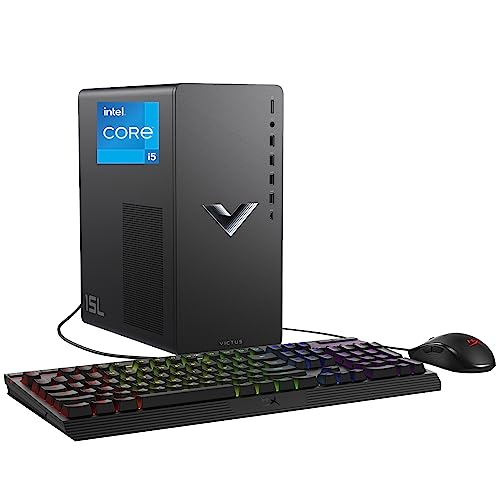
- Smallest documented footprint: HP Victus 15L Gaming Desktop TG02-1020h, Core i5-13400F, RTX 3050, 8GB, 512GB — Check on Amazon
- IPASON Gaming Desktop, Ryzen 5 5600, RTX 3060 12GB, 16GB, 1TB NVMe — Check on Amazon
- ZOTAC MEK Gaming Desktop, Ryzen 5 5500, RTX 3050, 16GB, 500GB, 650W Gold — Check on Amazon
- Skytech Blaze 3.0 Gaming Desktop, Core i5-10400F, RTX 3060, 16GB, 1TB, 600W Gold — Check on Amazon
See 2 more Amazon options
- STGAubron Gaming Desktop, Ryzen 5 5500, RTX 3050 6GB, 16GB, 1TB SSD — Check on Amazon
- ZER-LON Gaming Desktop, Ryzen 5 5500, RTX 4060 8GB, 16GB, 1TB NVMe — Check on Amazon
Read the full guide ↓
Disclosure: As an Amazon Associate, reviewstook.com earns from qualifying purchases. Links to Amazon on this page are affiliate links; they cost you nothing extra. Listing details such as price and availability change often, so check the current Amazon listing before you buy.
Pairing “gaming desktop” with “small spaces” is a slightly unfair fight, and this guide will not pretend otherwise. A desktop tower is the largest gaming PC shape there is — that is the source of its one great virtue, an upgrade path that lets it absorb a stronger graphics card years from now — and it is the opposite of what a small room asks for. So the honest shape of this guide is different from a normal desktop roundup. Of the six verified gaming desktops under $700 below, exactly one documents a genuinely compact case. The other five are standard builder towers, graded here not by pretending they are small but by what their installation actually costs: the case, the air it needs around it, the cables that fall behind it, and the heat it sheds into the room it shares with you.
That grading matters because a desktop’s real footprint is never just its case. A tower pushed flush against a wall kinks its own cables and strangles its exhaust. A tower sealed into a TV cabinet is a space heater with a processor attached. A tower planned for a spot beyond its power cord’s reach gets replanned on delivery day, usually somewhere worse. Read the six reviews below with a tape measure in hand: the first pick is the one that truly shrinks the install, and the towers that follow are ranked by how gracefully they occupy the space they honestly need.
One disclosure about measurement itself. The verified research behind this guide documents a size class for only one pick — the HP, at roughly 15 liters. The tower listings do not publish dimensions in the material we could verify, so no tower below is given invented measurements, weights or noise figures: they are graded by form-factor class, and the buying routine later in this guide routes you to each live listing’s dimension table before you order. A compact-sounding name in a listing title is marketing, not a measurement, and this guide treats it that way throughout.
In this guide
Quick Picks
Short on time, or comparing several options at once? Each row below names the space you have and the desktop that fits it, with a link to the listing.
| Your space | Pick | Why it stands out | Link |
|---|---|---|---|
| Smallest documented footprint | HP Victus 15L TG02-1020h, Core i5-13400F / RTX 3050 | The only pick with a documented compact case (~15L class) and an internal PSU — traded against 8GB RAM and proprietary parts | Check on Amazon |
| Best tower, if a mid-tower fits | IPASON Gaming Desktop, Ryzen 5 5600 / RTX 3060 12GB | The tier’s resident card with 12GB of VRAM, 1TB storage and a named 550W PSU — check price on Amazon | Check on Amazon |
| Best foundation in a standard case | ZOTAC MEK, Ryzen 5 5500 / RTX 3050 | The biggest named PSU here (650W Gold) — check price on Amazon; upgrades happen inside the box | Check on Amazon |
| Best standard-parts longevity | Skytech Blaze 3.0, Core i5-10400F / RTX 3060 | Named 600W Gold PSU and off-the-shelf parts throughout — serviceable where it sits; check price on Amazon | Check on Amazon |
| Most storage inside the box | STGAubron Gaming Desktop, Ryzen 5 5500 / RTX 3050 6GB | A full 1TB SSD — check price on Amazon — means no external drive cluttering the desk, with fine print to verify on arrival | Check on Amazon |
| Best card, if the sale is live | ZER-LON Gaming Desktop AOV4060, Ryzen 5 5500 / RTX 4060 8GB | A newer-generation card in a standard tower — but it only belongs here when a sale brings it within this guide’s budget; check price on Amazon | Check on Amazon |
How These Picks Were Chosen
The budget was applied as a ceiling, not a target: every desktop below is a real Amazon listing in this guide’s budget tier in the United States, and because prices change often you should check price on Amazon for the current figure before you buy. Two picks are explicitly conditional. Because it often sits above this budget, the ZER-LON appears only as a sale pick — buy it only when the live price falls within budget. The HP’s pricing also varies by sales cycle, so check price on Amazon rather than assuming a typical figure. Anything whose graphics were integrated-only, or whose “gaming” claim rested on a card from two generations further back, was excluded however cheap or compact it claimed to be, because it does not answer the search you actually made.
We did not use these desktops ourselves. We read the maker listings and specification pages and the listing records for each ASIN, and compared graphics cards, VRAM where the listing publishes it, CPUs, memory, storage and power supplies. A PSU earns credit only when the listing names its wattage and, ideally, its efficiency rating; where a listing stays silent on the power supply, the review says so, because for a machine you plan to live beside for years the unknown specs are findings, not footnotes. The field also splits into two construction philosophies at this price: builder towers put together from standard, replaceable components, and brand-name boxes wrapped around proprietary cases, boards and power supplies. Neither kind is automatically better — but they occupy space differently, age differently, and deserve to be labeled as what they are.
On top of that sat the installation grading this angle demands. Each pick was assessed on four things. First, form-factor class: one documented compact brand box, five standard towers — stated as classes, because classes are what the verified research supports. Second, the documented record: a dimension, mount or volume figure appears in this guide only where the underlying research documents it for that exact machine, which in practice means the HP’s roughly-15-liter class and nothing else; no other pick is given measurements it did not earn. Third, airflow: every gaming tower is an air pump that takes in cool air and puts out hot air, so each review notes what its placement must respect. Fourth, the cable drop and the power supply’s address — and here this set has one simplifying trait: all six machines run internal power supplies, so there is no external brick to house, but the wall socket and the rear cable bundle become part of the footprint instead, and the reviews treat them that way.
The Space a Gaming Desktop Really Occupies
Before the reviews, the four hidden costs that decide whether a desktop actually fits a small space. None of them appears on a spec sheet, and every one of them has ended a real installation.
The air jacket. A gaming tower breathes. Intake faces — usually the front and bottom — pull in room air; exhaust faces — usually the rear and top — push out air heated by the graphics card. Both need open room to work. Crowd the intake against a wall or a cabinet side and the machine recycles its own heat; block the exhaust and the hot air pools exactly where the next breath comes from. This is why the sealed cabinet is refused outright for every pick in this guide: a closed TV cabinet or desk hutch turns a 1080p gaming session into a slow oven test, and the machine’s response — throttling, fan ramps, shutdowns — gets blamed on the hardware instead of the furniture. Wherever a tower lives, its vented faces need clear air and its back needs somewhere for the heat to go.
The cable drop. Installed depth is the case depth plus the bend room behind it. Out of a tower’s rear panel come the power cord, the display cable — which must land in the graphics card’s ports, low at the back of the case, not the motherboard’s — USB runs to the desk, and an Ethernet cable if you wire it. Each connector needs its own un-kinked curve, and that curve is measured in real centimeters of your room. A tower specced to fit a shelf exactly, front to back, does not fit the shelf once its cables are attached. When you measure, measure for the machine plus its drop.
The heat in the room. A desktop under gaming load converts most of the electricity it draws into heat that ends up in the room — in a large space, unnoticeable; in a small bedroom in summer, a genuine comfort factor that no listing mentions. The room is part of the cooling system whether you planned it that way or not. This is also the small-space argument for the tower form factor itself: the upgrades that keep a desktop current — a stronger graphics card, a second SSD — happen inside the box you already placed. The footprint stays fixed while the performance grows, and no external drives or docks colonize the desk around it.
The power supply’s address. Mini PCs make you house an external brick; these desktops do not — all six power supplies are internal, which removes one object from the floor plan entirely. What replaces it is simpler but just as binding: the tower must live within its power cord’s reach of a wall outlet, with the surge strip placed where the drop can reach it. A perfect spot with no socket in range is not a spot. Plan the outlet first, then the furniture, then the machine.
The 6 Best Gaming Desktops for Small Spaces Under $700
HP Victus 15L Gaming Desktop TG02-1020h — Core i5-13400F, RTX 3050, 8GB, 512GB
Who it suits: The buyer whose spot is genuinely small — a desk corner, a shelf, the floor beside a TV stand — and who wants a big brand’s warranty and support standing behind the machine that has to live there.
This is the only pick in the guide whose smallness is a documented fact rather than a hope. The Victus 15L is a compact, proprietary design of roughly 15 liters — a different size class from the standard towers below, small enough to sit where they cannot: on the desk rather than under it, on a shelf, beside a screen. Its power supply is internal, so the entire installation is the case and its cable drop, with no brick to house. And the hardware inside over-delivers for the footprint: the Core i5-13400F is a 13th-generation, ten-core processor — the strongest and newest CPU in this guide — paired with an RTX 3050 and a 512GB SSD. Check price on Amazon for the current figure, as pricing varies by sales cycle and third-party prices drift between HP’s own promotions.
Two trades come with it, and neither hides in fine print. The first is memory: this desktop ships with 8GB of RAM. That is half the sensible minimum for a 2026 gaming PC, it can hold back the graphics card it is paired with, and the honest price of this pick is the machine plus one matching memory stick — budget for it, fit it in the first week, and only then judge the machine. Second: the compact proprietary construction that makes the Victus small also caps its future. A later graphics card must fit a small case and live within a proprietary power supply’s limits, which narrows the upgrade path from “almost anything sensible” to “short, frugal cards only, if that.” Placement discipline matters more here than with the towers, too: a compact case has less thermal slack, so its vents need genuinely open air, nothing gets stacked on top of it, and the sealed-cabinet refusal applies to it most of all. Bought with open eyes — the smallest documented install, the best CPU, a real support network, plus one RAM stick — it is the answer to this keyword. Bought as a cheap tower that happens to be small, it will disappoint you twice.
- Roughly 15L compact case — the only documented small footprint in the guide.
- Core i5-13400F — the newest, strongest CPU here — with HP’s warranty and support network behind it.
- Internal power supply: the whole install is the case plus its cables.
Honest limitation: It arrives with 8GB of RAM — treat a matching second stick as part of the purchase price — and the compact proprietary case and PSU narrow future graphics upgrades to short, low-power cards at best.
Choose it if your measured spot rules out a standard tower and brand support matters to you. Skip it if the upgrade path is the point of buying a desktop — every builder tower below keeps that path wider open.

IPASON Gaming Desktop — Ryzen 5 5600, RTX 3060 12GB, 16GB, 1TB NVMe, 550W
Who it suits: The buyer whose tape measure says a standard tower fits — and who then wants the best tower this budget sells, placed once and upgraded in place for years.
If the spot fits a mid-tower, this is the mid-tower. The graphics card is the headline and it is the right one: the RTX 3060 in this machine is the 12GB version, and at this tier VRAM is the spec that decides how gracefully a card ages — 12GB keeps textures at high settings in current games where 8GB cards are increasingly forced to compromise. Around it sits the complete specification this budget should buy: a Ryzen 5 5600 with six modern cores, 16GB of DDR4-3200, a full 1TB NVMe SSD rather than the 500GB compromise found further down this guide, Windows 11 Home, and — crucially for a machine that will be opened again one day — a named 550W power supply that leaves real headroom for a stronger future card. Check price on Amazon for the current figure — it is not just the best-balanced pick here but a strong value option in this tier.
For this angle, its installation story is the standard tower’s story told well. The verified research documents no dimensions for this listing, so the review will not invent any: it is a standard tower-class case, and step one of the buying routine below exists precisely for it — take its measurements from the live listing’s spec table and test them against your spot, cable drop included. What the standard case buys a small room is invisible but real: every future improvement — the second SSD, the stronger graphics card the 550W unit was specified for — happens inside the box already sitting there. The footprint you planned on day one is the footprint you still have in year three. Two cautions belong to the listing rather than the hardware: the listing notes the GPU brand may vary, which is normal for builder towers and harmless to performance, and this ASIN’s listing family has shown variant drift, with the same family appearing under a different graphics card headline. Confirm the style name in your cart says Ryzen 5 5600 with RTX 3060 before paying, and check the card in the case when the box arrives.
- RTX 3060 12GB — the card this tier lives on, with memory headroom that ages gracefully.
- The supporting cast is complete: Ryzen 5 5600, 16GB DDR4-3200, a 1TB NVMe SSD.
- Named 550W PSU — upgrade headroom you can plan around, inside the same case.
Honest limitation: It is a standard tower-class install — measure the live listing’s dimensions against your spot before ordering — and the listing family has shown variant drift, so the style name must be confirmed in the cart and on arrival.
Choose it if a standard tower fits your space and you want the balanced default: strongest resident card, full storage, named PSU. Skip it if your spot only fits the compact class — that is the HP above — or if the live price has climbed well above this guide’s budget while the ZER-LON below is simultaneously on sale within budget — check price on Amazon for both.

ZOTAC MEK Gaming Desktop — Ryzen 5 5500, RTX 3050, 16GB, 500GB, 650W Gold
Who it suits: The buyer who thinks of a desktop as a chassis that will outlive its first graphics card — and who wants to order this week at an ordinary price, with no sale-watching or alerts.
ZOTAC’s day job is graphics cards, and the MEK is assembled with that bias: the supporting hardware reads like a list written by someone planning the second GPU, not the first. The power supply makes the point — an 80+ Gold unit rated at 650W, more documented wattage than any other pick in this guide — headroom the included card barely touches. Beside it: a Ryzen 5 5500, 16GB of DDR4-3200 and Wi-Fi 6E, the fastest wireless in this set. That wireless earns its mention in a small-spaces guide, because it deletes the stiffest run from the cable plan: with Wi-Fi this capable, the tower can live where the desk is instead of where the router is. Check price on Amazon for the current figure. You do not need a promotion calendar to consider this machine in this budget tier.
The debits are real and unchanged by the angle. An RTX 3050 sits a clear class under the 3060 picks — a 1080p card for medium-to-high settings, leaning on DLSS in heavier games — and the verified material never states the card’s memory size, so this review does not either. Storage is 500GB, and with current games installing at 70–150GB apiece, a second SSD belongs in the first-year budget. In space terms, though, that upgrade is free: it mounts inside the case, adding no desk footprint and no new cable to the drop. The case itself is standard tower class, with no dimensions in the verified research — pull them from the live listing and run step one of the routine below before ordering. Bought as intended, this is the strongest foundation in the guide at a price that shows up in normal weeks; bought expecting the 3050 to be the final card, it is the wrong machine wearing the right power supply.
- A 650W 80+ Gold power supply — more documented headroom than any rival here.
- In this guide’s budget tier — check price on Amazon; no sale required to consider it.
- Wi-Fi 6E removes the Ethernet run from the cable plan; the second SSD mounts inside the box.
Honest limitation: An RTX 3050 is an entry card, plainly a step down from the 3060s, and the 500GB drive will ask for company within the first year.
Choose it if the tower is a long-term foundation and you are ordering at this week’s ordinary price. Skip it if day-one graphics strength is the whole point and no upgrade is planned — the IPASON’s 12GB 3060 serves that buyer better.

Skytech Blaze 3.0 Gaming Desktop — Core i5-10400F, RTX 3060, 16GB, 1TB, 600W Gold
Who it suits: The buyer planning to keep one tower for many years — someone who prizes parts they can replace themselves, serviced on the floor where the machine lives, over a newer processor platform.
Every component in the Blaze 3.0 could be bought off a shelf separately, and that ordinariness is the feature. An Intel Core i5-10400F, an RTX 3060, 16GB of DDR4-3200 and a 1TB SSD make up the specification, and the line that matters most names the power supply: 600W, Gold-rated. For a small room the practical consequence is serviceability. When upgrade day comes, a stronger card goes into a standard case on standard connectors, fed by a PSU whose headroom is documented rather than guessed, and the whole job happens beside the desk with no proprietary brackets and no second pair of hands. Among these six machines, none passes that future-upgrade test more cleanly. Check price on Amazon for the current figure in this guide’s budget tier.
The compromise is the processor’s platform. Intel’s LGA1200 socket is finished, and the 10400F is a 10th-generation part: the CPU you unbox is the CPU that board will always have, because no meaningful processor upgrade exists for it. What stays open is the graphics side, for years — which suits gaming, where cards date faster than processors and six competent cores will partner this class of card for a long time. Two footnotes ride along: it arrives with Windows 10 Home, so walk the free Windows 11 upgrade during setup; and the verified material never headlines the 3060’s memory size, so none is printed here — if the 12GB-versus-8GB question decides your purchase, confirm it on the live listing, and know that on the IPASON above the figure is guaranteed. The case is tower class, graded as such; its measurements live in the live listing’s spec table, and step one of the routine below is where they meet your tape measure.
- 600W Gold PSU with wattage and tier in print — upgrade headroom you never have to guess.
- Shelf-standard parts end to end: the easiest machine here to open, service and upgrade in place.
- In this guide’s budget tier — check price on Amazon, with no sale event required to consider it.
Honest limitation: A finished CPU platform with no processor upgrade path, Windows 10 in the box, and no VRAM figure stated in the verified listing material.
Choose it if the chassis is the purchase — documented PSU headroom and standard parts for a later graphics card. Skip it if you want processor upgrades down the line or a guaranteed 12GB card today; both point to the IPASON.

STGAubron Gaming Desktop — Ryzen 5 5500, RTX 3050 6GB, 16GB, 1TB SSD (Model ABR1722)
Who it suits: The buyer who wants a terabyte of storage and the lit-tower look in a small room — and who accepts ten minutes of verification homework when the machine arrives as part of the deal.
Start with the specification as published, because on paper it is among the most complete here: Ryzen 5 5500, RTX 3050 6GB, 16GB of RAM, a full 1TB SSD in a price band where 500GB is common, Wi-Fi 6, Bluetooth 5.2, and a case lit by four RGB fans. The terabyte earns a small-spaces paragraph of its own: a library stored inside the tower needs no external drive squatting on the desk, no extra USB run in the cable drop, no second object bidding for the shelf. Check price on Amazon for the current figure — in this tier it out-stores every rival here. The lit case cuts both ways in a small room, and the guide says so plainly: a glass-sided tower is bought to be looked at, which happily agrees with the airflow rule — out in the open with its vented faces clear, rather than shut in a cabinet where four fans would stir a sealed box of the machine’s own heat. Placed as its looks intend, it breathes the way it was built to.
One condition rides on this recommendation, and it is not negotiable. The listing publishes neither the power supply’s wattage or maker, nor the memory speed, nor whether the SSD is NVMe or SATA. Of the three gaps, the PSU is the one with consequences: it caps every graphics-card upgrade you might attempt later, separating “a stronger card drops in” from “the power supply gets replaced first, assuming the case and board allow it.” So the first-week routine in step five below is part of the purchase: read the PSU label through the side panel or on inspection, confirm the drive’s interface and the memory speed in Windows, and if any of the three falls materially short of what the headline led you to expect, use the return window while it stands open. Checked and as described, this is the storage value of the guide. Taken on faith, it is a gamble wearing RGB. Spend the ten minutes.
- A full 1TB SSD and 16GB of RAM — the strongest storage specification here, all of it inside the box.
- Check price on Amazon for the current figure in this budget tier.
- Wi-Fi 6, Bluetooth 5.2 and a four-fan RGB case designed to sit in the open, where it breathes best.
Honest limitation: Nothing about the power supply, the memory speed or the SSD’s interface is published — your upgrade ceiling stays a mystery until the delivered unit is inspected.
Choose it if storage and looks top your list and the arrival checks sound like a fair trade. Skip it if an undocumented power supply breaks the deal for your upgrade plans — the Skytech and ZOTAC above print theirs.

ZER-LON Gaming Desktop — Ryzen 5 5500, RTX 4060 8GB, 16GB, 1TB NVMe (Model AOV4060)
Who it suits: The patient price-watcher with a tower-sized spot — someone who wants a newer-generation graphics card under $700 and will wait for the week this listing agrees to sell it there.
The rule outranks everything else in this review, so it goes first and in bold: buy this desktop only when its live price falls within this guide’s budget — check price on Amazon. What the RTX 4060 brings is a generation jump — better efficiency, current DLSS upscaling, frame generation — which makes it, in a sale week, the strongest graphics card in this guide. The catch is that it often sits above this budget, so treat it as a deal you set an alert for rather than an everyday purchase in this tier. Sold straight that way, it earns its place — Ryzen 5 5500, 16GB of DDR4, a full 1TB NVMe SSD and Wi-Fi, a specification confirmed against a real Amazon listing under model AOV4060.
Placement is unremarkable in the best way: a standard tower case, measured from the live listing like its rivals, that can be set down as confidently as any pick here. The unknown is the ceiling rather than the footprint. No wattage for the power supply appears anywhere in the verified listing material, and since the PSU caps every future GPU upgrade, that number has to wait for delivery day. Make the first evening do the work: side panel off, the wattage and the spare PCIe power connectors noted, the figure filed away for upgrade day. The 5500 also trails the IPASON’s 5600 slightly on cache — a footnote beside a 4060 today, a fact worth having in three years. The pick, in one line: the guide’s best card, on a timer, in a standard case, with one label to read when it lands.
- RTX 4060 8GB — the newest card here, carrying DLSS and frame generation.
- At the sale price the supporting cast is complete: 16GB of memory and a 1TB NVMe drive.
- A confirmed Amazon listing (model AOV4060) that periodically dips into this budget.
Honest limitation: It is a sale-only pick that often sits above this guide’s budget — check price on Amazon — and the unpublished PSU leaves upgrade headroom unknown until you read the label.
Choose it if, on the day you buy, the live price falls within this guide’s budget — check price on Amazon. Skip it if it is sitting above budget — at that point the IPASON above is the better desktop, and this one returns to being a price alert, not a purchase.

Comparison Table
| Product | Install class | Best use | Link |
|---|---|---|---|
| HP Victus 15L TG02-1020h | Compact brand box (~15L, documented) | The genuinely small install, with brand support — plus one RAM stick | Check on Amazon |
| IPASON Gaming Desktop (Ryzen 5 5600) | Standard tower class | The balanced default if a mid-tower fits: strongest resident card, 1TB, named 550W PSU | Check on Amazon |
| ZOTAC MEK | Standard tower class | 650W Gold foundation at an everyday price; upgrades stay inside the box | Check on Amazon |
| Skytech Blaze 3.0 | Standard tower class | Standard parts and a named 600W Gold PSU — easiest to service where it sits | Check on Amazon |
| STGAubron Gaming Desktop ABR1722 | Standard tower class (RGB) | 1TB of storage inside the box and the RGB look, conditional on verifying the fine print | Check on Amazon |
| ZER-LON Gaming Desktop AOV4060 | Standard tower class | Newest card in the guide — only when a sale brings it within this guide’s budget; check price on Amazon | Check on Amazon |
How to Choose: The Five-Step Measure-Before-You-Buy Routine
- Step 1 — Measure the spot. Width, height and depth of the actual place the machine will live: the desk corner, the shelf, the floor gap beside the desk, the hutch opening. Then compare those numbers with the live listing’s dimension table for the pick you want. The research behind this guide documents a size class for the HP alone (~15L); for every tower, the listing’s own spec table is the only honest source, and a compact-sounding product name is not a measurement. If the numbers say a standard tower does not fit, believe them and buy the compact pick instead of planning to make it fit.
- Step 2 — Reserve ventilation clearance. Every pick in this guide breathes through vented faces and exhausts hot air, mostly to the rear. Leave clear air on the intake and exhaust faces and an open path behind the machine for heat to escape the area. Sealed cabinets, closed hutches and cupboards are refused for all six picks — no exceptions for the small one, whose compact case has the least thermal slack of all. If the only available spot is enclosed, the spot is wrong, not the machine.
- Step 3 — Give the power supply an address. All six machines run internal power supplies, so there is no external brick to find a home for — the address that matters is the wall socket. The tower must sit within its power cord’s reach of an outlet, with the surge strip placed where the cord can reach it without crossing the room. Decide the socket before the furniture arrangement; a spot with no power in range is a spot that will be abandoned on delivery day.
- Step 4 — Walk the cable drop. Stand where the machine will sit and trace every cable from its rear panel: the display cable down to the graphics card’s ports — low at the back of the case, never the motherboard’s row above them — the power cord to the socket from step 3, USB runs up to the desk, and Ethernet if you are wiring it (the ZOTAC’s and STGAubron’s Wi-Fi can delete that run entirely). Add the bend room those cables need to the case’s depth from step 1: that total is the machine’s real installed depth, and it is the number your spot has to beat.
- Step 5 — Then order, and verify on arrival. Confirm the style name in the cart before paying — CPU, GPU, memory, storage — because builder listing families drift, the IPASON’s included. When the box arrives, check the delivered configuration against the model number, read the power supply’s label wherever the listing left it unpublished (the ZER-LON and the STGAubron), confirm the drive and memory in Windows, and — if you bought the HP — fit the second RAM stick in the first week, while the machine is new to you and the return window is still open if anything is not as described.
Common Buying Mistakes
- Sealing a gaming tower inside a TV cabinet or a closed desk hutch. Under load the machine heats its own air supply, throttles, and gets blamed for a furniture decision. Open air on the vented faces is not optional for any pick here.
- Measuring the case and forgetting the cables. Installed depth is case depth plus the bend room of the power cord, display cable and USB runs behind it; a tower that fits a shelf exactly does not fit it plugged in.
- Standing a tower with a bottom intake flat on thick carpet. The pile chokes the intake the machine breathes through. A hard surface — the floor, a board, a low stand — is part of the installation, not an accessory.
- Treating the top of the case as a shelf. Many towers exhaust upward; books, consoles and routers stacked on top block the exit and add their own heat to the case below.
- Trusting a compact-sounding name instead of the dimension table. In this guide exactly one pick documents its size class. For the rest, the live listing’s measurements — not its title — decide whether your spot works.
- Planning the perfect spot with no socket in reach. Every pick here has an internal power supply and a fixed-length cord; the outlet’s location is a dimension of the installation just like the shelf’s depth.
- Paying above budget for a “sale pick.” A listing that only dips within this guide’s budget during a sale is a purchase in this tier only during the dip — check price on Amazon; buying it on an ordinary week is how budgets quietly die.
- Buying the compact HP and skipping the RAM stick. Its 8GB is a starter amount; the second stick is part of the price, and games will collect the debt in stutter until it is paid.
- Judging the towers only by the space they take on day one. A standard tower’s upgrades happen inside the box you already placed — the footprint stays fixed while the performance grows — and ignoring that misprices every tower in this guide against the compact pick.
Final Recommendation
- Genuinely small spot: HP Victus 15L, plus one RAM stick in the same order.
- A mid-tower fits: IPASON Gaming Desktop (RTX 3060 12GB).
- Buying the tower as a foundation: ZOTAC MEK or Skytech Blaze 3.0 — named Gold PSUs, standard parts.
- Storage without desk clutter: STGAubron ABR1722, with the fine print verified in week one.
- Watching for a sale: ZER-LON AOV4060 — only when a sale brings it within this guide’s budget; check price on Amazon.
Our top two for small-space buyers at this budget are the HP Victus 15L — the only pick whose compact footprint is documented rather than implied, carrying the guide’s strongest CPU and a real support network, provided the RAM stick is budgeted as part of its price — and the IPASON, for buyers whose measured spot honestly fits a standard tower: the resident RTX 3060 12GB, a terabyte of storage and a named 550W power supply — check price on Amazon — in a case whose upgrades will never grow its footprint. If your space is tighter still, the same budget buys genuinely small machines in Best Gaming Desktop For Small Spaces Under $500 and the small form factor guides; if it can stretch, Best Gaming Desktop For Small Spaces Under $800 is the next step up this ladder. Whichever you choose, run the five steps first: measure the spot, reserve the air, address the socket, walk the cable drop — and only then order.
Frequently Asked Questions
Will a gaming desktop fit inside a desk hutch or TV cabinet?
Only if the enclosure is open-backed with clear air around the machine’s vented faces — and you should measure the live listing’s dimensions plus the cable bend behind the case before trusting it. A sealed cabinet or closed hutch is refused for every pick in this guide: a gaming tower under load heats the air it then has to breathe, and throttling follows. The compact HP is the most plausible candidate for furniture placement, and even it needs its vents unobstructed and nothing stacked on top.
How much space does a gaming desktop really need?
More than its case: the case itself, clear air on the faces it breathes through, and the bend room of the cables falling behind it. In this guide only the HP documents its size class — roughly 15 liters — while the five towers are graded by class because their listings do not publish dimensions in the verified research. The five-step routine above turns that honesty into a method: measure the spot, take the tower’s measurements from its live listing, and add the cable drop before you decide.
Is the HP Victus 15L really smaller than the towers?
Yes — it is a documented compact design of roughly 15 liters, a smaller class than the standard builder towers in this guide, and the only pick here that can honestly claim a desk- or shelf-sized install. The trades are construction and memory: a proprietary case and power supply that cap future graphics-card upgrades, and 8GB of RAM as shipped, which should be priced as the machine plus one matching stick.
Where does the power brick go?
There isn’t one. All six desktops in this guide run internal power supplies, so no external brick needs a home on the floor or the desk. What needs planning instead is the wall socket: the tower has to live within its power cord’s reach of an outlet, and that reach is step three of the buying routine — decide it before the furniture, not after the delivery.
Can I put a gaming tower on carpet?
Not flat on thick pile if the case breathes through its bottom — and many towers do. Carpet chokes a bottom intake and feeds the machine dust. Put the tower on a hard surface: bare floor, a simple board or a low stand that lifts the intake clear. It costs almost nothing and it is the difference between the airflow the case was designed for and a slow, dusty compromise.
Is a smaller gaming PC a quieter one?
Not automatically, and this guide will not put numbers on it: no verified noise figures exist for any pick here, so none are claimed. What can be said honestly is structural — a compact case has less airflow slack than a tower, so its fans work closer to their limits under load, while a standard tower has more air to move quietly. If literal silence is the priority, that is a different category of machine entirely; see the mini PC guides linked below.
- Best Gaming Desktop For Small Spaces Under $500
- Best Gaming Desktop For Small Spaces Under $800
- Best Gaming Desktop Under $500
- Best Gaming Desktop Under $800
- Best Gaming Desktop For Beginners Under $700
- Best Gaming Desktop For Streaming Under $700
- Best Gaming Desktop For 1440p Gaming Under $700
- Best Small Form Factor Gaming PC Under $700
- Best Compact Gaming PC Under $700
- Best Mini Gaming PC Under $700
- Best Budget Gaming PC Under $700
- Best 1080p Gaming PC Under $700


