Where to buy
Check the latest price, availability and delivery on Amazon. Orders are placed on Amazon. We may earn a commission from qualifying purchases.
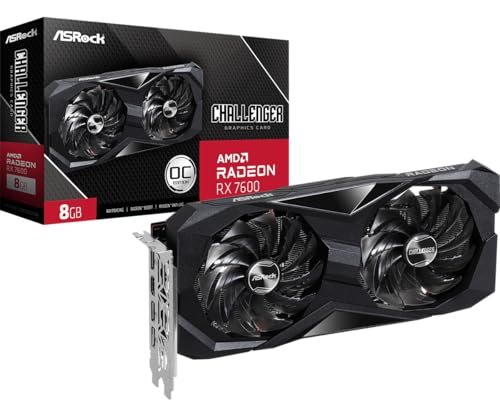
- Best build under $700: ASRock Radeon RX 7600 Challenger 8GB OC — the graphics card the top build in this guide is built around — Check on Amazon
- IPASON Gaming PC Desktop, Ryzen 5 5600 and RTX 3060 12GB (the prebuilt benchmark) — Check on Amazon
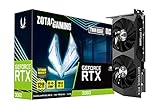
- ZOTAC Gaming GeForce RTX 3060 Twin Edge OC 12GB (anchor card for the RTX 3060 build) — Check on Amazon
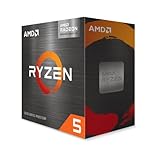
- AMD Ryzen 5 5600G with Radeon Graphics (anchor chip for the staged APU build) — Check on Amazon
- Intel Core i5-14400F build — built around the same RX 7600 card as Build 1 — Check on Amazon
- ZER-LON Gaming PC, Ryzen 5 5500 and RTX 4060 (the sale-watch prebuilt) — Check on Amazon
Read the full guide ↓
Disclosure: As an Amazon Associate, reviewstook.com earns from qualifying purchases. Links to Amazon on this page are affiliate links; they cost you nothing extra. Listing details such as price and availability change often, so check the current Amazon listing before you buy.
Every “best gaming PC build under $700” guide on the internet was written for a market that no longer exists, so this one starts with the reality nobody wants to print. Right now, in late 2026, memory and graphics card prices are inflated by a shortage that has pushed a basic 16GB DDR4 kit — a part that used to be a rounding error — into a serious budget line on Amazon, and pushed new RTX 3060 12GB cards into a much higher tier than they used to occupy. Add those two lines to any honest parts list and the classic $700 build, the one with an RTX 3060 at its heart, does not fit easily, even before you pay for Windows. Check price on Amazon for each part as you go rather than trusting any fixed total. We show the full parts lists below rather than quietly swapping in a weaker card and keeping the headline.
What does fit is still worth having. An all-new build around AMD’s Radeon RX 7600 — a card that trades blows with the RTX 3060 at 1080p — can still work within this budget when you check price on Amazon and time the graphics card purchase carefully, and it is a genuine 1080p high-settings machine. A Ryzen 5 5600G build with no graphics card at all sits in a lower, budget tier and plays esports and older games today, with a power supply already sized for the card you add later. And the uncomfortable benchmark hanging over the whole guide is a prebuilt: an IPASON desktop with the RTX 3060 12GB inside and Windows 11 Home included — often better value than the parts to build its equivalent, in a market where the graphics card alone sits in a premium tier. Check price on Amazon for the current listing. This guide presents all six paths honestly, says plainly where building wins (control, reuse, upgrade path) and where it currently loses (raw value), and gives you the buy rules that make each path work within this budget.
In this guide
Quick Picks
Short on time? Each row names a builder type and the path that suits it. Parts lists are itemized in the reviews; the Windows line is handled openly in each build, and you should check price on Amazon for each part before you order.
| Builder type | Pick | Why it stands out | Link |
|---|---|---|---|
| Best build under $700 | RX 7600 + Ryzen 5 5500 AM4 build | The only all-new discrete-GPU build that reaches the ceiling — check price on Amazon and time the card purchase | Check on Amazon |
| Best value overall | IPASON Gaming PC (Ryzen 5 5600, RTX 3060 12GB) | Strong value with Windows included — check price on Amazon; often cheaper than its own parts list | Check on Amazon |
| Best for upgraders | RTX 3060 12GB + Ryzen 5 5600X build | A premium-tier total all-new, but much more workable within budget if you reuse your DDR4, SSD and case — check price on Amazon | Check on Amazon |
| Best staged build | Ryzen 5 5600G APU build | A budget-tier entry today, games at 1080p low, PSU already sized for a future GPU | Check on Amazon |
| Best for streamers | Intel Core i5-14400F + RX 7600 build | Ten cores for game plus stream; much more workable within budget if you bring your own DDR4 and SSD | GPU listing under Build 1 |
| Best sale watch | ZER-LON Gaming PC (Ryzen 5 5500, RTX 4060) | An RTX 4060 machine that only enters this budget on sale days — buy only when it falls within the $700 budget, never above it | Check on Amazon |
How These Picks Were Chosen
A build guide lives or dies on how honestly it handles cost, so here is ours. Every part in every build below is a real, named component you can find on Amazon, and the parts lists are shown line by line in each review so you can check price on Amazon for each one and add them up against the $700 ceiling yourself. Nothing is described from memory, and where listings vary (they do, especially on SSDs), the review says so. Prices change often: the guide’s job is to tell you which builds are designed to work within this budget, which ones only work with reuse or timing, and where to walk away if the live price has moved a build out of this tier.
Three accounting rules apply to all six picks. First, the parts lists are complete: CPU, motherboard, memory, storage, power supply, case and graphics card, with a cooler counted where the CPU does not bundle one. A build list that forgets the power supply is not a build list. Second, Windows is handled separately and openly rather than buried. A new Windows 11 Home license is an extra cost to plan for — check the current price at Microsoft’s store or on Amazon; prebuilts in this guide include it, and a DIY build either transfers an eligible existing license, runs unactivated with the watermark and personalization limits that involves, or pays that line. Each review states what the license means for that build. Third, performance is described at class level — 1080p high, 1080p low, upscaling territory — because that is what the hardware tiers support; we do not print per-game frame rates we did not measure.
The platform choices follow from the market. Every build here sits on a DDR4 platform — AMD’s AM4 or Intel’s LGA1700 with a DDR4 board — because DDR5 memory has inflated even harder than DDR4, with DDR5 kits sitting in a much higher tier on Amazon than DDR4 kits, and no build under $700 survives that kind of premium memory line. The RTX 3060 12GB remains the tier’s reference card, as it should: 12GB of VRAM, DLSS, and the strongest ray-tracing support at the class. But reference is not the same as resident, and in this market the card that actually lives in this budget tier is the RX 7600. The guide keeps both, described as they are — check price on Amazon for each before you decide.
The 6 Best Gaming PC Builds Under $700
Build 1: The RX 7600 Build — Ryzen 5 5500, Radeon RX 7600 (Best Build Under $700)
Who it suits: First-time builders who want a complete, all-new gaming PC at the $700 ceiling and are willing to buy the graphics card on a good day rather than a convenient one.
This is the build the keyword can honestly deliver right now. The ASRock Radeon RX 7600 Challenger 8GB OC is a dual-fan RDNA 3 card with a 2,695 MHz boost clock, and at 1080p its raster performance sits in the same class as the RTX 3060 — ahead in many traditional titles, behind once ray tracing and DLSS enter the comparison, and working with 8GB of VRAM instead of 12GB. The Ryzen 5 5500 is the budget Zen 3 six-core that makes the arithmetic possible: a budget-tier chip on Amazon — check price on Amazon — with the Wraith Stealth cooler in the box, so there is no separate cooler line. Its compromises are real and stated: it is a PCIe 3.0 chip with half the L3 cache of the 5600X, which costs a few percent in CPU-heavy games, and the RX 7600’s PCIe x8 link means you should pair it with a PCIe 4.0 board — the B550 below — rather than an older B450, where the card gives up a little more.
- Graphics card: ASRock Radeon RX 7600 Challenger 8GB OC — check price on Amazon; this is the card to time carefully, as its listing moves between tiers
- CPU: AMD Ryzen 5 5500 (Check on Amazon) — budget tier, cooler included; check price on Amazon
- Motherboard: MSI PRO B550M-P — budget-tier AM4 board
- Memory: TEAMGROUP Elite DDR4-3200 16GB (2x8GB) — budget-tier DDR4 kit
- Storage: Crucial P3 Plus 1TB NVMe — budget-tier NVMe drive, available on Amazon
- Power supply: MSI MAG A650GN II 650W 80+ Gold — budget-tier Gold unit
- Case: Antec NX200 M — budget-tier case
- Total: check price on Amazon for each part and add them up against the $700 ceiling — this build is designed to fit that ceiling when the graphics card is bought on a good day
- Windows: budget separately for a new license, or no added cost with an eligible transfer
Read the budget the way it is written: this is a build under $700 on the days the graphics card cooperates, and it can slip above the ceiling on the days it does not, especially if the SSD listing has moved up as well. The discipline is the build. Decide in advance that the card has to keep the whole list within this budget, buy the platform parts whenever, and let the GPU purchase wait for a better live price — check price on Amazon before you commit — because the platform is not going anywhere, and the same patience applied to the memory kit (the single most inflated line in the list) is what separates this build from the more expensive versions of the same machine elsewhere. What you get for the discipline is a balanced 1080p system: high settings in mainstream titles, esports at high refresh, FSR upscaling in reserve, and a 650W Gold power supply with genuine headroom for a future card.
- Full 1080p performance class from all-new parts at the ceiling — the only build here that manages it.
- 650W Gold PSU and a B550 board leave a real upgrade path: a stronger CPU and card drop in later.
- Every part is a named, standard component you can replace individually.
Honest limitation: The budget only holds when the card and the SSD are bought at favourable live prices; when the RX 7600 listing sits in a higher tier, the same list moves well above the ceiling, and the 8GB of VRAM will age faster than the 3060’s 12GB in texture-heavy games.
Choose it if you are building new, want the best frames for the budget available this month, and can time the GPU purchase. Skip it if you need to order everything today at whatever price is showing — that buyer is better served by the prebuilt below.

Build 2: The Benchmark — IPASON Prebuilt with RTX 3060 12GB (Best Value Overall)
Who it suits: Anyone whose real goal is the most gaming performance for $700 or less, and who is willing to let a factory do the assembly to get it.
Every build guide needs its control group, and this is the one the other five picks are measured against. The IPASON desktop pairs a Ryzen 5 5600 — a stronger gaming CPU than Build 1’s 5500, with PCIe 4.0 and the full cache — with an RTX 3060 12GB, 16GB of DDR4-3200, a 1TB NVMe SSD, a named 550W power supply and Windows 11 Home installed. Check price on Amazon for the current listing. Set that beside Build 3’s parts list, which puts the same GPU class from parts in a much higher tier before Windows, and the conclusion is not subtle: at current parts prices, this prebuilt delivers the tier’s reference graphics card, a better CPU than our top DIY pick, and an operating system, for less than the cost of building the equivalent machine. The shortage has inverted the usual rule that building saves money, because prebuilt makers buy memory and graphics cards at contract prices the retail market is not offering you.
What you give up is the thing this whole category exists for: control. The listing notes that the GPU brand may vary, so the specific 3060 that arrives is the maker’s choice, not yours. The motherboard and case are the maker’s choice too, which matters in two years when you want to know whether a bigger card fits and whether the board’s power delivery supports a faster CPU — questions a parts list answers by construction and a prebuilt answers only on arrival. There is also documented variant drift on this listing family: the same product code has been seen wearing an RTX 4060 headline in a reseller’s spec sheet, so confirm the configuration in the cart and again on the box before the return window closes. None of that overturns the arithmetic. It defines what the arithmetic costs.
- RTX 3060 12GB and Ryzen 5 5600 — the tier’s reference GPU with a full-strength CPU.
- Windows 11 Home included, which is a separate license cost every DIY build here has to answer on its own.
- Named 550W PSU and a 1TB NVMe SSD — no silent downgrades in the fine print.
Honest limitation: GPU brand may vary, the board and case are unspecified, and the value depends on the live listing — check price on Amazon, because if the listing is sitting in a higher tier when you look, the advantage over Build 1 narrows to the Windows license and the assembly.
Choose it if performance per dollar is the whole question. Skip it if choosing your own parts, knowing your motherboard, and upgrading on your own schedule are the point of the exercise — that is what Builds 1, 3 and 5 sell, and in this market you pay for it.

Build 3: The RTX 3060 12GB Build — Ryzen 5 5600X (Best for Upgraders)
Who it suits: Owners of an aging DDR4 desktop whose memory, SSD and case are still good — the one audience for whom this build genuinely costs under $700.
This is the build the keyword promises, priced the way this guide prices everything: line by line — check price on Amazon for each part. The ZOTAC Twin Edge OC is a compact dual-fan RTX 3060 12GB that currently sits in a premium tier on Amazon, and dual-fan models from the bigger brands sit in a similar tier. The Ryzen 5 5600X sits in a mid-range tier — check price on Amazon. Around them sits the same platform as Build 1. The honest headline is this: from all-new parts, the RTX 3060 build sits well above this budget tier this year, and any guide showing it comfortably within budget is pricing a graphics card from a market that has closed.
- Graphics card: ZOTAC GeForce RTX 3060 Twin Edge OC 12GB — check price on Amazon; other new RTX 3060 12GB cards on Amazon also sit in a premium tier
- CPU: AMD Ryzen 5 5600X (Check on Amazon) — check price on Amazon
- Motherboard: MSI PRO B550M-P — check price on Amazon
- Memory: TEAMGROUP Elite DDR4-3200 16GB (2x8GB) — check price on Amazon
- Storage: Crucial P3 Plus 1TB NVMe — check price on Amazon
- Power supply: MSI MAG A650GN II 650W 80+ Gold — check price on Amazon
- Case: Antec NX200 M — check price on Amazon
- Total: check price on Amazon for each part — all-new this build sits well above the $700 ceiling; reusing your DDR4 kit, SSD and case brings it much closer to this budget
- Windows: budget separately for a new license — check the current price — or no added cost with an eligible transfer
The reuse column is where this build earns its place. A DDR4 kit, an NVMe SSD and a case are exactly the parts that survive from a 2019-era gaming PC, and they are also — not coincidentally — the lines the shortage has inflated most. Keep yours, buy the card when its live price works for the budget, the CPU, the board and the power supply, and the build can land under the ceiling, with the strongest CPU and the most VRAM of any build in this guide. Two cautions belong to this pick specifically. Some 5600X listings bundle a Wraith Stealth cooler and some do not; check the listing, and if no cooler is included, budget for a basic tower cooler on top of the parts above. And the reason to pay this build’s premium at all is the long game — 12GB of VRAM and DLSS are the features that will still matter in three years — so if your horizon is twelve months of esports, Build 1 does the same job for less commitment.
- The tier’s reference card with 12GB of VRAM, DLSS and the class’s best ray-tracing support.
- The 5600X is the strongest gaming CPU in this guide, on a PCIe 4.0 platform.
- For upgraders reusing memory, storage and case, it is the best machine here under $700.
Honest limitation: From new parts it misses the budget by a wide margin, full stop. It belongs in this guide because the reuse path is real and common — not because the all-new total can be wished down.
Choose it if you have DDR4, an SSD and a case worth keeping, or you value the 12GB card enough to pay the market’s current price for it. Skip it if you are starting from an empty desk — Build 1 or the IPASON will game as well at 1080p for far less.
Build 4: The Staged Build — Ryzen 5 5600G, Graphics Card Later (Best on a Split Budget)
Who it suits: Buyers whose $700 arrives in two installments — part of the budget now, the rest in a few months — and who need a working, gameable PC from the first installment.
The 5600G is the only chip in this guide with graphics worth the name built in: six Zen 3 cores and Radeon Vega 7 integrated graphics that handle esports titles and older games at 1080p on low settings, plus a bundled cooler. Check price on Amazon for the current listing — stock is thin and some trackers have recently shown it unavailable from Amazon itself, with third-party sellers carrying it, so check availability carefully. The build around it deliberately spends on the parts a future graphics card will want: the same B550 board, the same 1TB SSD, and the same 650W Gold power supply as Build 1, which is roughly double the wattage this machine needs today and exactly what an RX 7600 or RTX 3060 will want tomorrow. Nothing in the list is a placeholder except the empty PCIe slot.
- CPU: AMD Ryzen 5 5600G with Radeon Vega 7 graphics — check price on Amazon, cooler included
- Motherboard: MSI PRO B550M-P — check price on Amazon (choose a board with HDMI or DisplayPort output; the APU needs it)
- Memory: TEAMGROUP Elite DDR4-3200 16GB (2x8GB) — check price on Amazon; dual-channel matters doubly here, because the integrated graphics share this memory
- Storage: Crucial P3 Plus 1TB NVMe — check price on Amazon
- Power supply: MSI MAG A650GN II 650W 80+ Gold — check price on Amazon
- Case: Antec NX200 M — check price on Amazon
- Total: check price on Amazon for each part — a budget-tier entry today, with a higher all-in total once a graphics card joins it
- Windows: budget separately for a new license — check the current price — or no added cost with an eligible transfer
The honesty note is in the second total. Staging is a financing decision, not a saving: the finished machine costs more than Build 1 bought in one go, because the 5600G carries a premium for graphics you will eventually stop using, and its compromises persist after the card arrives — half the L3 cache of the 5600X and a PCIe 3.0 link that slightly constrains an x8 graphics card like the RX 7600. What the premium buys is time and a working PC in the interval, and for a buyer whose alternative is not gaming at all for four months, that trade can be entirely rational. Buy the memory as a matched 2x8GB kit even though a single stick is cheaper: integrated graphics run on system memory bandwidth, and single-channel RAM is the one false economy that visibly slows this specific build.
- A complete, usable gaming PC today at a budget-tier entry cost — the lowest entry cost in this guide.
- Platform, storage and power supply are already final; the graphics card is the only staged part.
- The APU keeps working as a backup display output even after a card is installed.
Honest limitation: Integrated graphics mean 1080p low in undemanding games, not the high settings of Builds 1 to 3 — and the completed machine costs more in total than building Build 1 once.
Choose it if your budget genuinely arrives in stages. Skip it if you have the full $700 now; splitting a budget you already hold only adds cost.
Build 5: The Intel Build — Core i5-14400F and RX 7600 (Best for Streamers and Multitaskers)
Who it suits: Builders who game and stream, record or keep a second workload running — the buyers who feel core count, not just clock speed.
Intel’s answer at this tier is a genuinely different shape of CPU: the Core i5-14400F runs six performance cores and four efficiency cores, ten cores and sixteen threads in total, boosting to 4.7 GHz, with a stock cooler in the boxed version. For gaming alone it trades blows with the Ryzen chips here; with a stream encoder, a browser full of tabs and a recording running beside the game, the extra cores are the difference between a build that notices and a build that does not. Check price on Amazon for the current listing. The board is the part to get right: LGA1700 accepts DDR4 or DDR5 depending on the board, and this build specifies the MSI PRO B760M-P DDR4 — check price on Amazon — because the DDR5 version of the same-named board would force a much higher-tier DDR5 memory kit that sinks the budget. Check for DDR4 in the listing title before you order; the two boards are easy to confuse and the mistake is expensive.
- CPU: Intel Core i5-14400F, 10 cores (6P+4E), up to 4.7 GHz — check price on Amazon
- Motherboard: MSI PRO B760M-P DDR4 — check price on Amazon (the DDR4 version; the DDR5 board of the same name does not fit this budget)
- Graphics card: ASRock Radeon RX 7600 Challenger 8GB OC — check price on Amazon
- Memory: TEAMGROUP Elite DDR4-3200 16GB (2x8GB) — check price on Amazon
- Storage: Crucial P3 Plus 1TB NVMe — check price on Amazon
- Power supply: MSI MAG A650GN II 650W 80+ Gold — check price on Amazon
- Case: Antec NX200 M — check price on Amazon
- Total: check price on Amazon for each part — all-new this build sits above the $700 ceiling; reusing your DDR4 kit and SSD brings it within this budget
- Windows: budget separately for a new license — check the current price — or no added cost with an eligible transfer
The pattern will look familiar by now: Intel’s platform tax — a board and a CPU that sit in higher tiers than Build 1’s equivalents — puts the all-new total past Build 1’s, and past the ceiling. For the large population of builders upgrading from a DDR4 machine, the reuse column fixes it completely: bring your kit and your SSD and the Intel build lands within this budget with the strongest multitasking CPU in the guide. Two platform notes deserve the space. A B760 board that has sat in a warehouse may need a BIOS update before it boots a 14th-gen chip, and this board has no BIOS flashback button, so buy from a seller whose listing states current firmware or be ready to borrow a CPU for the update. And the 14400F has no integrated graphics at all — the F is literal — so the build shows nothing on a monitor until the graphics card is installed and the cable is plugged into the card, not the board.
- Ten cores and sixteen threads: the only build here that shrugs at game-plus-stream workloads.
- LGA1700 with a DDR4 board keeps one foot in the current platform without the DDR5 memory bill.
- Same GPU, PSU and storage as Build 1, so the upgrade path is identical.
Honest limitation: All-new, it sits above the ceiling in a $700 guide — it earns its place on the strength of the reuse total and the streaming use case, and all-new buyers without old DDR4 should take Build 1 instead.
Choose it if you stream or multitask heavily and own DDR4 worth reusing. Skip it if you game only and are buying every part new; the Ryzen build is the same frames for less.
Build 6: The Sale Watch — ZER-LON Prebuilt with RTX 4060 (Best If You Can Wait for a Dip)
Who it suits: Patient buyers who want the newest graphics architecture in this guide and are willing to let a price alert do the shopping.
The RTX 4060 is the card a $700 guide would lead with in a sane market: a generation newer than the 3060, more efficient, and the cheapest way into DLSS 3 frame generation. As a standalone card it does not rescue a parts list at current prices — but as a prebuilt it periodically falls into this budget, and the ZER-LON AOV4060 is the machine to watch: a Ryzen 5 5500, an RTX 4060 8GB, 16GB of DDR4, a 1TB NVMe SSD and Windows 11 Home. The trackers tell the story plainly: it usually sits in a higher tier, with sale dips that reach this guide’s ceiling. So the recommendation is a rule, not a shrug — buy this machine only when it falls within the $700 budget, and do not buy it above that, because above the ceiling the IPASON’s 12GB card and stronger CPU are the better purchase.
Two fine-print items come with this pick, and both are stated the way this guide states them everywhere. The listing does not publish the power supply’s wattage, which matters the day you want a stronger graphics card; open the case on arrival, read the label, and let that number — not optimism — plan your upgrade. And the 4060’s 8GB of VRAM is the standing trade of its generation: faster and cleverer than the 3060, with less memory to hold textures, which is why the IPASON remains the value pick even when this machine’s price dips below it on a percentage basis. Set the alert, hold the line at $700, and let other people pay the higher-tier price.
- Newest GPU architecture in the guide, with DLSS 3 frame generation.
- Complete machine with Windows included — no separate license line when the dip comes.
- 1TB NVMe storage rather than the 500GB that sale machines often hide.
Honest limitation: At its usual higher-tier pricing it is not a $700-budget machine at all; this pick is a price alert with a hard ceiling, and the unpublished PSU wattage caps your certainty about future upgrades.
Choose it if you can wait for a sale and will actually walk away above $700. Skip it if you are buying this week at the showing price — that is the IPASON’s week, or Build 1’s.

Comparison Table
| Build | Graphics | Cost position | Best use | Link |
|---|---|---|---|---|
| Build 1: Ryzen 5 5500 + RX 7600 | RX 7600 8GB | All-new, within budget when the card is timed well | The true $700 build, bought with timing | Check on Amazon |
| Build 2: IPASON prebuilt | RTX 3060 12GB | Check price on Amazon, Windows included | Most performance per dollar, no assembly | Check on Amazon |
| Build 3: Ryzen 5 5600X + RTX 3060 | RTX 3060 12GB | Well above budget all-new; within budget when reusing parts | Upgraders with DDR4, an SSD and a case | Check on Amazon |
| Build 4: Ryzen 5 5600G staged | Vega 7 integrated, card later | Budget-tier entry today | Budgets that arrive in two installments | Check on Amazon |
| Build 5: Core i5-14400F + RX 7600 | RX 7600 8GB | Above budget all-new; within budget when reusing parts | Gaming plus streaming and multitasking | GPU listing under Build 1 |
| Build 6: ZER-LON prebuilt | RTX 4060 8GB | Buy only when it falls within the $700 budget | Newest architecture, bought on a dip | Check on Amazon |
How to Choose a Gaming PC Build Under $700
- Price the whole machine, never the headline parts. CPU plus GPU is the number every forum post quotes; the build you can actually switch on adds a board, memory, storage, a power supply, a case and possibly a cooler and a Windows license. In the current market those “extras” add up quickly, and they are where builds aimed at this budget quietly end up well over it.
- Treat memory as the swing line. A 16GB DDR4 kit — check price on Amazon — is the most affordable new memory a gaming build can use right now, and DDR5 sits in a much higher tier that is disqualifying at this budget — which is why every build here is AM4 or LGA1700-with-DDR4. If you already own a desktop DDR4 kit (full-size DIMMs, not laptop SO-DIMMs), reusing it is the single largest saving available to you.
- Give the graphics card a walk-away price. GPU listings in this tier swing widely between listings and weeks. Decide the ceiling the build works at — a firm limit for Build 1’s RX 7600 that keeps the whole list in budget, and the $700 budget flat for the ZER-LON machine — and let the purchase wait for it. The platform parts are stable; the card is the trade.
- Match the card to the board’s PCIe generation. The RX 7600 uses an x8 link and gives up performance on PCIe 3.0 boards, so pair it with B550 or B760. The RTX 3060’s x16 link is more forgiving of older boards — one of the few practical edges it holds over the 7600 for upgraders.
- Buy the power supply for the next card, not this one. The 650W Gold unit in these lists costs little more than a 450W bargain unit and removes the PSU from every future upgrade conversation. Never carry a no-name supply of unknown wattage into a build you plan to keep.
- Answer the Windows question before you order. Check the current price for a new license at Microsoft’s store or on Amazon. A retail license from a PC you are retiring may transfer; an OEM license from a prebuilt generally does not. Running unactivated costs nothing and works, with a watermark and locked personalization. Any of the three is defensible — pretending the line does not exist is not.
- Check the cooler is in the box. The 5500, 5600G and boxed 14400F bundle coolers; 5600X listings vary. A build list that assumes a cooler the listing does not include is short the cost of a basic cooler on delivery day.
- Mind the board’s firmware and its exact name. A B760 board may need a BIOS update for a 14th-gen CPU, and Intel sells near-identical boards in DDR4 and DDR5 versions. Both mistakes are free to avoid and expensive to make.
Why the Prebuilt Wins on Price Right Now — and When Building Wins Anyway
The strangest number in this guide deserves its own explanation. A prebuilt containing an RTX 3060 12GB often undercuts building — check price on Amazon — while the same graphics card, bought alone in a box, sits in a premium tier, and the memory kit costs the prebuilt maker a fraction of its retail price under contract. This is what a component shortage does to the usual economics: retail parts prices are set by scarcity, system prices are set by inventory bought earlier and in bulk, and for as long as that gap lasts, the assembled machine undercuts the parts bin. Add the included Windows license and the IPASON is not merely cheaper than Build 3 — it is cheaper by roughly the price of the graphics card’s own retail markup. If your only goal is frames per dollar this quarter, the honest advice is to buy it, or to hold the ZER-LON’s $700 line, and revisit building when memory prices normalize.
Building still wins three arguments that price does not capture. The first is reuse: the moment you own a DDR4 kit, an SSD and a case, the arithmetic flips — Builds 3 and 5 land within this budget with the strongest CPUs in this guide, and no prebuilt answers that. The second is knowledge: a parts list tells you your motherboard’s limits, your power supply’s wattage and your case’s clearances before you spend anything, and every future upgrade is a lookup instead of an investigation. The third is repair: when one part fails in year three, a builder replaces that part; a prebuilt owner starts a support ticket. Those are the things the DIY premium at current prices, depending on the build, actually buys. Pay it knowingly, for those reasons, and it is money well spent. Pay it because a guide pretended the parts were cheaper than they are, and it is not.
Common Buying Mistakes
- Copying a build list from a guide written before the memory shortage, then discovering at checkout that the RAM line has tripled and the total is fiction.
- Budgeting CPU and GPU and forgetting the board, power supply, case and Windows — the extra cost that separates a parts pile from a PC.
- Buying a DDR5 motherboard for a budget Intel build because the name matched, and inheriting a much higher-tier memory kit with it.
- Pairing an RX 7600 with a PCIe 3.0 board to save a little money, and paying for it in performance every day instead.
- Buying a single 16GB memory stick to save money — worst on the 5600G build, where integrated graphics live on memory bandwidth, but a false economy everywhere.
- Paying the ZER-LON’s usual higher-tier price because the guide said “under $700”. The pick is the dip, not the listing.
- Assuming the CPU includes a cooler — or assuming it does not and buying one twice. Read the listing.
- Plugging the monitor into the motherboard on an F-series Intel or non-G Ryzen build and troubleshooting a “dead” PC that simply has no graphics output there.
- Reusing a laptop’s SO-DIMM memory in a desktop build. Same DDR4 generation, physically different sticks; they do not fit.
Final Recommendation
- Building new, on time: Build 1, the RX 7600 and Ryzen 5 5500 — the only all-new discrete-GPU build at the ceiling.
- Most performance per dollar: the IPASON prebuilt — the benchmark every DIY total in this guide is judged against.
- Upgrading a DDR4 machine: Build 3, the RTX 3060 12GB and 5600X, with your memory, SSD and case carried over.
- Budget in two installments: Build 4, the 5600G staged build as a budget-tier entry today.
- Gaming plus streaming: Build 5, the i5-14400F build — within budget for DDR4 owners.
- Patient and alert-driven: the ZER-LON RTX 4060 machine, within the $700 budget and not above it.
Our top two are Build 1 and the IPASON, because between them they state this market’s whole truth: the best build under $700 right now is an RX 7600 machine bought with timing and discipline, and the best value under $700 is a prebuilt that undercuts the parts market entirely. Builders with a tighter ceiling should see Best Gaming PC Build Under $500, where the same honesty applies with smaller numbers, and those who can stretch should see Best Gaming PC Build Under $800, where the RTX 3060 build starts to fit without conditions. If the building itself is the hobby, Best Gaming PC Build For Beginners Under $700 walks the same budget at a first-timer’s pace. Set your walk-away prices before you open a single listing, itemize every line including Windows, and check the live price of the graphics card last — in this market, that order is the whole difference between a $700 build and an over-budget surprise.
Frequently Asked Questions
Can you really build a gaming PC with an RTX 3060 for under $700?
Not from all-new parts at current prices — itemized honestly, that build sits well above this budget before Windows, because the card alone sits in a premium tier and memory sits in an inflated tier. Check price on Amazon for each part. It becomes a genuine under-$700 build if you reuse a DDR4 kit, an SSD and a case from an older machine, or if graphics card prices fall back toward their old levels. Anyone showing you the all-new version at $700 is using prices from before the shortage.
Why is RAM so expensive in these builds?
A supply shortage has repriced memory across the board: new 16GB DDR4 kits on Amazon sit in an inflated tier, 32GB DDR4 kits sit in a higher tier, and 16GB DDR5 kits sit in a higher tier still — check price on Amazon for current listings. That is why every build in this guide uses a DDR4 platform, and why reusing a kit you already own is worth more than any other single saving — it removes the most inflated line in the list entirely.
Is the RX 7600 as good as the RTX 3060 12GB?
At 1080p they are in the same performance class: the RX 7600 is competitive or ahead in traditional rasterized games, while the RTX 3060 pulls ahead with ray tracing, has the more mature DLSS upscaling, and carries 12GB of VRAM against 8GB — the difference most likely to matter in a few years. Today, the deciding factor is price: the 7600 generally sits in a lower tier than the 3060 — check price on Amazon for both — and that gap is what makes the 7600 the buildable card at $700.
Do I have to buy Windows for a DIY build?
You have to answer the question, not necessarily pay it. Check the current price for a new Windows 11 Home license at Microsoft’s store or on Amazon. A retail license from a machine you are retiring may be transferable; an OEM license tied to an old prebuilt generally is not. Windows also installs and runs unactivated, with a watermark and some personalization locked. The prebuilts in this guide include a license, which is part of their price advantage.
AM4 or LGA1700 — which platform should a $700 build use?
Both, conditionally. AM4 (Builds 1, 3 and 4) has the cheaper boards and CPUs, and its upgrade ceiling — a Ryzen 7 5800X3D-class chip later — is well understood. LGA1700 with a DDR4 board (Build 5) costs more as a platform and returns ten cores that multitask and stream better. What neither build should use at this budget is DDR5: the memory pricing, not the platforms, makes that decision for you.
Is 16GB of RAM enough, or should the build have 32GB?
16GB in a matched 2x8GB kit remains the right call at this budget: it runs current games properly in dual-channel, and the extra cost of a 32GB kit is better spent on the graphics card’s price window. The exception is the streamer or heavy multitasker of Build 5, for whom 32GB is a legitimate quality-of-life upgrade — bought knowingly, as an upgrade, not as a default.
Should I wait for prices to come down instead?
Waiting is a real strategy this year, and the shortage forecasts behind the current memory pricing run into 2027, so “down” may not mean soon. The middle path this guide is built around: buy the stable platform parts when you find them fairly priced, hold a hard walk-away price on the graphics card — the most volatile line — and let the IPASON’s live listing — check price on Amazon — be your benchmark for whether building beats buying this month. If a prebuilt with your target card undercuts your parts total, that is the market talking, and there is no prize for refusing to listen. Builders set on a card for streaming should also see Best Gaming PC Build For Streaming Under $700, and anyone whose desk is the constraint should see Best Gaming PC Build For Small Spaces Under $700.


