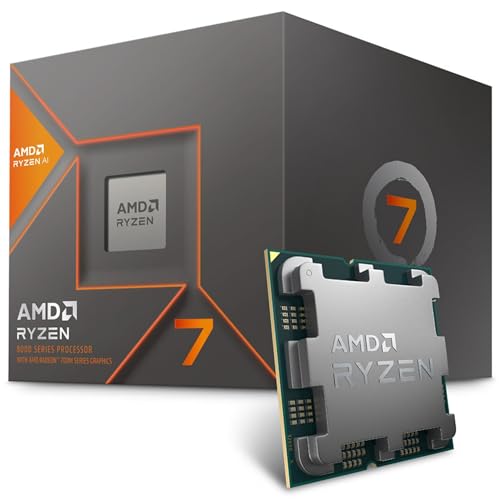
Where to buy
Check the latest price, availability and delivery on Amazon. Orders are placed on Amazon. We may earn a commission from qualifying purchases.
- Best route when the footprint is your decision: AMD Ryzen 7 8700G with Radeon 780M graphics — the processor at the centre of the staged AM5 build below, the one route here where you choose the case yourself — check price on Amazon
- Best complete build to order today: ZOTAC Gaming GeForce RTX 5060 Twin Edge OC, 8GB GDDR7 — the graphics card the Intel DDR4 build below is assembled around — check price on Amazon
- Cheapest way onto the desk: Skytech Blaze4 Mini, Ryzen 7 5700 / RTX 4060 Ti — a tower despite the name; read its review before you measure for it — check price on Amazon
- Best current-generation prebuilt: Thermaltake LCGS Quartz i1460, i5-14400F / RTX 5060 — check price on Amazon
See 2 more Amazon options
- The capacity route, no external drive on the desk: Skytech Archangel, i5-14400F / RTX 4060 / 32GB DDR5 / 2TB — check price on Amazon
- Most graphics memory, largest install commitment: CyberPowerPC Gamer Xtreme VR, i7-13700F / RTX 4060 Ti 16GB — Check on Amazon
Read the full guide ↓
Disclosure: As an Amazon Associate, reviewstook.com earns from qualifying purchases. Links to Amazon on this page are affiliate links; they cost you nothing extra. Listing details such as price and availability change often, so check the current Amazon listing before you buy.
Start with the sentence nobody selling you a “small” gaming PC wants printed: at $1,200, nothing in this guide is small. There is no mini PC here, nothing that mounts behind a monitor, and no tower in this set earns the word compact — the six routes below are two self-builds in standard cases and four prebuilt towers, all of them furniture your room has to make peace with. What a small-space buyer at this budget is actually choosing is not size. It is installation: which of these machines asks the least of a tight desk or a small room once it is plugged in — the heat it pours into that room, the fall of its cables, whether it can breathe where you put it, and whether its footprint is a decision you get to make or a box that simply arrives. Graded that way, the ranking in this guide will look upside-down to a regular build reader. The two self-builds lead, not because they are faster, but because a build is the only route whose case — the single part that decides the footprint — is yours to choose. The prebuilts follow in order of how little reopening, verifying and rearranging each one schedules into your first week.
Two pieces of context before the picks, because both shape every judgement that follows. First, the money: November 2026 is a memory-price crisis. DDR5 kits cost far more than they did across their recent history, and current graphics cards sit well above their launch positioning. That is why this $1,200 guide contains four prebuilts at all — their makers bought memory before the spike — and why the builds below are judged on whether they can close inside the budget at the current price on Amazon, not on a price remembered from a calmer season. Second, the measuring: none of the six listings’ verified research documents a full set of dimensions we are willing to print, so this guide prints none. Each pick is graded by form-factor class and by what its installation demands, and the checklist near the end tells you exactly what to measure on the live listing before ordering.
In this guide
Quick Picks
Short on time, or comparing several routes at once? Each row pairs a buyer type with the route that fits it, and links that route’s anchor listing.
| Buyer type | Pick | Why it stands out | Link |
|---|---|---|---|
| Best when the case is your choice | AM5 starter build: Ryzen 7 8700G | You pick the case, so you pick the footprint; the coolest-running route here as delivered — check price on Amazon | Check on Amazon |
| Best complete build today | Intel DDR4 build: Core i5-12400F + RTX 5060 | A full 1440p-class machine whose case line is also yours to choose; check the current price on Amazon to confirm it closes under budget | Check on Amazon |
| Cheapest onto the desk | Skytech Blaze4 Mini (prebuilt) | RTX 4060 Ti performance positioned at the value end of this tier — but “Mini” is a name, not a measurement — check price on Amazon | Check on Amazon |
| Best current-gen prebuilt | Thermaltake LCGS Quartz i1460 | RTX 5060 and a named 600W Gold power supply, positioned inside this budget tier; the least case-opening of the towers — check price on Amazon | Check on Amazon |
| Best for a clear desk | Skytech Archangel (prebuilt) | 32GB DDR5 and 2TB inside the tower — no external drive, no extra cable, at the top end of this budget tier — check price on Amazon | Check on Amazon |
| Best graphics longevity | CyberPowerPC Gamer Xtreme VR (prebuilt) | The only 16GB graphics card here, positioned as a deal-tier pick inside this budget when its current pricing falls in line — and the largest installation of the six — check price on Amazon | Check on Amazon |
How These Picks Were Chosen
The budget was applied to the whole machine, never to a headline part. For the two self-builds, every line of the parts list counts in its review — processor, motherboard, memory, storage, power supply, case and a Windows 11 Home OEM licence, which sits below full retail for the Microsoft System Builder version — because a build that fits the budget only by forgetting the operating system does not fit the budget. Where a build only closes under $1,200 when a key part is favourably priced, the review says so and names the part to watch, and you should check the current price on Amazon for that part before committing. For the prebuilts, the whole machine with Windows included is what counts — their advantage in this season’s memory market.
On top of that money filter, this variant applies an installation filter, and it is worth stating how it works because it reorders the guide. Each route was graded on five things a small room actually feels. Footprint class: is the machine a standard tower, and — for the builds — is the case a line you can shop, or a fixed box? Heat: every discrete card here pours its working heat into your room, so routes are graded on how much card they run; the one route with no discrete card pours the least, and says so. Air: all six cool with fans and case airflow, so all six need open air at their intakes and exhausts — none of them, at any price in this guide, belongs inside a sealed cabinet or a closed TV stand. Cables: every pick powers from an internal supply, so there is no external brick to house — the supply’s “address” is the wall socket and its cord’s reach, and the real cable question is the drop from the tower to your monitor, keyboard and network point. And reopening: a pick that needs its case opened on delivery day — to read an unpublished supply label, to verify a configuration — schedules work in the exact spot you have least room to work in, and was graded down for it.
What this guide did not do is measure anything. The verified research behind these picks does not document dimensions, volumes, weights or noise figures for these listings, so none are printed — not estimated, not borrowed from a sibling model, not rounded from a product photo. Where size decides a pick’s grade, the grade is given by class and the reader is sent to the live listing’s specification table with a tape-measure checklist.
Measure Before You Buy: The Five Steps
Every return in this category begins with a tape measure that came out after the box arrived. Do these five steps first, in this order, before any of the six routes below gets ordered.
- Step 1 — Measure the spot, not the dream. Width, depth and height of the exact place the machine will live: the desk corner, the floor gap beside it, the shelf. Write the three numbers down. Then open the live listing of the pick you favour and read its documented dimensions against them. If the listing does not document dimensions, that is itself information — choose a route whose case you control, or wait until it does.
- Step 2 — Claim the ventilation clearance. Whatever spot you measured needs open air beyond the box: room behind the rear exhaust, space at the intakes, nothing soft draped over the top. A tower that fits with a centimetre to spare on every side does not fit — it cooks. If your only spot is an enclosed cabinet or a closed stand, stop here: no pick in this guide is cleared for it, and the honest purchase is a different layout, not a different PC.
- Step 3 — Give the power supply an address. All six routes run internal power supplies, so there is no brick to hide — but the tower still has to sit within its cord’s reach of a socket, without a cord crossing the room at ankle height. Decide the socket first and let it veto positions.
- Step 4 — Walk the cable drop. From the tower’s planned position, trace the run to the monitor, the keyboard and mouse, and a wired network point if you use one. Cables that fall short get replaced by cables stretched tight across a desk — the visual opposite of what a small space needs. A tower on the floor needs a longer, tidier drop than one on the desk.
- Step 5 — Only then order. Spot measured, clearance claimed, socket chosen, cable drop walked. If any step failed, the fix is a different route from this guide — usually one of the builds, whose case line is yours — or a different spot, never a hope that the box will somehow be smaller than its specification.
The AM5 Math: The Right Platform at the Wrong Moment
One analysis belongs in this guide before the reviews, because it explains the shape of the six. Our standing platform advice for a new build is AM5: the Ryzen 5 7600X and a board such as the MSI PRO B650-P WiFi remain fairly positioned on their own. Fair — until the memory line. A 32GB DDR5-6000 kit now sits in a much higher tier than its long-run history, a 1TB NVMe drive costs far more than it did in calmer years, and the RTX 5060 sits well above its launch positioning. Assemble the conventional AM5 build at current pricing — a Ryzen 5-class processor, a B650 board, 32GB of DDR5, an RTX 5060, a 1TB SSD, a 750W Gold supply, a case and Windows — and the honest total lands well above this guide’s budget. Even allowing for more favourable pricing on the card and memory, it still lands above the budget.
Note what that money does not buy, for this guide’s purposes: smallness. The conventional AM5 build lives in the same standard tower case as everything else here, so waiting for its prices buys you a platform, not a footprint. It therefore appears in this guide as a rain check, not a pick: it would only close inside the budget if several conditions happened at once — much lower processor pricing, a lower-tier B650 board, a 16GB DDR5-6000 kit at the bottom of its current band, and the RTX 5060 back near the bottom of its band — together with a modestly priced drive and supply, a value case and a Windows licence transferred from a retired PC. Buyers who want AM5 today without the treasure hunt take the staged route at pick one, which puts the same socket under a working PC now and leaves the graphics slot empty. Everyone else builds on DDR4 or buys prebuilt — and either way, measures first.
The 6 Best Gaming PC Builds for Small Spaces Under $1200
1. The AM5 Starter Build — Ryzen 7 8700G, Graphics Card Later
Who it suits: Small-space builders who want the one thing no prebuilt can offer — a footprint they choose themselves — and who can let the graphics card wait for a saner market.
Every other route in this guide delivers its box and asks your room to adapt. This one starts from the room. The parts list is the documented one: a Ryzen 7 8700G — check price on Amazon; an MSI PRO B650-P WiFi motherboard — check the current price on Amazon; 16GB (2×8GB) of DDR5-6000; a Crucial P310 1TB Gen4 NVMe; an MSI MAG A750GL 750W Gold power supply; a case in the value tier; and a Windows 11 Home OEM licence. Totalled honestly with Windows included, that closes under budget — the only AM5 machine in this guide that does so as a complete PC today, and it manages it because the graphics card line reads zero.
For a small space, that zero is doing double duty. The 8700G is a 65W chip whose Radeon 780M integrated graphics are the strongest AMD sells — genuinely playable 1080p in esports, older and lighter current titles at reduced settings, and not a 1440p solution by any honest definition — and with no discrete card fitted, this is the coolest-running route in the guide as delivered: the heat it pours into a small room is a processor’s heat, not a graphics card’s. The case line is the other half of the argument. The build assumes a value-tier case; that line is also the one a small-space builder is expected to shop deliberately, against Step 1’s measurements — choose a different case and you re-total that line alone, every other part unchanged. No prebuilt here offers that lever. The eight Zen 4 cores will not bottleneck the mid-range card you add later, and the empty PCIe slot plus the 750W supply make that card a drop-in when it comes.
The fine print is real. The boxed cooler situation has shifted: the listing advertises a Wraith Spire, while a 2026 buyer report documents current boxes (part number 100-100001236SBX) shipping with the smaller Wraith Stealth instead — adequate for this 65W chip, but check which box you receive rather than assuming. Integrated graphics drink system memory bandwidth, so the dual-channel kit in the list is a requirement, not a preference, and 16GB shared between system and graphics is tight. And the staged path costs more in the end: add an RTX 5060 later — check price on Amazon when that time comes — and the lifetime total will pass every prebuilt in this guide — at which point the machine also pours a discrete card’s heat into your room, so plan the card’s arrival as an installation event, not just a purchase. What the money buys is the platform and the choice of box. In a small space, that choice is the purchase.
- The only route whose footprint is a decision: the case line is yours to shop against your own measurements.
- Coolest installation in the guide as delivered — a 65W processor and no discrete card dumping heat into the room.
- A genuine AM5 foundation — B650 board, DDR5, the current socket — running as a complete PC inside this budget, Windows inside the total.
Honest limitation: Until the graphics card arrives this is a 1080p integrated-graphics machine in a full-size case, and the staged route’s lifetime cost exceeds every prebuilt in this guide.
Choose it if your room is the constraint and the platform is the purchase. Skip it if you want 1440p this month — the build below or the Blaze4 Mini will be playing while this one is still a promise.

2. The Intel DDR4 Build — Core i5-12400F + RTX 5060
Who it suits: Builders who want a complete 1440p-class machine ordered this week, in a case they picked to fit the spot they measured.
The parts list: an Intel Core i5-12400F — check price on Amazon — boxed cooler included; an MSI PRO B760-P WiFi DDR4 motherboard in the lower tier of its band; a 16GB (2×8GB) DDR4-3200 kit; a ZOTAC RTX 5060 Twin Edge OC — check the current price on Amazon, because this build’s budget case depends on where that card sits in its band; a 1TB Gen3 NVMe drive; the same MSI MAG A750GL 750W Gold supply; a Montech AIR 100 ARGB case in the value tier; and the Windows licence. Totalled when the card is favourably priced within its band, the machine closes under budget with Windows included. Totalled when the card sits at the top of its current band, it moves over budget — so this build is a buy when the card’s current price is in its lower band, and a wait when it is not.
Its small-space case is the same lever as pick one, pulled on a finished machine: the footprint is set by a standard case you choose, not by a box that arrives. Choose it against your Step 1 measurements, and favour airflow you can feed: a discrete card pours its working heat into the room, and this build needs Step 2’s clearance on every side its case breathes through. The installation itself is the friendly kind: every supply is internal, so there is no brick to house, and the two parts chosen with the future in mind — the 750W ATX 3.1 supply and the case itself — are exactly the parts that survive into your next build. The DDR4 decision deserves its sentence: 16GB is the compromise that makes the total work, the board has four slots, and a 32GB DDR4 kit sits a tier above the 16GB kit — but adding it today pushes the total further over, so build with 16GB and treat the memory step as a later drop-in upgrade. Note also what the 12400F’s suffix means for your desk wiring: it has no integrated graphics, so the monitor cable goes into the graphics card’s ports, never the motherboard’s — the first cable-drop decision of the install, made on day one.
- A complete native-1440p-class machine whose case — and therefore footprint — is your choice.
- Every part is a mainstream, widely stocked component; the total depends on timing one card, not on a memory kit nobody can buy.
- The 750W Gold, ATX 3.1 supply and the case carry forward to the next build untouched; four memory slots make 32GB a drop-in.
Honest limitation: LGA1700 with DDR4 is a finished platform — the next processor upgrade means a new board and new memory — and the total only closes under $1,200 with Windows included when the RTX 5060 is bought in the lower part of its pricing band.
Choose it if you want to build now, in a case fitted to your spot, and can time one graphics card purchase. Skip it if you want 32GB and a current platform on day one — that combination is a prebuilt this year.

3. Skytech Blaze4 Mini — The Prebuilt That Beats Every Parts List
Who it suits: Buyers whose room can take a standard tower and whose real goal is playing this month — provided they measure for the machine it is, not the machine its name suggests.
Deal with the name first, because in a small-spaces guide it is the whole review in miniature: “Mini” here is a product name, not a measurement. The verified research behind this pick documents no dimensions for this listing, so this guide prints none and grades the machine as what it demonstrably is — a standard-parts prebuilt tower. If your spot was sized by the word Mini, go back to Step 1 of the checklist and measure for a tower. What the machine itself offers is the strongest value argument in this guide: a Ryzen 7 5700 with an RTX 4060 Ti 8GB, 16GB of DDR4, a 1TB SSD, a 650W Gold supply and Windows 11 Home, positioned at the value end of this budget tier — check price on Amazon. At its most favourable positioning it undercuts the hardware-only total of the Intel build above while including the Windows licence that build has to add, and its card is a step above the RTX 5060 the build carries. The Blaze4 Mini is built from standard parts, which matters in a tight install: memory, storage and graphics card can all be replaced with ordinary components later.
Its installation grading is middling, honestly so. It is a discrete-card tower, so it pours a gaming card’s heat into the room and needs the same open air as the builds — no cabinet, no closed stand, clearance at the intakes. Its supply is internal, so the cable story is the simple one: socket reach plus the drop to your monitor. What it does not give you is any say in the box: the case is the case, and if its documented dimensions on the live listing do not fit your measured spot, no discount repairs that. The pricing discipline is the other condition. When this model sits higher in its band, the argument narrows to convenience rather than value; the 16GB of DDR4 and the AM4 platform are the same finished-platform compromise as the Intel build, arrived at from the other direction. Treat its lower-band positioning as the buy case and its higher-band positioning as the walk-away line — check the current price on Amazon before you decide.
- RTX 4060 Ti pace positioned at the value end of this tier — less than the parts alone cost for any equivalent build at the moment.
- Windows 11 Home included, assembled and warranted as one machine; standard-parts construction keeps later servicing simple.
- The most value-led route in this guide onto a small desk — as long as the desk is measured for a tower.
Honest limitation: The name promises a size the listing does not document; the value case lives at its favourable pricing, and higher in its band it is merely competitive.
Choose it if you catch it in the lower part of its band and your measured spot takes a standard tower. Skip it if you were shopping the word “Mini” — nothing about this machine is mini, and the builds above let you choose a case that fits.

4. Thermaltake LCGS Quartz i1460 — The Current-Generation Prebuilt
Who it suits: Buyers who want the newest graphics architecture in a finished tower that asks the least case-opening of any prebuilt here.
Inside the Quartz sit a Core i5-14400F, an RTX 5060 8GB, 16GB of DDR4-3600, a 1TB NVMe drive and a 600W 80 Plus Gold power supply, positioned inside this budget tier against higher list positioning — check price on Amazon. Think of it as the Intel build above, bought instead of assembled: much the same processor class, the same graphics card, Windows installed, one warranty to call. For a small space, its distinguishing virtue is how little it asks of you after delivery. The power supply’s wattage is published — 600W Gold, named in the specification — which sounds like a spec-sheet detail until you are installing in a corner with no workbench: the towers that leave their supply unpublished schedule a case-opening on delivery day just to read a label, and the LCGS Quartz does not. Its positioning has also stayed inside this budget tier — which the Intel build’s current total cannot always claim — so it is the tower you can simply order, place and wire.
The rest of its installation profile is the standard tower profile: a discrete card’s heat into the room, open air required at its intakes and exhaust, no sealed furniture, an internal supply whose address is the nearest socket. Thermaltake’s LCGS line uses standard components, so the DDR4 platform’s ceiling is the same compromise as elsewhere — fine for this machine’s life, not a foundation for the next one. One buying check: the RTX 5060’s frame generation genuinely smooths high-refresh play, but it does not reduce input latency and works only in supported titles, so value the card first on its native rendering — honest 1440p-class performance with an 8GB frame-buffer ceiling. Caught at its most favourable positioning it undercuts the self-build’s all-in cost, while at its higher list positioning the build takes the crown back — check the current price on Amazon.
- Current-generation RTX 5060 with DLSS 4, in a machine that needs no assembly, no part-timing and no delivery-day case-opening.
- A named 600W Gold power supply — the specification the other towers here leave you to verify yourself.
- Positioned inside this budget tier as a complete, ready-to-run machine.
Honest limitation: The DDR4 platform is finished and the 8GB frame buffer is this tier’s ceiling; at its higher list positioning, build it yourself instead.
Choose it if you want current-gen features in a finished PC positioned favourably inside this budget, placed once and left alone. Skip it if it is at its higher list positioning and you are willing to build — or if 16GB of graphics memory matters more, in which case the last pick in this guide is yours.

5. Skytech Archangel — The 32GB Route
Who it suits: Buyers working at a small desk who stream, multitask heavily, or simply refuse a 16GB machine in 2026 — and who want the extra hardware inside the tower instead of plugged into it.
The Archangel pairs a Core i5-14400F, an RTX 4060 8GB, 32GB of DDR5-5600, a 2TB SSD and a 650W Gold power supply, positioned at the top end of this budget tier — check price on Amazon. The specification to stare at is the memory: 32GB of DDR5 is the configuration the AM5 analysis above could not assemble under budget at any honest total, because the kit alone now sits in a high tier on today’s Amazon. Skytech’s integrators are plainly working from memory bought under older pricing, and the result is a machine selling the exact thing builders cannot currently buy — capacity headroom — at this guide’s ceiling. For this guide’s reader there is a second, quieter dividend: 2TB of storage inside the tower is storage that is not an external drive on a small desk, with its own cable, its own footprint and its own talent for sliding off the back. The Archangel keeps the desk surface for the things that have to be there.
Its installation is otherwise the standard tower contract, and its limits are the standard ones. A discrete card pours its heat into the room; the case needs open air; the supply is internal, so its address is a socket within cord reach and the cable drop is yours to walk in Step 4. The published 650W Gold supply leaves real room for a future graphics card, and the upgrade conversation starts from a known number rather than a label you have to open the case to read. The ceiling discipline applies with unusual strictness: this pick sits at the very top of the budget tier, so it is only a pick when its current pricing stays inside the budget, and it lives near that line rather than far under it — check the current price on Amazon. The platform is LGA1700, finished like the other Intel machines here, and its RTX 4060 is a step behind the 4060 Ti and 5060 cards above it in raw pace — at 1440p it remains a capable card with DLSS support, and for the multitasking buyer the trade of a slightly slower card for double the system memory and storage is the right shape of compromise.
- 32GB DDR5 and 2TB of storage inside the tower — the two capacities builders cannot currently afford to assemble, and no external drive on the desk.
- At its most favourable positioning in its band, it becomes a genuine bargain when the deal cycle swings its way.
- Published 650W Gold power supply leaves real, known room for a future graphics card.
Honest limitation: It sits at the top end of this budget tier, its RTX 4060 is the slowest discrete card among the prebuilts here, and its Intel platform is a finished one.
Choose it if memory and storage capacity are your actual bottleneck and your desk has no room for bolt-on drives. Skip it if frames per unit of budget is your only question — the Blaze4 Mini is that answer.

6. CyberPowerPC Gamer Xtreme VR (GXiVR8040A14) — The 16GB Card
Who it suits: 1440p players with a measured, ventilated spot for a full tower, who keep games for years and mod them — the buyers for whom graphics memory, not raw frame rate, is what ages a PC out.
Every other card in this guide stops at 8GB of graphics memory. This machine’s RTX 4060 Ti carries 16GB, beside a Core i7-13700F, 16GB of DDR5 and a 1TB NVMe drive, and it is positioned as a deal-tier pick inside this budget when on deal, and well above this budget away from deals — check price on Amazon. The 16GB frame buffer is the entire argument, and it is a good one: at native 1440p the 8GB cards in this guide already manage texture settings in the heaviest current releases, and that pressure only grows over a machine’s life. The silicon is the same 4060 Ti as the 8GB version, so nothing here buys more frames today; the purchase is settings headroom — the memory that keeps the frames it has looking right in three years. The Gamer Xtreme VR is, on silicon alone, the longest-lived graphics configuration under $1,200.
It ranks last in this guide anyway, and the reason is the guide you are reading. Of the six routes here, this is the largest installation commitment: a full tower that wants the most measured room, the most clearance and the longest cable drop of the set, pouring a discrete card’s heat into your space like the rest. Worse for a tight install, CyberPowerPC’s component brands for parts like the power supply can vary by production run — so read the listing’s current specification before ordering, and expect the delivered unit’s supply label to mean a delivery-day case-opening in exactly the spot you have least room to work in. The conditions on pricing are equally strict: away from its deal positioning this machine sits above this guide’s budget entirely, so it is a pick only when its current price falls inside the budget, and its 16GB of system memory is the minimum this guide accepts where the Archangel offers 32GB. Buy it on deal positioning, verify the spec, measure the spot twice — and if all three hold, this is the pick whose graphics will still be comfortable when the others are negotiating settings.
- The only 16GB graphics card in this guide — the 1440p longevity pick, full stop.
- The Core i7-13700F is the most capable processor in this guide for gaming mixed with streaming or editing work.
- DDR5 platform, unlike the DDR4 machines around it.
Honest limitation: Deal-conditional in the hardest sense — away from its deal positioning it sits well above this budget — and the largest, most verification-hungry installation of the six.
Choose it if its deal positioning is live and its current price is inside the budget, texture headroom at 1440p is your priority, and your measured spot honestly takes a full tower. Skip it if it is sitting at a non-deal positioning, or your space is the reason you opened this guide — the builds at the top are the small-space answer.

Comparison Table
| Route | Type | Installation profile | Graphics | Memory / Storage | Price | Link |
|---|---|---|---|---|---|---|
| AM5 starter build (Ryzen 7 8700G) | Self-build | Case is your choice; coolest as delivered, no discrete card yet | Radeon 780M integrated | 16GB DDR5 / 1TB | Check price on Amazon | See review 1 |
| Intel DDR4 build (i5-12400F) | Self-build | Case is your choice; discrete-card heat, standard tower install | RTX 5060 8GB | 16GB DDR4 / 1TB | Check price on Amazon | See review 2 |
| Skytech Blaze4 Mini | Prebuilt | Standard tower — “Mini” is a name, not a measurement | RTX 4060 Ti 8GB | 16GB DDR4 / 1TB | Check price on Amazon | See review 3 |
| Thermaltake LCGS Quartz i1460 | Prebuilt | Standard tower; named PSU, least delivery-day reopening | RTX 5060 8GB | 16GB DDR4 / 1TB | Check price on Amazon | See review 4 |
| Skytech Archangel | Prebuilt | Standard tower; 2TB inside means no external drive on the desk | RTX 4060 8GB | 32GB DDR5 / 2TB | Check price on Amazon | See review 5 |
| CyberPowerPC GXiVR8040A14 | Prebuilt | Full tower; largest install, verify the delivered PSU label | RTX 4060 Ti 16GB | 16GB DDR5 / 1TB | Check price on Amazon | See review 6 |
How to Choose a Gaming PC Build for a Small Space Under $1200
- Measure before you fall for anything. Run the five steps in this guide — spot, clearance, socket, cable drop, then order — and read the live listing’s documented dimensions against your numbers. A pick whose size you cannot verify is a pick you have not finished researching.
- Decide whether the footprint is chosen or delivered. That is the real fork in this guide. The two builds hand you the case line, and with it the only real size control $1,200 buys; the four prebuilts hand you a finished tower and ask your room to adapt. Neither is wrong, but they are different purchases — know which one you are making.
- Never let a name measure a machine. “Mini” in a product title is marketing until a specification table documents dimensions. Grade every tower here as a tower, and let the tape measure — yours, on the listing’s numbers — do the rest.
- Budget the room’s heat, not just the desk’s area. Every discrete card in this guide pours its working heat into your space for as long as you play. The staged AM5 build is the one route that starts cool and lets you plan the card’s arrival; the towers belong where their exhaust goes somewhere other than back into their own intakes, or onto you.
- Refuse the sealed cabinet, at every price. No pick here is cleared for an enclosed stand or a closed cupboard. If that is the only spot, the correct purchase is a different layout — a tower beside the furniture breathes; a tower inside it cooks, throttles and ages early.
- Count what stays off the desk. Capacity inside the tower is surface outside it: the Archangel’s 2TB is an external drive you never place, cable or knock off the back of a small desk. On a tight surface, internal headroom is a space feature, not just a spec.
- Prefer the tower that does not need opening on day one. A published power-supply wattage — the Quartz’s 600W Gold, the Archangel’s 650W Gold — is one less reason to open a case in a corner with no workbench. Where a listing leaves the supply unpublished or variable, schedule the verification before you schedule the furniture around it.
- Use the budget as your walk-away line, not hope. Every deal-conditional pick is judged the same way: check the current price on Amazon, and if it sits inside this budget tier in the lower part of its band, buy and stop deliberating; if it sits above the budget, wait.
- Keep the packaging until the second week. A dead memory slot, a coil-whining supply, the wrong cooler in the box — a build’s failures announce themselves in the first days, and in a small space the box is also the only place the machine can go back into.
Common Buying Mistakes
- Measuring the desk for the word “Mini.” The Blaze4 Mini’s name documents nothing about its size; buyers who trust it order a standard tower for a mini-PC spot and start the return the same afternoon.
- Shoving a gaming tower into a sealed cabinet or closed TV stand because it physically fits. Fit is not airflow: every pick in this guide cools with case fans and open air, and an enclosed tower recycles its own exhaust until performance and lifespan pay for the furniture choice.
- Forgetting the cable drop. A tower that fits the floor gap but leaves the monitor cable stretched tight, or the power cord crossing the room, has not actually been installed — it has been stored, live, in the way.
- Placing the tower where its exhaust heats the player. In a small room the waste heat goes somewhere: beside your legs, or straight into a wall it bounces back from. Both destinations are chosen on day one, by where you put the box.
- Budgeting a 32GB DDR5 kit at its historical pricing. Mainstream kits now sit in a much higher tier than their long-run history; a build planned at the old positioning will come up well short before it starts.
- Forgetting the Windows licence in the build total, then comparing the result against prebuilts that include one. That asymmetry — and at this budget, it settles comparisons.
- Paying top-of-band pricing for an RTX 5060 in a build whose whole argument rests on the card being favourably priced. When the card sits at the top of its band, the build’s arithmetic gives way and the prebuilts win outright — check the current price on Amazon first.
- Speccing a single DDR5 stick for the APU build to save a little. An APU’s graphics live on system memory bandwidth, and a single stick measurably slows the exact graphics the chip was bought for.
- Trusting that the cooler named in the listing is the cooler in the box. Current 8700G boxes have been documented shipping the smaller Wraith Stealth behind a Wraith Spire listing — check yours on delivery, while returns are still easy.
Final Recommendation
- Footprint is the whole question: The AM5 starter build — the only route where you choose the case, and the coolest install in the guide until the card arrives.
- Builders who want to play today: The Intel DDR4 build, in a case measured for your spot, with the graphics card timed to favourable pricing in its band.
- Best value, tower-sized spot: Skytech Blaze4 Mini at the value end of this tier — measured as a tower, never as a “Mini” — check price on Amazon.
- Zero-fuss current generation: Thermaltake LCGS Quartz i1460 positioned inside this budget — order it, place it, wire it, done — check price on Amazon.
- Capacity without desk clutter: Skytech Archangel at the top end of this budget tier — check price on Amazon.
- Longevity first, space second: CyberPowerPC GXiVR8040A14, on its deal positioning inside this budget only, in a spot measured twice — check price on Amazon.
Our top two at this budget are the two builds, and for this guide’s reader the reason is not the usual builder’s pride — it is geometry. The AM5 starter build and the Intel DDR4 build are the only routes whose largest physical fact, the case, is chosen by the person who has to live next to it; one of them starts cool and staged, the other arrives complete and 1440p-ready. The prebuilts answer with value — the Blaze4 Mini’s positioning at the value end of this tier is a level no parts list currently touches — and with convenience, and both answers are legitimate once your measured spot honestly takes a standard tower. Readers whose space problem is really a budget problem should see Best Gaming PC Build Under $800, while those with room to stretch will find the ceiling lifts at Best Gaming PC Build Under $1500. Measure the spot, claim the clearance, walk the cable drop — then total every line, hold every deal pick to the budget as its walk-away line, and check the live listing before you order.
Frequently Asked Questions
Is any PC in this guide actually small?
No — and the guide would rather say so than dress a tower in smaller language. The six routes are two self-builds in standard cases and four prebuilt towers. What $1,200 buys a small-space buyer is not smallness but control: the builds let you choose the case, and the prebuilts differ in how much heat, verification and desk clutter they bring. Genuinely small machines live in other guides — see Best Gaming PC For Small Spaces Under $1200 and Best Small Form Factor Gaming PC Under $1200 — at performance levels this tier’s cards exist to exceed.
Why don’t you print the dimensions of each pick?
Because the verified research behind these picks does not document them, and a small-spaces guide that guesses a measurement fails its reader at the exact moment the box meets the shelf. Each pick is graded by form-factor class and installation demands instead, and the five-step checklist tells you which documented figures to read on the live listing and how to measure your spot against them. If a listing documents no dimensions, treat that as a reason to favour a build, whose case you choose from listings that do.
Can I put one of these towers inside a cabinet or TV stand?
Not a sealed one — no pick in this guide is cleared for it. All six cool with case fans and open air; an enclosed tower breathes its own exhaust, runs hotter and ages faster. An open-backed, open-fronted stand with real clearance on every side the case breathes through is a different matter, and Step 2 of the checklist is how you judge it. If the only spot is a closed cupboard, change the layout before you change the PC.
Does the “Mini” in Blaze4 Mini mean it fits where other towers don’t?
No. It is a product name, and the listing’s verified research documents no dimensions to support reading it as a size. Grade the machine as a standard-parts prebuilt tower — a very good one at the value end of this tier — and measure your spot for a tower. Buyers whose spot genuinely cannot take one should start with the builds at the top of this guide, where the case is a choice, or with the mini-PC guides linked in the first FAQ answer.
Which pick runs coolest in a small room?
The AM5 starter build, as delivered — and it is not close. Its 8700G is a 65W processor with integrated graphics, so the heat it pours into the room is a processor’s heat; every other route here runs a discrete graphics card, and a gaming card’s working heat joins the room for as long as you play. That advantage is rented, not owned: the day the staged build’s graphics card drops in, it joins the discrete-card class like the rest, which is why its review treats the card’s arrival as an installation event.
Can you really build a gaming PC under $1,200 in 2026?
Yes — though not the machine you would have specced two years ago. Builds on DDR4 platforms close under the line at pricing verified this season, and an AM5 machine closes if it begins life around an APU. The conventional recipe — AM5, 32GB of DDR5, a discrete card — comes to well above this budget, because memory and graphics cards climbed while processors and boards stayed fair. Every route in this guide is itemised rather than asserted, and you should check the current price on Amazon for each part before you total a build.
Should I wait for prices to fall instead of buying anything here?
For the AM5 discrete build specifically, waiting is a defensible strategy: a 32GB DDR5-6000 kit back in a much lower tier and an RTX 5060 back near the bottom of its band would reopen the conventional recipe. But forecasts through the end of 2026 point up rather than down, and the prebuilt deals here exist because integrators hold stock bought earlier. If the machine has to fit your room this season, take the deal in front of you over the forecast.
- Best Gaming PC Build Under $1200
- Best Gaming PC Build Under $800
- Best Gaming PC Build Under $1500
- Best Gaming PC Build For Beginners Under $1200
- Best Gaming PC Build For Streaming Under $1200
- Best Gaming PC Build For Small Spaces Under $800
- Best Gaming PC Build For 1440p Gaming Under $1200
- Best Gaming PC Under $1200
- Best Prebuilt Gaming PC Under $1200
- Best Budget Gaming PC Under $1200
- Best Mini Gaming PC Under $1200
- Best Compact Gaming PC Under $1200


