Where to buy
Check the latest price, availability and delivery on Amazon. Orders are placed on Amazon. We may earn a commission from qualifying purchases.
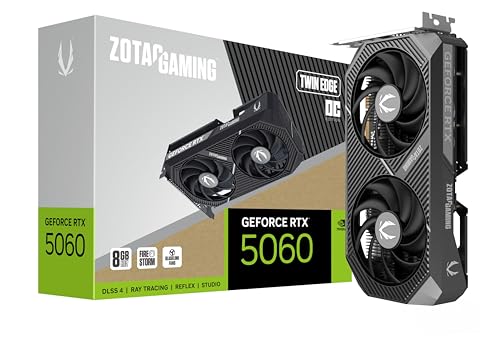
- The self-build route to a native 1440p machine: ZOTAC Gaming GeForce RTX 5060 Twin Edge OC, 8GB GDDR7 — the graphics card the Intel DDR4 build below is planned around — check price on Amazon
- The value pick of the guide, delivered assembled: Skytech Blaze4 Mini, Ryzen 7 5700 / RTX 4060 Ti — check the current price on Amazon
- The sole 16GB graphics card in the lineup — the pick for holding 1440p texture quality over years: CyberPowerPC Gamer Xtreme VR, i7-13700F / RTX 4060 Ti 16GB — check price on Amazon
- Newest-generation graphics in a PC that needs no assembly: Thermaltake LCGS Quartz i1460, i5-14400F / RTX 5060 — check the current price on Amazon
See 2 more Amazon options
- The route with 32GB of system memory: Skytech Archangel, i5-14400F / RTX 4060 / 32GB DDR5 / 2TB — check price on Amazon
- The AM5 route in two stages — platform first, graphics card when the market eases: AMD Ryzen 7 8700G with Radeon 780M graphics, the chip the sixth pick is built on — Check on Amazon
Read the full guide ↓
Disclosure: As an Amazon Associate, reviewstook.com earns from qualifying purchases. Links to Amazon on this page are affiliate links; they cost you nothing extra. Listing details such as price and availability change often, so check the current Amazon listing before you buy.
Two numbers hide inside every “1440p gaming PC” claim, and only one of them is earned by the hardware. The first is the resolution on your desk: a 1440p monitor lights up 2560×1440 pixels for whatever signal it receives. The second is the resolution the graphics card actually computes each frame — the render resolution. When a game is rendered at the full 2560×1440, every displayed pixel was worked out for that frame; that is native 1440p. When the game is rendered at 1920×1080 or lower and then stretched or reconstructed to fill the panel, the screen still reports 1440p while the card did a fraction of the work. Both pictures can look perfectly good, but they are not the same product, and this guide scores all six of its routes by the render number. The market those routes compete in makes the honesty necessary twice over. This is a difficult season for memory pricing: DDR5 kits have become one of the most expensive parts of a fresh build, and current-generation graphics cards are under the same pressure. Price a conventional AM5 build with a discrete card in that climate and it strains well past this guide’s budget. That is why, of the six defensible ways to spend $1,200 on a 1440p-capable machine this season, just two are self-builds whose parts lists genuinely close within the budget, four are prebuilts assembled from memory their makers bought before the spike — and the last of the six, a staged AM5 build, declines to claim 1440p rendering at all until a graphics card joins it down the road. For every linked pick below, check price on Amazon before you decide.
Rendered Pixels vs Displayed Pixels: The Distinction This Guide Runs On
Count the pixels and the gap stops being abstract. A 1440p frame holds roughly 3.7 million of them; a 1080p frame roughly 2.1 million. Rendering natively at 2560×1440 therefore demands about 78% more pixel work per frame than 1080p, before textures and lighting enter the bill. That arithmetic is why stepping from a 1080p machine to a true 1440p machine means buying hardware rather than flipping a setting — and why upscaling was invented: compute fewer pixels, then reconstruct a 1440p image from the smaller render. A good reconstruction is genuinely convincing, but it remains a reconstruction, so the truthful way to describe any card is to name the render resolution it can sustain and file upscaling under headroom.
DLSS lets us put numbers on that headroom for the NVIDIA cards below. With a 1440p output, its Quality mode renders at approximately 1707×960 internally and its Performance mode at approximately 1280×720: Quality is a modest step down from a native render, Performance is a 720p-class render presented at 1440p. Point the same modes at a 4K output and the internal renders become roughly 2560×1440 and 1920×1080 — which explains why “runs 4K with DLSS” so frequently translates to “renders at 1440p or 1080p while the monitor handles the rest.” Frame generation belongs in a different column altogether: it interpolates extra frames to make motion look smoother, leaving both the underlying renders and the input latency untouched, so generated frames count as polish and never as rendering. The one AMD graphics solution in the guide, the Radeon 780M inside the staged build, leans on FSR upscaling instead of DLSS; its working pattern is a render at 1080p or below, upscaled to the panel, and that is precisely how this guide scores it — not as native 1440p under any wording.
Here, then, is the verdict the reviews are not allowed to blur. Machines built around the RTX 5060 or the RTX 4060 Ti — self-built or prebuilt — render today’s games natively at 1440p on high settings, keeping DLSS in reserve, with an 8GB frame buffer as their shared ceiling in the heaviest titles; the single 16GB exception is called out where it appears. The RTX 4060 prebuilt renders native 1440p one step behind that group. The 8700G build renders no native 1440p whatsoever today: it is a machine that renders at 1080p class and upscales for a 1440p screen, purchased for the platform it will become a genuine 1440p machine on later. And 4K native rendering is beyond all six — at 3840×2160 each card here survives on aggressive upscaling, a display-side arrangement rather than a render.
In this guide
Quick Picks
Short on time? Each row names a buyer type and its 1440p truth.
| Buyer type | Pick | The 1440p truth | Link |
|---|---|---|---|
| Best build to order today | Intel DDR4 build: Core i5-12400F + RTX 5060 | Renders 1440p natively with DLSS 4 in reserve; the complete build, Windows included, is planned to fit the budget — check the current price on Amazon for the card before ordering the rest | Check on Amazon |
| Best value overall | Skytech Blaze4 Mini (prebuilt) | RTX 4060 Ti native-1440p performance in a prebuilt that has positioned itself as the value option in this tier — check price on Amazon | Check on Amazon |
| Best for keeping a 1440p machine for years | CyberPowerPC Gamer Xtreme VR (prebuilt) | The guide’s only 16GB graphics card — and texture capacity is the spec that ages slowest at 1440p — check the current price on Amazon and only buy when it sits within this budget | Check on Amazon |
| Best current-gen prebuilt | Thermaltake LCGS Quartz i1460 | An RTX 5060 rendering native 1440p behind a named 600W Gold power supply — check price on Amazon | Check on Amazon |
| Best 32GB route | Skytech Archangel (prebuilt) | Native 1440p from an RTX 4060, plus 32GB of DDR5 and 2TB of storage — memory a builder cannot currently assemble as easily at this tier — check the current price on Amazon | Check on Amazon |
| Best staged build | AM5 starter build: Ryzen 7 8700G | No native 1440p today — it renders at 1080p class and upscales to the panel, on a platform waiting for a real card — check price on Amazon | Check on Amazon |
How These Picks Were Chosen
Each route had to satisfy two budgets simultaneously. The money budget is $1,200 charged against the complete machine rather than a headline component. Both self-builds therefore account for the full machine in their reviews — CPU, board, RAM, storage, PSU, case, and a Windows 11 Home OEM license — on the principle that a build which only fits once the operating system is forgotten does not fit. Where a build’s fit depends on the graphics card’s live pricing, the review flags that dependency and names the component to time: check the current price on Amazon for that card first, and let it decide whether the rest of the list is worth ordering. A prebuilt’s live price, by contrast, already bundles the finished machine with Windows, which is exactly the edge they hold this year — so for each prebuilt, check price on Amazon and judge it against the same $1,200 ceiling as a complete machine.
The pixel budget is the second test, and enforcing it is this guide’s reason for existing. A route may claim 1440p only at the resolution its graphics hardware genuinely renders. Upscaling credit went solely where the documented hardware supplies it — DLSS across the RTX 5060, RTX 4060 Ti and RTX 4060 picks, FSR on the Radeon 780M pick — with internal render resolutions stated outright rather than hinted at. Frame generation was scored as motion smoothing, never as rendering, and no route received a native-4K claim, because no card here renders 4K.
None of these systems was benchmarked on our bench. Instead, every CPU, GPU, board, kit, drive and power supply named below corresponds to a real product in this class, and the reviews describe each pick’s position within its tier rather than printing prices that would go stale — for the live figure, check price on Amazon. Two more filters fixed the final six. Memory honesty eliminated or reframed any route whose fit quietly assumed a 32GB DDR5 kit at an unobtainable position in the market, which is why the standard AM5 discrete build shows up further down as an analysis instead of as a pick. Upgrade honesty required each pick’s next upgrade to be an ordinary standard part, and pushed the reviews to state openly where a platform dead-ends — because a $1,200 dead end disclosed up front is a fair deal, while the same dead end discovered later is a grievance.
The AM5 Math: The Right Platform at the Wrong Moment
Left to platform merits alone, our recommendation for a fresh build would be AMD’s AM5 socket, and nothing about the chips or boards argues otherwise. The Ryzen 5 7600X and boards such as the MSI PRO B650-P WiFi sit in the mainstream of the platform, where they belong. The trouble begins on the memory line. The 32GB of DDR5-6000 this platform is designed around has become one of the most expensive lines in the whole build, climbing well above its historical position in the tier, and storage has followed memory upward. Add up a default build in that climate — a Ryzen 5 7600-class processor, a B650 board, 32GB of DDR5, an RTX 5060, a 1TB SSD, a 750W Gold PSU, a case and a Windows license — and the all-in figure, license included, lands well outside this guide’s budget. Even repricing the card and memory more optimistically does not bring a conventional AM5 discrete build comfortably home.
That is why the textbook AM5 build appears here as a rain check with conditions attached, not as a pick. It would fit under $1,200 only when several favourable conditions coincide at once: a mainstream AM5 processor, a B650 board, a smaller DDR5-6000 kit and an RTX 5060 all sitting at the favourable end of their tiers at the same time — rounded out by a mainstream 1TB drive, the power supply, a case and a Windows license carried over from a retired PC instead of purchased. Anyone set on AM5 today without that scavenger hunt should look at pick six, which parks the same socket inside a working PC immediately and reserves the graphics slot for the day the market returns to earth. Everybody else is better served building on DDR4 or buying a prebuilt — the six routes that follow.
The 6 Best Gaming PC Builds for 1440p Gaming Under $1200
1. The Intel DDR4 Build — Core i5-12400F + RTX 5060
Who it suits: Builders happy to order the whole parts list this week, trading a mature platform for the most capable native-1440p card a from-scratch build can carry at this budget.
The list runs: Intel Core i5-12400F — check price on Amazon; an MSI PRO B760-P WiFi DDR4 motherboard; a 16GB (2×8GB) DDR4-3200 kit in Crucial form; the ZOTAC RTX 5060 Twin Edge OC — check the current price on Amazon, because this card is the line that decides the build; a 1TB Gen3 NVMe drive; an MSI MAG A750GL 750W Gold power supply; a Montech AIR 100 ARGB case; and a Windows 11 Home OEM license. The unlinked parts sit in the mainstream-to-value end of their tiers. The finished machine is planned to close within the budget, Windows and all, when the card is bought at a favourable point in its tier. When the card sits at the expensive end of its tier, the same machine stops fitting — the card is the single line worth timing. Check price on Amazon for the card first; at the favourable end of its range this build is a purchase, and at the expensive end it is a postponement.
For the 1440p shopper, the card’s rendering is the substance of the pick. An RTX 5060 renders current games natively at 2560×1440 on high settings, and DLSS then operates as true reserve capacity — Quality mode’s internal render, around 1707×960, sits close enough to native that plenty of players will engage it purely for frame-rate margin, whereas Performance mode’s internal render near 1280×720 is the honest emergency setting for the heaviest releases rather than a mode to plan around. DLSS 4’s multi frame generation can smooth high-refresh play in titles that support it; it neither cuts input latency nor alters what the card renders. The hard ceiling is the 8GB frame buffer, which is where the most demanding current games at native 1440p start asking for texture compromises. The supporting cast is chosen to outlast the platform: a six-core CPU with its boxed cooler, and a 750W ATX 3.1 power supply already carrying the native connector future cards expect — deliberately overspecified, since supply and case roll forward into a subsequent build untouched. Memory is the negotiated term: 16GB of DDR4 is what allows the total to close, the board offers four slots, and a larger DDR4 kit belongs in the build as a later capacity step rather than a day-one requirement.
- Current-generation native-1440p rendering, with DLSS Quality available as genuine headroom instead of a necessity.
- Each line of the build is a real, obtainable part in its tier — nothing rests on a memory kit at an unobtainable position in the market.
- The 750W Gold ATX 3.1 supply and airflow case transfer to a future build as-is, and four RAM slots turn the 32GB upgrade into a drop-in.
Honest limitation: LGA1700 on DDR4 is a closed platform — a future CPU upgrade drags a new board and new memory behind it — the 8GB buffer caps the heaviest 1440p titles, and the sub-$1,200 total with Windows holds only while the RTX 5060 is captured at a favourable point in its tier rather than at the expensive end — check the current price on Amazon before committing.
Choose it if building now from parts you selected yourself is the priority and one graphics card purchase can be timed. Skip it if day one must include 32GB on a current platform — this year that specification is sold as a prebuilt, further down this page.

2. Skytech Blaze4 Mini — The Prebuilt That Beats Every Parts List
Who it suits: Players who would rather be gaming at 1440p within the month than managing a project.
Begin with the concession. Inside the Blaze4 Mini, a Ryzen 7 5700 works alongside an RTX 4060 Ti 8GB, 16GB of DDR4, a 1TB SSD, a 650W Gold power supply and Windows 11 Home, and the machine positions itself as the value pick in this tier — check price on Amazon, because its appeal is strongest when its live price sits at the favourable end of its range. At that favourable end, it undercuts what the equivalent parts currently cost separately while also absorbing the Windows license a build must purchase on its own. On this guide’s central question it is stronger still: the 4060 Ti out-renders the build’s RTX 5060 at native 1440p, holding 2560×1440 on high settings with DLSS as reserve, so in an ordinary year this is the very machine a $1,200 parts budget was attempting to reproduce for less. Ownership stays builder-friendly, too, because Skytech assembles from standard components — RAM, storage and GPU can each be swapped for ordinary parts later.
What the pick demands in return is discipline about price. Away from the favourable end of its range, the case shrinks from value to mere convenience. Its 16GB of DDR4 on the AM4 platform mirrors the Intel build’s finished-platform bargain, and its 8GB frame buffer imposes the same native-1440p texture ceiling as every 8GB card in this guide. Treat the favourable end of its tier as the buying line and the upper end as the point of refusal — check the current price on Amazon.
- Native-1440p performance from an RTX 4060 Ti in a prebuilt positioned as the value option in its tier — check price on Amazon.
- Windows 11 Home is bundled, and the machine arrives assembled under a single warranty.
- Built from standard parts throughout, so memory, storage and graphics remain replaceable down the line.
Honest limitation: The value argument lives at the favourable end of its price range; toward the upper end of its tier the machine is only competitive, its AM4/DDR4 platform offers no CPU path worth taking, and the 8GB card shares this tier’s texture limits at native 1440p.
Choose it if it appears at the favourable end of its range — check price on Amazon — and maximum native-1440p gaming per dollar is the goal. Skip it if it is sitting at the upper end of its range while you enjoy building — that week, the Intel build above spends the same money better.

3. CyberPowerPC Gamer Xtreme VR (GXiVR8040A14) — The 16GB Card
Who it suits: Players who keep a library for years and mod it heavily — the audience for whom graphics memory, rather than headline frame rates, decides when a PC feels old.
Graphics memory is where this machine separates itself: while each other card in the guide stops at 8GB, its RTX 4060 Ti carries 16GB, teamed with a Core i7-13700F, 16GB of DDR5 and a 1TB NVMe drive — check the current price on Amazon, and treat this pick as budget-eligible only when that live price sits within this guide’s ceiling. Raw rendering speed matches the 8GB 4060 Ti exactly — at native 1440p both versions draw identical pixels today, so no extra frames are being bought. The purchase is texture headroom: the resource the heaviest current releases already force 8GB cards to ration at 1440p, and the rationing only tightens across a machine’s life. The configuration also indicts the wider market — here are 16GB of DDR5 system memory and a 16GB graphics card inside a complete PC in this tier, in the very season when a large DDR5 kit on its own has become one of the hardest lines for builders to afford.
The conditions attached are firm. Outside a favourable live price, the machine belongs to the tier above this guide’s budget, so it qualifies strictly when its live price sits within the ceiling — check price on Amazon before treating it as an option here. Its 16GB of system memory concedes ground to the 32GB Archangel below, and because CyberPowerPC’s component brands for items such as the power supply can differ between production runs, the specification on the live listing is the one to read before ordering. Secure it within budget, confirm the spec, and no graphics configuration under $1,200 will stay presentable at 1440p for longer.
- The lineup’s only 16GB graphics card — and at native 1440p, texture capacity is the specification that determines longevity.
- The Core i7-13700F is the most capable processor in the guide for gaming mixed with streaming or editing.
- A DDR5 platform, in contrast to the DDR4 machines surrounding it.
Honest limitation: It is price-dependent in the strictest sense — away from a favourable live price it belongs outside this budget — and its 16GB of system memory is the floor this guide tolerates rather than a luxury.
Choose it if the live price sits within budget — check the current price on Amazon — and preserving texture quality at native 1440p for years outranks everything else. Skip it if it is sitting above this tier — either wait for a better moment in its cycle or take the Blaze4 Mini instead.

4. Thermaltake LCGS Quartz i1460 — The Current-Generation Prebuilt
Who it suits: Buyers after the newest graphics architecture — DLSS 4 with multi frame generation — driving their 1440p games inside a finished PC, with no parts list to time.
Under the Quartz’s glass sit a Core i5-14400F, an RTX 5060 8GB, 16GB of DDR4-3600, a 1TB NVMe drive and a 600W 80 Plus Gold power supply, and the machine sits in the mainstream of this prebuilt tier — check price on Amazon. Regard it as the Intel build translated into a prebuilt: effectively the same processor class and the very same graphics card, assembled for you, Windows installed, one warranty to call. Its graphics account is consequently the same truthful one — native 1440p rendering on high settings, DLSS Quality supplying headroom from an internal render around 1707×960, Performance mode held back as the heavy-title fallback, frame generation contributing smoother motion without touching input latency, and the 8GB buffer marking the ceiling. The comparison with building cuts honestly in both directions: a well-timed self-build can undercut the Quartz’s total and equips itself with a beefier 750W supply, while the Quartz demands no timing whatsoever and is planned to sit inside this budget as a complete machine. Thermaltake’s LCGS machines use standard components, so the DDR4 platform’s ceiling is the familiar, deliberate trade: adequate for this PC’s service life, not a foundation for its successor.
Since the model rotates through promotional pricing, patience helps here: at the favourable end of its range the Quartz is the effortless route to this performance, while at the upper end the build reclaims the advantage — check the current price on Amazon. Score the card on its native rendering first, and the Quartz is simply the effortless way to purchase the exact 1440p performance the Intel build assembles manually.
- An RTX 5060 of the current generation, rendering native 1440p with DLSS 4, inside a machine requiring neither assembly nor timing.
- The 600W Gold power supply is actually specified — many prebuilts at this price leave that line blank.
- A complete, current-generation machine positioned inside this budget tier — check price on Amazon.
Honest limitation: The DDR4 platform is finished, the 8GB frame buffer sets this tier’s ceiling at 1440p, and at the upper end of its range the self-build above becomes the smarter purchase.
Choose it if current-generation 1440p features in a completed PC at a favourable point in its range sound right — check price on Amazon. Skip it if it is sitting at the upper end of its range while you are willing to build — or if 16GB of graphics memory outranks convenience, which points back to the CyberPowerPC.

5. Skytech Archangel — The 32GB Route
Who it suits: Multitaskers who stream with a browser, a game and capture software all open at once — or anyone who simply declines to buy a 16GB machine in 2026 and has seen what 32GB presently costs a builder.
The Archangel pairs a Core i5-14400F, an RTX 4060 8GB, 32GB of DDR5-5600, a 2TB SSD and a 650W Gold power supply, and it sits at the top of this guide’s budget tier — check the current price on Amazon, and treat it as eligible only when that live price sits at or under the ceiling. Linger on the memory line, because it is the story: 32GB of DDR5 is the very configuration the AM5 analysis above could not assemble beneath this budget at any truthful total. Skytech’s integrators are evidently drawing on memory purchased under earlier pricing, so the machine offers the one commodity builders currently cannot obtain as easily — capacity headroom — throwing in twice the storage of everything else here. The graphics card concedes a step of raw pace to the 4060 Ti and 5060 picks: the RTX 4060 renders native 1440p on high settings across most current games with DLSS in reserve, yet in the heaviest titles it resorts to upscaling earlier than the cards ranked above it. For the multitasking buyer, surrendering a little rendering pace for double the system memory and storage is the correctly shaped trade.
Ceiling discipline governs the pick: this is a machine that belongs at the very top of the budget tier, so the Archangel qualifies only when its live price sits at or under the ceiling — check price on Amazon — and buyers should expect it to hug the line rather than clear it comfortably. Its LGA1700 platform is as finished as the guide’s other Intel machines. Evaluated as a capacity purchase it stands without a rival here; evaluated purely on frames per dollar, the Blaze4 Mini defeats it clearly.
- 32GB of DDR5 alongside a 2TB drive — the pair of capacities no builder can presently afford to assemble as easily.
- At the favourable end of its range, it turns into an outright bargain whenever the deal cycle swings — check the current price on Amazon.
- The 650W Gold supply leaves genuine room for a graphics card upgrade later.
Honest limitation: It consumes the entire budget ceiling, its RTX 4060 is the slowest discrete renderer among these prebuilts, and the Intel platform behind it is a finished one.
Choose it if memory and storage capacity are your real constraint and native 1440p a step behind the leaders is acceptable. Skip it if the question is purely frames per dollar — the Blaze4 Mini answers that one.

6. The AM5 Starter Build — Ryzen 7 8700G, Graphics Card Later
Who it suits: Builders with patience, who want AMD’s current platform beneath a working, game-capable PC today and can state exactly what its graphics will and will not render until a card is added.
The list runs: Ryzen 7 8700G — check price on Amazon; an MSI PRO B650-P WiFi — check the current price on Amazon; 16GB (2×8GB) of DDR5-6000; a Crucial P310 1TB Gen4 NVMe; the same MSI MAG A750GL 750W Gold supply; the Montech AIR 100 ARGB case; and a Windows 11 Home OEM license. The unlinked parts sit in the mainstream-to-value end of their tiers. The build is planned to close beneath the budget with Windows counted — the sole AM5 machine in this guide that closes beneath the budget at positions actually obtainable today, achieved precisely because the graphics card line is left for later.
That staging must be described without varnish, since this is the one pick that renders no 1440p at all. The 8700G’s Radeon 780M is the strongest integrated graphics AMD offers, and its truthful working resolution is 1080p: genuinely playable across esports, older catalog and lighter current titles at trimmed settings. Wired to a 1440p monitor, the sensible pattern is rendering at 1080p or below while FSR upscales to the panel — a 1440p picture on the display, built from a 1080p-class render, which this guide records as exactly that and nothing more. What the build actually sells is everything surrounding the graphics: eight full-strength Zen 4 cores that will not hold back the mid-range card added later, a B650 board on a socket with years of processors ahead, and an empty PCIe slot backed by 750W, reducing the eventual card to a ten-minute installation. The fine print deserves equal clarity. Boxed cooling has shifted under buyers: the listing advertises a Wraith Spire, yet a 2026 buyer report documents current boxes (part number 100-100001236SBX) containing the smaller Wraith Stealth — sufficient for a 65W chip, but verify which cooler your box holds. Because integrated graphics feed on system memory bandwidth, the dual-channel kit is mandatory rather than preferable, and 16GB divided between system and graphics runs tight. Finally, staging costs more across the machine’s life: adding a discrete card later pushes the lifetime total well past every prebuilt above. The premium purchases the platform itself — which, for the right buyer, is the whole reason to build.
- A genuine AM5 foundation — B650 board, DDR5, live socket — inside a working PC within this budget, Windows included.
- Eight Zen 4 cores that remain relevant long after the graphics card lands.
- An empty PCIe slot and a 750W supply turn the future GPU into a ten-minute drop-in — and turn this into a native-1440p machine on that day, not a day sooner.
Honest limitation: Until a graphics card arrives, this is a machine that renders at 1080p class and upscales for your 1440p panel — by this guide’s definition it is not yet a 1440p gaming PC — and the staged route’s lifetime cost overtakes every prebuilt in the guide.
Choose it if the platform is the real purchase, the GPU can wait a season, and honest 1080p rendering in the interim beats a finished platform. Skip it if native 1440p is wanted this month — take the Blaze4 Mini or the CyberPowerPC and enjoy it immediately.

Comparison Table
| Route | Type | Graphics | What it honestly renders at 1440p | Memory / Storage | Price | Link |
|---|---|---|---|---|---|---|
| Intel DDR4 build (i5-12400F) | Self-build | RTX 5060 8GB | Native 1440p on high settings; DLSS Quality (~1707×960 render) as reserve | 16GB DDR4 / 1TB | Check component prices on Amazon; planned to fit the budget, Windows included, when the card is at a favourable point in its tier | See review 1 |
| Skytech Blaze4 Mini | Prebuilt | RTX 4060 Ti 8GB | Native 1440p on high settings; the strongest renderer per dollar here when its live price is favourable | 16GB DDR4 / 1TB | Check price on Amazon | Check on Amazon |
| CyberPowerPC GXiVR8040A14 | Prebuilt | RTX 4060 Ti 16GB | Native 1440p on high settings, with texture headroom no 8GB card here can match | 16GB DDR5 / 1TB | Check the current price on Amazon; buy only when it sits within this budget | Check on Amazon |
| Thermaltake LCGS Quartz i1460 | Prebuilt | RTX 5060 8GB | Native 1440p on high settings; DLSS 4 headroom on top | 16GB DDR4 / 1TB | Check price on Amazon | Check on Amazon |
| Skytech Archangel | Prebuilt | RTX 4060 8GB | Native 1440p across most games; leans on upscaling earlier in the heaviest titles | 32GB DDR5 / 2TB | Check the current price on Amazon; buy only at or under this budget’s ceiling | Check on Amazon |
| AM5 starter build (Ryzen 7 8700G) | Self-build | Radeon 780M integrated | Renders nothing at 1440p — 1080p-class rendering, FSR-upscaled for the panel | 16GB DDR5 / 1TB | Check component prices on Amazon; planned to fit the budget, Windows included | See review 6 |
Pairing a Monitor With a $1,200 1440p Build
The monitor is where the render-versus-display distinction stops being theory. The natural partner for every discrete-card route here is a 27-inch 1440p panel: at that size, 2560×1440 gives a sharpness step over 1080p that you can see from a normal seating distance, without the pixel count of 4K that none of these cards can feed natively. A 32-inch 1440p panel spreads the same pixels thinner and is a legitimate comfort choice, but it adds no rendering demand and no sharpness.
Refresh rate deserves the same honesty as resolution. These cards render native 1440p at high settings; in lighter and esports titles they will push well past 60 frames per second, and in the heaviest releases they will sit nearer it, with DLSS Quality buying margin. A 144Hz-class 1440p monitor is therefore the honest pairing. A 240Hz panel is a forward-looking purchase whose top end this GPU class will rarely touch at native 1440p outside esports titles. And set the display’s output to 2560×1440 and its refresh rate to the panel’s real maximum in your operating system on day one, because a high-refresh monitor left at a default 60Hz is the most common way buyers pay for headroom they never see.
What not to buy for these machines is a 4K monitor as a gaming display. DLSS Performance at a 4K output is a 1920×1080 internal render, and Quality is a 2560×1440 one — so a 4K panel turns your native-1440p machine into an upscaling machine while costing more than the 1440p panel it actually matches. As a gaming purchase for this GPU class, it is the one pairing this guide refuses.
How to Choose a Gaming PC Build for 1440p Under $1200
- Score every claim by its render resolution, never its display resolution. A machine “for 1440p” ought to compute 2560×1440 per frame. When a listing’s 1440p narrative depends on upscaling a render from 1080p or lower, you are looking at a 1080p machine with a capable scaler — occasionally still worth the money, never worth the mislabel.
- Add up the complete machine before falling for a component. CPU, board, RAM, storage, PSU, case and the Windows license all belong in the sum. The current season punishes shortcuts on the memory line in particular: with 32GB DDR5 kits positioned far above their historical place in the tier, a parts list priced off last year’s RAM describes a computer that cannot be bought.
- Learn the upscaling figures before leaning on them. At 1440p output, DLSS Quality renders internally near 1707×960 — near enough to native to serve as honest headroom. DLSS Performance renders near 1280×720 and belongs in the fallback column for the heaviest titles. Frame generation contributes neither pixels nor responsiveness; it only smooths motion.
- Treat graphics memory as a lifespan specification. The guide’s lone 16GB card will not top today’s frame-rate tables; it will still be holding texture settings in 2028. On any 8GB card, plan the settings compromise in the heaviest 1440p releases from the outset.
- Pick the platform with both eyes open. AM5 is the only socket here with a future, and reaching it this year costs either a staged build or a deal hunt. The DDR4 platforms — Intel’s B760, AMD’s AM4 — are finished, yet finished is not the same as broken: they are precisely how this guide’s working native-1440p machines slipped under the budget.
- Overspec the power supply and never the opposite. The 750W Gold unit specified in both builds survives into the next build, and already carries the connectors current cards expect. A bargain 500W unit is this budget’s textbook false economy.
- Get a prebuilt quote before mocking prebuilts. Integrators are selling memory stockpiled before the spike. Once a prebuilt carrying your target card sits beneath your own parts sum on a live check — as the Blaze4 Mini can, before Windows is even counted — the rational move is to buy the machine. Check price on Amazon for both routes before deciding.
- Trade on the budget line rather than hope. Each price-dependent pick in this guide states its condition in the same way: it belongs in this guide only when its live price sits within the $1,200 ceiling. Above that line, wait; below it, buy without relitigating. For linked picks, check the current price on Amazon to apply the test.
- Retain every box until the second week has passed. Infant failures — a dead memory slot, a whining power supply, an unexpected cooler in the carton — surface within days, and a return without packaging is a worse errand.
Common Buying Mistakes
- Accepting “1440p gaming PC” on a listing as a promise about rendering. The panel’s resolution is assured; the render resolution is the part requiring verification — and the part this guide grades.
- Booking DLSS Performance or frame generation as native performance. At 1440p output the former renders at a 720p-class internal resolution, while the latter interpolates frames without lowering input latency. Neither converts an upscaling machine into a native one.
- Matching this GPU class to a 4K gaming monitor. Even DLSS Quality at 4K output is internally a 2560×1440 render, so the 4K panel’s premium buys you an upscaling machine at a higher price.
- Budgeting a 32GB DDR5 kit at its historical position in the tier. Mainstream kits sit far above that historical position today; a plan drawn at the old figure begins life well short.
- Omitting the Windows license from a build’s total and then comparing against prebuilts that bundle one. The asymmetry matters, and at this budget it settles comparisons.
- Paying the expensive end of the RTX 5060’s range inside a build whose whole argument rests on the card sitting at a favourable point in its tier. At the expensive end the self-build’s arithmetic gives way and the prebuilts win cleanly — check price on Amazon for the card before ordering the rest of the list.
- Committing an 8GB card to a five-year 1440p plan without confronting its memory ceiling — or committing the opposite error, buying the 16GB machine well above this budget for headroom that only justifies itself when its live price sits within the ceiling.
- Saving a few dollars with a single DDR5 stick in the APU build. Integrated graphics live on system memory bandwidth, so single-channel memory throttles the very graphics the chip was bought for — and the upscaling workflow that pick relies on.
- Trusting that the cooler named in a listing is the cooler in the carton. The 8700G’s advertised Wraith Spire has been documented arriving as a Wraith Stealth — inspect the box on delivery, while a return is still painless.
- Leaving a high-refresh monitor idling at its 60Hz default. The panel’s true refresh rate must be selected in the operating system; until then, the headroom remains theoretical.
Final Recommendation
- The default buy for most readers: Skytech Blaze4 Mini — the most native-1440p rendering per dollar on this page when its live price is favourable; check price on Amazon.
- For builders ordering this week: The Intel DDR4 build, provided the graphics card is captured at a favourable point in its tier.
- For 1440p players keeping a machine for years: CyberPowerPC GXiVR8040A14, strictly when its live price sits within this budget; check the current price on Amazon.
- For current-generation features with zero assembly: Thermaltake LCGS Quartz i1460; check price on Amazon.
- For capacity before everything: Skytech Archangel, at or beneath this budget’s ceiling; check the current price on Amazon.
- For platform before everything: The AM5 starter build around the Ryzen 7 8700G — purchased in full knowledge that it renders at 1080p until the card arrives.
Two picks head this budget. The Blaze4 Mini leads because RTX 4060 Ti native-1440p performance in a value-positioned prebuilt is a combination no current parts list can easily answer, and the Intel DDR4 build follows because it is the one from-scratch machine whose every line is obtainable in its tier this week; between them they frame the season’s truth — prebuilts are winning on price, builds on control. The same six routes assessed without the 1440p lens live in the parent guide to the Best Gaming PC Build Under $1200; a smaller budget points to Best Gaming PC Build Under $800, and room to stretch changes the picture at Best Gaming PC Build Under $1500. So: sum every line, hold each price-dependent pick to the budget line, grade each 1440p claim by the render resolution underneath it, and check the live listing before ordering.
Frequently Asked Questions
What is the difference between rendering at 1440p and displaying at 1440p?
Display resolution is a property of the monitor: a 1440p panel invariably shows 2560×1440. Render resolution is a property of the workload: it is the size of the frame the graphics card actually computes. Upscaling connects the two — a game computed at 1920×1080, or at DLSS Performance’s internal render of roughly 1280×720, can be reconstructed and shown at 1440p, often attractively — yet the card performed 1080p-class or 720p-class work. This guide awards 1440p credit exclusively for rendering.
Which of these six routes actually render games natively at 1440p?
Five of them. The Intel DDR4 build and the Thermaltake Quartz (RTX 5060), the Blaze4 Mini and the CyberPowerPC (RTX 4060 Ti with 8GB and 16GB respectively) and the Archangel (RTX 4060) each render today’s games natively at 2560×1440 on high settings, keeping upscaling as reserve. The AM5 starter build is the exception: its Radeon 780M computes at 1080p class and upscales for the panel, which is why it is presented here as a platform purchase rather than a 1440p machine.
Can any of these machines handle 4K gaming?
Natively, none — and this guide will not pretend otherwise. Fed a 4K output, DLSS Quality on these cards renders internally at roughly 2560×1440 and Performance at roughly 1920×1080: the display announces 4K while the card renders 1440p or 1080p. As a way to play on a 4K television already in the room, that is acceptable. As a justification for buying a 4K monitor for this GPU class, it fails, and no $1,200 route renders 3840×2160 natively.
Is DLSS Quality at 1440p basically native?
Nearly, and labeled honestly it is a legitimate tool: Quality mode’s internal render of roughly 1707×960 is about two-thirds of native along each axis, reconstructed from there — the basis on which this guide treats it as true headroom for the RTX picks. Performance mode, internally near 1280×720, makes a materially smaller claim and should be budgeted as the fallback for the heaviest titles rather than the plan. Frame generation is a third thing again: smoother apparent motion, with rendering and input latency both unchanged.
Is 16GB of graphics memory worth it at this budget?
At a live price that sits within this budget, yes — check the current price on Amazon for the CyberPowerPC — for the 1440p player intending to keep the machine for years. Its 16GB RTX 4060 Ti matches the 8GB card’s rendering speed today while preserving texture quality as games expand, and texture memory is the first ceiling 8GB cards strike at native 1440p. At a live price well above this budget, no: the premium then purchases headroom using money that, in a normal market, would fund a faster class of card outright. The product cannot be separated from where its live price sits against the ceiling.
Can you really build a gaming PC under $1,200 in 2026?
You can — just not the machine you would have specified two years ago. Builds on DDR4 platforms close beneath the budget with obtainable parts, and an AM5 build closes provided it begins life around an APU. The orthodox AM5 recipe of 32GB DDR5 plus a discrete card sits well outside the budget in the current climate, because memory and graphics cards have climbed while processors and boards held fair. Rather than ask you to accept that conclusion, this guide explains the reasoning route by route.
Why is RAM so expensive right now, and when will it normalize?
Manufacturers have redirected output toward AI data-center demand, and the consequence is that 32GB DDR5-6000 kits sit far above their long-run historical position in the tier, with forecasts through late 2026 anticipating further increases instead of relief. No honest source can date the normalization. The workable responses are the ones structuring this guide — build on DDR4, open an AM5 build with 16GB and an APU, or buy a prebuilt whose maker stocked memory earlier.
Should I wait for prices to fall instead of buying anything here?
For the AM5 discrete build in particular, waiting is a respectable strategy, and its reopening conditions are the ones described above: DDR5 kits returning to a more ordinary position in their tier alongside an RTX 5060 at a favourable point in its range. But forecasts through the end of 2026 point upward rather than down, and the prebuilt bargains here exist because integrators are working through older stock — once that stock turns over, their prices will chase the same market. A machine needed this season is better bought at a live price that fits the budget in front of you — check price on Amazon and apply the ceiling honestly.
- Best Gaming PC Build Under $1200
- Best Gaming PC Build Under $800
- Best Gaming PC Build Under $1500
- Best Gaming PC Build For Beginners Under $1200
- Best Gaming PC Build For Streaming Under $1200
- Best Gaming PC Build For Small Spaces Under $1200
- Best Gaming PC Under $1200
- Best Prebuilt Gaming PC Under $1200
- Best Budget Gaming PC Under $1200
- Best 1440p Gaming PC Under $1200


