Disclosure: As an Amazon Associate, reviewstook.com earns from qualifying purchases. Links to Amazon on this page are affiliate links; they cost you nothing extra.
Canon makes everything from cheap inkjets to office lasers and refillable MegaTank printers. The right model depends on what you print: documents, photos or both.
This guide covers six Canon printers. It is built from published specifications and listings, not our own testing, so confirm details on each product page.
New to printers? Start with our guide to the best printers for home use and how we pick printers.
By the Reviewstook Editorial Team. Last updated: October 31, 2026.

In this guide
Quick Picks
| Printer | Type | Best for |
|---|---|---|
| Canon PIXMA TR4720 | Color inkjet all-in-one | Light, occasional printing in a small space |
| Canon MegaTank G3290 | MegaTank all-in-one | Everyday printing with refillable tanks |
| Canon PIXMA G620 | MegaTank photo all-in-one | Photo printing with refillable tanks |
| Canon PIXMA TS9521Ca | Color inkjet all-in-one | Photos and documents with auto duplex |
| Canon imageCLASS MF465dw II | Monochrome laser all-in-one | Office-grade black-and-white multifunction |
| Canon Color imageCLASS MF665Cdw | Color laser all-in-one | Color laser multifunction for offices |
6 Best Canon Printers for Home and Office

Top pickBest for a dorm, spare room or apartment
1. Canon PIXMA TR4720
A small, plain color inkjet all-in-one that prints, copies and scans.
Good for: A dorm, spare room or apartment. Strengths: Compact body and a simple feature set. Weaknesses: Small cartridges mean it is not meant for heavy use. Skip it if you print daily.


Best for families and students who print a lot
2. Canon MegaTank G3290
A wireless MegaTank all-in-one from Canon, a newer model in the line that includes the G3270.
Good for: Families and students who print a lot. Strengths: Refillable tanks tend to lower the cost per page. Weaknesses: Bigger than a cartridge printer; check the feeder and duplex support on the product page. Skip it if you print very little.


Best for photo hobbyists who print often and want low ink cost
3. Canon PIXMA G620
A wireless MegaTank all-in-one aimed at photo printing, with print, copy and scan.
Good for: Photo hobbyists who print often and want low ink cost. Strengths: Refillable tanks with a photo focus. Weaknesses: Pricey up front, and check the ink set it uses. Skip it if you print mostly black-and-white documents.


Best for households that print photos and documents
4. Canon PIXMA TS9521Ca
A wireless home all-in-one inkjet that prints, copies and scans, with auto duplex printing and a 4.3-inch touchscreen, per the listing.
Good for: Households that print photos and documents. Strengths: Automatic two-sided printing, a touchscreen and a five-ink system, per the listing. Weaknesses: The listing mentions no document feeder, and cartridge costs add up with volume. Skip it if you need a feeder for scanning stacks or the lowest ink cost.

Best for small offices with steady document volume
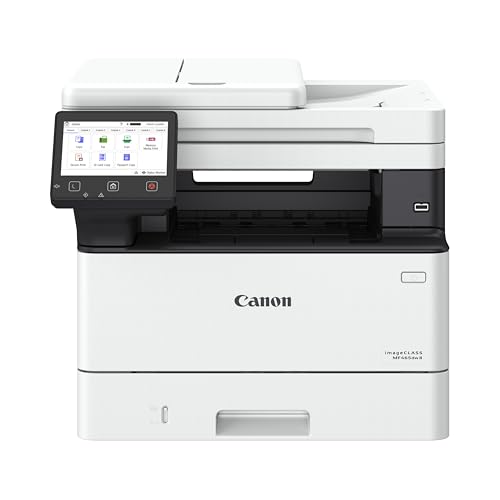
5. Canon imageCLASS MF465dw II
A monochrome laser all-in-one from Canon’s office line that prints, copies, scans and faxes, with wireless and duplex.
Good for: Small offices with steady document volume. Strengths: Built for heavier workloads than home models. Weaknesses: Larger and pricier than home printers. Skip it if you have light needs and little space.
Best for offices that scan and print in color
6. Canon Color imageCLASS MF665Cdw
A wireless color laser all-in-one with two-sided printing, from Canon’s office line.
Good for: Offices that scan and print in color. Strengths: Laser color output and duplex printing. Weaknesses: Toner cost and size. Skip it if you print mostly text in black.

Understanding Canon’s Printer Families
PIXMA
PIXMA is Canon’s home inkjet range, from basic to photo-oriented. See best Canon PIXMA printers.
MegaTank
MegaTank printers use refillable tanks and a low cost per page. See best Canon MegaTank printers.
imageCLASS
imageCLASS is the laser range for offices, in monochrome and color.
Check the ink or toner policy
Some models restrict third-party supplies. Read the product page.
Best Picks by Category
These labels summarize the picks below by role and price tier. They are not hands-on test results.
- Top rated: Canon PIXMA TR4720 — a budget-tier pick; check price on Amazon.
- Most reviewed: Canon PIXMA G620 — a mid-range pick; check price on Amazon.
- Best value: Canon PIXMA TR4720 — a budget-tier pick; check price on Amazon.
- Lowest price: Canon PIXMA TR4720 — a budget-tier pick; check price on Amazon.
- Premium option: Canon PIXMA G620 — a mid-range pick; check price on Amazon.
Price, Rating and Review Comparison
The table sorts the picks by price tier for a quick side-by-side comparison. Prices change often, so confirm the current price on Amazon.
| Product | Price | Rating | Ratings | Price tier |
|---|---|---|---|---|
| Canon PIXMA TR4720 | Check price on Amazon | — | — | Budget |
| Canon imageCLASS MF465dw II | Check price on Amazon | — | — | Budget |
| Canon Color imageCLASS MF665Cdw | Check price on Amazon | — | — | Budget |
| Canon PIXMA TS9521Ca | Check price on Amazon | — | — | Mid-range |
| Canon MegaTank G3290 | Check price on Amazon | — | — | Mid-range |
| Canon PIXMA G620 | Check price on Amazon | — | — | Mid-range |
How Much Feedback Backs Each Rating
Price tier gives a quick sense of where each pick sits in the range. Here is how the tiers look for each pick.
- Canon PIXMA TR4720: Budget tier — check price on Amazon.
- Canon MegaTank G3290: Mid-range tier — check price on Amazon.
- Canon PIXMA G620: Mid-range tier — check price on Amazon.
- Canon PIXMA TS9521Ca: Mid-range tier — check price on Amazon.
- Canon imageCLASS MF465dw II: Budget tier — check price on Amazon.
- Canon Color imageCLASS MF665Cdw: Budget tier — check price on Amazon.
How to Choose
Pick the family
PIXMA is Canon’s consumer inkjet line. MegaTank models use refillable tanks. imageCLASS is the office laser line.
Check running cost
Compare the price of ink or toner and its page yield. MegaTank and lasers usually cost less per page than small cartridges.
Match the features
A feeder, duplex printing and fax are on some models but not all. Check the product page.
How We Chose These Products
We start from products sold on Amazon with a full product name and clear specifications, and we skip results that show only a brand name or a vague title. We then read the listing and any manufacturer information for each one and note the features that matter for printers: print technology, running costs, connectivity and size. We do not run our own lab tests, and this guide contains no hands-on measurements. Use it to build a shortlist, then check current prices, dimensions and return terms on the Amazon page before you buy.
Buying Guide: What to Check Before You Choose
Brand ecosystems
Some brands use subscriptions or restrict third-party ink. Check the terms and the cost of consumables.
Ink tank versus cartridge
Ink tank printers use refillable tanks and usually have a lower cost per page, with a higher purchase price. Cartridge printers are cheaper up front but ink can cost more over time. Check the page yield and the cost of refills.
Laser printers
Laser printers print text quickly and sharply and do not clog like inkjets. Color lasers cost more. Check the toner cost and the print speed.
Quick Reference: Which Pick Suits Whom
- Canon PIXMA TR4720: suits A dorm, spare room or apartment
- Canon MegaTank G3290: suits families and students who print a lot
- Canon PIXMA G620: suits photo hobbyists who print often and want low ink cost
- Canon PIXMA TS9521Ca: suits households that print photos and documents
- Canon imageCLASS MF465dw II: suits small offices with steady document volume
- Canon Color imageCLASS MF665Cdw: suits offices that scan and print in color
Common Mistakes to Avoid
- Judging a printer by its price without considering ink cost.
- Ignoring the starter cartridge size.
- Forgetting the paper types needed.
- Assuming all-in-ones are always better.
- Skipping the return window.
Setup and Care
- Install the maker’s app or driver.
- Connect to Wi-Fi.
- Run an alignment and nozzle check.
- Print regularly to avoid clogs.
What to Check Before You Buy
- Check ink cost and cartridge types.
- Look for mobile app support.
- Compare photo printing quality.
- Check wireless setup.
- Look at the scan features.
Estimating Your Real Cost Per Page
The price on the printer box is a down payment, not the full cost. Over a few years, ink or toner usually costs more than the machine. A simple calculation gives you a much better comparison than the sticker price. Divide the price of a replacement ink set or toner cartridge by the page yield the maker states, and you get a rough cost per page. Do the same for the color and black supplies separately, since many inkjets charge very different amounts for each.
Two cautions apply. First, the maker’s page yield is measured under standard conditions, usually with a low coverage pattern. Photos, charts and dense graphics use far more ink than a letter. Second, the starter cartridges in the box are often partly filled, so the first replacement comes sooner than the yield suggests.
How the three technologies compare
- Cartridge inkjets have the lowest purchase price and the highest cost per page. They suit people who print a few pages a week and want a color copier and scanner on the desk.
- Refillable tank inkjets cost more up front, but a bottle of ink typically prints thousands of pages. They reward steady use, and they also tolerate long idle stretches better than small cartridges do, though no inkjet likes to sit unused for months.
- Laser printers use toner powder fused to the page with heat. Text comes out crisp and fast, and toner does not dry out the way liquid ink can. Color lasers cost more and take up more room.
If you print fewer than about a hundred pages a month, the low entry cost of a cartridge model may beat the savings from a tank. If you print several hundred, the math tilts toward a tank or a laser. These are rules of thumb, not guarantees, so run the numbers with the real supply prices when you shop.
Matching a Canon to Your Household or Office
Instead of picking by model name, picture the person standing at the printer and what they hand it.
The student or renter with a small desk
Printing is occasional: a boarding pass, a lease, a worksheet. Space matters more than speed. A compact all-in-one with a flatbed scanner covers everything, and low volume means small cartridges are fine. The main thing to watch is whether the machine tolerates sitting idle, since dried nozzles are the usual complaint with infrequent use. Printing a page every week or two keeps ink moving.
The family with homework, forms and school projects
Volume is irregular but real, and color matters for posters and reports. A refillable tank model fits this pattern, because bursts of heavy printing do not trigger expensive cartridge purchases. Look for a sheet feeder that holds enough paper to survive a project night, and check whether automatic two-sided printing is included, since duplex saves paper on long documents.
The hobbyist who prints photos
Photo work depends on the ink set and the paper. More ink colors can widen the range of tones a printer can reproduce, and a dedicated photo or gray ink can help with fine gradations. Pair the printer with the paper types it supports, and check borderless printing sizes if you want prints without white margins.
The home business or small office
Here the questions change. How many pages per month will the machine handle comfortably? Does it have an automatic document feeder for scanning stacks of contracts and receipts? Is there a network port as well as Wi-Fi, so several workstations can share it reliably? Office-line machines are built with higher monthly duty cycles in mind and come with larger paper trays, which means fewer refills of the paper cassette. Black-and-white laser suits text-heavy work, while a color laser makes sense if clients see your printed materials.
Features Worth Paying For, and a Few That Are Not
Spec sheets stack up features, but only some change daily life.
| Feature | Why it matters | Who benefits most |
|---|---|---|
| Automatic duplex printing | Prints on both sides without flipping pages by hand | Anyone printing multi-page documents |
| Automatic document feeder | Scans or copies multiple pages unattended | Home offices, paperwork-heavy households |
| Ethernet port | Stable network sharing without Wi-Fi dropouts | Offices with several users |
| Touchscreen | Easier setup and menu navigation | Shared family printers |
| Large paper tray | Fewer reloads | Heavy printing |
| Fax | Needed only for certain businesses and forms | Medical, legal and some small offices |
A feature you will use weekly is worth paying for. A feature you will use once a year is worth less than it looks. Fax is a good example: if no one you deal with requires it, it is dead weight. A flatbed scanner, on the other hand, earns its keep even for people who rarely scan, because the first time a form needs a signature copy, you will want it.
Mobile printing
Printing from a phone usually works through the maker’s app, a built-in system print service or a standard such as AirPrint. Check which of these the exact model supports and whether it works over your home network without cables. Setup is smoother when the phone and printer share the same Wi-Fi network, and trouble with printers dropping off the network is among the most common support issues.
Paper, Media and Photo Printing Basics
The paper you choose affects the result as much as the printer. Plain copy paper works for documents but absorbs ink readily, so color can look flatter. Coated or photo paper holds ink at the surface, which sharpens detail and deepens color. Each paper has a recommended side and a weight range, and the printer’s settings should match the paper type so it lays down the right amount of ink.
A few practical points follow from that:
- Check the maximum paper weight the feeder handles before buying cardstock or thick photo stock.
- Look at the rear tray versus front cassette design if you plan to print on envelopes or labels, since a straight paper path handles thick media more gracefully.
- Store paper flat and sealed. Humidity curls sheets and causes jams.
- Let fresh prints dry before stacking them, especially with dye-based inks.
Pigment inks tend to resist smearing and water on plain paper, while dye inks often look brighter on glossy media. Which ink type a model uses is stated in its specifications, and it is worth reading if both documents and photos matter to you.
Maintenance Habits That Prevent Most Problems
Most printer failures trace back to a few causes: dried ink, paper jams and network trouble. Prevention is cheap.
- Print something regularly. A small color test page every week or two keeps inkjet nozzles active. Turn the printer off with its own power button, not at the wall, so the print head can park and cap itself.
- Run cleaning cycles sparingly. Head cleaning uses ink. Do it when you see streaks or missing colors, not as a ritual.
- Keep the path clean. Dust and paper fibers build up around rollers. Wipe them gently with a lint-free cloth if the maker says it is safe.
- Handle tank ink carefully. Fill each tank with its matching color, squeeze bottles gently and keep the printer level while filling. Ink stains are stubborn.
- Update firmware and drivers. Updates can fix connection problems, but read what changes, particularly if third-party supplies matter to you.
When a jam happens, power down, open the access panel and pull the sheet gently in the direction of the paper path. Tearing a page leaves scraps that cause the next jam.
Questions to Settle Before You Check Out
- What do replacement supplies cost, and how many pages does each one yield?
- Do I need a feeder for scanning, or only a flatbed?
- Will the printer sit within range of my router, or do I need a wired connection?
- How much desk or shelf space is available, including room to open the scanner lid and paper tray?
- Is the return window long enough to test setup, print quality and noise in my own home?
Answer those honestly and the choice between Canon’s home inkjets, refillable tank models and office lasers usually becomes clear without needing a long comparison chart.
Reading Canon’s Range Like an Insider
Canon’s catalogue confuses buyers because the same technology appears at several sizes and the names do not obviously rank themselves. The guide above introduced the families — PIXMA for home inkjets, MegaTank for refillable tanks, imageCLASS for laser machines aimed at offices — but the practical skill is reading a specific model against your workload. Start with the monthly rhythm of your printing rather than its peaks. Canon’s home inkjets are built for households that print weekly in modest amounts and value scanning, copying and photos alongside documents. The MegaTank models keep that same home character and change only the ink economics, which is why a G-series machine feels familiar to anyone who has used a PIXMA: the difference is in the running cost, not in the personality. The imageCLASS machines are a different species — faster, more businesslike, built for shared use and longer documents — and they reward buyers who print in volume and punish nobody, because a home that prints little simply will not use what it paid for.
Within PIXMA, the dividing lines are the document feeder, the paper handling and the photo ambition. The PIXMA TR4720 includes the feeder and stays compact, which is why it keeps appearing in home-office conversations. The PIXMA TS9521Ca stretches toward larger paper and creative work. The PIXMA G620 is the photo specialist of the range, with an ink set and paper handling aimed at people who judge a printer by its prints rather than its pages. None of these is a lesser machine; each is the same idea tuned for a different desk.
A second insider habit: check what a model does with its second paper path. Many Canon home printers offer a rear feed or a second tray route for thicker media, envelopes and photo paper. Owners who discover this path use their printer for cards, labels and invitations without drama. Owners who never find it force everything through the main tray and conclude the printer dislikes thick paper. The manual’s paper chapter is the least-read and most useful part of the documentation Canon ships.
Matching the Six Picks to Real Households
For the small home office that prints documents, scans contracts and copies the occasional form, the contest is between the PIXMA TR4720 and the imageCLASS MF465dw II, and it is decided by volume and pace. The TR4720 handles the mixed, moderate workload of a freelancer or a household administrator gracefully and adds color whenever it is wanted. The MF465dw II is the choice when documents are long, deadlines are real and several people share the machine: monochrome laser speed and stamina, with scanning and copying built for paperwork rather than photographs. Choosing the laser for a light workload buys speed you will rarely use; choosing the inkjet for a heavy one buys a queue you will meet daily.
For the family that prints schoolwork, worksheets and color handouts in quantity, the MegaTank G3290 is the Canon that changes household behaviour. Refillable tanks mean the printer stops being a rationed resource. Children print the extra draft; parents print the full reading packet; nobody does mental arithmetic before pressing print. That freedom is the product, and it is why tank machines are judged on a different scale from cartridge machines even when their print quality is comparable.
For the photographer and the crafter, the choice narrows to the PIXMA G620 and the TS9521Ca, and it turns on what leaves the printer. The G620 is for photographs as the end product — prints to frame, to give and to keep — with running costs that let you print generously while you learn what good looks like. The TS9521Ca is for paper as a material: larger sheets, card, craft projects and layouts where the size itself is the point. A household can happily contain both kinds of printing, but one machine must be chosen first, and it should be the one serving the work done weekly rather than the work imagined annually.
The Color imageCLASS MF665Cdw serves the small office that prints color documents — proposals, charts, branded paperwork — at a pace and volume where an inkjet would feel fragile. Its natural owner is a business that happens to be at home, not a home that occasionally does business. Naming that distinction honestly is the fastest route to the right Canon.
Getting the Best From a Canon Day to Day
Canon inkjets reward correct paper settings more visibly than most. The driver offers distinct modes for plain paper, photo papers and specialty media, and the printer changes how it lays down ink for each. A photograph printed with the plain-paper setting on photo paper looks washed out because the machine genuinely printed it differently. Building the habit of choosing the paper type every time you change the paper is the single largest quality improvement available to a Canon owner, and it costs nothing.
For documents, learn the two quality levels you will actually use: a draft level for your own working copies and a standard level for anything leaving the house. Switching deliberately between them, rather than living permanently in one, is how owners keep both costs and quality where they belong. On the MegaTank models, keep an eye on the tank windows as part of passing the machine — a glance a week — so a refill is a calm errand instead of an interruption.
On the imageCLASS machines, the habits are office habits: keep the paper path clean, replace toner when the machine’s warnings turn persistent rather than at the first polite notice, and use the built-in reports when something seems off, because a laser printer that can describe its own page counts and error history makes troubleshooting a conversation instead of a guessing game. Across all six picks, keep firmware current through Canon’s tools; Canon uses updates to refine network behaviour and compatibility, which for a wireless household printer is most of its lived experience.
Canon Maintenance Without the Folklore
Printer advice online is full of rituals, some useful and some inherited nonsense. For a Canon inkjet, the practices that genuinely matter are few. Print something in color occasionally, because the color nozzles clog from disuse exactly as the black ones do, and a household that prints only text for months can find its first color job streaked. Use the built-in nozzle check before the cleaning cycle, not after: the check pattern tells you whether cleaning is needed at all and which colors are affected, and it uses a fraction of the ink a blind cleaning consumes. Run one cleaning, re-check, and stop there; repeated deep cleaning in a single session wastes ink and rarely fixes what one cycle could not.
Switch the printer off with its own button when it will sit for a while, so the heads park and cap themselves. Keep it out of direct sun and away from radiators, because heat ages ink in the machine as surely as time does. For MegaTank owners, keep the ink bottles stored upright and sealed, and fill tanks before they run completely dry — air in the lines is the one tank problem that turns a refill from a two-minute job into a troubleshooting session.
For imageCLASS owners, the parallel list is shorter: keep spare toner bought ahead, shake a fading cartridge gently once as a short-term measure and no more, and treat repeated jams as information. A laser that jams in the same place is describing a worn roller or a paper problem, and the manual’s jam map will tell you which. Canon’s support pages for each model carry diagrams worth more than a dozen forum threads, because they describe your exact machine rather than a cousin of it.
More Questions Canon Buyers Ask
How long will a Canon inkjet last in a normal home?
Years, if it is used the way it was designed to be used: regularly, on suitable paper, with its maintenance left mostly to its own routines. The machines that die young usually die of neglect — months idle, then a desperate cleaning binge — or of being fed a volume they were never built for. Matching the family to the workload, as this guide does, is the real longevity feature.
Is it worth paying for the MegaTank over a cartridge PIXMA?
Only if your volume makes it so. The tank premium buys ink economics, and ink economics only matter across many pages. A light printer of occasional pages may never print enough for the saving to arrive, and for that household the simpler cartridge machine is the honest recommendation. A busy family crosses the line quickly and keeps saving for the life of the machine.
Can a Canon all-in-one work well as the only scanner in the house?
Yes, for the documents household life actually produces: forms, letters, receipts, school papers and photographs for sharing. The feeder-equipped models handle multi-page documents gracefully, and the flatbed handles books, fragile originals and anything thick. Dedicated scanners exist for archives measured in boxes; for the drawer of paperwork every home accumulates, these machines are enough.
What should I check first when a Canon prints blank pages?
Confirm the obvious in order: the file actually contains content at the selected pages, the ink or toner is present, any protective tape on a newly installed cartridge was removed, and the paper type setting is sane. Then print the machine’s own test or status page. If the printer can print its own page, the engine is fine and the problem lives in the connection or the document — a far easier fault to fix.
Do Canon printers work well on a Mac and with iPhones?
The home models in this list are chosen with Apple households in mind, and Canon supports printing and scanning from macOS and iOS through standard paths and its own apps. As with any wireless printer, the network is the variable: printer and device on the same home network, firmware reasonably current, and the experience is the uneventful one Apple users expect.
Worked Examples: Three Canon Purchases Done Well
A freelance bookkeeper working from a spare room prints invoices, statements and client letters daily, scans signed documents weekly, and occasionally copies multi-page records. The tempting purchase is a small home inkjet, because the desk is small. The correct purchase is the imageCLASS MF465dw II, because the workload is office work wearing home clothes: long documents, constant scanning, and a professional cost to any day the printer misbehaves. Six months in, the difference shows not in print quality — both machines print a fine invoice — but in pace, stamina and the absence of supply errands. The lesson generalises: buy for the work’s rhythm, not the room’s size.
A family with three school-age children prints worksheets nightly, project material weekly and photographs whenever a grandparent’s birthday approaches. Their previous cartridge printer made printing feel rationed. The MegaTank G3290 changed the household’s relationship with the machine: drafts are printed freely, mistakes are reprinted without a sigh, and the photographs happen on proper photo paper because the ink economics no longer punish experimentation. The printer did not get better; the household’s behaviour did, which is the real measure of a family purchase.
A retired couple prints travel documents, the occasional letter, photographs of grandchildren and a community newsletter four times a year. Their volume is low but their standards are not, and the PIXMA G620 suits them precisely: photographs are the point of the machine, running costs forgive their irregular schedule of bursts and quiet months, and the all-in-one scanner handles the paperwork of life. The same couple with an office laser would have owned a faster machine and enjoyed it less. Canon’s range rewards this kind of honesty about your own life, because the catalogue contains a machine tuned for each of these households and the wrongness of a mismatch is paid monthly, in small frustrations, for years.
Setup and First-Week Checks for a New Canon
Unbox onto a clear surface and remove every piece of transit material the quick-start sheet lists, including the ones inside the scanner lid and paper paths that are easy to miss; a surprising share of first-day errors are a forgotten strip of tape describing itself as a jam. Load plain paper, run the alignment or setup routine the machine requests, and print the test page before connecting anything else, so you know the engine works before the network enters the story.
Connect to Wi-Fi next, update the firmware when the machine offers it, and then print one real job from each device that will use the printer. Scan one document to the computer and one to a phone if that is a path you will use. Copy a two-page document if your model has a feeder. These five small jobs cover nearly everything the printer will be asked to do in its first year, and doing them in the first week means any weakness is found while returning or exchanging is still painless.
Finish by setting your defaults deliberately: the quality level for everyday documents, two-sided printing on or off according to your paper habits, and the paper type matching what is actually loaded. Photograph or note the ink or toner the machine uses and keep that note with your household records, because the moment you need it is a shop, a low cartridge and no memory of the model number. A Canon set up this way disappears into the household’s routines, which is the highest praise any printer in this guide can earn: it stops being a device you manage and becomes a service your home simply has.
Paper Handling Habits That Make Any Canon Behave Better
Most paper problems blamed on printers are storage problems wearing a disguise. Paper left open in a humid room absorbs moisture unevenly, and the resulting curl is what feed rollers struggle with, what makes pages emerge wavy, and what turns a reliable machine into an intermittent one. Keep paper in its wrapper until it is loaded, load it flat without forcing the guides, and set the guides snugly against the stack rather than loosely near it. A stack loaded carelessly — fanned poorly, mixed sizes, a few sheets of card hiding among plain paper — will jam eventually, and the jam will be recorded in the owner’s mind as the printer’s fault.
Mixed-media households should make the rear feed or specialty path a habit rather than a discovery. Envelopes, labels and card all feed more honestly through the path designed for them, and Canon prints the media limits for each path in the manual in plain language. Respecting those limits is not caution for its own sake: a sheet too thick for a path does not merely fail, it can stress the feed mechanism that every other job depends on. The five minutes spent reading the paper chapter when the printer arrives are repaid every time a special job emerges perfectly on the first attempt.
Finally, treat output with the same respect as input. Collect prints promptly, because pages left in the exit area can be pulled back into conversations with the next job’s paper path on some designs, and because a printer buried under its own output looks — and gradually becomes — neglected. Clean the scanner glass with a soft cloth when scans show a persistent line, since a line on every scan at the same position is dirt on the glass, faithfully reproduced. These are small acts of ownership, and across a range as varied as Canon’s they are the common thread between the machines owners praise for years and the identical machines other owners curse. The printer is half the system. The habits are the other half, and they are entirely yours to choose.
When a Canon Is the Wrong Answer
Honesty about a range includes its edges. A household that prints almost entirely black-and-white documents in serious volume, with no interest in photographs, may find even Canon’s own imageCLASS machines more than it needs and a simpler monochrome laser from any maker the rational buy — though the MF465dw II in this list is precisely Canon’s answer to that household, and it earns its place by adding scanning and copying stamina that basic lasers lack. A household that prints a handful of pages a month should question owning any of these machines and consider whether a library or a print service covers its real needs more cheaply. And a buyer whose heart is set on a specific paper size or craft workflow should start from that requirement and check each Canon against it, rather than falling for a family name. The picks above cover the great majority of home and small-office lives, and they cover them well. The purpose of naming the exceptions is not to undermine the list but to complete it: a recommendation you can test against your own circumstances is worth more than one that claims to fit everyone, and a Canon bought with open eyes is a Canon that stays bought, used and appreciated for the whole of its working life.
Frequently Asked Questions
Are Canon printers good for photos?
PIXMA models are popular for photos, especially photo-focused ones. For everyday documents, almost any Canon will do.
What is a MegaTank printer?
Canon’s name for a refillable ink tank printer, which tends to lower the cost per page.
Do Canon printers block third-party ink?
Some models do. Check the cartridge policy of the exact model before buying.
Which is cheaper to run, inkjet or laser?
Laser is usually cheaper per page for text, and ink tank printers are cheaper for color and photos.
How do I connect my printer to Wi-Fi?
Use the printer’s setup menu or the maker’s app. See our Wi-Fi guide.
Do I need genuine ink?
Not always, but some printers restrict third-party ink. Check the terms.
Does Canon support AirPrint?
Many models do.
Is Canon good for photos?
Many Canon inkjets are aimed at photos.
How much does it cost to run a Canon inkjet versus a MegaTank?
Divide the price of a replacement ink set by its stated page yield to estimate cost per page. Cartridge models cost less to buy but more per page, while MegaTank bottles usually print far more pages. The savings grow with higher printing volume.
Can a Canon printer print without a computer?
Many models print from a phone or through wireless features and the maker’s app, and some handle copying on their own. Support differs by model, so check the specifications for mobile printing, scanning and copying before buying, especially if you do not own a computer.
Why does my inkjet printer streak after sitting unused?
Ink can dry in the print head nozzles when a printer sits idle. Running the maker’s cleaning cycle or nozzle check usually helps, though each cycle uses ink. Printing a small page every week or two helps prevent clogs.
Do I need an automatic document feeder on my printer?
Only if you scan or copy multi-page documents regularly. A flatbed scanner handles single pages and books but is slow for stacks. Home offices and paperwork-heavy households benefit most, while occasional users can skip it and save money.
Is a laser printer better than an inkjet for home use?
It depends on what you print. Lasers print text quickly and sharply and handle long idle periods well, while inkjets handle photos and color graphics at lower purchase prices. If you mostly print black documents, a monochrome laser is hard to beat.
Bottom Line
For light use, the Canon PIXMA TR4720 is the compact pick. For heavy use, the Canon MegaTank G3290 lowers ink cost, and the imageCLASS MF465dw II suits a black-and-white office.
Related Reading
- Types of Printers Explained: Inkjet, Laser, Ink Tank and More
- 7 Best Wireless Printers for Home Use
- 5 Best 11×17 Tabloid Printers for Home and Office
- 6 Best AirPrint Printers for iPhone, iPad and Mac
- 7 Best All-in-One Printers for Scanning and Printing
More Printer Guides
- Best Printers for Home Use
- Best Epson Printers for Home and Office
- Best HP DeskJet Printers for Home Use
- Best HP LaserJet Printers for Home and Small Office
- Best HP OfficeJet Pro Printers for Home Offices
- Best HP Printers for Home and Office

