Where to buy
Check the latest price, availability and delivery on Amazon. Orders are placed on Amazon. We may earn a commission from qualifying purchases.
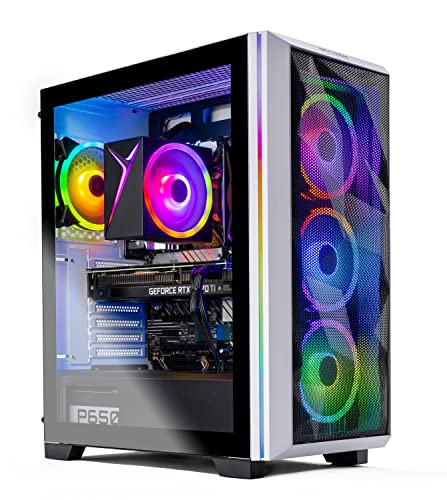
- Best overall for 1440p in a one-tower room: Skytech Chronos Gaming PC, Ryzen 7 5700X, RTX 4070 Ti 12GB — Check on Amazon
- HOENGAGER Gaming PC, Intel Core i7-12700F, RTX 4070 12GB, 32GB DDR4 — Check on Amazon
- CYBERPOWERPC Gamer Xtreme VR, Intel Core i7-13700F, RTX 4060 Ti 16GB — Check on Amazon
- CYBERPOWERPC Gamer Master, AMD Ryzen 7 8700F, RTX 4060 Ti 8GB — Check on Amazon
See 2 more Amazon options
- iBUYPOWER Scale, AMD Ryzen 5 7600, RTX 4060 Ti 8GB — Check on Amazon
- Skytech Shiva Gaming PC, AMD Ryzen 5 5600X, RTX 4060 Ti 8GB, White — Check on Amazon
Read the full guide ↓
Disclosure: As an Amazon Associate, reviewstook.com earns from qualifying purchases. Links to Amazon on this page are affiliate links; they cost you nothing extra. Listing details such as price and availability change often, so check the current Amazon listing before you buy.
Start with the sentence most guides for this search avoid: at $1,200, there is no such thing as a small 1440p gaming PC — not in the tower market this budget buys from. The six machines below are the strongest 1440p systems this money can reach — the same six our main $1,200 guide recommends — and every one is a tower: furniture that will occupy a floor corner, a stretch of desk, or the space beside a desk for years. If your room genuinely cannot take a tower, the honest answer lives in a different set of guides, linked below — this one will not pretend a tower is something it is not. But if yours is the far more common situation — a small bedroom, a shared room, a compact desk setup — where a tower can fit if it is the right tower, placed the right way, then “small spaces” stops being a product category and becomes what it really is: a placement problem. That is the problem this guide grades.
So the six systems here are judged twice. First, on the terms that make them worth $1,200 at all: the graphics card ladder that decides 1440p — an RTX 4070 Ti at the top, an RTX 4070 below it, and the RTX 4060 Ti in its 16GB and 8GB forms beneath that — because a small-space guide that quietly downgraded your GPU would be solving the wrong problem. Second, on the terms a small room actually imposes: how much floor or desk each tower claims, which faces need open air, how much heat each graphics tier pours into a room you may also sleep in, how the noise carries at ear distance, and whether the case is glass that wants a protected corner or mesh that breathes in a tight one. One discipline runs through all of it: the verified research documented no exact case dimensions for any of these six listings, so this guide prints none — take measurements from the live listing’s specification block and check them against your taped-out spot. Prices get the same treatment: check the live price on Amazon for each system before you buy, as listings change often.
In this guide
Quick Picks
Each row below names a small-room situation and the system that suits it, with a link to the listing.
| Your situation | Pick | Why it stands out | Link |
|---|---|---|---|
| One tower, maximum 1440p, floor corner free | Skytech Chronos, Ryzen 7 5700X, RTX 4070 Ti 12GB | The strongest GPU in this guide — check price on Amazon — and the warmest, so it earns a ventilated floor spot | Check on Amazon |
| A glass showcase in a protected corner | HOENGAGER Gaming PC, i7-12700F, RTX 4070 12GB | 4070-class graphics, 32GB of RAM and a tempered-glass case that wants to be seen — and kept out of the walkway | Check on Amazon |
| A small, warm room that heats up fast | CYBERPOWERPC Gamer Xtreme VR, i7-13700F, RTX 4060 Ti 16GB | The 4060 Ti is the cooler-running GPU class here, and the 16GB version is the one that ages slowest | Check on Amazon |
| A current platform with money left for the room | CYBERPOWERPC Gamer Master, Ryzen 7 8700F, RTX 4060 Ti 8GB | 8-core AM5 and DDR5 — check price on Amazon, with headroom left for the desk and monitor | Check on Amazon |
| A tight corner where the case must breathe | iBUYPOWER Scale, Ryzen 5 7600, RTX 4060 Ti 8GB | A mesh-front case — check price on Amazon — and keyboard and mouse in the box — the fewest extra boxes on a small desk | Check on Amazon |
| A white setup in a shared or visible space | Skytech Shiva, Ryzen 5 5600X, RTX 4060 Ti 8GB | The only white tower here — it reads as furniture in a light room — check price on Amazon and check for any live coupon at checkout | Check on Amazon |
How These Picks Were Chosen
The budget was applied as a ceiling: every system below is a real Amazon listing positioned within the $1,200 budget tier in the United States. Check the live price on Amazon before you buy, as listings change often, and treat the live listing as the referee.
We did not use these PCs ourselves. We read the maker listings and specification pages and compared the parts that decide 1440p performance, in the order they decide it — a machine that fails as a 1440p PC fails this search no matter where it fits. First and overwhelmingly, the graphics card: its tier, and its VRAM. An RTX 4070 Ti and an RTX 4060 Ti 8GB can sit in near-identical cases at near-identical prices, and they are not near-identical products: the 4070 Ti was designed for 1440p at high refresh, the 4070 a step below it, the 4060 Ti 16GB matching the 8GB card’s speed while doubling its memory for texture-heavy games, and the 4060 Ti 8GB earning its place through DLSS and sensible settings. Second, the CPU platform: a current socket with DDR5 and an upgrade future, versus the mature AM4 and DDR4 platforms, which perform well today and end where they are. Third, the supporting parts: 16GB of RAM as a floor, 32GB as a genuine advantage, a 1TB NVMe SSD as the standard, a power supply stated where the listing states it.
On top of that sat the placement grading, this variant’s whole reason to exist. The verified research documented the form-factor facts used below: all six systems are towers; the HOENGAGER wears a tempered-glass case and a 240mm liquid cooler; the Scale wears a mesh case with a tower air cooler; the Shiva is finished in white; the Chronos and Shiva publish their power supply wattages (750W and 600W Gold) while the HOENGAGER does not publish one in the verified material. What the research did not document is any pick’s exact dimensions or volume — so none is printed. Placement is graded on class and architecture instead: which GPU tier’s heat the room must absorb, which faces need open air, whether a glass panel is in harm’s way. Noise is treated the same honest way: no listing here publishes a verified noise figure, so none is quoted; the guide reasons structurally, from cooling type, GPU tier and distance — the one variable you fully control. The main guide’s honesty filter applies unchanged: several listings note the graphics card brand may vary, stated rather than smoothed over, and listing frame-rate claims are treated as marketing.
The Honest Part: None of These Is Small
One short section of plain speech first, because this search contains a hopeful assumption. Genuinely small machines do exist at $1,200: small form factor cases at a fraction of a tower’s footprint, and book-sized mini PCs that hide behind a monitor. What they cannot do at this budget is carry the graphics cards in this guide. A 4070 Ti or 4070 at $1,200 lives in a tower because that is where the power supply, cooling and price fit; the small-machine guides at this budget — Best Mini Gaming PC Under $1200, Best Small Form Factor Gaming PC Under $1200, Best Compact Gaming PC Under $1200 and Best Mini PC Under $1200 — make the opposite trade, giving up GPU tiers to win the space outright. Neither trade is a trick; the mistake is only expecting both halves at once.
So here is the decision rule. If floor and desk space are hard constraints — if there is physically no tower-sized rectangle in your room with open air around it — stop here and take the small-machine guides; a tower bought anyway will spend its life suffocating in a cabinet or colonising the one surface you needed. If space is a preference and performance the hard requirement — you have a floor corner or a desk end, and you need the most 1440p $1,200 buys, arranged as considerately as possible — read on. The six towers below are graded to make that arrangement as painless as warm air allows.
The 6 Best 1440p Gaming PCs Under $1,200 for Small Spaces
Skytech Chronos Gaming PC — Ryzen 7 5700X, RTX 4070 Ti 12GB
Who it suits: The small-room buyer with exactly one tower-sized spot — most naturally a ventilated floor corner — who wants it to hold the most 1440p performance this budget can contain, and will buy at the right moment rather than on a random day.
The graphics card is the whole argument, so start there. The RTX 4070 Ti, with 12GB of GDDR6X memory, was built for 2560×1440 at high refresh rates, with headroom above it: where the other picks ask which settings to trim, this one asks how much of a 165Hz or 180Hz monitor you would like to use, with DLSS and frame generation on top. Around it sits a balanced tower build — an AMD Ryzen 7 5700X (8-core, 3.4 GHz, boost to 4.6 GHz), a 1TB NVMe SSD, 16GB of DDR4 at 3200, a stated 750W Gold power supply, 802.11ac Wi-Fi and Windows 11 Home, under model number ST-CHRONOS-0638-W-AM. Skytech notes the exact graphics card brand may vary.
For a small room, grade it as what it is: the performance ceiling of this guide, paid for in heat as well as money. The 4070 Ti is the highest tier here, and a tower running it under load is the warmest of the six over a long session in a small, closed room. That argues for a floor placement with clearance on the faces that breathe — and against the desk, where its footprint and warm exhaust land in your personal space. Check the live price on Amazon before you decide, as this listing’s price moves a lot. When the live price fits this budget tier it is, by a wide margin, the best 1440p purchase in this guide; when it sits well above the tier, it does not belong here at all. The advice is mechanical: if the live price fits the budget, consider it promptly; if it has drifted well above, do not stretch — take a steadier pick below and let an alert watch this one. The platform caveat completes the honesty: AM4 and DDR4 mean the CPU upgrade path ends with this generation — fair if you replace whole systems, a reason to choose the AM5 picks below if you upgrade piece by piece.
- RTX 4070 Ti 12GB — a full tier above everything else here; true high-refresh 1440p with headroom.
- 750W Gold PSU, stated in the listing — proper support for the card, with upgrade room.
- Check price on Amazon: the single best buy in this guide when the live price fits the budget.
Honest limitation: Its price moves a lot, so the live listing needs checking before you buy — and as the warmest-running pick it is the worst candidate here for a sealed cabinet or a desk in a hot room; the AM4/DDR4 platform also has no CPU upgrade path beyond its generation.
Choose it if the live price on Amazon fits the budget, you have a ventilated floor spot, and raw 1440p performance is your priority. Skip it if the live price has drifted well above the ceiling, your only spot is an enclosed one, or you specifically want a current platform to upgrade over time.

HOENGAGER Gaming PC — Intel Core i7-12700F, RTX 4070 12GB, 32GB DDR4
Who it suits: The buyer whose small room is also a considered room — a setup looked at as much as used — who wants 4070-class 1440p performance with the multitasking headroom most prebuilts at this price skip: streamers, creators, and anyone who games with a second screen of open work.
One tier down from the Chronos, and still squarely a 1440p machine: the GeForce RTX 4070 carries the same 12GB of VRAM as the Ti above it, and at 2560×1440 it is a high-settings card in its own right — the step between the two shows up at the highest refresh rates and heaviest ray tracing, not in whether games run well. Around the card, the specification is this guide’s most generous: Intel’s Core i7-12700F, a 12-core chip (eight performance plus four efficiency cores); 32GB of DDR4 at 3200MHz, double what most systems here ship with, and a real difference if you stream, edit video, or play simulation titles that eat RAM; a 1TB M.2 PCIe SSD; a 240mm AIO liquid cooler; 802.11ac Wi-Fi and Bluetooth; HDMI and DisplayPort outputs; Windows 11 Pro rather than Home — all of it in a tempered-glass RGB case.
That case is this pick’s placement story. Tempered glass is a display decision: this tower wants a visible spot — and in a small room, visible spots are usually traffic spots, exactly where a glass panel should not live. Place it as you would glass furniture: a protected corner, out of chair swing and passing knees, never floor-level in a walkway. The liquid cooler adds a second note: a radiator exhales heat through one face of the case, so that face needs open air — do not back it into a corner. HOENGAGER is a smaller integrator than the big US builders: its listing does not publish a power supply wattage in the verified material, and support runs through the seller rather than a large domestic network. Check the live price on Amazon for this listing: it belongs on this $1,200 shortlist when the live price sits at or under the ceiling, which RTX 4070 systems with 32GB periodically do, and should be passed over when the live price is above it. The platform is a mature one — DDR4, a 12th-generation Intel socket — so judge it as a finished machine to be used as built.
- RTX 4070 12GB — genuine high-settings 1440p, one tier below the Chronos and well above the 4060 Ti systems.
- 32GB of DDR4 RAM — double the guide’s typical fit, and the right call for streaming and creator work.
- Tempered-glass case and 240mm AIO liquid cooling — the showcase build of the six, with Windows 11 Pro included.
Honest limitation: A smaller seller with a thinner listing — no PSU wattage published in the verified material, so it qualifies only when the live listing is at or under $1,200; the glass case also rules out walkway and floor-traffic placement, which some small rooms cannot spare.
Choose it if you want 4070 performance plus 32GB of RAM behind glass, in a spot the room’s traffic does not cross. Skip it if you prefer a large integrator’s support network, the live listing is priced above the ceiling, or the only available spot is an exposed one.

CYBERPOWERPC Gamer Xtreme VR — Intel Core i7-13700F, RTX 4060 Ti 16GB (GXiVR8040A14)
Who it suits: The long-term planner in the small, warm room — who knows VRAM is where mid-range cards age first, would rather have 16GB of it than a slightly faster card with half the memory, and wants the coolest-running GPU class in the guide while they are at it.
This is the most interesting specification decision in the guide. The RTX 4060 Ti comes in two forms that share a name and a core but not a future: the 8GB version reviewed three times below, and this 16GB version. At today’s settings their raw speed is close; the difference appears where 1440p buyers live — texture quality. At 2560×1440, ultra texture packs and poorly optimised console ports can push past 8GB of VRAM, and when a card runs out the symptoms are ugly — stutter, pop-in, textures that resolve late or never. Sixteen gigabytes does not make this card faster; it makes it age slower, often the smarter purchase for a buyer keeping a PC four or five years. CyberPowerPC pairs it with an Intel Core i7-13700F — a 16-core Raptor Lake processor (eight performance plus eight efficiency cores) that is frankly more CPU than a 4060 Ti needs for gaming, a pleasant direction for an imbalance to run, leaving the system strong for streaming, editing and a future card upgrade. The rest is current-platform equipment: 16GB of DDR5, a 1TB PCIe Gen4 NVMe SSD, Wi-Fi, and Windows 11 Home, under model number GXiVR8040A14.
The small-room grade follows from the card class. The 4060 Ti systems are the cooler-running half of this guide — less graphics hardware simply hands the room less heat than the 4070-class pair above — which makes this the pick for the bedroom that already runs warm. It is still a tower, needing open air on its breathing faces; cooler is a relative term, not a licence to enclose it. Check the live price on Amazon before you decide, as this listing moves across the budget ceiling in both directions: when the live price fits the $1,200 budget it is the thinking buyer’s pick of the 4060 Ti systems; above that, the 8GB systems below deliver most of the same frame rates for less. One specification to verify on the live listing before ordering is the memory configuration: this class of system has shipped with a single 16GB stick before, which leaves performance on the table until a second is added. CyberPowerPC’s scale is the other quiet advantage — a large US integrator with a real warranty operation.
- RTX 4060 Ti 16GB — double the VRAM of the 8GB card; the texture-headroom pick for a long ownership run.
- The cooler-running GPU class in this guide — the kindest of the six to a small, warm room.
- Core i7-13700F, 16 cores — CPU power well beyond the GPU’s needs, ready for a future card upgrade.
Honest limitation: The price straddles the ceiling, so check the live price on Amazon — and the 16GB card is no faster than the 8GB today; you are paying for longevity, not frames. The RAM stick configuration also needs confirming on the live listing.
Choose it if you keep PCs for years, play texture-heavy AAA games at 1440p, your room runs warm, and you catch it at or under $1,200. Skip it if it is sitting above the budget when you shop and you upgrade often — the cheaper 8GB systems will serve a shorter ownership run just as well.

CYBERPOWERPC Gamer Master — AMD Ryzen 7 8700F, RTX 4060 Ti 8GB (GMA2900A)
Who it suits: Buyers who want the newest AMD platform in this guide — an 8-core AM5 processor and DDR5 — with a proven 1440p card, at a price that has been seen comfortably under budget, leaving real money for the small room around the PC.
If the Gamer Xtreme above is the VRAM pick, this is the platform pick. The Ryzen 7 8700F is an 8-core AM5 processor at 4.1 GHz on AMD’s current socket — the motherboard accepts newer Ryzen generations, and its DDR5 is the current standard. For a buyer who thinks in upgrade steps — a faster CPU in three years, a larger memory kit, a next-generation card in the same case — this is the foundation that supports the plan, and in a small room that matters more than usual: upgrading in place means the one tower spot you measured is never disturbed. The graphics card is the RTX 4060 Ti in its 8GB form: at 1440p a high-settings card in most games with DLSS doing honest work in the heaviest ones, and an esports card without qualification, where Counter-Strike 2, Valorant and Apex Legends run at the frame rates a 144Hz-plus monitor exists for. The supporting specification is standard done properly: 16GB of DDR5, a 1TB PCIe Gen4 NVMe SSD, Wi-Fi, Windows 11 Home, on the AMD B650 chipset under model number GMA2900A.
Placement-wise it is the uncomplicated tower of the six: a standard case in the cooler-running 4060 Ti class, with no demands beyond the universal ones — a measured spot, open air on the breathing faces, exhaust into the room. Check the live price on Amazon and check who the seller is. Sold by Amazon, it is one of the best-balanced buys here; sold by a marketplace seller at a markup, it is not. Check who the seller is as carefully as the price. The 8GB caveat applies in full — at 1440p some games will ask texture settings down a notch, the honest cost of the 8GB card. In exchange you get the newest platform in the guide and, when Amazon is the seller, headroom left over for the desk, monitor arm and chair clearance the setup still needs.
- Ryzen 7 8700F on AM5 with DDR5 — the most upgradeable foundation in this guide, upgraded in place in the same spot.
- RTX 4060 Ti 8GB — high-settings 1440p with DLSS, and esports frame rates without compromise.
- Check price on Amazon — real headroom under the ceiling when Amazon is the seller.
Honest limitation: 8GB of VRAM is the card’s ceiling at 1440p textures, and marketplace sellers have listed this system far above its Amazon prices — seller and price both need checking.
Choose it if you want a current AMD platform to upgrade over time and find it with Amazon as the seller and the live price within budget. Skip it if texture-maxed AAA gaming is your main use — that is the 16GB system above — or the only listings are marked-up third-party ones.

iBUYPOWER Scale — AMD Ryzen 5 7600, RTX 4060 Ti 8GB (SCA5N46T01)
Who it suits: The buyer with a tight corner and no patience for deal-hunting — who wants the pick whose price simply is under budget, whose case breathes in a confined spot, and whose box contains the fewest extras to find homes for.
After two picks whose prices swing across the ceiling, the Scale is a relief. Check the live price on Amazon — this pick has generally sat inside the budget, even on its steadier days. The machine is a sensible, current-platform 1440p system: an AMD Ryzen 5 7600, a 6-core AM5 processor boosting to 5.1 GHz, well matched to its graphics card; the RTX 4060 Ti 8GB, delivering the same high-settings-with-DLSS 1440p and high-refresh esports performance described above; a 1TB NVMe SSD; Wi-Fi; Windows 11 Home; and a gaming keyboard and mouse in the box, under model number SCA5N46T01. The Ryzen 7600 also carries a quiet bonus the F-suffixed chips here lack: integrated graphics, which makes troubleshooting a GPU problem someday a five-minute job instead of a blind one.
The case is why this pick leads the small-spaces grading among the standard towers. The Scale case is a mesh design with RGB fans and a tower air cooler behind it — and mesh is a placement feature, not a styling one: a case drawing air through a perforated front face tolerates a tight corner best, because its intake is a broad surface. Mesh still needs open air in front of it, and the checklist below applies in full — but if your one spot is a corner with walls on two sides, this is the case architecture that complains least. The included keyboard and mouse are the second small-room virtue: every peripheral in the box is one less purchase and one less cable decision, and headroom stays unspent for the second memory stick. Which brings up the honest limitation, printed in iBUYPOWER’s own title to the company’s credit: the 16GB of DDR5-5200 is a single stick, listed as 16×1 — single-channel until a second is added, which costs real performance in CPU-sensitive games. The fix is neither expensive nor difficult: a second matching stick is one of the cheapest upgrades in PC gaming, takes minutes to fit, and this system’s positioning leaves headroom to do it. Budget for that stick from day one: the Scale becomes a balanced AM5 system with dual-channel 32GB, at a steadier positioning in this guide.
- Mesh-front case — the breathing pick of the six, and the most forgiving of a tight corner.
- Check price on Amazon — a steadier pick whose pricing has generally stayed inside the budget.
- Keyboard and mouse included, and enough budget headroom left over to fix its one flaw.
Honest limitation: The 16GB of RAM ships as a single stick (16×1), so it runs single-channel until you add a second stick — plan that cheap upgrade into the purchase. Mesh forgives a tight corner; it does not forgive a closed cabinet.
Choose it if your spot is confined, you want a stable, predictable price on a current platform, and you are happy fitting one memory stick. Skip it if you will never open the case for any reason — buy a dual-channel system instead — or you want more than 4060 Ti-class graphics.

Skytech Shiva Gaming PC — AMD Ryzen 5 5600X, RTX 4060 Ti 8GB, White
Who it suits: Buyers whose PC will live in plain sight — a shared living space, a light-coloured room, a white desk setup — and value hunters who will clip a coupon for extra value.
Most gaming PCs are black boxes with coloured light inside, and in a small room a black tower is a visual event whether you wanted one or not: the darkest, largest object in the space. The Shiva is the pick for the room that minds. Skytech builds it in a white case with the specification that matters intact: an AMD Ryzen 5 5600X, a 6-core processor at 3.7 GHz; the RTX 4060 Ti 8GB, with the 1440p behaviour described throughout this guide — high settings with DLSS in demanding games, very high frame rates in esports titles; a 1TB NVMe SSD; 16GB of DDR4 at 3200; a 600W Gold power supply, wattage and certification both stated; 802.11ac Wi-Fi; and Windows 11 Home, under model number ST-SHIVA2-0763-W-AM. Skytech notes the graphics card brand may vary. It is the same essential recipe as the other 4060 Ti systems here, executed on the previous AMD platform and finished in the colour half the market forgets to offer.
Placement follows from the finish. A white tower earns the visible spots black towers get exiled from — beside a light desk, in a shared room where it reads as furniture rather than equipment — and that visibility is a genuine small-space feature: the spot a machine can occupy without offending the room is often the only spot going. Thermally it sits in the cooler 4060 Ti class, and its stated 600W Gold supply is properly matched to the card. Check the live price on Amazon, and check for any coupon at checkout, as coupon mechanics matter — the headline price and the cart total can differ — so check the final total at checkout, and treat anything above the budget as a pass. The platform caveat is the familiar AM4 one: the 5600X and DDR4 perform well today and have no upgrade path beyond their generation, so this is a buy-it-finished machine. Within that understanding it is a coherent one — known CPU, known card, properly specified power supply, a case colour none of the other five picks offers — and, when a coupon applies, a strong-value route here to a genuine 1440p system from a large US integrator.
- A genuine white build — the only non-black option in this guide, and the one that can live in visible spots in shared rooms.
- 600W Gold PSU stated in the listing, and a proven 5600X plus 4060 Ti pairing in the cooler-running class.
- Check price on Amazon and check for a live coupon — strong value when a coupon applies.
Honest limitation: Any coupon needs checking in the cart, as without it the price can sit above this guide’s ceiling — and the AM4/DDR4 platform is finished, with no CPU upgrade path.
Choose it if your PC will live in plain sight in a light or shared room, or a live coupon brings the live price within budget when you shop. Skip it if no coupon is live and the live price sits above the budget, or you want an upgradeable platform — the AM5 systems above are yours.

Comparison Table
| Product | GPU / VRAM | CPU / Platform | RAM / Storage | Space note | Link |
|---|---|---|---|---|---|
| Skytech Chronos | RTX 4070 Ti / 12GB | Ryzen 7 5700X / AM4 | 16GB DDR4 / 1TB NVMe | Tower; warmest GPU tier here — a ventilated floor spot, never a cabinet | Check on Amazon |
| HOENGAGER Gaming PC | RTX 4070 / 12GB | Core i7-12700F / DDR4 | 32GB DDR4 / 1TB SSD | Tempered-glass tower; a protected, visible corner out of the walkway | Check on Amazon |
| CYBERPOWERPC Gamer Xtreme VR | RTX 4060 Ti / 16GB | Core i7-13700F / DDR5 | 16GB DDR5 / 1TB Gen4 NVMe | Tower; cooler-running card class — the kindest to a small, warm room | Check on Amazon |
| CYBERPOWERPC Gamer Master | RTX 4060 Ti / 8GB | Ryzen 7 8700F / AM5 | 16GB DDR5 / 1TB Gen4 NVMe | Tower; uncomplicated placement, upgraded in place over its life | Check on Amazon |
| iBUYPOWER Scale | RTX 4060 Ti / 8GB | Ryzen 5 7600 / AM5 | 16GB DDR5 (1 stick) / 1TB NVMe | Mesh-front tower; the breathing pick for a tight corner | Check on Amazon |
| Skytech Shiva | RTX 4060 Ti / 8GB | Ryzen 5 5600X / AM4 | 16GB DDR4 / 1TB NVMe | White tower; the pick that can live in plain sight in a shared room | Check on Amazon |
Measure Before You Buy: The Small-Space Checklist
- Choose the spot before the system. Floor corner, desk end, or beside the desk — each spot favours different picks here, and deciding first turns the rest of the purchase into checking. A spot chosen after the tower arrives is usually the spot that was left, not the spot that works.
- Tape the footprint before you order. Take the case’s width, depth and height from the live listing’s product-information block — this guide prints no measurements, because the verified research documented none — mark them on your floor or desk with painter’s tape, then live with the outline for a day. Tape is honest in a way imagination is not: it shows the chair clearance you lose, the door swing that clips the corner, the walkway that narrows. If the taped rectangle fails, the tower would have too.
- Budget clearance, not just footprint. A tower breathes through specific faces — the front or side intake, the rear and top exhaust — and those faces need open air, not a wall, a curtain or a cabinet side. Add room behind the case and above it if the case exhausts upward. The footprint gets the machine into the room; the clearance lets it stay healthy there. Route the cables as part of the footprint, too: a spot that lets them drop straight down behind the desk beats one that drapes them across the room.
- Never plan a closed cabinet. The most repeated mistake in small-space PC ownership: a closed cabinet turns any of these towers into an oven that recycles its own exhaust, throttles performance and shortens its parts’ lives. If the only spot is enclosed, the answer is a small-machine guide, not a tower and hope.
Heat and Noise: The Two Invisible Footprints
A tower occupies space twice: once with its case, and once with what it does to the air around it. Heat is the easier half to plan for because it follows the graphics card ladder exactly. The RTX 4070 Ti system is the warmest of the six under load, the RTX 4070 just below it; the four RTX 4060 Ti systems form the cooler class, and in a small bedroom — door closed, in summer — that difference is felt across an evening, not measured in a benchmark. A warm tower exhausting freely into a room is a space heater with excellent frame rates; the same tower exhausting into a cabinet or a corner pocket is a problem compounding itself. If your room already runs hot, the 4060 Ti picks — the 16GB Gamer Xtreme above all — buy their slightly lower tier partly in comfort, and that is a legitimate currency at this budget.
Noise asks for the same structural honesty. No listing here publishes a verified noise figure, so this guide quotes none — distrust any source that assigns these systems precise decibel numbers from a specification sheet. Liquid cooling, as in the HOENGAGER’s 240mm AIO, moves heat to a radiator at the case’s edge; air cooling, as in the Scale’s tower cooler behind a mesh front, keeps the work inside the case; neither is automatically quieter in a real room — fan behaviour under your games matters more than the category on the box. What reliably works is physics you control: every step of distance between case and ears — floor instead of desk, desk end instead of beside the monitor — reduces what you hear more surely than any feature list. In a bedroom, place for the night as well as the session: a tower you can hear through gameplay is one thing at 8 p.m. and another at 1 a.m.
How to Choose a 1440p Gaming PC Under $1,200 for a Small Space
- Buy the GPU tier first, and know the ladder. Space pressure does not repeal the ladder: RTX 4070 Ti, then RTX 4070, then RTX 4060 Ti, each step down a real step in settings, refresh rate and longevity at 1440p. A system that spends its money on decoration instead of the card has decorated the wrong priority — and in a small room you will look at the consequence for years. Count VRAM as carefully as the tier: 12GB is the comfortable figure for 1440p, 16GB is the longevity pick, and 8GB is workable with occasional texture compromises.
- Decide your platform philosophy before you buy. AM5 and current Intel systems with DDR5 can grow in place — new CPUs on the same socket, cheap memory additions, a future graphics card — which in a small room means the measured spot is never disturbed. AM4 and DDR4 systems here — the Chronos and the Shiva — trade that future for a stronger or cheaper specification today. Neither answer is wrong; buying one while expecting the other is the mistake.
- Check the RAM configuration, not just the capacity. Sixteen gigabytes in two sticks runs dual-channel and performs as it should. Sixteen gigabytes in one stick — as the iBUYPOWER Scale ships — leaves performance behind until a second stick is fitted. The listing title or specification table will tell you; look for 16×1 versus 8×2 or 16×2, and check the Gamer Xtreme’s current configuration the same way.
- Demand a stated power supply. A listing that names wattage and an 80 Plus certification — the Chronos at 750W Gold, the Shiva at 600W Gold — is telling you something good about the whole build. A listing silent on the PSU, like the HOENGAGER’s in the verified material, is asking you to trust the part whose failure can take the rest with it; price that silence into the decision.
- Buy the live price, not the headline. This category’s prices swing a lot. Check the live price on Amazon for the pick you want, set a price alert, check whether Amazon or a third-party seller is the vendor — the Gamer Master’s pricing turns entirely on that — and remember that coupons may only appear in the cart, as the Shiva’s can.
Common Buying Mistakes
- Assuming the word “gaming PC” tells you anything about size. It does not — every pick in this guide is a tower, and the dimensions live in the listing’s specification block, not in the product name or the render.
- Ordering first and measuring later. The tape test costs an evening; returning a tower costs considerably more, and the spot you improvise for an unmeasured case is rarely a spot with air around it.
- Placing a glass-sided tower — the HOENGAGER above all — at floor level in a walkway, or on a desk edge in chair-swing range. Glass wants a protected spot; small rooms have few, so claim yours deliberately.
- Paying a high-day price for a deal-priced system. The Chronos price moves a lot; buyers who do not check the live price on Amazon fund the difference.
- Trusting a marketplace seller’s markup as the real price. The Gamer Master can cost more through third parties than when sold by Amazon; check the seller on the listing as carefully as the price.
- Skipping the coupon. In this category a meaningful part of the real price sometimes exists only as a clip-on coupon or a cart discount, as with the Shiva, where a coupon can change the cart total.
- Ignoring the RAM configuration and discovering single-channel memory after the fact — the Scale’s single stick is disclosed in its title and still surprises buyers who read only the capacity.
- Spending the entire budget on the tower and nothing on the room: no desk that fits the measured spot, no 1440p monitor to justify the GPU, no second memory stick. In a small space the setup is the product, not the accessory.
Final Recommendation
- Most buyers, at the right price: Skytech Chronos, Ryzen 7 5700X, RTX 4070 Ti — in a ventilated floor spot.
- 4070 performance with 32GB RAM, behind glass: HOENGAGER Gaming PC, i7-12700F, RTX 4070 — in a protected corner, at a live price under the ceiling.
- Long ownership in a warm room: CYBERPOWERPC Gamer Xtreme VR, RTX 4060 Ti 16GB.
- Newest platform with upgrade plans: CYBERPOWERPC Gamer Master, Ryzen 7 8700F.
- Tight corner, stable price, no deal-hunting: iBUYPOWER Scale, Ryzen 5 7600.
- White setups in shared rooms: Skytech Shiva, Ryzen 5 5600X, White.
Our top two for a small room are the Skytech Chronos, for the buyer with a ventilated floor corner who catches it when the live price fits the budget, and the iBUYPOWER Scale, for the buyer whose corner is tighter: a mesh case that breathes where it stands — check price on Amazon — and headroom for the second memory stick its single-stick configuration asks for. If your room runs warm, the 16GB Gamer Xtreme taxes the air least while aging slowest; if the machine will live in plain sight, the white Shiva was finished for exactly that; if you stream or create, the HOENGAGER’s 4070 and 32GB combination is the specialist, provided its glass gets a protected home and its live price is under the ceiling. And if measuring has convinced you no tower belongs in your room at all, that is a result, not a failure — the genuinely small machines live in Best Small Form Factor Gaming PC For Small Spaces Under $1200 and the mini and compact guides above. Buyers still deciding the wider questions should also see the main guide, Best 1440p Gaming PC Under $1200, the tighter budget at Best 1440p Gaming PC Under $800, and the stretch option at Best 1440p Gaming PC Under $1500. Measure the spot, check the live price on Amazon, confirm the seller and the memory configuration, and then enjoy the resolution this budget was always meant for.
Frequently Asked Questions
Are any of these PCs actually small?
No — and this guide would rather say so than sell you a surprise. All six are towers, because at $1,200 the graphics cards that make 1440p worthwhile — the RTX 4070 Ti, 4070 and 4060 Ti — are sold in tower systems. Genuinely small machines at this budget exist in the small form factor, compact and mini PC categories, trading GPU tiers for their size; they are covered in Best Small Form Factor Gaming PC Under $1200, Best Compact Gaming PC Under $1200 and Best Mini Gaming PC Under $1200. If a tower fits your room at all, the six here are the strongest use of the space.
How much room does a tower need around it?
Plan for the footprint plus working clearance, and take both from the live listing rather than from this page: the verified research documented no exact dimensions for these six systems, so the listing’s product-information block is the only honest source for the case’s width, depth and height. Tape that footprint at your intended spot, then allow open air on the faces the case breathes through and room behind for cables to bend. If the taped outline plus clearance does not fit with the chair and door still working, the tower does not fit, whatever the product name implies.
Can I put one of these in a TV cabinet or an enclosed desk?
No. A closed cabinet makes the tower breathe its own exhaust, and the results are throttled performance, rising noise as the fans fight for air, and shortened component life — the exact opposite of what $1,200 is for. An open-backed, open-front shelf run is a different matter and can work with clearance on the breathing faces; a door that closes in front of the machine is the disqualifying feature. If an enclosed unit is genuinely your only option, a mini PC from the guides linked above is the right purchase, not a tower and a hope.
Which of the six runs coolest and quietest in a small bedroom?
Coolest follows the GPU ladder: the four RTX 4060 Ti systems — the Gamer Xtreme 16GB, Gamer Master, Scale and Shiva — form the cooler class, and the 4070 Ti Chronos is the warmest under load. Quietest cannot be answered with a figure, because no listing here publishes a verified noise rating; what decides it in practice is placement — a tower on the floor, at a distance, with open air around it runs its fans slower and sounds further away than one on the desk beside your monitor. For a bedroom, the 4060 Ti class plus floor placement is the combination this guide would choose, and the mesh-fronted Scale breathes easiest in a confined corner.
- Best 1440p Gaming PC Under $1200
- Best 1440p Gaming PC Under $800
- Best 1440p Gaming PC Under $1500
- Best 1440p Gaming PC For Streaming Under $1200
- Best 1440p Gaming PC For Beginners Under $1200
- Best Mini Gaming PC Under $1200
- Best Small Form Factor Gaming PC Under $1200
- Best Compact Gaming PC Under $1200
- Best Mini PC Under $1200
- Best Gaming PC Under $1200
- Best Prebuilt Gaming PC Under $1200


