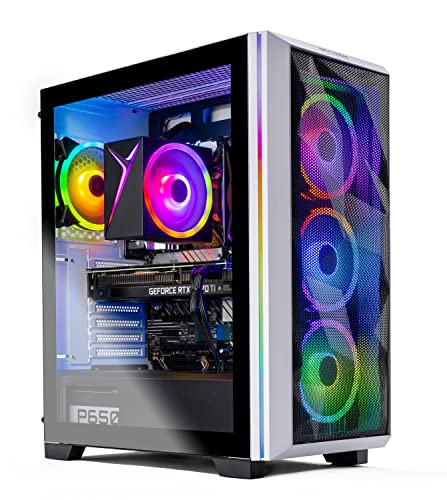
Where to buy
Check the latest price, availability and delivery on Amazon. Orders are placed on Amazon. We may earn a commission from qualifying purchases.
- Most performance for the money, when its sale price appears: Skytech Chronos Gaming PC, Ryzen 7 5700X, RTX 4070 Ti 12GB — Check on Amazon
- HOENGAGER Gaming PC, Intel Core i7-12700F, RTX 4070 12GB, 32GB DDR4 — Check on Amazon
- CYBERPOWERPC Gamer Xtreme VR, Intel Core i7-13700F, RTX 4060 Ti 16GB — Check on Amazon
- CYBERPOWERPC Gamer Master, AMD Ryzen 7 8700F, RTX 4060 Ti 8GB — Check on Amazon
See 2 more Amazon options
- iBUYPOWER Scale, AMD Ryzen 5 7600, RTX 4060 Ti 8GB — Check on Amazon
- Skytech Shiva Gaming PC, AMD Ryzen 5 5600X, RTX 4060 Ti 8GB, White — Check on Amazon
Read the full guide ↓
Disclosure: As an Amazon Associate, reviewstook.com earns from qualifying purchases. Links to Amazon on this page are affiliate links; they cost you nothing extra. Listing details such as price and availability change often, so check the current Amazon listing before you buy.
Buying your first gaming PC is confusing for one main reason: the listings are written in a dialect nobody speaks at home. Every product title is a string of codes — RTX this, Ryzen that, DDR-something — and the prices seem to change every time you look. This guide is the translation. It covers six ready-made (in PC language, “prebuilt”) gaming PCs that cost $1,200 or less, explains every technical word the first time it appears, and tells you honestly what these machines can and cannot do. If you have never owned a gaming PC, you are exactly who this was written for.
First, the resolution in the title. “1440p” describes how detailed the picture on your monitor is: a 1440p screen shows 2560 pixels across and 1440 down, about 3.7 million dots of picture in total. The older standard, 1080p, shows about 2.1 million. So a 1440p picture carries roughly 78% more detail — games look visibly sharper and crisper — but your PC has to work roughly 78% harder to draw it. That extra work is why the budget matters. Cheaper PCs are built for 1080p and struggle when asked for more. Around $1,200 is the first price point where PCs appear that were genuinely designed for 1440p, which is why this guide exists at this budget and why the honest summary is good news: at $1,200, real 1440p gaming begins. Fast, competitive games — the shooters and sports titles people play online — run at full 1440p detail on every machine here, at high speed. The big cinematic story games run at high settings too; on some picks the PC uses a clever trick called DLSS (explained below) to keep them smooth. What $1,200 does not buy is every setting pushed to maximum in every brand-new game forever — that costs more, and any listing that promises it at this price is advertising, not informing.
One more honesty note before the picks, because it surprises every first-time buyer: PC prices move. A lot. Some of the six systems below sit under $1,200 almost all the time. Others only dip under $1,200 during sales, and spend the rest of the time above it. For every pick, this guide tells you the rule to follow — for a couple of them the rule is simply “only buy it on the days it fits the $1,200 budget — check the current price on Amazon before you decide.” Follow those rules and $1,200 buys you a genuinely good 1440p machine. Ignore them and the same money buys noticeably less.
The Jargon, Translated
Six terms explain almost every line of every PC listing. Here they are in plain words.
- GPU / graphics card. The part that draws the game on your screen. It is the single most important part in a gaming PC — more important than everything else combined. Cards are ranked in tiers: in this guide, from strongest down, they are the RTX 4070 Ti, the RTX 4070, and the RTX 4060 Ti, all made by NVIDIA. A higher tier means prettier settings and smoother motion.
- VRAM. The graphics card’s own private memory, measured in gigabytes (GB). It holds the textures — the surface detail of walls, clothing, landscapes. At 1440p, games want more of it: 12GB or 16GB is comfortable, 8GB works but occasionally means turning texture detail down a notch in the very biggest games.
- CPU / processor. The PC’s general-purpose brain, which runs the game world while the graphics card draws it. Names like Ryzen 7 5700X (made by AMD) or Core i7-13700F (made by Intel) are model numbers; for a first PC, any processor in this guide is strong enough — the graphics card is where your money should go.
- RAM. The PC’s shared short-term memory, separate from VRAM. 16GB is the standard for gaming; 32GB helps if you also stream, edit video, or keep dozens of browser tabs open behind the game. One detail matters: RAM works best in pairs of sticks (“dual-channel”), and one pick below ships with a single stick — its review explains the cheap fix.
- SSD. The storage drive your games live on. All six picks include a fast 1TB SSD. Modern games are huge — some pass 100GB each — so 1TB holds roughly eight to twelve big games, and adding a second drive later is the easiest upgrade there is.
- Native vs upscaled, and DLSS. “Native” means the PC draws every one of the screen’s 3.7 million pixels itself. “Upscaling” means it draws fewer — say 2 million — and smart software rebuilds the rest, so the picture looks close to native while the PC works less hard. NVIDIA’s version of this software is called DLSS, and every card in this guide supports it. Upscaling is not cheating or fake; it is the normal, sensible way modern PCs run demanding games, and it is why the 4060 Ti picks below are real 1440p machines.
In this guide
Quick Picks
Short on time, or comparing several options at once? Each row below names a buyer type and the system that suits it, with a link to the listing.
| Buyer type | Pick | Why it stands out | Link |
|---|---|---|---|
| Most performance, if you catch the sale | Skytech Chronos, Ryzen 7 5700X, RTX 4070 Ti 12GB | The strongest graphics card here — check price on Amazon, as it only fits this budget on its best sale days | Check on Amazon |
| Best if you might stream or create | HOENGAGER Gaming PC, i7-12700F, RTX 4070 12GB | 4070-class graphics plus 32GB of RAM — double most rivals | Check on Amazon |
| Best buy-it-and-keep-it choice | CYBERPOWERPC Gamer Xtreme VR, i7-13700F, RTX 4060 Ti 16GB | 16GB of VRAM — the version of this card that ages slowest | Check on Amazon |
| Best if you like the idea of upgrading later | CYBERPOWERPC Gamer Master, Ryzen 7 8700F, RTX 4060 Ti 8GB | Built on AMD’s current platform — check price on Amazon, and check that Amazon itself is the seller | Check on Amazon |
| Easiest first-PC buy | iBUYPOWER Scale, Ryzen 5 7600, RTX 4060 Ti 8GB | Keyboard and mouse in the box, with pricing that tends to stay inside this budget — check the current price on Amazon | Check on Amazon |
| Best white build | Skytech Shiva, Ryzen 5 5600X, RTX 4060 Ti 8GB | A white system that can fit this budget when a coupon is live — check price on Amazon and the final total at checkout | Check on Amazon |
How These Picks Were Chosen
We did not use these PCs ourselves. What we did is the homework a careful friend would do: read each maker’s listing and specification sheet, compared the parts in the order they matter — graphics card and its VRAM first, then the processor’s platform, then RAM, storage, power supply and cooling — and checked each system against this budget, because a recommendation is only honest if it can genuinely fit it. Every system here is a genuine Amazon listing that belongs in an under-$1,200 guide when its live price fits the budget in the United States. Where a pick only fits the budget during a sale rather than as its everyday position, the review says so plainly and tells you to check the current price on Amazon before buying.
Three beginner-specific filters were applied on top. First, every pick had to be a true 1440p machine — no systems whose graphics card is really a 1080p part wearing a fancy case, however pretty the lights. Second, every pick had to be complete and sensible out of the box: a fast 1TB SSD, at least 16GB of RAM, Wi-Fi built in, and Windows already installed, so your first evening is spent playing rather than assembling. Third, anything a beginner would trip over had to be flagged in plain sight rather than buried — a single stick of RAM, an unpublished power supply figure, a price that only exists with a coupon. Those flags appear in the reviews, the honest-limitation lines, and the mistakes section — because the point of a first PC is hearing them before you pay, not after.
The 6 Best 1440p Gaming PCs for Beginners Under $1,200
Skytech Chronos Gaming PC — Ryzen 7 5700X, RTX 4070 Ti 12GB
Who it suits: The beginner who wants the strongest machine on this page and is willing to wait for the right day to buy it — patience is literally part of this pick.
Start with the part that matters. The RTX 4070 Ti is the best graphics card in this guide by a clear margin, and it was designed for exactly the screen you are shopping for: at 1440p it plays modern games at high settings natively — drawing every pixel itself — and in fast competitive games it can feed a high-refresh monitor (one that redraws the picture 165 or more times per second) the way that monitor deserves. Its 12GB of VRAM is the comfortable amount for this resolution. The supporting cast is solid and honestly specified: a Ryzen 7 5700X processor (eight cores, the working units inside a CPU — plenty), a 1TB SSD, 16GB of RAM, Wi-Fi, Windows 11, and a 750W power supply with a Gold efficiency rating that the listing actually states. A stated power supply sounds like a small thing; many listings hide it, and it is the part that powers everything else.
Now the part nobody puts in the headline. This listing’s price moves a great deal, and it only fits this guide’s budget on its good days. In plain words: this PC is only a $1,200 PC during its stronger sales. On those days it is the best buy in this guide by a wide margin, because you are getting a graphics card that higher-budget systems routinely contain. On its ordinary days it does not belong in this guide at all. So the rule is absolute: check the current price on Amazon, buy it only when that live price fits the $1,200 budget, or do not buy it — set a price alert and let the iBUYPOWER Scale below, whose pricing tends to be steadier, be your no-waiting alternative. One smaller note: its processor sits on AMD’s older AM4 platform, which means that years from now you cannot upgrade just the processor — you would replace the machine. For most first-PC buyers, who keep a computer whole for four or five years, that is a perfectly reasonable trade for this much graphics power.
- RTX 4070 Ti with 12GB of VRAM — a full step above every other card here; proper high-settings 1440p.
- 750W Gold power supply, stated in the listing — strong, efficient, and honest.
- The single best purchase in this guide on the days its live price fits the budget — check price on Amazon before buying.
Honest limitation: A price that fits this budget is an occasional visitor, not the norm — the same listing often sits well above the budget — and the older AM4 platform means no processor-only upgrade path later.
Choose it if you check the current price on Amazon, it fits the $1,200 budget, and you want maximum performance for the money. Skip it if it is sitting well above the budget when you shop, or you already know you want to upgrade parts one at a time for years.

HOENGAGER Gaming PC — Intel Core i7-12700F, RTX 4070 12GB, 32GB DDR4
Who it suits: Beginners who suspect gaming is only the start — who might stream, edit video, or simply keep everything open at once — and want the memory headroom for it from day one.
The graphics card is the RTX 4070, one step below the Chronos above and still a proper high-settings 1440p card with the same 12GB of VRAM. In the games themselves, the difference between the two shows up mainly at the very highest settings and refresh rates; in ordinary play, both feel like what they are — cards built for this resolution. What makes this system different is everything around the card. Its Intel Core i7-12700F processor has twelve cores, strong for gaming and genuinely good at the second jobs beginners grow into. It carries 32GB of RAM — double every other pick here — which is the difference between “close some tabs before you play” and never thinking about it, and it matters most if you stream your games or edit the clips afterwards. Storage is the standard fast 1TB SSD, cooling includes a liquid cooler (a pump-and-radiator setup that moves heat quietly), and it comes with Wi-Fi, Bluetooth, and Windows 11 Pro instead of the usual Home edition.
The caveats are about the seller, not the parts. HOENGAGER is a smaller maker than the big American brands in this guide; its listing does not publish a power supply wattage in the material we could verify, and support runs through the seller rather than a large service network. So check the current price on Amazon before judging it: it earns its place here when the live listing fits the $1,200 budget, which systems with these parts periodically do, and should be passed over without regret when it sits above that budget. Judge it as a finished machine to use as it arrives — with its older-generation memory and socket, that is what it is designed to be — and on that basis its specification is the most generous on this page.
- RTX 4070 with 12GB of VRAM — genuine high-settings 1440p, one tier below the top pick.
- 32GB of RAM included — double the standard, and the right amount for streaming and creating.
- Liquid cooling, Bluetooth, and Windows 11 Pro in the box.
Honest limitation: A smaller seller with a thinner listing — no power supply wattage published in the verified material — so it is only a pick while you check the current price on Amazon and the live price is at or under $1,200.
Choose it if you want 4070 performance plus room to stream and multitask, at a live price under the ceiling. Skip it if you would rather have a big brand’s support network behind your first PC, or the listing is priced above $1,200 today.

CYBERPOWERPC Gamer Xtreme VR — Intel Core i7-13700F, RTX 4060 Ti 16GB (GXiVR8040A14)
Who it suits: The beginner who plans to keep this PC for a long time — four or five years — and would rather buy the version of things that ages slowest.
This pick teaches the most useful lesson in the guide: two graphics cards can share a name and still be different purchases. The RTX 4060 Ti comes in an 8GB version (three picks below use it) and this 16GB version. Today they run games at almost identical speed. The difference is VRAM — the card’s private memory for textures. At 1440p, the biggest games with their texture detail turned up can want more than 8GB, and when a card runs out, games stutter or surfaces load in late and blurry. Sixteen gigabytes does not make this card faster; it makes it grow old more gracefully, which is exactly what a keep-it-for-years buyer should pay for. CyberPowerPC pairs it with an Intel Core i7-13700F processor with sixteen cores — honestly more processor than this graphics card needs for games, but in the good direction: it will handle streaming, editing, and one day a stronger graphics card without becoming the bottleneck. Around that: 16GB of current-generation DDR5 RAM, a fast 1TB SSD, Wi-Fi, Windows 11, and the backing of one of the largest PC builders in the US.
Its price needs one careful sentence: this system crosses the $1,200 line in both directions, so the buy signal is simply the live price the day you shop — check the current price on Amazon: at or under $1,200, buy; above it, wait or choose a pick below. One thing to check on the live listing before ordering: whether the 16GB of RAM arrives as one stick or two. This class of system has shipped both ways; two sticks run measurably better, and the current configuration is the one that counts — if it is a single stick, adding a matching one later is cheap and easy, as the Scale review below explains.
- RTX 4060 Ti with 16GB of VRAM — double the texture memory of the 8GB card; the slow-aging pick.
- Core i7-13700F with sixteen cores — more than enough processor for gaming, streaming, and a future card upgrade.
- Current DDR5 memory and a fast 1TB SSD, from a large US builder with a real warranty operation.
Honest limitation: The price straddles the budget — it fits the budget on deal days and sits above it at other times — and the 16GB card is no faster than the 8GB version today; you are paying for the years, not for extra speed now.
Choose it if you keep computers for years, play the big story games with textures turned up, and find it at or under $1,200. Skip it if it is sitting above the budget when you shop and you tend to upgrade often — the 8GB picks below will serve a shorter ownership just as well.

CYBERPOWERPC Gamer Master — AMD Ryzen 7 8700F, RTX 4060 Ti 8GB (GMA2900A)
Who it suits: Beginners who like the idea of improving the machine over time — a part this year, a part in two years — and want the modern foundation that makes that possible.
One piece of jargon unlocks this pick: the “platform.” A processor plugs into a socket on the PC’s main board, and AMD’s current socket is called AM5. This system’s Ryzen 7 8700F (eight cores) uses AM5, and its memory is the current DDR5 type — which means that in three years you could fit a newer Ryzen processor and more memory into this same machine. The Chronos and Shiva in this guide use the previous AM4 platform: perfectly good today, but finished — nothing newer fits them. Neither choice is wrong, but they suit different owners, and this is the guide’s clearest AM5 option from a big builder. The graphics card is the RTX 4060 Ti in its 8GB form: at 1440p that means high settings in most games with DLSS upscaling helping in the heaviest ones, and in competitive games — Counter-Strike 2, Valorant, Apex Legends — the very high frame rates a fast 1440p monitor exists for. The rest is the guide’s standard done properly: 16GB of DDR5 RAM, a fast 1TB SSD, Wi-Fi, Windows 11.
The price story has two halves, and you need both. When Amazon itself is the seller, this system tends to sit comfortably inside this budget, with room left over in the overall setup budget toward a monitor — check the current price on Amazon to confirm that is true today. But other sellers on the same marketplace have listed it well above the budget. So check two things, not one: the price, and who is selling it. If Amazon is the seller and the live price fits the budget, this is one of the best-balanced buys on the page. The honest limitation is the 8GB of VRAM described in the review above — in the biggest games you may occasionally turn texture detail down one notch. That is the trade that comes with this tier of card, and for many beginners it is a fair trade for the modern platform and its position inside this budget.
- Ryzen 7 8700F on the current AM5 platform with DDR5 — the most upgradeable foundation here.
- RTX 4060 Ti 8GB — high-settings 1440p with DLSS, and top frame rates in competitive games.
- Often sits inside this budget when Amazon is the seller — check price on Amazon, and leave room in your setup budget for your monitor.
Honest limitation: 8GB of VRAM means an occasional texture compromise in the biggest games, and marketplace sellers have listed this same system far above Amazon’s own prices — check the seller as carefully as the price.
Choose it if you want a current platform to grow with, at an Amazon-sold price. Skip it if you play mainly the biggest releases with every texture setting at maximum — that is the 16GB system above — or the only listings are marked-up third-party ones.

iBUYPOWER Scale — AMD Ryzen 5 7600, RTX 4060 Ti 8GB (SCA5N46T01)
Who it suits: The first-time buyer who wants the simplest possible decision: a fair price that is actually there when you look, a modern machine, and a keyboard and mouse in the box.
After several picks whose prices swing like a gate, meet the calm one. This listing’s pricing tends to be steadier than the sale-dependent picks above, and it is the pick to check first if you do not want to watch for a sale — check the current price on Amazon to confirm it fits the budget on the day you shop. What the money buys is a well-judged modern system: a Ryzen 5 7600 processor (six cores, on the current AM5 platform), the RTX 4060 Ti 8GB graphics card with the 1440p behaviour described throughout this guide, a 1TB SSD, Wi-Fi, Windows 11, a one-year manufacturer warranty, and — alone among these six — a gaming keyboard and mouse included. The processor carries one more quiet beginner-friendly bonus: unlike the “F” models elsewhere here, it has basic graphics built in, so if the graphics card ever has a problem, the PC can still show a picture while you troubleshoot. That is the kind of feature you only appreciate on the one bad evening it saves.
Its flaw is printed in iBUYPOWER’s own title, to the company’s credit: the 16GB of RAM arrives as a single stick, written “16×1.” RAM runs fastest as a matched pair (“dual-channel”), and a single stick leaves some performance behind, mostly in games that lean on the processor. Here is why this is a good flaw for a beginner to have: the fix is the cheapest, easiest upgrade in all of PC gaming. A second matching 16GB DDR5 stick is a comparatively small extra purchase — check its current price on Amazon or another retailer — clips in within minutes through the case’s side panel, and is well worth planning into the purchase. Plan that stick as part of the purchase — treat it as the system’s real final step — and the Scale becomes a balanced 32GB machine, and one of the most predictable buys in this guide.
- Pricing that tends to stay inside this budget — check the current price on Amazon, with no sale-watching usually required.
- Current AM5 platform, plus a processor with built-in backup graphics for easy troubleshooting.
- Keyboard and mouse included, and enough budget left to fix its one flaw immediately.
Honest limitation: The 16GB of RAM ships as a single stick, so the machine runs in slower single-channel mode until you add the second one — budget for that stick from day one.
Choose it if you want a stable price, a current platform, and the least stressful first purchase on this page. Skip it if you are certain you will never open the case for any reason — pick a machine that ships with two sticks — or you want more than 4060 Ti-class graphics.

Skytech Shiva Gaming PC — AMD Ryzen 5 5600X, RTX 4060 Ti 8GB, White
Who it suits: Beginners building a white desk setup — and anyone willing to learn one shopping trick, the coupon, in exchange for a price that can fit this budget.
Almost every gaming PC at every price is a black box. The Shiva is the exception in this guide: a white case, with the specification that matters fully intact. Its Ryzen 5 5600X processor (six cores) powered a whole generation of respected gaming PCs, and its RTX 4060 Ti 8GB delivers the same 1440p story as the other 4060 Ti picks — high settings with DLSS in demanding games, very high frame rates in competitive ones. It has the standard fast 1TB SSD, 16GB of RAM, Wi-Fi, Windows 11, and one detail worth copying as a habit: its 600W Gold power supply is stated right in the listing, wattage and rating both, which is what an honest listing looks like.
The price is the lesson. This system can fit this budget — but getting there has depended on a coupon clipped on the listing. Coupons change what “the price” means: the headline figure may sit above the budget, and the real price appears only when the coupon is applied and you reach the cart. So with this pick, the number that counts is the final total at checkout — check the current price on Amazon and that checkout total: anywhere under $1,200, it is an appealing route in this guide to a genuine 1440p PC from a big builder; with no coupon live and the total over budget, the Scale above is your buy. One smaller note: the Shiva sits on the older AM4 platform, so like the Chronos it is a buy-it-finished machine with no processor upgrade path. Bought when a coupon brings it inside the budget, as a complete and finished white PC, it is a coherent and likeable first computer.
- A genuine white build — the only non-black option here, with no specification penalty for the colour.
- 600W Gold power supply stated in the listing, and a proven processor-and-card pairing.
- Can fit this budget when a coupon is live — check price on Amazon and confirm the final total at checkout.
Honest limitation: The budget-fitting price is a coupon price — without a live coupon it can sit over budget — and the older AM4 platform is finished, with no processor upgrade path.
Choose it if your setup is white, or the coupon brings it under $1,200 when you shop. Skip it if no coupon is live and it sits at list price, or you want a platform you can upgrade for years.

Comparison Table
| Product | GPU / VRAM | CPU / Platform | RAM / Storage | Best use | Link |
|---|---|---|---|---|---|
| Skytech Chronos | RTX 4070 Ti / 12GB | Ryzen 7 5700X / AM4 | 16GB DDR4 / 1TB NVMe | Maximum 1440p performance — only when the live price fits the budget; check price on Amazon | Check on Amazon |
| HOENGAGER Gaming PC | RTX 4070 / 12GB | Core i7-12700F / DDR4 | 32GB DDR4 / 1TB SSD | 4070 performance plus RAM for streaming and creating | Check on Amazon |
| CYBERPOWERPC Gamer Xtreme VR | RTX 4060 Ti / 16GB | Core i7-13700F / DDR5 | 16GB DDR5 / 1TB Gen4 NVMe | VRAM headroom for keeping a PC for years | Check on Amazon |
| CYBERPOWERPC Gamer Master | RTX 4060 Ti / 8GB | Ryzen 7 8700F / AM5 | 16GB DDR5 / 1TB Gen4 NVMe | Newest AMD platform — check price on Amazon and confirm the seller | Check on Amazon |
| iBUYPOWER Scale | RTX 4060 Ti / 8GB | Ryzen 5 7600 / AM5 | 16GB DDR5 (1 stick) / 1TB NVMe | Steadier pricing on a current platform — check price on Amazon | Check on Amazon |
| Skytech Shiva | RTX 4060 Ti / 8GB | Ryzen 5 5600X / AM4 | 16GB DDR4 / 1TB NVMe | White build — check price on Amazon and for a live coupon | Check on Amazon |
How to Choose Your First 1440p Gaming PC
- Spend on the graphics card first. It decides how your games look and run more than everything else combined. In this guide the order is: RTX 4070 Ti, then RTX 4070, then RTX 4060 Ti. If a listing spends its money on colourful lights and a fancy case instead of the card, it has decorated the wrong priority.
- Check the VRAM number, not just the card’s name. The 4060 Ti exists with 8GB and with 16GB of VRAM, and they are different purchases: same speed today, different staying power. For 1440p, 12GB or more is the comfortable figure; 8GB is fine with the occasional texture setting turned down.
- Match the PC to your monitor’s speed, not only its size. Monitors also have a refresh rate, measured in Hz — how many times per second the picture redraws. A basic 1440p 60Hz screen is fed well by any pick here. A fast 144Hz or 165Hz screen is what the top two cards are for. And if you do not own a 1440p monitor yet, read the starter kit section below before choosing — the monitor is part of this purchase.
- Decide whether you are an upgrader or a replacer. The AM5 systems (Gamer Master, Scale) and the current Intel system (Gamer Xtreme) can grow: more memory, a newer processor on the same socket, a stronger graphics card later. The AM4 systems (Chronos, Shiva) and the HOENGAGER are finished machines — excellent as bought, replaced whole someday. Neither personality is wrong; buying one while expecting the other is the mistake.
- Look at how the RAM is arranged, not just how much there is. Sixteen gigabytes as two sticks runs at full speed; as one stick — the Scale’s one flaw — it runs slower until you add its pair. Listings write this as “16×1” versus “8×2” or “16×2.” It is a thirty-second check that saves a confused first month.
- Prefer listings that state the power supply. When a maker prints the wattage and an efficiency rating (the Chronos at 750W Gold, the Shiva at 600W Gold), they are showing their work. Silence about the part that powers everything else is information too.
- Buy the price, not the listing. Check the current price on Amazon for the machine you want, check the seller’s name as well, and look for a coupon before checkout. In this guide, patience and one coupon can be the difference between a pick fitting this budget and sitting outside it — the largest saving available to you costs nothing but attention.
Setting Up: Your First Evening, Step by Step
Every pick in this guide arrives with Windows installed and needs no assembly. The first evening goes like this. Unbox the PC and check inside the case, through its glass side, for packing material — builders often wedge foam or an inflatable pack inside to protect parts in transit, and the machine must not be switched on with it still there; the maker’s quick-start sheet will tell you if yours has any. Stand the PC where air can move around it, not sealed in a cabinet. Then connect the monitor — and here is the single most common beginner mistake in all of PC gaming: the cable must plug into the graphics card, the horizontal row of sockets low on the back of the case, not into the similar-looking sockets on the main board above it. Plug it into the board and the PC will use its weakest graphics (or show nothing at all on the “F” processors in this guide, which have none built in) and every game will run terribly for reasons that baffle new owners for weeks.
Connect power, keyboard and mouse, and switch on. Windows will walk you through its own setup in plain language. Once you reach the desktop, do three things before installing any game. First, set your monitor to its full speed: Windows display settings, advanced display, and choose the highest refresh rate listed — fast monitors quietly default to 60Hz, and half of what you paid for is sitting in that menu. Second, open the NVIDIA app and install the latest graphics driver — the software that lets games and the card talk properly; it is free, and it matters. Third, install a game store — Steam is the standard starting point — and download a game. That is the whole ritual. Everything after it is optional learning, at your own pace.
The Starter Kit: What Else the Budget Has to Cover
A PC on its own is not a setup, and the one item that matters most for this particular guide is the screen. A 1440p PC needs a 1440p monitor to show you what you paid for — driving one of these machines into an old 1080p screen is like buying a sports car for a road with a 30 limit. If you do not already own one, a good 27-inch 1440p monitor with a 144Hz or 165Hz refresh rate is a significant extra purchase — check the current price on Amazon or another retailer — and it is a legitimate part of this purchase: it is why a pick whose live price leaves room in your overall setup budget can be the smarter buy even against a stronger ceiling-priced system.
The rest of the kit is smaller. A keyboard and mouse: only the iBUYPOWER Scale lists them in the box among these six, so unless the live listing of your pick says otherwise, plan on buying a basic gaming set separately — check the current price before you buy. A headset with a microphone, if you will play with friends, is another modest extra purchase. None of these are inside any pick’s price in this guide, and that is deliberate — the honest total for a from-scratch 1440p setup is the PC plus the cost of that kit, and a beginner deserves to see that before choosing which PC, not after.
Common Beginner Mistakes
- Plugging the monitor into the wrong sockets. It bears repeating: monitor cable into the graphics card (low, horizontal row), never the main board above it. Half of all “my new PC is slow” stories are this one cable.
- Paying the everyday price for a sale-priced machine. The Chronos often sits well above this budget and only fits it during sales. Buying it on the wrong week is the most expensive mistake in this guide, and the easiest to avoid.
- Forgetting the monitor in the maths — spending the whole $1,200 on the PC and connecting it to an old 1080p screen, or leaving nothing for the 1440p display the PC was bought for.
- Mixing up RAM and VRAM. They are different memories in different places: RAM serves the whole PC, VRAM belongs to the graphics card. A listing boasting “32GB” is talking about RAM; the number that decides texture quality at 1440p is the card’s VRAM.
- Believing the frame-rate promises in listing titles. “Runs everything at ultra” is advertising copy, not a measurement. Judge by the graphics card’s tier and VRAM, which cannot be inflated with adjectives.
- Skipping the coupon, or judging a price before the cart. With the Shiva, a clipped coupon can be the difference between sitting over budget and fitting it — the real price sometimes only exists at checkout.
- Assuming the seller is Amazon. Marketplace sellers list the same systems at large markups; the Gamer Master has sat well above the budget from third parties while Amazon’s own listing was the budget-fitting one — check the current price on Amazon and the seller’s name together. The seller’s name is part of the price.
- Leaving the monitor at 60Hz. Your fast screen’s full refresh rate waits in a Windows settings menu. Set it on day one.
Final Recommendation
- The easiest first-PC buy: iBUYPOWER Scale, Ryzen 5 7600.
- The most performance, bought patiently: Skytech Chronos, Ryzen 7 5700X, RTX 4070 Ti.
- For streaming and creating alongside gaming: HOENGAGER Gaming PC, i7-12700F, RTX 4070, 32GB RAM.
- For keeping one PC for years: CYBERPOWERPC Gamer Xtreme VR, RTX 4060 Ti 16GB.
- For upgrading step by step: CYBERPOWERPC Gamer Master, Ryzen 7 8700F.
- For a white setup or a coupon bargain: Skytech Shiva, Ryzen 5 5600X, White.
If you are a beginner who wants one answer, take this one: buy the iBUYPOWER Scale — check the current price on Amazon first — order the second matching memory stick alongside it, and put the change toward a proper 1440p monitor. That combination — a modern platform, a genuine 1440p card, memory done properly, and the right screen — is the most complete first setup this budget assembles, with no sale-watching and no drama. Buy the Chronos instead if, and only if, you catch it when its live price fits the budget; on that day it is simply the strongest machine $1,200 can buy. Working to a tighter budget? Start with Best 1440p Gaming PC For Beginners Under $800. Able to stretch? Compare Best 1440p Gaming PC For Beginners Under $1500. Still deciding whether prebuilt is right at all? See Best Gaming PC For Beginners Under $1200. Whichever you choose, check the current price on Amazon, confirm the seller, plug the monitor into the graphics card — and welcome to 1440p.
Frequently Asked Questions
What does 1440p actually mean, in plain words?
It is the size of the picture your monitor shows: 2560 pixels wide by 1440 tall, about 3.7 million dots, versus about 2.1 million for the older 1080p standard. More dots means a sharper, more detailed image — and more work for the PC drawing it, which is why the graphics card matters so much and why $1,200 is the budget where PCs built for it appear.
Is $1,200 a sensible budget for a first gaming PC?
It is a genuinely well-chosen one for 1440p. Below it, you are usually buying a strong 1080p machine and asking it to stretch upward. At $1,200 — spent on a machine whose live price genuinely fits this budget — the graphics cards designed for 1440p become available: competitive games run natively at full detail and high speed, and big story games run at high settings, with DLSS upscaling helping on the 4060 Ti picks. It is the first tier where the hardware matches the monitor.
What is DLSS, and is upscaled 1440p “real” 1440p?
DLSS is NVIDIA’s upscaling software. The PC draws the game at a lower internal resolution — less work, higher speed — and DLSS rebuilds the picture to fill your 1440p screen, using information from previous frames to keep it sharp. Purists will note the PC did not literally draw every pixel; practically, at its Quality setting the result looks very close to native and plays much faster, and it is the standard way modern PCs run demanding games. Native is the gold standard, upscaled is the sensible everyday mode, and every pick here can do both depending on the game.
Do these PCs come with a monitor, keyboard and mouse?
No monitor is included with any of them — you will need a 1440p screen to get what you paid for — a good 27-inch high-refresh model is a significant extra purchase, so check the current price before you buy. For keyboard and mouse, only the iBUYPOWER Scale lists them in the box among these six; check your chosen listing, and otherwise plan on buying a basic set separately. The starter kit section above lays out what else to plan for.
Why does the same PC cost so much more one week than another?
Because gaming PC prices genuinely swing that much: sales events, coupons, stock levels and which seller holds the listing all move the number, sometimes by a large amount. That is why this guide refuses to pretend one fixed price exists — the Chronos only fits this budget on its sale days, while the Scale’s pricing tends to be steadier. Check the current price on Amazon before you buy. The live listing is the referee; it tells you whether today’s price fits the budget or is a wait-it-out one.
Is 16GB of RAM enough for a beginner?
Yes — 16GB is the standard amount for gaming, and every pick here has at least that. Two refinements matter more than the headline number. RAM should come as two sticks, not one, to run at full speed (the Scale ships one stick; its pair is its first upgrade). And 32GB — included with the HOENGAGER, reachable on the others with an inexpensive second kit — earns its place if you stream, edit video, or keep a lot open while you play.
What is the first upgrade I should plan?
It depends on the pick, and each is simple. For the Scale: the second 16GB memory stick — cheapest performance you will ever buy. For any pick: a second SSD when the first fills with games, which needs no tools beyond a screwdriver and ten minutes. Years later, the AM5 and current-Intel picks can take a newer processor or a stronger graphics card; the AM4 picks are instead replaced whole, which is a fine plan if it was your plan from the start. A stronger graphics card is the one upgrade that may also need a bigger power supply — another reason the stated 750W and 600W Gold units in this guide are reassuring.
I am a total beginner. Which one should I just buy?
The iBUYPOWER Scale. Its pricing tends to be the steadier one — check the current price on Amazon and confirm it fits the budget before you buy — it is built on the current platform, it includes a keyboard and mouse, its processor has backup graphics to make any future troubleshooting easier, and its one flaw — the single memory stick — is the cheapest fix in PC gaming, with budget left over to do it. Add a 1440p monitor and you have the complete, correct first setup this guide was written to point you to.


