
Where to buy
Check the latest price, availability and delivery on Amazon. Orders are placed on Amazon. We may earn a commission from qualifying purchases.
- Best for 1440p upscaling under $400: KAMRUI AM08PRO Mini Gaming PC, Ryzen 7 7735HS, 32GB DDR5, 512GB SSD — Check on Amazon
- Beelink EQR6 Pro Mini PC, Ryzen 7 7735HS, 24GB DDR5, 1TB SSD — Check on Amazon
- KAMRUI Mini PC, Ryzen 7 7735HS, 16GB LPDDR5, 512GB SSD — Check on Amazon
- FIREBAT A6 Mini Gaming PC, Ryzen 7 7735HS, 16GB LPDDR5, 512GB SSD — Check on Amazon
See 2 more Amazon options
- GMKtec NucBox M6 Mini PC, Ryzen 5 6600H, 16GB DDR5, 512GB SSD — Check on Amazon
- Beelink SER5 MAX Mini PC, Ryzen 7 5800H, 16GB DDR4, 500GB SSD — Check on Amazon
Read the full guide ↓
Disclosure: As an Amazon Associate, reviewstook.com earns from qualifying purchases. Links to Amazon on this page are affiliate links; they cost you nothing extra. Listing details such as price and availability change often, so check the current Amazon listing before you buy.
This guide grades six sub-$400 PCs on one question only: what can each of them actually do with a 1440p screen? Not what they can do in general — plenty of guides answer that — but what happens, mode by mode, when the display in front of them has 2560×1440 pixels and a game asks to be drawn on it. The short answer has to come first, because everything else in this guide hangs on it: no PC under $400 renders modern games natively at 1440p. None. Native 1440p means the graphics hardware draws every one of the panel’s roughly 3.69 million pixels, every frame, and the cheapest new machines that can do that in current games carry discrete graphics cards — the first discrete-GPU towers, built around an RTX 3050, sit in a higher tier well above this budget, and even that card is a step below comfortable 1440p hardware. The genuinely comfortable native-1440p tier, RTX 4060 or RX 7600 class, starts around $700 and firms up around $1,200. Four hundred dollars buys integrated graphics, and integrated graphics at 1440p is a story about rendering somewhere lower and displaying somewhere higher.
That story is worth understanding precisely, because it is not a bad one — it is just a specific one. Two different resolutions are involved in every game you will play on these machines. The display resolution is what your monitor shows: 2560×1440, about 3.69 million pixels, roughly 78 percent more than 1080p’s 2.07 million. The render resolution is what the graphics chip actually draws before the image is scaled up to fill the panel. When a game on one of these PCs runs with FSR set to Quality and the display set to 1440p, the chip renders at about 1707×960 — barely more work than 1080p — and FSR reconstructs the result into a 1440p image. Drop to FSR Balanced or Performance and the render target falls further. Set the game to render at a plain 1080p and let the monitor upscale it, and you get a softer picture than FSR produces, because 1080p does not divide evenly into 1440p — the scaling is non-integer, so every pixel lands between pixels and the image blurs slightly. These distinctions are the entire ballgame at this budget, and each review below grades its machine on exactly which of these modes it handles well.
There are four honest 1440p modes at this price, and the six picks divide among them. First, native 1440p gaming in light titles: esports games, indies and older releases at reduced settings, where the engines are light enough that a Radeon 680M can draw the full panel. Second, FSR-upscaled gaming: modern titles rendered at 900p-to-1080p-class resolutions and reconstructed to 1440p — the main gaming mode for anything current. Third, native 1440p desktop and media: every pick here drives a 1440p desktop, text, video and streaming at full panel resolution without effort, and several drive two or three 4K displays besides. Fourth, emulation rendered internally above the panel: classic-console emulation, where the emulated scene is simple enough that the emulator can render it at or beyond 1440p internally even on modest hardware — the one route by which a $400 box shows a genuinely sharp 1440p game image. One technology note before the picks: none of these machines supports DLSS. DLSS is exclusive to NVIDIA’s RTX cards, and every pick below runs AMD integrated graphics, so FSR — which works on any GPU — is the only upscaler in this guide. Anyone who tells you a 680M mini PC “has DLSS” is wrong about the hardware.
In this guide
Quick Picks
Each row below grades the pick through the 1440p lens only: its strongest honest mode on a 2560×1440 screen, and the ceiling that comes with it.
| Buyer type | Pick | Its 1440p story | Link |
|---|---|---|---|
| Best 1440p upscaling under $400 | KAMRUI AM08PRO, Ryzen 7 7735HS, 32GB DDR5, 512GB SSD | The strongest FSR source image here — dual-channel socketed DDR5 feeding a full-power 680M | Check on Amazon |
| Best quiet 1440p desk | Beelink EQR6 Pro, Ryzen 7 7735HS, 24GB DDR5, 1TB SSD | The same 680M upscaling in the calmest box, with 1TB for a big library | Check on Amazon |
| Best set-and-forget 1440p | KAMRUI Mini PC, Ryzen 7 7735HS, 16GB LPDDR5, 512GB SSD | Full 680M upscaling performance in the simplest box — nothing to configure or upgrade | Check on Amazon |
| Best native-1440p esports | FIREBAT A6, Ryzen 7 7735HS, 16GB LPDDR5, 512GB SSD | A 54W power mode for light titles at native 1440p; demanding games pay a measured memory penalty | Check on Amazon |
| Best value with a 1440p monitor | GMKtec NucBox M6, Ryzen 5 6600H, 16GB DDR5, 512GB SSD | 660M upscaling in a budget-tier box — easier to fit alongside the panel itself | Check on Amazon |
| Best for older games at 1440p | Beelink SER5 MAX, Ryzen 7 5800H, 16GB DDR4, 500GB SSD | Vega graphics: yesterday’s games near the panel, today’s games upscaled from low renders | Check on Amazon |
How These Picks Were Chosen
Every machine below is a real Amazon listing in this guide’s budget tier, and the reviews ask you to check price on Amazon before you buy, because mini PC prices swing with coupons more than almost any other category on Amazon. A pick that sits comfortably in the tier one week and drifts higher the next is normal behaviour for this market, not an error in this guide. Where a listing can drift above the $400 ceiling on an ordinary day, the review says so, so you can decide whether to buy on a dip or not at all.
The selection filter was the 1440p question itself. We started from the strongest integrated graphics AMD sells at this price — the Radeon 680M — and asked what each candidate box does to that chip’s one scarce resource: memory bandwidth. An integrated GPU owns no video memory; it borrows system RAM for both its frame buffer and its bandwidth, so the memory configuration behind the chip decides how close to native its upscaling source image can sit and how much of the panel it can draw unaided. Socketed dual-channel DDR5 is the full-performance arrangement. Soldered dual-channel LPDDR5 is close behind. A soldered configuration that restricts bandwidth — one pick below carries exactly that flaw, measured by independent reviewers at a 20 to 35 percent graphics penalty in advanced 3D games — demotes an otherwise identical chip, and the review grades it accordingly. Power limits were the second filter: the same Ryzen 7 7735HS can be allowed very different wattage ceilings, and sustained watts are what hold graphics clocks up through a long session at a high render resolution.
Two kinds of listing were excluded outright. The first was the $400 “gaming tower” with no discrete graphics card, or one several generations old wearing RGB fans — those machines are beaten at every 1440p mode by the 680M mini PCs here, and their weak power supplies close the upgrade door their shape promises to open. The second was any product whose only path under $400 was a stack of account-targeted coupons; a qualifying price has to be one an ordinary buyer can plausibly pay. We did not use these products ourselves. The performance framing comes from maker specifications, manuals and independent reviews of the same hardware, and where a number in a review comes from a single reviewer’s testing — the FIREBAT A6’s Counter-Strike 2 range is the clearest case — the text attributes it rather than presenting it as our measurement.
The 6 Best PCs Graded Purely as 1440p Machines Under $400
KAMRUI AM08PRO Mini Gaming PC, Ryzen 7 7735HS, 32GB DDR5, 512GB SSD
Who it suits: The buyer pairing a 1440p monitor with this budget who wants the best upscaled image the money can produce — and the widest slice of genuinely native 1440p play.
Start with why this box grades first on a 1440p screen when all four 680M picks share the same graphics chip. The Radeon 680M — 12 compute units at 2200MHz inside the Ryzen 7 7735HS — renders every frame out of system memory, and the AM08PRO feeds it the best memory arrangement in this guide: 32GB of DDR5-4800 in two SO-DIMM slots, true dual channel, expandable to 64GB. Bandwidth is what decides the render resolution a game can sustain, and render resolution is what decides how good the FSR reconstruction on your 1440p panel looks. On this machine, modern games hold a 1080p-class internal render with FSR Quality sending the picture to the full panel — the sharpest upscaled mode available under $400 — while esports and older titles step up to drawing the panel natively at reduced settings. Three switchable performance modes (silent, auto, performance) let the chip hold its clocks when a session gets long, which is precisely when a 1440p upscale is working hardest.
The supporting hardware keeps the 1440p story clean. A 512GB PCIe 4.0 SSD with a second slot free (up to 2TB) holds a rotating library; two HDMI 2.0 ports and a USB-C drive up to three 4K displays, so the 1440p desktop, work and video side of the panel is never in doubt; WiFi 6, Bluetooth 5.2 and 2.5-gigabit LAN cover the connections. Check price on Amazon for the current price — this is the strongest 1440p performance in this guide, in a box positioned squarely in this budget tier. And because the memory is socketed rather than soldered, the one upgrade that matters most to an integrated GPU’s future — more and faster RAM — stays open to you.
- Dual-channel socketed DDR5 gives the 680M its full bandwidth — the best FSR source image and the most native-1440p headroom under $400.
- Three performance modes hold graphics clocks through long sessions at high render resolutions.
- Check price on Amazon: the strongest 1440p machine here sits in this guide’s budget tier.
Honest limitation: Even here, native 1440p stops at light and older games. Current AAA titles are an upscaling experience on this box — a good one, but the panel is being filled by reconstruction, not by native rendering, and no setting changes that.
Choose it if your 1440p monitor is already bought and you want the best image this budget can honestly put on it. Skip it if you intend to play new releases at native 1440p — that requirement starts two price tiers up, and this guide’s final section links to it.

Beelink EQR6 Pro Mini PC, Ryzen 7 7735HS, 24GB DDR5, 1TB SSD
Who it suits: The buyer whose 1440p screen sits in a shared room or a living-room corner, and who wants the same upscaling quality as the top pick without the fan noise that usually comes with it.
The EQR6 Pro runs the same Ryzen 7 7735HS and Radeon 680M as the AM08PRO, fed by 24GB of DDR5 in two 12GB modules — dual channel, as the 680M needs, and swappable up to 64GB later. Its 1440p grading is therefore nearly identical: light titles native at reduced settings, modern titles rendered around 1080p and reconstructed by FSR Quality to the panel, desktop and media at full native 1440p without a flicker of effort. Where it separates itself is everything around the image. The power supply is built into the chassis, so no brick sprawls behind the monitor. Storage starts at 1TB on a PCIe 4.0 SSD — double most rivals — with a second M.2 slot beyond it, which matters more on a 1440p setup than it first appears: upscaled gaming rewards a large installed library you can dip into, rather than constant re-downloads. Beelink quotes cooling noise around 32 decibels; that is a maker figure, not an independent measurement, but the EQR line’s quiet reputation is consistent across reviewers, and a quiet box is worth real money when the screen it feeds is the room’s TV.
Dual HDMI outputs handle a 1440p main screen plus a second display, dual LAN ports let the machine moonlight as a home server, and Wake-on-LAN and auto power-on suit a box that lives in a media cabinet. Check price on Amazon for the current price — it is positioned in this budget tier. Grade it as the top pick’s equal for the picture, and its superior for the room the picture is in.
- Full 680M upscaling quality — FSR Quality from a 1080p-class render — in the quietest chassis here.
- 1TB of storage as standard, with a second slot: the library a 1440p back-catalogue habit actually needs.
- Built-in power supply and dual LAN make it the tidiest fit for a TV-corner 1440p setup.
Honest limitation: The 24GB memory size is an in-between configuration, and the headline quiet figure is the maker’s own claim — expect hushed rather than silent when the 680M is working at full render load.
Choose it if the 1440p screen is shared space and calm matters as much as the last few frames. Skip it if you want the absolute strongest upscaling setup and an open 64GB path from day one — that is the AM08PRO.

KAMRUI Mini PC, Ryzen 7 7735HS, 16GB LPDDR5, 512GB SSD
Who it suits: The buyer who wants the 680M’s 1440p upscaling exactly as it comes out of the box — no modes to tune, no upgrades to plan, no decisions after the first evening.
This plain KAMRUI mini PC puts the same Ryzen 7 7735HS and Radeon 680M into a smaller, simpler enclosure than its AM08PRO sibling, and its 1440p grading lands in the same place: esports and older games can be drawn natively at 1440p on reduced settings, current games render lower and arrive at the panel through FSR, and the desktop itself is crisp native 1440p across up to three displays. The memory behind the chip is 16GB of LPDDR5 — and the important detail is that LPDDR5 in this design runs at proper dual-channel-class bandwidth, so unlike the bandwidth-restricted pick further down this list, the 680M here is fed honestly. Sixteen gigabytes is sufficient capacity for the titles this graphics tier plays; the upscaling pipeline does not ask for more.
The catch is permanence. LPDDR5 in this class of machine is soldered to the board, so the 16GB you buy is the 16GB the machine retires with, and a memory failure years from now means a replacement computer rather than a cheap stick. The 512GB SSD fills at the usual rate — a handful of large installs in rotation — and its pricing tells a two-sided story: this listing is coupon-driven and can drift just over this guide’s ceiling on an ordinary day, so check price on Amazon first and, if it is showing above the tier, the right move is to wait for a dip. Bought within this budget tier, it is the zero-maintenance route to the same upscaled-1440p experience the top two picks deliver.
- The full 680M 1440p story — native for light games, FSR Quality for modern ones — with nothing to configure.
- Dual-channel-class LPDDR5 bandwidth feeds the graphics properly, unlike the restricted design below.
- Triple-display output and 2.5G LAN in the smallest-fuss box in the guide.
Honest limitation: The memory is soldered and fixed for life at 16GB, and the listing’s price can drift above this guide’s $400 ceiling — this is a buy-on-a-dip pick, not a pay-any-day one, so check price on Amazon before you buy.
Choose it if you want a finished appliance that puts a good upscaled picture on a 1440p screen and then disappears from your thoughts. Skip it if upgradeability matters or the live price is showing above this guide’s $400 ceiling — the AM08PRO is the better buy then.
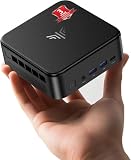
FIREBAT A6 Mini Gaming PC, Ryzen 7 7735HS, 16GB LPDDR5, 512GB SSD
Who it suits: The esports player with a 1440p monitor — the one buyer in this guide whose favourite games are light enough to be drawn natively on the panel.
The A6’s pitch is wattage: its Ryzen 7 7735HS is allowed up to 54W, the generous end of this chip’s range, and sustained power is what keeps the Radeon 680M’s clocks high through a long match. For the native-1440p mode, that matters directly. Independent testing recorded Counter-Strike 2 at low settings running between 75 and 110 frames per second on this machine — figures we attribute to that reviewer rather than claim ourselves — and light competitive titles are exactly where a 680M can render a meaningful share of its catalogue at or near the full 2560×1440. Around the chip sit a 512GB PCIe SSD with dual M.2 slots for growth, USB-C, WiFi 6, Bluetooth 5.2 and 2.5-gigabit LAN, in gaming-styled casing. Check price on Amazon for the current price — it sits at the top of this budget tier.
Then the flaw, and on a 1440p screen it is a specific one. The A6’s 16GB of LPDDR5 is soldered, and in the configuration reviewers examined it operates in a single-channel arrangement that restricts the memory bandwidth the 680M lives on — the same testing measured graphics performance cut by roughly 20 to 35 percent in advanced 3D games versus a dual-channel machine. Bandwidth is the currency that buys render resolution, so the penalty lands precisely on the upscaling mode: where the dual-channel picks render modern games at a 1080p-class resolution and upscale, this machine more often renders lower and asks FSR to bridge a wider gap, with a visibly softer result on a 1440p panel. In esports you will rarely notice; in a current AAA title you will. The RAM can never be upgraded or replaced, either, so the arrangement is permanent. Buy it for native-1440p competitive play and older titles, where it is genuinely strong, and it earns its place. Buy it as a modern-games upscaling box and the three picks above it are measurably better at the same job.
- A full 54W envelope sustains the clocks that native-1440p esports rendering depends on.
- Reviewer-recorded CS2 performance at low settings in the 75–110 fps range.
- Dual M.2 slots give storage room to grow even though the memory cannot.
Honest limitation: Soldered, bandwidth-restricted memory costs a measured 20–35% in demanding 3D games — the penalty falls exactly on the render resolution its upscaling starts from — and the 16GB is fixed for life.
Choose it if your 1440p gaming is competitive titles and older releases that this chip can draw natively. Skip it if modern AAA games are the point — their upscaled image is softer here than on any dual-channel 680M pick.
GMKtec NucBox M6 Mini PC, Ryzen 5 6600H, 16GB DDR5, 512GB SSD
Who it suits: The buyer whose budget has to cover the 1440p monitor as well as the PC — this pick’s price is what makes the whole setup fit under a sensible total.
The M6 steps down to the Radeon 660M — six compute units at 1900MHz inside a six-core Ryzen 5 6600H — which is roughly half the graphics hardware of the 680M machines, and its 1440p grading has to be read in that light. Native 1440p gaming narrows to the lightest esports and indie titles at low settings. Modern games render at genuinely low resolutions — 720p-class — and FSR carries them to the panel across a wide gap; the reconstruction is competent, but on a 1440p screen you can see it working. What the M6 does at full native resolution, it does well: the desktop, text, browsing and video are true 1440p, and its display outputs (HDMI, DisplayPort and USB-C) plus a USB4 port make it an unusually capable hub for a monitor-centred desk. Emulation is the quiet strength — classic consoles rendered internally at high resolutions are well within this chip’s reach, and that mode shows a sharp 1440p image rather than an upscaled one.
Around the graphics sit unusually grown-up parts for the price: 16GB of DDR5 in real dual-channel SO-DIMM slots, a 512GB SSD with a second slot beside it, dual 2.5-gigabit LAN, WiFi 6E, dual-fan cooling and Windows 11 Pro. Its positioning in this budget tier is the headline: as one of the lower-priced picks here — check price on Amazon for the current price — it can routinely leave real room in the overall budget unspent, which is exactly what a 1440p monitor purchase needs. As a gaming-first machine it is the weakest pick here; as the computer that makes a complete 1440p setup affordable, it might be the smartest.
- Budget-tier positioning — check price on Amazon; this is the pick most likely to leave real budget for the 1440p panel itself.
- Socketed dual-channel DDR5, dual SSD slots, dual 2.5G LAN and USB4: hub hardware the pricier picks envy.
- Native 1440p desktop and internally-rendered emulation are genuinely sharp, even where gaming is upscaled.
Honest limitation: The 660M is about half a 680M. On a 1440p screen its modern-game mode is low-render upscaling you can see, and native 1440p gaming is confined to the lightest titles.
Choose it if the monitor shares this budget, or gaming shares the machine with work, media and emulation. Skip it if the panel is already bought and games come first — the step up to a 680M pick is the best-value upgrade in this guide.

Beelink SER5 MAX Mini PC, Ryzen 7 5800H, 16GB DDR4, 500GB SSD
Who it suits: The back-catalogue player — someone whose library is the classics, indies and esports of the last decade, which are precisely the games a 1440p screen flatters at this price.
The SER5 MAX pairs the previous generation’s integrated graphics — a Vega 8 design, eight cores at 2000MHz inside the Ryzen 7 5800H — with the strongest general-purpose CPU value in this guide: eight Zen 3 cores boosting to 4.4GHz at up to 54W, 16GB of DDR4-3200 in two SO-DIMM slots expandable to 64GB, and a 500GB NVMe SSD with room to grow. Graded through the 1440p lens, its modes sort by the age of the game. Titles from the mid-2010s and earlier, and light esports, can be drawn at or near the panel’s native resolution on sensible settings — and because they were built for weaker hardware than this, they often look their best doing it. Anything current drops to a 720p-class render with FSR bridging to 1440p, and the Vega architecture’s age shows in that mode: the upscale is softer and the settings floor lower than on the RDNA 2-based 680M picks. Emulation, helped by those eight fast CPU cores, renders internally at high resolutions comfortably and is arguably this machine’s finest 1440p trick.
The desktop side is unambiguously native: three displays at 4K@60 across HDMI, DisplayPort and USB-C mean a 1440p work screen is effortless, and WiFi 6, Bluetooth 5.2 and Wake-on-LAN round out a mature, well-documented platform. Check price on Amazon for the current price — it is positioned as a budget-tier entry in this guide. Buy it for the library you already own and it pairs with a 1440p monitor better than its age suggests; buy it for launch-week releases and the 680M picks exist to correct that plan.
- Eight Zen 3 cores at up to 54W — the strongest emulation and everyday-computing muscle in this budget tier.
- Older and light games at or near native 1440p, in a budget-tier box — check price on Amazon.
- Socketed DDR4 up to 64GB and triple 4K@60 display support in a proven, well-documented box.
Honest limitation: Vega-generation graphics sit a full generation behind the 680M. Current games on a 1440p screen are a low-render, visibly upscaled experience, and no upgrade changes the graphics — only the memory and storage grow.
Choose it if your games predate the current generation and your budget is firm. Skip it if you buy new games at launch — spend the difference on a 7735HS machine and its RDNA 2 graphics.

Comparison Table
| Product | Graphics | How it fills a 1440p screen | Link |
|---|---|---|---|
| KAMRUI AM08PRO, 7735HS, 32GB DDR5, 512GB | Radeon 680M, dual-channel DDR5 | Light games native; modern games FSR Quality from a 1080p-class render — the sharpest upscale here | Check on Amazon |
| Beelink EQR6 Pro, 7735HS, 24GB DDR5, 1TB | Radeon 680M, dual-channel DDR5 | The same upscaling quality as the top pick, in a quieter box with double the storage | Check on Amazon |
| KAMRUI Mini PC, 7735HS, 16GB LPDDR5, 512GB | Radeon 680M, soldered LPDDR5 | Full 680M upscaling with zero configuration; memory fixed at 16GB for life | Check on Amazon |
| FIREBAT A6, 7735HS, 16GB LPDDR5, 512GB | Radeon 680M, bandwidth-restricted RAM | Strongest native-1440p esports; modern games upscale from a lower render than its siblings | Check on Amazon |
| GMKtec NucBox M6, 6600H, 16GB DDR5, 512GB | Radeon 660M, dual-channel DDR5 | Lightest titles native; modern games upscaled from 720p-class renders — visible, but the cheapest route | Check on Amazon |
| Beelink SER5 MAX, 5800H, 16GB DDR4, 500GB | Radeon Vega 8, dual-channel DDR4 | Older games near-native; current games upscaled from low renders; emulation internally sharp | Check on Amazon |
How to Choose a PC Whose Job Is a 1440p Screen
- Grade the render resolution, not the display resolution. Every pick here can output 2560×1440 — that is a cable specification, not a gaming one. The question that separates them is what they render internally before upscaling: a 1080p-class render with FSR Quality looks close to native on a 1440p panel; a 720p-class render visibly does not. Buy the machine whose sustainable render resolution is highest for your games.
- Follow the memory bandwidth. On integrated graphics, bandwidth is render resolution. Socketed dual-channel DDR5 first, soldered dual-channel LPDDR5 second, anything bandwidth-restricted last — independent testing measured that last compromise at 20 to 35 percent of graphics performance in demanding games. Listings rarely advertise the configuration; reviews and teardowns reveal it, which is why this guide names it for every pick.
- Match the machine to your catalogue’s age. Esports and pre-2020 libraries get genuine native 1440p from the 680M picks. A launch-week AAA habit gets upscaling everywhere at this budget — acceptable if you choose it knowingly, miserable if you discover it after the return window. The honest fork is not between these six PCs; it is between these six and saving toward the $700 tier.
- Use FSR, never plain monitor upscaling. Setting a game to 1080p and letting the panel stretch it produces the non-integer softness described in the introduction. Setting the display to 1440p and FSR to Quality or Balanced renders at a similar internal resolution but reconstructs with temporal data — a clearly sharper result from the same hardware. This single menu choice is worth more than the price gap between several picks here.
- Do not expect DLSS. DLSS runs only on NVIDIA RTX cards. Every machine in this guide is AMD integrated graphics, so FSR is the upscaler — the good news being that FSR works in the overwhelming majority of modern titles and its Quality mode at 1440p output is its best-looking configuration.
- Count storage in installed games. Upscaled gaming suits a wide installed library you rotate through. A 512GB SSD holds the operating system plus roughly four to six large modern installs; if your rotation is wider, start with the 1TB pick or confirm a free second slot before you buy.
- Buy on the dip. This is Amazon’s most coupon-volatile category, so check price on Amazon for each pick before you buy; one pick can drift above this guide’s $400 ceiling on an ordinary day, and paying that drifted price would break the ceiling this guide is built around — wait for it to return to the tier instead.
The Monitor Half of the Decision
A 1440p monitor bought alongside one of these PCs is a future-proofing purchase, and it should be made with that framing rather than as a claim about today. Today, the panel earns its keep in three ways: the desktop, text and video are natively sharp in a way no upscaling is involved in; light games genuinely render at its full resolution; and FSR-upscaled modern games land on it looking better than the same render stretched across a 1080p screen, because the reconstruction has more target pixels to work with. Tomorrow, the same panel is the correct display for the discrete-GPU machine this budget cannot yet buy — a $700-tier PC bought in a year will drive it natively, and you will not be shopping for a monitor twice.
Two cautions keep the purchase honest. First, do not feed the panel a plain 1080p signal and call the result 1440p gaming: the non-integer scaling softens everything, and FSR from inside the game is always the better route to the same frame rate. Second, a high-refresh 1440p panel is not wasted on these machines, but its value is specific — desktop smoothness and esports titles can use the refresh rate, while upscaled AAA games will live far below it. Buy the refresh for the games that can reach it and the upgrade you plan, not for the games that cannot.
Common Buying Mistakes
- Reading “supports 1440p” or “4K output” on a listing as a gaming claim. Output resolution is a display feature; every pick here outputs 4K to a desktop. Gaming at a resolution is a rendering claim, and at $400 it is an upscaling one.
- Setting games to 1080p on a 1440p monitor and blaming the PC for the blur. That softness is non-integer monitor scaling. Display at 1440p, FSR on Quality, and the same hardware looks a class better.
- Waiting for a DLSS option that will never appear. These are AMD integrated graphics; FSR is the tool. Any listing or video promising DLSS on a 680M machine is misinformed or worse.
- Paying 680M money for a bandwidth-restricted memory configuration that performs like a cheaper chip — the single most expensive invisible mistake in this category.
- Judging an upscaling machine by a native-1440p test. Run a current game at full native 1440p, watch it struggle, and return a PC that was honestly sold as an FSR machine — the mismatch was in the expectation, not the hardware.
- Spending the entire budget on the PC and leaving the 1440p monitor for “later”, then gaming on an old 1080p panel where a cheaper guide would have served better. The NucBox M6’s price exists to keep the monitor inside the plan.
- Assuming a graphics upgrade will fix the resolution later. There is no PCIe slot in any pick here. RAM and storage grow on the socketed models; the graphics you buy is the graphics you keep.
Final Recommendation
- Best upscaled image on a 1440p screen: KAMRUI AM08PRO, Ryzen 7 7735HS, 32GB DDR5.
- Quiet rooms and TV corners: Beelink EQR6 Pro, 24GB DDR5, 1TB SSD.
- Zero-maintenance simplicity: KAMRUI Mini PC, 7735HS, 16GB LPDDR5 — bought on a dip.
- Native-1440p esports: FIREBAT A6, with its memory penalty understood.
- PC and monitor on one budget: GMKtec NucBox M6.
- Older libraries: Beelink SER5 MAX.
For a reader who owns a 1440p monitor and has $400, the KAMRUI AM08PRO is the pick: its dual-channel socketed DDR5 lets the Radeon 680M sustain the highest render resolutions in this guide, which is the same thing as saying it puts the sharpest honest picture on the panel — natively for light games, through FSR Quality for modern ones. The Beelink EQR6 Pro matches that picture and wraps it in the quietest, best-storaged box here, which is why it shares the top recommendation. Everything else in this guide is a deliberate trade from that standard: simplicity, native esports power, total-setup price, or catalogue age. If the trades do not suit, the honest exits are upwards: Best 1440p Gaming PC Under $500 is the next step of the same upscaling story, the first discrete-GPU towers arrive at Best 1440p Gaming PC Under $700, and comfortable native 1440p is the subject of Best 1440p Gaming PC Under $1200. If your screen is actually 1080p, Best 1080p Gaming PC Under $400 will serve you for less. Whichever route you take, set the display to 2560×1440, set FSR to Quality, and judge the machine by the games you actually play.
Frequently Asked Questions
What is the difference between render resolution and display resolution?
Display resolution is the grid your monitor shows — 2560×1440, about 3.69 million pixels. Render resolution is the grid the graphics hardware actually draws each frame before the image is scaled to fit. When the two match, the image is native. When a game renders at 1707×960 and FSR reconstructs it to 2560×1440, the display resolution is 1440p but the render resolution is not — and at this budget, that gap is where all modern gaming happens.
Can any PC under $400 play games at native 1440p?
Light ones, yes: esports titles, indies and older games at reduced settings on the Radeon 680M picks in this guide — the FIREBAT A6’s reviewer-recorded Counter-Strike 2 figures are the documented example. Modern AAA games, no: they are rendered at lower resolutions and upscaled on every machine at this price, including the strongest one here. The listings checked for this guide found the cheapest discrete-GPU towers sitting well above this budget tier, and even those cards are below comfortable 1440p hardware.
Does the Radeon 680M support DLSS?
No. DLSS is exclusive to NVIDIA’s RTX graphics cards, and the 680M is AMD integrated graphics. The upscaler on every pick in this guide is AMD’s FSR, which runs on any GPU and is built into most modern titles. At 1440p output, FSR’s Quality mode renders internally at about 1707×960 and is the configuration these machines should be used in.
Why does the same graphics chip perform differently across these six PCs?
Memory bandwidth and power. The 680M has no video memory of its own, so dual-channel socketed memory feeds it fully while a bandwidth-restricted soldered configuration starves it — measured at 20 to 35 percent in demanding games on the one pick here that carries that design. Higher allowed wattage also lets the chip hold its clocks longer. Same silicon, different supply lines, different render resolutions.
Is a 1440p monitor a sensible purchase with a $400 PC?
Yes, as a deliberate two-stage plan. The desktop and light games are native on it today, upscaled modern games look better on it than on a 1080p panel, and it is the correct display for the discrete-GPU machine you may buy later. It is not sensible if the expectation is native 1440p in current games today — no monitor purchase fixes a rendering limit. One practical note: never feed it a plain 1080p signal for gaming, because non-integer scaling blurs the image; use in-game FSR instead.
Which of these PCs is best for emulation on a 1440p screen?
Emulation is the one mode where these machines render internally at or above the panel rather than below it, because emulated scenes are light. The Beelink SER5 MAX’s eight fast Zen 3 cores make it the catalogue choice for older systems, and the 680M picks handle more demanding emulation with the same internal-resolution headroom. In every case the displayed image is a genuinely high-resolution render, not an upscale of a low one.
What budget buys comfortable native 1440p gaming?
Plan on the $700 tier for the first new towers with RTX 4060 or RX 7600-class discrete graphics, and around $1,200 for native 1440p with settings and frame-rate headroom to spare. Between $400 and $700 there is no hidden native-1440p tier — the picks in this guide are the honest top of the upscaling budget, and the step up is a step in graphics hardware, not in box quality.
Can I add a graphics card to one of these PCs later?
No. None of the six has a PCIe slot or a power supply sized for a discrete card, and external GPU docks cost more than these PCs while delivering a fraction of a card’s performance. The growth paths are memory and storage on the socketed picks — the AM08PRO, EQR6 Pro, NucBox M6 and SER5 MAX. Buy the graphics performance you need in the machine itself, at whatever tier that turns out to be.
- Best 1440p Gaming PC Under $500
- Best 1440p Gaming PC Under $700
- Best 1440p Gaming PC Under $1200
- Best 1080p Gaming PC Under $400
- Best Gaming PC Under $400
- Best Mini Gaming PC Under $400
- Best 1440p Gaming PC For Beginners Under $400
- Best 1440p Gaming PC For Streaming Under $400
- Best 1440p Gaming PC For Small Spaces Under $400

