
Where to buy
Check the latest price, availability and delivery on Amazon. Orders are placed on Amazon. We may earn a commission from qualifying purchases.
- Best overall for small spaces under $400: KAMRUI AM08PRO Mini Gaming PC, Ryzen 7 7735HS, 32GB DDR5, 512GB SSD — Check on Amazon
- Beelink EQR6 Pro Mini PC, Ryzen 7 7735HS, 24GB DDR5, 1TB SSD — Check on Amazon
- KAMRUI Mini PC, Ryzen 7 7735HS, 16GB LPDDR5, 512GB SSD — Check on Amazon
- FIREBAT A6 Mini Gaming PC, Ryzen 7 7735HS, 16GB LPDDR5, 512GB SSD — Check on Amazon
See 2 more Amazon options
- GMKtec NucBox M6 Mini PC, Ryzen 5 6600H, 16GB DDR5, 512GB SSD — Check on Amazon
- Beelink SER5 MAX Mini PC, Ryzen 7 5800H, 16GB DDR4, 500GB SSD — Check on Amazon
Read the full guide ↓
Disclosure: As an Amazon Associate, reviewstook.com earns from qualifying purchases. Links to Amazon on this page are affiliate links; they cost you nothing extra. Listing details such as price and availability change often, so check the current Amazon listing before you buy.
A small room changes what a good gaming PC is. In a studio apartment, a dorm, a box bedroom or a shared flat, the machine does not get a dedicated desk in a dedicated room — it gets a corner of the kitchen table, a shelf above the bed, the TV stand, or the twelve inches behind a monitor. Every pick in this guide is a mini PC, and that is deliberate: at under $400 the strongest gaming graphics you can buy come from AMD’s Radeon 680M integrated chip, and that chip lives in boxes small enough to hold in one hand. But “small” is not one thing. A mini PC still has a power brick, still breathes through vents that need clearance, still runs cables to a screen, a keyboard and a network — and still makes noise a metre from your pillow. This guide grades all six verified picks on where they can actually live: on the desk, on a bookshelf, on the TV stand, behind the monitor, or on the floor — and on the hidden space costs each one brings with it.
Two honesty notes before the picks, because this category collects myths. The first is about the screen: no PC under $400 renders modern games natively at 1440p, and none of these six changes that. What they do — genuinely well — is play esports and older games at 1080p and send modern games to a 1440p monitor rendered lower and upscaled with FSR, which is exactly the right workload for a small-space setup where the screen often doubles as the TV. The second is about size itself: the verified listing material for these machines documents form factor, ports and cooling design, but it does not publish a trustworthy dimension table for every model, and no pick here has a verified VESA mount in the sources we checked. So this guide grades placement by documented shape and hardware — tower-form versus flat box, built-in versus external power supply, fan design and power modes — and tells you plainly, pick by pick, which measurements you must take from the live listing before you commit a shelf to it. Invented centimetres would be worse than none.
In this guide
Quick Picks
Short on time? Each row names the small-space situation and the machine that fits it. Placement grades here are summaries — the reviews below grade all five homes for every pick.
| Your space | Pick | Why it fits there | Link |
|---|---|---|---|
| Best overall for small spaces | KAMRUI AM08PRO, Ryzen 7 7735HS, 32GB DDR5, 512GB SSD | The strongest 680M setup in a small tower that stands on a desk corner or the floor beside it | Check on Amazon |
| Best for the TV stand | Beelink EQR6 Pro, Ryzen 7 7735HS, 24GB DDR5, 1TB SSD | Built-in power supply — no brick on the stand — plus quiet-first cooling and dual LAN | Check on Amazon |
| Best for a bookshelf or tiny desk | KAMRUI Mini PC, Ryzen 7 7735HS, 16GB LPDDR5, 512GB SSD | The plainest, simplest flat box here — the full 680M with the least to arrange around it | Check on Amazon |
| Best gaming-styled box | FIREBAT A6, Ryzen 7 7735HS, 16GB LPDDR5, 512GB SSD | A 54W performance mode and gamer styling for a desk or TV corner — with a memory caveat | Check on Amazon |
| Best value, smallest spend | GMKtec NucBox M6, Ryzen 5 6600H, 16GB DDR5, 512GB SSD | A budget-tier pick that leaves headroom for the shelf, mount or monitor the room needs | Check on Amazon |
| Best for a media corner | Beelink SER5 MAX, Ryzen 7 5800H, 16GB DDR4, 500GB SSD | Eight cores and triple-display output for a TV-stand machine that works all day | Check on Amazon |
How These Picks Were Chosen
The starting point was the same verified set as our main under-$400 guide: real Amazon listings at or repeatedly seen under $400, built on the Radeon 680M, 660M or Vega integrated graphics that are the only honest gaming hardware at this price. Onto that set we applied the small-spaces filter. First, documented form factor: five of the six are flat mini PC boxes and one — the AM08PRO — is a small tower, and that difference decides which surfaces each can use. Second, power delivery: a built-in power supply deletes the external brick entirely, while a brick needs its own hidden home on the floor or behind furniture. Third, cooling behaviour: switchable performance modes, fan design and maker noise claims determine whether a box can sit at arm’s length in a quiet room or belongs across the room by the TV. Fourth, the cables: display outputs, LAN ports and front ports decide how much cable a placement drags across the room with it.
What we refused to do matters as much. The verified sources behind these picks do not document exact dimensions or a VESA bracket for any of the six, so this guide claims neither. Where placement turns on a measurement — shelf height for the tower, bracket compatibility for a monitor-back mount — the review says the number must come from the live listing, and the how-to-choose section turns that into a measuring checklist. Noise is treated the same way: one pick carries a maker-quoted noise figure, flagged as a maker claim wherever it appears, and everything else is graded qualitatively — fan size and count, power mode, and the distance the placement puts between the fan and your ears. That is the honest version of a small-spaces guide. The dishonest version prints a dimension table nobody verified.
The Five Places a Mini PC Can Live
On the desk. The default, and the most demanding: the box sits within arm’s reach, so fan noise is at its most audible, the power brick competes with your keyboard for surface, and every cable is visible. Desk placement rewards the quietest cooling and punishes towers least — a small tower’s footprint is narrow even if its height is not.
Behind the monitor. The zero-footprint dream, and the one this guide cannot promise for any pick: monitor-back mounting needs a VESA bracket, and no verified source documents one for these six listings. Some flat mini PCs in this class ship with brackets and some do not. If this is your plan, the bracket’s presence on the live listing is a buy-or-don’t-buy check, not an assumption — and the fallback for every pick here is the shelf or desk space directly under the screen, which costs almost the same room.
On a bookshelf. Shelves are the natural habitat of the flat boxes: they slide into a shelf bay like a hardback book’s wider cousin. The traps are ventilation — a shelf bay is a half-closed box, and a mini PC exhausting into it will throttle — and the brick, which has to hide behind the books. Leave the front of the bay open and a clear gap above the vents, and a shelf is the best no-desk home in this guide.
On the TV stand. The living-room placement: the screen is across the room, so fan noise fades to near-irrelevance, a controller replaces the keyboard, and the box joins the router and the streaming stick. This is where dual LAN ports, quiet cooling and a built-in power supply earn their keep, and where a long HDMI run — planned, not improvised — is the main cost.
On the floor. The placement of last resort for a mini PC. It frees the desk entirely, but carpet smothers bottom intakes, dust loads the fans, feet find the box in the dark, and every cable runs at maximum length. The one pick shaped for it is the small tower; the flat boxes tolerate a floor spot on hard flooring beside the desk, and none of them wants carpet.
The 6 Best 1440p Gaming PCs for Small Spaces Under $400
KAMRUI AM08PRO Mini Gaming PC, Ryzen 7 7735HS, 32GB DDR5, 512GB SSD
Who it suits: The small-space buyer with one fixed spot — a desk corner or the floor beside it — who wants the strongest gaming performance in this guide and an upgrade path, and can give a small tower a permanent home.
The AM08PRO is the only pick here built as a small tower rather than a flat box, and its placement story follows from that shape. On a desk it stands in a narrow footprint and takes its desk space vertically, which suits a corner or the far end of a shared desk better than a wide flat box does. On the floor beside the desk it is the one pick genuinely shaped to live there — tower-form, upright, with its ports reachable — though hard flooring and a dust-aware owner are still part of the deal. A bookshelf is its weakest home: a tower’s height is the dimension shelf bays ration most tightly, and the verified material for this listing does not publish the height, so measure the live listing’s dimensions against your shelf before assuming it fits. Behind a monitor is not a tower’s game at all. Wherever it stands, plan the hidden costs: an external power brick to park on the floor or behind the desk, display and Ethernet cables to its two HDMI ports, USB-C and 2.5-gigabit LAN, and clear air around the case — its three performance modes (silent, auto and performance) let you trade fan noise for clocks, and silent mode at desk distance in the evening is a real quality-of-life feature in a one-room home.
The reason to accept the tower’s placement demands is what is inside it. The Radeon 680M graphics are fed by 32GB of socketed dual-channel DDR5 — the full-bandwidth configuration integrated graphics need, expandable to 64GB — with a 512GB SSD and a second slot for another drive. That makes this the strongest honest gaming setup under $400 and the only pick whose memory and storage both grow with you. Check the live price on Amazon before you order.
- Small-tower form: narrow desk footprint, and the only pick honestly shaped for a floor spot.
- Socketed dual-channel DDR5 to 64GB and a second SSD slot — the room you save is not repaid in disposability.
- Silent performance mode for desk-distance evenings; 2.5G LAN and triple-display output for any corner.
Honest limitation: It is still integrated graphics — modern AAA games are rendered below 1440p and upscaled — and the tower is the least shelf- and monitor-friendly shape here, with its exact height unpublished in the verified material.
Choose it if you have one permanent corner, on the desk or beside it, and want the best frames and upgrade path this budget offers. Skip it if your only space is a shelf bay or behind a screen — the flat boxes below were born for that.

Beelink EQR6 Pro Mini PC, Ryzen 7 7735HS, 24GB DDR5, 1TB SSD
Who it suits: The TV-stand and shared-room buyer — someone whose gaming corner is also the living room, and who wants the tidiest possible box in it.
The EQR6 Pro owns the single most valuable small-spaces feature in this guide: its power supply is built into the chassis. Every other pick here needs you to find a home for an external brick; this one plugs a plain power cable into the wall and the space problem simply ends. On a TV stand that means a clean shelf with no brick wedged behind the screen; on a desk it means the surface stays clear; on a bookshelf it removes the hot brick from behind the books entirely. Beelink also designs this line for quiet — the maker quotes around 32 decibels in its own testing, which is a manufacturer figure rather than an independent measurement, but the EQR family’s quiet reputation is consistent across reviews, and at TV distance even a working fan is effectively silent. Dual LAN ports let it sit by the router on a short cable — wired networking without a cable run across the room — and dual HDMI outputs drive the TV and a monitor if the stand ever grows a second screen. Behind a monitor it cannot promise a mount, since no bracket is documented for this listing; take its dimensions from the live listing if a monitor-back plan matters to you.
Inside, the same Ryzen 7 7735HS and Radeon 680M as the top pick, with 24GB of dual-channel DDR5 that can be swapped up to 64GB and the most storage in this guide — a 1TB PCIe 4.0 SSD with a second M.2 slot — which matters in a small room because a games library that fits is a library that never needs an external drive cluttering the stand. Check the live price on Amazon before you order.
- Built-in power supply: the only pick with no brick to hide — the tidiest TV stand, desk or shelf here.
- Quiet-first design with a maker-quoted ~32dB figure, dual LAN for a short wired run, dual HDMI.
- 1TB of storage as standard plus a second slot, so no external drive joins the furniture.
Honest limitation: The 24GB memory size is an awkward middle step, the quoted noise figure is the maker’s own, and no VESA mount is documented — monitor-back buyers must confirm a bracket on the live listing.
Choose it if the PC lives where other people watch, talk and sleep, and cable-and-brick tidiness is half the purchase. Skip it if maximum gaming tuning matters more than calm — the AM08PRO’s performance mode is the gamer-first setup.

KAMRUI Mini PC, Ryzen 7 7735HS, 16GB LPDDR5, 512GB SSD
Who it suits: The buyer with the least space of all — a shelf bay, a sliver of desk, a monitor ledge — who wants the full 680M experience with the absolute minimum of arrangement.
This is the plain KAMRUI rather than the gaming-tower AM08PRO, and in a small room its plainness is the feature. It is the simpler, smaller box of the two: a flat mini PC carrying the same Ryzen 7 7735HS and Radeon 680M, with 16GB of LPDDR5 memory, a 512GB SSD, triple-display output, WiFi 6, Bluetooth 5.2 and a 2.5-gigabit LAN port. Placement is where it earns its place in this guide. A flat box of this class is the natural bookshelf machine — it slides into a bay with the front open and air above its vents — and the natural small-desk machine, tucking under a monitor stand or beside a laptop without rearranging the room. On the TV stand it is equally content. The honest unknowns are the same as its rivals’: no dimensions and no VESA bracket are documented in the verified material for this listing, so a monitor-back plan or a tight shelf must be confirmed against the live listing’s measurements first. Its hidden space cost is the standard one — an external power brick to park out of sight — with no second SSD slot to plan around, because there is not one: the 512GB inside is the storage story, which keeps the cabling simple and the library necessarily rotating.
The trade for the tidy shape is permanence. The LPDDR5 memory is soldered to the board — 16GB on the day you buy it is 16GB forever — although its bandwidth is proper dual-channel-class, so the 680M is fed correctly today. Pricing on this listing can move around the budget ceiling, so check the price on Amazon and buy it on a dip when the live price fits. As a finished appliance for a small room, it is the easiest machine in this guide to live with. As a project, it is deliberately not one.
- The simplest flat box here: shelf, desk ledge or TV stand, with nothing to configure or arrange.
- Full Radeon 680M performance with proper dual-channel-class memory bandwidth.
- Triple-display output and 2.5G LAN — connections a tiny footprint usually costs you.
Honest limitation: The 16GB of memory is soldered and can never be upgraded, there is no second SSD slot, and its price can move around the budget ceiling — check the price on Amazon and treat this as a buy-on-a-dip listing.
Choose it if your space is a shelf bay or a desk corner and you want unbox, plug in, play. Skip it if you expect to upgrade memory or storage later — that is the AM08PRO or the EQR6 Pro.
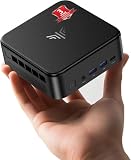
FIREBAT A6 Mini Gaming PC, Ryzen 7 7735HS, 16GB LPDDR5, 512GB SSD
Who it suits: The desk-or-TV-corner buyer who wants a gaming-styled box with a real high-power mode, plays mostly esports and older titles, and has the ventilation room its performance mode asks for.
The A6 is styled like a games machine rather than an office box, which in a small room is a placement decision in itself: this is a box you display on the desk or the TV stand rather than hide on a shelf. Its pitch is power — the Ryzen 7 7735HS is allowed up to 54W, the generous end of this chip’s range, so boost clocks and the Radeon 680M’s graphics clocks hold longer under load. Place it with that in mind: a 54W mini PC working hard moves real heat through small vents, so it wants open air on a desk or stand, not a closed cabinet and not a tight shelf bay, and its fans at full mode will be audible at desk distance in a quiet room in a way they never are across a living room. Across that room, on a TV stand with a controller in hand, is arguably its best home. Dual M.2 slots give its 512GB SSD a growth path, and USB-C, WiFi 6, Bluetooth 5.2 and 2.5-gigabit LAN cover the cabling. No dimensions or VESA bracket are documented for this listing, so measure from the live listing for any shelf or monitor-back plan, and budget a spot for its external power brick. Independent testing found its esports performance exactly right — Counter-Strike 2 at low settings ran at a very playable 75 to 110 frames per second in the reviewer’s hands. Check the price on Amazon for the current listing.
Then the caveat this guide will not soften: the A6’s 16GB of LPDDR5 is soldered and, in the configuration reviewers examined, runs in a single-channel arrangement that restricts the 680M’s memory bandwidth — the same testing measured graphics performance cut by roughly 20 to 35 percent in advanced 3D games versus a dual-channel machine. In esports and older games you will rarely feel it; in the newest titles, where frames are already scarce, you will. In a small room that buys a specific profile: a good-looking, strong-cooling esports box for open placements, whose memory compromise is priced into this ranking.
- A full 54W performance envelope in a gaming-styled chassis made to be seen on a desk or stand.
- Dual M.2 PCIe 4.0 slots — storage can grow even though memory cannot.
- Esports performance confirmed by independent testing — Counter-Strike 2 at low settings held a playable 75–110 fps.
Honest limitation: Soldered, single-channel memory costs the 680M a measured 20–35% in demanding 3D games, the RAM can never be upgraded, and the 54W mode needs open air and makes desk-distance noise.
Choose it if your library is esports, indie and older AAA, and your placement is an open desk or TV stand. Skip it if the only home is a closed cabinet or tight shelf — or if modern AAA games are the point.
GMKtec NucBox M6 Mini PC, Ryzen 5 6600H, 16GB DDR5, 512GB SSD
Who it suits: The buyer whose room needs the budget as much as the PC — a shelf, a mount, a longer cable, a better monitor — because this budget-tier pick routinely leaves meaningful headroom in the budget unspent.
The M6 is a flat, dual-fan mini PC built around the six-core Ryzen 5 6600H and its Radeon 660M graphics, and its placement profile is the most flexible per dollar in this guide. The flat box takes the usual homes — desk, open shelf bay, TV stand — and its connectivity suits the awkward ones: dual 2.5-gigabit LAN ports for wherever the router happens to live, and a USB4 port that opens the door to a dock, which in a small room is a genuine placement tool — one cable to the box, everything else on the desk. Memory is 16GB of DDR5 in real dual-channel SO-DIMM slots and storage is a 512GB SSD with a second slot beside it, so unlike the soldered picks it can grow in place. Dual-fan cooling in a box this size is a sensible design, but no noise figure is documented for it, so treat desk-distance sound as an unknown to judge in the return window rather than a promise. As with every pick here, no dimensions or VESA bracket are documented — measure from the live listing before a shelf or monitor-back commitment — and its external power brick needs the usual hidden home. It sits in the budget tier of this guide — check the price on Amazon — and Windows 11 Pro is preinstalled.
The compromise is graphics tier. The 660M carries roughly half the graphics hardware of the 680M machines above: esports at 1080p on low settings, older and indie games comfortably, and modern AAA titles only at genuinely low render resolutions with FSR doing visible work on a 1440p screen. In placement terms that is the profile of a second machine, a student machine, an emulation and media box with a gaming sideline — one that earns its shelf with networking and flexibility rather than frame rates.
- A budget-tier pick — the one most likely to leave room in the same budget for the room’s shelf, mount or monitor.
- Dual 2.5G LAN and USB4 docking: the best cabling flexibility here for awkward room layouts.
- Socketed dual-channel DDR5 and dual SSD slots, so it grows where it sits.
Honest limitation: The Radeon 660M is about half a 680M; modern games mean 720p-class rendering and visible upscaling on a 1440p panel, and no noise figure is documented.
Choose it if gaming shares the machine with work, media or emulation, and the room needs the leftover budget. Skip it if games come first — the jump to a 680M pick is the most worthwhile upgrade step in this guide.

Beelink SER5 MAX Mini PC, Ryzen 7 5800H, 16GB DDR4, 500GB SSD
Who it suits: The media-corner buyer — a TV stand or desk that needs a real everyday computer all day and a games machine in the evening, bought for the least money in this guide.
The SER5 MAX is the previous generation’s champion in the standard flat mini PC shape, and its placement story is versatility at a low price. The flat box takes the desk, the open shelf and the TV stand without fuss; three displays run at 4K@60 across HDMI, DisplayPort and USB-C, so a TV plus a monitor is a native arrangement rather than an adapter puzzle — the natural setup for a room where one corner does everything. Its Ryzen 7 5800H allows up to a 54W ceiling, so under a gaming load it wants the same respect as the A6: open air around the vents, not a sealed cabinet. Memory is 16GB of DDR4-3200 across two SO-DIMM slots, expandable to 64GB, and the 500GB NVMe SSD has room to grow toward 2TB, so the box can be upgraded where it sits instead of replaced. WiFi 6, Bluetooth 5.2 and Wake-on-LAN are present — the last of those is a small-space feature in disguise, letting a TV-stand machine wake from the sofa. No dimensions or VESA bracket are documented for this listing, so a monitor-back or tight-shelf plan needs the live listing’s measurements, and the external power brick needs its parking spot. Check the price on Amazon — it is positioned in the budget tier of this guide.
The compromise is the graphics generation. The 5800H’s integrated Radeon graphics are the older Vega design — eight cores at 2000MHz — a clear step behind the RDNA 2-based 680M above. Esports at 1080p low: comfortably. AAA games from the mid-2010s: yes, with sensible settings. Anything current: the render resolution drops toward 720p and FSR carries the picture to your 1440p screen in a way you will notice. Bought for the library you already own, at a price that acknowledges its age, it is a bargain with years left in it.
- Triple 4K@60 display output across three port types — the TV-plus-monitor corner is its native setup.
- Socketed DDR4 expandable to 64GB and Wake-on-LAN, at a budget-tier position in this guide — check the price on Amazon.
- Eight Zen 3 cores make it the strongest everyday computer per dollar in this guide.
Honest limitation: Vega-generation graphics are a full generation behind the 680M picks — current games are a 720p-and-upscale experience — and its 54W ceiling needs open ventilation like any hard-working mini PC.
Choose it if the library on your shelf is a back catalogue, the budget will not move, and the box earns its place doing everyday work between game sessions. Skip it if launch-week releases are your habit — that reader is exactly who the 7735HS picks above exist for.

Comparison Table
| Product | Form and placement strengths | Watch out for | Link |
|---|---|---|---|
| KAMRUI AM08PRO, 7735HS, 32GB DDR5, 512GB | Small tower: desk corner or floor; silent mode for quiet rooms | Least shelf-friendly shape; height not published in verified material | Check on Amazon |
| Beelink EQR6 Pro, 7735HS, 24GB DDR5, 1TB | Flat box with built-in PSU: tidiest TV stand, desk or shelf | Noise figure is a maker claim; no VESA documented | Check on Amazon |
| KAMRUI Mini PC, 7735HS, 16GB LPDDR5, 512GB | Plainest flat box: bookshelf bay or monitor ledge | Soldered RAM, no second SSD slot; buy on a price dip | Check on Amazon |
| FIREBAT A6, 7735HS, 16GB LPDDR5, 512GB | Gaming-styled box for an open desk or TV stand, 54W mode | Single-channel soldered RAM costs 20–35% in hard games; needs open air | Check on Amazon |
| GMKtec NucBox M6, 6600H, 16GB DDR5, 512GB | Flat box, dual LAN and USB4 dock: flexible cabling anywhere | 660M is half a 680M; no noise figure documented | Check on Amazon |
| Beelink SER5 MAX, 5800H, 16GB DDR4, 500GB | Flat box, triple display: TV-plus-monitor media corner | Vega graphics are a generation behind; 54W ceiling needs ventilation | Check on Amazon |
How to Choose a Gaming PC for a Small Space Under $400
- Measure the spot, then read the live listing. No verified source publishes a dimension table for these six, so the listing’s own measurements are the only honest ones. Tape out the footprint on your desk or shelf, note the shelf bay’s height — the rationed dimension for the AM08PRO’s tower form — and compare before you order, not after.
- Treat a monitor-back mount as a listing check, not a feature. None of the six has a documented VESA bracket in the verified material. If hanging the PC behind the screen is the plan, confirm the bracket on the live listing first; if it is absent, the shelf or desk space under the monitor is the fallback every pick here can use.
- Count the power brick as furniture. Only the EQR6 Pro has a built-in power supply. The other five each bring an external brick that needs a home — on the floor, behind the stand, on the shelf behind the books. If no such spot exists in your room, that is a genuine argument for the Beelink.
- Give every placement an air gap. Mini PCs throttle when their vents are buried. A few clear inches around the case, an open shelf front instead of a closed door, and never a sealed TV cabinet: ventilation clearance is free performance, and the closed-cabinet trap is the most common way small-space buyers strangle a good little PC.
- Use distance as your noise control. No independent decibel figures exist for these picks, and the one maker-quoted figure in the guide is labelled as such. What you control is geography: a fan at TV distance is a non-issue, the same fan at arm’s length in a quiet room is the loudest thing in it. Choose the placement — and the pick, like the AM08PRO with its silent mode — for the distance you actually have.
- Plan cable runs before the box arrives. Display cable to the screen, Ethernet if the router allows it, power to the wall. A TV-stand setup may need one long HDMI cable bought deliberately; a desk setup needs the brick and cables routed once, properly, instead of daily. Measure the run; cables bought a size too short are how small rooms end up with a PC in the wrong place.
- Match the memory to the tenancy. A small room often means a long stay with one machine. Socketed picks — AM08PRO, EQR6 Pro, NucBox M6, SER5 MAX — can grow to 64GB and take extra storage in place. The soldered KAMRUI and FIREBAT are finished appliances: right for a fixed setup, wrong for a growing one. The A6’s single-channel penalty belongs in this decision too.
- Spend the savings on the space. The NucBox M6, as a budget-tier pick, routinely leaves meaningful headroom in the budget unspent. In a small room that money often does more as a shelf, a longer cable, a monitor arm or the 1440p monitor itself than it would as a slightly faster box in the wrong place.
Common Buying Mistakes
- Assuming “mini PC” means it fits anywhere. The AM08PRO is a tower, shelf heights vary, and no pick here publishes verified dimensions in the material we checked — measure the spot and the listing, in that order.
- Ordering a monitor-back setup without confirming a VESA bracket exists for that exact listing. It is documented for none of these six; assuming it is how a PC ends up balanced on a stack of books.
- Shutting the PC in a TV cabinet or a closed shelf and blaming the machine for throttling. Integrated graphics in a sealed box cook themselves; the fix is an open front and an air gap, not a faster PC.
- Forgetting the power brick when planning the layout. Five of these six picks have one, it is warm, it is awkward, and it will live exactly where you did not plan for it.
- Putting a flat mini PC on carpet. Bottom intakes smother, dust loads the fans, and the box you bought to save space becomes the thing you trip over. Hard floor beside the desk at worst; a surface at best.
- Judging noise from a spec sheet. Maker noise figures are marketing-adjacent, and no independent measurements anchor this category — judge the fan in your room, inside the return window, at the distance it will actually sit.
- Buying the FIREBAT A6 for a tight shelf because it is small, then running its 54W mode in a bay with no airflow — its strength and its placement needs are the same feature.
- Believing the setup renders native 1440p because the monitor is 1440p. These machines render lower and upscale with FSR; that is the honest deal at $400 in any room size, and guides for genuinely native 1440p start a budget tier up.
Final Recommendation
- Most small rooms: KAMRUI AM08PRO, if a desk corner or floor spot is yours to give it.
- TV stands and shared rooms: Beelink EQR6 Pro — no brick, quiet-first, storage for the whole library.
- Shelf bays and the tiniest desks: KAMRUI Mini PC, bought on a price dip.
- Open desks, esports-first: FIREBAT A6, memory caveat understood.
- When the room needs budget too: GMKtec NucBox M6.
- Media corners on the least money: Beelink SER5 MAX.
Our top two for small spaces under $400 are the KAMRUI AM08PRO, because its socketed dual-channel DDR5 lets the Radeon 680M perform at its full honest level from the one shape here that stands happily on a desk corner or the floor — and the Beelink EQR6 Pro, because its built-in power supply and quiet-first design make it the easiest machine in this guide to actually live alongside. Between them they cover the two shapes a small room offers: a corner to stand in, and a stand to disappear onto. If the budget can stretch, Best 1440p Gaming PC For Small Spaces Under $500 widens the choice, while readers whose rooms can take a slightly larger box should compare Best Small Form Factor Gaming PC Under $400 and Best Compact Gaming PC Under $400. And when the space problem is solved and the question becomes pure performance, Best 1440p Gaming PC Under $500 is the next step up. Measure your spot, confirm the listing’s dimensions, and check the live price before you order.
Frequently Asked Questions
How much space does a mini gaming PC actually take up?
Less than any tower, but more than the product photo suggests. The box itself is only part of it: add the external power brick on five of these six picks, a few inches of ventilation clearance around the vents, and the cable runs to the screen, keyboard and router. The verified material for these listings does not publish a dimension table, so take the exact footprint from the live listing and tape it out in the room before you buy — the honest method, and the one this guide is built on.
Can I mount one of these PCs behind my monitor?
Only if the exact listing includes or supports a VESA bracket — and no verified source documents one for any of the six picks in this guide, so treat monitor-back mounting as unconfirmed until you check the live listing. If no bracket exists, the shelf or desk space directly beneath the monitor gives you nearly the same zero-footprint result with no hardware gamble.
Is it safe to put a mini PC in a TV cabinet or closed shelf?
It is the most common small-space mistake in this category. A mini PC in a sealed cabinet recirculates its own hot air, the integrated graphics throttle, and the performance you paid for quietly leaves. An open-front shelf bay with a few inches of clearance is fine; a closed door is not. If the cabinet is the only option, leave the door open while gaming — or choose a placement on top of the stand instead.
Which pick is quietest for a bedroom or studio?
The Beelink EQR6 Pro is designed quiet-first and carries a maker-quoted figure of around 32 decibels — a manufacturer claim, not an independent measurement, but consistent with the line’s reputation in reviews. The AM08PRO’s silent performance mode is the other deliberate answer. Beyond the pick, distance is the real control: any of these machines is effectively silent at TV distance and audible at arm’s length under a gaming load.
Can these PCs really game on a 1440p monitor?
Yes, with the honest definition: esports and older games run at 1080p and often approach 1440p at low settings on the 680M picks, while modern AAA games are rendered at 720p to 1080p and upscaled to the 1440p screen with FSR. No PC under $400 renders modern games natively at 1440p — that tier starts around $700 — and in a small room, where the monitor usually doubles as the TV, the upscaled result is a genuinely good experience at a normal viewing distance.
Mini PC or small tower for a small room?
It depends on which dimension your room rations. The AM08PRO’s small-tower form takes its space vertically — a narrow footprint that suits a desk corner or a floor spot but fights shelf heights. The flat boxes take theirs horizontally and slide into shelf bays and TV stands. Measure the actual spot: rooms short on surface want the tower’s corner, rooms short on everything want the flat box’s shelf.
Will these PCs work as everyday computers in a small home office?
Completely. Every pick runs a six- or eight-core Ryzen processor with 16GB or more of memory and a fast SSD — more than office work, browsing, media and light photo editing ask for — and most drive two or three displays for work. The gaming ceiling in this guide is a graphics ceiling, not a computing one, which is exactly why mini PCs suit small homes: one small box honestly covers both jobs.

