Where to buy
Check the latest price, availability and delivery on Amazon. Orders are placed on Amazon. We may earn a commission from qualifying purchases.
- Best overall: MXZ Gaming Desktop, Ryzen 5 5500, GTX 1660 Super 6GB, 16GB DDR4, 500GB NVMe SSD — Check on Amazon
- STGAubron Gaming PC, Ryzen 5 5500, Radeon RX 580 8GB, 16GB DDR4, 512GB SSD — Check on Amazon
- Beelink SER5 MAX Mini PC, Ryzen 7 7735U, Radeon 680M, 24GB LPDDR5, 500GB SSD — Check on Amazon
- GMKtec NucBox M6 Ultra, Ryzen 5 7640HS, Radeon 760M, 16GB DDR5, 512GB SSD — Check on Amazon
See 2 more Amazon options
- LXZ Gaming PC, Ryzen 5 5600GT, Integrated Radeon Graphics, 16GB DDR4, 1TB NVMe SSD — Check on Amazon
- ACEMAGICIAN AM06 Pro Mini PC, Ryzen 7 5800U, Radeon Vega 8, 16GB DDR4, 512GB NVMe SSD — Check on Amazon
Read the full guide ↓
Disclosure: As an Amazon Associate, reviewstook.com earns from qualifying purchases. Links to Amazon on this page are affiliate links; they cost you nothing extra. Listing details such as price and availability change often, so check the current Amazon listing before you buy.
In a large setup, the graphics card comes first and the furniture works around it. In a studio apartment, a dorm room or a corner of a shared living room, the first question is blunter: where does the box physically go, and what does it displace when it gets there? This guide takes the six strongest sub-$500 routes to a 1440p screen and grades them the way a small-space buyer actually experiences them — by footprint class first, and by gaming power second. The six split cleanly into two species. Three are conventional towers: full-size furniture that claims a patch of floor or a serious slice of desk, permanently. Three are mini PCs: shelf-class boxes that can live behind the monitor, on a bookcase or inside a TV stand’s open shelf, and leave the room looking much as it did before. Neither species is the “right” answer. They are different trades between space and performance, and this guide’s job is to price both sides of that trade honestly.
Two honesty notes carry over from the rest of this series. First, the 1440p part: $500 does not buy native 1440p at high settings in current AAA games. What it buys is native 1440p in esports and older titles, upscaled output for newer games, and a perfectly crisp 1440p desktop for work and video — and shrinking the box does not change that arithmetic, because the limit is graphics hardware, not case size. Second, the price part: the two towers with proper discrete graphics cards only fit this budget on sale, and one of the minis is a sale-watch pick that often sits above the line. Where a pick’s place in this guide depends on a discount, its review says so in plain words — check price on Amazon before you buy.
One more note: our verified research on these six listings does not include manufacturer dimensions for any of them, so this article prints none. You will not find invented centimetres, borrowed volumes or noise figures here. Placement is graded by documented form-factor class — full tower, mini PC — and by the consequences that follow from the class: floor versus shelf, internal power supply versus external brick, upgradeable versus sealed. Exact measurements for the configuration you are buying live in one place only: the dimensions field of the live Amazon listing — and the checklist near the end of this guide turns it into a five-minute routine. In a small space, that routine is not homework. It is the purchase.
In this guide
Quick Picks
Short on time, or comparing several options at once? Each row below names a buyer type and the product that suits it, with a link to the listing.
| Buyer type | Pick | Why it stands out | Link |
|---|---|---|---|
| Best overall | MXZ Gaming Desktop, Ryzen 5 5500 / GTX 1660 Super | The strongest gaming hardware here — but it is a full tower, so it earns its floor space only on sale — check price on Amazon | Check on Amazon |
| Best for a truly small desk | Beelink SER5 MAX, Ryzen 7 7735U / Radeon 680M | Shelf-class mini with the strongest integrated graphics in the guide, positioned as an everyday pick under the budget — check price on Amazon | Check on Amazon |
| Best 8GB graphics card | STGAubron Gaming PC, Ryzen 5 5500 / RX 580 8GB | 8GB of VRAM in a tower that includes keyboard and mouse — one less purchase, one large footprint — check price on Amazon | Check on Amazon |
| Best modern mini platform | GMKtec NucBox M6 Ultra, Ryzen 5 7640HS / Radeon 760M | DDR5, USB4 and dual 2.5GbE in a mini — a sale-watch pick that often sits above budget — check price on Amazon | Check on Amazon |
| Best tower to upgrade later | LXZ Gaming PC, Ryzen 5 5600GT / 1TB NVMe | A full-size tower with double the storage of the rest — check price on Amazon — floor space spent now, a graphics card added later | Check on Amazon |
| Cheapest credible option | ACEMAGICIAN AM06 Pro, Ryzen 7 5800U / Vega 8 | The smallest commitment in money and space — the lowest-positioned mini in the guide — check price on Amazon | Check on Amazon |
How These Picks Were Chosen
The budget rule is the one used across this series: a pick qualifies only if the exact configuration is positioned at or under $500 in the US. Machines that have never credibly fitted this budget were excluded however good they are. Where a pick normally lives above the line and only visits during sales, the guide says so plainly and states the buying rule that follows from it: check price on Amazon and buy only when it fits the budget. That discipline matters doubly here: a recommendation that quietly sits above budget has failed a small-space buyer twice.
We did not use these PCs ourselves. We read the maker listings and specification pages and compared, first, the placement facts that are actually documented — form-factor class, power-supply arrangement, port layout, included peripherals — and then the parts that decide gaming outcomes: the graphics hardware, its video memory, and the CPU, memory configuration and storage behind it. One deliberate omission runs through the guide: dimensions. None of the six listings’ verified records publish measurements we could stand behind, so no review below states a size in numbers. We would rather grade the class honestly and send you to the live listing’s dimensions field — which describes the exact variant in your cart — than print a number we cannot verify.
Two filters decided the final six. The placement filter asks whether the machine has a believable home in a small room: a tower passes if its performance genuinely justifies furniture-scale space, and a mini passes if it is honestly capable rather than merely tiny. The gaming filter: a pick must do something real at 2560×1440 — native resolution in lighter titles, or clean upscaled output with the honesty to say which. Readers whose space is tighter still should also look at Best Small Form Factor Gaming PC Under $500 and Best Compact Gaming PC Under $500, where the cases shrink further.
Two Classes of Small
It helps to name the two species plainly before the reviews, because almost every difference that matters in a small room flows from the split. A tower is a piece of furniture that computes. It stands on the floor beside the desk or takes a serious slice of the desktop, it contains its own power supply, it breathes through vents on several faces, and it can be opened and upgraded for years. In exchange, it offers the only discrete graphics cards in this guide — the only genuinely strong gaming hardware $500 can reach. A mini PC is an appliance that computes. It sits on a shelf, behind the monitor or under it, draws power from an external brick that itself needs a home, moves very little air, and is essentially sealed: the graphics it ships with are the graphics it retires with. In exchange for that ceiling it gives the room back — the desk stays a desk, the floor stays clear, and the PC can share a home with books, a console or the TV.
Heat and noise follow the same split, and in a small room they are placement facts, not comfort trivia. A tower under load exhausts warm air continuously, a short distance from the bed or the desk chair; a mini’s whole power budget arrives through a laptop-class brick, so it adds far less heat and moves far less air. Neither machine should be sealed inside a closed cabinet — that trap is covered in the mistakes section below.
The 6 Best 1440p Gaming PCs for Small Spaces Under $500
MXZ Gaming Desktop — Ryzen 5 5500, GTX 1660 Super 6GB, 16GB DDR4, 500GB NVMe SSD
Who it suits: The small-space buyer whose room can spare one tower’s worth of floor — beside the desk, not on it — and who wants the strongest gaming performance this budget can reach, bought at the right moment.
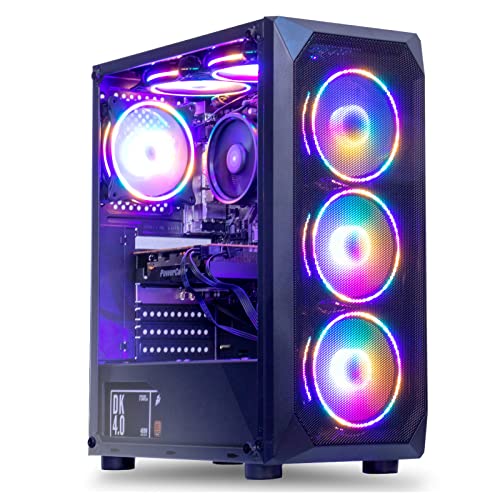
Start with the placement verdict, because for this guide it comes first: this is a full-size tower, and it should be planned as furniture. The realistic home is the floor beside or under the desk, where its footprint costs no working surface; on top of a small desk it will crowd out the monitor, keyboard and the human being. It breathes through multiple faces — the configuration carries six RGB fans — so it wants open air on its vented sides rather than a push against the wall or a home inside a cabinet, and under gaming load it will be the warmest, most audible machine in this guide at desk distance. None of that is a defect. It is simply the price of the one thing no mini here can offer: a real discrete graphics card.
That card is the GTX 1660 Super, a Turing-generation GPU with 6GB of GDDR6, and it remains the strongest gaming hardware in this guide by a wide margin. At a 1440p panel it plays esports titles — Counter-Strike 2, Valorant, Rocket League, Apex Legends at reduced settings — at native resolution, and works through the pre-2022 AAA catalogue at 1440p medium. Newer heavy releases are rendered at 1080p and upscaled; there is no DLSS on the GTX line and no ray tracing worth switching on, so in-game scalers and FSR do that work. The supporting cast is sensible and standard: six-core Ryzen 5 5500, 16GB of DDR4-3200, a 500GB NVMe SSD, a listed 450W 80 Plus power supply, Windows 11 Pro — and because it is a standard tower, a stronger graphics card can replace the 1660 Super in a future year, inside the same footprint: the upgrade path costs money, not additional space.
The buying rule is strict, and this guide will not soften it: this configuration only fits this guide when it is on sale under the budget — check price on Amazon. On sale under the budget it is the best gaming value here. Above the budget it has left this guide entirely and belongs in the Best 1440p Gaming PC Under $700 conversation instead. One listing caution: MXZ’s own page contradicts itself — a bullet mentions a 1TB drive where the title and specification table say 500GB, and a stray description line names a different graphics card — so confirm the configuration and dimensions on the live listing at checkout, and keep the order screenshot.
- GTX 1660 Super 6GB — the strongest graphics hardware in this guide, and the only pick that plays a wide range of games at native 1440p.
- Standard tower platform with a listed 450W PSU: future GPU upgrades happen inside the footprint you already gave it.
- Positioned at the strong-value end of this budget when on sale — at that point, nothing smaller is remotely close for gaming — check price on Amazon.
Honest limitation: It is furniture. It claims floor or desk volume permanently, exhausts the most heat into a small room, and it is only under $500 on sale — at its usual above-budget pricing it breaks this guide’s budget outright.
Choose it if you have a floor spot with open air around it, can wait for a sale that brings it under the budget — check price on Amazon — and want maximum gaming per dollar. Skip it if the desk is the only surface you have, or you are buying today at whatever it costs.

STGAubron Gaming PC — Ryzen 5 5500, Radeon RX 580 8GB, 16GB DDR4, 512GB SSD
Who it suits: The floor-tower buyer whose library is esports, MOBAs and a deep back catalogue — and who values the included keyboard and mouse because, in a small setup, every separate purchase is also a separate object to store.
Placement first again: same furniture class as the MXZ. This is a full tower that lives on the floor, wants clearance around its vents, and should never be sealed into a cabinet or wedged into a corner with its exhaust against a wall. Two small-space details distinguish it. The listing includes an RGB keyboard and mouse, which sounds like a footnote and is not: a first-time buyer in a small room avoids a second parcel, a second set of boxes, and a second pair of devices competing for the desk — the PC arrives as a complete station needing only a monitor. And because the graphics card is a 2017 design with power draw that is high for its performance, this tower puts the most waste heat of any pick here into the room around it. In a small bedroom in August, with the door closed, that heat is a genuine placement consideration — and the honest reason this pick sits below the MXZ despite its larger memory.
That memory is the pick’s real argument: the RX 580 carries 8GB of VRAM, the most in this guide, and at 1440p video memory is where budget cards fail first — textures spill, stutter arrives, settings lock. In the games of its era and the many titles sharing their engines, 8GB buys honest native-1440p play at medium settings and strong 1080p everywhere else. Around it: the same six-core Ryzen 5 5500, 16GB of DDR4, a 512GB SSD, WiFi 6, Bluetooth 5.2 and Windows 11 Home. AMD has moved the Polaris generation to legacy driver support, so new-game optimisations are no longer coming, and marketplace RX 580 builds have a long reputation for inconsistent component quality — Amazon’s return window is part of the product, and the first week should be treated as a test.
This configuration only fits the budget on sale — check price on Amazon. Caught on sale under the budget, tested hard on arrival, it is a defensible VRAM-rich route onto a 1440p screen. Above the budget it is an old graphics card wearing a new PC’s price tag, in a tower your room still has to house, and this guide does not recommend it at that level.
- 8GB of GDDR5 VRAM — the most video memory in this guide, and it shows in texture headroom at 1440p.
- Keyboard and mouse in the box: the complete station arrives in one parcel, a real virtue in a small room.
- Positioned as the cheapest discrete-GPU route here when on sale — check price on Amazon.
Honest limitation: A 2017 graphics architecture on legacy drivers, the highest heat output in the guide for a small room to absorb, marketplace build variability — and, like the MXZ, a sub-$500 machine only during sales.
Choose it if you find it under $500, your games are pre-2023 and esports titles, and you will verify it inside the return window. Skip it if your room already runs hot, you play brand-new releases, or the live price sits well above the budget — check price on Amazon.

Beelink SER5 MAX Mini PC — Ryzen 7 7735U, Radeon 680M, 24GB LPDDR5, 500GB SSD
Who it suits: The buyer this angle exists for: a small desk, a shared room, a living-room shelf — anyone who needs to buy today, under $500, and wants the PC to all but disappear once it is installed.
The placement story is the mirror image of the towers’. This is a mini PC of the shelf class: the kind of box that lives behind the 1440p monitor it drives, on a bookshelf among the books, or on an open TV-stand shelf beside a console, returning the desk and the floor entirely to the room. Its power arrives through an external brick rather than an internal supply, so plan a resting place for the brick — floor by the outlet, or behind the stand — and a cable path from it; that brick and the display cable are the whole of its hidden footprint. It moves little air and adds little heat, which in a small closed room is a quality-of-life difference you feel by the second hour of a session. Two cautions apply even here: give its vents open air rather than sealing it in a closed cabinet, and leave cable slack if it lives behind the monitor, so the screen can still be adjusted.
The Ryzen 7 7735U carries the Radeon 680M, an RDNA 2 integrated GPU that independent testing places roughly in GTX 1050 Ti territory — the strongest integrated graphics available under $500. At a 1440p panel that means esports and indie titles at native 1440p on low-to-medium settings, heavier games rendered at 1080p or below with FSR and upscaled, and a flawless native-1440p desktop for everything else. The 24GB of LPDDR5 is doing quiet, essential work: the 680M borrows system memory for both bandwidth and capacity, and 24GB removes the squeeze that hobbles 16GB integrated machines when a game, a browser and a voice call share the pool. Triple-display output (HDMI, DisplayPort and Type-C), WiFi 6 and Bluetooth 5.4 round out a machine that is as good a small-space work PC as it is a games box.
Best of all, the price needs no asterisk. This exact configuration is positioned as an everyday pick under the budget rather than a sale-only visitor — check price on Amazon. The structural trade is permanence: the LPDDR5 is soldered, so 24GB is the final memory figure, there is no graphics slot and never will be, and when the 680M stops being enough, the whole PC is replaced rather than upgraded. The storage, at least, is a standard replaceable SSD. Readers comparing the mini class specifically should cross-shop Best Mini Gaming PC Under $500 before deciding.
- Radeon 680M integrated graphics — the strongest iGPU class under $500, in a box that hides behind the monitor.
- 24GB LPDDR5 feeds the integrated GPU properly — the memory configuration small iGPU machines usually get wrong.
- Positioned as a genuine everyday sub-$500 pick, not a sale-day event — check price on Amazon.
Honest limitation: Sealed forever — no graphics or RAM upgrade path exists, so its gaming ceiling is fixed on the day it arrives, and heavy modern games mean rendering well below 1440p.
Choose it if space is the hard constraint, you are buying now, and your library is esports, indie and older titles. Skip it if a future graphics-card upgrade is part of your plan — that is what the towers in this guide are for.

GMKtec NucBox M6 Ultra — Ryzen 5 7640HS, Radeon 760M, 16GB DDR5, 512GB SSD
Who it suits: The shelf-space buyer who wants the newest platform in the smallest box — DDR5, USB4, serious networking — and who can wait for this one’s regular discounts to bring it back under the line.
Like the Beelink, this is a shelf-class mini — behind the monitor, on a bookcase, on a TV stand’s open shelf — with its power brick given a home nearby and its vents in open air. Where its placement profile differs is cabling. This is the most connected machine in the guide — a full-function USB4 port, dual 2.5GbE Ethernet, triple 4K display output, WiFi 6 and Bluetooth 5.2 — and every one of those ports is a potential cable. In a small room, cables are footprint too: a mini wired to two displays, a dock and Ethernet can trail more spaghetti across a desk than the tower it replaced. The tidy installation uses its wireless for peripherals, one display cable, and Ethernet only if the router is genuinely close; the untidy one negates the point of buying small.
On hardware, this is the most modern machine here. The Ryzen 5 7640HS is a Zen 4 processor paired with the Radeon 760M, an RDNA 3 integrated GPU that sits a step below the Beelink’s 680M in raw graphics terms despite the newer architecture, because it carries fewer compute units. Expect esports at native 1440p on low settings, mainstream games rendered at 1080p with upscaling, and excellent modern video handling including AV1. The platform around it is the argument: DDR5 memory in real SO-DIMM slots rather than solder — a mini that can actually be upgraded — dual M.2 SSD slots, and that port selection.
This 16GB/512GB configuration often sits above the budget, while spending real time under $500 during its regular sales — check price on Amazon — and its larger 32GB/1TB sibling is positioned in the same family during promotions. The rule writes itself: when it is on sale under the budget, this is a strong modern alternative to the Beelink, trading a little graphics muscle for slots, ports and platform youth; above the budget it has left this guide and should be compared in the Best Mini Gaming PC Under $700 class instead. One family-wide warning: GMKtec sells several near-identically named M6 variants with different memory and storage, so verify the exact RAM and SSD in the cart — and take the dimensions from that exact variant’s listing — before paying.
- Newest platform here: Zen 4 CPU, DDR5 in upgradeable slots, dual SSD slots, USB4, dual 2.5GbE.
- Radeon 760M RDNA 3 graphics with AV1 support — modern media handling and light 1440p gaming.
- Positioned as a genuine under-$500 machine whenever its regular sales run — check price on Amazon.
Honest limitation: The 760M is a step behind the 680M for games, this configuration often sits above budget until the next discount — check price on Amazon — and its rich port selection can cable-clutter a small desk if installed carelessly.
Choose it if you catch it on sale under the budget and want modern ports, upgradeable memory and networking in a mini. Skip it if the live price sits above the budget and gaming is the priority — check price on Amazon — the Beelink games harder and is positioned lower in the tier, today.

LXZ Gaming PC — Ryzen 5 5600GT, Integrated Radeon Graphics, 16GB DDR4, 1TB NVMe SSD
Who it suits: The planner with one tower’s worth of floor to give permanently: a first-PC buyer whose real intention is a proper graphics card within the year, and who wants the case, CPU and storage already in place when it arrives.
Of the three towers here, this one asks the most of a small room. It is a full-size tower in a white sea-view case — a design meant to be looked at, so it tends to claim visible space, on or beside the desk, rather than disappearing under it. Budget its footprint as furniture, keep its vented faces in open air, and remember that a tower’s space cost is not just the case: it is the cable bundle and clearance behind it, and the floor patch stays occupied for the life of the machine. What the room gets in return is the only pick here whose story improves: every future upgrade happens inside the same case.
Day one, honestly, is modest. The Ryzen 5 5600GT’s integrated Radeon graphics — the listing is candid that there is no dedicated card — are the weakest gaming hardware in this guide: at a 1440p monitor that means esports rendered at 1080p or 720p on low settings and upscaled, older games at reduced internal resolution, and no credible native-1440p AAA play at all. The substance of the purchase is everything around that chip: a strong six-core CPU that will feed a mid-range graphics card happily later, 16GB of DDR4, a listed 400W power supply to plan upgrades around, and a 1TB NVMe SSD — double the storage of every other pick here, positioned at the top end of this budget — check price on Amazon. The upgrade itself is one purchase and ten minutes with a screwdriver.
The risk is symmetrical with the promise: you are spending up to the full budget — and giving a small room’s scarcest resource, space — to a PC that does not yet do the thing in the headline. If the graphics card never gets bought, you own an office-and-esports tower upscaling to your 1440p screen, and the Beelink would have served you better in a fraction of the space. If the upgrade genuinely happens, the budget went into exactly the parts that are annoying to replace later. One homework item: LXZ sells sibling configurations under similar titles, so confirm “5600GT, 16GB, 1TB NVMe” — and the case dimensions — on the live listing before checkout.
- 1TB NVMe SSD, positioned at the top end of this budget — check price on Amazon — twice the storage of anything else in this guide.
- Full-size AM4 tower: the only pick whose 1440p story transforms with one later purchase, inside the same footprint.
- The six-core 5600GT has ample headroom for the mid-range card this plan depends on.
Honest limitation: The largest space commitment in the guide, paired with — as delivered — its weakest graphics: 1440p output is upscaled esports and older games only, until you add a card.
Choose it if the floor spot is genuinely spare and a GPU upgrade within the year is in the plan and the budget. Skip it if the PC must be finished the day it arrives, or the room cannot spare a tower — pick the Beelink, or catch the MXZ on sale.

ACEMAGICIAN AM06 Pro Mini PC — Ryzen 7 5800U, Radeon Vega 8, 16GB DDR4, 512GB NVMe SSD
Who it suits: The smallest commitments of all: a spare 1440p monitor in a second room, a kid’s first PC, a living-room shelf for indie and retro libraries — anywhere “under $500” really means “as far under as possible, in money and in space.”
It is a shelf-class mini with the same freedoms as the other two — behind the monitor, on a bookcase, on the open shelf of a TV stand — and the same two duties: a home for its external power brick, and open air at its vents rather than a closed cabinet door. Because it is the cheapest machine here by a wide margin, it also enables a placement the others cannot: buying it leaves a meaningful share of the $500 budget unspent, which in a small room is not abstract savings — it is the monitor arm that lifts the screen off the desk, or the wall shelf the PC then sits on. Space problems are often solved with the accessories around the PC rather than the PC itself, and this is the only pick that funds its own accessories.
The eight-core, sixteen-thread Ryzen 7 5800U is honestly strong for the money — a better everyday-computing CPU than several pricier picks here — paired with 16GB of dual-channel DDR4 and a 512GB NVMe SSD. The graphics require the guide’s most careful honesty: Vega 8 is a generation behind the 680M and two behind the 760M, so at 1440p this is an esports-and-indies device — League of Legends, Rocket League, older and lighter titles at native or near-native settings, everything heavier rendered at 720p–1080p and upscaled, ideally with FSR where offered. Check price on Amazon — this pick is positioned at the low end of the budget, with a 32GB/1TB configuration also positioned inside budget. Dual LAN ports and triple-display 4K output, meanwhile, make it a genuinely good 1440p desktop for work, browsing and video, which for many second-room buyers is most of the job.
It closes the guide because it is the lowest-risk experiment here. If the household discovers it loves PC gaming, nothing was wasted: the AM06 Pro retires gracefully to desk, TV or media duty, and the savings it left behind become the seed of the tower fund. The listing’s marketing name-checks heavy shooters; treat that as aspiration, set expectations at esports and back catalogue, and this little box will meet them.
- Positioned as the cheapest credible PC in this guide — check price on Amazon — leaving budget for the arm, shelf or cables that finish a small setup.
- Eight Zen 3 cores make it the best everyday-computing value here, gaming aside.
- Dual LAN and triple-display output give it a second career as a 1440p desk and media box.
Honest limitation: Vega 8 graphics are the floor of this guide — modern AAA at 1440p is out of reach even upscaled in many titles — and its DDR4 platform caps how far memory upgrades can take it.
Choose it if the true budget is well under the cap, the room is nearer a shelf than a desk, or the games are esports, indie and retro. Skip it if current AAA titles are the point; that ambition belongs to the $700 tier.

Comparison Table
| Product | Placement class | Best use | Link |
|---|---|---|---|
| MXZ Gaming Desktop (Ryzen 5 5500 / GTX 1660 Super) | Floor tower — furniture footprint | Most real gaming performance, if the room can spare the floor — buy on sale under the budget — check price on Amazon | Check on Amazon |
| STGAubron Gaming PC (Ryzen 5 5500 / RX 580 8GB) | Floor tower — furniture footprint, highest heat | VRAM-rich older-game play with keyboard and mouse included — check price on Amazon | Check on Amazon |
| Beelink SER5 MAX (Ryzen 7 7735U / Radeon 680M) | Mini — shelf, monitor-back or TV-stand class | Best buy-today small-space pick — check price on Amazon | Check on Amazon |
| GMKtec NucBox M6 Ultra (Ryzen 5 7640HS / Radeon 760M) | Mini — shelf class, most cables to manage | Modern DDR5/USB4 mini — buy on its regular sales under the budget — check price on Amazon | Check on Amazon |
| LXZ Gaming PC (Ryzen 5 5600GT / 1TB) | Full-size tower — the largest commitment here | 1TB platform tower positioned at the top end of the budget, built to accept a GPU later — check price on Amazon | Check on Amazon |
| ACEMAGICIAN AM06 Pro (Ryzen 7 5800U / Vega 8) | Mini — shelf class, smallest commitment | Cheapest credible option, positioned at the low end of the budget — check price on Amazon | Check on Amazon |
The Space You Cannot See on the Spec Sheet
Every PC in this guide occupies more room than its case. Budgeting only for the box is the classic small-space error, so count the entourage before you order. The power supply is the first invisible item, and it splits by class: the towers carry theirs inside the case, so their external footprint is one mains cable; the three minis run from external power bricks, and each brick needs a resting place — floor by the outlet, behind the TV stand, on the shelf beside the PC — plus a cable run from there to the box. Cables are the second item. A tower on the floor needs display, power and probably Ethernet runs long enough to reach the desk without tension; a mini behind the monitor needs almost none, while a mini wired for dual displays and dual Ethernet, like the GMKtec, can give the advantage back. Price the cable lengths your layout actually needs.
Clearance is the third item, and it is non-negotiable in both classes. Vented faces need open air around them — a tower pushed flush against a wall or a mini resting against the back panel of a shelf will run hotter and louder than the same machine given breathing room. The closed cabinet deserves its own warning: a tower inside a closed TV cabinet will overheat, full stop, and a mini inside one will throttle itself slower and bake its components. Open shelves, open backs and doors left open during play are the workable versions of tidy. Finally, count the monitor and the peripherals. A 1440p panel and its stand claim desk area no PC specification mentions, and the keyboard needs a home when the desk doubles as a dining table. The room is the spec sheet that matters.
How to Choose a 1440p Gaming PC for a Small Space Under $500
- Measure before you buy — the five-minute routine. (1) Open the live Amazon listing for the exact configuration in your cart and find its dimensions field; marketplace variants differ, so measure the variant, not the product family. (2) Measure your intended spot — width, depth and height, including the inside of any shelf or cabinet. (3) Add clearance on every vented face; if the spot only fits with the vents pressed to a surface, it does not fit. (4) Tape the footprint outline onto the desk or floor and live with it for a day. (5) Walk the cable path from the spot to the monitor, the outlet and the router, and check you own — or are ordering — the lengths it needs.
- Choose the class before the model. If the room cannot spare a tower’s floor patch, no tower review should tempt you — the minis are your shortlist, and the choice among them is graphics (Beelink), platform (GMKtec) or price (ACEMAGICIAN). If the room can spare it and gaming performance leads, the towers are the shortlist.
- Match the heat to the room. A small, closed, sun-facing bedroom is the hardest environment in this guide. The discrete-GPU towers — the RX 580 build most of all — exhaust real heat under load; the minis sip power through laptop-class bricks and add far less. If the room already runs warm, that difference is worth more than a spec-sheet gap.
- Check the current price before you buy. The rules from the reviews, collected: MXZ only on sale under the budget; STGAubron only on sale under the budget; GMKtec only on sale under the budget; Beelink and LXZ are buy-today picks positioned under the budget; the ACEMAGICIAN, at the low end of the budget, needs no timing at all.
- Decide by the exit, not just the arrival. A tower is a platform: graphics, memory and storage upgrade inside the same footprint, so today’s compromise can become next year’s genuinely capable 1440p machine. A mini is a finished appliance: smaller, quieter, cheaper to run, and exactly as fast forever. Neither is wrong — buying one while expecting the other’s behaviour is.
- For integrated graphics, memory is graphics. iGPUs borrow system RAM for bandwidth and capacity alike, so the Beelink’s 24GB of fast LPDDR5 is a gaming specification, not a luxury, and dual-channel configuration is mandatory on any DDR4 machine. Check the listing’s Q&A if the channel configuration is not stated.
- Keep the 1440p definition honest. Native 1440p in esports and older titles, upscaled output in newer games, full native resolution for desktop and video: all six picks do at least one of those genuinely, and none does native high-settings 1440p in new AAA releases. If that last item is your non-negotiable, the honest budget is the one in Best 1440p Gaming PC Under $700 — and the honest space answer is to make room for the tower it will likely be.
Common Buying Mistakes
- Measuring the PC but not the spot — or worse, trusting the product photos for scale. Marketplace photos are renders without reference objects; the only trustworthy size source is the exact variant’s dimensions field on its live listing.
- Sealing any of these machines inside a closed cabinet or TV unit. Towers overheat; minis throttle and bake. Tidy means open shelves and open backs, not closed doors.
- Forgetting the power brick. A mini’s brick needs a home and a cable run; discovering that on delivery day is how small setups end up with a brick dangling behind the desk.
- Pushing vents flush against walls, shelf backs or soft furnishings. Clearance is part of the footprint. A machine that only fits without breathing room does not fit.
- Paying the non-sale price for a sale-dependent pick. The MXZ, the STGAubron and the GMKtec above the budget are not under-$500 PCs having a bad day; they are above-budget PCs, and your room deserves an above-budget decision if you pay it — check price on Amazon.
- Buying the tower for a desk it does not fit, because the gaming numbers were better. A tower belongs on the floor with open air; if the room has no such patch, the mini was the right answer all along.
- Ignoring the monitor math. Spending the whole $500 on the PC for a 1440p panel you do not yet own — or forgetting the panel and its stand claim desk space too. On a 1080p screen, several of these same machines feel twice as fast — the Best 1080p Gaming PC Under $500 tier is worth a look before you commit to a panel you do not own.
- Trusting a listing title over its specification table — or its table over the box that arrives. Variants hide under one title, listings contradict themselves (one pick here disagrees with itself about its own storage), and the return window is your verification tool. Use it.
Final Recommendation
- Smallest footprint with real gaming ability: Beelink SER5 MAX (Radeon 680M, 24GB) — positioned as an everyday pick under the budget, no sale-watching required — check price on Amazon.
- Most gaming performance, if the floor can spare a tower: MXZ Gaming Desktop (GTX 1660 Super) — on sale under the budget only — check price on Amazon.
- Complete station in one box: STGAubron Gaming PC (RX 580 8GB) — keyboard and mouse included, on sale under the budget, tested inside the return window — check price on Amazon.
- Newest, most connected mini: GMKtec NucBox M6 Ultra — when its price returns to under the budget — check price on Amazon.
- The stepping stone: LXZ Gaming PC (5600GT, 1TB), for buyers genuinely committed to the later GPU.
- Tightest budgets and second rooms: ACEMAGICIAN AM06 Pro — positioned at the low end of the budget, leaving money for the arm or shelf that finishes the setup — check price on Amazon.
Our top two are divided by the room, not the benchmark chart. If your space is genuinely small — a desk that must stay a desk, a shelf, a TV stand — the Beelink SER5 MAX is the recommendation: the strongest integrated graphics under $500, memory configured the way integrated graphics need, a genuine everyday position under the budget — check price on Amazon — and a footprint that returns the room to you. If your room can give one tower a floor patch with open air around it, and your calendar can wait for a sale, the MXZ is the strongest gaming machine $500 can reach, and its upgrades will happen inside the footprint you already surrendered. The STGAubron is the wildcard for older-game players who catch it on sale under the budget; the GMKtec is the modern-platform mini when discounted; the LXZ is a platform purchase, not a finished 1440p PC; and the ACEMAGICIAN is the honest floor that funds its own accessories. For the same six machines graded purely on gaming, see Best 1440p Gaming PC Under $500; for the tighter end of the ladder, see Best 1440p Gaming PC For Small Spaces Under $400. Measure the spot, check price on Amazon, and only then order — in a small room, the order of those three steps is the whole game.
Frequently Asked Questions
Which of these six PCs is actually the smallest?
The three mini PCs — the Beelink, the GMKtec and the ACEMAGICIAN — form the smallest class by a wide margin: shelf, monitor-back and TV-stand machines rather than furniture. We do not rank them against each other in centimetres, because our verified research on these listings does not include manufacturer dimensions we can stand behind. The exact figures for the configuration you are buying are in the dimensions field of its live Amazon listing — run the five-minute measure-before-you-buy routine in this guide before ordering.
Can a full tower really work in a small room?
Yes, if the room can give it the right patch: floor space beside or under the desk, open air around its vented faces, and a cable run that does not cross the room under tension. What a tower cannot do in a small room is sit on a small desk without crowding out the monitor and the human, live inside a closed cabinet, or avoid warming the room under long gaming loads. If no floor patch in your room meets those conditions, the honest answer is a mini.
Is a mini PC powerful enough for a 1440p monitor?
For the desktop, browsing, video and office work: completely — every pick here drives a 1440p display at full native resolution all day. For games: esports and indie titles at native 1440p on low-to-medium settings on the 680M and 760M machines, heavier games rendered below 1440p and upscaled, and the Vega 8 machine a step below that again. What no mini at this price does is native 1440p at high settings in current AAA releases — that requires a discrete graphics card, which at $500 means a tower, on sale.
Can I put a mini PC inside my TV cabinet to keep things tidy?
Not behind a closed door. Even an efficient mini needs to move air, and a sealed cabinet turns it into a small oven: the machine throttles itself slower and ages its components faster. The workable tidy options are an open-backed cabinet, a shelf with the door removed or left open during play, or placing the box behind the TV or monitor where air circulates freely. The same rule applies with more force to the towers — a closed cabinet is the single most reliable way to overheat any pick in this guide.
Why are there no exact dimensions or noise figures in the comparison table?
Because our verified sources for these six listings do not publish them reliably, and this guide does not invent specifications. No listing here publishes a noise figure we could verify. What we can grade honestly is form-factor class and its consequences — floor versus shelf, internal versus external power supply, upgradeable versus sealed. The one trustworthy source for the rest: the dimensions field of the live listing for the exact configuration in your cart.
Which pick should I buy today, at a real sub-$500 price, for a small desk?
The Beelink SER5 MAX. Check price on Amazon — it is positioned as an everyday pick under the budget, it carries the strongest integrated graphics in this guide and the memory configuration to feed them, and it is the pick whose placement — behind the monitor or on a shelf — suits a small desk best. If the true budget is well under the cap, the ACEMAGICIAN AM06 Pro, positioned at the low end of the budget, is the honest alternative — check price on Amazon — with expectations set at esports, indie and retro.
What should tower owners upgrade first?
The graphics card — it is the entire ballgame at 1440p, and on the LXZ it is the missing piece outright. Plan around the power supplies: the MXZ lists 450W and the LXZ 400W, adequate for the shipped hardware and modest upgrades, not for a future flagship card; the STGAubron’s supply is not stated in the material we verified, so check the live listing before planning a hungry upgrade. Memory to 32GB is a distant second. The minis, by design, do not take this question.


