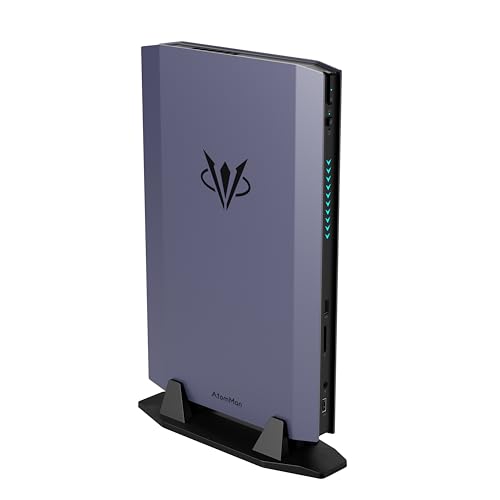
Where to buy
Check the latest price, availability and delivery on Amazon. Orders are placed on Amazon. We may earn a commission from qualifying purchases.
- Best overall: AtomMan G7 Ti Mini PC, Core i9-14900HX, RTX 4070 Laptop GPU, 32GB DDR5, 1TB SSD — Check on Amazon
- AtomMan G1 Pro Mini PC, Ryzen 9 8945HX, Desktop RTX 5060, 32GB DDR5, 1TB SSD — Check on Amazon
- HP OMEN 16L Gaming Desktop, Ryzen 7 8700F, Desktop RTX 5060, 64GB DDR5, 1TB SSD — Check on Amazon
- AtomMan G7 Pt Mini PC, Ryzen 9 7945HX, RX 7600M XT Mobile GPU, 32GB DDR5, 1TB SSD — Check on Amazon
- GMKtec EVO-X1 Mini PC, Ryzen AI 9 HX 370, Radeon 890M, OCuLink, 32GB LPDDR5X, 1TB SSD — Check on Amazon
- Beelink SER9 Pro Mini PC, Ryzen AI 9 HX 370, Radeon 890M, 32GB LPDDR5X, 1TB SSD — Check on Amazon
Read the full guide ↓
Disclosure: As an Amazon Associate, reviewstook.com earns from qualifying purchases. Links to Amazon on this page are affiliate links; they cost you nothing extra. Listing details such as price and availability change often, so check the current Amazon listing before you buy.
Every machine in this guide can light up a 1440p monitor. That is the easy half of this search, and it is the half the listings sell. The hard half — the one this guide grades — is whether the machine actually renders your games at 2560×1440, or renders them at 1080p or lower and stretches, sharpens and upscales the result on its way to the screen. Those are different products wearing the same search term. A PC that outputs a 1440p signal is a display fact; a PC that renders at 1440p is a graphics fact, and confusing the two is how a buyer ends up with a crisp desktop and a soft game. So the standing rule here: native 1440p rendering is credited only where the silicon honestly reaches it, pick by pick, and everything else is labelled as what it is — a lower internal render, presented at 1440p by an upscaler.
Graded that way, the six verified small form factor machines under $1,500 sort into three honest classes. At the top, three machines with discrete NVIDIA graphics — a full-power RTX 4070 Laptop GPU and two desktop RTX 5060s — render lighter and older titles natively at 1440p and use DLSS to carry heavier ones, which is a legitimate and often excellent way to play at this resolution. In the middle, an AMD mobile-GPU mini renders 1440p natively only in lighter titles and leans on FSR for the rest. At the bottom, two tiny integrated-graphics minis are 1080p renderers, full stop: they will fill a 1440p screen beautifully with your desktop, your browser and your older library, but a modern game on them is rendered well below 1440p no matter what the monitor says. One of those two, though, carries a port that lets it borrow a desktop graphics card later — and that escape route is spelled out in full below, because on a 1440p brief it changes what the machine is.
One more piece of standing honesty before the picks. The size tax at this budget is severe, and it is worse at 1440p than at 1080p, because 1440p is exactly where graphics horsepower starts to cost real money. A full-size tower carrying a desktop RTX 4070 SUPER is available on Amazon inside this budget, and that card renders modern games natively at 1440p in a way nothing below can match. If your room fits a tower, the tower is the correct 1440p purchase and this guide is a detour. What follows is for the rooms where it does not fit: behind-monitor desks, TV cabinets, dorm shelves and rented rooms, where the question is not “what is the fastest $1,500 PC?” but “what is the most honest 1440p I can buy in a few liters?”
In this guide
Quick Picks
Short on time, or comparing several options at once? Each row below names a buyer type and the machine that suits it, with a link to the listing.
| Buyer type | Pick | Why it stands out | Link |
|---|---|---|---|
| Best overall | AtomMan G7 Ti Mini PC | The strongest renderer in a true mini: RTX 4070 Laptop GPU at up to 140W, native 1440p in lighter titles, DLSS for the rest | Check on Amazon |
| Best desktop GPU in a mini (deal only) | MINISFORUM AtomMan G1 Pro | A genuine desktop RTX 5060 with DLSS in 3.8 liters — only a pick at or under $1,500 | Check on Amazon |
| Best upgrade path | HP OMEN 16L Gaming Desktop | The same desktop RTX 5060 in a 16-liter tower whose card you can actually replace later | Check on Amazon |
| Best value with a discrete GPU | AtomMan G7 Pt Mini PC | RX 7600M XT mobile graphics and a 16-core Ryzen 9 — native 1440p in lighter titles, FSR beyond; check price on Amazon | Check on Amazon |
| Best route to real 1440p later | GMKtec EVO-X1 Mini PC | Integrated graphics today, a native OCuLink port for a desktop card tomorrow, in roughly 0.75 liters | Check on Amazon |
| Smallest serious gaming box | Beelink SER9 Pro Mini PC | Radeon 890M in roughly 0.82 liters — an honest 1080p renderer that displays 1440p, and does not pretend otherwise here | Check on Amazon |
How These Picks Were Chosen
The budget was applied as a ceiling on the complete, configured machine: every pick is a real Amazon listing in the United States that fits this guide’s budget — check price on Amazon for the current figure, because prices in this category move often, especially through the late-2026 memory shortage. Two picks need extra care by design: the G1 Pro qualifies only when its live price sits at or under this guide’s budget, and the OMEN 16L pick is one specific seller-upgraded configuration, so the exact style and seller need confirming on the live listing. Both conditions are stated in their reviews, not buried.
On top of the base guide’s discipline — volumes computed from published dimensions, every mobile GPU named as mobile with the makers’ published core and memory figures — this variant adds one grading layer: rendering. Each pick was graded on what resolution it actually renders at, title class by title class, using the GPU silicon it carries and the independent-review consensus for that silicon. Upscaling is credited only where the hardware supports it: DLSS only on the three NVIDIA discrete picks, whose Tensor cores exist; FSR, which runs on any of these GPUs, credited generically and without internal-resolution figures, because the base research documents none for it. Where a pick’s graphics have no upscaling hardware story worth the name, the review says so instead of borrowing one.
The exclusions from the base guide stand, and they bite harder on a 1440p brief. The Ryzen AI Max+ 395 machines built around the Radeon 8060S — the strongest integrated graphics in the category — are out on arithmetic: even the most affordable in-stock 64GB examples sit in a premium tier above this guide’s budget after the memory-shortage repricing. The AtomMan G7 Pro, with an RTX 5070 Laptop GPU, is likewise configured above the whole budget. And no small prebuilt with a desktop RTX 4070 or 4070 SUPER has been verified on Amazon inside this budget; the verified 4070 SUPER systems at this level are full towers. What remains is the truthful shape of the tier, re-graded for rendering: three DLSS machines, one FSR machine, and two integrated minis — one of which can stop being integrated whenever its owner pays for the dock.
Rendering Is Not Displaying: The 1440p Distinction
A 1440p frame contains roughly 3.7 million pixels; a 1080p frame about 2.1 million. Rendering at 1440p therefore asks roughly 78 percent more of the graphics hardware than rendering at 1080p — before settings, effects or frame rate enter the argument. When a listing says a small PC “supports 1440p” or “drives a 1440p display,” it is making the cheap claim: the output electronics can carry the signal. Every pick in this guide clears that bar, including the two integrated minis, whose display outputs are rated far beyond 1440p. The expensive claim — rendering the game’s world at 2560×1440, sixty times a second — is the one that separates the picks, and it is the claim this guide checks.
Upscaling lives in the gap between those claims, and it deserves neither the hype nor the contempt it usually gets. A good upscaler renders the game at a lower internal resolution and reconstructs a 1440p image from it, using motion data and prior frames. The result is not native 1440p — fine detail, foliage, fences and distant text are reconstructed rather than rendered — but on modern implementations it is close enough that most players, most of the time, trade it gladly for the frame rate it buys. What is not acceptable is hiding the trade. So where this guide credits DLSS on the NVIDIA picks, it prints the internal render alongside the output: at a 1440p output, DLSS Quality renders internally at roughly 1707×960, Balanced at roughly 1485×836, and Performance at roughly 1280×720 — which is to say, Performance mode at a 1440p screen is a 720p-class render wearing reconstruction, and it looks like one in still scenes. FSR, the upscaler available to the AMD picks here, is credited in this guide without internal-resolution figures: the base research documents none, and attaching DLSS’s numbers to a different upscaler would be exactly the kind of quiet substitution this section exists to prevent.
Two corollaries run through every review below. First, VRAM is the budget upscaling cannot rebuild: reconstruction can sharpen a frame, but textures are stored at the resolution the memory can hold, and the 8GB of graphics memory shared by every discrete pick here is the ceiling that decides texture settings at 1440p long after the upscaler has done its work. Second, 4K is refused for this entire set. None of these machines renders modern games natively at 3840×2160; the strongest pick here is a 1440p machine, and the integrated minis are not close. If a 4K screen is what you own, these PCs will drive it — displaying is easy — and DLSS on the NVIDIA picks can present a 4K output from an internal render of roughly 2560×1440 at Quality or roughly 1920×1080 at Performance. But a buyer whose goal is 4K gaming should not be shopping in a $1,500 small form factor guide at all, and this one will not pretend otherwise to keep them here.
The 6 Best Small Form Factor Gaming PCs for 1440p Gaming Under $1,500
AtomMan G7 Ti Mini PC — Core i9-14900HX, RTX 4070 Laptop GPU, 32GB DDR5, 1TB SSD
Who it suits: The small-space gamer who wants the most genuine 1440p rendering that fits in a true mini — and who understands, before paying, that the “RTX 4070” in a 2.55-liter box is the laptop GPU of that name, not the desktop card.
This is the strongest renderer in the guide, and the only mini here whose 1440p claim survives contact with heavier games. The graphics are NVIDIA’s GeForce RTX 4070 Laptop GPU run at up to 140 watts — the full power limit for that part, which matters, because laptop GPUs are sold across a wide wattage range and a 140W example is a fundamentally faster device than an 80W one carrying the same name. NVIDIA’s published specifications give it 4,608 CUDA cores and 8GB of GDDR6 memory; independent review consensus places the full-power part around desktop RTX 4060 Ti territory. Translated into this guide’s grading: lighter, older and esports titles render natively at 2560×1440 with settings chosen sensibly; demanding modern releases render at a DLSS internal resolution — Quality’s roughly 1707×960 is the honest working point — and present at 1440p from there. That is a real 1440p machine by the standard most players actually live by, and it is the best one in this guide.
The honesty the name demands still applies. The desktop RTX 4070 carries 5,888 cores and 12GB of GDDR6X on a 200-watt budget, and it is a class above this chip; if the number in your head was the desktop card, recalibrate before ordering. The 8GB of memory is also the pick’s long-term ceiling at this resolution — upscaling lowers the render cost, but texture budgets at 1440p are set by memory, and 8GB is where high texture settings in newer games start negotiating. Around the GPU, the package supports the role: a 24-core Core i9-14900HX, 32GB of DDR5 in proper sockets upgradable to 96GB, a 1TB SSD with a second M.2 slot, Wi-Fi 7, and dual-fan cooling with silent and performance modes, in a chassis of roughly 2.55 liters. The listing documents HDMI 2.1 and USB4 display outputs, which is what the monitor-pairing guidance for this pick rests on — a 1440p high-refresh panel belongs on the card’s outputs, as with any discrete machine. The listing family mixes configured 32GB/1TB and barebone styles on the same pages, so check price on Amazon and confirm the configured style before ordering.
- RTX 4070 Laptop GPU at the full 140W power limit — the strongest rendering silicon in any true mini here.
- Native 1440p in lighter titles; DLSS Quality at 1440p output for heavier ones, with the internal render stated, not hidden.
- Socketed DDR5 to 96GB and two M.2 slots — rare serviceability in a mini.
Honest limitation: The GPU is the laptop part — 4,608 cores and 8GB against the desktop card’s 5,888 cores and 12GB — and its 8GB is the texture ceiling at 1440p for the machine’s whole life; the listing family also mixes barebone and configured styles.
Choose it if you want the most 1440p a mini can honestly render under $1,500 and your space constraint is non-negotiable. Skip it if a 16-liter box fits your room — the OMEN below offers a desktop card and an upgrade path for similar money — or if the tower benchmark at the top of this guide fits your desk, because it out-renders this machine outright.

MINISFORUM AtomMan G1 Pro — Ryzen 9 8945HX, Desktop RTX 5060, 32GB DDR5, 1TB SSD
Who it suits: The purist who wants a genuine desktop graphics card — correctly named, desktop silicon — rendering for a 1440p screen from inside a machine still small enough to call a mini, and who is patient enough to buy it only when the price behaves.
The G1 Pro’s graphics need no translation, which is its distinction in this guide. Inside its roughly 3.8-liter chassis sits a real desktop GeForce RTX 5060 — a low-profile Gigabyte card running at its full 145W, mounted in an actual PCIe x16 slot and fed by a 350W internal power supply. As a renderer it is graded the way the base research grades the card: a strong 1080p part that reaches into 1440p with upscaling. Concretely, that means native 1440p rendering in lighter and older titles at sensible settings, and DLSS carrying the heavier catalogue — Quality mode presenting 1440p from an internal render of roughly 1707×960, with Balanced’s roughly 1485×836 as the fallback when a title pushes harder. Frame generation on this card is display-side smoothness, not rendering: it interpolates the picture the monitor shows and does not change the resolution the game is computed at, and this guide credits it as nothing more. The processor is the sixteen-core Ryzen 9 8945HX, with 32GB of DDR5, a 1TB SSD, Wi-Fi 7 and 5-gigabit Ethernet.
The price is why this pick’s rank carries a condition, stated as plainly here as in the base guide: its pricing usually sits in a premium tier above this guide’s budget, and it only occasionally comes down into range on promotion. This machine ranks second in an under-$1,500 guide only inside that window — when the live listing checks in at or under this guide’s budget. Above that line it falls behind the G7 Ti on value and behind the OMEN on upgradeability, and no sentence in this review should be read as permission to stretch. Two further honesties carry over from the base research. The machine ships in an 80-watt gaming mode that withholds roughly a fifth of its performance behind a manual toggle — switch it before judging the machine, because at 1440p that fifth is the difference between native and upscaled in borderline titles. And the desktop card does not make this a normally upgradeable PC: the low-profile card in a 3.8-liter chassis is not realistically swappable, and the 350W supply sets its own ceiling. What you are buying is desktop rendering honesty at mini size — the correct silicon, correctly named — rather than a growth path.
- A genuine desktop RTX 5060 at full 145W in a PCIe slot — the only one in a mini here, with DLSS upscaling.
- 3.8 liters with an internal 350W power supply; no external brick to place.
- A sixteen-core Ryzen 9 8945HX, plus Wi-Fi 7 and 5-gigabit Ethernet.
Honest limitation: It fits this budget only on promotion — its everyday pricing sits above this guide’s budget — and the low-profile card is not realistically upgradeable despite being a desktop part; it also ships in an 80W mode that must be switched off to get the rendering you paid for.
Choose it if desktop silicon inside a mini is exactly the brief and the live price reads $1,500 or less. Skip it if the price has drifted above this guide’s budget — the G7 Ti renders faster for the money and the OMEN upgrades properly — and skip it if you will forget to leave the 80W mode behind.

HP OMEN 16L Gaming Desktop — Ryzen 7 8700F, Desktop RTX 5060, 64GB DDR5, 1TB SSD
Who it suits: The reader whose “small form factor” honestly means a compact tower: someone with room for 16 liters who wants the same desktop 1440p rendering as the pick above, in a case whose graphics card they can replace in three years.
The rendering story here is the G1 Pro’s silicon without the mini’s asterisks. The desktop GeForce RTX 5060 — 8GB of GDDR7, a standard card in a standard slot — renders lighter and older titles natively at 1440p and hands heavier ones to DLSS, presenting 1440p from internal renders of roughly 1707×960 at Quality or 1485×836 at Balanced. Nothing about that grading changes for being in a bigger box; what changes is everything around it. Sixteen liters buys real airflow, so the card holds its clocks through long sessions without the thermal negotiation compact chassis live with, and the card itself comes out with a screwdriver when a future generation tempts you — the only pick in this guide where “1440p in three years” can mean a better GPU rather than a new PC. The Amazon listing behind this pick is one specific seller-upgraded configuration: 64GB of memory and a 1TB SSD fitted by PCOnline US, with the upgrades under the seller’s own one-year warranty and the rest of the machine under HP’s — check price on Amazon for the current figure. Read the listing’s warranty split before ordering; factory OMEN 16L configurations exist under other listings, so confirm you are looking at the right configuration before comparing.
The CPU deserves the same plain treatment the base guide gave it. The Ryzen 7 8700F is derived from AMD’s mobile silicon family and carries half the cache of mainstream desktop Ryzen 7 parts, so it is a competent gaming processor rather than a great one. At 1440p that matters less than it would at 1080p — the higher the render resolution, the more the graphics card, not the processor, sets the pace — which is precisely why this pick holds its rank on a 1440p brief despite the weakest gaming CPU per-core in the guide. The GPU and the chassis are the reasons to buy this machine; the processor is the compromise you accept for them, and at this resolution it is a compromise with a small bill.
- Standard desktop RTX 5060 in a swappable slot — the only true graphics upgrade path here, and a real DLSS renderer today.
- 16 liters: compact for a tower, with the airflow to hold clocks quietly under sustained 1440p loads.
- Seller-upgraded 64GB configuration — check price on Amazon; factory versions sit in a lower tier.
Honest limitation: It is five to twenty times the volume of the minis above, the linked configuration’s memory and storage are seller-fitted under a split warranty, and the 8700F’s reduced cache makes it the weakest gaming CPU per-core in this guide.
Choose it if 16 liters fits the room and the next five years matter more than the next five inches. Skip it if the PC has to mount, hide or travel — the other five picks exist for exactly that.

AtomMan G7 Pt Mini PC — Ryzen 9 7945HX, RX 7600M XT Mobile GPU, 32GB DDR5, 1TB SSD
Who it suits: Value hunters who want discrete graphics in a mini for a 1440p screen, and who would rather have sixteen full-power CPU cores and money left unspent than the last increment of rendering power.
Grade the graphics first, because on this brief they decide the pick. The Radeon RX 7600M XT is a mobile part — the M is load-bearing — with 8GB of GDDR6 at a 120W power limit; it is not the desktop RX 7600 XT, which is a 16GB card. Named correctly, the base research grades it as a strong 1080p graphics solution that reaches into 1440p in lighter titles, and this variant holds that line exactly: esports, older and lighter games render natively at 2560×1440; demanding modern titles are rendered at 1080p-class resolutions and presented at 1440p through FSR, the upscaler this hardware uses. FSR is credited here generically and without internal-resolution figures — the base research documents none for it, and the DLSS numbers printed elsewhere in this guide belong to DLSS. There are no Tensor cores in this machine, so there is no DLSS to claim, and none is claimed: what the G7 Pt offers at 1440p is an honest mid position — native where the game is light, upscaled where it is not, at the lowest price of any discrete pick in the guide.
Everything around the graphics argues the other side of the trade. The Ryzen 9 7945HX — sixteen cores, thirty-two threads, boosting to 5.4GHz — is the most processor in this guide, and at 1440p, where the GPU sets the pace, that CPU headroom is spent on everything else the machine does: compiling, rendering, heavy multitasking between games. Memory is socketed DDR5 upgradable to 96GB, storage supports PCIe 5.0 NVMe drives, and 65W and 85W system modes trade a little performance for quieter running. The chassis is about 269 by 155 by 64 millimeters — roughly 2.7 liters — though the 300-watt external power brick rides along outside that figure, as it does for most minis in this class. Check price on Amazon for the configured 32GB/1TB version before ordering. Buy it as a workstation that games at 1440p honestly, rather than as a gaming machine first, and it is the best value in this guide.
- The Ryzen 9 7945HX’s sixteen cores are the most processor in this guide, full stop.
- Discrete mobile graphics at 120W: native 1440p in lighter titles, FSR-presented 1440p beyond, in roughly 2.7 liters.
- Socketed DDR5 to 96GB and PCIe 5.0 storage support — check price on Amazon.
Honest limitation: The RX 7600M XT is a mobile GPU with 8GB of memory — not the 16GB desktop 7600 XT its name suggests — with no DLSS; at 1440p its demanding-game rendering is upscaled, not native, and the 300W external brick is not counted in the tidy chassis volume.
Choose it if your workload mixes gaming with serious CPU work, or you want discrete graphics in a mini while keeping the most money unspent. Skip it if gaming at 1440p is the whole job and the budget stretches to the G7 Ti — its GPU renders a class higher for play alone.

GMKtec EVO-X1 Mini PC — Ryzen AI 9 HX 370, Radeon 890M, OCuLink, 32GB LPDDR5X, 1TB SSD
Who it suits: The staged buyer on a 1440p brief: someone who wants a tiny, capable PC now, accepts that its own graphics render at 1080p, and is genuinely buying the documented route to desktop rendering later.
Start with what this machine renders on day one, because the honesty matters more here than anywhere in the guide. The EVO-X1 runs AMD’s Ryzen AI 9 HX 370 with Radeon 890M integrated graphics — 16 compute units of RDNA 3.5 architecture fed by 32GB of soldered LPDDR5X memory it shares with the system. That is the strongest integrated graphics in its class, and its class is 1080p: esports and competitive titles run fluently there, indie and older libraries beautifully, and modern games at native 1440p are beyond it. Connected to a 1440p monitor it will display that resolution all day — the desktop, the browser, the video stream — while games render below it and are presented through FSR, credited generically here with no internal-resolution figures, as the base research documents none. If the previous sentence describes a machine you would be disappointed to own, stop here and buy the G7 Pt or G7 Ti instead; this pick’s case rests entirely on the port in the next paragraph.
The port is a native OCuLink connector — the small socket that lets a mini PC drive an external desktop graphics card over a proper PCIe link — and it is why this pick outranks its identical-graphics sibling below on a 1440p brief. The full invoice matters, because this guide refuses to fold a second purchase silently into the first: the mini itself — check price on Amazon — plus an OCuLink dock of the DEG1 type, which does not include a power supply, so a desktop card’s PSU is a further purchase, plus a new desktop RTX 4060. The complete path is a substantial second spend on top of the mini — comparable to this guide’s whole budget once everything is counted, before the PSU — spread across two purchases, with a dock and brick living on the desk beside the tiny PC. What completes at the end of it is real desktop-4060 rendering with DLSS: native 1440p in the lighter half of a library, upscaled in the heavier half, from a standard card you can carry to a future build. The chassis, for the record, is 110 by 107 by 63 millimeters — roughly 0.75 liters, the smallest in this guide — with two M.2 slots and dual 2.5-gigabit Ethernet. The caveat that binds: memory is soldered, so choose the capacity for the machine’s whole life; a 64GB variant exists for those who will keep it as an eGPU host for years.
- Native OCuLink port: the only integrated-graphics pick here with a documented route to genuine desktop 1440p rendering.
- About 0.75 liters, with two M.2 slots and dual 2.5GbE — homelab manners in a gaming mini.
- The most affordable integrated-graphics route to a later upgrade — check price on Amazon.
Honest limitation: Until the dock and card arrive, it renders games at 1080p-class resolutions whatever the monitor says — and completing the route costs a substantial second spend plus a power supply, landing at or over this budget in total.
Choose it if the two-stage plan is real, or if you want the mini likeliest to earn a second career. Skip it if you want maximum rendering on day one — that money belongs in the G7 Ti — or if the dock will never happen, in which case the SER9 Pro below is the same daily experience, finished.

Beelink SER9 Pro Mini PC — Ryzen AI 9 HX 370, Radeon 890M, 32GB LPDDR5X, 1TB SSD
Who it suits: The reader whose space problem is the most extreme in this guide — a PC that must mount behind a monitor, hide in a TV unit, or travel — and who is honest with themselves that their gaming is a 1080p library shown on whatever screen is there.
This pick is in a 1440p guide to close the question, not to win it. The SER9 Pro carries the same Ryzen AI 9 HX 370 and Radeon 890M integrated graphics as the EVO-X1 above, in a chassis of roughly 135 by 136 by 45 millimeters — about 0.82 liters, smaller than the external power bricks of the discrete minis in this guide. Its display side is impeccable: outputs including USB4 drive a 1440p monitor without strain, and the desktop experience at that resolution is indistinguishable from any machine here. Its rendering side is a 1080p story. Esports and competitive titles run fluently at 1080p; indie and older AAA libraries run beautifully; new AAA games at native 1440p are beyond integrated graphics at any size, and on this machine they are beyond them permanently — the 32GB of memory is soldered and shared with the graphics, there is a single M.2 storage slot, and there is no OCuLink port, so the escape route the EVO-X1 sells does not exist here. FSR presentation softens the gap on a 1440p screen — credited generically, with no figures attached — but it does not close it, and this guide will not let a tidy chassis blur that sentence.
None of that makes it a bad purchase; it makes it a finished one. It sits in a mid-range tier comfortably inside this budget, well below the premium positioning of the strongest pick here — check price on Amazon for the current figure. For the reader whose alternative was a console-sized hole in a media unit and whose library is esports, indie and back-catalog, a small, quiet appliance that renders its games honestly at 1080p and displays everything else at 1440p is a coherent buy — as long as it is bought as that, and not as the 1440p gaming PC the search term promised. One listing discipline from the base research: confirm the live listing still resolves to the HX 370 configuration, because a lower-priced variant trading on this model’s name has appeared in Amazon tables and must not be substituted.
- About 0.82 liters — the smallest complete PC in this guide that games at all.
- Radeon 890M: the strongest integrated graphics in its class, ideal for 1080p esports and indie libraries on any screen.
- Mid-range positioning that sits comfortably under budget — check price on Amazon.
Honest limitation: Soldered memory, one storage slot and no OCuLink port: the graphics it ships with are final, and its games render at 1080p class — a 1440p monitor shows them upscaled, never native.
Choose it if the PC has to effectively vanish and your library runs to esports, indie and back-catalog. Skip it if rendering modern games at 1440p is the actual requirement — that requirement starts at the G7 Pt and is properly met by the three picks above it.
Comparison Table
| Product | Volume | Graphics (named exactly) | Honest 1440p verdict | Price | Link |
|---|---|---|---|---|---|
| AtomMan G7 Ti Mini PC | ~2.55L | RTX 4070 Laptop GPU, 8GB, up to 140W | Native in lighter titles; DLSS Quality (renders ≈1707×960) in heavier ones | Check price on Amazon | Check on Amazon |
| MINISFORUM AtomMan G1 Pro | ~3.8L | Desktop RTX 5060, 8GB, 145W low-profile | Native in lighter titles; DLSS-upscaled in heavier ones | Check price on Amazon — a pick only within this guide’s budget | Check on Amazon |
| HP OMEN 16L Gaming Desktop | 16L | Desktop RTX 5060, 8GB GDDR7, swappable | Native in lighter titles; DLSS-upscaled in heavier ones; card replaceable later | Check price on Amazon | Check on Amazon |
| AtomMan G7 Pt Mini PC | ~2.7L | RX 7600M XT mobile, 8GB, 120W | Native in lighter titles only; FSR-presented 1440p beyond; no DLSS | Check price on Amazon | Check on Amazon |
| GMKtec EVO-X1 Mini PC | ~0.75L | Radeon 890M integrated + OCuLink port | 1080p renderer today; desktop-card 1440p after the documented dock spend | Check price on Amazon | Check on Amazon |
| Beelink SER9 Pro Mini PC | ~0.82L | Radeon 890M integrated, shared memory | 1080p renderer; displays 1440p, never renders modern games at it | Check price on Amazon | Check on Amazon |
How to Choose a Small Form Factor Gaming PC for 1440p Gaming Under $1,500
- Ask what renders, not what displays. Every pick here outputs a 1440p signal. The deciding question is the render resolution per title class: native 1440p, an upscaled internal render, or 1080p presented on a bigger screen. This guide’s verdict column answers it per pick; any listing that will not is selling the display claim.
- Read the GPU’s full name and wattage. A specification that reads “RTX 4070 Laptop GPU at 140W” or “RX 7600M XT” is telling you the truth; a bare “RTX 4070” headline in a mini listing is the laptop part hoping the question never gets asked. When in doubt, the GPU maker’s published core counts and memory settle it — 4,608 cores and 8GB for the laptop 4070, against 5,888 and 12GB for the desktop card.
- Match the upscaler to the silicon. DLSS belongs to the NVIDIA picks — it needs Tensor cores, which the AMD and integrated picks do not have, and any claim of DLSS on them is fiction. On the NVIDIA picks, read the mode, not the label: at 1440p output, Quality renders ≈1707×960 internally, Balanced ≈1485×836, Performance ≈1280×720. FSR serves the rest of the set and is credited here without figures, because none are documented for it in the base research.
- Treat 8GB of VRAM as the real 1440p ceiling. Every discrete pick here carries 8GB. Upscaling reduces render cost; it does not create texture memory. If your library is the newest releases at high texture settings, that ceiling — not the upscaler — is what you will meet first, and it argues for the strongest renderer (the G7 Ti) or for leaving the category.
- Pair the monitor with the rendering, not the port. A 1440p high-refresh panel is the right partner for the three DLSS picks and the G7 Pt; plug it into the graphics card’s outputs, not the motherboard’s, on any machine with a discrete card. For the integrated minis, the same panel is a fine desktop screen whose games will render at 1080p — buy it for the desktop, not for a rendering claim. Exact port lists beyond the G7 Ti’s documented HDMI 2.1 and USB4 are a live-listing check, not a spec to assume.
- Price the whole path, not the first box. An eGPU plan’s real total is the mini, a dock, a power supply the dock leaves out, and the card itself (a new desktop RTX 4060). A barebone-style listing’s real total is the box plus the memory, storage and operating system it lacks. Compare complete totals against complete towers.
- Apply the tower test last. A desktop RTX 4070 SUPER tower can be found under this budget, rendering natively at 1440p beyond anything here. If it fits your space, it is the better 1440p PC; this guide’s picks are for the rooms where it does not fit. Readers comparing the wider field should start with Best 1440p Gaming PC Under $1500 and narrow down from there.
Common Buying Mistakes
- Reading “supports 1440p” as “renders at 1440p.” Output support is a display fact every mini here has; rendering is a graphics fact only some of them have. The gap between the two sentences is where this category’s marketing lives.
- Believing a mini’s “RTX 4070” is the desktop card. It is the Laptop GPU — 4,608 cores and 8GB against the desktop part’s 5,888 cores and 12GB — and the same trick applies to AMD’s M-suffixed mobile parts, whose desktop namesakes carry twice the memory.
- Quoting a DLSS output resolution as the render resolution. DLSS Performance at a 1440p screen renders at roughly 1280×720 internally; calling that “1440p gaming” without the internal figure is how soft games get sold as sharp ones.
- Expecting DLSS from hardware without Tensor cores. The AMD mobile and integrated picks in this guide have none; their upscaler is FSR. A listing or review that credits them with DLSS is inventing hardware.
- Buying an eGPU host whose eGPU never arrives. Dock, separate power supply and card together add a substantial second spend; unless that second stage is genuinely planned, buy the discrete mini instead and render properly from day one.
- Treating the G1 Pro’s everyday premium-tier price as if it belonged in an under-$1,500 decision. Above this guide’s budget it is up against machines that render faster or upgrade properly; its seat in this guide exists only when it checks in within budget.
- Assuming “small” means “upgradeable later.” Between soldered RAM, single storage slots and missing eGPU ports, most minis are finished products the day they arrive. The exceptions — socketed AtomMan memory, the EVO-X1’s OCuLink, the OMEN’s standard slots — get named in this guide precisely because they are exceptions.
- Skipping the style check on listing families. One page can hold both the configured G7 Ti or G7 Pt and its barebone twin; order the wrong style and you have bought yourself a second shopping trip for memory, storage and an OS.
Final Recommendation
- Most small-space 1440p gamers: AtomMan G7 Ti — the strongest honest rendering in a true mini.
- Desktop silicon or nothing (price permitting): MINISFORUM AtomMan G1 Pro — at $1,500 or under, and only there.
- Five-year keepers: HP OMEN 16L — today’s DLSS rendering, tomorrow’s card swap, if 16 liters fits.
- Value with discrete graphics: AtomMan G7 Pt — check price on Amazon; native 1440p in lighter titles, the best CPU in the guide.
- Staged buyers: GMKtec EVO-X1 — 1080p today, an honest OCuLink path to desktop 1440p rendering tomorrow.
- The tightest spaces: Beelink SER9 Pro — 0.82 liters of finished, quiet, 1080p-rendering PC for the screen you already have.
Our top two are the AtomMan G7 Ti, because it is the only true mini here whose 1440p story holds in heavier games — native where the title is light, DLSS Quality where it is not, from the strongest laptop GPU silicon this budget reaches in a small box — and the MINISFORUM AtomMan G1 Pro, because its desktop RTX 5060 renders with no naming translation at all, provided it is bought inside its deal window. Between them sits the OMEN 16L for readers whose five-year plan matters more than five liters, and the G7 Pt as the value answer when CPU muscle shares the desk with play. If your constraint is milder than you thought, say so: the wider field in Best Mini Gaming PC Under $1500, the parent guide at Best Small Form Factor Gaming PC Under $1500, and ultimately the RTX 4070 SUPER tower from the top of this page all reward the reader who measures the room before the frame rate. Cross-check the neighboring tiers — Best Small Form Factor Gaming PC For 1440p Gaming Under $1200 if the budget tightens, Best Small Form Factor Gaming PC For 1440p Gaming Under $2500 if the 8060S class is the machine you actually want — and check the live price and exact listing style before you order, because in this category both move fast.
Frequently Asked Questions
Is DLSS Quality actually rendering at 1440p?
No. At a 1440p output, DLSS Quality renders the game internally at roughly 1707×960 and reconstructs the 2560×1440 image from that render plus motion data. The result is often close to native in motion, and it is the honest working mode of the NVIDIA picks in this guide — but it is a reconstruction, and this guide prints the internal figure wherever it credits the output. Balanced renders at roughly 1485×836 and Performance at roughly 1280×720, which is a 720p-class render; at that point the word for the experience is “presented at 1440p,” not rendered at it.
Which of these machines renders modern games natively at 1440p?
None of them, across the whole of a modern library — and any guide that says otherwise at this budget and size is selling something. The honest map: the G7 Ti, G1 Pro and OMEN 16L render lighter, older and esports titles natively at 1440p and upscale the demanding ones; the G7 Pt does the same with a lower native line and FSR beyond it; the two integrated minis render at 1080p class regardless of the screen. Native-everything 1440p at this money lives in towers — a desktop RTX 4070 SUPER tower can be found inside this budget — which is why that benchmark sits at the top of this guide.
Can these PCs handle a 4K monitor?
They can drive one; they cannot game natively on one. Displaying 4K is an output fact all six clear, and on the NVIDIA picks DLSS can present a 4K output from an internal render of roughly 2560×1440 at Quality or roughly 1920×1080 at Performance. But native 4K rendering of modern games is beyond every pick here, including the strongest. If 4K gaming is the goal, this category and budget are the wrong place to shop, and a 1440p panel is the better partner for every machine in this guide.
Why is there no Ryzen AI Max+ 395 mini in this guide?
Price, not merit. The 8060S machines are excellent; the shortage arithmetic is not. After the late-2026 memory repricing, the cheapest in-stock 64GB examples sit in a premium tier well over this budget — so their home is the under-$2,500 guides, and forcing one in here on a stale launch price would be exactly the dishonesty this guide exists to avoid. The AtomMan G7 Pro (RTX 5070 Laptop GPU), configured above this budget, is excluded on the same arithmetic.
What does the word “Laptop” in a GPU name cost in performance?
About a class. Per NVIDIA’s published figures, the laptop RTX 4070 carries 4,608 cores and 8GB of memory on a budget topping out at 140W, where the desktop RTX 4070 carries 5,888 cores, 12GB and 200W. Independent reviewers place the full-power laptop part around desktop RTX 4060 Ti territory — genuinely 1440p-capable with upscaling in the mix — which is why wattage matters: the same laptop GPU sold at 80W in a thinner machine is a slower product wearing the same name.
Should I stage the EVO-X1 and an eGPU, or just buy the G7 Ti?
Add the invoice first. Price the EVO-X1 path as a whole — the mini (check price on Amazon), a dock, a power supply and a desktop RTX 4060 — and it comes to comparable money to the G7 Ti, spread over time, with a reusable desktop card and real desktop rendering as the prize. If the plan will actually be completed, the staged route holds up. If the money has to land in a single purchase, or the dock will sit on a wish list forever, the G7 Ti renders faster on day one and stays simpler forever. The size-first version of this same decision is covered in Best Small Form Factor Gaming PC Under $1500.
Can these machines be upgraded later?
It splits cleanly by pick. The two AtomMan G7 machines accept socketed memory up to 96GB and carry spare storage room, but their graphics are soldered for life. The SER9 Pro is sealed in every respect that counts. The EVO-X1 upgrades externally, through its OCuLink port. The G1 Pro’s desktop card, being low-profile, is not realistically swappable. Only the OMEN 16L offers the tower pattern — graphics, memory and storage all replaceable — which is the honest price of its 16 liters, and why five-year keepers should start there or with Best Gaming PC Under $1500.
- Best Small Form Factor Gaming PC Under $1500
- Best Small Form Factor Gaming PC Under $1200
- Best Small Form Factor Gaming PC Under $2500
- Best Small Form Factor Gaming PC For 1440p Gaming Under $1200
- Best Small Form Factor Gaming PC For 1440p Gaming Under $2500
- Best Small Form Factor Gaming PC For Small Spaces Under $1500
- Best Small Form Factor Gaming PC For Streaming Under $1500
- Best Small Form Factor Gaming PC For Beginners Under $1500
- Best Compact Gaming PC Under $1500
- Best Mini Gaming PC Under $1500
- Best Mini PC Under $1500


