Where to buy
Check the latest price, availability and delivery on Amazon. Orders are placed on Amazon. We may earn a commission from qualifying purchases.
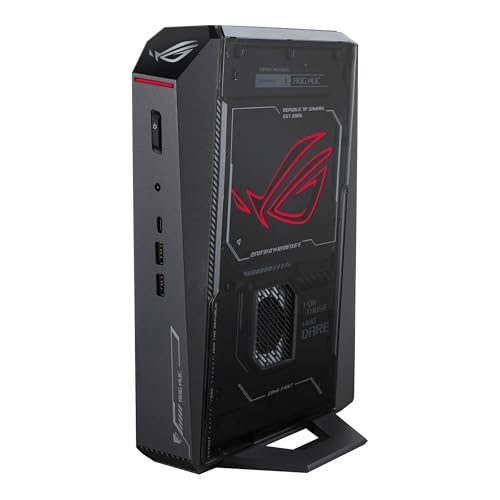
- Best overall small form factor gaming PC for 1440p gaming: ASUS ROG NUC (2025), Core Ultra 9 275HX, RTX 5070 Ti Mobile, 16GB, 1TB, ~3.0L — Check on Amazon
- GMKtec EVO-X2, Ryzen AI Max+ 395, Radeon 8060S, 64GB, 1TB, ~2.8L — Check on Amazon
- Minisforum AtomMan G7 Pro, Core i9-14900HX, RTX 5070 Laptop GPU, 32GB, 1TB, slim slab — Check on Amazon
- ASUS ROG G22CH DB779, Core i7-13700KF, desktop RTX 4070, 32GB, 1TB, ~10.7L — Check on Amazon
- ASUS ROG NUC 970, Core Ultra 9 185H, RTX 4070 Laptop GPU, 32GB, 1TB, 2.5L — Check on Amazon
- Minisforum AtomMan G1 Pro, Ryzen 9 8945HX, desktop RTX 5060, 32GB, 1TB, ~3.8L — Check on Amazon
Read the full guide ↓
Disclosure: As an Amazon Associate, reviewstook.com earns from qualifying purchases. Links to Amazon on this page are affiliate links; they cost you nothing extra. Listing details such as price and availability change often, so check the current Amazon listing before you buy.
Every machine in this guide can put a 2560×1440 picture on your monitor. That is the easy part, and it is not what this search is really asking. Displaying 1440p means the box can drive the panel; rendering 1440p means its graphics hardware actually draws each frame at that resolution, all 3.69 million pixels of it, instead of drawing fewer pixels and stretching the result. The gap between those two sentences is where 1440p guides go dishonest, so this one grades every pick on the rendering side of it: which of these six small machines genuinely render modern games at native 1440p, which ones render at 1080p or below and upscale honestly, and which upscaler each one is actually entitled to use.
The good news first, because at $2,500 in a small box it is real news: this is the first tier in this batch of guides where native 1440p is the normal mode rather than the exception. The strongest picks here — a desktop RTX 4070 in an 11-liter case, an RTX 5070 Ti Mobile in a 3-liter slab — render demanding modern games natively at 2560×1440 at high settings. The honest limits sit one step down: the 8GB laptop GPUs render lighter and esports titles natively and lean on DLSS upscaling in the heaviest games, and the one integrated-graphics pick renders at 1440p in lighter titles and upscales the rest with a different, weaker toolset that this guide names plainly. Two ceilings apply to the whole set. There is no RTX 5080 small form factor PC under $2,500 — the one genuine sub-4-liter 5080 machine, the top configuration of ASUS’s ROG NUC (2025), sits in a premium tier well above this guide’s ceiling. And native 4K gaming is refused for every pick here: these are 1440p machines, and the guide’s recommendation is a 1440p high-refresh monitor for all six.
One more piece of standing honesty, because four of the six picks depend on it: laptop GPUs are named as laptop GPUs everywhere below. An RTX 5070 Laptop GPU carries 8GB of memory and 4,608 CUDA cores where the desktop RTX 5070 carries 12GB and 6,144; an RTX 4070 Laptop GPU is a class reviewers place around the desktop RTX 4060 Ti. The names are shared with desktop cards; the silicon is not, and the 1440p verdicts in this guide are graded against what the silicon actually is. If the small box itself turns out not to be the point, the same budget buys a desktop RTX 5070 Ti tower — those machines live in our guide to the Best Gaming PC Under $2500. If the small box is the point and 1440p is the target, read on: quick picks first, then the rendering-versus-displaying explainer this whole guide hangs on, six detailed reviews with an honest 1440p verdict for each, a comparison table, and the mistakes that waste money at this tier.
In this guide
Quick Picks
Short on time, or comparing several options at once? Each row below names a buyer type and the machine that suits it, with a link to the listing.
| Buyer type | Pick | Why it stands out | Link |
|---|---|---|---|
| Best overall for 1440p | ASUS ROG NUC (2025), RTX 5070 Ti Mobile | The strongest 1440p renderer that fits in ~3 liters — check price on Amazon | Check on Amazon |
| Best for memory-heavy work and play | GMKtec EVO-X2, 64GB | 64GB of unified memory in ~2.8 liters; 1440p in lighter titles, upscaled in heavy ones | Check on Amazon |
| Best value current-generation GPU | Minisforum AtomMan G7 Pro | RTX 5070 Laptop GPU with DLSS 4 in a 33mm-thin slab with value-tier positioning | Check on Amazon |
| Best real desktop graphics card | ASUS ROG G22CH DB779 | A full desktop RTX 4070 12GB rendering native 1440p — no laptop silicon | Check on Amazon |
| Best truly tiny | ASUS ROG NUC 970 | 2.5 liters, RTX 4070 Laptop GPU at its full 140W — check price on Amazon | Check on Amazon |
| Best upgrade path | Minisforum AtomMan G1 Pro | A desktop RTX 5060 in a real PCIe slot you can swap later, in ~3.8 liters | Check on Amazon |
How These Picks Were Chosen
The first filter was physical. A pick had to publish its dimensions, and the volume those dimensions produce had to land at roughly 20 liters or under; the six machines that survived sit between about 2.5 and 11 liters. Applying that one rule removed every desktop RTX 5070 Ti and RTX 5080 prebuilt in the wider $2,500 market — good machines, several cheaper than anything below, but 35-to-45-liter towers answering a different search and covered in the Best 1440p Gaming PC Under $2500 guide instead. The second filter was evidence. Each ASIN and specification here traces back to an actual Amazon listing or to maker and retailer documentation of that machine. Because prices in this category move constantly, no pick below carries a fixed price: use the Amazon links to check the live price, and treat any machine whose current listing sits above this guide’s ceiling as out of budget, whatever it cost when the research was done.
The third filter belongs to this angle: each pick was graded as a 1440p renderer. Three questions decided the grade. What does the machine draw natively, judged from the GPU’s real silicon, its memory capacity and its power limit rather than the badge on the listing? Which upscaler is it entitled to — DLSS only where Tensor cores exist, which covers every RTX pick here and excludes the integrated Radeon pick, and FSR credited in general terms, with no internal-resolution numbers hung on it, because the research behind these picks records none? And what does the memory ceiling do to the grade, given that upscaling rebuilds sharpness from fewer pixels but cannot rebuild texture detail the VRAM never held — the limit 8GB cards meet first at 1440p? Nothing below rests on hands-on use: the grading comes from maker listings, specification pages and independent reviews, compared across volume, silicon, memory ceilings and power supplies. Prices are deliberately left to the live listings, because prices in this category shift weekly — check the price on Amazon for whichever pick you shortlist.
Rendering at 1440p Is Not the Same as Displaying It
Start with the arithmetic, because everything else in this guide follows from it. A 2560×1440 frame holds about 3.69 million pixels; a 1920×1080 frame holds about 2.07 million. Native 1440p rendering asks the GPU to draw roughly 78 percent more pixels than 1080p, every frame, at the same settings. Any of these six machines can send a 1440p signal to a monitor — integrated graphics from a decade ago can do that — but sending the signal is displaying, and drawing the frame is rendering, and only the second one costs performance. When a listing tells you a small PC “supports 4K output,” it is making the displaying claim. This guide grades the rendering claim.
Upscaling is the honest middle path, and it works by rendering fewer pixels than the panel shows. NVIDIA’s DLSS, available on every RTX pick in this guide, renders internally at a fraction of the output resolution and reconstructs the rest: at 1440p output, DLSS Quality renders at about 1707×960 internally, Balanced at about 1485×836, and Performance at about 1280×720 — which means DLSS Performance at 1440p output is, underneath the reconstruction, a 720p-class render. Those figures belong to DLSS and to nothing else. The integrated Radeon 8060S in the EVO-X2 has no Tensor cores, so it has no DLSS at all — this guide denies it explicitly wherever the question arises — and its upscaling route is AMD’s FSR, credited here generically: a real and usable tool that every GPU class in this guide can run, but one this guide attaches no internal-resolution numbers to, because the research behind these picks documents none. Frame generation, offered on the current-generation RTX picks, belongs in the same honesty box: it synthesizes additional displayed frames to smooth motion, which is a display-side benefit. It does not render the game at a higher resolution and it does not reduce input latency, so it never upgrades a pick’s rendering verdict below.
The last piece is memory. Upscaling reduces the pixel load; it does not reduce the texture load by the same amount, because textures are stored and sampled at the resolution the game requests. At 1440p output, an 8GB card can find its texture budget spent even while DLSS keeps the frame rate comfortable — the symptom is texture pop-in and stutter in the heaviest current titles, not a low frame counter. That is why the verdicts below separate the picks the way they do: 12GB of VRAM (the NUC 2025’s Mobile 5070 Ti, the G22CH’s desktop 4070) buys native-1440p confidence; 8GB buys native 1440p in lighter titles and DLSS-presented 1440p in heavy ones; and the EVO-X2’s enormous 64GB unified pool is a genuine texture-budget advantage that partly compensates for its weaker rendering silicon.
The 6 Best Small Form Factor Gaming PCs for 1440p Gaming Under $2,500
ASUS ROG NUC (2025) — Core Ultra 9 275HX, RTX 5070 Ti Mobile, 16GB, 1TB (~3.0L)
Who it suits: Anyone who wants the strongest 1440p rendering that can be had from a three-liter box, and who will check the live price on Amazon before buying, since this family’s positioning can move it in and out of this budget.
The heading carries the caveat, and the caveat carries the review: the graphics chip is the RTX 5070 Ti Mobile, the laptop variant with 12GB of GDDR7, not the desktop card of the same name. It remains the most powerful rendering GPU in this guide, and for this keyword that settles the argument. Backed by 12GB of memory, it is one of only two picks here for which native 2560×1440 rendering of demanding modern games at high settings is routine rather than aspirational; when a title does push past native, DLSS is the reserve instead of the plan, with DLSS Quality rebuilding the 1440p output from a 1707×960 internal render. The chassis helps the case: 282.4 × 187.7 × 56.5 mm works out to almost exactly 3.0 liters, a flat slab that stands upright on a desk or tucks behind a monitor. ASUS surrounds the GPU with the most finished hardware in the guide — a Core Ultra 9 275HX, triple-fan cooling with dual vapor chambers, Thunderbolt 4, and a pair of SO-DIMM slots.
Price is where discipline comes in. This 5070 Ti configuration is a premium-tier machine whose live Amazon price decides whether it belongs in an under-$2,500 guide at all, so check the price on Amazon before planning around it. Caught inside the budget, it is the machine to beat; priced above the ceiling, it blows the brief and the picks below overtake it. Two structural limits ride along. It ships with 16GB of system memory in a market where 32GB is the comfortable standard, and filling the second slot means buying SO-DIMM at shortage-era pricing, so count that second 16GB DDR5 stick in the true cost and check its current price before ordering. And the family’s top rung is out of reach by design: the RTX 5080 version of this chassis is a premium-tier configuration positioned well above this guide’s ceiling, the guide’s clearest evidence that no sub-$2,500 RTX 5080 small form factor PC exists.
- The guide’s strongest GPU silicon — RTX 5070 Ti Mobile with 12GB GDDR7 — inside ~3.0 liters.
- Demanding games rendered natively at 1440p and high settings, DLSS held as headroom.
- Dual-vapor-chamber, triple-fan cooling, Thunderbolt 4, and the most polished chassis here.
- Memory sits in two SO-DIMM slots, so the shipped 16GB can grow.
Honest limitation: Its live price can sit above this guide’s ceiling — check the price on Amazon before committing — and 16GB of shipped RAM trails rivals that include 32GB or 64GB.
Honest 1440p verdict: Native 1440p in demanding modern games at high settings; DLSS Quality when a title asks for more. The set’s strongest renderer.
Choose it if its live price sits inside your budget and frames per liter is your metric. Skip it if the current listing prices it above the ceiling, or you want 32GB fitted from the factory.

GMKtec EVO-X2 (64GB) — Ryzen AI Max+ 395, Radeon 8060S, 64GB, 1TB (~2.8L)
Who it suits: The memory-first buyer — local AI models, large creative projects, heavy multitasking — who also wants real 1440p gaming from a box under three liters.
No discrete graphics card lives inside this machine, and the guide makes no attempt to hide that: the Radeon 8060S is integrated graphics built into AMD’s Ryzen AI Max+ 395 processor. What the processor contributes instead is a memory architecture none of the other five picks can approach — 64GB of LPDDR5X unified memory on a 256 GB/s bus, shared between CPU and GPU, inside a 193 × 185.8 × 77 mm box of about 2.8 liters. Notebookcheck rates the 8060S at roughly the RTX 4070 Laptop GPU’s level, an integrated-graphics result that would have been unthinkable a few years ago. Graded for this keyword, the picture splits cleanly. Lighter and older games, and esports titles at reduced settings, render natively at 1440p. Demanding modern games take the other route — a 1080p-class render upscaled to the panel — and the upscaler is FSR, never DLSS: with no Tensor cores in the silicon, DLSS is denied to this pick outright, and FSR is credited in general terms with no internal-resolution figures attached. The compensation is the pool itself: with 64GB unified, the texture budget that chokes 8GB cards at 1440p is simply not this machine’s problem.
On memory-led work the pick stands alone: this 64GB/1TB configuration is the accessible entry point to the Ryzen AI Max+ 395 platform — check the price on Amazon, since it is a premium-tier machine whose live listing decides its value case. The weakness mirrors the strength — the memory is soldered, so 64GB is both generous and final. The 128GB versions of the same machine exist for buyers who outgrow it, at premium pricing well outside this guide. The external 230W adapter also belongs in the desk calculation, since the 2.8-liter figure describes the box alone and the brick needs a home too. Bought for its memory, with 1440p gaming as a strong second talent, the EVO-X2 justifies itself; bought purely as a gaming PC, the tower comparison will sting.
- 64GB of unified LPDDR5X memory — a texture budget no 8GB card in this guide can match.
- Integrated Radeon 8060S graphics that reviewers place around RTX 4070 Laptop class.
- Windows 11 Pro in ~2.8 liters — check the price on Amazon.
Honest limitation: Soldered memory that can never grow, integrated rather than discrete graphics, and no DLSS — demanding games reach 1440p as an upscaled presentation, not a native render.
Honest 1440p verdict: Native 1440p in lighter titles; 1080p-class rendering upscaled via FSR in demanding ones. Graded as a memory machine that games, not a gaming machine first.
Choose it if your desk splits its time between memory-hungry work and games. Skip it if gaming is the machine’s only job — this budget buys more frames further down the page.

Minisforum AtomMan G7 Pro — Core i9-14900HX, RTX 5070 Laptop GPU, 32GB, 1TB (slim slab, ~3.0L body)
Who it suits: The buyer chasing current-generation discrete graphics and a complete 32GB/1TB configuration at a value-tier entry point for this class, in a slab thin enough to stand next to a monitor like a book.
Shape opens the argument: a body of 385 × 237 × 33 mm — roughly three liters, only 33mm thick — growing to 398 × 260 × 80 mm on its stand, at 2.62 kg. The internals pair a 24-core Core i9-14900HX with the RTX 5070 Laptop GPU and 8GB of GDDR7, cooled by six heat pipes and dual fans. The GPU gets its full name here, as everywhere in this guide, because the full name is the grading: a laptop part with 4,608 CUDA cores where the desktop RTX 5070 carries 6,144, and 8GB of memory where the desktop card carries 12GB. At 1440p, memory draws the line. Esports and lighter titles render natively at 2560×1440; demanding modern games become a DLSS exercise — render below native, reconstruct up to the panel — and this pick runs the guide’s newest version of that tool, with DLSS 4 support documented for its GPU. The 8GB ceiling still governs textures, so in the heaviest titles expect to trim texture settings while DLSS protects the frame rate. Around the GPU the configuration is complete: 32GB of DDR5 over two SO-DIMM slots (96GB maximum), 1TB of storage plus a second M.2 slot, Wi-Fi 7, USB4 and Windows 11 Pro. The configured 32GB/1TB machine is positioned as this guide’s value-tier current-generation entry, with a lower-cost barebone style sold alongside it on the same listing — check the price on Amazon for the configured style, and do not mistake the barebone’s positioning for the finished machine’s.
Arrival checks matter with this pick, and review coverage documents both. Some review units arrived with all 32GB on a single stick, leaving the memory in single-channel mode and performance unclaimed — count the sticks when yours lands, since the remedy (a second stick) is simple but not free. The Amazon page is also a style family that includes the barebone, so confirm the configured 32GB/1TB style is what sits in your cart before paying.
- Current-generation RTX 5070 Laptop GPU with DLSS 4, in a complete 32GB/1TB configuration.
- A 33mm-thin slab of ~3.0L that stands vertically and barely touches the desk.
- Room to grow: memory to 96GB and a spare M.2 slot, rare in this class.
Honest limitation: Behind the “RTX 5070” headline sits an 8GB laptop GPU whose texture budget — not its frame rate — is the first 1440p limit, and one listing page mixes barebone and configured styles.
Honest 1440p verdict: Native 1440p in esports and lighter titles; DLSS-presented 1440p in demanding ones. A 1440p machine, with the upscaling doing real work.
Choose it if the newest GPU generation at a value-tier configured price is the priority. Skip it if the 8GB ceiling worries you for your library — the G22CH below answers with a 12GB desktop card.

ASUS ROG G22CH DB779 — Core i7-13700KF, Desktop RTX 4070, 32GB, 1TB (~10.7L)
Who it suits: The SFF buyer who will not accept laptop silicon — the guide’s only full desktop graphics card, for a desk that can spare eleven liters but not forty.
Every other discrete-GPU pick here compromises on a laptop part; this one refuses. The chassis measures 11.50 × 32.30 × 28.69 cm, about 10.7 liters by computation and in the 10L class ASUS advertises, and inside it a desktop RTX 4070 DUAL brings its full specification — 12GB of GDDR6X, all 5,888 CUDA cores at desktop power — fed by an internal 600W 80+ Gold power supply. For this keyword the spec sheet is nearly the verdict: a 12GB desktop RTX 4070 is a native-1440p card, drawing demanding modern games at 2560×1440 and high settings without leaning on upscaling, and keeping DLSS in reserve — Quality mode rebuilding output from a 1707×960 internal render — for the heaviest titles or for chasing high-refresh rates on a 1440p panel. The supporting hardware is complete: Core i7-13700KF, 32GB of DDR5, a 1TB PCIe 4.0 SSD, Wi-Fi 6E, Windows 11 Home, and a wired keyboard and mouse in the box. It is a premium-tier machine — check the price on Amazon — and on hardware honesty it leads the guide: a genuine desktop card, a genuine PSU, and native 1440p with no footnote.
The warnings concern configuration, not capability. Memory is SO-DIMM, and ASUS rates 32GB as the machine’s maximum — precisely what it ships with — so no memory upgrade path exists beyond the box’s contents. The G22CH badge also covers weaker variants: a Core i7-13700F version with 16GB has been offered by third-party importers, sometimes at premium asking prices. Match the model number every time — DB779 — on the listing and on the box, and buy from a seller whose returns policy you trust.
- A desktop RTX 4070 with 12GB — the guide’s only full desktop GPU, no laptop footnote.
- Native 1440p at high settings, DLSS kept as reserve instead of requirement.
- An internal 600W 80+ Gold PSU, so there is no brick to hide.
- Premium-tier positioning — check the price on Amazon before ordering.
Honest limitation: Roughly three to four times the volume of the NUC-class picks at ~10.7 liters, and the 32GB it ships with is also its rated memory maximum.
Honest 1440p verdict: Native 1440p in demanding modern games at high settings — tied with the NUC 2025 as the set’s native renderer, and the only one doing it with a desktop card.
Choose it if desktop-class rendering outranks minimum volume. Skip it if the PC has to travel or hide behind a monitor — that work belongs to the 2.5-to-3-liter picks.

ASUS ROG NUC 970 — Core Ultra 9 185H, RTX 4070 Laptop GPU, 32GB, 1TB (2.5L)
Who it suits: The buyer whose first specification is volume — the smallest machine in the guide, built to vanish behind a TV, under a monitor or into a carry-on.
The pitch is 2.5 liters, and the NUC 970 makes it without surrendering discrete graphics. A 270 × 180 × 50 mm chassis holds an RTX 4070 Laptop GPU running at its full 140W — the highest power limit that chip is given, which matters, because a laptop GPU’s real performance is set by wattage as much as by name, and ASUS left this one unstrangled. The full name still applies: 4,608 cores and 8GB against the desktop card’s 5,888 and 12GB, a class independent reviewers put around the desktop RTX 4060 Ti. Graded at 1440p, that class renders esports, older and lighter titles natively at 2560×1440, and handles demanding modern games the DLSS way — a lower internal render reconstructed to the panel — under the same 8GB texture ceiling as the G7 Pro. The rest of the specification is complete and current: Core Ultra 9 185H, 32GB of DDR5 with slots rated to 64GB, a 1TB SSD, Thunderbolt 4, an SD card reader, and a vertical stand in the box. Pricing is the pleasant surprise: as the previous generation, it is positioned a tier below the 2025 model — check the price on Amazon, and expect it to sit comfortably inside this budget class.
The trade is generational. This is the previous NUC, a GPU generation behind the 2025 model leading the guide, so buyers set on DLSS 4 and the newest silicon should look there or at the G7 Pro. The 2.5-liter class also packs heat and fan noise into the least air of any pick — small-box physics that touches the whole guide and bites hardest here.
- The guide’s smallest chassis at 2.5 liters, with its discrete GPU at the full 140W.
- A complete 32GB/1TB specification — check the price on Amazon.
- Thunderbolt 4 and an SD reader suit living-room and travel duty alike.
Honest limitation: A previous-generation laptop GPU with 8GB of VRAM — demanding games at 1440p arrive DLSS-presented rather than native — in the box with the least thermal headroom here.
Honest 1440p verdict: Native 1440p in lighter titles; DLSS-presented 1440p in demanding ones. The smallest honest route to a 1440p panel in this guide.
Choose it if minimum volume outranks every other consideration. Skip it if current-generation graphics or any GPU upgrade path is on your list — this class offers neither.

Minisforum AtomMan G1 Pro — Ryzen 9 8945HX, Desktop RTX 5060, 32GB, 1TB (~3.8L)
Who it suits: The upgrader — the only sub-4-liter pick whose graphics card is a genuine, swappable desktop card sitting in a genuine slot.
This pick breaks the rule the other tiny machines obey. Its RTX 5060 is a desktop card — a low-profile Gigabyte OC model at 145W — plugged into a real PCIe x16 slot inside a 3.8-liter chassis (Minisforum’s figure; reviewers measuring the box recorded 12.4 × 8.5 × 2.25 inches). When a faster low-profile card arrives in a few years, this machine can accept it; no other pick here can accept a graphics upgrade of any kind. As a 1440p renderer today, the desktop 5060 occupies the same honest band as the 8GB laptop picks: native 1440p for esports and lighter titles, and current-generation DLSS — Quality rebuilding 1440p output from a 1707×960 internal render — carrying demanding games, against the same 8GB texture ceiling. The platform beneath the slot is substantial: a 16-core Ryzen 9 8945HX, 32GB of DDR5 SO-DIMM expandable to 96GB, a 1TB PCIe 4.0 SSD with a second M.2 slot, an internal 350W power supply with no brick, 5GbE networking, Wi-Fi 7 and Windows 11 Pro. It sits in the mid-to-premium tier of this guide, also sold direct from Minisforum’s US store — check the price on Amazon before ordering.
Review findings earn equal billing with the specs, and one is a 1440p finding in disguise. The machine ships in an 80W “Gaming Mode” that quietly withholds roughly a fifth of its performance behind a software toggle — at 1440p, where the rendering margin is thinnest, that hidden fifth is often the difference between native and upscaled in borderline titles, so locate the performance setting on day one before concluding anything about the hardware. Reviewers further found the machine loud under heavy load, and Minisforum’s control utility has shipped with a driver component that Windows Defender flags — documented in review coverage and worth knowing before installing the maker’s software. None of it cancels the slot: keep a machine for years and upgrade in place, and this is the only pick whose 1440p story can improve.
- A desktop RTX 5060 in a real PCIe x16 slot — the only GPU upgrade path under 4 liters here.
- Internal 350W PSU, 5GbE, memory headroom to 96GB and a second M.2 slot.
- Mid-to-premium tier positioning — check the price on Amazon.
Honest limitation: A power-limited shipping mode you must switch off yourself, loud operation under load, and a low-profile format that restricts future upgrades to low-profile cards.
Honest 1440p verdict: Native 1440p in lighter titles; DLSS-presented 1440p in demanding ones — with the only upgrade path in the guide if that verdict ever stops being enough.
Choose it if your habit is upgrading machines rather than replacing them. Skip it if you want quiet, set-and-forget running — the NUC picks make calmer housemates.
Comparison Table
| Product | Volume (from published dimensions) | Graphics | Memory / Storage | Honest 1440p verdict | Price | Link |
|---|---|---|---|---|---|---|
| ASUS ROG NUC (2025) | ~3.0L (282.4 × 187.7 × 56.5 mm) | RTX 5070 Ti Mobile, 12GB | 16GB / 1TB | Native 1440p in demanding games; DLSS as reserve | Check price on Amazon | Check on Amazon |
| GMKtec EVO-X2 (64GB) | ~2.8L (193 × 185.8 × 77 mm) | Radeon 8060S integrated | 64GB unified, soldered / 1TB | Native in lighter titles; FSR-upscaled in demanding ones; no DLSS | Check price on Amazon | Check on Amazon |
| Minisforum AtomMan G7 Pro | ~3.0L slab (385 × 237 × 33 mm body) | RTX 5070 Laptop GPU, 8GB | 32GB / 1TB | Native in lighter titles; DLSS 4-presented in demanding ones | Check price on Amazon | Check on Amazon |
| ASUS ROG G22CH DB779 | ~10.7L (11.50 × 32.30 × 28.69 cm) | Desktop RTX 4070, 12GB | 32GB / 1TB | Native 1440p in demanding games; desktop card, no asterisk | Check price on Amazon | Check on Amazon |
| ASUS ROG NUC 970 | 2.5L (270 × 180 × 50 mm) | RTX 4070 Laptop GPU, 8GB, 140W | 32GB / 1TB | Native in lighter titles; DLSS-presented in demanding ones | Check price on Amazon | Check on Amazon |
| Minisforum AtomMan G1 Pro | ~3.8L (maker figure) | Desktop RTX 5060 low-profile, 8GB, in PCIe slot | 32GB / 1TB | Native in lighter titles; DLSS-presented in demanding ones; swappable later | Check price on Amazon | Check on Amazon |
How to Choose a Small Form Factor Gaming PC for 1440p Gaming Under $2,500
- Grade the render, not the output. Displaying 1440p is universal here; rendering demanding games natively at 1440p is routine for only two picks. Sort your library first — esports and older catalogues live happily on the upscaling picks, while a diet of current AAA titles argues for the 12GB machines.
- Read the GPU’s name to the very end, “Laptop” and “Mobile” included. The laptop part shares a badge with a desktop card and little else: fewer cores, less memory, lower wattage. Set the listing’s VRAM and core counts against the desktop card you believe you are buying.
- Treat VRAM as a texture budget. At 1440p output the 8GB ceiling shows first as texture compromise rather than frame-rate collapse, because DLSS keeps frames arriving while textures run out. Buyers who keep machines for years should weight the 12GB picks accordingly.
- Know which upscaler your money buys. DLSS belongs to the RTX picks alone; the integrated Radeon machine runs FSR only, and any DLSS claim made for it is false. If a favourite game’s DLSS support is part of the plan, the EVO-X2 is the wrong machine however strong its memory is.
- Pair the panel with the rendering, not the marketing. Every pick here wants a 1440p high-refresh monitor: the native renderers feed it directly, and the upscaling picks show their best image at their graded output. Buying a 4K monitor for any machine in this guide and expecting native-rendered gaming on it is a category error.
- Do the liter math yourself. Multiply the published dimensions together and divide by a million (millimetres) to get liters. A listing that withholds dimensions is selling a tower with good marketing, not a small form factor PC; every pick here publishes its numbers.
- Count memory two ways: the amount, and whether it can grow. Soldered memory (the EVO-X2’s 64GB — ample, and final) and slotted memory (both NUCs, both AtomMans) are different ownership experiences. A 16GB machine with slots is a plan, provided the second stick is budgeted at shortage-era prices.
- Match the configuration, never the headline. Barebone and configured versions, and several memory sizes, share single listing pages in this category, and the eye-catching price may belong to another style. Verify CPU, GPU, RAM and storage in the cart on every order.
- Budget the brick and the noise. Most sub-4-liter machines run from an external adapter — 230W in the EVO-X2’s case — whose bulk the liter figure excludes, and the same wattage in a tenth of a tower’s airflow means faster fans. The G22CH and G1 Pro, with internal power supplies, at least carry their full bulk inside the volume they advertise.
Common Buying Mistakes
- Reading “supports 4K output” as “renders games at 4K.” Output support is a displaying claim and costs nothing; every pick in this guide is a 1440p rendering machine, and native 4K gaming is refused for all six.
- Assuming DLSS Quality means the game renders at 1440p. It renders at about 1707×960 and reconstructs the rest — an excellent image, honestly labelled in this guide, but not a native render.
- Reading “RTX 5070” and picturing the desktop card. In this class the badge usually means the Laptop GPU — 4,608 cores and 8GB against the desktop card’s 6,144 and 12GB. Same name, different silicon.
- Expecting DLSS on the EVO-X2. Its Radeon 8060S is integrated AMD silicon without Tensor cores; FSR is its upscaling route. Seller copy implying otherwise is simply wrong.
- Fitting the ROG NUC (2025) into a $2,500 plan without checking its live price. Its place here depends on the current Amazon listing sitting inside the budget; priced above the ceiling, the budget is spent and the whole comparison restarts.
- Ordering a barebone by mistake. One listing page hosts both the barebone and the configured G7 Pro, and the lower-cost barebone version — no RAM, no SSD, no Windows — is a different product wearing a bargain’s clothes.
- Treating a 16GB machine’s memory upgrade as an afterthought. With SO-DIMM prices where the shortage has put them, the second stick — a single 16GB DDR5 module at current shortage-era pricing — belongs in the budget from the start; check its price when you order the machine.
- Never switching the G1 Pro out of its shipping power mode. The 80W gaming mode it arrives in quietly withholds about a fifth of its performance — at 1440p, precisely the fifth that decides native versus upscaled in borderline titles.
- Buying the wrong variant of a drifting model line. Importers have asked premium prices for the G22CH’s weaker 13700F/16GB variant. The product is the model number — DB779, RNUC14SRKU9189AUI — never the family name.
Final Recommendation
- Most 1440p SFF buyers: ASUS ROG NUC (2025) — when its live price sits inside the budget.
- Native 1440p from a real desktop card: ASUS ROG G22CH DB779.
- Memory-heavy work plus gaming: GMKtec EVO-X2 (64GB).
- Newest GPU generation, value-tier configured price: Minisforum AtomMan G7 Pro.
- Smallest possible box: ASUS ROG NUC 970.
- Upgraders: Minisforum AtomMan G1 Pro.
The top two earn their places for opposite reasons. The ROG NUC (2025) is the rendering answer — the strongest GPU that fits in three liters, drawing 1440p natively — check its live price on Amazon and buy it when that price sits inside this budget: Check on Amazon. The EVO-X2 is the capability answer — 64GB of unified memory no tower in this class can match, in 2.8 liters, with honest 1440p gaming (native in lighter titles, upscaled in heavy ones) riding along as a bonus rather than the headline: Check on Amazon. A smaller budget with the same resolution target starts at the Best Small Form Factor Gaming PC Under $1500 guide, while the Best Small Form Factor Gaming PC Under $3000 guide shows the ceiling for buyers who decide the size tax is worth paying at any level. Whichever band you land in: grade the render rather than the output, read the GPU’s whole name, confirm the configuration in the cart, and check the live price before ordering.
Frequently Asked Questions
Is DLSS Quality actually rendering at 1440p?
No. At 1440p output, DLSS Quality renders the game internally at about 1707×960 and reconstructs a 1440p image from it; Balanced renders at about 1485×836 and Performance at about 1280×720, a 720p-class internal render. The reconstructed image is genuinely good — that is why the upscaling picks in this guide are recommendable — but a guide that calls it native rendering is grading the display, not the render. The native verdicts above are reserved for machines that draw all 3.69 million pixels themselves.
Can any of these machines game at native 4K?
Not as this guide grades it, and 4K is refused as a gaming recommendation for the whole set. Upscaling to a 4K panel exists on the RTX picks — DLSS Quality at 4K output renders at about 2560×1440 internally, and Performance at about 1920×1080 — so a 4K display will light up and games will run, but the honest pairing for every pick here is a 1440p high-refresh monitor, where the two 12GB machines render natively and the rest present their best upscaled image. If native 4K is the requirement, the answer is a tower, not a small box at this budget.
Is there an RTX 5080 small form factor PC under $2,500?
No, and a listing that hints otherwise deserves a slow read. The one genuine sub-4-liter RTX 5080 machine — the top configuration of the ROG NUC (2025) — is a premium-tier configuration positioned well above this guide. Desktop RTX 5080 cards do exist in towers, but inside a true small form factor chassis the 5080 sits firmly above this guide’s ceiling.
Is a laptop GPU in a desktop box a bad deal for 1440p?
No — laptop silicon is simply how nearly every gaming PC under four liters gets built. The laptop parts are efficient, and at their full power limits (140W for the NUC 970’s RTX 4070 Laptop GPU) they deliver honest 1440p gaming, native in lighter titles and DLSS-presented in heavier ones. It becomes a bad deal only when the naming tricks you: an RTX 5070 Laptop GPU has 4,608 cores and 8GB where the desktop RTX 5070 has 6,144 cores and 12GB, so compare it against desktop cards a class down, not against its namesake — and at 1440p, watch the 8GB texture ceiling more than the frame rate.
Does the EVO-X2 support DLSS?
No. DLSS requires NVIDIA Tensor cores, and the EVO-X2’s graphics are AMD’s integrated Radeon 8060S — there is no NVIDIA silicon in the machine. Its upscaling route is AMD’s FSR, which this guide credits generically and attaches no internal-resolution figures to. What the EVO-X2 offers instead is memory: 64GB of unified memory gives it a texture budget at 1440p that the 8GB discrete picks cannot match, which is a real advantage of a different kind.
What monitor should I pair with these machines?
A 1440p high-refresh panel, for all six — it is the resolution the two 12GB picks render natively and the output the upscaling picks are graded at. Connect it to the machine’s graphics output and set the panel’s full refresh rate in Windows after the driver is installed; a high-refresh monitor left at its default rate is the most common silent disappointment in this category. For exact port lists, check the live listing for your pick: this guide claims only the outputs its research documents, which include Thunderbolt 4 on both ASUS NUCs and HDMI 2.1 plus USB4 on the G7 Pro.
What if the PC is for a living-room TV, not a desk?
Start the shortlist with the two smallest picks — the 2.5-liter NUC 970 and the 3-liter ROG NUC (2025) — and take the room-by-room detail from the Best Small Form Factor Gaming PC For Small Spaces Under $2500 guide, which was written for exactly that space. A 1440p verdict travels well to a TV: the native renderers feed a 1440p or 4K panel a genuinely rendered image at 1440p, and the upscaling picks present cleanly from across the room, where reconstruction artefacts are hardest to see. Check the machine’s height against your media unit’s shelf and plan a wireless controller, because a PC behind a TV is a console only once the input problem is solved.


