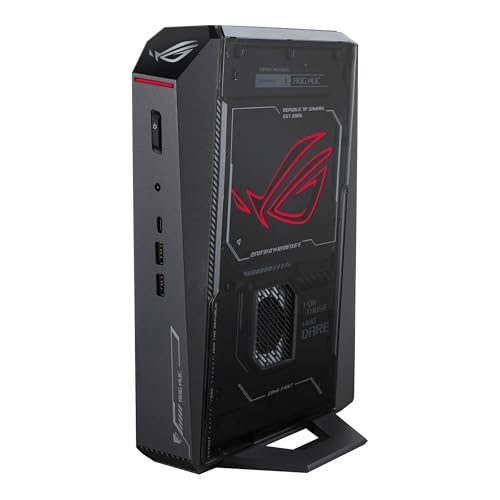
Where to buy
Check the latest price, availability and delivery on Amazon. Orders are placed on Amazon. We may earn a commission from qualifying purchases.
- Best overall for a first small PC: ASUS ROG NUC (2025), RTX 5070 Ti Mobile, 16GB, 1TB, about 3 liters — Check on Amazon
- GMKtec EVO-X2, Ryzen AI Max+ 395, Radeon 8060S, 64GB memory, 1TB, about 2.8 liters — Check on Amazon
- Minisforum AtomMan G7 Pro, Core i9-14900HX, RTX 5070 Laptop GPU, 32GB, 1TB, thin slab design — Check on Amazon
- ASUS ROG G22CH DB779, Core i7-13700KF, full desktop RTX 4070, 32GB, 1TB, about 10.7 liters — Check on Amazon
- ASUS ROG NUC 970, Core Ultra 9 185H, RTX 4070 Laptop GPU, 32GB, 1TB, 2.5 liters — Check on Amazon
- Minisforum AtomMan G1 Pro, Ryzen 9 8945HX, desktop RTX 5060 in a slot, 32GB, 1TB, about 3.8 liters — Check on Amazon
Read the full guide ↓
Disclosure: As an Amazon Associate, reviewstook.com earns from qualifying purchases. Links to Amazon on this page are affiliate links; they cost you nothing extra. Listing details such as price and availability change often, so check the current Amazon listing before you buy.
If this is your first gaming PC, the small ones look like the friendly option — and in some ways they are. A small form factor PC sits on the desk instead of under it, travels to another room easily, and arrives as one finished box: no building, no parts list, no compatibility puzzles. But this corner of the market has the most confusing labels in PC gaming, and beginners are exactly who they catch. Sellers stamp “small form factor” on ordinary towers. Graphics chips carry the same names as stronger desktop cards while quietly being the laptop versions. One listing page can sell three different machines — including an empty shell with no memory, no storage and no Windows. This guide walks a first-time buyer through all of it in plain language: the jargon, which machine fits which beginner, what else you will need to buy, and exactly what to do on your first evening.
Three honest facts before the picks. First, every machine here is genuinely small — between about 2.5 and 11 liters by the manufacturers’ own published measurements, against 35 to 45 liters for a normal tower. Second, there is no RTX 5080 small form factor PC under $2,500: the one real sub-4-liter RTX 5080 machine sits well above this budget, so at this budget small boxes run laptop-class graphics chips, and this guide calls them laptop chips every single time rather than letting the names flatter them. Third, the good news: none of the six picks is renewed or refurbished — all six are sold new — and none is a barebone you have to finish building. One pick’s memory is permanently soldered, and one listing hides a barebone option on the same page; both are flagged below.
One more thing this guide will not do: quote frame rates. Performance varies too much by game and settings for a single number to be honest, so instead you get the comparisons that actually predict how a machine feels — its graphics chip, how that chip stacks up against the desktop card with the same name, and its memory.
In this guide
Quick Picks
In a hurry? Each row matches a type of first-time buyer to the machine that suits them, with a link to the listing.
| Buyer type | Pick | Why it stands out | Link |
|---|---|---|---|
| Best overall for beginners | ASUS ROG NUC (2025), RTX 5070 Ti Mobile | The strongest graphics in a ~3-liter box — a premium pick, so check the price on Amazon before you buy | Check on Amazon |
| Best if you also do memory-heavy work | GMKtec EVO-X2, 64GB | 64GB of memory the other five cannot match, in ~2.8 liters | Check on Amazon |
| Best value with the newest graphics | Minisforum AtomMan G7 Pro | Current-generation graphics and a complete 32GB/1TB setup, positioned as the value pick here | Check on Amazon |
| Best if you want a real desktop graphics card | ASUS ROG G22CH DB779 | A full desktop RTX 4070, no laptop compromise — and keyboard and mouse are in the box | Check on Amazon |
| Best if tiny is the whole point | ASUS ROG NUC 970 | The smallest box here at 2.5 liters, complete and ready to use out of the box | Check on Amazon |
| Best if you like the idea of upgrading later | Minisforum AtomMan G1 Pro | Its desktop graphics card sits in a real slot and can be swapped one day | Check on Amazon |
How These Picks Were Chosen
The first test was a tape measure, the only test listing titles cannot fake. A machine qualified only if its maker publishes real dimensions and the box works out to roughly 20 liters or less. The six that passed land between about 2.5 and 11 liters. That one rule removed every full-size tower from contention — including some excellent, cheaper machines with stronger graphics, covered in the Best Gaming PC Under $2500 guide instead. If your desk has room for a tower, read that guide too — smallness always costs something.
The second test was verification. Every model number and specification here traces back to a real listing, a manufacturer’s specification page or independent coverage of that exact machine. Prices change often, so check the price on Amazon before you buy and confirm the live listing still fits the budget — where a pick sits at the premium end of the budget, the review says so plainly. The third test was honest naming, the one that matters most for beginners: four of these six machines use laptop graphics chips, so they are called laptop graphics chips everywhere — in the buy box, the quick picks, the reviews and the comparison table. NVIDIA’s own published figures show why: a desktop RTX 5070 has 6,144 processing cores and 12GB of graphics memory, while the RTX 5070 Laptop GPU has 4,608 cores and 8GB. Same family name, meaningfully different hardware. One pick has no separate graphics card at all — its graphics are built into its processor — and it earns its place for a different reason, stated openly in its review.
Finally, a beginner filter shaped the order and the advice. Machines that arrive complete, with Windows installed and nothing left to buy before the first game, are favored. The traps that catch first-time buyers are called out in each review and again in the mistakes section. We did not use these machines ourselves; this guide is built from maker listings, specification pages and independent reviews.
The Jargon, Translated
Thirteen terms explain nearly every confusing sentence in a small-PC listing, each defined the way a friend would explain it.
- Small form factor (SFF) and liters. A PC’s size measured in liters of volume — length × width × height. A normal gaming tower is 35–45 liters; everything here is 2.5 to 11 — “on the desk or in a backpack” instead of “under the desk.”
- GPU / graphics card. The chip that draws your games; it matters more to gaming performance than any other part. In small PCs the “card” is often a chip fixed to the main board — which is why the next term matters.
- Laptop GPU vs desktop GPU. Small PCs mostly use the laptop versions of graphics chips. They share names with desktop cards but have fewer cores, less memory and lower power limits. An RTX 5070 Laptop GPU is a good chip; it is simply not the desktop RTX 5070. Whenever this guide says “Laptop” or “Mobile,” it is flagging exactly that distinction.
- VRAM (graphics memory). The memory on the graphics chip itself, holding the game’s textures and scenery. More is better for modern games at higher resolutions; 8GB is the working minimum here, 12GB more comfortable.
- CPU / processor. The machine’s general-purpose brain, running Windows, your browser and the non-graphics parts of games. All six here are strong; rarely the part a first-time buyer needs to worry about.
- RAM (system memory). The machine’s short-term workspace. 16GB is the floor for gaming today, 32GB is comfortable, and one pick here carries 64GB. Not to be confused with VRAM, which belongs to the graphics chip.
- Soldered. Memory fixed permanently to the board at the factory. It can never be added to or replaced. Of these six machines, only the EVO-X2 has soldered memory — a generous 64GB, but 64GB forever.
- SO-DIMM slots. The small, laptop-style memory slots most of these machines use. Slots are good news: memory can be upgraded later with a screwdriver and five minutes. Five of the six picks have them.
- SSD and M.2. The storage drive your games live on. All six picks use fast SSDs; an M.2 slot is the socket the drive sits in, and a second empty slot means adding storage later is easy.
- Barebone. A machine sold as a shell — typically no memory, no storage, no Windows — for people who enjoy finishing the build themselves. None of the six picks is a barebone. Warning: the G7 Pro’s page also offers a barebone version of that machine, and picking it by accident is the easiest expensive mistake in this guide.
- Renewed / refurbished. A used machine that has been checked and resold. Nothing wrong with renewed in general, but for the record: none of these six picks is renewed. All six are sold new.
- Power supply and power brick. The part that feeds the machine electricity. Bigger small PCs (the G22CH, the G1 Pro) have theirs built inside; most tiny ones use an external brick, like a laptop charger — the EVO-X2’s is a 230W unit — which needs a home on or under your desk and is not counted in the machine’s liters.
- Refresh rate (Hz). How many times per second your monitor redraws the picture. Many gaming monitors can do 144Hz or more but arrive set to 60Hz in Windows, quietly throwing away smoothness you paid for. The fix takes thirty seconds — step 6 of the walkthrough below.
The 6 Best Small Form Factor Gaming PCs Under $2,500 for Beginners
ASUS ROG NUC (2025) — Core Ultra 9 275HX, RTX 5070 Ti Mobile, 16GB, 1TB (about 3.0 liters)
Who it suits: The beginner who wants the most gaming power in a genuinely tiny box, and is willing to wait for the right price.
Begin with the word in this review’s heading: Mobile. The graphics chip is the RTX 5070 Ti Mobile — the laptop version, with 12GB of its own memory — not the desktop RTX 5070 Ti. Even so, it is the strongest graphics chip in this guide, in the most polished small machine here: a Core Ultra 9 275HX processor, triple-fan cooling with dual vapor chambers, Thunderbolt 4, and a flat chassis measuring 282.4 × 187.7 × 56.5 mm — almost exactly 3 liters, standing vertically like a slim book. The model number to match is RNUC15JNK9X369AU. Now the positioning, which matters for this pick: ASUS positions this family as a premium line in its own US store, and this 5070 Ti configuration sits at the top end of this guide’s budget — check the price on Amazon and buy only if the live listing still fits an under-$2,500 plan. When it fits, it is the machine to beat; if the live price has moved above the budget, the picks below are better buys.
The beginner-specific catch is memory. This machine ships with 16GB where most rivals here include 32GB, and while its two SO-DIMM slots make upgrading genuinely easy, the upgrade is not free: a single 16GB DDR5 SO-DIMM is an extra retail purchase in the current shortage market — check the current price before you budget for it. Treat the honest total cost as machine plus one more stick; the upgrade still makes sense for most beginners. And set one expectation now: the family’s RTX 5080 configuration, in this same chassis, sits well above this budget — which is why no pick in this guide has one.
- The strongest graphics chip here — RTX 5070 Ti Mobile, 12GB — in about 3 liters.
- Serious cooling, Thunderbolt 4, and memory slots for later.
- Premium performance that rivals tower PCs in a thirteenth of the space.
Honest limitation: It sits at the premium end of this budget — check the price on Amazon to confirm the live listing still fits — and it ships with 16GB of memory where rivals include 32GB or 64GB, so the real cost includes a second stick.
Choose it if the live listing still fits your budget and you want maximum performance per liter. Skip it if the live price pushes it over budget, or you want 32GB in the box with nothing left to buy.

GMKtec EVO-X2 (64GB) — Ryzen AI Max+ 395, Radeon 8060S, 64GB, 1TB (about 2.8 liters)
Who it suits: The beginner whose PC has a double life — games in the evening, memory-hungry work such as local AI tools or big creative projects by day — in under three liters.
This pick breaks the pattern: there is no separate graphics card inside the EVO-X2. Its Radeon 8060S graphics are built into AMD’s Ryzen AI Max+ 395 processor — what the glossary calls integrated graphics — and what makes the machine special is the memory behind them: 64GB of fast LPDDR5X on a wide 256 GB/s connection, shared between processor and graphics. For games, Notebookcheck places the 8060S roughly on par with the RTX 4070 Laptop GPU, which makes this a genuinely capable gaming box. For memory-hungry work it is in a class of one in this guide: this exact 64GB/1TB configuration stands out as a distinctive option of its kind — check the price on Amazon for the current listing. The box measures 193 × 185.8 × 77 mm, about 2.8 liters, and runs Windows 11 Pro.
Two things a beginner must know. First, that wonderful memory is soldered — fixed at the factory, impossible to upgrade, ever. Sixty-four gigabytes is a lot today and also the ceiling for the machine’s life; the 128GB versions of this same PC exist because some buyers outgrow it, and they sit well above this budget. Second, the 2.8 liters exclude its external 230W power brick, which needs a home too. Bought for what its memory does, with gaming as a strong second talent, the EVO-X2 earns its price; bought as a pure games machine, it spends a lot of money on memory your games will never touch.
- 64GB of unified memory no other pick approaches, for AI, heavy projects and games.
- Integrated graphics reviewers place around RTX 4070 Laptop class.
- Check the price on Amazon, with Windows 11 Pro included.
Honest limitation: The 64GB is soldered and can never grow, and the graphics — excellent for integrated — sit a class below a real desktop graphics card.
Choose it if memory-hungry work shares the desk with your games. Skip it if gaming is the whole job — the same money buys stronger graphics elsewhere in this guide.

Minisforum AtomMan G7 Pro — Core i9-14900HX, RTX 5070 Laptop GPU, 32GB, 1TB (slim slab, about 3.0 liters)
Who it suits: The beginner who wants the newest graphics generation and a complete, nothing-else-to-buy setup, positioned as the value option here.
The shape is the first delight: the body measures 385 × 237 × 33 mm — about three liters, just 33mm thin — growing to 398 × 260 × 80 mm on its stand, at 2.62 kg. Inside are a 24-core Core i9-14900HX and the RTX 5070 Laptop GPU with 8GB of memory. Apply the glossary honestly: the desktop RTX 5070 has 6,144 cores and 12GB; this laptop part has 4,608 and 8GB. It is still a current-generation chip, and the machine around it is complete for a first PC — 32GB in two slots (to 96GB), 1TB plus a second drive slot, Wi-Fi 7, USB4, and Windows 11 Pro on the configured version. The configured machine is positioned as the value entry in this guide — check the price on Amazon for the current listing, since pricing for this brand moves between its own store and Amazon and the configured version can sell out.
Two arrival-day checks. First, the listing trap: this page is a style family, and one of the styles is the barebone — no memory, no storage, no Windows — That lower-priced style is not a deal; it is a different, unfinished product, so make sure the configured 32GB/1TB style is selected before you pay. Second, some review units shipped with all 32GB on a single memory stick, running slower single-channel mode; the walkthrough below shows how to check yours, and a matching second stick is the fix — easy, but not free.
- Current-generation RTX 5070 Laptop GPU with a complete 32GB/1TB configuration included.
- A 33mm-thin slab that stands vertically, taking almost no desk.
- Memory to 96GB plus a second storage slot — rare growing room here.
Honest limitation: The graphics are the 8GB laptop part despite the “RTX 5070” headline, and the listing mixes barebone and configured versions on one page — the easiest expensive misclick in this guide.
Choose it if you want the newest graphics here in a value-positioned configured setup. Skip it if 8GB of graphics memory worries you for the games you play — the G22CH below carries a 12GB desktop card.

ASUS ROG G22CH DB779 — Core i7-13700KF, Desktop RTX 4070, 32GB, 1TB (about 10.7 liters)
Who it suits: The beginner who wants small-ish without the laptop compromises — the only machine here with a full desktop graphics card.
Every other graphics pick in this guide asks you to accept a laptop chip. The G22CH does not. Its case measures 11.50 × 32.30 × 28.69 cm — about 10.7 liters — and inside sits a desktop RTX 4070 with all 5,888 cores and 12GB of GDDR6X memory, powered by a built-in 600W 80+ Gold power supply, so there is no brick to hide. The rest is equally grown-up: a Core i7-13700KF, 32GB of memory, a 1TB SSD, Wi-Fi 6E, Windows 11 Home — and, uniquely here, a wired keyboard and mouse in the box, the closest thing in this guide to a complete first-PC kit. Check the price on Amazon for the current listing — it is positioned as a mid-range to premium option in this guide and offers strong gaming hardware for its tier.
Beginners should know three things. First, the memory uses slots but ASUS rates 32GB as the maximum — exactly what it ships with — so there is no memory upgrade path. Second, a setup detail unique to this pick: its processor model ends in “KF,” and the F means it has no integrated graphics of its own. Every picture comes from the desktop graphics card, with no backup — normal for gaming PCs, but the monitor cable must go into the card’s ports; plug into the wrong socket and you get no picture at all, rather than a slower one. Third, configuration discipline: the G22CH name also covers a weaker variant with a Core i7-13700F and 16GB, offered by third-party importers at inflated prices. The model number that matters is DB779 — check it on the listing and on the box.
- A full desktop RTX 4070, 12GB — the only pick with no laptop asterisk.
- Built-in 600W Gold power supply; keyboard and mouse included.
- Check the price on Amazon for the current listing.
Honest limitation: At about 10.7 liters it is three to four times the size of the NUC-class picks, and its 32GB memory ceiling is also its shipping configuration — there is no growing room.
Choose it if real desktop graphics matter more than minimum size. Skip it if the PC has to travel, hide behind a monitor, or fit a shelf — that is what the 2.5-to-3-liter picks are for.

ASUS ROG NUC 970 — Core Ultra 9 185H, RTX 4070 Laptop GPU, 32GB, 1TB (2.5 liters)
Who it suits: The beginner for whom small is the first requirement — a machine that disappears behind a TV or into a carry-on, still complete and homework-free.
Two and a half liters is the entire pitch, and the NUC 970 makes it without giving up a real graphics chip. The case measures 270 × 180 × 50 mm, and inside, the RTX 4070 Laptop GPU runs at 140W — the highest power limit that chip gets anywhere, which matters because a laptop GPU’s speed is set as much by its wattage as by its name, and ASUS did not strangle this one. The honest naming still applies: 4,608 cores and 8GB against the desktop card’s 5,888 and 12GB, a class reviewers place around the desktop RTX 4060 Ti. Around it: a Core Ultra 9 185H, 32GB (in slots, to 64GB), 1TB, Thunderbolt 4, an SD card reader, and a vertical stand in the box. The model number is RNUC14SRKU9189AUI. Positioning is friendly here: it sits comfortably inside the budget as a mid-range to premium option — check the price on Amazon to confirm the live listing.
What you give up is the newest generation. This is the previous model of ASUS’s NUC line, a generation behind the 2025 machine at the top of this guide, with no graphics upgrade path — in this class there never is. The smallest box here also has the least room to breathe, so it will be the most audible in a long session beside you — put it behind a TV or monitor. For a first PC that simply works, those are fair trades.
- The smallest machine here at 2.5 liters, its graphics chip at full 140W.
- Complete 32GB/1TB setup — check the price on Amazon.
- Thunderbolt 4, an SD reader and an included stand — an easy living-room or travel PC.
Honest limitation: Previous-generation laptop graphics with 8GB of memory, no way to upgrade them later, and the least cooling headroom of any pick here.
Choose it if minimum size outranks everything else. Skip it if you want the newest graphics generation, or a machine you can upgrade — this class offers neither.

Minisforum AtomMan G1 Pro — Ryzen 9 8945HX, Desktop RTX 5060, 32GB, 1TB (about 3.8 liters)
Who it suits: The beginner who likes keeping a machine for years and improving it — the only sub-4-liter pick whose graphics card can be replaced one day.
The G1 Pro breaks the rule every other tiny pick follows. Its RTX 5060 is a genuine desktop card — a slim, low-profile model running at 145W — plugged into a real PCIe x16 slot inside a 3.8-liter case (the maker’s figure; reviewers measuring the box got 12.4 × 8.5 × 2.25 inches). When a faster low-profile card exists in a few years, this machine can accept it; no other pick here can accept any graphics upgrade at all. The platform around the slot is serious: a 16-core Ryzen 9 8945HX, 32GB in slots (to 96GB), 1TB plus a second drive slot, a built-in 350W power supply — no brick — 5GbE, Wi-Fi 7 and Windows 11 Pro. Check the price on Amazon, and compare it with Minisforum direct if you are shopping around.
Three findings from review coverage matter as much as the specs. First, the machine ships in an 80W “Gaming Mode” that quietly holds back roughly a fifth of the performance you paid for — finding the performance setting in the maker’s software on day one is part of unboxing this PC, and the walkthrough below includes it. Second, reviewers found it loud under heavy load; small and powerful is rarely quiet. Third, Minisforum’s control utility has shipped with a driver component that Windows Defender flags — worth knowing so the warning does not alarm you, and so you download the utility only from Minisforum’s own site. None of this cancels the slot: if you upgrade rather than replace, this is the only pick whose graphics story can change.
- A desktop RTX 5060 in a real slot — the only graphics upgrade path under 4 liters.
- Built-in power supply, memory to 96GB, a second storage slot.
- Check the price on Amazon for the current listing.
Honest limitation: It ships in a power-limited mode you must switch off yourself, it runs loud under load, and future graphics upgrades are limited to slim low-profile cards that fit the slot and the 350W supply.
Choose it if you upgrade machines rather than replace them. Skip it if you want calm, set-and-forget ownership — the two ASUS NUC picks are easier housemates.
Comparison Table
| Product | Size (from published dimensions) | Graphics, honestly named | Memory / Storage | Price | Link |
|---|---|---|---|---|---|
| ASUS ROG NUC (2025) | ~3.0L (282.4 × 187.7 × 56.5 mm) | RTX 5070 Ti Mobile (laptop chip), 12GB | 16GB, in slots / 1TB | Check price on Amazon | Check on Amazon |
| GMKtec EVO-X2 (64GB) | ~2.8L (193 × 185.8 × 77 mm) | Radeon 8060S, integrated into the processor | 64GB, soldered / 1TB | Check price on Amazon | Check on Amazon |
| Minisforum AtomMan G7 Pro | ~3.0L slab (385 × 237 × 33 mm body) | RTX 5070 Laptop GPU, 8GB | 32GB, in slots / 1TB | Check price on Amazon | Check on Amazon |
| ASUS ROG G22CH DB779 | ~10.7L (11.50 × 32.30 × 28.69 cm) | Desktop RTX 4070, 12GB | 32GB (also its maximum) / 1TB | Check price on Amazon | Check on Amazon |
| ASUS ROG NUC 970 | 2.5L (270 × 180 × 50 mm) | RTX 4070 Laptop GPU, 8GB, full 140W | 32GB, in slots / 1TB | Check price on Amazon | Check on Amazon |
| Minisforum AtomMan G1 Pro | ~3.8L (maker figure) | Desktop RTX 5060 low-profile, 8GB, in a swappable slot | 32GB, in slots / 1TB | Check price on Amazon | Check on Amazon |
Your First Evening: Setup in Eight Steps
Every pick arrives as a finished PC with Windows installed, so your first evening is about connecting things in the right order and checking that what arrived is what you paid for. Budget about an hour, most of it waiting for updates, and work through the steps in order.
- Choose the spot before you plug anything in. These machines breathe through vents on their sides and tops, so give the box open air on all sides: on the desk, beside or behind the monitor, or on a TV shelf with space above it. Do not close any of them inside a cabinet or drawer, however tidy it looks — a sealed cupboard defeats them. If your machine uses an external power brick, decide where it lives now too, somewhere air reaches it.
- Connect power, and find the switch. Plug the power supply into the wall first, then into the PC. If your machine has a rocker switch on the back, flip it on — a PC with that switch off looks completely dead and has panicked many first-time owners. Then press the front power button once and wait; first boots are slow.
- Plug the monitor into the graphics card’s ports — not the motherboard’s. This is the most common beginner mistake in PC gaming. Display sockets can sit in two places: a cluster belonging to the graphics card, and one or two belonging to the motherboard. Games run at full speed only through the card’s sockets — on a tower like the G22CH, the horizontal row lower down the back; on the NUC-class boxes, the display outputs on the machine itself. The warning is strictest on the G22CH: its Core i7-13700KF has no integrated graphics at all (that is what the F means), so its motherboard sockets are dead ends — plug the monitor there and you get no picture whatsoever, with no backup. It is the only pick with an F-suffix processor; the others carry backup graphics, but the rule is the same for all six: monitor into the graphics outputs, always.
- Connect peripherals, and use a cable for the internet if you possibly can. Keyboard and mouse first (the G22CH includes a wired set; the others assume you have your own). Then plug in an Ethernet cable if the PC can reach your router: everything in the next step is a download, and wired is faster and far less likely to stall than Wi-Fi. Wi-Fi works if a cable is impossible — just expect the evening to run longer.
- Run Windows Update, then update the graphics driver. Let Windows finish its first-run setup, then open Settings → Windows Update and run it repeatedly until it reports you are up to date, restarting whenever it asks. Then update the graphics driver from the chip maker’s own app — the NVIDIA App for the GeForce machines, AMD’s software for the EVO-X2. A shipped driver can be months old; the current one is free performance and stability. Do not install games until both are done — a half-updated PC is the source of most “my new PC is broken” stories.
- Set your monitor’s real refresh rate. If you bought a gaming monitor, it can probably do far more than the 60Hz Windows defaults to. Go to Settings → System → Display → Advanced display and choose the highest refresh rate offered. Thirty seconds, and the smoothness you paid for actually shows up. If the highest option is 60Hz, your monitor is a 60Hz model — fine for now, and the first upgrade to consider later.
- Verify that the machine you received is the machine you ordered. Five minutes, and this step protects you from every trap in this guide. In Windows, open Settings → System → About and Task Manager’s Performance tab, and compare what you see against your order: the processor name, the graphics chip’s full name (including the word Laptop or Mobile, where it applies), the memory total, and the storage size. Match model numbers where the guide gives them — DB779 on the G22CH (not the weaker 13700F variant), RNUC15JNK9X369AU on the ROG NUC (2025), RNUC14SRKU9189AUI on the NUC 970. G7 Pro owners: confirm you bought the configured style, not the barebone, and check whether the 32GB shows as one stick or two — review units sometimes shipped single-channel. G1 Pro owners: open Minisforum’s control software and switch off the 80W “Gaming Mode” it ships in, which holds back about a fifth of its performance. If anything does not match the listing, act now, inside the return window — not after a month of gaming.
- Install a game store and one game. Install Steam (or the Epic Games Store, or the Xbox app — most beginners start with Steam), sign in, and install one game you know well rather than five you do not. Play it for twenty minutes. You are not benchmarking; you are confirming the whole chain — updates, driver, monitor setting, configuration — works while returns are still easy. Then install the rest of your library overnight.
What Else You Will Spend
The PC is the biggest purchase, not the only one. This section lists the extras honestly, in the order you will meet them. Check the current price on Amazon or at your retailer of choice for each extra before you budget for it.
- A monitor comes first. None of these six machines includes a screen, and a gaming PC without a monitor is a paperweight. If you do not already own one, it is your next purchase — before a fancy keyboard, before anything decorative. A living-room TV works well as a first screen for the small picks, one of their genuine advantages.
- Keyboard and mouse, unless you bought the G22CH. The G22CH is the only pick that documents a keyboard and mouse in the box. The other five assume you have your own; if you do not, a basic set is a day-one necessity, not an accessory.
- The ROG NUC (2025)’s second memory stick is an extra cost. The machine ships with 16GB, a single 16GB DDR5 SO-DIMM is an extra retail purchase in the current shortage market — check the current price before you buy — and the comfortable version of this PC is therefore the machine plus one stick. Still a good buy when the total fits your budget — a misleading one if you pretend the stick is free.
- A possible second stick for the G7 Pro. If your unit arrives with its 32GB on a single stick (step 7 of the walkthrough shows the check), a matching second stick restores full memory speed. The fix is easy — slots are the friendly kind of hardware — but the stick is a purchase, so treat it as machine + fix if you find yours is single-channel.
- Desk space for a power brick. Not a purchase, but a cost beginners forget: most of the tiny picks use an external adapter (the EVO-X2’s is a 230W unit), and it lives on your desk or floor permanently. The G22CH and G1 Pro, with built-in power supplies, are the exceptions.
Upgrades, in Plain Terms
Beginners often ask whether a small PC is a dead end. The honest answer is: mostly not for memory and storage, almost always for graphics — with one shining exception.
Memory and storage are the friendly upgrades. Five of the six picks hold memory in SO-DIMM slots: the NUC 970 can grow to 64GB, the G7 Pro and G1 Pro to 96GB, and the ROG NUC (2025)’s two slots turn its 16GB start into a plan rather than a problem. The G22CH’s slots are already at ASUS’s 32GB maximum, and the EVO-X2 is the true exception — its 64GB is soldered, with no upgrade path. Storage is friendlier still: the G7 Pro and G1 Pro each have a second M.2 slot waiting empty.
Graphics upgrades are promised for exactly one pick. On the G1 Pro, the desktop RTX 5060 sits in a real PCIe x16 slot, and swapping it for a future low-profile card is a documented path — limited to slim cards that fit the case and its 350W power supply, but real. On the other five, no graphics swap is promised: their graphics are chips fixed to the main board or, in the G22CH’s case, a card inside a compact ASUS design that this guide’s research does not document as a swap path. Treat those five as buying the graphics you need for the machine’s whole life — the deal small PCs make, and the reason the reviews push you to read the graphics chip’s full name before you buy.
How to Choose Among the Six
- Start with the space, honestly measured. If the PC must vanish — behind a TV, into a bag — you are choosing between the 2.5-liter NUC 970 and the 3-liter class. If it must merely be tidy on a desk, all six qualify. If eleven liters is acceptable, the G22CH’s desktop graphics enter the picture. Measure first; the answer eliminates half the list.
- Then read the graphics chip’s full name, including “Laptop” or “Mobile.” Compare laptop chips against desktop cards one class down, not against their namesakes. If the word Laptop in a heading bothers you, the G22CH and G1 Pro are your two desktop-card picks.
- Decide whether memory is a gaming question or a work question. For games alone, 32GB is plenty and 64GB is wasted money. For local AI, big creative projects or extreme multitasking, the EVO-X2’s 64GB is the entire point of a machine.
- Check the live price before you decide. The ROG NUC (2025) is a premium pick — buy it only if the live listing still fits your budget, and walk away if it has moved above it. For the G7 Pro, compare the live Amazon listing with Minisforum’s own store rather than assuming either price. Check the live listing before you order, and let a price above your budget line decide for you.
- Confirm the exact configuration in the cart. Configured style, not barebone, on the G7 Pro. The DB779 model, not its weaker sibling, on the G22CH. The 64GB/1TB configuration on the EVO-X2. Model numbers are the product; family names are marketing.
- Count the whole desk, not just the box. Monitor, keyboard, mouse, and a home for a power brick if your pick has one. The G22CH shortens that list by including peripherals; the tiny picks shorten it only if a TV does screen duty.
Common Buying Mistakes
- Trusting the words “small form factor” in a listing title. Sellers apply them to 40-liter towers. If the published dimensions do not multiply out to something small, the box is not small.
- Reading “RTX 5070” and picturing the desktop card. In this class it is usually the Laptop GPU — 4,608 cores and 8GB where the desktop card has 6,144 and 12GB. The full name is the specification.
- Buying the ROG NUC (2025) without checking whether the live price still fits a $2,500 plan. It belongs in this guide as a premium pick inside that budget; if the live listing has moved above it, the budget is gone and the comparison should start over.
- Ordering the G7 Pro’s barebone style by accident. It sits on the same listing page, costs less, and arrives with no memory, no storage and no Windows. Check the style selector before paying.
- Buying the wrong G22CH. The weaker 13700F/16GB variant has been offered at inflated prices. DB779 is the product; “G22CH” alone is not.
- Plugging the monitor into the motherboard’s display socket. On the G22CH, whose F-suffix processor has no graphics of its own, that means no picture at all; on any machine it means games bypass the graphics card you paid for. Graphics card ports, always.
- Forgetting the memory bill on the 16GB machine. At current SO-DIMM prices the second stick is a real line item — check the current price — not an afterthought.
- Leaving the G1 Pro in its shipping mode. It arrives limited to an 80W gaming mode that hides about a fifth of its performance. The toggle is in the maker’s software; finding it is part of unboxing.
- Assuming small means silent. Small means the fans sit closer to the heat and to you; placement behind a monitor or across the room helps.
Final Recommendation
- Most beginners who want maximum power per liter: ASUS ROG NUC (2025) — strictly when the live price still fits the budget.
- Beginners whose PC also does memory-heavy work: GMKtec EVO-X2 (64GB).
- Beginners who want the newest graphics as the value option: Minisforum AtomMan G7 Pro.
- Beginners who want one box with almost everything included: ASUS ROG G22CH DB779.
- Beginners who want the smallest, simplest thing that works: ASUS ROG NUC 970.
- Beginners who plan to upgrade rather than replace: Minisforum AtomMan G1 Pro.
Our top two for a first small PC are the ROG NUC (2025) and the EVO-X2, for opposite reasons. The NUC is the performance answer — the strongest graphics that fit in three liters, bought only when the live listing still fits the budget and with the second memory stick honestly added to its real cost — Check on Amazon. The EVO-X2 is the capability answer: 64GB of memory no comparably small machine can match, gaming around the RTX 4070 Laptop class as a bonus, and nothing left to configure — Check on Amazon. If your space problem is the same but the budget is smaller, the Best Small Form Factor Gaming PC Under $1500 guide starts from the same definitions at a smaller budget; if you are curious what the ceiling above this budget looks like, the Best Small Form Factor Gaming PC Under $3000 guide is where the RTX 5080 question gets its expensive answer. Whichever you choose: measure the space, read the graphics chip’s whole name, confirm the configuration in the cart, and check the live price before you order.
Frequently Asked Questions
I am a complete beginner. Is a small PC harder to set up than a normal one?
No — if anything it is simpler. All six picks arrive assembled with Windows installed, and the first-evening routine is the same eight steps for each: place it, power it, monitor into the graphics outputs, peripherals and internet, updates, refresh rate, verify the configuration, install a game store. The small-PC-specific risks are all at the buying stage — laptop graphics naming, barebone styles, weaker variants — which is why this guide spends its length there.
Can I get an RTX 5080 in a small PC under $2,500?
No, and a listing implying otherwise deserves a very slow read. The only genuine sub-4-liter RTX 5080 machine — the top configuration of the ROG NUC (2025) — sits well above this budget at regular Amazon listings — check the price on Amazon if you want to see the current gap. At $2,500, small boxes top out at the RTX 5070 Ti Mobile, which is pick one in this guide.
What else do I need to buy besides the PC?
A monitor or a TV — the essential one; none of the six includes one. A keyboard and mouse, unless you choose the G22CH, which includes a wired set. After that, the honest extras are the catch items: a second memory stick for the ROG NUC (2025) (check the current price before you buy) and possibly one for the G7 Pro if yours arrives single-channel. Everything else can wait.
Can I upgrade one of these later, or am I locked in?
Memory and storage, mostly yes: five of the six use slots (the NUC 970 grows to 64GB; the G7 Pro and G1 Pro to 96GB), and two have a spare drive slot. The EVO-X2’s memory is soldered and final. Graphics, only on the G1 Pro, whose desktop card sits in a real slot and can be swapped for a future low-profile card; on the other five, the graphics you buy are the graphics the machine keeps.
What if the price I see is higher than the one in this guide?
Prices move weekly, so always check the live listing before you order. Some picks are price-sensitive: the ROG NUC (2025) only belongs in this budget when its live price still fits, so if it has moved above the budget the right move is to wait or choose another pick; the G7 Pro’s live Amazon price may differ from Minisforum’s own store. If a live price crosses your budget line, believe the line, not the listing.


