Where to buy
Check the latest price, availability and delivery on Amazon. Orders are placed on Amazon. We may earn a commission from qualifying purchases.
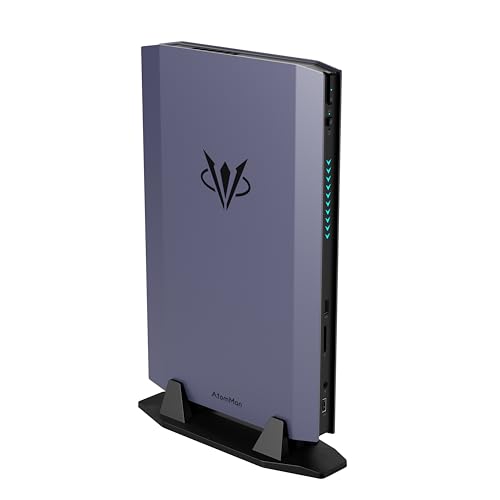
- Best overall streaming mini: AtomMan G7 Ti Mini PC, Core i9-14900HX, RTX 4070 Laptop GPU, 32GB DDR5, 1TB SSD — Check on Amazon
- MINISFORUM AtomMan G1 Pro, Ryzen 9 8945HX, Desktop RTX 5060, 32GB DDR5, 1TB SSD — Check on Amazon
- HP OMEN 16L Gaming Desktop, Ryzen 7 8700F, Desktop RTX 5060, 64GB DDR5, 1TB SSD — Check on Amazon
- AtomMan G7 Pt Mini PC, Ryzen 9 7945HX, RX 7600M XT Mobile GPU, 32GB DDR5, 1TB SSD — Check on Amazon
- GMKtec EVO-X1 Mini PC, Ryzen AI 9 HX 370, Radeon 890M, OCuLink, 32GB LPDDR5X, 1TB SSD — Check on Amazon
- Beelink SER9 Pro Mini PC, Ryzen AI 9 HX 370, Radeon 890M, 32GB LPDDR5X, 1TB SSD — Check on Amazon
Read the full guide ↓
Disclosure: As an Amazon Associate, reviewstook.com earns from qualifying purchases. Links to Amazon on this page are affiliate links; they cost you nothing extra. Listing details such as price and availability change often, so check the current Amazon listing before you buy.
A streaming PC does two jobs at once, and it is worth defining them before any product names appear — every pick here is graded against both. Job one is the game itself, rendered at the settings and smoothness you would want if nobody were watching. Job two is the broadcast: OBS or a similar program composites your game capture, your camera, your alerts and your overlays into a single picture, hands it to a hardware encoder, and pushes it up your internet connection while chat, a browser and a Discord call compete for whatever the first two jobs left behind. On Twitch, that broadcast is H.264 video at roughly 6,000 kbps with constant bitrate — a hard ceiling that rewards encoder quality, because at a fixed low bitrate some encoders simply look cleaner than others. On YouTube you may send a higher bitrate, broadcast at 1440p, and use the newer AV1 codec where your hardware supports it. So a streaming guide cannot rank machines the way a gaming guide does. It has to ask, for each box: what encoder silicon does it actually carry, how much headroom remains after the game takes its share, and what happens to the stream in the heaviest moment of the heaviest game you play?
Graded that way, this under-$1,500 set has an unusual virtue: every one of the six machines below carries an AV1-capable hardware encoder. The differences that decide the ranking are subtler — a dedicated encoder block versus one sharing a small chip with the game, NVENC versus AMD’s VCN at Twitch’s bitrate, and whether the box holds a second encoder in reserve. Size still runs from about 0.75 liters to a 16-liter compact tower, and it still matters on a streamer’s crowded desk — but size is the second question here. The first is the encoder.
One honesty item belongs at the top. A full-size tower with a desktop RTX 4070 SUPER — the Skytech Omega, with a Ryzen 7 7700X, 32GB of DDR5 and a published 750-watt Gold power supply — is positioned inside this budget on Amazon, and it games faster and streams with more headroom than anything below. Small form factor buys you space, never speed; what follows is for readers whose room, cabinet or desk cannot take the tower, and who want each machine’s streaming trade-offs stated plainly. Nor will you find the fashionable Ryzen AI Max+ 395 class built around the Radeon 8060S: after the late-2026 memory shortage repriced it, the cheapest in-stock 64GB examples on Amazon sit well above this budget — they fail this budget on positioning, not on merit.
In this guide
Quick Picks
Short on time? Each row names a streaming buyer type and its machine, with a link to the listing.
| Buyer type | Pick | Why it stands out | Link |
|---|---|---|---|
| Best overall for streaming | AtomMan G7 Ti Mini PC | Ada NVENC with AV1 encode, a Quick Sync encoder in reserve, and the strongest graphics in a true mini — check price on Amazon | Check on Amazon |
| Newest encoder, desktop card (deal only) | MINISFORUM AtomMan G1 Pro | A genuine desktop RTX 5060 and its Blackwell NVENC in 3.8 liters — only when its live price falls within this guide’s budget; check price on Amazon | Check on Amazon |
| Long sessions, quiet room | HP OMEN 16L Gaming Desktop | The same desktop RTX 5060 encoder in a 16-liter case with real airflow; seller-upgraded 64GB style — check price on Amazon | Check on Amazon |
| Best value streamer | AtomMan G7 Pt Mini PC | RDNA 3 VCN with AV1 encode and sixteen CPU cores — check price on Amazon | Check on Amazon |
| Streams now, upgrades its encoder later | GMKtec EVO-X1 Mini PC | 890M AV1 encode today, an OCuLink port that can add a desktop card — and its encoder — tomorrow; dual 2.5GbE | Check on Amazon |
| Smallest streaming box | Beelink SER9 Pro Mini PC | 890M AV1 encode and a wired 2.5GbE port in roughly 0.82 liters, for esports and indie streams | Check on Amazon |
How These Picks Were Chosen
The budget was applied as a ceiling on the complete, configured machine: every pick is a real Amazon listing positioned within this guide’s budget — and where a pick only fits the budget during a promotion rather than at its everyday positioning, the review says so plainly. Two picks carry conditions: the G1 Pro qualifies only when its live price falls within this budget, so check the current price on Amazon before considering it, and the OMEN 16L pick belongs to one specific seller-upgraded configuration. Check the current price on Amazon for every pick, because this category’s pricing has been moving weekly through the late-2026 memory shortage. Within that ceiling, the grading order is encoder first, headroom second, size third: the encoder each machine’s silicon actually carries, the power left over once it is fed, and only then the liters.
Encoder claims were derived from the silicon itself, using NVIDIA’s, AMD’s and Intel’s published specifications for each documented chip — never from listing headlines. That discipline matters in both directions: the RTX 4070 Laptop GPU below is credited with its Ada-generation NVENC and AV1 encode, which are real, and in the same breath named a laptop part with 4,608 cores and 8GB of memory rather than allowed to borrow the desktop card’s reputation. Where a machine’s streaming ceiling is set by shared silicon rather than by its encoder, the review says that instead.
We did not use these machines ourselves. We read maker listings and specification pages, price trackers keyed to the exact Amazon listings, and independent reviews, and favored products whose numbers are published in full: GPU power limits, soldered-versus-socketed memory, and dimensions. No frame-rate figures are claimed anywhere; performance is described by class and encoder capability, per independent-review consensus — the parts a specification can honestly settle. Three exclusions define the tier: the Ryzen AI Max+ 395 (Radeon 8060S) minis are out on price; the AtomMan G7 Pro (RTX 5070 Laptop GPU), documented in a configured form positioned above this budget, is the category’s ceiling rather than a pick; and no small prebuilt with a desktop RTX 4070 or 4070 SUPER could be verified within this budget, so the tower in the intro is discussed in prose and given no purchase link here. Readers building a shortlist across the whole field should also see Best Streaming PC Under $1500.
The Encoder Map: What Each Kind of Silicon in This Guide Can Actually Broadcast
Streaming quality is decided less by the game hardware than by a small, fixed block of silicon called the encoder, which compresses your picture into the stream. Because it is separate from the cores that render the game, a good hardware encoder broadcasts almost for free. A bad or missing one forces the processor to compress video in software while also running the game — which is how streams stutter on machines that game perfectly well. This guide contains three encoder families, and the ranking follows from their differences.
NVENC, in two generations. The G7 Ti’s RTX 4070 Laptop GPU carries NVIDIA’s Ada-generation NVENC: H.264 for Twitch and AV1 for YouTube, and the benchmark for clean H.264 at Twitch’s roughly 6,000 kbps ceiling. The G1 Pro and the OMEN 16L carry desktop RTX 5060 cards, whose Blackwell-generation NVENC is a step newer still — again H.264 and AV1, from a single encoder block on this card. Both generations leave the encoder side of streaming essentially solved; what differs between those three machines is the rendering power and cooling around the encoder. The G7 Ti adds one more trick no other pick here has: its Core i9-14900HX also carries Intel Quick Sync, a second, independent hardware encoder good for H.264 and HEVC (its AV1 support is decode only, and this guide claims no more for it). The broadcast can sit on NVENC and a local recording on Quick Sync, and neither block is ever asked to do two jobs.
AMD VCN, in two generations. The G7 Pt’s RX 7600M XT is an RDNA 3 part whose VCN media engine encodes H.264, HEVC and AV1; the two Radeon 890M minis run the RDNA 3.5 version of the same engine, with the same codec list. AMD’s honest weakness is H.264 at low bitrate: at Twitch’s 6,000 kbps, VCN’s H.264 picture is visibly softer than NVENC’s in fast motion. On YouTube the weakness mostly evaporates, because YouTube accepts the higher bitrates and the AV1 streams where this engine is strong. So the AMD picks are graded as YouTube-first stream machines and perfectly serviceable Twitch machines — not as failed NVIDIA machines.
The shared-silicon caveat. In the SER9 Pro and EVO-X1, the encoder lives inside the same chip that renders the game and composites your OBS scene, fed by the same soldered memory. The encoder block itself is dedicated, so encoding stays cheap; what is shared is everything around it — graphics power, memory bandwidth and heat. Streaming an esports or indie title, that sharing is invisible. Streaming a new AAA release divides one small chip three ways, and the game side of these machines is a fluent-1080p class of hardware to begin with — the discrete picks exist for readers whose library makes that division hurt. Finally, the network: an encoder can only send what the connection carries, and wired Ethernet is a requirement, not a preference — the documented ports below (2.5GbE, dual 2.5GbE and 5GbE) exist to be used.
The 6 Best Small Form Factor Gaming PCs for Streaming Under $1,500
AtomMan G7 Ti Mini PC — Core i9-14900HX, RTX 4070 Laptop GPU, 32GB DDR5, 1TB SSD
Who it suits: The streamer who wants the most complete broadcast toolkit that fits in a true mini — the strongest encoder pairing in this guide, the strongest mini graphics, and a machine that disappears behind the monitor it streams to.
Start with the encoder, because on this machine it is genuinely two encoders. The RTX 4070 Laptop GPU brings NVIDIA’s Ada-generation NVENC, which handles Twitch’s H.264 at roughly 6,000 kbps as cleanly as any silicon in this guide, and encodes AV1 for YouTube broadcasts at 1440p. Behind it, the Core i9-14900HX’s Intel Quick Sync sits in reserve as a second, independent hardware encoder for H.264 and HEVC work. That pairing enables the setup serious streamers run — broadcast on NVENC, a high-quality local recording on Quick Sync, neither taxing the game — and no other pick here can split the work that way. The game side is the strongest in any true mini: the laptop GPU runs at its full 140-watt power limit, which independent reviewers place around desktop RTX 4060 Ti territory — a genuine 1440p-capable class with settings chosen sensibly, and strong at 1080p — backed by 32GB of socketed DDR5 (upgradable to 96GB), a 1TB SSD with a second M.2 slot, and a 24-core processor. The chassis works out to roughly 2.55 liters, with dual-fan cooling and silent and performance modes — the silent mode a real streaming feature, since fan noise is broadcast noise within microphone range. For the configured 32GB/1TB style, check price on Amazon; a barebone style shares the listing at a lower position in the tier, so confirm the style name in the cart — the difference is whether memory, storage and Windows arrive in the box.
The naming honesty this batch insists on applies in full: NVIDIA’s published specifications give the laptop GPU 4,608 CUDA cores and 8GB of GDDR6, against the desktop RTX 4070’s 5,888 cores and 12GB of GDDR6X. The encoder generation is the same Ada family either way, so stream quality is not what the laptop part surrenders — rendering headroom is, and the 8GB is shared between the game and OBS’s compositing, the practical ceiling on very heavy scenes at 1440p. None of that displaces it from the top of this ranking: it is the only mini here whose broadcast hardware is, in every respect, a non-issue.
- Two hardware encoders — Ada NVENC for the broadcast, Intel Quick Sync in reserve for recording or a second job.
- Full-power 140W laptop GPU: the most game headroom behind the stream of any true mini here.
- Socketed memory to 96GB, two M.2 slots, and a silent cooling mode that respects the microphone.
Honest limitation: You are buying the laptop GPU — 4,608 cores and 8GB of memory where the desktop namesake carries 5,888 cores and 12GB — and because barebone and configured styles share one listing, the style check before ordering is not optional.
Choose it if streaming is the machine’s main job and you want the encoder question settled outright. Skip it if 16 liters fits your room and you would rather have the OMEN’s swappable desktop card for similar money, or if your desk can hold the tower from the intro, which out-games and out-streams it.

MINISFORUM AtomMan G1 Pro — Ryzen 9 8945HX, Desktop RTX 5060, 32GB DDR5, 1TB SSD
Who it suits: The purist streamer: the reader who wants the newest encoder NVIDIA sells, attached to a genuine desktop graphics card, inside a machine still small enough to call a mini — and who is patient enough to buy it only when the price behaves.
No other machine in this guide is built quite like this one. Inside a chassis of about 3.8 liters sits a real desktop GeForce RTX 5060 — a low-profile Gigabyte card at its full 145W, in an actual PCIe x16 slot, fed by a 350W internal power supply. For streaming, the card’s Blackwell-generation NVENC is the point: the newest encoder here, producing H.264 for Twitch and AV1 for YouTube from a single encoder block, with desktop-card power and cooling behind the game it broadcasts. Around it: the sixteen-core Ryzen 9 8945HX, 32GB of DDR5, a 1TB SSD, Wi-Fi 7 and documented 5-gigabit Ethernet — the fastest wired networking in the guide. The gaming side is honest desktop-5060 performance, a strong 1080p class reaching into 1440p with upscaling. Then there is what it costs, which is why this pick wears an asterisk. Its documented list positioning sits well above this budget, its ordinary Amazon positioning is also above this budget, and only launch-era promotions have brought it inside this budget. The rule is mechanical: when its live price falls within this budget — check the current price on Amazon — it is a pick; when it sits above the budget it is a different and worse decision, and nothing here should be read as talking you into it.
Two further honesties, one of them streaming-specific. The machine ships in an 80-watt gaming mode that withholds roughly a fifth of its performance behind a manual toggle — and a streamer who forgets the toggle will meet the missing performance on air, in the heaviest scene, which is the worst possible time. Switch it before your first broadcast and leave it switched. Second, do not mistake the desktop card for a desktop upgrade path: the low-profile card is, in hands-on reviewers’ words, not realistically swappable inside 3.8 liters, and the 350W supply would cap a replacement anyway. What you are buying is the newest encoder and desktop silicon honesty at mini size.
- Blackwell-generation NVENC on a genuine desktop RTX 5060 — the newest encoder in this guide, AV1 included.
- 3.8 liters with an internal 350W power supply; no external brick on the desk.
- Documented 5GbE networking — the strongest wired connection here.
Honest limitation: It only fits this budget on promotion — its everyday positioning sits above this budget against an even higher list positioning — and it ships in an 80W mode you must remember to leave behind; the low-profile card is not realistically upgradeable despite being a desktop part.
Choose it if the live price falls within this budget — check price on Amazon — and the newest encoder in a mini is exactly your brief. Skip it if the price has drifted above the budget — in that case the G7 Ti streams as well and sits lower in the tier — and skip it if you are the sort of owner who never opens a settings menu twice.

HP OMEN 16L Gaming Desktop — Ryzen 7 8700F, Desktop RTX 5060, 64GB DDR5, 1TB SSD
Who it suits: The streamer who broadcasts for hours at a stretch and whose “small form factor” honestly means a compact tower — desktop encoder, cooling that stays composed under a long session, and a graphics card they can replace in three years.
The OMEN 16L carries the same desktop RTX 5060 as the pick above, and with it the same Blackwell-generation NVENC: H.264 for Twitch at its bitrate ceiling, AV1 for YouTube, from a card in a standard slot inside a 16-liter case with real airflow. For streaming duty, the big case is not dead volume — sustained game-plus-encode loads are where the minis’ small fans work hardest and get loudest near a microphone, and 16 liters of airflow is the quietest streaming environment here. The listing behind this pick is a seller-upgraded one: PCOnline US opens the machine and fits the 64GB of memory and 1TB SSD, and those upgraded parts carry the seller’s own one-year warranty while the remainder keeps HP’s; that configuration is positioned within this budget — check price on Amazon. The memory figure is not decoration for a streamer — game, OBS, browser, chat and Discord all live in RAM at once, and 64GB removes memory from the list of things to think about. Read that warranty split on the listing before you order; factory OMEN 16L configurations live under other listings positioned elsewhere in the tier. This size class gets a guide of its own at Best Compact Gaming PC Under $1500, for readers comparing it against the stricter minis.
The processor deserves two honest lines, both streaming-relevant. The Ryzen 7 8700F is derived from AMD’s mobile silicon family and carries half the cache of mainstream desktop Ryzen 7 parts (16MB of L3), so it is a competent rather than great gaming CPU — with NVENC doing the encoding that matters less for streaming than it would for software encoding, but it is the weakest game-side processor here. And the F in its name means no integrated graphics at all: no second encoder, no fallback display output, and the monitor must be plugged into the graphics card, because the motherboard’s display sockets have nothing behind them. NVENC is the whole broadcast department — enough, on this card, but a department of one.
- Blackwell NVENC on a standard, swappable desktop RTX 5060 — the only true encoder-and-GPU upgrade path here.
- 16 liters of airflow: the composed, microphone-friendly cooling for long broadcasts.
- The seller-upgraded 64GB style sits within this budget — check price on Amazon — and factory styles can sit lower in the tier still.
Honest limitation: It is five to twenty times the volume of the minis above, the linked configuration’s memory and storage are seller-fitted with a split warranty, and the 8700F has no integrated graphics — no second encoder, and no picture at all from the motherboard’s display ports.
Choose it if 16 liters fits your space, your sessions are long, and you value the next five years over the next five inches. Skip it if your PC has to mount behind a screen, disappear into a cabinet or travel — the five minis in this guide exist for exactly those rooms.

AtomMan G7 Pt Mini PC — Ryzen 9 7945HX, RX 7600M XT Mobile GPU, 32GB DDR5, 1TB SSD
Who it suits: The value streamer — especially the YouTube-first streamer — who wants a discrete GPU’s encoder and the most processor in this guide, with the most money left over.
The G7 Pt’s streaming hardware is AMD’s RDNA 3 media engine, the VCN block inside its Radeon RX 7600M XT. It encodes H.264, HEVC and AV1 in hardware, and the AV1 line shapes this pick’s identity: on YouTube, where AV1 ingest and higher bitrates are available, it broadcasts with a modern codec at full quality. On Twitch, where the broadcast is H.264 at roughly 6,000 kbps, the same engine’s picture is visibly softer than NVENC’s in fast motion — serviceable, genuinely, but the honest reason it ranks below the NVIDIA machines for Twitch-first readers. Around the encoder, the value case is strong: the Ryzen 9 7945HX brings sixteen cores and thirty-two threads boosting to 5.4GHz — the most processor in this guide, carrying the game, OBS’s compositing, chat and browser at once — and memory is socketed DDR5 upgradable to 96GB with PCIe 5.0 storage support. The configured 32GB/1TB version sits in the lower part of this budget tier on Amazon — check price on Amazon — noticeably below the G7 Ti’s positioning in the tier. The chassis is about 269 by 155 by 64 millimeters — roughly 2.7 liters, with the 300-watt external brick riding outside that figure — and 65W and 85W system modes trade a little performance for quieter running near a microphone.
The naming honesty: the M in 7600M XT is load-bearing. This is the mobile part — 8GB of GDDR6 at a 120W power limit — not the desktop RX 7600 XT, which is a 16GB card. Named correctly, its graphics are a strong 1080p solution reaching into 1440p in lighter titles, which pairs naturally with its encoder profile: a 1080p broadcast machine for Twitch and a 1080p-or-1440p AV1 machine for YouTube. Bought as a small workstation that also streams very well, it is the best value in this guide.
- RDNA 3 VCN with AV1 encode — a modern YouTube broadcast from a mini at a value price.
- 16-core Ryzen 9 7945HX: the most processor in this guide, for everything around the stream.
- Socketed DDR5 to 96GB and PCIe 5.0 storage support — check price on Amazon.
Honest limitation: AMD’s H.264 at Twitch’s bitrate ceiling is visibly softer than NVENC’s, the RX 7600M XT is a mobile GPU with 8GB — not the 16GB desktop 7600 XT its name suggests — and the 300W external brick is not counted in the tidy chassis volume.
Choose it if you stream mainly to YouTube, or your Twitch content is not fast-motion-critical, and you want discrete streaming hardware with maximum money left over. Skip it if Twitch is your platform and picture quality at 6,000 kbps is the whole game — that is NVENC’s home turf, and the G7 Ti is the mini that owns it here.

GMKtec EVO-X1 Mini PC — Ryzen AI 9 HX 370, Radeon 890M, OCuLink, 32GB LPDDR5X, 1TB SSD
Who it suits: The staged streamer: someone whose channel starts with esports and indie titles on integrated graphics, and who wants a credible, itemized route to a desktop encoder later — without replacing the machine to get there.
On day one, the EVO-X1 streams the way its silicon says it should. The Ryzen AI 9 HX 370’s Radeon 890M carries the RDNA 3.5 version of AMD’s VCN engine, with hardware encode for H.264, HEVC and AV1 — so even this 0.75-liter box can send YouTube an AV1 broadcast. The honest ceiling is shared silicon: the same chip renders the game, composites the OBS scene and feeds the encoder, all from the same 32GB of soldered LPDDR5X memory. For esports, indie and older libraries at 1080p — the natural starting library of a new channel — that division works. For new AAA releases it does not; a streaming workload does not make integrated graphics stronger, it makes the division three ways instead of two. The supporting cast is unusually streamer-friendly for a mini: dual 2.5-gigabit Ethernet ports (wired is a broadcast requirement, and here you have a spare), two M.2 slots — the second is where local recordings live — and a metal chassis of 110 by 107 by 63 millimeters, roughly 0.75 liters, the smallest in this guide. Pricing is the friendliest here: it sits in the lower part of this budget tier from the maker’s own Amazon store — check price on Amazon.
Stage two is the pick’s reason to exist: a native OCuLink port, the small connector that lets a mini PC drive an external desktop graphics card over a proper PCIe link. For a streamer, that upgrade is not only about game performance — a desktop card brings its own desktop encoder, so the day the dock arrives, the broadcast moves to discrete NVENC-class hardware while the 890M retires to running the game alone. The path is described in How to Choose below: a DEG1-type dock (power supply not included) and a new desktop RTX 4060, bought across two purchases, add a substantial further cost on top of the mini itself. Buy the EVO-X1 if that plan is real; if the dock will never happen, the SER9 Pro below is the same daily streaming experience in a finished box. For the tightest version of the space problem, see Best Small Form Factor Gaming PC For Small Spaces Under $1500 as well.
- AV1 hardware encode from integrated graphics — a modern YouTube stream from a 0.75-liter box.
- Native OCuLink port: the only pick here whose encoder can be upgraded to desktop class later.
- Dual 2.5GbE and two M.2 slots, positioned in the lower part of this budget tier.
Honest limitation: Until the dock and card arrive, game, compositor and encoder share one chip and its soldered memory — AAA streaming is beyond it — and the two-stage path adds a substantial further cost beyond the mini itself.
Choose it if your channel starts light and the eGPU stage is genuinely planned, or the dual networking earns its keep in a second career. Skip it if you want discrete streaming hardware on day one — that money belongs in the G7 Pt or G7 Ti.

Beelink SER9 Pro Mini PC — Ryzen AI 9 HX 370, Radeon 890M, 32GB LPDDR5X, 1TB SSD
Who it suits: The streamer whose space problem is the most extreme in this guide — a PC that must mount behind a monitor or hide in a TV unit — and whose streamed library is esports, indie and older titles rather than new AAA releases.
The SER9 Pro’s streaming proposition is the EVO-X1’s day-one proposition, finished and sealed. The same Ryzen AI 9 HX 370 and Radeon 890M bring the same RDNA 3.5 VCN encoder — H.264 and HEVC, plus AV1 encode for YouTube — and the same shared-silicon arithmetic: game, OBS compositing and broadcast dividing one chip and 32GB of soldered LPDDR5X memory. Within its library class, that arithmetic is comfortable: esports and competitive titles at 1080p, indie and older games, emulation and living-room play, all streamable while the box itself effectively vanishes — at roughly 135 by 136 by 45 millimeters it works out to about 0.82 liters. It is also properly connected for the job: a documented 2.5-gigabit Ethernet port, USB4, Wi-Fi 6 and Windows 11 Pro. Pricing: it sits comfortably inside this budget in the lower-to-middle part of the tier, with no deal condition attached — check price on Amazon.
The structural limits are the mirror image of the EVO-X1. There is no OCuLink port, so the encoder and graphics it has on day one are the ones it has forever; the memory is soldered, and because the graphics share it, that ceiling binds twice; storage is a single M.2 slot, which a streamer filling a recordings drive will feel sooner than a gamer would. That makes it a finished streaming appliance rather than a platform — acceptable, even welcome, for a console-sized hole in a media unit. If there is any chance the channel grows into heavier games, the same money buys the EVO-X1 and keeps the door open. Readers comparing the smallest stream boxes across budgets should also see Best Mini PC For Streaming Under $1500.
- Roughly 0.82 liters — the smallest complete streaming PC in this guide, with AV1 encode on board.
- Documented 2.5GbE wired networking, USB4 and Windows 11 Pro.
- Its positioning sits well within the budget, no deal-watching required — check price on Amazon.
Honest limitation: Soldered memory, one storage slot and no OCuLink port: the encoder, graphics and RAM it ships with are final, and modern AAA streaming is beyond integrated graphics at any size.
Choose it if the PC must effectively vanish and your streamed library is esports, indie and back-catalog. Skip it if there is any real chance of outgrowing it — the EVO-X1 costs similar money and keeps the door open.
Setting Up OBS on These Machines: Encoder Choices and the Three Lag Counters
Whichever pick you buy, three OBS decisions matter more than everything else in the settings combined. First, the encoder: choose it deliberately, per machine, rather than accepting a default. On the G7 Ti, broadcast on NVENC — H.264 for Twitch, AV1 for YouTube — and put any local recording on the Quick Sync encoder, so each job gets its own silicon. On the G1 Pro and the OMEN 16L, broadcast on the RTX 5060’s NVENC, H.264 for Twitch or AV1 for YouTube. On the G7 Pt, use the AMD hardware encoder — AV1 for YouTube, where this engine is at its best, and H.264 for Twitch with the softer-at-6,000-kbps caveat understood. On the EVO-X1 and SER9 Pro, use the Radeon 890M’s AMD hardware encoder, and keep the broadcast canvas at 1080p or below: the same chip is rendering your game, and asking it to composite and encode a 1440p scene as well is how a light machine becomes a struggling one. Second, the rate control: use constant bitrate (CBR) — roughly 6,000 kbps for Twitch, higher for YouTube as your upload allows — with a keyframe interval of 2 seconds, which the platforms expect. Third, the connection: run an Ethernet cable — most dropped-frame problems vanish once the stream stops sharing air with every other device in the home.
When a stream stutters, OBS’s statistics window separates the failure into three counters, each with its own fix — read the counter that is actually climbing. Frames missed due to rendering lag means the graphics hardware could not composite your scene in time: the game is taking everything. Cap the game’s frame rate so the compositor gets its share, simplify heavy overlays and alerts, and — on the two integrated-graphics minis — drop the OBS canvas to 720p, which lightens compositing and encoding at once. Skipped frames due to encoding lag means the encoder itself is overloaded: choose a faster encoder preset first, then reduce output resolution or bitrate if it persists. On this guide’s hardware encoders the counter should sit at zero in normal use, so a climbing number usually means a software encoder got selected — check that OBS is really using the hardware block you intended. Dropped frames are the network’s counter, not the PC’s: no machine setting fixes a connection that cannot carry the bitrate. Wire the Ethernet cable, lower the bitrate until the counter stops, and only then wonder whether the fault is your upload or the ingest server. Two machine-specific notes. G1 Pro owners: leave the 80-watt gaming mode behind before your first stream, or the game side runs at four-fifths power. G7 Ti owners: the silent cooling mode is the right default for microphone work; the performance mode is for sessions when the game matters more than the fan.
Costing the Rest of the Streaming Kit — Without Inventing Prices
A stream is not finished when the PC is bought, and this section deliberately contains no prices: the honest advice is an order of purchase. Buy in the order viewers notice. First, the microphone. Audio is the half of a stream the audience cannot look away from; a modest USB microphone placed close to your mouth will improve a broadcast more than any other single purchase, and with a small PC it matters doubly, because the machine and its fan sit within arm’s reach. Second, headphones, so game and chat audio never leak back into that microphone. Third, lighting before camera: an ordinary camera under decent light outperforms an expensive camera in a dim room. And the item to not buy for this setup: a capture card. Capture cards exist to bring a picture in from outside the PC — a console, or a second gaming machine in a dual-PC setup. For single-PC streaming, the game is already inside the machine and OBS captures it directly; a capture card would add cost, cables and a failure point. Spend that money on the microphone instead.
Comparison Table
| Product | Volume | Streaming encoder (named exactly) | Price | Link |
|---|---|---|---|---|
| AtomMan G7 Ti Mini PC | ~2.55L | Ada NVENC (H.264 + AV1) plus Quick Sync reserve (H.264/HEVC) | Check price on Amazon | Check on Amazon |
| MINISFORUM AtomMan G1 Pro | ~3.8L | Desktop RTX 5060 Blackwell NVENC (H.264 + AV1), single block | Check price on Amazon — only within this budget | Check on Amazon |
| HP OMEN 16L Gaming Desktop | 16L | Desktop RTX 5060 Blackwell NVENC (H.264 + AV1); no second encoder — 8700F has no iGPU | Check price on Amazon | Check on Amazon |
| AtomMan G7 Pt Mini PC | ~2.7L | RDNA 3 VCN (H.264 + HEVC + AV1); H.264 softer at Twitch bitrates | Check price on Amazon | Check on Amazon |
| GMKtec EVO-X1 Mini PC | ~0.75L | 890M RDNA 3.5 VCN (H.264 + HEVC + AV1), shared with the game; OCuLink path to a desktop encoder | Check price on Amazon | Check on Amazon |
| Beelink SER9 Pro Mini PC | ~0.82L | 890M RDNA 3.5 VCN (H.264 + HEVC + AV1), shared with the game; no upgrade path | Check price on Amazon | Check on Amazon |
How to Choose a Small Form Factor Gaming PC for Streaming Under $1,500
- Pick your platform before your PC. Twitch means H.264 at roughly 6,000 kbps — NVENC’s home turf, which is why the G7 Ti, G1 Pro and OMEN lead this guide for Twitch-first readers. YouTube accepts higher bitrates, 1440p and AV1, which levels the field and makes the AMD picks — the G7 Pt especially — far stronger buys.
- Match the encoder to the library, not the other way round. Every pick here has a hardware AV1 encoder, so the codec is not the decision; headroom is. Esports, indie and older titles stream happily from the 890M minis. New AAA releases divide a small chip three ways — game, compositor, encoder — and belong on the discrete picks.
- Count your encoders if you record. Streaming and recording at full quality at once is two encoding jobs. Only the G7 Ti holds two hardware encoders (NVENC plus Quick Sync); elsewhere, one encoder does both, or the recording takes the stream’s settings.
- Wire it, whatever you buy. Dropped frames are a network counter: the SER9 Pro documents 2.5GbE, the EVO-X1 dual 2.5GbE and the G1 Pro 5GbE — and on any pick, the cable is part of the setup, not an accessory.
- Price the whole path, not the first box. An eGPU plan for the EVO-X1 costs the mini plus a dock, plus a power supply the dock omits, plus the card (a new desktop RTX 4060) — a substantial total across the separate purchases. A barebone-style listing is likewise only the first line of its cost. Compare complete totals against complete towers, and check the current price on Amazon for each part before you commit.
- Apply the tower test last. A desktop RTX 4070 SUPER tower positioned within this budget streams with more headroom than anything here. If it fits your space, it is the better streaming PC; these picks are for the rooms where it does not. For the whole field first, start from Best Gaming PC Under $1500 and narrow toward small.
Common Buying Mistakes
- Streaming over Wi-Fi because the desk is far from the router. Dropped frames are the network’s counter — run the cable, or lower the bitrate.
- Letting OBS encode in software (x264) while a hardware encoder sits idle. The hardware block exists precisely so the processor doesn’t have to compress video and run the game at once — check the encoder setting before blaming the machine.
- Letting the G1 Pro’s everyday price sneak into this shortlist when it sits above the budget. Above this guide’s ceiling it is up against faster, more upgradeable machines; within this guide’s ceiling is the only place it belongs.
- Forgetting the G1 Pro’s 80-watt mode. It ships withholding roughly a fifth of its performance behind a toggle; the shortfall announces itself mid-broadcast if you never switch it.
- Believing a mini’s “RTX 4070” is the desktop card. It is the Laptop GPU — 4,608 cores and 8GB against the desktop part’s 5,888 and 12GB. The encoder is genuinely Ada-generation; the rendering headroom behind the stream is what differs.
- Expecting AAA streaming from integrated graphics. The 890M’s encoder is modern, but the game, the compositor and the broadcast share one chip — esports and indie libraries are its honest territory.
- Buying a capture card for a single-PC setup. The game is already in the machine; a capture card serves consoles and dual-PC rigs, and here it would only add a failure point.
- Skipping the style check on listing families. Both AtomMan listings sell barebone and configured styles from one page; order the wrong one and your first evening with the machine becomes a second shopping trip — for memory, storage and an operating system.
Final Recommendation
- Most streamers: AtomMan G7 Ti — two hardware encoders and the strongest mini graphics settle the broadcast question outright.
- Newest encoder, price permitting: MINISFORUM AtomMan G1 Pro — Blackwell NVENC on a desktop card in 3.8 liters, only when its live price falls within this budget — check price on Amazon.
- Long sessions in a quiet room: HP OMEN 16L — the same desktop encoder, the calmest cooling, and a card you can replace later.
- Value, especially for YouTube: AtomMan G7 Pt — AV1 encode and sixteen cores, positioned in the lower part of this budget tier — check price on Amazon.
- Staged streamers: GMKtec EVO-X1 — 890M AV1 today, an honest OCuLink path to a desktop encoder tomorrow.
- The tightest spaces: Beelink SER9 Pro — 0.82 liters of finished, wired, AV1-capable streaming appliance.
Our top two are the G7 Ti, for readers who want the broadcast hardware to simply never be the problem — it is the only pick with a second encoder in reserve — and the G1 Pro for readers who catch it within this budget and want the newest encoder NVIDIA makes attached to a desktop card. Between them sits the honest middle: the OMEN for long sessions and rooms that take 16 liters, the G7 Pt for YouTube-first streamers whose budget has other plans. If your constraint is milder than you thought, say so — the wider field in Best Mini Gaming PC Under $1500, and ultimately the tower from the top of this page, reward the reader who measures the room before the bitrate. Neighboring guides bracket this one — Best Small Form Factor Gaming PC Under $1200 when the budget tightens, Best Small Form Factor Gaming PC Under $2500 when the 8060S class is the machine you actually want — and in this category the live price and the exact listing style both move fast, so verify each before you order.
Frequently Asked Questions
Can a mini PC really run a live stream and a game at the same time?
Yes — that is what a hardware encoder is for. The encoder is a dedicated block of silicon that compresses the broadcast without meaningfully taxing the parts rendering the game, so a discrete mini like the G7 Ti or G1 Pro runs game, OBS and chat the way a tower does, only smaller. The integrated-graphics minis do it too, within their class: game, compositor and encoder share one chip, which suits esports, indie and older titles at 1080p and is not a recipe for streaming new AAA releases. The limit is never the concept; it is which library you point at which machine.
Do I need AV1 to stream?
No — and yes, by platform. Twitch’s broadcast standard remains H.264 at roughly 6,000 kbps, and AV1 does nothing for you there today; encoder quality at that bitrate is what matters, which is NVENC’s strength. YouTube accepts AV1 ingest, higher bitrates and 1440p broadcasts, and there AV1 is a genuine quality advantage. Unusually for this price tier, all six picks carry an AV1-capable hardware encoder, so the codec never decides the purchase — headroom and platform do. Streaming at 4K is limited by the platforms rather than by any machine here, and no pick should be bought for it.
Where are the Ryzen AI Max+ 395 (Radeon 8060S) minis?
In the under-$2,500 guides, priced out of this one. The 8060S machines are excellent, and their encoder is a modern AV1-capable one — but after the late-2026 memory shortage repriced the category, the cheapest in-stock 64GB examples on Amazon sit well above this budget. Squeezing one in on a stale launch positioning would be precisely the kind of quiet dishonesty this guide is written against. The AtomMan G7 Pro (RTX 5070 Laptop GPU) misses for the same reason — documented in a configured form positioned above this budget.
Do I need a capture card with any of these PCs?
Not for streaming the PC’s own games — OBS captures the game inside the machine, and every pick here is a single-PC setup. A capture card earns its place only when the picture originates outside the PC: a console, or a second gaming PC in a dual-PC arrangement. Put the money toward the microphone instead.
Is Wi-Fi good enough for streaming?
It is the most common cause of a stream fault no PC setting can fix. Dropped frames are a network problem: the connection, not the encoder, fails to carry the bitrate, usually because Wi-Fi is shared and variable in a way a cable is not. The documented wired ports in this guide — 2.5GbE on the SER9 Pro, dual 2.5GbE on the EVO-X1, 5GbE on the G1 Pro — exist to be used. If a cable run is genuinely impossible, lower the bitrate until the dropped-frame counter stops, and treat that ceiling as your stream’s real resolution budget.
Can these machines’ streaming hardware be upgraded later?
It splits cleanly by pick. The OMEN 16L follows the tower pattern — its desktop RTX 5060 comes out with a screwdriver, and a future card brings a future encoder with it. The EVO-X1 upgrades externally, through its OCuLink port and a dock, for the further cost described in How to Choose. The G1 Pro’s desktop card is low-profile and not realistically swappable, and the G7 Ti, G7 Pt and SER9 Pro carry their encoders for life — though the AtomMan pair still take socketed memory to 96GB. Readers who expect to chase encoder generations should start with the OMEN or Best Prebuilt Gaming PC Under $1500. For the rendering side of the same decision, see Best Small Form Factor Gaming PC For 1440p Gaming Under $1500.
- Best Small Form Factor Gaming PC Under $1500
- Best Small Form Factor Gaming PC Under $1200
- Best Small Form Factor Gaming PC Under $2500
- Best Small Form Factor Gaming PC For Small Spaces Under $1500
- Best Small Form Factor Gaming PC For Beginners Under $1500
- Best Streaming PC Under $1500
- Best Compact Gaming PC Under $1500
- Best Mini Gaming PC Under $1500
- Best Mini PC Under $1500
- Best Barebones Mini PC Under $1500


