Where to buy
Check the latest price, availability and delivery on Amazon. Orders are placed on Amazon. We may earn a commission from qualifying purchases.
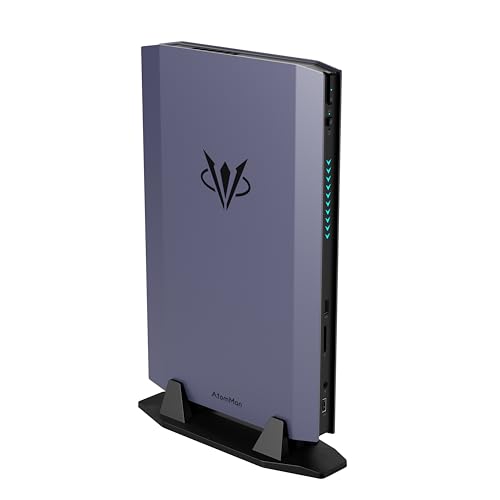
- Best overall: AtomMan G7 Ti Mini PC, Core i9-14900HX, RTX 4070 Laptop GPU, 32GB DDR5, 1TB SSD — Check on Amazon
- AtomMan G7 Pt Mini PC, Ryzen 9 7945HX, RX 7600M XT Mobile GPU, 32GB DDR5, 1TB SSD — Check on Amazon
- Beelink SER9 Pro Mini PC, Ryzen AI 9 HX 370, Radeon 890M, 32GB LPDDR5X, 1TB SSD — Check on Amazon
- GMKtec EVO-X1 Mini PC, Ryzen AI 9 HX 370, Radeon 890M, OCuLink, 32GB LPDDR5X, 1TB SSD — Check on Amazon
- MINISFORUM AtomMan G1 Pro, Ryzen 9 8945HX, Desktop RTX 5060, 32GB DDR5, 1TB SSD — Check on Amazon
- HP OMEN 16L Gaming Desktop, Ryzen 7 8700F, Desktop RTX 5060, 64GB DDR5, 1TB SSD — Check on Amazon
Read the full guide ↓
Disclosure: As an Amazon Associate, reviewstook.com earns from qualifying purchases. Links to Amazon on this page are affiliate links; they cost you nothing extra. Listing details such as price and availability change often, so check the current Amazon listing before you buy.
If this is your first gaming PC, welcome — and before we sell you on anything small, here is the sentence most guides would rather skip. A normal full-size gaming tower with a desktop RTX 4070 SUPER graphics card can be found on Amazon within this guide’s budget — and that tower will play games faster than every machine below. A small form factor PC is not a trick for getting more speed per dollar. It is how you buy a computer that fits where a tower cannot: behind a monitor, inside a TV stand, on a dorm desk, on a shelf in a rented room. You are trading some performance for space, and that trade can be worth it — as long as somebody tells you the exchange rate before you pay. That is this guide’s job: every term in plain English, every graphics chip called by its real name, and a step-by-step plan for your first evening.
The six picks span a huge size range, from about three-quarters of a liter (picture a thick paperback) to sixteen liters (a compact tower). Two are tiny boxes with integrated graphics — graphics built into the processor — that play esports, indie and older games happily at 1080p, the standard HD resolution. Three are minis with separate graphics chips of the kind laptops use, — hence the word “Laptop” or “Mobile” in their names throughout this guide: the names match desktop cards, but the parts are smaller, thriftier versions, roughly a class down. One is a small tower with a genuine desktop graphics card you can replace years from now. Two warnings. First, prices here have been jumping around during the late-2026 memory shortage, so always check the live price on Amazon before you buy — no price in this category stays still for long. Second, the G1 Pro only belongs in this guide when its live price checks in at $1,500 or under; above that line, its review tells you to walk away. If any word above was new to you, read the glossary next.
In this guide
Quick Picks
In a hurry? Start here: six kinds of first-time buyer, matched to the machine that fits each one.
| Buyer type | Pick | Why it stands out | Link |
|---|---|---|---|
| Best overall | AtomMan G7 Ti Mini PC | An RTX 4070 Laptop GPU at its full 140W power limit in about 2.55 liters — check price on Amazon | Check on Amazon |
| Best value with a separate graphics chip | AtomMan G7 Pt Mini PC | RX 7600M XT mobile graphics and the most processor cores in this guide, in about 2.7 liters — check price on Amazon | Check on Amazon |
| Smallest serious gaming box | Beelink SER9 Pro Mini PC | Radeon 890M integrated graphics in roughly 0.82 liters — smaller than some laptops’ power bricks | Check on Amazon |
| Best buy-it-in-stages pick | GMKtec EVO-X1 Mini PC | 890M graphics today and an OCuLink port that can drive a desktop graphics card later, in roughly 0.75 liters | Check on Amazon |
| Best desktop graphics chip in a mini (deal only) | MINISFORUM AtomMan G1 Pro | A real desktop RTX 5060 card inside 3.8 liters — only a pick at or under $1,500 | Check on Amazon |
| Best upgrade path | HP OMEN 16L Gaming Desktop | 16 liters buys what no mini here offers: standard desktop parts and a graphics card you can actually swap later | Check on Amazon |
How These Picks Were Chosen
The budget was applied to the complete, ready-to-use machine: every pick is a real Amazon listing that fits this guide’s $1,500 budget in the United States, with memory, storage and Windows already fitted. Where a pick only fits the budget on promotion rather than at its everyday price, the review says so — check the live price on Amazon. That matters more than usual right now, because these machines are built from the same memory and storage chips whose prices spiked in late 2026, and listings move week to week.
We did not use these machines ourselves. We worked from maker listings and specification pages, listing records for the exact Amazon listings, and independent reviews, favoring machines whose makers publish full numbers: dimensions you can turn into a volume, graphics power limits you can compare, memory you can tell is changeable or fixed forever. Two honesty rules run through everything below: size claims are arithmetic, not adjectives, and graphics names come from NVIDIA’s and AMD’s published specifications, not listing headlines — which is why laptop graphics are called laptop graphics even when a headline drops the word.
Three near-misses mark the edges of the tier. The fashionable Ryzen AI Max+ 395 minis built around Radeon 8060S graphics are genuinely excellent and genuinely out: the cheapest in-stock 64GB example sits in a premium tier well above this guide’s budget after the shortage repricing. The AtomMan G7 Pro, the G7 Ti’s sibling with an RTX 5070 Laptop GPU, is likewise priced above budget in its configured form, so it is the category’s ceiling rather than a pick. And no small prebuilt with a desktop RTX 4070 or 4070 SUPER could be verified under $1,500; the verified machines with those cards are all full towers, like the tower example above.
The Beginner’s Glossary: Twelve Terms That Decide What You Are Buying
Every confusing listing in this category is confusing because of one of these twelve terms. Learn them here and the reviews below will read like plain English.
- Small form factor (SFF) and liters. “Small form factor” just means a PC built to take up little room, measured in liters — the box’s volume: width times depth times height. This guide runs from about 0.75 liters (a fat paperback) to 16 liters (a small tower); photos lie about size, liters do not.
- CPU (the processor). The computer’s general-purpose brain — it runs Windows, your browser, and the parts of a game that are not drawing pictures. More cores help with multitasking, streaming and work software.
- GPU (the graphics card or chip). The part that draws the game. For gaming, this is the most important component — the one your money should follow. In small PCs it comes in three kinds: a desktop card, a laptop chip, or graphics built into the processor.
- Laptop (mobile) GPU. A graphics chip designed for laptops, soldered inside the machine forever. It often shares its name with a desktop card while being weaker: NVIDIA’s RTX 4070 Laptop GPU has 4,608 cores and 8GB of memory; the desktop RTX 4070 has 5,888 cores and 12GB — same name, different part, roughly a class apart. AMD marks its mobile parts with an “M” — the RX 7600M XT (8GB) is not the desktop RX 7600 XT (16GB). The letter is the most important character in the listing.
- Integrated graphics (iGPU). Graphics built into the processor itself, sharing the computer’s ordinary memory instead of having its own. Fine for esports, indie and older games at 1080p; not enough for new big-budget games. The Radeon 890M in two picks here is the strongest integrated graphics in its class — and it is still integrated graphics.
- RAM (system memory) — socketed versus soldered. The computer’s short-term workspace; 32GB is the comfortable amount here. Socketed memory sits in slots and can be upgraded later. Soldered memory is fixed to the board at the factory and can never change. Plainly: the Beelink SER9 Pro and GMKtec EVO-X1 have soldered memory — the 32GB they ship with is the 32GB they die with. The other four picks use socketed memory.
- SSD and M.2 slots. The SSD is the fast storage drive your games live on (1TB is standard here), plugged into a small socket called an M.2 slot. Two slots mean you can add a second drive later without replacing the first — the G7 Ti and EVO-X1 have two; the SER9 Pro has one.
- PSU (power supply) and wattage. The PSU feeds electricity to everything, and wattage is its capacity. Graphics chips also carry a wattage figure — how much power the chip may use — and for laptop GPUs it decides speed: the same “RTX 4070 Laptop” chip run at 140W is much faster than at 80W. When a small PC hides its GPU wattage, treat the headline as a question, not a specification.
- Barebone. A half-finished PC sold without memory, storage or Windows, which you must buy and fit yourself. Plainly: none of the six picks here is a barebone — every pick is the complete, configured version. But beware the trap: the G7 Ti and G7 Pt listings also sell barebone versions on the same page, and picking the cheaper style name in the cart buys you a second shopping trip.
- Renewed (refurbished). A used machine checked, cleaned and resold, usually with a shorter guarantee. Plainly: none of the six picks here is renewed — all are sold new. The nearest thing is the OMEN 16L, a new HP machine that the seller opened to fit extra memory and storage; that is “seller-upgraded,” a different thing, and its review explains the split warranty.
- OCuLink and eGPU. OCuLink is a small port that lets a mini PC connect to an external desktop graphics card (an “eGPU”) in a dock on your desk. It is the one escape hatch from integrated graphics: only the EVO-X1 here has the port, and the dock, power supply and card are all separate purchases, priced honestly in its review.
- Refresh rate (Hz). How many times per second your monitor redraws the picture. Many monitors can run faster than the basic 60Hz they start at — 120Hz, 144Hz or more — but Windows often leaves them at 60 until you change one setting. Step 6 of the walkthrough below fixes it, free.
The Honest Comparison: What the Same Money Buys in a Big Box
Every small-PC guide should print this section; here it is in beginner terms. The tower from the introduction — a Skytech Omega with a Ryzen 7 7700X, a desktop RTX 4070 SUPER with 12GB of memory, 32GB of RAM and a published 750-watt Gold-rated power supply — is faster than everything below, quieter under load, easier to upgrade, and cheaper than this guide’s budget. If your room can hold a tower, buy the tower. If it cannot — a TV cabinet, one small student desk, a rented flat’s shelf — the six machines below are the honest small options, each with its volume stated and its graphics named exactly, so the space premium stays a number you chose.
Your First Evening: Setup, Step by Step
Whichever pick you buy, the first evening follows the same eight steps. Do them in order to avoid the three mistakes nearly every first-time buyer makes: the monitor in the wrong socket, the monitor left at its slow starter setting, and never checking the machine received is the machine ordered.
- Place it with breathing room. Small PCs still breathe: every pick here pulls air in and pushes warm air out through vents. Put the machine on a hard, flat surface — not carpet, not a bed — with a hand’s width of clear space around its vents, and never run it inside a closed cabinet; small boxes in sealed cupboards cook themselves.
- Connect power, and find the real switch. Plug the power cable (on the minis, the brick’s cable) into the wall first, then the machine. Look for a power switch on the supply or brick as well as the one on the case — a machine that seems dead on first press is usually a second switch you have not found yet.
- Plug the monitor into the graphics card’s ports — not the motherboard’s. On the OMEN 16L and the G1 Pro, the back panel has two clusters of display sockets — one for the motherboard, one for the graphics card. Use the card’s. On the OMEN the warning is absolute: its Ryzen 7 8700F processor has no integrated graphics at all (that is what the “F” in its name means), so the motherboard sockets produce no picture — plug in there and you will think your new PC is broken. On the G1 Pro and the two AtomMan minis, the motherboard sockets may show a picture through the processor’s weak built-in graphics while your games quietly ignore the real card — a trap with a working screen, which is worse. On the SER9 Pro and EVO-X1 there is no separate card, so any display output is correct.
- Connect peripherals and a wired internet connection. Keyboard and mouse first (the OMEN listing bundles a keyboard; the minis are the box alone). Then run a network cable from the machine to your router rather than relying on Wi-Fi: the next step downloads gigabytes, and a cable is faster and cannot drop halfway.
- Run Windows Update, then update the graphics driver. Let Windows Update work through its list — restart when it asks, then check again, because updates arrive in waves. Then update the graphics driver through the maker’s own app (NVIDIA’s or AMD’s), not through Windows: the driver talks to your graphics chip, and a fresh one is free performance and stability. One pick-specific job belongs here too: G1 Pro buyers, switch the machine out of the 80-watt gaming mode it ships in, which holds back roughly a fifth of its speed until you do.
- Set your monitor’s real refresh rate. In Windows, open Settings, then System, then Display, then Advanced display, and choose the highest refresh rate your monitor offers. Many gaming monitors can do far more than the 60Hz Windows starts them at; this one setting is the difference between the smoothness you paid for and an office PC’s.
- Verify the machine you received is the machine you ordered. Open Settings, then System, then About, and read the processor name and installed memory; compare them with your order and the model number on the box. Three checks matter here. SER9 Pro buyers: the processor must read Ryzen AI 9 HX 370 — a cheaper lookalike built on a lesser chip exists, and it is not this pick. G7 Ti and G7 Pt buyers: confirm you received the configured style, with memory, storage and Windows fitted — the barebone style arrives without them. OMEN buyers: confirm the 64GB is fitted and keep the seller’s paperwork, since the upgraded parts carry the seller’s warranty, not HP’s.
- Install a game store and one game. Install Steam (or the store your games live on), sign in, download one game you know well, and play it for twenty minutes. You are not benchmarking — you are confirming the whole chain works: right monitor socket, right refresh rate, right driver, right machine. If something feels wrong, sort it tonight, inside the return window, rather than next month.
The 6 Best Small Form Factor Gaming PCs Under $1,500 for Beginners
AtomMan G7 Ti Mini PC — Core i9-14900HX, RTX 4070 Laptop GPU, 32GB DDR5, 1TB SSD
Who it suits: The beginner who wants the most gaming power that fits in a true mini, and who has understood the glossary’s central lesson before paying: the “RTX 4070” in this 2.55-liter box is the laptop GPU of that name, not the desktop card.
Start with what you are actually buying. The processor is Intel’s Core i9-14900HX, a 24-core chip from the top of the laptop range. The graphics are NVIDIA’s RTX 4070 Laptop GPU, and the detail that makes this pick is its power limit: up to 140 watts, the highest setting for that chip. Remember from the glossary that a 140W example is a fundamentally faster device than an 80W one wearing the same name — this machine gives you the strong version. Around them sit 32GB of socketed DDR5 memory (upgradable to 96GB), a 1TB SSD with a second empty slot, Wi-Fi 7, and quiet/performance cooling modes. At roughly 2.55 liters it disappears behind a monitor or into a TV unit. Independent reviewers place its gaming at the 1440p tier in the sensible-settings sense, strong at 1080p — the best in a mini under this budget. Check the configured 32GB/1TB version’s live price on Amazon before you buy.
Now the honesty paragraph. NVIDIA’s published figures give the RTX 4070 Laptop GPU 4,608 cores and 8GB of graphics memory; the desktop RTX 4070 has 5,888 cores and 12GB, and review consensus puts the full-power laptop part around the desktop RTX 4060 Ti class. Still excellent — just not the card the headline name suggests, so set expectations by the laptop numbers. The second caution is the barebone trap: this listing family also sells a cheaper barebone style, and the style name in your cart is the difference between a computer and a project.
- RTX 4070 Laptop GPU at its full 140W power limit — the strongest graphics in any true mini here.
- Socketed memory upgradable to 96GB and two SSD slots — unusually growable for a mini.
- Roughly 2.55 liters, with quiet and performance cooling modes for shared rooms.
Honest limitation: The graphics are the laptop part — 4,608 cores and 8GB, not the desktop card’s 5,888 and 12GB — and the listing mixes barebone and configured styles, so the style check in Step 7 is not optional.
Choose it if your space constraint is absolute and you want the fastest true mini under $1,500. Skip it if 16 liters fits your room — the OMEN below gives you a desktop card and a real upgrade path for similar money — or if the tower fits your desk, because it beats this machine outright for less.

AtomMan G7 Pt Mini PC — Ryzen 9 7945HX, RX 7600M XT Mobile GPU, 32GB DDR5, 1TB SSD
Who it suits: The beginner who wants separate graphics in a mini, cares about value, and will also use the machine for work or study — its processor is the strongest in the guide.
The G7 Pt is the AMD-flavored sibling of the pick above. Its processor, the Ryzen 9 7945HX, has sixteen cores — the most here — which chew through compiling, rendering and heavy multitasking. Its graphics are AMD’s Radeon RX 7600M XT, and the M is doing real work in that name: this is the mobile part, with 8GB of graphics memory at a 120-watt power limit, not the desktop RX 7600 XT, which carries 16GB. Named correctly, it is a strong 1080p graphics solution that reaches into 1440p in lighter games. The chassis measures about 269 by 155 by 64 millimeters — roughly 2.7 liters — though the 300-watt external power brick travels outside that tidy figure. Memory is socketed and upgradable to 96GB, and 65W and 85W system modes run it quieter. Check the configured version’s live price on Amazon — it is the value option in this pair, trading a step of graphics for a step up in processor.
Think of this pick as a small workstation that also games very well. If gaming is the only job, the G7 Ti spends its extra money where gaming cares; if your week mixes games with demanding work, the G7 Pt is the value answer. Its barebone style, also offered on the same listing, is the same cart trap as its sibling’s: the pick is the configured one — check its price on Amazon.
- Sixteen-core Ryzen 9 7945HX — the most processor in this guide.
- Separate mobile graphics at 120W in roughly 2.7 liters — check price on Amazon.
- Socketed memory to 96GB, with quieter 65W and 85W running modes.
Honest limitation: The RX 7600M XT is a mobile GPU with 8GB of memory — not the 16GB desktop card its name echoes — and the chunky 300W power brick is not counted in the 2.7-liter figure.
Choose it if your workload mixes gaming with serious CPU work, or you want discrete graphics and money left over. Skip it if gaming is the whole job and the budget stretches to the G7 Ti — its graphics are the better buy for play alone.

Beelink SER9 Pro Mini PC — Ryzen AI 9 HX 370, Radeon 890M, 32GB LPDDR5X, 1TB SSD
Who it suits: The beginner with the most extreme space problem in this guide — the PC must hide behind a monitor, inside a TV unit, or travel in a bag — whose games are esports titles, indies and older releases, not this year’s biggest games at high settings.
Size is the product here, so start there: at roughly 135 by 136 by 45 millimeters, the SER9 Pro works out to about 0.82 liters — the entire computer is smaller than the power bricks of the two AtomMan machines above. Inside, AMD’s Ryzen AI 9 HX 370 provides twelve cores and the Radeon 890M, the strongest integrated graphics in its class, borrowing the machine’s memory rather than carrying its own. Per independent review consensus, the 890M runs esports and competitive games fluently at 1080p, handles indie and older big games beautifully, and makes a superb living-room machine; new big-budget games at 1440p are beyond it. It sits comfortably inside this budget as a mid-range pick — check the live price on Amazon. If your space is the tightest version of tight, Best Small Form Factor Gaming PC For Small Spaces Under $1500 is the neighboring guide written for exactly that search.
The limits are the price of the size, and they are all “forever” limits. The 32GB of memory is soldered — fixed at purchase — and because the graphics borrow from it, that ceiling counts twice. There is one storage slot, not two, and no OCuLink port, so the external-graphics escape route in the next review is closed: the graphics it has on day one are the graphics it has for life. That makes it a finished PC — an appliance rather than a growing platform — and for a beginner whose alternative was a console-sized gap in a TV unit, finished is a feature. One buying check, repeated from Step 7: order the HX 370 version of this model, because a cheaper variant built on a lesser processor shares the name.
- About 0.82 liters — nothing else in this guide comes close on size.
- Radeon 890M integrated graphics: the best of its kind, fluent at 1080p in esports and indie games.
- Sits comfortably inside this budget as a mid-range pick — check price on Amazon.
Honest limitation: Soldered memory, one storage slot and no OCuLink port: the memory and graphics it ships with are final, and modern big-budget gaming at 1440p is beyond integrated graphics at any size.
Choose it if the machine has to all but disappear and your games are esports, indie and older favorites. Skip it if you want any graphics growth path at all — that is the next pick’s entire reason to exist, at similar money.
GMKtec EVO-X1 Mini PC — Ryzen AI 9 HX 370, Radeon 890M, OCuLink, 32GB LPDDR5X, 1TB SSD
Who it suits: The beginner buying in stages: a tiny, capable PC today, with a genuine, honestly priced route to desktop graphics later, without replacing the machine.
On paper this is the SER9 Pro’s close relative: the same Ryzen AI 9 HX 370 processor, the same Radeon 890M integrated graphics, the same 32GB of soldered memory and a 1TB SSD, in a metal chassis of 110 by 107 by 63 millimeters — roughly 0.75 liters, the smallest volume in this guide. Day to day it plays the same 1080p esports-and-indie game as the Beelink. The differences are the doors it leaves open: two storage slots instead of one, two fast wired-network ports, and its reason to exist — a native OCuLink port, the glossary’s connector that lets a mini drive an external desktop graphics card. It is a budget-to-mid-range pick from the maker’s own Amazon store — check the live price on Amazon.
Because you are a beginner, here is the second stage with its whole cost attached — sellers of OCuLink machines prefer to whisper it. The dock is a separate purchase, and it does not include a power supply for the card. A new desktop RTX 4060 is another separate purchase on top of that. All in, stage two adds a substantial second spend beyond the mini — check live prices on Amazon before you commit — with a dock and an extra power supply living beside the tiny PC whose smallness started the project. That is not a reason to avoid the plan — the finished setup performs like a real desktop, and the card carries into a future build — but start only if you will finish. The memory caveat rhymes with the Beelink’s: soldered, so choose the capacity for the machine’s whole life — a 64GB variant exists for buyers who know this box will serve as an eGPU host for years.
- Native OCuLink port: the only integrated-graphics pick here with a desktop-graphics future.
- Roughly 0.75 liters, two storage slots and dual fast Ethernet — a mini with a second career in it.
- Budget-to-mid-range positioning in this guide — check price on Amazon.
Honest limitation: Until the dock and card arrive, it is an integrated-graphics machine with the 890M’s ceiling, and the soldered memory means the capacity decision happens once, at checkout.
Choose it if you are genuinely buying in two stages, or want the mini with the best afterlife. Skip it if you want maximum graphics on day one — that money belongs in the G7 Ti — or if the dock will never actually happen — the SER9 Pro then gives you the same daily experience.

MINISFORUM AtomMan G1 Pro — Ryzen 9 8945HX, Desktop RTX 5060, 32GB DDR5, 1TB SSD
Who it suits: The beginner who wants the real thing — a genuine desktop graphics card, not a laptop chip or integrated graphics — in a machine still small enough to call a mini, and who is patient enough to buy only when the price behaves.
Nothing else in this guide is built quite like the G1 Pro. Its chassis is about 3.8 liters, and inside sits an actual desktop GeForce RTX 5060: a low-profile card at its full 145 watts, plugged into a real graphics slot and fed by a 350-watt internal power supply — no external brick at all. No naming games: desktop silicon, correctly named, delivering honest desktop-5060 performance — strong 1080p gaming that reaches into 1440p with upscaling help. The processor is another sixteen-core flagship, the Ryzen 9 8945HX, with 32GB of memory, a 1TB SSD, Wi-Fi 7 and fast 5-gigabit wired networking. Now the price, which is why this pick carries the guide’s biggest warning. This premium-tier machine usually sits above this guide’s budget and only drops inside it on promotion. It earns its place here at $1,500 or less, and not above. Check the live price on Amazon first, and if it sits above the budget line, close the tab — no sentence here is permission to stretch.
Two smaller honesties complete the picture. First, it ships in an 80-watt gaming mode holding back roughly a fifth of its performance behind a settings toggle — Step 5 told you to switch it on night one, before judging the machine. Second, a desktop card in a 3.8-liter box is not the upgrade story it sounds like: the card is a special low-profile size that reviewers judge not realistically swappable, and the 350-watt supply sets its own ceiling. You are buying honest desktop graphics at mini size — not a growth path. At the right price that is a distinctive product; above the budget line, an expensive way to avoid the OMEN below.
- A genuine desktop RTX 5060 at full 145W in a proper slot — the only one in a mini here.
- 3.8 liters with an internal 350W power supply; no brick on the desk.
- Sixteen-core processor, Wi-Fi 7 and 5-gigabit Ethernet.
Honest limitation: It only fits this budget on promotion — its everyday positioning is premium-tier and above this guide’s ceiling — and the low-profile card is not realistically upgradeable despite being a desktop part.
Choose it if desktop silicon in mini form is exactly the brief and the live price sits at $1,500 or below. Skip it if the price has drifted above the budget line — the G7 Ti is then the better value and the OMEN is more upgradeable.

HP OMEN 16L Gaming Desktop — Ryzen 7 8700F, Desktop RTX 5060, 64GB DDR5, 1TB SSD
Who it suits: The beginner whose “small form factor” honestly means a compact tower: room for 16 liters, wanting standard parts, calm cooling, and a card replaceable in three years instead of a machine that gets replaced.
Think of the OMEN 16L as this guide’s control group — the machine that shows what the five minis trade away. Sixteen liters is roughly a third of a normal mid-tower — it fits where towers cannot — and inside everything is standard desktop fare. The graphics are a desktop GeForce RTX 5060 with 8GB of current-generation memory in a normal slot. The processor is AMD’s Ryzen 7 8700F — the chip behind the walkthrough’s one absolute warning, since the F means it has no integrated graphics of its own. It derives from AMD’s mobile chip family and carries half the cache (a small, fast memory store inside the processor) of mainstream desktop Ryzen 7 parts, so it is competent rather than great; the graphics card and chassis are the reasons to buy. The Amazon listing behind this pick is a seller-upgraded configuration: the 64GB of memory and 1TB SSD were fitted by the seller, PCOnline US — check the live price on Amazon before ordering. Read the warranty split before ordering — upgraded parts carry the seller’s one-year warranty, the rest of the machine HP’s — and know that factory OMEN 16L versions exist under other listings. A keyboard is bundled, the only pick here that includes one.
Why does a 16-liter tower belong in a small form factor guide at all? Because its upgrade arithmetic is unanswerable, and beginners benefit most from machines that forgive. Every mini above either can never change its graphics, changes them only through an external dock, or holds a desktop card it cannot realistically swap. The OMEN’s card comes out with a screwdriver and a replacement goes in the same afternoon; its memory is socketed, its storage expands, and its larger case stays quiet under loads that make minis sing. If your room can take 16 liters, this pick ages best. Cross-shopping the wider compact class? See Best Compact Gaming PC Under $1500.
- A standard desktop RTX 5060 on a card you can unplug and replace — unique in this guide.
- 16 liters: compact for a tower, with real airflow and quiet-cooling headroom.
- The 64GB seller-upgraded style linked here — check price on Amazon; factory styles are also sold under other listings.
Honest limitation: It is five to twenty times the volume of the minis above, the linked configuration’s memory and storage are seller-fitted under a split warranty, and the 8700F’s reduced cache makes it the weakest gaming processor, core for core, in this guide.
Choose it if you have a desk corner or floor space that fits 16 liters and you plan to keep the machine for years. Skip it if your PC has to hide, mount or travel — hiding, mounting and traveling are what the five minis are for.

What Else You Will Spend
The price of the PC is not the price of playing games on it. Budget for the following on top of any pick: extra costs are counted as the machine plus the fix, never folded quietly into a pick.
- A monitor, first. None of these machines includes a screen. If you do not already own one, a monitor is your first additional purchase — before a fancy keyboard, before anything. Just do not let it surprise you after checkout.
- Keyboard and mouse, unless bundled. The OMEN listing includes a keyboard. The minis are the box alone, so if you do not own a keyboard and mouse, add basic ones to the same order — gaming is miserable on a borrowed office set, and impossible on nothing.
- The EVO-X1’s second stage, if you chose it. The one extra-cost catch in the guide, itemized in its review: a dock, a power supply the dock leaves out, and a desktop RTX 4060 — all separate purchases after the mini; check live prices on Amazon first. If that second spend makes you flinch, the G7 Ti puts comparable money in one box.
Upgrades, in Plain Terms
Beginners are often sold a first PC as “upgradeable” without anyone saying what that means. Here is the truthful version, pick by pick, with no promises the hardware cannot keep.
- Graphics card swaps: exactly one pick. Only the OMEN 16L lets you swap the graphics card the normal tower way — standard card, standard slot, screwdriver job — and even there, read the fitted power supply’s label before choosing a hungrier future card. The G1 Pro’s card, desktop part though it is, comes in a low-profile size shaped for its small case, so swapping it later is not a realistic plan. The other four picks have their graphics soldered or built in for life.
- The EVO-X1’s exception is external: the OCuLink dock route described above — an addition, not a swap, and the card survives into a future build.
- Memory and storage: the friendly upgrades. The G7 Ti and G7 Pt take socketed memory up to 96GB and have storage room to grow; the OMEN’s are standard and expandable; the G1 Pro’s memory is socketed DDR5. The SER9 Pro and EVO-X1 have soldered memory — what you buy is what you keep — though the EVO-X1 at least offers a second storage slot.
- The beginner’s rule. If a listing for a mini uses the word “upgradeable” without naming which part, assume it means storage and nothing else, and check the memory line for the word “soldered” before you pay.
Comparison Table
| Product | Volume | Graphics (named exactly) | Price | Link |
|---|---|---|---|---|
| AtomMan G7 Ti Mini PC | ~2.55L | RTX 4070 Laptop GPU, 8GB, up to 140W | Check price on Amazon (configured style) | Check on Amazon |
| AtomMan G7 Pt Mini PC | ~2.7L | RX 7600M XT mobile, 8GB, 120W | Check price on Amazon | Check on Amazon |
| Beelink SER9 Pro Mini PC | ~0.82L | Radeon 890M integrated, shared memory | Check price on Amazon | Check on Amazon |
| GMKtec EVO-X1 Mini PC | ~0.75L | Radeon 890M integrated + OCuLink port | Check price on Amazon | Check on Amazon |
| MINISFORUM AtomMan G1 Pro | ~3.8L | Desktop RTX 5060, 8GB, 145W low-profile | Check price on Amazon — only at or under this guide’s budget | Check on Amazon |
| HP OMEN 16L Gaming Desktop | 16L | Desktop RTX 5060, 8GB GDDR7, swappable | Check price on Amazon (seller-upgraded style) | Check on Amazon |
How to Choose a Small Form Factor Gaming PC Under $1,500
- Let the room decide the size. These six machines span 0.75 to 16 liters, and they are not interchangeable: a liter-class box is the only thing that mounts behind a screen or hides in a cabinet, the 2.5–3.8L minis want a shelf or a deep desk, and 16 liters needs a corner. Multiply each candidate’s published dimensions yourself; a photo will make a shoebox and a suitcase look the same size.
- Interrogate the graphics name. Demand the full name plus a wattage. “RTX 4070 Laptop GPU, 140W” tells you exactly what you are getting; a headline that says only “RTX 4070” is hoping you will assume the desktop card. AMD’s giveaway is the letter M. When in doubt, the GPU maker’s specification page outranks any listing.
- Be honest about your game library. Integrated graphics — the Radeon 890M here — is genuinely enough for esports, indie and older games at 1080p, and it is not enough for new big-budget releases. That single honest answer picks between the two cheapest machines in this guide and everything above them.
- Total the whole journey before comparing. A staged eGPU build is the mini plus the cost of a dock, a power supply and a card — check the live price on Amazon for each part. A barebone listing is the box plus memory, storage and Windows. Compare those finished totals against finished towers, not against headline prices.
- End with the tower question. A tower carrying a desktop RTX 4070 SUPER can be found inside this budget, and it out-games everything here. If it fits your room, stop shopping small. If it does not, you have your answer — and readers who want the wider field can start from Best Gaming PC Under $1500 and narrow down.
Common Buying Mistakes
- Reading “RTX 4070” on a mini and picturing the desktop card. The laptop chip behind that name carries 4,608 cores and 8GB of memory where the desktop part carries 5,888 and 12GB — a full class lower. AMD’s mobile parts hide the same way behind a missing “M”.
- Wiring the monitor to the motherboard during setup. On the OMEN 16L you will get a black screen and a scare, because its processor has no graphics to fall back on; on the discrete minis you may get a picture that quietly runs on the weak built-in graphics instead. Step 3 exists because almost everyone does this once.
- Clicking the cheaper style name in a listing family. The G7 Ti and G7 Pt pages also offer barebone styles — no memory, no storage, no Windows — and the price gap is exactly the cost of the parts you must buy next.
- Forgetting the brick. The tidy liter figure describes the box, not the 300W brick two of these minis park on the same shelf. Measure for both.
- Buying the EVO-X1 for an eGPU plan that stays a plan. Stage two is a substantial second spend on top of the mini; if that money is not genuinely set aside, the discrete minis serve you better from day one.
- Stretching to the G1 Pro’s everyday price. Above this guide’s budget it stops being a bargain and starts competing with machines that are faster or easier to upgrade. Its slot here is conditional, and the condition is staying at or under the budget line.
- Believing “upgradeable” on a mini listing. Soldered memory, one storage slot and graphics fixed for life are the class norm; the genuine exceptions — socketed memory in the AtomMan pair, the EVO-X1’s OCuLink port, standard slots in the OMEN — stand out precisely because they are rare.
Final Recommendation
- For most beginners with a real space constraint: AtomMan G7 Ti — the most gaming a true mini can honestly offer.
- For value with separate graphics: AtomMan G7 Pt — the value pick here, with the strongest processor in the guide; check price on Amazon.
- For the smallest possible footprint: Beelink SER9 Pro — a complete 1080p PC in about 0.82 liters.
- For buying in two stages: GMKtec EVO-X1 — integrated graphics now, a costed OCuLink route to a desktop card later.
- For desktop silicon in mini form, when the price cooperates: MINISFORUM AtomMan G1 Pro — at $1,500 or under, and only then.
- For keeping one machine the longest: HP OMEN 16L — provided 16 liters fits your room.
If we had to hand a first-time buyer just two names, they would be these. The G7 Ti, because it balances the tier best: full-power laptop graphics, memory you can grow, two storage slots, and a footprint that solves real space problems. And the EVO-X1, because its staged path is the only honest way to start small and end with desktop graphics — with a substantial second spend later, for a card you keep. If this guide has quietly convinced you that your space problem was exaggerated, that is a good outcome too: the OMEN 16L, the wider field in Best Mini Gaming PC Under $1500, and above all the tower from the comparison section will all serve you well. Neighboring guides bracket this one — Best Small Form Factor Gaming PC Under $1200 if money gets tighter, Best Small Form Factor Gaming PC Under $2500 if the 8060S class is what you actually want — and whichever you choose, confirm the live price and exact listing style before ordering, because in this category both move fast.
Frequently Asked Questions
I plugged everything in and there is no picture. What did I do wrong?
Almost certainly Step 3: the monitor cable is in the motherboard’s sockets instead of the graphics card’s. On the OMEN 16L that means a completely blank screen, because its Ryzen 7 8700F processor has no graphics of its own to fall back on — the machine is fine; move the cable to the card’s sockets. On the G7 Ti, G7 Pt and G1 Pro the same mistake can instead give you a picture that runs on the weak built-in graphics, so check even if the screen lit up. Only on the SER9 Pro and EVO-X1 is every display socket the right one, because their graphics are built into the processor.
Is a small form factor PC under $1,500 actually good for gaming?
Yes — provided you grade it as a space purchase rather than a speed purchase. The three discrete-graphics machines (G7 Ti, G1 Pro, OMEN) handle 1440p gaming with settings chosen sensibly, and the two integrated-graphics minis are smooth 1080p machines for esports, indie and older games. Against a same-money tower they all lose: a desktop RTX 4070 SUPER tower can be found inside this very budget. Buy small because your room demands it, and these six are good; buy small expecting a bargain on speed, and no guide can save you.
Where are the Ryzen AI Max+ 395 (Radeon 8060S) minis?
In a higher price bracket. Those machines are the most exciting small PCs around, but the late-2026 memory shortage repriced them hard: The cheapest in-stock 64GB examples sit in a premium tier well beyond this guide’s ceiling. Quoting a stale launch price to squeeze one in would be exactly the trick this guide refuses to play. The same arithmetic excludes the AtomMan G7 Pro in its configured form. Look for both in the under-$2,500 guides.
EVO-X1 plus an eGPU, or the G7 Ti in one box?
Do the addition before deciding. The staged route — the mini itself, a dock, a power supply the dock leaves out, and a desktop RTX 4060, each bought separately (check live prices on Amazon) — adds up to G7 Ti money, paid in two installments, leaving you owning a standard desktop card. Choose it if the installments suit your budget and the second one is certain. Choose the G7 Ti if you want the speed tonight with nothing left to buy. The 1440p-focused version of this choice is worked through in Best Small Form Factor Gaming PC For 1440p Gaming Under $1500.
- Best Small Form Factor Gaming PC Under $1500
- Best Small Form Factor Gaming PC Under $1200
- Best Small Form Factor Gaming PC Under $2500
- Best Small Form Factor Gaming PC For Small Spaces Under $1500
- Best Small Form Factor Gaming PC For Streaming Under $1500
- Best Compact Gaming PC Under $1500
- Best Mini Gaming PC Under $1500
- Best Mini PC Under $1500
- Best Barebones Mini PC Under $1500


