Where to buy
Check the latest price, availability and delivery on Amazon. Orders are placed on Amazon. We may earn a commission from qualifying purchases.
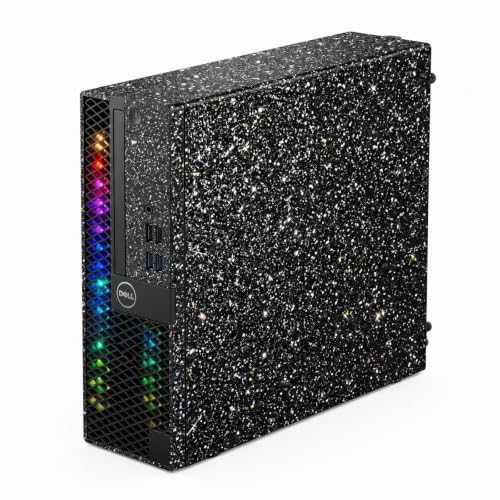
- Best small-spaces RGB gaming PC under $400: Dell OptiPlex 3050 SFF with Flash Black Film RGB Panel, Core i5-6600 (Renewed) — Check on Amazon
- Dell OptiPlex Desktop (SFF) Bundle with 24 Inch Monitor and RGB Front Panel (Renewed) — Check on Amazon
- Dell Gaming OptiPlex Desktop RGB Computer PC, Core i7-4770, GT 1030, 24 Inch Monitor Bundle (Renewed) — Check on Amazon
- Dell RGB Gaming Desktop PC, Core i5, Radeon RX 550 4G, Custom RGB Case Lighting (Renewed) — Check on Amazon
See 2 more Amazon options
- Dell RGB Gaming Tower Computer, Core i7 6th Gen, GTX 1050 Ti 4GB (Renewed) — Check on Amazon
- STGAubron Gaming PC Desktop, Core i5, RX 550 4G, ARGB Fans, New — Check on Amazon
Read the full guide ↓
Disclosure: As an Amazon Associate, reviewstook.com earns from qualifying purchases. Links to Amazon on this page are affiliate links; they cost you nothing extra. Listing details such as price and availability change often, so check the current Amazon listing before you buy.
Three searches collide in this keyword, and it is worth separating them before any money moves. “RGB gaming PC” at under $400 already means compromise: the lights are fitted panels, fixed-pattern fans and backlit keyboards on renewed or entry-level hardware, never the addressable, software-run light shows of expensive builds. “Small spaces” cuts the field again, and it cuts it honestly in two. Half of what survives the budget is genuinely compact — renewed small-form-factor office PCs, the flat Dell OptiPlex class built to sit on or under a cubicle desk, wearing a remote-controlled light panel the refurbisher added. The other half is not small at all: full-size towers that happen to be the strongest gaming hardware $400 can touch, included here because many small-room buyers have exactly one tower-sized patch of floor beside the desk and would rather spend it on a graphics card than on compactness. This guide grades all six on installation first — where the machine can live, what it needs around it, and what it refuses to tolerate — and on gaming hardware second.
One reader should leave now, politely. If “small spaces” means a PC that disappears — mounted behind the monitor, hidden in a media unit, silent on a shelf — nothing in this guide does that, and nothing at this price with “RGB gaming PC” in its name does either. These are visible machines; the lights are the point of them. Buyers who want the disappearing act should start with the mini PC guides instead, at Best Mini PC Under $400 and Best Mini Gaming PC Under $400, where the machines are built to be hidden and the lighting question mostly goes away. Everyone else — the dorm room, the bedroom corner, the apartment desk that is also the dining table — is in the right place. Two warnings travel with all six picks. First, none of them belongs inside a sealed cabinet, a closed TV unit or any furniture with a door and no airflow — a refusal repeated through this guide because it is the single most common way small-space buyers kill a PC slowly. Second, prices at this tier move weekly, so check price on Amazon for each pick before you buy.
In this guide
Quick Picks
Short on time, or comparing several options at once? Each row below names a buyer type and the product that suits it, with a link to the listing.
| Buyer type | Pick | Why it stands out | Link |
|---|---|---|---|
| Smallest commitment of space | Dell OptiPlex 3050 SFF Flash Black Film (Renewed) | Small-form-factor box, no monitor forced on you — check price on Amazon | Check on Amazon |
| Best one-box desk | Dell OptiPlex (SFF) Bundle, 24 Inch Monitor (Renewed) | PC, screen, keyboard, mouse and headset arrive together and light up together | Check on Amazon |
| Best small box with a real card | Dell Gaming OptiPlex RGB, Core i7-4770, GT 1030 (Renewed) | The only small-form-factor pick with a discrete graphics card — check price on Amazon | Check on Amazon |
| Best tower for one floor spot | Dell RGB Gaming Desktop, Core i5, RX 550 4G (Renewed) | Custom case lighting and a discrete card, positioned in the budget tier — check price on Amazon | Check on Amazon |
| Strongest card, most floor | Dell RGB Gaming Tower, Core i7 6th Gen, GTX 1050 Ti (Renewed) | The best graphics card in this guide, in a full tower that needs a real home | Check on Amazon |
| Best new tower | STGAubron Gaming PC Desktop, Core i5, RX 550 4G | The only new machine here, with lit fans and a maker’s warranty — check price on Amazon | Check on Amazon |
How These Picks Were Chosen
The grading order is this keyword’s, not the usual one. Installation came first: each machine was classed by the space it actually claims — small-form-factor desktop, the flat office class designed for crowded desks, or full tower, a piece of furniture in its own right — and then judged on what its listing documents about living there: what is included that also needs a home, how its air moves, where its cables have to travel, and whether it can be mounted, stacked or tucked. Gaming hardware was graded second, and the lighting third, because a small-space buyer who gets the placement wrong does not have a slightly worse PC; they have a PC in the way, overheating in a cabinet or exiled to a hallway.
A discipline note, stated plainly because it shapes every review below: none of the six listings documents its case dimensions, weight or any VESA mounting provision, so this guide prints none of those figures and claims no mounting option for any pick. Where size matters, the guide works with the documented class instead — small-form-factor machines in this Dell family belong to a standard office footprint class; towers are towers — and the checklist near the end turns that into measurements of your own space rather than numbers invented for theirs. If a seller’s live listing has since published exact dimensions, measure against those instead. The same restraint applies to noise and heat figures: none are documented, none are printed, and the ventilation advice below is written as clearance habits, not specifications.
The budget was applied as a ceiling for this Under $400 guide. Readers should check price on Amazon before ordering, because listing prices change often. One pick is included, clearly labeled, because it is the only small-form-factor bundle with a discrete graphics card and readers compare against it constantly. We did not use these products ourselves. We read the maker and refurbisher listings, their specification blocks and Amazon-linked price records, and compared form factor, graphics, processors, memory, storage, included peripherals and warranty routes. Renewed machines are named as renewed in every heading, table row and recommendation, because a renewed PC with a 90-day guarantee is a different purchase from a new PC with a maker’s warranty even when the specifications match — and at this tier, five of the six honest options are renewed.
The 6 Best RGB Gaming PCs for Small Spaces Under $400
Dell OptiPlex 3050 SFF with Flash Black Film, Core i5-6600, 16GB DDR4, 512GB SSD, Windows 11 Pro (Renewed)
Who it suits: The small-space buyer who already owns a monitor and wants to add the least possible machine to the room — a dorm desk, a bedroom corner, a shared apartment — for light gaming and everyday work.
Start with what this machine asks of your space, because it asks the least in this guide. It is a renewed small-form-factor OptiPlex 3050: the flat, low-profile office class of PC that was designed by the thousand for desks where the computer shares surface with paperwork, a phone and a coffee. It needs one patch of desk or shelf, a wall socket, and open air around its vents — no floor territory, no second box of accessories demanding homes of their own. The keyboard and mouse are included, WiFi and Bluetooth are fitted, and there is no monitor in the box, which for this angle is a feature: it adds nothing to a desk that already has a screen, and it does not force a second screen onto one that does not need it. The power supply is internal, as it is on all six picks here, so there is no external brick to house, hide or trip over — one power cord from machine to socket is the whole power story, and in a small room that simplicity is worth real money.
The RGB is the refurbisher’s “Flash Black Film” front treatment with an LED light panel behind it: remote-controlled, with adjustable speed and several color-changing patterns, documented in the listing in those terms. On a desk at night it reads as a deliberate light bar on the front of the machine — the strongest lighting effect per unit of space in this guide, because all of it faces the room. The hardware underneath is honest for the money: a 6th-generation Core i5-6600 running up to 3.9GHz, 16GB of DDR4 memory — a generation newer than the DDR3 in the two bundle picks below — a 512GB SSD and Windows 11 Pro. What the listing does not name is any discrete graphics card, and that silence is the specification: gaming here is integrated class, which means Minecraft, Roblox, League of Legends and their weight class at modest settings, older games, and cloud streaming, which suits a small quiet box. Check price on Amazon to complete the case: it is positioned as a budget-tier option in this guide.
- Small-form-factor class: the least space claimed by any pick here, with no monitor forced into the deal.
- Check price on Amazon — a budget-tier route to a lit gaming setup in this guide.
- Remote-controlled RGB front panel, DDR4 memory, Windows 11 Pro and wireless fitted.
Honest limitation: No discrete graphics card is named in the listing, so performance is integrated class, and the small-form-factor case forecloses adding one later — low-profile slots and a modest power supply close that road.
Choose it if your screen already exists and the brief is a small, lit, honest everyday machine. Skip it if your game library is heavier than the light class, or you want an upgrade path — both point at the towers further down this guide.

Dell OptiPlex Desktop Computer (SFF) Bundle, Core i5, 16GB RAM, 512GB SSD, 24 Inch Monitor, Windows 11 Pro (Renewed)
Who it suits: A buyer furnishing a small desk from absolute zero — no screen, no keyboard, no headset — who wants the entire setup to arrive in one box and be working the same evening.
The installation story is this bundle’s whole argument, so take it seriously in both directions. In its favor: one order delivers a complete desk. The PC is the same renewed small-form-factor OptiPlex class as the pick above — a quad-core Core i5 at 3.20GHz, 16GB of RAM, a 512GB SSD, Windows 11 Pro — and around it the bundle wraps a 24 inch monitor, a gaming keyboard with three backlight colors, a backlit mouse and a gaming headset. Nothing else needs buying, borrowing or finding a home for beyond what is in the box, and for a first setup in a small room that completeness has real value. Against it: a bundle does not shrink the laws of furniture. The monitor is a 24 inch screen, and it will claim the center of a small desk, its stand’s footprint underneath it and your viewing distance in front of it; the headset needs a hook, a corner or a drawer; and the PC itself needs its patch of surface with air around it. Buyers picturing “small” as “takes no room” should read the checklist below before ordering — this is the smallest complete setup in the guide, which is a different claim from the smallest machine.
The lighting is a front-panel affair: the listing documents an RGB LED light on the front panel whose patterns, speed and mode change by remote control, with the bundled peripherals adding their own backlighting around it. It is a coherent glow for a desk viewed from the front, which is how its owner will see it. The gaming honesty from the base guide stands unchanged: nothing in the listing names a discrete graphics card, so graphics are the processor’s integrated class — esports at low settings, older and lighter titles, no modern AAA. Check price on Amazon; with a monitor included, it is positioned as a complete budget-tier setup for exactly that. Renewed terms here are the family standard: the machines are inspected and tested before sale, the guarantee floor is 90 days, and the box it arrives in may be a plain one. And the small-form-factor warning applies with full force — there is no realistic path to a full-size graphics card inside this case later, so buy it as a finished setup, not a first draft of one.
- Everything in one box: small-form-factor PC, 24 inch monitor, backlit keyboard, mouse and headset.
- Remote-controlled front-panel lighting — the whole desk glows from one remote.
- Check price on Amazon: a complete small setup with Windows 11 Pro.
Honest limitation: No discrete graphics card is named in the listing, so gaming means integrated-graphics class — light titles only — and the included monitor still needs a small desk’s center, stand room and viewing distance.
Choose it if you are starting from an empty desk and your games are the light kind. Skip it if you already own a screen — the pick above sells you the same class of machine for less, without duplicating it — or if anything demanding is on your playlist.

Dell Gaming OptiPlex Desktop RGB Computer PC, Core i7-4770, GT 1030 2GB, 16GB RAM, 512GB SSD, 24 Inch Monitor, Windows 11 Pro (Renewed)
Who it suits: Bundle buyers working in a small room who want the monitor included and refuse to settle for integrated graphics — provided the price cooperates, which it usually does not.
On installation, this is the middle path between the two small-form-factor picks above. The PC belongs to the same compact OptiPlex family class, so its claim on the room is a patch of desk rather than a patch of floor, and the bundle again wraps it in a complete setup: a 24 inch HDMI monitor, keyboard, mouse and headset, WiFi and Windows 11 Pro, renewed to Refurbished – Excellent condition. The RGB follows the pattern documented across this refurbisher family’s listings: an RGB LED light treatment on the front panel, changed by remote, plus backlit peripherals. It looks the part from the front of a desk. It is not addressable, and there is no case-fan light show, because a small-form-factor OptiPlex has no case fans to speak of — the glow lives on the face of the machine and in the accessories, which in a small room, viewed from the chair in front of it, is honestly most of the effect anyone gets.
What separates it from the bundle above is the graphics card: a GeForce GT 1030 with 2GB of GDDR5. It is a real discrete card — a step above integrated graphics for esports and older titles at 1080p low settings — and a step below the RX 550 towers below, let alone the GTX 1050 Ti. Around it, the platform shows its age without apology: a Core i7-4770, a quad-core that was respectable more than a decade ago, and 16GB of DDR3 memory, with the 512GB SSD doing what it can to keep daily use feeling current. Then price, which is why this pick needs a careful live check. Check price on Amazon before you consider it: when the live price fits your Under $400 budget, it is a reasonable complete small-space setup with a real card. If it does not fit, the towers further down and the bundle above are worth comparing first.
- The only small-form-factor pick with a discrete graphics card, plus monitor and peripherals in the box.
- Front-panel RGB with remote control, following the pattern this refurbisher family documents across its listings.
- Compact class footprint: desk patch, not floor patch, with Windows 11 Pro and a 512GB SSD.
Honest limitation: Check the live price carefully before buying, and note that its i7-4770 and DDR3 memory make it the oldest platform in the guide.
Choose it if the live price fits your budget and you need screen, peripherals and a discrete card in a single order for a small desk. Skip it if the live price does not fit your budget — in that case it falls outside this guide’s value argument.

Dell RGB Gaming Desktop PC, Core i5, Radeon RX 550 4G, 16GB RAM, 512GB SSD, Windows 10 Pro (Renewed)
Who it suits: The small-room buyer who has exactly one tower-sized patch of floor beside the desk, and wants real case lighting and a real graphics card standing in it, inside the budget, today.
Be clear about the trade this pick proposes, because it is the honest center of this guide. It is a full-size tower. It will not sit gracefully on a small desk, it should not be squeezed into a cabinet, and it claims the largest single volume of any machine here. What it offers in exchange is the strongest installation story among the towers: it stands on the floor beside the desk — the classic small-room arrangement, where the desk surface stays clear for the monitor, keyboard and the actual living — and its lighting is documented in the listing itself as a special feature, “Custom RGB Case Lighting,” with an RGB gaming mouse and keyboard in the box. Of the three towers in this guide, this is the one whose glow is a designed feature of the case rather than a set fitted afterward or fans behind a panel. Floor placement has its own disciplines, all covered in the checklist below: the tower’s vents need open air rather than a wall or a curtain, its cables must reach the desk without crossing a walkway under tension, and a floor machine in a small room lives closer to dust and kicked chair legs than a desk machine does. None of that is a reason to refuse it; it is the price of the arrangement, stated before you pay.
The hardware justifies the floor space better than most. A Radeon RX 550 with 4GB of GDDR5 is an entry-level discrete card, and this review will not inflate it — esports titles and older games at 1080p low-to-medium settings, a clear step above integrated graphics, a clear step below the GTX 1050 Ti below — behind a quad-core Core i5 running up to 3.6GHz, 16GB of memory and a 512GB SSD, with HDMI, DisplayPort and DVI outputs. Two plain statements belong here. The memory is DDR3, per the listing’s own specification data, a generation older than DDR4, which caps the upgrade path and is part of why this machine costs less. And it ships with Windows 10 Pro, whose mainstream support has ended — budget a plan for that, or accept a games-and-browsing role. Connectivity arrives by USB WiFi and Bluetooth dongles rather than built-in radios, which in a small room is a minor mercy: two small dongles, no antenna forest. Check price on Amazon for the closing detail: it is positioned in the budget tier, from the same refurbisher family as the tower below, with a stated one-year parts-and-labor cover in the listing copy — read its terms on the live page, since refurbisher cover varies, but it is a stronger promise than the renewed minimum.
- Case lighting the listing itself documents as a special feature, with an RGB keyboard and mouse included.
- Radeon RX 550 4GB discrete graphics — a real card for the floor spot it claims.
- Check price on Amazon — a discrete-card tower positioned in the budget tier.
Honest limitation: It is a full tower asking for floor space and open air, on a DDR3 platform running Windows 10 Pro, with WiFi arriving on a USB dongle rather than built in.
Choose it if you have the floor patch and want the lit case and the card. Skip it if your room has no honest tower spot — the small-form-factor picks above exist for exactly that room — or if the Windows 10 installation ends the conversation.
Dell RGB Gaming Tower Computer, Core i7 6th Gen, GTX 1050 Ti 4GB, 16GB RAM, 512GB SSD, Windows 11 Pro (Renewed)
Who it suits: Buyers whose small room can spare one proper tower position — a floor corner or a sturdy desk end — and who refuse to let the room’s size talk them out of the strongest graphics card this budget can honestly touch.
Installation first, as this guide grades it: this is a full-size tower, sold by STG USA as Amazon Renewed, Refurbished – Excellent, and it needs a full-size tower’s home. On the floor beside a desk it is a good citizen — vents to open air, cables dropping a short distance to the desk above, the RGB set the refurbisher fitted glowing at ankle height where, frankly, tower lighting in a small room is mostly seen. On a desk it is a presence: it will dominate a small work surface, crowd the monitor to one side and put its fans at ear level, and buyers with a genuinely small desk should count that as a cost, not a detail. What it never tolerates is enclosure. A tower of this class moving this much air does not belong in a cabinet, a closed TV unit or a desk’s enclosed PC cubby, and the sealed-cabinet refusal in this guide applies to it most of all, because it is the machine buyers are most tempted to hide. If your only tower spot is inside furniture with a door, this is not your pick, whatever its graphics card promises.
And the graphics card does promise the most here. A GeForce GTX 1050 Ti with 4GB of GDDR5 is the most capable card in this guide by a clear margin — the only one we describe as a genuine 1080p gaming card for esports titles and older AAA games at sensible settings — around a 6th-generation Core i7 at 3.4GHz, 16GB of DDR4 and a 512GB SSD under Windows 11 Pro, with built-in WiFi. An old platform, honestly labeled, but a balanced one, and the case is the one chassis in this guide you can open and upgrade later, which matters in a small room too: one machine that grows beats two machines that don’t, when there is only room for one. The lighting is a refurbisher-fitted RGB set in the tower — case lighting added to a business machine — so judge it as the best-performing machine here that also lights up, not as a light show that also performs. On price, the rule is simple: check price on Amazon before you order and buy only when the live price fits your Under $400 budget. Let listings that sit above your budget pass without a second thought.
- GTX 1050 Ti 4GB — the strongest graphics card in this guide, and the only real 1080p gaming card.
- Full-size tower: the one pick here with a genuine open-and-upgrade future.
- Balanced platform: 6th-gen Core i7, 16GB DDR4, 512GB SSD, Windows 11 Pro, built-in WiFi.
Honest limitation: Check the live price before buying — it belongs in this Under $400 guide only when the live listing fits the budget — and it is a renewed machine on a decade-old platform with a 90-day guarantee, not a warranty.
Choose it if you have one honest tower spot, gaming performance comes first, and you can watch the price for a few days. Skip it if the only place for it is inside closed furniture — that placement is refused for every pick here, and for this one most firmly.

STGAubron Gaming PC Desktop, Core i5, RX 550 4G, 16GB RAM, 512GB SSD, WiFi 6, Windows 11 Home (New)
Who it suits: Buyers with a tower spot who want the only new machine in this guide — maker’s warranty, built-in wireless, lit fans behind a viewing panel — and who accept entry-level graphics as the price of newness.
Its installation profile is the modern tower standard, for better and worse. Better: everything is built in, including WiFi 6 and Bluetooth 5.0, so the machine needs one power cord and nothing else — no dongles, no antenna add-ons, no peripheral hunt — and in a small room, a one-cord machine that stands wherever the floor patch is — not wherever the router cable reaches — is a genuine placement freedom. The lighting is the most substantial here: the listing documents RGB fans in the chassis — two in its specification block — behind the case’s viewing panel, so this is the one pick whose glow is designed to be looked at from the side, which decides its placement for you: a viewing panel wants an audience, and a tower bought for its lit side should stand where the side faces the room, not against a wall or inside a desk cubby where the money spent on fans becomes a faint leak of light at the vents. Worse: it is still a full tower claiming a full tower’s volume, the largest class in this guide, Check price on Amazon before you buy. When the live price fits your Under $400 budget, the price is defensible; above that line you are paying a new-machine premium for graphics the renewed towers match.
The graphics are the same Radeon RX 550 4GB as the renewed Dell tower above, behind a Core i5 running up to 3.6GHz, with 16GB of memory and a 512GB SSD — so on frame rates, new and renewed are peers, and what newness buys is support, connectivity and presentation. One correction this pick exists to teach, because small-space buyers shopping by photos need it most: the listing’s title calls its fans “ARGB Fan,” the addressable kind each LED can be programmed individually, usually through motherboard software. Its own specification block describes the cooling as “RGB Fan” and names no lighting-control software, sync system or controller hub. When a listing disagrees with itself, believe the plainer statement: plan on fixed or simply-cycling rainbow fans that light the case beautifully and take no instructions from you. That is the normal implementation at this budget and no reason to skip the machine — but it is the difference between buying a look you saw and buying a capability that was never there. An RGB keyboard and mouse are included, completing the one-box story.
- The guide’s only new machine: a maker’s warranty, a genuine Windows 11 Home license, and WiFi 6 with Bluetooth 5.0 built in.
- Lit case fans behind a viewing panel — the fullest lighting package here, if it stands where the side faces the room.
- RX 550 4GB graphics, 16GB of memory and a 512GB SSD — entry-level hardware, honestly labeled.
Honest limitation: The “ARGB” in the title is backed by no named control software in the listing — treat the fans as fixed-pattern RGB — check price on Amazon and buy only when the live listing fits your budget, and it claims a full tower’s volume regardless.
Choose it if new-with-warranty matters, your tower spot shows the machine’s side to the room, and the live price fits your budget. Skip it if your tower spot hides the side panel — you would be paying for a light show nobody can see — or if you need addressable, software-synced lighting as an actual feature, which starts in a higher budget class entirely.

Comparison Table
| Product | Placement class | Graphics | What the RGB actually is | Link |
|---|---|---|---|---|
| Dell OptiPlex 3050 SFF Flash Black Film (Renewed) | Small-form-factor — a patch of desk or shelf | None named in listing — integrated class | RGB front panel with remote, on a film-treated SFF case | Check on Amazon |
| Dell OptiPlex SFF Bundle, 24″ Monitor (Renewed) | Small-form-factor PC plus a 24 inch monitor’s desk claim | None named in listing — integrated class | RGB front panel with remote, backlit keyboard, mouse and headset | Check on Amazon |
| Dell Gaming OptiPlex RGB, i7-4770 (Renewed) | Small-form-factor PC plus a 24 inch monitor’s desk claim | GT 1030 2GB | RGB front-panel treatment with remote, backlit peripherals | Check on Amazon |
| Dell RGB Gaming Desktop, Core i5 (Renewed) | Full tower — a patch of floor beside the desk | RX 550 4GB | Custom RGB case lighting, plus RGB keyboard and mouse | Check on Amazon |
| Dell RGB Gaming Tower, i7 6th Gen (Renewed) | Full tower — floor corner or a sturdy desk end | GTX 1050 Ti 4GB | RGB set fitted in a full tower by the refurbisher | Check on Amazon |
| STGAubron Gaming PC Desktop (New) | Full tower — stands where its lit side faces the room | RX 550 4GB | Lit case fans (titled ARGB, specified as RGB) plus RGB peripherals | Check on Amazon |
Measure Before You Buy: The Five-Step Checklist
None of the six listings publishes case dimensions, so the measuring that matters is of your room, not of their boxes. Do these five steps in order, before ordering, and a small-space purchase stops being a guess.
- Step 1 — Measure the spot. Decide the exact patch first: the desk corner, the shelf, the floor beside the desk. Measure its width, depth and height with a tape, and write the numbers down. Then class your candidates honestly against it: the three small-form-factor picks belong to the flat office class built for a desk patch; the three towers need a floor patch or a genuinely sturdy desk end. If your spot is a shelf or a desk corner, the towers are already eliminated, whatever their graphics cards promise — a tower does not become small because the listing’s photo crops it kindly.
- Step 2 — Check the ventilation clearance. Every pick in this guide breathes through vents and fans, and every one needs open air on its vented sides and room above or behind it for warm air to escape. Walk the spot and ask where the air goes: if the answer is “into a wall,” “into a curtain” or “nowhere, the door closes,” the spot fails. This is the sealed-cabinet refusal in practical form — no pick in this guide, tower or small-form-factor, goes inside a closed cabinet, a TV unit with a door, or an enclosed desk cubby. Small cases are not exempt; they have less air to spare, not more tolerance for having none.
- Step 3 — Give the power an address. The simple news first: all six picks have internal power supplies, so there is no external brick to house, mount or hide — one power cord per machine. That cord still needs a plan. Find the socket or the power strip it will actually use, confirm the cord reaches it without crossing a walkway under tension or pinning itself under the case, and if the strip lives behind furniture, decide now whether the machine’s plug joins it before the furniture goes back. In a small room the socket map, not the PC, is usually what decides where the PC stands.
- Step 4 — Walk the cable drop. Trace every cable’s route from the machine to where it ends: monitor cable up to the screen, keyboard and mouse leads or their receivers, the headset’s resting place, and a network cable if you run wired. A floor tower means a cable drop from desk to floor — keep it behind the desk, off the floor’s traffic path and out of the chair’s casters. A desk machine means short runs but more cable visible on the surface you live on. The bundles add a monitor cable and peripheral leads to the same small desk; the remote-controlled panels, to their credit, add no cable at all.
- Step 5 — Then order. Only now, with the spot measured, the air confirmed, the socket assigned and the cables walked, does price get its say: buy the pick that fits the spot, and check price on Amazon to confirm it fits your Under $400 budget. Order first and measure on delivery day, and a small room ends up with a tower on the dining table.
How to Choose an RGB Gaming PC for a Small Space Under $400
- Start with the room, not the listing. Your space offers one of three homes: a desk patch, a floor patch, or nothing but furniture with doors. The first suits the small-form-factor picks, the second suits the towers, and the third suits none of them — that answer comes before any specification is read.
- Never buy a fit you cannot document. These listings publish no case dimensions and no mounting provisions. If a machine must fit a measured gap or hang on a mount, a listing that does not document the figures or the mount cannot promise it — choose a class of machine that does not need the promise.
- Count everything in the box as furniture. A bundled 24 inch monitor, headset and keyboard all need homes. A bundle is the smallest complete setup and also more objects than a bare machine; which of those matters depends on what your desk already holds.
- Grade the graphics card before the glow. The honest ladder at this tier is GTX 1050 Ti, then RX 550, then GT 1030, then integrated. Each step down is a real step down in what plays at 1080p, and no lighting effect compensates for one — least of all in a small room, where the machine is close enough to judge daily.
- Treat “no graphics card named” as integrated graphics. A seller with a discrete card to brag about brags in the headline. Where no card is named anywhere, the graphics are the processor’s built-in set, and the light-gaming ceiling that comes with them is part of the product.
- Ask where the lights live, and whether you will see them. Front panel, case strip, fans behind a viewing panel, or only the bundled keyboard? Then place honestly: a lit side panel against a wall is a purchase nobody sees, and a front panel glow is the whole show on a desk machine.
- Read the specification block, not the title. Headlines at this tier spend the words “ARGB” and “gaming” carelessly. Scroll to the specification block: that is where the listing quietly concedes fixed-pattern fans, a DDR3 memory line, or the absence of any named graphics card — and where the two conflict, the block describes what will actually be delivered.
- Know the renewed terms before the price tempts you. Before a renewed price tempts you, read which cover the listing actually grants: the Amazon Renewed floor is a 90-day refund-or-replacement guarantee, some refurbisher listings promise longer parts-and-labor terms, and the two are not interchangeable. Price in cosmetic wear as well — every renewed pick here worked an office job before it worked a desk.
- Check the Windows version and the memory generation. Windows 11 and DDR4 are the current baseline, and two picks here fall short of it on one count or the other. A shortfall like that can still be the right purchase — both of those picks are — provided the price admits it, which in this guide it does.
- Use a walk-away rule on prices. Fix your budget before you open a single listing — check price on Amazon, buy when it fits your Under $400 budget, and close the tab when it does not — and the market’s weekly mood becomes weather, not pressure.
Common Buying Mistakes
- Ordering first and measuring on delivery day. In a small room the spot is the specification; a tower that fits nowhere is not a bargain at any price.
- Putting any of these machines inside a sealed cabinet or a closed TV unit. Enclosed furniture starves every pick here of air — the refusal is strict because the failure is slow, quiet and certain.
- Assuming “small form factor” means mountable. No pick in this guide documents a VESA provision or any mounting option; a shelf or a desk patch is the plan, not a bracket.
- Buying a lit-side-panel tower and standing it with the panel against a wall or inside a desk cubby, then wondering where the light show went.
- Counting a bundle’s monitor as “free space.” The screen takes the desk’s center, its stand takes the surface under it, and your chair takes the viewing distance in front of it.
- Letting cables improvise. A floor tower’s cable drop across a walkway or under chair casters is a tripped breaker, a yanked port or a fallen machine waiting to happen.
- Trusting an “ARGB” headline over the same listing’s own spec block, which says “RGB Fan” and names no control software anywhere. What ships is the spec block’s machine.
- Reading a discrete graphics card into the words “gaming PC” and a glowing render. An unnamed card is an absent card.
- Buying a small-form-factor renewed PC as a starter rig to upgrade later. The case, its low-profile slots and its power supply were never sized for that plan — towers are the upgradeable shape.
- Paying over your budget without checking the live listing first. Check price on Amazon and hold your Under $400 line rather than paying a surcharge for impatience.
Final Recommendation
- Smallest commitment of space: Dell OptiPlex 3050 SFF Flash Black Film (Renewed).
- Best one-box desk: Dell OptiPlex SFF Bundle with 24 Inch Monitor (Renewed).
- Best small box with a real card: Dell Gaming OptiPlex RGB, GT 1030 (Renewed).
- Best tower for one floor spot: Dell RGB Gaming Desktop, RX 550 (Renewed).
- Strongest card, most floor: Dell RGB Gaming Tower, GTX 1050 Ti (Renewed).
- Best new tower: STGAubron Gaming PC Desktop, RX 550.
For most small rooms the answer is the machine that asks the least of them: the OptiPlex 3050 SFF at the top of this guide, check price on Amazon, lighting its panel on a patch of desk and leaving the rest of the room alone — with its bundle sibling at its one-box option the better buy when the desk starts completely empty. The towers earn their floor only when the games demand a real graphics card, and then they earn it honestly. If your room can stretch on a different day, the same search at the next tier is covered in Best RGB Gaming PC For Small Spaces Under $500, and buyers whose space is larger than their patience for renewed terms should compare the plain machines in Best Gaming PC Under $400 and Best Prebuilt Gaming PC Under $400. Measure the spot, refuse the cabinet, hold the $400 line where the rules require it, and the machine that arrives will fit the room you actually have.
Frequently Asked Questions
Can any of these PCs mount behind a monitor?
None of them documents a VESA mount or any other mounting provision in its listing, so this guide claims mounting for no pick. The small-form-factor machines are built to sit on a desk or a shelf, and that is the placement to plan around. If a PC that disappears behind the screen is the actual requirement, that is a mini PC’s job — see the guides at Best Mini PC Under $400 and Best Compact Gaming PC Under $400 — not a renewed office desktop’s, whatever a product photo seems to suggest.
Can I put one of these inside my TV unit or desk cabinet?
No — and this guide refuses that placement for all six picks, towers and small-form-factor machines alike. A closed cabinet traps the warm air every one of these PCs exhausts, and the machine responds by throttling, roaring or quietly shortening its own life. If the furniture has an open back, generous vents and a door that stays open while the PC runs, that is a different structure from a sealed cabinet; measure the airflow honestly against Step 2 of the checklist above. A door that closes is the line.
Tower on the floor or on the desk — which is better in a small room?
On the floor, for almost every small room. A floor tower frees the entire desk for the screen and the living, drops its cables a short distance behind the desk, and keeps its fans below ear level; its costs are dust, kicked chair legs and the discipline of keeping its vents off the wall. On a small desk, a tower consumes the surface the room can least spare and puts its lighting at eye level whether you want it there or not. The exception is a genuinely sturdy spare desk end in a dust-heavy or pet-heavy room, where elevation buys cleanliness. Choose before ordering — the checklist above is written in that order for a reason.
Do the monitor bundles actually save space?
They save shopping, not space. A bundle means one order, matched parts and no second delivery — real conveniences for a first desk. But the 24 inch monitor claims the desk’s center and stand room exactly as any monitor does, and the headset and peripherals need homes too. A bundle is the smallest complete setup in this guide; the smallest machine is the bare OptiPlex 3050 above it, which adds nothing to a desk that already has a screen. Buy the bundle when you need everything it contains, and the bare machine when you don’t.
Which graphics card should I insist on at $400?
The GTX 1050 Ti is the strongest card this budget touches, and it lives in a full tower; the RX 550 is the realistic in-budget standard, in towers new and renewed; the GT 1030 is a step below both, and the only one offered in a small-form-factor bundle; and a listing that names no card is offering integrated graphics, which describes both remaining small boxes. That is this keyword’s whole trade in one paragraph: at $400, compactness and graphics pull in opposite directions, and every pick in this guide is a chosen point between them. For modern AAA releases, no card at this tier suffices — that is a conversation for Best RGB Gaming PC Under $700, not a problem a light show can solve.
Are renewed “RGB gaming PCs” a safe buy?
They are a defined-risk buy. Every Amazon Renewed machine here has been inspected and tested and carries at least a 90-day refund-or-replacement guarantee, and the refurbishers behind these listings make their living on office-fleet Dells built to run for years. What you accept in exchange is cosmetic uncertainty, genuinely old platforms — DDR3 memory and decade-old processors appear above, labeled as such — and cover measured in months where a new machine’s warranty runs in years. In a small room there is one more consideration, and it favors renewed slightly: a machine that has survived years of office service has a known character, while its placement demands — a desk patch, open air, one cord — are the simplest in this guide to satisfy.


