Where to buy
Check the latest price, availability and delivery on Amazon. Orders are placed on Amazon. We may earn a commission from qualifying purchases.
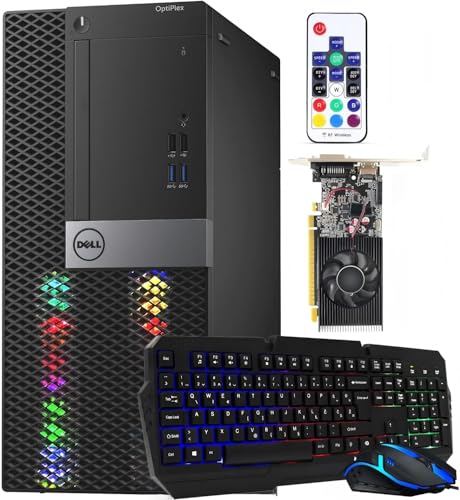
- Best overall RGB gaming PC for beginners under $400: Dell RGB Gaming Tower Computer, Core i7 6th Gen, GTX 1050 Ti 4GB (Renewed) — Check on Amazon
- Dell RGB Gaming Desktop PC, Core i5, Radeon RX 550 4G, Custom RGB Case Lighting (Renewed) — Check on Amazon
- STGAubron Gaming PC Desktop, Core i5, RX 550 4G, ARGB Fans, New — Check on Amazon
- Dell OptiPlex Desktop (SFF) Bundle with 24 Inch Monitor and RGB Front Panel (Renewed) — Check on Amazon
See 2 more Amazon options
- Dell Gaming OptiPlex Desktop RGB Computer PC, Core i7-4770, GT 1030, 24 Inch Monitor Bundle (Renewed) — Check on Amazon
- Dell OptiPlex 3050 SFF with Flash Black Film RGB Panel, Core i5-6600 (Renewed) — Check on Amazon
Read the full guide ↓
Disclosure: As an Amazon Associate, reviewstook.com earns from qualifying purchases. Links to Amazon on this page are affiliate links; they cost you nothing extra. Listing details such as price and availability change often, so check the current Amazon listing before you buy.
If this is your first gaming PC, start with the two facts that make every other fact in this guide easier to judge. First: the lights are decoration. RGB fans, glowing front panels and backlit keyboards make a setup look like a gaming setup, and that look is a perfectly good thing to want — but lighting adds no speed at all, and at $400 every dollar spent glowing is a dollar not spent on the part that runs your games. Second: at this price, five of the six honest ways to buy that look are renewed machines — retired office computers that a refurbisher has cleaned, tested, fitted with lights and listed again. That is not a warning off; it is how this budget reaches a real graphics card at all. It does mean the words on the listing matter more than the photos, so this guide is plain about it: every term is explained in plain English, every pick is graded on what its listing documents, and the setup steps assume you have never plugged in a gaming PC before.
Here is what $400 honestly buys in this category. Two picks are renewed full-size towers with genuine graphics cards — a GTX 1050 Ti in the top pick, a Radeon RX 550 in the second — and lights fitted into the case. One is a brand-new tower from a value brand, with lit fans, modern connections and the same RX 550 card. And three are small, slim office PCs wearing a remote-controlled light panel on the front, two of them bundled with a monitor and peripherals. Two of those three name no graphics card at all, which means light games only — said plainly in their reviews, not left for the glow to suggest. What does not exist here is a new tower with a modern graphics card and lighting you program from software. If a listing seems to promise that combination, it is describing the lights accurately and the performance generously.
One price rule runs through the guide. Prices change, so check price on Amazon before you buy, and buy only on a day the live price sits at or under $400. Follow the rule and the market’s mood swings stop being your problem.
In this guide
Quick Picks
Short on time, or comparing several options at once? Each row below names a buyer type and the product that suits it, with a link to the listing.
| Buyer type | Pick | Why it stands out | Link |
|---|---|---|---|
| Best overall for a first PC | Dell RGB Gaming Tower, Core i7 6th Gen, GTX 1050 Ti (Renewed) | The strongest graphics card here, in a full-size tower you can open later | Check on Amazon |
| Best value with a real card | Dell RGB Gaming Desktop, Core i5, RX 550 4G (Renewed) | Case lighting genuinely in the case, positioned in this budget tier | Check on Amazon |
| Best if you want brand new | STGAubron Gaming PC Desktop, Core i5, RX 550 4G | The only new machine here: lit fans, WiFi 6 and a maker’s warranty | Check on Amazon |
| Best complete first setup | Dell OptiPlex (SFF) Bundle, 24 Inch Monitor (Renewed) | Monitor, keyboard, mouse and headset in the same box as the PC | Check on Amazon |
| Best bundle with a graphics card | Dell Gaming OptiPlex RGB, Core i7-4770, GT 1030 (Renewed) | A monitor bundle with a real, if modest, card — check price on Amazon first | Check on Amazon |
| Cheapest way to the look | Dell OptiPlex 3050 SFF Flash Black Film (Renewed) | A remote-controlled light panel — the entry-tier route to the look in this guide | Check on Amazon |
How These Picks Were Chosen
The first filter was the budget itself, applied as a ceiling. Each pick is presented for this budget tier with an explicit instruction in its review: check price on Amazon and buy only when the live price sits at or under $400. Anything positioned well outside this budget tier was left out, however good its lights looked.
The second filter is the one this guide most wants to teach a beginner: the lighting was verified from the words of each listing, never from its pictures. Product photos at this tier are renders and studio shots that routinely show effects the shipped hardware cannot produce. So each review states what the listing’s own text documents — how many lit fans there are and whether they are programmable or fixed-pattern, whether any control software is named, or whether the “RGB” turns out to be a front-panel light strip worked by a remote. One pick below calls its fans “ARGB” in its title and plain “RGB Fan” in its own specification block; the review reports both and trusts the plainer one. That habit — when a listing disagrees with itself, believe the specification block — will protect you on most listings beyond this guide too.
None of these machines was bought or tested for this guide. The judgements rest on the listings themselves — maker and refurbisher pages and their specification blocks — compared across graphics cards, processors, memory type and capacity, storage, included peripherals and warranty routes. Renewed machines are called renewed in every heading, table row and recommendation, because a renewed tower with a 90-day guarantee is a different purchase from a new tower with a maker’s warranty even when the specifications match.
Words Worth Knowing Before You Buy
Twelve terms explain nearly everything in the six reviews below. They are written for someone who has never bought a gaming PC; if you already know them, skip to the reviews.
- RGB lighting. Lights inside or on the case that glow in colors. Pure decoration — it changes how the PC looks and nothing about how fast it runs. Here the lights come in three forms: lit fans, a light strip fitted into a tower, and a light panel on a slim office PC’s front.
- ARGB (addressable RGB). The fancier kind of lighting, where software sets each light’s color individually, making waves and gradients possible. It needs compatible fans, a controller and named software. Honest statement for this budget: no pick here documents real, software-controlled ARGB, whatever its title says.
- Graphics card (GPU). The part that draws your games, and the single most important part in a gaming PC. The honest ladder in this guide runs: GTX 1050 Ti at the top, then the RX 550, then the GT 1030, then no card at all. Each step down plays noticeably less.
- Integrated graphics. Basic picture-making built into the processor, used when a PC has no graphics card. Fine for the desktop, video and light games; not built for demanding ones. Two picks below run on integrated graphics because their listings name no card — and a listing that names no card is offering exactly this.
- Processor (CPU). The PC’s general-purpose brain. Every processor here is an older Intel Core i5 or i7 — an adequate partner for these cards, and never the reason a game will or will not run. The card decides that.
- RAM (memory). Short-term workspace, measured in gigabytes. All six picks carry 16GB, the right amount for this tier. What differs is the generation: DDR4 is the newer kind, DDR3 the older, and the two cannot be swapped for each other later.
- Renewed / refurbished. A used machine inspected, tested and cleaned for resale. On Amazon, Renewed products carry at least a 90-day refund-or-replacement guarantee. In this guide five of the six picks — both Dell towers, both monitor bundles and the slim 3050 — are renewed. Only the STGAubron is new.
- Barebone. A half-finished PC sold without some parts — usually memory, storage or Windows — which you supply yourself. None of the six picks is a barebone; every one arrives complete. Listings elsewhere at this price sometimes are, so check before assuming.
- Soldered. Parts fixed permanently to the board, never replaceable or upgradeable. None of the six picks has soldered memory or storage — these are desktops with parts in slots. Their limits are different ones, explained per pick: slim cases with no room for a graphics card, or an older memory generation.
- Refresh rate (Hz). How many times per second your monitor redraws the picture. A 60Hz screen shows at most 60 fresh pictures a second however fast the PC is — and Windows often starts a fast monitor at 60Hz until you fix it, which the setup steps below do.
- Power supply (PSU). The box inside the PC that feeds electricity to everything else. It matters for one beginner reason: a future graphics-card upgrade is only safe if the power supply is strong enough, and no listing here publishes its wattage — why the upgrades section below makes no promises it cannot keep.
- Warranty vs guarantee. A new PC carries a maker’s warranty, measured in years. A renewed PC carries a guarantee, measured in days — 90 days is the Amazon Renewed minimum, though one listing below states longer cover in its own copy. Same idea, very different length; read which one your listing offers.
The 6 Best RGB Gaming PCs for Beginners Under $400
Dell RGB Gaming Tower Computer, Core i7 6th Gen, GTX 1050 Ti 4GB, 16GB RAM, 512GB SSD, Windows 11 Pro (Renewed)
Who it suits: A first-time buyer who wants the glowing look but cares at least as much about the games — this is the pick where performance leads and the lights come along.
Start with the graphics card, because here it deserves to lead. The GeForce GTX 1050 Ti with 4GB of its own memory is the strongest card in this guide by a clear margin — a full class above the RX 550 and GT 1030 in the other picks, and the only card here we would call a genuine 1080p gaming card, suited to esports titles and older big-name games at sensible settings. Around it the machine is balanced rather than flashy: a 6th-generation Core i7 at 3.4GHz, 16GB of DDR4 memory, a 512GB SSD and Windows 11 Pro, with WiFi built in. The platform is old and this guide labels it old; it is also coherent, with no part holding the others back. It is sold by STG USA under Amazon Renewed, in Refurbished – Excellent condition, with the 90-day refund-or-replacement guarantee renewed status carries.
The lighting needs a clear picture in your head. The listing describes an RGB model with an RGB set fitted — in plain terms, case lighting a refurbisher has added to a business tower. That makes it a capable renewed tower given the gaming treatment, not a factory light show with programmable fans. Buy it as the best-performing machine in this guide that also lights up. Then the price rule, printed here rather than buried: check price on Amazon, and buy it only on a day the live price sits at or under $400. Let it go without regret on the days it does not.
- GTX 1050 Ti 4GB — the most capable graphics card in this guide, and the only one we would call a genuine 1080p gaming card.
- Balanced parts around it: 6th-gen Core i7, 16GB DDR4, 512GB SSD, Windows 11 Pro, built-in WiFi.
- A full-size tower with an RGB set fitted — the one case here with real room to open up and change parts later.
Honest limitation: Its live price can drift above the $400 line, so it belongs here only under the buy-at-or-under-$400 rule — check price on Amazon first; and it is a renewed machine on a decade-old platform, covered by a 90-day guarantee rather than a warranty.
Choose it if the games come first and you can watch the price for a few days. Skip it if you must order today at whatever it costs, or you want lighting you can program fan by fan — that does not exist at this budget anywhere.

Dell RGB Gaming Desktop PC, Core i5, Radeon RX 550 4G, 16GB RAM, 512GB SSD, Windows 10 Pro (Renewed)
Who it suits: A beginner who wants the lit-case look and a real graphics card in this budget tier — check price on Amazon to confirm the current listing before you order.
This renewed Dell tower, from the same refurbisher family as the pick above, leads its listing with its lighting: the special features document “Custom RGB Case Lighting,” with an RGB gaming keyboard and mouse in the box. That makes it one of only two picks where the case itself is lit as a designed feature. The graphics card is a Radeon RX 550 with 4GB of memory, and its level is stated plainly: an entry-level card that plays esports titles and older games at 1080p on low-to-medium settings, clearly better than integrated graphics, clearly below the GTX 1050 Ti above. Around it sit a quad-core Core i5 running up to 3.6GHz, 16GB of memory and a 512GB SSD, with HDMI, DisplayPort and DVI on the back — every common way to connect a monitor. WiFi and Bluetooth arrive on small USB dongles rather than built in — worth knowing before you wonder where the antenna is.
Two things date this machine, and both are said out loud. Its memory is DDR3 — a generation older than the DDR4 in the tower above — which caps later upgrades and is part of why it costs less. And it ships with Windows 10 Pro, whose mainstream support from Microsoft has ended; treat it as a games-and-browsing machine that needs a plan for its operating system, not as a five-year main PC. Against that, the listing copy states one year of parts-and-labor cover with free tech support — stronger than the renewed minimum, though terms vary, so read the wording on the live page. Check price on Amazon before you order to confirm the live price still fits this budget.
- Custom RGB case lighting documented in the listing itself, plus an RGB keyboard and mouse.
- Radeon RX 550 4GB — a real graphics card with honest entry-level performance.
- Positioned in this budget tier among this guide’s discrete-card towers — check price on Amazon.
Honest limitation: DDR3 memory and Windows 10 Pro age the platform twice over, and wireless depends on USB dongles rather than built-in radios.
Choose it if you want the lit case and a real card, in budget, today. Skip it if the older memory or the Windows 10 installation bothers you — the new STGAubron below answers both objections — check price on Amazon for that listing too.
STGAubron Gaming PC Desktop, Core i5, RX 550 4G, 16GB RAM, 512GB SSD, WiFi 6, Windows 11 Home (New)
Who it suits: A beginner who would rather buy new — maker’s warranty, modern connections — and accepts entry-level graphics as the fair price of that peace of mind.
This is the only new computer in the guide, and the difference is in the details a renewed tower cannot offer: WiFi 6 and Bluetooth 5.0 built in, a genuine new-machine Windows 11 Home license, an RGB keyboard and mouse in the box, and a warranty relationship with the maker instead of a refurbisher’s guarantee. Its lighting is also the most substantial here: the listing documents RGB fans in the chassis — two of them, per its specification block — behind the case’s viewing panel, the one pick that genuinely resembles the glowing towers in advertisements. The hardware underneath matches the renewed Dell beside it: the same Radeon RX 550 4GB card, a Core i5 running up to 3.6GHz, 16GB of memory and a 512GB SSD. Understand what newness buys: support, connectivity and presentation. On game performance, this machine and the renewed Dell beside it are equals.
Now the lesson this pick exists to teach, because every beginner meets it somewhere. The listing’s title calls its fans “ARGB Fan” — the programmable kind. Its own specification block describes the cooling as “RGB Fan,” and nothing in the listing names lighting-control software, a sync system or a controller. When a listing contradicts itself, believe the plainer statement: plan on fixed or simply cycling rainbow fans that light the case beautifully and take no instructions from you. That is the normal implementation at this budget, not a defect — but it is the difference between buying a look you saw and a capability that was never there. Price asks for the same patience as the top pick: check price on Amazon, and buy only when the live price sits at $400 or below. Above that line, you pay a premium for newness while a renewed machine matches its graphics.
- The sole new pick: a maker’s warranty, a genuine Windows 11 Home license, WiFi 6 and Bluetooth 5.0 built in.
- Lit case fans behind a viewing panel, plus an RGB keyboard and mouse — the fullest lighting here.
- RX 550 4GB graphics, 16GB of RAM and a 512GB SSD: honest entry-level hardware.
Honest limitation: The “ARGB” in the title is backed by no named control software — treat the fans as fixed-pattern RGB — and its live price can sit above the $400 line, making this a check-price-first pick.
Choose it if buying new matters more than squeezing out value, and you can wait until the live price on Amazon fits the budget. Skip it if programmable, software-synced lighting is a feature you actually need — that starts in a higher budget class.

Dell OptiPlex Desktop Computer (SFF) Bundle, Core i5, 16GB RAM, 512GB SSD, 24 Inch Monitor, Windows 11 Pro (Renewed)
Who it suits: A beginner starting from an empty desk — no monitor, no keyboard, no headset — who wants one box to contain the whole glowing setup, and whose games are the light kind.
This listing is the guide’s clearest case of the RGB label doing marketing work, so read it for what it verifiably is. The computer is a renewed small-form-factor Dell OptiPlex — “small form factor” simply means a slim case — with a quad-core Core i5 at 3.20GHz, 16GB of RAM and a 512GB SSD under Windows 11 Pro. Its RGB is a light on the front panel: the listing documents an RGB LED light whose patterns, speed and mode you change with a remote controller. Around that panel, the bundle supplies the rest of the desk: a 24 inch monitor, a gaming keyboard with three backlight colors, a backlit mouse and a gaming headset. What the listing does not name, anywhere, is a discrete graphics card — so picture-making falls to the processor’s integrated graphics: esports at low settings, older and lighter games, no modern demanding titles. Bought with that understanding, it is a budget-tier complete setup: monitor included — check price on Amazon — for a light gamer or a child’s first PC.
The renewed terms are the standard ones for this refurbisher family: inspected and tested, a minimum 90-day guarantee, possibly a plain box. And the slim case settles the future: no full-size graphics card fits inside it, with its low-profile slots and modest power supply, so the machine you unbox is the machine you keep. Buy it as a finished setup, never as a starting point.
- Everything in one box: 24 inch monitor, the PC with its RGB front panel, backlit keyboard, mouse and headset.
- Remote-controlled front-panel lighting with several patterns — simple to run from the chair.
- Windows 11 Pro and a complete desk setup in one box — check price on Amazon.
Honest limitation: No discrete graphics card is named, so gaming is integrated-graphics class — light titles only — and the slim case leaves no upgrade path.
Choose it if one order has to furnish the whole desk, and your gaming is light. Skip it if your game library includes anything demanding, or you hope to add a graphics card later — pick one of the towers above instead.

Dell Gaming OptiPlex Desktop RGB Computer PC, Core i7-4770, GT 1030 2GB, 16GB RAM, 512GB SSD, 24 Inch Monitor, Windows 11 Pro (Renewed)
Who it suits: A bundle buyer who wants the monitor included and a real graphics card in the box — the middle path between this guide’s two Dell bundles — provided the price cooperates.
The specification mixes genuine strengths with genuine age; see both. The graphics card is a GeForce GT 1030 with 2GB of memory: a real discrete card, a step above integrated graphics for esports and older titles at 1080p low settings, and a step below the RX 550 picks, let alone the GTX 1050 Ti. The processor is a Core i7-4770, a 3.40GHz quad-core that was respectable in its day — more than a decade ago — and the 16GB of memory is the older DDR3 kind, with a 512GB SSD making daily use feel current. The bundle is generous: a 24 inch HDMI monitor, keyboard, mouse and headset, WiFi, and Windows 11 Pro, renewed to Refurbished – Excellent condition. The RGB follows this refurbisher family’s documented pattern: an RGB LED light treatment across the front panel, changed by remote, plus backlit peripherals. On a desk it looks the part; it is not programmable, and it does not live in case fans.
Price is why this pick carries the guide’s strictest warning: check price on Amazon first, and consider it only when the live price sits at or under $400. It is included because it is the bundle beginners most often compare against the picks above; the instruction is the top pick’s rule, only stricter. At or under $400 it is a reasonable complete setup with a real card. Above that line, the monitor-less towers above give you stronger graphics for this budget tier.
- A discrete GT 1030 instead of integrated graphics, with the monitor, headset, keyboard and mouse all in the box.
- RGB front-panel treatment with remote control, following this refurbisher family’s documented pattern.
- Windows 11 Pro and a 512GB SSD soften the platform’s age in daily use.
Honest limitation: Its live price must be checked against the $400 line on Amazon, and the i7-4770 with DDR3 memory is the oldest platform here — a buy-only-when-the-live-price-fits pick, full stop.
Choose it if the live price on Amazon fits the $400 line and one order must bring the screen, the peripherals and a discrete card together. Skip it if the live price on Amazon sits above $400 — outside this budget and outside its own value argument.

Dell OptiPlex 3050 SFF with Flash Black Film, Core i5-6600, 16GB DDR4, 512GB SSD, Windows 11 Pro (Renewed)
Who it suits: A beginner who already owns a monitor and peripherals and wants the cheapest honest route to a PC that lights up — a bedroom or dorm machine for light games and everyday work.
Take the bundles out of the picture and this is the entry tier of the RGB look. The machine is a renewed OptiPlex 3050 in the slim small-form-factor case, its front wearing the refurbisher’s “Flash Black Film” treatment with an RGB LED light panel: remote-controlled, with adjustable speed and several color-changing patterns, documented in the listing in the same terms as its bundle siblings. Underneath, the fundamentals are fair for this budget tier — a 6th-generation Core i5-6600 running up to 3.9GHz, 16GB of DDR4 memory (a generation newer than the DDR3 in two picks above), a 512GB SSD, a keyboard and mouse in the box, WiFi and Bluetooth fitted, and Windows 11 Pro. What it does not have is any named discrete graphics card, so the gaming story is the integrated one: Minecraft, Roblox, League of Legends and their weight class at modest settings, older games, and streamed cloud gaming.
Positioning is the headline the marketing should have used: this is the entry-tier pick in this guide — check price on Amazon — positioned inside this budget tier for light gaming and everyday work. The usual renewed cautions apply: inspected and tested, cosmetic surprises possible, a guarantee measured in days rather than years. The slim case again means no meaningful graphics upgrade later. Judged as what it is — a light-up everyday PC for light gaming that looks like it belongs in a gaming setup — it is this tier’s honest floor.
- The entry-tier route here to a PC that lights up — check price on Amazon.
- DDR4 memory and Windows 11 Pro give it newer foundations than the DDR3 bundle picks.
- An RGB front panel worked by remote, with keyboard and mouse in the box and WiFi and Bluetooth fitted.
Honest limitation: No discrete graphics card is named, so performance is integrated class, and the slim case closes off upgrading it later.
Choose it if the look, the small footprint and light gaming are the brief, and you already have a screen. Skip it if a graphics card is in your plans, now or later — spend on the towers at the top instead.

Comparison Table
| Product | Graphics | What the RGB actually is | Link |
|---|---|---|---|
| Dell RGB Gaming Tower, i7 6th Gen (Renewed) | GTX 1050 Ti 4GB | An RGB set fitted into a full-size tower by the refurbisher | Check on Amazon |
| Dell RGB Gaming Desktop, Core i5 (Renewed) | RX 550 4GB | Custom RGB case lighting, plus an RGB keyboard and mouse | Check on Amazon |
| STGAubron Gaming PC Desktop (New) | RX 550 4GB | Lit case fans (titled ARGB, specified as plain RGB) plus RGB peripherals | Check on Amazon |
| Dell OptiPlex SFF Bundle, 24″ Monitor (Renewed) | None named in listing — integrated class | An RGB front panel with a remote, plus backlit keyboard, mouse and headset | Check on Amazon |
| Dell Gaming OptiPlex RGB, i7-4770 (Renewed) | GT 1030 2GB | An RGB front-panel treatment with a remote, plus backlit peripherals | Check on Amazon |
| Dell OptiPlex 3050 SFF Flash Black Film (Renewed) | None named in listing — integrated class | An RGB front panel with a remote, on a film-treated slim case | Check on Amazon |
Your First Evening: Setting Up, Step by Step
Whichever pick you bought, the first evening follows the same eight steps. None needs tools or experience, and doing them in this order prevents nearly every beginner panic.
- Placement first. Put the PC where air can move around it — on the desk or the floor beside it, never sealed in a closed cabinet, because the fans that light up also have to breathe. Leave a hand’s width clear at the back and sides. Slim picks can lie flat or stand upright; towers stand upright. Keep the front-panel lights’ remote somewhere findable — for three picks, it is the entire lighting control system.
- Power. Plug the power cable into the back of the PC and into the wall or a surge protector, then flip the switch on the back of the power supply, if your machine has one, before pressing the front power button. A back switch left off is the most common reason a new setup appears dead. Renewed machines may arrive with the cable loose in a plain box — normal for refurbished stock.
- Monitor into the graphics card’s ports — not the motherboard’s. On the three tower picks and the GT 1030 bundle, the monitor cable belongs in the ports on the graphics card: the horizontal row of sockets low on the back of the case, in the card’s own bracket. The sockets higher up, clustered with the USB ports, belong to the motherboard, and anything plugged in there is not using your graphics card. This matters most on the top pick: its processor has basic built-in graphics of its own, so a monitor plugged into the motherboard shows a perfectly normal picture while every game quietly runs on the weak built-in graphics instead of the GTX 1050 Ti you paid for. If the desktop looks fine but games run strangely slowly, check this cable first. On the two slim picks with no graphics card, the motherboard’s sockets are the only ones there are — use them without worry.
- Peripherals and a wired internet connection. Plug in the keyboard and mouse — included with every pick here except, possibly, the top tower, whose listing does not promise them — and run an Ethernet cable from the PC to your router if you can reach one. Wired is faster and steadier than WiFi for the first big download session and for gaming afterward; picks with built-in WiFi can fall back on wireless, and the renewed Dell desktop’s USB WiFi dongle needs a spare USB socket, so plug it in before wondering why there is no internet.
- Windows Update, then the graphics driver. Let Windows finish its first-run setup, connect to the internet, then run Windows Update and keep restarting until it reports nothing left — a renewed machine may have sat in a warehouse while updates piled up. After that, update the graphics driver from the card maker’s own software or website, because the driver Windows installs by itself is often old. One pick needs an extra decision here: the renewed Dell desktop ships with Windows 10, whose mainstream support has ended, so treat this step as the moment to plan what comes next.
- Set the monitor’s real refresh rate. If your monitor is faster than 60Hz, Windows will probably still be running it at 60Hz. Open Settings, go to Display, then Advanced display, and choose the highest refresh rate listed. This two-minute step is the most commonly skipped free upgrade in PC gaming — skip it and a fast screen behaves like a slow one.
- Verify the machine you actually received. Before the return window closes, confirm the delivered PC matches the listing you paid for. In Windows, open Task Manager’s Performance tab and Settings’ About page and check the processor name, the 16GB of memory, the storage size and — on the card picks — the graphics card’s name. On the STGAubron, look at the fans with your own eyes: fixed rainbow patterns are what its specification block documents, whatever the title said. A mismatch is worth money only while the guarantee is open — why this step belongs on the first evening, not the first month.
- Install a game store and try a game. Install Steam (or whichever store your games live on), download one game you know well, and play it for twenty minutes. You are not benchmarking; you are confirming the whole chain — card, driver, monitor setting, internet — works together while returns are still easy. Start the graphics at low or medium: at this tier, sensible settings are the difference between smooth and miserable.
What Else You Will Spend
The PC’s price is not the whole first-setup price, and beginners deserve the rest of the list before ordering. The biggest item is the monitor: four of the six picks — both Dell towers, the STGAubron and the slim 3050 — are the computer only, so if you do not already own a screen, a monitor is a required purchase on top, and it should come first in the leftover budget because every game is seen through it. The two Dell bundles are the exception: their 24 inch monitors are in the box, which is precisely their value. After the screen come the keyboard and mouse — included with most picks but not promised in the top tower’s listing — and a headset if you play with friends, which only the bundles include. None of these accessories is priced here, because the listings do not price them; treat them as real costs to shop separately, never as part of a pick’s price.
Two picks carry a specific catch to budget as “the machine, plus the fix.” The renewed Dell desktop’s fix is a plan rather than a part: it arrives on Windows 10, whose mainstream support has ended, so its true cost includes deciding how you will handle the operating system over its life. The GT 1030 bundle’s catch is stricter: check price on Amazon and buy only when the live price fits this budget, so its true cost is the machine plus the patience to wait until it does. Leave a little room, too, for the games themselves and, if your desk is far from the router, a long Ethernet cable. None of this is hidden-cost trickery; it is the whole purchase, stated before you make it.
Upgrades, in Plain Terms
Beginners are often sold a cheap PC as a “starter rig” they will upgrade later, so here is exactly what later looks like for each shape of machine in this guide — with no promise the listings cannot support. A graphics-card swap is only a safe promise when a listing documents a strong enough power supply and a standard case with room for a card. No listing in this guide publishes its power supply’s wattage, so a card swap is promised for none of the six. The three towers are standard cases you can open: if you later want a stronger card, the first job is to read the wattage printed on the power supply inside, and let that number — plus the room in the case — decide what card is safe. The top pick’s full-size tower is the roomiest of the three; a real advantage, held to its honest size.
For the three slim picks, the answer is simply no: their low-profile slots and modest power supplies close the graphics-card road entirely, and no later purchase changes that. Buy them as finished machines. Memory follows the same honesty: the DDR3 machines are capped by an old generation not worth spending into, the DDR4 machines use the current kind, and in every pick the realistic first upgrade is not a part at all — it is the monitor, the accessories and the game library above. If upgrading the graphics is genuinely in your plan, the correct move is a tower from this list, bought with its power-supply label read on day one.
How to Choose an RGB Gaming PC Under $400
- Trust the specification block over the title. Titles at this tier throw around “ARGB” and “gaming” at no cost. The spec block is where the same listing quietly admits the fans are plain RGB, the memory is older DDR3, or no graphics card exists at all — and the spec block is what gets delivered.
- Know which of the three “RGBs” you are looking at. Programmable ARGB, where software sets each light’s color, is effectively absent under $400. Fixed-pattern fans cycle their rainbow and take no instructions. Panel RGB — a light strip behind a refurbished office case’s front, driven by a remote — is what most renewed “RGB gaming PCs” actually are. All three glow; they are not the same product.
- Grade the card before the glow. The ladder in this guide runs GTX 1050 Ti, RX 550, GT 1030, then integrated graphics, and every rung down removes games you can play well at 1080p. No light show on any listing buys a rung back.
- Set your walk-away line before you shop. Check price on Amazon for the listing you want. Borrow this guide’s rule — at or under the $400 line, buy; above it, wait — and price swings stop costing you money.
Common Buying Mistakes
- Taking a title’s “ARGB” at face value when the same listing’s spec block says “RGB Fan” and names no control software. The spec block’s version is the one that ships.
- Plugging the monitor into the motherboard’s sockets on a tower with a graphics card, then concluding the card is weak. On the top pick the picture still appears — drawn by the processor’s basic built-in graphics — so the mistake hides itself.
- Paying above the $400 line without checking the live price on Amazon first. Hold the budget line and wait if the current price does not fit.
- Buying a slim renewed PC as a “starter rig” for later upgrades. Small-form-factor cases, low-profile slots and small power supplies close that road; buy towers for upgrading.
Final Recommendation
- Best overall for a beginner: Dell RGB Gaming Tower, GTX 1050 Ti (Renewed).
- Best value already inside the budget: Dell RGB Gaming Desktop, RX 550 (Renewed).
- Best brand-new machine: STGAubron Gaming PC Desktop, RX 550.
- Best complete first setup: Dell OptiPlex SFF Bundle with 24 Inch Monitor (Renewed).
- Best bundle that still has a card — check price first: Dell Gaming OptiPlex RGB, GT 1030 (Renewed).
- The cheapest route to the look: Dell OptiPlex 3050 SFF Flash Black Film (Renewed).
For most first-time buyers our top two are the two renewed Dell towers with real graphics cards: the GTX 1050 Ti tower at the top of this guide when its price sits at or under the line, and the RX 550 tower with custom case lighting at its listing on Amazon when you would rather not wait. Between them they state this tier’s truth for a beginner: the look is available, the lights are simple, and the money that matters is the money spent on the card. If a bigger budget arrives later, the same search one tier up lives at Best RGB Gaming PC Under $500, and buyers who decide the lights were never the point should compare the plain machines in Best Gaming PC Under $400 and Best Prebuilt Gaming PC Under $400 before ordering. Decide which kind of RGB you are buying, confirm the card by name, hold the $400 line, follow the eight setup steps — and the setup on your desk will glow as hoped, with no surprises inside the case.
Frequently Asked Questions
I have never owned a gaming PC. Can I actually set one of these up myself?
Yes. Every pick here arrives complete — nothing to build, nothing to install inside the case — and the eight steps in the walkthrough above cover the whole first evening: place it, power it, plug the monitor into the right sockets, connect peripherals and wired internet, let Windows update, set the refresh rate, check the parts match the listing, and install a game store. The one step that genuinely matters is the monitor cable: on a tower with a graphics card it belongs in the card’s sockets, low on the back of the case.
Can you really buy an RGB gaming PC for under $400?
Yes, under the definition this guide works by: real case or panel lighting over honest, entry-level gaming hardware. What the money cannot reach is a new tower holding a modern graphics card and software-controlled, per-light RGB. In its place you get renewed business towers with refurbisher-fitted lighting, one new value-brand tower whose fans run fixed patterns, and slim bundles whose RGB is a front panel worked by remote. The look is genuine; the performance class is esports and older games at 1080p; a listing implying more is selling you the lights.
What is the difference between RGB and ARGB, and does it matter here?
ARGB — addressable RGB — lets software set each light’s color on its own, which is what makes waves, gradients and synced effects possible. Plain RGB runs everything together in fixed patterns, or one color at a time. Here the difference matters mostly as truth-in-labeling: under $400, even listings titled “ARGB” name no control software in their own spec blocks, so expect fixed patterns from every pick here and file per-light control under higher budgets.
Are renewed “RGB gaming PCs” a safe buy for a first PC?
They are a defined-risk buy, and for a beginner the definition is the reassurance. Amazon Renewed machines pass inspection and testing before resale and carry at least a 90-day refund-or-replacement guarantee, and the refurbishers behind these listings make their living on office-fleet Dells — machines built to run for years. What you risk is cosmetic condition, older platforms (DDR3 memory and decade-old processors appear above, labeled as such) and cover that ends long before a new machine’s warranty would. Price those risks in, verify the delivered parts on the first evening using step seven of the walkthrough, and renewed remains the only route by which this budget reaches a discrete graphics card at all.
Which graphics card should I insist on at $400?
Insist on a named card, and know the order: the GTX 1050 Ti is the strongest this budget touches, the RX 550 is the realistic in-budget standard, the GT 1030 sits a step below both, and an unnamed card means integrated graphics. For esports titles and older big-name games at 1080p low-to-medium settings, the 1050 Ti and RX 550 are genuinely playable. For modern demanding releases, no card at this tier suffices — that is a higher-budget conversation, and the honest move is to save toward it.


