Where to buy
Check the latest price, availability and delivery on Amazon. Orders are placed on Amazon. We may earn a commission from qualifying purchases.
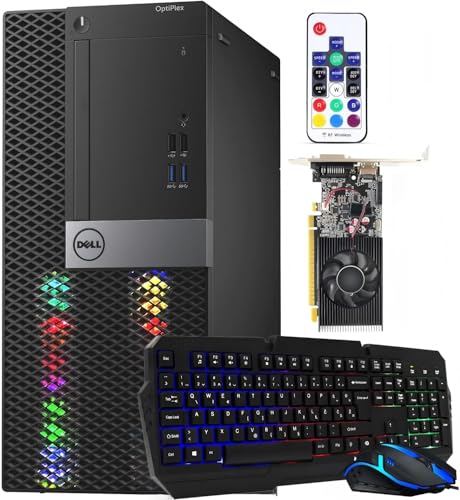
- Best overall RGB gaming PC for streaming under $400: Dell RGB Gaming Tower Computer, Core i7 6th Gen, GTX 1050 Ti 4GB (Renewed) — Check on Amazon
- Dell OptiPlex 3050 SFF with Flash Black Film RGB Panel, Core i5-6600 (Renewed) — Check on Amazon
- Dell RGB Gaming Desktop PC, Core i5, Radeon RX 550 4G, Custom RGB Case Lighting (Renewed) — Check on Amazon
- STGAubron Gaming PC Desktop, Core i5, RX 550 4G, ARGB Fans, New — Check on Amazon
See 2 more Amazon options
- Dell Gaming OptiPlex Desktop RGB Computer PC, Core i7-4770, GT 1030, 24 Inch Monitor Bundle (Renewed) — Check on Amazon
- Dell OptiPlex Desktop (SFF) Bundle with 24 Inch Monitor and RGB Front Panel (Renewed) — Check on Amazon
Read the full guide ↓
Disclosure: As an Amazon Associate, reviewstook.com earns from qualifying purchases. Links to Amazon on this page are affiliate links; they cost you nothing extra. Listing details such as price and availability change often, so check the current Amazon listing before you buy.
Streaming asks a computer to do two jobs at once: play the game, and compress that game into a video feed in real time. The second job is done by a piece of silicon called an encoder, and at a $400 budget the encoder — not the RGB lighting, not the case, not the headline processor — is what decides whether your stream looks clean or falls apart. So this guide grades the RGB machines in this price tier the way a streamer has to: encoder first, everything else second. The honest headline is short. Exactly one pick below carries a discrete hardware encoder strong enough to stream the games it plays from the same box. Two more encode through their processors’ integrated Quick Sync. Two carry an elderly AMD encoder that works and shows its age. One names no encoder this guide can verify at all. And no pick in this guide — not one — can encode AV1, the newer codec the platforms are slowly moving toward. If AV1 is a requirement rather than a someday, this budget cannot meet it, and the guide says so now rather than after you have ordered.
The workflow being graded against is the real one. On Twitch, a standard partner-quality stream runs around 6,000 kbps with constant bitrate (CBR) and two-second keyframes, at 1080p60 at most — and at this hardware tier, 720p60 or 1080p30 is often the smarter target. YouTube is more generous: it accepts higher bitrates, 1440p streams and AV1 live encoding. Twitch’s AV1 support exists only through its limited Enhanced Broadcasting programme, so for almost everyone reading this, Twitch means H.264 — which is fortunate, because H.264 is the one codec every encoder in this guide can produce. Streaming in 4K is limited by the platforms themselves, not by anything you can buy at $400, so it plays no part in the grading. What does play a part: whether the encoder is a dedicated block that works for free while the game renders, or the same strained quad-core processor doing a third job; whether 16GB of memory and a 512GB drive leave room for the game, the streaming software, a browser and the recordings piling up; and whether the live price on the day you shop still fits this budget tier — check price on Amazon before you buy.
In this guide
Quick Picks
Short on time, or comparing several options at once? Each row below names a streaming job and the machine that suits it, with a link to the listing.
| Streaming job | Pick | Why it stands out | Link |
|---|---|---|---|
| Best one-box game streamer | Dell RGB Gaming Tower, Core i7 6th Gen, GTX 1050 Ti (Renewed) | The only discrete encoder in the guide — Pascal NVENC streams while the card renders | Check on Amazon |
| Best stream-box value | Dell OptiPlex 3050 SFF Flash Black Film, i5-6600 (Renewed) | Skylake Quick Sync is a genuinely usable H.264 encoder in a budget-tier package — check price on Amazon | Check on Amazon |
| Best in-budget discrete card | Dell RGB Gaming Desktop, Core i5, RX 550 4G (Renewed) | Polaris hardware encoding and a real card in this budget tier — check price on Amazon | Check on Amazon |
| Best new machine | STGAubron Gaming PC Desktop, Core i5, RX 550 4G | New with a maker’s warranty and the same Polaris encoder — buy on a dip | Check on Amazon |
| Best bundle, on a dip only | Dell Gaming OptiPlex RGB, Core i7-4770, GT 1030 (Renewed) | Monitor bundle whose encoding is done by the CPU’s Quick Sync — the card has none | Check on Amazon |
| Talk and console-capture station | Dell OptiPlex (SFF) Bundle, 24 Inch Monitor (Renewed) | Complete glowing setup; no encoder is documented, so grade it as a capture/talk box | Check on Amazon |
How These Picks Were Chosen
Every machine below first had to belong in the parent guide to RGB gaming PCs under $400 — real Amazon listings, renewed machines named as renewed everywhere they appear. This streaming cut then re-graded the same six machines on streaming criteria only, and re-ranked them: the order below is not the order of the general guide, because a machine that games best does not automatically stream best.
The first criterion is the encoder, and every encoder claim in this article is derived from the silicon the base research documents — the graphics card or processor named in the listing — and from nothing else. Where a listing names a card, the card’s encoder is graded. Where a listing names a processor with integrated graphics, that processor’s Quick Sync is graded. Where a listing names neither a discrete card nor a specific processor model, this guide makes no encoder claim for that machine at all, and grades it on the jobs that do not need one. The second criterion is simultaneous load: streaming is a second workload stacked on the game, so memory headroom, core count and recording storage all count harder here than they do in a gaming-only guide. The third is fit for this budget tier: check price on Amazon for each pick, because a streaming recommendation that belongs in a higher tier is not a $400 recommendation.
One grading decision deserves stating up front. Software encoding on the CPU (x264) is treated throughout as an emergency fallback, never as a plan. Every processor in this guide is an older quad-core that is already busy rendering the game; asking it to compress the video as well is how dropped frames happen. The machines below earn their places through hardware encoders, and the one with no documented hardware encoder is recommended only for work that routes around the problem — talking to camera, streaming a desktop, or encoding a console feed that arrives through a capture card.
The Encoder Map: What Each Machine Actually Streams With
This section is the whole guide in miniature. Read it before the reviews, because the reviews keep referring back to it.
- Dell RGB Gaming Tower (GTX 1050 Ti): Pascal NVENC. The GeForce GTX 1050 Ti carries a dedicated NVENC encoder block, and it is the only discrete encoder in this guide. In OBS it appears as a hardware encoder that compresses the stream on its own silicon while the card renders the game — the arrangement every one-box streamer wants. The honest grading: Pascal is an older NVENC generation, and at Twitch’s roughly 6,000 kbps its H.264 output is visibly softer than a modern encoder’s, with busy, fast-moving scenes showing it first. It works, it is genuinely usable, and it is a generation behind. It cannot encode AV1 — no card of its era can.
- Dell OptiPlex 3050 SFF (Core i5-6600): Intel Quick Sync. This machine names no discrete card, so its encoder is the one inside its documented processor: the i5-6600’s Skylake-generation Quick Sync, a proper hardware H.264 and HEVC encoder that OBS can select directly. For a talk stream, a desktop stream or light same-box gaming at 720p, it is a real tool, not a consolation prize. It cannot encode AV1.
- Dell RGB Gaming Desktop and STGAubron (Radeon RX 550): AMD Polaris VCN. Both RX 550 machines encode through the card’s Polaris-generation media engine — hardware H.264 and HEVC encoding that OBS exposes as the AMD hardware encoder. It is the oldest and softest discrete encoder class in this guide: at Twitch bitrates its H.264 is noticeably less clean than NVENC’s, and its drivers are a legacy branch now. It cannot encode AV1. Neither listing documents its processor model precisely enough for this guide to claim a second, integrated encoder for either machine, so none is claimed.
- Dell Gaming OptiPlex bundle (GT 1030 + Core i7-4770): the card encodes nothing; Quick Sync does. This is the trap pick, and it is graded in the open. The GeForce GT 1030 carries no NVENC encoder at all — the absence is a known property of that card, and it means the discrete graphics card contributes nothing to the stream’s compression. The actual encoder is the i7-4770’s Haswell-generation Quick Sync: the oldest Quick Sync in this guide, H.264 only for practical purposes, serviceable for light work. It cannot encode AV1.
- Dell OptiPlex SFF bundle (Core i5, no card named): no encoder documented. The listing names a quad-core Core i5 without a model number and names no discrete graphics card. This guide therefore claims no encoder for it — not Quick Sync, not anything — and grades the machine as a talk, desktop and console-capture station, where the encoding load is small or arrives from a console. If the live listing has since specified a processor model, the encoder picture can be re-derived from it at publish time; until then, buy it for the jobs in its review, not for one-box game streaming.
Two set-wide facts follow from the map. First, AV1 encoding exists nowhere in this guide — not on the Pascal card, not on either Polaris card, not on any Quick Sync here. YouTube AV1 live streaming and Twitch’s limited AV1 programme are both closed to this entire tier, and any edit or listing that suggests otherwise is wrong. Second, no pick is credited with two encoders. Streamers sometimes split work — one encoder for the live feed, another for a clean local recording — and that arrangement needs hardware this budget does not document. Here, one stream, one encoder, chosen well, is the whole game.
The 6 Best RGB Gaming PCs for Streaming Under $400
Dell RGB Gaming Tower Computer, Core i7 6th Gen, GTX 1050 Ti 4GB, 16GB RAM, 512GB SSD, Windows 11 Pro (Renewed)
Who it suits: The one buyer this tier can serve completely — someone who wants to play a game and stream that same game from the same $400 box, with the glowing tower in shot behind them.
Every other pick in this guide asks you to route around an encoder problem. This one simply has the encoder. The GTX 1050 Ti’s Pascal NVENC block compresses the stream on dedicated silicon, which means the arrangement a streamer actually needs: the card renders the game, the encoder block handles the video, and the 6th-generation Core i7 is left to run the game, the streaming software and the browser without also doing compression duty. In OBS you select the NVENC encoder, set constant bitrate around 6,000 kbps with two-second keyframes, and the machine does the rest. For esports titles and older games at 1080p — rendered at reduced settings where the card needs the help — this is a genuine one-box streaming PC, the only one in the guide.
The grading stays honest about the generation. Pascal NVENC is an early iteration of the technology, and at Twitch’s bitrate ceiling its picture is visibly softer than what a modern card produces: fine detail in grass, foliage and fast camera pans smears sooner. Viewers on a phone will never notice; viewers on a large monitor will, mildly. There is no AV1 encoding, so YouTube streams go out in H.264 like everyone else’s at this tier. The platform around the card is a decade old — 16GB of DDR4 and a 512GB SSD are adequate rather than generous, and a streamer who records every session locally will fill that drive; treat a second drive as a planned addition on top of the machine itself. The machine is sold by STG USA as Amazon Renewed, Refurbished – Excellent, with the 90-day refund-or-replacement guarantee renewed status carries — a guarantee, not a maker’s warranty. Its RGB is a lighting set fitted by the refurbisher to a business tower: it glows convincingly on camera, and it is not addressable or software-controlled.
Check price on Amazon before you buy. This is a budget-tier pick, so only buy it on a day when the live listing still fits the under-$400 frame of this guide, and pass on the days it sits in a higher tier.
- Pascal NVENC hardware encoding — the only discrete encoder in this guide, and the only true one-box game-streaming arrangement here.
- GTX 1050 Ti 4GB is also the strongest gaming card in the set, so the game itself holds up while it streams.
- Balanced platform: 6th-gen Core i7, 16GB DDR4, 512GB SSD, Windows 11 Pro.
Honest limitation: Pascal NVENC is an older, softer generation at Twitch bitrates and there is no AV1; the machine is renewed with a 90-day guarantee, so check price on Amazon and only buy it when the live price still fits this budget tier.
Choose it if you want to stream the games you play from one machine and can watch the price for a few days. Skip it if AV1 encoding matters to you now — nothing at this budget has it — or the live price on Amazon has moved into a higher tier today.

Dell OptiPlex 3050 SFF with Flash Black Film, Core i5-6600, 16GB DDR4, 512GB SSD, Windows 11 Pro (Renewed)
Who it suits: Streamers whose show is themselves — talk, podcast-style and desktop content — plus light-game streamers and anyone building a small, quiet, glowing stream corner on the smallest budget in this guide.
The surprise of this set is that the cheapest machine carries the second-best encoder. The OptiPlex 3050 names no discrete graphics card, but it names its processor precisely — a Core i5-6600 — and that processor’s Skylake Quick Sync is a proper hardware encoder for H.264 and HEVC that OBS can drive directly. Quick Sync’s virtue for a streamer is that it is nearly free: the encode runs on a fixed-function block inside the processor, leaving the cores themselves for the streaming software, the browser, chat and everything else on the desk. For a talk stream at 1080p30 or 720p60, a desktop or creative stream, or a light game the integrated graphics can actually render, this little SFF box does the whole job — and its remote-controlled RGB front panel reads as intentional set dressing on camera, which is a remarkable amount of stream corner for a budget-tier machine.
The limits are the rendering side, not the encoding side. Integrated graphics decide which games can be streamed from this box at all: esports and older titles at modest settings, yes; anything modern and demanding, no — the encoder would happily compress a slideshow. The sensible second role is as a dedicated stream box in a two-machine setup, encoding a feed that arrives from a console or a gaming PC through a capture card, where its Quick Sync and its silence earn their keep and its graphics never render a game. The 512GB drive is the recording catch it shares with the whole guide — a streamer who archives locally should plan for a second drive on top of the machine itself. It is a renewed machine with the standard inspected-and-tested terms and a guarantee measured in days, and the small-form-factor case forecloses adding a graphics card later: there is no slot-powered upgrade story worth planning around, and its Quick Sync cannot grow an AV1 block. What it is, as a budget-tier option in this guide, is the best encoding value in the set, and the pick for a streamer whose games are light or whose games live on another machine.
- Skylake Quick Sync hardware H.264/HEVC encoding — a real encoder, nearly free in CPU terms.
- Budget-tier positioning in this guide, with DDR4 memory and Windows 11 Pro — check price on Amazon.
- Small, quiet SFF box whose RGB front panel works as on-camera set dressing.
Honest limitation: No discrete graphics card is named, so same-box game streaming is limited to light titles the integrated graphics can render, and the SFF case leaves no real path to add a card later. No AV1 encoding.
Choose it if your stream is talk, desktop or light games, or you want a dedicated encode box beside a console. Skip it if you intend to stream modern games from this machine itself — that is the top pick’s job.

Dell RGB Gaming Desktop PC, Core i5, Radeon RX 550 4G, 16GB RAM, 512GB SSD, Windows 10 Pro (Renewed)
Who it suits: The value streamer who wants a discrete card doing both jobs — rendering the game and encoding the stream — in this budget tier, with case lighting that is genuinely in the case.
This STG-refurbished Dell is the in-budget way to get a discrete encoder without waiting for a price dip. The Radeon RX 550’s Polaris media engine gives OBS a hardware H.264 encoder on the same card that renders the game, and that separation — card encodes, processor plays — is the correct one-box shape, the same shape as the top pick, executed with older silicon. Grade the picture quality plainly: Polaris is the oldest discrete encoder generation in this guide, and at Twitch’s roughly 6,000 kbps its H.264 output is visibly softer than the 1050 Ti’s NVENC, particularly in fast motion. For an esports stream at 720p60 — the sensible target for this hardware — it is serviceable and honest. The card itself plays esports and older games at 1080p low-to-medium settings, a clear step above integrated graphics and a clear step below the GTX 1050 Ti.
The platform asks for two acknowledgements. The memory is DDR3, a generation older than the DDR4 elsewhere here, and it ships with Windows 10 Pro, whose mainstream support has ended — workable for a games-and-streaming box, but a real consideration for a long-term main PC. Connectivity arrives by USB WiFi and Bluetooth dongles; for streaming, treat those as decoration and run a cable, as the OBS section below insists for every pick. The listing documents custom RGB case lighting as a designed feature, plus an RGB keyboard and mouse, and states one-year parts-and-labor cover in its copy — a stronger promise than the renewed minimum, with terms to read on the live page, since refurbisher warranties vary. Check price on Amazon: this pick is positioned inside this budget tier, so confirm the live price before you buy.
- Polaris hardware H.264 encoding on a real discrete card — the correct one-box shape at an in-budget price.
- Custom RGB case lighting documented in the listing, with RGB keyboard and mouse included.
- Positioned in this budget tier — check price on Amazon — with one-year parts-and-labor cover stated in the listing copy.
Honest limitation: The Polaris encoder is the softest discrete option here and its drivers are a legacy branch; DDR3 memory and Windows 10 Pro date the platform; no AV1 encoding, and no second encoder is documented for this machine.
Choose it if you want to stream esports from one box, in budget, today. Skip it if stream picture quality is your top priority — the 1050 Ti’s NVENC is a generation cleaner — or the Windows 10 installation is a deal-breaker.
STGAubron Gaming PC Desktop, Core i5, RX 550 4G, 16GB RAM, 512GB SSD, WiFi 6, Windows 11 Home (New)
Who it suits: Buyers who want the streaming shape of the pick above — a discrete card rendering and encoding — in a brand-new machine with a maker’s warranty, WiFi 6 and a genuine Windows 11 licence, and who can wait for the price to behave.
Under the hood this is the same streaming proposition as the renewed Dell beside it: a Radeon RX 550 whose Polaris media engine provides hardware H.264 encoding for OBS while the card renders esports-class games, with 16GB of memory and a 512GB SSD around it. Everything the encoder map said about Polaris applies unchanged — oldest discrete encoder generation in the guide, visibly softer than NVENC at Twitch bitrates, legacy driver branch, and no AV1 encoding anywhere in the machine. What newness buys is everything around the encoder: a warranty relationship with the maker rather than a refurbisher’s guarantee, Windows 11 Home installed as a new-machine licence, WiFi 6 and Bluetooth 5.0 built in rather than dongled, and an RGB keyboard and mouse in the box.
Two disciplines from the base guide carry straight into this angle. The first is the lighting label: the listing’s title calls its fans “ARGB”, its own specification block calls them “RGB Fan”, and nothing names lighting-control software — so plan on fixed-pattern rainbow fans, which for a streamer is honestly fine, since the case is set dressing and the audience sees the effect, not the protocol. The second is price patience. Check price on Amazon before you buy: only buy it when the live price still fits this budget tier; above that tier, you are paying new-machine money for the same encoder the renewed Dell above offers as a budget-tier alternative. Streamers on a deadline should also note that built-in WiFi 6 does not change the wired rule — the OBS section’s Ethernet requirement applies to this machine exactly as to the dongle machines.
- Brand-new with a maker’s warranty, a genuine Windows 11 Home licence, and WiFi 6 and Bluetooth 5.0 built in rather than dongled.
- Polaris hardware H.264 encoding on a discrete card, with the fullest fan-lighting package here.
- 16GB of RAM and a 512GB SSD: honest entry-level hardware underneath.
Honest limitation: The encoder is the same ageing Polaris block as the renewed Dell’s, with no AV1; its live price can sit in a higher tier, making this a buy-on-a-dip pick — check price on Amazon; and the “ARGB” title is not backed by any named control software — treat the fans as fixed-pattern RGB.
Choose it if new-with-warranty matters more than the last increment of value and you can wait for the price to touch the line. Skip it if the live price on Amazon sits in a higher tier today, or you want the cleanest stream picture in the guide — that is the NVENC pick at the top.

Dell Gaming OptiPlex Desktop RGB Computer PC, Core i7-4770, GT 1030 2GB, 16GB RAM, 512GB SSD, 24 Inch Monitor, Windows 11 Pro (Renewed)
Who it suits: Bundle buyers who need the monitor and peripherals in the same box and whose streaming is light — talk, desktop, esports at modest settings — provided the price ever cooperates.
This review exists to prevent one specific mistake: assuming the discrete graphics card in the box is the thing that will encode your stream. The GeForce GT 1030 in this bundle carries no NVENC encoder at all. In OBS, there is no NVIDIA hardware encoder to select, because the silicon for it is not on the card. The encoding this machine can actually do runs through its processor — the Core i7-4770’s Haswell-generation Quick Sync, the oldest Quick Sync in this guide. That is a real hardware encoder and it will carry a talk stream or a light esports stream at 720p, but it is the set’s weakest encoding option, it offers no AV1, and it shares the processor with everything else the machine is doing. The GT 1030 itself still earns its place as a renderer — a step above integrated graphics for esports and older titles at 1080p low settings, and a step below the RX 550 picks — it simply contributes nothing to compression, and a buyer who does not know that will misread this entire listing.
The rest of the specification is the base guide’s story: a 3.40GHz quad-core that was respectable more than a decade ago, 16GB of DDR3 memory, a 512GB SSD, a generous bundle of 24 inch monitor, keyboard, mouse and headset, Windows 11 Pro, renewed to Refurbished – Excellent condition, and the refurbisher family’s remote-controlled RGB front-panel treatment with backlit peripherals. Then the positioning, which is why this pick ranks fifth despite the bundle: this bundle is typically positioned in a higher tier than this guide’s budget. The instruction is strict and identical in spirit to the top pick’s, only harder to satisfy: check price on Amazon, and only buy it on a dip when the live price fits this budget tier, when it is a reasonable complete setup for light streaming. Otherwise, the towers above give you a better encoder and a better card in this tier, and you should let them.
- Monitor, headset, keyboard and mouse included — the whole desk in one order.
- Haswell Quick Sync provides genuine hardware H.264 encoding for light streams.
- GT 1030 discrete rendering is a step above integrated graphics for esports and older titles.
Honest limitation: The GT 1030 has no NVENC encoder — the card encodes nothing — leaving the oldest Quick Sync in the guide to do the work; it is typically positioned above this budget tier — check price on Amazon; and the i7-4770 with DDR3 is the oldest platform here. No AV1.
Choose it if it dips to the line and you need screen, peripherals and a light-streaming box in a single order. Skip it if the live price on Amazon sits in a higher tier, or you believed the discrete card meant discrete encoding — for that, only the top pick qualifies.

Dell OptiPlex Desktop Computer (SFF) Bundle, Core i5, 16GB RAM, 512GB SSD, 24 Inch Monitor, Windows 11 Pro (Renewed)
Who it suits: A from-scratch streamer whose show is talking to camera, streaming a desktop, or presenting — or a console streamer who needs a PC to run the broadcast while the console plays the game.
Grade this bundle by what its listing documents, because that is where its streaming story is decided. The listing names a quad-core Core i5 at 3.20GHz without a model number, 16GB of RAM, a 512GB SSD and Windows 11 Pro — and it names no discrete graphics card. This guide therefore makes no encoder claim for this machine: not Quick Sync, not anything. That is not a technicality. It is the difference between recommending a machine for a job it verifiably does and recommending it for a job its listing never specifies. The jobs it verifiably does are real ones. A talk or just-chatting stream is mostly a camera, a microphone and a screen — the encoding load is modest, and streamers run such shows on far less than this. A console stream routes the gameplay through a capture card, and the PC’s job becomes running the broadcast software and compositing the scene. And a desktop, teaching or creative stream asks for screen capture, not game rendering. For those three shows, this bundle is a complete, presentable, glowing setup — 24 inch monitor, remote-controlled RGB front panel, backlit keyboard, mouse and headset — positioned in this budget tier for exactly that work; check price on Amazon.
What it is not is a one-box game streamer. With no discrete card named, the gaming side is integrated class, and with no processor model documented, the encoding side cannot be graded at all — a buyer who orders it to stream modern games from the same box is buying two unknowns at once. The renewed terms are the family’s standard ones — professionally inspected and tested, a minimum 90-day guarantee, possibly a generic box — and the small-form-factor case closes the upgrade door: no realistic path to a full-size graphics card exists inside an SFF OptiPlex, so the machine you buy is the machine you keep. Buy it as a finished broadcast desk for talk and console work, and it is good value. Buy it as a game-streaming PC, and the two towers with named encoders at the top of this guide are where the money belongs.
- One box holds the whole desk: a 24 inch monitor, the RGB-panel PC, a backlit keyboard, a mouse and a headset.
- Positioned in this budget tier with Windows 11 Pro — check price on Amazon for a complete broadcast desk for talk and console-capture work.
- Remote-controlled front-panel lighting with multiple patterns — simple set dressing that works on camera.
Honest limitation: No discrete graphics card and no processor model are named in the listing, so no encoder can be graded for this machine; one-box game streaming is not a job it can be recommended for, and the SFF case leaves no upgrade path.
Choose it if your stream is talk, desktop or console-via-capture and you are furnishing a whole desk at once. Skip it if you intend to play and stream games on this box — choose a pick with a documented encoder instead.

Comparison Table
| Product | Encoder (from documented silicon) | Streaming verdict | Link |
|---|---|---|---|
| Dell RGB Gaming Tower, i7 6th Gen (Renewed) | Pascal NVENC on the GTX 1050 Ti | The only one-box game streamer; older, softer NVENC; no AV1 | Check on Amazon |
| Dell OptiPlex 3050 SFF Flash Black Film (Renewed) | Skylake Quick Sync (i5-6600) | Talk, desktop, light games, or a dedicated encode box; no AV1 | Check on Amazon |
| Dell RGB Gaming Desktop, Core i5 (Renewed) | Polaris VCN on the RX 550 | One-box esports streaming at 720p; softest discrete encoder; no AV1 | Check on Amazon |
| STGAubron Gaming PC Desktop (New) | Polaris VCN on the RX 550 | Same encoder as above in a new machine; buy on a dip; no AV1 | Check on Amazon |
| Dell Gaming OptiPlex RGB, i7-4770 (Renewed) | Haswell Quick Sync — the GT 1030 has no NVENC | Light streaming only; typically positioned above this budget tier — check price on Amazon | Check on Amazon |
| Dell OptiPlex SFF Bundle, 24″ Monitor (Renewed) | None documented in the listing | Talk, desktop and console-capture station; not a game streamer | Check on Amazon |
Setting Up OBS on a $400 Stream Machine
Whichever pick you buy, the setup follows the same shape, and the first evening is the time to do it — while the return or guarantee window is open and a problem is still the seller’s. Work through it in this order.
- Pick the encoder your silicon actually has. On the Dell tower, select the NVENC hardware encoder. On the two RX 550 machines, select the AMD hardware H.264 encoder. On the OptiPlex 3050 and the i7-4770 bundle, select Quick Sync H.264. On the SFF bundle, make no assumption — check what the delivered machine actually offers before planning a game stream around it. Never select x264 except as a diagnostic: on these quad-cores, software encoding while gaming is the dropped-frame recipe this guide warned about.
- Set the platform numbers. Constant bitrate (CBR), two-second keyframe interval. Around 6,000 kbps is Twitch’s practical ceiling and the right target for the NVENC pick at 1080p30 or 720p60; the Polaris and older Quick Sync picks will look cleaner at 720p60 with the same bitrate, because fewer pixels per frame means more bits per pixel. YouTube accepts higher bitrates, which flatters the older encoders — if your audience is there, use the headroom.
- Watch the three lag counters. OBS reports three distinct failures, and each has its own fix. Rendering lag means the game and OBS are fighting over the graphics card: cap the game’s frame rate, lower its settings, and stop asking a 1050 Ti or RX 550 to render at maximum while it also composites a stream. Encoding lag means the chosen encoder is overloaded: move to a faster encoder preset, drop the output resolution a step, and confirm you selected the hardware encoder at all. Network lag — dropped frames blamed on the connection — is almost never the encoder’s fault: it is the upload path, and its fix is below.
- Run a cable. This rule is absolute. Every pick in this guide streams over wired Ethernet or not at all. It applies to the machine with USB WiFi dongles, to the one with WiFi 6 built in, and to the bundles alike: WiFi drops frames in bursts that no encoder setting can repair, and a stream that stutters every time someone uses the microwave is a stream nobody watches. If the PC cannot sit near the router, a long cable or a powerline run is part of the streaming budget, ahead of any accessory in the next section.
- Rehearse for one hour at full load. Before your first public stream, run a private one — an unlisted or test stream at your full intended settings, game running, for a full hour, inside the return or guarantee window. Watch the three counters, watch the recording, and listen back. Every weakness in this tier announces itself in that hour: the encoder that cannot hold 1080p, the drive filling with recordings, the fan noise in the microphone. An hour of rehearsal is the cheapest quality control in streaming.
Costing the Rest of the Stream Kit (Without Prices)
The PC is not the whole purchase, and this section deliberately names no prices — accessory prices move as fast as PC prices do, and the order matters more than the amounts. Buy in this order, and stop wherever your stream stops needing things.
- Microphone first. Viewers forgive a soft picture long before they forgive bad audio. A dedicated microphone, positioned close, does more for a $400 stream than any other single purchase — and it is why the fan-noise and room placement of the PC itself matter. The glowing tower looks best on camera and sounds worst if it sits beside the microphone with its fans spun up; put the machine where it photographs well and the microphone where it hears you, and let a cable reconcile the two.
- Lighting — and not the case kind. The RGB in these machines lights the PC. A stream needs light on your face, which is a different purchase and a different direction. The case glow is background; one steady light aimed at the streamer is the foreground. Confusing the two is the most common way this keyword’s buyers spend money twice.
- Webcam. Only after audio and light. A camera in a well-lit room with a good microphone reads as professional; an expensive camera in a dark room with echoing audio reads as the opposite.
- Capture card — console and second-PC only. A capture card does exactly one job: it brings a video feed from another device — a console, or a separate gaming PC — into the streaming machine. For the two bundle picks and the OptiPlex 3050, that is a legitimate architecture: the console renders, the PC encodes and broadcasts. For a game running on the same PC you are streaming from, a capture card does nothing at all. Do not buy one for same-PC games, whatever a listing implies.
How to Choose an RGB Gaming PC for Streaming Under $400
- Name your stream before your machine. One-box game streaming, talk/desktop streaming and console-via-capture are three different purchases wearing one keyword. Only the first needs a discrete encoder; the third needs almost no PC power at all.
- Grade the encoder before the graphics card. For streaming, the card’s encoder block matters as much as its rendering. In this guide that order is: Pascal NVENC, then Skylake Quick Sync, then Polaris VCN, then Haswell Quick Sync — and a card with no encoder at all, however real its rendering, belongs below all of them for this job.
- Never assume a discrete card encodes. The GT 1030 in this guide renders games and encodes nothing. Check the encoder, by name, for any card you are considering — the listing will not volunteer the absence.
- Accept the AV1 fact. No machine at this budget encodes AV1. If AV1 live streaming is a genuine requirement, the honest move is a higher budget, not a hopeful reading of a $400 listing.
- Stream on a cable. Budget the Ethernet run as part of the purchase. Dongle WiFi, built-in WiFi and bundle WiFi are all equally unsuitable for a stable upload.
- Plan for the recording drive. Every pick here carries a 512GB SSD shared between games and recordings. If you record every session, a second drive is a planned addition on top of the machine — not a surprise.
- Check the live price. Check price on Amazon for every pick. Only buy when the live price still fits this under-$400 budget tier; above that tier, wait. A stream setup bought patiently leaves room in the budget for the microphone.
- Keep the renewed terms in view. Five of these six machines are renewed, with guarantees measured in days or refurbisher cover whose terms live on the live page. Rehearse inside the window, as the OBS section insists, so any problem surfaces while it is still returnable.
Common Buying Mistakes
- Assuming the GT 1030 — or any discrete card — must have a hardware encoder. It does not; NVENC’s absence on that card is this tier’s most expensive surprise.
- Believing a listing that implies AV1 or “next-gen streaming” at $400. No silicon in this guide encodes AV1, on any pick in this budget tier.
- Selecting x264 software encoding on a quad-core that is already rendering the game, then blaming the internet for the dropped frames.
- Streaming over WiFi because the listing made a feature of its wireless — dongle, built-in or otherwise. The upload path is wired or it is unreliable.
- Buying a capture card to stream games played on the same PC. It captures other devices; for same-PC games it is money spent on nothing.
- Spending the accessory budget on a camera before a microphone, or on more case glow instead of light on the streamer’s face.
- Buying the i7-4770 bundle in a higher price tier because the monitor makes it feel complete, when it should be treated as a buy-only-on-a-dip pick — check price on Amazon.
- Recording every session to the shared 512GB drive until the game, the recordings and the operating system run out of room mid-stream.
Final Recommendation
- Best one-box game streamer: Dell RGB Gaming Tower, GTX 1050 Ti (Renewed) — at or under $400.
- Best stream-box value: Dell OptiPlex 3050 SFF Flash Black Film (Renewed).
- Best in-budget discrete encoder: Dell RGB Gaming Desktop, RX 550 (Renewed).
- Best new machine: STGAubron Gaming PC Desktop, RX 550 — on a dip.
- Best bundle, on a dip only: Dell Gaming OptiPlex RGB, GT 1030 (Renewed).
- Best talk and console-capture desk: Dell OptiPlex SFF Bundle with 24 Inch Monitor (Renewed).
Our top two are the two ends of the honest answer. The Dell RGB Gaming Tower is the only machine here that plays a game and streams it from the same box with a discrete encoder, and it earns the top spot on that fact alone, when the live price fits this budget tier. The Dell OptiPlex 3050 SFF is the value answer: a real Quick Sync encoder in a budget-tier position in the guide, ideal for talk streams, light games and console capture. Streamers whose ambitions outgrow this tier’s encoders should read the same search at the next level in Best RGB Gaming PC For Streaming Under $500 and the wider streaming field in Best Streaming PC Under $400 and Best Prebuilt Gaming PC For Streaming Under $400, while buyers who decide encoding was never their problem can compare the general guides at Best RGB Gaming PC Under $400 and Best Gaming PC For Streaming Under $400. Choose the encoder first, run the cable, rehearse for an hour — and a $400 stream will look like you spent more.
Frequently Asked Questions
Can you actually stream from a $400 RGB gaming PC?
Yes, within limits this guide states rather than hides. One pick — the renewed Dell tower with the GTX 1050 Ti — can play and stream games from the same box using its Pascal NVENC encoder, at esports and older-game settings. Others stream talk, desktop content or light games through Quick Sync or an AMD hardware encoder, and the bundles serve console streamers as capture-and-broadcast desks. What $400 cannot do is stream demanding modern games at high settings, or encode AV1 on any machine.
Which encoder should I use in OBS on these machines?
The hardware one your silicon documents. NVENC on the GTX 1050 Ti tower; the AMD hardware H.264 encoder on the two RX 550 machines; Quick Sync H.264 on the OptiPlex 3050 and on the i7-4770 bundle — where, notably, Quick Sync is the only encoder, because the GT 1030 beside it has no NVENC at all. Avoid x264 software encoding while gaming on any of these quad-cores; it competes with the game for the same processor.
Why does the GT 1030 machine rank so low for streaming if it has a graphics card?
Because rendering and encoding are different jobs done by different silicon. The GT 1030 renders — modestly, a step above integrated graphics — but it carries no NVENC encoder block, so it contributes nothing to compressing the stream. That work falls to the i7-4770’s Haswell Quick Sync, the oldest encoder in this guide. A buyer choosing it for its “discrete graphics” would be buying the one part of the machine streaming cannot use.
Can any of these PCs stream in AV1?
No. AV1 encoding exists on none of the silicon in this guide — not the Pascal card, not the Polaris cards, not either Quick Sync generation. YouTube AV1 live streaming and Twitch’s AV1 programme (which is itself limited to Enhanced Broadcasting) are both out of reach at this budget. Every stream from these machines is H.264, which both platforms fully accept.
Is 720p a failure for a stream at this budget?
No — at Twitch’s roughly 6,000 kbps, it is often the sharper choice. An older encoder given fewer pixels spends more bits on each one, and a clean 720p60 stream looks better than a smeared 1080p one on the same bitrate. The NVENC pick can hold 1080p30 or 720p60 respectably; the Polaris and older Quick Sync picks will generally look their best at 720p. Resolution is a dial, not a badge.
Do I need a capture card?
Only if the gameplay happens on a different device. Console streamers using the bundle picks or the OptiPlex 3050 as a broadcast desk need one to bring the console’s picture in. If the game runs on the same PC as the streaming software, a capture card adds nothing — the software captures the game directly. It is the most commonly wasted purchase in this tier.
Are renewed PCs reliable enough to stream on?
They are a defined-risk buy, and streaming adds one discipline to it: rehearse early. Renewed machines here are inspected and tested and carry at least a 90-day refund-or-replacement guarantee, or refurbisher cover stated in the listing. Run the full one-hour test stream described above inside that window, and any encoder, thermal or drive problem surfaces while returning the machine is still simple.
- Best RGB Gaming PC Under $400
- Best RGB Gaming PC Under $500
- Best RGB Gaming PC Under $700
- Best RGB Gaming PC For Beginners Under $400
- Best RGB Gaming PC For Small Spaces Under $400
- Best RGB Gaming PC For 1440p Gaming Under $400
- Best Streaming PC Under $400
- Best Prebuilt Gaming PC For Streaming Under $400
- Best Budget Gaming PC Under $400


