Where to buy
Check the latest price, availability and delivery on Amazon. Orders are placed on Amazon. We may earn a commission from qualifying purchases.
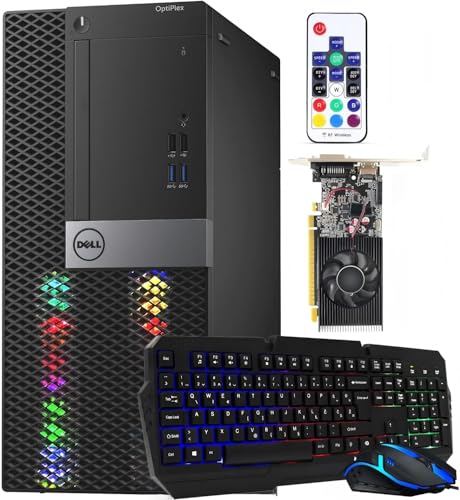
- Best for streaming: Dell RGB Gaming Tower, Core i7 6th Gen, GTX 1050 Ti, 16GB RAM, 512GB SSD, Windows 11 Pro (Renewed) — Check on Amazon
- Beelink SER5 MAX Mini PC, Ryzen 7 5800H, 16GB RAM, 500GB SSD, Windows 11 Pro — Check on Amazon
- GMKtec M5 Plus Gaming Mini PC, Ryzen 7 5825U, 32GB RAM, 1TB SSD, Windows 11 Pro — Check on Amazon
- BOSGAME P4 Light Gaming Mini PC, Ryzen 7 5700U, 32GB RAM, 1TB SSD, Windows 11 Pro — Check on Amazon
See 2 more Amazon options
- KAMRUI E3B Mini Gaming PC, Ryzen 5 7430U, 32GB RAM, 512GB SSD — Check on Amazon
- ACEMAGICIAN AM06 Pro Mini Gaming PC, Ryzen 7 5800U, 16GB RAM, 512GB SSD, Dual LAN — Check on Amazon
Read the full guide ↓
Disclosure: As an Amazon Associate, reviewstook.com earns from qualifying purchases. Links to Amazon on this page are affiliate links; they cost you nothing extra. Listing details such as price and availability change often, so check the current Amazon listing before you buy.
Streaming asks a computer to do two jobs at once: play the game, and compress that gameplay into a live video feed sixty times a second, every second, for hours. A prebuilt under $400 was never designed with the second job in mind, so this guide grades these six machines the way a streamer actually loads them — encoder first, simultaneous workload second, and only then the usual prebuilt questions about what is in the box and who stands behind it. The honesty note comes first, because it shapes every pick: there is exactly one machine here with a dedicated hardware video encoder of the kind streaming software prefers, and it is the renewed tower. The five new mini PCs encode through the integrated graphics of their Ryzen processors — a real hardware encoder, but an older, softer one — and not one machine in this guide, at any position, can encode AV1. What $400 honestly buys a streamer is a starter arrangement: a talk-and-desktop stream, a console stream through a capture card, a dedicated second PC doing nothing but encoding, or light esports streamed from the same box that plays them. Demanding modern games played and streamed from one $400 machine is the one shape this budget does not honestly offer, and no review below pretends otherwise.
The Streaming Workflow This Guide Grades Against
Every judgment in this guide is measured against a concrete workload, so here it is. The baseline stream is Twitch at roughly 6,000 kbps with constant bitrate (CBR) and a two-second keyframe interval at 1080p60 — the platform’s practical ceiling for most broadcasters, and the hardest common case because a fast-moving game at 6,000 kbps gives the encoder very few bits per frame to work with. YouTube is the second target: it accepts much higher bitrates, takes 1440p streams, and supports AV1 live encoding, which rewards newer encoder hardware — hardware this budget does not contain, a fact the encoder map below states plainly. Twitch’s own AV1 route exists only through its Enhanced Broadcasting programme and remains limited, so for a Twitch-first streamer AV1 is a future consideration, not a buying criterion today. Streaming in 4K is limited by the platforms rather than by any PC at any price, so no pick here is graded on it. Alongside the encode itself, each machine is graded on the simultaneous load around it: the game, OBS, a browser full of chat and dashboard tabs, voice chat, and a local recording if you keep one — because at this budget the encoder is rarely the only thing straining.
In this guide
Quick Picks
Short on time, or comparing several options at once? Each row below names a streaming job and the prebuilt that suits it, with a link to the listing.
| Streaming job | Pick | Why it stands out | Link |
|---|---|---|---|
| Only real one-box game streamer | Dell RGB Gaming Tower, GTX 1050 Ti (Renewed) | The guide’s only discrete encoder — Pascal NVENC carries the encode; renewed, so buy only at $400 or under | Check on Amazon |
| Best dedicated stream box | Beelink SER5 MAX, Ryzen 7 5800H, 16GB, 500GB | Strongest processor in the guide at a 54W budget — the mini with the most simultaneous-load headroom | Check on Amazon |
| Most room for the whole workload | GMKtec M5 Plus, Ryzen 7 5825U, 32GB, 1TB | 32GB of RAM and 1TB of storage for game, OBS, chat and recordings at once, dual 2.5GbE LAN | Check on Amazon |
| Same room, value tier | BOSGAME P4, Ryzen 7 5700U, 32GB, 1TB | The same 32GB/1TB working room and dual 2.5GbE networking — check price on Amazon | Check on Amazon |
| Tidiest stream desk | KAMRUI E3B, Ryzen 5 7430U, 32GB, 512GB | 32GB dual-channel memory and a VESA plate in the box — the whole PC bolts behind the monitor | Check on Amazon |
| Cheapest recording archive | ACEMAGICIAN AM06 Pro, Ryzen 7 5800U, 16GB, 512GB | A 2.5-inch bay waiting for a cheap drive to hold local recordings — check price on Amazon | Check on Amazon |
How These Picks Were Chosen
The first audit was the encoder, because in streaming the encoder — the piece of silicon that turns rendered frames into the video your viewers watch — decides picture quality more than any other single component. Each pick was graded only on the encoder its documented hardware actually contains, and the map in the next section lays out the whole set. The short version: one Pascal-generation NVENC block in the renewed tower, five Vega-generation AMD integrated encoders in the minis, no AV1 encoding anywhere, and no Intel Quick Sync claimed for any pick, because the only Intel processor in the set sits in the tower behind its discrete card and no integrated Intel encoder is documented for it in the base research this guide is built on. Any guide that promises you AV1, or a modern NVENC picture, from a $400 prebuilt is describing a machine that does not exist at this price.
The second audit was simultaneous load. A streaming PC is never running one program: it is running the game, OBS, a browser carrying chat and the dashboard, a voice-chat client, and often a local recording at higher quality than the stream itself. Laptop-class processors and 16GB of memory feel that stack; 32GB machines feel it less; storage fills with recordings faster than new streamers expect. Each review therefore grades its pick’s memory and storage as streaming specifications, not as spec-sheet decoration, and prices the known catches — a small SSD that will need a second drive for recordings — as machine plus fix, never folded quietly into the headline.
The third audit is the one the base guide for these machines was built on, and it still applies: completeness and support. Every pick arrives with Windows installed — five with Windows 11 Pro, the ACEMAGICIAN with Windows 11 in its standard edition — and wireless built in, from Wi-Fi 6 to Wi-Fi 6E. The five minis are new, sold by their makers through Amazon storefronts with the maker’s warranty behind them; read the warranty terms on the live listing before ordering. The tower is renewed: refurbished, graded Refurbished – Excellent, sold by a third-party Renewed seller (STG USA on the listing checked for the base guide) and shipped from Amazon, with the Amazon Renewed Guarantee — replacement or refund within 90 days — as its safety net instead of a warranty. Its renewed status is stated in its heading, its first paragraph and its limitation line, here as in the base guide. For every pick, check price on Amazon before you buy, because pricing at this tier changes often.
The Encoder Map: What Each Machine Actually Encodes With
The renewed Dell’s GTX 1050 Ti — Pascal NVENC. This is the only discrete hardware encoder in the guide, and the reason a 2017 graphics card leads a streaming guide in 2026. NVENC is a dedicated block on the card: it compresses the stream without asking the processor to do it, which is exactly the division of labour a one-box stream needs. Two honest limits. It is a Pascal-generation block, the generation before the big NVENC quality leap, so at Twitch’s 6,000 kbps its H.264 picture is visibly softer than a modern card’s — expect clean, watchable video, not the crisp text and fine detail newer encoders hold. And it has no AV1 encode: AV1 encoding hardware arrived with NVIDIA’s RTX 40-series and nothing older has it, whatever a listing implies. The same applies to the desktop RTX 3050 and 3060 cards you will see in guides one tier up — those are Ampere-generation NVENC, H.264 and HEVC only, with no AV1 encode either.
The five Ryzen minis — Vega-generation AMD integrated encoding. Each mini’s processor carries an AMD media engine alongside its Vega-class integrated graphics, and it will hardware-encode H.264 (and HEVC) in OBS while the same silicon renders your game or your desktop. That sharing is the honest caveat: the encoder block is separate, but the chip’s power and thermal budget is not, so a mini streaming a game it is also playing works harder than a mini encoding a feed it merely receives. AMD’s H.264 encoding of this generation is also visibly softer than NVENC at Twitch bitrates — fast motion and fine detail smear sooner — which is why these machines grade best as dedicated stream boxes and talk-stream machines, where the picture is a face and a desktop rather than a firefight. None of them encodes AV1: this Vega generation predates AV1 encoding entirely, and this guide makes no AV1 claim in either direction for them.
What is not in this set. No pick is credited with dual encoders; no pick offers Intel Quick Sync, and none is claimed; and the software x264 encoder is treated throughout as an emergency fallback, not a plan — on laptop-class processors, asking the CPU to software-encode a game stream while it also runs the game is how dropped frames happen. If AV1 encoding, or a modern NVENC picture, is a genuine requirement, the honest answer is that it starts at a higher budget than this one; the guides at Best Streaming PC Under $400 and Best Gaming PC For Streaming Under $400 cover the same money from other angles, and stepping up is covered by Best Prebuilt Gaming PC Under $500.
The 6 Best Prebuilt Gaming PCs for Streaming Under $400
Dell RGB Gaming Tower — Core i7 6th Gen, GTX 1050 Ti, 16GB RAM, 512GB SSD (Renewed)
Who it suits: The beginner streamer who wants to play and stream from one box — esports and older games, honestly framed — and who knowingly accepts refurbished hardware and a 90-day guarantee to get the only discrete encoder this budget contains.
Its terms come first, as they did in the base guide. This is an Amazon Renewed product: a refurbished Dell tower on a sixth-generation Core i7, graded Refurbished – Excellent, sold by a third-party Renewed seller and shipped from Amazon, backed by the Amazon Renewed Guarantee rather than a maker’s warranty. What justifies it at the head of a streaming guide is the GeForce GTX 1050 Ti inside. Its Pascal NVENC block is the only dedicated streaming encoder under $400: in OBS you select NVENC, the card compresses the stream on its own silicon, and the ageing processor is left to run the game and the desktop — the only arrangement in this guide where playing and encoding are genuinely separated. For esports titles and older games, which this card plays at 1080p, that separation is the whole ballgame: the stream stays smooth because the encode is not fighting the game for the same cores. The tower is also the most complete box here by a distance — the listing’s RGB set bundles a keyboard, mouse and speakers, Wi-Fi is built in, Windows 11 Pro is installed — so the streaming desk needs only a monitor and the kit discussed later in this guide.
The limits are real and stated in full. Pascal NVENC is an older generation: at Twitch’s roughly 6,000 kbps its picture is softer than a modern card’s, with fine detail and fast motion giving up first, and there is no AV1 encode on this card or anywhere else in this guide. The platform is from 2016: the processor predates Microsoft’s supported-CPU list for Windows 11, so the installed Windows 11 Pro is the refurbisher’s work, and 16GB of RAM with a 512GB SSD is a workable but tight simultaneous-load budget — recordings will outgrow that drive, and a second drive later is a machine-plus-fix cost, not a surprise to discover mid-season. Support is the 90-day guarantee window, which is why the OBS section below insists on a full rehearsal inside it. Price discipline is the final term, and it is hard: check price on Amazon before you buy, and treat this guide’s budget as a hard ceiling. Within that budget, it is the one genuine one-box streamer here. Above that budget, pass: the renewed risk is only worth taking while the live listing stays inside the guide’s budget.
- The only discrete hardware encoder in the guide — NVENC carries the stream while the CPU plays.
- The only complete box: RGB keyboard, mouse and speakers bundled, Wi-Fi built in, Windows 11 Pro installed.
- Backed by the Amazon Renewed Guarantee: replacement or refund within 90 days — rehearse inside it.
Honest limitation: Refurbished hardware on a 2016 platform with a 90-day guarantee instead of a warranty, an older and softer NVENC generation with no AV1 — and its live price can sit above this guide’s budget, at which point this guide does not recommend it — check price on Amazon first.
Choose it if you want to play and stream from one machine at this price, the live price is at or under $400, and you will test it thoroughly inside the guarantee window. Skip it if you need a new machine with a full warranty, modern encoder quality, or AV1 — none of those exist under $400.

Beelink SER5 MAX Mini PC — Ryzen 7 5800H, 16GB RAM, 500GB SSD (New)
Who it suits: The streamer building a two-machine setup on a budget — or running a talk, desktop or light esports stream from one small box — who wants the strongest processor in this guide doing the encoding.
Reframed for streaming, the SER5 MAX’s virtue is headroom. Its Ryzen 7 5800H runs at a 54W power budget, unusually generous for a mini PC, and simultaneous load is where that headroom is spent: the chip renders, encodes through its Vega-generation AMD media engine, and still has cores for OBS’s supporting cast of browser, chat and voice. As a dedicated stream box it is the best in this guide — a capture card brings the game in from a console or a main PC, and the Beelink does nothing but encode it, a job well inside its abilities, with the encoder’s softness at Twitch bitrates the only real compromise. As a one-box machine it handles talk and desktop streams comfortably and light esports streaming honestly; demanding games played and streamed on the same integrated graphics are where its class tells, and this guide does not pretend otherwise. It is a complete new prebuilt: Windows 11 Pro installed, Wi-Fi 6 and Bluetooth 5.2 built in, triple-display output, and Beelink’s storefront support behind it. Check price on Amazon before you buy.
Its streaming debits are capacity, not capability. Sixteen gigabytes of RAM is the tightest simultaneous-load figure among the serious picks here once a game, OBS, a browser and voice chat are all resident, and 500GB of storage fills quickly if you keep local recordings — a larger drive later is a machine-plus-fix cost, and both the RAM (to 64GB) and the SSD (to 2TB) can be upgraded, but a streamer who knows they record everything should weigh the 32GB/1TB machines below. And like every mini here, the box holds the machine, its power adapter and a display cable — no keyboard, mouse or monitor. Neither debit breaks it as a stream box; they define it as the strong, small encoder you grow storage onto, rather than the finished article.
- Strongest processor in the guide, with a 54W budget — the most simultaneous-load headroom of any mini here.
- The best dedicated stream box in the set: feed it a capture card and encoding is its only job.
- Windows 11 Pro, Wi-Fi 6 and triple-display output — check price on Amazon.
Honest limitation: Its AMD integrated encoder is visibly softer than NVENC at Twitch bitrates and has no AV1; 16GB of RAM and 500GB of storage are tight for a game-plus-stream workload with recordings kept.
Choose it if you are building a two-box setup, or your stream is talk, desktop or light esports from one box. Skip it if you want to play and stream demanding games from a single machine — that job belongs to the renewed tower above, within its own limits.

GMKtec M5 Plus Gaming Mini PC — Ryzen 7 5825U, 32GB RAM, 1TB SSD (New)
Who it suits: The streamer whose problem is not the encode but everything around it — the one who keeps recordings, runs a crowded dashboard, and wants the workload to fit without negotiation.
The M5 Plus grades for streaming on room. Thirty-two gigabytes of DDR4 and a 1TB NVMe SSD — double the memory and storage of the Beelink — mean the simultaneous-load stack this guide grades against simply fits: game or capture feed, OBS, browser tabs, voice chat, and a local recording writing to a drive that is not already nearly full. Its Ryzen 7 5825U encodes through the same Vega-generation AMD media engine as the other minis, with the same honest softness at Twitch bitrates and the same absence of AV1, and its U-series power budget gives it less sustained headroom than the Beelink’s 54W chip — which is why it sits third for streaming despite the fuller specification: as a dedicated stream box or a talk-and-desktop machine it is entirely comfortable, and as a one-box game streamer it shares the integrated-graphics ceiling of its class. The networking quietly serves a streamer well: dual 2.5GbE LAN ports mean the wired connection this guide insists on never has to share a port with a home-server second job, and Wi-Fi 6E is there for everything except the stream itself. Windows 11 Pro is installed; a second M.2 slot waits for more recording storage. Check price on Amazon before you buy.
The cautions are the ones its base-guide review carried. Confirm the configuration in the cart is the 32GB/1TB version this review describes, because mini PC listings commonly offer several configurations under one page. Support runs through GMKtec’s storefront and warranty — read the terms on the live listing before ordering. And keep the encoder expectation set: this machine’s stream picture will be a good AMD-integrated picture, which at 6,000 kbps means fast-moving game footage softens sooner than it would from the tower’s NVENC — one more reason it earns its place as the roomy stream box rather than as a one-box games machine.
- 32GB RAM and 1TB SSD fitted from the factory — the simultaneous-load stack fits without trimming.
- Dual 2.5GbE LAN: a dedicated wired port for the stream, with a second for everything else.
- Check price on Amazon before you buy.
Honest limitation: A U-series power budget sustains less headroom than the Beelink’s 54W chip, and its integrated encoder shares the AMD softness at Twitch bitrates — no AV1, and no NVENC-class picture.
Choose it if your stream carries a heavy supporting cast and a recording habit, and the encoding itself is a talk, desktop or captured feed. Skip it if one-box game streaming is the plan — its encoder and graphics are the wrong tools for that job.

BOSGAME P4 Light Gaming Mini PC — Ryzen 7 5700U, 32GB RAM, 1TB SSD (New)
Who it suits: The streamer who wants the M5 Plus’s working room — 32GB of RAM, 1TB of storage, serious networking — in a budget-friendly tier, and is comfortable verifying a configuration carefully on arrival.
The P4’s streaming case mirrors the GMKtec’s, positioned in a more budget-friendly tier. Its Ryzen 7 5700U, a generation behind the 5825U but in the same neighbourhood for this workload, encodes through the same Vega-generation AMD media engine: H.264 hardware encoding, visibly softer than NVENC at Twitch bitrates, no AV1 — stated here so no reader has to infer it. Around that encoder sits the room a stream needs: 32GB of RAM for the supporting cast, a 1TB SSD that does not force a recording decision in the first month, dual 2.5GbE LAN ports for the wired rule, Wi-Fi 6E for everything else, triple 4K display output for a multi-monitor stream desk, and Windows 11 Pro installed. As a dedicated stream box fed by a capture card, or as the machine behind a talk and desktop stream, it is fully specified for the job. Check price on Amazon before you buy.
The caution is the known quirk of this listing family, carried from the base guide at full size: the P4 has been sold in more than one processor variant under near-identical titles — a 5825U variant exists alongside the 5700U this review describes — so the configuration on the live page, and again in the box on delivery day, is worth thirty seconds of checking against this review’s 5700U / 32GB / 1TB description. For a streamer that check matters twice, because the processor is the encoder. BOSGAME is a smaller brand than Beelink or GMKtec, with seller-led support through its storefront; the warranty terms live on the listing, and the first week — while both the maker’s terms and Amazon’s return window are open — is the time to run the full streaming rehearsal described below.
- 32GB RAM and 1TB SSD from the factory, with Windows 11 Pro installed.
- Wi-Fi 6E and dual 2.5GbE LAN — the wired-stream rule is easy to obey here.
- Check price on Amazon before you buy.
Honest limitation: A smaller brand with seller-led support; this listing family has carried more than one processor variant, and its integrated encoder shares the AMD softness — verify the configuration on the live page and on delivery.
Choose it if you want the full 32GB/1TB stream-box specification in a budget-friendly tier, or the dual-LAN networking. Skip it if you would rather have a bigger brand’s support network, or you need a one-box game streamer.

KAMRUI E3B Mini Gaming PC — Ryzen 5 7430U, 32GB RAM, 512GB SSD (New)
Who it suits: The streamer with a small, visible desk — a bedroom or shared-room setup — who wants the stream box to disappear behind the monitor and the budget to stay low.
The E3B’s streaming proposition is tidiness plus memory. A VESA mounting plate is included in the box, so the entire stream PC bolts to the back of a monitor: no box on the desk, no extra cable run across it, and a setup that looks like a monitor and a microphone rather than a control room. Behind that monitor, its specification is sensible for the job: a Ryzen 5 7430U encoding through the same Vega-generation AMD media engine as the other minis — H.264 in hardware, softer than NVENC at Twitch bitrates, no AV1 — and 32GB of dual-channel DDR4, the configuration that gives the simultaneous-load stack its room and integrated graphics their best memory arrangement. As a dedicated stream box or a talk-stream machine it is well judged, and it sits in a budget-friendly tier for a new 32GB machine — check price on Amazon before you buy. RAM can be expanded to 64GB and storage to 2TB later, per the coverage of this listing.
Two limits, both carried from the base guide. The 7430U is a six-core chip — the thinnest processor headroom among the 32GB picks — so its simultaneous-load margin is the first to thin if you ask it to play a game and stream it at once; treat it as a stream box and a talk machine, not a one-box games streamer. And KAMRUI sells this model in more than one configuration: the 16GB version exists under a separate listing (a different ASIN entirely), and the machine reviewed here is the 32GB one, so confirm the configuration in the cart before paying. Its 512GB SSD is the other quiet catch for a recording streamer — a second drive later is a machine-plus-fix cost. Support is seller-led through KAMRUI’s Amazon storefront; do the first-week streaming rehearsal while Amazon’s return window is open.
- VESA mount included: the whole stream PC disappears behind the monitor.
- 32GB of dual-channel RAM — the memory configuration this workload benefits from most.
- Check price on Amazon before you buy.
Honest limitation: Vega 7 graphics and a six-core processor give it the thinnest simultaneous-load margin of the 32GB picks; support is seller-led, and a 16GB sibling configuration exists — check the cart carefully.
Choose it if the stream desk must stay invisible and the stream is talk, desktop or a captured feed. Skip it if you want one-box game streaming headroom — look at the tower, or the Beelink as a stream box.
ACEMAGICIAN AM06 Pro Mini Gaming PC — Ryzen 7 5800U, 16GB RAM, 512GB SSD (New)
Who it suits: The streamer on the tightest budget who records everything — and wants a cheap bay waiting for the archive drive — and who is comfortable doing an hour of first-boot hygiene on a value-brand machine.
The AM06 Pro’s streaming case is its storage economics. Its Ryzen 7 5800U encodes through the same Vega-generation AMD media engine as the other minis in this guide — H.264 hardware encoding, the familiar softness at Twitch bitrates, no AV1 — and as a dedicated stream box or talk-stream machine it does that job as well as its silicon allows. What distinguishes it is underneath: a 2.5-inch expansion bay ready for an inexpensive SATA drive, which changes how a recording habit is paid for. Local recordings and the VOD archive grow into the cheap bay while the 512GB NVMe SSD keeps the system and OBS; no other pick here grows recording storage this cheaply. Dual LAN ports serve the wired rule, and triple 4K output covers a multi-monitor desk — check price on Amazon before you buy.
Its debits are the ones the base guide stated, unchanged. Sixteen gigabytes of RAM is, with the Beelink, the tightest simultaneous-load figure in this guide — fine for a stream box whose only real job is encoding, thinner if the machine must also play. Support is value-brand and seller-led through ACEMAGICIAN’s storefront, without the service depth of the larger makers. And its listing specifies Windows 11 without the Pro edition most rivals here include — irrelevant to OBS, but check the live listing if the edition matters to you for anything else. The standard value-brand routine applies and is worth following: on first boot, let Windows update fully, run a security scan, and consider a clean Windows install from Microsoft’s own media if anything about the software load looks unfamiliar — then run the streaming rehearsal in the first week, while every window is open.
- A 2.5-inch expansion bay — the cheapest recording-archive growth path in this guide.
- Dual LAN and triple 4K output in a value-tier, fully working stream box.
- Check price on Amazon before you buy.
Honest limitation: Value-brand, seller-led support; Windows 11 without the Pro edition; 16GB of RAM is a tight simultaneous-load budget — plus the usual mini PC absence of keyboard, mouse and monitor.
Choose it if the expansion bay and its budget-friendly positioning appeal and your stream is talk, desktop or a captured feed. Skip it if you want the strongest brand support, 32GB fitted from the factory, or any one-box gaming ambition.

Comparison Table
| Product | Encoder | Best streaming use | Link |
|---|---|---|---|
| Dell RGB Gaming Tower, GTX 1050 Ti | Pascal NVENC (discrete) | The only one-box play-and-stream arrangement, at $400 or under only | Check on Amazon |
| Beelink SER5 MAX, 5800H, 16GB, 500GB | AMD integrated (Vega generation) | The strongest dedicated stream box; light esports from one box | Check on Amazon |
| GMKtec M5 Plus, 5825U, 32GB, 1TB | AMD integrated (Vega generation) | The roomiest stream box — recordings and a crowded dashboard fit | Check on Amazon |
| BOSGAME P4, 5700U, 32GB, 1TB | AMD integrated (Vega generation) | The same room and networking in a budget-friendly tier | Check on Amazon |
| KAMRUI E3B, 7430U, 32GB, 512GB | AMD integrated (Vega generation) | A stream box that mounts behind the monitor and vanishes | Check on Amazon |
| ACEMAGICIAN AM06 Pro, 5800U, 16GB, 512GB | AMD integrated (Vega generation) | A cheap stream box with a bay waiting for the archive drive | Check on Amazon |
How to Choose a Prebuilt for Streaming Under $400
- Decide the shape of your stream before the machine. One box playing and streaming, a dedicated stream box fed by a capture card, or a talk and desktop stream — the three honest shapes at this budget point at different picks. The tower is the one-box answer; the minis are stream boxes and talk machines; demanding games played and streamed from any single $400 machine is not on the menu.
- Grade the encoder, not the graphics headline. What your viewers see is the encoder’s work. This set contains one Pascal NVENC block and five Vega-generation AMD encoders, no AV1 anywhere, and no Quick Sync claimed for any pick. A listing that implies modern encoder features at this price is describing silicon that is not in the box.
- Count the simultaneous load, not just the stream. Game or capture feed, OBS, browser, voice chat, recording — price the whole stack against the machine’s cores and memory. The 32GB picks absorb it; the 16GB picks are stream boxes first and everything else second.
- Plan recording storage on day one. A local recording habit eats a 500GB drive in a season. Either buy the 1TB machines, or price the smaller picks as machine plus a second drive — the ACEMAGICIAN’s bay makes that fix cheapest, and the Beelink’s SSD can be swapped to 2TB.
- Wire the stream. Every pick here can take a cable, and the dual-LAN machines make it effortless. Streaming over Wi-Fi from any of these machines is choosing dropped frames; the OBS section below treats the cable as a rule, not a preference.
- Respect the renewed terms. The tower is the best streamer here and a refurbished machine with a 90-day guarantee. Buy it only at $400 or under, set it up immediately, and run the full rehearsal while a fault still means a refund.
- Verify the configuration in the cart. Mini PC listings carry several configurations on one page, and this set includes a listing family sold with two different processors under near-identical titles. The processor is the encoder — confirm the cart, and confirm again on delivery.
- Set the picture expectation before the first stream. At 6,000 kbps, this hardware produces a clean, watchable stream whose fast motion softens sooner than a modern encoder’s would. Viewers forgive a soft picture on a small channel; they do not forgive stutter, which is a settings and wiring problem this guide shows you how to avoid.
Setting Up OBS on These Machines
Pick the encoder your silicon actually has. On the renewed Dell, select the NVENC H.264 encoder in OBS — that choice is the entire reason the tower leads this guide, because the encode then runs on the card’s dedicated block instead of the processor. On every mini, select the AMD hardware H.264 encoder. On no machine in this guide should you select AV1 — none of them can encode it — and x264 software encoding is an emergency fallback for a static talk scene at most, never the plan for gameplay: on these laptop-class processors it competes with the game for the same cores and loses.
Set the platform numbers. For Twitch: rate control CBR, bitrate around 6,000 kbps, keyframe interval two seconds, output 1080p60 if the feed is a captured console or desktop source, and 720p60 if one of the minis is also rendering the game — a smaller picture encoded well beats a larger one starved of bits. For YouTube you may raise the bitrate substantially and stream at 1440p output, which also earns a better transcode on YouTube’s side; the encoder hardware limits stay the same. Preset choices follow the same logic everywhere in this set: choose the quality preset one step back from the maximum on the AMD minis, because the slower presets cost simultaneous-load headroom these machines do not have spare.
Read the three lag counters, and know each fix. OBS’s stats window separates streaming failures into three kinds, and each has a different cause. Rendering lag means the graphics side could not compose frames in time — the fix is to cap the game’s frame rate, lower its settings, or, on a mini doing double duty, move the game to another machine and let this one only encode. Encoding lag means the encoder itself is overloaded — the fix is a faster encoder preset, a lower output resolution or frame rate, and confirming you selected the hardware encoder rather than x264. Network dropped frames mean the connection, not the computer — the fix is the wired rule below, a lower bitrate, and a different ingest server, in that order. Diagnosing which counter is moving turns a ruined stream into a five-minute adjustment; guessing turns it into new hardware bought for the wrong reason.
The wired rule is absolute. Run an Ethernet cable from the router to the streaming machine for every stream, on every pick, without exception. Wi-Fi — even the Wi-Fi 6E two of these machines carry — varies with walls, neighbours and microwave ovens, and a stream is a constant-rate flow that exposes every variation as dropped frames your viewers see as stutter. The dual-LAN GMKtec and BOSGAME make the rule easy; the tower’s built-in wireless does not exempt it. If a cable genuinely cannot reach, treat that as a problem to solve with a longer cable or a moved router before treating it as a reason to stream wirelessly.
Rehearse for an hour before it counts. Before your first public stream, run a private test — an unlisted YouTube stream or a Twitch test broadcast — for a full hour at your intended settings, with the game or feed, the browser, voice chat and a local recording all running, and watch the three counters. Do this in the first week with any machine, and inside the guarantee window with the renewed tower, while a hardware fault is still the seller’s problem. An hour of rehearsal is the cheapest streaming equipment in this entire guide.
What Else a Stream Needs: Costing the Kit
The PC is not the whole purchase, and this section costs the rest of the desk in priority order — deliberately without prices, because the right spend in each category depends on your room and your voice, and a guide that invents a bundle total is not helping you budget. Microphone first. Viewers tolerate a soft picture far longer than bad audio; a dedicated USB microphone, positioned close to your mouth with the gain set low, is the single largest quality jump a new streamer can buy, ahead of every other item here. Any pick in this guide runs one without noticing it. Lighting second. A single light in front of you, raised and angled, does more for a face camera than a camera upgrade does — it lets whatever webcam you own work at a low, clean gain instead of a noisy one. Webcam third. Only after the microphone and the light; a modest webcam lit properly outperforms an expensive one in a dark room, and every machine here drives one alongside the stream without strain. Capture card last, and only for its one job. A capture card is how a console — or a separate gaming PC — feeds a stream box, and for the two-machine and console shapes in this guide it is essential: it is how the minis above receive the game they encode. For games played on the same PC that streams them, a capture card does nothing at all — the game is already in the machine — and buying one for a one-box setup is the most common wasted purchase in starter streaming. Buy the kit in this order, as the channel proves it needs each piece.
Common Buying Mistakes
- Believing a $400 prebuilt can encode AV1, or that a card from the RTX 3050/3060 generation can — AV1 encoding starts with the RTX 40-series, and nothing in this guide has it.
- Selecting x264 software encoding on a laptop-class processor and asking it to run the game too — the dropped frames that follow are a settings error, not a broken machine.
- Streaming over Wi-Fi because the listing advertised Wi-Fi 6E. Wireless generation is not wired stability; run the cable.
- Buying a capture card for a one-box setup, where it captures nothing — it belongs in console and two-machine setups only.
- Spending on a webcam before a microphone. Audio is the quality viewers judge first and forgive last.
- Buying the renewed tower on a day its price has drifted above $400, paying new-machine money for refurbished risk and an older encoder.
- Skipping the streaming rehearsal until the first public stream — or, with the renewed tower, until after the 90-day guarantee has closed.
- Ordering the wrong configuration from a multi-configuration listing, then discovering the processor — which is the encoder — is not the one the review described.
- Judging the minis as failed game streamers when they were honestly specified as stream boxes. The shape of the setup is a buying decision; make it before the purchase, not after the first stream.
Final Recommendation
- One box, playing and streaming: Dell RGB Gaming Tower (Renewed), at $400 or under only.
- Best dedicated stream box: Beelink SER5 MAX.
- Room for recordings and the whole dashboard: GMKtec M5 Plus.
- The same room in a budget-friendly tier: BOSGAME P4.
- An invisible stream desk: KAMRUI E3B.
- A recording archive on a budget: ACEMAGICIAN AM06 Pro.
Our top two for streamers at this budget are the renewed Dell tower, for the only genuine one-box arrangement under $400 — its NVENC block carries the encode while its processor plays, and its bundle completes the desk — bought with open eyes, a hard $400 ceiling and a full rehearsal inside its 90-day guarantee; and the Beelink SER5 MAX, for the strongest stream box in the set, whose 54W processor has the headroom to encode a captured feed and run the whole supporting cast without drama. Between them they cover the two honest shapes of this search: one machine doing both jobs within its class, and one small machine doing the encoding job properly. Streamers whose games live on a console should also read Best Mini PC For Streaming Under $400, and anyone whose budget can move should see Best Prebuilt Gaming PC Under $500, where newer encoder hardware begins to enter the picture. Whichever shape you choose, wire it, rehearse it, and set the encoder expectation this guide has stated from its first paragraph — a clean, honest stream at this price beats an imaginary one at any price.
Frequently Asked Questions
Can you really stream from a prebuilt PC under $400?
Yes — in the shapes this guide describes. A talk or desktop stream, a console stream through a capture card into a dedicated stream box, light esports played and streamed from the renewed tower, or a two-machine setup with a mini encoding: all are real, working arrangements at this price. What $400 does not buy is one machine that plays demanding modern games and streams them well at the same time, and it does not buy AV1 encoding or a modern NVENC picture anywhere.
Which of these PCs has the best encoder?
The renewed Dell’s GTX 1050 Ti, because its Pascal NVENC is a dedicated encoding block that works independently of the processor — the only one in the guide. It is an older NVENC generation, so its picture at Twitch’s 6,000 kbps is softer than a modern card’s, and it has no AV1. The five minis share Vega-generation AMD integrated encoders: genuinely hardware encoding, visibly softer than NVENC at Twitch bitrates, and best used where encoding is their only job.
Does any PC under $400 encode AV1 for YouTube or Twitch?
No. AV1 encoding hardware arrived with NVIDIA’s RTX 40-series on the desktop side, and nothing at this price contains it — not the renewed tower’s GTX 1050 Ti, not the minis’ integrated graphics, and not the RTX 3050 or 3060 cards in guides one tier up, which are Ampere-generation and encode H.264 and HEVC only. For a Twitch-first streamer this costs little today, since Twitch’s AV1 route remains limited; for YouTube it is a reason to budget higher when AV1 becomes the point of the purchase.
Should I use one PC or two for streaming at this budget?
Two modest machines beat one strained one at this price, if you already own or can cheaply get the second. A mini in this guide doing nothing but encoding a captured feed is a calm, reliable setup. One-box streaming is the renewed tower’s job — its NVENC separation is what makes it work — and even there, the honest scope is esports and older games. Asking any of the minis to render a demanding game and encode it simultaneously is asking integrated graphics to be in two places at once.
Why does this guide insist on an Ethernet cable?
Because a stream is a constant-rate flow, and Wi-Fi is a variable one. Every dropped frame caused by a wireless fluctuation is visible to every viewer as stutter, and OBS’s network counter will show them even when the game itself feels fine. Every pick here has a wired port — two of them have two — and a cable is the cheapest quality upgrade in streaming. Stream over Wi-Fi only after a wired test has proven the machine and settings innocent.
Is the renewed tower a safe buy for a streamer?
It is a managed risk, managed the same way as in the base guide: the Amazon Renewed Guarantee gives you replacement or refund within 90 days if the machine does not work as expected, with free returns. For a streamer the management has a specific form — run the full one-hour streaming rehearsal in the first week, at your real settings, so any fault surfaces while the answer is still a refund. Buy it only at $400 or under; above that price the risk is simply worse paid.
What should I buy first besides the PC?
A microphone, before anything else — viewers judge audio first. Then a light for your face, then a webcam if your format needs one, and a capture card only if your games live on a console or a second PC. The kit section above costs that order out in full; none of it strains any machine in this guide, and none of it rescues a stream whose encoder settings and wiring are wrong, which is why the OBS section comes first.
- Best Prebuilt Gaming PC Under $400
- Best Prebuilt Gaming PC Under $500
- Best Prebuilt Gaming PC Under $700
- Best Prebuilt Gaming PC For Beginners Under $400
- Best Prebuilt Gaming PC For Small Spaces Under $400
- Best Prebuilt Gaming PC For 1440p Gaming Under $400
- Best Streaming PC Under $400
- Best Gaming PC For Streaming Under $400
- Best Budget Gaming PC For Streaming Under $400
- Best Mini PC For Streaming Under $400


