Where to buy
Check the latest price, availability and delivery on Amazon. Orders are placed on Amazon. We may earn a commission from qualifying purchases.
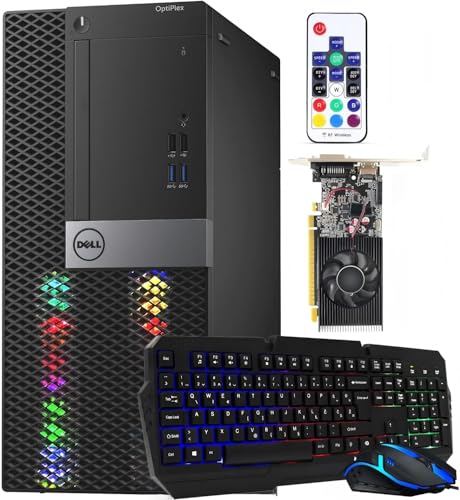
- Strongest renderer under $400: Dell RGB Gaming Tower Computer, Core i7 6th Gen, GTX 1050 Ti 4GB (Renewed) — Check on Amazon
- Dell RGB Gaming Desktop PC, Core i5, Radeon RX 550 4G, Custom RGB Case Lighting (Renewed) — Check on Amazon
- STGAubron Gaming PC Desktop, Core i5, RX 550 4G, New — Check on Amazon
- Dell OptiPlex Desktop (SFF) Bundle with 24 Inch Monitor and RGB Front Panel (Renewed) — Check on Amazon
See 2 more Amazon options
- Dell Gaming OptiPlex Desktop RGB Computer PC, Core i7-4770, GT 1030, 24 Inch Monitor Bundle (Renewed) — Check on Amazon
- Dell OptiPlex 3050 SFF with Flash Black Film RGB Panel, Core i5-6600 (Renewed) — Check on Amazon
Read the full guide ↓
Disclosure: As an Amazon Associate, reviewstook.com earns from qualifying purchases. Links to Amazon on this page are affiliate links; they cost you nothing extra. Listing details such as price and availability change often, so check the current Amazon listing before you buy.
This guide exists to answer one question honestly, so here is the answer before anything else: no RGB gaming PC under $400 renders modern games natively at 1440p. Not one of the six machines below — not the strongest of them, not on a good day, not at any setting a listing photograph would dare to show. What every one of them can do is light up a desk, drive a 1440p monitor with a crisp desktop, and present games on that monitor by rendering them at 1080p or below and upscaling the result. The distance between those two sentences — between displaying 1440p and rendering 1440p — is the entire subject of this guide, because it is the distance that listings at this price work hardest to blur.
The blur is easy once you see the mechanism. A graphics output that can carry a 2560×1440 signal is cheap and old; integrated graphics from a decade ago can put a sharp 1440p desktop on a screen. Rendering a game at 1440p is a different job entirely: the card must draw roughly 78 percent more pixels than a 1080p frame, every frame, and the cards this budget buys — a GTX 1050 Ti at the top, an RX 550 in the middle, a GT 1030 and two sets of integrated graphics below — were built to draw 1080p frames, modestly, when they were new. They have not become faster since. So the working pattern for this tier is settled before we begin: buy the 1440p monitor for its sharpness and because it will outlive the PC, set games to render at 1080p, let FSR upscale where a game offers it, and enjoy a picture that looks close to native on a still screen and honest about what it is in motion.
Two more honesty notes before the picks. The RGB in these product names buys no frames — it is fixed-pattern fans, a fitted light set, a front panel run by a remote, or backlit peripherals, and no pick here has addressable, software-controlled lighting. And the upscaling story needs care: DLSS, the upscaler most buyers have heard of, appears nowhere in this guide’s picks, because DLSS requires NVIDIA RTX hardware with Tensor cores and every card below is older than that invention or made by someone else. FSR is the upscaler these machines actually have. Each review grades its pick on the same terms: what it renders, what it merely displays, and which upscaler it can use. Check the price on Amazon for each pick before you buy, and only buy when a listing sits at or under the $400 line.
In this guide
Quick Picks
Short on time, or comparing several options at once? Each row below names a buyer type and the product that suits it, with a link to the listing.
| Buyer type | Pick | Why it stands out | Link |
|---|---|---|---|
| Strongest 1440p route under $400 | Dell RGB Gaming Tower, Core i7 6th Gen, GTX 1050 Ti (Renewed) | The only card here with any native-1440p territory — light titles at low settings — and the best 1080p-render-plus-upscale machine | Check on Amazon |
| Best in-budget renderer | Dell RGB Gaming Desktop, Core i5, RX 550 4G (Renewed) | A real discrete card, DisplayPort documented for the 1440p monitor — check price on Amazon | Check on Amazon |
| Best new machine | STGAubron Gaming PC Desktop, Core i5, RX 550 4G | The same RX 550 rendering class in a new tower, with outputs its title rates for 4K display — display, not rendering | Check on Amazon |
| Best complete setup | Dell OptiPlex (SFF) Bundle, 24 Inch Monitor (Renewed) | Monitor and peripherals in one box; a 1440p desktop-class machine for light titles, not a 1440p renderer | Check on Amazon |
| Best bundle with a discrete card | Dell Gaming OptiPlex RGB, Core i7-4770, GT 1030 (Renewed) | A discrete card a step above integrated, with a monitor included — check price on Amazon | Check on Amazon |
| Budget 1440p desktop | Dell OptiPlex 3050 SFF Flash Black Film (Renewed) | A budget-tier option: integrated graphics, a sharp desktop, light games, cloud streaming — check price on Amazon | Check on Amazon |
How These Picks Were Chosen
The budget was applied as a ceiling. Every pick is presented for this under-$400 tier, and each review tells you to check the price on Amazon before buying, since listing prices change often. Only buy a pick when its current Amazon price sits at or under $400.
Because this keyword is about a resolution, each pick was graded first on rendering, from the graphics hardware its listing documents. The ladder at this price is short and unforgiving: a GTX 1050 Ti, two RX 550 machines, a GT 1030, and two listings that name no discrete card at all — which this guide treats, here and everywhere, as integrated graphics. Upscaling was then checked per card rather than assumed from brand names. DLSS was looked for and found nowhere: it runs only on NVIDIA RTX cards with Tensor cores, and the two NVIDIA cards in this set are Pascal-generation GTX models that predate Tensor cores entirely, while the Radeon and integrated picks are not NVIDIA hardware at all. Where a review mentions DLSS, it is to deny it. FSR — AMD’s FidelityFX Super Resolution, which runs across brands including every GPU class in this guide — is credited generically as the set’s working upscaler, with no internal-resolution figures attached, because the base research for these listings documents none and we do not borrow numbers from other hardware. Finally, display outputs are claimed only where a listing documents them; where one does not, the review says so and sends you to the live listing, because the port is what decides how a 1440p monitor gets connected.
We did not use these products ourselves. We read the maker and refurbisher listings and their specification blocks, and compared graphics cards, processors, memory, storage, documented outputs and warranty routes. Renewed machines are named as renewed in every heading, table row and recommendation, because a renewed tower with a 90-day guarantee is a different purchase from a new tower with a maker’s warranty even when the specifications match — and at this tier, five of the six honest options are renewed.
The 6 Best RGB Gaming PCs for 1440p Gaming Under $400
Dell RGB Gaming Tower Computer, Core i7 6th Gen, GTX 1050 Ti 4GB, 16GB RAM, 512GB SSD, Windows 11 Pro (Renewed)
Who it suits: The buyer who wants a 1440p monitor on the desk and the strongest rendering this budget can honestly attach to it — the only pick here whose card has any native-1440p territory at all.
Start with the card, because at this resolution the card is the whole story. The GeForce GTX 1050 Ti with 4GB of GDDR5 is the most capable renderer in this guide by a wide margin, and its honest 1440p verdict splits in two. For esports titles and older games — the League of Legends, Counter-Strike and back-catalogue class — it can render natively at 2560×1440 at low settings, and that is a narrow territory no other pick here owns. For anything modern and demanding, it is a 1080p renderer: set the game to 1920×1080, let FSR upscale to the panel where the game offers it, and the result on a 1440p screen is presentable in a way a native render at unplayable frame rates never is. The 4GB of video memory matters more at this output resolution than at 1080p, because upscaling still has to store textures at the display’s scale — the 1050 Ti’s 4GB is the largest texture budget in this guide, which is part of why it grades first on this angle as well as the base one.
What this card cannot do is DLSS, and the review states it plainly because the GTX badge invites the assumption: the 1050 Ti is Pascal silicon, built before NVIDIA put Tensor cores in anything, so DLSS does not exist for it in any game. FSR is its upscaler. Around the card sits a 6th-generation Core i7 at 3.4GHz, 16GB of DDR4 and a 512GB SSD under Windows 11 Pro — an old platform, honestly labelled, but balanced, with no part embarrassing the renderer. The RGB is a light set fitted by the refurbisher to a business tower; judge it as the best-rendering machine here that also glows, not as a light show. The machine is Amazon Renewed, Refurbished – Excellent, sold by STG USA with the 90-day refund-or-replacement guarantee. On price, check the price on Amazon before you buy and only buy when it sits at or under $400.
- GTX 1050 Ti 4GB — the strongest renderer here; native 1440p only for light titles at low settings, a genuine 1080p-render-plus-FSR machine for the rest.
- 4GB of VRAM is the set’s largest texture budget, which counts double when the output is a 1440p panel.
- Balanced platform: 6th-gen Core i7, 16GB DDR4, 512GB SSD, Windows 11 Pro, in an openable full-size tower.
Honest limitation: DLSS is denied outright — Pascal has no Tensor cores — and this is a renewed machine with a 90-day guarantee rather than a warranty, so check the price on Amazon and buy only at or under $400.
Choose it if the 1440p monitor is the plan and you want the best rendering $400 can attach to one. Skip it if you expected DLSS or native 1440p in modern games — no machine in this guide offers either, and this one is simply the closest.

Dell RGB Gaming Desktop PC, Core i5, Radeon RX 550 4G, 16GB RAM, 512GB SSD, Windows 10 Pro (Renewed)
Who it suits: The value buyer who wants a real graphics card feeding the 1440p monitor, a documented DisplayPort to feed it through, and good value in this tier — check price on Amazon.
The Radeon RX 550 with 4GB of GDDR5 sets this machine’s ceiling, and the review will not raise it: this is a 1080p-rendering card. Esports and older titles at 1080p low-to-medium settings are its working range, and on a 1440p panel the honest configuration is a 1080p render upscaled — by FSR in games that implement it — to fill the screen. Native 1440p rendering of anything beyond the lightest titles is not a settings problem you can tune away; the pixels simply cost more than this card has. What the pick does document, unusually for this tier, is its outputs: HDMI, DisplayPort and DVI are listed, and DisplayPort is the connection a 1440p monitor wants, so the pairing here is verified rather than assumed. DLSS, again, is denied — the RX 550 is AMD hardware and DLSS is an NVIDIA RTX technology — and the listing’s documented “Custom RGB Case Lighting” plus RGB keyboard and mouse make it one of two picks where the case itself is lit as a designed feature.
Two plain statements belong in this review. The memory is DDR3, per the listing’s own specification data, a generation older than the DDR4 in the tower above, which caps upgrades. And it ships with Windows 10 Pro, whose mainstream support has ended — plan for that, or accept this as a games-and-browsing box rather than a long-term main PC. Connectivity is by USB WiFi and Bluetooth dongles rather than built-in radios. Against all of that, the value is the argument — check price on Amazon. It comes from the same refurbisher family as the top pick, with a one-year parts-and-labor cover stated in the listing copy — read the terms on the live page before relying on it, since refurbisher cover varies, but as stated promises go it beats the renewed minimum.
- RX 550 4GB discrete graphics — a real card, graded honestly as a 1080p renderer with FSR upscale to the 1440p panel.
- HDMI, DisplayPort and DVI documented in the listing — the 1440p monitor pairing is verified, not guessed.
- Check price on Amazon: a discrete-card tower in this budget tier, with custom case lighting.
Honest limitation: No native 1440p gaming beyond the lightest titles, no DLSS, DDR3 memory and an out-of-support Windows 10 Pro installation — the platform is dated twice over.
Choose it if you want the lit case, the real card and the documented DisplayPort, in budget, today. Skip it if Windows 10 or DDR3 bothers you — the new STGAubron below answers both objections with the same rendering class in a new machine.
STGAubron Gaming PC Desktop, Core i5, RX 550 4G, 16GB RAM, 512GB SSD, WiFi 6, Windows 11 Home (New)
Who it suits: Buyers who want a new machine with a maker’s warranty behind the 1440p monitor — and who understand that this listing’s own title is the perfect illustration of the difference between displaying a resolution and rendering it.
Look at the title’s output claim first, because it teaches the whole angle. The listing advertises “4K DP, HDMI” among its features — DisplayPort and HDMI outputs rated to carry a 4K signal. That statement is about the cable, and it is entirely compatible with the truth about the card behind it: a Radeon RX 550 with 4GB of GDDR5, which renders games at 1080p. A machine can display a desktop at 4K and render its games at a quarter of that resolution in the same afternoon, and this one would. For a 1440p panel the working pattern is the same as the Dell above it — render at 1080p, upscale with FSR where a game offers it, and let the sharp desktop be the resolution you actually live at. DLSS is denied for the same reason: this is AMD hardware, and DLSS belongs to NVIDIA’s RTX line. The processor is a Core i5 running up to 3.6GHz, with 16GB of memory and a 512GB SSD, and the new-machine details are real advantages the renewed towers cannot match: WiFi 6 and Bluetooth 5.0 built in, a genuine Windows 11 Home license, an RGB keyboard and mouse in the box, and a warranty relationship with the maker.
The lighting needs the correction this pick has carried through the whole batch. The title calls its fans “ARGB” — addressable, per-LED, software-programmed. The specification block describes the cooling as “RGB Fan,” two of them, and names no lighting-control software, sync system or controller anywhere. When a listing disagrees with itself, believe the plainer statement: plan on fixed or simply-cycling rainbow fans that light the case handsomely and take no instructions. On price, check the price on Amazon before you buy. At or under $400 the new-machine premium is defensible; above it, you are paying that premium for rendering the renewed Dell beside it matches.
- The guide’s only new machine: a maker’s warranty, a genuine Windows 11 Home license, and built-in WiFi 6 and Bluetooth 5.0.
- Outputs its title rates for 4K display over DisplayPort and HDMI — connection headroom, honestly separated from rendering power.
- RX 550 4GB with 16GB of RAM and a 512GB SSD: the same honest 1080p-render class as the renewed Dell, with FSR as its upscaler.
Honest limitation: The “4K” in the feature list is an output rating, not a gaming resolution, the “ARGB” in the title is not backed by any named control software — check the price on Amazon and buy only at or under $400.
Choose it if new-with-warranty matters — check price on Amazon first. Skip it if you read “4K DP” as a promise about games — it is a promise about a port, and the RX 550 behind it renders at 1080p.

Dell OptiPlex Desktop Computer (SFF) Bundle, Core i5, 16GB RAM, 512GB SSD, 24 Inch Monitor, Windows 11 Pro (Renewed)
Who it suits: A buyer starting from nothing who wants one box to contain the whole desk — and whose resolution ambitions are a sharp desktop and light games, not rendered 1440p.
The graphics question must be answered first, because the listing does not answer it: nothing in this listing’s description names a discrete graphics card, and in this guide that silence is always read the same way — the graphics are the processor’s integrated class. That settles the 1440p verdict in one line. This is a 1440p desktop machine: integrated graphics of this generation are entirely comfortable drawing a crisp 2560×1440 Windows desktop, documents, video and web, and that is a genuinely pleasant way to work. Games are the other job. Esports at low settings, older and lighter titles, rendered at or below 1080p and upscaled where FSR is offered, are the realistic library; anything modern and demanding is out of reach, and no setting changes that. There is no DLSS to discuss — integrated graphics have no Tensor cores — and FSR in supported games is the only upscaling help available.
What the bundle sells is completeness — check price on Amazon: a renewed small-form-factor OptiPlex with a quad-core Core i5 at 3.20GHz, 16GB of RAM and a 512GB SSD under Windows 11 Pro, a 24 inch monitor, a gaming keyboard with three backlight colors, a backlit mouse and a headset, with the PC’s RGB taking the form of a front-panel LED light whose patterns, speed and mode change by remote control. Two cautions follow from the angle of this guide. The included screen is the bundle’s convenience, not a 1440p upgrade — if a 1440p panel is the goal, it is a separate purchase, and you should confirm the machine’s display outputs on the live listing before pairing one, since the base listing copy does not enumerate them. And the small-form-factor case forecloses the usual escape route: low-profile slots and a modest power supply mean no realistic graphics-card upgrade later, so the rendering class you buy is the rendering class you keep. The renewed terms are the family’s standard ones — professionally inspected, a minimum 90-day guarantee, possibly a generic box.
- Everything in one box: 24 inch monitor, RGB-panel PC, backlit keyboard, mouse and headset — check price on Amazon.
- Integrated graphics graded plainly: a sharp 1440p desktop and light titles, with FSR help where games offer it.
- Windows 11 Pro and a 512GB SSD make it a capable everyday machine behind the panel.
Honest limitation: No discrete graphics card is named in the listing, so rendered gaming is integrated class — and the SFF case leaves no upgrade path, while the included monitor is a convenience screen, not the 1440p panel of the keyword.
Choose it if one order has to furnish the entire desk and the games in question are light ones. Skip it if rendered resolution is the point — that money belongs in the discrete-card towers above, with a 1440p monitor bought separately.

Dell Gaming OptiPlex Desktop RGB Computer PC, Core i7-4770, GT 1030 2GB, 16GB RAM, 512GB SSD, 24 Inch Monitor, Windows 11 Pro (Renewed)
Who it suits: Bundle buyers who want a monitor included and a discrete card in the box — a step of rendering above the integrated bundle. Check price on Amazon before you buy.
The GeForce GT 1030 with 2GB of GDDR5 is a real discrete card, and its 1440p verdict sits exactly one step above integrated graphics: esports and older titles rendered at 1080p low settings and upscaled to the panel, with the lightest titles only flirting with anything higher. Two limits define it. The first is the card’s age and class — like the GTX 1050 Ti at the top of this guide, the GT 1030 is Pascal silicon with no Tensor cores, so DLSS is denied here too; having “GeForce” on the box is not the same as having RTX in it. FSR is the upscaler it can use. The second limit is the 2GB of video memory, the tightest texture budget in this guide, and at a 1440p output resolution textures are where a small budget shows first — expect low texture settings to be part of the deal even in games the card otherwise runs. Behind the card sits the oldest platform in the guide: a Core i7-4770 at 3.40GHz, more than a decade old, with 16GB of DDR3 memory and a 512GB SSD doing what it can to keep daily use feeling current.
The bundle itself is generous — a 24 inch HDMI monitor, keyboard, mouse and headset, WiFi, Windows 11 Pro, renewed to Refurbished – Excellent — and the RGB follows the refurbisher pattern documented across this family: an RGB LED treatment on the front panel, changed by remote, plus backlit peripherals. As with the bundle above, treat the included screen as the convenience it is; a 1440p panel is a separate purchase. Check the price on Amazon before you buy. It is included because it is the bundle configuration readers most often compare against the picks above. Only buy it when its current price sits at or under $400, when it is a reasonable complete setup with a real card; above that line, the monitor-less towers above give you more rendering for your money.
- Monitor, headset, keyboard and mouse included, with a discrete GT 1030 rather than integrated graphics.
- FSR upscaling from a 1080p render is its route to the 1440p panel; RGB front-panel treatment with remote, per the family’s documented pattern.
- Windows 11 Pro and the 512GB SSD keep daily use feeling quicker than the platform’s age suggests.
Honest limitation: The 2GB of VRAM is the set’s tightest texture budget at 1440p output, DLSS is denied, and the i7-4770 with DDR3 is the oldest platform here — check the price on Amazon and buy only at or under $400, full stop.
Choose it if its current price sits at or under $400 and one order must bring screen, peripherals and a discrete card together. Skip it if its current price sits above $400 — above the line it is out of this budget and out of its value argument.

Dell OptiPlex 3050 SFF with Flash Black Film, Core i5-6600, 16GB DDR4, 512GB SSD, Windows 11 Pro (Renewed)
Who it suits: The buyer who already owns, or is separately buying, a 1440p monitor and wants a budget-tier machine to sit behind it — a sharp desktop and light games; check price on Amazon.
The specification is a fair one for the money: a renewed OptiPlex 3050 small-form-factor PC with a 6th-generation Core i5-6600 running up to 3.9GHz, 16GB of DDR4 — a generation newer than the DDR3 in the two bundle picks — a 512GB SSD, keyboard and mouse in the box, WiFi and Bluetooth, and Windows 11 Pro. The front wears the refurbisher’s “Flash Black Film” treatment with an RGB LED panel: remote-controlled, adjustable speed, several color-changing patterns, documented in the listing in the same terms as its bundle siblings. What the listing does not name is any discrete graphics card, so the graphics are the processor’s integrated class, and the 1440p verdict matches the bundle above with one difference in emphasis: the desktop is this machine’s home ground. A 1440p panel fed by this box gives you a genuinely crisp working screen, and its gaming is the integrated library — Minecraft, Roblox, League of Legends and their weight class at modest settings, rendered at or below 1080p with FSR help where a game offers it — plus cloud streaming, which asks almost nothing of local graphics and suits a small SFF box well. DLSS, for the last time in this guide, is denied: no Tensor cores exist anywhere in this set.
Check the price on Amazon before you buy, and judge it alongside the monitor itself, which is where this tier’s resolution money honestly belongs. The standard renewed cautions apply — inspection and testing done, cosmetics a possible surprise, cover counted in days rather than years — and the SFF case again means no meaningful graphics upgrade later. Confirm the display outputs on the live listing before pairing a 1440p panel, since the base listing copy does not enumerate them. Judged as what it is — a budget route to a lit, capable 1440p-desktop machine — it is an honest budget option in this tier.
- Check price on Amazon — a budget-tier machine in this guide, to pair with a 1440p monitor bought separately.
- DDR4 memory and Windows 11 Pro give it newer fundamentals than either DDR3 bundle pick.
- RGB front panel worked by remote, with keyboard, mouse, WiFi and Bluetooth all in the box.
Honest limitation: No discrete graphics card is named in the listing, so rendered gaming is integrated class, the small-form-factor case forecloses upgrading it later, and its display outputs are not enumerated in the listing copy — check them live before pairing a panel.
Choose it if a sharp 1440p desktop and light gaming on a budget are the brief. Skip it if you want rendered games anywhere near the panel’s resolution — that money belongs in the towers at the top of this guide.

Comparison Table
| Product | Graphics | Honest 1440p verdict | Link |
|---|---|---|---|
| Dell RGB Gaming Tower, i7 6th Gen (Renewed) | GTX 1050 Ti 4GB | Native 1440p for light titles at low settings; 1080p render + FSR for the rest; no DLSS | Check on Amazon |
| Dell RGB Gaming Desktop, Core i5 (Renewed) | RX 550 4GB | 1080p renderer; FSR upscale to the panel; DisplayPort documented; no DLSS | Check on Amazon |
| STGAubron Gaming PC Desktop (New) | RX 550 4GB | 1080p renderer; outputs rated for 4K display — display, not rendering; no DLSS | Check on Amazon |
| Dell OptiPlex SFF Bundle, 24″ Monitor (Renewed) | None named in listing — integrated class | 1440p desktop machine; lightest titles at or below 1080p render | Check on Amazon |
| Dell Gaming OptiPlex RGB, i7-4770 (Renewed) | GT 1030 2GB | 1080p low-settings renderer; 2GB VRAM is the tightest texture budget here; no DLSS | Check on Amazon |
| Dell OptiPlex 3050 SFF Flash Black Film (Renewed) | None named in listing — integrated class | 1440p desktop machine; light titles and cloud streaming; outputs not enumerated — check live | Check on Amazon |
Rendering Is Not Displaying: What 1440p Actually Means at $400
Two different jobs hide inside the phrase “1440p gaming PC,” and separating them is most of what shopping this tier well means. Displaying 1440p means the machine can send a 2560×1440 signal to a monitor and draw a desktop on it — text, windows, video, web pages. That job is about the output port and a little graphics throughput, and decade-old hardware does it easily. Rendering 1440p means the graphics card must compute every pixel of a moving 3D scene at that resolution, sixty or more times a second. A 1440p frame holds about 3.7 million pixels against a 1080p frame’s 2.1 million — roughly 78 percent more work for the same scene at the same settings — and the cards in this guide were entry-level answers to the 1080p question when they were new. That arithmetic, not any listing’s wording, is why the native-1440p column of this guide is so short.
Upscaling is how the gap gets bridged, and it deserves a precise description rather than a slogan. An upscaler lets the game render at a lower resolution — cheaper — and then reconstructs a higher-resolution image for the screen. The result is not the same as a native render: detail, distant objects and motion all give it away to a degree. But on a 1440p monitor it is visibly better than stretching a plain 1080p image, which is the alternative, and at these frame rates it is the difference between a demanding game being playable on the panel and not being playable at all. One wrinkle worth knowing: 1080p into 1440p is a non-integer scale — about 1.33 pixels out for every pixel in, per axis — so simple whole-image scaling softens unevenly, which is the problem a real upscaler’s reconstruction exists to solve.
Which upscaler a machine can use is decided by its silicon, and this set’s answer is uniform. DLSS is NVIDIA’s, and it runs on the Tensor cores found only in RTX-branded cards. The two NVIDIA cards in this guide are GTX models from the Pascal generation that predates Tensor cores, the two RX 550 machines are AMD hardware, and the two integrated picks have no discrete silicon of any brand — so DLSS is absent from all six, and any review or listing implying a GTX 1050 Ti or GT 1030 can use it is wrong. FSR, AMD’s FidelityFX Super Resolution, is built to run across brands and generations, and it is the upscaler every pick in this guide can actually call on in games that implement it; this guide credits it generically and attaches no internal-resolution figures to it, because the listings’ research documents none and figures belong to the hardware they were measured on. Driver-level scaling and in-game resolution sliders fill the remaining gaps. The practical summary: at $400 you do not choose between upscalers — FSR chooses you, and it is good enough to make the 1440p monitor a sensible purchase rather than a taunt.
The one route to genuinely high-resolution gaming pictures at this budget is not in any of the six boxes: cloud gaming services render the game on a server and stream the video, so the local machine only has to display — the job these PCs are actually good at. The costs are a subscription, a strong and preferably wired connection, and input lag that competitive players will feel. For the integrated picks especially, it is a legitimate way to see resolutions their own silicon will never render. And 4K, for completeness, is refused for the whole tier: a 4K frame is four times a 1080p frame, and a budget that cannot render 1440p natively has nothing to say to it beyond displaying a desktop.
How to Choose an RGB Gaming PC for a 1440p Monitor Under $400
- Ask the rendering question first. “Can it output 1440p?” is the listing’s question. Yours is “what resolution does it render games at?” — and at this budget the answer is 1080p or below for every machine, with the GTX 1050 Ti alone holding a small native-1440p territory in light titles.
- Grade the card by name, not by glow. The honest ladder here is GTX 1050 Ti, then RX 550, then GT 1030, then integrated. Each step down is a real step down in what renders at 1080p, and no lighting effect compensates for one.
- Run the DLSS test. If the card’s name starts with GTX, RX or “integrated,” it has no Tensor cores and no DLSS, whatever the surrounding marketing implies. DLSS begins at RTX. In this guide, FSR is the upscaler on every pick.
- Treat “4K output” in a title as a port rating. It describes what the connector can carry to a screen. It says nothing about the resolution games will render at, and the STGAubron in this guide — 4K-rated outputs, a 1080p-rendering card — is the standing example.
- Count VRAM as the texture budget. Upscaling still stores textures at display scale, so at 1440p output a 4GB card breathes easier than a 2GB one. The GT 1030’s 2GB is the tightest budget here and will mean low texture settings even in games it otherwise runs.
- Verify the connection, don’t assume it. DisplayPort is the pairing a 1440p monitor wants. Two picks document their outputs in the listing; where one does not, check the live listing for a DisplayPort before ordering the panel.
- Price the monitor as part of the purchase. The 1440p screen is a separate buy for five of these six picks, and the bundles’ included screens are convenience panels, not 1440p upgrades. Budget for the screen separately when you check the price on Amazon for the PC itself.
- Use the walk-away rule. Decide the line before you shop — check the price on Amazon, and at or under $400, buy; above it, wait — and the market’s mood stops being your problem.
- Know the renewed terms before the price tempts you. Renewed cover starts at Amazon’s minimum 90-day refund-or-replacement guarantee, and some refurbisher listings state longer parts-and-labor terms. Read which one your listing actually offers, and remember these were office machines first.
- Check the fundamentals behind the resolution. Windows 11 and DDR4 are the current baseline. A DDR3 or Windows 10 Pro machine is not automatically wrong — two picks here are both — but judge its value accordingly when you check the price on Amazon.
Common Buying Mistakes
- Reading “supports 1440p” or “4K output” as a promise about games. It is a statement about the signal the port can carry; the card behind the port decides what renders, and at $400 it renders 1080p.
- Assuming DLSS comes with any NVIDIA card. GTX is not RTX: the Pascal cards in this guide predate Tensor cores, and DLSS does not exist for them in any game, at any setting.
- Judging the picture by listing photographs. Product shots at this tier are renders and images displayed at resolutions the shipped hardware cannot render a game at; the text of the spec block is the product.
- Expecting the bundle’s included monitor to be the 1440p upgrade. The bundles sell completeness — screen, peripherals, headset — and their graphics are the weakest of the six; a 1440p panel is a separate purchase.
- Paying above $400 without checking first. Check the price on Amazon before you buy, and wait rather than paying over the line for a machine in this tier.
- Buying a small-form-factor renewed PC as a future 1440p rig. SFF cases, low-profile slots and small power supplies close the graphics-upgrade road; buy a tower if a stronger card is part of the plan.
- Setting games to 1440p because the monitor is 1440p, then blaming the machine for the slideshow. Set the render resolution to 1080p, enable FSR where offered, and let the upscaler do its one job.
- Ignoring the operating system line. Mainstream support for Windows 10 has ended, so a machine shipping it in late 2026 needs an upgrade plan or a short intended life — fine as a games box, risky as a five-year main PC.
Final Recommendation
- Strongest 1440p route: Dell RGB Gaming Tower, GTX 1050 Ti (Renewed).
- Best value in budget: Dell RGB Gaming Desktop, RX 550 (Renewed).
- Best new machine: STGAubron Gaming PC Desktop, RX 550.
- Best complete setup: Dell OptiPlex SFF Bundle with 24 Inch Monitor (Renewed).
- Best bundle with a card: Dell Gaming OptiPlex RGB, GT 1030 (Renewed).
- Budget 1440p desktop: Dell OptiPlex 3050 SFF Flash Black Film (Renewed).
Our top two are the two renewed Dell towers with real graphics cards: the GTX 1050 Ti tower at the top of this guide when its price sits at or under the line — the only pick with any native-1440p territory and the best upscaling machine of the six — and the RX 550 tower with custom case lighting and a documented DisplayPort — check price on Amazon. Between them they state this angle’s whole truth: the 1440p monitor is worth buying, the desktop will look superb on it, and the games will be rendered at 1080p and upscaled — by FSR, the only upscaler this budget’s silicon supports — whatever the product names suggest. If your budget can stretch on a different day, the same search at the next tier is covered in Best RGB Gaming PC Under $500, buyers who want the resolution question answered with a bigger rendering budget should look at Best Prebuilt Gaming PC For 1440p Gaming Under $400, and those who decide the lights were never the point should compare the plain machines in Best Gaming PC Under $400 and Best Prebuilt Gaming PC Under $400 before ordering. Buy the monitor for the desktop, set the render resolution honestly, hold the $400 line, and nothing about the picture on your desk will surprise you.
Frequently Asked Questions
Can any RGB gaming PC under $400 really game at 1440p?
Natively, essentially no. The strongest card in this guide, the GTX 1050 Ti, renders light esports and older titles at 2560×1440 at low settings, and that is the whole of the tier’s native territory; modern demanding games are beyond every pick at that resolution. Presented at 1440p, yes — every pick can render at 1080p and upscale to a 1440p panel, which is the working pattern this guide is built around. The distinction between those two answers is the one listings blur, and it is why the reviews grade rendering and displaying separately.
Does the GTX 1050 Ti support DLSS?
No, and neither does anything else in this guide. DLSS runs on the Tensor cores found only in NVIDIA’s RTX-branded cards. The 1050 Ti and the GT 1030 are Pascal-generation GTX cards that predate Tensor cores entirely; the RX 550 machines are AMD hardware; the two remaining picks use integrated graphics. FSR — which runs across brands and generations — is the upscaler all six picks can use in games that implement it, and it is the one this guide credits.
What is the difference between a 1440p monitor and 1440p gaming?
A 1440p monitor is a screen with 2560×1440 pixels; anything that can send it a signal — including every machine in this guide, subject to its outputs — will show a sharp desktop on it. 1440p gaming means the graphics card computes the game’s frames at that full resolution, which costs roughly 78 percent more rendering work than 1080p for the same scene. At under $400 you can have the first today and the second only in the lightest titles on the strongest pick; for everything else, the card renders at 1080p and an upscaler fills the panel.
Should I buy the 1440p monitor now, or put the money toward a stronger PC?
Both orders work, for different buyers. The monitor-first route gives you the sharp desktop immediately, a screen that will outlive this PC, and upscaled gaming that looks respectable in the meantime. The PC-first route delays the panel but buys rendering power, which is the scarcer thing. What does not work is expecting a $400 machine to make a 1440p monitor perform like the advertisements: whichever order you choose, budget the two as separate purchases with separate jobs.
Does FSR work on all six of these PCs?
In games that implement it, yes — FSR is designed to run across GPU brands and generations, including NVIDIA GTX cards, AMD’s own RX line and integrated graphics, which covers every pick in this guide. It is not universal: a game without FSR support falls back to its own resolution scaling or a plain 1080p image stretched to the panel. But where it is offered, it is the single most valuable setting these machines have, and it costs nothing.
Why is the GT 1030 bundle in a $400 guide?
Because it is the bundle configuration buyers most often compare against the other picks — a monitor and peripherals included, with a discrete card instead of integrated graphics. It is included under the guide’s strictest rule, printed in its review: check the price on Amazon and buy only at or under $400. Above that line, the towers above it in this guide give you more rendering for your money, and the review says so.


