Where to buy
Check the latest price, availability and delivery on Amazon. Orders are placed on Amazon. We may earn a commission from qualifying purchases.
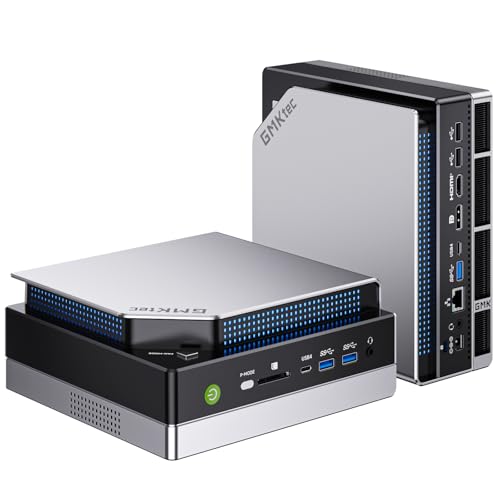
- Best 1440p renderer in a mini PC: GMKtec EVO-X2, Ryzen AI Max+ 395, Radeon 8060S, 64GB, 1TB — Check on Amazon
- Minisforum MS-S1 MAX, Ryzen AI Max+ 395, Radeon 8060S, 64GB, 2TB, Dual 10GbE — Check on Amazon
- Beelink SER9 Pro, Ryzen AI 9 HX 370, Radeon 890M, 32GB, 1TB — Check on Amazon
- Apple Mac mini M4 Pro, 24GB Unified Memory, 512GB SSD — Check on Amazon
See 2 more Amazon options
- Minisforum MS-02 Ultra, Core Ultra 9 285HX, 32GB, 1TB, Dual 25GbE — Check on Amazon
- Minisforum MS-A2 Mini Workstation, Ryzen 9 HX, PCIe x16 — Check on Amazon
Read the full guide ↓
Disclosure: As an Amazon Associate, reviewstook.com earns from qualifying purchases. Links to Amazon on this page are affiliate links; they cost you nothing extra. Listing details such as price and availability change often, so check the current Amazon listing before you buy.
Every mini PC in this guide can put a 1440p picture on your monitor. That sentence is true, and it is also the trap this entire page exists to disarm — because displaying 1440p and rendering a game at 1440p are two different jobs, done by two different parts of the machine, and at this budget they come apart completely. The display side is easy: a desktop at 2560×1440, a video stream, a browser window — every pick here, including the two workstation machines with display-grade integrated graphics, handles that without breathing hard. The render side is the expensive one. A game rendered natively at 1440p asks the graphics hardware to produce roughly 78% more pixels per frame than 1080p, and the honest headline for this guide is that only two of the six machines below — the pair built on AMD’s Strix Halo chip — render modern games anywhere near that resolution, and even they do it selectively: lighter and older titles natively at reduced settings, demanding titles rendered at 1080p and upscaled to the panel. The other four picks are graded in this guide for what they actually are at 1440p: excellent 1440p desktops, an upscaling 1080p games machine, and two platforms whose 1440p gaming story starts the day you install a card in their PCIe slots.
Two more honesty notes before the picks. First, the budget itself: $3,000 mini PCs are workstations and homelab hosts, not gaming towers — a gaming tower at this money carries a discrete graphics card from a different performance world, and readers whose primary job is high-refresh 1440p gaming belong in Best Mini Gaming PC For 1440p Gaming Under $3000 or Best Gaming PC Under $3000. What this guide is for is the buyer who needs a mini PC for work — local AI, virtualization, fast networking, a small footprint — and wants to know, precisely, what 1440p gaming that machine will and will not do. Second, the ceiling: the most expensive mini PC configuration we could verify on Amazon, the 128GB version of the Strix Halo machines, sits in a premium tier above this entire budget — so even at $3,000 you are buying the category’s 64GB tier, its workstation tier and its expansion tier, not its summit. Prices in this category change often, so check the price on Amazon for each pick before you buy, and treat any listing that looks out of line with its tier as a pick to wait on.
Rendering 1440p Is Not Displaying 1440p
This distinction is the spine of the guide, so it gets its own section before any product is graded. When a game runs, two resolutions are in play. The render resolution is the size of the image the graphics hardware actually computes, pixel by pixel, every frame. The display resolution is the size of the signal sent to your monitor — 2560×1440 for a 1440p panel. When the two match, the game is running natively at 1440p, and the graphics hardware is doing the full 3.69-million-pixel workload. When they do not match, something has to stretch the smaller rendered image up to fill the panel, and how that stretching happens decides how the game looks.
The cheapest stretch is simple scaling: render at 1080p, let the monitor or the game blow the picture up to 1440p. It works, and it is visibly softer than native, because 1080p to 1440p is a non-integer scale — about 1.33× per axis — so pixels land unevenly and fine detail smears. (720p to 1440p, by contrast, is an exact 2×2 integer scale, which is why very weak machines sometimes look cleaner rendering at 720p than at odd in-between resolutions.) The smarter stretch is a temporal upscaler — AMD’s FSR on the Radeon machines in this guide — which renders below 1440p, then reconstructs a 1440p output using information from previous frames. Done well, it looks close to native at a fraction of the rendering cost, and it is the honest mechanism behind most “1440p gaming” claims made for integrated graphics. What it never does is change the render workload: the game is still being computed at the lower resolution, and textures, effects and geometry are all produced at that lower internal size.
One technology is conspicuously absent from this guide, and its absence is a fact about the hardware, not an oversight. DLSS is NVIDIA’s upscaler, and it runs only on NVIDIA RTX graphics hardware. No machine in this guide has an RTX card — the six picks run on AMD integrated graphics, Intel integrated graphics and Apple’s own GPU — so DLSS is not available on any pick here, in any mode, at any setting. Any roundup that credits a mini PC from this class with DLSS is confusing the name of a technology with the silicon required to run it. The upscaling story in this guide is FSR on the four AMD machines, credited generically and without internal-resolution figures, because the base research documents none; the Intel and Apple picks rely on each game’s own resolution scaling, and the guide says so rather than dressing that up.
Finally, frame generation. Several modern games and drivers can insert interpolated frames between rendered ones, making motion look smoother on a high-refresh panel. That is a display-side trick: it raises the number of frames your eyes see without rendering a single additional real pixel, and it does nothing to close the gap between a 1080p render and a 1440p panel. This guide credits frame generation to no pick as a resolution feature, because it is not one.
In this guide
Quick Picks
Short on time, or comparing several options at once? Each row below names a buyer type and the machine that suits it, graded on the 1440p criteria explained above, with a link to the listing.
| Buyer type | Pick | Its honest 1440p verdict | Link |
|---|---|---|---|
| Best 1440p renderer in a mini PC | GMKtec EVO-X2, Ryzen AI Max+ 395, 64GB | Strix Halo’s 8060S: lighter titles native at 1440p at reduced settings, demanding titles via 1080p render + FSR | Check on Amazon |
| Same rendering, plus a network | Minisforum MS-S1 MAX, 64GB, 2TB | Identical chip and graphics to the EVO-X2; the premium buys ports and storage, not one extra rendered pixel | Check on Amazon |
| Best value 1440p all-rounder | Beelink SER9 Pro, Ryzen AI 9 HX 370 | 890M renders at 1080p and upscales to the panel; native 1440p only for the lightest titles | Check on Amazon |
| Best 1440p desktop, macOS games | Apple Mac mini M4 Pro, 24GB, 512GB | Superb 1440p display machine; renders lighter macOS-native titles at 1440p, and the game library is the real limit | Check on Amazon |
| 1440p desktop now, card later | Minisforum MS-02 Ultra, Core Ultra 9 285HX | Integrated graphics drive the 1440p desk today; 1440p gaming waits on the low-profile card its PCIe slot exists for | Check on Amazon |
| Cheapest route to a 1440p platform | Minisforum MS-A2, Ryzen 9 HX | Display-grade 610M as shipped; the PCIe slot, not the chip, is its 1440p gaming story | Check on Amazon |
How These Picks Were Chosen
The six picks are exactly the verified set from our general guide to this budget, re-graded on 1440p criteria — no machine was added, dropped or swapped for this angle, and no ASIN or specification appears here that the base research did not verify. The budget was applied as a ceiling on real Amazon listings: every pick is a configuration that fits at or under $3,000 in the United States — check the price on Amazon before you buy, as listings change often. That rule is why the 128GB Strix Halo machines are landmarks in this guide rather than picks: they sit in a premium tier above this budget. A recommendation you cannot buy inside the budget is not a recommendation.
The re-grading itself used three questions, in order. First: what does the machine render? Graphics hardware was sorted into the classes the silicon actually occupies — Strix Halo’s Radeon 8060S, the strongest integrated graphics sold; the Radeon 890M, a clear class below it; Apple’s M4 Pro GPU, strong integrated graphics inside a macOS game library; and display-grade integrated graphics (Intel’s solution in the MS-02 Ultra, the Radeon 610M in the MS-A2) that exist to drive monitors, not to render games. Second: what does it display? Documented video outputs were taken only from the base research — listing-stated output counts where they exist, and an explicit “not documented, check the listing” where they do not. Third: what is the honest path from the first answer to a 1440p panel — native rendering, FSR upscaling from a 1080p-class render, plain scaling, or a future graphics card in a documented slot? Every review below answers all three, and the ranking follows the answers: the two Strix Halo machines lead because they are the only picks whose rendering class reaches toward 1440p at all; the SER9 Pro follows as the strongest upscaling route in a much lower tier; the Mac mini is graded as a display machine with a library caveat; and the two slot machines close the list because their 1440p gaming is a plan, not a shipment.
Two filters from the base guide stayed in force. The honesty filter: any machine whose headline is a graphics claim borrowed from a desktop part with a similar name, or a barebone price presented as a finished computer, is called out in its review rather than quietly repeated. And the audience filter: these are workstation-class machines bought for named professional work — local AI, virtualization, homelab networking, creation — with 1440p gaming as a dividend. If the dividend is the whole point of your purchase, the same money in a tower buys native 1440p rendering at high settings as a matter of routine, and this guide will keep pointing you that way rather than pretend otherwise.
The 6 Best Mini PCs for 1440p Gaming Under $3,000
GMKtec EVO-X2 — Ryzen AI Max+ 395, Radeon 8060S, 64GB, 1TB
Who it suits: Buyers whose real job is memory-bound — local AI models, heavy integrated-graphics work — and who want the most 1440p gaming any mini PC can honestly offer as the second use of the same machine.
The EVO-X2 leads this guide because its graphics hardware is in a class of its own here. The Ryzen AI Max+ 395 pairs 16 Zen 5 cores with a Radeon 8060S integrated GPU of 40 compute units, fed by 64GB of LPDDR5X-8000 that CPU and graphics share as one pool — AMD’s own guidance allows the graphics side to address up to 48GB of it, which matters at 1440p because textures are loaded at the resolution you are displaying, not the resolution you are rendering, and no other pick in this guide has that kind of memory headroom behind its graphics. Graded honestly on the render question, the 8060S is the strongest integrated graphics available in any mini PC, and its home turf is 1080p: modern titles there are its natural workload. At 1440p the truthful verdict splits by game. Lighter, older and esports titles can be rendered natively at 1440p at reduced settings — this is the only pick where that sentence applies to more than a token handful of games. Demanding modern titles are a 1080p render upscaled to the panel with FSR, which on a good implementation looks close to native from a normal viewing distance while costing the hardware a 1080p workload. That is a genuinely good 1440p experience. It is not native 1440p rendering, and this review will not call it that.
On the display side, the listing documents quad-display output, with USB4 among its connections — driving a 1440p monitor is the least demanding thing this machine will ever be asked to do, and pairing guidance is in the monitor section below. The EVO-X2 is also the most accessible verified way into the Strix Halo platform — check the price on Amazon, with 64GB and a 1TB PCIe 4.0 SSD fitted. (A 64GB/2TB sibling configuration sits in the same premium tier; this guide links the 1TB listing, so confirm the configuration on the live page.) The catch is cast in silicon and stated in every guide we publish on this chip: the memory is soldered beside the chip, so the 64GB you buy is the 64GB you own forever, and the 128GB version of this same box sits above this entire budget. If your ambitions outgrow the pool, the replacement is a second machine, not an upgrade.
- Radeon 8060S with up to 48GB of addressable shared memory: the only pick that renders lighter titles natively at 1440p.
- Most accessible verified Strix Halo listing on Amazon, with 1TB fitted — check the price on Amazon.
- Quad-display output documented in the listing — the 1440p desk is trivially within its reach.
Honest limitation: Demanding games at 1440p are upscaled from a 1080p-class render, not native — and the soldered 64GB is final, with the 128GB sibling priced out of this budget entirely.
Choose it if you want the strongest rendering a mini PC can do at 1440p today, with local AI or heavy integrated-graphics work as the machine’s day job. Skip it if native 1440p at high settings is the requirement — no integrated graphics does that, and the tower guides are where that requirement lives.

Minisforum MS-S1 MAX — Ryzen AI Max+ 395, Radeon 8060S, 64GB, 2TB, Dual 10GbE
Who it suits: Strix Halo buyers who also run a real network — a NAS on 10GbE, a home server rack, a small studio — and who want the AI machine, the infrastructure machine and the 1440p-capable mini to be one box.
Start with the sentence this angle demands: for 1440p gaming, the MS-S1 MAX renders exactly as many pixels as the EVO-X2, because it is built on exactly the same silicon. Same Ryzen AI Max+ 395, same Radeon 8060S, same 64GB of soldered LPDDR5X-8000 shared between CPU and graphics. Every word of the EVO-X2’s rendering verdict applies unchanged — lighter titles native at 1440p at reduced settings, demanding titles as a 1080p render upscaled with FSR, textures carried by the big shared pool. The premium over the GMKtec — check the price on Amazon for both — buys no rendering whatsoever. What it buys is everything around the rendering: a 2TB SSD fitted as standard with a second M.2 position, dual 10GbE networking, USB4 V2 at 80Gbps — the fastest peripheral connection on any pick here — an internal 320W power supply instead of a brick, and a PCIe x16 slot per the listing. For a machine that spends its life pulling model files and media off network storage at ten gigabits, that premium is well spent. For a machine that will sit alone on a desk with one Ethernet cable and a 1440p monitor, it is a premium spent on talents the desk never uses, and the EVO-X2 is the same gaming machine for less.
Display-side documentation is thinner here, and the guide keeps it that way: the listing documents HDMI and USB4 video outputs, but sources vary on the total display count, so this guide claims no number — check the live listing if a multi-monitor 1440p desk is part of the plan. Two further cautions from the base research belong in this review. Stock has at times been orderable for a later delivery date rather than sitting in an Amazon warehouse, so read the delivery estimate as carefully as the price. And the soldered-memory law applies with full force: 64GB is final, and this model’s own 128GB configuration sits in a premium tier outside the budget. The chassis is also a workstation’s — larger and more industrial than a living-room mini — so buyers picturing a box hidden behind the monitor should weigh the EVO-X2’s footprint first.
- Identical Strix Halo rendering to the EVO-X2 — the same native-1440p-for-lighter-titles, FSR-for-demanding verdict.
- Dual 10GbE, USB4 V2 80Gbps and a PCIe x16 slot per the listing: infrastructure no other Strix Halo pick matches.
- 2TB fitted and an internal 320W PSU — the verified top of the 64GB Strix Halo band; check the price on Amazon.
Honest limitation: The premium over the EVO-X2 buys ports and storage, not performance — and the total display count is not consistently documented, so multi-monitor plans need a live-listing check.
Choose it if the machine must feed on 10GbE networking or host a card later, and its 1440p gaming is a dividend on an infrastructure purchase. Skip it if gaming is the reason for the premium — on this angle the EVO-X2 is the same gaming machine for less — check the price on Amazon for both.

Beelink SER9 Pro — Ryzen AI 9 HX 370, Radeon 890M, 32GB, 1TB
Who it suits: Buyers who want a superb small desktop whose 1440p gaming is honestly an upscaling story — and who would rather stay in a much lower tier than buy rendering headroom they may not need.
The SER9 Pro is the control group of this budget, and on the 1440p angle it grades better than its price suggests. Its Radeon 890M is the strongest integrated graphics of its generation — a clear class below the Strix Halo’s 8060S, and a clear class above everything else in this guide except the Mac. The honest verdict: this is a 1080p rendering machine. Modern titles are rendered at 1080p and upscaled to your 1440p panel with FSR, which is exactly the route the demanding games take on the two picks above it — the difference is that the Strix Halo pair can also step up to native 1440p in lighter titles, while on the 890M native 1440p rendering is confined to the lightest and oldest games at reduced settings. In exchange, the SER9 Pro sits in a much lower, mid-range tier — check the price on Amazon. For a buyer whose gaming is a few evenings a week on a 1440p panel they already own, the upscaled picture from this box is the value centre of the entire guide.
Display-side honesty matters most for this pick. The base research documents USB4 and 2.5GbE among its connections, but it deliberately makes no monitor-count claim for the SER9 Pro — listing copy and hands-on reviews have disagreed about its configuration details, including whether the chassis holds one M.2 slot or two — so this guide claims no display number either. It will drive a 1440p monitor; how many simultaneous displays it supports is a question for the live listing, and the monitor-pairing section below treats it that way. Its other ceilings are the conventional ones, stated plainly: the 32GB of LPDDR5X is soldered and is the lifetime memory specification; there is no OCuLink port, which closes the easy external-GPU road some rivals offer; and listings for this name have drifted — a variant built on a lesser chip circulates under the same SER9 Pro name at lower prices, so confirm the delivered configuration is the HX 370 with the 890M before the return window closes. None of these are flaws at this tier; they are the honest boundaries of the conventional mini PC.
- Radeon 890M: renders at 1080p and FSR-upscales to the panel — the same route demanding games take on picks in the premium tier above it.
- A mid-range pick in a chassis of roughly 0.82 litres — check the price on Amazon.
- USB4 and 2.5GbE fitted as standard, with Windows 11 Pro.
Honest limitation: Native 1440p rendering is limited to the lightest titles; the 32GB is soldered for life, there is no OCuLink, and no display count is documented well enough for this guide to claim one.
Choose it if your 1440p gaming is upscaled 1080p-class gaming and your work is general-purpose, however demanding. Skip it if you want native 1440p in lighter titles plus the big shared memory pool — that is the Strix Halo pair, at Strix Halo prices.
Apple Mac mini M4 Pro — 24GB Unified Memory, 512GB SSD
Who it suits: Creators and developers inside Apple’s ecosystem who want the most refined 1440p desktop in this guide — and whose games, as well as their software, live on macOS.
Grade the two halves of this angle separately, because they point in opposite directions. As a display machine, the Mac mini M4 Pro is the best in this guide: Apple’s own published specification supports up to three displays, its three Thunderbolt 5 ports and HDMI port drive high-resolution panels without negotiation, and a 1440p desktop on this machine is crisp, colour-accurate and silent. As a rendering machine, the M4 Pro’s 16-core GPU is strong integrated graphics — but the binding constraint on its 1440p gaming is not the silicon, it is the shelf. macOS simply does not have most of the games a Windows buyer means by “1440p gaming”; the catalogue of macOS-native titles is a fraction of the Windows one, and within that catalogue the honest verdict mirrors the SER9 Pro’s: lighter native titles can be rendered at 1440p, demanding ones are rendered lower and scaled by the game’s own settings to fill the panel. There is no DLSS here — there is no NVIDIA hardware — and this guide makes no FSR claim for the Mac either, because FSR is AMD’s technology and the base research documents no upscaler for this pick; each macOS game handles its internal resolution its own way, and the review leaves it there rather than inventing a pipeline.
The purchasing facts are Apple’s eternal ones. Nothing inside is upgradeable: 24GB of memory and 512GB of storage are the lifetime specification, and 512GB fills quickly on a machine bought for media work — an external SSD is a planned second purchase on top of the machine itself. Buyers who know they are memory-bound should check the price on Amazon for the 48GB configuration before ordering, because there is no road upward afterwards. This is a premium pick — check the price on Amazon before you buy. And the obvious point, stated because this is a gaming angle: if your game library is Windows-only, this is not a gaming machine for you at any resolution, however beautiful its desktop is.
- Apple-published support for up to three displays, over Thunderbolt 5 and HDMI — the strongest documented display story in the guide.
- M4 Pro performance and hardware media engines in a near-silent premium desktop — check the price on Amazon.
- Lighter macOS-native titles render at 1440p; the catalogue, not the chip, is the ceiling.
Honest limitation: Most of the Windows game catalogue does not exist here; memory and storage are fixed forever, and the 512GB drive makes an external SSD a planned purchase.
Choose it if your creative tools and your games both live on macOS and the 1440p desk matters more than the render ceiling. Skip it if your library is Windows-only, or you need any plan to upgrade the machine itself.

Minisforum MS-02 Ultra — Core Ultra 9 285HX, 32GB, 1TB, Dual 25GbE
Who it suits: Homelab builders and virtualization users who need a small server-grade machine that drives a serious 1440p desk today — and who understand its gaming chapter is written by a card they have not bought yet.
This is the verified ceiling of the mini PC category as a platform: a PCIe 5.0 x16 slot, four DDR5 SO-DIMM slots accepting up to 256GB with ECC support, four M.2 storage positions, dual 25GbE SFP+ networking plus 10GbE and 2.5GbE copper, and an internal 350W power supply — check the price on Amazon. On the display half of this angle it is genuinely strong — the maker’s listing copy specifies four video outputs across its USB4 and HDMI ports, so a multi-monitor 1440p desk is documented, not hoped for. On the render half, the guide refuses to flatter it: as shipped, graphics are the chip’s integrated Intel solution, which is a display engine. It will run a 1440p desktop, video and light or old games at reduced resolutions; it does not render modern games at 1440p, and no upscaling technology changes that, because there is no discrete GPU and no RTX hardware for DLSS to run on. What the MS-02 Ultra sells on this angle is a documented future: the PCIe slot takes a low-profile dual-slot card, capped by the 350W supply, and the day that card goes in, the machine’s 1440p gaming story is whatever that card’s story is. The card is a second purchase at a second price, and reviewer coverage notes the CPU’s power limit steps down when a discrete card is installed — the slot is a door, not a promise.
The limitations from the base research are worth repeating before the infrastructure seduces you. Owner reports collected by review sites single out the power supply fan as the component people hear under sustained load, and Linux and Proxmox users have reported driver and PCIe passthrough quirks that make Windows with Hyper-V the smoother first path. None of that disqualifies the machine — it defines it. This is a host first and a desktop second, and on a 1440p gaming angle it is a display platform with an expansion plan, bought for virtualization and networking, whose gaming improves exactly when its owner spends more money. If that sentence describes your plan, it is an excellent buy.
- Four video outputs specified in the maker’s listing copy — a documented multi-monitor 1440p desk today.
- PCIe 5.0 x16 slot, ECC memory to 256GB and dual 25GbE: the most expandable mini PC we could verify — check the price on Amazon.
- Internal 350W PSU in a 4.8-litre chassis — no brick, and the cap that defines its future graphics card.
Honest limitation: Integrated graphics only as shipped — 1440p gaming is a later, wattage-capped card purchase, and the PSU fan is audible under sustained load per owner reports.
Choose it if your mini PC is really a server that must also drive a 1440p desk, with a low-profile card in its future. Skip it if you want any real game rendering on day one; that is the Strix Halo picks and the SER9 Pro.

Minisforum MS-A2 — Ryzen 9 HX Mini Workstation, PCIe x16, Socketed RAM
Who it suits: Buyers who distrust soldered specifications and want the cheapest documented route into this class — a platform they can grow, in 1.78 litres — and who accept that its 1440p gaming, like the MS-02 Ultra’s, lives on the far side of a card purchase.
The MS-A2 is the philosophical opposite of the Strix Halo boxes, and the cheapest machine in this guide by a wide margin. Its Ryzen 9 HX processor — a 16-core Zen 5 part in the flagship configuration — sits beside two ordinary DDR5-5600 SO-DIMM slots you can fill to 96GB yourself, three M.2/U.2 storage positions, dual 10G SFP+ networking plus dual 2.5GbE, and display output over HDMI and two USB-C ports. Its positioning proves the platform point: the barebone style sits in a budget tier on Amazon, and the configured 32GB/1TB version sits in a mid-range tier well below the top of this guide’s budget — check the price on Amazon for the exact style. One buying caution from the base research is load-bearing: the Amazon listing family spans barebone and configured styles across two chip variants, so confirm the exact style and configuration on the live page before ordering — a barebone price is a starting point that excludes memory, storage and often the operating system, not a finished computer.
On this angle, the honesty note is the graphics, and it is the same note as the MS-02 Ultra’s, played lower. As shipped, the MS-A2’s integrated Radeon 610M is a display engine — the weakest graphics in this guide. It drives the 1440p desktop over its documented HDMI and USB-C outputs without complaint, and that is the end of its rendering story: it does not render modern games at 1440p, at 1080p, or at any resolution a gaming guide would grade, and there is no upscaler that rescues a display-class GPU. Anything graphical waits on the card you install in its PCIe x16 slot — PCIe 4.0, eight lanes electrical — and the review must not let the slot’s promise blur the machine’s day-one reality. Review coverage of the family also reports audible fan noise under load and relatively high idle power for a mini, plus limited airflow around the PCIe area: the tax a dense 1.78-litre workstation pays, and a real consideration for the card it can host. Buy this machine as the platform it is — memory you choose, storage you choose, a card when the work demands it — and its 1440p chapter opens when you do.
- Socketed DDR5 to 96GB and three storage positions — the only pick whose memory you choose, in 1.78 litres.
- HDMI plus two USB-C display outputs documented — the 1440p desk is covered from day one.
- Barebone style in a budget tier; configured 32GB/1TB in a mid-range tier — check the price on Amazon.
Honest limitation: The 610M is display-grade only until you buy a card; the dense chassis runs its fans audibly under load, and the listing family mixes barebone and configured styles — verify the exact one in the cart.
Choose it if you want a grow-it-yourself platform whose 1440p gaming arrives with the card you choose later. Skip it if you want rendering performance the day the box arrives, with nothing left to buy.

Comparison Table
| Product | Graphics | 1440p verdict | Link |
|---|---|---|---|
| GMKtec EVO-X2 64GB | Radeon 8060S integrated, 64GB shared pool | Lighter titles native at reduced settings; demanding titles 1080p render + FSR | Check on Amazon |
| Minisforum MS-S1 MAX 64GB | Radeon 8060S integrated, 64GB shared pool | Identical rendering to the EVO-X2; premium buys infrastructure | Check on Amazon |
| Beelink SER9 Pro | Radeon 890M integrated, 32GB soldered | 1080p render + FSR upscale; native only for the lightest titles | Check on Amazon |
| Apple Mac mini M4 Pro | M4 Pro GPU, 24GB unified | Elite 1440p desktop; lighter macOS-native titles render at 1440p | Check on Amazon |
| Minisforum MS-02 Ultra | Intel integrated, PCIe 5.0 slot empty | 1440p desktop today; gaming waits on a low-profile card | Check on Amazon |
| Minisforum MS-A2 | Radeon 610M integrated, PCIe slot empty | Display-grade as shipped; the slot is the whole gaming story | Check on Amazon |
How to Choose a Mini PC for 1440p Gaming Under $3,000
- Ask the render question first, and accept the answer. Write down the games you actually play. If they are demanding modern titles and you want them rendered natively at 1440p at high settings, no mini PC at any price in this guide does that — the correct purchase is a tower, and Best Mini PC For 1440p Gaming Under $2500 will show you what the tier below concedes on the same question. Stay here if your gaming fits the honest shapes on offer: native 1440p in lighter titles on Strix Halo, or a good upscaled picture everywhere else.
- Grade the graphics class, not the graphics name. Integrated graphics come in classes — display-grade (Radeon 610M, Intel integrated), strong (Radeon 890M, Apple’s M4 Pro GPU) and Strix Halo’s 8060S at the top. None of them is a discrete GPU, and none of them runs DLSS, because DLSS needs NVIDIA RTX hardware that no mini PC in this class carries. If a listing’s graphics name sounds like a desktop card, check whether it is the integrated part wearing the family name.
- Treat upscaling as the plan, not the apology. On the AMD machines, FSR upscaling from a 1080p-class render is how demanding games are meant to be played on a 1440p panel — set the game’s output to 1440p, enable FSR, and let the render resolution sit where the hardware is comfortable.
- Remember that textures follow the display, not the render. A game upscaled to 1440p still loads textures intended for a 1440p picture. That is why the Strix Halo pair’s huge shared memory pool — the graphics side can address up to 48GB of it — is a real 1440p asset and not just an AI specification, and why the 32GB soldered machines deserve a second thought if your games are texture-hungry.
- Decide your memory architecture before your model. Soldered LPDDR5X (Strix Halo, Mac mini, SER9 Pro) delivers bandwidth and integration and can never be upgraded — the capacity you choose is the machine’s lifetime capacity. Socketed DDR5 (MS-02 Ultra, MS-A2) grows: buy 32GB today, more when the work demands it. This decision outranks brand, chip and price.
- Consider the whole machine, not just the listing. A barebone style excludes memory, storage and often the operating system; a slot machine’s gaming story excludes the card that makes it a gaming machine; the Mac mini’s setup includes the external SSD its 512GB drive makes necessary. Factor in every missing part before comparing picks — check the price on Amazon for the machine and any parts it still needs.
- Check the live price before you decide. This category reprices often. Check the price on Amazon, set your walk-away budget before you shop, and if a listing sits well above the tier you expected, wait — stock and pricing in this class rotate weekly.
Pairing a 1440p Monitor With These Machines
A 1440p panel is the one part of this setup every pick can honour — displaying 1440p is cheap; it is rendering games at 1440p that costs. Pairing advice therefore splits in two. For the desktop half, any pick here drives a 1440p monitor happily, and the differences are about how many panels and through which ports, using only what the base research documents. The MS-02 Ultra’s listing copy specifies four video outputs across its USB4 and HDMI ports — the most complete documented display story among the Windows picks. The EVO-X2’s listing documents quad-display output. The MS-A2 documents HDMI plus two USB-C display outputs. The Mac mini carries Apple’s published support for up to three displays across its Thunderbolt 5 and HDMI ports. The MS-S1 MAX documents HDMI and USB4 video outputs, but sources disagree on a total count, so this guide claims none — verify on the live listing before planning a multi-panel desk around it. The SER9 Pro documents USB4 among its connections, and the base research deliberately makes no display-count claim for it at all; treat its multi-monitor support as a live-listing question too.
For the gaming half, pair the panel to the renderer, not the other way round. A high-refresh 1440p monitor earns its keep with the two Strix Halo machines, whose upscaled and lighter-native output can feed it; on the SER9 Pro it is a reasonable luxury; on the two slot machines it is a purchase for the machine they will become after a card, not the machines that arrive. Whatever you buy, do the two-minute setup that most buyers skip: connect the monitor to a documented full-bandwidth port, then set the panel’s real refresh rate in the operating system’s display settings — panels routinely arrive running at a default lower rate, and a 1440p screen left at its out-of-box setting quietly wastes the money spent on it. And keep the honest alternative in view: cloud gaming services render on remote hardware and stream the picture — the one route by which even the display-grade picks can show a genuinely 1440p-rendered game, at the price of a subscription, a strong connection and input lag. It is a property of the service, not of the machine, and this guide credits it to no pick.
Common Buying Mistakes
- Believing “supports 1440p” means “renders games at 1440p.” Every pick here supports a 1440p display; only the Strix Halo pair render games anywhere near it, and only selectively.
- Crediting an integrated GPU with DLSS. DLSS runs on NVIDIA RTX hardware only, and no machine in this guide has any — claims otherwise are confusing a technology’s name with its silicon.
- Counting frame generation as resolution. Interpolated frames smooth motion; they render no additional real pixels and close none of the gap between a 1080p render and a 1440p panel.
- Spending $3,000 for gaming alone. A tower at this budget renders native 1440p at high settings as routine; these minis are workstations whose gaming is a dividend.
- Buying a soldered-memory machine one size too small. A 64GB Strix Halo or a 24GB Mac mini cannot become the bigger version — the upgrade is a second computer.
- Assuming the 128GB Strix Halo machines fit this budget. They sit in a premium tier above this budget; check the live price on Amazon, not the launch coverage.
- Reading a barebone or slot-machine listing as a finished gaming machine. The MS-A2’s barebone style excludes memory, storage and an OS; both slot machines exclude the card their gaming depends on.
- Confusing listing families. The MS-A2 listing spans barebone and configured styles and two chip variants; the SER9 Pro’s name covers a lesser-chip variant at lower prices. Confirm the exact configuration in the cart, and again on delivery.
Final Recommendation
- Most 1440p rendering in a mini PC: GMKtec EVO-X2 64GB.
- Same rendering on a 10GbE network: Minisforum MS-S1 MAX 64GB.
- Best value upscaled 1440p: Beelink SER9 Pro — and keep the change.
- macOS creators with a 1440p desk: Apple Mac mini M4 Pro.
- Homelab hosts driving a 1440p desk: Minisforum MS-02 Ultra, card to follow.
- Grow-it-yourself platforms: Minisforum MS-A2, card to follow.
Our top two on this angle are the two Strix Halo machines: the GMKtec EVO-X2, the cheapest honest route to the only integrated graphics that render lighter games natively at 1440p and upscale the rest from a position of strength, and the Minisforum MS-S1 MAX, which renders identically and adds the network, storage and slot for buyers whose day job needs them. The value centre of the guide is the Beelink SER9 Pro, which, in a much lower tier, delivers the same upscaled-1440p experience in demanding games, in 0.82 litres; the Mac mini is the pick when the desk and the software are Apple’s; and the two Minisforum platforms are bought for infrastructure first, with their 1440p gaming chapter deliberately deferred to a card. If none of those shapes fit — if what you actually want is native 1440p rendering at high settings across your whole library — the correct conclusion is that the machine you want is not a mini PC, and the guides at Best Mini PC Under $3000 and Best Gaming PC Under $3000 bracket the choice from both sides. Whatever you choose, confirm the exact configuration and the live price on the listing first: in this category, in this year, that check is worth more than any single specification.
Frequently Asked Questions
Can any mini PC under $3,000 really game at 1440p?
Yes — with the definition kept honest. The two Strix Halo machines in this guide render lighter and older titles natively at 1440p at reduced settings, and render demanding titles at 1080p for upscaling to the panel, which is a good-looking and entirely legitimate way to play on a 1440p monitor. The SER9 Pro does the upscaling half of that in a much lower tier. What no mini PC here does is render demanding modern games natively at 1440p at high settings; that workload belongs to discrete graphics cards in towers, and any guide that promises it from integrated graphics is selling you the display resolution and hoping you never ask about the render resolution.
Is upscaled 1440p noticeably worse than native 1440p?
In motion, from a normal viewing distance, a good temporal upscale such as FSR is difficult to distinguish from native — that is precisely why it is the standard route for integrated graphics on 1440p panels. The differences appear at the extremes: fine static detail examined closely, very fast motion, and interfaces rendered at the internal resolution. The honest framing is not that upscaling is fake 1440p, but that it is a 1080p-class render presented at 1440p — judge it as that, and it is a genuinely good picture for the hardware class.
Why is there no DLSS in this guide?
Because there is no NVIDIA hardware in it. DLSS is NVIDIA’s upscaling technology and it runs only on RTX graphics cards; the six picks here use AMD, Intel and Apple graphics, none of which can run it in any mode. The AMD machines upscale with FSR instead. If DLSS matters to you — and at 1440p it is a legitimate reason to choose a machine — you are shopping for a discrete RTX card, which at this budget means a tower rather than a mini PC.
What about 4K gaming on these machines?
Not as a rendering target. A 4K frame carries roughly four times the pixel workload of 1080p and more than double that of 1440p, which puts native 4K rendering beyond every integrated GPU in this guide for modern games. Several picks display a 4K desktop and video perfectly well — that is the display half of the distinction again — and cloud gaming services can present a 4K picture rendered on their hardware, with the subscription, connection and input-lag caveats that come with it. For local rendering, 1440p is the ceiling this class should be aimed at, and 1080p is its home turf.
Should I buy a slot machine now and add a graphics card later?
Only if the machine earns its keep before the card arrives. The MS-02 Ultra and MS-A2 are excellent homelab and virtualization platforms on day one, and their slots — low-profile, capped by 350W and internal supplies respectively — genuinely do open a 1440p gaming chapter later. But consider the plan whole: machine plus card, against a Strix Halo machine that renders from day one, and against the tower that out-renders both. The slot is a door, not a discount.
Is 64GB of memory worth the premium for gaming?
Not for gaming alone. The 64GB unified pool earns its premium in local AI work and heavy multitasking; for games, its 1440p contribution is real but secondary — texture headroom behind the 8060S’s rendering. If gaming is the whole job, the SER9 Pro’s upscaled 1440p in a much lower tier is the value answer in this guide, and a tower is the performance answer. Buy the Strix Halo machines when the memory is the tool and the gaming is the dividend.
What should a general user with a 1440p monitor actually buy?
The SER9 Pro in this guide, or the tier beneath it. It drives the 1440p desktop completely, renders its games at 1080p and upscales them to your panel — check the price on Amazon; the tier covered by Best Mini PC Under $1500 handles the same desk for less again. Give the monitor itself, storage and backup their own attention — the parts of a 1440p setup you will actually see every day.


