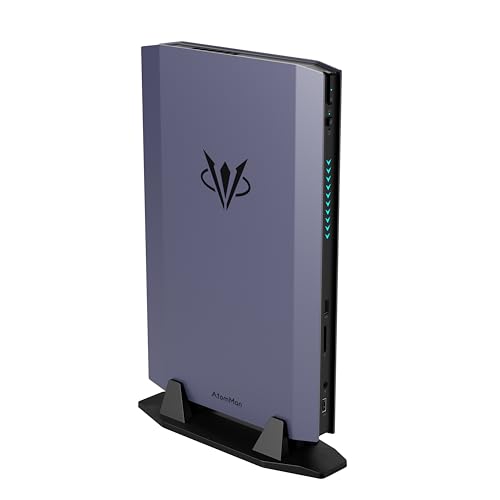
Where to buy
Check the latest price, availability and delivery on Amazon. Orders are placed on Amazon. We may earn a commission from qualifying purchases.
- Best for streaming: AtomMan G7 Ti Mini PC, Core i9-14900HX, RTX 4070 Laptop GPU, 32GB, 1TB — Check on Amazon
- Apple Mac mini M4 Pro, 24GB Unified Memory, 512GB SSD — Check on Amazon
- Beelink SER9 Pro AI Mini PC, Ryzen AI 9 HX 370, Radeon 890M, 32GB, 1TB — Check on Amazon
- Minisforum MS-02 Ultra Mini Workstation, Core Ultra 9 285HX, 32GB, 1TB, Dual 25GbE — Check on Amazon
- Minisforum MS-01 Mini Workstation, Core i9-13900H, Dual 10GbE, 32GB, 1TB — Check on Amazon
See 1 more Amazon option
- Minisforum MS-A2 Mini Workstation, Ryzen 9 HX, PCIe x16 Slot, Dual 10G SFP+ — Check on Amazon
Read the full guide ↓
Disclosure: As an Amazon Associate, reviewstook.com earns from qualifying purchases. Links to Amazon on this page are affiliate links; they cost you nothing extra. Listing details such as price and availability change often, so check the current Amazon listing before you buy.
Streaming asks a computer for one very specific thing — a hardware video encoder — and a $2,500 mini PC budget mostly buys things that are not that. The top of the mini PC market sells infrastructure: 25-gigabit networking, error-correcting memory roads, expansion slots, memory ceilings past 96GB. None of it encodes a single frame. So this guide grades the six verified machines from our general mini PC research at this tier the way a streamer actually experiences them: by the encoder silicon inside, by how much headroom is left when a game, OBS, a browser full of chat and a recording are all running at once, and by how much fan noise reaches the microphone. Ranked that way, the order turns upside down. The general guide’s flagship workstation falls to fourth, because its graphics are integrated and its power supply fan is audible under load. The one machine here with a real discrete encoder fitted at the factory takes first place by a distance. And the honest headline survives the re-grading intact: the picks in this guide sit inside the $2,500 budget rather than at its ceiling — check the current price on Amazon for each one — and a streamer whose budget is genuinely the question should read the Best Mini PC For Streaming Under $1200 and Best Mini PC For Streaming Under $1500 guides too, because the encoder you need usually sits in a far lower tier.
Only two of these six machines can encode AV1, the codec YouTube’s live platform rewards and Twitch is rolling out through Enhanced Broadcasting. The other four are H.264 and HEVC machines — which is not a disqualification, because Twitch’s everyday standard is still H.264 at around 6,000 kbps, and it will be for a long while. But it does mean the encoder map, not the price ladder, is the spine of this guide, printed in full below so no pick borrows an encoder it does not have.
In this guide
Quick Picks
Short on time, or comparing several options at once? Each row below names a streamer type and the product that suits it, with a link to the listing.
| Streamer type | Pick | Why it stands out | Link |
|---|---|---|---|
| Best for streaming | AtomMan G7 Ti, i9-14900HX, RTX 4070 Laptop GPU, 32GB, 1TB | The only fitted discrete encoder here: Ada-generation NVENC with AV1, on its own card, VRAM and thermals | Check on Amazon |
| Best for quiet rooms | Apple Mac mini M4 Pro, 24GB, 512GB | Effectively silent under stream loads, with hardware media engines — on macOS, with H.264/HEVC encoding only | Check on Amazon |
| Best value encoder | Beelink SER9 Pro, Ryzen AI 9 HX 370, 32GB, 1TB | The set’s other AV1 encoder (Radeon 890M) at roughly half the budget — the control group, again | Check on Amazon |
| Best future encoder | Minisforum MS-02 Ultra, Core Ultra 9 285HX, 32GB, 1TB | Quick Sync today; a PCIe 5.0 slot waiting for the low-profile card that becomes its real encoder tomorrow | Check on Amazon |
| Best second stream box | Minisforum MS-01, i9-13900H, 32GB, 1TB | vPro remote management and dual 10GbE make it a dedicated encoding node you administer from the gaming desk | Check on Amazon |
| Best platform, weakest encoder | Minisforum MS-A2, Ryzen 9 HX, 32GB, 1TB | A real slot and dual 10G networking, graded last here because the fitted Radeon 610M is a display engine, not an encoder | Check on Amazon |
How These Picks Were Chosen
The six machines are the same verified set as our general guide to this tier — the same Amazon listings and the same deal rules — re-graded for one job. Nothing new has been added and no specification has been borrowed from anywhere else. What changed is the weighting. The general guide rewarded networking, slots and memory ceilings. This one rewards, in order: the encoder hardware fitted as shipped; the headroom left over when game, encoder, capture, chat software and a local recording run simultaneously; the noise the cooling makes in a room with a live microphone; and the wired networking a stable upload actually needs — which, it turns out, is the one thing every pick here has in surplus.
Encoder claims follow a strict rule: they are derived only from the silicon the base research documents, and they are stated at the strength the silicon earns. NVIDIA’s Ada generation (the RTX 4070 Laptop GPU in the G7 Ti) carries NVENC with AV1 encode. AMD’s RDNA 3.5 media engine (the Radeon 890M in the SER9 Pro) encodes AV1 as well, though its H.264 output is visibly softer than NVENC’s at Twitch bitrates — a standing finding across this batch’s streaming research, and the reason an AMD pick never outranks an NVIDIA pick on encoder quality alone. Intel’s Quick Sync in the two workstation CPUs and the MS-01’s Iris Xe is graded as an H.264/HEVC encoder; no AV1 encode is claimed for any Intel pick in this guide. The Mac mini’s media engines are credited exactly as its base research documents them — hardware ProRes and AV1 engines for timeline and decode work — while its live encoding through VideoToolbox is H.264 and HEVC, with no AV1 encode claimed. And the MS-A2’s Radeon 610M is RDNA 2-generation integrated graphics: its video engine predates AV1 encode entirely, and it is graded as what it is, a display output with a basic encoder attached.
Price discipline follows the current rule for this site: no static product prices are printed here, because prices change and Amazon Associates requires displayed prices to stay current. For every linked pick, check the current price on Amazon before you buy. Picks are described instead by position inside this budget band — the SER9 Pro and the MS-A2 barebone toward the lower end, the G7 Ti and the Mac mini in the middle, the workstation picks toward the upper end — and any pricing condition behind a pick’s streaming case is stated qualitatively in its review.
The Streaming Workflow, Defined Up Front
Every grade below assumes the mainstream one-machine workflow, with a second-box variation noted where a pick suits it better. You play on the machine, OBS captures the game, a hardware encoder compresses the picture, and the result leaves over a wired connection while a local recording — the copy you edit later — writes to disk at the same time. Chat, alerts, a browser source or two and your voice run alongside. That simultaneous pile is the real test at this tier, not the encoder’s existence.
The platform targets are these. Twitch’s everyday standard is 1080p60 at roughly 6,000 kbps, constant bitrate, with a two-second keyframe interval — H.264, because that is what Twitch ingests universally today. YouTube accepts far more: higher bitrates, 1440p streams that dodge the worst of its compression, and AV1 live encoding, which is where an AV1-capable encoder earns its keep first. Twitch’s own AV1 path runs through Enhanced Broadcasting, which is real but limited and enrolment-dependent — treat it as a bonus an AV1 encoder may unlock, never as the reason the stream works tonight. And 4K streaming is platform-limited rather than hardware-limited: the platforms are the bottleneck there, so no pick gains or loses points over it.
Two consequences follow. First, H.264 quality at 6,000 kbps is the grading currency, and it is why NVENC leads, why AMD’s H.264 softness matters, and why Quick Sync’s mature H.264 keeps two workstation picks respectable. Second, the encoder must not share its silicon with the game if it can help it. A discrete card encodes on its own hardware while the game renders; an integrated GPU encodes and renders on the same die, from the same memory pool, inside the same thermal envelope. That single distinction explains most of the ranking below.
The Encoder Map
- AtomMan G7 Ti — RTX 4070 Laptop GPU: Ada-generation NVENC, twin encoder blocks with AV1 encode. The only discrete encoder in the set, and the only one whose game and stream never compete for the same silicon. Named as the laptop card everywhere, because it is one: 8GB, up to 140W in this chassis.
- Apple Mac mini M4 Pro: VideoToolbox hardware encoding in H.264 and HEVC. AV1 encode is not claimed — the chip’s AV1 engine is a decode and timeline asset, not a live-encode path. ProRes hardware is a recording and editing asset, not a stream encoder.
- Beelink SER9 Pro — Radeon 890M: RDNA 3.5 VCN with genuine AV1 encode — the set’s second AV1 path. Its H.264 at Twitch bitrates is visibly softer than NVENC’s, and the encoder shares the die, the memory and the thermals with the game it is capturing.
- Minisforum MS-02 Ultra — 285HX integrated Intel graphics: Quick Sync H.264/HEVC. No AV1 encode is claimed for it. Its streaming future is the PCIe slot: a low-profile card fitted later becomes the encoder, inside a 350W power ceiling the base research documents.
- Minisforum MS-01 — Iris Xe: Quick Sync H.264/HEVC from an older generation. No AV1 encode. Best used where its encoding is the whole job — a dedicated second box — rather than shared with a game.
- Minisforum MS-A2 — Radeon 610M: RDNA 2-generation video engine: H.264/HEVC only, no AV1 encode, and display-class performance. The weakest encoder fitted to any pick here; the machine’s streaming route is its PCIe slot, not its graphics.
- Nowhere in this set: no pick is credited with an encoder its silicon does not carry, and x264 software encoding is treated throughout as an emergency fallback — feasible on the 24-core machines for a light scene, never the plan.
The 6 Best Mini PCs for Streaming Under $2,500
AtomMan G7 Ti Mini PC — Core i9-14900HX, RTX 4070 Laptop GPU, 32GB, 1TB
Who it suits: The one-machine game streamer who wants the stream encoded on dedicated hardware, in a box that still fits behind a monitor — and who has read the words “Laptop GPU” and priced the machine accordingly.
This is the only pick that arrives with a streamer’s actual shopping list already fitted. The RTX 4070 Laptop GPU — 8GB, running at up to 140W in this chassis — carries Ada-generation NVENC hardware with twin encoder blocks and AV1 encode. That one fact reorganises everything. The game renders on the card’s 3D engine while the stream encodes on separate silicon; the local recording can run on the second encoder block while the live feed uses the first; and when YouTube is the destination, AV1 live is available today rather than promised by a future slot purchase. Around the encoder sits the strongest simultaneous-load platform in the set: Intel’s Core i9-14900HX with 24 cores to 5.8GHz absorbs OBS’s scene work, chat software and browsers without touching the game’s cores, and 32GB of DDR5 in two SO-DIMM slots — upgradable to 96GB — is the comfortable tier for game-plus-stream-plus-everything memory pressure. The configured 32GB/1TB machine sits in the middle of this budget band, with a barebone version positioned lower — check the current price on Amazon for both before comparing them.
The limitations are the base guide’s, sharpened by the angle. The card is the laptop part: 8GB of VRAM against the desktop 4070’s 12GB, at laptop wattage, in a slim chassis that is a thermal compromise by design — under a long simultaneous load of game plus encode, expect the machine to manage heat actively rather than silently, and a microphone in the same room will know the fans exist. The barebone version is not a streaming shortcut: it needs memory, storage and an operating system before it encodes anything, and once memory, storage and an operating system are added, the configured machine is usually the honest comparison. The pricing discipline is the sharpest in the guide — this pick’s first place depends on the current price on Amazon staying in the middle of this band, because a listing that has drifted toward the top of the band hands the argument to the lower-positioned AV1 route below. One setup note the base research leaves open: it documents Wi-Fi 7 and the display outputs, but does not document a wired Ethernet specification for this machine, and the wired rule in the OBS section below is absolute — confirm the port situation on the live listing before ordering, because a streamer does not run a serious encoding machine on Wi-Fi and call it a setup.
- Twin Ada NVENC blocks with AV1: stream and local recording encode in parallel, off the game’s silicon entirely.
- 24 cores and 32GB of socketed memory: the set’s deepest simultaneous-load headroom.
- A mid-band position that leaves room in the budget for the desk around the machine — check the current price on Amazon.
Honest limitation: It is the 8GB laptop RTX 4070 in a slim, thermally managed chassis — a strong mobile encoder, not a desktop card, and its fans are part of the room’s sound while it works.
Choose it if you stream games from the same machine you play them on and want the encoder question settled at the factory. Skip it if the current price on Amazon has drifted well toward the top of this band, or your streams are talk and desktop content that never needed a discrete encoder.

Apple Mac mini M4 Pro — 24GB Unified Memory, 512GB SSD
Who it suits: The macOS-native creator-streamer — the Final Cut, Logic and Apple-ecosystem broadcaster — whose first specification is a quiet room and whose platform is already chosen.
The Mac mini’s streaming case is built from two assets no other pick matches. The first is silence: in normal use the machine is effectively inaudible, and under a stream load it stays the quietest box in this guide by a wide margin — in a room with a live microphone, that is not a comfort feature, it is an audio specification, and it is why this pick outranks an AV1-capable Windows machine below. The second is its media hardware: the M4 Pro’s engines make the recording side of a streamer’s workflow — capturing, scrubbing, editing the VOD — feel effortless, and its live encoding through VideoToolbox in H.264 and HEVC is stable, hardware-fixed work that leaves the 12-core CPU and 16-core GPU free for the content itself. On pricing, this configuration sits in the middle of this budget band — check the current price on Amazon before you buy. Its documented Gigabit Ethernet satisfies the wired rule without an adapter conversation.
Now the discipline this guide applies to every pick, applied here. The Mac’s AV1 engine is not an AV1 live encoder: VideoToolbox encodes H.264 and HEVC, and AV1 encode is not claimed for this machine anywhere in this guide — if AV1 live to YouTube is your roadmap, the G7 Ti above and the SER9 Pro below are the picks that hold it. The platform limits are the base guide’s and they are total: macOS only, which ends the discussion for most game streaming — this is a creator and talk-format machine, a console-capture host, a podcast and presentation streamer, not a PC-game box. Nothing inside is upgradeable, so the 24GB and 512GB you order are the machine’s lifetime specification; and 512GB against a habit of keeping local recordings is a planned external SSD, planned as machine plus drive from day one, never discovered mid-season. Choose the configuration with the next five years open in front of you.
- The quietest streaming room in this guide: no fan management intrudes on the microphone.
- Hardware media engines make the record-edit-publish half of streaming the fastest here per watt.
- Positioned in the middle of this budget band, well inside the ceiling — check the current price on Amazon.
Honest limitation: H.264/HEVC encoding only — no AV1 live path — inside a sealed macOS appliance whose memory and storage are fixed at purchase.
Choose it if your content is talk, creative work or console capture, your software is Apple’s, and silence is a production value. Skip it if you stream PC games, need AV1 encoding, or ever intend to open the machine.

Beelink SER9 Pro AI Mini PC — Ryzen AI 9 HX 370, Radeon 890M, 32GB, 1TB
Who it suits: The streamer who wants an AV1-capable encoder and a genuinely capable small gaming machine for roughly half this budget — and who accepts that an integrated encoder shares everything with the game.
In the general guide this machine was the control group, the sensible-money benchmark. Re-graded for streaming it keeps that role and adds a real credential: the Radeon 890M’s RDNA 3.5 media engine encodes AV1, making this the set’s second AV1 path and by far its lowest-positioned — it sits toward the lower end of this budget band, around half the ceiling. Check the current price on Amazon, and while it stays in that lower position the streaming case is compelling: a 12-core Zen 5 processor for the simultaneous pile, 32GB of memory, a 1TB SSD for recordings, documented 2.5GbE for the wired rule, and an AV1 encoder for YouTube — in about 0.82 litres that disappears behind the monitor it streams from.
The grading honesty cuts two ways here. The 890M’s H.264 output at Twitch’s bitrates is visibly softer than NVENC’s — the standing AMD finding in this batch — so on Twitch, the platform most readers stream to, this encoder is a class below the G7 Ti’s even though it wins the AV1 line on the spec sheet. And an integrated encoder is a shared encoder: the same die renders the game, the same memory pool feeds both jobs, the same small thermal envelope sheds both loads. Light and mid-weight games stream from it happily; a demanding title at high settings will make the game and the stream negotiate, and the OBS section below exists partly for that negotiation. The base guide’s caveats stand at full size: the 32GB is soldered LPDDR5X, the machine’s lifetime specification with no road upward; there is no OCuLink and no slot, so the encoder it ships with is the encoder it retires with; and Beelink’s own listing copy and hands-on reviews disagree on whether it has one M.2 slot or two — check the live listing if a second recording drive matters, because the sources conflict and this guide does not guess. Listings for this name have also drifted to a different-processor variant in sibling research, so verify the delivered configuration is the HX 370 build on arrival.
- AV1 encode from the Radeon 890M at the lower end of this budget band — the budget AV1 route; check the current price on Amazon.
- The strongest integrated graphics in the set for the games themselves, in 0.82 litres.
- Documented 2.5GbE wired networking and a full terabyte for the recording habit.
Honest limitation: Its H.264 is visibly softer than NVENC at Twitch bitrates, and the encoder shares die, memory and thermals with the game — soldered, slottless, forever.
Choose it if your games are light-to-mid-weight, YouTube matters to you, and half the budget staying unspent sounds like a feature. Skip it if Twitch picture quality at 6,000 kbps is the whole game, or your titles are demanding enough to fight an integrated GPU for its own output.
Minisforum MS-02 Ultra Mini Workstation — Core Ultra 9 285HX, 32GB, 1TB
Who it suits: The infrastructure-minded streamer — the homelab owner whose stream box is also a node — buying a platform whose real encoder arrives later, in its slot.
As shipped, this machine streams the way a workstation streams: respectably, on integrated graphics. The Core Ultra 9 285HX’s Quick Sync encodes H.264 and HEVC with the maturity Intel’s encoder is known for, the 24 cores to 5.5GHz laugh at the simultaneous pile, four M.2 positions give recordings their own drive, and the networking — dual 25GbE SFP+, 10GbE, 2.5GbE — is so far beyond a stream’s upload needs that the wired rule becomes a joke at this machine’s expense: any one of its ports is a permanent, wired, full-duplex answer. It sits toward the upper end of this budget band — check the current price on Amazon. But no AV1 encode is claimed for its Quick Sync in this guide, and its as-shipped encoder is a generation’s compromise — which is why a machine that tops the general guide sits fourth here.
Its streaming story is really a two-act one, and the second act is a purchase. The PCIe 5.0 x16 slot takes a low-profile dual-slot card, and the day a low-profile Ada-class card goes in, this becomes the best streaming platform in the guide — discrete NVENC, AV1, server networking, 256GB memory ceiling with ECC support. The base research frames the honesty around that plan: the internal supply is 350W, a real ceiling; the processor’s power limit steps down when a discrete card is installed; and the card is a separate future purchase, never part of this pick as shipped. The as-shipped limitations matter in a streaming room specifically: owners and reviewers report the machine is audible under sustained load, with the power supply fan the component people notice — a microphone liability the Mac mini and SER9 Pro simply do not have — and homelab coverage documents Linux and Proxmox driver and passthrough quirks, with Windows and Hyper-V the smoother road. Buy it as a platform with a good interim encoder. Do not buy it as a finished streamer and discover the distinction on your first broadcast.
- Quick Sync H.264/HEVC today on 24 cores, with four M.2 positions for the recording archive.
- The slot: a low-profile card later makes it the strongest streaming platform in this guide.
- Networking so far past the requirement that upload stability stops being a topic.
Honest limitation: Integrated graphics as shipped, no AV1 encode claimed, a power supply fan owners hear under load, and a 350W ceiling governing the card that fixes it.
Choose it if the box is infrastructure first and the encoder upgrade is a planned, priced second step. Skip it if you want the finished streaming machine on day one — that is the G7 Ti, positioned lower in this band.

Minisforum MS-01 Mini Workstation — Core i9-13900H, 32GB, 1TB
Who it suits: The two-box streamer: a gamer whose main rig plays, and who wants a small, remotely managed, always-on node to carry the encode — or a homelabber adding streaming to a virtualisation host.
Reframed as a dedicated encoding box, the MS-01’s feature list reads differently. Its Iris Xe Quick Sync is an older generation’s H.264/HEVC encoder — no AV1 encode, and nobody here claims otherwise — but in a second-box arrangement it encodes a captured feed and nothing else, which is the workload integrated encoders are honestly good at: no game shares the die, no negotiation happens, the stream is the whole job. Intel vPro remote management is the pick’s streaming superpower in that role: the box lives in a cupboard or across the room, administered from the gaming desk like the server it is. Dual 10GbE SFP+ plus dual 2.5GbE move the captured feed and the upload without thinking about it, three M.2 slots plus a U.2 position hold the recordings, and 14 cores keep OBS’s scene work comfortable. On pricing, check the current price on Amazon carefully: this configuration has been seen on Amazon above the maker’s own list in a shortage market, and the correct response to pricing above list is in the mistakes list below.
As a one-box game streamer it grades exactly as its silicon says: the Iris Xe renders light games and encodes them adequately, and demanding titles are beyond the arrangement — this is a stream box, not a gaming machine, and the guide will not pretend the capture-card route changes that. Two documented limitations carry over at full size. ServeTheHome’s hands-on plug-fest on its PCIe slot — wired x8, half-height, single-slot — found some cards never initialise, so the “add a discrete encoder later” plan needs your specific card checked against owner reports before it is a plan at all. And measured noise at full CPU load sits in the low-to-mid 40s dB(A) in review coverage: irrelevant in the cupboard role that suits it best, a real consideration if it shares the room with your microphone. Its official memory ceiling is 64GB, and that is the figure this guide prints.
- vPro remote management: the only pick designed to be run headless from another desk.
- A dedicated Quick Sync encoder with no game competing for it, in the two-box arrangement.
- Dual 10GbE, three M.2 slots and a U.2 position: a recording and relay node, not just an encoder.
Honest limitation: An older Quick Sync generation with no AV1, a slot some cards refuse to initialise in, and current Amazon pricing above its own list.
Choose it if your stream architecture is two boxes, or your homelab wants an encoding node with management manners. Skip it if you play and stream on one machine, or the live price is still wearing its shortage premium.

Minisforum MS-A2 Mini Workstation — Ryzen 9 HX, 32GB, 1TB
Who it suits: The platform buyer whose streaming plans run through its PCIe slot — and who understands that, as shipped, this is the weakest encoder in the guide wearing the second-best chassis.
Nothing about the MS-A2’s platform is in dispute: a 16-core Zen 5 HX processor to 5.4GHz, two DDR5-5600 SO-DIMM slots to 96GB, three M.2/U.2 storage positions, dual 10G SFP+ on an Intel X710 plus dual 2.5GbE, in 1.78 litres. Pricing is a family affair worth reading carefully — the barebone sits at the lower end of this budget band on Amazon, while configured 32GB/1TB versions sit higher in the band — check the current price on Amazon for the exact configuration — and a barebone is a starting point, not a computer: memory, storage and an operating system stand between the kit and its first stream. All of that earned it second place in the general guide. For streaming it earns sixth, and the reason fits in one line: its fitted graphics are the Radeon 610M, an RDNA 2-generation integrated part whose video engine handles H.264 and HEVC at display-driving strength and encodes no AV1 at all. As a game streamer it is not a contender. As a stream box it leans entirely on its CPU and its slot.
Grade it, then, as a chassis for an encoder you supply. The PCIe x16 slot — PCIe 4.0, wired x8 electrically — is the machine’s actual streaming specification: a low-profile discrete card fitted there turns this into a compact, dual-10G streaming platform with 96GB of memory headroom, and the 16 Zen 5 cores make even the interim arrangement workable for talk and desktop content encoded in software at modest settings, the one set member where the x264 fallback conversation is not entirely theoretical. The base research’s limitations ride along: independent coverage notes audible noise under load, relatively high idle power, and limited airflow around the PCIe area — the last of which matters precisely when a card goes in — and the listing discipline is real, because this family sells in several configurations and a barebone under closely related listings, so the exact configuration on the live page must be matched before ordering. Buy the platform if the platform is the point. If the point is a stream next weekend, every pick above this one ships with a better encoder already inside.
- A genuine PCIe slot and dual 10G networking in 1.78 litres — the densest encoder-hosting platform per litre here.
- 16 Zen 5 cores and a 96GB ceiling: the strongest CPU-side fallback in the set.
- The barebone’s lower position in this band lets parts owners start the platform for less — check the current price on Amazon.
Honest limitation: The Radeon 610M is for displays, not streams — no AV1, basic H.264/HEVC — and the discrete encoder that redeems it is a second purchase inside a thermally tight slot area.
Choose it if you are building a small streaming platform around a card you choose, and the integrated interim is acceptable. Skip it if the machine must stream well the day it arrives.

Comparison Table
| Product | Encoder fitted | Best streaming use | Link |
|---|---|---|---|
| AtomMan G7 Ti, 14900HX, RTX 4070 Laptop, 32GB, 1TB | Ada NVENC, twin blocks, AV1 encode | One-box game streaming with the encoder on its own silicon | Check on Amazon |
| Apple Mac mini M4 Pro, 24GB, 512GB | VideoToolbox H.264/HEVC; no AV1 encode | Quiet-room creator, talk and console-capture streaming on macOS | Check on Amazon |
| Beelink SER9 Pro, HX 370, 32GB, 1TB | Radeon 890M VCN, AV1 encode; H.264 softer | Light-to-mid-weight game streaming at half the budget | Check on Amazon |
| Minisforum MS-02 Ultra, 285HX, 32GB, 1TB | Quick Sync H.264/HEVC; no AV1 encode claimed | Infrastructure streaming today, discrete encoder via its slot tomorrow | Check on Amazon |
| Minisforum MS-01, 13900H, 32GB, 1TB | Iris Xe Quick Sync H.264/HEVC; no AV1 | Dedicated second stream box with vPro management | Check on Amazon |
| Minisforum MS-A2, Ryzen 9 HX, 32GB, 1TB | Radeon 610M H.264/HEVC only; no AV1 | A slot platform whose real encoder is a later purchase | Check on Amazon |
Setting Up OBS on These Machines
Pick the encoder your silicon actually has. On the G7 Ti, select NVENC and let the card work: for Twitch, H.264 at 6,000 kbps CBR; for YouTube, the same encoder’s AV1 at a higher bitrate with a 1440p canvas is the quality route. On the SER9 Pro, select the AMD hardware encoder — AV1 for YouTube, H.264 for Twitch, accepting the softer H.264 as the documented trade. On the MS-02 Ultra and MS-01, select Quick Sync H.264. On the Mac mini, VideoToolbox H.264. On the MS-A2 as shipped, Quick Sync does not exist and NVENC does not exist: use its AMD encoder for light scenes or software encoding at a fast preset on its 16 cores for talk content, and understand both as interim arrangements until a card occupies the slot. Everywhere: constant bitrate, a two-second keyframe interval, and the encoder preset one step toward quality from the middle — these encoders have headroom at 1080p60, and preset greed is what the lag counters below exist to catch.
Separate the stream from the recording. The simultaneous habit that separates a setup from a struggle is recording locally at high quality while the stream runs at platform bitrate. The G7 Ti does this best — twin NVENC blocks mean the recording need not touch the live encoder’s budget. On the integrated picks, record on the same encoder only if the scene is light; otherwise record the stream’s own output and save the second encode for a machine that can afford it. Point the recording at its own drive where the machine offers one — the workstations’ spare M.2 positions exist for exactly this — because a recording competing with a game’s loading on one SSD is a stutter with a paper trail.
Read the three lag counters like instruments. OBS reports three distinct failures and each has a different owner. Rendering lag means the GPU could not composite the scene in time: on integrated picks this is the game and the scene fighting over one die — cap the game’s frame rate, lower its settings, simplify the scene. Encoding lag means the encoder itself fell behind: step the preset toward speed, drop the output resolution before the bitrate, and on shared-silicon picks accept that a demanding game plus a quality preset is an arithmetic problem, not a settings problem. Network lag — dropped frames with both other counters clean — is the upload: it is almost never the plan you bought, and it is fixed by the paragraph below, not by the encoder settings.
Wire it. This rule has no exceptions at any price. A stream is a sustained, unforgiving upload, and Wi-Fi’s retransmissions land exactly where viewers see them. Every pick in this guide documents wired networking — 2.5GbE on the SER9 Pro, dual 2.5GbE or better on the Minisforum machines, Gigabit Ethernet on the Mac mini — except the G7 Ti, whose base research documents Wi-Fi 7 but no wired specification: confirm its port situation on the live listing before ordering, and treat a documented wired path as part of that pick’s purchase, not an accessory. Run the cable, then rehearse: one full hour at your real settings, game and all, inside the return window, watching the three counters. A machine that cannot hold an hour in rehearsal will not hold a season in public, and the rehearsal is free while the window is open.
The Rest of the Streaming Desk
No prices appear in this section, deliberately — the kit around the machine is ordered by importance, not cost, and none of it belongs inside any pick above. Microphone first. Viewers forgive a soft picture years before they forgive bad audio; a decent microphone, positioned close, in a room whose loudest fan you have already chosen — which is a streaming argument for the Mac mini and the SER9 Pro and against running a workstation’s power supply fan beside your chair — outranks every other purchase on this page. Lighting second. A single soft light on the face does more for perceived quality than the jump from any encoder here to any other. Webcam third, once the light exists for it to see by. A capture card is a console-only purchase: it earns its place when a console or a second PC is the source — the MS-01’s two-box arrangement is built on one — and it does nothing at all for games played on the same machine, where OBS captures directly. Buy in that order — which is the final form of this guide’s argument about where streaming money actually goes: the room and the desk first, then the encoder.
How to Choose a Mini PC for Streaming Under $2,500
- Start from the encoder, not the budget. Write down your platform and format — Twitch H.264 today, YouTube AV1 ambitions, talk versus games — and the encoder that serves it. Then find the lowest-positioned machine in this guide that carries it. For most streamers that exercise ends at the G7 Ti or the SER9 Pro, well under the ceiling, and the Best Mini PC Under $1500 tier covers the rest.
- Decide whether game and encoder share silicon. That is the real fork in this guide. A discrete encoder (the G7 Ti) never negotiates with the game. An integrated encoder (everyone else) is a negotiation whose terms depend on the game’s weight. Light games, talk formats and second-box duties negotiate easily; demanding one-box game streaming does not.
- Grade your room as a studio. Fan noise is a microphone specification. The Mac mini is effectively silent, the SER9 Pro is a small quiet box, and the workstations are documented to be audible under sustained load — the MS-01’s low-to-mid-40s dB(A), the MS-02 Ultra’s power supply fan. A loud machine in another room (the MS-01’s cupboard role) beats a loud machine under the microphone every time.
- Treat a slot as a plan with a separate purchase, not a feature. The MS-02 Ultra’s and MS-A2’s slots become encoders only when a card is bought, fitted and — on the MS-01 — verified to initialise at all. Factor the card into the comparison yourself, check its low-profile fit and the power ceiling behind it, and never let a pick’s listing quietly include a future it does not ship with.
- Size memory and storage for the pile, not the game. Game plus OBS plus chat plus a recording is a 32GB-shaped workload; that is why this set’s floor is comfortable. Recordings are the storage story: the Mac mini’s 512GB is a planned external drive, and the workstations’ spare M.2 positions are a genuine streaming feature, not a spec-sheet ornament.
- Interrogate the budget one last time. The verified ceiling of the mini category sells infrastructure streamers mostly do not need. If no slot, fabric or memory ceiling names your plan, the honest purchase is the SER9 Pro — or a step down to the Best Streaming PC Under $2500 conversation about towers, where this budget buys a desktop card — and spend on the microphone and the light instead.
Common Buying Mistakes
- Buying networking when you needed an encoder. Dual 25GbE moves a stream’s upload exactly as well as the 2.5GbE port beside it; the frame budget is spent by the encoder, not the fabric.
- Crediting a pick with AV1 it cannot encode. In this set, AV1 encode belongs to the G7 Ti’s Ada NVENC and the SER9 Pro’s 890M — not to Quick Sync, not to VideoToolbox, and not to the Radeon 610M, whatever a listing’s graphics headline implies.
- Reading “RTX 4070” in the G7 Ti as the desktop card. It is the 8GB laptop GPU at up to 140W — the right encoder for this job, and a different product from its 12GB namesake.
- Streaming over Wi-Fi because the box was expensive. Price does not stabilise an upload; a cable does. Rehearse wired, for an hour, inside the return window.
- Counting a barebone or a slot as a finished streamer. The barebone MS-A2 is a kit; the MS-02 Ultra’s slot is a future card. Both are legitimate purchases and neither encodes a demanding stream the day it arrives.
- Accepting the MS-01’s shortage premium as its normal pricing. When the current price on Amazon sits above the maker’s own list, that is a reason to wait, not to pay quietly.
- Spending the whole $2,500 on the box and nothing on the microphone. The audience hears the room before it sees the encoder, and the desk section above outranks the price ladder.
- Planning a card for the MS-01’s slot without checking the plug-fest record. Reviewer testing found cards that never initialise in it; your specific card needs an owner report, not an assumption.
Final Recommendation
- One-box game streaming: AtomMan G7 Ti — the only discrete encoder here, and it is not close.
- Quiet-room creator streaming: Apple Mac mini M4 Pro.
- AV1 on a budget: Beelink SER9 Pro — and keep the difference for the desk.
- Platform streaming, encoder to come: Minisforum MS-02 Ultra.
- Two-box and homelab streaming: Minisforum MS-01.
- Building around your own card: Minisforum MS-A2.
The streaming verdict on this tier is a reversal with a lesson in it. The general guide’s champion, the MS-02 Ultra, is a magnificent small server whose encoder is an interim arrangement and whose finished form needs a card bought on top of the machine as shipped; the machine a streamer should actually buy first is the G7 Ti, whose laptop-named card carries the twin NVENC blocks and the AV1 path that the next several years of platforms reward, from a position lower in this band. Below it, the SER9 Pro repeats its control-group trick in a new discipline — an AV1 encoder and a fine small gaming machine for roughly half the budget — and the Mac mini owns every streaming room where silence is the production value and the content is not PC games. The MS-01 and MS-A2 are not failed streamers; they are platforms and nodes whose streaming stories are architectural, and they reward buyers who think that way. If your needs sit below this ceiling entirely, the narrower guides — Best Mini PC For Beginners Under $2500, Best Mini PC For Small Spaces Under $2500 and Best Mini PC For 1440p Gaming Under $2500 — re-grade neighbouring questions, and the Best Mini Gaming PC Under $2500 tier answers the frames-first version of the same budget.
Frequently Asked Questions
Which of these mini PCs can encode AV1 for streaming?
Two. The AtomMan G7 Ti, through its RTX 4070 Laptop GPU’s Ada-generation NVENC, and the Beelink SER9 Pro, through its Radeon 890M’s RDNA 3.5 media engine. No AV1 encode is claimed for the two Intel Quick Sync picks, for the Mac mini’s VideoToolbox, or for the MS-A2’s Radeon 610M. AV1 matters today chiefly for YouTube live and for Twitch’s limited Enhanced Broadcasting rollout; for everyday Twitch streaming in H.264, all six machines have a workable path, graded in their reviews.
Is the RTX 4070 in the AtomMan G7 Ti the same as a desktop RTX 4070?
No. It is the RTX 4070 Laptop GPU: 8GB of memory against the desktop card’s 12GB, running at up to 140W in this chassis. Its encoder hardware is the genuine Ada generation with AV1 — which is what this guide is buying — and the card should be judged as a high-end mobile GPU in a small desktop, not by its desktop namesake’s reputation.
Can I stream and play demanding games on one of the integrated-graphics picks?
On the SER9 Pro, for light-to-mid-weight games, yes — with the negotiation described in its review: the encoder and the game share one die, one memory pool and one thermal envelope, and OBS’s rendering-lag counter will tell you when the negotiation is lost. On the MS-02 Ultra the same arrangement works for lighter titles on Quick Sync. On the MS-01 and MS-A2, demanding one-box game streaming is not the honest use; they are a second box and a platform respectively.
Why does the general guide’s best mini PC rank only fourth for streaming?
Because the disciplines buy different things. The MS-02 Ultra’s 25GbE networking, ECC memory road and memory ceiling are infrastructure virtues that a stream never touches, while its encoder is integrated Quick Sync with no AV1 encode claimed, and its power supply fan is documented to be audible under load in a room with a microphone. Its slot makes it the best future streaming platform here — with a card bought and fitted. Streaming grades what is fitted.
Do I need 25GbE or 10GbE networking for streaming?
No. A 6,000 kbps Twitch stream uses a rounding error of even a 2.5GbE port. What you need is a wired connection — any wired connection — because sustained upload stability, not bandwidth, is what drops frames. The workstations’ fast fabrics serve their homelab duties; for the stream itself, the SER9 Pro’s 2.5GbE and the Mac mini’s Gigabit Ethernet are equally complete answers.
Should I buy the MS-A2 barebone and build my streaming platform?
Only if the platform is the project. The barebone excludes memory, storage and an operating system, and once those parts are added the configured version — positioned higher in this band — is frequently the simpler finished machine — before the discrete encoder card that is this pick’s actual streaming plan joins the basket. Check the current price on Amazon for both forms, factor the card in as well, and compare the complete platform against the G7 Ti before deciding the platform route saves anything.
Why is there no Strix Halo machine among the picks?
For the base guide’s documented reasons: the 128GB GMKtec EVO-X2 class sits over this budget on Amazon, and the 64GB version — toward the upper end of this budget band in catalog data — could not be pinned to a current Amazon listing firmly enough to link responsibly. It is discussed openly rather than linked on a guess. Its integrated Radeon graphics would in any case be graded here as a shared-silicon encoder, in the SER9 Pro’s family, not as a discrete one.


