Where to buy
Check the latest price, availability and delivery on Amazon. Orders are placed on Amazon. We may earn a commission from qualifying purchases.
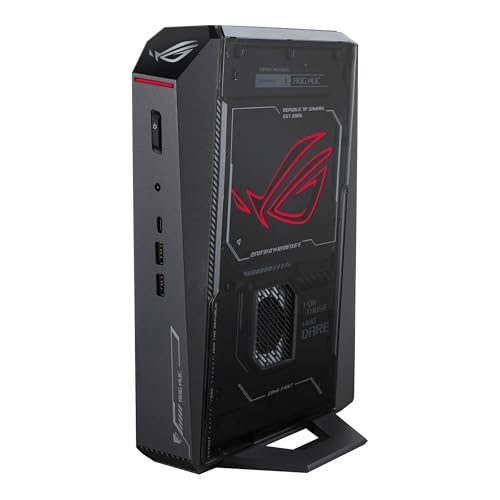
- Best overall for 1440p: ASUS ROG NUC (2025), Core Ultra 9 275HX, RTX 5070 Ti Mobile, 16GB, 1TB — Check on Amazon
- ASUS ROG G22CH DB779, Core i7-13700KF, desktop RTX 4070, 32GB, 1TB — Check on Amazon
- GMKtec EVO-X2, Ryzen AI Max+ 395, Radeon 8060S, 64GB unified memory, 1TB — Check on Amazon
See 3 more Amazon options
- Minisforum AtomMan G7 Pro, Core i9-14900HX, RTX 5070 Laptop GPU, 32GB, 1TB — Check on Amazon
- ASUS ROG NUC 970, Core Ultra 9 185H, RTX 4070 Laptop GPU, 32GB, 1TB — Check on Amazon
- Minisforum AtomMan G1 Pro, Ryzen 9 8945HX, desktop RTX 5060, 32GB, 1TB — Check on Amazon
Read the full guide ↓
Disclosure: As an Amazon Associate, reviewstook.com earns from qualifying purchases. Links to Amazon on this page are affiliate links; they cost you nothing extra. Listing details such as price and availability change often, so check the current Amazon listing before you buy.
Every machine in this guide can put a 1440p picture on your monitor. That is the easy half of the promise in the title, and it is the half the listings advertise. The hard half is where the game itself is drawn. A PC can display 1440p — desktop, text, video, the works — while rendering its games at 1080p or lower and stretching the result up to fill the panel, and at mini-PC prices that quiet substitution is the norm rather than the exception. So this guide grades one thing first: at 2560×1440 output, how much of the picture did your graphics chip actually render, and how much did an upscaler reconstruct? Judged that way, the six picks below split into honest tiers. Two of them render demanding games natively at 1440p as their normal mode. One renders lighter games natively and upscales the rest. Three treat 1440p as an upscaled destination — a good-looking one, with modern upscaling doing real work, but a destination reached from a smaller render all the same. Each review states which tier its pick sits in, in plain terms, before it says anything nice about it.
The second honesty note is about names, because at this budget the names are doing heavy lifting. Five of these six machines carry NVIDIA graphics, and most of those are laptop parts wearing desktop-sounding badges: an RTX 4070 Laptop GPU has 4,608 CUDA cores and 8GB of memory where the desktop RTX 4070 has 5,888 cores and 12GB, per NVIDIA’s own published specifications. Every mobile GPU below is labelled mobile in its review, without exception. The sixth machine has no discrete card at all — AMD’s Strix Halo chip with 64GB of memory shared between processor and graphics — and it earns its place differently: its graphics can never run out of texture memory at 1440p, because there is no small, fixed pool to run out of. And the standing ceiling still applies: there is no RTX 5080 mini under $2,500. The one genuine sub-4-litre RTX 5080 machine, the top configuration of ASUS’s ROG NUC (2025), sits in a premium tier well above this budget, on deal and at regular pricing alike. If frames per dollar are your only metric, a tower still wins, and our Best Gaming PC Under $2500 guide covers those.
In this guide
Quick Picks
Short on time, or comparing several options at once? Each row below names a buyer type and the product that suits it, with a link to the listing.
| Buyer type | Pick | Why it stands out at 1440p | Link |
|---|---|---|---|
| Best overall for 1440p | ASUS ROG NUC (2025), RTX 5070 Ti Mobile | The strongest renderer here: a 12GB mobile 5070 Ti that treats native 1440p as its normal mode, in about 3 litres — check price on Amazon at deal pricing | Check on Amazon |
| Best honest desktop card | ASUS ROG G22CH DB779 | A real desktop RTX 4070 with 12GB in a 10.7-litre case — native 1440p with no laptop asterisk | Check on Amazon |
| Best texture headroom | GMKtec EVO-X2, 64GB | Strix Halo integrated graphics fed by 64GB of shared memory — the one pick with no 8GB texture ceiling at 1440p — check price on Amazon | Check on Amazon |
| Best value discrete GPU | Minisforum AtomMan G7 Pro | RTX 5070 Laptop GPU and 32GB of RAM at a lower entry tier than the ASUS picks — a DLSS-first 1440p machine; check price on Amazon | Check on Amazon |
| Best tiny footprint | ASUS ROG NUC 970 | Full-power 140W RTX 4070 Laptop GPU in 2.5 litres — check price on Amazon | Check on Amazon |
| Best upgrade path | Minisforum AtomMan G1 Pro | A desktop RTX 5060 in a real PCIe slot — the only pick whose 1440p future can be re-bought later, in 3.8 litres | Check on Amazon |
How These Picks Were Chosen
The budget was applied as a ceiling on real, verifiable listings: every product below is a real Amazon listing that fits the under-$2,500 budget in the United States — check price on Amazon, as listing prices change often. Two picks are deal-dependent in ways the reviews state plainly: the ROG NUC (2025) qualifies at deal pricing and not at the higher regular pricing its family shelves at, and the AtomMan G7 Pro’s configured version was positioned through the maker’s own channel, with Amazon pricing that tends to run higher. Where a pick’s case collapses above this budget, its review says so plainly as a walk-away warning. The six machines themselves — their ASINs and specifications — are exactly the set verified in our base guide, Best Mini Gaming PC Under $2500; what changes here is the grading, which is done entirely on 1440p rendering.
That grading starts from silicon, not from names. We compared core counts, memory capacity and published power limits, because in this category the badge is the least reliable part of the listing. Then each pick was placed on the render scale this guide uses throughout: native, where the chip renders the game at 2560×1440 itself; upscaled, where the game renders lower — typically 1080p — and an upscaler reconstructs the 1440p output; and desktop-only, where 1440p is a resolution the machine displays but does not game at. No pick here falls into the third tier for everything, but two of the six live there for demanding games, and their reviews say so. Upscaling figures are quoted only for the five NVIDIA picks, using NVIDIA’s published scaling factors, and only in passages about those picks. The AMD machine is credited with FSR upscaling in general terms only — no internal-resolution figures are attached to it, because its maker documents none and we do not borrow NVIDIA’s numbers for AMD’s technology.
Video memory was graded as a texture budget, which is what it becomes at 1440p. Upscaling can reconstruct pixels the renderer never drew, but it cannot rebuild textures: a game set to 1440p loads its high-resolution texture data at that intent regardless of the internal render resolution, and it loads it into the same fixed pool. That is why the three 8GB picks below carry the sternest warnings in this guide despite having perfectly modern upscalers, why the two 12GB picks grade above them on this angle, and why the EVO-X2’s shared memory pool — tens of gigabytes addressable by its graphics — is a genuine 1440p asset rather than a curiosity. Size was enforced the same way as in the base guide, from published dimensions: anything over about 11 litres was excluded. The one deliberate exception is the ROG G22CH at 10.7 litres, a compact tower rather than a true mini, kept because it is the control group — the machine that shows what a desktop card does to the 1440p question when the size demand relaxes even slightly. We did not use these products ourselves; we read maker listings, specification pages and independent reviews, and anything we could not verify from a real listing was excluded rather than guessed in.
Rendered Pixels vs Displayed Pixels
One distinction runs through every review below, so it gets its own section. Display resolution is what your monitor shows: the desktop, the text, the video stream, the final image. Render resolution is what the graphics chip actually drew before that image reached the screen. When the two match, the picture is native. When the render is smaller and software stretches it to fit, the picture is upscaled — sharper than the raw render, softer than a native frame, and cheaper to produce by exactly the margin that makes it attractive. Every pick in this guide displays 1440p without effort; that has been trivial for graphics hardware for a decade. The entire buying question is the render.
For the five NVIDIA picks, the arithmetic of upscaling is published and fixed. DLSS renders at a fraction of the output on each axis: at 1440p output, DLSS Quality renders internally at roughly 1707×960, DLSS Balanced at roughly 1485×836, and DLSS Performance at roughly 1280×720 — which is to say, Performance mode at a 1440p monitor is a 720p-class render wearing a reconstruction. None of this makes DLSS a trick; its reconstruction is genuinely good, and on the stronger picks below it is best understood as headroom — a way to trade surplus rendering power for higher settings or a faster panel. But it is headroom spent from a render that exists. On the 8GB picks, DLSS is not headroom; it is the mechanism that makes 1440p reachable at all, and the honest description of those machines is “1080p renderers with an excellent 1440p output stage.” The AMD pick plays by the same physics with different branding: its FSR upscaling likewise presents a smaller render at 1440p output, and this guide credits it in those general terms without attaching figures its maker has not published for this chip. Frame generation, where the RTX generations in this set offer it, belongs in a separate mental box entirely: it synthesises additional displayed frames to smooth motion. It changes how fluid the picture feels, never what was rendered, and it is never counted as resolution anywhere in this guide.
Two scaling facts are worth keeping while you read the reviews. A 1080p render shown on a 1440p panel scales by a non-integer factor of about 1.33× per axis, which is why a plain, unassisted 1080p image looks soft at 1440p and why a real upscaler earns its keep. A 720p render, by contrast, scales to 1440p by an exact 2× per axis — clean arithmetic, but a quarter of the pixels, and no reconstruction fully hides that in a demanding game. The reviews now take the six in that order.
The 6 Best Mini Gaming PCs for 1440p Gaming Under $2,500
ASUS ROG NUC (2025) — Core Ultra 9 275HX, RTX 5070 Ti Mobile, 16GB, 1TB
Who it suits: The buyer who wants native 1440p rendering in a true mini, and who is willing to buy on a deal rather than on a schedule.
This is the strongest renderer in the guide, and the only mini here whose graphics belong to the current generation’s upper tier. The chip is the RTX 5070 Ti Mobile — a laptop GPU, named as one — with 12GB of GDDR7 memory, in a chassis of 282.4 × 187.7 × 56.5 mm, about 3.0 litres, with a triple-fan cooling system built around dual vapor chambers. On the render scale, it sits alone at the top of this set: native 1440p at high settings is its normal mode rather than its stretch goal, and DLSS on this pick is what the technology is supposed to be — surplus converted into higher settings or higher refresh, not a crutch the resolution depends on. The 12GB of video memory matters as much as the core count at this resolution. Textures load at full 1440p intent whether or not upscaling is active, and 12GB is the capacity that absorbs that without the quiet texture downgrades the 8GB picks below can be forced into. Around the GPU, ASUS fits a Core Ultra 9 275HX, Thunderbolt 4 and two SO-DIMM slots.
The pick’s honest weakness is system memory, not graphics: the documented configuration carries 16GB of DDR5, the specification of a machine a tier down, and the fix — a second 16GB stick — costs real money in the current market, so check the current retail price before you commit. Plan for 32GB from day one and treat that upgrade as part of the real cost of the machine. The second weakness is the price gate itself. This pick is in this guide at deal pricing on Amazon — check price on Amazon before you buy; the family shelves at a higher regular tier, where it is not an under-$2,500 purchase at all. Set against the tower benchmark — a desktop RTX 5070 Ti prebuilt with 16GB of video memory and 32GB of RAM in a similar premium tier — the NUC at deal pricing still hands back a mobile GPU with 4GB less memory and no graphics upgrade path, ever. What the same money buys is 3.0 litres and the strongest honest 1440p render this form factor currently reaches. That is a legitimate purchase. It is not a value purchase, and it is only a purchase at all while the deal is live.
- The strongest 1440p renderer in this guide: RTX 5070 Ti Mobile with 12GB GDDR7, a tier above every other pick.
- Native 1440p at high settings as the normal mode, with DLSS as headroom rather than a requirement.
- Thunderbolt 4 and dual vapor chambers inside a published-dimensions footprint of about 3.0 litres.
Honest limitation: It only fits this budget at deal pricing — check price on Amazon, because the family shelves at a higher regular tier — and the 16GB of system RAM it ships with needs a paid second stick.
Choose it if native 1440p in a true mini is the goal and you can wait for the deal price. Skip it if you need to buy today at shelf price, or if a tower fits your room — the same money renders more there.

ASUS ROG G22CH DB779 — Core i7-13700KF, Desktop RTX 4070, 32GB, 1TB
Who it suits: The skeptic: the buyer who wants a desktop graphics card’s 1440p answer with no laptop asterisk, and accepts a bigger box as the price of honesty.
No other discrete GPU in this guide is a genuine desktop card, and at 1440p that distinction is the whole story. The G22CH carries a desktop RTX 4070 — the full card, 5,888 CUDA cores and 12GB of GDDR6X memory per NVIDIA’s specifications, running at desktop power behind a 600W 80+ Gold power supply — and 1440p is this card’s home resolution: native rendering at high settings is what it was built for, with DLSS available as headroom in exactly the same sense as on the flagship above. The supporting specification needs no day-one surgery: a Core i7-13700KF, 32GB of DDR5 and a 1TB PCIe 4.0 SSD. The case measures 11.50 × 32.30 × 28.69 cm, about 10.7 litres, and the review should be plain about what that means: this is a compact tower, not a true mini. It will not mount behind a monitor. It sits under a desk like a small tower, because it is one — and in exchange, it is the only pick whose 1440p claims require no translation from mobile to desktop terms.
Its pricing position is also the friendliest here. It sits in a mid-range tier for this guide — check price on Amazon — and deal coverage has reported it well below its list tier, which, against premium towers with the faster RTX 4070 SUPER, is a modest premium for a quarter of the space, and at deal pricing the most accessible route in this guide to a no-asterisk native 1440p machine. Model discipline matters here. The configuration documented in this guide is DB779 — 13700KF, 32GB — while reseller listings for a weaker 13700F/16GB variant have been seen asking more money for less machine. Read the model number on the live listing before any money moves. One more ceiling to know: ASUS caps this chassis at 32GB of memory across its two SO-DIMM slots, so the healthy amount fitted at the factory is also all it will ever hold. Neither caution touches the graphics. If 10.7 litres fits your space, this is the pick whose 1440p performance you can take at face value.
- A genuine desktop RTX 4070 with 12GB — native 1440p at high settings with no mobile translation needed.
- 600W Gold power supply and 32GB fitted: the card runs at desktop power, and no day-one upgrades are required.
- Reported well under its list tier in deal coverage — check price on Amazon; the most accessible no-asterisk 1440p route in the guide.
Honest limitation: At 10.7 litres this is a compact tower wearing a mini guide’s badge; behind-monitor mounting is out, and the DB779 model number needs checking on the listing because of variant drift.
Choose it if your space fits a small tower and you want the 1440p question answered by desktop silicon. Skip it if the whole point is a machine that disappears — the NUCs are a quarter of its size.

GMKtec EVO-X2 (64GB) — Ryzen AI Max+ 395, Radeon 8060S, 64GB Unified Memory, 1TB
Who it suits: The buyer whose games stress texture memory harder than raw rendering — and whose second hobby, local AI, makes the memory the point of the machine anyway.
The EVO-X2 is built around AMD’s Ryzen AI Max+ 395, codenamed Strix Halo: sixteen Zen 5 cores and a Radeon 8060S integrated GPU with 40 RDNA 3.5 compute units, fed by 64GB of LPDDR5X-8000 memory that processor and graphics share at 256 GB/s. Integrated graphics is usually where a gaming guide lowers its voice; here it is the headline. Independent assessment from Notebookcheck places the 8060S roughly on par with the RTX 4070 Laptop GPU for gaming, and reviewers have framed this machine as a genuine 1440p gaming box without a dedicated card. On this guide’s render scale, that translates honestly as follows: lighter and older games render natively at 1440p at sensible settings; demanding modern titles are a reduced-settings native render or a 1080p-class render presented at 1440p through FSR upscaling. There is no DLSS here — that is NVIDIA’s technology and this is not an NVIDIA machine — and this guide attaches no internal-resolution figures to the FSR path, because none are documented for this chip. What the EVO-X2 offers instead is the one 1440p asset no other pick can match: texture headroom. Its graphics draw from a 64GB pool rather than a fixed 8GB or 12GB, so the texture pop-in and quiet quality downgrades that stalk the 8GB picks at 1440p simply have no ceiling to hit. The chassis works out to about 2.8 litres from its 193 × 185.8 × 77 mm dimensions, runs Windows 11 Pro, and draws power from an external 230W adapter.
The 64GB/1TB configuration is a premium-tier Strix Halo box — check price on Amazon for the current figure. Two cautions are structural, and both matter more on a five-year horizon than the render tier does. The memory is soldered, so the 64GB decision is forever — the 128GB configurations exist precisely because buyers outgrow it, and they sit in a premium tier far outside this budget. And the shared pool is shared in both directions: the same memory feeds the processor, the game and the graphics at once, which is why the 64GB configuration is the one to buy and the smaller configurations of this platform are not in this guide. GMKtec is also a smaller maker than ASUS: support, firmware polish and warranty handling are the known trade for being first and cheapest with new silicon. Buy it as the memory pick that also renders 1440p credibly, and it has no rival here; buy it expecting the flagship NUC’s native-render headroom, and you have misread it.
- 64GB of unified memory: the only pick whose graphics can address tens of gigabytes, so 1440p textures never hit a fixed VRAM ceiling.
- Radeon 8060S integrated graphics placed by Notebookcheck around RTX 4070 Laptop class for gaming — native 1440p for lighter titles, upscaled for demanding ones.
- Available on Amazon in about 2.8 litres — check price on Amazon; a premium-tier entry to Strix Halo.
Honest limitation: Demanding games at 1440p are an upscaled presentation here, not a native render, and the soldered 64GB can never grow — the step up is a second machine in a tier well above this budget.
Choose it if texture headroom and local AI matter alongside 1440p gaming. Skip it if native rendering of demanding titles is the whole job — that is the ROG NUC (2025) above, on deal.

Minisforum AtomMan G7 Pro — Core i9-14900HX, RTX 5070 Laptop GPU, 32GB, 1TB
Who it suits: The value hunter: the buyer who accepts an upscaled 1440p in exchange for a current-generation discrete GPU and a full 32GB of RAM at the lowest entry price in this guide.
Minisforum’s AtomMan line puts laptop silicon in desktop clothing, and the G7 Pro is its current-generation statement: a Core i9-14900HX and an RTX 5070 Laptop GPU — a mobile part, named as one, with 8GB of GDDR7 and a power limit around 115W — in a slim upright chassis that stands on the desk like a games console. Independent review coverage of full-power examples places this GPU in the class of a desktop RTX 4060 Ti, and that placement defines its 1440p honestly: this is a DLSS-first machine. Esports and older titles render natively at 1440p at reduced settings; demanding games are a 1080p-class render carried to the panel by DLSS, where the Quality mode’s roughly 1707×960 internal render is the setting to live on and the Performance mode’s 720p-class render is visibly a compromise too far. No pick at this price matches its supporting specification: two SO-DIMM slots holding 32GB of DDR5 and accepting 96GB, a 1TB SSD beside a second M.2 slot wired for PCIe 5.0 drives, Wi-Fi 7, USB4, HDMI 2.1, and Windows 11 Pro on configured units. The configured 32GB/1TB version launched through the maker’s channel in a lower tier than the ASUS picks, with a barebone version — no RAM, no SSD, no operating system — positioned below it; Minisforum’s own store later listed the configured unit at a higher tier, and Amazon pricing for this brand tends to run above the maker’s direct prices, so check price on Amazon rather than assuming the launch positioning still holds.
The binding constraint at 1440p is the 8GB of video memory, and it binds in the way this guide’s method section described: upscaling reconstructs the frame, but textures load at full 1440p intent into those 8GB regardless, so the texture setting — not the resolution setting — is the dial this machine’s owners will manage. Two checks on arrival are non-negotiable with this pick. Review units were documented shipping with a single 32GB stick — single-channel memory in a machine sold on performance, and a real cost to an upscaling pipeline that moves frames through system memory — so open the memory page in the BIOS or a system tool on day one and raise it with the seller if yours arrives that way. The Amazon page is also a style family, with barebone and configured versions side by side: make sure the configured 32GB/1TB style is the one in your cart before paying, because the barebone’s lower price is not a discount — it is a different product. Against the cheapest tower route to similar frames you are paying a clear premium; what it buys is the slim upright form, a 16-core HX processor, and 32GB fitted from the start.
- Configured 32GB/1TB positioned at launch in the guide’s lower entry tier — check price on Amazon.
- Current-generation DLSS on an RTX 5070 Laptop GPU — the strongest upscaling toolkit among the 8GB picks.
- 32GB of RAM fitted and slots to 96GB, a PCIe 5.0-capable second SSD slot, Wi-Fi 7 and USB4.
Honest limitation: At 1440p this is an upscaled machine with an 8GB texture ceiling, and its firmest pricing reference is its maker-channel launch positioning — Amazon tends to charge more, and some review units shipped with single-channel memory that must be checked on arrival.
Choose it if you want discrete-GPU 1440p output in a mini without paying the ASUS premium, and you are comfortable living on DLSS Quality. Skip it if native rendering matters to you, or you need a hard, stable Amazon price today.

ASUS ROG NUC 970 — Core Ultra 9 185H, RTX 4070 Laptop GPU, 32GB, 1TB
Who it suits: The small-desk buyer who wants the tiniest footprint in the guide and a straightforward Amazon listing — the previous flagship, bought the smart way, with its 1440p terms understood.
The ROG NUC 970 is the 2024 flagship of this line, and a year of successors has made it the value route into the same chassis idea. At 270 × 180 × 50 mm it is the smallest box in this guide at 2.5 litres, and ASUS uses that box properly: the RTX 4070 Laptop GPU runs at its full 140W power limit rather than the strangled settings thinner minis impose on the same chip. That chip — 4,608 cores and 8GB of memory, per NVIDIA’s published specifications — is placed by independent reviewers around the desktop RTX 4060 Ti class at full power, which puts this pick in the same 1440p tier as the G7 Pro above, reached from the previous generation: lighter titles render natively at 1440p at reduced settings, and demanding games are an upscaled presentation, with DLSS Quality’s roughly 1707×960 internal render as the sensible default and the lower modes trading visible softness for smoothness. The supporting cast is complete and needs no day-one spending: a Core Ultra 9 185H, 32GB of DDR5 with slots that accept up to 64GB, a 1TB SSD, Thunderbolt 4, an SD card reader that creators genuinely use, and the vertical stand in the box. It is positioned below its list tier on Amazon — check price on Amazon — and that gap is the entire argument — the 2025 model at the top of this guide renders a tier higher, but it costs noticeably more at its deal pricing and ships with half this machine’s memory.
The specification that will age first here is the same one that binds the G7 Pro: 8GB of video memory. At 1440p output, textures load at full intent into that pool whether the frame behind them was rendered natively or reconstructed, so this machine’s texture settings will be managed down over its life in a way the two 12GB picks above will not ask of their owners. No upgrade fixes it; the GPU is the machine’s GPU for life. Whether that premium is rational is a question about your room, not the machine: in a dorm, a studio apartment or a media console, 2.5 litres is the difference between a gaming PC fitting the life and not existing in it at all. Buy the NUC 970 with its 1440p tier stated plainly — upscaled for demanding games, native for lighter ones — and it is the most defensible tax in the guide.
- The guide’s smallest pick at 2.5 litres, running its 4070 Laptop GPU at the full 140W limit instead of a throttled one.
- Positioned below its list tier on Amazon — check price on Amazon; not a launch promise.
- Thunderbolt 4, an SD card reader and 32GB of RAM slotted to grow to 64GB — the creator-friendly specification.
Honest limitation: The 8GB of video memory is the aging point of the whole machine at 1440p, and demanding games are upscaled rather than native — a large share of what you pay is the 2.5-litre form itself.
Choose it if the smallest footprint wins and an ASUS warranty matters to you. Skip it if you can stretch to the 2025 NUC’s deal price — its 12GB mobile 5070 Ti renders natively where this machine upscales.

Minisforum AtomMan G1 Pro — Ryzen 9 8945HX, Desktop RTX 5060, 32GB, 1TB
Who it suits: The tinkerer: the buyer who accepts the weakest native 1440p render in the guide today in exchange for the only slot that can change that answer later.
The G1 Pro is the engineering outlier here. The graphics are a desktop RTX 5060 — Gigabyte’s low-profile card at 145W — sitting in a genuine PCIe x16 slot inside the 3.8-litre chassis and fed by an internal 350W power supply instead of a laptop brick. The rest of the build runs to a sixteen-core Ryzen 9 8945HX, 32GB of DDR5-5200 in slots that accept 96GB, a 1TB PCIe 4.0 SSD with a second M.2 slot beside it, 5GbE networking, Wi-Fi 7 and Windows 11 Pro. Check price on Amazon for the current US figure. On today’s render scale, honesty requires placing it last of the six: the desktop 5060 is an entry-tier card with 8GB of memory, so at 1440p it is a DLSS-first machine — native rendering for esports and older titles at reduced settings, and for demanding games an upscaled output built on DLSS Quality’s roughly 1707×960 internal render, with the same 8GB texture ceiling that binds the two picks above. What no other pick can say is that this verdict is temporary. The slot accepts low-profile cards, which today means the RTX 5060 class and below — a narrow path by tower standards, and by mini standards the only one that exists. When a stronger low-profile card arrives, this is the only machine in the guide that can take it; everything else here is a sealed answer.
Two documented gotchas must be handled on day one, and both bear directly on 1440p. The G1 Pro ships in an 80W gaming mode that withholds roughly a fifth of its performance behind a software toggle — find the performance mode in Minisforum’s utility and switch it before judging anything at 1440p, or you will conclude the machine is slower than it is; on a pick whose 1440p case is already marginal, a fifth of its performance is the difference between tiers. Reviewers found it loud under heavy load — the acoustic tax of cooling 3.8 litres — and the maker’s utility software is documented shipping a driver component that Windows Defender flags. Know both before the first warning surprises you. Priced against the towers, complete desktop RTX 5060 systems sit in a much lower budget tier, so a substantial share of this pick’s price is the 3.8 litres and the slot. Buy the slot with your eyes open and it is a rational premium; buy it expecting the sealed picks’ polish and it will annoy you weekly.
- The only true PCIe graphics slot in the guide: today’s 1440p compromise is the one verdict here that a future low-profile card can overturn.
- Available on Amazon — check price on Amazon — with an internal 350W power supply and no laptop brick, in 3.8 litres.
- Memory slots to 96GB behind a sixteen-core Ryzen 9 8945HX — the strongest CPU-side upgrade story here.
Honest limitation: As shipped and as specified, it is the weakest 1440p renderer in the guide — an 8GB, DLSS-first machine — and it ships in a power-saving mode that hides about a fifth of its performance until you find the toggle.
Choose it if a future card swap justifies the premium and maker utilities do not scare you. Skip it if you want the strongest render today or a sealed, quiet appliance — that is the NUC 970’s job, at a similar price.
Comparison Table
| Product | Graphics (honest label) | 1440p verdict | Size | Link |
|---|---|---|---|---|
| ASUS ROG NUC (2025) | RTX 5070 Ti Mobile, 12GB | Native at high settings — the normal mode | ~3.0L | Check on Amazon |
| ASUS ROG G22CH DB779 | Desktop RTX 4070, 12GB | Native at high settings — no asterisk | ~10.7L | Check on Amazon |
| GMKtec EVO-X2 (64GB) | Radeon 8060S integrated, 64GB unified | Native for lighter titles, FSR-upscaled for demanding ones; no texture ceiling | ~2.8L | Check on Amazon |
| Minisforum AtomMan G7 Pro | RTX 5070 Laptop GPU, 8GB | DLSS-first; native only for lighter titles | Slim upright | Check on Amazon |
| ASUS ROG NUC 970 | RTX 4070 Laptop GPU, 8GB, 140W | DLSS-first; native only for lighter titles | 2.5L | Check on Amazon |
| Minisforum AtomMan G1 Pro | Desktop RTX 5060 low-profile, 8GB | DLSS-first today; the only verdict a future card can change | 3.8L | Check on Amazon |
Pairing a 1440p Monitor With These Minis
The monitor half of a 1440p setup is where money quietly leaks, so the pairing advice starts with the panel itself: buy a 1440p high-refresh monitor, not a 4K one. Every pick in this guide is graded on its 1440p render, and a 4K panel asks each of them to reconstruct toward a target none renders natively — even the two native-1440p picks treat 4K as a DLSS-fed stretch, and the 8GB machines have no business there at all. A good 1440p panel at a high refresh rate is also where the stronger picks’ headroom becomes visible: native rendering plus frames to spare is a combination that only shows on a screen that can display them. Spend the difference between a 4K panel and a 1440p one on refresh rate and panel quality instead.
Connections should be built only from what each listing documents, and this guide claims no port it cannot source. The ROG NUC (2025) and the NUC 970 both document Thunderbolt 4, which carries a DisplayPort signal — one cable from that port to a monitor’s USB-C or DisplayPort input is the clean run for either machine. The AtomMan G7 Pro documents HDMI 2.1 and USB4, either of which carries a 1440p high-refresh signal. The AtomMan G1 Pro’s listing headlines quad-4K display support, so multi-monitor 1440p desk setups are documented territory for it. For the EVO-X2 and the ROG G22CH, the base research does not enumerate a port list, and rather than invent one: check the live listing’s port table before ordering, confirm a DisplayPort-class or HDMI 2.1-class output, and cable to that. Whichever pick and port you land on, finish the job in software on the first evening: open the display settings and set the monitor’s real refresh rate, because Windows routinely defaults a high-refresh panel to a lower rate and a 1440p setup quietly running at a basic refresh is the most common self-inflicted downgrade in this entire category. Readers planning the desk around the machine’s footprint as well as its picture will find the same six graded on installation in our Best Mini Gaming PC For Small Spaces Under $2500 guide.
How to Choose a Mini Gaming PC for 1440p Under $2,500
- Ask the render question first. For any pick, in any listing, the only question that matters at this resolution is what the game is drawn at before the upscaler sees it. This guide’s verdicts — native, split, or DLSS-first — are the answer for these six; demand the same answer anywhere else.
- Read video memory as the texture budget. Upscaling reconstructs pixels; it does not rebuild textures. At 1440p output, 12GB is comfortable, 8GB is a setting you will manage, and the EVO-X2’s shared pool is the exception that proves the rule. The memory line is also the one part of a mini listing that cannot be spun: an “RTX 5070” with 8GB is the laptop part whatever the headline says.
- Learn the DLSS figures once. At 1440p output, Quality renders around 1707×960, Balanced around 1485×836 and Performance around 1280×720. Knowing that Performance is a 720p-class render stops a settings menu from making your decisions for you — and knowing Quality is not native stops a listing from doing the same.
- Judge the GPU by its power limit as well as its model. One laptop GPU can be set anywhere from half power to its full 140W ceiling depending on the chassis around it. The NUC 970’s published 140W and the G7 Pro’s figure around 115W let you model performance; a maker who will not publish the wattage is telling you something else.
- Treat deal-dependent picks as a different product. The ROG NUC (2025) sits in this budget at deal pricing and above it the rest of the time — two positions, effectively two products. Decide which one you are buying, set a price alert for the deal, and do not let a crossed-out “list price” make the decision for you.
- Interrogate style-family listings. The G7 Pro shares one Amazon page between barebone and configured versions. Verify the style, memory and storage sitting in the cart before checkout — a barebone bought at a configured machine’s expected price is this category’s most expensive misunderstanding.
- Check the as-shipped memory configuration. The flagship NUC ships with 16GB where 32GB is this budget’s standard, and G7 Pro review units shipped with a single 32GB stick. Both are fixable or raisable on day one and expensive to discover in month three.
- Pair the panel to the render, not the badge. A 1440p high-refresh monitor is the correct partner for every pick here; a 4K panel spends your money on pixels none of these machines natively draws. If the total setup is the real constraint, the tier below plus a better panel is often the smarter spend — see Best Mini Gaming PC For 1440p Gaming Under $1500.
Common Buying Mistakes
- Reading “outputs 4K” as “renders at 1440p.” Display support is a decade-old triviality; the render is the product. Listings lead with the display number precisely because it is the bigger one.
- Believing the GPU name. A mini badged “RTX 4070” carries the 8GB laptop part until its own listing proves otherwise — the memory line and the wattage are the proof.
- Expecting DLSS on the AMD pick. The EVO-X2 upscales through FSR, a different technology with no published internal-resolution figures for this chip; anyone quoting you DLSS numbers for it is conflating two vendors’ systems.
- Paying shelf price for a deal-dependent pick. At regular pricing the ROG NUC (2025) is not the under-$2,500 pick on a bad day — it is a different purchase from the deal-priced version entirely.
- Clicking the barebone style on a shared listing page by accident, then finding the box holds no RAM, no SSD and no Windows licence.
- Leaving the G1 Pro in its shipping mode: it arrives with roughly a fifth of its performance switched off, and at 1440p that fifth is the difference between tiers.
- Chasing an RTX 5080 mini at this budget. The real machine sits in a premium tier well above this budget, and listings implying otherwise are selling a badge, not the card.
- Forgetting to set the monitor’s refresh rate. Windows defaults many high-refresh panels to a basic rate; a 1440p setup can be downgraded by a settings page and never by the hardware at all.
Final Recommendation
- Native 1440p in a true mini: ASUS ROG NUC (2025) — at deal pricing only; check price on Amazon.
- Native 1440p with no asterisk: ASUS ROG G22CH DB779.
- Texture headroom and local AI: GMKtec EVO-X2 (64GB).
- Discrete-GPU 1440p output for the least money: Minisforum AtomMan G7 Pro.
- Smallest footprint, clear listing: ASUS ROG NUC 970.
- A 1440p verdict that can improve later: Minisforum AtomMan G1 Pro.
Our top two for this angle are the ROG NUC (2025), for the strongest honest render in three litres, and the ROG G22CH, for answering the 1440p question with a desktop card and no translation. Between them they mark the two ways to buy native 1440p in this form factor: pay the deal-gated premium for the mini, or relax the size and let the tax nearly vanish. The EVO-X2 is the pick for buyers whose games punish texture memory or whose desk also runs local models, and the G7 Pro is the value route into upscaled 1440p with a current-generation toolkit. The NUC 970 remains the smallest defensible footprint, and the G1 Pro is the only machine here whose weakest-in-guide verdict comes with an expiry date. If your budget is a plan rather than a fact, see Best Mini Gaming PC Under $3000 for where the RTX 5080 machines actually live; if this is your first mini, the plain-language version of the same six machines is our Best Mini Gaming PC For Beginners Under $2500 guide. Whichever pick you land on, verify the exact style and configuration on the live listing, check the memory it ships with on the day it arrives, set your monitor’s real refresh rate — and check the live price before you order.
Frequently Asked Questions
Is DLSS Quality actually rendering at 1440p?
No. At a 1440p monitor, DLSS Quality renders the game internally at roughly 1707×960 and reconstructs the 1440p output from that render plus data from previous frames. The result is genuinely good — often close to native in motion — but it is a reconstruction, and the honest description of a DLSS-first machine is a 1080p-class renderer with an excellent output stage. Native rendering is the render and the output being the same number, and in this guide only the ROG NUC (2025) and the ROG G22CH do it as their normal mode.
Can these minis play at native 1440p without upscaling?
Two of them, as a normal mode: the ROG NUC (2025) and the ROG G22CH, both with 12GB of video memory behind a current or desktop-class GPU. The EVO-X2 renders lighter and older titles natively and upscales demanding ones. The three 8GB picks — the G7 Pro, the NUC 970 and the G1 Pro — are upscaled machines for demanding games and native only for esports and older titles at reduced settings. That split, not the shared “1440p ready” language in their listings, is the real specification of this guide.
Is 8GB of video memory enough for 1440p gaming?
It is enough to output 1440p and not always enough to furnish it. Textures load at the resolution you select, into the video memory you have, whether the frame is rendered natively or reconstructed — so on an 8GB card the texture setting becomes the dial you manage, title by title, and it will be managed further down as games grow. The 12GB picks postpone that conversation for years, and the EVO-X2’s 64GB shared pool removes its ceiling entirely, which is why memory capacity is graded so heavily in a 1440p guide.
Does the EVO-X2 support DLSS?
No. DLSS is NVIDIA’s technology; the EVO-X2’s graphics are AMD’s, and its upscaling path is FSR. This guide credits that path in general terms and deliberately prints no internal-resolution figures for it, because none are documented for this chip — the figures quoted elsewhere in this article belong to DLSS on the NVIDIA picks only, and transferring them across vendors is exactly the conflation the listings rely on.
Should I pair one of these minis with a 4K monitor?
Not for gaming. None of these machines renders games natively at 4K; the strongest two would present 4K as a DLSS-fed reconstruction, and the 8GB picks should not be asked to try. A 1440p high-refresh panel is the pairing every pick here was graded for, it costs less than the 4K panel, and the money saved is better spent on the ROG NUC (2025)’s second memory stick or the better panel tier. For desktop sharpness alone, all six drive high-resolution displays happily — but buy the monitor for the render you actually own.
Can I buy an RTX 5080 mini PC for under $2,500?
Not a genuine one. The one genuine sub-4-litre RTX 5080 machine — the ROG NUC (2025) in its top configuration — sits in a premium tier well above this budget, on deal and at regular pricing alike. Inside this budget, the strongest verified mini GPU remains the RTX 5070 Ti Mobile from the same chassis family, at deal pricing — check price on Amazon. A listing offering a 5080 mini for under $2,500 is mislabelled, misconfigured, or not the machine in its headline.
- Best Mini Gaming PC Under $2500
- Best Mini Gaming PC Under $1500
- Best Mini Gaming PC Under $3000
- Best Mini Gaming PC For Beginners Under $2500
- Best Mini Gaming PC For Streaming Under $2500
- Best Small Form Factor Gaming PC Under $2500
- Best Mini PC Under $2500
- Best Barebones Mini PC Under $2500
- Best Compact Gaming PC Under $2500


