Where to buy
Check the latest price, availability and delivery on Amazon. Orders are placed on Amazon. We may earn a commission from qualifying purchases.
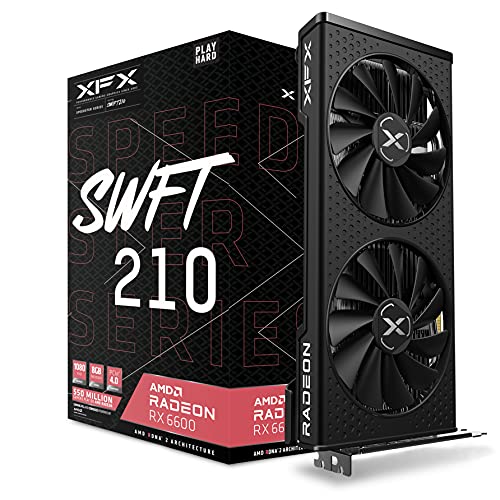
- Best build if you insist on new parts: XFX Speedster SWFT 210 Radeon RX 6600 8GB — the graphics card anchoring the all-new parts build below — Check on Amazon
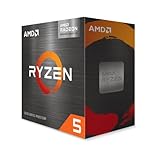
- AMD Ryzen 5 5600G — the heart of the starter build that plays today and takes a graphics card later — Check on Amazon
- MINISFORUM UM870 Slim Barebone — the finish-it-yourself mini PC, which still needs memory, a drive and a system added — check price on Amazon — Check on Amazon
- abytespark Gaming PC, GTX 1660 Super — the ready-made tower that currently costs less than building its equal — Check on Amazon
See 2 more Amazon options
- Beelink SER5 MAX Mini PC, Ryzen 7 7735HS — the no-building-at-all pick, finished at the budget line — Check on Amazon
- STGAubron Gaming PC, Ryzen 5 5500 and RX 580 — yesterday’s classic budget formula, assembled for you, worth buying only when its price dips — Check on Amazon
Read the full guide ↓
Disclosure: As an Amazon Associate, reviewstook.com earns from qualifying purchases. Links to Amazon on this page are affiliate links; they cost you nothing extra. Listing details such as price and availability change often, so check the current Amazon listing before you buy.
If this is your first gaming PC, welcome — and before anything else, you deserve the honest headline most beginner guides bury: in November 2026, you cannot assemble the classic gaming PC from brand-new parts and land under $500. We priced the standard beginner build — a Ryzen 5 5500 processor, a B550 motherboard, 16GB of memory, a 500GB solid-state drive and a Radeon RX 6600 graphics card — line by line at current prices, and it totals well over the budget before an operating system. The parts did not get better; memory and storage climbed steeply during a shortage running through 2025 and 2026, and a memory kit that was cheap two years ago now costs far more. Any parts list promising a new $500 build today is quoting yesterday’s prices.
Here is the part the other guides skip: $500 still buys a genuinely good first gaming PC — it just arrives by a different road. This guide walks six complete routes, each accounted for to the last component, operating system included, because a total that leaves out the system software is a fib a beginner should not have to catch. Two are real do-it-yourself builds, shown honestly so you can see the gap yourself. One is a barebone mini PC, where the headline figure is only a down payment and we account for the missing pieces in the open. Three are finished computers that currently beat building on price, including a complete GTX 1660 Super tower that undercuts every parts list here. If building is the hobby, the staged build in position two was written for you; if the games are the point, the finished machines will save you real money and your whole first weekend.
In this guide
Quick Picks
Short on time, or comparing several options at once? Each row below names a type of first-time buyer and the route that suits them; each route is itemized in full in its review below, and linked picks say check price on Amazon for the current figure.
| Buyer type | Pick | Why it stands out | Link |
|---|---|---|---|
| Best all-new parts build | Ryzen 5 5500 + RX 6600 parts build (XFX SWFT 210) | The classic budget build of 2024 — honestly over this budget with all-new parts today | Check on Amazon |
| Best start now, graphics card later | Ryzen 5 5600G starter build | Plays today on built-in graphics; the empty card slot is the whole upgrade plan | Check on Amazon |
| Best barebone route | MINISFORUM UM870 Slim completion | A barebone box that costs far more once finished — read the completion notes before buying | Check on Amazon |
| Best ready-made tower | abytespark Gaming PC, GTX 1660 Super | Complete with Windows and cheaper than any parts list here — check price on Amazon | Check on Amazon |
| Best zero-effort PC | Beelink SER5 MAX Mini PC | Finished and complete at the budget line; the strongest built-in graphics among the ready-made picks | Check on Amazon |
| Best price-dip buy | STGAubron Gaming PC, RX 580 | Worth buying only when its price dips to the budget line or below — a skip above it | Check on Amazon |
How These Picks Were Chosen
The budget was applied to the whole finished machine, never to the most exciting component. Every route below carries a total that includes a processor, a motherboard where one is needed, 16GB of memory, at least 500GB of solid-state storage, a case and power supply where those apply, and a plain statement of where the operating system comes from. Any product whose headline price left out parts a computer cannot run without was either completed honestly on paper or left out. That rule is what disqualifies most barebone listings as budget builds: a barebone box containing no memory, no storage drive and no operating system is not a complete computer, and nothing here pretends otherwise.
We did not assemble these machines ourselves. We read the makers’ listings and specification pages, and checked every component against Amazon listings; for linked picks, check price on Amazon for the current figure rather than trusting any number printed in a guide. Two market facts shaped everything below. First, memory: desktop memory kits have risen sharply during the shortage running through 2025 and 2026, and laptop-style memory for mini PCs has risen even more steeply. Second, storage: consumer drive prices have climbed steeply through the same flash shortage. Together those two lines add a substantial amount to every build here compared with two years ago — before the graphics card is even discussed.
Performance claims are kept to what the hardware class honestly supports. The routes with a separate graphics card are 1080p machines — the resolution of a standard full-HD monitor: esports games at high frame rates, older big-budget games at medium-to-high settings, the newest releases at low-to-medium settings with upscaling help. The built-in-graphics routes sit a class below and are described that way. Nothing here is presented as a 1440p machine, because at $500 in November 2026 there is no honest way to build or buy one; that search has its own guide, linked at the end of this one.
Thirteen Words Worth Learning Before You Spend Anything
Here is the whole of this hobby’s vocabulary, in plain English, tied to the six routes below.
- Build path. A complete route from money to a working PC — parts you assemble, a half-finished box you complete, or a finished machine you simply buy. All six picks are build paths, each accounted for honestly in its review.
- Graphics card (discrete GPU). A separate board whose only job is drawing games — the biggest single factor in how well a PC plays. Picks one, four and six have one; picks two, three and five do not.
- Integrated graphics (and APU). Graphics built into the processor itself; AMD calls a processor with strong built-in graphics an APU. It shares the machine’s memory, plays lighter games well, and costs nothing extra — the strategy behind pick two.
- Barebone. A half-finished computer: case, processor and motherboard included; memory, drive and operating system missing, to be bought and fitted by you. Only pick three is one — its review accounts for the missing pieces first.
- Renewed. A used machine inspected, cleaned and resold with a short warranty. Plainly: none of the six picks here is renewed — every route is new parts or a new finished machine.
- Soldered. Attached permanently at the factory; soldered memory can never be changed. Only the Beelink mini PC (pick five) has it. The parts builds use sticks you can swap in minutes; the barebone’s slots start empty, waiting for yours.
- Memory (RAM) and dual-channel. The machine’s short-term workspace; 16GB is the sensible gaming amount. Dual-channel means two matching sticks instead of one, feeding data faster — it matters most for built-in graphics, which borrow this memory.
- DDR4, DDR5 and SO-DIMM. Memory generations: DDR4 and DDR5 sticks are physically different and never interchangeable. Desktops use long sticks; mini PCs and laptops use short SO-DIMMs. Pick three takes DDR5 SO-DIMMs — laptop memory, the priciest kind in this shortage.
- NVMe SSD. The storage drive your games and system live on — a small stick that plugs straight into the motherboard, far faster than old spinning drives. Every route includes at least 500GB of it, counted in the total.
- PCIe slot. The long socket a graphics card pushes into. An empty one is a promise: a card can be added later without rebuilding. Picks one, two and six have one; the mini PCs in picks three and five do not.
- Power supply (PSU). The box converting wall power into what the parts need, rated in watts. A card can only be added if the supply is strong enough — which is why card upgrades are promised here only where a wattage is actually published.
- Operating system (OS) and activation. Windows, in every case here. Finished machines include a licensed copy. Parts builds do not — they can run Windows unactivated (fully usable, some personalization locked) or free Linux until a licence is bought. A parts quote hiding this understates itself.
- Upgrade path. What a machine lets you improve later without replacing it. A tower with an empty slot and a known power supply has one; a sealed mini PC with soldered memory does not.
The 6 Best Gaming PC Builds for Beginners Under $500
1. The All-New Parts Build — Ryzen 5 5500 and Radeon RX 6600 (XFX Speedster SWFT 210)
Who it suits: Beginners who want the real building experience — every part new, chosen by them, covered by its own warranty — and whose budget can stretch past the $500 line.
This is the build every forum thread recommends to a first-timer, so it goes first and gets accounted for first, part by part. The processor is the AMD Ryzen 5 5500 — six cores, cooler bundled — and it has no built-in graphics at all: remember that on assembly night, because the monitor must plug into the graphics card, never the motherboard. The board is the ASRock B550M-HDV. Memory is a 16GB kit of two 8GB DDR4-3200 sticks. Storage is Kingston’s NV3, a 500GB NVMe drive. The graphics card is the XFX Speedster SWFT 210 Radeon RX 6600, 8GB — check price on Amazon, though some marketplace listings sit far above the usual level. The case is a Montech XR-class mid-tower; the power supply is a named one — the Thermaltake Smart 500W. Total: well over the $500 line, Windows not yet included; running unactivated adds nothing, and a licence adds more.
None of that makes it a bad build — component for component, it is the best machine in this guide. The RX 6600 is a genuine 1080p card with current driver support, the 5500 a real six-core gaming processor, and the B550 board leaves room for a Ryzen 7 5700X3D-class processor years from now. It is simply not a $500 build: a large share of the overrun is memory and storage inflation alone, and most of the rest is a graphics card that cost far less a couple of years ago and has not returned to that level since. If your ceiling is truly $500, the routes below exist for you; if it can stretch, this is the one worth stretching to — the only route here where every component is current, new and individually replaceable when something eventually fails.
- Every part new with its own warranty — the only fully do-it-yourself route to a modern graphics card in this guide.
- The B550 platform keeps a genuine processor upgrade open for later years.
Honest limitation: Well over the $500 budget before an operating system, this build misses the line by a wide margin — no all-new parts list with a separate graphics card that we could verify comes in under the line in the current market.
Choose it if you can stretch and want the best, most repairable machine here. Skip it if $500 is a hard ceiling — the finished systems below put a working gaming PC on your desk today for noticeably less.
2. The Starter Build — Ryzen 5 5600G Now, Graphics Card Later
Who it suits: Beginners who play esports and older games, enjoy building in stages, and would rather assemble a real tower now than wait for a full build to fit the budget.
The staged strategy is the oldest honest trick in budget building: start with a processor that has decent built-in graphics, play on it from day one, and let a separate graphics card arrive months later as one later purchase. The anchor is the AMD Ryzen 5 5600G — six cores with Radeon Vega 7 integrated graphics and a cooler in the box; check price on Amazon. Around it sits the first build’s shared basket: the B550M-HDV board, a 16GB DDR4-3200 kit (buy the two-stick version — built-in graphics borrow system memory, so the second stick is partly a graphics purchase), a Kingston NV3 500GB drive, a Montech XR-class case, and the named Thermaltake Smart 500W power supply. The total lands over $500 — but it is the closest an all-new tower comes to the line, with the empty slot, power headroom and platform to become the first build later: one card, dropped in, is the entire second stage.
What the Vega 7 graphics actually deliver needs the same plain speaking. This is integrated graphics from 2021: esports titles at 1080p on low-to-medium settings are its home ground, older big-budget games run at reduced settings, and the newest releases are a fight it sometimes loses. Its graphics share memory with the rest of the system, so part of your 16GB always works as graphics memory. And the 5600G connects its graphics slot at PCIe 3.0 speed, not 4.0 — a small cost with today’s mid-range cards, but worth knowing before the future card is bought. As a finished PC at this budget this build is a promise rather than a product; as the first stage of a two-stage purchase whose second stage is one part in a waiting slot, it is the smartest way to start building in a bad market.
- A complete, working tower of new parts with the clearest upgrade story in this guide: one card completes it.
- Vega 7 graphics cover esports and older games at 1080p reduced settings from the first evening.
Honest limitation: Its all-in total is still over budget, and until the graphics card arrives this is the weakest gaming performer among the tower routes — built-in graphics are a bridge, not a destination.
Choose it if building is half the fun and a graphics card can follow within the year. Skip it if you want the strongest gaming performance per dollar today — that is the ready-made tower two picks down.
3. The Barebone Completion — MINISFORUM UM870 Slim, Priced With Everything It Still Needs
Who it suits: Beginners who already own laptop memory and a spare NVMe drive from a dead laptop or an earlier project — the only buyers for whom this route’s arithmetic works.
Barebone mini PCs are where “$500 build” guides mislead newcomers most, so this pick exists to be priced in daylight. The MINISFORUM UM870 Slim barebone is an appealing little box: a Ryzen 7 8745H with Radeon 780M graphics — the strongest integrated graphics AMD sells in this class — two empty DDR5 SO-DIMM slots, two M.2 drive slots, USB4 and fast 2.5GbE networking — check price on Amazon. The listing states what the headline hides: this is the barebone version, shipped without memory, storage or an operating system, all three to install. So let us install them. A single 16GB DDR5 SO-DIMM is currently one of the priciest memory formats in the shortage — laptop memory has risen even more steeply than desktop kits. Add a 500GB NVMe drive of the Kingston NV3 class. The completed total lands well over this guide’s budget, no operating system bought yet. The pattern repeats across the category: surveys of mini PC listings have documented sibling barebones completing for more than the same machine bought complete — finishing it yourself can cost more than the finished product.
The conclusion writes itself: in the November 2026 memory market, completing a barebone is the most expensive way to acquire a mini PC, and at a $500 budget it is not close. The route keeps exactly one honest use case. If a dead laptop or shelved project has already given you a DDR5 SO-DIMM kit and an M.2 drive, the completion cost collapses to the box alone, the 780M is the best integrated graphics in this guide, and the result is a compact, quiet, genuinely capable 1080p esports machine for less than any other route here. That is building from salvage. What is not honorable is presenting the barebone’s headline figure as the price of a computer to a first-time buyer who owns no parts — which is why this pick appears as a warning with a link, rather than a recommendation with one.
- The strongest integrated graphics in this guide (Radeon 780M), with two memory slots, two drive slots and USB4.
- The completion, itemized: the barebone box plus a 16GB DDR5 SO-DIMM plus a 500GB NVMe lands well over budget, operating system still excluded.
- For owners of salvaged laptop memory and a drive, the same box completes for the price of the box alone — the cheapest strong route in the guide.
Honest limitation: Bought from zero, this is the worst-value route in the guide: well over budget before an operating system, for integrated graphics that the finished mini PC below delivers, assembled and warranted, right at the budget line.
Choose it if the memory and drive are already in a drawer at home. Skip it if the memory would come from a checkout — in this market, that single stick costs nearly as much as the computer it completes.

4. The Ready-Made Tower That Beats Building — abytespark Gaming PC, GTX 1660 Super
Who it suits: Beginners whose real goal is a gaming PC under $500 — and who are happy to let this strange market work for them instead of against them.
Here is the arithmetic that decides this guide. The all-new parts build above costs well over budget and still needs an operating system. This tower — assembled, tested, Windows licensed and installed, a separate GTX 1660 Super 6GB graphics card, 16GB of memory and a 1TB NVMe drive — sells complete for less than the parts to build its equivalent: check price on Amazon. In a market where memory and storage have climbed steeply, that is a remarkable position. The GTX 1660 Super is a 2019 card and this guide prices it as one — but it remains a real card with 6GB of its own memory, capable of this category’s 1080p brief: esports at high frame rates, older big-budget games at medium-to-high settings, newer titles at reduced settings, with upscaling help where games offer it. (A GTX card, not an RTX one: no DLSS — plan on in-game settings and, where offered, AMD’s FSR, which works on any card.) Against the RX 6600 build it gives up a performance step and years of driver future. Set against every other complete route under $500, it is the strongest gaming machine of the six.
The compromises are real and belong in print. Behind the listing’s “Core i7” headline, its own fields document an i7-7700 — a capable four-core processor from 2017, but a dead-end platform with no processor upgrade path, in a case whose power supply wattage the listing does not publish. The brand is a small one, so support means the seller and Amazon rather than a global maker. And the exact configuration sold under this listing family has drifted before, so the processor, storage and price must be confirmed on the live listing before ordering, and against the box that arrives, as the walkthrough below explains. The verdict stands: prebuilt leftovers are currently priced below the sum of their parts, and this tower is the clearest example in the guide. Building is a hobby with real rewards; in November 2026, at this budget, it is not a way to save money.
- Complete and licensed: GTX 1660 Super, 16GB memory, 1TB NVMe and Windows included — less than the parts basket of build one; check price on Amazon.
- The strongest separate-graphics-card gaming performance available under $500 today.
- Arrives assembled and tested; the build time is zero and the warranty covers the whole machine at once.
Honest limitation: The i7-7700 platform is a dead end — no processor upgrade path — the power supply wattage is unpublished, and the small-brand listing’s exact configuration must be verified live before buying.
Choose it if today’s gaming performance per dollar is the whole decision. Skip it if future upgrades matter more than today’s frame rates — that is the starter build in position two, at a higher total.
5. The Skip-the-Build Pick — Beelink SER5 MAX Mini PC
Who it suits: Beginners who want a finished, warranted gaming-capable PC at exactly the budget line, in a box small enough to sit behind a monitor — and who accept built-in graphics as the price of zero assembly.
The Beelink SER5 MAX is the barebone’s opposite number: everything included. Its Ryzen 7 7735HS carries Radeon 680M integrated graphics, joined by 24GB of LPDDR5 memory and a 500GB PCIe 4.0 NVMe drive, and Windows comes installed — check price on Amazon. Set that against the barebone route: an equal-or-stronger finished machine with more memory than the completion build we priced, a whole-unit warranty and a power cable as the only assembly step — and it works out cheaper than completing the UM870 Slim from zero. The 680M is the second-strongest integrated graphics in this guide — a genuine 1080p esports performer at reduced settings, and entirely capable of the older big-budget catalogue at medium settings. For a desk, a dorm room or a living-room TV, it is a complete answer to this search at the budget line.
These limits are built into the hardware and cannot be undone later. The 24GB of memory is soldered: it will never become 32GB. There is no graphics slot and never will be; the 680M is the fastest this machine will ever draw. Storage can grow — the specification leaves a second drive path — but the performance ceiling is fixed on the day of purchase: an appliance bought for what it is, not a platform bought for what it could become. Beginners who want to play games tonight, on a silent box the size of a paperback, with the whole budget spent and none of it on parts still in the post, have found their pick.
- Complete at the line: Windows included, 24GB of memory and a 500GB NVMe — no parts basket, no completion trap; check price on Amazon.
- Radeon 680M graphics handle 1080p esports and older big-budget games at reduced-to-medium settings.
- Smaller, quieter and lower-power than every tower route in this guide.
Honest limitation: Soldered memory and no expansion slot mean the performance you buy is the performance you keep — there is no upgrade chapter to this machine’s story.
Choose it if you want a finished PC at the budget line and never want to open it. Skip it if you plan to grow into a separate graphics card later — that future belongs to the tower builds.

6. The Price-Dip Tower — STGAubron Gaming PC, Ryzen 5 5500 and RX 580
Who it suits: Patient beginners willing to watch a price — who want the classic budget formula’s value without a used market’s risks, from a listing that dips under the line on a documented pattern.
The classic $500 build of the forum era pairs a modern budget processor with a cheap, older graphics card — and this tower is that exact formula, assembled by someone else. Inside is a Ryzen 5 5500 on the AM4 platform, a Radeon RX 580 8GB graphics card, 16GB of DDR4 memory and a 512GB SSD, with Windows installed and a keyboard and mouse in the box. Its price moves a lot: it has dipped under the budget line before and also sits well above it for long stretches. So this pick carries the guide’s hardest rule, and it is not negotiable: at the budget line or below, on one of its dips, it is a strong buy — a modern platform with a real upgrade path, wearing an older card that can be replaced when the market calms. Above the line, skip it — the abytespark above beats it at that money. Set a price alert and let the dip come to you; here, patience is practically a component.
The RX 580 brings two warnings with it. The card is a 2017 design, and AMD has moved the RX 500 series to a legacy driver schedule — security and stability updates rather than day-one game optimizations — so its 1080p competence is a slowly depreciating asset. Like the tower in pick four, its power supply wattage is unpublished — exactly the number that matters the day a hungrier card replaces the 580 — so this guide promises a processor upgrade (the AM4 socket accepts years of faster chips) but not a card swap, until the fitted unit’s label has been read. What it gets right is the foundation: unlike the i7-7700 tower, the platform here is alive, the memory and drive are standard parts, and the whole formula — modern platform, yesterday’s card, tomorrow’s upgrade — is what a smart $500 builder would assemble by hand, at a dip price below the current cost of assembling it.
- The forum-formula build, pre-assembled: living AM4 platform plus an 8GB card, with Windows and peripherals included.
- Its documented habit of dipping under the budget line makes the dip a strategy, not a hope.
- The only sub-$500 finished tower here whose processor can be upgraded later.
Honest limitation: Most days this listing sits well above the budget line, outside the budget entirely, and the RX 580 — now on legacy drivers — has its best gaming years behind it.
Choose it if waiting for a dip suits you and the upgradeable platform is the draw. Skip it if you are buying this week at whatever price is showing; the abytespark is the better buy today.

Comparison Table
| Route | Honest total | Graphics | Windows included | Link |
|---|---|---|---|---|
| All-new parts build (Ryzen 5 5500 + RX 6600) | Well over budget | Radeon RX 6600 8GB, separate card | No | Check on Amazon |
| Starter build (Ryzen 5 5600G) | Over budget | Radeon Vega 7, integrated | No | Check on Amazon |
| Barebone completion (UM870 Slim) | Well over budget from zero; in budget with salvaged memory/drive | Radeon 780M, integrated | No | Check on Amazon |
| abytespark tower (GTX 1660 Super) | Under budget — check price on Amazon | GTX 1660 Super 6GB, separate card | Yes | Check on Amazon |
| Beelink SER5 MAX mini PC | At the budget line — check price on Amazon | Radeon 680M, integrated | Yes | Check on Amazon |
| STGAubron tower (RX 580) | Under the line on its dips; well over it most days | Radeon RX 580 8GB, separate card | Yes | Check on Amazon |
Your First Evening: Assembly and Setup, Step by Step
Whichever route you chose, the first evening follows the same arc — assemble, connect correctly, update, check that what arrived is what you paid for, and only then install a game. One wrong cable ruins more first evenings than any failed part, so the order matters.
- Assemble first, if your route has assembly. For the two parts builds: fit the processor and cooler onto the motherboard while the board is still on its box, click both memory sticks into their slots (use both — dual-channel matters), press the NVMe drive into its slot, then mount the board in the case, fit the power supply and connect the cables; the graphics card goes into the long PCIe slot last. For the barebone: memory and drive into their slots, lid back on. Finished machines skip to step two.
- Place it where air can reach it. A tower wants open space around its intake and exhaust — a desk top or open floor corner, never a sealed cabinet; a mini PC wants the same courtesy in miniature. Heat is the slow killer of every part you just bought.
- Connect the power, and find the switch. Plug the cable in and check the small rocker switch on the power supply at the back of a tower — a machine that seems dead on arrival is very often just this switch, left off. Minis use an external brick; seat both connections firmly.
- Plug the monitor into the graphics card — the step that catches every beginner. With a separate graphics card, the monitor cable belongs in the card’s sockets, low on the back of the case — not the motherboard’s higher up. On the parts build and the STGAubron tower, the Ryzen 5 5500 has no integrated graphics at all, so the motherboard sockets have nothing behind them: plug there and you get a black screen, not a picture. On the abytespark tower the trap is sneakier: its i7-7700 has basic built-in graphics, so the motherboard sockets show a normal-looking picture while every game silently runs on that instead of the GTX 1660 Super you paid for. On the starter build the rule runs the other way for now: with no card fitted, the motherboard sockets are correct, driven by the 5600G’s built-in graphics — and the day a card goes in, the cable moves down to the card, the same evening.
- Connect peripherals and wired internet. Keyboard and mouse (the STGAubron includes a set; every other route assumes your own). Run an Ethernet cable to the router if you possibly can — the first evening involves gigabytes of downloads, and wired is faster and steadier than Wi-Fi for all of it.
- Install or meet Windows. Finished machines arrive with Windows licensed and installed; parts builds and the barebone do not. A parts build can run Windows unactivated — fully usable, some personalization settings locked — while you decide on a licence; that is a normal, honest start. Follow the on-screen setup.
- Run Windows Update, then install the graphics driver. Let Windows Update finish everything it offers. Then install the current graphics driver from the maker’s site — AMD’s for the RX 6600, RX 580 and all the integrated Radeon graphics here; NVIDIA’s for the GTX 1660 Super. The driver Windows installs by itself is a placeholder, not the real thing.
- Set the monitor’s real refresh rate. A gaming monitor does not arrive set to its advertised speed: Windows commonly defaults to 60Hz. In display settings, choose the highest refresh rate your monitor lists. Until you do, a fast monitor runs at half speed, and no part inside the PC can fix that from its side.
- Verify that what arrived is what you paid for. Open Task Manager’s Performance tab and check: processor name, memory amount, drive size, graphics name. On a parts build this confirms every stick and drive was detected; an unseated memory stick simply vanishes from the list. On a finished machine it is your protection against configuration drift: the abytespark’s listing family has shipped different configurations before, so confirm the processor, card and storage match the live listing you ordered from, inside the return window. On the STGAubron, the same check confirms you received the Ryzen 5 5500 build you waited for.
- Install a game store and one game. Steam is the usual first stop. Install one game you know well before ten you are curious about — it is your test bench for everything above: if it runs as the reviews describe, the evening’s work is done.
How to Choose Your $500 Path
- Decide what the $500 must include before pricing anything. A total that leaves out the operating system, or quietly assumes parts you do not own, is not a total at all. Every route here states its operating-system position in print; hold any other guide — or seller — to the same standard.
- If the budget is hard and the need is now, buy finished. The complete systems here deliver more gaming performance per dollar than any basket of new parts, because their contents were priced before the memory spike. The Beelink if you want zero effort, the abytespark tower for performance, the STGAubron — on a dip — for upgradeability.
- If building is the hobby, build the starter path. The 5600G tower is the only route here whose second stage is one part pushed into a slot that is already waiting. Accept its honest over-budget total, or close the gap with parts you already own, and let the card arrive when prices or payday allow.
- Treat every barebone price as a down payment, never a total. Before any barebone purchase, price the memory and drive it needs at today’s listings and add them: at current prices that adds a substantial amount to a mini PC barebone — exactly the part most guides leave out.
- Count your drawers before your cart. A case, power supply, drive or memory kit already owned is worth a great deal this year. Reuse is the only lever that moves a do-it-yourself build’s total dramatically this year.
- Be honest about whether you will ever open the case again. If the answer is never, a sealed mini PC’s fixed ceiling costs you nothing. If you tinker yearly, pay for the platform — the AM4 towers accept faster processors and future cards — and accept less performance today.
What Else You Will Spend
The PC is not the whole purchase, and a beginner’s budget deserves the rest of the list in the open. None of the following is hidden inside any pick’s price above.
- A monitor comes first. Every route here is a 1080p machine, so the screen it wants is a 1080p monitor — ideally a high-refresh one, which the graphics-card routes can feed in esports and older games. On an old office monitor or a TV, it is also the first upgrade after the PC itself. We name no prices here, because none were verified — check listings when you shop.
- The starter build’s second stage is a planned spend, not a surprise. The 5600G build is bought knowing a graphics card follows. The card class anchoring build one is a mid-range purchase — check price on Amazon and treat a card of that class as the size of the future purchase; the build plays games from day one while you save for it.
- The barebone’s completion is priced inside its own review — read it as part of the machine’s price. Laptop memory and a drive, on top of the barebone box, unless those parts come from a drawer.
- Keyboard and mouse. Only the STGAubron includes a set in the box, as its listing documents. Every other route assumes a set you already own or will add — ordinary ones are fine to start; gaming-branded peripherals are the last thing a $500 budget should chase.
- Nothing here needs a fix-it purchase to work as described. Unlike pricier tiers, no pick here ships with a part that must be replaced on day one. The catches are of the other kinds: a total over the line, a price to catch on a dip, a configuration to verify on arrival.
Upgrades, in Plain Terms
An upgrade promise is only worth making when the power supply — the part that decides whether a bigger graphics card can even run — is a known quantity. Here is exactly what this guide promises, pick by pick, and what it deliberately does not.
- The all-new parts build: a graphics-card swap is promised. Its power supply is a named 500W unit in a standard mid-tower case, so a future card can replace the RX 6600; its B550 board also accepts a faster processor later, up to the Ryzen 7 5700X3D class. The most open future in the guide.
- The starter build: the graphics card addition is the plan itself. Same named 500W power supply, same standard case, empty slot waiting. When the card goes in, the monitor cable moves from the motherboard sockets to the card’s sockets that same evening — the walkthrough’s rule.
- The STGAubron tower: a processor upgrade is promised; a graphics-card swap is not. Its AM4 socket accepts years of faster processors. But its power supply wattage is unpublished, so no card swap is promised until the label on the fitted unit has been read.
- The abytespark tower: no upgrades are promised. The processor platform is a documented dead end and the power supply wattage is unpublished. Buy it as the finished machine it is — the strongest $500 gaming performance in this guide — not as a project.
- The mini PCs: completion parts only, or nothing. The barebone’s slots accept more memory and a second drive, and that is its whole upgrade story — its graphics are integrated and final. The Beelink promises nothing, ever: soldered memory and no card slot mean the machine you buy is the machine you keep; storage can grow, performance cannot.
Common Buying Mistakes
- Following a $500 parts list from 2024 — or a video made then — and discovering at checkout that memory and storage have quietly added a large extra amount.
- Treating a barebone’s headline price as the price of a computer. No memory, no drive and no operating system is not a PC; it is only the first instalment of one.
- Plugging the monitor into the motherboard on a machine with a graphics card — a black screen where the processor has no integrated graphics, a silently slow picture where it does. Step four of the walkthrough exists because this mistake is nearly universal.
- Buying a single memory stick to save money in a starter build — integrated graphics live on memory bandwidth, and one stick taxes the very performance the build exists to deliver.
- Saving a small amount by reusing an ancient power supply under a new graphics card — and risking every other part in the machine to do it.
- Paying the STGAubron tower’s everyday price. Its value lives only at its documented dips; at its everyday level, other picks beat it.
- Assuming a mini PC upgrades later the way a tower does. Soldered memory and absent slots are forever; buy integrated graphics only if you can live under its ceiling.
- Chasing a 1440p build at this budget. No honest $500 route in November 2026 renders 1440p natively — see Best Gaming PC Build For 1440p Gaming Under $500 for what that search returns, and Best Gaming PC Build Under $700 for the budget where the all-new build becomes real.
Final Recommendation
- Most beginners with a hard $500: the abytespark Gaming PC with GTX 1660 Super — the strongest finished gaming machine under the line, with nothing to assemble.
- Beginners who want to build: the Ryzen 5 5600G starter build — honestly over budget new, under budget with reused parts, and one card away from the top build.
- Zero-effort buyers: the Beelink SER5 MAX — finished, warranted and right at the budget line.
- Patient hunters: the STGAubron RX 580 tower — only ever at the budget line or under, on a dip.
- Salvage builders with laptop memory in a drawer: the MINISFORUM UM870 Slim completion, for the price of the box alone.
- Stretched budgets: the all-new RX 6600 build, the best machine here — at its real, over-budget price.
Our top two at this budget are the abytespark tower, because no honest parts list in November 2026 assembles its equal for less, and the 5600G starter build, because it is the one route that keeps the builder’s promise — a real tower, honestly priced, waiting on a single graphics card to become the machine the first build describes. Together they cover the two honest shapes of this search in a shortage market: snap up the finished machine the market has mispriced in your favor, or build a platform and let time sort out the graphics. Neighbouring searches: Best Gaming PC Build Under $400 for tighter budgets, Best Gaming PC Build For Beginners Under $700 for more headroom, Best Gaming PC Build For Small Spaces Under $500 for small desks. Price every line before you order and check the live listings — at $500 in 2026, the homework is half the build.
Frequently Asked Questions
I am a complete beginner. Can I really assemble a PC myself?
Yes — the two parts builds here use standard components that fit together in only one way each, and the walkthrough above orders the job: processor and memory on the board first, card last. The honest beginner warning is about budget, not difficulty: the all-new build costs well over budget, and the staged build is over budget too. If $500 is fixed and building is optional, a finished machine is the calmer first evening.
Why did memory and storage prices change the answer so much?
Because every build has to buy them. Memory and storage have climbed so steeply that those two lines alone cost far more than the same lines cost in 2024 — enough to break a $500 budget before the graphics card is chosen. Finished systems assembled from pre-spike stock dodge that tax entirely.
Is a barebone mini PC a cheaper way to build?
Not if the memory comes from a checkout. The barebone here finishes well over budget from zero — more than a finished mini PC with stronger specifications — because a single 16GB laptop-memory stick is currently very expensive. Barebones only save money when the memory and drive are salvaged from parts already at home.
Should I build the starter machine or buy the complete tower?
Buy the tower if performance now is the priority — the GTX 1660 Super machine is both stronger today and cheaper in total. Build the starter machine if you value the process and the future: its graphics are weaker today, but one card dropped into its waiting slot overtakes the tower later, on a platform that also accepts faster processors. One is a finished product; the other is a funded project. Both are respectable.
What about Windows — is it included in these totals?
Deliberately, and stated per pick. The three finished systems include Windows in their price. The parts builds and the barebone do not: they run Windows unactivated — fully usable, with personalization limits — or take a free Linux installation, or add a licence on top. A quote that hides this understates itself by the price of a licence.
Can any of these PCs game at 1440p?
No. Every route here is a 1080p machine; the separate-card routes hold that resolution credibly, the integrated routes at reduced settings. Native 1440p begins several price tiers up — the honest map of that search is in Best Gaming PC Build For 1440p Gaming Under $500, and the wider Best Gaming PC Under $500 guide covers the complete-system side of this same budget.
- Best Gaming PC Build Under $400
- Best Gaming PC Build Under $700
- Best Gaming PC Build Under $1200
- Best Gaming PC Build For Beginners Under $400
- Best Gaming PC Build For Streaming Under $500
- Best Budget Gaming PC Under $500
- Best Barebones Mini PC Under $500
- Best Mini Gaming PC Under $500
- Best 1080p Gaming PC Under $500


