Where to buy
Check the latest price, availability and delivery on Amazon. Orders are placed on Amazon. We may earn a commission from qualifying purchases.
- Best overall fanless mini PC for a small space: MeLE Quieter4C Fanless Mini PC, Intel N100, 8GB RAM, 128GB, Windows 11 Pro — Check on Amazon
- MINIX NEO Z300-0dB Fanless Mini PC, Intel Core i3-N300, 16GB RAM, 512GB SSD — Check on Amazon
- Protectli Vault FW4C, 4-Port Firewall Mini PC, Intel J3710, 4x 2.5GbE — Check on Amazon
- HUNSN RJ42 Micro Firewall Appliance, Intel N150, 4x 2.5GbE LAN — Check on Amazon
- KINGDEL NC3000 Fanless Industrial Mini PC, Core i7 8th Gen, 32GB RAM, 1TB SSD — Check on Amazon
See 1 more Amazon option
- ZOTAC ZBOX CI337 Nano Fanless Barebone Mini PC, Intel N100, No RAM/Storage/OS — Check on Amazon
Read the full guide ↓
Disclosure: As an Amazon Associate, reviewstook.com earns from qualifying purchases. Links to Amazon on this page are affiliate links; they cost you nothing extra. Listing details such as price and availability change often, so check the current Amazon listing before you buy.
A fanless mini PC looks like the easiest small-space purchase there is: no tower, no fan, a metal slab smaller than a paperback. Then it arrives, and the real installation begins — a power brick that needs a home of its own, cables dropping off the back of the shelf, and one rule that catches more buyers than any other in this category: the case of a fanless PC is its heatsink. The finned shell is not packaging around the cooling system; it is the cooling system, shedding heat into the air touching it, on every side, all the time. That makes placement a stricter discipline than for a fanned machine, which can forgive a dusty corner because it moves its own air. A fanless box sealed inside a TV cabinet, buried under paperwork or pushed flush against a wall on its finned sides is a machine being slowly cooked by its own installation. This guide therefore grades the install, not the spec sheet: where each machine can honestly live, what has to fit around it, and what to measure before any money moves.
The second honesty comes from the budget in the search itself. There is nothing genuinely fanless to buy near the top of this $2,500 budget on Amazon US, because the verified category sits well below it. Passive cooling caps the processor at low-power chips — Intel’s N100, N150 and i3-N300, an older low-wattage Celeron, a 15-watt-class laptop processor in a finned industrial case — and those chips are inexpensive. The most expensive verified fanless machines in this guide’s research sit at the upper end of the category’s range, and all six picks below sit in the category’s lower tiers — check price on Amazon for each linked configuration. So the $2,500 figure buys no extra silence and no extra speed. What it does buy, in a small room, is freedom to choose the machine whose shape fits the space — and to leave much of the budget for the things around it. Every pick here was confirmed fanless from the manufacturer’s own specifications, manual or an independent review, never from a listing adjective; machines marketed as “silent” that contain a fan were excluded, however small they are. A small fanned box in a tight space is a different purchase, covered in Best Mini PC For Small Spaces Under $2500.
The gaming framing deserves the same plain treatment, because this keyword sits in a gaming category. Every pick runs Intel integrated graphics of the N-series/UHD class: retro emulation, indie and older titles at modest settings, and cloud gaming are the realistic menu, delivered in total silence. Modern AAA gaming is not available in a fanless case at any price — the heat arithmetic forbids it — and 1440p gaming least of all; that conversation lives at Best Fanless Mini PC For 1440p Gaming Under $2500, with fanned alternatives at Best Mini Gaming PC Under $2500. If silence and a small footprint are the actual job, read on: quick picks first, then how the fanless claims were verified, a section on the space these machines really occupy, six placement-graded reviews, a comparison table, a five-step measuring routine, the placement mistakes this category invites, and the questions small-space buyers ask most.
In this guide
Quick Picks
Short on time, or comparing several options at once? Each row below names the tight-space situation and the product that suits it, with a link to the listing.
| Placement | Pick | Why it fits there | Link |
|---|---|---|---|
| Best overall for a small space | MeLE Quieter4C (N100, 8GB/128GB) | The thinnest documented slab here — 5.16 × 3.19 × 0.72 in — with a VESA mount in the box and USB-C power | Check on Amazon |
| Best shelf or desk-corner desktop | MINIX NEO Z300-0dB (i3-N300, 16GB/512GB) | The most desktop in a fanless case: eight cores, documented footprint, VESA mount included | Check on Amazon |
| Best for a network corner, with support | Protectli Vault FW4C (J3710, 4x 2.5GbE) | Four labelled Ethernet ports and a console port — the footprint is the cable bundle, planned once | Check on Amazon |
| Best self-supported network-corner box | HUNSN RJ42 (N150, 4x 2.5GbE) | Newer chip and four Intel I226-V ports in a finned appliance case that grows storage internally | Check on Amazon |
| Best where legacy gear already lives | KINGDEL NC3000 (i7 8th Gen, 32GB/1TB) | An industrial metal case with serial ports and VGA — sized for the equipment shelf, not the bookshelf | Check on Amazon |
| Best behind-monitor kit build | ZOTAC ZBOX CI337 Nano (N100 barebone) | A brand-name fanless kit with a VESA mount — you finish it with your own DDR5, SSD and OS | Check on Amazon |
How These Picks Were Chosen
Two filters decided this list, and neither was price. The first was proof of silence. A pick qualified only if the absence of a fan could be confirmed from the maker’s own specification page or manual, or from an independent review of teardown quality — a passive heatsink and a finned chassis doing the cooling, stated by someone other than the listing headline. “Silent,” “whisper” and “0dB-style” marketing on machines that do contain a fan — a large share of the small mini PCs on Amazon — failed the test regardless of how tiny or quiet those machines are, because a fan changes the placement rules: it needs intake and exhaust clearance in specific places, and it will eventually be heard. If the fanless claim could not be documented, the machine was excluded.
The second filter was this angle’s own: installability. Each surviving machine was graded as a physical object in a real room — its form-factor class, the dimensions and mounting hardware its maker actually documents, where its external power brick has to live, how its cables leave the shelf, and how much open air its finned surfaces need. That grading follows a strict evidence rule: a dimension, weight, VESA pattern or noise figure is printed only where the base research documents it for that exact machine. Three picks carry documented measurements or an in-box VESA mount; the other three are graded by class — finned appliance box, industrial metal case — with readers pointed to the live listing’s specification table for exact figures. Nothing was backfilled from roundups or sibling models.
Prices change often, so check the current price on Amazon for each listing before you buy — and note that two of these listings are families of configurations rather than single products, so confirm the exact build as well as the price. Two picks need a configuration warning up front. The ZOTAC is a barebone — it ships with no memory, no storage and no operating system, and its review treats the completion as separate purchases rather than letting the barebone kit stand in for a complete computer. The Protectli and KINGDEL listings each cover several configurations; the reviews name exactly which configuration each link points at. We did not use these machines ourselves; the placement grades rest on maker documents, manuals and independent reviews, and on the thermal behaviour those sources measured.
The Space a Fanless PC Really Occupies
Before the reviews, the four hidden space costs of this category — because the box in the product photo is only about half of what you are actually installing.
The air gap is part of the machine. A fanned PC inhales and exhales; a fanless PC radiates. Its fins need room air against them on every side, and the documented surface temperatures are not trivial: reviewer stress-testing of the best-known pick below measured its case top at 64.5°C after twenty minutes of sustained load, and owners of the eight-core pick report case exteriors around 160°F under long work, warm enough that its maker warns about the top cover in its own listing copy. None of that is dangerous to the machine — it is the design working — but it converts directly into placement law. Open shelf, yes. On top of a receiver or console that also runs warm, no. Under a stack of books, inside a closed media cabinet, wedged between a wall and a row of binders: refused, outright, for every pick in this guide. This is stricter than the rule for fanned machines, and it is the most common way small-space buyers ruin a good fanless purchase.
The brick needs an address. Every machine here runs from an external power supply (the MeLE’s USB-C power input is the tidy exception in cabling terms, not in physics — a supply still exists and still warms up). The brick is a second object, roughly fist-sized, that wants its own ventilated spot: not dangling by its cable behind the cabinet, not buried in the cable spaghetti where it cooks itself and everything touching it. Plan its home when you plan the machine’s — a shelf corner, a ventilated cable tray, the floor beside the network corner — and count its cable length in the drop.
The cable drop sets the real depth. Installed depth is the chassis plus the bend of whatever leaves its back panel. A desktop pick drops a display cable, a power lead and perhaps Ethernet: a modest tail. The two firewall picks drop four Ethernet cables plus power and possibly a console lead — a stiff bundle that needs a planned route down from the network corner, not an afterthought. The industrial pick’s VGA and serial leads are thicker and less flexible than anything else here and demand bend room of their own. Measure from the wall to the front of the shelf with the cables bent, not with the box alone.
The heat goes into the room. These are 6-to-15-watt-class machines, so the total heat is small — but in a genuinely small room, a fanless box running 24/7 at head height is a warm object in your air. Placement near the room’s natural airflow, rather than in its deadest corner, is free performance: sustained clocks in a sealed case fall well below the headline turbo (independent measurement found roughly 1.2 GHz average on the N100 pick at factory power limits under a long stress run), and every degree of ambient air you deny the case is a degree the silicon pays for.
The 6 Best Fanless Mini PCs for Small Spaces Under $2,500
MeLE Quieter4C Fanless Mini PC (Intel N100, 8GB RAM, 128GB)
Where it lives: Behind the monitor, on a VESA mount — the only pick whose documented dimensions make it a true zero-footprint desktop.
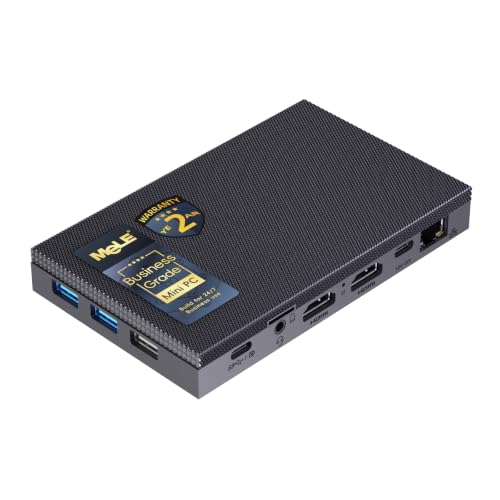
The Quieter4C is the reference machine of this category, and for a small space it has the one set of numbers that matters most: a documented chassis of 5.16 × 3.19 × 0.72 inches, thinner than a paperback novel, with a VESA mount in the box. Bolted behind a display, its desk footprint is not small — it is zero, and the slab’s broad flat faces get air on most sides, which is exactly what a finned case wants. The linked configuration is MeLE’s Business-Grade build: an Intel N100 (four cores, up to 3.4 GHz, a 6-watt-class chip), 8GB of RAM, 128GB of storage split between eMMC and an M.2 upgrade slot, a microSD slot, and Windows 11 Pro. Display output is the strongest in this guide — two HDMI 2.0 ports plus a full-function USB-C port drive three 4K screens — and the machine is powered over USB-C, so the behind-monitor install can be a genuinely short cable run: display leads measured in inches, one power lead dropping to the brick’s planned home. The line’s step-up builds add memory and storage (the 16GB versions carry soldered LPDDR5, so buy the memory you need at purchase). Check price on Amazon for the linked build, and check the current price on Amazon for the step-up configurations before choosing between them.
The placement caveats are thermal, and they are documented rather than guessed. Reviewer stress-testing at factory power limits (a power ceiling around 8 watts) measured sustained clocks averaging roughly 1.2 GHz over a long run, with the CPU peaking at 68°C and the case top reaching 64.5°C — the slab gets properly warm, and behind a monitor it is also sitting in the monitor’s own warm air. Leave the mount’s natural gap; do not sandwich the machine between the panel and a wall. For the bursty work a small-space PC actually does — browsing, documents, media, home automation, a light always-on server — that sustained figure costs nothing in practice. Networking is the other modest note: gigabit Ethernet and Wi-Fi 5, a step behind the newer picks.
- Documented 5.16 × 3.19 × 0.72 in chassis and an in-box VESA mount: the behind-monitor install, verified rather than hoped for.
- USB-C power plus triple 4K output (2× HDMI 2.0 and USB-C) — the shortest, tidiest cable drop in this guide.
- M.2 slot and microSD give the 128GB base configuration a storage growth path inside the same footprint.
- Verified fanless by design, with reviewer-measured thermals on the record.
Honest limitation: The case runs hot to the touch under sustained load and sustained clocks settle far below the turbo headline; the linked 8GB/128GB build is the line’s floor configuration, and networking is gigabit/Wi-Fi 5 class.
Choose it if your small space has a monitor with a free VESA pattern and the PC’s job is everyday computing, media or light 24/7 duty. Skip it if the workload is sustained rendering or compiling — passive physics will tax it wherever you put it — or if 2.5GbE networking is the point; that is the firewall picks’ territory.

MINIX NEO Z300-0dB Fanless Mini PC (Intel Core i3-N300, 16GB RAM, 512GB SSD)
Where it lives: On an open shelf or desk corner with air above it — the most capable silent desktop, and the one whose placement rules are written by its own heat.
The Z300-0dB is the ceiling of the fanless desktop branch: an Intel Core i3-N300 — eight efficiency cores, up to 3.8 GHz, in the 7-watt class — inside a finned aluminum chassis that is the heatsink, with 16GB of DDR4 in a single SO-DIMM slot (socketed, upgradeable to 32GB, single channel), a 512GB PCIe NVMe SSD, and Windows 11 Pro installed. Its footprint is documented at 4.84 × 4.72 × 1.81 inches — a near-square slab, roughly twice the MeLE’s thickness — and a VESA mount is included for behind-monitor duty. The port set is the most desktop-complete here: dual HDMI 2.0 at 4K/60, a 2.5GbE Ethernet port, Wi-Fi 6 on external antennas (which need a little vertical clearance of their own), and two USB 3.2 Gen 2 ports. One cabling fact shapes the install: the USB-C port is data-only — no power delivery, no display — so this machine takes its power from its own brick and its picture from HDMI, full stop. Independent reviewers confirmed the fanless build and measured roughly 23% faster multi-core performance than the N100 generation. Check the current price on Amazon for the linked configuration.
Placement discipline is this pick’s price of admission. Under sustained load its CPU has been measured at 98°C in stress testing, and owners report the chassis exterior reaching roughly 160°F during long CPU-intensive work — hot enough that MINIX’s own listing copy warns the top cover may become warm and should be kept out of children’s reach. In a small space that dictates terms: an open shelf with nothing stacked on top, out of toddler and pet range, never inside a cabinet. The gaming ceiling is the category’s ceiling — reviewer testing put modern open-world titles out of comfortable reach at anything past low settings, while retro emulation ran well — so buy it as the silent main desktop it is.
- Eight-core i3-N300 — the strongest processor in a verified fanless consumer desktop.
- Documented 4.84 × 4.72 × 1.81 in footprint and an included VESA mount.
- Socketed memory (to 32GB) and a fitted 512GB NVMe: grows inside its existing footprint.
- 2.5GbE and Wi-Fi 6 with external antennas — the modern port set the cheaper slabs skip.
Honest limitation: The hottest case in this guide under sustained load, with a maker’s keep-away-from-children warning on the top cover; single-channel memory, one storage slot, and a data-only USB-C port.
Choose it if one silent machine must be a real main desktop in a small room and you can give it an open, reachable-by-adults shelf. Skip it if the only available spot is enclosed, at child height, or shared with stacked clutter — its heat makes those placements wrong rather than merely suboptimal.

Protectli Vault FW4C (Intel J3710, 4x 2.5GbE Firewall Mini PC)
Where it lives: The network corner — a shelf by the modem, a hall cupboard with ventilation, anywhere four Ethernet cables naturally gather.
Protectli builds appliances, not desktops, and the FW4C’s small-space story is about cables rather than centimetres: our research documents no chassis dimensions or VESA pattern for it, so it is graded by class — a finned aluminum appliance box — and by what plugs into it. Four Intel 2.5GbE ports, labelled WAN, LAN, OPT1 and OPT2 on the chassis itself, plus a hardware serial console port, mean the installed object is the box plus a five-lead bundle that wants a planned drop: down to the modem, across to the switch or access point, with the power brick given a ventilated home at the end of the run. Inside are an Intel J3710 quad-core (1.6 GHz, bursting to 2.6 GHz) with AES-NI encryption support and the option of coreboot open firmware. The linked Amazon configuration carries 4GB of DDR3 RAM and a 32GB SSD; the platform’s documented ceiling is 8GB of DDR3L and an mSATA drive, and higher configurations exist under the same model name — verify the exact build in the cart. What you get beyond the hardware is the vendor around it: US-based support, a 30-day money-back guarantee, and deep published documentation. Check price on Amazon for the linked configuration, and compare it with Protectli’s own store before you order, as channel pricing can differ.
The silicon’s age is the honest limitation. A 2016-era low-power chip routes a gigabit WAN and runs standard firewall rules silently and indefinitely — which is the job — but multi-gigabit VPN throughput and heavy intrusion-prevention workloads sit beyond its comfortable reach, and even sympathetic reviewers point power users at newer N-series hardware. As a desktop it makes no sense at all: it ships as a firewall platform for pfSense, OPNsense or similar software that you install yourself. Judged as infrastructure that disappears into a network corner and is forgotten, it is the most defensible purchase in this guide.
- Four Intel 2.5GbE ports with printed WAN/LAN/OPT labels, plus a hardware console port.
- coreboot open-firmware option and AES-NI — the firewall checklist, covered.
- US-based support, 30-day money-back guarantee, published documentation down to BIOS level.
- Finned aluminum fanless chassis built for decade-long 24/7 duty in a corner.
Honest limitation: The J3710 is a 2016 chip with a low ceiling for VPN and inspection workloads; no maker-documented dimensions or mount in our research, so measure from the live listing if the shelf is exact; check the current price on Amazon against the maker’s own store before ordering.
Choose it if the small space in question is a network corner and you want a vendor standing behind the box that guards it. Skip it if you need multi-gigabit VPN throughput, or a desktop — this is neither, by design.
HUNSN RJ42 Micro Firewall Appliance (Intel N150, 8GB RAM, 128GB SSD, 4x 2.5GbE)
Where it lives: The same network corner as the Protectli, one generation newer — for buyers who measure a listing carefully and support themselves.
The RJ42 executes the four-port fanless appliance idea with current silicon. Its manufacturer’s manual documents a fanless aluminum chassis rated at 0.00 dB, carrying an Intel N150 (four cores, up to 3.6 GHz), 8GB of DDR5 in a single SO-DIMM slot, a 128GB SSD, and four 2.5GbE ports on Intel I226-V controllers — the NIC generation the pfSense and OPNsense communities specifically look for. Storage growth happens inside the same footprint, which matters in a small space: two M.2 2280 NVMe slots plus a 2.5-inch SATA position alongside the fitted drive let one box evolve from firewall to small virtualisation host without a second chassis appearing on the shelf. Display outputs (dual HDMI 2.1, DisplayPort, and USB-C with display) let it moonlight as a quiet desktop in a pinch. The manual also documents mounting holes for an optional 80mm fan — leave them empty; fitting it ends the fanless premise this guide is built on. As with the Protectli, no maker-documented dimensions or VESA pattern appears in our research, so the placement grade is by class: a finned appliance box whose real installed size is its four-Ethernet cable bundle and its brick. Check price on Amazon for the linked configuration, and read the live listing carefully before ordering.
The trade against the Protectli is accountability, and it is the whole decision. There is no US support line and no money-back promise beyond Amazon’s returns; documentation is a translated manual rather than a knowledge base. The white-box market churns — near-identical four-port boxes rotate through storefronts, and this same chassis is sold with N100 and i3-N305 variants — so the arrival check in the measuring routine below is not decoration: confirm the chip is the N150 and the NICs are Intel I226-V on the live listing and again on delivery. HUNSN sells the RJ42 in barebone and several fitted configurations under closely related listings; the one linked here is the N150 build with 8GB and 128GB documented by a spec-checked survey of the category.
- An Intel N150 with DDR5 memory puts it a full generation ahead of the supported-brand rival.
- All four 2.5GbE ports run on Intel I226-V controllers, the ones firewall distributions handle best.
- Two M.2 NVMe slots plus a 2.5-inch bay: the install grows internally, not across the shelf.
- Fanless aluminum chassis documented in the maker’s own manual.
Honest limitation: White-box support reality — a manual, a storefront inbox and Amazon returns instead of a vendor; configurations and sibling variants churn, so the chip and NIC check on arrival is part of the purchase.
Choose it if you are fluent enough to self-support a firewall and want the newest hardware in the network corner. Skip it if the network serves other people and needs a vendor behind it — that is precisely the Protectli’s reason to exist.

KINGDEL NC3000 Fanless Industrial Mini PC (Core i7 8th Gen, 32GB RAM, 1TB SSD)
Where it lives: The equipment shelf — a workshop bench, a control cabinet with ventilation, a point-of-sale counter — not the living-room bookshelf.
The NC3000 is the industrial branch of fanless design, where the passive-cooling problem is solved with mass: a full metal case with the surface area to shed a 15-watt-class processor’s heat. It is the largest class of machine in this guide, and our research documents no exact dimensions or mounting pattern for it — grade it as an industrial box, measure from the live listing if your shelf is tight, and give its cable side real thought, because its leads are the stiffest here: two RS232 serial COM ports and a VGA connector alongside HDMI, four USB 3.0 ports, Wi-Fi and Bluetooth. Thick legacy cables bend wide, and the installed depth is the chassis plus that bend. The linked configuration pairs an 8th-generation Core i7 (the i7-8565U: four cores, up to 4.6 GHz turbo) with 32GB of DDR4 RAM and a 1TB NVMe SSD — the roomiest specification in this guide. Check price on Amazon for the linked configuration before ordering. Either way, this sits at the upper end of the verified fanless category on Amazon — and still well below the $2,500 budget, which is the category’s ceiling making its point.
The limitations are the platform’s age and the brand’s catalogue discipline. An 8th-generation Core i7 is a 2018 design: its UHD Graphics 620 is dated for media work, and under sustained all-core load a passively cooled U-series chip settles well below its turbo headline — the same physics as every pick here, applied to a bigger badge. KINGDEL’s wider range also teaches the listing-literacy lesson this guide keeps returning to: at least one newer KINGDEL listing states that the exact 12th-generation i7 variant is “shipped randomly” from a list of four chips. That listing is excluded from this guide — a CPU lottery is not a specification — and the NC3000 is recommendable precisely because its listing names its processor plainly.
- The linked build’s 32GB of RAM and 1TB NVMe are the most memory and storage fitted to any pick here.
- Two RS232 serial ports plus VGA output — legacy and industrial equipment connects directly, no adapters.
- 15W-class Core i7 passively cooled in a full metal chassis — built for equipment environments.
- Its listing names the exact processor (i7-8565U) — not true of every sibling listing in this brand’s range.
Honest limitation: The largest, heaviest class of install in this guide with no documented dimensions in our research; a 2018 platform with dated integrated graphics, and a brand catalogue that demands careful listing-reading.
Choose it if serial ports, VGA or a metal industrial build are requirements of the room the machine will live in. Skip it if the space is a living-room shelf or you want a modern desktop — the MINIX does that job with newer silicon in a smaller desktop form.

ZOTAC ZBOX CI337 Nano Fanless Barebone (Intel N100, No RAM/Storage/OS)
Where it lives: Behind a monitor or on a small shelf — a brand-name fanless kit whose final footprint you partly choose yourself.
ZOTAC’s C-series is the longest-running fanless line in consumer mini PCs, and the CI337 Nano is its current N100 generation. ZOTAC’s own description is “a robust passive cooled design with no moving components,” built around the same four-core N100 (up to 3.4 GHz) as the MeLE, in a nano-class chassis with a VESA mount for behind-display installs — the maker documents the mount, though our research records no exact chassis dimensions, so treat the final fit as class-plus-listing rather than to-the-millimetre. Display output matches the finished machines: two HDMI 2.0 ports, DisplayPort 1.4 and DisplayPort over USB-C drive three screens. What arrives, though, is a kit. The single DDR5-4800 SO-DIMM slot (up to 16GB — ZOTAC’s specification governs here; at least one retailer Q&A answer wrongly claims DDR4), the M.2 2242 slot and the 2.5-inch SATA bay all arrive empty, and there is no operating system. Treat the completion as the separate purchases they are: a DDR5 SO-DIMM, an SSD, and an OS — Linux free, Windows a licence — itemised, never folded into the barebone itself. Check price on Amazon for the barebone, and check the current price of the memory and storage you choose separately, because component pricing can move; the finished machine sits in the same lower tier of this guide as the other picks once completed. As a barebone, it is the lowest entry point on this page before completion parts.
The compromises beyond the homework are two. The M.2 slot is 2242-length and runs at PCIe 3.0 x1 — a narrow, slow lane — so the 2.5-inch SATA bay will carry bulk storage in most builds. And the single memory slot caps the machine at 16GB in single channel, permanently: the footprint you mount is the machine you keep. In exchange you get what the white-box picks cannot offer — a fanless machine from a brand with a support site, a model number and a documentation trail, at the entry end of this guide. For a signage player, a quiet utility box or a first fanless experiment behind a spare monitor, that is a compelling starting point.
- A fanless kit from an established brand — ZOTAC’s C-series passive design, with documentation and support behind it.
- VESA mount and triple display output, same as the finished machines.
- Lowest entry point in the guide as a barebone, before completion parts — check price on Amazon.
- Memory, storage and operating system are your choices — including a free Linux build.
Honest limitation: It arrives empty — memory, storage and OS are extra purchases, extra deliveries and extra work; the M.2 slot is short (2242) and slow (PCIe 3.0 x1), and memory is one slot, 16GB maximum, single channel, forever.
Choose it if you enjoy the build and want brand-name fanless hardware at the entry end of the guide for a behind-monitor or shelf install. Skip it if you want to plug in and work today — the other five picks all arrive ready to run.

Comparison Table
| Product | Placement class | Documented mounting | Best use | Link |
|---|---|---|---|---|
| MeLE Quieter4C (N100) | Ultra-thin slab, 5.16 × 3.19 × 0.72 in | VESA mount in the box | Zero-footprint silent desktop behind the monitor | Check on Amazon |
| MINIX NEO Z300-0dB (i3-N300) | Compact finned slab, 4.84 × 4.72 × 1.81 in | VESA mount in the box | The most capable silent main desktop, on open air | Check on Amazon |
| Protectli Vault FW4C (J3710) | Finned appliance box (class-graded) | Not documented in our research | Supported firewall duty in the network corner | Check on Amazon |
| HUNSN RJ42 (N150) | Finned appliance box (class-graded) | Not documented in our research | Newest four-port hardware in a fanless appliance case | Check on Amazon |
| KINGDEL NC3000 (i7 8th Gen) | Industrial full-metal case (class-graded) | Not documented in our research | Serial ports, VGA and legacy equipment shelves | Check on Amazon |
| ZOTAC ZBOX CI337 Nano (N100) | Nano-class kit chassis (class-graded) | VESA mount | Entry-level brand-name fanless kit build | Check on Amazon |
How to Choose: Measure Before You Buy
Specifications end arguments about computers; measurements end arguments about rooms. Run these five steps in order before ordering any pick in this guide — they take ten minutes and they prevent every placement failure this category produces.
- Measure the spot — all of it. Width, depth and height of the shelf, cubby or desk corner, then subtract the machine’s non-negotiables: the chassis, the air gap around its finned surfaces, and the cable bend behind it. Where a pick’s dimensions are documented (the two desktop slabs), plan to the figure; where they are not, take them from the live listing’s specification table and add the same margins. If the honest total does not fit, the machine does not fit — a smaller class of pick, or a VESA mount behind the monitor, is the answer, not optimism.
- Reserve ventilation clearance. Decide, before ordering, that the finned top and sides will sit in open room air: nothing stacked on top, no books or papers against the fins, no closed door in front of it. Sealed cabinets and enclosed media furniture are refused for every pick here — a fanless case in a closed box is a heatsink with nowhere to shed, and it will throttle, cook its brick neighbour, or both. If the only spot in the room is enclosed, the honest purchase is a fanned machine placed elsewhere, or a VESA install behind the display where air moves.
- Give the brick an address. Every pick runs from an external power supply. Choose its home now: a ventilated shelf corner, a cable tray with airflow, the floor beside the network corner — somewhere its own warmth escapes and its cable reaches without tension. Not dangling behind the cabinet, not buried in the cable pile, not taped under the desk against carpet. Measure the brick’s cable into the drop in step 4; a brick that cannot reach its address is a return waiting to happen.
- Walk the cable drop. Stand at the spot and count what leaves the machine: display leads, Ethernet (one for a desktop, four for a firewall pick, plus a possible console lead), USB peripherals, the power lead. Follow each one down to where it lands. Thick legacy leads — the industrial pick’s VGA and serial cables — bend in wide arcs and push the machine forward on the shelf; antenna stalks on the MINIX need vertical room; four Ethernet cables are a bundle with its own stiffness. The installed depth is the chassis plus the widest bend. If the drop crosses a walkway or a door swing, reroute the plan now, not after delivery.
- Then order — and verify on arrival. This category sells configurations, not just models: the Protectli and KINGDEL listings span several builds, the HUNSN chassis ships with three different chips, the MeLE line spans memory and storage tiers, and the ZOTAC arrives deliberately empty. Check the exact configuration — chip, memory, storage, network controllers — in the cart before paying, and again against the delivered unit before it goes into its measured spot. A machine swapped into a tight install is a machine whose return window quietly expires; verify first, mount second.
Two decisions sit underneath the measuring. The first is the job split: desktops (MeLE, MINIX) for silent everyday computing, firewall appliances (Protectli, HUNSN) for the network corner — four Ethernet ports are wasted on a desk and priceless on a router — and the industrial box (KINGDEL) where serial ports and metal are requirements. The second is the support question: the vendor-backed four-port option includes US support and a money-back guarantee, while the hardware-first route does not, so decide whether you are buying a product or a product plus a safety net, and check the current price on Amazon for each before choosing. Readers whose rooms are smaller still, or whose budgets match the category’s real ceiling more closely, should also work through Best Fanless Mini PC For Small Spaces Under $1200 and Best Fanless Mini PC For Small Spaces Under $500.
Common Buying Mistakes
- Measuring the box and forgetting the install. The chassis is half the footprint. The brick, the cable bend and the air gap are the other half, and they are the half that causes returns.
- Sealing the radiator in a cabinet. A fanless PC in a closed media cabinet will throttle or cook. Open air is a system requirement in this category, not a preference — the rule is stricter than for fanned machines precisely because there is no fan to forgive you.
- Stacking things on the fins. Books, papers, a router, another mini PC: anything resting on the finned top is a blanket on a heatsink. The eight-core pick’s maker warns about its hot top cover in its own listing; treat every pick’s top as a no-storage surface.
- Pushing it flush against the wall. Finned sides and backs need room air. A machine wedged between a wall and a row of books is breathing its own exhaust.
- Assuming $2,500 buys a bigger or faster fanless machine. The verified category tops out well below this budget. Above that, higher prices buy support, ports, ruggedness or markup — never a faster class of silent silicon, and never a bigger heatsink that changes the physics.
- Forgetting the barebone bill — and the barebone parcels. The ZOTAC kit excludes memory, storage and an OS, and each of those arrives as its own separate purchase. Check the current price on Amazon for the kit and for the completion parts separately before comparing it with finished machines.
- Fitting the RJ42’s optional fan. The chassis documents mounting holes for an 80mm fan. Fitting one converts the machine into a fanned box with a small fan — the exact thing this guide’s verification filter exists to exclude.
- Trusting a configuration you did not read. Listings here bundle multiple builds under one page, one chassis ships with three different processors, and at least one prominent industrial listing in this brand family ships one of four CPUs at random (excluded from this guide). Verify in the cart and on arrival.
- Buying a firewall appliance as a desktop, or the reverse. Four LAN ports do not improve a desktop, and a desktop’s single Ethernet port does not make a router. Match the box to the corner it will live in.
- Expecting gaming performance because the keyword sat in a gaming category. These machines emulate, stream and play light titles beautifully and silently. They do not render modern games at any price — and no placement trick changes that.
Final Recommendation
- Most small-space buyers: MeLE Quieter4C — the documented thinnest slab here, VESA-mounted behind the monitor — check price on Amazon.
- A silent main desktop with headroom: MINIX NEO Z300-0dB — on an open shelf, out of small hands’ reach — check the current price on Amazon.
- A network corner with a vendor behind it: Protectli Vault FW4C.
- Network-corner hardware for self-supporters: HUNSN RJ42.
- Equipment shelves and legacy gear: KINGDEL NC3000.
- Builders who want the brand-name kit: ZOTAC ZBOX CI337 Nano barebone.
The short version: in a small space, the best fanless PC is the one whose installation fits — fins in open air, brick housed, cables dropped cleanly — and by that measure the MeLE Quieter4C is the easiest machine in this guide to place well, with the MINIX Z300-0dB the pick when the silent box must also be a full-strength desktop. The firewall pair splits on support rather than hardware, the KINGDEL serves the equipment shelf, and the ZOTAC kit rewards a builder with the lowest entry point in the category as a barebone. First-time silent-PC buyers should also read Best Fanless Mini PC For Beginners Under $2500; media-first rooms are covered at Best Fanless Mini PC For Streaming Under $2500; and the same shortlist logic at the category’s natural prices lives at Best Fanless Mini PC Under $500 and Best Fanless Mini PC Under $800, under the parent guide at Best Fanless Mini PC Under $2500. Measure the spot, reserve the air, house the brick, walk the cables — then put the rest of the budget toward the install itself, because in this category placement matters more than spending up to the ceiling.
Frequently Asked Questions
Can I put a fanless mini PC inside a closed TV cabinet?
No — and this is the placement rule that matters most in this category. A fanless case is a heatsink that sheds heat into the air touching it; a closed cabinet traps that air, so the machine heats its own supply until it throttles or worse. Reviewer measurements on the leading pick here recorded a case-top temperature of 64.5°C in open air under sustained load. Every pick in this guide needs its finned surfaces in open room air: an open shelf, a ventilated stand, or a VESA mount behind the display. If the room’s only spot is enclosed, buy a fanned machine for a different spot instead.
How much space does a fanless mini PC really take up?
More than the product photo suggests. The honest installed footprint is the chassis, plus the air gap its fins need on every side, plus the external power brick and its cable, plus the bend of every lead leaving the back panel. The two desktop slabs are documented at 5.16 × 3.19 × 0.72 in (MeLE) and 4.84 × 4.72 × 1.81 in (MINIX) before any of those additions; the firewall picks add a four-Ethernet cable bundle that is, in practice, their largest dimension.
Is behind the monitor a good place for one?
It is the best place in most small rooms — provided the mount is documented, as it is for the MeLE and MINIX (VESA mount in the box) and the ZOTAC (VESA mount). Behind the panel the footprint drops to zero and the fins get air on most sides. Two cautions: leave the mount’s natural gap rather than sandwiching the machine against a wall, since the monitor adds its own warmth to that air; and remember the machine disappears from sight, which makes the verify-on-arrival step more important, not less — check the configuration before it goes behind the screen.
Why is nothing in this guide anywhere near $2,500?
Because passive cooling caps the processor — and processors under that cap are cheap. A fanless case can shed the heat of a 6-to-15-watt chip; the chips in that envelope — Intel’s N-series, low-power Celerons, 15W-class laptop parts in industrial cases — cost little, and the machines built on them sit in the lower tiers of this budget. The most expensive verified fanless machines in our research still sit well below the $2,500 budget. Listings claiming fanless silence near the top of this budget are, in our research, fanned machines with optimistic copy, industrial quotes, or low-power boxes wearing a markup. Spend the difference on the install — mounting, storage, a second unit as a spare — or keep it.
Do fanless mini PCs get hot in a small room?
They run warm by design, in small absolute terms. These are 6-to-15-watt-class machines, so the total heat added to a room is modest; the surfaces, however, are genuinely hot to the touch under sustained work — documented case temperatures run from the mid-60s Celsius on the N100 slab to owner reports around 160°F on the eight-core pick, whose maker warns the top cover may become warm and should be kept out of children’s reach. Place accordingly: open air, nothing stacked on top, out of reach of small children and pets during heavy work, and not in the room’s deadest corner if it will run around the clock.
Can these machines play games?
The light kind, silently and well: retro emulation, indie titles, older games at modest settings, and cloud gaming services, where the rendering happens elsewhere and the fanless box is simply a silent terminal. Modern AAA gaming is beyond every verified fanless machine at any price — the integrated Intel graphics here are the same class found in entry-level boxes, because anything stronger produces more heat than a passive case can shed. If gaming is the main job and silence is secondary, a quiet fanned mini PC is the honest route.
Where should the power brick go?
Somewhere with its own air, chosen in advance: a ventilated shelf corner, an open cable tray, the floor beside the network corner. The brick is a small heater in its own right, so it should not dangle by its cable, sit buried in the cable pile, or share the sealed space you have just refused the machine itself. Count its cable in the drop when you measure — for the behind-monitor installs, the brick’s home at the end of the power lead is the one part of the footprint that stays on the desk or floor, so plan it rather than discovering it.


