Where to buy
Check the latest price, availability and delivery on Amazon. Orders are placed on Amazon. We may earn a commission from qualifying purchases.
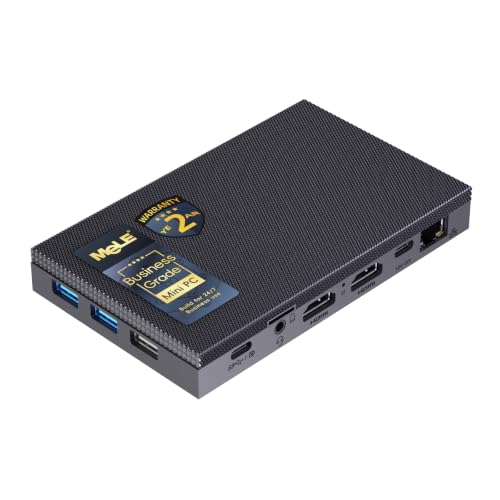
- Best overall fanless mini PC: MeLE Quieter4C Fanless Mini PC, Intel N100, 8GB RAM, 128GB, Windows 11 Pro — Check on Amazon
- MINIX NEO Z300-0dB Fanless Mini PC, Intel Core i3-N300, 16GB RAM, 512GB SSD — Check on Amazon
- Protectli Vault FW4C, 4-Port Firewall Mini PC, Intel J3710, 4x 2.5GbE — Check on Amazon
- HUNSN RJ42 Micro Firewall Appliance, Intel N150, 4x 2.5GbE LAN — Check on Amazon
- KINGDEL NC3000 Fanless Industrial Mini PC, Core i7 8th Gen, 32GB RAM, 1TB SSD — Check on Amazon
See 1 more Amazon option
- ZOTAC ZBOX CI337 Nano Fanless Barebone Mini PC, Intel N100, No RAM/Storage/OS — Check on Amazon
Read the full guide ↓
Disclosure: As an Amazon Associate, reviewstook.com earns from qualifying purchases. Links to Amazon on this page are affiliate links; they cost you nothing extra. Listing details such as price and availability change often, so check the current Amazon listing before you buy.
If this is your first mini PC, start with the sentence every beginner here deserves to hear before spending anything: a fanless mini PC is a silent, low-power computer — it is not a gaming machine with the fan removed. “Fanless” means the metal case itself does the cooling — no fan, no moving parts — and a case can only shed so much heat. That limit is why every genuinely fanless machine runs a modest, cool-running processor with integrated graphics — graphics built into the processor itself, with no separate card. They are wonderful at everyday computing, video, home-server jobs and light gaming: older games, indie titles, retro emulation and games streamed from the cloud. They do not run modern big-budget games, and no fanless mini PC at any price does — the graphics hardware those games need makes more heat than a silent metal box can shed.
The second thing a beginner should know is what $2,500 actually buys here, because the honest answer is: far less than you would expect, and that is good news. Fanless processors are inexpensive chips, so the whole verified category sits well below this guide’s budget in gaming-PC terms. Even the most capable verified fanless machines in this category sit well below the top of this budget, and there is no separate fanless tier at the top of this budget — above the category’s natural ceiling, listings wearing the word “fanless” are fanned machines with optimistic wording, industrial quotes, or the same low-power box with a markup. Silence does not scale with price. So every pick here is a machine whose silence was verified from the manufacturer’s own documents or independent reviewers (never from a listing headline), every pick sits in the lower part of this budget range — check the current price on Amazon for the exact configuration — and we will tell you what to do with the money left over — mostly, keep it. If gaming is the main job rather than a side benefit, look at fanned machines instead, starting with Best Mini Gaming PC Under $2500. If silence is the main job, you are in the right place, and the glossary further down translates every term in this guide into plain English.
In this guide
Quick Picks
Short on time, or comparing several options at once? Each row below names a buyer type and the product that suits it, with a link to the listing.
| Buyer type | Pick | Why it stands out | Link |
|---|---|---|---|
| Best overall fanless mini PC | MeLE Quieter4C (N100, 8GB/128GB) | The reference silent desktop: verified fanless, three 4K outputs, powered over USB-C | Check on Amazon |
| Most capable fanless desktop | MINIX NEO Z300-0dB (i3-N300, 16GB/512GB) | Eight processor cores — the most a verified fanless desktop offers — in a finned metal case | Check on Amazon |
| Firewall duty with a vendor behind it | Protectli Vault FW4C (J3710, 4x 2.5GbE) | Four Intel 2.5GbE ports, an open-firmware option and US-based support | Check on Amazon |
| Firewall hardware for the least money | HUNSN RJ42 (N150, 4x 2.5GbE) | A newer processor and four modern network ports for notably less than the supported brands | Check on Amazon |
| Legacy and industrial ports | KINGDEL NC3000 (i7 8th Gen, 32GB/1TB) | Serial ports, VGA output and a 15-watt-class Core i7 passively cooled in a full metal case | Check on Amazon |
| Build-it-yourself fanless kit | ZOTAC ZBOX CI337 Nano (N100 barebone) | A brand-name fanless kit you finish with your own memory, storage and operating system | Check on Amazon |
How These Picks Were Chosen
The first test every pick had to pass was the word “fanless” itself, checked properly. A machine only counts as fanless here if the manufacturer’s own specification page or manual, or an independent reviewer who opened or tested the machine, confirms there is no fan inside — the cooling is a finned metal case and nothing else. Listing headlines were never accepted as proof, because “silent” is the most stretched word in this category: many mini PCs advertised as silent or whisper-quiet contain a small fan that spins up under load. Those machines were excluded however good they are at their real job.
The second test was honesty about money. Prices change often, so this guide does not print a fixed price for any pick — for any pick with an Amazon link, check the current price on Amazon for the exact configuration named. Where a listing sells several configurations under one page (the Protectli and the KINGDEL both do), the review names the exact configuration the link points to. One pick, the ZOTAC, is a barebone kit that arrives with no memory, no storage and no operating system; its review describes the completion openly rather than letting the kit alone pretend to be a whole computer. We did not use these machines ourselves; we read maker specifications, manuals and independent testing, and compared processor class, fitted memory and storage, ports, and how each design copes with sustained heat — the thing that rules this category, because a passively cooled processor cannot hold its headline burst speed through a long load. The picks are judged against what their hardware can sustain, not what their boxes advertise.
A Beginner’s Glossary: The Words in This Guide, in Plain English
- Fanless / passive cooling. The machine has no fan: its metal case is the cooler, carrying heat from the processor into the finned case and out into the room air. That is why these PCs are completely silent, why the case feels warm under work, and why they must sit in open air — a fanless case sealed in a cabinet is a radiator with nowhere to radiate.
- Integrated graphics. The picture-making part of the computer, built into the processor instead of living on a separate graphics card. It borrows some of the machine’s ordinary memory for its work (that borrowed part is called shared memory) — fine for video, desktop work and light games, and the main reason these are light-gaming machines rather than gaming PCs.
- Processor (CPU). The computer’s main thinking chip. “Cores” are its parallel work lanes — more cores help when several jobs run at once. The headline speed (for example “up to 3.8 GHz”) is a short burst speed; in a fanless case, long heavy work settles lower once the case warms up. Every chip here is a low-power model a silent case can cool.
- Memory (RAM), soldered vs socketed. RAM is the machine’s short-term workspace: more of it means more programs and tabs open comfortably at once. Socketed memory sits in a slot you can open and swap — an upgrade path. Soldered memory is fixed to the board forever: what you buy is what you keep. Per pick in this guide: the MINIX’s memory is socketed (16GB, growing to 32GB); the HUNSN’s sits in a standard slot; the ZOTAC kit’s slot arrives empty for you to fill; the MeLE’s is fitted as shipped — its 16GB builds use soldered memory — so choose at purchase; the Protectli’s platform tops out at 8GB; the KINGDEL arrives with 32GB fitted.
- Storage (SSD). Where your files and programs live long-term. An SSD is the fast modern kind: NVMe is the fastest connection type, SATA an older, slower one, eMMC basic built-in storage found in small machines, and mSATA an older small-drive format. Bigger numbers (512GB, 1TB) mean more room for games and media.
- Resolution. How many pixels the picture has. 1080p is the standard sharp picture; 1440p is a step sharper; 4K is sharper again. These machines display a crisp 4K desktop and 4K video happily. Rendering a modern game at 4K is a completely different, much heavier job, and not one any pick here can do.
- Refresh rate. How many times per second the monitor redraws, measured in Hz. A basic monitor is 60Hz. A higher-refresh monitor only helps if the machine can produce new frames that fast — for games, beyond these integrated graphics — so buy the monitor for desktop comfort, not gaming speed you will not get.
- Upscaling. A trick where a game is drawn at a lower, easier resolution and then stretched intelligently to fill a sharper screen. In its modern forms it belongs to gaming graphics cards — the best-known version, DLSS, exists only on NVIDIA cards. No pick here has a graphics card, so no pick offers it, and any listing implying otherwise is dressing up the same integrated graphics everyone else has.
- Power brick. The external adapter that plugs into the wall and feeds the little PC. It is part of the machine’s footprint: it needs its own spot with air around it, not burial under cables. One pick here, the MeLE, can instead be powered over USB-C, which tidies a desk considerably.
- Finished (prebuilt) vs barebone. A finished machine arrives ready: memory, storage and Windows fitted, plug in and go. A barebone is a kit — the case, processor and ports are there, but the memory, storage and operating system are empty slots for parts you buy and fit yourself. Barebone prices look lower because they price part of a computer.
- New vs renewed. Renewed (or refurbished) means a used machine that has been checked and resold, usually cheaper, with a shorter warranty. Stated plainly: every pick in this guide is sold new. None of the six is a renewed or refurbished unit.
- Platform. The family of parts a machine is built around — its processor generation and the board it sits on. The platform decides your ceiling: how much memory the board can ever take, which storage fits, and whether upgrades exist. A platform described as finished or legacy still works fine; it just will not grow.
- Firewall appliance. A small computer whose whole job is to be your network’s gatekeeper — it runs free firewall software (names like pfSense or OPNsense) and routes and protects every device behind it. That is why two picks below have four network ports and no screen ambitions: not failed desktops but a different tool, shipping without an operating system because you install the firewall software yourself.
The 6 Best Fanless Mini PCs Under $2,500, Explained for Beginners
MeLE Quieter4C Fanless Mini PC (Intel N100, 8GB RAM, 128GB)
Who it suits: A first-time buyer who wants the proven silent computer for everyday life — browsing, documents, video, a bedroom or studio desk — and wants it ready the evening it arrives.
The Quieter4C is the machine this category is measured against, and the easiest recommendation here for a beginner. Inside its slim finned case (about 5.2 × 3.2 × 0.7 inches) sits an Intel N100 processor — four cores, up to 3.4 GHz, a chip in the 6-watt class, exactly the gentle heat a silent case handles well. The configuration linked here is the Business-Grade build with 8GB of memory, 128GB of storage and Windows 11 Pro already installed, so the first evening is plugging in, not building. It is unusually good at screens: two HDMI ports plus a full-function USB-C port can run three 4K displays, and a VESA mount in the box lets it disappear behind a monitor — also good placement for a case that cools through its surfaces. Check the current price on Amazon for this listing; a roomier 16GB/512GB configuration of the same machine is also sold, positioned above this entry configuration in the line.
The limitations are the honest physics of the category. Reviewers stress-testing it at factory power settings measured it settling to roughly a third of its headline burst speed over a long load, with the top of the case getting properly warm — around 64°C at the surface. Everyday work is bursty, so in normal use it feels responsive; hour-long rendering or compiling marathons are not its job. The linked build’s 8GB of memory and 128GB of storage are the line’s starting point — fine for a dedicated quiet role, tight for a main family computer — and because the memory is fitted as shipped (the 16GB builds use soldered memory), that choice is made at purchase, not later. Its networking is the older gigabit Ethernet and Wi-Fi 5. None of that changes what it is: the reference silent desktop, positioned in the lower part of this guide’s budget range.
- Verified fanless by design — no fan, no moving parts, silent by construction.
- Three 4K display outputs and USB-C power make the tidiest desk in this guide.
- Windows 11 Pro fitted and ready; VESA mount included for behind-monitor placement.
- Storage can grow later through the M.2 slot and microSD slot.
Honest limitation: Sustained heavy work slows to what a silent case can shed and the case runs hot to the touch; the linked 8GB/128GB build is the line’s floor, its memory is not an upgrade-later item, and its networking is a generation behind.
Choose it if you want the default silent PC for ordinary computing and media. Skip it if your work is sustained and heavy, or you need faster 2.5-gigabit networking — see the MINIX and the firewall pair.

MINIX NEO Z300-0dB Fanless Mini PC (Intel Core i3-N300, 16GB RAM, 512GB SSD)
Who it suits: A beginner who wants one silent machine as a real main computer — busier multitasking, lots of tabs, light server jobs — and the strongest fanless desktop that exists.
The “0dB” in the name is a literal claim, and independent reviewers confirm the design: a finned aluminium case that is itself the heatsink, wrapped around an Intel Core i3-N300 with eight cores (up to 3.8 GHz) — the most processor cores a verified fanless desktop offers. It arrives complete: 16GB of memory in a slot you can later upgrade to 32GB, a 512GB NVMe drive, and Windows 11 Pro installed. Reviewer testing measured roughly 23% faster multi-core performance than the N100 generation — the difference between a quiet utility box and a quiet computer you can live on. The port set is modern: two HDMI outputs for 4K displays, 2.5-gigabit Ethernet, Wi-Fi 6 with external antennas, USB ports, and a VESA mount. Check the current price on Amazon — it is positioned close to the top of the verified fanless desktop category, and still well below this guide’s budget.
Its limitations are heat and gaming, and both deserve plain words. Eight cores in a sealed case get hot: stress testing measured the processor at 98°C under sustained load, owners report the case exterior reaching roughly 160°F during long heavy work, and MINIX’s own listing warns that the top cover may become warm and should be kept out of children’s reach. Safe for the machine, but it decides placement for you — open air, always. Gaming stays in the light class no matter how many cores it has, because the graphics are the same integrated kind as every pick here: reviewers found retro emulation running happily (PS2-era emulation ran mostly smoothly) and older big-name titles only just playable at low settings. Buy it as the best silent desktop, not as a games machine.
- Eight-core i3-N300 — the strongest processor in a verified fanless consumer desktop.
- 16GB of socketed memory (upgradable to 32GB) and a 512GB NVMe drive, ready out of the box.
- 2.5-gigabit Ethernet, Wi-Fi 6 and dual 4K outputs — a complete modern port set.
- Independently tested and confirmed fanless, with a VESA mount included.
Honest limitation: The case gets hot enough under long loads to carry a keep-away-from-children warning from its own maker; single-channel memory, one storage slot, a data-only USB-C port, and gaming that stops at emulation and older titles.
Choose it if you want the silent machine with the most headroom for everyday work. Skip it if your workload is hours-long rendering or compiling, or if gaming matters more than silence.

Protectli Vault FW4C (Intel J3710, 4x 2.5GbE Firewall Mini PC)
Who it suits: A beginner setting up a home firewall or small network who wants a company standing behind the box — real support, documentation, a money-back promise — more than the newest specifications.
Protectli builds appliances, not desktops, and the FW4C is a firewall computer: a finned, fanless aluminium box with four Intel 2.5-gigabit network ports labelled WAN, LAN, OPT1 and OPT2, a hardware console port for setup, AES-NI encryption support, and the option of coreboot open firmware instead of a conventional BIOS. It runs free firewall systems such as pfSense or OPNsense, installed by you — normal for this kind of machine, and Protectli’s published knowledge base walks through it. The Amazon listing linked here is the configuration with 4GB of memory and a 32GB drive; the same chassis is sold in higher configurations (8GB/120GB listings exist), and the platform’s documented ceiling is 8GB of memory and an mSATA drive. Check the current price on Amazon and compare it with buying direct from Protectli before you order, as the two channels can differ.
The honest limitation is the age of its processor. The J3710 is a 2016-era low-power chip, and while it routes a typical home connection and runs standard firewall rules silently and indefinitely, heavier work like fast VPN connections for a whole house or deep traffic inspection is beyond its comfortable reach, and even friendly coverage steers power users to newer machines, including the HUNSN below. What the extra money buys is everything around the hardware: US-based support that answers, documentation down to individual settings, a 30-day money-back guarantee, and a vendor that has sold the same models for years. For a first firewall, that hand-holding is worth buying — as support, not as speed.
- Four Intel 2.5-gigabit ports with printed labels and a hardware console port.
- coreboot open-firmware option and AES-NI encryption support — the firewall checklist, covered.
- US-based support, deep published documentation and a 30-day money-back guarantee.
- Finned fanless chassis built for always-on, years-long duty.
Honest limitation: A 2016 processor with a modest ceiling for VPN and inspection workloads, and channel pricing that can differ from the maker’s own store — compare both before ordering.
Choose it if the firewall is infrastructure you do not want to think about and a vendor behind it is worth more than specifications. Skip it if you need multi-gigabit VPN throughput or the most hardware per dollar.
HUNSN RJ42 Micro Firewall Appliance (Intel N150, 8GB RAM, 128GB SSD, 4x 2.5GbE)
Who it suits: A beginner-to-confident home-lab buyer who wants the modern version of the four-port silent firewall — newer processor, faster memory, room to grow — and is comfortable checking a listing and self-supporting.
The RJ42 takes the Protectli idea and rebuilds it a generation newer. The manufacturer’s manual describes a fanless aluminium chassis rated at 0.00 dB of noise (mounting holes for an optional fan are documented too — you will never need to fit one). Inside is an Intel N150 processor — four cores, up to 3.6 GHz — with 8GB of modern DDR5 memory in a standard slot, a 128GB drive, and four 2.5-gigabit ports on Intel I226-V controllers, the exact network chips the pfSense and OPNsense communities look for. Storage room is the surprise strength: beyond the fitted drive there are two full-size M.2 NVMe slots and a bay for a 2.5-inch drive, so the same box can grow from firewall into a small home server. Check the current price on Amazon for the configuration you are actually buying.
The trade is support, and a beginner should walk into it with eyes open. There is no US support line and no money-back promise beyond Amazon’s own returns; help is a translated manual, a storefront inbox, and community forums. Listings for this class of box also churn — the same chassis is sold in versions with different processors (an N100 and an i3-N305 variant of this model exist), so the first-evening job with this pick is verifying that the box that arrived has the N150 chip and the Intel network controllers the listing promised. The difference between this and the Protectli is the price of vendor accountability, and either side of that trade can be the right buy.
- Intel N150 and DDR5 memory — a full generation newer than the supported-brand rival.
- Four Intel I226-V 2.5-gigabit ports, the controllers firewall software handles best.
- Two spare M.2 slots plus a 2.5-inch bay: firewall today, small server tomorrow.
- Manufacturer-documented fanless aluminium chassis, rated silent.
Honest limitation: White-box support reality — a manual, a storefront inbox and Amazon returns instead of a vendor; the same chassis is sold with different processors, so verify the chip and network controllers on the live listing and again on delivery.
Choose it if you are happy to self-support in exchange for the newest hardware per dollar. Skip it if you maintain a network for other people and need a company behind the box — that is the Protectli’s whole reason to exist.

KINGDEL NC3000 Fanless Industrial Mini PC (Core i7 8th Gen, 32GB RAM, 1TB SSD)
Who it suits: A buyer whose silent computer has to connect to the physical world — serial-controlled equipment, an older VGA display, kiosk, point-of-sale or workshop hardware — and who needs more memory and storage than the N-series boxes offer.
The NC3000 is the industrial branch of fanless computing, where the cooling problem is solved with mass: a full metal case with the surface area to shed a 15-watt-class processor’s heat in silence. The configuration linked here pairs an 8th-generation Core i7 (the i7-8565U, four cores, up to 4.6 GHz in bursts) with 32GB of memory and a 1TB NVMe drive. The ports are why it exists: two RS232 serial ports for older equipment, HDMI and VGA video outputs, four USB 3.0 ports, Wi-Fi and Bluetooth, in a chassis built for control rooms and cabinets full of pre-USB-C gear. Check the current price on Amazon for this listing; either way it sits well below this guide’s budget, leaving most of the budget unspent.
The limitations deserve the same directness. An 8th-generation Core i7 sounds grander than it is: it is a 2018 platform whose integrated graphics are older than the N100’s in some ways that matter for media, and under a long all-core load its passively cooled processor settles well below its burst headline — the same physics as every pick here, applied to a bigger badge. The brand’s wider catalogue also teaches a listing lesson: KINGDEL sells many near-identical fanless boxes, and at least one of its newer listings states that the exact processor variant is “shipped randomly” from a list of four chips. A lottery is not a specification, and that listing is not in this guide; the NC3000 linked here names its processor plainly, which is why it is the one we can recommend.
- 32GB of memory and a 1TB drive fitted — the roomiest fanless box in this guide.
- Dual serial ports and VGA: connects to legacy and industrial gear without adapters.
- A 15-watt-class Core i7 passively cooled in a full metal chassis.
- The exact processor is named in the listing, unlike some sibling listings.
Honest limitation: A 2018 platform with dated integrated graphics; passive cooling caps sustained performance well below the burst headline, and the brand’s wider catalogue demands careful reading.
Choose it if serial ports, VGA or an industrial metal build are real requirements. Skip it if you want a modern desktop — the MINIX does that job with newer silicon for similar money.

ZOTAC ZBOX CI337 Nano Fanless Barebone (Intel N100, No RAM/Storage/OS)
Who it suits: A beginner who likes the idea of one small, guided building project — fitting memory and a drive into a brand-name kit — and wants the lowest-cost way into genuinely fanless hardware.
ZOTAC’s C-series is the longest-running fanless line in consumer mini PCs, and the CI337 Nano is its current N100 model. ZOTAC describes a robust passive-cooled design with no moving components, built around the same four-core N100 (up to 3.4 GHz) as the MeLE, in a nano chassis with a VESA mount and triple display output. What arrives is a computer missing its variable parts on purpose: one empty memory slot that takes a DDR5-4800 module up to 16GB, one short M.2 slot and a 2.5-inch drive bay, both empty, and no operating system. Check the current price on Amazon — as a barebone it is positioned as the lowest entry point in this guide. Completing it means adding three things, described openly: a memory module (memory prices have been volatile, so shop parts with the same care as the box — check the current price for any module you consider), a modest SSD for one of the two storage spots, and an operating system — free if you choose Linux, a licence if you choose Windows. The finished machine lands in the same lower-budget territory as everything else here.
The homework is real, and one compromise is permanent: fitting parts is easy — a slot, a bay, a few screws — but the compatibility choices (the right memory type, the right drive size) are yours. The M.2 slot is the short 2242 length and runs at a narrow, slow PCIe 3.0 x1 connection, so the 2.5-inch SATA bay will carry bulk storage in most builds and neither is a speed path. The single memory slot caps the machine at 16GB forever. What you get in return is what the white-box picks cannot offer: a fanless machine from an established brand with a support site, a real model number and documentation, at the lowest entry point in the guide. For a signage player, a quiet utility box or a first fanless experiment, that is the best value on this page — as long as you know the sticker is a down payment, not a computer.
- Established-brand fanless kit with documented passive design and real support behind it.
- Lowest entry point in the guide — check the current price on Amazon for the barebone kit.
- Triple display output and a VESA mount, the same tricks as the finished machines.
- You choose the memory, storage and operating system — including a free Linux build.
Honest limitation: It arrives empty — memory, storage and an operating system are extra purchases and extra work; the M.2 slot is short and slow, and memory is one slot with a 16GB ceiling, permanently.
Choose it if you want brand-name fanless hardware at the floor of the category and enjoy one small build. Skip it if you want to plug in and work the same evening — every other pick here arrives ready.

Comparison Table
| Product | Type | Best use | Link |
|---|---|---|---|
| MeLE Quieter4C (N100) | Finished fanless desktop | Silent everyday computing, media, light always-on duty | Check on Amazon |
| MINIX NEO Z300-0dB (i3-N300) | Finished fanless desktop | The most capable silent main desktop | Check on Amazon |
| Protectli Vault FW4C (J3710) | Firewall appliance | Supported, documented firewall duty | Check on Amazon |
| HUNSN RJ42 (N150) | Firewall appliance | Newest four-port hardware per dollar | Check on Amazon |
| KINGDEL NC3000 (i7 8th Gen) | Industrial mini PC | Serial ports, VGA and legacy equipment | Check on Amazon |
| ZOTAC ZBOX CI337 Nano (N100) | Fanless barebone kit | Lowest-cost brand-name fanless build | Check on Amazon |
How to Choose Your First Fanless Mini PC
- Start with the job, because this category is three categories. Fanless desktops (MeLE, MINIX) are silent everyday computers. Firewall appliances (Protectli, HUNSN) are network gatekeepers that ship without an operating system and are wasted as desktops. Industrial boxes (KINGDEL) exist for serial ports and metal. Pick by job first and any of the six can be right; pick by the biggest numbers on the page and you will end up with a firewall on your desk.
- Judge sustained speed, not burst speed. Every processor here advertises a burst clock it cannot hold in a sealed case — independent testing found the best-known N100 box sustaining roughly a third of it under a long load. For bursty work that costs you nothing; for hour-long heavy jobs, the fix is a fan, not a bigger fanless budget.
- Count the connections you will really use. The differences between these machines live at their edges: three 4K outputs (MeLE, ZOTAC), fast 2.5-gigabit networking (MINIX, both firewall boxes), four network ports (the firewall pair), serial ports and VGA (KINGDEL). List your screens, your network and your older gear before your favourite processor.
- Keep the leftover money leftover. The most common beginner error here is assuming the unspent budget is a problem to solve. It is not: no faster fanless machine exists at a higher price, so whatever you do not spend on the machine, its monitor and its storage is simply money you still have. If a smaller budget is your real one, the same shortlist logic applies at Best Fanless Mini PC Under $500 and Best Fanless Mini PC Under $800.
Your First Evening: Setting Up a Fanless Mini PC, Step by Step
Two notes before the steps. If you bought the ZOTAC kit, there is a step zero: fit the memory module and a drive into their slots and bays, and have your operating system ready on a USB stick — the kit’s review above lists what it needs. If you bought a firewall box, its setup is installing the free firewall software from a USB stick and configuring it through a web page; steps 1 to 4 still apply to placing and connecting it. For the finished desktops, here is the whole first evening, in order:
- Place it like a radiator, because it is one. The case is the heatsink, so it needs open air on its finned surfaces: on the desk in the open, or behind the monitor on the VESA mount several picks include, with air on most sides. Never bury it in a drawer, a pile of papers or a sealed media cabinet, and keep it away from children and pets during heavy work — the MINIX’s own maker warns its top cover gets warm. This one decision decides how fast it can run, every evening.
- Give the power brick its own address. The adapter needs a spot where air can reach it — on the desk or floor in the open, not coiled inside a cable nest behind the cabinet. (The MeLE is the exception: it can run from USB-C power instead.)
- Connect the monitor to the mini PC’s own outputs. These machines have integrated graphics, so the screen plugs straight into the box — HDMI on every pick here. There is no separate graphics card to hunt for ports on — the beginner confusion from gaming PCs, where the monitor must go into the card and not the motherboard, does not exist here. Switch the monitor to that input and you should see a picture.
- Add keyboard, mouse and a wired internet connection. Any USB keyboard and mouse will do for setup. Then plug in an Ethernet cable if the machine will live near the router: game downloads and cloud gaming behave far better wired than over Wi-Fi, and a cable removes a whole category of first-week mystery.
- Let Windows update itself, then update the drivers. On the Windows machines, run Windows Update repeatedly until it stops finding things, restarting when asked — this delivers most driver updates on its own. It is unglamorous and it is the step that prevents most early problems.
- Set the monitor’s real refresh rate. Windows often starts a new monitor at a basic rate. In Settings, under display and advanced display, choose the highest refresh rate your monitor actually supports.
- Verify the delivered configuration against the model number. Before the return window closes, open the system information screen and check that the processor, memory and storage match what the listing promised for your exact model. This matters most for the HUNSN (confirm the N150 processor and Intel network controllers) and the KINGDEL (confirm the named processor — its brand sells lookalike boxes).
- Install a game store and set your expectations inside it. Install Steam (or your store of choice) and start with what these machines do well: indie games, older favourites, and emulation of classic consoles, all in complete silence. If you subscribe to a cloud gaming service, that is the other honest route — the game runs on a server elsewhere and the silent box just shows it. Modern big-budget releases are the one thing not on this menu, and knowing that on night one is the difference between a machine you love and one you resent.
What Else You Will Spend Money On
No pick includes a monitor, keyboard or mouse, and none of those is hiding inside any pick — what you pay for a pick buys the computer (or, for the kit, part of one). Budget for the setup around the machine, in this order. First, the monitor: it is the biggest and longest-lived purchase in a small setup, the thing you will still be using when this PC is replaced — any modern screen with an HDMI input works with every pick here. We quote no monitor prices in this guide because our research verified computers, not screens.
Second, the catches, each described honestly as machine plus fix rather than buried. The ZOTAC kit’s fix is its completion — a memory module, a drive and an operating system, itemised in its review; memory prices have been volatile lately, so check current part prices when you build, and Linux makes the operating-system line free. The MeLE’s fix, if you want more than the linked build, is buying the higher configuration at purchase (check the current price on Amazon for the 16GB/512GB build), because its memory cannot be upgraded later. The Protectli’s fix is headroom: higher configurations of the same chassis exist if 4GB is too little, and its 8GB platform ceiling is a fact to accept before buying, not after. The HUNSN’s fix is optional — spare drive slots that invite a second drive later. Third, the small things: a keyboard and mouse if you own none, an Ethernet cable for the wired connection step 4 asks for, and — only for always-on duty — a small uninterruptible power supply so the silent box rides out power blips silently. That is the whole list; everything else a $2,500 budget might tempt you toward is decoration.
Upgrades, in Plain Terms
Here is the whole upgrade story of this category, stated plainly: there is no graphics upgrade for a fanless mini PC — not for any pick here, not at any later date. The graphics are part of the processor, there is no slot for a graphics card, and there never will be in one, because a gaming graphics card makes more heat than passive cooling can shed. If a machine in this guide ever feels too slow for the games you want, the upgrade is a different computer — a fanned one — not a part. Anyone who tells you otherwise is selling something.
What can genuinely grow, per pick, is memory and storage where the maker documented the room. The MINIX’s memory can be swapped from 16GB to a 32GB module in its single slot — the one real memory upgrade in this guide. The HUNSN was built to grow: its memory sits in a standard slot and it has two spare M.2 slots plus a 2.5-inch bay waiting for drives. The ZOTAC kit’s “upgrade” is its starting point — you choose its memory (up to its 16GB ceiling) and storage when you build it. The MeLE’s storage can grow through its M.2 slot and microSD slot, while its memory is fixed at whatever configuration you bought. The Protectli’s platform accepts up to 8GB of memory and an mSATA drive, and no more — the honest price of its decade-old design. The KINGDEL arrives with 32GB and a terabyte fitted, which is its answer: nothing to plan, nothing promised. Buy each machine for what it is on day one plus the documented room above, and you will never be disappointed by an upgrade path that was never real.
Common Buying Mistakes
- Paying a premium for the word “fanless” without verifying it. If the maker’s own specification does not say fanless or passive, assume a fan: the priciest mistake in this category is a fanned machine bought for its headline.
- Assuming a bigger budget buys a faster silent machine. The category tops out well below this guide’s budget. Above that, higher prices buy support, ports, ruggedness or markup — never a faster class of fanless processor.
- Judging by burst speeds. A sealed case sustains a fraction of the headline clock speed. Plan around sustained performance and bursty workloads, and distrust any guide that never mentions it.
- Sealing the radiator in a cabinet. A fanless PC in a closed media cabinet will slow down or cook. Open air is a requirement of the design, not a suggestion — see step 1 of the setup walkthrough.
- Buying a firewall appliance as a desktop, or a desktop as a firewall. Four network ports do not make a desktop better, and a desktop’s single network port does not make a router. Two picks here are network tools that ship without an operating system — their design, not a defect.
- Forgetting the barebone bill. A kit alone excludes memory, storage and an operating system. Total the finished machine — check the current price on Amazon and current part prices — before comparing it with finished machines.
- Trusting a configuration you did not read. Listings here bundle several configurations under one page, and at least one prominent industrial listing ships one of several processors at random. Verify the exact configuration in the cart and again on delivery, against the model number.
- Expecting modern gaming because the search sat in a gaming category. These machines emulate, stream and play light games silently. They do not render modern big-budget titles, and no unspent remainder changes that — if gaming grows into the main job, the honest next step is a quiet fanned machine; readers narrowing by room should see Best Fanless Mini PC For Small Spaces Under $2500.
Final Recommendation
- Most beginners: MeLE Quieter4C.
- A silent main desktop with headroom: MINIX NEO Z300-0dB.
- A first firewall with a vendor behind it: Protectli Vault FW4C.
- Firewall hardware value: HUNSN RJ42.
- Serial ports and industrial builds: KINGDEL NC3000.
- One small build project on a floor budget: ZOTAC ZBOX CI337 Nano barebone.
Our top two for a beginner are the MeLE Quieter4C — the proven reference for silent everyday computing, check the current price on Amazon — and the MINIX NEO Z300-0dB, the most complete fanless desktop we could verify, positioned near the top of the verified fanless category — check the current price on Amazon. Between them they cover what most people typing this search actually want: a computer that makes no noise at all, doing ordinary work well, bought once and understood completely. The firewall pair splits on support rather than hardware, the KINGDEL serves a legacy-equipment world nothing else here touches, and the ZOTAC kit is the builder’s bargain. If the machine will do always-on duty, the one genuinely luxurious use of the leftover budget is a second identical unit as a cold spare, so a failure becomes a ten-minute swap instead of an emergency. Otherwise, keep the change. Beginners working to the category’s natural budget should also see Best Fanless Mini PC For Beginners Under $500 and Best Fanless Mini PC For Beginners Under $800; those who mainly want silent media and streaming duty should see Best Fanless Mini PC For Streaming Under $2500; and anyone still wondering whether any fanless box can game at higher resolutions should read Best Fanless Mini PC For 1440p Gaming Under $2500 before spending anything.
Frequently Asked Questions
Why is there no fanless mini PC anywhere near $2,500?
Because passive cooling caps the processor, and capped processors are cheap. A sealed fanless case can shed the heat of a chip in roughly the 6-to-15-watt class; the processors that fit that envelope — Intel’s N-series, low-power Celerons, 15-watt laptop parts in industrial cases — cost little, and the machines built on them top out well below this budget. Anything advertised as fanless far above the category’s natural ceiling is a fanned machine with optimistic wording, an industrial quote, or a low-power box wearing a markup.
Is a fanless mini PC good for gaming?
For the gaming it can honestly do, yes: retro emulation (PS2-era emulation ran smoothly on the strongest pick in reviewer testing), indie games, older titles at low settings and cloud gaming services all work well and in complete silence. For modern big-budget gaming, no — the integrated graphics in every verified fanless machine are the same class found in entry-level boxes, and there is no graphics upgrade later. Silence and modern gaming performance are, for now, a choice rather than a combination; if gaming becomes the main job, start from Best Mini Gaming PC Under $2500 instead.
Do fanless mini PCs overheat?
They run hot by design — the case is the heatsink, and surface temperatures around 55–70°C under load are documented on the leading picks, with one eight-core model measured at 98°C in stress testing and owners reporting case temperatures around 160°F. That is within the machines’ design, but it dictates placement: open air, finned surfaces unobstructed, out of closed cabinets, and away from children and pets during heavy work. Expect sustained speeds to fall as the case warms — roughly a third of the burst headline on long loads.
Which type do I need: desktop, firewall appliance or industrial box?
Match the box to the job. A fanless desktop (MeLE, MINIX) is a silent general-purpose computer that arrives ready. A firewall appliance (Protectli, HUNSN) is a network device with several network ports that ships without an operating system for you to install firewall software such as pfSense or OPNsense — it is not a desktop bargain. An industrial box (KINGDEL) trades modern silicon for serial ports, legacy video and metal construction. The processors overlap heavily; the ports and the purpose do not.
What should I do with the rest of a $2,500 budget?
In order: the monitor and the small setup items in the what-else section above, since no pick includes them. Then, if the machine will do always-on duty, consider a second identical unit as a cold spare — redundancy is this category’s real luxury. Whatever remains, keep. There is no faster fanless machine waiting at a higher price, and unspent money is the correct outcome of an honest search here — the same machines compete without the four-figure framing at Best Fanless Mini PC Under $1500.
Is a barebone fanless PC cheaper than a finished one?
As a barebone kit alone, it is positioned lower than the finished machines; finished, often not by much once completion is counted. The ZOTAC kit here — check the current price on Amazon — needs a memory module, storage and an operating system before it computes, and memory prices have been volatile lately, so the parts bill deserves the same care as the box. Choosing Linux and parts you already own can reopen the gap; buying everything new at a bad moment for memory prices can close it entirely. Total the completed machine, not the kit, before deciding.


