Where to buy
Check the latest price, availability and delivery on Amazon. Orders are placed on Amazon. We may earn a commission from qualifying purchases. Every kit below is a true barebone: the sticker buys the case, board, processor and cooler with the memory slots and drive bay empty and no operating system fitted. The price that matters for a streamer is the finished price — kit plus RAM, SSD and OS — and each review below prints that total before it talks about encoders.
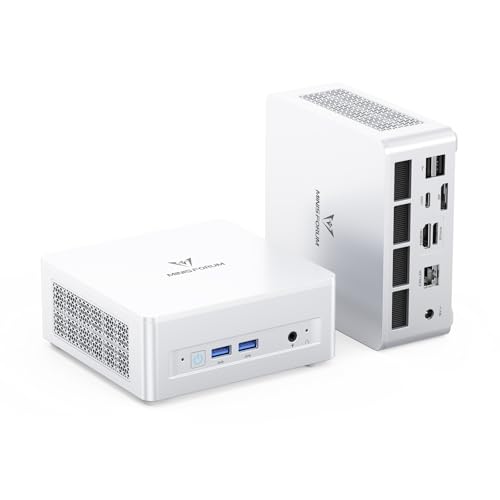
- Best barebones kit for streaming: MINISFORUM UM880 Plus Barebone, Ryzen 7 8845HS, Radeon 780M — Check on Amazon
- MINISFORUM UM870 Slim Barebone, Ryzen 7 8745H, Radeon 780M — Check on Amazon
- GMKtec NucBox K8 Plus, Ryzen 7 8845HS (Without RAM / SSD / OS) — Check on Amazon
- ASUS NUC 14 Essential Barebone Kit, Intel N150 — Check on Amazon
- ASUS NUC 14 Essential Barebone Kit, Intel Core 3 N355 — Check on Amazon
See 1 more Amazon option
- Intel NUC 11 NUC11PAHi5 Barebone, Core i5-1135G7, 0GB RAM / 0GB SSD — Check on Amazon
Read the full guide ↓
Disclosure: As an Amazon Associate, reviewstook.com earns from qualifying purchases. Links to Amazon on this page are affiliate links; they cost you nothing extra. Listing details such as price and availability change often, so check the current Amazon listing before you buy.
A barebones mini PC is a strange thing to buy for streaming, and this guide will not pretend otherwise. Start with the two bills nobody puts in the headline. The first bill is the computer itself: under $400 here buys an empty box with a processor soldered inside — no RAM, no SSD, no operating system. It will not boot, let alone open OBS, until you fit memory and storage yourself and install an OS. The second bill is the broadcast kit: not one of these boxes has a camera, a microphone worth streaming on or a light, and if your games live on a console you will need a capture card as well. A barebone only enters this conversation for one kind of buyer — the streamer who already owns DDR5 SO-DIMMs and a spare NVMe drive, or who wants to choose their own memory and drive sizes — because at current component prices, completing one with new parts usually costs more than buying the same machine finished. Every review below works through that completion logic before it says a word about streaming.
What a streamer should grade first, once the arithmetic is accepted, is not the core count or the clock speed. It is the encoder: the fixed-function block inside the graphics hardware that turns your rendered frames into the video your viewers watch. Encoding on that block costs almost no gaming performance; encoding on the CPU (the x264 software path) taxes the same cores your game is using, and on small chips that trade is ruinous. So this guide grades each kit by the encoder its silicon actually carries. The three AMD kits share the Radeon 780M, whose RDNA 3 media engine is the strongest encoder in this set — it encodes H.264 and HEVC and, because RDNA 3’s VCN block supports it, AV1 as well. The three Intel kits run Quick Sync, Intel’s mature hardware encoder, in H.264 and HEVC. Neither family is a discrete NVIDIA card with NVENC. The platforms set the terms regardless: Twitch’s standard ingest is H.264 at around 6,000 kbps CBR, while YouTube accepts higher bitrates and AV1 live streams. AV1 hardware is therefore a YouTube and local-recording asset today, not a Twitch upgrade — the guide grades it that way, as a bonus, never as the headline.
The realistic workload for every machine in this guide is the same, and it is narrower than the word “streaming PC” suggests — these are integrated-graphics boxes. The honest formats are: talk and desktop streams (just chatting, podcasts, screen-share and creative work), console gaming fed through a capture card so the mini PC only has to encode, and light games played on the box itself — esports titles and older games at reduced settings — with OBS sending 720p60 or 1080p30. Modern AAA games played and streamed from the same one of these kits, at the same time, is not a format any of them supports; the two MINISFORUM kits come closest, and even they are 1080p-low machines. If that is your show, the money belongs in a tower with a discrete GPU — the internal links below will take you there. If your show is talk, desktop or console-capture, read on — that is exactly the job these six kits were graded on.
The Encoder Is the Streaming Spec
Everything else in this guide hangs off one section, so here it is plainly. A stream is two workloads wearing one coat: rendering (drawing the game or desktop) and encoding (compressing the picture into the bitstream the platform receives). A discrete graphics card separates them neatly. An integrated GPU does not — the same silicon renders and encodes, and the same system memory feeds the game, the encoder’s frame buffers, OBS’s scene compositing and the browser tabs holding your chat and dashboard. That is why this guide treats memory configuration as a streaming specification: a kit with two SO-DIMM slots running a matched pair in dual channel gives the integrated GPU roughly double the memory bandwidth of a single stick — bandwidth the game and the stream share. The ASUS kits’ single slot is therefore not a minor spec difference; for a streamer it is the ceiling on the whole machine.
On the encoder blocks themselves, graded only from documented hardware. AMD VCN in the Radeon 780M (RDNA 3): a proper hardware encoder with H.264, HEVC and AV1 encode support. The AV1 point needs care, because it is generation-specific: the VCN block in RDNA 2 graphics has no AV1 encode, while RDNA 3’s does — and all three AMD kits here carry the 780M, which is RDNA 3. In OBS you select the AMD hardware encoder and it simply works, at a quality level at Twitch’s bitrate that sits close to Quick Sync and visibly ahead of asking a small CPU to encode in software. Intel Quick Sync (the N150, the Core 3 N355 and the NUC 11’s Iris Xe): the longest-serving hardware encoder in this guide, excellent at H.264, with HEVC available; no AV1 encode is claimed for any of these Intel parts, because none is documented for them. Quick Sync’s party trick is that it is a separate block from the 3D engine, so a capture-card or desktop stream barely touches the graphics cores. The x264 fallback — CPU software encoding — is graded as a last resort throughout: on the eight-core AMD chips it can hold a veryfast-preset 720p talk stream, and on the four-core Intel kits it should not be attempted while anything else is running.
And the platform ceiling: Twitch’s standard broadcast format is 1080p60 at roughly 6,000 kbps CBR with a two-second keyframe interval, and most new streamers should send 720p60 or 1080p30 — motion clarity and stability beat raw resolution at that bitrate. YouTube is the more generous platform, accepting higher bitrates, 1440p streams and AV1, which is where the 780M’s AV1 block earns its keep, alongside high-quality local recordings. Buy the encoder for the platform you actually stream to.
In this guide
Quick Picks
Short on time? Each row names a streaming job and the kit that fits it. Each kit is sold empty — check price on Amazon for the kit alone, and read each review for what completing it involves.
| Streaming job | Pick | Why it stands out | Link |
|---|---|---|---|
| Best barebones kit for streaming | MINISFORUM UM880 Plus Barebone, Ryzen 7 8845HS | Radeon 780M encoder with AV1, dual-channel memory, OCuLink eGPU escape hatch | Check on Amazon |
| Best value play-and-stream kit | MINISFORUM UM870 Slim Barebone, Ryzen 7 8745H | The same 780M encoder and dual slots in a slimmer box for less money | Check on Amazon |
| Best for dual-network stream setups | GMKtec NucBox K8 Plus, Ryzen 7 8845HS | Dual 2.5G Ethernet and dual USB4 around the same 780M encoder — dip pricing only | Check on Amazon |
| Cheapest console-capture stream box | ASUS NUC 14 Essential Barebone Kit, Intel N150 | Quick Sync does the encoding while the console does the gaming — the lowest-positioned kit in this guide | Check on Amazon |
| Best talk-stream box with headroom | ASUS NUC 14 Essential Barebone Kit, Intel Core 3 N355 | Eight cores for scenes, browser and chat in the same silent single-slot box | Check on Amazon |
| Best DDR4 capture-and-talk wildcard | Intel NUC 11 NUC11PAHi5 Barebone, Core i5-1135G7 | Iris Xe Quick Sync and cheap DDR4 completion — only at a sub-$400 dip | Check on Amazon |
How These Picks Were Chosen
The first filter was the definition of the category, applied without exceptions. A kit qualified only if it is sold genuinely bare: case, motherboard, soldered processor and cooling, with the SO-DIMM slots and the M.2 bay empty and no operating system installed, stated in the listing’s own title or specification table. Amazon’s search results for barebones keywords are full of complete mini PCs wearing the word as decoration, and any listing that ships with memory fitted was excluded however attractive its price. Where the same model sells in both forms — which is most of this guide — only the barebone variant’s listing, price and link were used, because the wrong-variant click is this category’s most common purchasing error.
The second filter was the encoder, and it is the one that makes this a streaming guide rather than a copy of the base one. Each kit’s hardware encoder was identified from its documented graphics silicon and nothing else: Radeon 780M means AMD’s RDNA 3 VCN encoder with AV1 encode support; Intel UHD and Iris Xe mean Quick Sync. No encoder was credited to any pick on the basis of a seller’s bullet points, and no pick was given an AV1 claim its silicon generation does not support. Kits whose graphics carry no credible hardware encoder at all did not survive this filter — a streaming guide built on CPU encoding at this budget would be a guide to dropped frames.
The third filter was simultaneous load, the test that separates a streaming PC from a PC that merely runs OBS. A live stream is a game or a capture feed, plus OBS compositing scenes, plus a browser holding chat, alerts and a dashboard, all at once. On integrated graphics every one of those draws on the same memory pool, so the guide favored two-slot kits that can run dual channel and can be fitted with 32GB, and it marked down, openly in each review, the single-slot design of the ASUS pair, which caps the whole machine at 16GB in single channel. CPU cores were graded for the multitasking stack rather than for gaming: eight threads is the comfortable floor for playing and streaming on one box, which is why the four-core Intel kits are positioned as encode-only machines for console capture and talk formats, where the game renders somewhere else.
The fourth filter was money, applied honestly instead of with guesses. No static kit or parts price is printed in this guide, because those prices move constantly — check the current price on Amazon for the exact listing linked, and check current memory and storage prices on the day you order. The completion logic is consistent throughout: a finished machine is the kit plus RAM plus SSD, before an operating system, with Linux costing nothing and a laptop-tied Windows license generally not transferable. Memory is the fastest-moving cost in this guide, which is why completing a kit with new parts so often costs more than buying the same machine finished.
The 6 Best Barebones Mini PCs for Streaming Under $400
MINISFORUM UM880 Plus Barebone — Ryzen 7 8845HS, Radeon 780M
Who it suits: The parts-owning streamer who wants the strongest single-box streaming platform this budget can start: play light games on the box and encode them properly, stream talk and desktop shows at full quality, and keep an external-GPU upgrade in reserve for the day the channel outgrows integrated graphics.
The streaming case for the UM880 Plus begins with its graphics. The Ryzen 7 8845HS pairs eight Zen 4 cores and sixteen threads (boosting to 5.1GHz) with the Radeon 780M, twelve RDNA 3 compute units whose media engine is the best encoder in this guide: hardware H.264 and HEVC, plus AV1 encode that RDNA 3’s VCN block supports and RDNA 2’s did not. In practice that means OBS hands the stream to a dedicated block while the 780M’s compute units render your game, and the CPU stays mostly out of both jobs — the only arrangement under which playing and streaming on one small box genuinely works. The memory design protects that arrangement: two socketed DDR5 SO-DIMM slots, rated up to 96GB, so you can fit a matched 32GB pair in dual channel and give the shared pool the bandwidth a game-plus-OBS stack consumes. Storage is two M.2 2280 PCIe 4.0 slots — a boot drive and a recordings drive, separated from day one, which VOD archivists will appreciate. Networking is 2.5G Ethernet, and the port list adds HDMI, DisplayPort and USB4 video outputs plus the enthusiast’s prize, an OCuLink port: the credible route to a desktop GPU in an external dock, making this kit a two-stage plan.
The completion picture, with no varnish: check price on Amazon for the kit on its own. Completed with a larger memory kit and a larger NVMe drive, the finished machine can cost more than the identical UM880 Plus sold complete, and even a modest 16GB/500GB completion pushes the finished total well past the kit alone. Either way, with new parts this barebone is the expensive route to this computer; with DDR5 and an NVMe drive already in your drawer, it is a direct route into the best streaming silicon in the class. No operating system is included in any of that.
- Radeon 780M encoder: H.264, HEVC and AV1 hardware encode — the strongest in this guide.
- Two DDR5 slots and two M.2 slots: dual-channel memory and a separate recordings drive.
- OCuLink and USB4 give a real external-GPU path when the channel outgrows the iGPU.
Honest limitation: Completed with new parts it costs more than the same machine bought complete — noticeably so in a larger-memory, larger-drive build — and the OCuLink dock and GPU it invites are further purchases on top. Its AV1 encoder also does nothing for a standard Twitch stream, which is H.264 regardless.
Choose it if you own DDR5 SO-DIMMs and an NVMe drive and want one box that plays light games, encodes them on dedicated hardware and can grow a discrete GPU later. Skip it if you are buying memory and storage new — price the complete UM880 Plus first — or if your format is modern AAA at high settings, which no integrated kit here streams.

MINISFORUM UM870 Slim Barebone — Ryzen 7 8745H, Radeon 780M
Who it suits: The streamer who wants the UM880 Plus’s encoder and memory layout in a slimmer, cheaper box, and whose upgrade plan is a bigger drive rather than an external GPU — a talk, desktop and light-gaming channel that values a tidy desk.
Under the slimmer shell sits the same streaming heart as the top pick. The Ryzen 7 8745H matches its sibling’s eight Zen 4 cores and sixteen threads at a slightly lower 4.9GHz boost, and — the specification that matters here — it carries the same Radeon 780M graphics, which means the same RDNA 3 VCN encoder: H.264, HEVC and AV1 in hardware, selected in OBS as the AMD encoder, with the same quality at Twitch’s bitrate and the same YouTube and recording advantages. Memory is again two socketed DDR5 SO-DIMM slots, so the dual-channel rule that protects simultaneous load applies in full: fit a matched pair, never a single stick, because the game and the stream drink from the same pool. Storage is M.2 2280 PCIe 4.0, with the listing describing a second PCIe 4.0 slot for expansion. Video outputs are HDMI, DisplayPort and USB4, networking is a single 2.5G Ethernet port, and dual-band Wi-Fi is built in. What the Slim gives up against its sibling is the OCuLink port — the clean eGPU path — and that is the entire difference a streamer needs to weigh.
Positioning is the Slim’s argument: it sits below the top pick in this guide’s range — check price on Amazon — while delivering the same encoder for less money. The completion shape is the same too: add a 16GB DDR5 SO-DIMM and a 500GB NVMe and the finished machine costs substantially more than the kit alone, before an operating system. As with its sibling, that arithmetic only flatters the kit if the memory and drive are already yours. One warning specific to this model: the UM870 Slim also sells on Amazon as complete machines at far higher prices, so confirm the listing you order from says “barebone” and “without RAM/SSD/OS” in the title, as the linked one does.
- The same Radeon 780M hardware encoder as the top pick — H.264, HEVC and AV1.
- Two socketed DDR5 slots keep dual-channel memory, the streamer’s non-negotiable, available.
- 2.5G Ethernet, USB4, HDMI and DisplayPort in a slimmer box for less money.
Honest limitation: No OCuLink, so a future external GPU runs through USB4 with its bandwidth penalty — and the completion-cost warning applies in full: with new DDR5 at current prices, the complete version of this machine is the cheaper finished streamer.
Choose it if you own the parts and your show is talk, desktop, console capture or light games, with no eGPU in the plan. Skip it if the external-GPU upgrade matters to you — that is the UM880 Plus — or if you would be buying memory new.

GMKtec NucBox K8 Plus — Ryzen 7 8845HS (Without RAM / SSD / OS)
Who it suits: The technically minded streamer whose setup is half home lab: dual-network arrangements, a separate streaming VLAN, a NAS on the second port, several monitors — and who is patient enough to buy this kit only when its price dips into the budget it usually lives above.
The K8 Plus is built on the same Ryzen 7 8845HS and Radeon 780M pairing as the UM880 Plus, so the streaming core is identical and top-tier for this guide: eight Zen 4 cores for the game-and-browser stack, and the RDNA 3 VCN encoder handling H.264, HEVC and AV1 in hardware while the compute units render. Memory is dual socketed DDR5 SO-DIMM in the same up-to-96GB class, storage is M.2 NVMe — the correct arrangement, stated once and not repeated. Where this kit earns its own review is the connection panel: two 2.5G Ethernet ports, two USB4 ports, HDMI 2.1 and DisplayPort, with GMKtec claiming up to four 4K displays. For a streamer, dual wired networking is a genuinely useful luxury — game and stream traffic on one port, a second machine, capture feed or NAS on the other — and it is a layout no other kit in this guide offers. The four-display figure is the maker’s claim, not a verified one; a streamer needs two screens, so treat the rest as headroom.
Now the positioning that governs everything about this pick: the kit sits at the very top of this guide’s budget as an empty box — check the current price on Amazon — and it spends most of its life above this guide’s ceiling, only visiting on dips. Add the memory and storage it needs and the finished machine moves well past the kit alone, before an operating system, the weakest completion ratio here. None of that disqualifies it — its port panel is unmatched under $400 and its dips do occur — but it defines the buying method: set a price alert, confirm the listing still says “Without RAM/SSD/OS” (the same model sells complete at far higher prices), and buy only when it dips into this budget, never at its usual higher positioning.
- Dual 2.5G Ethernet — separate your stream traffic from everything else on the desk.
- Same 8845HS and Radeon 780M encoder as the top pick, with dual USB4 alongside.
- Dual socketed DDR5 slots and M.2 NVMe storage: the correct streaming foundation.
Honest limitation: At its dip positioning it consumes the entire $400 budget as an empty box, and it usually sits above the ceiling entirely — this is a sale-watch purchase whose finished cost with new parts is the hardest in the guide to justify.
Choose it if dual networking is a real requirement of your setup and your DDR5 and NVMe drive are already on the shelf. Skip it if one Ethernet port serves your show — the two MINISFORUM kits deliver the same encoder for less.

ASUS NUC 14 Essential Barebone Kit — Intel N150
Who it suits: The console streamer or talk-show host who needs a dedicated encode box and nothing more: the console (or the conversation) supplies the content, this silent 0.56-litre kit sits behind the monitor and turns it into a stream — for the lowest entry price in the guide.
Reframe this kit correctly and it makes sense. The Intel N150 is a four-core, four-thread processor with Intel UHD graphics: it is not a gaming chip, and this review will not sell it as one. What it carries is Quick Sync, Intel’s hardware encoder, and for the capture-card workflow that is the only silicon that matters. Your console renders the game; a capture card feeds it to the NUC; Quick Sync encodes H.264 for Twitch at 6,000 kbps without asking the four small cores to do software encoding they cannot sustain. Around that encoder the kit is properly finished: triple display support, a 2.5G Ethernet port for the wired connection a stream should always use, Wi-Fi 6E and Bluetooth 5.3, and a VESA mount in the box so the finished machine disappears behind a screen. It is also the lowest-positioned kit here — check price on Amazon.
Two structural facts bound what this box can be. The first is memory: one DDR5-4800 SO-DIMM slot, maximum 16GB, single channel, permanently. For an encode-only box that ceiling is survivable — OBS, a capture feed and a browser fit in 16GB — but there is no headroom and no upgrade, and the moment you ask the same box to also play the game, the shared single-channel pool is where the stream goes to die. The second is the completion cost, the starkest in this guide: the single DDR5 stick this kit needs can cost more than the computer itself, and adding a 500GB NVMe takes the finished total well above what complete N150 mini PCs with the same memory and storage fitted typically cost. Own the stick and the drive, and this is a brand-name encode box positioned at the bottom of this guide. Buy them new, and the complete machines are not slightly cheaper; they are substantially cheaper.
- Quick Sync hardware encoding: the console plays, this box streams, neither compromises.
- Lowest-positioned entry here, with 2.5G LAN and a VESA mount included.
- Near-silent 0.56L chassis: a stream box your microphone will never hear.
Honest limitation: One memory slot, 16GB maximum, single channel for life, and four cores — it cannot play and stream modern games at once, and should never be asked to. At current DDR5 prices the single stick it needs can cost more than the kit.
Choose it if your format is console capture, talk or desktop streaming and you already own a DDR5 SO-DIMM and a small NVMe drive. Skip it if the games must run on the same box — that is what the Radeon 780M kits above are for.

ASUS NUC 14 Essential Barebone Kit — Intel Core 3 N355
Who it suits: The talk, podcast and desktop streamer who liked the N150 kit’s silence and price class but runs a heavier desk — multiple scene sources, a browser full of dashboard tabs, chat, alerts and a DAW or call software alongside OBS — and wants the cores to absorb it.
This is the step-up variant of the kit above, sharing its chassis, its terms and its ceiling, so only the processor needs discussing. The Core 3 N355 doubles the count to eight cores and eight threads, aimed squarely at the simultaneous-load problem. The encoder story is unchanged — Quick Sync handles the stream in hardware, H.264 for Twitch, exactly as on the N150 — but everything around the encoder gets breathing room: OBS scene switching with several sources, the browser stack every streamer keeps open, a Discord or call guest, recording locally while streaming. Storage and connectivity carry over: M.2 NVMe, triple display support, 2.5G Ethernet, Wi-Fi 6E and the VESA mount. It sits a clear step above its sibling in this guide’s range — check price on Amazon.
What does not change is the ceiling that matters. The memory design is identical: one DDR5-4800 SO-DIMM slot, 16GB maximum, single channel. The extra cores do not raise the memory cap, do not create dual channel and do not make this a gaming kit — the integrated graphics remain a desktop part, and playing-and-streaming on this box is still the wrong assignment. The completion picture is the N150’s with a higher starting point: the same memory and storage — a 16GB DDR5 SO-DIMM and a 500GB NVMe — take the finished total well above the kit alone, and above what complete equivalents typically cost. The honest question between the two ASUS kits is whether your non-gaming workload — the scenes, tabs and tools around the stream — is heavy enough to feel four extra cores. For a bare capture box it is not; for a working talk-stream desk, it is.
- Eight cores for the streaming stack: scenes, browser, chat and tools without sweat.
- Same Quick Sync encoder, 2.5G LAN, triple displays and VESA mount as the N150 kit.
- On a dip, the step up to eight cores can cost very little extra over its sibling.
Honest limitation: The single-slot, 16GB, single-channel ceiling is unchanged, so the cheaper kit’s memory limit applies in full — you are buying multitasking headroom, not gaming ability, and the Radeon 780M kits sit close above it in this range doing both jobs.
Choose it if your show is talk, podcast, desktop or console capture with a busy software stack, and the DDR5 stick and drive are already yours. Skip it if a simple capture box suffices — choose the N150 instead — or if the games must run on the same machine.
Intel NUC 11 NUC11PAHi5 Barebone — Core i5-1135G7, 0GB / 0GB
Who it suits: The patient DDR4 owner: a streamer with laptop DDR4 sticks in the drawer who wants a proven Intel platform for capture and talk streaming, Thunderbolt for docks and capture gear, and the discipline to buy this kit only when its price falls into a budget it usually ignores.
The context first, because this pick needs it. This is a legacy kit from Intel’s own era of the NUC line, built around the Core i5-1135G7: four cores, eight threads, up to 4.20GHz, with Iris Xe integrated graphics. For streaming, its credential is Quick Sync in its mature Tiger Lake form — a capable, well-supported H.264 hardware encoder that OBS has handled flawlessly for years, ideal for the console-capture and talk formats. No AV1 encode is claimed for it; that is not this generation’s trick. The platform around the encoder is genuinely pleasant: two DDR4 SO-DIMM slots, socketed, up to 64GB — DDR4 being the older, cheaper memory standard is the entire point for a parts-drawer build — an M.2 NVMe slot plus a 2.5-inch SATA bay that swallows the spare drives other kits cannot use, Thunderbolt 3, Wi-Fi 6 and support for four 4K displays. A completed NUC 11 remains a comfortable talk/capture tool, and its Iris Xe graphics handle older and lighter games a clear step above the N150 and N355 boxes.
The warning label, at the size this guide requires: this kit usually costs more than $400. It usually sits well above this guide’s ceiling, and buying-guide coverage describes it the same way, with DDR4 memory and storage still to add on top. It sits in this guide for one reason: it does occasionally dip, when old stock clears and third-party sellers compete, and a sub-$400 NUC11PAHi5 is a legitimate buy for the DDR4-owning streamer. Above $400 it is not a pick in an under-$400 guide; it is a nostalgia purchase. Verify the exact variant — this ASIN is the true 0GB/0GB barebone, while the same model name sells pre-fitted at higher prices — verify the seller, and hold your price line.
- Iris Xe Quick Sync: a mature, dependable hardware encoder for capture and talk streams.
- Two socketed DDR4 slots up to 64GB — the cheapest memory standard to complete with.
- Thunderbolt 3, Wi-Fi 6, M.2 plus a 2.5-inch bay: flexible with parts-bin hardware.
Honest limitation: On an ordinary day this kit simply is not an under-$400 product — expect to see it well above this guide’s ceiling — so buying it means waiting for a clearance dip and acting then. It is also yesterday’s platform: DDR4 instead of DDR5, Thunderbolt 3 rather than USB4, and an encoder with no AV1.
Choose it if you catch it at or under $400 with DDR4 SO-DIMMs and a spare drive already in hand. Skip it if the listing is sitting at its usual price — the two MINISFORUM kits are a generation newer and genuinely inside this budget.

Comparison Table
| Product | Processor / Graphics | Hardware encoder | Memory it takes | Best streaming use | Link |
|---|---|---|---|---|---|
| MINISFORUM UM880 Plus Barebone | Ryzen 7 8845HS / Radeon 780M | AMD VCN — H.264, HEVC, AV1 | 2× DDR5 SO-DIMM, socketed, up to 96GB | Play-and-stream light games; eGPU path via OCuLink | Check on Amazon |
| MINISFORUM UM870 Slim Barebone | Ryzen 7 8745H / Radeon 780M | AMD VCN — H.264, HEVC, AV1 | 2× DDR5 SO-DIMM, socketed | Same encoder in the slimmer, cheaper box | Check on Amazon |
| GMKtec NucBox K8 Plus | Ryzen 7 8845HS / Radeon 780M | AMD VCN — H.264, HEVC, AV1 | 2× DDR5 SO-DIMM, socketed, up to 96GB class | Dual-network setups, four-display desks — dip only | Check on Amazon |
| ASUS NUC 14 Essential (N150) | Intel N150 / Intel UHD | Intel Quick Sync — H.264, HEVC | 1× DDR5-4800 SO-DIMM, max 16GB, single channel | Console-capture and talk encode box | Check on Amazon |
| ASUS NUC 14 Essential (Core 3 N355) | Intel Core 3 N355 / Intel UHD | Intel Quick Sync — H.264, HEVC | 1× DDR5-4800 SO-DIMM, max 16GB, single channel | Busy talk/podcast desk with multitasking headroom | Check on Amazon |
| Intel NUC 11 NUC11PAHi5 Barebone | Core i5-1135G7 / Iris Xe | Intel Quick Sync — H.264, HEVC | 2× DDR4 SO-DIMM, socketed, up to 64GB | Legacy capture-and-talk desk, bought on a dip | Check on Amazon |
How to Choose a Barebones Mini PC for Streaming
- Decide who renders the game. This single decision sorts the whole guide. If a console renders and a capture card feeds the picture, the PC only encodes, and the Quick Sync ASUS and NUC kits are honest, cheap tools. If the same box must render and encode, only the Radeon 780M kits qualify, and only for light games at reduced settings. Buyers who need modern games rendered and streamed from one machine need a discrete GPU — leave this category and take the internal links to the streaming PC guides.
- Grade the encoder, not the core count. A hardware encoder is a streaming specification; a boost clock is not. The 780M’s VCN block and Intel’s Quick Sync both encode without taxing the CPU. The x264 software path on four small cores is how streams die — if a setup forces it, lower the output to 720p and the preset to veryfast, or change the hardware.
- Treat memory as a streaming budget. The game, OBS, the encoder’s buffers and your browser all share one pool on integrated graphics. Fit a matched pair in dual channel in the two-slot kits — 32GB if recordings and heavy scenes are planned — and accept the ASUS pair’s 16GB single-channel ceiling only for encode-only work, where it is survivable by design.
- Do the completion sum before the encoder seduces you. Kit + memory + SSD + OS, checked today, against the same machine sold complete. Memory and storage add enough to reverse the value of every kit here. A barebone needs your parts drawer, or another non-price reason, to win.
- Wire the stream. Every kit in this guide offers a wired Ethernet port, several at 2.5G. Use it. Streaming over Wi-Fi from a box sitting next to the router is the most common self-inflicted wound in small-channel streaming, and no encoder quality survives a fluctuating connection.
- Confirm the variant on the page before paying. These models all sell complete on sibling listings under near-identical titles. The variant you select has to declare the slots empty — barebone, no RAM, no SSD, no OS — in its title or style name. If the price looks too good for the complete machine, you are looking at the barebone — or about to buy the wrong thing.
- Plan the operating system and the first hour. No kit here includes an OS: Linux is free, Windows is a license you own or buy, and a license tied to a dead laptop generally does not transfer. Budget time for firmware and driver updates too — a barebone’s first setup is longer than a complete machine’s.
Set Up OBS Once, Correctly
Whichever kit you complete, the OBS configuration follows the same rules, dictated by the encoders and the platforms. Encoder selection comes first: on the three AMD kits choose the AMD hardware encoder (H.264 for Twitch; AV1 is the right choice for YouTube live and for local recordings), on the three Intel kits choose Quick Sync H.264. Never choose x264 on the four-core Intel kits, and on the AMD kits treat x264 as a talk-only experiment at 720p on the veryfast preset — the hardware block sitting idle next door does the job better. Rate control: CBR, always, for live streaming — variable bitrate is for recordings. Set roughly 6,000 kbps for Twitch with a two-second keyframe interval, which the platforms require. Canvas and output: run a 1080p canvas, but set the output honestly — 720p60 for fast-moving games, 1080p30 for talk and desktop, 1080p60 only on the 780M kits with light content. A stable lower resolution looks better at 6,000 kbps than a struggling higher one.
Then learn the three counters in OBS’s Stats window, because they divide every streaming fault into three piles with three different fixes. Frames missed due to rendering lag means the graphics side could not composite your scenes in time — the fix is on the render side: lower the output resolution, simplify scenes, cap the game’s frame rate, and in the two-slot kits confirm your memory is actually running dual channel. Frames skipped due to encoding lag means the encoder could not keep up — confirm you selected the hardware encoder rather than x264, drop the output resolution or frame rate, and avoid the slowest quality presets on integrated encoders. Dropped frames with neither of the above means the network: the fix is the Ethernet cable, a lower bitrate, or a different ingest server — never the encoder settings. Finally, record locally while you stream for your first weeks: the recording is your diagnostic copy, your VOD insurance, and on the 780M kits it can ride the AV1 encoder at a quality the stream’s bitrate never allows.
What $400 Does Not Include: The Broadcast Kit
Completing a kit in this guide finishes the computer. They do not start the broadcast. No kit here — no mini PC of any kind — includes a camera or a microphone, so a streamer budgeting honestly adds a second list, budgeted separately and never folded into any pick’s cost. Microphone first. Viewers forgive soft video and leave over bad audio faster than over any other fault; a USB microphone and the discipline to keep it close to your mouth is the highest-value purchase in streaming, ahead of every other item here. Lighting second: a single modest light aimed at your face does more for a cheap camera’s picture than a camera upgrade does, because small sensors fail in dim rooms, not in bright ones. A webcam, if your format has a face in it: talk, podcast and reaction formats need one; a pure gameplay-capture channel can skip it. A capture card, for console streamers only: it is the bridge that makes the ASUS and NUC 11 encode-box picks possible, and a PC gamer needs one not at all. Add the small things — a second screen or a phone for chat, cables, a USB hub if the desk grows — and the pattern is the barebone’s own lesson: the headline price is a down payment, and the honest budget is the whole list, written down before anything is ordered.
Common Buying Mistakes
- Comparing a barebone’s sticker with a complete mini PC’s price and calling the barebone the cheaper streamer. The comparison only exists after RAM, SSD and OS — and at current part prices it usually reverses.
- Selecting x264 in OBS because a tutorial said software encoding looks better. On these chips it looks like dropped frames. The hardware encoder exists precisely so the CPU does not have to do this job.
- Fitting one memory stick in a two-slot kit. The integrated GPU renders and encodes from the same shared pool; single channel starves both, and the stream shows it before the game does.
- Buying the ASUS kits to play and stream modern games on one box. Their encoder is genuinely good and their graphics are genuinely not — they are capture and talk machines, and the guide labels them that way.
- Chasing AV1 for a Twitch channel. Standard Twitch ingest is H.264 at around 6,000 kbps regardless of what your encoder supports; AV1 earns its place on YouTube and in local recordings.
- Streaming over Wi-Fi because the desk looks cleaner. Dropped frames are uglier. Run the cable.
- Paying the K8 Plus’s or the NUC 11’s everyday price inside an under-$400 plan. Both are dip purchases that usually sit above the ceiling; patience is the discount.
- Spending the whole budget on the computer and nothing on the microphone. The kit list is part of the streaming PC whether it appears on the invoice or not.
Final Recommendation
- Best single-box streamer: MINISFORUM UM880 Plus Barebone — the strongest encoder here, dual-channel memory, and an eGPU path in reserve.
- Same encoder, less money: MINISFORUM UM870 Slim Barebone.
- Dual-network setups: GMKtec NucBox K8 Plus — on a dip only.
- Cheapest console-capture box: ASUS NUC 14 Essential, Intel N150.
- Busy talk-stream desk: ASUS NUC 14 Essential, Intel Core 3 N355.
- The DDR4 drawer build: Intel NUC 11 NUC11PAHi5 Barebone — only when a dip brings it to $400 or below.
The shortlist divides by one question — who renders the game? If the answer is “this box,” the choice is between the two MINISFORUM kits, and it is a ports question: the UM880 Plus if the OCuLink eGPU path matters to your channel’s future, the UM870 Slim if it does not. If the answer is “a console” or “nobody — I talk and show my screen,” the Quick Sync kits do the job for less, with the N355 earning its premium only when the software stack around the stream is heavy. First-time builders should also read Best Barebones Mini PC For Beginners Under $400 before ordering parts, space-first desks are covered in Best Barebones Mini PC For Small Spaces Under $400, and readers who decide a finished machine is the wiser buy should start from Best Streaming PC Under $400 instead. Whatever you choose, write the completion sum down, confirm the variant says the slots are empty, and check the live price before you order.
Frequently Asked Questions
Can a barebones mini PC really run a stream?
Yes — once it is completed, which is the point the whole guide turns on. As sold, these kits are empty boxes that cannot boot. Fitted with memory, storage and an operating system, the Radeon 780M kits can play light games and encode the stream on their hardware encoder at the same time, and the Intel Quick Sync kits make excellent dedicated encode boxes for console capture, talk and desktop formats. What none of them can do is play and stream modern AAA games simultaneously; that workload needs a discrete graphics card.
Which encoder should I use in OBS on these machines?
The hardware one, always. On the AMD kits, select the AMD encoder — H.264 for Twitch, AV1 for YouTube live or local recordings. On the Intel kits, select Quick Sync H.264. Avoid x264 software encoding on the four-core Intel kits entirely, and on the AMD kits reserve it for 720p talk streams at the veryfast preset. Set CBR at roughly 6,000 kbps for Twitch with a two-second keyframe interval.
Does AV1 encoding matter for streaming?
Only where the platform accepts it. Twitch’s standard ingest is H.264, so the Radeon 780M’s AV1 support changes nothing there today. YouTube accepts AV1 live streams and higher bitrates, and AV1 makes visibly better local recordings at the same file size — so AV1 is a real asset for YouTube streamers and archivists, and a bonus, not a headline, for everyone else. Note that it is generation-specific on AMD hardware: RDNA 3’s VCN encodes AV1; RDNA 2’s does not.
How much does it really cost to finish one of these kits?
Enough to change the decision. A modest DDR5 completion — a 16GB DDR5 SO-DIMM and a 500GB NVMe SSD — adds a substantial amount to any kit, before an operating system (Linux free; Windows a separate license). The legacy NUC 11 completes with DDR4 parts instead, the cheaper memory standard to complete with. Check current prices on the day you order; memory is among the most volatile costs in computing right now, and at current part prices a complete mini PC is often the cheaper finished machine.
What else do I need besides the completed PC?
A microphone before anything else, then lighting, then a webcam if your format shows your face, and a capture card if — and only if — your games run on a console. None of it is included with any kit here, so budget for it separately. A wired Ethernet connection to the router completes the list; every kit here has the port, and streaming over Wi-Fi is the most common avoidable fault in small setups.
Which kit should a first-time streamer-builder choose?
If you own DDR5 parts, the UM870 Slim: two parts to fit, the strongest encoder class here once it boots, and a price that leaves something in the budget for the microphone. If you own nothing and your games are on a console, the NUC 14 Essential N150 kit bought knowingly as an encode box — with its single-slot ceiling accepted in advance — is the honest entry. And if you own nothing and the games must run on the PC, check the current price of a complete streaming PC before choosing a barebone; this category rewards the parts-rich.
- Best Barebones Mini PC Under $400
- Best Barebones Mini PC Under $500
- Best Barebones Mini PC Under $700
- Best Barebones Mini PC For Beginners Under $400
- Best Barebones Mini PC For Small Spaces Under $400
- Best Barebones Mini PC For 1440p Gaming Under $400
- Best Streaming PC Under $400
- Best Mini PC Under $400
- Best Mini Gaming PC Under $400


