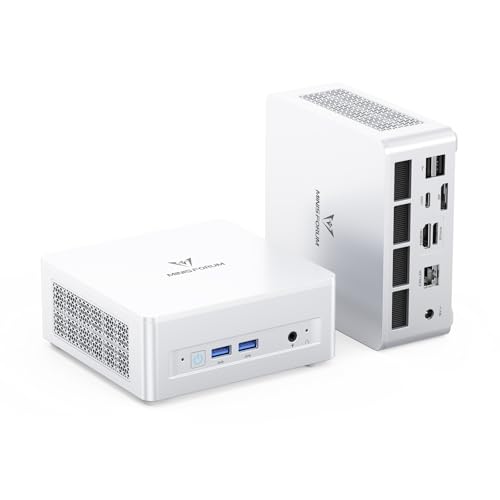
Where to buy
Check the current price on Amazon, along with availability and delivery. Orders are placed on Amazon. We may earn a commission from qualifying purchases. Every product below is a barebones kit: what you pay for is the case, board, processor and cooler only — no RAM, no SSD and no operating system unless a review says otherwise, so budget for those parts before comparing any kit here with a complete mini PC. For every pick below, check price on Amazon before you order, because the kit is only the first part of the total spend.
- Best overall barebones kit: MINISFORUM UM880 Plus Barebone, Ryzen 7 8845HS, Radeon 780M — Check on Amazon
- MINISFORUM UM870 Slim Barebone, Ryzen 7 8745H, Radeon 780M — Check on Amazon
- GMKtec NucBox K8 Plus, Ryzen 7 8845HS (Without RAM / SSD / OS) — Check on Amazon
- ASUS NUC 14 Essential Barebone Kit, Intel N150 — Check on Amazon
- ASUS NUC 14 Essential Barebone Kit, Intel Core 3 N355 — Check on Amazon
See 1 more Amazon option
- Intel NUC 11 NUC11PAHi5 Barebone, Core i5-1135G7, 0GB RAM / 0GB SSD — Check on Amazon
Read the full guide ↓
Disclosure: As an Amazon Associate, reviewstook.com earns from qualifying purchases. Links to Amazon on this page are affiliate links; they cost you nothing extra. Listing details such as price and availability change often, so check the current price on Amazon before you buy.
A barebones mini PC is the most misunderstood bargain in small computers, so this guide starts with the sentence the listings put in the smallest print: under $400 buys you an empty box with a processor in it — not a working computer. There is no memory in the slots, no drive in the M.2 bay and no Windows license waiting at first boot. The machine will not post, will not install anything and will not play a single game until you add RAM, an SSD and an operating system yourself. That is not a defect; it is the entire product. A barebone exists for the buyer who already owns a drawer of DDR5 SO-DIMMs and a spare NVMe drive, or who would rather choose their own memory speed and drive size than accept whatever a factory fitted that month. If that is not you, the honest headline is that a complete mini PC at the same money is usually the better purchase — and the reasoning behind this guide shows why, in full below.
Here is the logic that decides everything in this category right now. Memory and SSD prices have climbed hard, and complete mini PCs — priced on older parts contracts — have not climbed as fast as the components inside them. When the parts a barebone still needs are priced on their own, the kit-plus-parts route can end up costing more in total than the identical machine sold complete, already fitted with memory and storage. Barebones only look cheaper. They are cheaper in exactly one situation — when the RAM and SSD are already sitting in your parts drawer — and this guide is written for that buyer, with the cost-to-complete question addressed head-on next to every pick so nobody else gets surprised.
What the $400 ceiling genuinely buys, for the right buyer, is remarkable silicon. The top three kits carry AMD’s Ryzen 7 8845HS or 8745H — eight Zen 4 cores with Radeon 780M integrated graphics, the strongest iGPU class in a mini PC — in an empty box. Fitted with two DDR5 sticks in dual channel (the 780M shares system memory, so dual channel is not optional for gaming), they play esports titles and older AAA games at 1080p low-to-medium settings, drive three or four displays, and leave an M.2 slot or an OCuLink/USB4 port open for future storage or an external GPU. The Intel kits trade graphics power for something else: ASUS’s NUC 14 Essential line offers a brand-name box with 2.5G networking and a VESA mount at the lower end of this budget — check the current price on Amazon — as long as you accept its single memory slot, which caps it at 16GB in single channel forever. The final pick is a legacy Intel NUC kit with its warning label facing forward: a fine DDR4 platform whose usual asking price sits above this budget, worth buying only when it dips into it.
Every review below answers the same four questions: what is actually in the box, what memory and storage it takes (socketed SO-DIMM or soldered, one slot or two), what completing it involves and what that means for the total spend, and who should skip it.
In this guide
Quick Picks
Short on time? Each row names a buyer type and the kit that suits it. Remember that every kit here is an empty box — the completion question is covered in each review, and you should check price on Amazon for the kit itself before deciding.
| Buyer type | Pick | Why it stands out | Link |
|---|---|---|---|
| Best overall barebones kit | MINISFORUM UM880 Plus Barebone, Ryzen 7 8845HS | Strongest iGPU class, two DDR5 slots, two M.2 slots, USB4 and OCuLink | Check on Amazon |
| Best value 780M kit | MINISFORUM UM870 Slim Barebone, Ryzen 7 8745H | Same Radeon 780M graphics for less money, in a slimmer box | Check on Amazon |
| Best for dual networking and displays | GMKtec NucBox K8 Plus, Ryzen 7 8845HS | Dual 2.5G LAN, two USB4 ports, four-display output — at the very top of the budget | Check on Amazon |
| Cheapest respectable way in | ASUS NUC 14 Essential Barebone Kit, Intel N150 | Brand-name kit at the lower end of the budget, 2.5G LAN, Wi-Fi 6E, VESA mount included | Check on Amazon |
| Best light-duty Intel step-up | ASUS NUC 14 Essential Barebone Kit, Intel Core 3 N355 | Eight cores instead of four in the same tiny, quiet chassis | Check on Amazon |
| Best legacy DDR4 wildcard | Intel NUC 11 NUC11PAHi5 Barebone, Core i5-1135G7 | Thunderbolt 3, quad displays, DDR4 parts — only worth it when it dips into this budget | Check on Amazon |
How These Picks Were Chosen
The first filter was the definition itself. A pick had to be a genuine barebone as sold: case, motherboard, processor and cooling, with the RAM slots and drive bays empty and no operating system installed. Complete mini PCs that Amazon’s search results surface under barebones keywords — and there are many, because “barebone” is a word sellers attach to almost anything small — were excluded, however good they looked. So were listings that call a machine barebone while shipping it with memory fitted; if a listing’s own title or specification table does not say the slots are empty, it did not qualify. Where a maker sells the same box in both forms, only the barebone variant’s listing was used, because clicking the wrong variant on a shared listing page is the most common way buyers in this category end up owning the wrong thing.
The second filter was the memory question, and it eliminated more famous names than any other. A barebone’s entire value is the parts you fit yourself, so the guide favored kits with socketed SO-DIMM memory in two slots: two slots means dual-channel memory, and dual channel roughly decides whether an integrated GPU like the Radeon 780M performs like a gaming chip or a slideshow, because the iGPU has no memory of its own. Kits with soldered LPDDR5 memory cannot be barebones in any meaningful sense, and single-slot kits are included only where the rest of the package honestly earns it, with the single-channel ceiling stated in the review rather than buried. Storage was judged the same way: at least one full-size M.2 2280 NVMe slot, with a second slot or a 2.5-inch bay counting as a genuine advantage.
The third filter was the completion cost, judged qualitatively rather than by any fixed number. Memory and storage pricing is moving fast enough that any printed figure would be stale on arrival, so each review works through the same honest comparison instead: what the kit still needs, whether those parts are the expensive current-generation kind or the cheaper older kind, and how the finished total is likely to compare with the same machine sold complete. The pattern that shapes every verdict is simple — with brand-new parts at current component prices, a barebone usually finishes more expensive than its complete equivalent, while with parts already owned it can be the cheapest route into the platform by a wide margin. Where a kit needs parts whose pricing is especially volatile, the guide says so in words rather than inventing a number.
Finally, kit prices themselves move between listings and over time — the same kit can be listed at noticeably different prices in near-identical listings from the same brand. That is why this guide prints no kit prices at all: check the current price on Amazon on the exact listing linked, check the variant selector, and only then order.
The 6 Best Barebones Mini PCs Under $400
MINISFORUM UM880 Plus Barebone — Ryzen 7 8845HS, Radeon 780M
Who it suits: Parts-drawer owners who want the strongest integrated graphics available in an empty box — the buyer with two DDR5 SO-DIMMs and an NVMe drive already on the shelf, who wants a machine that games at 1080p today and can take an external GPU tomorrow.
What is in the box is a Ryzen 7 8845HS: eight Zen 4 cores and sixteen threads boosting to 5.1GHz, with Radeon 780M integrated graphics — twelve RDNA 3 compute units that remain the benchmark every mini PC iGPU is measured against. Around that chip sits the most expandable small box in this guide. Memory is two DDR5 SO-DIMM slots, socketed, rated up to 96GB total — fit two matched sticks and the 780M gets the dual-channel bandwidth it needs; fit one and you have halved your graphics performance to save money you will wish you had spent. Storage is two M.2 2280 PCIe 4.0 slots, so a boot drive now and a games drive later needs no adapters. The port list is the enthusiast one: HDMI, DisplayPort and USB4 video outputs, a 2.5G Ethernet port, and an OCuLink port — the small connector that lets this box drive a desktop graphics card in an external dock at near-native speed, the most credible upgrade path any mini PC offers.
Now the completion cost, stated as plainly as it can be: check the current price on Amazon for the kit, then price the memory and drive it still needs before you conclude anything. Fitted with a generous DDR5 kit and a large NVMe drive bought new at current component prices, the finished machine works out more expensive than the identical UM880 Plus sold complete — the complete version, priced on older parts contracts, is simply the cheaper way to own this computer when everything is bought new. Read that again before ordering. With parts you already own, the picture inverts completely: the kit alone — check price on Amazon — is a direct route into the best iGPU platform in the class, and the parts drawer does the rest for free. There is no operating system either way: add a Windows license at retail, or install Linux and add nothing.
- Ryzen 7 8845HS with Radeon 780M — the strongest integrated graphics in this guide.
- Two socketed DDR5 SO-DIMM slots (up to 96GB) and two M.2 2280 PCIe 4.0 slots.
- OCuLink port plus USB4 — a real external-GPU upgrade path, rare at any price.
Honest limitation: At current component prices the finished build costs more than the same machine bought complete. This kit only makes financial sense with parts already in hand, and the OCuLink dock and GPU it invites are further purchases.
Choose it if you already own DDR5 SO-DIMMs and an NVMe drive, and you want maximum iGPU performance plus an eGPU path. Skip it if you are buying memory and storage new — check the complete UM880 Plus first, because it will very likely be cheaper finished.

MINISFORUM UM870 Slim Barebone — Ryzen 7 8745H, Radeon 780M
Who it suits: The same parts-drawer buyer as the UM880 Plus, minus the eGPU ambition — someone who wants 780M graphics in a slimmer, simpler box and is happy to let the second M.2 slot, rather than a graphics dock, be the upgrade story.
The UM870 Slim’s processor is the Ryzen 7 8745H: the same eight Zen 4 cores and sixteen threads, boosting to 4.9GHz, with the same Radeon 780M integrated graphics as its bigger sibling. The differences are in what surrounds the chip and what the box gives up to be slim. Memory remains the right kind — two DDR5 SO-DIMM slots, socketed, so dual channel is available and the 780M can breathe — and storage is M.2 2280 PCIe 4.0, with the listing describing a second PCIe 4.0 slot for expansion. Video runs through HDMI, DisplayPort and USB4, networking is a single 2.5G Ethernet port where the UM880 Plus adds OCuLink, and wireless is dual-band Wi-Fi built in. It is the same gaming heart in a tidier body with a shorter port list.
Position in the budget is the argument: this kit sits a step below the UM880 Plus in the range while delivering the same graphics silicon — check the current price on Amazon to see the gap on the day you order. The completion logic is the same shape, though. Even a modest completion built around a single DDR5 SO-DIMM and a mid-size NVMe drive adds a substantial parts bill on top of the kit before an operating system enters the picture, and at current component prices that pushes the finished machine well past what the kit alone suggests. None of that is this kit’s fault — it is the market’s — but it means the Slim, like its sibling, is a bargain precisely when the memory and drive are already yours. One more variant warning: the UM870 Slim also exists on Amazon as complete machines at far higher prices. Confirm the page you order from says “barebone” and “without RAM/SSD/OS” in the title, as the linked listing does.
- Same Radeon 780M graphics as the guide’s top pick, in a slimmer box for less money.
- Two socketed DDR5 SO-DIMM slots — dual channel available, memory fully replaceable.
- USB4, HDMI and DisplayPort outputs plus 2.5G Ethernet and built-in Wi-Fi.
Honest limitation: No OCuLink port, so the external-GPU path runs through USB4 docks with their bandwidth penalty — and the completion-cost warning applies in full: with new DDR5 at current prices, a complete UM870 Slim is the cheaper finished machine.
Choose it if you own the parts and want 780M performance without paying for ports you will not use. Skip it if an eGPU dock is in your future plans — that is the UM880 Plus above — or if you are buying memory new.

GMKtec NucBox K8 Plus — Ryzen 7 8845HS (Without RAM / SSD / OS)
Who it suits: Network-minded builders — the home-lab and multi-monitor crowd — who want 8845HS power with dual Ethernet and dual USB4, and who are comfortable buying at the very ceiling of this budget.
GMKtec’s K8 Plus carries the same Ryzen 7 8845HS and Radeon 780M pairing as the UM880 Plus, and differentiates itself with the connection panel: two 2.5G Ethernet ports (the mini PC as router, firewall or dual-network server is a real use case at this spec), two USB4 ports, HDMI 2.1 and DisplayPort, with the maker claiming up to four 4K displays. Memory is dual DDR5 SO-DIMM, socketed, in the same up-to-96GB class as its rivals, and storage is M.2 NVMe — the standard, correct arrangement. As a specification, it is arguably the most complete box in this guide.
The problem is where this kit sits in the budget. It lives right at the very top of the under-$400 range — check the current price on Amazon — and it spends much of its time above this guide’s ceiling, only visiting it on dips. At the top of the budget the completion arithmetic turns severe: the empty box consumes nearly the whole allowance, and the DDR5 memory and NVMe drive it still needs come entirely on top, making the finished machine the most expensive outcome in this guide relative to what it is. The K8 Plus earns its place because its port layout is genuinely unmatched under $400 and it does verifiably dip into this budget — but as a watch-and-wait pick, not a buy-any-day one. Set an alert, confirm the listing still says “Without RAM/SSD/OS” (the same model sells complete at far higher prices), and strike only when it is inside the budget.
- Dual 2.5G Ethernet — the only kit here that can anchor a home lab or software router.
- Two USB4 ports plus HDMI 2.1 and DisplayPort; maker claims up to four displays.
- Same 8845HS / Radeon 780M core and dual-socket DDR5 layout as the top pick.
Honest limitation: It sits at the very top of the $400 budget as an empty box and is often priced above the ceiling altogether — this is a dip-only purchase, and its finished cost with new parts is the highest in this guide relative to what it is.
Choose it if dual networking or four displays are your actual requirement and you already own DDR5 and an NVMe drive. Skip it if you only need one Ethernet port — the two MINISFORUM kits deliver the same graphics for noticeably less money.

ASUS NUC 14 Essential Barebone Kit — Intel N150
Who it suits: Buyers who value a brand name, a warranty structure and silence over graphics — the home-office, media-player and always-on-server crowd — and who understand exactly which ceiling they are accepting before they pay.
ASUS took over Intel’s NUC line, and the NUC 14 Essential is its entry kit: a 0.56-litre box built around the Intel N150, a four-core, four-thread processor that is a desktop-and-documents chip, not a gaming one. The kit around it is properly finished for the class: triple display support, a 2.5G Ethernet port, Wi-Fi 6E and Bluetooth 5.3, and a VESA mount in the box so the finished machine can disappear behind a monitor. The barebone terms are exactly as they should be — no RAM, no SSD, no OS — and its position in the budget is the friendliest in this guide: it sits at the lower end of the range, so check the current price on Amazon and expect the entry point of this line-up rather than the ceiling.
Now the two honest problems, and they are structural. The first is the memory design: this board has one DDR5-4800 SO-DIMM slot, maximum 16GB, single channel, forever. There is no second slot to grow into and no way to run dual channel, which permanently caps memory capacity and integrated-graphics bandwidth. For office work, browsing, 4K playback and light server duties that ceiling is acceptable; for gaming it is why this kit sits fourth in a gaming-category guide. The second problem is the completion cost, the starkest in this guide: at current DDR5 prices, the single memory stick this kit needs can cost a startling amount relative to the kit itself — memory is currently the expensive half of this build — and once a small NVMe drive is added, the finished total lands far above what complete N150 mini PCs with the same memory and storage already fitted typically ask. If you own a DDR5 SO-DIMM and a small NVMe drive, this is a brand-name bargain at the lower end of the budget. If you do not, the complete boxes are not a little cheaper finished; they are cheaper by a wide margin.
- Lowest entry point of any respectable kit here — the bottom end of this budget.
- 2.5G LAN, Wi-Fi 6E, triple displays and a VESA mount included in the box.
- ASUS support and documentation behind the NUC name, in a near-silent 0.56L chassis.
Honest limitation: One memory slot, 16GB maximum, single channel for life — and at current DDR5 prices the single stick it needs can cost a disproportionate amount next to the kit itself. This is a light-duty machine: office, media and server work, not a gaming PC.
Choose it if you have a spare DDR5 SO-DIMM and NVMe drive and want a quiet, branded, always-on box. Skip it if gaming is the point, or if you would be buying the memory new — a complete N150 machine does the same job for far less finished money.

ASUS NUC 14 Essential Barebone Kit — Intel Core 3 N355
Who it suits: The same light-duty buyer as the N150 kit, with heavier multitasking — many browser tabs, several office apps, a busier home server — who wants more cores in the same silent box and accepts the same memory ceiling with eyes open.
This is the step-up variant of the kit above, and the review can be shorter because the chassis, the terms and the caveats are shared. What changes is the processor: the Core 3 N355 doubles the core count to eight cores and eight threads, a real, felt difference in desktop responsiveness, browser-heavy work and small-server duty compared with the four-core N150. Everything else carries over: the same compact case, triple-display support, 2.5G Ethernet, Wi-Fi 6E, VESA mount, and the same barebone terms — no RAM, no SSD, no operating system. Its position in the budget is a clear step above its sibling — check the current price on Amazon — so the eight-core version costs noticeably more than the four-core one.
What does not change is the part that matters most: the memory design is identical — one DDR5-4800 SO-DIMM slot, 16GB maximum, single channel. The extra cores do not unlock dual channel, do not raise the memory ceiling and do not turn this into a gaming kit. The completion logic is therefore the N150’s logic with a larger starting point: the same DDR5 stick and NVMe drive still have to be added on top, which takes the finished total well beyond what complete equivalents in this class typically ask. The question between the two ASUS kits is simply whether eight cores are worth the step up in price to your workload; for a pure media box they are not, and for a working desktop or a server running several services at once, they are.
- Eight cores in the same tiny, quiet, VESA-mountable chassis as the N150 kit.
- Same strong connectivity: 2.5G LAN, Wi-Fi 6E, triple display support.
- Positioned above the N150 kit in the range — on a dip, the core upgrade can cost very little extra.
Honest limitation: The single-slot, 16GB, single-channel memory ceiling is unchanged, so the cheaper kit’s gaming and memory limits apply in full — you are buying cores, not headroom. At its usual position in the range it also sits close to the Radeon 780M kits, which are far stronger all-round machines.
Choose it if your workload is CPU-multitasking in a silent box and you already own the DDR5 stick and drive it needs. Skip it if you are choosing between this and a 780M barebone at similar money — for anything graphical, the AMD kits are in a different league.
Intel NUC 11 NUC11PAHi5 Barebone — Core i5-1135G7, 0GB / 0GB
Who it suits: Patient bargain-hunters with DDR4 in the drawer — buyers who specifically want the classic Intel NUC platform, Thunderbolt and a four-display desk, and who are willing to wait for this kit to fall into this budget instead of paying what it usually asks.
Context first, because this pick needs it: this is a legacy kit from the Intel era of the NUC line, built around the Core i5-1135G7 — four cores, eight threads, up to 4.20GHz, with Iris Xe integrated graphics. The platform’s charms are real. Memory is two DDR4 SO-DIMM slots, socketed, up to 64GB — DDR4 being the older, cheaper standard is precisely the point for a parts-drawer build — storage is an M.2 NVMe slot plus a 2.5-inch SATA bay, and the port list includes Thunderbolt 3, Wi-Fi 6 and support for four 4K displays. As a desk machine for office work, media and light creative tasks, a completed NUC 11 remains genuinely pleasant, and its graphics, while a generation behind the Radeon 780M kits, are a clear step above the N150/N355 boxes for older and lighter games.
The warning label, printed as large as this guide requires: this kit usually costs more than $400. Its usual asking price sits above this guide’s budget — check the current price on Amazon before assuming otherwise — and buying-guide coverage describes it the same way: a kit priced above this range, with DDR4 memory and storage still to add on top. It is in this guide for one reason: it does, occasionally, dip — old stock clears, third-party sellers compete, and a NUC11PAHi5 inside the under-$400 budget is a legitimate buy for the DDR4-owning builder. At anything above $400 it is not a pick in an under-$400 guide; it is a nostalgia purchase. Verify the exact variant (this ASIN is the true 0GB/0GB barebone — the same model name is sold pre-fitted at higher prices), verify the seller, and hold your price line.
- Two socketed DDR4 SO-DIMM slots up to 64GB — the cheapest memory standard to complete.
- Thunderbolt 3, Wi-Fi 6 and four-display support from a proven Intel-era platform.
- M.2 NVMe plus a 2.5-inch SATA bay — flexible storage from parts-bin drives.
Honest limitation: Its usual price is above this guide’s budget, so this is a dip-only, alert-setting purchase. The platform is also a generation old: no USB4, DDR4 rather than DDR5, and Iris Xe graphics well behind the Radeon 780M kits.
Choose it if you catch it at or under $400 and you own DDR4 SO-DIMMs and a spare drive. Skip it if the live price is above $400 — at that money the UM870 Slim and UM880 Plus are newer, faster and actually in budget.

Comparison Table
| Product | Processor / Graphics | Memory it takes | Best use | Link |
|---|---|---|---|---|
| MINISFORUM UM880 Plus Barebone | Ryzen 7 8845HS / Radeon 780M | 2× DDR5 SO-DIMM, socketed, up to 96GB | Strongest iGPU build, eGPU path via OCuLink | Check on Amazon |
| MINISFORUM UM870 Slim Barebone | Ryzen 7 8745H / Radeon 780M | 2× DDR5 SO-DIMM, socketed | 780M gaming in the slimmer, cheaper box | Check on Amazon |
| GMKtec NucBox K8 Plus | Ryzen 7 8845HS / Radeon 780M | 2× DDR5 SO-DIMM, socketed, up to 96GB class | Dual 2.5G networking, four displays | Check on Amazon |
| ASUS NUC 14 Essential (N150) | Intel N150 / Intel UHD | 1× DDR5-4800 SO-DIMM, max 16GB, single channel | Quiet office, media and server box | Check on Amazon |
| ASUS NUC 14 Essential (Core 3 N355) | Intel Core 3 N355 / Intel UHD | 1× DDR5-4800 SO-DIMM, max 16GB, single channel | Busier light-duty desktop and home server | Check on Amazon |
| Intel NUC 11 NUC11PAHi5 Barebone | Core i5-1135G7 / Iris Xe | 2× DDR4 SO-DIMM, socketed, up to 64GB | Legacy four-display desk, bought on a dip | Check on Amazon |
How to Choose a Barebones Mini PC Under $400
- Start with your parts drawer, not the listings. A barebone is a discount only on parts you already own. Inventory what you have — DDR5 or DDR4 SO-DIMMs, an M.2 2280 drive, a 2.5-inch SATA drive — and let that inventory choose the kit. DDR5 parts point to the AMD kits or the ASUS boxes; DDR4 parts point to the NUC 11; an empty drawer points, honestly, to a complete mini PC instead.
- Do the completion sum before anything else. Kit price + memory + SSD + operating system, priced today — check the current price on Amazon for the kit and for the parts — compared against the same machine sold complete. At current component prices, the memory and storage a barebone still needs are expensive enough to invert the value of every kit here. If the finished barebone costs more than the complete machine, the barebone needs a non-price reason to exist: your parts, your preferred drive, your exact memory kit.
- Two memory slots or it is not a gaming kit. Integrated graphics share system memory, and two SO-DIMM slots running a matched pair in dual channel can be worth more gaming performance than a whole processor tier. Every 780M kit here has two slots; both ASUS kits have one, which is why they are office picks, and the guide labels them that way.
- Socketed versus soldered is the whole ballgame. A true barebone has empty SO-DIMM slots and an empty M.2 bay, and takes the memory generation the board specifies — DDR5 for the AMD and ASUS kits, DDR4 for the NUC 11; the two do not interchange. If a “barebone” listing turns out to have LPDDR5 soldered to the board, there is nothing to fit and nothing to upgrade — walk away and buy a real kit.
- Confirm the variant on the page before paying. These models all sell as complete machines on sibling listings — sometimes on the same page, one click away. The title or style selector must say barebone / no RAM / no SSD / no OS. If the price looks too good for the complete machine, you are probably looking at the barebone.
- Decide the operating system in advance. No kit here includes one. Linux installs free; Windows needs a license you own or buy, and a license tied to a dead laptop’s motherboard generally does not transfer.
- Treat above-ceiling kits as watches, not purchases. Two picks in this guide — the K8 Plus at its usual position and the NUC 11 at almost any time — live above $400 and only visit this budget. Set a price alert, hold your line, and let the dip come to you.
The Completion Worksheet: What Each Kit Really Costs
Because the kit price is a down payment rather than a finished price, here is the whole guide on one page, worked through qualitatively — check the current price on Amazon for each kit and for the parts it needs on the day you order, because no printed figure would stay true. Operating system is excluded from every comparison — add a Windows license at retail, or nothing for Linux. UM880 Plus: positioned in the upper part of this budget; completed with generous new DDR5 and storage it finishes more expensive than the same machine sold complete, and only wins when the parts are already owned. UM870 Slim: a step below its sibling for the same graphics, with the same completion logic — a bargain with parts in hand, poor value with everything bought new. K8 Plus: sits at the very ceiling on its dips and above it the rest of the time, so its finished cost with new parts is the worst ratio here. NUC 14 Essential N150: the lowest entry point in the guide, yet its completion gap is the widest — the single DDR5 stick it needs is currently expensive relative to the kit, and complete N150 equivalents typically finish far cheaper. NUC 14 Essential N355: the same story with a higher starting point, justified only by the extra cores for multitasking and server work. NUC 11: realistically above budget most days, with DDR4 parts — the cheaper memory standard — still to add; at a dip into this budget with DDR4 already owned, it becomes the cheapest finished machine here.
The pattern is the thesis of the whole category right now: memory got expensive faster than complete computers did, because complete machines are priced on parts contracts signed earlier. Barebones are therefore a genuine hedge for the parts-rich and a genuine trap for the parts-poor. Know which buyer you are before the listing’s countdown timer decides for you.
Common Buying Mistakes
- Comparing a barebone’s price with a complete mini PC’s price and calling the barebone cheaper. The comparison only exists after RAM, SSD and OS are added — and at current part prices it usually reverses.
- Fitting one memory stick in a two-slot iGPU machine and wondering why games crawl. The Radeon 780M and Iris Xe drink from system memory; single channel starves them.
- Mixing memory generations. DDR4 SO-DIMMs do not fit DDR5 slots. The NUC 11 wants DDR4; everything else here wants DDR5. One wrong kit ordered in haste costs a return cycle.
- Clicking the wrong variant. Barebone and complete versions of the UM870 Slim, K8 Plus and NUC 11 all circulate under near-identical titles. Read the style name on the order confirmation, not just the headline.
- Assuming a Windows license is included, or transfers from an old laptop. Neither is true by default; price the OS or plan on Linux before the kit arrives.
- Paying the K8 Plus’s or NUC 11’s everyday price inside an under-$400 plan. Both are dip purchases. Their usual prices sit above the ceiling, and patience is the discount.
- Skipping the BIOS and driver step. A barebone’s first hour includes firmware updates and chipset drivers the factory would have installed on a complete machine. Budget the time, especially on the AMD kits.
Final Recommendation
- Most parts-drawer builders: MINISFORUM UM880 Plus Barebone.
- 780M value: MINISFORUM UM870 Slim Barebone.
- Dual networking / four displays: GMKtec NucBox K8 Plus — on a dip only.
- Cheapest branded way in: ASUS NUC 14 Essential, Intel N150.
- Busier light-duty desk: ASUS NUC 14 Essential, Intel Core 3 N355.
- DDR4 owners, patient hunters: Intel NUC 11 NUC11PAHi5 Barebone — at $400 or under only.
Our top two are the two MINISFORUM kits, and the choice between them is a ports question: the UM880 Plus if OCuLink matters to your future, the UM870 Slim if it does not and you would rather keep the difference. Both deliver the same Radeon 780M heart, both take two socketed DDR5 sticks, and both are honest bargains exactly when their memory and storage are already sitting in your drawer. Readers starting from zero parts should also see Best Barebones Mini PC Under $500 before assuming the next tier solves the completion problem — it does not; the parts bill follows you up the ladder — and first-time builders may prefer Best Barebones Mini PC For Beginners Under $400, while space-first setups are covered in Best Barebones Mini PC For Small Spaces Under $400. Whatever you choose, do the completion sum in writing, confirm the variant says the slots are empty, and check the current price on Amazon before you order.
Frequently Asked Questions
What exactly does a barebones mini PC include?
The case, the motherboard, the processor (soldered to the board in every kit here), the cooling system, the power adapter and the ports. It does not include RAM, storage or an operating system unless the listing explicitly says otherwise. Treat any listing that does not state the slots are empty as a complete machine until its specification table proves otherwise.
How much does it really cost to finish a barebones mini PC?
It depends on the parts the kit still needs, and that is exactly why this guide prints no totals: a modest DDR5 completion — one or two SO-DIMM sticks plus an NVMe SSD — currently adds a substantial sum on top of any kit, plus an operating system (Linux free; Windows a separate license purchase). DDR4 completions for the legacy kit use the older, cheaper memory standard, but still add meaningfully to the total. Check the current price on Amazon for the kit and for every part on the day you order; memory is the most volatile component price in computing right now.
Is a barebone cheaper than a complete mini PC?
Only if you already own the memory and SSD, or catch an unusual parts sale. Priced like-for-like with new parts at current component prices, the complete machines win the head-to-heads in this guide: the UM880 Plus finished from a barebone costs more than the same machine sold complete, and a completed NUC 14 Essential kit costs far more than complete N150 boxes with the same memory and storage already fitted. The barebone’s advantage is control — your drive, your memory kit, your spares — not the sticker.
Can a barebones mini PC actually play games?
The Radeon 780M kits can: with two DDR5 sticks in dual channel, expect esports titles and older AAA games at 1080p low-to-medium settings, and modern AAA titles to need reduced settings or upscaling. The Intel kits are not gaming machines — the N150 and N355 boxes are office and media PCs, and the NUC 11’s Iris Xe handles older and lighter games only. No kit here replaces a discrete graphics card, though the UM880 Plus’s OCuLink port lets you add one externally later.
What memory do I need to buy?
Match three things: the form factor (SO-DIMM, the laptop-style stick, in every kit here), the generation (DDR5 for the AMD kits and both ASUS boxes; DDR4-3200 for the NUC 11), and the count (a matched pair for dual channel in the two-slot kits). The ASUS kits take a single DDR5-4800 stick up to 16GB; the AMD kits take pairs up to 96GB; the NUC 11 takes DDR4 pairs up to 64GB.
Why do some listings call a complete mini PC “barebone”?
Because the word is unregulated and it converts searches. Some sellers mean the machine is a barebones platform; some attach the word to any small PC; some run one product page where “barebone” is merely the cheapest style option among fitted ones. Defend yourself with the specification table: empty SO-DIMM slots and an empty M.2 bay, stated in writing, or it is not the product this guide is about.
Which kit should a first-time builder choose?
If you own DDR5 parts, the UM870 Slim: two parts to fit, the fewest extras to configure, and the strongest graphics here once it boots. If you own nothing, the honest first build in this category is usually a complete mini PC — or the NUC 14 Essential N150 kit bought knowingly as a light-duty machine, with its single-slot ceiling accepted in advance.
- Best Barebones Mini PC Under $500
- Best Barebones Mini PC For Beginners Under $400
- Best Barebones Mini PC For Small Spaces Under $400
- Best Barebones Mini PC For Streaming Under $400
- Best Barebones Mini PC For 1440p Gaming Under $400
- Best Mini PC Under $400
- Best Mini Gaming PC Under $400
- Best Barebones Mini PC Under $700


