Where to buy
Check the latest price, availability and delivery on Amazon. Orders are placed on Amazon. We may earn a commission from qualifying purchases.
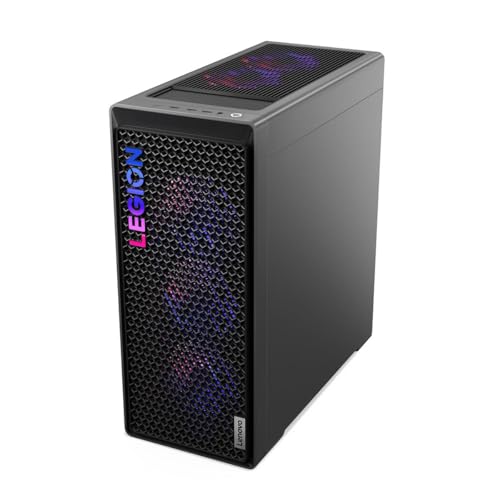
- Best overall for a small room: Lenovo Legion T7 34IAS10, Core Ultra 7 265KF, RTX 5080 — Check on Amazon
- CLX Set Gaming PC, Ryzen 7 9800X3D, RTX 5080, 2TB SSD — Check on Amazon
- Lenovo Legion Tower 7i Gen 10, Core Ultra 9 285K, RTX 5080, 2TB SSD — Check on Amazon
- CyberPowerPC Gamer Supreme SLC8480A9, Ryzen 7 9800X3D, RTX 5070 Ti, 2TB SSD — Check on Amazon
See 2 more Amazon options
- Skytech King 95, Ryzen 7 9800X3D, RTX 5070 Ti, 850W Gold PSU — Check on Amazon
- Acer Nitro 60 N60-181-UR26, Ryzen 9 7900, RTX 5070 Ti, 2TB SSD — Check on Amazon
Read the full guide ↓
Disclosure: As an Amazon Associate, reviewstook.com earns from qualifying purchases. Links to Amazon on this page are affiliate links; they cost you nothing extra. Listing details such as price and availability change often, so check the current Amazon listing before you buy.
Let us be direct about what this search actually involves. There is no small gaming PC in this guide. Every machine below is a full-size flagship tower: tall, heavy, and converting much of the electricity it draws into warm air blown into your room. If your space problem is a desk that cannot fit a tower, a shelf that cannot take the weight, or a studio flat where the PC shares air with your bed, no rearrangement of these six machines changes that. What this guide can do — and what it is for — is grade the six best flagship-class 1440p machines under $3,000 on how livable each one is once it moves into a small room: how much floor or desk it claims, how much heat it sheds, how noticeable its fans are from a chair two feet away, and what each one demands in clearance to breathe.
The costs of a flagship tower in a small space are mostly recurring ones, not the purchase price. A tower with an RTX 5080 inside is a small space heater that also plays games; in a large room that heat disperses, while in a nine-by-twelve bedroom it raises the temperature of the air you are sitting in, session after session. Fan noise behaves the same way: a cooler that is unremarkable across a living room is a constant presence when the machine sits on the desk beside your monitor, at ear level, in a quiet flat at midnight. And the footprint is not just the rectangle the case occupies — it is that rectangle plus the clearance behind it for exhaust air and cable bends, plus the floor space your chair needs to roll back without striking a glass side panel. This guide grades all of that as honestly as the published information allows — and where a maker does not publish dimensions, it says so.
Two boundary facts belong at the top. First, there is no RTX 5090 system anywhere near $3,000 in any shape — not in a tower, not in a compact case, not anywhere we could verify; complete 5090 machines live far above this budget, so the RTX 5080 is the fastest graphics tier this money buys, full stop. Second, if your room truly cannot take a tower, the genuinely compact route exists but it is not cheaper: the small-form-factor machines with 5080-class graphics that our research verified cost more than this entire budget. Readers in that position should start with Best Small Form Factor Gaming PC For Small Spaces Under $3000 and Best Compact Gaming PC For Small Spaces Under $3000 instead. Everyone else — one workable corner, one stretch of floor beside the desk, one deep desk — is who the six reviews below are written for.
In this guide
Quick Picks
Short on time, or comparing several options at once? Each row below names a buyer type and the machine that suits it, with a link to the listing.
| Buyer type | Pick | Why it stands out | Link |
|---|---|---|---|
| Best overall for a small room | Lenovo Legion T7 34IAS10, Core Ultra 7 265KF, RTX 5080 | Flagship 5080 power from a major OEM; check price on Amazon, as its deals swing widely | Check on Amazon |
| Best when you need real measurements | Lenovo Legion Tower 7i Gen 10, Core Ultra 9 285K, RTX 5080 | The only pick whose maker publishes full case dimensions and weight | Check on Amazon |
| Best pure gaming tower | CLX Set Gaming PC, Ryzen 7 9800X3D, RTX 5080 | The fastest gaming CPU and GPU pairing here, liquid-cooled; buy only at deal prices | Check on Amazon |
| Best for a shared studio or bedroom desk | Acer Nitro 60 N60-181-UR26, Ryzen 9 7900, RTX 5070 Ti | 12-core CPU and 2TB storage in the cooler-running GPU class; strong only when discounted | Check on Amazon |
| Best value with money left for the room | Skytech King 95, Ryzen 7 9800X3D, RTX 5070 Ti | Named 850W Gold PSU and 360mm liquid cooling; the lowest-priced route to this pairing — check price on Amazon | Check on Amazon |
| Best standard tower for later upgrades | CyberPowerPC Gamer Supreme SLC8480A9, Ryzen 7 9800X3D, RTX 5070 Ti | Conventional parts and 2TB storage; the easiest case here to open and extend | Check on Amazon |
How These Picks Were Chosen
The starting pool is the same six machines our base guide verified for this budget: real Amazon listings, each verified selling within this budget, with every ASIN and specification carried over from that verification unchanged. This variant re-grades that fixed set through one lens — placement in a small room — and introduces no new products, prices or specifications of its own. Where a pick’s value depends on a deal price, that dependency is stated as plainly here as it was in the base guide, because a small-space buyer who overpays has less room, in every sense, to correct the mistake.
The placement grading follows a strict evidence rule. Exact dimensions are printed for a pick only when the maker’s own listing documentation supplies them. In this set, exactly one machine meets that bar: the Lenovo Legion Tower 7i, whose listing publishes its height, width, depth and weight, and whose review below works with those real numbers. For the other five, no dimensions were present in the verified material, so none are invented here — each is graded by its documented form-factor class (full tower, standard ATX tower, mainstream OEM tower) and by its documented cooling hardware, and each review tells you to take the case measurements from the live listing and compare them against your taped-out spot before ordering. A made-up dimension wrong by an inch is how a tower ends up not fitting the alcove it was bought for.
Heat and noise are graded the same disciplined way. No decibel figure is claimed for any pick, because none of the six listings publishes a verified acoustic measurement, and quoting one from a forum post would be inventing data. Instead, heat is ranked by graphics class — the three RTX 5080 machines convert the most power to warm air under sustained load, and the three RTX 5070 Ti machines run a step cooler — and noise is discussed structurally: which picks carry 360mm liquid coolers (documented on the Legion Tower 7i, the CLX Set and the King 95), which sit at desk distance versus floor distance, and how placement changes what you hear. We did not use these machines ourselves; the grading rests on maker listings, as the base guide’s did.
Finally, every pick had to survive an honesty test specific to this angle: would we still recommend it to a reader whose room is genuinely small, knowing it is a tower? All six passed on the same condition — that the reader has one viable placement (a floor corner with clearance, or a deep desk) and wants flagship 1440p performance badly enough to give that placement to it. Readers without a viable placement are routed, without embarrassment, to the small-form-factor and mini guides linked throughout this page, including Best Mini Gaming PC For Small Spaces Under $3000. A guide that pretends a flagship tower is a small-space product would fail its readers.
The 6 Best 1440p Gaming PCs for Small Spaces Under $3,000
Lenovo Legion T7 34IAS10, Core Ultra 7 265KF, RTX 5080 (90Y6003KUS)
Who it suits: The small-room buyer who has exactly one good tower spot — a floor corner or a deep desk end — and wants the strongest 1440p graphics in this guide, from a major manufacturer, placed there once and left alone.
Start with the placement reality. The T7 is Lenovo’s full-size Legion tower class: a conventional upright case meant to live either on the floor beside a desk or at the far end of a deep one. Its verified listing material does not publish case dimensions, so take the height, width and depth from the live listing and check them against your spot — in particular the depth, because a tower’s true footprint is its depth plus several inches behind for exhaust air and cable bends. What the specification does document is a flagship list: an Intel Core Ultra 7 265KF, an RTX 5080 with 16GB of GDDR7, 32GB of RAM, a 1TB SSD and Windows 11 Pro, wrapped in Lenovo’s OEM build, single warranty and support structure. For a small room, that OEM-ness is a placement feature in disguise: one vendor to call, and a machine you are unlikely to need to open or spread across the floor for repairs.
Thermally, this is an RTX 5080 machine, which places it in the warmest class in this guide. Under a long gaming session the card and the 20-core processor together shed heat at a rate a small, closed room will register — plan on the room warming perceptibly over an evening, and on the tower needing unobstructed intake and exhaust rather than a cabinet or a curtain-draped corner. The 265KF’s core count earns its keep in a small-space life in a less obvious way: it handles streaming, recording and background work on the same machine, which means one tower doing two jobs instead of a second PC competing for the same scarce floor space. Noise, as everywhere in this guide, is graded without invented figures: expect a full-size tower’s fan array to be plainly audible at desk distance under load and much less present from the floor, which is why this pick’s natural home is the floor corner rather than beside your monitor.
The listing sits just under this guide’s ceiling at list, but deal events have recorded this exact machine at dramatically lower prices — the swings on this listing are wide enough that timing matters more than haggling. In a small room that difference is not abstract: money saved on a deal is most of the shelving, the longer desk, or the monitor arm that makes the tower’s placement work. Bought at a deal price — check price on Amazon before you commit — this is the strongest machine in the guide and the benchmark for the rest. Bought at list while a rival is discounted, it is merely a fair flagship in a big box.
- An RTX 5080 with 16GB of GDDR7 — no faster graphics tier is verified under this budget on Amazon.
- Deal coverage has caught this listing far below its list price — check price on Amazon before buying.
- Major-OEM build, warranty and support; one machine covering gaming plus streaming and background work.
Honest limitation: Storage is 1TB where three rivals below offer 2TB, its case dimensions are not in the verified material (measure from the live listing), and as an RTX 5080 tower it sits in the guide’s warmest heat class for a small room.
Choose it if you have one solid tower placement, want OEM support behind flagship power, and can time the purchase to a deal. Skip it if your only placement is a sealed cabinet or a shallow desk, or the listing is at full price while another 5080 pick is discounted.

CLX Set Gaming PC, Ryzen 7 9800X3D, RTX 5080, 2TB SSD
Who it suits: The pure gamer in a small room who can give a full-size tower a floor placement with breathing room — and who will only buy it at its deal price.
This is the gaming specialist of the six: AMD’s Ryzen 7 9800X3D, whose 3D V-Cache design tops gaming charts and keeps frame times smooth in crowded, CPU-heavy scenes, paired with the same RTX 5080 and 16GB of GDDR7 found in the Lenovo above, plus 32GB of DDR5, a 2TB NVMe SSD, WiFi and Windows 11 Home. For placement, the documented facts are these: it is a full-size case with room to grow, and it carries a 360mm all-in-one liquid cooler. That cooler cuts both ways in a small room. A 360mm radiator moves the X3D’s heat out through a large, slow-turning fan array rather than a small, fast one, which is the right architecture for keeping a flagship civilized at close quarters — but a radiator also needs an unobstructed mounting face and exhaust path, so this is not a tower to wedge between a wall and a bookshelf with an inch to spare. Its case dimensions are not in the verified material; measure the live listing’s figures against your spot, and budget clearance on top of them, before the deal clock tempts you.
Heat grading puts it level with the other two 5080 machines: top of this guide’s range. In a small bedroom that means treating ventilation as part of the purchase — a floor spot with open air behind and above it, not the inside of a media unit. The 2TB drive earns a small-space mention too: storage fitted inside the case is a peripheral you do not have to find room for, and an external drive dangling off a cramped desk is exactly the clutter this specification lets you skip.
Then the price, which is where this pick’s discipline lives. Deal coverage has recorded this CLX Set comfortably inside this budget — and later coverage of the same configuration recorded it climbing far above the budget as component prices rose. Same machine, wildly different numbers. The rule is therefore absolute and unchanged from the base guide: at a deal price it is a legitimate flagship for a small room with a floor corner to give it — check price on Amazon before you buy; once it climbs above this budget it has left this guide, and the Legion T7 above delivers the same graphics card with an OEM warranty for less. CLX is also a smaller integrator than Lenovo or Acer, so support runs through CLX rather than a global service network — a fair trade for the specification, but one to make knowingly.
- Ryzen 7 9800X3D plus RTX 5080 — the strongest pure-gaming pairing verified under this budget.
- 360mm liquid cooling and a 2TB NVMe SSD fitted as standard.
- Seen well under its list price in Amazon deal coverage — check price on Amazon.
Honest limitation: The most volatile price in this guide — the same configuration has been recorded far above this budget — and its case dimensions are unpublished in the verified material, so your placement check depends on the live listing’s numbers.
Choose it if gaming is the whole brief, your room has a floor placement with real clearance, and the live price sits at a genuine deal level inside this budget. Skip it if the price has climbed past the $3,000 ceiling of this guide, or your only spot would starve its radiator of air.

Lenovo Legion Tower 7i Gen 10, Core Ultra 9 285K, RTX 5080, 2TB SSD
Who it suits: The buyer who wants to plan a small room around actual numbers — and whose desk also streams, edits or renders, so one tower has to do every job the room contains.
This is the only machine in the guide whose maker hands you the tape-measure facts, so it gets the most concrete placement grade. By its own published dimensions, the Legion Tower 7i measures 17.55 × 8.3 × 19.28 inches and weighs 39.68 pounds. Work those numbers into your room. The footprint — the rectangle it claims on floor or desk — is the 8.3-by-19.28-inch face, roughly 160 square inches, a little over a square foot, before you add the clearance behind its 19.28-inch depth for cables and exhaust. Its height of 17.55 inches will not fit under most desk crossbars or inside typical media furniture, and at just under 40 pounds it is a two-handed, plan-the-route lift, not something you slide around casually when rearranging a small room. The enclosed volume works out to roughly 46 liters by simple arithmetic on those published dimensions — a genuine full tower, stated plainly so nobody buys it imagining otherwise. If your taped-out spot accommodates those figures with air to spare, this is the one purchase in the guide you can make with zero dimensional guesswork.
The hardware inside that measured box is built for the everything-at-once desk: Intel’s 24-core Core Ultra 9 285K, which matches the gaming leaders closely and pulls ahead the moment encoding, exporting or rendering joins the session; the same RTX 5080 with 16GB of GDDR7 as the two picks above; 32GB of RAM; a 2TB SSD; a documented 360mm liquid cooler; and an 850W power supply named in the listing. That consolidation is the small-space argument: the streaming PC, the editing PC and the gaming PC are one footprint here, not three. The heat class is the guide’s highest — a 24-core flagship and a 5080 under a combined gaming-and-streaming load is the warmest workload in this guide — and the liquid cooler plus floor placement is the intended answer to it: radiators exhaust through a broad fan array, and a floor position puts distance, the cheapest noise reduction there is, between the fans and your ears.
On price, the Amazon listing for this configuration has been seen inside this budget, while Lenovo’s own store prices comparable 285K and 5080 builds noticeably higher. The Amazon figure is marketplace pricing on one specific configuration, and Legion Tower 7i listings exist in several lookalike CPU, memory and storage combinations — so check price on Amazon and verify the exact specification on the page before ordering. No other pick in this guide lets you check both with this much certainty.
- Published dimensions and weight — 17.55 × 8.3 × 19.28 in, 39.68 lb — the only fully measurable pick here.
- Core Ultra 9 285K: 24 cores covering gaming, streaming and creation in a single footprint.
- RTX 5080, 2TB SSD, 360mm liquid cooling and a named 850W PSU in the listing.
Honest limitation: Roughly 46 liters and nearly 40 pounds is a lot of machine to house — under-desk crossbars and media cabinets are mostly ruled out — and for gaming alone the 285K’s extra cores buy little over the 9800X3D picks.
Choose it if your room plan needs real measurements and your PC works a second job in creation or streaming. Skip it if the machine will only ever game, or its published height and depth fail your taped-out spot — believe the tape, not the hope.

CyberPowerPC Gamer Supreme SLC8480A9, Ryzen 7 9800X3D, RTX 5070 Ti, 2TB SSD
Who it suits: The upgrade-minded gamer in a small room who wants a conventional tower they can open on the same floor space it already occupies — no second workbench, no proprietary parts hunt.
CyberPowerPC builds the traditional integrator way: retail-grade components in a standard tower case, nothing proprietary, everything replaceable. For a small room, that philosophy has a specific virtue — servicing and upgrading happen inside the footprint you already gave it. Each future swap — drive, memory, graphics card — happens at the tower’s own spot, not by dragging a second machine into the room. The configuration pairs the Ryzen 7 9800X3D with an RTX 5070 Ti carrying 16GB of GDDR7, 32GB of DDR5 and a 2TB PCIe 4.0 SSD, with WiFi and Windows 11 Home. The graphics step down from the 5080 trio is also a placement step down: the 5070 Ti class sheds noticeably less heat into the room under sustained load while still delivering ultra settings and high-refresh play at 1440p, with the full DLSS 4 feature set. In a small bedroom that doubles as an office, that cooler-running class is a genuine quality-of-life argument, not a consolation.
Two specification gaps carry over from the base guide unchanged, and in a flagship they deserve the same emphasis. The listing does not state the power supply’s wattage, and it does not name the motherboard model — the first matters for future GPU upgrades, the second for future CPU ones on the AM5 platform. Neither is unusual for the brand, and standard-parts construction means both can be identified the day the machine arrives; but a buyer planning a decade of upgrades from one small-room footprint should know they are accepting two small unknowns. Its case dimensions are likewise absent from the verified material, so the live listing’s measurements against your tape are, again, the deciding document.
It has been seen in CyberPowerPC deal roundups at prices close to the Legion T7’s best 5080 deal levels — check price on Amazon — so this pick’s case rests on balance rather than raw graphics: the better gaming CPU, double the T7’s storage, a cooler-running GPU class, and the most serviceable case in the guide. For a small room hosting this machine for years of upgrades, that is a coherent trade, made with eyes open about the two unpublished lines.
- Ryzen 7 9800X3D frame rates with a 2TB PCIe 4.0 SSD as standard.
- RTX 5070 Ti 16GB — a step cooler-running than the 5080 class, with full DLSS 4 support.
- Standard-parts tower: the easiest machine here to service and upgrade in place.
Honest limitation: The listing leaves the PSU wattage and motherboard model unstated, and its seen price sits close to discounted RTX 5080 machines — compare live prices against the Legion T7 before ordering.
Choose it if you plan to keep one tower for years and upgrade it in place on the same patch of floor. Skip it if an RTX 5080 pick in this guide is priced close to its live price on the day you buy, or unpublished PSU details are a deal-breaker for you.

Skytech King 95, Ryzen 7 9800X3D, RTX 5070 Ti, 850W Gold PSU
Who it suits: The small-bedroom gamer who wants this tier’s defining components — the 9800X3D and a 16GB graphics card — at the lowest verified prices in the guide, leaving budget to fix the room around the tower.
The King 95’s small-space case begins with its GPU class. Like the CyberPowerPC above, it runs an RTX 5070 Ti with 16GB of GDDR7 rather than a 5080, and in a small bedroom that choice reads differently than it does in a spec-sheet shootout: less heat poured into the room across a long session, the same 9800X3D gaming processor as the guide’s most expensive picks, and the complete DLSS 4 toolkit for 1440p. Skytech also publishes what many listings hide — an 850W 80 Plus Gold power supply, a 360mm all-in-one liquid cooler, 32GB of DDR5 5600 memory and a 1TB Gen4 NVMe SSD, model ST-KING95-1671-W-AM, with Windows 11 Home installed. The named 850W supply matters for placement too: it is the component that decides whether a future graphics upgrade is a ten-minute swap or a rewiring session conducted on the floor of a room that has no spare floor.
What is not published in the verified material is the case’s dimensions, so the routine from the rest of this guide applies: pull the measurements from the live listing, tape the footprint, add clearance behind and above, and only then decide. The 360mm radiator documented in the specification needs its exhaust path respected the same way the CLX’s does. Two further cautions carry over from the base guide. Skytech sells near-identical King 95 variants — different storage, memory speeds and even newer X3D chips under similar titles — so match the model number on the exact listing page; and the graphics card’s brand may vary, as the listing states, which is normal integrator practice but means the specific card is a lottery within the contracted model and tier.
The pricing is the friendliest in the guide: a mid-range list price for the tier, with Amazon deal coverage recording it lower still in event after event — check price on Amazon. The money this pick leaves unspent against the 5080 trio is, for most small rooms, the difference between a tower endured and a tower accommodated — the deeper desk, the monitor arm that frees the surface the tower would have taken, the shelving that gets everything else off the floor. This pick treats the room as part of the system.
- The 9800X3D and RTX 5070 Ti pairing, with an 850W 80 Plus Gold power supply named in the open.
- 360mm liquid cooling and the cooler-running 5070 Ti class for small bedrooms.
- Amazon deal events have repeatedly recorded it well under its list price — check price on Amazon.
Honest limitation: Storage is 1TB where the CyberPowerPC and CLX offer 2TB, case dimensions are not in the verified material, and near-identical King 95 variants crowd the listings — the exact model number must be checked before ordering.
Choose it if you want flagship gaming with money deliberately left over to make the room work. Skip it if you specifically want RTX 5080 ray-tracing headroom, or 2TB of storage without adding a drive later.

Acer Nitro 60 N60-181-UR26, Ryzen 9 7900, RTX 5070 Ti, 2TB SSD
Who it suits: The hybrid gamer-creator in a shared room or studio — a buyer who wants a 12-core processor and 2TB of storage from a global OEM, and who understands this listing is only a good idea on its discounted days.
The Nitro 60 is Acer’s mainstream OEM tower take on the tier, and its specification leans toward the desk that does more than game. The Ryzen 9 7900 is a 12-core processor — not an X3D gaming specialist, but a chip whose extra cores show up in rendering, encoding, compiling and heavy multitasking, the workloads a one-room, one-PC life tends to accumulate. The RTX 5070 Ti supplies the same 16GB GDDR7 graphics foundation as the two picks above it, placing this machine in the guide’s cooler-running GPU class — a real consideration when the tower shares air with a bed, a sofa or a second person’s workspace. Acer rounds it out with 32GB of DDR5, a 2TB PCIe 4.0 SSD, WiFi 6 and gigabit ethernet in an airflow-focused Nitro chassis, backed by a global OEM warranty.
Placement grading follows the house rule: the verified material for this listing does not publish case dimensions, so no figures are printed here and the live listing’s specification block is your measurement source. As a mainstream OEM tower it should be planned as a floor or deep-desk placement with the same exhaust clearance as every other pick — and the airflow-focused chassis design only delivers its benefit if that clearance actually exists. One further line deserves naming: the base verification did not document this listing’s power supply, so no wattage is claimed for it in this guide; check the live listing if that figure matters to your upgrade plans.
Now the price, which is this review’s main event, because this listing’s recorded range is the widest in the guide. Its list price sits just under this guide’s ceiling — at which, plainly, it should not be bought while RTX 5080 machines above are seen for less. Price tracking for this exact model records an average far below that list price and a lowest-ever price deep in value territory, with deal sightings in between. Read in small-space terms: near its floor, this is a 12-core, 2TB, OEM-warrantied tower for money that leaves most of the room-improvement budget intact; at its ceiling, it is the worst flagship buy on this page. Set a price alert, check price on Amazon, buy the discounted version of this machine, and walk away at list without a second thought.
- A 12-core Ryzen 9 7900 — more multitasking and creation muscle than any other 5070 Ti pick here.
- Cooler-running 5070 Ti class with 2TB storage and a global OEM warranty.
- Its tracking history swings from deep-discount lows up to a list price near this budget’s ceiling — only a buy when discounted.
Honest limitation: At its list price it is outclassed by the RTX 5080 picks in this guide; its non-X3D processor trails the 9800X3D machines in pure gaming frame rates, and neither its case dimensions nor its PSU are documented in the verified material.
Choose it if you catch it in the discounted band its tracking history shows, especially if the same room also does creation work. Skip it if the live price has drifted up toward list, where the Legion T7 above is simply the stronger buy.

Comparison Table
| Product | CPU / GPU | Space notes | Link |
|---|---|---|---|
| Lenovo Legion T7 34IAS10 (90Y6003KUS) | Core Ultra 7 265KF / RTX 5080 | Full-size OEM tower; dimensions not in verified sources — measure from the live listing; warmest heat class | Check on Amazon |
| CLX Set Gaming PC | Ryzen 7 9800X3D / RTX 5080 | Full-size case, 360mm liquid cooler needs an unobstructed exhaust path; dimensions not documented | Check on Amazon |
| Lenovo Legion Tower 7i Gen 10 | Core Ultra 9 285K / RTX 5080 | 17.55 × 8.3 × 19.28 in, 39.68 lb (published) — roughly 46L; the only fully measurable pick | Check on Amazon |
| CyberPowerPC Gamer Supreme SLC8480A9 | Ryzen 7 9800X3D / RTX 5070 Ti | Standard ATX tower, serviceable in place; cooler-running GPU class; dimensions not documented | Check on Amazon |
| Skytech King 95 | Ryzen 7 9800X3D / RTX 5070 Ti | 360mm liquid cooling, named 850W Gold PSU; cooler-running class; dimensions not documented | Check on Amazon |
| Acer Nitro 60 N60-181-UR26 | Ryzen 9 7900 / RTX 5070 Ti | Mainstream OEM tower, airflow-focused chassis; cooler-running class; dimensions not documented | Check on Amazon |
How to Choose a Flagship Tower for a Small Room
- Tape the spot before you shop. Mark the tower’s footprint on the floor or desk with painter’s tape, using dimensions from the maker’s listing — published outright for the Legion Tower 7i, listed in the specification block for the others. Then add the invisible part of the footprint: several inches behind the case for exhaust air and cable bends, and open air above it. If the taped rectangle does not fit with that clearance, the tower does not fit, whatever the product photos suggest.
- Measure the route, not just the destination. A tower that fits its corner still has to get there — through the door, past the desk, around the bed. Check the narrowest point on the path, and remember these machines are heavy — nearly 40 pounds in the one case where weight is published. Plan the carry before the delivery, not during it.
- Budget the room’s heat, not just the PC’s power. Every watt a gaming tower draws becomes heat in the room. The RTX 5080 picks sit in the warmest class here; the RTX 5070 Ti picks run a step cooler and are the kinder choice for a small bedroom that is also where you sleep. If your room already runs warm, that GPU-class difference is worth more than the frame-rate difference.
- Put distance between the fans and your ears. No verified decibel figures exist for these six listings, so treat noise as a placement problem rather than a specification. A tower on the floor, behind the desk’s modesty panel or a storage box, is dramatically less present than the same tower on the desk at ear level — and the picks with documented 360mm liquid coolers move their heat through large fan arrays designed for exactly that duty.
- Never seal a flagship in furniture. A closed media cabinet, a wardrobe conversion, a cupboard under the stairs with the door shut — each turns a tower’s exhaust into its intake and throttles or cooks a $3,000 machine. If the only available placement is enclosed, that is the room telling you to buy a smaller class of PC, and the honest-alternative section below is your guide.
- Match the CPU to the room’s second job. One tower in a small room usually works two jobs. Pure gaming points to the 9800X3D picks; gaming plus streaming, editing or rendering points to the 24-core Legion Tower 7i or the 12-core Acer. Choosing by workload avoids paying for cores — and their heat — that your room never uses.
- Count storage as saved clutter. A 2TB pick (CLX, Legion Tower 7i, CyberPowerPC, Acer) postpones the external drive, the dangling cable and the shelf it would need. The 1TB picks (Legion T7, King 95) are fine if a second internal drive is in your near future; both take one inside the same footprint.
- Keep the deal rules non-negotiable. The CLX belongs in a cart at its deal prices and nowhere near its price-spike excursions; the Acer is a buy in its discounted band and a walk-away at list; the Legion T7 is a benchmark at its deal price and merely fair at list. In a small room, an overpayment is not just money lost — it is the room budget spent on nothing.
The Honest Alternative: When the Room Says No
Everything above assumes your room can absorb a tower with clearance. If it cannot — if the tape test fails, if the only placement is enclosed, if the desk is a wall-mounted fold-down — then the correct flagship purchase is not a tower at all, and no review in this guide should talk you out of your own measurements. The genuinely small routes are mapped in Best Small Form Factor Gaming PC Under $3000 and Best Mini Gaming PC Under $3000: machines measured in single-digit liters that sit behind a monitor or on a shelf and leave the room’s air and floor plan alone.
Name the trade in both directions, because it runs both ways. Going small at this budget buys back your room and your quiet, and costs you the top of the graphics range: the compact machines with RTX 5080-class graphics that our research verified are priced above this entire budget, so a sub-$3,000 small-form-factor build means stepping down a GPU tier or accepting a mini PC’s integrated or mobile-class graphics — fine for 1440p at moderated settings, not the native-ultra experience the towers above deliver. Going tower buys the 5080, the X3D, the 2TB drive and the upgrade runway, and costs you a square foot of floor, a warmer room and a fan array you will hear on quiet nights. Neither direction is the smart one in the abstract. The tape measure, the thermometer and the shape of your evenings decide it — and a reader who works through those and lands on Best Compact Gaming PC Under $3000 has used this guide exactly as intended.
If the tower fits but the flagship premium is what strains, Best 1440p Gaming PC For Small Spaces Under $2500 applies this same placement grading a tier lower, and Best 1440p Gaming PC Under $2500 covers the tier’s full field. The placement logic does not change with price; only the heat class and the size of the deal swings do.
Common Buying Mistakes
- Assuming a flagship tower will “probably fit.” Probably is how a deep case meets a shallow alcove. Tape first, with clearance included, and believe the tape.
- Sealing the tower inside a media cabinet or wardrobe to hide it. Enclosed placement recycles exhaust into intake; a hidden flagship is a throttled, shortened-life flagship.
- Putting the tower on thick carpet directly under the desk. Bottom intakes suffocate against pile, and the floor spot you chose for quiet becomes the hottest placement in the room. A hard board or stand under the case fixes it for a few dollars.
- Placing a glass-panel tower where chair casters, knees and vacuum cleaners travel. In a small room the tower is always in someone’s path; choose the corner that traffic avoids, not the one that merely looks tidy.
- Ignoring the room’s heat until July. A 5080-class tower is a space heater with a frame rate. If the room has no window routine or cooling, the 5070 Ti class is not a downgrade — it is the correct specification.
- Buying the CLX Set on a price spike. Its recorded range runs from genuine deal prices to far above this budget for the identical configuration. The deal price is the product; the spike price is a different, worse one.
- Paying the Acer Nitro 60’s list price. Its tracking average sits far below list, and 5080 machines above have been seen under that list figure — list price is the one price this pick must never be bought at.
- Ordering a lookalike variant. Legion towers and King 95s ship in multiple configurations under similar titles; the model number is the product, not the headline — and at these weights, a return is a genuinely heavy mistake.
Final Recommendation
- Most small-room flagship buyers: Lenovo Legion T7 34IAS10 — RTX 5080 power and OEM support, bought at its deal prices — check price on Amazon.
- Buyers who need real measurements: Lenovo Legion Tower 7i Gen 10 — the only pick with published dimensions, and the room’s one-machine answer to gaming plus creation.
- Pure gamers with a floor corner: CLX Set — the 9800X3D and RTX 5080 pairing, bought only at its deal prices.
- Small bedrooms: Skytech King 95 — the cooler-running 5070 Ti class with money left to make the room work.
- Shared studios that also create: Acer Nitro 60 — 12 cores and 2TB, bought only in its discounted band.
- Long-term upgraders: CyberPowerPC Gamer Supreme SLC8480A9 — standard parts, serviced in place on the same footprint.
Our top two for a small room are the Legion T7, because an RTX 5080 from a major OEM caught at its deal prices leaves the most budget for the placement it demands, and the CLX Set, because the 9800X3D and RTX 5080 together are the fastest gaming combination this budget verifies — provided its live price is behaving. Together they represent the two ways a flagship makes sense at this money: the big-manufacturer machine caught on sale, and the gaming specialist caught at its deal price. Readers speccing this budget for a broadcast desk should also read Best 1440p Gaming PC For Streaming Under $3000, and every reader should run the tape test from the How to Choose section before ordering anything on this page — at $3,000, measuring is the cheapest specification there is.
Frequently Asked Questions
How much space does a flagship gaming tower actually need?
More than its footprint. The one pick here with published dimensions, the Legion Tower 7i, claims a rectangle of about 8.3 by 19.3 inches — a little over a square foot — and stands 17.55 inches tall. On top of that rectangle, plan several inches of open air behind the case for exhaust and cable bends, and unobstructed space above it. Tape the whole envelope, clearance included; if the envelope fits, the tower fits.
Which of these six PCs is the smallest?
It cannot be answered honestly from published data, and this guide will not pretend otherwise. Only the Legion Tower 7i’s maker publishes full case dimensions in the verified material — 17.55 × 8.3 × 19.28 inches, roughly 46 liters, 39.68 pounds. The other five are all full-tower-class machines whose listings in our sources omit dimensions; take each candidate’s measurements from its live listing and compare like for like before assuming any of them is the compact option.
Can I keep a gaming tower inside a TV cabinet or wardrobe?
No — not a flagship one, and not with the door closed. These machines exhaust the heat of a high-end graphics card and processor under load; an enclosed cabinet feeds that hot air straight back into the intakes, costing performance and component life. If enclosed furniture is your only placement, buy a smaller class of PC from the small-form-factor guides instead.
Will a tower like this heat up a small bedroom?
Yes, perceptibly, over a long session — every watt it draws ends up as heat in the room. The effect is strongest with the RTX 5080 picks and mildest with the RTX 5070 Ti picks, which is why this guide grades heat by GPU class and steers small, warm bedrooms toward the 5070 Ti machines. Ventilation, a floor placement away from the bed, and session-length awareness manage the rest.
Is there an RTX 5090 PC small enough for a compact desk under $3,000?
No. There is no verified RTX 5090 prebuilt anywhere near $3,000 in any form factor — the card alone launched at a premium list price of its own, and complete 5090 systems, tower or compact, price far above this budget. Compact machines with 5080-class graphics also sit above $3,000 in our verified research. Under this budget, the honest choice is a 5080 tower with a measured placement, or a genuinely small PC with a step down in graphics.
Should I just buy a mini PC instead?
If the tape test fails or the room cannot take the heat, yes — that is the right call, and the small-form-factor and mini guides linked in this page exist for exactly your situation. If you have one workable placement and you want native 1440p ultra settings, high refresh and years of upgrade runway, the tower earns its square foot. Decide from your room’s measurements, not from the product category’s marketing.


