Where to buy
Check the latest price, availability and delivery on Amazon. Orders are placed on Amazon. We may earn a commission from qualifying purchases.
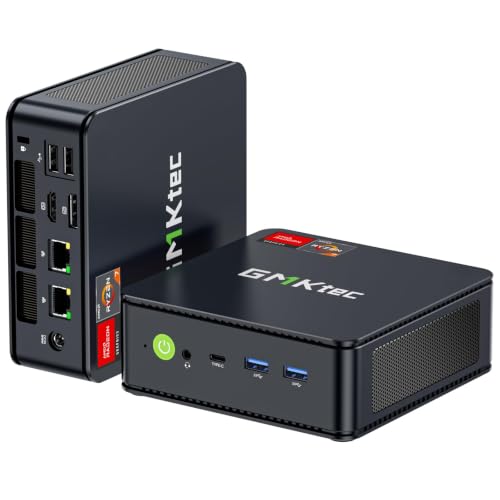
- Best overall workstation for streaming under $400: GMKtec M5 Plus Mini PC, Ryzen 7 5825U, 32GB RAM, 1TB SSD — Check on Amazon
- Beelink SER5 MAX Mini PC, Ryzen 7 5800H, 16GB RAM, 500GB SSD — Check on Amazon
- KAMRUI E3B Mini PC, Ryzen 5 7430U, 32GB RAM, 512GB SSD — Check on Amazon
- Dell OptiPlex 7060 SFF Desktop, Core i5-8500, 16GB RAM, 512GB SSD (Renewed) — Check on Amazon
See 2 more Amazon options
- BOSGAME P4 Mini PC, Ryzen 7 5700U, 32GB RAM, 1TB SSD — Check on Amazon
- MeLE Quieter4C Mini PC, Intel N150, 8GB RAM, 256GB SSD, Fanless — Check on Amazon
Read the full guide ↓
Disclosure: As an Amazon Associate, reviewstook.com earns from qualifying purchases. Links to Amazon on this page are affiliate links; they cost you nothing extra. Listing details such as price and availability change often, so check the current Amazon listing before you buy.
Streaming from a workstation is a specific job, and it deserves a specific definition before any product is named. The workflow this guide is built around is one machine doing three things at once: running your work — the code editor, the drawing tablet’s canvas, the DAW, the document, the light game — while OBS captures it, encodes the picture into a broadcast, and pushes that broadcast out over your network, with a chat window and a browser riding along. Every part of that sentence is a load. The work app takes processor and memory. The encode takes either a dedicated hardware block or spare processor cores. The upload takes a network connection that does not wobble. A machine that is a fine workstation and a poor streamer usually fails on exactly one of those three, and it is rarely the one the listing headline talks about.
So here is the honest headline for this entire budget, stated before the picks: no computer under $400 has an AV1 encoder, and none of the six below changes that. AV1 encoding — the codec YouTube rewards with visibly cleaner pictures at a given bitrate, and the one newer NVIDIA and Intel hardware is built around — starts well above this price. What $400 buys instead is H.264 encoding, done one of three ways depending on the pick: AMD’s Vega-generation hardware encoder on the four Ryzen machines, Intel Quick Sync on the two Intel machines, or software x264 encoding on the Ryzen chips’ spare cores. H.264 is what Twitch is built on — its standard broadcast is roughly 6,000 kbps at a constant bitrate — so a $400 workstation streams to Twitch legitimately, today, with the right pick. YouTube accepts the same H.264 stream and also takes higher bitrates and 1440p uploads from bigger hardware; here you will send it a clean 1080p H.264 broadcast and let its servers do the rest. Live 4K streaming is platform-limited even for expensive machines and is simply not part of this conversation.
The second honest point is that the workstation half of the search still matters. Streaming a heavy multitasking desk — IDE, local stack, screen share, chat, browser — is a memory workload as much as an encoder workload, which is why this guide keeps the base workstation standards: 32GB of memory where the budget allows, memory that can grow to 64GB rather than soldered ceilings, documented multi-monitor outputs, and live pricing checked on Amazon rather than taken from a printed figure. Within those rules, the six machines below separate cleanly once you grade them the way a streamer should: encoder first.
In this guide
Quick Picks
Short on time? Each row names a kind of streamer and the machine that fits, with the encoder route that makes it work.
| Streamer type | Pick | Why it stands out for streaming | Link |
|---|---|---|---|
| Best overall | GMKtec M5 Plus, Ryzen 7 5825U, 32GB, 1TB | Eight cores for x264, 32GB for the full desk, dual 2.5GbE upload path | Check on Amazon |
| Best software encoding | Beelink SER5 MAX, Ryzen 7 5800H, 16GB, 500GB | A 54W eight-core chip that holds x264 presets through long sessions | Check on Amazon |
| Best value | KAMRUI E3B, Ryzen 5 7430U, 32GB, 512GB | 32GB and a hardware encoder in a budget-tier package — check price on Amazon | Check on Amazon |
| Best dedicated encoder block | Dell OptiPlex 7060 SFF (Renewed), i5-8500, 16GB, 512GB | Quick Sync encodes without touching the cores your work is using | Check on Amazon |
| Best always-on stream box | BOSGAME P4, Ryzen 7 5700U, 32GB, 1TB | Dual 2.5GbE, 1TB for recordings, built to run around the clock | Check on Amazon |
| Best silent, mic-friendly box | MeLE Quieter4C, Intel N150, 8GB, 256GB | Fanless — zero fan noise near a microphone; light content only | Check on Amazon |
How These Picks Were Chosen
The starting set is the six verified workstation listings under $400 — complete machines, no barebone kits, with pricing to check on Amazon for each pick. On top of that base, three streaming filters were applied, and they are worth stating because they reorder what “best” means here.
The first filter is the encoder audit. Every pick’s broadcast route was traced to the silicon its listing actually documents — nothing was assumed from a brand name. The four Ryzen machines carry Vega-generation integrated graphics, whose video block encodes H.264 and HEVC and belongs to AMD’s oldest encoder family still in service: functional, but the softest hardware picture in this guide at Twitch bitrates, and with no AV1 encode or decode. The Dell’s Core i5-8500 carries Intel Quick Sync in its UHD Graphics 630 — a mature, well-regarded H.264 and HEVC encoder that works independently of the processor cores. The MeLE’s N150 carries a modern Quick Sync block that decodes AV1 for playback but, like everything here, cannot encode it. Any pick whose only honest route was “the processor will somehow cope” was graded down accordingly — which is why core counts get read alongside encoder blocks throughout this guide.
The second filter is the one-machine test. A stream is the work plus OBS plus chat plus a browser, all at once, for hours. That pattern punishes 16GB machines and rewards the 32GB picks, and it punishes soldered memory hardest of all, because a ceiling you hit mid-stream cannot be upgraded away. Four of the six picks take 64GB later; the one soldered machine is recommended only where its workload can never grow.
The third filter is the upload path. A broadcast is only as stable as the wire it leaves on, so documented wired networking was credited where the listing states it: dual 2.5GbE ports on the GMKtec and the BOSGAME, gigabit Ethernet on the KAMRUI and the MeLE. Where a base listing documents no wired port speed — the Beelink and the Dell — this guide claims none, and the OBS section below treats confirming the wired connection as part of setup rather than assuming a specification.
The Encoder Map: What Each Chip Can Actually Broadcast
Because the encoder decides the picture your viewers get, here is the whole map in one place before the reviews argue about it. Twitch’s standard broadcast is H.264 at about 6,000 kbps, constant bitrate, with keyframes every two seconds — settings every pick below can be configured to produce. The differences are in how clean that picture looks and what the encode costs the rest of the machine.
Vega hardware encoding (the four Ryzen picks) is the route of least resistance: OBS hands the frame to the graphics block’s video engine and the processor stays free for your work. The cost is quality. Vega’s encoder is AMD’s oldest family in this guide, and at 6,000 kbps its H.264 output is visibly softer in fine detail — foliage, confetti, fast camera pans over textured scenes — than the alternatives. For a coding, art, office or talk stream, where the screen is mostly static, that softness barely registers. For fast motion, it does.
x264 software encoding (the eight-core Ryzen picks) is the quality route, and it is why core counts matter in a streaming guide. Given spare cores, x264 at its veryfast preset produces a cleaner 6,000 kbps picture than the Vega block does, and the eight-core machines here have cores to give — provided your work leaves some behind. The 54W Beelink is the strongest software encoder in the guide precisely because its power budget lets all eight cores sustain that work through a long session instead of easing off.
Quick Sync (the Dell and the MeLE) is the efficiency route: a dedicated block, independent of the cores, producing a clean H.264 picture for almost no processor cost. The Dell’s 8th-generation version is the more proven broadcast block; the MeLE’s newer N150 version adds modern touches including AV1 decoding for playback, but sits in a four-core machine with 8GB of memory, which caps the workload long before the encoder does. Neither encodes AV1. Nothing here does — that sentence will not change anywhere in this guide.
The 6 Best Workstation PCs for Streaming Under $400
GMKtec M5 Plus Mini PC — Ryzen 7 5825U, 32GB RAM, 1TB SSD
Who it suits: The working streamer who wants one machine to carry the whole desk — work apps, OBS, chat and browser — without any single part of the setup being the weak link.
The M5 Plus earns the top spot on the strength of the complete picture rather than any single specification. Its Ryzen 7 5825U brings eight cores and sixteen threads, and for streaming that core count is a budget you spend two ways. Route one is the integrated Vega graphics’ hardware encoder: OBS hands it the frames, the cores stay entirely yours, and the broadcast costs your work almost nothing. Route two is x264 software encoding on the cores themselves, which at the veryfast preset produces a cleaner picture at Twitch’s 6,000 kbps than the Vega block manages — the right choice when your work is bursty rather than constant, because the encoder can borrow cores your editor is not using that second. Having both routes in one machine is what flexibility looks like at this price, and no other pick here pairs them with this much supporting hardware.
The support matters as much as the routes. The 32GB of fitted memory — socketed, expandable to 64GB — is what lets the full streaming desk exist at all: your IDE or canvas, a local stack, OBS, chat and a tab-heavy browser are a 20GB-plus pattern on a busy day, and machines with half this memory spend the stream swapping instead of encoding. The upload path is the best documented in the guide: dual 2.5GbE ports mean a wired connection with headroom to spare, one link for the broadcast and one, if you want it, dedicated to a NAS holding your recordings and project files. Triple 4K display output across HDMI, DisplayPort and USB-C covers the standard stream desk — work in the middle, chat and OBS preview on the sides — and the 1TB SSD swallows local recordings without a filing emergency. Check price on Amazon for the current listing.
- Both encoder routes in one box: Vega hardware for free cores, x264 on eight cores for picture quality.
- 32GB fitted and socketed to 64GB — the full work-plus-stream desk fits, and can grow.
- Dual 2.5GbE ports: the strongest documented wired upload path in this guide.
Honest limitation: The hardware encoder is Vega-generation — the softest H.264 picture here at 6,000 kbps in fast motion — and there is no AV1 encode, so the quality route means spending cores on x264.
Choose it if you stream the work you do on the same machine and want the most balanced tool for it. Skip it if your broadcast is fast-motion gaming first and workstation second — a gaming-first guide will serve that search better.

Beelink SER5 MAX Mini PC — Ryzen 7 5800H, 16GB RAM, 500GB SSD
Who it suits: The streamer whose content is the work itself — long coding sessions, builds, data jobs, tutorials — and who wants the cleanest software-encoded picture this budget can produce.
The SER5 MAX’s streaming case rests on one number: 54W. Its Ryzen 7 5800H is an eight-core, sixteen-thread processor from AMD’s higher-power mobile line, and where U-series chips sprint and then ease off, this one’s power budget lets it hold its speed through jobs measured in minutes and hours. Software encoding is exactly that kind of job. An x264 encode at veryfast — or faster presets traded deliberately against quality — is a sustained all-core load, and the machine that sustains it without throttling is the machine whose stream looks the same in hour three as in minute three. For a streamer who would rather spend cores than accept the Vega block’s softer hardware picture, this is the strongest engine under $400, full stop. The Vega encoder remains available as the zero-cost fallback for days when the work itself needs every core.
The trade is fitted capacity, and a streamer should weigh it more carefully than a regular workstation buyer would. The machine arrives with 16GB of memory and a 500GB SSD — workable for a disciplined desk, tight for the full OBS-plus-everything pattern, and the reason this guide ranks it second rather than first. The saving grace is that both limits are plans rather than ceilings: the chassis opens, memory expands to 64GB, and storage swaps up to 2TB. Check price on Amazon for the current listing — and the honest advice is to plan for the memory upgrade as part of the purchase from day one, because a streaming desk will ask for it. Triple display output via HDMI, DisplayPort and USB-C and Windows 11 Pro round out a machine that hides behind a monitor at under five inches square. One setup note: the base listing documents Wi-Fi 6 but no wired port speed, so plan on confirming the Ethernet connection in hand rather than assuming a specification — the OBS section below explains why the wire matters.
- A 54W eight-core processor: the best sustained x264 software encoding in this guide.
- Vega hardware encoder in reserve for days the work needs every core.
- Check price on Amazon, with memory and storage both upgradeable to finish the build.
Honest limitation: It arrives with 16GB of RAM and 500GB of storage — a streaming desk will want the memory upgrade sooner rather than later, so budget for it as part of the purchase.
Choose it if your streams are long, CPU-heavy work sessions and picture quality from x264 is your priority. Skip it if you want 32GB fitted from day one and the budget spent in one box — that is the M5 Plus above.

KAMRUI E3B Mini PC — Ryzen 5 7430U, 32GB RAM, 512GB SSD
Who it suits: The budget-first streamer — a developer, writer, teacher or analyst starting a channel around their work — who needs the full streaming desk to fit without spending the whole $400.
The E3B’s argument is that the streaming desk is a memory workload before it is an encoder workload, and on memory it refuses to compromise: 32GB in a dual-channel pair, the same fitted capacity as the guide’s top pick, in a budget-tier package — check price on Amazon. The encoder side is honestly mid-pack. The Ryzen 5 7430U is a six-core, twelve-thread chip, and its Vega 7 graphics carry the same Vega-generation hardware encoder as the rest of the Ryzen picks: perfectly serviceable H.264 for the mostly-static screens of work streaming — code, documents, slides, a face camera — and visibly soft if you push fast motion through it at 6,000 kbps. Six cores also bound the x264 route: veryfast is realistic while your work is light, and the hardware block is the safer default when it is not. Know which kind of stream you run, and this machine’s grading is either entirely adequate or a reason to step up to an eight-core pick.
Around that core offer, the platform details suit a stream desk well. Display output is documented precisely — HDMI 2.0, DisplayPort 1.4 and USB-C, three 4K outputs at 60Hz — so work, chat and preview each get a screen with no adapter heroics. Two M.2 2280 slots (one NVMe, one SATA-only) give recordings and projects a second home, memory tops out at 64GB, gigabit Ethernet provides the wired upload path, and a VESA mount and HDMI cable in the box let the machine bolt behind a monitor and vanish from the shot. Windows 11 Pro is not a guess, either — the listing’s own product information states it outright. Two cautions carry over from the base guide at full strength: a 16GB version of this machine exists under a separate listing, so confirm the 32GB configuration is what lands in your cart; and reviewers have noted the fan becomes audible under sustained heavy load — a real consideration if your microphone sits close, and the reason the fanless pick at the end of this guide exists.
- 32GB of dual-channel memory in a budget-tier package — check price on Amazon; the streaming desk fits from day one.
- Vega hardware encoder plus a bounded x264 route on six cores: honest options for work-paced streams.
- Three documented 4K outputs, gigabit Ethernet, and a VESA mount in the box.
Honest limitation: Six cores cap the software-encoding route, the Vega encoder is soft on fast motion, and the fan is audible under sustained load near a microphone.
Choose it if your stream is work-paced — talking, teaching, building, writing — and value leads. Skip it if your content is fast-motion or your sessions are marathon all-core work; the eight-core picks earn their premium there.
Dell OptiPlex 7060 SFF Desktop (Renewed) — Core i5-8500, 16GB RAM, 512GB SSD
Who it suits: The streamer who wants the encode taken off the processor’s plate entirely — and who is comfortable with renewed business hardware and the trade that comes with it.
This renewed corporate desktop owns the guide’s most efficient streaming trick. Its Core i5-8500 carries Intel UHD Graphics 630, and inside that sits Quick Sync: a dedicated encoding block that produces a clean, mature H.264 (and HEVC) broadcast picture while asking almost nothing of the six processor cores, which stay entirely available for your work. On the Ryzen picks, a quality encode is something you schedule around your workload; on the Dell, it is simply handled, in parallel, by silicon that does nothing else. For a work-first stream — a professional broadcasting their screen while the machine underneath keeps working — that division of labor is genuinely elegant, and it is why this older business machine outranks newer hardware for this particular angle.
The rest of the machine is the renewed ledger, stated as plainly as the base guide states it. The i5-8500’s six cores and 16GB of memory run the work-plus-OBS pattern adequately rather than generously, and the platform guarantees two monitors from its standard dual DisplayPort outputs — a third video port was a factory option, so check the exact unit if a three-screen desk is essential. Check price on Amazon for the current listing, and a keyboard and mouse are included. Behind the renewed listing sits the Amazon Renewed guarantee — a 90-day program floor — instead of a manufacturer’s warranty, and the chassis facts from the base guide still apply: a serviceable small-form-factor box whose PCIe slot and 200W power supply leave a low-profile, bus-powered graphics card as a possible later addition, though nothing in that path changes the streaming story told here — Quick Sync is already the right encoder for this machine. Treat it as what it is: the cheapest route to a dedicated hardware encoder, bought with used hardware and a shorter safety net.
- Quick Sync encodes the broadcast on a dedicated block — the work keeps all six cores.
- A budget-tier entry in the guide — check price on Amazon — with keyboard and mouse included.
- A serviceable business chassis with the guide’s only expansion slot, for whatever that is worth later.
Honest limitation: Renewed hardware covered by a 90-day program guarantee rather than a factory warranty, 16GB of memory, and only two monitors guaranteed.
Choose it if a set-and-forget hardware encode appeals and the renewed trade is one you accept with backups in place. Skip it if the machine is the one computer your income depends on and you want a new unit with a full warranty — the minis above are yours.
BOSGAME P4 Mini PC — Ryzen 7 5700U, 32GB RAM, 1TB SSD
Who it suits: The creator whose streaming setup is really a small production system — recordings archived locally, files moving to and from a NAS, a machine that may run a home lab when it is not on air.
On the streaming fundamentals the P4 stands level with the guide’s leader: an eight-core, sixteen-thread Ryzen 7 5700U offering the same two encoder routes — the Vega hardware block for a zero-cost broadcast, or x264 on spare cores for a cleaner picture at 6,000 kbps — backed by 32GB of memory and a full 1TB SSD. Where it pulls ahead is everything around the broadcast. Dual 2.5GbE ports are the joint-best wired networking in this guide, and for a streaming workstation they do double duty: a rock-solid wired upload path for the live broadcast, and a second fast link that moves finished recordings to a NAS or pulls project files across at two and a half times gigabit speed. The 5700U is efficiency-tuned, so the machine runs coolly and quietly enough to live always-on — the natural profile for a box that hosts your archive, your media library and maybe a container or two between streams.
The display story is fully documented — three 4K outputs spread over HDMI, DisplayPort and USB-C — Windows 11 Pro appears in the listing title itself, and Wi-Fi 6E with Bluetooth 5.2 handles the wireless side. Check price on Amazon for the current listing — a budget-tier route here to eight cores, 32GB and a terabyte together. The encoder honesty is the same as every Ryzen pick: the Vega block is the soft option for fast motion, there is no AV1 encode, and in a sustained all-core sprint the U-series chip yields a little to the SER5 MAX’s 54W processor — relevant if your plan is heavy x264 presets during heavy work. One verification habit is required, carried from the base guide: this listing family has also been sold in a 5825U variant under a near-identical title, so confirm the configuration on the live listing before ordering and again on the box when it arrives.
- Eight cores, 32GB and 1TB with both encoder routes — streaming fundamentals at the leader’s level.
- Dual 2.5GbE: one link for the broadcast, one for the archive — the production-system pick.
- Efficiency-tuned and quiet-running, suited to always-on duty between streams.
Honest limitation: Under a sustained all-core load the efficiency-tuned chip gives ground to the SER5 MAX’s 54W part, and this listing family has shipped a different processor variant before — verify the configuration.
Choose it if your stream is one job among several — archive, server, lab — on a machine that never really switches off. Skip it if sustained software-encoding throughput is the whole brief; that is the SER5 MAX’s specialty.

MeLE Quieter4C Mini PC — Intel N150, 8GB RAM, 256GB SSD, Fanless
Who it suits: The voice-first streamer — podcaster, narrator, ASMR-adjacent creator, or anyone recording speech in a quiet room — whose content is light and whose microphone is close.
Every other pick in this guide has a fan, and every fan is a noise source a sensitive microphone can hear. The Quieter4C is fanless — passively cooled by design, per the manufacturer and confirmed across independent reviews — so it contributes exactly zero mechanical noise to a recording, while drawing power in the low teens of watts. That single fact is its entire streaming case, and for the right creator it is decisive: a silent box that sits behind a monitor, runs a just-chatting or podcast stream, a screen of notes and chat, and never once whirs into the take. Its Intel N150 carries a modern Quick Sync block, which encodes H.264 and HEVC on dedicated silicon — the right tool for a light broadcast, leaving the little processor free for the browser and chat. The same block decodes AV1, so watching streams and reference video is smooth; it does not encode AV1, and neither does anything else in this guide.
Now the limits, at the same full size the base guide gives them, because they define who should not buy this. The N150 is a four-core efficiency processor, the 8GB of memory is soldered LPDDR5 that can never be upgraded, and storage is 256GB. There is no x264 route worth the name — four efficiency cores are not a software encoder — and the one-machine pattern of a demanding app plus OBS plus a heavy browser will overwhelm it. Streaming gameplay from this box is not a thing it does. What it does within its brief is more capable than the headline suggests: three 4K display outputs at 60Hz across dual HDMI and USB-C run a desk of documents, dashboards and communication tools; Windows 11 Pro is fitted; gigabit Ethernet provides the wired upload a stable broadcast needs; and the chassis, barely five inches by three, mounts behind a monitor and disappears. Check price on Amazon for the current listing. Buy it as a silent appliance for light, voice-led content — and if your ambitions outgrow it, the honest step is a Ryzen pick above as the main machine, with this one perhaps staying on as the quietest second box in the room.
- Fanless and silent — the only pick that adds no fan noise to a microphone’s world.
- Modern Quick Sync hardware encoding sized honestly for light, voice-led broadcasts.
- Three 4K outputs, gigabit Ethernet and Windows 11 Pro in a box that vanishes behind a monitor.
Honest limitation: Four efficiency cores, 8GB of soldered memory that can never grow, and 256GB of storage — light content only, with no software-encoding route and no gameplay streaming.
Choose it if silence is a hard requirement and your broadcast is voice, chat and light screens. Skip it if you stream games, heavy apps or long multitasking sessions — every other pick here outmuscles it several times over.

Comparison Table
| Product | Processor | Broadcast encoder route | Memory | Link |
|---|---|---|---|---|
| GMKtec M5 Plus | Ryzen 7 5825U, 8 cores | Vega hardware H.264, or x264 on 8 cores | 32GB, socketed to 64GB | Check on Amazon |
| Beelink SER5 MAX | Ryzen 7 5800H, 8 cores, 54W | Strongest x264 here; Vega hardware in reserve | 16GB, upgradable to 64GB | Check on Amazon |
| KAMRUI E3B | Ryzen 5 7430U, 6 cores | Vega hardware H.264; light x264 | 32GB, upgradable to 64GB | Check on Amazon |
| Dell OptiPlex 7060 SFF (Renewed) | Core i5-8500, 6 cores | Quick Sync H.264/HEVC — dedicated block | 16GB, serviceable chassis | Check on Amazon |
| BOSGAME P4 | Ryzen 7 5700U, 8 cores | Vega hardware H.264, or x264 on 8 cores | 32GB, 1TB fitted | Check on Amazon |
| MeLE Quieter4C | Intel N150, 4 cores | Quick Sync H.264/HEVC — light duty only | 8GB, soldered — fixed forever | Check on Amazon |
Setting Up OBS on a $400 Workstation
Whatever pick you land on, the broadcast settings converge on the same shape. In OBS, set the output to constant bitrate — CBR — at about 6,000 kbps for Twitch, with a keyframe interval of two seconds; those two numbers are the platform’s standard contract and every encoder in this guide can honor them. YouTube accepts the same stream happily and will take higher bitrates if your upload allows, but at this hardware tier the sensible move is to send it the same clean 1080p H.264 broadcast rather than chasing settings the encoder cannot feed. Then choose the encoder per machine, because that choice is the whole game at $400:
- GMKtec M5 Plus and BOSGAME P4: start with x264 at veryfast while your work is bursty and the cores are free; switch to the Vega hardware encoder on days the work itself is all-core. Watch which one you are on — the picture difference at 6,000 kbps is real.
- Beelink SER5 MAX: x264 is the point of this machine. Veryfast is the working preset; faster presets buy core headroom at a visible quality cost, slower ones spend the 54W budget you bought. The Vega block is the fallback, not the plan.
- KAMRUI E3B: default to the Vega hardware encoder and reserve x264 for light-work streams; six cores shared between a heavy app and a software encode is where dropped encoding frames begin.
- Dell OptiPlex 7060: Quick Sync, full stop. It is the machine’s reason to exist in this guide — set it, and let the six cores do your work.
- MeLE Quieter4C: Quick Sync at modest canvas settings for voice-and-screen content. Do not ask its four efficiency cores for x264; that experiment ends in encoding lag.
When a stream stutters, OBS tells you which of three different problems you have, and each has a different fix — confusing them wastes evenings. Rendering lag means the graphics side could not compose frames in time: the integrated GPU is also driving your work and your monitors, so cap the work app’s frame rate, close the extra preview, and lower the canvas before you touch anything else. Encoding lag means the encoder — whichever route you chose — is overloaded: step the x264 preset faster, or move the encode onto the hardware block your pick carries. Network dropped frames are not the computer’s fault at all: the upload path faltered. The fix is a cable. Stream wired, always — the M5 Plus and P4 document 2.5GbE ports and the E3B and MeLE gigabit ports, and on the Beelink and the Dell, where the base listings state no wired speed, the rule is the same: plug in whatever Ethernet the unit has rather than trusting Wi-Fi with a broadcast your audience watches live.
The Rest of the Kit, Priced Honestly
A workstation is not a stream until a few things surround it, and this section deliberately names them without prices — peripheral prices swing too much to print responsibly, and no pick’s recommendation above secretly depends on them. Spend in this order. Microphone first: viewers forgive a soft picture long before they forgive bad audio, and any dedicated USB microphone is a larger upgrade to a work stream than any setting in OBS. Note the interaction with the picks: the minis’ fans are near your desk, the KAMRUI’s is documented as audible under load, and the fanless MeLE exists precisely for rooms where that matters. Lighting second if a camera is part of your format — a lit face at 1080p reads as production value that no encoder setting can fake. A second screen third: every pick here documents at least two display outputs (the Dell guarantees two; the minis document three), so chat and OBS preview can live off your work screen without buying anything exotic. A capture card last, and only for a specific reason: it exists to bring in a source outside this computer — a console, a camera with clean HDMI output, or a second PC in a dual-machine setup. For streaming the work happening on the machine itself, which is this guide’s entire premise, no pick needs one and none should be sold to you as a requirement.
How to Choose a Workstation PC for Streaming Under $400
- Pick your encoder route before your processor. Hardware block (Vega or Quick Sync) for a zero-cost broadcast alongside heavy work; x264 on eight cores for the cleanest picture at Twitch bitrates. The pick follows from that decision, not the other way round.
- Accept the AV1 fact early. Nothing under $400 encodes AV1. If AV1 broadcasting is a genuine requirement rather than a nice-to-have, the honest move is a larger budget — see Best Workstation PC For Streaming Under $500 and above — not a listing that implies otherwise.
- Count memory for the combined desk. Work plus OBS plus chat plus browser is the real load: 32GB fitted is the comfortable standard, and a documented path to 64GB is the insurance. Soldered memory is a ceiling with a date on it.
- Match cores to the encode you chose. Software encoding is an all-core, all-evening job: eight cores sustain it, six cores bound it, four efficiency cores cannot do it. Hardware encoding relaxes the requirement — which is the Dell’s whole argument.
- Wire the upload. A broadcast over Wi-Fi is a dropped-frame counter waiting for an audience. Documented 2.5GbE or gigabit ports are a streaming feature, not a footnote.
- Count monitors from the port list. Work, chat and preview want screens. Five picks document three outputs; the renewed Dell guarantees two — plan the desk around what is documented, not what a headline implies.
- Weigh the renewed trade with streaming eyes. The Dell’s Quick Sync is a real prize and it sits in the budget tier; its cover is a 90-day program guarantee. If the stream is income, decide whether that safety net is thick enough before cost decides for you.
- Keep the workstation honest. Streaming does not repeal the base rules: no ECC memory exists here, no certified GPU, integrated graphics throughout. If your work needs those, a streaming guide at the next budget — or a workstation guide without the streaming constraint — is the right read.
Common Buying Mistakes
- Assuming a listing that says “streaming ready” has an AV1 encoder. At this price, nothing does — check which encoder the silicon actually carries, and in which generation.
- Judging the encoder by the graphics name alone. The Vega block in these Ryzen chips is AMD’s oldest encoder family here: fine for static work screens, soft on fast motion at 6,000 kbps.
- Running the broadcast over Wi-Fi because the wired port was a footnote. Network dropped frames are the most common stream problem at this tier and the cheapest to prevent.
- Treating rendering lag, encoding lag and network drops as one problem. OBS counts them separately because they are separate — fix the counter that is actually climbing.
- Buying a capture card to stream the machine’s own screen. Screen capture is free in OBS; capture cards are for consoles, cameras and second PCs.
- Starving memory to buy cores, then running out of both. The combined desk eats RAM first; a 32GB six-core machine streams a real workload more happily than a 16GB eight-core one with everything swapping.
- Skipping the configuration check on delivery. Listing families at this price ship variants — the BOSGAME’s processor, the KAMRUI’s memory size — and two minutes in system settings protects the whole purchase.
- Putting a loud-under-load mini next to an open microphone and discovering it on the recording. Fan noise is a streaming specification; the fanless pick exists because of it.
Final Recommendation
- Most work streamers: GMKtec M5 Plus.
- Long sessions, cleanest software encode: Beelink SER5 MAX.
- Tightest budget, full desk: KAMRUI E3B.
- Dedicated encoder block, budget pick: Dell OptiPlex 7060 SFF (Renewed).
- Archive, NAS and always-on production: BOSGAME P4.
- Silence for voice-led content: MeLE Quieter4C.
Our top two for streaming work at this budget are the GMKtec M5 Plus — the only pick that pairs both encoder routes with 32GB of memory and a dual-2.5GbE upload path in one box — and the Beelink SER5 MAX, whose 54W eight-core processor is the strongest sustained software encoder here for streamers whose content is long, CPU-heavy work. Between them they cover the two honest shapes of this search: the balanced all-rounder, and the encoder-first specialist you finish with a memory upgrade. If the budget binds hardest, the KAMRUI E3B’s 32GB package is the value pick — check price on Amazon; if a dedicated Quick Sync block in the budget tier appeals and the renewed trade is acceptable, the Dell is the clever buy; the BOSGAME is the production-system choice; and the little MeLE is the answer when the microphone matters more than the muscle. Streamers whose format is gaming first should also see Best Streaming PC Under $400, and buyers who simply need the desk without the broadcast will find the wider picture in Best Workstation PC Under $400. Choose the encoder route, wire the upload, verify the configuration when the box arrives, and check the live price before you order.
Frequently Asked Questions
Can a workstation PC under $400 really stream?
Yes — to Twitch’s standard, honestly. A 1080p H.264 broadcast at about 6,000 kbps with two-second keyframes is within every pick in this guide, via a hardware encoder block or, on the eight-core Ryzen machines, x264 software encoding. What this budget cannot do is AV1 encoding, which no machine here offers, and live 4K streaming, which is platform-limited even for far more expensive hardware.
Which encoder should I use in OBS?
It depends on the pick, and the OBS section above assigns each one. In short: Quick Sync on the Dell and the MeLE, because the dedicated block is their strength; x264 at veryfast on the eight-core Ryzen machines when their cores are free, with the Vega hardware encoder as the fallback when the work needs them; and the Vega block as the default on the six-core KAMRUI.
Why does this guide keep saying there is no AV1?
Because it is the single most consequential fact at this budget and the easiest for a listing to blur. AV1 encoding lives in newer, more expensive hardware. The Ryzen picks’ Vega graphics cannot encode or decode it; the Dell’s Quick Sync predates it; the MeLE’s modern Quick Sync decodes AV1 for playback but cannot encode it. Every broadcast from these machines is H.264 (or HEVC where a platform accepts it) — which Twitch is built on, so the practical loss is smaller than the spec sheet suggests.
Is the renewed Dell a sensible streaming machine?
It is the guide’s most efficient encoder — Quick Sync broadcasts without touching the cores your work uses — in a budget-tier renewed package; check price on Amazon. The trade is the renewed one: used hardware, a 90-day Amazon Renewed program guarantee rather than a factory warranty, 16GB of memory and two guaranteed monitors. For a second machine or a budget-first setup it is excellent; for the one computer your income and your channel both depend on, weigh the shorter safety net and keep backups either way.
Do I need a capture card with any of these PCs?
Not for streaming what is on the machine itself — OBS captures the screen directly, free. A capture card earns its place only when the source is external: a game console, a camera feeding clean HDMI, or a second computer in a dual-PC setup where this workstation becomes the dedicated streaming box — a role the always-on BOSGAME and the silent MeLE can each play in their own way.
Can the fanless MeLE stream games?
No, and this guide will not pretend otherwise. Four efficiency cores, 8GB of soldered memory and integrated graphics make it a voice-and-screen appliance: podcast and just-chatting formats, dashboards, documents and chat. It is in this guide because it is the only pick that makes no fan noise near a microphone — for gameplay, choose any of the Ryzen picks or the Dell.


